The TypeError: object of type ‘NoneType’ has no len() error occurs while attempting to find the length of an object that returns ‘None’. The python object whose data type is NoneType can’t be used in length function. The Length function is used for data structures that store multiple objects.
The python variables, which have no value initialised, have no data type. These variables are not assigned any value, or objects. The length function can not be called the variables which are not allocated with any value or object. If you call the length function for these variables of none type, it will throw the error TypeError: object of type ‘NoneType’ has no len()
Exception
The error TypeError: object of type ‘NoneType’ has no len() will display the stack trace as below
Traceback (most recent call last):
  File "/Users/python/Desktop/test.py", line 2, in <module>
    print (len(s))
TypeError: object of type 'NoneType' has no len()
[Finished in 0.1s with exit code 1]
How to reproduce this error
If a python variable is not assigned with any value, or objects, the variable would have none data type. If the length function is invoked for the none type variable, the error TypeError: object of type ‘NoneType’ has no len() will be thrown.
test.py
s=None
print (len(s))
Output
Traceback (most recent call last):
  File "/Users/python/Desktop/test.py", line 2, in <module>
    print (len(s))
TypeError: object of type 'NoneType' has no len()
[Finished in 0.1s with exit code 1]
Solution 1
The python variable which is not assigned with any value or object, should be assigned with a value or object. If the variable is not assigned with any value or object , assign with an object such as list, tuple, set, dictionary etc.
s=[1,2]
print (len(s))
Output
2
[Finished in 0.0s]
Solution 2
Due to the dynamic creation of the variable the python variable may not be assigned with values. The datatype of the variable is unknown. In this case, the None data type must be checked before the length function is called.
s=None
print type(s)
if s is None :
	print "Value is None"
else:
	print (len(s))
Output
Value is NoneSolution 3
The python variable should be validated for the expected data type. If the variable has the expected data type, then the length function should be invoked. Otherwise, the alternate flow will be invoked.
s=None
print type(s)
if type(s) in (list,tuple,dict, str):
	print (len(s))
else:
	print "not a list"
Output
not a listSolution 4
If the data type of the variable is unknown, the length function will be invoked with try and except block. The try block will execute if the python variable contains value or object. Otherwise, the except block will handle the error.
s=None
try :
	print (len(s))
except :
	print "Not a list"
Output
Not a list
[Finished in 0.0s]This error occurs when you pass a None value to a len() function call. NoneType objects are returned by functions that do not return anything and do not have a length.
You can solve the error by only passing iterable objects to the len() function. Also, ensure that you do not assign the output from a function that works in-place like sort() to the variable name for an iterable object, as this will override the original object with a None value
In this tutorial, we will explore the causes of this error with code examples, and you will learn how to solve the error in your code.
Table of contents
- TypeError: object of type ‘NoneType’ has no len()
- Example #1: Reassigning a List with a Built-in Function
- Solution
- Example #2: Not Including a Return Statement
- Solution
- Summary
TypeError: object of type ‘NoneType’ has no len()
We raise a Python TypeError when attempting to perform an illegal operation for a specific type. In this case, the type is NoneType.
The part ‘has no len()‘ tells us the map object does not have a length, and therefore len() is an illegal operation for the NoneType object.
Retrieving the length of an object is only suitable for iterable objects, like a list or a tuple.
The len() method implicitly calls the dunder method __len__() which returns a positive integer representing the length of the object on which it is called. All iterable objects have __len__ as an attribute. Let’s check if __len__ is in the list of attributes for an NoneType object and a list object using the built-in dir() method.
def hello_world():
    print('Hello World')

print(type(hello_world())
print('__len__' in dir(hello_world())
Hello World
<class 'NoneType'>
Hello World
False
We can see that __len__ is not present in the attributes of the NoneType object.
lst = ["football", "rugby", "tennis"]

print(type(lst))

print('__len__' in dir(lst))
<class 'list'>
True
We can see that __len__ is present in the attributes of the list object.
Example #1: Reassigning a List with a Built-in Function
Let’s write a program that sorts a list of dictionaries of fundamental particles. We will sort the list in ascending order of the particle mass. The list will look as follows:
particles = [

{"name":"electron", "mass": 0.511},
    {"name":"muon", "mass": 105.66},
    {"name":"tau", "mass": 1776.86},
    {"name":"charm", "mass":1200},
    {"name":"strange", "mass":120}
 ]
Each dictionary contains two keys and values, and one key corresponds to the particle’s name, and the other corresponds to the mass of the particle in MeV. The next step involves using the sort() method to sort the list of particles by their masses.
def particle_sort(p):

    return p["mass"]
sorted_particles = particles.sort(key=particle_sort)
The particle_sort function returns the value of “mass” in each dictionary. We use the mass values as the key to sorting the list of dictionaries using the sort() method. Let’s try and print the contents of the original particles list with a for loop:
for p in particles:

    print("{} has a mass of {} MeV".format(p["name"], p["mass"]))
electron has a mass of 0.511 MeV

muon has a mass of 105.66 MeV

strange has a mass of 120 MeV

charm has a mass of 1200 MeV

tau has a mass of 1776.86 MeV
Let’s see what happens when we try to print the length of sorted_particles:
print("There are {} particles in the list".format(len(sorted_particles)))---------------------------------------------------------------------------
TypeError Traceback (most recent call last)
<ipython-input-57-9b5c6f8e88b6> in <module>
----> 1 print("There are {} particles in the list".format(len(sorted_particles)))
TypeError: object of type 'NoneType' has no len()Let’s try and print sorted_particles
print(sorted_particles)NoneSolution
To solve this error, we do not assign the result of the sort() method to sorted_particles. If we assign the sort result, it will change the list in place; it will not create a new list. Let’s see what happens if we remove the declaration of sorted_particles and use particles, and then print the ordered list.
particles.sort(key=particle_sort)
print("There are {} particles in the list".format(len(particles)))
for p in particles:
    print("{} has a mass of {} MeV.".format(p["name"],p["mass"]))
There are 5 particles in the list
electron has a mass of 0.511 MeV.
muon has a mass of 105.66 MeV.
strange has a mass of 120 MeV.
charm has a mass of 1200 MeV.
tau has a mass of 1776.86 MeV.
The code now works. We see that the program prints out the number of particles in the list and the order of the particles by ascending mass in MeV.
Example #2: Not Including a Return Statement
We can put the sorting steps in the previous example in its function. We can use the same particle list and sorting function as follows:
particles = [
 {"name":"electron", "mass": 0.511},
 {"name":"muon", "mass": 105.66},
 {"name":"tau", "mass": 1776.86},
 {"name":"charm", "mass":1200},
 {"name":"strange", "mass":120}
]
def particle_sort(p):
    return p["mass"]
The next step involves writing a function that sorts the list using the “mass” as the sorting key.
def sort_particles_list(particles):
    particles.sort(key=particle_sort)
Then we can define a function that prints out the number of particles in the list and the ordered particles by ascending mass:
def show_particles(sorted_particles):
    print("There are {} particles in the list.".format(len(sorted_particles)))
    for p in sorted_particles:

        print("{} has a mass of {} MeV.".format(p["name"],p["mass"]))
Our program needs to call the sort_particles_list() function and the show_particles() function.
sorted_particles = sort_particles_list(particles)
show_particles(sorted_particles)
---------------------------------------------------------------------------
TypeError Traceback (most recent call last)
<ipython-input-64-65566998d04a> in <module>
----> 1 show_particles(sorted_particles)
<ipython-input-62-6730bb50a05a> in show_particles(sorted_particles)
1 def show_particles(sorted_particles):
----> 2 print("There are {} particles in the list.".format(len(sorted_particles)))
3 for p in sorted_particles:
4 print("{} has a mass of {} MeV.".format(p["name"],p["mass"]))
5
TypeError: object of type 'NoneType' has no len()The error occurs because we did not include a return statement in the sort_particles_list() function. We assign the sort_particles_list() output to the variable sorted_particles, then pass the variable to show_particles() to get the information inside the list.
Solution
We need to add a return statement to the sort_particles_list() function to solve the error.
def sort_particles_list(particles):
    particles.sort(key=particle_sort)
    return particles
sorted_particles = sort_particles_list(particles)
show_particles(sorted_particles)
There are 5 particles in the list.
electron has a mass of 0.511 MeV.
muon has a mass of 105.66 MeV.
strange has a mass of 120 MeV.
charm has a mass of 1200 MeV.
tau has a mass of 1776.86 MeV.Summary
Congratulations on reading to the end of this tutorial!
For further reading on the len() method, go to the article: How to Find the Length of a List in Python.
For further reading on the has no len() TypeErrors, go to the article:
How to Solve Python TypeError: object of type ‘function’ has no len()
To learn more about Python for data science and machine learning, go to the online courses page on Python, which provides the best, easy-to-use online courses.
The len() method only works on iterable objects such as strings, lists, and dictionaries. This is because iterable objects contain sequences of values. If you try to use the len() method on a None value, you’ll encounter the error “TypeError: object of type ‘NoneType’ has no len()”.
In this guide, we talk about what this error means and how it works. We walk through two examples of this error in action so you can figure out how to solve it in your code.

Find Your Bootcamp Match
- Career Karma matches you with top tech bootcamps
- Access exclusive scholarships and prep courses
Select your interest
First name
Last name
Phone number
By continuing you agree to our Terms of Service and Privacy Policy, and you consent to receive offers and opportunities from Career Karma by telephone, text message, and email.
TypeError: object of type ‘NoneType’ has no len()
NoneType refers to the None data type. You cannot use methods that would work on iterable objects, such as len(), on a None value. This is because None does not contain a collection of values. The length of None cannot be calculated because None has no child values.
This error is common in two cases:
- Where you forget that built-in functions change a list in-place
- Where you forget a return statement in a function
Let’s take a look at each of these causes in depth.
Cause #1: Built-In Functions Change Lists In-Place
We’re going to build a program that sorts a list of dictionaries containing information about students at a school. We’ll sort this list in ascending order of a student’s grade on their last test.
To start, define a list of dictionaries that contains information about students and their most recent test score:
students = [
	{"name": "Peter", "score": 76 },
	{"name": "Richard", "score": 63 },
{"name": "Erin", "score": 64 },
{"name": "Miley", "score": 89 }
]
Each dictionary contains two keys and values. One corresponds with the name of a student and the other corresponds with the score a student earned on their last test. Next, use the sort() method to sort our list of students:
def score_sort(s):
	return s["score"]


sorted_students = students.sort(key=score_sort)
We have declared a function called “score_sort” which returns the value of “score” in each dictionary. We then use this to order the items in our list of dictionaries using the sort() method.
Next, we print out the length of our list:
print("There are {} students in the list.".format(len(sorted_students)))
We print out the new list of dictionaries to the console using a for loop:
for s in sorted_students:
	print("{} earned a score of {} on their last test.".format(s["name"], s["score"]))
This code prints out a message informing us of how many marks a student earned on their last test for each student in the “sorted_students” list. Let’s run our code:
Traceback (most recent call last):
  File "main.py", line 13, in <module>
	print("There are {} students in the list.".format(len(sorted_students)))
TypeError: object of type 'NoneType' has no len()
Our code returns an error.
To solve this problem, we need to remove the code where we assign the result of the sort() method to “sorted_students”. This is because the sort() method changes a list in place. It does not create a new list.
Remove the declaration of the “sorted_students” list and use “students” in the rest of our program:
students.sort(key=score_sort)

print("There are {} students in the list.".format(len(students)))

for s in students:
	print("{} earned a score of {} on their last test.".format(s["name"], s["score"]))
Run our code and see what happens:
There are 4 students in the list.
Richard earned a score of 63 on their last test.
Erin earned a score of 64 on their last test.
Peter earned a score of 76 on their last test.
Miley earned a score of 89 on their last test.
Our code executes successfully. First, our code tells us how many students are in our list. Our code then prints out information about each student and how many marks they earned on their last test. This information is printed out in ascending order of a student’s grade.
Cause #2: Forgetting a Return Statement
We’re going to make our code more modular. To do this, we move our sorting method into its own function. We’ll also define a function that prints out information about what score each student earned on their test.
Start by defining our list of students and our sorting helper function. We’ll borrow this code from earlier in the tutorial.
students = [
	{"name": "Peter", "score": 76 },
	{"name": "Richard", "score": 63 },
{"name": "Erin", "score": 64 },
{"name": "Miley", "score": 89 }
]

def score_sort(s):
	return s["score"]
Next, write a function that sorts our list:
def sort_list(students):
	students.sort(key=score_sort)
Finally, we define a function that displays information about each students’ performance:
def show_students(new_students):
	print("There are {} students in the list.".format(len(students)))
	for s in new_students:
			 print("{} earned a score of {} on their last test.".format(s["name"], s["score"]))
Before we run our code, we have to call our functions:
new_students = sort_list(students)
show_students(new_students)
Our program will first sort our list using the sort_list() function. Then, our program will print out information about each student to the console. This is handled in the show_students() function.
Let’s run our code:
Traceback (most recent call last):
  File "main.py", line 21, in <module>
	show_students(new_students)
  File "main.py", line 15, in show_students
	print("There are {} students in the list.".format(len(new_students)))
TypeError: object of type 'NoneType' has no len()
Our code returns an error. This error has occured because we have forgotten to include a “return” statement in our “sort_list” function.
When we call our sort_list() function, we assign its response to the variable “new_students”. That variable is passed into our show_students() function that displays information about each student. To solve this error, we must add a return statement to the sort_list() function:
def sort_list(students):
	students.sort(key=score_sort)
	return students
Run our code:

«Career Karma entered my life when I needed it most and quickly helped me match with a bootcamp. Two months after graduating, I found my dream job that aligned with my values and goals in life!»
Venus, Software Engineer at Rockbot
There are 4 students in the list.
Richard earned a score of 63 on their last test.
Erin earned a score of 64 on their last test.
Peter earned a score of 76 on their last test.
Miley earned a score of 89 on their last test.
Our code returns the response we expected.
Conclusion
The “TypeError: object of type ‘NoneType’ has no len()” error is caused when you try to use the len() method on an object whose value is None.
To solve this error, make sure that you are not assigning the responses of any built-in list methods, like sort(), to a variable. If this does not solve the error, make sure your program has all the “return” statements it needs to function successfully.
Now you’re ready to solve this problem like a Python professional!
- Cause of the
TypeError: object of type 'NoneType' has no len()in Python - Fix the
TypeError: object of type 'NoneType' has no len()in Python

In Python, the len function is used to find the length of any collection. But, when you try to pass a None value to the len function, this causes a TypeError: object of type 'datatype' has no len() error because the len function does not support the None value.
Cause of the TypeError: object of type 'NoneType' has no len() in Python
As discussed, in Python None value has no length; the len function does not support it. To understand it better, let’s have an example.
Code example:
none_val = None
print(type(none_val))
print(len(none_val))
Output:
<class 'NoneType'>
TypeError: object of type 'NoneType' has no len()
As you can see in the above example, we are finding the length with the len function of the none_val variable whose value is None. But this has caused a TypeError: object of type 'NoneType' has no len().
Let’s see whether the len function supports the None type to understand the reason for this error.
none_val = None
print(dir(none_val))
Output:
['__bool__', '__class__', '__delattr__', '__dir__', '__doc__', '__eq__', '__format__', '__ge__', '__getattribute__', '__gt__', '__hash__', '__init__', '__init_subclass__', '__le__', '__lt__', '__ne__', '__new__', '__reduce__', '__reduce_ex__', '__repr__', '__setattr__', '__sizeof__', '__str__', '__subclasshook__']
As you can see in the list provided by the dir() function, it is used to enlist all the built-in functions of the object. In this case, we have passed the object of the None type to the dir function, which displayed all the built-in supported functions.
But the point to note here is that the len function is not included in the above list.
Fix the TypeError: object of type 'NoneType' has no len() in Python
Now, let’s try to fix the TypeError: object of type 'NoneType' has no len().
my_list = [1,2,3,4,5]
my_tpl = (1,2,3,4,5)
none_list = [None, None, None, None, None]

print("This length of my_list is  ",len(my_list))
print("This length of my_tpl is  ",len(my_tpl))
print("This length of none_list is  ",len(none_list))
Output:
This length of my_list is   5
This length of my_tpl is   5
This length of none_list is   5
As you can see, when we try to find the length of a collection like a list or a tuple with the len function, it runs smoothly because len supports collections.
Also, you can find the length of any collection that contains None values. See the list none_list as displayed in the above example.
And to verify that any collection supports the len function, you can pass the collection to the dir function. See the example below.
my_list = [1,2,3,4,5]
print(dir(my_list))
Output:
['__add__', '__class__', '__contains__', '__delattr__', '__delitem__', '__dir__', '__doc__', '__eq__', '__format__', '__ge__', '__getattribute__', '__getitem__', '__gt__', '__hash__', '__iadd__', '__imul__', '__init__', '__init_subclass__', '__iter__', '__le__', '__len__', '__lt__', '__mul__', '__ne__', '__new__', '__reduce__', '__reduce_ex__', '__repr__', '__reversed__', '__rmul__', '__setattr__', '__setitem__', '__sizeof__', '__str__', '__subclasshook__', 'append', 'clear', 'copy', 'count', 'extend', 'index', 'insert', 'pop', 'remove', 'reverse', 'sort']
As you can see, this list has the len function, which means the collection list my_list supports the len function.
Я парсю этот ресурс.Беру заголовок,дату и контент новости.
Выходит следующие сообщение об ошибке:
 Traceback (most recent call last):
  File "C:/Users/Администратор/PycharmProjects/Task/parser.py", line 130, in <module>
    call_all_func(resources)
  File "C:/Users/Администратор/PycharmProjects/Task/parser.py", line 112, in call_all_func
    item_title = get_item_title(item_page,title_rule)
  File "C:/Users/Администратор/PycharmProjects/Task/parser.py", line 35, in get_item_title
    soup = BeautifulSoup(item_page, 'lxml')
  File "C:UsersАдминистраторAppDataLocalProgramsPythonPython37-32libsite-packagesbs4__init__.py", line 267, in __init__
    elif len(markup) <= 256 and (
TypeError: object of type 'NoneType' has no len()
Process finished with exit code 1
Как я понял из ошибки,ошибка содержится в этом участке кода:
 # < Собираем заголовки с страницы.
def get_item_title(item_page,title_rule):
    soup = BeautifulSoup(item_page, 'lxml')
    item_title = soup.find(title_rule[0],{title_rule[1]:title_rule[2]})
    print(item_title)
    return item_title['content']
В title_rule=meta , title_rule=property , title_rule=og:title
Я решил сделать print(item_title) На выводе:
 vesti
кол-во ссылок: 34
http://vesti.kz//khl/269571/
<meta content='Прямая трансляция первого матча "Барыса" в новом сезоне КХЛ' property="og:title"/>
http://vesti.kz//profi/269572/
<meta content='"Я вернусь в Украину чемпионом мира". Деревянченко сделал очередное заявление перед боем с Головкиным' property="og:title"/>
http://vesti.kz//mirfutbol/269569/
<meta content="Криштиану Роналду составил завещание" property="og:title"/>
http://vesti.kz//wta/269568/
<meta content="Путинцева показала лучший результат в карьере и завершила выступление на US Open " property="og:title"/>
http://vesti.kz//mirfutbol/269566/
<meta content="Месси получил приз фонда Папы Римского " property="og:title"/>
http://vesti.kz//amateur/269565/
<meta content="Казахстанский боксер рассказал о подготовке к ЧМ и включил Узбекистан в число главных соперников" property="og:title"/>
http://vesti.kz//national/269564/
<meta content="Сборная Казахстана начала подготовку к матчам с Кипром и Россией в отборе на Евро-2020" property="og:title"/>
http://vesti.kz//sportsout/269563/
<meta content="Китайский миллиардер из рейтинга Forbes передал Головкину эстафету в челлендже" property="og:title"/>
http://vesti.kz//uefa/269509/
<meta content='Кто из звезд "Манчестер Юнайтед" может приехать в Казахстан на матч с "Астаной" в Лиге Европы' property="og:title"/>
http://vesti.kz//france/269562/
<meta content="ПСЖ подписал трехкратного победителя Лиги чемпионов и отдал в аренду чемпиона мира" property="og:title"/>
http://vesti.kz//amateur/269561/
<meta content="Василий Левит оценил свою форму и озвучил задачу на ЧМ-2019 по боксу " property="og:title"/>
http://vesti.kz//mirfutbol/269560/
<meta content="ФИФА назвала трех претендентов на награду лучшему футболисту года" property="og:title"/>
http://vesti.kz//profi/269547/
Traceback (most recent call last):
  File "C:/Users/Администратор/PycharmProjects/Task/parser.py", line 130, in <module>
    call_all_func(resources)
  File "C:/Users/Администратор/PycharmProjects/Task/parser.py", line 112, in call_all_func
    item_title = get_item_title(item_page,title_rule)
  File "C:/Users/Администратор/PycharmProjects/Task/parser.py", line 35, in get_item_title
    soup = BeautifulSoup(item_page, 'lxml')
  File "C:UsersАдминистраторAppDataLocalProgramsPythonPython37-32libsite-packagesbs4__init__.py", line 267, in __init__
    elif len(markup) <= 256 and (
TypeError: object of type 'NoneType' has no len()
Process finished with exit code 1
После вывода (если я правильно понял) код ругается на эту ссылку.
Как решить эту ошибку? По ошибке мне понятно только
что объект типа ‘NoneType’ не имеет len ()
Отредактировано r4khic (Сен. 3, 2019 08:16:03)
TypeError: object of type ‘NoneType’ has no len()
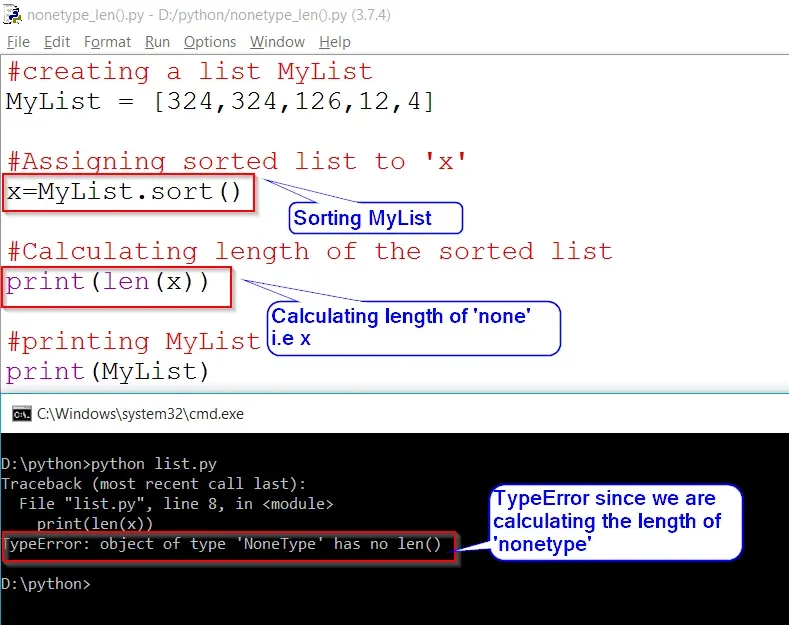
In this article, we will learn about the error “TypeError: object of type ‘NoneType’ has no len( )”
This error is generated in Python when we try to calculate the length of an object which returns ‘none’.
Let us understand it more with the help of an example.
Example:
# Creating a list MyList
MyList = [324,324,126,12,4]

# Assigning sorted list to 'x'
x=MyList.sort()

# Calculating length of the sorted list
print(len(x))

# Print MyList
print(MyList)
Output:
File "list.py", line 8, in <module>
print(len(x))
TypeError: object of type 'NoneType' has no len()
In the above example in line 8 of the code we are calculating the length of the sorted list. But we know sort( ) method returns ‘none‘. So instead of calculating the length of the list, we are calculating the length of ‘none’. thus the error
TypeError: object of type ‘NoneType’ has no len( ) is encountered.
Also, x=MyList.sort( ) doesn’t make any sense. Since the sort( ) method doesn’t return anything and we are assigning ‘none‘ to ‘x‘.
Вопрос:
Я получаю сообщение об ошибке из этого кода Python:
with open('names') as f:
names = f.read()
names = names.split('n')
names.pop(len(names) - 1)
names = shuffle(names)
f.close()

assert len(names) > 100
Ошибка:
Python: TypeError: object of type 'NoneType' has no len()
Утверждающий оператор бросает эту ошибку, что я делаю неправильно?
Лучший ответ:
shuffle(names) – операция на месте. Отбросьте задание.
Эта функция возвращает None и поэтому у вас есть ошибка:
TypeError: object of type 'NoneType' has no len()
Ответ №1
Вам не нужно назначать names на list или [] или что-нибудь еще, пока вы не захотите его использовать.
Непосредственно использовать список, чтобы составить список имен.
shuffle изменяет список, который вы передаете ему. Он всегда возвращает None
Если вы используете диспетчер контекста (with ...), вам не нужно явно закрывать файл
from random import shuffle

with open('names') as f:
names = [name.rstrip() for name in f if not name.isspace()]
shuffle(names)

assert len(names) > 100
Ответ №2
Какова цель этого
names = list;
? Кроме того, в Python не требуется ;.
Вы хотите
names = []
или
names = list()
в начале вашей программы? Хотя данный конкретный код не требуется, этот оператор не должен создавать эту переменную names, поскольку вы делаете это позже, когда вы читаете в нее данные из вашего файла.
@JBernardo уже указал на другую (и более серьезную) проблему с кодом.
Max, see below. The example Mnist example runs, so the system set-up should be ok. I tried the model with one channel input only, but that gives the same error, so it’s probably something else.
Using Theano backend.
Using gpu device 0: GeForce GTX 960 (CNMeM is enabled with initial size: 95.0% o
f memory, cuDNN 5005)
Load VGG16 model output data…
Imports:
from future import print_function, division
try:
import os
except:
pass
try:
import h5py
except:
pass
try:
import sys
except:
pass
try:
import numpy
except:
pass
try:
from PIL import Image
except:
pass
try:
import matplotlib.pyplot
except:
pass
try:
from CropImageFromMask import export_prediction
except:
pass
try:
from VGG16mod2 import VGG16
except:
pass
try:
from myUtils import load_vars
except:
pass
try:
from hyperopt import Trials, STATUS_OK, tpe
except:
pass
try:
from hyperas import optim
except:
pass
try:
from hyperas.distributions import choice, uniform, conditional
except:
pass
try:
from keras.models import Model, Sequential
except:
pass
try:
from keras.layers import Convolution2D, MaxPooling2D, ZeroPadding2D, GlobalA
veragePooling2D
except:
pass
try:
from keras.layers import Activation, Dropout, Flatten, Dense, Input, merge
except:
pass
try:
from keras.callbacks import History, EarlyStopping, ModelCheckpoint
except:
pass
try:
from keras.optimizers import RMSprop, Adam, SGD
except:
pass
try:
from keras.preprocessing.image import ImageDataGenerator
except:
pass
try:
from keras.regularizers import l2
except:
pass
Hyperas search space:
def get_space():
return {
‘batch_size’: hp.choice(‘batch_size’, [32, 64, 128]),
}
Traceback (most recent call last):
File «C:Program Files (x86)Microsoft Visual Studio 11.0Common7IDEExtensio
nsMicrosoftPython Tools for Visual Studio2.1visualstudio_py_util.py», line 1
06, in exec_file
exec_code(code, file, global_variables)
File «C:Program Files (x86)Microsoft Visual Studio 11.0Common7IDEExtensio
nsMicrosoftPython Tools for Visual Studio2.1visualstudio_py_util.py», line 8
2, in exec_code
exec(code_obj, global_variables)
File «D:DataEssentialProgrammingPythonKerasVGG16classHyperVGG16classHyp
erVGG16classHyper.py», line 258, in
trials=Trials())
File «C:Program FilesAnaconda2libsite-packageshyperasoptim.py», line 42,
in minimize
notebook_name=notebook_name, verbose=verbose)
File «C:Program FilesAnaconda2libsite-packageshyperasoptim.py», line 62,
in base_minimizer
model_str = get_hyperopt_model_string(model, data, notebook_name, verbose, s
tack)
File «C:Program FilesAnaconda2libsite-packageshyperasoptim.py», line 137
, in get_hyperopt_model_string
data_string = retrieve_data_string(data, verbose)
File «C:Program FilesAnaconda2libsite-packageshyperasoptim.py», line 160
, in retrieve_data_string
indent_length = len(determine_indent(data_string))
TypeError: object of type ‘NoneType’ has no len()
Press any key to continue . . .
