In Python, a “Typeerror” occurs when you use different data types in an operation.
For example, if you attempt to divide an integer (number) by a string, it leads to a typeerror because an integer data type is not the same as a string.
One of those type errors is the “int object is not callable” error.
The “int object is not callable” error occurs when you declare a variable and name it with a built-in function name such as int(), sum(), max(), and others.
The error also occurs when you don’t specify an arithmetic operator while performing a mathematical operation.
In this article, I will show you how the error occurs and what you can do to fix it.
How to Fix Typeerror: int object is not callable in Built-in Function Names
If you use a built-in function name as a variable and call it as a function, you’ll get the “int object is not callable” error.
For instance, the code below attempts to calculate the total ages of some kids with the built-in sum() function of Python. The code resulted in an error because the same sum has already been used as a variable name:
kid_ages = [2, 7, 5, 6, 3]

sum = 0
sum = sum(kid_ages)
print(sum)
Another example below shows how I tried to get the oldest within those kids with the max() function, but I had declared a max variable already:
kid_ages = [2, 7, 5, 6, 3]

max = 0
max = max(kid_ages)
print(max)
Both code examples led to this error in the terminal:

To fix the issue, you need to change the name of the variable you named as a built-in function so the code can run successfully:
kid_ages = [2, 7, 5, 6, 3]

sum_of_ages = 0
sum = sum(kid_ages)
print(sum)

# Output: 23
kid_ages = [2, 7, 5, 6, 3]

max_of_ages = 0
max = max(kid_ages)
print(max)

# Output: 7
If you get rid of the custom variables, your code will still run as expected:
kid_ages = [2, 7, 5, 6, 3]

sum = sum(kid_ages)
print(sum)

# Output: 23
kid_ages = [2, 7, 5, 6, 3]

max = max(kid_ages)
print(max)

# Output: 7
How to Fix Typeerror: int object is not callable in Mathematical Calculations
In Mathematics, if you do something like 4(2+3), you’ll get the right answer which is 20. But in Python, this would lead to the Typeerror: int object is not callable error.

To fix this error, you need to let Python know you want to multiply the number outside the parentheses with the sum of the numbers inside the parentheses.
To do this, you do this by specifying a multiplication sign (*) before the opening parenthesis:
print(4*(2+3))

#Output: 20
Python allows you to specify any arithmetic sign before the opening parenthesis.
So, you can perform other calculations there too:
print(4+(2+3))

# Output: 9
print(4-(2+3))

# Output: -1
print(4/(2+3))

# Output: 0.8
Final Thoughts
The Typeerror: int object is not callable is a beginner error in Python you can avoid in a straightforward way.
As shown in this article, you can avoid the error by not using a built-in function name as a variable identifier and specifying arithmetic signs where necessary.
Thank you for reading.
Learn to code for free. freeCodeCamp’s open source curriculum has helped more than 40,000 people get jobs as developers. Get started
In this article, we will be discussing the TypeError: “int” Object is not callable exception. We will also be through solutions to this problem with example programs.
Why Is This Error Raised?
- “int” is used as a variable name.
- Arithmetic Operator not provided when calculating integers.
- Placing parentheses after a number
Using int As A Variable, Name
Variable declaration using in-built names or functions is a common mistake in rookie developers. An in-built name is a term with its value pre-defined by the language itself. That term can either be a method or an object of a class.
int is an in-built Python keyword. As we discussed, it is not advisable to use pre-defined names as variable names. Although using a predefined name will not throw any exception, the function under the name will no longer be re-usable.
Let’s refer to the following example:
myNums = [56,13,21,54]
sum = 0
sum = sum(myNums)
print("sum of myNums list: ", sum)
Output and Explanation

- Variable
myNums is a list of 4 integers. - A variable
sumis initialized with the value 0 - The sum of
myNumslist is calculated usingsum()function and stored insumvariable. - Results printed.
What went wrong here? In step 2, we initialize a variable sum with a value of 0. In Python, sum is a pre-defined function. When were try to use the sum function in step 3, it fails. Python only remembers sum as a variable since step 2. Therefore, sum() has lost all functionality after being declared as a variable.
Solution
Instead of using sum as a variable declaration, we can use more descriptive variable names that are not pre-defined (mySum, mySum, totalSum). Make sure to follow PEP 8 naming conventions.
myNums = [56,13,21,54]
totalSum = 0
totalSum= sum(myNums)
print("sum of myNums list: ", totalSum)
Correct Output
sum of myNums list: 144Arithmetic Operator Not Provided When Calculating Integers
Failing to provide an arithmetic operator in an equation can lead to TypeError: “int” object is not callable. Let’s look at the following example:
prices = [44,54,24,67]
tax = 10
totalPrice = sum(prices)
taxAmount = totalPrice(tax/100)
print("total taxable amounr: ", taxAmount)
Output / Explanation

- List of integers stored in the variable
prices - Tax percentage set to
10 - Total price calculated and stored in
totalPrice - Total Taxable amount calculated.
- Final result printed.
To calculate the taxable amount, we must multiply totalPrice with tax percentage. In step 4, while calculating taxAmount, the * operator is missing. Therefore, this gives rise to TypeError: "int" Object Is Not Callable
Solution
Denote all operators clearly.
prices = [44,54,24,67]
tax = 10
totalPrice = sum(prices)
taxAmount = totalPrice*(tax/100)
print("total taxable amounr: ", taxAmount)
total taxable amount: 18.900000000000002Recommended Reading | [Solved] TypeError: ‘str’ object is not callable
Placing Parentheses After an Integer
Let’s look at the following code:
Output / Explanation
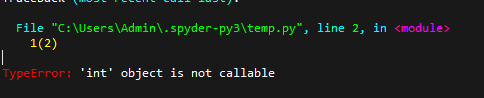
It is syntactically wrong to place parentheses following an integer. Similar to the previous section, It is vital that you ensure the correct operators.
Solution
Do not use brackets after a raw integer. Denote correct operators.
cursor.rowcount() TypeError: “int” Object Is Not Callable
Let’s look at the following code:
sample ="select * from myTable"
...
...
...
....
self.cur = self.con.cursor()
self.cur.execute(sample)
print(self.cur.rowcount())
Error Output
TypeError: 'int' object is not callableSolution
According to the sqlite3 documentation provided by Python, .rowcount is an attribute and not a function. Thereby remove the parenthesis after .rowcount.
sample ="select * from myTable"
...
...
...
....
self.cur = self.con.cursor()
self.cur.execute(sample)
print(self.cur.rowcount)
Let’s refer to the following code.
contours,hierarchy = cv2.findContours(
thresh,cv2.RETR_CCOMP,cv2.CHAIN_APPROX_SIMPLE
)

...
...
...
...

if (hierarchy.size() > 0):
    numObj =hierarchy.size()
Error Output
   if (hierarchy.size() > 0):
TypeError: 'int' object is not callable
Solution
The hierarchy object returned is a numpy.ndarray object. You should also note that the numpy.ndarray.size attribute is an integer, not a method. Therefore, they cause the exception.
if event.type == pygame.quit() TypeError: ‘int’ Object Is Not Callable
Let’s refer to the example code to move an image:
import pygame
import sys

pygame.init()
...
...
...

while True:
    for i in pygame.event.get():
       if i.type() == pygame.QUIT:
            sys.exit()
    ...
    ...
Error Output
if i.type() == pygame.QUIT:
TypeError: 'int' object is not callable
Solution
The condition statement should be:
if i.type == pygame.QUIT:Instead of the current:
if i.type() == pygame.QUIT:Please note that type is a member of the class Event, not a function. Therefore, it is not required to pass parenthesis.
TypeError: ‘int’ Object Is Not Callable Datetime
Let’s refer to the following code:
from datetime import *
...
...
...

for single_date in daterange(start_date, end_date):
    if single_date.day() == 1 and single_date.weekday() == 6:
        sundays_on_1st += 1
Error Output
TypeError: 'int' object is not callable
Solution
.day is not a function but an attribute. Therefore passing parenthesis should be avoided.
from datetime import *
...
...
...

for single_date in daterange(start_date, end_date):
    if single_date.day == 1 and single_date.weekday() == 6:
        sundays_on_1st += 1
![[Fixed] JavaScript error: IPython is Not Defined](https://www.pythonpool.com/wp-content/uploads/2023/01/javascript-error-ipython-is-not-defined-300x157.webp)
FAQs
How do I fix TypeError int object is not callable?
You can fix this error by not using “int” as your variable name. This will avoid the cases where you want to convert the data type to an integer by using int().
What does TypeError int object is not callable mean?
Object not callable simply means there is no method defined to make it callable. Usually, parenthesis is used to call a function or object, or method.
Conclusion
We have looked at the exception TypeError: ‘int’ Object Is Not Callable. This error mostly occurs due to basic flaws in the code written. Various instances where this error appears have also been reviewed.
Other Errors You Might Get
-
![[Fixed] Module Seaborn has no Attribute Histplot Error](https://www.pythonpool.com/wp-content/uploads/2023/01/Fixed-Module-Seaborn-has-no-Attribute-Histplot-Error-300x157.webp)
[Fixed] Module Seaborn has no Attribute Histplot Error
●January 18, 2023
-
[Fixed] JavaScript error: IPython is Not Defined
by Rahul Kumar Yadav●January 18, 2023
-
![[Fixed] “io.unsupportedoperation not readable” Error](https://www.pythonpool.com/wp-content/uploads/2023/01/io.unsupportedoperation-not-readable--300x157.webp)
[Fixed] “io.unsupportedoperation not readable” Error
by Rahul Kumar Yadav●January 18, 2023
-
![[Fixed] “Index Object Has No Attribute tz_localize” Error](https://www.pythonpool.com/wp-content/uploads/2023/01/index-object-has-no-attribute-tz_localize-300x157.webp)
[Fixed] “Index Object Has No Attribute tz_localize” Error
by Rahul Kumar Yadav●January 18, 2023
Table of Contents
Hide
- What is TypeError: the ‘int’ object is not callable?
- Scenario 1: When you try to call the reserved keywords as a function
- Solution
- Scenario 2: Missing an Arithmetic operator while performing the calculation
- Solution
- Conclusion
The TypeError: the ‘int’ object is not a callable error occurs if an arithmetic operator is missed while performing the calculations or the reserved keywords are declared as variables and used as functions,
In this tutorial, we will learn what int object is is not callable error means and how to resolve this TypeError in your program with examples.
There are two main scenarios where developers try to call an integer.
- When you try to call the reserved keywords as a function
- Missing an Arithmetic operator while performing the calculation
Scenario 1: When you try to call the reserved keywords as a function
Using the reserved keywords as variables and calling them as functions are developers’ most common mistakes when they are new to Python. Let’s take a simple example to reproduce this issue.
item_price = [10, 33, 55, 77]
sum = 0
sum = sum(item_price)
print("The sum of all the items is:", str(sum))
Output
Traceback (most recent call last):
  File "c:PersonalIJSCodemain.py", line 4, in <module>
    sum = sum(item_price)
TypeError: 'int' object is not callable
If you look at the above code, we have declared the sum as a variable. However, in Python, the sum() is a reserved keyword and a built-in method that adds the items of an iterable and returns the sum.
Since we have declared sum as a variable and used it as a function to add all the items in the list, Python will throw TypeError.
Solution
We can fix this error by renaming the sum variable to total_price, as shown below.
item_price = [10, 33, 55, 77]
total_price = 0
total_price = sum(item_price)
print("The sum of all the items is:", str(total_price))
Output
The sum of all the items is: 175Scenario 2: Missing an Arithmetic operator while performing the calculation
While performing mathematical calculations, if you miss an arithmetic operator within your code, it leads to TypeError: the ‘int’ object is not a callable error.
Let us take a simple example to calculate the tax for the order. In order to get the tax value, we need to multiply total_value*(tax_percentage/100).
item_price = [10, 23, 66, 45]
tax_percentage = 5
total_value = sum(item_price)
tax_value = total_value(5/100)
print(" The tax amount for the order is:", tax_value)
Output
Traceback (most recent call last):
  File "c:PersonalIJSCodemain.py", line 8, in <module>
    tax_value = total_value(5/100)
TypeError: 'int' object is not callable
We have missed out on the multiplication operator while calculating the tax value in our code, leading to TypeError by the Python interpreter.
Solution
We can fix this issue by adding a multiplication (*) operator to our code, as shown below.
item_price = [10, 23, 66, 45]
tax_percentage = 5
total_value = sum(item_price)
tax_value = total_value*(5/100)
print(" The tax amount for the order is:", tax_value)
Output
The tax amount for the order is: 7.2Conclusion
The TypeError: the ‘int’ object is not a callable error raised when you try to call the reserved keywords as a function or miss an arithmetic operator while performing mathematical calculations.
Developers should keep the following points in mind to avoid the issue while coding.
- Use descriptive and unique variable names.
- Never use any built-in function, modules, reserved keywords as Python variable names.
- Ensure that arithmetic operators is not missed while performing calculations.
- Do not override built-in functions like
sum(),round(), and use the same methods later in your code to perform operations.
Srinivas Ramakrishna is a Solution Architect and has 14+ Years of Experience in the Software Industry. He has published many articles on Medium, Hackernoon, dev.to and solved many problems in StackOverflow. He has core expertise in various technologies such as Microsoft .NET Core, Python, Node.JS, JavaScript, Cloud (Azure), RDBMS (MSSQL), React, Powershell, etc.
Sign Up for Our Newsletters
Subscribe to get notified of the latest articles. We will never spam you. Be a part of our ever-growing community.
By checking this box, you confirm that you have read and are agreeing to our terms of use regarding the storage of the data submitted through this form.
Error TypeError: ‘int’ object is not callable
This is a common coding error that occurs when you declare a variable with the same name as inbuilt int() function used in the code. Python compiler gets confused between variable ‘int’ and function int() because of their similar names and therefore throws typeerror: ‘int’ object is not callable error.
To overcome this problem, you must use unique names for custom functions and variables.
Example
##Error Code

#Declaring and Initializing a variable
int = 5;
#Taking input from user {Start}
productPrice = int(input("Enter the product price : "))
productQuantity = int(input("Enter the number of products : "))
#Taking input from user {Ends}

# variable to hold the value of effect on the balance sheet
# after purchasing this product.
costOnBalanceSheet = productPrice * productQuantity
#printing the output
print(costOnBalanceSheet)
Output
Enter the product price : 2300
Traceback (most recent call last):
  File "C:UsersWebartsolAppDataLocalProgramsPythonPython37-32intObjectnotCallable.py", line 3, in <module>
    productPrice = int(input("Enter the product price : "))
TypeError: 'int' object is not callable
In the example above we have declared a variable named `int` and later in the program, we have also used the Python inbuilt function int() to convert the user input into int values.
Python compiler takes “int” as a variable, not as a function due to which error “TypeError: ‘int’ object is not callable” occurs.
How to resolve typeerror: ‘int’ object is not callable
To resolve this error, you need to change the name of the variable whose name is similar to the in-built function int() used in the code.
#Code without error

#Declaring and Initializing a variable
productType = 5;
#Taking input from user {Start}
productPrice = int(input("Enter the product price : "))
productQuantity = int(input("Enter the number of products : "))
#Taking input from user {Ends}

# variable to hold the value of effect on the balance sheet
# after purchasing this product
costOnBalanceSheet = productPrice * productQuantity
#printing the output
print(costOnBalanceSheet)
OUTPUT:
Enter the product price : 3500
Enter the number of products : 23
80500
In the above example, we have just changed the name of variable “int” to “productType”.
How to avoid this error?
To avoid this error always keep the following points in your mind while coding:
- Use unique and descriptive variable names
- Do not use variable name same as python in-built function name, module name & constants
- Make the function names descriptive and use docstring to describe the function
Have you ever seen the TypeError object is not callable when running one of your Python programs? We will find out together why it occurs.
The TypeError object is not callable is raised by the Python interpreter when an object that is not callable gets called using parentheses. This can occur, for example, if by mistake you try to access elements of a list by using parentheses instead of square brackets.
I will show you some scenarios where this exception occurs and also what you have to do to fix this error.
Let’s find the error!
What Does Object is Not Callable Mean?
To understand what “object is not callable” means we first have understand what is a callable in Python.
As the word callable says, a callable object is an object that can be called. To verify if an object is callable you can use the callable() built-in function and pass an object to it. If this function returns True the object is callable, if it returns False the object is not callable.
callable(object)
Let’s test this function with few Python objects…
Lists are not callable
>>> numbers = [1, 2, 3]
>>> callable(numbers)
False
Tuples are not callable
>>> numbers = (1, 2, 3)
>>> callable(numbers)
False
Lambdas are callable
>>> callable(lambda x: x+1)
True
Functions are callable
>>> def calculate_sum(x, y):
...     return x+y
...
>>> callable(calculate_sum)
True
A pattern is becoming obvious, functions are callable objects while data types are not. And this makes sense considering that we “call” functions in our code all the time.
What Does TypeError: ‘int’ object is not callable Mean?
In the same way we have done before, let’s verify if integers are callable by using the callable() built-in function.
>>> number = 10
>>> callable(number)
False
As expected integers are not callable 🙂
So, in what kind of scenario can this error occur with integers?
Create a class called Person. This class has a single integer attribute called age.
class Person:
    def __init__(self, age):
        self.age = age
Now, create an object of type Person:
john = Person(25)
Below you can see the only attribute of the object:
print(john.__dict__)
{'age': 25}
Let’s say we want to access the value of John’s age.
For some reason the class does not provide a getter so we try to access the age attribute.
>>> print(john.age())
Traceback (most recent call last):
  File "callable.py", line 6, in <module>
    print(john.age())
TypeError: 'int' object is not callable
The Python interpreter raises the TypeError exception object is not callable.
Can you see why?
That’s because we have tried to access the age attribute with parentheses.
The TypeError‘int’ object is not callable occurs when in the code you try to access an integer by using parentheses. Parentheses can only be used with callable objects like functions.
What Does TypeError: ‘float’ object is not callable Mean?
The Python math library allows to retrieve the value of Pi by using the constant math.pi.
I want to write a simple if else statement that verifies if a number is smaller or bigger than Pi.
import math

number = float(input("Please insert a number: "))

if number < math.pi():
    print("The number is smaller than Pi")
else:
    print("The number is bigger than Pi")
Let’s execute the program:
Please insert a number: 4
Traceback (most recent call last):
  File "callable.py", line 12, in <module>
    if number < math.pi():
TypeError: 'float' object is not callable
Interesting, something in the if condition is causing the error ‘float’ object is not callable.
Why?!?
That’s because math.pi is a float and to access it we don’t need parentheses. Parentheses are only required for callable objects and float objects are not callable.
>>> callable(4.0)
False
The TypeError‘float’ object is not callable is raised by the Python interpreter if you access a float number with parentheses. Parentheses can only be used with callable objects.
What is the Meaning of TypeError: ‘str’ object is not callable?
The Python sys module allows to get the version of your Python interpreter.
Let’s see how…
>>> import sys
>>> print(sys.version())
Traceback (most recent call last):
  File "<stdin>", line 1, in <module>
TypeError: 'str' object is not callable
No way, theobject is not callable error again!
Why?
To understand why check the official Python documentation for sys.version.

That’s why!
We have added parentheses at the end of sys.version but this object is a string and a string is not callable.
>>> callable("Python")
False
The TypeError‘str’ object is not callable occurs when you access a string by using parentheses. Parentheses are only applicable to callable objects like functions.
Error ‘list’ object is not callable when working with a List
Define the following list of cities:
>>> cities = ['Paris', 'Rome', 'Warsaw', 'New York']Now access the first element in this list:
>>> print(cities(0))
Traceback (most recent call last):
  File "<stdin>", line 1, in <module>
TypeError: 'list' object is not callable
What happened?!?
By mistake I have used parentheses to access the first element of the list.
To access an element of a list the name of the list has to be followed by square brackets. Within square brackets you specify the index of the element to access.
So, the problem here is that instead of using square brackets I have used parentheses.
Let’s fix our code:
>>> print(cities[0])
Paris
Nice, it works fine now.
The TypeError‘list’ object is not callable occurs when you access an item of a list by using parentheses. Parentheses are only applicable to callable objects like functions. To access elements in a list you have to use square brackets instead.
Error ‘list’ object is not callable with a List Comprehension
When working with list comprehensions you might have also seen the “object is not callable” error.
This is a potential scenario when this could happen.
I have created a list of lists variable called matrix and I want to double every number in the matrix.
>>> matrix = [[1, 2, 3], [4, 5, 6], [7, 8, 9]]
>>> [[2*row(index) for index in range(len(row))] for row in matrix]
Traceback (most recent call last):
  File "<stdin>", line 1, in <module>
  File "<stdin>", line 1, in <listcomp>
  File "<stdin>", line 1, in <listcomp>
TypeError: 'list' object is not callable
This error is more difficult to spot when working with list comprehensions as opposed as when working with lists.
That’s because a list comprehension is written on a single line and includes multiple parentheses and square brackets.
If you look at the code closely you will notice that the issue is caused by the fact that in row(index) we are using parentheses instead of square brackets.
This is the correct code:
>>> [[2*row[index] for index in range(len(row))] for row in matrix]
[[2, 4, 6], [8, 10, 12], [14, 16, 18]]
Conclusion
Now that we went through few scenarios in which the errorobject is not callable can occur you should be able to fix it quickly if it occurs in your programs.
I hope this article has helped you save some time! 🙂
Related posts:

I’m a Tech Lead, Software Engineer and Programming Coach. I want to help you in your journey to become a Super Developer!
Curly brackets in Python have a special meaning. They are used to denote a function invocation. If you specify a pair of curly brackets after an integer without an operator between them, Python thinks you’re trying to call a function. This will return an “TypeError: ‘int’ object is not callable” error.
In this guide, we talk about what this error means and why it is raised. We walk through two examples of this error to help you figure out what is causing it in your code.

Find Your Bootcamp Match
- Career Karma matches you with top tech bootcamps
- Access exclusive scholarships and prep courses
Select your interest
First name
Last name
Phone number
By continuing you agree to our Terms of Service and Privacy Policy, and you consent to receive offers and opportunities from Career Karma by telephone, text message, and email.
TypeError: ‘int’ object is not callable
Python functions are called using curly brackets. Take a look at a statement that calls a function called “calculate_tip”:
This function accepts two parameters. The values we have specified as parameters are 5 and 10. Because curly brackets have this special meaning, you cannot use them to call an integer.
The two most common scenarios where developers try to call an integer are when:
- The value of a function has been reassigned an integer value
- A mathematical operator is missing in a calculation
Let’s explore each of these scenarios one by one to help you fix the error you are facing.
Scenario #1: Function Has an Integer Value
Write a program that calculates the sum of all the tips the wait staff at a restaurant has received in a day. We start by declaring a list of tips and a variable which will store the cumulative value of those tips:
all_tips = [5, 10, 7.50, 9.25, 6.75]
sum = 0
Next, we use the sum() method to calculate the total number of tips the wait staff have received:
sum = sum(all_tips)
print("The total tips earned today amount to $" + str(sum) + ".")
The sum() method adds up all the values in an array. We then print out a message to the console informing us how much money was earned in tips. We use the str() method to convert the value of “sum” to a string so we can concatenate it to the string that contains our message.
Run our code:
Traceback (most recent call last):
  File "main.py", line 4, in <module>
	sum = sum(all_tips)
TypeError: 'int' object is not callable
Our code returns an error because we have assigned a variable called “sum” which stores an integer value. Assigning this variable overrides the built-in sum() method. This means that when we try to use the sum() method, our code evaluates:
total_tips = 0([5, 10, 7.50, 9.25, 6.75])
We can fix this error by renaming the variable “sum”:
all_tips = [5, 10, 7.50, 9.25, 6.75]
total_tips = 0

total_tips = sum(all_tips)
print("The total tips earned today amount to $" + str(total_tips) +".")
We’ve renamed the variable “sum” to “total_tips”. Let’s run our code again:
The total tips earned today amount to $38.5.
Our code runs successfully!
Scenario #2: Missing a Mathematical Operator
Write a program that calculates a number multiplied by that number plus one. For instance, if we specify 9 in our program, it will multiply 9 and 10.
Start by asking a user to insert a number:
start_number = int(input("What number would you like to multiply? "))
Next, we multiply the value of the “start_number” variable by the number one greater than that value:
new_number = start_number (start_number + 1)
print("{} multiplied by {} is {}.".format(start_number, start_number + 1, new_number))
Our code prints out a message informing us of the answer to our math question. Run our code and see what happens:
What number would you like to multiply? 9
Traceback (most recent call last):
  File "main.py", line 3, in <module>
	new_number = start_number (start_number + 1)
TypeError: 'int' object is not callable
Our code does not finish executing. This is because we’ve forgotten an operator in our code. In our “new_number” line of code, we need to specify a multiplication operator. This is because Python treats square brackets followed by a value as a function call.
Add in a multiplication operator (*) to our code:
new_number = start_number * (start_number + 1)
Now, our code should work:
What number would you like to multiply? 10
10 multiplied by 11 is 110.
Our code returns the expected response.
Conclusion
The “TypeError: ‘int’ object is not callable” error is raised when you try to call an integer.
This can happen if you forget to include a mathematical operator in a calculation. This error can also occur if you accidentally override a built-in function that you use later in your code, like round() or sum().
Now you’re ready to solve this common Python issue like a professional developer!
In Python, we can use the parenthesis »
()
» for multiple purposes such as we can use them as small brackets to compute mathematical computation
e.g (a+b)*c
, define a tuple
e.g a=(1,2,3)
or use them in the function definition and calling
e.g function_name()
.
But if we mistreat the mathematical computation parenthesis usages with function calling parenthesis, the Python interpreter throws the
TypeError: ‘int’ object is not callable
error.
In this Python error guide, we will walk through this Python error and discuss why it raises and how to solve it. We will also discuss some examples that will give you a better understanding of this Python error. So let’s get started.
The Error statement is itself divided into two parts
-
Error Type
TypeError
:
The TypeError occurs in the Python program when we mishandle the property of one data type with another. -
Error Message
int object is not callable
:
This is the error message, that is telling us we are trying to call a function using an integer variable name.
Why this Error Occur in Python
According to the Python syntax, to call a function, we need to write the function name followed by the parenthesis.
Example
def my_function():
    print("This is a function")

# call function
my_function()
But if, instead of the function name, we put the parenthesis after an integer value or variable, we receive the
"TypeError: ‘int’ object is not callable"
error.
Example
def my_function():
    print("This is a function")

number = 20
# parenthesis after a integer variable
number()
Output
Traceback (most recent call last):
File "main.py", line 6, in <module>
number()
TypeError: 'int' object is not callable
Common Scenario
There are two major common cases when most new Python learners commit this error.
- Use the same name for function and integer variables.
- Forget to put the multiplication operator while performing a mathematical calculation.
Scenario 1: Using the same name for int variable and function.
The most common scenario when Python learners commit this mistake is when they use the same name for the function and the integer variable.
Let’s create an example where we want to calculate the total sum of our bill list. And we use the Python inbuilt function called
sum()
to calculate the sum of the list and use the same variable name to store the total sum.
Example
bill = [12, 34, 23, 53, 10, 9]

# total integer sum
sum = 0

# using the inbuilt Python sum method
sum = sum(bill)

print("The total bill is: ",sum)
Output
Traceback (most recent call last):
File "main.py", line 7, in <module>
sum = sum(bill)
TypeError: 'int' object is not callable
Break the code
We are getting this error because, in line 4, we defined a new integer variable by the name
sum = 0
. Now for the complete program, Python will treat the sum as an integer value(until we change it).
But in line 7, we are trying to compute the sum of the
bill
list using the Python
sum()
function, but now Python is confused between the names, so it will treat the
sum
as the integer object, not as an inbuilt function, and throw the
TypeError 'int' object is not callable
.
Solution 1
The solution to the above problem is very simple. We just need to change the integer
sum
object name to another name, so the inbuilt function can be invoked.
Solution
bill = [12, 34, 23, 53, 10, 9]

# total integer
total = 0

# using the inbuilt Python sum method
total = sum(bill)

print("The total bill is: ",total)
Output
The total bill is: 141
Scenario 2: Forget to put the multiplication operator while performing a mathematical calculation
In mathematics, we use brackets to represent a mathematical expression. There we can use the () brackets to represent the multiplication operation between the numbers inside and outside the bracket.
for instance (in mathematics)
2(3+4) = 14
But this syntax is invalid in Python. In Python, we need to explicitly specify the mathematic operator between the number and opening & closing parenthesis. for instance, if we rewrite the above expression in Python, we have to write it in this manner.
In Python
>>>2*(3+4)
14
Example
a = 2
b = 3
c = 4

# error
result = a(b+c)
print(result)
Output
Traceback (most recent call last):
File "main.py", line 6, in <module>
result = a(b+c)
TypeError: 'int' object is not callable
Break the code
In the above example
a
,
b
and
c
all are integer, but in line 6, we are missing the * operator between the
a
and opening parenthesis
(
that’s why Python is calling
a
as a function that leads to the
TypeError: 'int' object is not callable
error.
Solution 3
The solution for the above error is very simple, we just need to specify the
*
multiplication operator between
a
and
(
.
solution 2
a = 2
b = 3
c = 4

# solved
result = a+(b+c)

print(result)
Output
14
Conclusion
In this Python tutorial, we learned what is
TypeError: ‘int’ object is not callable
Error in Python and how to solve it. If you look closely at the error message, you will get an overall idea of what this error is all about. This error generally occurs in Python when we try to call a function using an integer name. To solve this problem, all you need to do is remove the parenthesis after the integer variable name.
If you are still getting this error in your Python program, you can comment your code and query in the comment section. We will try to help you in debugging.
People are also reading:
-
Delete Emails in Python
-
Python typeerror: ‘str’ object is not callable Solution
-
Python Numpy Array Tutorial
-
Python TypeError: ‘method’ object is not subscriptable Solution
-
Numpy Dot Product
-
Python Error: TypeError: ‘tuple’ object is not callable Solution
-
Python Check If File or Directory Exists
-
Python SyntaxError: unexpected EOF while parsing Solution
-
Online Python Compiler
-
Python ‘numpy.ndarray’ object is not callable Solution