In Python, a function is a block of code that only runs when called. You can pass data, known as parameters or arguments, to a function, and a function can return data as a result. To call a function, you must use the function name followed by parentheses () and pass the arguments inside the parentheses separated by commas. If you try to call a function using square brackets [] instead of parentheses, you will raise the error: “TypeError: ‘function’ object is not subscriptable”.
This tutorial will go through the error in detail. We will go through two example scenarios of this error and learn to solve it.
Table of contents
- TypeError: ‘function’ object is not subscriptable
- What is a TypeError?
- What Does Subscriptable Mean?
- Example #1: Calling a Function Using Square Brackets
- Solution
- Example #2: Function has the Same Name as a Subscriptable object
- Solution
- Summary
TypeError: ‘function’ object is not subscriptable
What is a TypeError?
A TypeError occurs when you perform an illegal operation for a specific data type.
What Does Subscriptable Mean?
The subscript operator, which is square brackets [], retrieves items from subscriptable objects like lists or tuples. The operator in fact calls the __getitem__ method, for example, a[i] is equivalent to a.__getitem__(i).
All subscriptable objects have a __getitem__ method. Functions do not contain items and do not have a __getitem__ method. We can verify that functions objects do not have the __getitem__ method by defining a function and passing it to the dir() method:
def add(a, b):
   result = a + b
   return result

print(type(add))

print(dir(add))
<class 'function'>

['__annotations__', '__call__', '__class__', '__closure__', '__code__', '__defaults__', '__delattr__', '__dict__', '__dir__', '__doc__', '__eq__', '__format__', '__ge__', '__get__', '__getattribute__', '__globals__', '__gt__', '__hash__', '__init__', '__init_subclass__', '__kwdefaults__', '__le__', '__lt__', '__module__', '__name__', '__ne__', '__new__', '__qualname__', '__reduce__', '__reduce_ex__', '__repr__', '__setattr__', '__sizeof__', '__str__', '__subclasshook__']
Let’s look at an example of accessing an item from a list:
numbers = [0, 1, 2, 3, 4]

print(numbers[2])
2
The value at the index position 2 is 2. Therefore, the code returns 2.
Functions are not subscriptable. Therefore, you cannot use square syntax to access the items in a function or to call a function, and functions can only return a subscriptable object if we call them.
The error “TypeError: ‘function’ object is not subscriptable” occurs when you try to access a function as if it were a subscriptable object. There are two common mistakes made in code that can raise this error.
- Calling a function using square brackets
- Assigning a function the same name as a subscriptable object
Example #1: Calling a Function Using Square Brackets
You can call a function using parentheses after the function name, and indexing uses square brackets after the list, tuple, or string name. If we put the indexing syntax after a function name, the Python interpreter will try to perform the indexing operation on the function. Function objects do not support the indexing operation, and therefore the interpreter will throw the error.
Let’s look at an example of creating a function that takes two integers as arguments and raises the first integer to the power of the second integer using the exponentiation operator **. First, you define the exponent function, then define two integer values to pass to the function. Then you will print the result of the exponent function.
# Exponent function

def exponent(a, b):

    return a ** b

a = 4

b = 3

print(f'{a} raised to the power of {b} is: {exponent[a, b]}')
---------------------------------------------------------------------------
TypeError                                 Traceback (most recent call last)
Input In [2], in <cell line: 11>()
      7 a = 4
      9 b = 3
---> 11 print(f'{a} raised to the power of {b} is: {exponent[a, b]}')

TypeError: 'function' object is not subscriptable
The code did not run because you tried to call the exponent function using square brackets.
Solution
You need to replace the square brackets after the exponent name with parentheses to solve the problem.
# Exponent function

def exponent(a, b):

    return a ** b

a = 4

b = 3

print(f'{a} raised to the power of {b} is: {exponent(a, b)}')
4 raised to the power of 3 is: 64
The code runs successfully with the correct syntax to call a function in place.
Example #2: Function has the Same Name as a Subscriptable object
You may encounter this TypeError if you define a subscriptable object with the same name as a function. Let’s look at an example where we define a dictionary containing information about the fundamental physical particle, the muon.
particle = {

   "name":"Muon",

   "charge":-1,

   "spin":1/2,

   "mass":105.7

}
Next, we are going to define a function that prints out the values of the dictionary to the console:
def particle(p):

   print(f'Particle Name: {p["name"]}')

   print(f'Particle Charge: {p["charge"]}')

   print(f'Particle Spin: {p["spin"]}')

   print(f'Particle Mass: {p["mass"]}')
Next, we will call the particle function and pass the particle dictionary as a parameter:
particle(particle)
---------------------------------------------------------------------------
TypeError                                 Traceback (most recent call last)
Input In [5], in <cell line: 1>()
----> 1 particle(particle)

Input In [4], in particle(p)
      1 def particle(p):
----> 3    print(f'Particle Name: {p["name"]}')
      5    print(f'Particle Charge: {p["charge"]}')
      7    print(f'Particle Spin: {p["spin"]}')

TypeError: 'function' object is not subscriptable
We raise this error because we have a function and a subscriptable object with the same name. We first declare “particle” as a dictionary, and then we define a function with the same name, which makes “particle” a function rather than a dictionary. Therefore, when we pass “particle” as a parameter to the particle() function, we are passing the function with the name “particle“. Square brackets are used within the code block to access items in the dictionary, but this is done on the function instead.
Solution
To solve this problem, we can change the name of the function. It is good to change the function name to describe what the function does. In this case, we will rename the function to show_particle_details().
particle = {

   "name":"Muon",

   "charge":-1,

   "spin":1/2,

   "mass":105.7

}
def show_particle_details(p):

   print(f'Particle Name: {p["name"]}')

   print(f'Particle Charge: {p["charge"]}')

   print(f'Particle Spin: {p["spin"]}')

   print(f'Particle Mass: {p["mass"]}')
Let’s see what happens when we try to run the code:
show_particle_details(particle)
Particle Name: Muon

Particle Charge: -1

Particle Spin: 0.5

Particle Mass: 105.7
The code runs successfully and prints out the particle information to the console.
Summary
Congratulations on reading to the end of this tutorial. The error “TypeError: ‘function’ object is not subscriptable” occurs when you try to access an item from a function. Functions cannot be indexed using square brackets.
To solve this error, ensure functions have different names to variables. Always call a function before attempting to access the functions. When you call a function using parentheses and not square brackets, the function returns.
For further reading on TypeErrors, go to the articles:
- How to Solve Python TypeError: ‘NoneType’ object is not subscriptable
- How to Solve Python TypeError: ‘map’ object is not subscriptable
Go to the online courses page on Python to learn more about Python for data science and machine learning.
Have fun and happy researching!
Unlike iterable objects, you cannot access a value from a function using indexing syntax.
Even if a function returns an iterable, you must assign the response from a function to a variable before accessing its values. Otherwise, you encounter an “TypeError: ‘function’ object is not subscriptable” error.

Find Your Bootcamp Match
- Career Karma matches you with top tech bootcamps
- Access exclusive scholarships and prep courses
Select your interest
First name
Last name
Phone number
By continuing you agree to our Terms of Service and Privacy Policy, and you consent to receive offers and opportunities from Career Karma by telephone, text message, and email.
In this guide, we talk about what this error means. We walk through two examples of this error so you can figure out how to solve it in your code.
TypeError: ‘function’ object is not subscriptable
Iterable objects such as lists and strings can be accessed using indexing notation. This lets you access an individual item, or range of items, from an iterable.
Consider the following code:
grades = ["A", "A", "B"]
print(grades[0])
The value at the index position 0 is A. Thus, our code returns “A”. This syntax does not work on a function. This is because a function is not an iterable object. Functions are only capable of returning an iterable object if they are called.
The “TypeError: ‘function’ object is not subscriptable” error occurs when you try to access a function as if it were an iterable object.
This error is common in two scenarios:
- When you assign a function the same name as an iterable
- When you try to access the values from a function as if the function were iterable
Let’s analyze both of these scenarios.
Scenario #1: Function with Same Name as an Iterable
Create a program that prints out information about a student at a school. We start by defining a dictionary with information on a student and their latest test score:
student = { "name": "Holly", "latest_test_score": "B", "class": "Sixth Grade" }
Our dictionary contains three keys and three values. One key represents the name of a student; one key represents the score a student earned on their latest test; one key represents the class a student is in.
Next, we’re going to define a function that prints out these values to the console:
def student(pupil):
	print("Name: " + pupil["name"])
	print("Latest Test Score: " + pupil["latest_test_score"])
	print("Class: " + pupil["class"])
Our code prints out the three values in the “pupil” dictionary to the console. The “pupil” dictionary is passed as an argument into the student() function.
Let’s call our function and pass the “student” dictionary as a parameter:
Our Python code throws an error:
Traceback (most recent call last):
  File "main.py", line 8, in <module>
	student(student)
  File "main.py", line 4, in student
	print("Name: " + pupil["name"])
TypeError: 'function' object is not subscriptable
This error is caused because we have a function and an iterable with the same name. “student” is first declared as a dictionary. We then define a function with the same name. This makes “student” a function rather than a dictionary.
When we pass “student” as a parameter into the student() function, we are passing the function with the name “student”.
We solve this problem by renaming our student function:
def show_student_details(pupil):
	print("Name: " + pupil["name"])
	print("Latest Test Score: " + pupil["latest_test_score"])
	print("Class: " + pupil["class"])

show_student_details(student)
We have renamed our function to “show_student_details”. Let’s run our code and see what happens:
Name: Holly
Latest Test Score: B
Class: Sixth Grade
Our code successfully prints out information about our student to the console.
Scenario #2: Accessing a Function Using Indexing
Write a program that filters a list of student records and only shows the ones where a student has earned an A grade on their latest test.
We’ll start by defining an array of students:
students = [
	{ "name": "Holly", "grade": "B" },
	{ "name": "Samantha", "grade": "A" },
	{ "name": "Ian", "grade": "A" }
]
Our list of students contains three dictionaries. Each dictionary contains the name of a student and the grade they earned on their most recent test.
Next, define a function that returns a list of students who earned an A grade:
def get_a_grade_students(pupils):
	a_grade_students = []
	for p in pupils:
    		if p["grade"] == "A":
        			a_grade_students.append(p)

	print(a_grade_students)

	return a_grade_students
The function accepts a list of students called “pupils”. Our function iterates over that list using a for loop. If a particular student has earned an “A” grade, their record is added to the “a_grade_students” list. Otherwise, nothing happens.
Once all students have been searched, our code prints a list of the students who earned an “A” grade and returns that list to the main program.
We want to retrieve the first student who earned an “A” grade. To do this, we call our function and use indexing syntax to retrieve the first student’s record:

«Career Karma entered my life when I needed it most and quickly helped me match with a bootcamp. Two months after graduating, I found my dream job that aligned with my values and goals in life!»
Venus, Software Engineer at Rockbot
first = get_a_grade_students[0]

print(first)
Run our code:
Traceback (most recent call last):
  File "main.py", line 16, in <module>
	first = get_a_grade_students[0]
TypeError: 'function' object is not subscriptable
Our code returns an error. We’re trying to access a value from the “get_a_grade_students” function without first calling the function.
To solve this problem, we should call our function before we try to retrieve values from it:
a_grades = get_a_grade_students(students)
first = a_grades[0]

print(first)
First, we call our get_a_grade_students() function and specify our list of students as a parameter. Next, we use indexing to retrieve the record at the index position 0 from the list that the get_a_grade_students() function returns. Finally, we print that record to the console.
Let’s execute our code:
[{'name': 'Samantha', 'grade': 'A'}, {'name': 'Ian', 'grade': 'A'}]
{'name': 'Samantha', 'grade': 'A'}
Our code first prints out a list of all students who earned an “A” grade. Next, our code prints out the first student in the list who earned an “A” grade. That student was Samantha in this case.
Conclusion
The “TypeError: ‘function’ object is not subscriptable” error is raised when you try to access an item from a function as if the function were an iterable object, like a string or a list.
To solve this error, first make sure that you do not override any variables that store values by declaring a function after you declare the variable. Next, make sure that you call a function first before you try to access the values it returns.
Now you’re ready to solve this common Python error like a professional coder!
The typeerror: function object is not subscriptable error generates because of using indexes while invoking functional object. Generally, Functions are callable object but not subscriptible. In this article, we will see the best ways to fix this error. We will also try to understand the situations where usually this error occurs. So Lets go !!
Lets practically understand the context for this error.
def print_name(name):
  print(name)
  return name + " Data Science Learner "

var=print_name[0]
Here print_name is callable function. But we are not invoking it as function with parameter. IN the place of it we used index print_name[0]. Hence when we run this code , we get function object is not subscriptable python error.
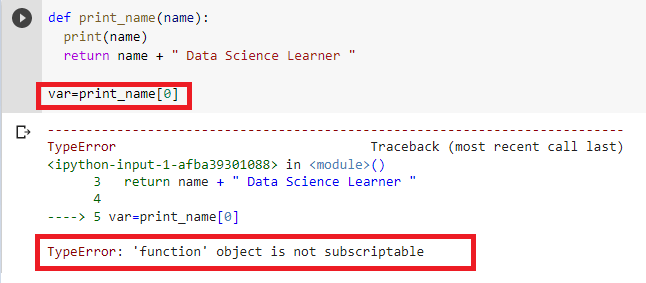
typeerror: function object is not subscriptable ( Solution ) –
The fix for this error is simple to avoid calling function using indexes. But you already know about it. So what next ? See lets simplify this for us with scenarios.-
Case 1: name ambiguity in function and iterable object –
This is one of the very common scenario for this error. Here we use the same name for function and iterable objects like ( list , dict, str etc) . If we declare the iterable object first and then function, so function will overwrite the iterable object type and throughs the same error.
print_name=[1,2,3]

def print_name(name):
  print(name)
  return name + " Data Science Learner "

var=print_name[0]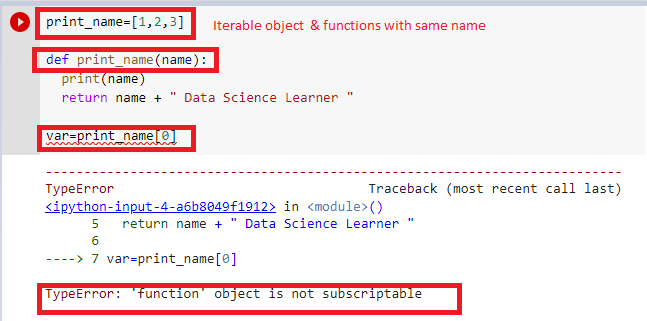
Hence we should always provide unique name to each identifiers. If we follow this best practice, we will never get this kind of error.
Case 2 : avoiding functions returns with local assignment-
If any function is returning any iterable object but we are not assigning it into any local variable. Wile directly accessing it with indexes it throws the same type error. Lets see how –
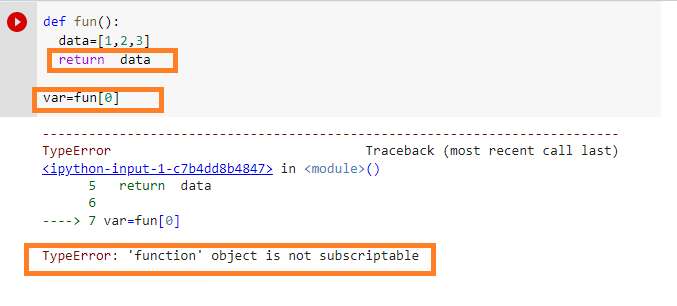
To avoid this we can follow the the below way –
def fun():
  data=[1,2,3]
  return  data

temp=fun()
var=temp[0]
print(var)
Similar Errors :
Typeerror: type object is not subscriptable ( Steps to Fix)
Solution -Typeerror int object is not subscriptable
Typeerror nonetype object is not subscriptable : How to Fix
Thanks
Data Science Learner Team

Join our list
Subscribe to our mailing list and get interesting stuff and updates to your email inbox.
We respect your privacy and take protecting it seriously
Thank you for signup. A Confirmation Email has been sent to your Email Address.
Something went wrong.
Object Is Not Subscriptable
Overview
Example errors:
TypeError: object is not subscriptable
Specific examples:
TypeError: 'type' object is not subscriptableTypeError: 'function' object is not subscriptable
Traceback (most recent call last):
  File "afile.py", line , in aMethod
    map[value]
TypeError: 'type' object is not subscriptable
This problem is caused by trying to access an object that cannot be indexed as though it can be accessed via an index.
For example, in the above error, the code is trying to access map[value] but map is already a built-in type that doesn’t support accessing indexes.
You would get a similar error if you tried to call print[42], because print is a built-in function.
Initial Steps Overview
-
Check for built-in words in the given line
-
Check for reserved words in the given line
-
Check you are not trying to index a function
Detailed Steps
1) Check for built-in words in the given line
In the above error, we see Python shows the line
This is saying that the part just before [value] can not be subscripted (or indexed). In this particular instance, the problem is that the word map is already a builtin identifier used by Python and it has not been redefined by us to contain a type that subscripts.
You can see a full list of built-in identifiers via the following code:
# Python 3.0
import builtins
dir(builtins)

# For Python 2.0
import __builtin__
dir(__builtin__)
2) Check for instances of the following reserved words
It may also be that you are trying to subscript a keyword that is reserved by Python True, False or None
>>> True[0]
<stdin>:1: SyntaxWarning: 'bool' object is not subscriptable; perhaps you missed a comma?
Traceback (most recent call last):
  File "<stdin>", line 1, in <module>
TypeError: 'bool' object is not subscriptable
3) Check you are not trying to access elements of a function
Check you are not trying to access an index on a method instead of the results of calling a method.
txt = 'Hello World!'

# Incorrectly getting the first word
>>> txt.split[0]

Traceback (most recent call last):
  File "<stdin>", line 1, in <module>
TypeError: 'builtin_function_or_method' object is not subscriptable

# The correct way
>>> txt.split()[0]

'Hello'
You will get a similar error for functions/methods you have defined yourself:
def foo():
    return ['Hello', 'World']

# Incorrectly getting the first word
>>> foo[0]

Traceback (most recent call last):
  File "<stdin>", line 1, in <module>
TypeError: 'function' object is not subscriptable

# The correct way
>>> foo()[0]
'Hello'
Solutions List
A) Initialize the value
B) Don’t shadow built-in names
Solutions Detail
A) Initialize the value
Make sure that you are initializing the array before you try to access its index.
map = ['Hello']
print(map[0])

Hello
B) Don’t shadow built-in names
It is generally not a great idea to shadow a language’s built-in names as shown in the above solution as this can confuse others reading your code who expect map to be the builtin map and not your version.
If we hadn’t used an already taken name we would have also got a much more clear error from Python, such as:
>>> foo[0]
Traceback (most recent call last):
  File "<stdin>", line 1, in <module>
NameError: name 'foo' is not defined
But don’t just take our word for it: see here
Further Information
- Python 2: Subscriptions
- Python 3: Subscript notation
@Gerry
Список частых ошибок в Python и их исправление.
TypeError: object is not subscriptable
Ошибка, которая сообщает, что обращение идет к элементам не правильно. Возможно, это другой тип объекта, а не тот, который вам кажется. Проверить можно командой type().
Например, такое может быть, если это список (list), а в обращаетесь за элементом к словарю (dictionary).
TypeError: unsupported type for timedelta days component: str
Ожидается число, а передается в timedelta строка. Исправить просто, если уверены, что передается цифра, то достаточно явно преобразовать в число: int(days)
Failed execute: tuple index out of range
Означает что передаётся меньше данных, чем запрашивается.
ModuleNotFoundError: No module named ‘bot.bot_handler’; ‘bot’ is not a package
venv/bin/python bot/bot.py
Traceback (most recent call last):
File «bot/bot.py», line 4, in
from bot.bot_handler import BotHandler
File «bot/bot.py», line 4, in
from bot.bot_handler import BotHandler
ModuleNotFoundError: No module named ‘bot.bot_handler’; ‘bot’ is not a package
Конфилкт имени файла и директории — они не должны быть здесь одинаковыми. Поменяйте название директории или имени файла.
ValueError: a coroutine was expected, got
Traceback (most recent call last):
File «test.py», line 41, in
asyncio.run(update.update_operations)
File «/usr/local/Cellar/python/3.7.4_1/Frameworks/Python.framework/Versions/3.7/lib/python3.7/asyncio/runners.py», line 37, in run
raise ValueError(«a coroutine was expected, got {!r}».format(main))
ValueError: a coroutine was expected, got
Забыта скобки () у функции в команде asyncio.run(update.update_operations).
![TypeError: builtin_function_or_method object is not subscriptable Python Error [SOLVED]](https://www.freecodecamp.org/news/content/images/size/w2000/2022/11/built_in_not_subable.png)
As the name suggests, the error TypeError: builtin_function_or_method object is not subscriptable is a “typeerror” that occurs when you try to call a built-in function the wrong way.
When a «typeerror» occurs, the program is telling you that you’re mixing up types. That means, for example, you might be concatenating a string with an integer.
In this article, I will show you why the TypeError: builtin_function_or_method object is not subscriptable occurs and how you can fix it.
Every built-in function of Python such as print(), append(), sorted(), max(), and others must be called with parenthesis or round brackets (()).
If you try to use square brackets, Python won’t treat it as a function call. Instead, Python will think you’re trying to access something from a list or string and then throw the error.
For example, the code below throws the error because I was trying to print the value of the variable with square braces in front of the print() function:
And if you surround what you want to print with square brackets even if the item is iterable, you still get the error:
gadgets = ["Mouse", "Monitor", "Laptop"]
print[gadgets[0]]

# Output: Traceback (most recent call last):
#   File "built_in_obj_not_subable.py", line 2, in <module>
#     print[gadgets[0]]
# TypeError: 'builtin_function_or_method' object is not subscriptable
This issue is not particular to the print() function. If you try to call any other built-in function with square brackets, you also get the error.
In the example below, I tried to call max() with square brackets and I got the error:
numbers = [5, 7, 24, 6, 90]
max_num = max(numbers)
print[max_num]

# Traceback (most recent call last):
#   File "built_in_obj_not_subable.py", line 11, in <module>
#     print[max_num]
# TypeError: 'builtin_function_or_method' object is not subscriptable
How to Fix the TypeError: builtin_function_or_method object is not subscriptable Error
To fix this error, all you need to do is make sure you use parenthesis to call the function.
You only have to use square brackets if you want to access an item from iterable data such as string, list, or tuple:
gadgets = ["Mouse", "Monitor", "Laptop"]
print(gadgets[0])

# Output: Mouse
numbers = [5, 7, 24, 6, 90]
max_num = max(numbers)
print(max_num)

# Output: 90
Wrapping Up
This article showed you why the TypeError: builtin_function_or_method object is not subscriptable occurs and how to fix it.
Remember that you only need to use square brackets ([]) to access an item from iterable data and you shouldn’t use it to call a function.
If you’re getting this error, you should look in your code for any point at which you are calling a built-in function with square brackets and replace it with parenthesis.
Thanks for reading.
Learn to code for free. freeCodeCamp’s open source curriculum has helped more than 40,000 people get jobs as developers. Get started
Welcome to another module of TypeError in the python programming language. In today’s article, we will be discussing an embarrassing Typeerror that usually gets landed up while we are a beginner to python. The error is named as TypeError: ‘method’ object is not subscriptable Solution.
In this guide, we’ll go through the causes and ultimately the solutions for this TypeError problem.
What are Subscriptable Objects in Python?
Subscriptable objects are the objects in which you can use the [item] method using square brackets. For example, to index a list, you can use the list[1] way.
Inside the class, the __getitem__ method is used to overload the object to make them compatible for accessing elements. Currently, this method is already implemented in lists, dictionaries, and tuples. Most importantly, every time this method returns the respective elements from the list.
Now, the problem arises when objects with the __getitem__ method are not overloaded and you try to subscript the object. In such cases, the ‘method’ object is not subscriptable error arises.
Why do you get TypeError: ‘method’ object is not subscriptable Error in python?
In Python, some of the objects can be used to access the inside elements by using square brackets. For example in List, Tuple, and dictionaries. But what happens when you use square brackets to objects which arent supported? It’ll throw an error.
Let us consider the following code snippet:
names = ["Python", "Pool", "Latracal", "Google"]
print(names[0])

int("5")[0]
OUTPUT:- Python
TypeError: int object is not subscriptable
This code returns “Python,” the name at the index position 0. We cannot use square brackets to call a function or a method because functions and methods are not subscriptable objects.
Example Code for the TypeError
x = 3
x[0] # example 1

p = True
p[0] # example 2

max[2] # example 3
OUTPUT:-
![[Solved] TypeError: ‘method’ Object is not ubscriptable](https://www.pythonpool.com/wp-content/uploads/2021/05/Untitled-1.png)
Explanation of the code
- Here we started by declaring a value x which stores an integer value 3.
- Then we used [0] to subscript the value. But as integer doesn’t support it, an error is raised.
- The same goes for example 2 where p is a boolean.
- In example 3, max is a default inbuilt function which is not subscriptable.
The solution to the TypeError: method Object is not Subscriptable
The only solution for this problem is to avoid using square brackets on unsupported objects. Following example can demonstrate it –
x = 3
print(x)

p = True
print(p)

max([1])
OUTPUT:-
Our code works since we haven’t subscripted unsupported objects.
If you want to access the elements like string, you much convert the objects into a string first. The following example can help you to understand –
x = 3
str(x)[0] # example 1

p = True
str(p)[0] # example 2
Also, Read
FAQs
1. When do we get TypeError: ‘builtin_function_or_method’ object is not subscriptable?
Ans:- Let us look as the following code snippet first to understand this.
import numpy as np
a = np.array[1, 2, 3, 4, 5, 6, 7, 8, 9, 10]
OUTPUT:-
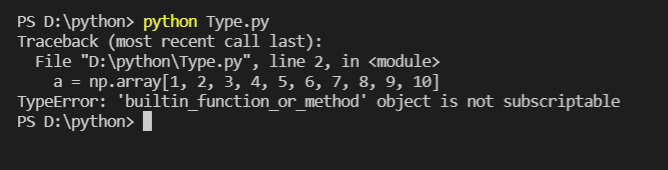
This problem is usually caused by missing the round parentheses in the np.array line.
It should have been written as:
a = np.array([1,2,3,4,5,6,7,8,9,10])
It is quite similar to TypeError: ‘method’ object is not subscriptable the only difference is that here we are using a library numpy so we get TypeError: ‘builtin_function_or_method’ object is not subscriptable.
Conclusion
The “TypeError: ‘method’ object is not subscriptable” error is raised when you use square brackets to call a method inside a class. To solve this error, make sure that you only call methods of a class using round brackets after the name of the method you want to call.
Now you’re ready to solve this common Python error like a professional coder! Till then keep pythoning Geeks!
In Python, Built-in functions are not subscriptable, if we use the built-in functions as an array to perform operations such as indexing, you will encounter TypeError: ‘builtin_function_or_method’ object is not subscriptable.
This article will look at what TypeError: ‘builtin_function_or_method’ object is not subscriptable error means and how to resolve this error with examples.
If we use the square bracket [] instead of parenthesis() while calling a function, Python will throw TypeError: ‘builtin_function_or_method’ object is not subscriptable.
The functions in Python are called using the parenthesis “()", and that’s how we distinguish the function call from the other operations, such as indexing the list. Usually, when working with lists or arrays, it’s a common mistake that the developer makes.
Let us take a simple example to reproduce this error.
Here in the example below, we have a list of car brands and are adding the new car brand to the list.
We can use the list built-in function to add a new car brand to the list, and when we execute the code, Python will throw TypeError: ‘builtin_function_or_method’ object is not subscriptable.
cars = ['BMW', 'Audi', 'Ferrari', 'Benz']

# append the new car to the list
cars.append["Ford"]

# print the list of new cars
print(cars)
Output
Traceback (most recent call last):
  File "c:PersonalIJSCodemain.py", line 4, in <module>
    cars.append["Ford"]
TypeError: 'builtin_function_or_method' object is not subscriptable
We are getting this error because we are not correctly using the append() method. We are indexing it as if it is an array (using the square brackets), but in reality, the append() is a built-in function.
How to Fix TypeError: ‘builtin_function_or_method’ object is not subscriptable?
We can fix the above code by treating the append() as a valid function instead of indexing.
In simple terms, we need to replace the square brackets with the parentheses (), making it a proper function.
This happens while working with arrays or lists and using functions like append(), pop(), remove(), etc., and if we perform the indexing operation using the function.
After replacing the code, you can observe that it runs successfully and adds a new brand name as the last element to the list.
cars = ['BMW', 'Audi', 'Ferrari', 'Benz']

# append the new car to the list
cars.append("Ford")

# print the list of new cars
print(cars)
Output
['BMW', 'Audi', 'Ferrari', 'Benz', 'Ford']Conclusion
The TypeError: ‘builtin_function_or_method’ object is not subscriptable occurs if we use the square brackets instead of parenthesis while calling the function.
The square brackets are mainly used to access elements from an iterable object such as list, array, etc. If we use the square brackets on the function, Python will throw a TypeError.
We can fix the error by using the parenthesis while calling the function.
Srinivas Ramakrishna is a Solution Architect and has 14+ Years of Experience in the Software Industry. He has published many articles on Medium, Hackernoon, dev.to and solved many problems in StackOverflow. He has core expertise in various technologies such as Microsoft .NET Core, Python, Node.JS, JavaScript, Cloud (Azure), RDBMS (MSSQL), React, Powershell, etc.
Sign Up for Our Newsletters
Subscribe to get notified of the latest articles. We will never spam you. Be a part of our ever-growing community.
By checking this box, you confirm that you have read and are agreeing to our terms of use regarding the storage of the data submitted through this form.