You might have worked with list, tuple, and dictionary data structures, the list and dictionary being mutable while the tuple is immutable. They all can store values. And additionally, values are retrieved by indexing. However, there will be times when you might index a type that doesn’t support it. Moreover, it might face an error similar to the error TypeError: ‘NoneType’ object is not subscriptable.
list_example = [1, 2, 3, "random", "text", 5.64]
tuple_example = (1, 2, 3, "random", "text", 5.64)

print(list_example[4])
print(list_example[5])
print(tuple_example[0])
print(tuple_example[3])

What is a TypeError?
The TypeError occurs when you try to operate on a value that does not support that operation. The most common reason for an error in a Python program is when a certain statement is not in accordance with the prescribed usage. The Python interpreter immediately raises a type error when it encounters an error, usually along with an explanation.
Let’s reproduce the type error we are getting:
On trying to index the var variable, which is of NoneType, we get an error. The ‘NoneType’ object is not subscriptable.

Let’s break down the error we are getting. Subscript is another term for indexing. Likewise, subscriptable means an indexable item. For instance, a list, string, or tuple is subscriptable. None in python represents a lack of value for instance, when a function doesn’t explicitly return anything, it returns None. Since the NoneType object is not subscriptable or, in other words, indexable. Hence, the error ‘NoneType’ object is not subscriptable.
An object can only be subscriptable if its class has __getitem__ method implemented.
By using the dir function on the list, we can see its method and attributes. One of which is the __getitem__ method. Similarly, if you will check for tuple, strings, and dictionary, __getitem__ will be present.

However, if you try the same for None, there won’t be a __getitem__ method. Which is the reason for the type error.
Resolving the ‘NoneType’ object is not subscriptable
The ‘NoneType’ object is not subscriptable and generally occurs when we assign the return of built-in methods like sort(), append(), and reverse(). What is the common thing among them? They all don’t return anything. They perform in-place operations on a list. However, if we try to assign the result of these functions to a variable, then None will get stored in it. For instance, let’s look at their examples.
Example 1: sort()
list_example = [1, 11, 14, 10, 5, 3, 2, 15, 77]
list_example_sorted = list_example.sort()
print(list_example_sorted[0])
The sort() method sorts the list in ascending order. In the above code, list_example is sorted using the sort method and assigned to a new variable named list_example_sorted. On printing the 0th element, the ‘NoneType’ object is not subscriptable type error gets raised.

Recommended Reading | [Solved] TypeError: method Object is not Subscriptable
Example 2: append()
list_example = [1, 11, 14, 10, 5, 3, 2, 15, 77]
list_example_updated = list_example.append(88)
print(list_example_updated[5])
The append() method accepts a value. The value is appended to t. In the above code, the return value of the append is stored in the list_example_updated variable. On printing the 5th element, the ‘NoneType’ object is not subscriptable type error gets raised.

Example 2: reverse()
Similar to the above examples, the reverse method doesn’t return anything. However, assigning the result to a variable will raise an error. Because the value stored is of NoneType.
list_example = [1, 11, 14, 10, 5, 3, 2, 15, 77]
list_example_reversed = list_example.reverse()
print(list_example_reversed[5])

Recommended Reading | How to Solve TypeError: ‘int’ object is not Subscriptable
The solution to the ‘NoneType’ object is not subscriptable
It is important to realize that all three methods don’t return anything to resolve this error. This is why trying to store their result ends up being a NoneType. Therefore, avoid storing their result in a variable. Let’s see how we can do this, for instance:
Solution for sort() method
list_example = [1, 11, 14, 10, 5, 3, 2, 15, 77]
list_example.sort()
print(list_example[0])

Solution for append() method
list_example = [1, 11, 14, 10, 5, 3, 2, 15, 77]
list_example.append(88)
print(list_example[-1])

Solution for the reverse() method
list_example = [1, 11, 14, 10, 5, 3, 2, 15, 77]
list_example_reversed = list_example.reverse()
print(list_example_reversed[5])

TypeError: ‘NoneType’ object is not subscriptable, JSON/Django/Flask/Pandas/CV2
The error, NoneType object is not subscriptable, means that you were trying to subscript a NoneType object. This resulted in a type error. ‘NoneType’ object is not subscriptable is the one thrown by python when you use the square bracket notation object[key] where an object doesn’t define the __getitem__ method. Check your code for something of this sort.
None[something]FAQs
How to catch TypeError: ‘NoneType’ object is not subscriptable?
This type of error can be caught using the try-except block. For instance:try:
list_example = [1, 11, 14, 10, 5, 3, 2, 15, 77]
list_sorted = list_example.sort()
print(list_sorted[0])
except TypeError as e:
print(e)
print("handled successfully")
How can we avoid the ‘NoneType’ object is not subscriptable?
It is important to realize that Nonetype objects aren’t indexable or subscriptable. Therefore an error gets raised. Hence, in order to avoid this error, make sure that you aren’t indexing a NoneType.
Conclusion
This article covered TypeError: ‘NoneType’ object is not subscriptable. We talked about what is a type error, why the ‘NoneType’ object is not subscriptable, and how to resolve it.
Other Python Errors You Might Get
-
![[Fixed] Module Seaborn has no Attribute Histplot Error](https://www.pythonpool.com/wp-content/uploads/2023/01/Fixed-Module-Seaborn-has-no-Attribute-Histplot-Error-300x157.webp)
[Fixed] Module Seaborn has no Attribute Histplot Error
●January 18, 2023
-
![[Fixed] JavaScript error: IPython is Not Defined](https://www.pythonpool.com/wp-content/uploads/2023/01/javascript-error-ipython-is-not-defined-300x157.webp)
[Fixed] JavaScript error: IPython is Not Defined
by Rahul Kumar Yadav●January 18, 2023
-
![[Fixed] “io.unsupportedoperation not readable” Error](https://www.pythonpool.com/wp-content/uploads/2023/01/io.unsupportedoperation-not-readable--300x157.webp)
[Fixed] “io.unsupportedoperation not readable” Error
by Rahul Kumar Yadav●January 18, 2023
-
![[Fixed] “Index Object Has No Attribute tz_localize” Error](https://www.pythonpool.com/wp-content/uploads/2023/01/index-object-has-no-attribute-tz_localize-300x157.webp)
[Fixed] “Index Object Has No Attribute tz_localize” Error
by Rahul Kumar Yadav●January 18, 2023
If you subscript any object with None value, Python will raise TypeError: ‘NoneType’ object is not subscriptable exception. The term subscript means retrieving the values using indexing.
In this tutorial, we will learn what is NoneType object is not subscriptable error means and how to resolve this TypeError in your program with examples.
In Python, the objects that implement the __getitem__ method are called subscriptable objects. For example, lists, dictionaries, tuples are all subscriptable objects. We can retrieve the items from these objects using Indexing.
The TypeError: ‘NoneType’ object is not subscriptable error is the most common exception in Python, and it will occur if you assign the result of built-in methods like append(), sort(), and reverse() to a variable.
When you assign these methods to a variable, it returns a None value. Let’s take an example and see if we can reproduce this issue.
numbers = [4, 5, 7, 1, 3, 6, 9, 8, 0]
output = numbers.sort()
print("The Value in the output variable is:", output)
print(output[0])
Output
The Value in the output variable is: None

Traceback (most recent call last):
  File "c:PersonalIJSCodemain.py", line 9, in <module>
    print(output[0])
TypeError: 'NoneType' object is not subscriptable
If you look at the above example, we have a list with some random numbers, and we tried sorting the list using a built-in sort() method and assigned that to an output variable.
When we print the output variable, we get the value as None. In the next step, we are trying to access the element by indexing, thinking it is of type list, and we get TypeError: ‘NoneType’ object is not subscriptable.
You will get the same error if you perform other operations like append(), reverse(), etc., to the subscriptable objects like lists, dictionaries, and tuples. It is a design principle for all mutable data structures in Python.
Note: Python doesn't allow to subscript the integer objects if you do Python will raise TypeError: 'int' object is not subscriptable
TypeError: ‘NoneType’ object is not subscriptable Solution
Now that you have understood, we get the TypeError when we try to perform indexing on the None Value. We will see different ways to resolve the issues.
Our above code was throwing TypeError because the sort() method was returning None value, and we were assigning the None value to an output variable and indexing it.
The best way to resolve this issue is by not assigning the sort() method to any variable and leaving the numbers.sort() as is.
Let’s fix the issue by removing the output variable in our above example and run the code.
numbers = [4, 5, 7, 1, 3, 6, 9, 8, 0]
numbers.sort()
output = numbers[2]
print("The Value in the output variable is:", output)
print(output)
Output
The Value in the output variable is: 3
3
If you look at the above code, we are sorting the list but not assigning it to any variable.
Also, If we need to get the element after sorting, then we should index the original list variable and store it into a variable as shown in the above code.
Conclusion
The TypeError: ‘ NoneType’ object is not subscriptable error is raised when you try to access items from a None value using indexing.
Most developers make this common mistake while manipulating subscriptable objects like lists, dictionaries, and tuples. All these built-in methods return a None value, and this cannot be assigned to a variable and indexed.
Srinivas Ramakrishna is a Solution Architect and has 14+ Years of Experience in the Software Industry. He has published many articles on Medium, Hackernoon, dev.to and solved many problems in StackOverflow. He has core expertise in various technologies such as Microsoft .NET Core, Python, Node.JS, JavaScript, Cloud (Azure), RDBMS (MSSQL), React, Powershell, etc.
Sign Up for Our Newsletters
Subscribe to get notified of the latest articles. We will never spam you. Be a part of our ever-growing community.
By checking this box, you confirm that you have read and are agreeing to our terms of use regarding the storage of the data submitted through this form.
In Python, NoneType is the type for the None object, which is an object that indicates no value. Functions that do not return anything return None, for example, append() and sort(). You cannot retrieve items from a None value using the subscript operator [] like you can with a list or a tuple. If you try to use the subscript operator on a None value, you will raise the TypeError: NoneType object is not subscriptable.
To solve this error, ensure that when using a function that returns None, you do not assign its return value to a variable with the same name as a subscriptable object that you will use in the program.
This tutorial will go through the error in detail and how to solve it with code examples.
Table of contents
- TypeError: ‘NoneType’ object is not subscriptable
- Example #1: Appending to a List
- Solution
- Example #2: Sorting a List
- Solution
- Summary
TypeError: ‘NoneType’ object is not subscriptable
Let’s break up the error message to understand what the error means. TypeError occurs whenever you attempt to use an illegal operation for a specific data type.
The subscript operator retrieves items from subscriptable objects. The operator in fact calls the __getitem__ method, for example a[i] is equivalent to a.__getitem__(i).
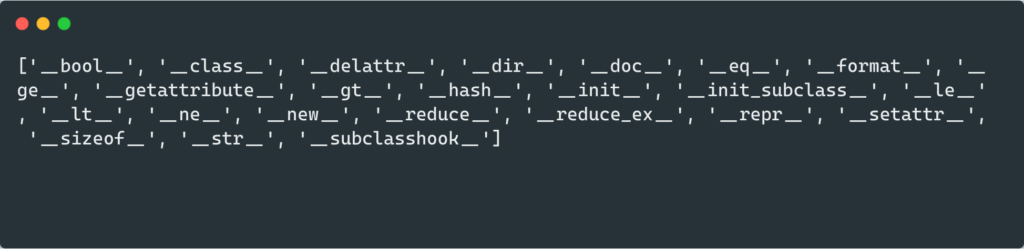
All subscriptable objects have a __getitem__ method. NoneType objects do not contain items and do not have a __getitem__ method. We can verify that None objects do not have the __getitem__ method by passing None to the dir() function:
print(dir(None))
['__bool__', '__class__', '__delattr__', '__dir__', '__doc__', '__eq__', '__format__', '__ge__', '__getattribute__', '__gt__', '__hash__', '__init__', '__init_subclass__', '__le__', '__lt__', '__ne__', '__new__', '__reduce__', '__reduce_ex__', '__repr__', '__setattr__', '__sizeof__', '__str__', '__subclasshook__']
If we try to subscript a None value, we will raise the TypeError: ‘NoneType’ object is not subscriptable.
Example #1: Appending to a List
Let’s look at an example where we want to append an integer to a list of integers.
lst = [1, 2, 3, 4, 5, 6, 7]

lst = lst.append(8)

print(f'First element in list: {lst[0]}')
In the above code, we assign the result of the append call to the variable name lst. Let’s run the code to see what happens:
---------------------------------------------------------------------------
TypeError                                 Traceback (most recent call last)
Input In [1], in <cell line: 5>()
      1 lst = [1, 2, 3, 4, 5, 6, 7]
      3 lst = lst.append(8)
----> 5 print(f'First element in list: {lst[0]}')

TypeError: 'NoneType' object is not subscriptable
We throw the TypeError because we replaced the list with a None value. We can verify this by using the type() method.
lst = [1, 2, 3, 4, 5, 6, 7]

lst = lst.append(8)

print(type(lst))
<class 'NoneType'>
When we tried to get the first element in the list, we are trying to get the first element in the None object, which is not subscriptable.
Solution
Because append() is an in-place operation, we do not need to assign the result to a variable. Let’s look at the revised code:
lst = [1, 2, 3, 4, 5, 6, 7]

lst.append(8)

print(f'First element in list: {lst[0]}')
Let’s run the code to get the result:
First element in list: 1
We successfully retrieved the first item in the list after appending a value to it.
Example #2: Sorting a List
Let’s look at an example where we want to sort a list of integers.
numbers = [10, 1, 8, 3, 5, 4, 20, 0]

numbers = numbers.sort()

print(f'Largest number in list is {numbers[-1]}')
In the above code, we assign the result of the sort() call to the variable name numbers. Let’s run the code to see what happens:
---------------------------------------------------------------------------
TypeError                                 Traceback (most recent call last)
Input In [8], in <cell line: 3>()
      1 numbers = [10, 1, 8, 3, 5, 4, 20, 0]
      2 numbers = numbers.sort()
----> 3 print(f'Largest number in list is {numbers[-1]}')

TypeError: 'NoneType' object is not subscriptable
We throw the TypeError because we replaced the list numbers with a None value. We can verify this by using the type() method.
numbers = [10, 1, 8, 3, 5, 4, 20, 0]

numbers = numbers.sort()

print(type(numbers))
<class 'NoneType'>
When we tried to get the last element of the sorted list, we are trying to get the last element in the None object, which is not subscriptable.
Solution
Because sort() is an in-place operation, we do not need to assign the result to a variable. Let’s look at the revised code:
numbers = [10, 1, 8, 3, 5, 4, 20, 0]

numbers.sort()

print(f'Largest number in list is {numbers[-1]}')
Let’s run the code to get the result:
Largest number in list is 20
We successfully sorted the list and retrieved the last value of the list.
Summary
Congratulations on reading to the end of this tutorial! The TypeError: ‘NoneType’ object is not subscriptable occurs when you try to retrieve items from a None value using indexing. If you are using in-place operations like append, insert, and sort, you do not need to assign the result to a variable.
For further reading on TypeErrors, go to the articles:
- How to Solve Python TypeError: ‘function’ object is not subscriptable
- How to Solve Python TypeError: ‘bool’ object is not subscriptable
Go to the online courses page on Python to learn more about Python for data science and machine learning.
Have fun and happy researching!
Python objects with the value None cannot be accessed using indexing. This is because None values do not contain data with index numbers.
If you try to access an item from a None value using indexing, you encounter a “TypeError: ‘NoneType’ object is not subscriptable” error.

Find Your Bootcamp Match
- Career Karma matches you with top tech bootcamps
- Access exclusive scholarships and prep courses
Select your interest
First name
Last name
Phone number
By continuing you agree to our Terms of Service and Privacy Policy, and you consent to receive offers and opportunities from Career Karma by telephone, text message, and email.
In this guide, we talk about what this error means and break down how it works. We walk through an example of this error so you can figure out how to solve it in your program.
TypeError: ‘NoneType’ object is not subscriptable
Subscriptable objects are values accessed using indexing. “Indexing” is another word to say “subscript”, which refers to working with individual parts of a larger collection.
For instance, lists, tuples, and dictionaries are all subscriptable objects. You can retrieve items from these objects using indexing. None values are not subscriptable because they are not part of any larger set of values.
The “TypeError: ‘NoneType’ object is not subscriptable” error is common if you assign the result of a built-in list method like sort(), reverse(), or append() to a variable. This is because these list methods change an existing list in-place. As a result, they return a None value.
An Example Scenario
Build an application that tracks information about a student’s test scores at school. We begin by defining a list of student test scores:
scores = [
	   { "name": "Tom", "score": 72, "grade": "B" },
	   { "name": "Lindsay", "score": 79, "grade": "A" }
]
Our list of student test scores contains two dictionaries. Next, we ask the user to insert information that should be added to the “scores” list:
name = input("Enter the name of the student: ")
score = input("Enter the test score the student earned: ")
grade = input("Enter the grade the student earned: ")
We track three pieces of data: the name of a student, their test score, and their test score represented as a letter grade.
Next, we append this information to our “scores” list. We do this by creating a dictionary which we will add to the list using the append() method:
new_scores = scores.append(
	{ "name": name, "score": score, "grade": grade }
)
This code adds a new record to the “scores” list. The result of the append() method is assigned to the variable “new_scores”.
Finally, print out the last item in our “new_scores” list so we can see if it worked:
The value -1 represents the last item in the list. Run our code and see what happens:
Enter the name of the student: Wendell
Enter the test score the student earned: 64
Enter the grade the student earned: C
Traceback (most recent call last):
  File "main.py", line 14, in <module>
	print(new_scores[-1])
TypeError: 'NoneType' object is not subscriptable
Our code returns an error.
The Solution
Our code successfully asks our user to insert information about a student. Our code then adds a record to the “new_scores” list. The problem is when we try to access an item from the “new_scores” list.
Our code does not work because append() returns None. This means we’re assigning a None value to “new_scores”. append() returns None because it adds an item to an existing list. The append() method does not create a new list.
To solve this error, we must remove the declaration of the “new_scores” variable and leave scores.append() on its own line:
scores.append(
	{ "name": name, "score": score, "grade": grade }
)
print(scores[-1])
We now only reference the “scores” variable. Let’s see what happens when we execute our program:
Enter the name of the student: Wendell
Enter the test score the student earned: 64
Enter the grade the student earned: C
{'name': 'Wendell', 'score': '64', 'grade': 'C'}
Our code runs successfully. First, our user is asked to insert information about a student’s test scores. Then, we add that information to the “scores” dictionary. Our code prints out the new dictionary value that has been added to our list so we know our code has worked.
Conclusion
The “TypeError: ‘NoneType’ object is not subscriptable” error is raised when you try to access items from a None value using indexing.
This is common if you use a built-in method to manipulate a list and assign the result of that method to a variable. Built-in methods return a None value which cannot be manipulated using the indexing syntax.
Now you’re ready to solve this common Python error like an expert.
It is very common to encounter this python error typeerror nonetype object is not subscriptable. If you are facing the challenge to fix it, You will get the solution here.
There are few objects like list, dict , tuple are iterable in python. But the error “Typeerror nonetype object is not subscriptable” occurs when they have None values and Python code access them via index or subscript. Firstly, Let’s understand with some code examples.
sample_list=None
print(sample_list[0])
Let’s run and see its output.

Typeerror nonetype object is not subscriptable ( Solution):
The solution/Fix for this error is in the error statement itself. But we will address them using the scenarios.
Function return type None at assignment
There are so many functions in python which change the elements like list, dict, etc in place and return None. Due to some misunderstanding, we assign them to some different objects. Which becomes None. When we try to access them via an index. It gives us the same error None type object is not subscriptable.
sample_list=[1,3,2,5,8,7]
new_list=sample_list.sort()
print(new_list[0])
Here we know that the sort function returns None But the code looks like it will return the sorted list. When we try to access their element using a subscript. It throws the same error.

The correct way of doing is to call those function which returns the None prior to the assignment. Refer to the below code for understanding it.

There can be an uncountable scenario where None type iterable accessed via index. Covering all of them will not be a good idea. Hence the best way to understand the root cause behind the error and apply the solution as per the use case.
Conclusion –
Well, This is a very common error for python beginners. Anyway, I hope this article must solve your problem. In fact, we encounter this error in different scenarios but the root cause will always be the same.
Thanks
Data Science Learner Team

Join our list
Subscribe to our mailing list and get interesting stuff and updates to your email inbox.
We respect your privacy and take protecting it seriously
Thank you for signup. A Confirmation Email has been sent to your Email Address.
Something went wrong.
- the
TypeError: 'NoneType' object is not subscriptablein Python - Solve the
TypeError: 'NoneType' object is not subscriptablein Python - Conclusion

Python has various sequence data types like lists, tuples, and dictionaries that support indexing. Since the term subscript refers to the value used while indexing, these objects are also known as subscriptable objects.
In Python, incorrect indexing of such subscriptable objects often results in TypeError: 'NoneType' object is not subscriptable. In this article, we will discuss this error and the possible solutions to fix the same.
Ready? Let’s begin!
the TypeError: 'NoneType' object is not subscriptable in Python
Before we look at why the TypeError: 'NoneType' object is not subscriptable occurs and how to fix it, let us first get some basics out of the way.
Introduction to NoneType and Subscriptable Objects in Python
In Python, a NoneType object is an object that has no value. In other words, it is an object that does not return anything.
The value None is often returned by functions searching for something but not finding it. Below is an example where a function returns the None value.
def none_demo():
    for i in [1, 2, 3, 4, 5]:
        if i == 10:
            return yes

ans = none_demo()
print(ans)
Output:
Talking about subscriptable objects, as the name says, these are Python objects that can be subscripted or indexed. In simpler words, subscriptable objects are those objects that can be accessed or traversed with the help of index values like 0, 1, and so on.
Lists, tuples, and dictionaries are examples of such objects. Below is a code that shows how you can traverse a list with the help of indexing.
cakes = ['Mango', 'Vanilla', 'Chocolate']
for i in range(0,3):
    print(cakes[i])
Output:
Now you know the basics well, so let’s move forward!
Solve the TypeError: 'NoneType' object is not subscriptable in Python
In Python, there are some built-in functions like reverse(), sort(), and append() that we can use on subscriptable objects. But if we assign the results of these built-in functions to a variable, it results in the TypeError: 'NoneType' object is not subscriptable.
Look at the example given below. Here, we used the reverse() function on the list called desserts and stored the resultant in the variable ans.
Then, we printed the variable ans value, which turns out to be None as seen in the output. However, the last statement leads to the TypeError: 'NoneType' object is not subscriptable.
Any guesses why this happened?
desserts = ['cakes', 'pie', 'cookies']
ans = desserts.reverse()
print("The variable ans contains: ", ans)
print(ans[0])
Output:
The variable ans contains:  None
Traceback (most recent call last):
  File "<string>", line 4, in <module>
TypeError: 'NoneType' object is not subscriptable
This happened because, in the last line, we are subscripting the variable ans. We know that the variable ans contains the value None, which is not even a sequence data type; hence, it can’t be accessed by indexing.
The important thing to understand here is that although we are assigning the reversed list to the variable ans, that does not make that variable ans of a list type. Thus, we cannot access the variable ans using indexing, thinking of it as a list.
In reality, the variable ans is a NoneType object, and Python does not support indexing such objects. Thus, one must not try to index a non-subscriptable object, or it will lead to the TypeError: 'NoneType' object is not subscriptable.
To rectify this issue from the above code, follow the approach below.
This time we do not assign the result of the reverse() operation to any variable. That way, the function will automatically replace the current list with the reversed list without any extra space.
Later, we can print the list as we want. Here, we are first printing the entire reversed list and then accessing the first element using the subscript 0.
As you can see, the code runs fine and gives the desired output.
desserts = ['cakes', 'pie', 'cookies']
desserts.reverse()
print(desserts)
print(desserts[0])
Output:
['cookies', 'pie', 'cakes']
cookies
The same rule of not assigning the result to a variable and then indexing it applies to other functions like sort() and append() too. Below is an example that uses the sort() function and runs into the TypeError: 'NoneType' object is not subscriptable.
desserts = ['cakes', 'pie', 'cookies']
ans = desserts.sort()
print("The value of the variable is: ", ans)
print(ans[1])
Output:
The value of the variable is:  None
Traceback (most recent call last):
  File "<string>", line 4, in <module>
TypeError: 'NoneType' object is not subscriptable
Again, this happens for the same reason. We have to drop the use of another variable to store the sorted list to get rid of this error.
This is done below.
desserts = ['cakes', 'pie', 'cookies']
desserts.sort()
print(desserts)
print(desserts[1])
Output:
['cakes', 'cookies', 'pie']
cookies
You can see that, this time, the sort() method replaces the list with the new sorted list without needing any extra space. Later, we can access the individual elements of the sorted list using indexing without worrying about this error!
And here is something interesting. Ready to hear it?
In the case of the sort() function, if you still want to use a separate variable to store the sorted list, you can use the sorted() function. This is done below.
desserts = ['cakes', 'pie', 'cookies']
ans = sorted(desserts)
print(ans)
print(ans[0])
Output:
['cakes', 'cookies', 'pie']
cakes
You can see that this does not lead to any error because the sorted() function returns a sorted list, unlike the sort() method that sorts the list in place.
But unfortunately, we do not have such alternate functions for reverse() and append() methods.
This is it for this article. Refer to this documentation to know more about this topic.
Conclusion
This article taught us about the 'NoneType' object not subscriptable TypeError in Python. We saw how assigning the values of performing operations like reverse() and append() on sequence data types to variables leads to this error.
We also saw how we could fix this error by using the sorted() function instead of the sort() function to avoid getting this error in the first place.
In this post, we are going to learn how to fix TypeError:NoneType object is not subscriptable in python. The Python object strings, lists, tuples, and dictionaries are subscribable because they implement the __getitem__ method. The subscript operator [] is used to access the element by index in Python from subscriptable objects. Whenever we access any element by index like list[i] from subscribable objects then internally it calls list. __getitem__[i].
1. What is TypeError:NoneType object is not subscriptable
if we access an element of none type by using subscript operator [] or assign the result of the built-in method append(), sort(), and reverse() to a variable the TypeError: ‘NoneType’ object is not subscriptable” will encounter. In case of dictionary built-in method update()
Python None type is the type that is used for the None type object. It represents no value or missing a value. For example, if a function does not return any value then returns default value will be None like append() and sort(),reverse().
1.1 typeerror:NoneType object is not subscriptable list
In this below example we have appended an element to a list and assigned value return by list. append() method to a variable and type error is raised. Even This error will be raised if we use the sort(), and the reverse() method the same way.
- As we can see, the value returned by the list.append() method is none
- Now we are trying to retrieve the value by using the subscript operator []. So we encounter with “TypeError: ‘NoneType’ object is not subscriptable”.The none type can’t be accessed by the subscript operator
mylist = [3, 6, 9, 12]
result = mylist.append(15)
print("Value return append method :", result)
print(type(result))
print("Access element by subscript operator:", result[0])
Output
Value return append method: None
<class 'NoneType'>
"print("Access element by subscript operator:", result[0])"
TypeError: 'NoneType' object is not subscriptable
- As we can see, the value returned by the list.append() method is none
- Now we are trying to retrieve the value by using the subscript operator []. So we encounter with “TypeError: ‘NoneType’ object is not subscriptable”.The none type can’t be accessed by the subscript operator
Using list.sort() method
mylist = [3, 6, 9, 12]
result = mylist.sort()
print("Value return append method :", result)
print(type(result))
print("Access element by subscript operator:", result[0])
Output
Value return append method: None
<class 'NoneType'>
"print("Access element by subscript operator:", result[0])"
TypeError: 'NoneType' object is not subscriptable
1.2.typeerror ‘nonetype’ object is not subscriptable dictionary
In this python example, we are updating the dictionary and accessing the value return by the update() method to variable and accessing it by using the update_dict[0] subscript operator. So the type error is raised.
mydict = {'math':100,'Eng':100,'Chem':98}
key_vals = {'Aon':200}
update_dict = mydict.update(key_vals)
print(update_dict)
print(update_dict[0])
Output
  print(update_dict[0])
TypeError: 'NoneType' object is not subscriptable
2. How to solve TypeError: ‘NoneType’ object is not subscriptable list
The solution to this error is to use the sort(), append(), and reverse method in place instead of accessing it to a variable and accessing the element by the subscript operator.
In this example, we have updated the list in place without access to a variable and accessed the list element by using the subscript operator[].
mylist = [3, 6, 9, 12]
mylist.append(15)
print('updated list',mylist)

print("Access element by subscript operator:", mylist[0])
Output
updated list [3, 6, 9, 12, 15]
Access element by subscript operator: 3
3. How to solve TypeError: ‘NoneType’ object is not subscriptable dictionary
The solution to this error is to use the sort(), append(), and reverse method in place instead of accessing it to a variable and accessing the element by the subscript operator.
In this example, we have updated the dictionary in place using the update() method without access to a variable and accessed the dictionary element by using the subscript operator bypassing the key name.
mydict = {'math':100,'Eng':100,'Chem':98}
key_vals = {'Aon':200}
mydict.update(key_vals)
print(mydict)
print(mydict['math'])
Output
{'math': 100, 'Eng': 100, 'Chem': 98, 'Aon': 200}
100
Summary
In this post, we have learned how to solve TypeError:NoneType object is not subscriptable in python with examples. This type of error occurs when we assign the result of the built-in method append(), sort(), and reverse() to a variable and access them using the subscript operator.
Do you encounter this stupid error?

You’re not alone—thousands of coders like you generate this error in thousands of projects every single month. This short tutorial will show you exactly why this error occurs, how to fix it, and how to never make the same mistake again. So, let’s get started!
Python throws the TypeError object is not subscriptable if you use indexing with the square bracket notation on an object that is not indexable. This is the case if the object doesn’t define the __getitem__() method. You can fix it by removing the indexing call or defining the __getitem__ method.
The following code snippet shows the minimal example that leads to the error:
variable = None
print(variable[0])
# TypeError: 'NoneType' object is not subscriptable
You set the variable to the value None. The value None is not a container object, it doesn’t contain other objects. So, the code really doesn’t make any sense—which result do you expect from the indexing operation?
Exercise: Before I show you how to fix it, try to resolve the error yourself in the following interactive shell:
If you struggle with indexing in Python, have a look at the following articles on the Finxter blog—especially the third!
Related Articles:
- Indexing in Python
- Slicing in Python
- Highly Recommended: Accessing the Index of Iterables in Python
Note that a similar problem arises if you set the variable to the integer value 42 instead of the None value. The only difference is that the error message now is "TypeError: 'int' object is not subscriptable".
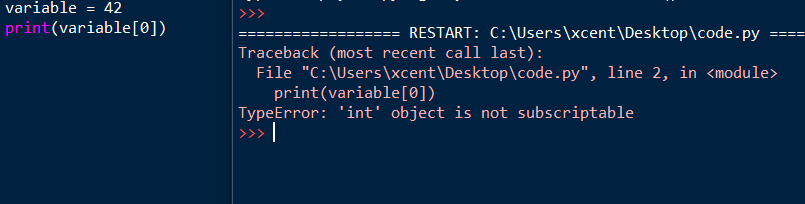
You can fix the non-subscriptable TypeError by wrapping the non-indexable values into a container data type such as a list in Python:
variable = [None]
print(variable[0])
# None
The output now is the value None and the script doesn’t throw an error anymore.
An alternative is to define the __getitem__ method in your code:
class X:
    def __getitem__(self, i):
        return f"Value {i}"

variable = X()
print(variable[0])
# Value 0
You overwrite the __getitem__ method that takes one (index) argument i (in addition to the obligatory self argument) and returns the i-th value of the “container”. In our case, we just return a string "Value 0" for the element variable[0] and "Value 10" for the element variable[10]. It doesn’t make a lot of sense here but is the minimal example that shows how it works.
I hope you’d be able to fix the bug in your code! Before you go, check out our free Python cheat sheets that’ll teach you the basics in Python in minimal time:
Related TypeError Messages
🌍 This was a very generic tutorial. You may have encountered a similar but slightly different variant of this error message. Have a look at the following tutorials to find out more about those!
- [Fixed] Matplotlib: TypeError: ‘AxesSubplot’ object is not subscriptable
- [Fixed] TypeError: ‘int’ object is not subscriptable
- [Fixed] Python TypeError: ‘float’ object is not subscriptable
- [Fixed] Python TypeError ‘set’ object is not subscriptable
- [Fixed] Python TypeError ‘bool’ object is not subscriptable
- (Solved) Python TypeError ‘Method’ Object is Not Subscriptable
- TypeError Built-in Function or Method Not Subscriptable (Fixed)
Programming Humor – Python

While working as a researcher in distributed systems, Dr. Christian Mayer found his love for teaching computer science students.
To help students reach higher levels of Python success, he founded the programming education website Finxter.com. He’s author of the popular programming book Python One-Liners (NoStarch 2020), coauthor of the Coffee Break Python series of self-published books, computer science enthusiast, freelancer, and owner of one of the top 10 largest Python blogs worldwide.
His passions are writing, reading, and coding. But his greatest passion is to serve aspiring coders through Finxter and help them to boost their skills. You can join his free email academy here.