ошибка 0-610000f6
После простоя сутки при включении HP photosmart b110b выдал ошибку 0*610000f6 . Печатать отказался  каретка дергается туда сюда. т.е. уходит влево там пару раз дергается, потом возвращается вправо там также дергается потом щелк и ошибка и стоит молча, бумагу не захватывает. Выдернул кабель откл. от питания через 30 сек. вкл. не помогло. Сбросил на заводские вроде восстановился. Смотрел шлейф СНПЧ вроде нормально каретке не мешает. Задний лоток проверял на месте. Что это ещё может?
  Сейчас вроде работает по стоит вкл. посмотрю что будет.
- KiborG
- Корабельный попугай
- Сообщения: 28
- Зарегистрирован: 28 дек 2010, 18:12
- Благодарил (а): 1 раз.
- Поблагодарили: 6 раз.
Re: ошибка 0-610000f6
 Leidenschaft » 22 фев 2012, 07:00
«Меж нами нет иных преград, чем кем являемся мы сами»
-
За это сообщение автора Leidenschaft поблагодарил:
- BURSTEN
-

Leidenschaft - Инженер OCP
- Сообщения: 1311
- Зарегистрирован: 10 сен 2010, 19:35
- Откуда: Омск
- Благодарил (а): 255 раз.
- Поблагодарили: 503 раз.
-
- Профиль
- Сайт
Re: ошибка 0-610000f6
KiborG » 22 фев 2012, 08:50
все что там написано я читал уже и проверил. Шлейф и все остальное нормально. У меня тем более он проложен по теме установка СНПЧ без разборки, так лучше получилось. А с разборкой там шлейф болтается не нравится мне что то это. Там фиксатор нужен какой-нибудь чтобы его влево не тянуло. Сейчас вроде работает нормально может где шестерня какая-нибудь не так встала, потому что треск сильный.
- KiborG
- Корабельный попугай
- Сообщения: 28
- Зарегистрирован: 28 дек 2010, 18:12
- Благодарил (а): 1 раз.
- Поблагодарили: 6 раз.
Re: ошибка 0-610000f6
Leidenschaft » 22 фев 2012, 08:54
KiborG писал(а):шестерня какая-нибудь не так встала, потому что треск сильный.
по звуку надо искать и смотреть. такие аппараты на вес золота сейчас.
«Меж нами нет иных преград, чем кем являемся мы сами»
-
Leidenschaft - Инженер OCP
- Сообщения: 1311
- Зарегистрирован: 10 сен 2010, 19:35
- Откуда: Омск
- Благодарил (а): 255 раз.
- Поблагодарили: 503 раз.
-
- Профиль
- Сайт
Re: ошибка 0-610000f6
KiborG » 22 фев 2012, 18:14
Leidenschaft писал(а):
KiborG писал(а):шестерня какая-нибудь не так встала, потому что треск сильный.
по звуку надо искать и смотреть. такие аппараты на вес золота сейчас.
Заметил что в магазинах не стало их, куда они подевались интересно.
- KiborG
- Корабельный попугай
- Сообщения: 28
- Зарегистрирован: 28 дек 2010, 18:12
- Благодарил (а): 1 раз.
- Поблагодарили: 6 раз.
Re: ошибка 0-610000f6
Leidenschaft » 22 фев 2012, 20:07
KiborG писал(а): куда они подевались интересно.
сняли с пр-ва 
«Меж нами нет иных преград, чем кем являемся мы сами»
-
Leidenschaft - Инженер OCP
- Сообщения: 1311
- Зарегистрирован: 10 сен 2010, 19:35
- Откуда: Омск
- Благодарил (а): 255 раз.
- Поблагодарили: 503 раз.
-
- Профиль
- Сайт
Вернуться в СНПЧ для HP
Перейти:
Кто сейчас на конференции
Сейчас этот форум просматривают: нет зарегистрированных пользователей и гости: 0
hp-concentra-wrapper-portlet

Actions
Issue
The error code ‘0x610000f6‘ message displays on the control panel, and the product does not print.
Solutions
Try the following solutions in the order presented to resolve the issue. When one of the solutions resolves the issue, there is no need to continue troubleshooting.
Video of clearing a carriage jam
The following video demonstrates the steps for clearing a carriage jam.
note:
This video shows the HP Photosmart Plus All-in-One Printer series (B209), but the steps are the same for your printer.

Solution one: Turn the printer off, and then on again
-
Press the Power button (
 ) to turn off the product. If the product does not turn off, continue to the next solution.
 -
Wait 60 seconds.
-
Press the Power button (
) to turn on the product.
-
If these steps resolved the issue, you do not need to continue troubleshooting.
-
If the issue persists, continue to the next solution.
Solution two: Clear any jammed paper
Jammed paper can cause the carriage to stall. Follow these steps to clear a paper jam.
Step one: Remove any loose paper
caution:Do not remove jammed paper at this stage. Trying to clear jammed paper from the front of the product can damage theprint mechanism.
Step two: Clear the paper jam
Use the following steps to check for and remove jammed paper from the back of the product.
-
Press the Power button (
) to turn off the product. -
Disconnect the power cord from the back of the product.
-
Push the buttons on either side of the rear access panel, and then pull the panel away from the product.
-
Gently pull the paper out of the rollers.
caution:If the paper tears while removing it from the rollers, check the rollers and wheels for torn pieces of paper that might remain inside the product. If any torn pieces of paper remain inside the product, more paper jams are likely to occur.
-
Reattach the rear access panel. Gently push the door forward until it snaps into place.
-
Reconnect the power cord to the back of the product.
-
Press the Power button (
) to turn on the product.
-
If these steps resolved the issue, there is no need to continue troubleshooting.
-
If the issue persists, see the next step.
Step three: Open the top cover, and then clear the paper jam
Use the following steps to open the top cover, and then clear the paper jam.
-
Press the Power button (
) to turn off the product. -
Disconnect the power cord from the back of the product.
-
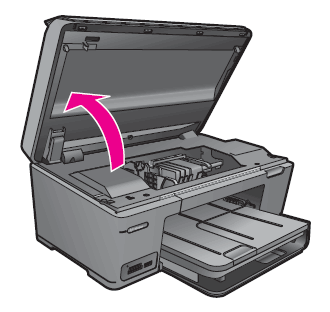
Open the cartridge access door.
Figure : Open the cartridge access door
-
Manually move the carriage to one side of the product.
-
If there is paper jammed in the product, gently remove the paper through the top of the product.
warning:Do not reach into the device when it is on and the carriage is stuck as this could cause an electrical shock. Always turn the product off before you remove any paper jam.
-
Close the cartridge access door.
Figure : Close the cartridge access door

-
Press the Power button (
) to turn on the product. -
Try printing again.
-
If these steps resolved the issue, you do not need to continue troubleshooting.
-
If the issue persists, continue to the next solution.
Solution three: Make sure that the carriage moves freely
Follow these steps to make sure that the carriage moves freely.
-
Disconnect the power cord and the USB cable from the back of the product.
caution:Do not reconnect the power cord and USB cable until instructed to do so.
-
Open the cartridge access door.
Figure : Open the cartridge access door
-
Press down firmly on the carriage latch handle to close it completely.
Figure : Carriage latch handle in the down position
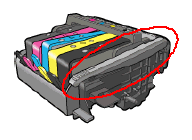
note:
If the latch handle is up, it results in incorrectly seated cartridges and the product does not function correctly.
-
Check whether the carriage can move freely from one side of the product to the other.Apply moderate pressure to one side of the carriage, and then push it back and forth in the product.
warning:You must disconnect the power cord to move parts by hand without the risk of an electrical shock.
-
Remove any debris or obstructions from the carriage path.
-
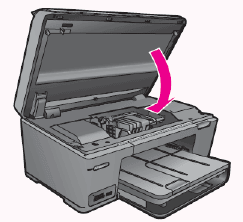
Close the cartridge access door.
Figure : Close the cartridge access door
-
Reconnect the power cord and the USB cable to the back of the product.
-
Press the Power button (
) to turn on the product. -
Try printing again.
-
If these steps resolved the issue, you do not need to continue troubleshooting.
-
If the issue persists, continue to the next solution.
Solution four: Remove and reinstall the cartridges
The product might indicate a carriage jam error if a cartridge is not installed correctly. Follow these steps to make sure that the cartridges are installed correctly.
Step one: Remove the cartridges
Use these steps to remove the cartridges.
-
Make sure that the product is turned on.
-
Use the access handles on the sides of the product to open the cartridge access door.
Figure : Open the cartridge access door

note:
Wait until the carriage is idle and silent before proceeding.
-
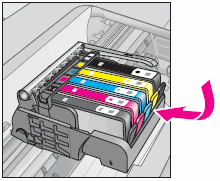
Press the tab on each cartridge, and then remove each cartridge from its slot.
Figure : Remove the cartridges

Step two: Reinstall the cartridges
Use these steps to reinstall the cartridges.
-
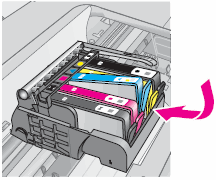
Slide each cartridge into its empty slot until it clicks into place and seats firmly in the slot. Make sure that the icon on each cartridge matches the shape and color of the icon on the slot you are inserting the cartridge into.
Figure : Install the cartridges

-
Close the cartridge access door.
Figure : Close the cartridge access door

-
Try printing again.
-
If these steps resolved the issue, you do not need to continue troubleshooting.
-
If the issue persists, continue to the next solution.
Solution five: Plug the product directly into a wall outlet
Plug the product directly into a wall outlet to make sure the power source is functioning correctly.
-
Disconnect the power cord from the back of the product.
-
Disconnect the power cord from any power strips or surge suppressors, and then plug it directly into a wall outlet.
-
Reconnect the power cord to the back of the product.
-
Try printing again.
note:
If the product prints when plugged directly into a wall outlet, the power strip or surge protector might not be allowing enough voltage to reach the product.
-
If these steps resolved the issue, you do not need to continue troubleshooting.
-
If the issue persists, continue to the next solution.
Solution six: Reset the printer, and then print a status report
Step one: Reset the printer
Use these steps to reset the printer
-
Press the Power button (
) to turn off the product. -
Disconnect the USB cable from the product.
-
Disconnect the power cord from the product, and then wait 60 seconds.
-
Unplug the power cord from the wall outlet.
-
Plug the power cord back into the wall outlet.
-
Reconnect the power cord to the back of the product.
-
Press the Power button (
) to turn on the product. -
Reconnect the USB cable to the back of the product, and then reconnect it securely to the product.
Step two: Print a status report
Use the following steps to print a status report from the product control panel.
-
Load plain white paper in the input tray.
-
On the control panel Home Screen, touch the right arrow (
 ) to view more options.
 -
Touch Setup (
 ).
). -
Touch Tools.
-
Touch Printer Status Report. The status report prints.
-
If these steps resolved the issue, you do not need to continue troubleshooting.
-
If the issue persists, continue to the next solution.
Solution seven: Service the product
Service or replace your HP product if the issue persists after completing all the preceding steps.
Go to Contact HP Customer Support to schedule a product repair or replacement. If you are in Asia Pacific, you will be directed to a local service center in your area.
To confirm your warranty status, go to HP Product Warranty Check. Repair fees might apply for out-of-warranty products.

United States
hp-detect-load-my-device-portlet
Actions
Hi @S31TDN,
I’d like to help!
I understand you are receiving a printer failure error.
Try the below suggestions-
Step 1: Check for obstructions in the carriage path
Clear obstructions from the carriage area inside the printer.
-
With the printer on, disconnect the power cord from the rear of the printer.
-
Open the door to access the carriage inside of the printer.
-
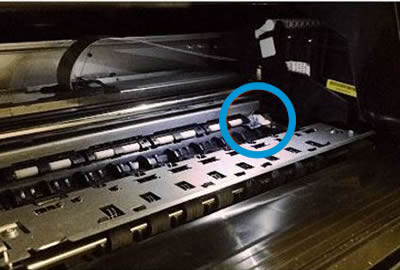
Look in the carriage path for debris such as crumpled paper or dislodged labels, and then remove any that you find.
-
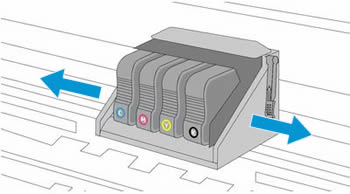
Use your hand to move the carriage to each side, making sure it moves freely. If the carriage is stalled or docked to one side of the printer and you cannot move it, continue with these steps.
-
Close the carriage access door.
-
Reconnect the power cord to the rear of the printer, and then turn the printer on.
If the error persists, continue to the next step.
Step 2: Reset the printer
Reset the printer to recover from printer failures.
-
With the printer turned on, disconnect the power cord from the printer.
-
Unplug the power cord from the power source.
-
Wait 60 seconds.
-
Reconnect the power cord to a wall outlet and to the printer.
NOTE:
HP recommends plugging the printer directly into a wall outlet.
If the issue persists, I’d suggest you contact HP in your region regarding the service options for your printer
Hope this helps! Keep me posted.
And, Welcome to the HP Support Community.
Please click “Accept as Solution” if you feel my post solved your issue, it will help others find the solution.
Click the “Kudos, Thumbs Up» on the bottom right to say “Thanks” for helping
Hi @S31TDN,
I’d like to help!
I understand you are receiving a printer failure error.
Try the below suggestions-
Step 1: Check for obstructions in the carriage path
Clear obstructions from the carriage area inside the printer.
-
With the printer on, disconnect the power cord from the rear of the printer.
-
Open the door to access the carriage inside of the printer.
-
Look in the carriage path for debris such as crumpled paper or dislodged labels, and then remove any that you find.
-
Use your hand to move the carriage to each side, making sure it moves freely. If the carriage is stalled or docked to one side of the printer and you cannot move it, continue with these steps.
-
Close the carriage access door.
-
Reconnect the power cord to the rear of the printer, and then turn the printer on.
If the error persists, continue to the next step.
Step 2: Reset the printer
Reset the printer to recover from printer failures.
-
With the printer turned on, disconnect the power cord from the printer.
-
Unplug the power cord from the power source.
-
Wait 60 seconds.
-
Reconnect the power cord to a wall outlet and to the printer.
NOTE:
HP recommends plugging the printer directly into a wall outlet.
If the issue persists, I’d suggest you contact HP in your region regarding the service options for your printer
Hope this helps! Keep me posted.
And, Welcome to the HP Support Community.
Please click “Accept as Solution” if you feel my post solved your issue, it will help others find the solution.
Click the “Kudos, Thumbs Up» on the bottom right to say “Thanks” for helping
—}}
������� �������� �������
��������� ������
��������� �����
����������� / Covid-19
��������� ����� ��� ��������
������������� ��������
�������� �����
������� �����
�������
��������� ����������� �����
�������� �������
����������
��������� �������
������� �� �����
��� �����
4�4 �����
��������
������� �����
�����
������������
�������� �����
KIA-�����
���� �����
Hyundai �����
VAG �����
������ �������
����� ������: �������������� �����
����-�������� (�� ���� �������, ��������)
���������� �������
���������� �������: �����������
���������� �������: ��������
���������� �������: �������
���������� �������: ���� � �����
���������� �������: ������
���������� �������: ���� ����������, �������
���������� �������: ������
���������� �������: �������
���������� �������: ���������
���������� �������: �����
���������� ��������-�������
�������� ������
�������� ������: ��������
�������� ������: ������� ������ (��������)
�������� ������: ����-��� (�������)
�������� ������: �������
�������� ������: ���������
�������� ������: ���� ����������, �������
�������� ������: ��������
�������� ������: ������
�������� �������
�������� ������� — ����� �������
�������� ������� — ��������
�������� ������� — �������
�������� ������� — ���� ����������, �������
�������� ������� — ����������
����� �������
��� �����
��� ����� — ��������
��� ����� — ����������. �����
��� ����� — ����������: ������� ������
��� ����� — ����������: ������� �����
��� ����� — ����������: ������� ���������, �������, ������
��������
�������� (��������)
������ � ��. ��������
������� (������� ����������� �������)
������
�����������
�������� �����
������� ��������
����������� �����
�����������
��������� �����
����� ���������� �����
������. ��������.
������� �������
����������
��������� ��������
������ �� ���������
���������� �����
������� � ����
�����������
���� �����
������������� � �������������
����������
���������
�������� �����
�����, ������, ����������
���������
��������
�������� ��������
������ �����
����������
�����������
����������� �����
������� �����
������� �����: ��������
������� �����: �������� ��������
���� ����
���� ����
�������� �����
������ ����
�����������
��������-��
GPS �����
��������� �����
�����-�����
���������
����. � ������ ������
������ �����
������� � PR
����������
������������
���������� �����
��������
����� ���������
������� � �����
�����������
�����������
������ ���������
������������ ��
������������ ������
������������ ����� (��������)
����
����� ����������
������
����������������� � ����������
����� ������������ ����������
����� ���������������
��� ������������ ������
������, �����, �������
������, �����, �������
���������� ������
���� �����������
�������������
������ ���������
���������� ������� ���������
��������� ������� ���������
�����������
������������� �������
������������
������������
�������
��������� �����
���
������������� ������������
����� ������
������������� �����
���������� �����
��������� �����
��� ������ �������
������ �����
�������
����� ���������
������ �� (��. ����� ����������)
���������� ��
��������� �� (������������� ��.)
���������� ������� ��
�� ������������� ���� ��
������� ������ �� (��������� �����)
������� ���� �� (��������� �-��)
������ �� (����������� �-��)
�� �������� �� (�������� ��., � ���� 18)
������ ����� �� (�. �������)
����� �� (��. ��������� ��������)
������� ������ �� (��������� �-��)
������� �� (��������� �-��)
�� ���. (����� �������)
����������� ������ ���.
������������ ���.
����� ����� ���. (60-��� ������� ��.)
����� �� (�������� ��.)
������� ���� ��
��� ������ �����
������� ������
��������� �����
��������� ���� �����������
������� �� ����� iHerb
�������� �������
���������� � �������� �������
����� �������� ����
������ �����
����������� ������ ������
��� ������ ���������!
������-�������� �����-�������
����� ����������
������������
����� �������
������������ ���� ��������
������� ��� �����
���� �����!
����������� �����
������-��������
�����������
����� ������������ �����
��������
����� �����������
����� ����������
����� ����� �����������
������ � ����������� (������������)
�� ������ ������� ������ �� �������.
���������� ���������������� ������.
- �������
- �����������
- �����-�����
����� ����� (����� ������� ��������. �� ��� �����-�������)
� �������� �� NN.RU
� ��� ���� ��� ������ �� NN.RU, ������� ������ �� ���� �� ����� ���� ����������.
�������������� �������, ����� ����� ����� ������.
� ���������� �����
����������

���� ������ ���� hp photosmart d5463 � ������� 0�610000f6. ����� ������������ �� �������� ��� ����� ��������.
���� ���� ����������� �� �������, �������� �� �������, �� ������ )
���� ���� ���-���� �������� � ������� ���� — ��������� �����������
TelepuzziK �����(�)
����� ������������ �� �������� ��� ����� ��������
������� ������ ��������� ���� ��� ������������� ???
������� �ݣ �� ���� ��� �������� ��� �������
���� �� ������� �� — ��� �� ��� ���� ��� ������� ���������� )))
�� ����� ���� ����� �� �������� �� ��

������ ����� ������� ��� ��� ������?
�����. ������� ������ ������ ���
������� ��������� ���������? �� ����� ��������� ������ ���� ������, �� � ������ ���������� ��� ������ ������ �� ����� ������� ���������� ��������� ��� ��������� ������� ���� ���������� ���������. � �������� �������� ��������� �������� ���� ����� �� �������.
������� ����� ��������� ��������. �������� �������.
��� ��-����� �� ��������� �������� �������� ��������: ������� ������ �������� ��� ��������-�������
� �������� �� NN.RU
� ��� ���� ��� ������ �� NN.RU, ������� ������ �� ���� �� ����� ���� ����������.
�������������� �������, ����� ����� ����� ������.
� ���������� �����
����������
������� �������� �������
��������� ������
��������� �����
����������� / Covid-19
��������� ����� ��� ��������
������������� ��������
�������� �����
������� �����
�������
��������� ����������� �����
�������� �������
����������
��������� �������
������� �� �����
��� �����
4�4 �����
��������
������� �����
�����
������������
�������� �����
KIA-�����
���� �����
Hyundai �����
VAG �����
������ �������
����� ������: �������������� �����
����-�������� (�� ���� �������, ��������)
���������� �������
���������� �������: �����������
���������� �������: ��������
���������� �������: �������
���������� �������: ���� � �����
���������� �������: ������
���������� �������: ���� ����������, �������
���������� �������: ������
���������� �������: �������
���������� �������: ���������
���������� �������: �����
���������� ��������-�������
�������� ������
�������� ������: ��������
�������� ������: ������� ������ (��������)
�������� ������: ����-��� (�������)
�������� ������: �������
�������� ������: ���������
�������� ������: ���� ����������, �������
�������� ������: ��������
�������� ������: ������
�������� �������
�������� ������� — ����� �������
�������� ������� — ��������
�������� ������� — �������
�������� ������� — ���� ����������, �������
�������� ������� — ����������
����� �������
��� �����
��� ����� — ��������
��� ����� — ����������. �����
��� ����� — ����������: ������� ������
��� ����� — ����������: ������� �����
��� ����� — ����������: ������� ���������, �������, ������
��������
�������� (��������)
������ � ��. ��������
������� (������� ����������� �������)
������
�����������
�������� �����
������� ��������
����������� �����
�����������
��������� �����
����� ���������� �����
������. ��������.
������� �������
����������
��������� ��������
������ �� ���������
���������� �����
������� � ����
�����������
���� �����
������������� � �������������
����������
���������
�������� �����
�����, ������, ����������
���������
��������
�������� ��������
������ �����
����������
�����������
����������� �����
������� �����
������� �����: ��������
������� �����: �������� ��������
���� ����
���� ����
�������� �����
������ ����
�����������
��������-��
GPS �����
��������� �����
�����-�����
���������
����. � ������ ������
������ �����
������� � PR
����������
������������
���������� �����
��������
����� ���������
������� � �����
�����������
�����������
������ ���������
������������ ��
������������ ������
������������ ����� (��������)
����
����� ����������
������
����������������� � ����������
����� ������������ ����������
����� ���������������
��� ������������ ������
������, �����, �������
������, �����, �������
���������� ������
���� �����������
�������������
������ ���������
���������� ������� ���������
��������� ������� ���������
�����������
������������� �������
������������
������������
�������
��������� �����
���
������������� ������������
����� ������
������������� �����
���������� �����
��������� �����
��� ������ �������
������ �����
�������
����� ���������
������ �� (��. ����� ����������)
���������� ��
��������� �� (������������� ��.)
���������� ������� ��
�� ������������� ���� ��
������� ������ �� (��������� �����)
������� ���� �� (��������� �-��)
������ �� (����������� �-��)
�� �������� �� (�������� ��., � ���� 18)
������ ����� �� (�. �������)
����� �� (��. ��������� ��������)
������� ������ �� (��������� �-��)
������� �� (��������� �-��)
�� ���. (����� �������)
����������� ������ ���.
������������ ���.
����� ����� ���. (60-��� ������� ��.)
����� �� (�������� ��.)
������� ���� ��
��� ������ �����
������� ������
��������� �����
��������� ���� �����������
������� �� ����� iHerb
�������� �������
���������� � �������� �������
����� �������� ����
������ �����
����������� ������ ������
��� ������ ���������!
������-�������� �����-�������
����� ����������
������������
����� �������
������������ ���� ��������
������� ��� �����
���� �����!
����������� �����
������-��������
�����������
����� ������������ �����
��������
����� �����������
����� ����������
����� ����� �����������
������ � ����������� (������������)
�� ������ ������� ������ �� �������.
���������� ���������������� ������.
�����
���� (�����)
��������� �����
�������