Какой же путь проходит баг и какую роль в его жизненном цикле играет тестировщик? Давайте разбираться.
Ошибка, дефект, но чаще всего баг. Именно так называется то, что находят тестировщики в процессе работы.
Определение бага
Bug в переводе означает “жук, насекомое”. Первая ошибка, которая была задокументирована, возникла как раз из-за жука. В середине 40-х годов 20 века ученых Гарвардского университета вызвали для того, чтобы определить причину сбоя в работе вычислительной машины Mark II. Покопавшись в этой громадной куче приборов, соединенных проводами, они обнаружили бабочку, застрявшую между контактами электромеханического реле. Стало ясно, что именно она и явилась причиной сбоя. Одна из сотрудниц университета, Грейс Хоппер, так и сформулировала результат исследований: «неполадку вызвал баг». Извлеченное насекомое было вклеено скотчем в технический дневник, с соответствующей сопроводительной надписью. Ее, как говорят, до сих пор можно увидеть в этом журнале, хранящемся в университетском научном музее.
В наше время большинство багов вызвано не насекомыми, как раньше, а преимущественно людьми.
Если обратиться к терминологии, то получается, что баг — это расхождение ожидаемого результата с фактическим. В нашем случае, ожидаемый результат — это поведение программы или системы, описанное в требованиях, а фактический результат — это поведение системы, наблюдаемое в процессе тестирования.
Баг в программе не появляется просто так, у него всегда есть источник. Например, ошибка программиста при написании кода. Дефекты встречаются, потому что люди склонны ошибаться, существует нехватка времени, сложность кода, сложность инфраструктуры, изменения технологий и/или много системных взаимодействий.
Что еще интересно, что программ, не содержащих ошибок, не бывает. По статистике на каждую тысячу строк программного кода, который пишут программисты, приходится несколько ошибок, а количество строк в сложном программном обеспечении достигает нескольких миллионов. Поэтому поиск и исправление этих ошибок – очень трудоемкое дело, составляющее до 45% всех затрат на разработку программного обеспечения.
Жизненный цикл бага
Давайте вкратце разберем каждый этап жизненного цикла

- Новый (New) — Тестировщик находит баг, локализует и вносит его в специальную систему, где хранятся баг-репорты. С этого момента баг начинает официально существовать.
Далее его статус меняется на Отказ (Rejected) или на Назначен (Assigned). - Отказ (Rejected) — пишется комментарий программиста или менеджера о причине reject-a(отклонения). Это может быть некачественное описание дефекта, такой дефект уже существует (дубликат), невозможность воспроизвести дефект. Также это может произойти потому что для заказчика какие-то ошибки перестали быть актуальными. После этого, тестировщик или закрывает дефект (Closed), или дополняет комментарии данного дефекта и переводит дефект заново в состояние Назначен(Assigned).
- Назначен (Assigned)— дефект просмотрен и открыт (то есть признан для исправления).
- Решен (Fixed) — дефект исправили и он в этом состоянии требует перепроверки тестировщиком.
- После проверки ошибки тестировщиком, дефект переводится в состояние Переоткрыт (Re-opened) (если дефект не исправлен или исправлен не полностью) либо в Закрыт (Closed), если ошибка исправлена.
Данную схему можно изобразить в текстовом виде. Вот несколько вариантов прохождения багов (можно просто нарисовать на листочке на собеседовании):
1. Новый (new) —> Отклонен (rejected) —> Закрыт (closed)
2. Новый (new) —> Назначен (аssigned) —> Решен (fixed) —> Закрыт (closed)
3. Новый (new) —> Назначен (аssigned) —> Решен (fixed) —> Закрыт (closed) —> Переоткрыт (re-opend)
Жизненный цикл бага с точки зрения команды
Давайте для большей наглядности рассмотрим жизненный цикл бага с точки зрения участников команды и их функций.

Сначала тестировщик находит баг. Далее заносит его в систему учета ошибок. После этого программист начинает изучать отчет о дефекте. Именно на этом этапе он решает баг это или нет.
Давайте посмотрим сначала сценарий, в котором разработчик принял баг. Перед ним сразу встает задача пофиксить его, то есть исправить и залить (отдать заново на проверку). Как только разработчик все сделал, баг снова отправляется к тестировщику, который производит тестирование исправлений, а также проверяет смежные участки (регрессионное тестирование).
Если баг больше не воспроизводится, то тестировщик закрывает баг.
Если баг снова воспроизводится, то мы возвращаем его программисту. И снова проходим все шаги, начиная с 3-го шага (рассмотрения проблемы программистом).
Теперь другой сценарий — разработчик не принял баг. Если баг не принят, то разработчик возвращает его нам. Наша задача — рассмотреть проблему. Если баг вернули из-за некорректного описания, то значит переписываем его. Если невозможно воспроизвести дефект, то заново проверяем все шаги, может мы что то упустили при описании. Если разработчик прав и бага нет, то мы закрываем баг. А если баг все же есть, то вносим необходимые коррективы и опять возвращаемся на шаг 3.
***
Именно так выглядят основные этапы жизненного цикла бага. Иногда могут добавляться дополнительные этапы, это вызвано особенностями процессов тестирования внутри фирмы. Неизменным всегда останется то, что баг создается и закрывается (прекращает существование) по различным причинам.
Software testing is the process of testing and verifying that a software product or application is doing what it is supposed to do. The benefits of testing include preventing distractions, reducing development costs, and improving performance. There are many different types of software testing, each with specific goals and strategies. Some of them are below:
- Acceptance Testing: Ensuring that the whole system works as intended.
- Integration Testing: Ensuring that software components or functions work together.
- Unit Testing: To ensure that each software unit is operating as expected. The unit is a testable component of the application.
- Functional Testing: Evaluating activities by imitating business conditions, based on operational requirements. Checking the black box is a common way to confirm tasks.
- Performance Testing: A test of how the software works under various operating loads. Load testing, for example, is used to assess performance under real-life load conditions.
- Re-Testing: To test whether new features are broken or degraded. Hygiene checks can be used to verify menus, functions, and commands at the highest level when there is no time for a full reversal test.
What is a Bug?
A malfunction in the software/system is an error that may cause components or the system to fail to perform its required functions. In other words, if an error is encountered during the test it can cause malfunction. For example, incorrect data description, statements, input data, design, etc.
Reasons Why Bugs Occur?
1. Lack of Communication: This is a key factor contributing to the development of software bug fixes. Thus, a lack of clarity in communication can lead to misunderstandings of what the software should or should not do. In many cases, the customer may not fully understand how the product should ultimately work. This is especially true if the software is designed for a completely new product. Such situations often lead to many misinterpretations from both sides.
2. Repeated Definitions Required: Constantly changing software requirements creates confusion and pressure in both software development and testing teams. Usually, adding a new feature or deleting an existing feature can be linked to other modules or software components. Observing such problems causes software interruptions.
3. Policy Framework Does Not Exist: Also, debugging a software component/software component may appear in a different or similar component. Lack of foresight can cause serious problems and increase the number of distractions. This is one of the biggest problems because of what interruptions occur as engineers are often under pressure related to timelines; constantly changing needs, increasing the number of distractions, etc. Addition, Design and redesign, UI integration, module integration, database management all add to the complexity of the software and the system as a whole.
4. Performance Errors: Significant problems with software design and architecture can cause problems for systems. Improved software tends to make mistakes as programmers can also make mistakes. As a test tester, data/announcement reference errors, control flow errors, parameter errors, input/output errors, etc.
5. Lots of Recycling: Resetting resources, redoing or discarding a finished work, changes in hardware/software requirements may also affect the software. Assigning a new developer to a project in the middle of nowhere can cause software interruptions. This can happen if proper coding standards are not followed, incorrect coding, inaccurate data transfer, etc. Discarding part of existing code may leave traces on other parts of the software; Ignoring or deleting that code may cause software interruptions. In addition, critical bugs can occur especially with large projects, as it becomes difficult to pinpoint the location of the problem.
Life Cycle of a Bug in Software Testing
Below are the steps in the lifecycle of the bug in software testing:
- Open: The editor begins the process of analyzing bugs here, where possible, and works to fix them. If the editor thinks the error is not enough, the error for some reason can be transferred to the next four regions, Reject or No, i.e. Repeat.
- New: This is the first stage of the distortion of distractions in the life cycle of the disorder. In the later stages of the bug’s life cycle, confirmation and testing are performed on these bugs when a new feature is discovered.
- Shared: The engineering team has been provided with a new bug fixer recently built at this level. This will be sent to the designer by the project leader or team manager.
- Pending Review: When fixing an error, the designer will give the inspector an error check and the feature status will remain pending ‘review’ until the tester is working on the error check.
- Fixed: If the Developer completes the debugging task by making the necessary changes, the feature status can be called “Fixed.”
- Confirmed: If the tester had no problem with the feature after the designer was given the feature on the test device and thought that if it was properly adjusted, the feature status was given “verified”.
- Open again / Reopen: If there is still an error, the editor will then be instructed to check and the feature status will be re-opened.
- Closed: If the error is not present, the tester changes the status of the feature to ‘Off’.
- Check Again: The inspector then begins the process of reviewing the error to check that the error has been corrected by the engineer as required.
- Repeat: If the engineer is considering a factor similar to another factor. If the developer considers a feature similar to another feature, or if the definition of malfunction coincides with any other malfunction, the status of the feature is changed by the developer to ‘duplicate’.
Few more stages to add here are:
- Rejected: If a feature can be considered a real factor the developer will mean “Rejected” developer.
- Duplicate: If the engineer finds a feature similar to any other feature or if the concept of the malfunction is similar to any other feature the status of the feature is changed to ‘Duplicate’ by the developer.
- Postponed: If the developer feels that the feature is not very important and can be corrected in the next release, however, in that case, he can change the status of the feature such as ‘Postponed’.
- Not a Bug: If the feature does not affect the performance of the application, the corrupt state is changed to “Not a Bug”.

Fig 1.1 Diagram of Bug Life Cycle
Bug Report
- Defect/ Bug Name: A short headline describing the defect. It should be specific and accurate.
- Defect/Bug ID: Unique identification number for the defect.
- Defect Description: Detailed description of the bug including the information of the module in which it was detected. It contains a detailed summary including the severity, priority, expected results vs actual output, etc.
- Severity: This describes the impact of the defect on the application under test.
- Priority: This is related to how urgent it is to fix the defect. Priority can be High/ Medium/ Low based on the impact urgency at which the defect should be fixed.
- Reported By: Name/ ID of the tester who reported the bug.
- Reported On: Date when the defect is raised.
- Steps: These include detailed steps along with the screenshots with which the developer can reproduce the same defect.
- Status: New/ Open/ Active
- Fixed By: Name/ ID of the developer who fixed the defect.
- Data Closed: Date when the defect is closed.
Factors to be Considered while Reporting a Bug:
- The whole team should clearly understand the different conditions of the trauma before starting research on the life cycle of the disability.
- To prevent future confusion, a flawed life cycle should be well documented.
- Make sure everyone who has any work related to the Default Life Cycle understands his or her best results work very clearly.
- Everyone who changes the status quo should be aware of the situation which should provide sufficient information about the nature of the feature and the reason for it so that everyone working on that feature can easily see the reason for that feature.
- A feature tracking tool should be carefully handled in the course of a defective life cycle work to ensure consistency between errors.
Bug Tracking Tools
Below are some of the bug tracking tools–
1. KATALON TESTOPS: Katalon TestOps is a free, powerful orchestration platform that helps with your process of tracking bugs. TestOps provides testing teams and DevOps teams with a clear, linked picture of their testing, resources, and locations to launch the right test, in the right place, at the right time.
Features:
- Applies to Cloud, Desktop: Window and Linux program.
- Compatible with almost all test frames available: Jasmine, JUnit, Pytest, Mocha, etc .; CI / CD tools: Jenkins, CircleCI, and management platforms: Jira, Slack.
- Track real-time data for error correction, and for accuracy.
- Live and complete performance test reports to determine the cause of any problems.
- Plan well with Smart Scheduling to prepare for the test cycle while maintaining high quality.
- Rate release readiness to improve release confidence.
- Improve collaboration and enhance transparency with comments, dashboards, KPI tracking, possible details – all in one place.
2. KUALITEE: Collection of specific results and analysis with solid failure analysis in any framework. The Kualitee is for development and QA teams look beyond the allocation and tracking of bugs. It allows you to build high-quality software using tiny bugs, fast QA cycles, and better control of your build. The comprehensive suite combines all the functions of a good error management tool and has a test case and flow of test work built into it seamlessly. You would not need to combine and match different tools; instead, you can manage all your tests in one place.
Features:
- Create, assign, and track errors.
- Tracing between disability, needs, and testing.
- Easy-to-use errors, test cases, and test cycles.
- Custom permissions, fields, and reporting.
- Interactive and informative dashboard.
- Integration of external companies and REST API.
- An intuitive and easy-to-use interface.
3. QA Coverage: QACoverage is the place to go for successfully managing all your testing processes so that you can produce high-quality and trouble-free products. It has a disability control module that will allow you to manage errors from the first diagnostic phase until closed. The error tracking process can be customized and tailored to the needs of each client. In addition to negative tracking, QACoverage has the ability to track risks, issues, enhancements, suggestions, and recommendations. It also has full capabilities for complex test management solutions that include needs management, test case design, test case issuance, and reporting.
Features:
- Control the overall workflow of a variety of Tickets including risk, issues, tasks, and development management.
- Produce complete metrics to identify the causes and levels of difficulty.
- Support a variety of information that supports the feature with email attachments.
- Create and set up a workflow for enhanced test visibility with automatic notifications.
- Photo reports based on difficulty, importance, type of malfunction, disability category, expected correction date, and much more.
4. BUG HERD: BugHerd is an easy way to track bugs, collect and manage webpage responses. Your team and customers search for feedback on web pages, so they can find the exact problem. BugHerd also scans the information you need to replicate and resolve bugs quickly, such as browser, CSS selector data, operating system, and screenshot. Distractions and feedback, as well as technical information, are submitted to the Kanban Style Task Board, where distractions can be assigned and managed until they are eliminated. BugHerd can also integrate with your existing project management tools, helping to keep your team on the same page with bug fixes.
Software testing is the process of testing and verifying that a software product or application is doing what it is supposed to do. The benefits of testing include preventing distractions, reducing development costs, and improving performance. There are many different types of software testing, each with specific goals and strategies. Some of them are below:
- Acceptance Testing: Ensuring that the whole system works as intended.
- Integration Testing: Ensuring that software components or functions work together.
- Unit Testing: To ensure that each software unit is operating as expected. The unit is a testable component of the application.
- Functional Testing: Evaluating activities by imitating business conditions, based on operational requirements. Checking the black box is a common way to confirm tasks.
- Performance Testing: A test of how the software works under various operating loads. Load testing, for example, is used to assess performance under real-life load conditions.
- Re-Testing: To test whether new features are broken or degraded. Hygiene checks can be used to verify menus, functions, and commands at the highest level when there is no time for a full reversal test.
What is a Bug?
A malfunction in the software/system is an error that may cause components or the system to fail to perform its required functions. In other words, if an error is encountered during the test it can cause malfunction. For example, incorrect data description, statements, input data, design, etc.
Reasons Why Bugs Occur?
1. Lack of Communication: This is a key factor contributing to the development of software bug fixes. Thus, a lack of clarity in communication can lead to misunderstandings of what the software should or should not do. In many cases, the customer may not fully understand how the product should ultimately work. This is especially true if the software is designed for a completely new product. Such situations often lead to many misinterpretations from both sides.
2. Repeated Definitions Required: Constantly changing software requirements creates confusion and pressure in both software development and testing teams. Usually, adding a new feature or deleting an existing feature can be linked to other modules or software components. Observing such problems causes software interruptions.
3. Policy Framework Does Not Exist: Also, debugging a software component/software component may appear in a different or similar component. Lack of foresight can cause serious problems and increase the number of distractions. This is one of the biggest problems because of what interruptions occur as engineers are often under pressure related to timelines; constantly changing needs, increasing the number of distractions, etc. Addition, Design and redesign, UI integration, module integration, database management all add to the complexity of the software and the system as a whole.
4. Performance Errors: Significant problems with software design and architecture can cause problems for systems. Improved software tends to make mistakes as programmers can also make mistakes. As a test tester, data/announcement reference errors, control flow errors, parameter errors, input/output errors, etc.
5. Lots of Recycling: Resetting resources, redoing or discarding a finished work, changes in hardware/software requirements may also affect the software. Assigning a new developer to a project in the middle of nowhere can cause software interruptions. This can happen if proper coding standards are not followed, incorrect coding, inaccurate data transfer, etc. Discarding part of existing code may leave traces on other parts of the software; Ignoring or deleting that code may cause software interruptions. In addition, critical bugs can occur especially with large projects, as it becomes difficult to pinpoint the location of the problem.
Life Cycle of a Bug in Software Testing
Below are the steps in the lifecycle of the bug in software testing:
- Open: The editor begins the process of analyzing bugs here, where possible, and works to fix them. If the editor thinks the error is not enough, the error for some reason can be transferred to the next four regions, Reject or No, i.e. Repeat.
- New: This is the first stage of the distortion of distractions in the life cycle of the disorder. In the later stages of the bug’s life cycle, confirmation and testing are performed on these bugs when a new feature is discovered.
- Shared: The engineering team has been provided with a new bug fixer recently built at this level. This will be sent to the designer by the project leader or team manager.
- Pending Review: When fixing an error, the designer will give the inspector an error check and the feature status will remain pending ‘review’ until the tester is working on the error check.
- Fixed: If the Developer completes the debugging task by making the necessary changes, the feature status can be called “Fixed.”
- Confirmed: If the tester had no problem with the feature after the designer was given the feature on the test device and thought that if it was properly adjusted, the feature status was given “verified”.
- Open again / Reopen: If there is still an error, the editor will then be instructed to check and the feature status will be re-opened.
- Closed: If the error is not present, the tester changes the status of the feature to ‘Off’.
- Check Again: The inspector then begins the process of reviewing the error to check that the error has been corrected by the engineer as required.
- Repeat: If the engineer is considering a factor similar to another factor. If the developer considers a feature similar to another feature, or if the definition of malfunction coincides with any other malfunction, the status of the feature is changed by the developer to ‘duplicate’.
Few more stages to add here are:
- Rejected: If a feature can be considered a real factor the developer will mean “Rejected” developer.
- Duplicate: If the engineer finds a feature similar to any other feature or if the concept of the malfunction is similar to any other feature the status of the feature is changed to ‘Duplicate’ by the developer.
- Postponed: If the developer feels that the feature is not very important and can be corrected in the next release, however, in that case, he can change the status of the feature such as ‘Postponed’.
- Not a Bug: If the feature does not affect the performance of the application, the corrupt state is changed to “Not a Bug”.
Fig 1.1 Diagram of Bug Life Cycle
Bug Report
- Defect/ Bug Name: A short headline describing the defect. It should be specific and accurate.
- Defect/Bug ID: Unique identification number for the defect.
- Defect Description: Detailed description of the bug including the information of the module in which it was detected. It contains a detailed summary including the severity, priority, expected results vs actual output, etc.
- Severity: This describes the impact of the defect on the application under test.
- Priority: This is related to how urgent it is to fix the defect. Priority can be High/ Medium/ Low based on the impact urgency at which the defect should be fixed.
- Reported By: Name/ ID of the tester who reported the bug.
- Reported On: Date when the defect is raised.
- Steps: These include detailed steps along with the screenshots with which the developer can reproduce the same defect.
- Status: New/ Open/ Active
- Fixed By: Name/ ID of the developer who fixed the defect.
- Data Closed: Date when the defect is closed.
Factors to be Considered while Reporting a Bug:
- The whole team should clearly understand the different conditions of the trauma before starting research on the life cycle of the disability.
- To prevent future confusion, a flawed life cycle should be well documented.
- Make sure everyone who has any work related to the Default Life Cycle understands his or her best results work very clearly.
- Everyone who changes the status quo should be aware of the situation which should provide sufficient information about the nature of the feature and the reason for it so that everyone working on that feature can easily see the reason for that feature.
- A feature tracking tool should be carefully handled in the course of a defective life cycle work to ensure consistency between errors.
Bug Tracking Tools
Below are some of the bug tracking tools–
1. KATALON TESTOPS: Katalon TestOps is a free, powerful orchestration platform that helps with your process of tracking bugs. TestOps provides testing teams and DevOps teams with a clear, linked picture of their testing, resources, and locations to launch the right test, in the right place, at the right time.
Features:
- Applies to Cloud, Desktop: Window and Linux program.
- Compatible with almost all test frames available: Jasmine, JUnit, Pytest, Mocha, etc .; CI / CD tools: Jenkins, CircleCI, and management platforms: Jira, Slack.
- Track real-time data for error correction, and for accuracy.
- Live and complete performance test reports to determine the cause of any problems.
- Plan well with Smart Scheduling to prepare for the test cycle while maintaining high quality.
- Rate release readiness to improve release confidence.
- Improve collaboration and enhance transparency with comments, dashboards, KPI tracking, possible details – all in one place.
2. KUALITEE: Collection of specific results and analysis with solid failure analysis in any framework. The Kualitee is for development and QA teams look beyond the allocation and tracking of bugs. It allows you to build high-quality software using tiny bugs, fast QA cycles, and better control of your build. The comprehensive suite combines all the functions of a good error management tool and has a test case and flow of test work built into it seamlessly. You would not need to combine and match different tools; instead, you can manage all your tests in one place.
Features:
- Create, assign, and track errors.
- Tracing between disability, needs, and testing.
- Easy-to-use errors, test cases, and test cycles.
- Custom permissions, fields, and reporting.
- Interactive and informative dashboard.
- Integration of external companies and REST API.
- An intuitive and easy-to-use interface.
3. QA Coverage: QACoverage is the place to go for successfully managing all your testing processes so that you can produce high-quality and trouble-free products. It has a disability control module that will allow you to manage errors from the first diagnostic phase until closed. The error tracking process can be customized and tailored to the needs of each client. In addition to negative tracking, QACoverage has the ability to track risks, issues, enhancements, suggestions, and recommendations. It also has full capabilities for complex test management solutions that include needs management, test case design, test case issuance, and reporting.
Features:
- Control the overall workflow of a variety of Tickets including risk, issues, tasks, and development management.
- Produce complete metrics to identify the causes and levels of difficulty.
- Support a variety of information that supports the feature with email attachments.
- Create and set up a workflow for enhanced test visibility with automatic notifications.
- Photo reports based on difficulty, importance, type of malfunction, disability category, expected correction date, and much more.
4. BUG HERD: BugHerd is an easy way to track bugs, collect and manage webpage responses. Your team and customers search for feedback on web pages, so they can find the exact problem. BugHerd also scans the information you need to replicate and resolve bugs quickly, such as browser, CSS selector data, operating system, and screenshot. Distractions and feedback, as well as technical information, are submitted to the Kanban Style Task Board, where distractions can be assigned and managed until they are eliminated. BugHerd can also integrate with your existing project management tools, helping to keep your team on the same page with bug fixes.
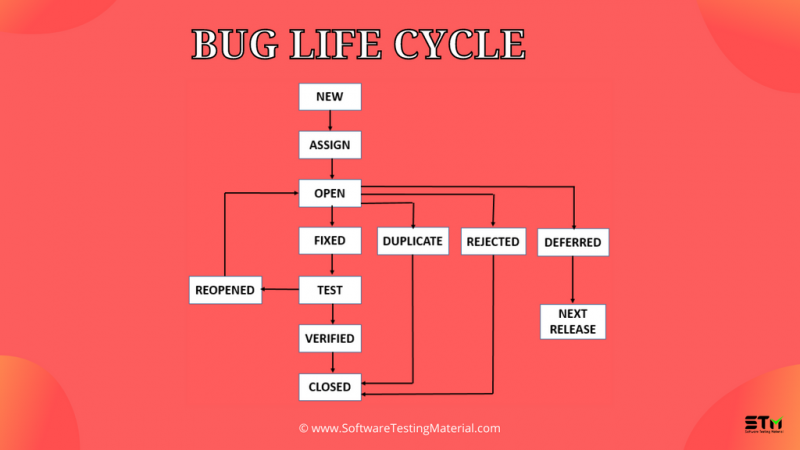
В этом посте мы расскажем вам все, что вам нужно знать о жизненном цикле ошибки (жизненный цикл дефекта). В предыдущем посте мы узнали, что такое тестирование программного обеспечения, жизненные циклы программного обеспечения, такие как SDLC и STLC.
Мы начнем с определения жизненного цикла ошибки и различных состояний жизни дефекта. cycle.
Определение жизненного цикла ошибки
Жизненный цикл ошибкитакже известен как жизненный цикл дефекта. В процессе разработки программного обеспечения ошибка имеет жизненный цикл. Ошибка должна пройти жизненный цикл, чтобы быть закрытой. Жизненный цикл ошибки зависит от используемых инструментов (КК, JIRA и т. д.) и процессов, которым следует организация.
Что такое программная ошибка?
Программная ошибка может быть определена как ненормальное поведение программного обеспечения. Ошибка начинается, когда дефект обнаружен, и заканчивается, когда дефект закрывается после проверки того, что он не воспроизводится.
Жизненный цикл дефекта — видеоруководство
Посмотрите видео ниже, чтобы увидеть подробное объяснение «Жизненный цикл ошибки / Жизненный цикл дефекта»
Пожалуйста, будьте терпеливы. Видео загрузится через некоторое время.
Если вам понравилось это видео, подпишитесь на наш канал YouTube, чтобы получать дополнительные видеоуроки.
Дефект Состояния жизненного цикла
Различные состояния ошибки в жизненном цикле ошибки программного обеспечения (sblc) следующие:
#1. Новый
Когда тестировщик находит новый дефект. Он должен предоставить надлежащий документ о дефекте команде разработчиков, чтобы воспроизвести и исправить дефект. В этом состоянии дефект, опубликованный тестировщиком, имеет статус «Новый»
#2. Назначено
Дефекты со статусом «Новый» будут одобрены (если допустимы) и переданы команде разработчиков руководителем тестирования/руководителем проекта/менеджером проекта. После назначения дефекта статус ошибки меняется на «Назначено»
#3. Открыть
Команда разработчиков начинает анализировать и работает над исправлением дефекта
#4. Исправлено
Когда разработчик вносит необходимые изменения в код и проверяет их, статус ошибки меняется на “Исправлено”, и ошибка передается группе тестирования.
#5. Тест
Если статус «Тест», это означает, что дефект исправлен и готов к тестированию независимо от того, исправлен он или нет.
#6. Проверено
Тестер повторно тестирует ошибку после того, как она была исправлена разработчиком. Если в программном обеспечении не обнаружена ошибка, то ошибка исправлена и присваивается статус «проверено».
#7. Закрыто
Если после проверки исправления ошибка больше не исчезает, ей будет присвоен статус «Закрыто».
#8. Повторно открыть
Если дефект остается прежним после повторного тестирования, то тестировщик регистрирует дефект с помощью документа о повторном тестировании дефекта и меняет статус на «Повторно открыть». Ошибка снова проходит жизненный цикл для исправления.
#9. Дубликат
Если дефект повторяется дважды или дефект соответствует одному и тому же понятию бага, команда разработчиков меняет статус на «дубликат».
#10. Отложено
В некоторых случаях менеджер проекта/руководитель может установить статус ошибки как отложенный.
- Если ошибка обнаружена в конце выпуска и ошибка незначительна или не важна, ее необходимо исправить немедленно.
- Если ошибка ошибка не связана с текущей сборкой.
- Если ожидается, что она будет исправлена в следующем выпуске.
- Клиент думает об изменении требования.
- В таких случаях статус будет изменен на «отложено ”, и это будет исправлено в следующем выпуске.
#11. Отклонено
Если система работает в соответствии со спецификациями, а ошибка вызвана неверным толкованием (например, ссылкой на старые требования или дополнительные функции), то руководитель группы или разработчики могут пометить такие ошибки как «Отклонено».
Некоторые другие статусы:
#12. Невозможно исправить
Технология не поддерживается, Корень проблемы с продуктом, Стоимость исправления ошибки выше
№ 13. Не воспроизводится
Несоответствие платформы, неправильный документ о дефекте, несоответствие данных, несоответствие сборки, несогласованные дефекты
#14. Требуется дополнительная информация
Если разработчик не может воспроизвести ошибку в соответствии с шагами, предоставленными тестировщиком, разработчик может изменить статус на «Требуется дополнительная информация». В этом случае тестировщику необходимо добавить подробные этапы воспроизведения и передать ошибки команде разработчиков для исправления. Этого не произойдет, если тестировщик напишет хороший документ о дефекте.
Заключение
Это все о жизненном цикле программной ошибки/жизненном цикле дефекта. Некоторые компании используют идентификаторы ошибок в RTM (матрице отслеживания требований) для сопоставления с тестовыми наборами.
Рекомендуемая литература:
- 8 типов тестовых наборов Подлежит автоматизации
- 8 типов тестовых случаев, которые нельзя автоматизировать
- Как написать хороший отчет об ошибке или документ о дефекте
- Процесс сортировки дефектов при тестировании программного обеспечения
- Результаты тестирования при тестировании программного обеспечения
- Что такое Атрибуты качества в архитектуре программного обеспечения
TAG: qa