ldapsearch выводит?
В локали :
ldapsearch -LLL -b 'dc=domain,dc=zn' -x -H 'ldap://localhost' '(objectClass=posixAccount)'В локали нет, ругается на
'Operation unable without authentification'но, вроде как одновременно samba в режиме DC и slapd на одной машине не могут работать
Если убиваю samba и запускаю slapd то отзывается (выводит ответ на запрос).
Если с удалённой машины, то:
ldapsearch -x -H ldaps://10.0.0.1 -D "cn=user,dc=domain,dc=zn" -w passwd
при запущенном samba — получаю сообщение:
ldap_bind: Invalid credintals (49)
Если slapd запущен — невозможно соединиться с сервером.
А запрос с клиента:
ldapsearch -xLLL -H ldaps://10.0.0.1:636 -D "cn=user,CN=Users,dc=domain,dc=zn" -W -b "dc=domain,dc=zn"
проходит
И вопрос: почему с ldap-браузера по портам 389 и 3268 подключение есть? Технически порты 389,3268 и что следует из обозначенного выше запроса порт 636 доступны, а thunderbird не хочет цепляться по 389 и 3268 и в то же время ldapsearch тоже не может их использовать? (говорит о необходимости авторизации, хотя пароль запрашивает и передает)? В softera ldap administrator, адрес подключения выглядит как
ldap://10.0.0.1:3268/DC=domain,DC=znполучается подключение не по ldaps, а по ldap. Это справедливо и для порта 3268 и для 389.
При подключении к серверу почтовым клиентом, посредством ldaps://dc.domain.zn:636 вылетает сообщение о том, что «Нет доступной информации. Не удалось получить информацию о подлинном статусе этого сайта.» при этом исключение не запрашивается. Самоподписанный сертификат на сервере есть.
Куда обращается thunderbird за сертификатом? Ldap-браузер подключаясь по ldaps:636 сертификат видит.
21.05.10 — 14:51
Сервак с MS Exchange. На клиенте — WinXP + Thunderbird 2.0.23. Как бы научить громоптицу видеть адресный каталог на сервере?
Гуглить умею 🙂 Все найденные варианты настройки адресной книги перепробовала, результат одинаков — репликация вылетает с ошибкой, поиск ничего не находит.
Сейчас настройки такие: http://imagebin.ca/view/HFKtJHP.html
фильтр поиска (objectclass=user)
Репликация начинается, но через пару секунд вылетает с ошибкой
1 — 21.05.10 — 15:07
попробуй изменить
имя пользователя = «ИМЯ_ДОМЕНАПользователь»
2 — 21.05.10 — 15:07
Для теста поставила TB 3.0.4, но снесла — с LDAP была та же проблема, а в остальном удобнее мне не показалась, да и С плагинами почти со всеми несовместима (а в 2.0 установлено все, что надо, для максимального удобства)
(1) меняла, ничего не дает
3 — 21.05.10 — 15:24
Пробовала так же в «имя пользователя» ставить «cn=имя_пользователя», не работает.
При смене айпи сервера на его имя в сети ошибка репликации полявлякется сразу же.
4 — 21.05.10 — 15:30
Ну и фильтр поиска по умолчанию (objectclass = *) тоже ничего не дает.
5 — 21.05.10 — 15:58
Дополнительный «бонус» — не сохраняет пароль на сервер с адресной книгой, при каждом запуске TB приходится вводить заново, хотя галка «Использовать менеджер паролей» стоит.
6 — 22.05.10 — 03:04
в тандебердея так и не разобрался, как правильно вести список адресов и группировать их по группам.
7 — 22.05.10 — 11:48
(6) да черт бы с ними с группами, мне б просто до адресной книги добраться =)
у одного из сотрудников внезапно тоже нашелся TB, настроенный на работу с MS Exchange, но что удивило — если у меня в свойствах ящика адрес выглядит как name@mycompany.ru, то у нее — name@postserver — 192.168.1.1, как-то так.
8 — 24.05.10 — 10:31
Проверка показала, что косяк у меня связан с Base DN, при некоторых настройках репликация начинается, в других — сразу выдает ошибку.
Проверены все найденные варианты, но загрузки так и нет.
9 — 24.05.10 — 11:06
В итоге удалось добиться успешного выполнения репликации адресной книги, но поиска по ней нет, при любых условиях «совпадений не найдено» О_о
Что-то я совсем запуталась О_о
10 — 24.05.10 — 11:13
BaseDN= dc=ldapserver,dc=ru
Port= 389
BindDN= cn=MyUser,cn=Users,dc=ldapserver,dc=ru // MyUser должен находится в Users
ОК. идем в поиск. набираем адрес. просит пароль. должно работать
11 — 24.05.10 — 11:21
(10) не-а =(
мистика какая-то.
Настройки, с которыми адресная книга загружается:
Base DN = OU=companyname, DC=companyname, DC=local
порт 3268
Bind DN = username@companyname.ru
с любыми другими — ошибка.
Поиск ни при каких настройках вообще не работает.
Sakura
12 — 24.05.10 — 12:00
В общем, проблема была решена исконно русским способом — через известное место.
Т.е. был настроен тот же ящик в Outlook Express, скопирована туда адресная книга, оттуда — импортирована в Thunderbird =)
Всем спасибо за участие =)
мой подход состоял в том, чтобы посмотреть на другой конец, сервер. Вы можете включить ведение журнала, сначала остановив демон slapd (sudo service slapd stop Если вы работаете в системе на основе Debian), то запустите демон из командной строки:sudo slapd -d stats, что выводит большое количество отладочной информации в stdout. (Как вариант sudo slapd -d BER сбросить пакеты, ref.)
используя этот подход, я понял, что Thunderbird даже не пытался соединиться с моим сервером OpenLDAP.
в моем кейс, проблема была с моими SSL сертификатами. Я настроил собственный центр сертификации для создания сертификатов, подписанных корневым сертификатом, который импортируется на клиентские компьютеры (в основном семейные).
две вещи (по крайней мере) имеют решающее значение:
-
импорт корневого ЦС (или сертификата сервера, если он самозаверяющий) в Thunderbird (Параметры — > Дополнительно — > сертификаты — > Просмотр сертификатов).
-
убедитесь, что вы правильно генерируется ваш сертификат. Например, я недавно поставил
basicConstraints = CA:TRUEна[ usr_cert ]раздел моего файла конфигурации OpenSSL, для того, чтобы иметь возможность импортировать сертификаты на Android устройства-после этого, Thunderbird больше не искал мои адреса… Повторное создание сертификатов с помощьюbasicConstraints = CA:FALSEсразу решило проблему!
надеюсь, это немного поможет.

Charles Malaheenee
Возникли проблемы при настройке Thunderbird на поиск адресов в адресной книге LDAP. В частности, при любой попытке поиска в оной постоянно вываливается ошибка о некорректном сертификате для сервера (дескать этот сертификат действителен только для такого-то компьютера). Добавляли в исключения сертификат от доменкотроллера (на который и настроена книга), однако продолжают сыпаться ошибки. Как побороть?
В качестве временного решения убрали галку «Использовать защищенное соединение», но хотелось бы прояснить ситуацию.
Ubuntu 10.04.2, Thunderbird 3.1.10, машина введена в домен Active Directory по хау-ту.
Пользователь решил продолжить мысль 29 Июня 2011, 04:49:40:
Никто не знает? Не верим! 
Пользователь решил продолжить мысль 30 Июня 2011, 06:19:18:
Нет, мы понимаем, что здесь собрались «кРуТые ОдмИны», которые жалким Thunderbirdom не занимаются, но все же кто-нибудь соизволит ответить? 
« Последнее редактирование: 30 Июня 2011, 06:19:18 от Malaheenee »
Все мы где-то, когда-то и в чем-то были новичками.

I have been using T-bird 26 for years, but needed to upgrade for some reason, so on one computer only (I have 3,) I went straight to V91. The other two are still using V26, and I don’t want to upgrade them till I get the bugs worked out of 91.
In the past I was able to share my eight address books across the computers by making a folder in My Documents called MyAddressBooks, then use Mega to synchronize the computers.
Then, I created some windows links to point the various .mab filenames in my T-bird profile to the sync’d files. (I had to make a separate link for each of my 8 address books. abook.mab, abook-1.mab, etc…)
This does not seem to work with V91. I created the links but V91 doesn’t recognize the new address books.
As a test, I created a new address book (in V91) then found 3 new files in my profile called abook-1.sqlite, abook-1.sqlite-shm, and abook-1.sqlite-wal.
So, a couple of questions…
1) Did the name of the address book change from a .mab file to several sqlite files?
2) Am I safe to upgrade the other 2 computers to V91, then create links to all the new file names? I guess there will be 24 links I need to create now. Eight wasn’t enough.
And some comments…
Why the hell was it necessary to go through all these hoops to simply share an address book across computers?
Why can’t I tell T-Bird where my address books are located, and why did they force me to place them in my profile folder?
What advantages does it serve to go from a .mab file to a .sqlite file? (I assume the reason for this was to use a different database manager for the address books? Seems to me the old one worked just fine.)
Why call them abook-1 and abook-2, not simply use the name the user call’s it when he creates it?
Thanks Mark.
I have been using T-bird 26 for years, but needed to upgrade for some reason, so on one computer only (I have 3,) I went straight to V91. The other two are still using V26, and I don’t want to upgrade them till I get the bugs worked out of 91.
In the past I was able to share my eight address books across the computers by making a folder in My Documents called MyAddressBooks, then use Mega to synchronize the computers.
Then, I created some windows links to point the various .mab filenames in my T-bird profile to the sync’d files. (I had to make a separate link for each of my 8 address books. abook.mab, abook-1.mab, etc…)
This does not seem to work with V91. I created the links but V91 doesn’t recognize the new address books.
As a test, I created a new address book (in V91) then found 3 new files in my profile called abook-1.sqlite, abook-1.sqlite-shm, and abook-1.sqlite-wal.
——
So, a couple of questions…
1) Did the name of the address book change from a .mab file to several sqlite files?
2) Am I safe to upgrade the other 2 computers to V91, then create links to all the new file names? I guess there will be 24 links I need to create now. Eight wasn’t enough.
——
And some comments…
Why the hell was it necessary to go through all these hoops to simply share an address book across computers?
Why can’t I tell T-Bird where my address books are located, and why did they force me to place them in my profile folder?
What advantages does it serve to go from a .mab file to a .sqlite file? (I assume the reason for this was to use a different database manager for the address books? Seems to me the old one worked just fine.)
Why call them abook-1 and abook-2, not simply use the name the user call’s it when he creates it?
Thanks Mark.
Выбранное решение
You can always run your own LDAP or CARDDav server on a local NAS and do your syncing to that.
More hardware and more asked of you to administer, but you don’t have to drink the cool aid. That part is your choice. But in the end, I find I am being forced to add contacts to address books in the cloud just to stop the providers marking mail as spam anyway.
With Thunderbird 91, the best is to use one of the oAuth providers like Google, GMX and yahoo and allow Thunderbird to detect the address book and set up the synchronization natively.
Прочитайте этот ответ в контексте
👍 0
Все ответы (6)
Oh, one last question, I upgraded because one of my email providers needed Oauth2 to access.
Upon research, it seems T-Bird added that feature around V60 or 70.
When did they change from .mab to sqlite?
Is there an older version I can download that use the old mab files, yet the new Oauth2 login?
Thanks, Mark.
1. Synced file system locations are not supported. They cause far more issues than they solve, including data duplication and loss.
2. The address book format changed with V78. when mozstorage was adopted to replace the mork file format as there are moves to fully remove all mork databases from the platform, along with XUL. mozstorage is based on sqlite.
3. Why not just use an ldif or carddav server implementation and share your address books that way, either by hosting your own instance or using one of the free providers like GMX or Google. The latest version (91) of Thunderbird can locate your address book with oauth providers and your calendars and simply ask you if you want to use them in Thunderbird.
4. Old versions as you have already noted simply do not work with newer implementations of things like oAuth, and despite it all having the same name, each provider keeps up a constant change. The Google oAuth implementation for instance has had to be patched multiple times in recent years and the outlook one is still a work in progress.
So to your questions.
2) Am I safe to upgrade the other 2 computers to V91, then create links to all the new file names? I guess there will be 24 links I need to create now. Eight wasn’t enough.
I suggest you rethink you synchronization process. it is not really supported and as you have found suddenly stops working because it is not a supported method of doing things.
Why the hell was it necessary to go through all these hoops to simply share an address book across computers?
It is not, I use my Google and GMX adress books from the web on each device including my phone.
Why can’t I tell T-Bird where my address books are located, and why did they force me to place them in my profile folder?
Personally I would like to see less allowable configuration of storage locations not more. But then I do support where people who know just enough to get into trouble go when they mess it up.
Your Thunderbird data belongs in your profile, not scatted in a collection of random locations that make locating what you have where difficult. The profile import and export is greatly complicated by these out of profile stores and anti virus program that might respect the Thunderbird profile do not do so when the data is elsewhere, so scanning results in locked files and data corruption. Lots of reason really, and none really for placing the address book outside the profile. Not when synchronization via the network is available.
What advantages does it serve to go from a .mab file to a .sqlite file? (I assume the reason for this was to use a different database manager for the address books? Seems to me the old one worked just fine.)
Well it was not just fine. The address book is in the process of a complete re write. The changes are far from over and as a decision was made to remove MORK, the MAB files had to go. MSF files are next I think
Why call them abook-1 and abook-2, not simply use the name the user call’s it when he creates it?
For one we don’t want you touching the files outside of the application, for another we inherited the convention from Netscape. That is how old this stuff that is being updated really is.
Hi Matt:
Thanks for the verbose response, and thanks for not taking offense at my obvious tone of frustration that probably should have been softened a bit.
I was going through these hoops because I don’t want my contacts stored on the cloud. As a company, I’m sure Google wants to be secure, but the people that work there are human and some of them may be willing to sell people’s stuff to bad actors to make a buck.
But, then I realized I have many of my contacts stored and synced on my phone anyway, so I figured if I am going to use a phone, I might as well just drink the cool-aid and go all in. Sigh.
So, I am going to start a new thread asking for better instructions to do this.
Thanks for your help, Mark.
Выбранное решение
You can always run your own LDAP or CARDDav server on a local NAS and do your syncing to that.
More hardware and more asked of you to administer, but you don’t have to drink the cool aid. That part is your choice. But in the end, I find I am being forced to add contacts to address books in the cloud just to stop the providers marking mail as spam anyway.
With Thunderbird 91, the best is to use one of the oAuth providers like Google, GMX and yahoo and allow Thunderbird to detect the address book and set up the synchronization natively.
Thanks, Matt:
I get the «add contacts to cloud book to stop the provider flagging as spam» thing. What a PITA, but whattayagonnado.
I have experimented with adding my Google contacts, (without TbSync) and I now have a new contacts list and it seems to be working.
Now that I have had that cookie, I want the glass of milk too.
I have 8 other lists (address books?) in T-bird, like «Friends», «Frequent», «Family», «Pests», and others. This makes finding my brother easier then searching through the entire list.
I know Google has «Labels» but they don’t seem to work like T-Bird folders.
Is there any way I can sub divide the Google list in T-Bird?
Ideally, I’d like to keep the format I am used to with separate lists, but I would be OK with sub folders in the google list.
I had the idea of keeping different accounts for the different lists, (friends in one Gmail account Family in another, pests in my Microsoft account, etc…) but that means telling my phone about all my accounts, and I’d rather not do that.
Thanks, Mark.
I limit my Google contacts, so am not experienced there with more than a bare minimum, but I think you might want to try out the card book add-on
https://addons.thunderbird.net/en-us/thunderbird/addon/cardbook/
If my failing memory servers, It managed to provide me with contacts by label from Google. But I have tried so many addons doing that stuff they all tend to be run together these days.
null
У многих на работе настроено централизованное хранение данных о сотрудниках и их контактах в хранилище с поддержкой протокола LDAP. В этой статье я покажу, как использовать его для поиска и подсказок при вводе адреса электронной почты в Thunderbird. Это невероятно удобно, ведь все адреса не упомнишь.
Открываем Thunderbird и переходим в меню Адресная книга — Правка — Настройки.
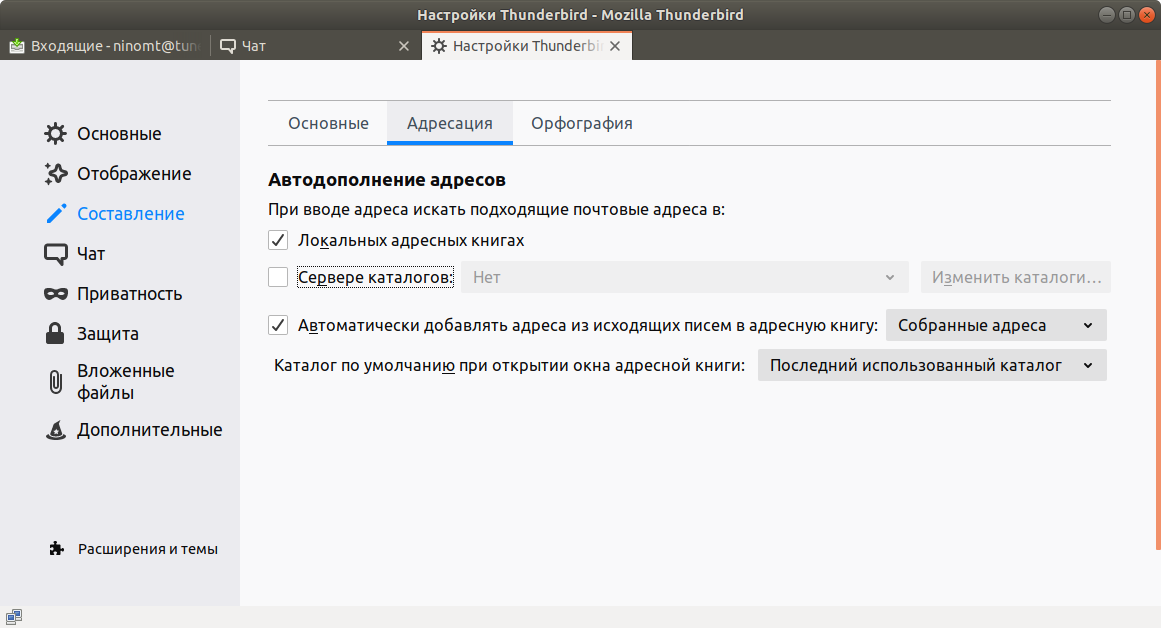
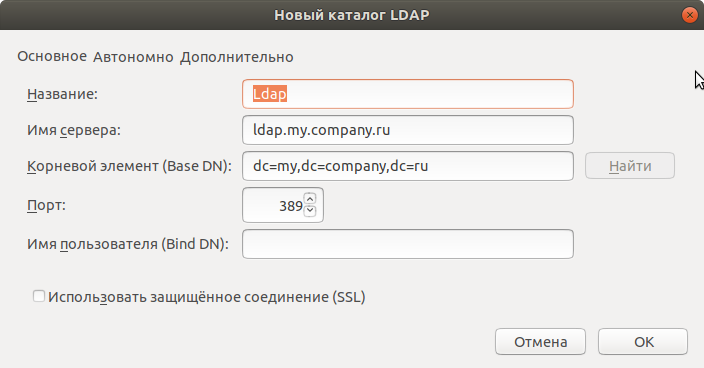
Ставим галочку возле сервера каталогов и нажимаем Изменить каталоги, затем выбираем пункт Добавить и вводим данные в зависимости от настроек своего LDAP сервера.
Выбираем созданный каталог.