Ситуация: мы пишем программу, которая будет работать как словарь. Нам нужно отсортировать по алфавиту не слова, а словосочетания. Например, если у нас есть термины «Большой Каньон (США)» и «Большой Взрыв (Вселенная)». Первые слова одинаковые, значит, порядок будет зависеть от вторых слов. Получается, что сначала должен идти «Большой Взрыв», а потом «Большой Каньон», потому что «В» идёт в алфавите раньше, чем «К».
Для этого мы пишем функцию, которая возвращает нам номер символа, стоящего сразу после пробела — whatNext(), а потом используем её, чтобы получить букву из строки:
def whatNext():
  # какой-то код, где переменная ind отвечает за номер символа
  return ind

# дальше идёт код нашей основной программы
# доходим до момента, когда нужно получить символ из строки phrase
# вызываем функцию и сохраняем то, что она вернула, в отдельную переменную
symbolIndex = whatNext()
# используем эту переменную, чтобы получить доступ к символу
symbol = phrase[symbolIndex]
Но после запуска компьютер выдаёт ошибку:
❌ TypeError: string indices must be integers
Что это значит: интерпретатор говорит нам, что обращаться к содержимому строку через индекс (порядковый номер символа в строке) можно только с помощью целых чисел.
Когда встречается: когда вместо целого числа интерпретатор видит не его, а что-то другое — символ, другую строку, дробное число, объект или что-то ещё. Это единственная причина, по которой возникает такая ошибка.
Что делать с ошибкой TypeError: string indices must be integers
Раз мы знаем единственную причину, то решение очевидное: нужно проверить, что именно мы отправляем в качестве индекса. Судя по всему, проблема в нашей функции whatNext(), которая возвращает не целое число, а что-то иное. Сейчас мы не знаем, что именно, потому что мы не знаем, как работает whatNext().
Можно предположить, что в функции whatNext() происходили какие-то вычисления, которые возвращали не целое, а дробное число. При этом само число могло быть целым (например, 12), просто его зачем-то приводили к десятичной дроби (12,00).
Другой вариант — функция возвращала не число, а строку с числом внутри, кортеж с одним числом, объект с числом. Для нас, людей, это всё ещё целое число, но для Python это другой тип данных.
Чтобы это исправить, нужно зайти внутрь функции и перепроверить, что она возвращает.
Вот пара примеров, которые могут возникнуть во время работы:
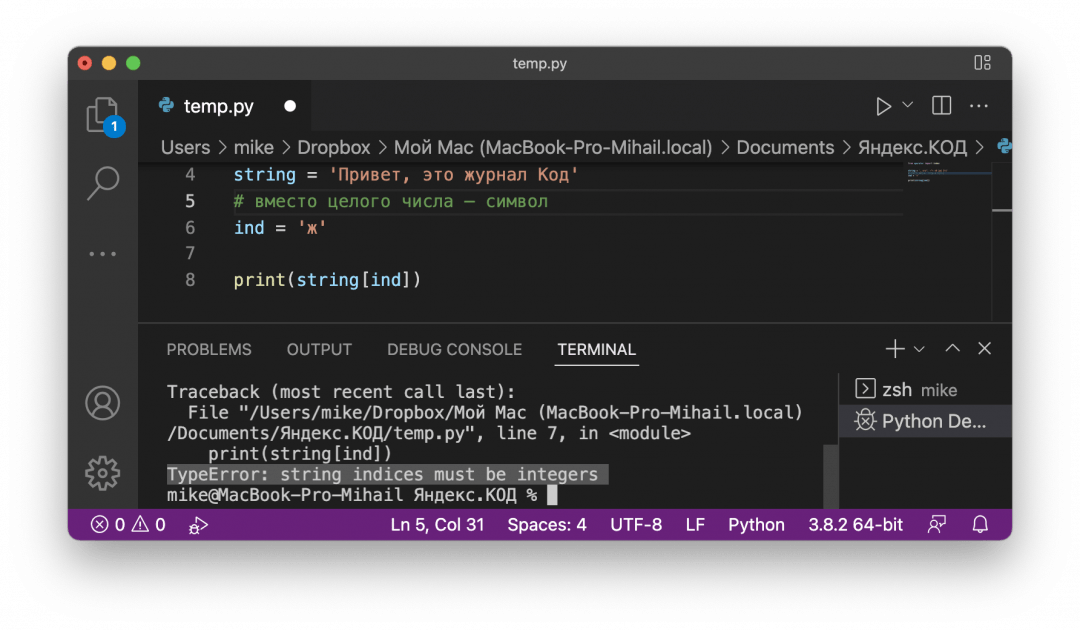
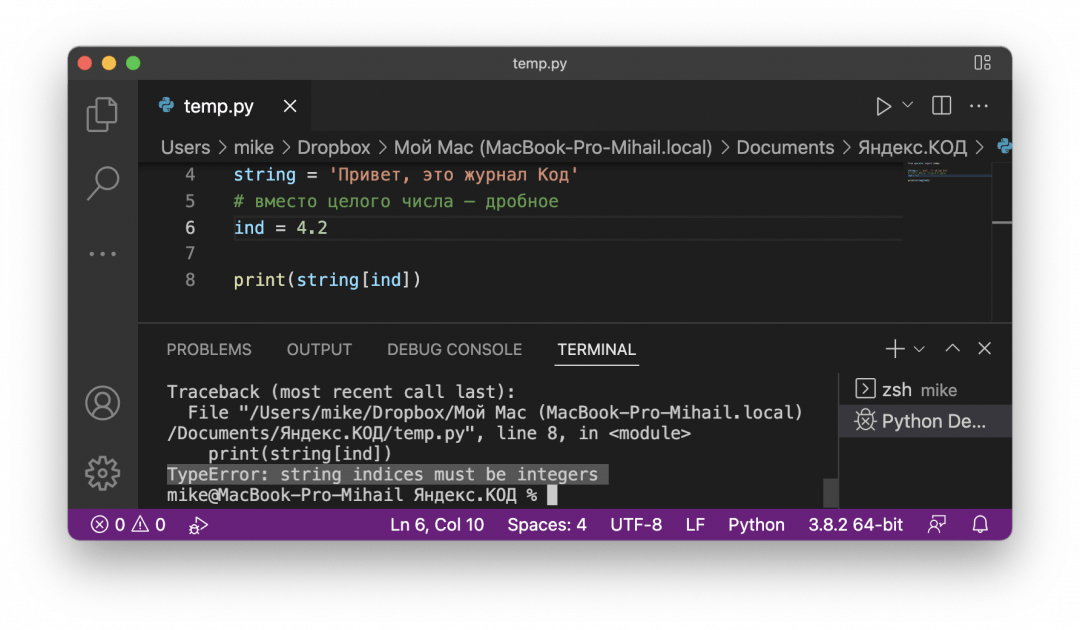
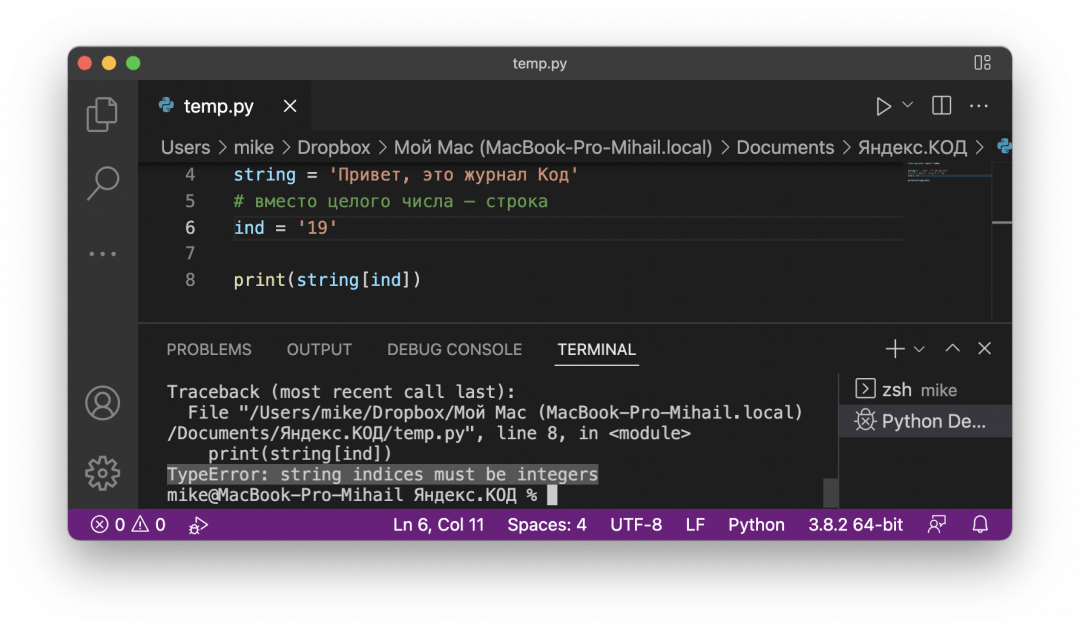
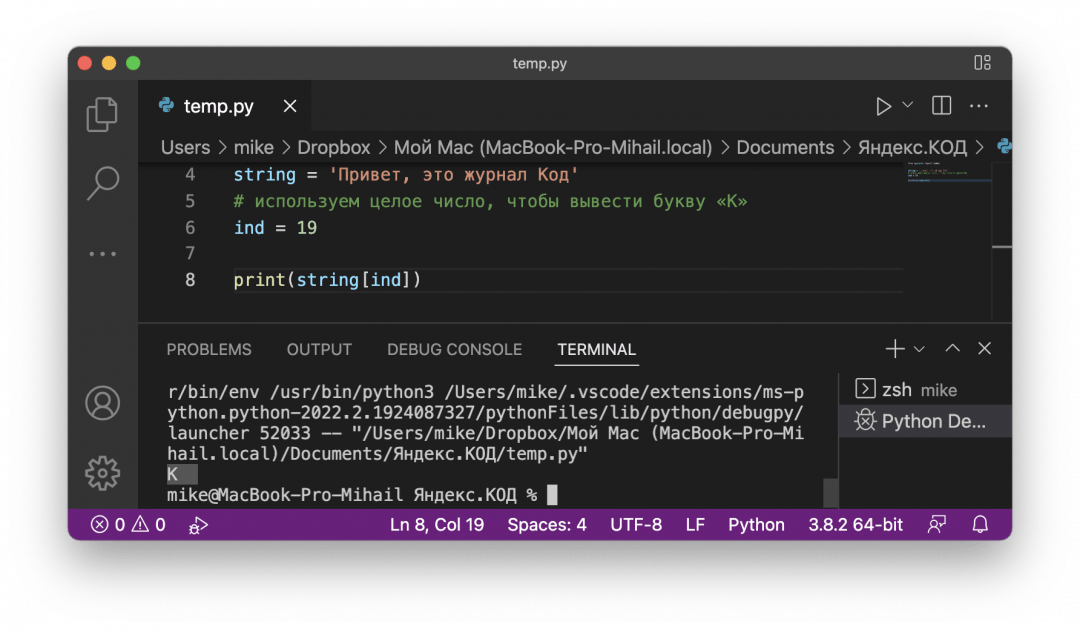
Но если поставить в индекс целое число — всё сработает, и мы получим символ, который стоит на этом месте в строке. На всякий случай напомним, что нумерация символов в Python идёт с нуля:
Вёрстка:
Кирилл Климентьев
Introduction
In python, we have discussed many concepts and conversions. In this tutorial, we will be discussing the concept of string indices must be integers. As we all know in python, iterable objects are accessed with the help of numeric values. If we try to access the iterable object using a string value, an error will be returned. This error will look like “TypeError: string indices must be integers.”
What are string indices?
Strings are the ordered sequences of character data. String indices are used to access the individual character from the string by directly using the numeric values. The string index starts with 0, i.e., the first character of the string is at 0 indexes and so on.
In python, when we see any iterable objects, these are indexed using numbers. If we try to access the iterable object with the help of a string, an error is returned. Error shows – “TypeError: string indices must be integers.”
All the characters which are present in the strings have their unique index. The index is used to specify the position of each character of the string. But all the indexes must be integers as we cannot remember the position with the help of a character, float value, etc.
Before moving further, I want to let you know that If you are coding in Python for a while, you might get many typeerrors every other day. To solve these errors, you can read our in-depth guide of the following typeerrors:
- How to Solve TypeError: ‘int’ object is not Subscriptable
- Invalid literal for int() with base 10 | Error and Resolution
- [Solved] TypeError: Only Size-1 Arrays Can Be Converted To Python Scalars Error
- How to solve Type error: a byte-like object is required not ‘str’
Examples showing the error String indices must be integer
Here, we will be discussing all the examples which will show you the error in your program as String indices must be an integer:
1. Taking indices as string
In this example, we will be taking an input string as str. Then, we will try to access the particular index of the string with the help of the string as the index. And then, see the output. Let us look at the example for understanding the concept in detail.
#input string
str = "Pythonpool"

p = str["p"]
print(p)
Output:

Explanation:
- Firstly, we have taken an input string as str.
- str = “Pythonpool”.
- Then, we have taken a variable p in which we have passed the index value as a character in the range of the string.
- The range of index of string starts from 0 and ends at the length of string- 1.
- At last, we have printed the output.
- Hence, you can see the “TypeError: string indices must be integers” which means you cannot access the string index with the help of character.
2. Taking indices as a float value
In this example, we will take an input string as str. And then, try to access the string with the help of float value as their index. Then, we will see the output. Let us look at the example for understanding the concept in detail.
#input string
str = "Pythonpool"

p = str[1.2]
print(p)
Output:

Explanation:
- Firstly, we have taken an input string as str.
- str = “Pythonpool”.
- Then, we have taken a variable p in which we have passed the index value as the float in the range of the string.
- The range of index of string starts from 0 and ends at the length of string- 1.
- At last, we have printed the output.
- Hence, you can see the “TypeError: string indices must be integers,” which means you cannot access the string index with the help of character.
3. string indices must be integers while parsing JSON using Python
In this example, we will see that while we are parsing on JSON, string indices must be integers. Let us look at the example for understanding the concept in detail.
import json
input_string = '{"coord": {"lon": 4.49, "lat": 50.73}, "weather": [{"id": 800, "main": "Clear", "description": "clear sky", "icon": "01d"}], "base": "stations", "main": {"temp": 26.96, "feels_like": 23.13, "temp_min": 26.11, "temp_max": 27.78, "pressure": 1016, "humidity": 26}, "visibility": 10000, "clouds": {"all": 0}, "dt": 1596629272, "timezone": 7200, "id": 2793548, "name": "La Hulpe", "cod": 200}'
data = json.loads(input_string)
for i in data['weather']:
    print(i['main'])
for j in data['main']:
    print(j['temp'])
Output:

Solution for String indices must be integers Error
The only solution for this type of error: “String indices must be integers” is to pass the index value as the integer value. As the iterable object can only be accessed with the help of the integer value. Let us look at the example for understanding the concept in detail.
#input string
str = "Pythonpool"

p = str[5]
print("output : ",p)
Output:

Explanation:
- Firstly, we have taken an input string as str.
- Str = Pythonpool.
- Then, we have taken a variable p in which we have passed the index value as an integer in the range of the string.
- The range of index of string starts from 0 and ends at the length of string- 1.
- At last, we have printed the output.
- Hence, you can see the output as ‘n’ as the 5th character of the string is ‘n.’
Conclusion
In this tutorial, we have learned about the concept of “TypeError: string indices must be integers.” We have seen what string indices are? Also, we have seen why string indices should be integers. We have explained this type of error with the help of all the examples and given the solution code for the error. All the examples are explained in detail with the help of examples. You can use any of the functions according to your choice and your requirement in the program.
However, if you have any doubts or questions, do let me know in the comment section below. I will try to help you as soon as possible.

In Python, there are certain iterable objects – lists, tuples, and strings – whose items or characters can be accessed using their index numbers.
For example, to access the first character in a string, you’d do something like this:
greet = "Hello World!"

print(greet[0])
# H
To access the value of the first character in the greet string above, we used its index number: greet[0].
But there are cases where you’ll get an error that says, «TypeError: string indices must be integers» when trying to access a character in a string.
In this article, you’ll see why this error occurs and how to fix it.
There are two common reasons why the «TypeError: string indices must be integers» error might be raised.
We’ll talk about these reasons and their solutions in two different sub-sections.
How to Fix the TypeError: string indices must be integers Error in Strings in Python
As we saw in last section, to access a character in a string, you use the character’s index.
We get the «TypeError: string indices must be integers» error when we try to access a character using its string value rather the index number.
Here’s an example to help you understand:
greet = "Hello World!"

print(greet["H"])
# TypeError: string indices must be integers
As you can see in the code above, we got an error saying TypeError: string indices must be integers.
This happened because we tried to access H using its value («H») instead of its index number.
That is, greet["H"] instead of greet[0]. That’s exactly how to fix it.
The solution to this is pretty simple:
- Never use strings to access items/characters when working with iterable objects that require you to use index numbers (integers) when accessing items/characters.
How to Fix the TypeError: string indices must be integers Error When Slicing a String in Python
When you slice a string in Python, a range of characters from the string is returned based on given parameters (start and end parameters).
Here’s an example:
greet = "Hello World!"

print(greet[0:6])
# Hello
In the code above, we provided two parameters – 0 and 6. This returns all the characters within index 0 and index 6.
We get the «TypeError: string indices must be integers» error when we use the slice syntax incorrectly.
Here’s an example to demonstrate that:
greet = "Hello World!"

print(greet[0,6])
# TypeError: string indices must be integers
The error in the code is very easy to miss because we used integers – but we still get an error. In cases like this, the error message may appear misleading.
We’re getting this error because we used the wrong syntax. In our example, we used a comma when separating the start and end parameters: [0,6]. This is why we got an error.
To fix this, you can change the comma to a colon.
When slicing strings in Python, you’re required to separate the start and end parameters using a colon – [0:6].
Summary
In this article, we talked about the «TypeError: string indices must be integers» error in Python.
This error happens when working with Python strings for two main reasons – using a string instead of an index number (integer) when accessing a character in a string, and using the wrong syntax when slicing strings in Python.
We saw examples that raised this error in two sub-sections and learned how to fix them.
Happy coding!
Learn to code for free. freeCodeCamp’s open source curriculum has helped more than 40,000 people get jobs as developers. Get started
На чтение 4 мин Просмотров 14.6к. Опубликовано 30.04.2021
В этой статье мы рассмотрим из-за чего возникает ошибка TypeError: String Indices Must be Integers и как ее исправить в Python.
Содержание
- Введение
- Что такое строковые индексы?
- Индексы строки должны быть целыми числами
- Примеры, демонстрирующие ошибку
- Использование индексов в виде строки
- Использование индексов в виде числа с плавающей запятой
- Решение для строковых индексов
- Заключение
Введение
В Python мы уже обсудили множество концепций и преобразований. В этом руководстве обсудим концепцию строковых индексов, которые должны быть всегда целыми числами. Как знаем в Python, доступ к итеративным объектам осуществляется с помощью числовых значений. Если мы попытаемся получить доступ к итерируемому объекту, используя строковое значение, будет возвращена ошибка. Эта ошибка будет выглядеть как TypeError: String Indices Must be Integers.
Что такое строковые индексы?
Строки — это упорядоченные последовательности символьных данных. Строковые индексы используются для доступа к отдельному символу из строки путем непосредственного использования числовых значений. Индекс строки начинается с 0, то есть первый символ строки имеет индекс 0 и так далее.
Индексы строки должны быть целыми числами
В python, когда мы видим какие-либо итерируемые объекты, они индексируются с помощью чисел. Если мы попытаемся получить доступ к итерируемому объекту с помощью строки, возвращается ошибка. Сообщение об ошибке — «TypeError: строковые индексы должны быть целыми числами».
Все символы, присутствующие в строках, имеют свой уникальный индекс. Индекс используется для указания позиции каждого символа в строке. Но все индексы должны быть целыми числами, поскольку мы не можем запомнить позицию с помощью символа, значения с плавающей запятой и так далее.
Примеры, демонстрирующие ошибку
Здесь мы обсудим все примеры, которые покажут вам ошибку в вашей программе, поскольку строковые индексы должны быть целыми числами:
Использование индексов в виде строки
В этом примере будем использовать строку в переменной line. Затем мы попытаемся получить доступ к конкретному индексу строки с помощью строкового символа в качестве индекса, а затем посмотрим результат.
Давайте посмотрим на пример для детального понимания концепции.
line = "Тестовая строка"

string = line["е"]
print(string)
Вывод программы:
Traceback (most recent call last):
  File "D:ProjectTESTp.py", line 3, in <module>
    string = line["е"]
TypeError: string indices must be integers
Объяснение:
- Мы использовали входную строку в переменной line
- Затем мы взяли переменную string, в которую мы передали значение индекса в виде строкового символа.
- Наконец, мы распечатали результат.
- Следовательно, вы можете увидеть ошибку TypeError: String Indices Must be Integers, что означает, что вы не можете получить доступ к строковому индексу с помощью символа.
Использование индексов в виде числа с плавающей запятой
В этом примере мы возьмем входную строку. А затем попробуйте получить доступ к строке с помощью значения с плавающей запятой в качестве их индекса. Затем мы увидим результат.
Давайте посмотрим на пример для детального понимания концепции.
line = "Тестовая строка"

string = line[1.6]
print(string)
Вывод программы:
Traceback (most recent call last):
  File "D:ProjectTESTp.py", line 3, in <module>
    string = line[1.6]
TypeError: string indices must be integers
Объяснение:
- Во-первых, мы взяли входную строку.
- Затем мы взяли переменную string, в которую мы передали значение индекса как число с плавающей запятой в диапазоне строки.
- Наконец, мы распечатали результат.
- Следовательно, вы можете увидеть «TypeError: строковые индексы должны быть целыми числами», что означает, что вы не можете получить доступ к строковому индексу с помощью числа с плавающей запятой
Решение для строковых индексов
Единственное решение для этого типа ошибки: «Строковые индексы должны быть целыми числами» — это передать значение индекса как целочисленное значение. Поскольку доступ к итерируемому объекту можно получить только с помощью целочисленного значения. Давайте посмотрим на пример для детального понимания концепции.
line = "Тестовая строка"

string = line[3]
print(string)
Вывод программы:
Объяснение:
- Во-первых, мы взяли входную строку.
- Затем мы взяли переменную, в которую мы передали значение индекса как целое число в диапазоне строки.
- Наконец, мы распечатали результат.
- Следовательно, вы можете увидеть вывод буквы «т», поскольку 3-й символ строки — «т».
Заключение
В этом руководстве мы узнали о концепции «TypeError: строковые индексы должны быть целыми числами». Мы видели, что такое строковые индексы? Также мы увидели, почему строковые индексы должны быть целыми числами. Мы объяснили этот тип ошибки с помощью всех примеров и дали код решения для ошибки. Все ошибки подробно объясняются с помощью примеров. Вы можете использовать любую из функций по вашему выбору и вашим требованиям в программе.
Однако, если у вас есть какие-либо сомнения или вопросы, дайте мне знать в разделе комментариев ниже. Я постараюсь помочь вам как можно скорее.
Posted by Marta on May 2, 2021 Viewed 13761 times

In this article, I will explain the main reason why you will face the TypeError: string indices must be integers error in Python along with a few different examples. I think it is essential to understand why this error occurs, since the better you understand the error, the better your ability to avoid it.
This tutorial contains some code examples and possible ways to fix the error.
String Indices must be Integers
A String in Python is a sequence of characters. Each of this character can be accessed using its index position. Using anything else but an integer to index a string will raise a String Indices must be Integers error . For example:
variable1 = "Hello Code Club"

print(variable1[0]) #Correct

print(variable1['Hello'] # ERROR
Output:
H

Traceback (most recent call last):
  File  line 5, in <module>
    print(variable1['Hello'])  # Error
TypeError: string indices must be integers
Check out line 5. A String should be indexed using an integer, but instead, the code in line 5 is indexing using not an integer but a string. Python doesn’t know how to execute this statement, and therefore it throws an error because it can continue with the execution.
In most cases you will face this problem because you assume that a given variable is a dictionary, but it is a String.
This error is very common because Python is not a strongly type language, in other words, variables don’t have a fixed type associated to them.
Dictionary Example
This error looks straightforward; however, when we are working with dictionaries, it might not be as obvious. Let’s see a code snippet that will raise our error:
variable1 = {
    'name': "Luke",
    'age': 347
}

for item in variable1:
    print(item['name'])
Output:
Traceback (most recent call last):
  File line 7, in <module>
    print(item['name'])
TypeError: string indices must be integers
This code snippet aims to print out all values inside the dictionary. Why is it raising an error? The item variable in line 7 is a String, not a dictionary.
To understand this, it is essential to point out when using a dictionary in a for loop, by default, the code will loop over the dictionary keys, not over the values. See the example below:
variable1 = {
    'name': "Luke",
    'age': 347
}
for item in variable1:
    print(item)
Output:
To loop over the values, we need to called the method .values():
variable1 = { 'name': "Luke", 'age': 347}

for item in variable1.values():
    print(item)
Output:
Working with Json Example
Another example where the “TypeError: string indices must be integers” error occur is when working with JSON. Let’s imagine that we have a file containing employees information, all saved in JSON format in a file. And we want to write a piece of code that returns the numbers of employees over 30. See below the code snippet:
employees.json
{"employees":
  [
    { "name": "Luke", "age": 21},
    { "name": "Marta", "age": 32},
    { "name": "Mike", "age": 45},
    { "name": "Jane", "age": 22}
  ]
}
import json

f=open('employees.json')
data = json.load(f)
f.close()

employee_above_30s = 0
for employee in data:
    if employee["age"]>30:
        employee_above_30s+=1

print(employee_above_30s)
After running the above code, we get an error. Why? The problem is in line 9. We are assuming the employee variable is a dictionary but it’s actually a string that contains the value “employees”, which is .
Therefore the solution is avoiding trying to access a field on a String, and use the dictionary instead. The easiest way to fix the above code snippet is replacing line 8 by for employee in data['employees'], as below:
employee_above_30s = 0
for employee in data['employees']:
    if employee["age"]>30:
        employee_above_30s+=1
The employee is now a dictionary instead of a String.
Knowledge Quiz
Here is a chance to check how much you learned. See below a few quiz questions that will help you to confirm and reinforce your understanding. Find the solutions at the bottom of this article:
- What would this program output?
variable = "Hello"
print(variable["1"])
A) H
B) e
C) string indices must be integers error
Conclusion
To summarise, we have seen a few scenarios where you could face the “TypeError: string indices must be integers” error and how you can fix it by making sure you only use string indices on dictionaries.
I hope you enjoy this article, and understand this issue better to avoid it when you are programming.
Thank you so much for reading and supporting this blog!
Happy Coding!
Solution
1.C
More Interesting Articles


In Python, iterable objects are indexed using numbers. When you try to access an iterable object using a string value, an error will be returned. This error will look something like “TypeError: string indices must be integers”.
In this guide, we’re going to discuss what this error means and why it is raised. We’ll walk through an example code snippet with this error and a solution to help you gain further context into how you can solve this type of error.

Find Your Bootcamp Match
- Career Karma matches you with top tech bootcamps
- Access exclusive scholarships and prep courses
Select your interest
First name
Last name
Phone number
By continuing you agree to our Terms of Service and Privacy Policy, and you consent to receive offers and opportunities from Career Karma by telephone, text message, and email.
Let’s get started!
The Problem: typeerror: string indices must be integers
We have a TypeError on our hands. That means that we’re trying to perform an operation on a value whose type is not compatible with that operation. Let’s look at our error message:
typeerror: string indices must be integers
Like many Python error messages, this one tells us exactly what mistake we have made. This error indicates that we are trying to access a value from an iterable using a string index rather than an integer index.
Iterables, like strings and dictionaries, are indexed starting from the number 0. Consider the following list:
keyboard = ["Apex Pro", "Apple Magic Keyboard"];
This is a list of strings. To access the first item in this list, we need to reference it by its index value:
This will return a keyboard name: “Apex Pro”. We could not access this list item using a string. Otherwise, an error would be returned.
An Example Scenario
Let’s create a dictionary called “steel_series” which contains information on a keyboard:
steel_series = {
	"name": "Apex Pro",
	"manufacturer": "SteelSeries",
	"oled_display": True
}
We’re going to iterate over all the values in this dictionary and print them to the console.
for k in steel_series:
	print("Name: " + k["name"])
	print("Manufacturer: " + k["manufacturer"])
	print("OLED Display: " + str(k["oled_display"]))
This code uses a for loop to iterate through every item in our “keyboard” object. Now, let’s try to run our code and see what happens:
Traceback (most recent call last):
  File "main.py", line 8, in <module>
	print("Name: " + k["name"])
TypeError: string indices must be integers
An error is present, as we expected. This error has been caused because we are trying to access values from our dictionary using string indices instead of integers.
The Solution
The problem in our code is that we’re iterating over each key in the “steel_series” dictionary.
The value of “k” is always a key in the dictionary. It’s not a record in our dictionary. Let’s try to print out “k” in our dictionary:
for k in steel_series:
	print(k)
Our code returns:
name
manufacturer
oled_display
We cannot use “k” to access values in our dictionary. k[“name”] is equal to the value of “name” inside “k”, which is “name”. This does not make sense to Python. You cannot access a value in a string using another string.
To solve this problem, we should reference our dictionary instead of “k”. We can access items in our dictionary using a string. This is because dictionary keys can be strings.
We don’t need to use a for loop to print out each value:
print("Name: " + steel_series["name"])
print("Manufacturer: " + steel_series["manufacturer"])
print("OLED Display: " + str(steel_series["oled_display"]))
Let’s run our new code:
Name: Apex Pro
Manufacturer: SteelSeries
OLED Display: True
Our code successfully prints out each value in our list. This is because we’re no longer trying to access our dictionary using the string value in an iterator (“k”).
Conclusion
String indices must be integers. This means that when you’re accessing an iterable object like a string, you must do it using a numerical value. If you are accessing items from a dictionary, make sure that you are accessing the dictionary itself and not a key in the dictionary.
Now you’re ready to solve the Python typeerror: string indices must be integers error like a pro!
This article will cover the core reasons for the TypeError: string indices must be integers mistakes in Python and a few instances. We believe that understanding why this error arises is critical because the better you understand the issue, the better you will avoid it.
Iterable objects are accessed in Python by using numeric values. An error will be thrown if we try to access the iterable object with a string value. “TypeError: string indices must be integers,” says the error message.
An Iterable is a set of elements that may be retrieved in a specific order. Numbers are used to index iterable objects in Python. An error will be thrown if you try to access an iterable object using a string or a float as the index.
Each character in a string has its index. The latter indicates the position of each character in the string. An attempt to access a position within a string using an index that is not an integer result in a TypeError: string indices must be integers. For example, for the indexes in str[“me”] and str[2.1], a TypeError exception is thrown since these aren’t integers. It means that you must use an integer value when accessing an iterable object like a string or float value.
What are string indices, and how do you use them?
Strings are character data that are arranged in a specific order. By directly using numeric values, string indices are used to access individual characters from a string. The string indexes begin with 0, indicating that the first character in the string is at index 0 and so on.
Integers are required for string indices
When we view iterable objects in Python, they are indexed with numbers. An error is given if we try to access the iterable object with the help of a string. “TypeError: string indices must be integers,” says the error message.
All of the characters in the strings have their unique index. The index specifies where each character in the string is located. However, all of the indexes must be integers because we can’t remember the position using a character, float value, or anything else.
This tutorial includes several code samples as well as possible solutions to the problem.
Using the float value of indices
We’ll use input_string to represent an input string in this example. Then, using the float value as their index, try to read the string. After that, we’ll look at the results. Finally, let’s look at an example to comprehend the notion better.
#input string
input_string = "codeunderscored"

p = input_string[1.5]
print(p)

To begin, we’ve set input_string = “codeunderscored” as an input string.
Then we created a variable p, into which we passed the index value as a float in the string’s range.
The index range of a string starts at 0 and ends at the length of the string, which is len(input_string -1).
Finally, the result has been printed.
As a result, you’ll notice “TypeError: string indices must be integers,” indicating you can’t use the character to access the string index.
The solution for the above-discussed code is as follows.
input_string = "codeunderscored"

p = input_string[1]
print(p)

Convert string indices to Integers
In Python, a String is a collection of characters. The index position of each character can be used to access it. Using anything other than an integer to index a string will result in an error. Error: String Indices Must Be Integers Consider the following scenario:
variable_holder = "codeunderscored solution"

print(variable_holder['solution']) # do not try this

print(variable_holder[1]) # how to go about it

Look at line 1. A string should be indexed with an integer but the code in line 1 above indexes with a string rather than an integer. Because Python doesn’t know how to execute this statement, it throws an error rather than proceeding with the execution.
You’ll run into this issue in most circumstances because you presume a variable is a dictionary when it’s a String.
Because Python is not a highly typed language, variables do not have a fixed type associated with them; this issue is relatively prevalent.
Example of a Dictionary
This issue appears to be simple, yet it may not be that evident when working with dictionaries.
Let’s look at some code that will cause our error:
students_dict = {
    'year': "2020",
    'name': "tom",
    'age': 18
}

for item in students_dict:
    print(item['age'])

The goal of this code snippet is to print out all of the values in the dictionary. So what is the reason for the error? In line 2, the age variable is a String, not a dictionary.
Because you are attempting to access values from a dictionary using string indices rather than integers, TypeError: string indices must be integers has occurred.
If you’re looking for anything in a dictionary, make sure you’re looking for the dictionary itself, not a key in the dictionary. In the dictionary, the value of the item is always a key. It’s not a word that exists in the dictionary. Let’s see how we can use the item in a dictionary example:
students_dict = {
    'year': "2020",
    'name': "tom",
    'age': 18
}

for item in students_dict:
    print(item)

The method must be called to loop over the method.values() as follows.
students_dict = {
    'year': "2020",
    'name': "tom",
    'age': 18
}

for item in students_dict.values():
    print(item)

To grasp this, it’s important to note that when utilizing a dictionary in a for loop, the code will loop over the dictionary keys rather than the values by default.
Using Json as an Example
When working with JSON, the “TypeError: string indices must be integers” problem can also occur. For instance, assume we have a file containing students’ information, all saved in JSON format. Also, we’d like to build some code that returns the total number of employees over 15. The following is a sample of code:
# students.json
{"students_json":
  [
    { "academic_year": "3", "name": "Tom Ann", "age": 14},
    { "academic_year": "1", "name": "Samwel Brown", "age": 18},
    { "academic_year": "4", "name": "Keen Moses", "age": 12},
    { "academic_year": "2", "name": "Jane Smith", "age": 16
  ]
}
import json

f=open('students.json')
data = json.load(f)
f.close()

students_above_15s = 0
for students_json in data:
    if students_json["age"]>15:
        student_above_15s+=1

print( student_above_15s)

We get an error after running the code above. Why? Line 9 is the source of the issue. We think the students variable is a dictionary, but it’s a string with the value “students”.
As a result, the approach is to avoid trying to access a field on a String. And instead, use the dictionary. To correct the following code snippet, replace line 8 with for employee in data[‘students’], as seen below:
import json

f=open('students.json')
data = json.load(f)
f.close()

students_above_15s = 0
for student in data['students_json']:
    if student["age"]>15:
        students_above_15s+=1

print(students_above_15s)

Slice Notation string[x:y]
Python offers slice notation for every sequential data type, such as lists, strings, tuples, bytes, bytearrays, and ranges. However, while using slice notation on strings, a TypeError: string indices must be integers error can occur, indicating that the indices must be integers, even though they are apparent. Let’s consider the following example.
str = "Codeunderscored testing slice notation!"
str[0,4]

Python will evaluate something like a tuple with just a comma “,”. To correctly separate the two integers, you must replace the comma “,” with a colon “:”
str = "Codeunderscored testing slice notation!"
str[0:8]

Conclusion
To summarize, we’ve looked at a few circumstances in which you might encounter the “TypeError: string indices must be integers” error, as well as how to avoid it by only using integer indices.
This error message, like many others in Python, shows us exactly what we’ve done wrong. This error occurs when a value from an iterable is accessed using a string index rather than an integer index.
Iterables, such as strings and dictionaries, are indexed from 0 to 1.
Integers must be used for string indices. It means that you must use a number value when accessing an iterable object like a string. If you’re looking for anything in a dictionary, make sure you’re looking for the dictionary itself, not a key in the dictionary.
We hope you enjoyed this post and have a better understanding of this problem so you can avoid it when developing.