Overview
Microsoft SQL Server is Relational Database Management System (RDBMS). The primary function of this software product is storing and retrieving data as per request of other software applications installed on the same or other computers across a network (including the Internet). Just like other computer applications, SQL Server also incorporates some error messages with it. In this technical paper, we are going to discuss some common SQL Server errors and the techniques to resolve them easily. So, let us get started!
SQL Server Error 3313
Description: ‘Could not redo log record’ error occurs in SQL Server while redoing of a logged operation in database ‘%. This error occurs at log record ID %S_LSN. The particular failure is previously logged as the error in the Windows Event Log Service. This error places the database into a SUSPECT state. Error 3313 in SQL Server requires to restore the database from full backup or repair the entire database.
Note: The database cannot be recovered during the startup of SQL Server.
Resolution: Below are some solutions to Microsoft SQL Server error 3313.
Technique 1: Run Hardware Diagnostics
First, run the hardware diagnostics to correct all issue. Also, examine that the Microsoft Windows NT system, application log, and SQL Server log to find out the cause of hardware failure.
If there is persistent data inconsistency problems then, try to swap out various hardware components to isolate the issue. Make sure that write caching is not enabled on disk controller of your system. If you suspect that, this is the problem then, contact the hardware vendor.
Eventually, you may find it beneficial to switch to a new hardware system, including reformatting disk drives and re-installing the OS.
Technique 2: Restore from Backup
If the issue is not related to hardware and a complete backup is available then, restore the database from recent backup.
Technique 3: Run DBCC CHECKDB Command
If the backup is not available then, execute DBCC CHECKDB command without the repair clause to recognize the level of corruption. DBCC CHECKDB command is recommended to repair the corrupted database.
SQL Server Error 3314
Description: It is a rollup error to undo the recovery process. It occurs while undoing a logged operation in database ‘%. It occurs in log record ID %S_LSN. It places the database into the SUSPECT state. The primary and other filegroups are suspect and might be damaged. One can recover the database or file from the backup or can repair the database.
Resolution: First workaround to fix SQL Server error 3314 is restore the database from backup. The server is recommended to use the current backup file to restore the SUSPECT database. However, if the backup is not available then, go to the following solution:
- Execute DBCC CHECDB command as an emergency repairing technique. For this run the below mentioned command:
ALTER DATABASE SET EMERGENCYAfter setting the database to emergency mode, try to copy or move whole data (as much possible) to another database.
SQL Server Error 3414
‘SQL Server service not starting: Error Code 3414’ is an error message that occurs while logging in or start-up time when the automatic recovery of SQL database is not completed properly. This error is stated as follows:
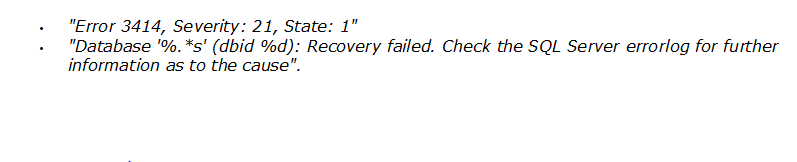
Note:The description of error 3414 can be found in the Event Log or ERRORLOG entry of SQL Server, while the database attempts recovery procedure and fails to do the same.
If SQL Server finds it hard to recuperate the scheduled database from a suspicious condition the error 3414 occurs. If the database recovery from SQL error 3414 becomes failed, this will update ‘sys.databases.state_desc’ and ‘SQL Server Management Studio’ both column status as a SUSPECT.
Resolution: The error message 3414 provides two choices:
- “Restore from a recent good backup”
- “Diagnose the recovery error and fix them”
Yet, to fix the issue, the alternative to restore from complete backup is good in some cases but if it is not possible; try the following alternatives:
- Utilize the Database Console Commands, rather ’emergency repair’ procedure provided by DBCC CHECKDB
- Copy the healthy or recoverable data to another database
Note: Via above-mentioned technique, the operational consistency is not guaranteed.
Quick Tip: SQL Error 3313, 3314 and 3414 make database in Suspect Mode and you will not be able to access your database. To resolve these error quickly, you can use SQL Recovery Software for easy repairing of your database.
Summing It Up
In this article, we have discussed some easy techniques for troubleshooting error 3313, 3314, 3414 in SQL Server. It is recommended to execute the guidelines sequentially and carefully to avoid any kind of data loss condition or you can opt for a quick solution ie SQL Recovery Tool to recover database from Suspect Mode.
Author: Andrew Jackson
I have tried the following STEPS OF commands to recover but in vain.
STEP 1) EXEC sp_resetstatus ‘MSDB’
o/p Message :The suspect flag on the database «MSDB» is already reset.
STEP 2)ALTER DATABASE MSDB SET EMERGENCY
O/P MESSAGE : Msg 5058, Level 16, State 6, Line 1 ,Option ‘EMERGENCY’ cannot be set in database ‘MSDB’.
STEP 3) DBCC checkdb(‘MSDB’)
O/P Message : Location:
page.cpp:3364
Expression: GetGhostRecCount () > 0
SPID: 53
Process ID: 1476
Msg 926, Level 14, State 1, Line 1
Database ‘msdb’ cannot be opened. It has been marked SUSPECT by recovery. See the SQL Server errorlog for more information.
Msg 3624, Level 20, State 1, Line 1
A system assertion check has failed. Check the SQL Server error log for details
Msg 3313, Level 21, State 2, Line 1
During redoing of a logged operation in database ‘msdb’, an error occurred at log record ID (539579:376:3). Typically, the specific failure is previously logged as an error in the Windows Event Log service. Restore the database from a full backup, or repair
the database.
Msg 3414, Level 21, State 1, Line 1
An error occurred during recovery, preventing the database ‘msdb’ (database ID 4) from restarting. Diagnose the recovery errors and fix them, or restore from a known good backup. If errors are not corrected or expected, contact Technical Support.
step 4) ALTER DATABASE MSDB SET SINGLE_USER WITH ROLLBACK IMMEDIATE
o/P Message :
Location: page.cpp:3364
Expression: GetGhostRecCount () > 0
SPID: 51
Process ID: 1476
Msg 926, Level 14, State 1, Line 1
Database ‘msdb’ cannot be opened. It has been marked SUSPECT by recovery. See the SQL Server errorlog for more information.
Msg 5069, Level 16, State 1, Line 1
ALTER DATABASE statement failed.
Msg 3624, Level 20, State 1, Line 1
A system assertion check has failed. Check the SQL Server error log for details
Msg 3313, Level 21, State 2, Line 1
During redoing of a logged operation in database ‘msdb’, an error occurred at log record ID (539579:376:3). Typically, the specific failure is previously logged as an error in the Windows Event Log service. Restore the database from a full backup, or repair
the database.
Msg 3414, Level 21, State 1, Line 1
An error occurred during recovery, preventing the database ‘msdb’ (database ID 4) from restarting. Diagnose the recovery errors and fix them, or restore from a known good backup. If errors are not corrected or expected, contact Technical Support.
STEP 5) DBCC CheckDB (‘MSDB’, REPAIR_ALLOW_DATA_LOSS)
O/P Message : Msg 926, Level 14, State 1, Line 1
Database ‘msdb’ cannot be opened. It has been marked SUSPECT by recovery. See the SQL Server errorlog for more information.
step 6) ALTER DATABASE MSDB SET MULTI_USER
O/P Message :
Location: page.cpp:3364
Expression: GetGhostRecCount () > 0
SPID: 51
Process ID: 1476
Msg 926, Level 14, State 1, Line 1
Database ‘msdb’ cannot be opened. It has been marked SUSPECT by recovery. See the SQL Server errorlog for more information.
Msg 5069, Level 16, State 1, Line 1
ALTER DATABASE statement failed.
Msg 3624, Level 20, State 1, Line 1
A system assertion check has failed. Check the SQL Server error log for details
Msg 3313, Level 21, State 2, Line 1
During redoing of a logged operation in database ‘msdb’, an error occurred at log record ID (539579:376:3). Typically, the specific failure is previously logged as an error in the Windows Event Log service. Restore the database from a full backup, or repair
the database.
Msg 3414, Level 21, State 1, Line 1
An error occurred during recovery, preventing the database ‘msdb’ (database ID 4) from restarting. Diagnose the recovery errors and fix them, or restore from a known good backup. If errors are not corrected or expected, contact Technical Support.
CAN ANYBODY HELP OUT ME TO RECOVER msdb FROM REVEOR MODE…
THANKS In Advance

- Remove From My Forums
-
Вопрос
-
hi,
I am bradley witham, i am using SQL Server and i am getting error code 3313 on SQL Server. Don’t know what to do, to fix this error on SQL Server. Please tell me what should i do to fix this error.
Thanks
Все ответы
-
hi,
I am bradley witham, i am using SQL Server and i am getting error code 3313 on SQL Server. Don’t know what to do, to fix this error on SQL Server. Please tell me what should i do to fix this error.
Thanks
This MS Link should help
Cheers,
Shashank
Please mark this reply as answer if it solved your issue or vote as helpful if it helped so that other forum members can benefit from it
My TechNet Wiki Articles
MVP-
Изменено
9 ноября 2017 г. 11:23
-
Предложено в качестве ответа
philfactor
9 ноября 2017 г. 13:05
-
Изменено
- Remove From My Forums
-
Question
-
Hi,
I am using SQL 2000. When i start the mssql server service, it stops immediately within a min. When i checked the windows event log, it shows an error as below,
Error: 3313, Severity: 21, State: 2
Error while redoing logged operation in database ‘model’. Error at log record ID (6:354:2)..Tried starting the sql server with minimal configuration and single user mode through the command prompt, the result was same…
checked the errorlog and found the below… seems corruption of sys db?
010-08-08 05:42:30.47 spid5 ex_raise2: Exception raised, major=34, minor=56, severity=21, attempting to create symptom dump
2010-08-08 05:42:30.50 spid8 Bypassing recovery for database ‘msdb’ because it is marked SUSPECT.
2010-08-08 05:42:30.62 spid5 Using ‘dbghelp.dll’ version ‘4.0.5’
*Dump thread — spid = 5, PSS = 0x42d820c0, EC = 0x42d823f0
*
* User initiated stack dump. This is not a server exception dump.
*
*Stack Dump being sent to D:MicrosoftSQLServerDataMSSQLlogSQLDump0045.txt
* *******************************************************************************
*
* BEGIN STACK DUMP:
* 08/08/10 05:42:30 spid 5
*
* ex_raise2: Exception raised, major=34, minor=56, severity=21
*
*
*
* MODULE BASE END SIZE
* sqlservr 00400000 00CBAFFF 008bb000
* ntdll 7C800000 7C8BFFFF 000c0000
* kernel32 77E40000 77F41FFF 00102000
* ADVAPI32 77F50000 77FEBFFF 0009c000
* RPCRT4 77C50000 77CEEFFF 0009f000
* MSVCP71 7C3C0000 7C43BFFF 0007c000
* MSVCR71 7C360000 7C3B5FFF 00056000
* opends60 41060000 41065FFF 00006000
* SHELL32 7C8D0000 7D0D2FFF 00803000
* msvcrt 77BA0000 77BF9FFF 0005a000
* GDI32 77C00000 77C47FFF 00048000
* USER32 77380000 77411FFF 00092000
* SHLWAPI 77DA0000 77DF1FFF 00052000
* sqlsort 42AE0000 42B6FFFF 00090000
* ums 41070000 4107DFFF 0000e000
* comctl32 77420000 77522FFF 00103000
* sqlevn70 41080000 4108AFFF 0000b000
* NETAPI32 02C90000 02CE7FFF 00058000
* AUTHZ 02CF0000 02D03FFF 00014000
* COMRES 030A0000 03165FFF 000c6000
* ole32 031F0000 03323FFF 00134000
* XOLEHLP 03330000 03335FFF 00006000
* MSDTCPRX 03340000 033B7FFF 00078000
* Invalid Address 033C0000 03420FFF 00061000
* Invalid Address 03430000 03448FFF 00019000
* VERSION 03450000 03457FFF 00008000
* WSOCK32 03460000 03468FFF 00009000
* WS2_32 03470000 03486FFF 00017000
* WS2HELP 03490000 03497FFF 00008000
* OLEAUT32 034A0000 0352BFFF 0008c000
* CLUSAPI 03570000 03581FFF 00012000
* RESUTILS 03590000 035A2FFF 00013000
* USERENV 035B0000 03673FFF 000c4000
7C36B22B Module(MSVCR71+0000B22B) (endthread+000000AA)
* 77E66063 Module(kernel32+00026063) (GetModuleFileNameA+000000EB)
* ——————————————————————————-
2010-08-08 05:42:44.42 spid5 Stack Signature for the dump is 0x28940147
2010-08-08 05:42:44.43 spid5 Error: 3456, Severity: 21, State: 1
2010-08-08 05:42:44.43 spid5 Could not redo log record (6:354:2), for transaction ID (0:0), on page (1:9), database ‘model’ (3). Page: LSN = (6:349:2), type = 13. Log: OpCode = 4, context 23, PrevPageLSN: (6:352:2)..
2010-08-08 05:42:44.50 spid5 ex_raise2: Exception raised, major=34, minor=56, severity=25, attempting to create symptom dump
2010-08-08 05:42:44.50 spid5 Using ‘dbghelp.dll’ version ‘4.0.5’
*Dump thread — spid = 5, PSS = 0x42d820c0, EC = 0x42d823f0
*
* User initiated stack dump. This is not a server exception dump.I thought of restoring the system databases… but we needed the service to be running for that tooo.. Any body can help on this … ?
Answers
-
Hi SQLARS,
Thanks for post the detail error message here, it helps a lot for locating your problem. The possible cause of your issue should be: Due to the disk failure the installation
of the SQL Server was corrupted which in turn corrupted the SQL Server databases.As a part of the resolution , I suggest you to reinstall the SQL Server 2000, then restore system databases and apply SP2. Is this sound reasonable for you?
We could do following operations in order to restore the entire SQL Server to working state:
1. After the SQL Server setup, rebuild the system databases using following command:
start /wait <CD or DVD Drive>setup.exe /qn
INSTANCENAME=<InstanceName> REINSTALL=SQL_Engine REBUILDDATABASE=1 SAPWD=<NewStrongPassword>2. Used SQL command to restore master, for example:
restore database master from disk =’Z:SQL_COPYSQL2005_Daily_Backupsmaster_backup_200905021800.bak’
with move ‘master’ to ‘E:Program
FilesMicrosoft SQL ServerMSSQL.1MSSQLDATAmaster.mdf’,move ‘mastlog’
to ‘E:Program FilesMicrosoft SQL ServerMSSQL.1MSSQLDATAmastlog.ldf’,replace
3. Start off with Resource Database (starting only master in single user mode)
4. Now we need to change location of other DBs: MSDBTempMODEL using the command like example below, please replace the name and file
path with your ownFor MSDB:
ALTER DATABASE MSDB
MODIFY
FILE (NAME = MSDBData, FILENAME = ‘E:Program FilesMicrosoft SQL ServerMSSQL.1MSSQLDATAMSDBData.mdf’);
ALTER DATABASE MSDB
MODIFY
FILE (NAME = MSDBLog, FILENAME = ‘E:Program FilesMicrosoft SQL ServerMSSQL.1MSSQLDATAMSDBLog.ldf’);
Then change locations for other databases using the same command above
5. Stop SQL Server and restart it normally from configuration manager.
If you have any other questions, please feel free to ask.
Thanks,
Grace
-
Marked as answer by
Monday, August 9, 2010 7:42 PM
-
Marked as answer by
- Remove From My Forums
-
Question
-
Hi,
I am using SQL 2000. When i start the mssql server service, it stops immediately within a min. When i checked the windows event log, it shows an error as below,
Error: 3313, Severity: 21, State: 2
Error while redoing logged operation in database ‘model’. Error at log record ID (6:354:2)..Tried starting the sql server with minimal configuration and single user mode through the command prompt, the result was same…
checked the errorlog and found the below… seems corruption of sys db?
010-08-08 05:42:30.47 spid5 ex_raise2: Exception raised, major=34, minor=56, severity=21, attempting to create symptom dump
2010-08-08 05:42:30.50 spid8 Bypassing recovery for database ‘msdb’ because it is marked SUSPECT.
2010-08-08 05:42:30.62 spid5 Using ‘dbghelp.dll’ version ‘4.0.5’
*Dump thread — spid = 5, PSS = 0x42d820c0, EC = 0x42d823f0
*
* User initiated stack dump. This is not a server exception dump.
*
*Stack Dump being sent to D:MicrosoftSQLServerDataMSSQLlogSQLDump0045.txt
* *******************************************************************************
*
* BEGIN STACK DUMP:
* 08/08/10 05:42:30 spid 5
*
* ex_raise2: Exception raised, major=34, minor=56, severity=21
*
*
*
* MODULE BASE END SIZE
* sqlservr 00400000 00CBAFFF 008bb000
* ntdll 7C800000 7C8BFFFF 000c0000
* kernel32 77E40000 77F41FFF 00102000
* ADVAPI32 77F50000 77FEBFFF 0009c000
* RPCRT4 77C50000 77CEEFFF 0009f000
* MSVCP71 7C3C0000 7C43BFFF 0007c000
* MSVCR71 7C360000 7C3B5FFF 00056000
* opends60 41060000 41065FFF 00006000
* SHELL32 7C8D0000 7D0D2FFF 00803000
* msvcrt 77BA0000 77BF9FFF 0005a000
* GDI32 77C00000 77C47FFF 00048000
* USER32 77380000 77411FFF 00092000
* SHLWAPI 77DA0000 77DF1FFF 00052000
* sqlsort 42AE0000 42B6FFFF 00090000
* ums 41070000 4107DFFF 0000e000
* comctl32 77420000 77522FFF 00103000
* sqlevn70 41080000 4108AFFF 0000b000
* NETAPI32 02C90000 02CE7FFF 00058000
* AUTHZ 02CF0000 02D03FFF 00014000
* COMRES 030A0000 03165FFF 000c6000
* ole32 031F0000 03323FFF 00134000
* XOLEHLP 03330000 03335FFF 00006000
* MSDTCPRX 03340000 033B7FFF 00078000
* Invalid Address 033C0000 03420FFF 00061000
* Invalid Address 03430000 03448FFF 00019000
* VERSION 03450000 03457FFF 00008000
* WSOCK32 03460000 03468FFF 00009000
* WS2_32 03470000 03486FFF 00017000
* WS2HELP 03490000 03497FFF 00008000
* OLEAUT32 034A0000 0352BFFF 0008c000
* CLUSAPI 03570000 03581FFF 00012000
* RESUTILS 03590000 035A2FFF 00013000
* USERENV 035B0000 03673FFF 000c4000
7C36B22B Module(MSVCR71+0000B22B) (endthread+000000AA)
* 77E66063 Module(kernel32+00026063) (GetModuleFileNameA+000000EB)
* ——————————————————————————-
2010-08-08 05:42:44.42 spid5 Stack Signature for the dump is 0x28940147
2010-08-08 05:42:44.43 spid5 Error: 3456, Severity: 21, State: 1
2010-08-08 05:42:44.43 spid5 Could not redo log record (6:354:2), for transaction ID (0:0), on page (1:9), database ‘model’ (3). Page: LSN = (6:349:2), type = 13. Log: OpCode = 4, context 23, PrevPageLSN: (6:352:2)..
2010-08-08 05:42:44.50 spid5 ex_raise2: Exception raised, major=34, minor=56, severity=25, attempting to create symptom dump
2010-08-08 05:42:44.50 spid5 Using ‘dbghelp.dll’ version ‘4.0.5’
*Dump thread — spid = 5, PSS = 0x42d820c0, EC = 0x42d823f0
*
* User initiated stack dump. This is not a server exception dump.I thought of restoring the system databases… but we needed the service to be running for that tooo.. Any body can help on this … ?
Answers
-
Hi SQLARS,
Thanks for post the detail error message here, it helps a lot for locating your problem. The possible cause of your issue should be: Due to the disk failure the installation
of the SQL Server was corrupted which in turn corrupted the SQL Server databases.As a part of the resolution , I suggest you to reinstall the SQL Server 2000, then restore system databases and apply SP2. Is this sound reasonable for you?
We could do following operations in order to restore the entire SQL Server to working state:
1. After the SQL Server setup, rebuild the system databases using following command:
start /wait <CD or DVD Drive>setup.exe /qn
INSTANCENAME=<InstanceName> REINSTALL=SQL_Engine REBUILDDATABASE=1 SAPWD=<NewStrongPassword>2. Used SQL command to restore master, for example:
restore database master from disk =’Z:SQL_COPYSQL2005_Daily_Backupsmaster_backup_200905021800.bak’
with move ‘master’ to ‘E:Program
FilesMicrosoft SQL ServerMSSQL.1MSSQLDATAmaster.mdf’,move ‘mastlog’
to ‘E:Program FilesMicrosoft SQL ServerMSSQL.1MSSQLDATAmastlog.ldf’,replace
3. Start off with Resource Database (starting only master in single user mode)
4. Now we need to change location of other DBs: MSDBTempMODEL using the command like example below, please replace the name and file
path with your ownFor MSDB:
ALTER DATABASE MSDB
MODIFY
FILE (NAME = MSDBData, FILENAME = ‘E:Program FilesMicrosoft SQL ServerMSSQL.1MSSQLDATAMSDBData.mdf’);
ALTER DATABASE MSDB
MODIFY
FILE (NAME = MSDBLog, FILENAME = ‘E:Program FilesMicrosoft SQL ServerMSSQL.1MSSQLDATAMSDBLog.ldf’);
Then change locations for other databases using the same command above
5. Stop SQL Server and restart it normally from configuration manager.
If you have any other questions, please feel free to ask.
Thanks,
Grace
-
Marked as answer by
Monday, August 9, 2010 7:42 PM
-
Marked as answer by