При выполнении заданий к главам вы скорее всего нередко сталкивались с возникновением различных ошибок. На этой главе мы изучим подход, который позволяет обрабатывать ошибки после их возникновения.
Напишем программу, которая будет считать обратные значения для целых чисел из заданного диапазона и выводить их в одну строку с разделителем «;». Один из вариантов кода для решения этой задачи выглядит так:
print(";".join(str(1 / x) for x in range(int(input()), int(input()) + 1)))
Программа получилась в одну строчку за счёт использования списочных выражений. Однако при вводе диапазона чисел, включающем в себя 0 (например, от -1 до 1), программа выдаст следующую ошибку:
ZeroDivisionError: division by zero
В программе произошла ошибка «деление на ноль». Такая ошибка, возникающая при выполнении программы и останавливающая её работу, называется исключением.
Попробуем в нашей программе избавиться от возникновения исключения деления на ноль. Пусть при попадании 0 в диапазон чисел, обработка не производится и выводится сообщение «Диапазон чисел содержит 0». Для этого нужно проверить до списочного выражения наличие нуля в диапазоне:
interval = range(int(input()), int(input()) + 1)
if 0 in interval:
    print("Диапазон чисел содержит 0.")
else:
    print(";".join(str(1 / x) for x in interval))
Теперь для диапазона, включающего в себя 0, например, от -2 до 2, исключения ZeroDivisionError не возникнет. Однако при вводе строки, которую невозможно преобразовать в целое число (например, «a»), будет вызвано другое исключение:
ValueError: invalid literal for int() with base 10: 'a'
Произошло исключение ValueError. Для борьбы с этой ошибкой нам придётся проверить, что строка состоит только из цифр. Сделать это нужно до преобразования в число. Тогда наша программа будет выглядеть так:
start = input()
end = input()
# Метод lstrip("-"), удаляющий символы "-" в начале строки, нужен для учёта
# отрицательных чисел, иначе isdigit() вернёт для них False
if not (start.lstrip("-").isdigit() and end.lstrip("-").isdigit()):
    print("Необходимо ввести два числа.")
else:
    interval = range(int(start), int(end) + 1)
    if 0 in interval:
        print("Диапазон чисел содержит 0.")
    else:
        print(";".join(str(1 / x) for x in interval))
Теперь наша программа работает без ошибок и при вводе строк, которые нельзя преобразовать в целое число.
Подход, который был нами применён для предотвращения ошибок, называется «Look Before You Leap» (LBYL), или «посмотри перед прыжком». В программе, реализующей такой подход, проверяются возможные условия возникновения ошибок до исполнения основного кода.
Подход LBYL имеет недостатки. Программу из примера стало сложнее читать из-за вложенного условного оператора. Проверка условия, что строка может быть преобразована в число, выглядит даже сложнее, чем списочное выражение. Вложенный условный оператор не решает поставленную задачу, а только лишь проверяет входные данные на корректность. Легко заметить, что решение основной задачи заняло меньше времени, чем составление условий проверки корректности входных данных.
Существует другой подход для работы с ошибками: «Easier to Ask Forgiveness than Permission» (EAFP) или «проще извиниться, чем спрашивать разрешение». В этом подходе сначала исполняется код, а в случае возникновения ошибок происходит их обработка. Подход EAFP реализован в Python в виде обработки исключений.
Исключения в Python являются классами ошибок. В Python есть много стандартных исключений. Они имеют определённую иерархию за счёт механизма наследования классов. В документации Python версии 3.10.8 приводится следующее дерево иерархии стандартных исключений:
BaseException
 +-- SystemExit
 +-- KeyboardInterrupt
 +-- GeneratorExit
 +-- Exception
      +-- StopIteration
      +-- StopAsyncIteration
      +-- ArithmeticError
      |    +-- FloatingPointError
      |    +-- OverflowError
      |    +-- ZeroDivisionError
      +-- AssertionError
      +-- AttributeError
      +-- BufferError
      +-- EOFError
      +-- ImportError
      |    +-- ModuleNotFoundError
      +-- LookupError
      |    +-- IndexError
      |    +-- KeyError
      +-- MemoryError
      +-- NameError
      |    +-- UnboundLocalError
      +-- OSError
      |    +-- BlockingIOError
      |    +-- ChildProcessError
      |    +-- ConnectionError
      |    |    +-- BrokenPipeError
      |    |    +-- ConnectionAbortedError
      |    |    +-- ConnectionRefusedError
      |    |    +-- ConnectionResetError
      |    +-- FileExistsError
      |    +-- FileNotFoundError
      |    +-- InterruptedError
      |    +-- IsADirectoryError
      |    +-- NotADirectoryError
      |    +-- PermissionError
      |    +-- ProcessLookupError
      |    +-- TimeoutError
      +-- ReferenceError
      +-- RuntimeError
      |    +-- NotImplementedError
      |    +-- RecursionError
      +-- SyntaxError
      |    +-- IndentationError
      |         +-- TabError
      +-- SystemError
      +-- TypeError
      +-- ValueError
      |    +-- UnicodeError
      |         +-- UnicodeDecodeError
      |         +-- UnicodeEncodeError
      |         +-- UnicodeTranslateError
      +-- Warning
           +-- DeprecationWarning
           +-- PendingDeprecationWarning
           +-- RuntimeWarning
           +-- SyntaxWarning
           +-- UserWarning
           +-- FutureWarning
           +-- ImportWarning
           +-- UnicodeWarning
           +-- BytesWarning
           +-- EncodingWarning
           +-- ResourceWarning
Для обработки исключения в Python используется следующий синтаксис:
try:
    <код , который может вызвать исключения при выполнении>
except <классисключения_1>:
    <код обработки исключения>
except <классисключения_2>:
    <код обработки исключения>
...
else:
    <код выполняется, если не вызвано исключение в блоке try>
finally:
    <код , который выполняется всегда>
Блок try содержит код, в котором нужно обработать исключения, если они возникнут. При возникновении исключения интерпретатор последовательно проверяет в каком из блоков except обрабатывается это исключение. Исключение обрабатывается в первом блоке except, обрабатывающем класс этого исключения или базовый класс возникшего исключения. Необходимо учитывать иерархию исключений для определения порядка их обработки в блоках except. Начинать обработку исключений следует с более узких классов исключений. Если начать с более широкого класса исключения, например, Exception, то всегда при возникновении исключения будет срабатывать первый блок except. Сравните два следующих примера. В первом порядок обработки исключений указан от производных классов к базовым, а во втором – наоборот.
try:
    print(1 / int(input()))
except ZeroDivisionError:
    print("Ошибка деления на ноль.")
except ValueError:
    print("Невозможно преобразовать строку в число.")
except Exception:
    print("Неизвестная ошибка.")
При вводе значений «0» и «a» получим ожидаемый соответствующий возникающим исключениям вывод:
Невозможно преобразовать строку в число.
и
Ошибка деления на ноль.
Второй пример:
try:
    print(1 / int(input()))
except Exception:
    print("Неизвестная ошибка.")
except ZeroDivisionError:
    print("Ошибка деления на ноль.")
except ValueError:
    print("Невозможно преобразовать строку в число.")
При вводе значений «0» и «a» получим в обоих случаях неинформативный вывод:
Неизвестная ошибка.
Необязательный блок else выполняет код в случае, если в блоке try не вызвано исключение. Добавим блок else в пример для вывода сообщения об успешном выполнении операции:
try:
    print(1 / int(input()))
except ZeroDivisionError:
    print("Ошибка деления на ноль.")
except ValueError:
    print("Невозможно преобразовать строку в число.")
except Exception:
    print("Неизвестная ошибка.")
else:
    print("Операция выполнена успешно.")
Теперь при вводе корректного значения, например, «5», вывод программы будет следующим:
2.0
Операция выполнена успешно.
Блок finally выполняется всегда, даже если возникло какое-то исключение, не учтённое в блоках except или код в этих блоках сам вызвал какое-либо исключение. Добавим в нашу программу вывод строки «Программа завершена» в конце программы даже при возникновении исключений:
try:
    print(1 / int(input()))
except ZeroDivisionError:
    print("Ошибка деления на ноль.")
except ValueError:
    print("Невозможно преобразовать строку в число.")
except Exception:
    print("Неизвестная ошибка.")
else:
    print("Операция выполнена успешно.")
finally:
    print("Программа завершена.")
Перепишем код, созданный с применением подхода LBYL, для первого примера из этой главы с использованием обработки исключений:
try:
    print(";".join(str(1 / x) for x in range(int(input()), int(input()) + 1)))
except ZeroDivisionError:
    print("Диапазон чисел содержит 0.")
except ValueError:
    print("Необходимо ввести два числа.")
Теперь наша программа читается намного легче. При этом создание кода для обработки исключений не заняло много времени и не потребовало проверки сложных условий.
Исключения можно принудительно вызывать с помощью оператора raise. Этот оператор имеет следующий синтаксис:
raise <класс исключения>(параметры)
В качестве параметра можно, например, передать строку с сообщением об ошибке.
В Python можно создавать свои собственные исключения. Синтаксис создания исключения такой же, как и у создания класса. При создании исключения его необходимо наследовать от какого-либо стандартного класса-исключения.
Напишем программу, которая выводит сумму списка целых чисел, и вызывает исключение, если в списке чисел есть хотя бы одно чётное или отрицательное число. Создадим свои классы исключений:
- NumbersError – базовый класс исключения;
- EvenError – исключение, которое вызывается при наличии хотя бы одного чётного числа;
- NegativeError – исключение, которое вызывается при наличии хотя бы одного отрицательного числа.
class NumbersError(Exception):
    pass


class EvenError(NumbersError):
    pass


class NegativeError(NumbersError):
    pass


def no_even(numbers):
    if all(x % 2 != 0 for x in numbers):
        return True
    raise EvenError("В списке не должно быть чётных чисел")


def no_negative(numbers):
    if all(x >= 0 for x in numbers):
        return True
    raise NegativeError("В списке не должно быть отрицательных чисел")


def main():
    print("Введите числа в одну строку через пробел:")
    try:
        numbers = [int(x) for x in input().split()]
        if no_negative(numbers) and no_even(numbers):
            print(f"Сумма чисел равна: {sum(numbers)}.")
    except NumbersError as e:  # обращение к исключению как к объекту
        print(f"Произошла ошибка: {e}.")
    except Exception as e:
        print(f"Произошла непредвиденная ошибка: {e}.")


if __name__ == "__main__":
    main()
Обратите внимание: в программе основной код выделен в функцию main. А код вне функций содержит только условный оператор и вызов функции main при выполнении условия __name__ == "__main__". Это условие проверяет, запущен ли файл как самостоятельная программа или импортирован как модуль.
Любая программа, написанная на языке программирования Python может быть импортирована как модуль в другую программу. В идеологии Python импортировать модуль – значит полностью его выполнить. Если основной код модуля содержит вызовы функций, ввод или вывод данных без использования указанного условия __name__ == "__main__", то произойдёт полноценный запуск программы. А это не всегда удобно, если из модуля нужна только отдельная функция или какой-либо класс.
При изучении модуля itertools, мы говорили о том, как импортировать модуль в программу. Покажем ещё раз два способа импорта на примере собственного модуля.
Для импорта модуля из файла, например example_module.py, нужно указать его имя, если он находится в той же папке, что и импортирующая его программа:
import example_module
Если требуется отдельный компонент модуля, например функция или класс, то импорт можно осуществить так:
from example_module import some_function, ExampleClass
Обратите внимание: при втором способе импортированные объекты попадают в пространство имён новой программы. Это означает, что они будут объектами новой программы, и в программе не должно быть других объектов с такими же именами.
| Введение | |
| Пример с базовым Exception | |
| Два исключения | |
| except Error as e:: Печать текста ошибки | |
| else | |
| finally | |
| raise | |
| Пример 2 | |
| Пример 3 | |
| Исключения, которые не нужно обрабатывать | |
| Список исключений | |
| Разбор примеров: IndexError, ValueError, KeyError | |
| Похожие статьи |
Введение
Если в коде есть ошибка, которую видит интерпретатор поднимается исключение, создается так называемый
Exception Object, выполнение останавливается, в терминале
показывается Traceback.
В английском языке используется словосочетание Raise Exception
Исключение, которое не было предусмотрено разработчиком называется необработанным (Unhandled Exception)
Такое поведение не всегда является оптимальным. Не все ошибки дожны останавливать работу кода.
Возможно, где-то разработчик ожидает появление ошибок и их можно обработать по-другому.
try и except нужны прежде всего для того, чтобы код правильно реагировал на возможные ошибки и продолжал выполняться
там, где появление ошибки некритично.
Исключение, которое предусмотрено в коде называется обработанным (Handled)
Блок try except имеет следующий синтаксис
try:
pass
except Exception:
pass
else:
pass
finally:
pass
В этой статье я создал файл
try_except.py
куда копирую код из примеров.
Пример
Попробуем открыть несуществующий файл и воспользоваться базовым Exception
try:
f = open(‘missing.txt’)
except Exception:
print(‘ERR: File not found’)
python try_except.py
ERR: No missing.txt file found
Ошибка поймана, видно наше сообщение а не Traceback
Проверим, что когда файл существует всё хорошо
try:
f = open(‘existing.txt’)
except Exception:
print(‘ERR: File not found’)
python try_except.py
Пустота означает успех
Два исключения
Если ошибок больше одной нужны дополнительные исключения. Попробуем открыть существующий файл, и после этого
добавить ошибку.
try:
f = open(‘existing.txt’)
x = bad_value
except Exception:
print(‘ERR: File not found’)
python try_except.py
ERR: File not found
Файл открылся, но так как в следующей строке ошибка — в терминале появилось вводящее в заблуждение сообщение.
Проблема не в том, что «File not found» а в том, что bad_value нигде не определёно.
Избежать сбивающих с толку сообщений можно указав тип ожидаемой ошибки. В данном примере это FileNotFoundError
try:
# expected exception
f = open(‘existing.txt’)
# unexpected exception should result in Traceback
x = bad_value
except FileNotFoundError:
print(‘ERR: File not found’)
python try_except.py
Traceback (most recent call last):
File «/home/andrei/python/try_except2.py», line 5, in <module>
x = bad_value
NameError: name ‘bad_value’ is not defined
Вторая ошибка не поймана поэтому показан Traceback
Поймать обе ошибки можно добавив второй Exception
try:
# expected exception should be caught by FileNotFoundError
f = open(‘missing.txt’)
# unexpected exception should be caught by Exception
x = bad_value
except FileNotFoundError:
print(‘ERR: File not found’)
except Exception:
print(‘ERR: Something unexpected went wrong’)
python try_except.py
ERR: File not found
ERR: Something unexpected went wrong
Печать текста ошибки
Вместо своего текста можно выводить текст ошибки. Попробуем с существующим файлом — должна быть одна пойманная ошибка.
try:
# expected exception should be caught by FileNotFoundError
f = open(‘existing.txt’)
# unexpected exception should be caught by Exception
x = bad_value
except FileNotFoundError as e:
print(e)
except Exception as e:
print(e)
python try_except.py
name ‘bad_value’ is not defined
Теперь попытаемся открыть несуществующий файл — должно быть две пойманные ошибки.
try:
# expected exception should be caught by FileNotFoundError
f = open(‘missing.txt’)
# unexpected exception should be caught by Exception
x = bad_value
except FileNotFoundError as e:
print(e)
except Exception as e:
print(e)
python try_except.py
name ‘bad_value’ is not defined
[Errno 2] No such file or directory: ‘missing.txt’
else
Блок else будет выполнен если исключений не будет поймано.
Попробуем открыть существующий файл
existing.txt
в котором есть строка
www.heihei.ru
try:
f = open(‘existing.txt’)
except FileNotFoundError as e:
print(e)
except Exception as e:
print(e)
else:
print(f.read())
f.close()
python try_except.py
www.heihei.ru
Если попробовать открыть несуществующий файл
missing.txt
то исключение обрабатывается, а код из блока else не выполняется.
[Errno 2] No such file or directory: ‘missing.txt’
finally
Блок finally будет выполнен независимо от того, поймано исключение или нет
try:
f = open(‘existing.txt’)
except FileNotFoundError as e:
print(e)
except Exception as e:
print(e)
else:
print(f.read())
f.close()
finally:
print(«Finally!»)
www.heihei.ru
Finally!
А если попытаться открыть несуществующий
missing.txt
[Errno 2] No such file or directory: ‘missing.txt’
Finally!
Когда нужно применять finally:
Рассмотрим скрипт, который вносит какие-то изменения в систему.
Затем он пытается что-то сделать. В конце возвращает
систему в исходное состояние.
Если ошибка случится в середине скрипта — он уже не сможет вернуть систему в исходное состояние.
Но если вынести возврат к исходному состоянию в блок finally он сработает даже при ошибке
в предыдущем блоке.
import os
def make_at(path, dir_name):
original_path = os.getcwd()
os.chdir(path)
os.mkdir(dir_name)
os.chdir(original_path)
Этот скрипт не вернётся в исходную директорию при ошибке в os.mkdir(dir_name)
А у скрипта ниже такой проблемы нет
def make_at(path, dir_name):
original_path = os.getcwd()
os.chdir(path)
try:
os.mkdir(dir_name)
finally:
os.chdir(original_path)
Не лишнима будет добавить обработку и вывод исключения
import os
import sys
def make_at(path, dir_name):
original_path = os.getcwd()
os.chdir(path)
try:
os.mkdir(dir_name)
except OSError as e:
print(e, file=sys.stderr)
raise
finally:
os.chdir(original_path)
По умолчанию print() выводит в sys.stdout, но в случае ислючений логичнее выводить в sys.stderr
raise
Можно вызывать исключения вручную в любом месте кода с помощью
raise.
try:
f = open(‘outdated.txt’)
if f.name == ‘outdated.txt’:
raise Exception
except FileNotFoundError as e:
print(e)
except Exception as e:
print(‘File is outdated!’)
else:
print(f.read())
f.close()
finally:
print(«Finally!»)
python try_except.py
File is outdated!
Finally!
raise
можно использовать для перевызова исключения, например, чтобы уйти от использования кодов ошибок.
Для этого достаточно вызвать raise без аргументов — поднимется текущее исключение.
Пример 2
Рассмотрим функцию, которая принимает числа прописью и возвращает цифрами
DIGIT_MAP = {
‘zero’: ‘0’,
‘one’: ‘1’,
‘two’: ‘2’,
‘three’: ‘3’,
‘four’: ‘4’,
‘five’: ‘5’,
‘six’: ‘6’,
‘seven’: ‘7’,
‘eight’: ‘8’,
‘nine’: ‘9’,
}
def convert(s):
number = »
for token in s:
number += DIGIT_MAP[token]
x = int(number)
return x
python
>>> from exc1 import convert
>>> convert(«one three three seven».split())
1337
Теперь передадим аргумент, который не предусмотрен в словаре
>>> convert(«something unseen«.split())
Traceback (most recent call last):
File «<stdin>», line 1, in <module>
File «/home/andrei/python/exc1.py», line 17, in convert
number &plu= DIGIT_MAP[token]
KeyError: ‘something’
KeyError — это тип Exception объекта. Полный список можно изучить в конце статьи.
Исключение прошло следующий путь:
REPL → convert() → DIGIT_MAP(«something») → KeyError
Обработать это исключение можно внеся изменения в функцию convert
convert(s):
try:
number = »
for token in s:
number += DIGIT_MAP[token]
x = int(number)
print(«Conversion succeeded! x = «, x)
except KeyError:
print(«Conversion failed!»)
x = —1
return x
>>> from exc1 import convert
>>> convert(«one nine six one».split())
Conversion succeeded! x = 1961
1961
>>> convert(«something unseen».split())
Conversion failed!
-1
Эта обработка не спасает если передать int вместо итерируемого объекта
>>> convert(2022)
Traceback (most recent call last):
File «<stdin>», line 1, in <module>
File «/home/andrei/python/exc1.py», line 17, in convert
for token in s:
TypeError: ‘int’ object is not iterable
Нужно добавить обработку TypeError
…
except KeyError:
print(«Conversion failed!»)
x = —1
except TypeError:
print(«Conversion failed!»)
x = —1
return x
>>> from exc1 import convert
>>> convert(«2022».split())
Conversion failed!
-1
Избавимся от повторов, удалив принты, объединив два исключения в кортеж и вынесем присваивание значения x
из try блока.
Также добавим
докстринг
с описанием функции.
def convert(s):
«»»Convert a string to an integer.»»»
x = —1
try:
number = »
for token in s:
number += DIGIT_MAP[token]
x = int(number)
except (KeyError, TypeError):
pass
return x
>>> from exc4 import convert
>>> convert(«one nine six one».split())
1961
>>> convert(«bad nine six one».split())
-1
>>> convert(2022)
-1
Ошибки обрабатываются, но без принтов, процесс не очень информативен.
Грамотно показать текст сообщений об ошибках можно импортировав sys и изменив функцию
import sys
DIGIT_MAP = {
‘zero’: ‘0’,
‘one’: ‘1’,
‘two’: ‘2’,
‘three’: ‘3’,
‘four’: ‘4’,
‘five’: ‘5’,
‘six’: ‘6’,
‘seven’: ‘7’,
‘eight’: ‘8’,
‘nine’: ‘9’,
}
def convert(s):
«»»Convert a string to an integer.»»»
try:
number = »
for token in s:
number += DIGIT_MAP[token]
return(int(number))
except (KeyError, TypeError) as e:
print(f«Conversion error: {e!r}», file=sys.stderr)
return —1
>>> from exc1 import convert
>>> convert(2022)
Conversion error: TypeError(«‘int’ object is not iterable»)
-1
>>> convert(«one nine six one».split())
1961
>>> convert(«bad nine six one».split())
Conversion error: KeyError(‘bad’)
Ошибки обрабатываются и их текст виден в терминале.
С помощью
!r
выводится
repr()
ошибки
raise вместо кода ошибки
В предыдущем примере мы полагались на возвращение числа -1 в качестве кода ошибки.
Добавим к коду примера функцию string_log() и поработаем с ней
def string_log(s):
v = convert(s)
return log(v)
>>> from exc1 import string_log
>>> string_log(«one two eight».split())
4.852030263919617
>>> string_log(«bad one two».split())
Conversion error: KeyError(‘bad’)
Traceback (most recent call last):
File «<stdin>», line 1, in <module>
File «/home/andrei/exc1.py», line 32, in string_log
return log(v)
ValueError: math domain error
convert() вернул -1 а string_log попробовал его обработать и не смог.
Можно заменить return -1 на raise. Это считается более правильным подходом в Python
def convert(s):
«»»Convert a string to an integer.»»»
try:
number = »
for token in s:
number += DIGIT_MAP[token]
return(int(number))
except (KeyError, TypeError) as e:
print(f«Conversion error: {e!r}», file=sys.stderr)
raise
>>> from exc7 import string_log
>>> string_log(«one zero».split())
2.302585092994046
>>> string_log(«bad one two».split())
Conversion error: KeyError(‘bad’)
Traceback (most recent call last):
File «<stdin>», line 1, in <module>
File «/home/andrei/exc7.py», line 31, in string_log
v = convert(s)
File «/home/andrei/exc7.py», line 23, in convert
number += DIGIT_MAP[token]
KeyError: ‘bad’
Пример 3
Рассмотрим алгоритм по поиску квадратного корня
def sqrt(x):
«»»Compute square roots using the method
of Heron of Alexandria.
Args:
x: The number for which the square root
is to be computed.
Returns:
The square root of x.
«»»
guess = x
i = 0
while guess * guess != x and i < 20:
guess = (guess + x / guess) / 2.0
i += 1
return guess
def main():
print(sqrt(9))
print(sqrt(2))
if __name__ == ‘__main__’:
main()
python sqrt_ex.py
3.0
1.414213562373095
При попытке вычислить корень от -1 получим ошибку
def main():
print(sqrt(9))
print(sqrt(2))
print(sqrt(-1))
python sqrt_ex.py
3.0
1.414213562373095
Traceback (most recent call last):
File «/home/andrei/sqrt_ex.py», line 26, in <module>
main()
File «/home/andrei/sqrt_ex.py», line 23, in main
print(sqrt(-1))
File «/home/andrei/sqrt_ex.py», line 16, in sqrt
guess = (guess + x / guess) / 2.0
ZeroDivisionError: float division by zero
В строке
guess = (guess + x / guess) / 2.0
Происходит деление на ноль
Обработать можно следующим образом:
def main():
try:
print(sqrt(9))
print(sqrt(2))
print(sqrt(-1))
except ZeroDivisionError:
print(«Cannot compute square root «
«of a negative number.»)
print(«Program execution continues «
«normally here.»)
Обратите внимание на то, что в try помещены все вызовы функции
python sqrt_ex.py
3.0
1.414213562373095
Cannot compute square root of a negative number.
Program execution continues normally here.
Если пытаться делить на ноль несколько раз — поднимется одно исключение и всё что находится в блоке
try после выполняться не будет
def main():
try:
print(sqrt(9))
print(sqrt(-1))
print(sqrt(2))
print(sqrt(-1))
python sqrt_ex.py
3.0
Cannot compute square root of a negative number.
Program execution continues normally here.
Каждую попытку вычислить корень из -1 придётся обрабатывать отдельно. Это кажется неудобным, но
в этом и заключается смысл — каждое место где вы ждёте ислючение нужно помещать в свой
try except блок.
Можно обработать исключение так:
try:
while guess * guess != x and i < 20:
guess = (guess + x / guess) / 2.0
i += 1
except ZeroDivisionError:
raise ValueError()
return guess
def main():
print(sqrt(9))
print(sqrt(-1))
python sqrt_ex.py
3.0
Traceback (most recent call last):
File «/home/andrei/sqrt_ex3.py», line 17, in sqrt
guess = (guess + x / guess) / 2.0
ZeroDivisionError: float division by zero
During handling of the above exception, another exception occurred:
Traceback (most recent call last):
File «/home/andrei/sqrt_ex3.py», line 30, in <module>
main()
File «/home/andrei/sqrt_ex3.py», line 25, in main
print(sqrt(-1))
File «/home/andrei/sqrt_ex3.py», line 20, in sqrt
raise ValueError()
ValueError
Гораздо логичнее поднимать исключение сразу при получении аргумента
def sqrt(x):
«»»Compute square roots using the method
of Heron of Alexandria.
Args:
x: The number for which the square root
is to be computed.
Returns:
The square root of x.
Raises:
ValueError: If x is negative
«»»
if x < 0:
raise ValueError(
«Cannot compute square root of «
f«negative number {x}»)
guess = x
i = 0
while guess * guess != x and i < 20:
guess = (guess + x / guess) / 2.0
i += 1
return guess
def main():
print(sqrt(9))
print(sqrt(-1))
print(sqrt(2))
print(sqrt(-1))
if __name__ == ‘__main__’:
main()
python sqrt_ex.py
3.0
Traceback (most recent call last):
File «/home/avorotyn/python/lessons/pluralsight/core_python_getting_started/chapter8/sqrt_ex4.py», line 35, in <module>
main()
File «/home/avorotyn/python/lessons/pluralsight/core_python_getting_started/chapter8/sqrt_ex4.py», line 30, in main
print(sqrt(-1))
File «/home/avorotyn/python/lessons/pluralsight/core_python_getting_started/chapter8/sqrt_ex4.py», line 17, in sqrt
raise ValueError(
ValueError: Cannot compute square root of negative number -1
Пока получилось не очень — виден Traceback
Убрать Traceback можно добавив обработку ValueError в вызов функций
import sys
def sqrt(x):
«»»Compute square roots using the method
of Heron of Alexandria.
Args:
x: The number for which the square root
is to be computed.
Returns:
The square root of x.
Raises:
ValueError: If x is negative
«»»
if x < 0:
raise ValueError(
«Cannot compute square root of «
f«negative number {x}»)
guess = x
i = 0
while guess * guess != x and i < 20:
guess = (guess + x / guess) / 2.0
i += 1
return guess
def main():
try:
print(sqrt(9))
print(sqrt(2))
print(sqrt(-1))
print(«This is never printed»)
except ValueError as e:
print(e, file=sys.stderr)
print(«Program execution continues normally here.»)
if __name__ == ‘__main__’:
main()
python sqrt_ex.py
3.0
1.414213562373095
Cannot compute square root of negative number -1
Program execution continues normally here.
Исключения, которые не нужно обрабатывать
IndentationError, SyntaxError, NameError нужно исправлять в коде а не пытаться обработать.
Важно помнить, что использовать обработку исключений для замалчивания ошибок программиста недопустимо.
Список исключений
Список встроенных в Python исключений
Существуют следующие типы объектов Exception
BaseException
+— SystemExit
+— KeyboardInterrupt
+— GeneratorExit
+— Exception
+— StopIteration
+— StopAsyncIteration
+— ArithmeticError
| +— FloatingPointError
| +— OverflowError
| +— ZeroDivisionError
+— AssertionError
+— AttributeError
+— BufferError
+— EOFError
+— ImportError
| +— ModuleNotFoundError
+— LookupError
| +— IndexError
| +— KeyError
+— MemoryError
+— NameError
| +— UnboundLocalError
+— OSError
| +— BlockingIOError
| +— ChildProcessError
| +— ConnectionError
| | +— BrokenPipeError
| | +— ConnectionAbortedError
| | +— ConnectionRefusedError
| | +— ConnectionResetError
| +— FileExistsError
| +— FileNotFoundError
| +— InterruptedError
| +— IsADirectoryError
| +— NotADirectoryError
| +— PermissionError
| +— ProcessLookupError
| +— TimeoutError
+— ReferenceError
+— RuntimeError
| +— NotImplementedError
| +— RecursionError
+— SyntaxError
| +— IndentationError
| +— TabError
+— SystemError
+— TypeError
+— ValueError
| +— UnicodeError
| +— UnicodeDecodeError
| +— UnicodeEncodeError
| +— UnicodeTranslateError
+— Warning
+— DeprecationWarning
+— PendingDeprecationWarning
+— RuntimeWarning
+— SyntaxWarning
+— UserWarning
+— FutureWarning
+— ImportWarning
+— UnicodeWarning
+— BytesWarning
+— EncodingWarning
+— ResourceWarning
IndexError
Объекты, которые поддерживают
протокол
Sequence должны поднимать исключение IndexError при использовании несуществующего индекса.
IndexError как и
KeyError
относится к ошибкам поиска LookupError
Пример
>>> a = [0, 1, 2]
>>> a[3]
Traceback (most recent call last):
File «<stdin>», line 1, in <module>
IndexError: list index out of range
ValueError
ValueError поднимается когда объект правильного типа, но содержит неправильное значение
>>> int(«text»)
Traceback (most recent call last):
File «<stdin>», line 1, in <module>
ValueError: invalid literal for int() with base 10: ‘text’
KeyError
KeyError поднимается когда поиск по ключам не даёт результата
>>> sites = dict(urn=1, heihei=2, eth1=3)
>>> sites[«topbicycle»]
Traceback (most recent call last):
File «<stdin>», line 1, in <module>
KeyError: ‘topbicycle’
TypeError
TypeError поднимается когда для успешного выполнения операции нужен объект
определённого типа, а предоставлен другой тип.
pi = 3.1415
text = «Pi is approximately « + pi
python str_ex.py
Traceback (most recent call last):
File «str_ex.py», line 3, in <module>
text = «Pi is approximately » + pi
TypeError: can only concatenate str (not «float») to str
Пример из статьи
str()
| Python | |
| Интерактивный режим | |
| str: строки | |
| : перенос строки | |
| Списки [] | |
| if, elif, else | |
| Циклы | |
| Функции | |
| Пакеты | |
| *args **kwargs | |
| ООП | |
| enum | |
| Опеределить тип переменной Python | |
| Тестирование с помощью Python | |
| Работа с REST API на Python | |
| Файлы: записать, прочитать, дописать, контекстный менеджер… | |
| Скачать файл по сети | |
| SQLite3: работа с БД | |
| datetime: Дата и время в Python | |
| json.dumps | |
| Selenium + Python | |
| Сложности при работе с Python | |
| DJANGO | |
| Flask | |
| Скрипт для ZPL принтера | |
| socket :Python Sockets | |
| Виртуальное окружение | |
| subprocess: выполнение bash команд из Python | |
| multiprocessing: несколько процессов одновременно | |
| psutil: cистемные ресурсы | |
| sys.argv: аргументы командной строки | |
| PyCharm: IDE | |
| pydantic: валидация данных | |
| paramiko: SSH из Python | |
| enumerate | |
| logging: запись в лог | |
| Обучение программированию на Python |
Данный урок посвящен исключениям и работе с ними. Основное внимание уделено понятию исключения в языках программирования, обработке исключений в Python, их генерации и созданию пользовательских исключений.
Исключения в языках программирования
Исключениями (exceptions) в языках программирования называют проблемы, возникающие в ходе выполнения программы, которые допускают возможность дальнейшей ее работы в рамках основного алгоритма. Типичным примером исключения является деление на ноль, невозможность считать данные из файла (устройства), отсутствие доступной памяти, доступ к закрытой области памяти и т.п. Для обработки таких ситуаций в языках программирования, как правило, предусматривается специальный механизм, который называется обработка исключений (exception handling).
Исключения разделяют на синхронные и асинхронные. Синхронные исключения могут возникнуть только в определенных местах программы. Например, если у вас есть код, который открывает файл и считывает из него данные, то исключение типа “ошибка чтения данных” может произойти только в указанном куске кода. Асинхронные исключения могут возникнуть в любой момент работы программы, они, как правило, связаны с какими-либо аппаратными проблемами, либо приходом данных. В качестве примера можно привести сигнал отключения питания.
В языках программирования чаще всего предусматривается специальный механизм обработки исключений. Обработка может быть с возвратом, когда после обработки исключения выполнение программы продолжается с того места, где оно возникло. И обработка без возврата, в этом случае, при возникновении исключения, осуществляется переход в специальный, заранее подготовленный, блок кода.
Различают структурную и неструктурную обработку исключений. Неструктурная обработка предполагает регистрацию функции обработчика для каждого исключения, соответственно данная функция будет вызвана при возникновении конкретного исключения. Для структурной обработки язык программирования должен поддерживать специальные синтаксические конструкции, которые позволяют выделить код, который необходимо контролировать и код, который нужно выполнить при возникновении исключительной ситуации.
В Python выделяют два различных вида ошибок: синтаксические ошибки и исключения.
Синтаксические ошибки в Python
Синтаксические ошибки возникают в случае если программа написана с нарушениями требований Python к синтаксису. Определяются они в процессе парсинга программы. Ниже представлен пример с ошибочным написанием функции print.
>>> for i in range(10):
    prin("hello!")

Traceback (most recent call last):
  File "<pyshell#2>", line 2, in <module>
    prin("hello!")
NameError: name 'prin' is not defined
Исключения в Python
Второй вид ошибок – это исключения. Они возникают в случае если синтаксически программа корректна, но в процессе выполнения возникает ошибка (деление на ноль и т.п.). Более подробно про понятие исключения написано выше, в разделе “исключения в языках программирования”.
Пример исключения ZeroDivisionError, которое возникает при делении на 0.
>>> a = 10
>>> b = 0
>>> c = a / b
Traceback (most recent call last):
  File "<pyshell#5>", line 1, in <module>
    c = a / b
ZeroDivisionError: division by zero
В Python исключения являются определенным типом данных, через который пользователь (программист) получает информацию об ошибке. Если в коде программы исключение не обрабатывается, то приложение останавливается и в консоли печатается подробное описание произошедшей ошибки с указанием места в программе, где она произошла и тип этой ошибки.
Иерархия исключений в Python
Существует довольно большое количество встроенных типов исключений в языке Python, все они составляют определенную иерархию, которая выглядит так, как показано ниже.
BaseException
+– SystemExit
+– KeyboardInterrupt
+– GeneratorExit
+– Exception
+– StopIteration
+– StopAsyncIteration
+– ArithmeticError
| +– FloatingPointError
| +– OverflowError
| +– ZeroDivisionError
+– AssertionError
+– AttributeError
+– BufferError
+– EOFError
+– ImportError
+– ModuleNotFoundError
+– LookupError
| +– IndexError
| +– KeyError
+– MemoryError
+– NameError
| +– UnboundLocalError
+– OSError
| +– BlockingIOError
| +– ChildProcessError
| +– ConnectionError
| | +– BrokenPipeError
| | +– ConnectionAbortedError
| | +– ConnectionRefusedError
| | +– ConnectionResetError
| +– FileExistsError
| +– FileNotFoundError
| +– InterruptedError
| +– IsADirectoryError
| +– NotADirectoryError
| +– PermissionError
| +– ProcessLookupError
| +– TimeoutError
+– ReferenceError
+– RuntimeError
| +– NotImplementedError
| +– RecursionError
+– SyntaxError
| +– IndentationError
| +– TabError
+– SystemError
+– TypeError
+– ValueError
| +– UnicodeError
| +– UnicodeDecodeError
| +– UnicodeEncodeError
| +– UnicodeTranslateError
+– Warning
+– DeprecationWarning
+– PendingDeprecationWarning
+– RuntimeWarning
+– SyntaxWarning
+– UserWarning
+– FutureWarning
+– ImportWarning
+– UnicodeWarning
+– BytesWarning
+– ResourceWarning
Как видно из приведенной выше схемы, все исключения являются подклассом исключения BaseException. Более подробно об иерархии исключений и их описании можете прочитать здесь.
Обработка исключений в Python
Обработка исключений нужна для того, чтобы приложение не завершалось аварийно каждый раз, когда возникает исключение. Для этого блок кода, в котором возможно появление исключительной ситуации необходимо поместить во внутрь синтаксической конструкции try…except.
print("start")
try:
   val = int(input("input number: "))
   tmp = 10 / val
   print(tmp)
except Exception as e:
   print("Error! " + str(e))
print("stop")
В приведенной выше программе возможных два вида исключений – это ValueError, возникающее в случае, если на запрос программы “введите число”, вы введете строку, и ZeroDivisionError – если вы введете в качестве числа 0.
Вывод программы при вводе нулевого числа будет таким.
start input number: 0 Error! stop
Если бы инструкций try…except не было, то при выбросе любого из исключений программа аварийно завершится.
print("start")
val = int(input(“input number: “))
tmp = 10 / val
print(tmp)
print("stop")
Если ввести 0 на запрос приведенной выше программы, произойдет ее остановка с распечаткой сообщения об исключении.
start
input number: 0
Traceback (most recent call last):
File “F:/work/programming/python/devpractice/tmp.py”, line 3, in <module>
tmp = 10 / val
ZeroDivisionError: division by zero
Обратите внимание, надпись stop уже не печатается в конце вывода программы.
Согласно документу по языку Python, описывающему ошибки и исключения, оператор try работает следующим образом:
- Вначале выполняется код, находящийся между операторами try и except.
- Если в ходе его выполнения исключения не произошло, то код в блоке except пропускается, а код в блоке try выполняется весь до конца.
- Если исключение происходит, то выполнение в рамках блока try прерывается и выполняется код в блоке except. При этом для оператора except можно указать, какие исключения можно обрабатывать в нем. При возникновении исключения, ищется именно тот блок except, который может обработать данное исключение.
- Если среди except блоков нет подходящего для обработки исключения, то оно передается наружу из блока try. В случае, если обработчик исключения так и не будет найден, то исключение будет необработанным (unhandled exception) и программа аварийно остановится.
Для указания набора исключений, который должен обрабатывать данный блок except их необходимо перечислить в скобках (круглых) через запятую после оператора except.
Если бы мы в нашей программе хотели обрабатывать только ValueError и ZeroDivisionError, то программа выглядела бы так.
print("start")
try:
   val = int(input("input number: "))
   tmp = 10 / val
   print(tmp)
except(ValueError, ZeroDivisionError):
   print("Error!")
print("stop")
Или так, если хотим обрабатывать ValueError, ZeroDivisionError по отдельность, и, при этом, сохранить работоспособность при возникновении исключений отличных от вышеперечисленных.
print("start")
try:
   val = int(input("input number: "))
   tmp = 10 / val
   print(tmp)
except ValueError:
   print("ValueError!")
except ZeroDivisionError:
   print("ZeroDivisionError!")
except:
   print("Error!")
print("stop")
Существует возможность передать подробную информацию о произошедшем исключении в код внутри блока except.
rint("start")
try:
   val = int(input("input number: "))
   tmp = 10 / val
   print(tmp)
except ValueError as ve:
   print("ValueError! {0}".format(ve))
except ZeroDivisionError as zde:
   print("ZeroDivisionError! {0}".format(zde))
except Exception as ex:
   print("Error! {0}".format(ex))
print("stop")
Использование finally в обработке исключений
Для выполнения определенного программного кода при выходе из блока try/except, используйте оператор finally.
try:
   val = int(input("input number: "))
   tmp = 10 / val
   print(tmp)
except:
   print("Exception")
finally:
  print("Finally code")
Не зависимо от того, возникнет или нет во время выполнения кода в блоке try исключение, код в блоке finally все равно будет выполнен.
Если необходимо выполнить какой-то программный код, в случае если в процессе выполнения блока try не возникло исключений, то можно использовать оператор else.
try:
   f = open("tmp.txt", "r")
   for line in f:
       print(line)
   f.close()
except Exception as e:
   print(e)
else:
   print("File was readed")
Генерация исключений в Python
Для принудительной генерации исключения используется инструкция raise.
Самый простой пример работы с raise может выглядеть так.
try:
   raise Exception("Some exception")
except Exception as e:
   print("Exception exception " + str(e))
Таким образом, можно “вручную” вызывать исключения при необходимости.
Пользовательские исключения (User-defined Exceptions) в Python
В Python можно создавать собственные исключения. Такая практика позволяет увеличить гибкость процесса обработки ошибок в рамках той предметной области, для которой написана ваша программа.
Для реализации собственного типа исключения необходимо создать класс, являющийся наследником от одного из классов исключений.
class NegValException(Exception):
   pass

try:
   val = int(input("input positive number: "))
   if val < 0:
       raise NegValException("Neg val: " + str(val))
   print(val + 10)
except NegValException as e:
  print(e)
P.S.
Если вам интересна тема анализа данных, то мы рекомендуем ознакомиться с библиотекой Pandas. На нашем сайте вы можете найти вводные уроки по этой теме. Все уроки по библиотеке Pandas собраны в книге “Pandas. Работа с данными”.

<<< Python. Урок 10. Функции в Python Python. Урок 12. Ввод-вывод данных. Работа с файлами>>>
In this article, let us learn about printing error messages from Exceptions with the help of 5 specifically chosen examples.
I have divided this article into 2 major sections
- Printing custom error messages and
- Printing a specific part of the default error message. By “default error message“, I mean the error message that you typically get in the command line if you did not catch a given exception)
Depending on which of the 2 options above you are looking for, you can jump to the respective section of the article using the table of content below.
So, let’s begin!
Printing Custom Error messages
There are 3 ways to print custom error messages in Python. Let us start with the simplest of the 3, which is using a print() statement.
Option#1: Using a simple print() statement
The first and easiest option is to print error messages using a simple print() statement as shown in the example below.
try:
    #Some Problematic code that can produce Exceptions
    x = 5/0
except Exception as e:
  print('A problem has occurred from the Problematic code: ', e)
Running this code will give the output below.
A problem has occurred from the Problematic code: division by zeroHere the line “x = 5/0″ in Example 1 above raised a “ZeroDivisionError” which was caught by our except clause and the print() statement printed the default error message which is “division by zero” to the standard output.
One thing to note here is the line “except Exception as e“. This line of code’s function is to catch all possible exceptions, whichever occurs first as an “Exception” object. This object is stored in the variable “e” (line 4), which returns the string ‘division by zero‘ when used with the print() statement (line 5).
To summarize if you wish to print out the default error message along with a custom message use Option#1.
This is the simplest way to print error messages in python. But this option of putting your custom messages into print statements might not work in cases where you might be handling a list of exceptions using a single except clause. If you are not exactly sure how to catch a list of exceptions using a single except clause, I suggest reading my other article in the link below.
Python: 3 Ways to Catch Multiple Exceptions in a single “except” clause
There I have explained the 3 ways through which you can catch a list of exceptions along with tips on when is the right situation to catch each of these exceptions.
Now that we have learned how to print the default string which comes with an exception object, let us next learn how to customize the message that e carried (the string ‘division by zero‘) and replace that with our own custom error message.
Option#2: Using Custom Exception classes to get customized error messages
In Python, you can define your own custom exception classes by inheriting from another Exception class as shown in the code below.
class MyOwnException(Exception):
    def __str__(self):
        return 'My Own Exception has occurred'

    def __repr__(self):
        return str(type(self))
try:
    raise MyOwnException
except MyOwnException as e:
    print(e)
    print(repr(e))
How to choose the exception class to inherit from?
In the above example, I have inherited from the Exception class in python, but the recommended practice is to choose a class that closely resembles your use-case.
For example, say you are trying to work with a string type object and you are given a list type object instead, here you should inherit your custom exception from TypeError since this Exception type closely resembles your use case which is “the variable is not of expected type”.
If you are looking for getting an appropriate Exception class to inherit from, I recommend having a look at all the built-in exceptions from the official python page here. For the sake of keeping this example simple, I have chosen the higher-level exception type named “Exception” class to inherit from.
In the code below, we are collecting values from the user and to tell the user that there is an error in the value entered we are using the ValueError class.
class EnteredGarbageError(ValueError):
    def __str__(self):
        return 'You did not select an option provided!'

try:
    options = ['A', 'B', 'C']
    x = input('Type A or B or C: ')
    if x not in options:
        raise EnteredGarbageError
    else:
        print ('You have chosen: ', x)

except EnteredGarbageError as err:
    print(err)
Now that we understand how to choose a class to inherit from, let us next have a look at how to customize the default error messages that these classes return.
How to customize the error message in our custom exception class?
To help us achieve our purpose here which is to print some custom error messages, all objects in python come with 2 methods named __str__ and __repr__. This is pronounced “dunder-str” and “dunder-repr” where “dunder” is short for “double underscore”.
Dunder-str method:
The method __str__ returns a string and this is what the built-in print() function calls whenever we pass it an object to print.
print(object1)In the line above, python will call the __str__ method of the object and prints out the string returned by that method.
Let us have a look at what python’s official documentation over at python.org has to say about the str method.
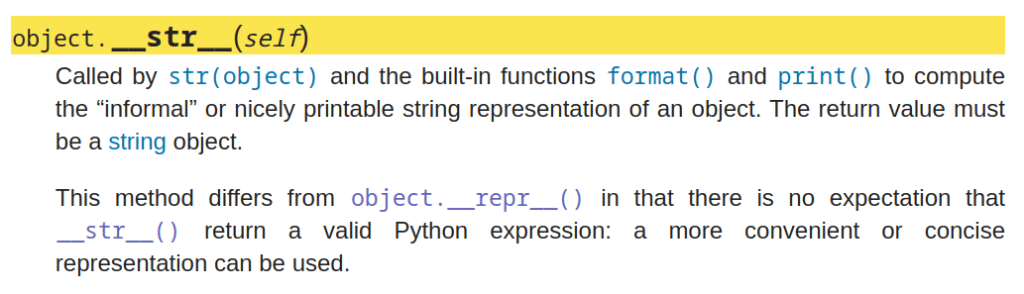
In simpler words, the str method returns a human-readable string for logging purposes, and when this information is passed to the built-in function print(), the string it returns gets printed.
So since our implementation of str returns the string “My Own Exception has occurred” this string got printed on the first line of the exception message.
Dunder-repr method:
__repr__ is another method available in all objects in python.
Where it differs from the dunder-str method is the fact that while the __str__ is used for getting a “friendly message”, the __repr__ method is used for getting, a more of a, “formal message”. You can think of str as a text you got from your friends and repr as a notice you got from a legal representative!
The below screenshot from python’s official documentation explains the use of __repr__ method.

Again, in simpler words, repr is typically used to print some “formal” or “official” information about an object in Python
In our Example 2 above, the repr method returned the class name using the built-in type() function.
Next, let us see another variation where we can print different error messages using a single Exception class without making a custom class.
Option#3: Custom Error messages from the raise statement
try:
  raise Exception('I wish to print this message')
except Exception as error:
  print(error)
Lucky for us, python has made this process incredibly simple! Just pass in the message as an argument to the type of exception you wish to raise and this will print that custom message instead!
In the above code, we are throwing an exception of type “Exception” by calling its constructor and giving the custom message as an argument, which then overrides the default __str__ method to return the string passed in.
If you wish to learn more about raise statement, I suggest reading my other article in the link below
Python: Manually throw/raise an Exception using the “raise” statement
where I have explained 3 ways you can use the raise statement in python and when to use each.
But when to use option 2 and when to use option 3?
On the surface, Option#3 of passing in the custom message may look like it made option#2 of using custom classes useless. But the main reason to use Option#2 is the fact that Option#2 can be used to override more than just the __str__ method.
Let’s next move on to section 2 of this article and look at how to choose a specific part of the default error message (the error printed on the console when you don’t catch an exception) and use that to make our own error messages
Choosing Parts of Default Error Messages to print
To understand what I mean by “Default Error Message” let us see an example
raise ValueError("This is an ValueError")This line when run, will print the following error message
Traceback (most recent call last):

  File "<ipython-input-24-57127e33a735>", line 1, in <module>
    raise ValueError("This is an ValueError")

ValueError: This is an ValueError
This error message contains 3 Parts
- Exception Type (ValueError)
- Error message (This is an ValueError)
- and the stack trace (the 1st few lines showing us where exactly in the program the exception has occurred)
The information needed
- to extract and use each of the individual pieces of information listed above and
- when to use what piece of information
is already covered with the help of several examples in my previous article in the link below
Python Exceptions: Getting and Handling Error Messages as strings.
And with that I will end this article!
If you are looking for another interesting read, try the article in the link below.
Exceptions in Python: Everything You Need To Know!
The above article covers all the basics of Exception handling in Python like
- when and how to ignore exceptions
- when and how to retry the problematic code that produced the exception and
- when and how to log the errors
I hope you enjoyed reading this article and got some value from it.
Feel free to share it with your friends and colleagues!