When I hit play I get this message: There was an error linking to the game process.
My specs:
System Information
——————
Operating System: Microsoft Windows 7 Professional (6.1.7601)
Architecture: 32-bit
Language: Croatian (Croatia)
Motherboard: ASUSTeK Computer INC. M4A77T
Processor: AMD Phenom(tm) II X4 965 Processor (Physical: 4, Logical: 4)
Memory: 4,00 GB
DIMM Modules: DIMM2: 2,00 GB @ 1333 MHz
DIMM3: 2,00 GB @ 1333 MHz
Page File: 6,49 GB
.NET Framework: 4.0
Display Information
——————-
Display Device(s): Generic PnP Monitor on ATI Radeon HD 5700 Series
Display Mode(s): 1920 x 1080 (32 bit) @ 60 Hz
Driver Version: 12.104.0.0
Display Memory: 1024,00 MB
Multisampling: 2, 4, 8
DPI: 96 (100%)
Audio Information
——————
Primary Playback: Creative Labs Inc. Software
Primary Recording: Microphone (USB Audio Device)
EAX: True
EAX 1.0: False
EAX 2.0: True
EAX 3.0: False
EAX 4.0: False
EAX 5.0: False
X-RAM: False
Disk Information
—————-
Install Path: D:EA GAMESBattlefield 2
Free: 131,82 GB, Total: 830,08 GB, NTFS
Mod Path: D:EA GAMESBattlefield 2modspr_beta
Free: 131,82 GB, Total: 830,08 GB, NTFS
Profiles Path: C:UsersKorisnikDocumentsProjectRealityProfile s
Free: 11,07 GB, Total: 101,34 GB, NTFS
Update DL Path: C:UsersKorisnikAppDataLocalProject RealityProject Reality BF2Downloads
Free: 11,07 GB, Total: 101,34 GB, NTFS
Update Log Path: C:UsersKorisnikAppDataLocalProject RealityProject Reality BF2UpdateLogs
Free: 11,07 GB, Total: 101,34 GB, NTFS
Game Information
—————-
CD Key Valid: True
Installed Mods: bf2, fh2, pr, pr_beta, xpack
Current Mod: pr_beta
BF2 Version: BF2 1.5
PR Version: 1.0.18.0
Language: English
Debug Available: False
Large Address: True
Supported Hardware: None
Profile Information
——————-
Profile 0001: sEX_YUMarinko-YU
Type: Online
Last Used Profile: True
View Intro: True
Fullscreen: True
Display Mode: 1280×960@60Hz
Display Mode Valid: True
Graphics Scheme: Custom
Multisampling: Off
VSync: False
Terrain Quality: Low
Effects Quality: High
Geometry Quality: High
Texture Quality: High
Lighting Quality: Low
Dynamic Shadows: Off
Dynamic Lights: Medium
Texture Filtering: Medium
Audio Provider: Software
Provider Valid: True
Audio Quality: High
EAX: True
Profile 0002: ssMarinko
Type: Offline
View Intro: True
Fullscreen: True
Display Mode: 1920×1080@60Hz
Display Mode Valid: True
Graphics Scheme: Medium
Multisampling: Off
VSync: False
Terrain Quality: Low
Effects Quality: Medium
Geometry Quality: Low
Texture Quality: Medium
Lighting Quality: Low
Dynamic Shadows: Medium
Dynamic Lights: Medium
Texture Filtering: Medium
Audio Provider: Software
Provider Valid: True
Audio Quality: Medium
EAX: True
|
|
#1 |
|
Join Date: May 2017 Posts: 5
Location: Tbilisi |
Code: Project Reality Log File PRLauncher.exe started at: 2017-05-12T16:06:46 Warning: Error in game thread: 1 Warning: Error in game thread: 2 > Access to the path 'D:gamesProject Reality BF2modsprvarsfci' is denied. > Access to the path 'D:gamesProject Reality BF2modsprvars' is denied. Error: 1103: There was an error linking to the game process. Please try again. Critical Error: An unhandled exception has occured. Details are as follows: No process is associated with this object. Further details can be found in the following file: D:gamesProject Reality BF2modsprbinPRLauncher.log Please report this error to the Project Reality Team, and include the log file in your report. Visit Support Forum > System.InvalidOperationException: No process is associated with this object. at System.Diagnostics.Process.EnsureState(State state) at System.Diagnostics.Process.get_HasExited() at Reality.BF2.Game.LaunchControl.f.a(Object a, EventArgs b) at Reality.BF2.Game.WhileRunning.c.a() at System.Threading.ExecutionContext.RunInternal(ExecutionContext executionContext, ContextCallback callback, Object state, Boolean preserveSyncCtx) at System.Threading.ExecutionContext.Run(ExecutionContext executionContext, ContextCallback callback, Object state, Boolean preserveSyncCtx) at System.Threading.ExecutionContext.Run(ExecutionContext executionContext, ContextCallback callback, Object state) at System.Threading.ThreadHelper.ThreadStart() SEE THIS : http://imgur.com/a/ncOgJ |

|
Last edited by Georgian.; 2017-05-12 at 12:22.. Reason: Image
|

 Georgia


|
|
#2 |
|
Join Date: Mar 2020 Posts: 3
|
Still waiting on a bloody fix. |
|
|
|
 United States of America

|
|
#3 |
|
PR:BF2 Developer
Join Date: Aug 2009 Posts: 2,987
|
Run as admin, disable anti virus. |
|
|
|


 Israel
Обновлено: 28.01.2023
Рассказываем о том, что собой представляет файл rld.dll и почему Windows может жаловаться на его отсутствие.
Как и многие другие динамически подключаемые библиотеки, rld.dll является необходимым компонентом для запуска огромного количества приложений, написанных на языке C++. Из-за этого отсутствие файла в системе приводит к появлению множества ошибок и сбоев. То же самое происходит в том случае, если файл был поврежден или некорректно перезаписан каким-то иным программным обеспечением.
Заключение
В большинстве случаев проблема устраняется настройкой антивируса или установкой другой версии игры. Надеемся, что после выполнения всех рекомендаций вы сможете избавиться от назойливой ошибки и наконец насладиться игрой в полной мере!

На другом компе на windows 7 игра работала, качал с того же сайта. Помогите решить проблему
Я знаю как эту проблему решить поэтому со всеми остальными делюсь крч.
Заходишь в «Безопасность Windows» (вводи через поиск, так легче) далее нажимаешь на значок щита в левом углу экрана, потом в «журнал защиты» там будет список всех недавних элементов, и один из этих элементов будет как раз таки заблокированный защитником файл «rld.dll» вот его тебе и надо поместить в карантин, а оттуда его потом восстановить.
ты просто лучьший, я столько библеотек переустонавливал что бы запустить игру но никак, сидел 3 часа и думал что делать и вспомнил что умные люди седят сдесь)
Похоже на то, что винда определила что ты запускаешь пиратку Crysis 3 и не даёт тебе это сделать)
Говорили что в 10-ке такую фигню сделают или уже сделали.

Установка новой версии игры
Если антивирус никак не влияет на работу библиотеки, то следует полностью переустановить игру. Попробуйте инсталлировать Crysis 3 с помощью того же дистрибутива, но с отключенной защитой Windows. Если это не помогло, необходимо скачать другой установщик. Поскольку речь идет о взломанной версии шутера, то сразу отправляйтесь на один из крупных торрентов и ищите раздачу по названию.
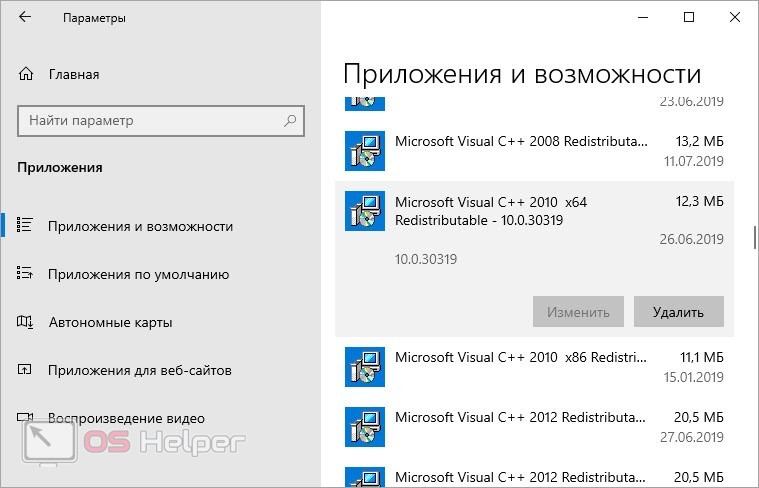
Подобная ошибка не наблюдается у геймеров с лицензионной версией. Вы можете приобрести Crysis 3 через официальный сервис разработчиков – Origin.
Установка системных компонентов
Теперь скачайте установщики системного ПО и распакуйте их на компьютер. Затем еще раз перезапустите ПК и проверьте работоспособность Crysis 3.
Проверка антивируса
Поскольку rld.dll – это компонент, интегрированный взломщиками для обхода защиты игры, он попадает в поле внимания антивируса. Практически во всех взломанных версиях «страдают» библиотеки и специальные файлы – они могут быть или удалены, или помещены в карантин автоматически.
Сначала вам нужно проверить список карантина и отыскать там файл rld.dll. Если он действительно оказался заблокированным, извлеките его из списка и добавьте в исключения. После этого ваш антивирус не будет реагировать на деятельность данной библиотеки.
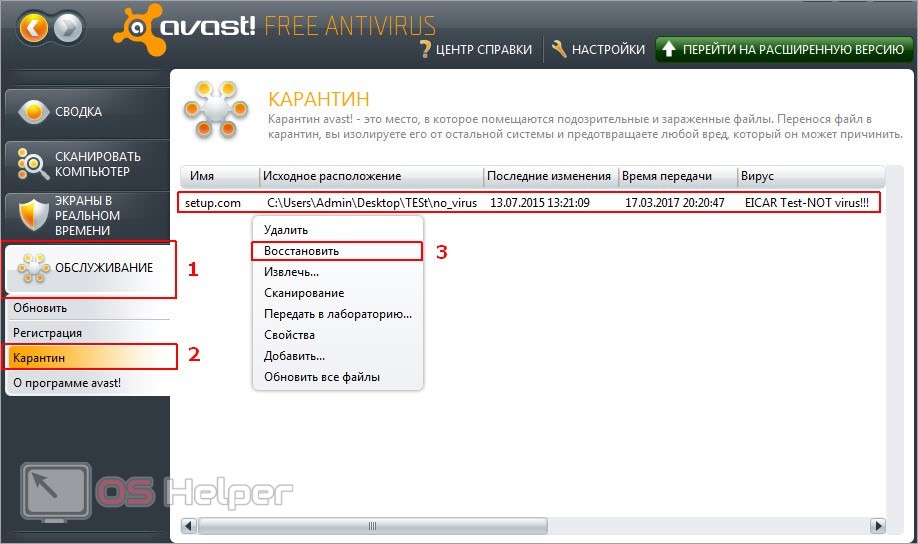
Альтернативный вариант – временное отключение защиты. Подойдет в том случае, если антивирус не удаляет файл, а лишь блокирует его при попытке использования. Тогда вам нужно выключить защиту в режиме реального времени, а только потом запускать Crysis 3. Выполнять данное действие придется каждый раз, поэтому удобнее всего настроить список исключений.
Но некоторые антивирусы настроены на полное удаление обнаруженной угрозы. В таком случае вам придется заново установить игру или crack-файлы для взлома.
Самостоятельно загружаем rld.dll в систему
Для начала можно попробовать добавить в систему отсутствующий файл или заменить тот, что не работает. Естественно, придется выгрузить его из рабочей Windows или найти в сети. Главное, быть осторожным. На многих сайтах под видом dll-файлов распространяется разного рода вредоносные программы. Поэтому нужен надежный источник динамически подключаемых библиотек.
При запуске компьютерных игр пользователи часто сталкиваются с ошибкой, связанной с той или иной библиотекой DLL. Решение этих проблем всегда разное – зависит от причины в конкретной ситуации. Сегодня вы узнаете, что делать при появлении ошибки The dynamic library rld.dll failed to initialize (E1103) при включении игры Crysis 3. С этой проблемой сталкиваются и при попытке запуска других игр, например, FIFA, The Sims 4, Pro Evolution Soccer. Данная библиотека требуется для корректной работы пиратских версий приложений.
Базовые действия
До вмешательства в антивирус и игровые файлы мы рекомендуем протестировать самые простые операции. Во-первых, перезапустите компьютер – это поможет исключить временные сбои системы. Во-вторых, включите игру от имени администратора. Сделать это можно через контекстное меню или свойства ярлыка.
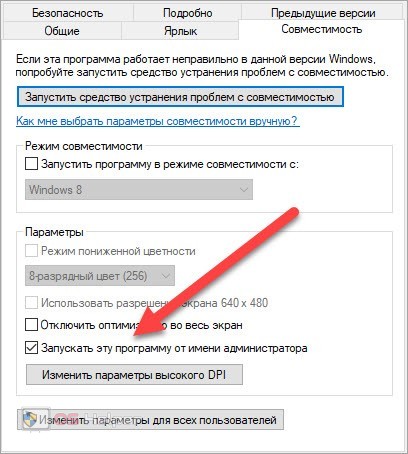
Если эти варианты не помогли, то неполадка все же связана с неисправностью или отсутствием файла rld.dll.
Способы исправления ошибки rld.dll
Пользоваться ею довольно просто, вот что вам нужно сделать:


После этого файл будет установлен в систему, и вы без проблем сможете запустить приложения, которые отказывались это делать.
Способ 2: Установка пакета Microsoft Visual C++ 2013
Установка MS Visual C++ 2013 – это более правильный способ устранения ошибки. По сути, файл должен помещаться в систему при установке самой игры, но из-за неаккуратных действий пользователя или поврежденного инсталлятора этого может не произойти. В таком случае делать все нужно самостоятельно. Для начала загрузите MS Visual C++ 2013 с официального сайта поставщика.


Примечание: Выбирайте разрядность в соответствии с характеристиками вашей операционной системы.
Как только инсталлятор будет загружен на ПК, запустите его и сделайте следующее:
-
Ознакомьтесь с лицензионным соглашение, после чего примите его, поставив галочку у соответствующего пункта, и нажмите «Далее».


Примечание: ошибка при запуске игр пропадет только после перезапуска операционной системы.
Теперь библиотека rld.dll находится в системной директории, следовательно, ошибка устранена.
Способ 3: Загрузка rld.dll
Файл библиотеки rld.dll можно загрузить на компьютер и без помощи сторонних программ, самостоятельно. После этого для устранения проблемы его всего лишь нужно поместить в системную директорию. Сейчас будет подробно описан этот процесс на примере Windows 7, где системная директория расположена по следующему пути:
C:WindowsSysWOW64 (64-разрядная ОС)
C:WindowsSystem32 (32-разрядная ОС)
Если ваша операционная система от Microsoft имеет другую версию, то узнать путь к ней вы можете, ознакомившись с этой статьей.


Теперь, если Windows произвела автоматическую регистрацию файла библиотеки, ошибка в играх будет устранена, в противном случае регистрацию провести нужно вам самостоятельно. Сделать это довольно просто, а со всеми деталями вы можете ознакомиться в этой статье.

Мы рады, что смогли помочь Вам в решении проблемы.
Отблагодарите автора, поделитесь статьей в социальных сетях.
Опишите, что у вас не получилось. Наши специалисты постараются ответить максимально быстро.
Загрузка библиотеки rld.dll
Еще один способ подразумевает ручную установку библиотеки. Вам необходимо скачать rld.dll по представленной ссылке и распаковать его на компьютер. Затем поместить в системный каталог System32, который расположен в папке Windows.
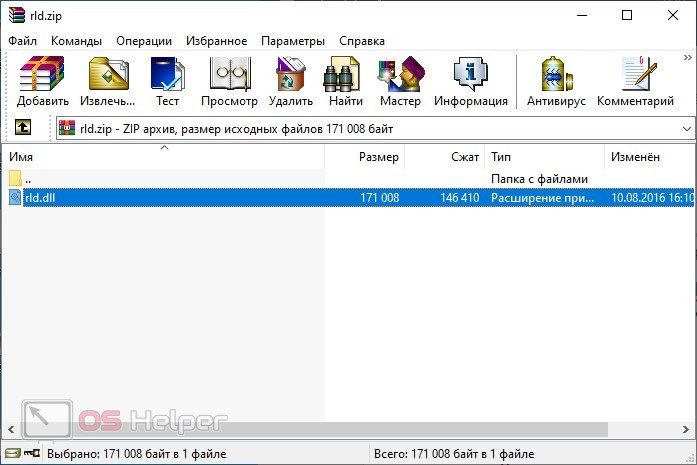
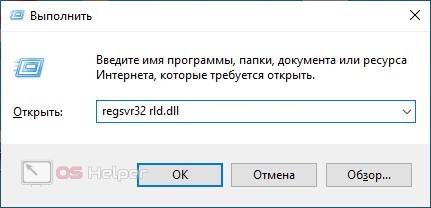
Остается провести регистрацию файла в системе. Для этого через приложение «Выполнить» введите команду [k]regsvr32 rld.dll[/k]. Для завершения процедуры перезагрузите компьютер.
Читайте также:
- Как установить dlc на скайрим
- Rust asset warmup вылетает
- Замена benson в гта 5
- House party ошибка unity
- Disciples 3 renaissance системные требования

-
Battlefield 2
-
Новости80
-
Мнения14
-
Юмор1
-
Файлы167
-
Читы16
-
Гайды4
-
Cкриншоты65
-
Галерея612
-
Форум812
-
Игроки

Доступна для скачивания новая версия PR.
Кому интересно сюда:
http://www.realitymod.com/downloads.html
с оффициального сайта разработчиков.
Но установка требует код, который будет доступен в пятницу ))
Качаем господа)))

Ура)) А где взять описание этой версии дополнения на русском?)
х/з Там не много чего нового добавили… В основном гемплей тот же останентся, я так думаю. В основном добавили новые пушки, анимацию, карты, транспорт, модели бойцов, пару новых фракций… Хотя может и изменения в гемплее будет… Я точно не знаю… Но знаю одно — мод стоит качать)))
В пятницу вечером будем — рубицца)) Если конечно русские серваки сделают)
Скачал,установил при запуске вылетает.Что ето может быть?
У тя баттла какой версии? Нужна версия 1.5. желательно лиц.

SoldierElite в теме про лучшие моды, как-то я PR проехал, хз почему, щас заценю спс за ссылку, скрины порадовали и мувик, вертики кста напонимли старый добрый BF Vietnam =)
SoldierElite у меня обыкновеная баттла лицензионая
В общем у меня баттла лиц. английская версия без всяких руссификаторов:
Я ставлю так:
1. Устанавливаю игру
2. Ставлю патч 1.41
3 Ставлю патч 1.5
4 Устанавливаю часть 1 PR
5 Устанавливаю часть 2 PR
И все. Аккаунт у меня тот же что и в обычной баттле…
Все работает…
Блин,мужыки,в PR0.9 есть два абрамса — один нормальный,а во второго командирская башенка НА МЕТР в воздухе висит.Ето у меня такой лаг или нет???

))) Прикольный глюк))
У меня как то в игре глюк был с раликом)) В воздухе тоже висел. К сожалению скриншота нет..((
Мне кажется не стоит паниковать… ето обычны баг игрв.. и всего то))
SoldierElite а вылетов при запуске не будет?
Пашка555,не тупи,скачай патчи,а потом влепи Project Reality v0.9 .
Народ!
У меня какая то фигня начала вылазить.
Когда родрубаюсь к серваку, загружаю карту, но она до конца не грузится… Вылетает ощибка BF2 Memory error… Что это за ерунда..((
Глюк на карте или баг мода…
Странно то, что именно на одной карте…

Можно ли поставить ботов на PR?
Боты есть, но не на всех картах…
В версии 0.87 клиент с картами для сингла надо отдельно качать, а в версии 0.9 выбираешь создать локальный сервер, кооператив… если один играешь ставишь количество игроков 1 и ставишь карты в очередь… ну, а потом ясно что дальше я думаю)))
где качать сингл для версии 0.87? не могу найти
БЫл раньше на официальном сайте ща можно на торентах де-нить прискать…
или здесь http://torrents.ru/forum/tracker.php?search_id=R0tS751AmJUt&start=100&nm=battlefield+2
или здесь http://www.rustorka.com/forum/index.php
я скачал карты с ботами на официальном сайте запускаю setup мне пишет что PR не установлен хоть он у меня установлен и версии подходят фигня какая та. Думаю скачать 0.9 там точно есть боты???
там кооператив есть, выше ж написал…
скачал 0.9 но когда залезаю в вертолет или другую технику кроме авто я умираю и еще не могу стрелять из стационарных пулеметов че делать???
Надо стать членом какого-нибудь взвода в команде ,потом нажать «Т» и выбрать нужный кит.
как поставить все карты в кооператив, а то я играю только с ботами?
stalker B.U.B.L.I.K.
Короче боты есть только в кооперативе, но не на всех картах…
Карт не так много, но инрать можно.
Чтобы сесть в вертушку или в БТР нужен соответствующий кит
pilot — для управления воздушной техникой
creewman — для управления наземеой техникой, кроме джипов и грузовиков с суплаем
Что бы выбрать кит нужно войти в отряд, подойти к технике и выбрать кит нажав кнопку T(напимер pilot)
Спасибо на счет китов разобрался. Но можно ли все карты что есть поставить в кооператив может там нужно что в файлах изменить?
Прописывать скрипты как в обычной баттле))
Но я этим не занимался и не умею(((
А вообще я те советую с людьми играть в PR… Там тебе люди и расскажут, как играть, что делать…
С ботами там совсем иная игра…
что для этого надо ? у меня при установке батлы вылезало окно с установкой Gamespy что это такое и нужно ли это и еще панк бастер
Кстати. ВСЕХ С 23 ФЕВРАЛЯ!
Спс) тя тоже с праздничком)
панк бастер — это головная боль…
но он нужен… я устанавливаю всё… кроме регистрации игры через инет…
Привет всем модостроителям Battlefield 2!
Помогите кто знает процесс как переделать все большие
конквест карты в coop (сингл)в Project reality 0.9
(кто может это сделать киньте инфу готов купить)
и еще кто знает как можно переносить технику из разных модов PR, USI, EOD 2,
POE 2 (к примеру в PR 0.9 добавить град или гаубицу из USI)
пишите gsvsts@yandex.ru
в мануал загляни, там все описано)))
Привет всем модостроителям Battlefield 2!
Помогите кто знает процесс как переделать все большие
конквест карты в coop (сингл)в Project reality 0.9
(кто может это сделать киньте инфу готов купить)
и еще кто знает как можно переносить технику из разных модов PR, USI, EOD 2,
POE 2 (к примеру в PR 0.9 добавить град или гаубицу из USI)
пишите gsvsts@yandex.ru
SoldierElite а я по англиски не понимаю лучьше ты мне обьесни
помогите пожалуйста я скачал проджект риалити там есть мульт но я туда зайти не могу там постонно вылетает ну эт ладно н у мя инглиш ьверсия русик у кого нить есть?и вопрос там есть сингл ну боты против ботов а то я там ток кооп нашел а как то не весело один на 20
c ботами я разобрался там просто число игроков один должно быть другой вопрос вернее просьба дайте русик пожааалуйста
aidefault найди в папке PR там можно изменять количество ботов до 128
люди где можно найти патч до версии 0.9 для «проекта реалности», а то у меня 0.8((
dimas R
русик в PR тебе не нужен… потому что там переводить нечего))
лучше мануал прочти на русском…
http://realitymodfiles.com/spearhead/manuals/Project_Reality_v0.9_Manual_RU.pdf
felip
к сожалению с патчем я тебе не помогу…
лучше удали все свои старые версии PR и скачай сразу 0.9 с патчем 0.91
скоро выйдет новая версия… говорят V 0.95

Всем привет,у меня такая проблемка:при игре с ботами,боты появляются только у американцев,как это исправить?
И тебе привет…
Посьавь количество игроков 1 если играешь один с ботами… и поставь соотношение ботов 50/50 что бы в каждой комманде было ровное количество ботов… не считая тебя
Спасибо,завтра попробую))
15 октября будет доступен пароль для новой версии http://www.realitymod.com/forum/f380-project-reality-news/88566-project-reality-v0-95-preload.html
ждём… http://www.realitymod.com/password/
вышла она)) круть…
немцы появились)) ахтунг)
у меня такой вопрос почему я сажусь в технику сразу умераю ?
Авторизуйтесь, чтобы принять участие в обсуждении.

Project Reality may seem like a complex and difficult game at first, but once the basics are learned, the game will likely leave you an ever-lasting impression that’ll have you coming back for more.
System Requirements[]
Project Reality is a standalone mod of Battlefield 2, a 2005 video game. Most computers are able to at least run Project Reality. However, in order to play Project Reality smoothly and increase immersion, your rig should meet or exceed the recommended system requirements. Remember that you can always change the in-game graphical settings under the «Options» tab to suit your needs.
Minimum System Requirements[]
- Operating System: Windows XP (support discontinued since April 28th 2020), Windows Vista, Windows 7, or Windows 8, Windows 10
- Processor: 2 GHz
- Memory: 512 MB RAM
- Hard Disk: 10GB free Hard Drive Space
- Graphics Processing Unit: Dedicated or Integrated Graphics Card with at least 128MB of Video RAM
- Sound: DirectX 9 Compatible Sound Device
- Internet: 128 kbps or faster
- Input: Mouse, Keyboard, Microphone (essential for communication, most servers will kick you for not having a microphone.)
Recommended System Requirements[]
- Operating System: Windows XP (support discontinued since April 28th 2020), Windows Vista, Windows 7, or Windows 8, Windows 10
- Processor: Dual-core CPU with 2.4GHz or better
- Memory: 2 GB for XP, 4GB for Vista, W7, and W8
- Hard Disk: 20GB free Hard Drive Space
- Graphics Processing Unit: Dedicated graphics card with 512MB
- Sound: DirectX 9 compatiable headset
- Internet: 1.5mb/s or faster
- Input: Quick DPI adjustable Mouse, Keyboard and Microphone (essential for communication, most servers will kick you for not having a microphone.)
- Optional: Joystick (if you plan on flying).
Recommended System Requirements for Ultra Settings[]
- Operating System: Windows XP (support discontinued since April 28th 2020), Windows Vista, Windows 7, or Windows 8, Windows 10
- Processor: Core i3 or Phenom II with 2.7GHz or better
- Memory: 8 GB or higher
- Hard Disk: 20GB free Hard Drive Space
- Graphics Processing Unit: Dedicated graphics card with 2GB or better
- Sound: DirectX 9 compatible sound headset, sound card with EAX support recommended for best sound performance.
- Internet: 5mb/s or faster
- Input: Quick DPI adjustable Mouse, Keyboard with a Number Pad and Microphone (essential for communication, most servers will kick you for not having a microphone.)
- Optional: Joystick (if you plan on flying).
Troubleshooting[]
- Windows 8 users may experience issues with the mumble overlay and punkbuster errors in Project Reality. The fix can be found here (thanks Wicca).
Installing Project Reality[]
To properly install Project Reality, you must first go to the [www.realitymod.com Project Reality website]. There, you can download a setup of Project Reality 1.3, which no longer requires you to have Battlefield 2.
Creating a Local Server or a CO-OP Server[]
Creating a local server in Project Reality is very similar to how you would do it in Battlefield 2. When you’re at Project Reality’s main menu click «Deployment». You should now see several options, click «Create Local». You will now have the option to choose which map you’d like to play.
If you would like to play against AIs you should not click on «Deployment», but «CO-OP». The way to create a server is the same as it would be when creating a server through «Deployment». Here you can choose how many AIs you’d like to play against, the ratio for the teams (eg. 1:10), and the difficulty of the AIs. Keep in mind that playing against AIs will always be like playing against AIs, and it cannot compare to online play which Project Reality has been developed for. However, you also have the option of joining online CO-OP games with other players, allowing you to communicate with squad members, plan attacks, and engage in other activities that A.I. would not be able to accomplish.
Practicing in a CO-OP Server[]
It is recommended that prior to joining a multiplayer server that you should gain experience from CO-OP servers to avoid disappointment. Players on CO-OP servers are more than happy to help you out with game mechanics, explain the communication terminology, and educate you on community etiquette of Project Reality. Remember that unlike deployment servers, CO-OP servers have a shorter respawn time for players and assets, faster-paced gameplay, and a lack of specific restrictions (i.e. Anyone is able to take a chopper and fly it).
When first starting as infantry on a CO-OP server if for some reason you feel that the sensitivity of the vehicle handling is too low or too high, you can adjust them in the options menu.
Joining your First Multiplayer Match[]
Before joining your first online game it is highly recommended that you take a look at the Project Reality Field Manual. This will tell you the majority of things you’d want to know before grabbing your rifle for the first time. Playing around on a local server is also recommended as you will get the basics about how the weapons work in this mod.
The first thing you would want to do after joining a server is to find a squad. Starting with an infantry squad would be the smartest thing, as armor- and air assets are valuable and should not be taken by people who do not know how to operate them properly.
Look for squads named «INF», «MUMBLE INF» or something similar. If the squads are locked you can ask the squad leader to open up by using the in-game chat. The default keys for chat are «J» (both teams), «K» (your team) and «L» (your squad). If you are not in a squad you will not able to use «L». The use of all-chat (J) for trivial subjects or taughting is frowned upon by server admins, excessive usage may result in a kick/ban.
When you have joined a squad you should tell your leader that you are new to this mod. Hopefully your leader will not have a problem with that, and he will help you through your very first battle. There are a few things you will have to remember when playing your first match:
- You are new. You are yet to learn how this mod works, therefore it is recommended that you take it slow. Listen to your squad leader, do as he says and you should be fine.
- Stay safe. Do not take any risks, do not do anything «stupid». Again; do as your squad leader tells you to do. It is important that you are willing to be ordered around. This mod contains a lot of «do this» and «do that». Be patient, you will get the hang of it sooner rather than later.
- Hold your fire! Unless your squad leader has given you a target to engage you are to hold your fire. Without you knowing it you might be «staying low», meaning your squad is trying to stay undetected. If a member of the squad fires his rifle the whole squad will be compromised.
Troubleshooting[]
- A lot of people are having an issue when joining a server for the first time after they’ve started the mod. When joining the server they will get an error saying «Your connection to the server has been lost». If you get this error you’ll simply have to join the server again, this time it will work. This can also be caused by the server crashing. Unfortunately server crashes are a common occurrence but the server will always repopulate immediately.
Joining Armor and Air Squads[]
Before joining an armor or air squad in a multiplayer match read the manual and make sure to practice enough in CO-OP/Local servers to get a hang of the handling of each asset. Otherwise, crashing assets due to a lack of knowledge and/or not knowing the functions of each vehicle may frustrate other players and possibly get you kicked or banned from the server.
Lastly, remember that everyone makes mistakes time to time, but develop a good habit of learning from your mistakes, and preventing them in the future.
Game Mechanics[]
Game mechanics can be found on this page, or on the Project Reality Manual. The mechanics of game are similar to that of Battlefield 2. By learning these mechanics, you can gain a better understanding and prevent confusion at critical moments.
Progress of a Match[]
Project Reality may seem like a complex and difficult game at first, but once the basics are learned, the game will likely leave you an ever-lasting impression that’ll have you coming back for more.
System Requirements[]
Project Reality is a standalone mod of Battlefield 2, a 2005 video game. Most computers are able to at least run Project Reality. However, in order to play Project Reality smoothly and increase immersion, your rig should meet or exceed the recommended system requirements. Remember that you can always change the in-game graphical settings under the «Options» tab to suit your needs.
Minimum System Requirements[]
- Operating System: Windows XP (support discontinued since April 28th 2020), Windows Vista, Windows 7, or Windows 8, Windows 10
- Processor: 2 GHz
- Memory: 512 MB RAM
- Hard Disk: 10GB free Hard Drive Space
- Graphics Processing Unit: Dedicated or Integrated Graphics Card with at least 128MB of Video RAM
- Sound: DirectX 9 Compatible Sound Device
- Internet: 128 kbps or faster
- Input: Mouse, Keyboard, Microphone (essential for communication, most servers will kick you for not having a microphone.)
Recommended System Requirements[]
- Operating System: Windows XP (support discontinued since April 28th 2020), Windows Vista, Windows 7, or Windows 8, Windows 10
- Processor: Dual-core CPU with 2.4GHz or better
- Memory: 2 GB for XP, 4GB for Vista, W7, and W8
- Hard Disk: 20GB free Hard Drive Space
- Graphics Processing Unit: Dedicated graphics card with 512MB
- Sound: DirectX 9 compatiable headset
- Internet: 1.5mb/s or faster
- Input: Quick DPI adjustable Mouse, Keyboard and Microphone (essential for communication, most servers will kick you for not having a microphone.)
- Optional: Joystick (if you plan on flying).
Recommended System Requirements for Ultra Settings[]
- Operating System: Windows XP (support discontinued since April 28th 2020), Windows Vista, Windows 7, or Windows 8, Windows 10
- Processor: Core i3 or Phenom II with 2.7GHz or better
- Memory: 8 GB or higher
- Hard Disk: 20GB free Hard Drive Space
- Graphics Processing Unit: Dedicated graphics card with 2GB or better
- Sound: DirectX 9 compatible sound headset, sound card with EAX support recommended for best sound performance.
- Internet: 5mb/s or faster
- Input: Quick DPI adjustable Mouse, Keyboard with a Number Pad and Microphone (essential for communication, most servers will kick you for not having a microphone.)
- Optional: Joystick (if you plan on flying).
Troubleshooting[]
- Windows 8 users may experience issues with the mumble overlay and punkbuster errors in Project Reality. The fix can be found here (thanks Wicca).
Installing Project Reality[]
To properly install Project Reality, you must first go to the [www.realitymod.com Project Reality website]. There, you can download a setup of Project Reality 1.3, which no longer requires you to have Battlefield 2.
Creating a Local Server or a CO-OP Server[]
Creating a local server in Project Reality is very similar to how you would do it in Battlefield 2. When you’re at Project Reality’s main menu click «Deployment». You should now see several options, click «Create Local». You will now have the option to choose which map you’d like to play.
If you would like to play against AIs you should not click on «Deployment», but «CO-OP». The way to create a server is the same as it would be when creating a server through «Deployment». Here you can choose how many AIs you’d like to play against, the ratio for the teams (eg. 1:10), and the difficulty of the AIs. Keep in mind that playing against AIs will always be like playing against AIs, and it cannot compare to online play which Project Reality has been developed for. However, you also have the option of joining online CO-OP games with other players, allowing you to communicate with squad members, plan attacks, and engage in other activities that A.I. would not be able to accomplish.
Practicing in a CO-OP Server[]
It is recommended that prior to joining a multiplayer server that you should gain experience from CO-OP servers to avoid disappointment. Players on CO-OP servers are more than happy to help you out with game mechanics, explain the communication terminology, and educate you on community etiquette of Project Reality. Remember that unlike deployment servers, CO-OP servers have a shorter respawn time for players and assets, faster-paced gameplay, and a lack of specific restrictions (i.e. Anyone is able to take a chopper and fly it).
When first starting as infantry on a CO-OP server if for some reason you feel that the sensitivity of the vehicle handling is too low or too high, you can adjust them in the options menu.
Joining your First Multiplayer Match[]
Before joining your first online game it is highly recommended that you take a look at the Project Reality Field Manual. This will tell you the majority of things you’d want to know before grabbing your rifle for the first time. Playing around on a local server is also recommended as you will get the basics about how the weapons work in this mod.
The first thing you would want to do after joining a server is to find a squad. Starting with an infantry squad would be the smartest thing, as armor- and air assets are valuable and should not be taken by people who do not know how to operate them properly.
Look for squads named «INF», «MUMBLE INF» or something similar. If the squads are locked you can ask the squad leader to open up by using the in-game chat. The default keys for chat are «J» (both teams), «K» (your team) and «L» (your squad). If you are not in a squad you will not able to use «L». The use of all-chat (J) for trivial subjects or taughting is frowned upon by server admins, excessive usage may result in a kick/ban.
When you have joined a squad you should tell your leader that you are new to this mod. Hopefully your leader will not have a problem with that, and he will help you through your very first battle. There are a few things you will have to remember when playing your first match:
- You are new. You are yet to learn how this mod works, therefore it is recommended that you take it slow. Listen to your squad leader, do as he says and you should be fine.
- Stay safe. Do not take any risks, do not do anything «stupid». Again; do as your squad leader tells you to do. It is important that you are willing to be ordered around. This mod contains a lot of «do this» and «do that». Be patient, you will get the hang of it sooner rather than later.
- Hold your fire! Unless your squad leader has given you a target to engage you are to hold your fire. Without you knowing it you might be «staying low», meaning your squad is trying to stay undetected. If a member of the squad fires his rifle the whole squad will be compromised.
Troubleshooting[]
- A lot of people are having an issue when joining a server for the first time after they’ve started the mod. When joining the server they will get an error saying «Your connection to the server has been lost». If you get this error you’ll simply have to join the server again, this time it will work. This can also be caused by the server crashing. Unfortunately server crashes are a common occurrence but the server will always repopulate immediately.
Joining Armor and Air Squads[]
Before joining an armor or air squad in a multiplayer match read the manual and make sure to practice enough in CO-OP/Local servers to get a hang of the handling of each asset. Otherwise, crashing assets due to a lack of knowledge and/or not knowing the functions of each vehicle may frustrate other players and possibly get you kicked or banned from the server.
Lastly, remember that everyone makes mistakes time to time, but develop a good habit of learning from your mistakes, and preventing them in the future.
Game Mechanics[]
Game mechanics can be found on this page, or on the Project Reality Manual. The mechanics of game are similar to that of Battlefield 2. By learning these mechanics, you can gain a better understanding and prevent confusion at critical moments.