This chapter will help you to recognize malfunctions and take appropriate measures or, if possible and acceptable, to perform
some simple repairs.
8.1 Error messages
The furnace continuously checks all functions during operation. If an error is detected, the respective error message is
displayed.
The acoustic signal and the error message can be acknowledged with the corresponding buttons.
The following error messages may be displayed. If there are any questions, please contact the Ivoclar Vivadent After Sales
Service.
Error /
Work can
Error
Hint
continue
No.
after the
error
2
T < B
8
L > T
9
V2x <= V1x
10
V2x > Tx + 1°C
11
Incorrect values for V1x, V2x
13
Current temperature after start
*,**
> Tx + 80°C
14
Temperature in the firing
*
chamber > 410 °C at the start of
the calibration program, i.e. too
high.
16
T2 < T1
17
Power failure > 10 s during a
firing program in progress
18
T1 > V12
19
yes
V2 < B
20
no
Error in the heating system
**
23
Heating muffle very old
24
Heating muffle defective
26
Temperature > B + 160°C at start
of a firing program
27
no
Furnace head cannot be initialized The furnace head cannot be brought to the end position. It might be
**,***
28
The furnace head does not reach
**
the target position
Text Error Message
Enter an acceptable value for T.
Enter an acceptable value for long-term cooling L.
Enter an acceptable value for the vacuum-on temperature V1x or the
vacuum-off temperature V2x.
Change either the vacuum values or the holding temperature T.
Enter plausible values for V1x, V2x.
Caution: Excess temperature! Program aborted; furnace head opens to cool
down the furnace.
Temperature too high for calibration. Furnace is cooling down! Try
restarting the program later.
Enter a lower value for T1 or a higher value for T2.
A program in progress was interrupted for more than 10 s. The program
cannot be continued.
Enter a lower value for T1 or a higher value for V12.
Prevacuum activated! V2 must be higher than B.
Check the heater fuse. If the fuse is O.K., contact your local Ivoclar
Vivadent Service Centre.
The heating muffle is very old. It is recommended replacing it by a new
one. After this error message has been confirmed, a program may still be
started.
The heating muffle is in such poor condition that it has to be replaced
immediately.
Firing chamber is too hot for the start of a firing program.
blocked by external mechanical influences! If this is not the case, contact
your local Ivoclar Vivadent Service Centre.
Furnace head does not open/close correctly. The furnace head is obstructed
or has been moved by hand. Operate the furnace head only with the keys
intended for that purpose.
55
-
Contents
-
Table of Contents
-
Bookmarks
Quick Links
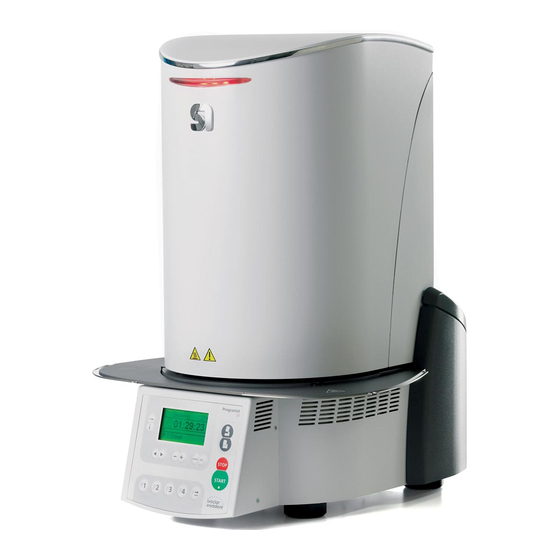
Programat
S1
®
Operating Instructions
Related Manuals for Ivoclar Vivadent Programat S1
Summary of Contents for Ivoclar Vivadent Programat S1
-
Page 1
Programat ® Operating Instructions… -
Page 3: Table Of Contents
Explanation of the display symbols Explanation of the acoustic signals Practical Use Switching on the furnace Loading the Programat S1 Sintering procedure with a standard program Sintering procedure with an individual program Additional possibilities and special features of the furnace…
-
Page 4: Views Of The Furnace, List Of Parts
List of Parts Insulation Thermocouple Sinter tray Display Frame plate Sinter chamber Furnace housing Membrane-sealed keypad On/Off switch 10 Heater fuse 11 Fuse holder 12 Power cord 13 Power socket 14 Rating plate 15 Rubber foot 16 Furnace head housing 17 Thermocouple plug 18 Power electronics plug 19 Plug fuse…
-
Page 6
10/11 10/11 18 23 21 20… -
Page 7
Operating unit: 71 ESC key 72 ENTER key 73 Start key 74 Start LED 75 Stop key 76 + key 77 — key 78 Settings key 79 Cursor right key 80 Cursor left key 81 Information key 82 Program 1 key 83 Program 2 key 84 Program 3 key 85 Program 4 key… -
Page 8: Introduction / Signs And Symbols
Operating Instructions Dear Customer Furnace concerned: Programat S1 Thank you for having purchased the Programat S1. It is a sinter Target group: Dental technologists furnace for dental laboratories requiring such a furnace for the CAD/CAM technique. The Programat S1 permits the sintering of ZrO These Operating Instructions facilitate the correct, safe and economic materials.
-
Page 9: Safety First
2. Safety First 2.1.1 This chapter is especially important for personnel who work with the Programat S1 or who have to carry out maintenance or repair work. Contraindication This chapter must be read and the corresponding instructions followed. The furnace must not be carried by the cooling tray.
-
Page 10
2.1.6 2.1.11 Burn hazard Contraindication Never use the furnace without the Never place objects in the sintering chamber by hand, since there is a burn sinter tray. Use only the original S1 hazard. Always use the sinter tray fork sinter tray. Do not use the firing trays or honey-combed trays from conven- (accessories) supplied for this purpose. -
Page 11: Health And Safety Instructions
Nevertheless, your This furnace has been designed according to EN 61010-1 and has Programat S1 is still a brand new furnace. been shipped from the manufacturer in excellent condition as far as safety regulations are concerned. To maintain this condition and to…
-
Page 12: Product Description
3.4 Accessories – Temperature Checking Set S1 3.5 Indication / contraindication Indication – Sintering of ZrO materials Contraindication – The Programat S1 is not suitable as a ceramic furnace for dental laboratories.
-
Page 13: Installation And Initial Start-Up
Check the delivery for completeness (see delivery form in Chapter 9) and transportation damage. If parts are damaged or missing, contact your local Ivoclar Vivadent Service Center. Packing and shipping of individual components The packaging of the S1 permits simple and safe shipping of individual components.
-
Page 14
Place the cooling tray (26) on the frame plate (5). Make sure that the cooling tray (26) is correctly positioned on the frame plate (5) and that the danger symbols are visible from above. Secure the cooling tray (26) with the two screws (27) including the silicone washer (28). -
Page 15: Demounting The Furnace Head
Step 3: Mounting the furnace head The complete furnace head is best mounted with the rear panel of the furnace pointing towards the user. Lift the furnace head with both hands as shown in the picture (with the rear hand gripping the holding area lined with sandpaper on the furnace head), and carefully position it on the furnace head mounting (35).
-
Page 16
Step 5: Connections Connect the cables of the furnace head with the furnace base. Proceed as follows: – Insert the thermocouple plug (17) (make sure that the polarity of the plug is correct) – Insert the heater plug (20) – Insert the power electronics plug (18) Secure the heater plug (20) by turning it until the heater plug (20) has been secured. -
Page 17: Initial Start-Up
4.4 Removing the furnace head Before the hood (29) is removed, the furnace has to be switched off, cooled down and the power cord (12) disconnected from the power socket (13). 1. Loosen the attachment screw (30) for the hood (29) and remove it 2.
-
Page 18: Operation And Configuration
– Open furnace head key (87) Furnace head is opened (not during a program in progress, or if The Programat S1 is equipped with a graphic display with backlight- the temperature in the sintering chamber is higher than ing. The numeric and command keys can be used to program and 600°C/1112°F).
-
Page 19: Program Structure
The sinter furnace basically offers two types of programs: Parameters Value range °C Value range °F Symbol Unit Unit a) Standard program for materials of the Temperature increase Ivoclar Vivadent group (see enclosed °C/min °F/min rate Program Table) Heating 1200 °C 1292 2192 °F…
-
Page 20: Settings / Test Program And Information
5.6 Settings / test program and information Settings Display Short Description By pressing the Settings key (78) you will reach the setting screen Date The date can be set (the latest setting selected will be shown). using the -/+ keys General write Enables the activation protection…
-
Page 21: Explanation Of The Display Symbols
5.7 Explanation of the symbols in the display 5.6.2 Information By pressing the Information key (81), you will reach the information screen (the last selected information is displayed). The cursor keys Symbol Name Meaning Symbol (79, 80) can be used to toggle between the possible information. Open furnace head Shown in the recommen- This screen can be left with the ESC key (71) or one of the…
-
Page 22: Explanation Of The Acoustic Signals
5.8 Explanation of the acoustic signal Basically, all the acoustic signals are played using the tune and volume selected by the user. The acoustic signal can only be stopped by pressing the STOP key. – After the self-test has been completed In order to inform the user that the automatic self-test has been successfully completed, an acoustic signal is played.
-
Page 23: Practical Use
6. Practical Use CAD/CAM fabricated support structures (for large frameworks with a The operating procedure for the Programat S1 will be explained with pronounced curvature) should not be separated for the sintering the help of two examples: one standard and one individual program.
-
Page 24: Additional Possibilities And Special Features Of The Furnace
6.4 Sintering using an individual program 6.6 Programming* Step 1: The parameter list can be selected via Settings – Programming. This Select a free program. list contains all the program parameters. The desired parameter is selected with the cursor keys. The value is adjusted using the Step 2: -/+keys.
-
Page 25: Maintenance, Cleaning And Diagnosis
This chapter describes the user maintenance and cleaning procedures 7.1.2 Cleaning of the sintering chamber for the Programat S1. All the other tasks must be performed by Use the enclosed cleaning brush (102) for cleaning. Do not use qualified service personnel at a certified Ivoclar Vivadent Service compressed air for cleaning under any circumstances.
-
Page 26: Monitoring And Maintenance
Insulation (1) monthly it has to be replaced by a certified Ivoclar Vivadent Service Centre. Fine hair- line cracks on the surface of the insulation are harmless and do not influence the function of the furnace in a negative fashion.
-
Page 27: Test Programs
For calibration, you need sinter rings, a measuring device (slide 1200 firing hours. For this reason, Ivoclar Vivadent recommends a gauge) and a conversion table (enclosed in the Temperature Check- maintenance and service procedure.
-
Page 28: What If
(see Chapter 5.6.1). * A program in progress is stopped! ** The error cannot be acknowledged; the programs cannot be started! If one of the following error numbers appear, contact your local Ivoclar Vivadent Service After Sales Service: 25, 29 54, 56…
-
Page 29: Technical Malfunctions
Please refer to the addresses in Chapter 10. If repairs during the warranty period are not carried out by a certified Ivoclar Vivadent After Sales Service Center, the warranty will expire immediately. Please also refer to the corresponding warranty regulations.
-
Page 30: Product Specifications
Acceptable humidity range Max. 80% relative humidity Acceptable ambient pressure 500 mbar to 1060 mbar Use only original packaging of the Programat S1 together with the Overvoltage category II respective foam material for shipping purposes. Contamination level 2 Acceptable voltage fluctuations +/- 10% Max.
-
Page 31: Miscellaneous
10. Miscellaneous 10.1 Program table A program table is enclosed in these Operating Instructions. Should this not be the case, please contact the Ivoclar Vivadent Service Center. Important information The current program tables are also available at: www.ivoclarvivadent.com/downloadcenter The program tables can be downloaded from the Internet as PDF files. Please note, that the version of the program table should correspond to the software version which is used on your furnace.
-
Page 32
Leicester LE19 4SE Ivoclar Vivadent Marketing (India) United Kingdom Ivoclar Vivadent Ltda. Pvt. Ltd. Ivoclar Vivadent Polska Sp. z o.o. Tel. +44 116 284 7880 Alameda Caiapós, 723 503/504 Raheja Plaza Al. Jana Pawla II 78 Fax +44 116 284 7881 Centro Empresarial Tamboré…
Програмат П310 (Programat P310) разработана на базе печи Програмат П 300 (Programat P300) и дополнена рядом важнейших инновация для максимального удобства работы зубного техника.
Благодаря цветному сенсорному экрану и надежной мембранной клавиатуре, эта печь стала еще проще в эксплуатации, чем печь P300 предыдущего поколения.
Печь оснащена многочисленными программами для керамических масс Ivoclar Vivadent, таких как IPS e.max , IPS d.SIGN , IPS InLine и IPS Empress, чтобы обеспечить немедленное использование печи без программирования.
Кроме того, Progarmat P310 оснащен муфелем с технологий QTK2, которая отвечает за равномерное распределение тепла в печи, что приводит к оптимальным результатам обжига и длительного цикла нагревательного элемента.
Новая систем управления вакуумным насосом с технологией двойного клапана обеспечивает бесшумную и экономичную работу.
Преимущества:
- Цветной сенсорный экран и защищенная мембранная клавиатура
- Большие иконки для управления
- Муфель с QTK2 технологией и SiC отражающий экран в верхней части муфеля
- Энергосберегающие технологии
- Удаленная диагностика через интернет
- Встроенный держатель для щипцов
- 300 индивидуальных программ обжига
- Двойной клапан по вакууму.
Технические характеристики:
- Напряжение: 200-240 В / 50-60 Гц
- Размеры (в закрытом состоянии):
- Ширина 315 мм / 390 мм (с охлаждающим трегером) x глубина 455 мм x высота 315 мм
- Полезный объем камеры обжига: 90 мм / В 80 мм
- Максимальная температура обжига: 1200 °C
Комплектация:
- Programat P310 1 x
- Сетевой кабель 1 x
- Вакуумный шланг 1 x
- Набор трегеров для обжига Programat 2 1 x
- Набор для измерений температуры 2 1 x
- Шнур USB 1 x
- Инструкция по эксплуатации 1 x
- Держатель щипцов 1 x
Основные отличия модели Programat P310 от печи P300:
- Цветной сенсорный экран высокого разрешения с надежной мембранной клавиатурой
- Муфель с технологией QTK2 с нижним отражателем SiC что обеспечивает равномерное распределение тепла в печи для достижения наилучших результатов обжига
- Добавлена функция Thermo-Shock Protection (TSP). Данная функция дает возможность предотвратить термальный шок (появление трещин) на поверхности керамики если верхняя часть печи закрыта и температура в печи слишком высокая.
- Вакуумная технология двойного клапана Double-valve vacuum technology. Данная функция дает возможность снижения шума вакуумного насоса во время работы. Вакуумный насос очищает от влаги вакуумный шланг и камеру обжига печи.
- Система сохранения и восстановления данных на случай внезапного отключения подачи электроэнергии. Дает возможность восстановления и сохранения настроек если период отключения не превышает 10 секунд.
- Съемная верхняя часть печи для удобства транспортировки и выполнения различных технических работ.
Основные схожие характеристики печи Programat P310 в сравнении с печью Programat P300:
- У печи 300 программ для керамических масс Ivoclar Vivadent, таких как IPS e.max , IPS d.SIGN , IPS InLine и IPS Empress, чтобы обеспечить немедленное использование печи без программирования
- Печь может быть подсоединена к устройствам,имеющим USB порты (принтерам,флеш-накопителям,съемным жестким дискам)