|
Максим  Пользователь Сообщений: 9 |
#1 05.08.2021 17:23:30 Господа, добрый день. Намедни решил своять код для подключения к API. Код выглядит следующим образом:
Изменено: Filo — 07.08.2021 22:13:42 |
||
|
PooHkrd  Пользователь Сообщений: 6602 Excel x64 О365 / 2016 / Online / Power BI |
Стесняюсь спросить, а с какой целью вы два раза применяете Json.FromValue к заголовку и телу завпроса? Вот горшок пустой, он предмет простой… |
|
Максим Пользователь Сообщений: 9 |
#3 05.08.2021 18:33:42 Не стоит стеснятся, верно подмечено! Как говорится — «заставь дурака молится, так он и лоб расшибет». Это я явно перестарался. НО!
Я человек не самый подкованный в программировании, да чего уж лукавить, профан второсортный ) Изменено: Максим — 05.08.2021 22:06:52 |
||||

|
Дмитрий(The_Prist) Щербаков  Пользователь Сообщений: 13958 Профессиональная разработка приложений для MS Office |
#4 05.08.2021 19:01:10 а теперь еще так попробуйте:
P.S. Раз мы все тут немного подзабыли про название темы, то предложу согласно правил: Ошибка Power Query: Не удается преобразовать значение типа Binary в тип Record Изменено: Дмитрий(The_Prist) Щербаков — 05.08.2021 20:20:19 Даже самый простой вопрос можно превратить в огромную проблему. Достаточно не уметь формулировать вопросы… |
||
|
Максим Пользователь Сообщений: 9 |
Верно подмечено комрад! Вопрос остается подвешенным. Что же все-таки означает сие сообщение об ошибке? Изменено: vikttur — 07.08.2021 11:17:58 |
|
Дмитрий(The_Prist) Щербаков Пользователь Сообщений: 13958 Профессиональная разработка приложений для MS Office |
#6 06.08.2021 09:24:09
Означает, что Вы передаете в функцию параметр не того типа, который эта функция ожидает. Вы в Headers передаете значение Json.FromValue, которое возвращает тип Bynary. А Headers ожидает тип Record. Вы мой код попробовали? Даже самый простой вопрос можно превратить в огромную проблему. Достаточно не уметь формулировать вопросы… |
||
|
Filo Пользователь Сообщений: 9 |
#7 06.08.2021 18:52:11
Код применил. Ошибка: Закавычил значение 138564, получил: Изменено: Filo — 07.08.2021 22:16:46 |
||
|
Filo Пользователь Сообщений: 9 |
Вопрос решил. Всем спасибо за участие! |
|
vikttur Пользователь Сообщений: 47199 |
Тема может быть полезна не только Вам. Рассказать о решении не хотите? |
|
Filo Пользователь Сообщений: 9 |
#10 07.08.2021 18:32:50
Web.Contents() — выдает бинарный код поэтом дополнительно его бинарить не надо. (Во многих примерах на просторах интернета используется подключения используется Text.ToBinary) Headers — это HTTP запрос поэтому, должно уйти как есть, а на в виде JOSN Описание Web.Contents — Синтаксис Дмитрий(The_Prist) Щербаков — дал код который по сути верно собран за исключением пары изменений в Contents — не стоило заключать значения в #» «. Так работает:
Сама по себе ошибка, которую показал Power Query говорит о том, что в коде значение (Value) бинарное (=Binary) и он не может превратить его в тип Record который предусмотрен. Изменено: Filo — 07.08.2021 22:12:06 |
||||
|
vikttur Пользователь Сообщений: 47199 |
Filo, еще одно замечание: через время картинки будут недоступны… Можно же прописать строки текстом |
|
PooHkrd Пользователь Сообщений: 6602 Excel x64 О365 / 2016 / Online / Power BI |
#12 07.08.2021 18:59:13
А некоторым через фаервол недоступны уже сейчас. Можно же картинки к сообщению прикреплять. Вот горшок пустой, он предмет простой… |
||
|
Filo Пользователь Сообщений: 9 |
Прикрепил ссылку, там все подробно! |
|
a.petrov  Пользователь Сообщений: 1 |
#14 29.12.2021 16:14:10 Все таки, возможно ли полный код запроса привести? Сколько не пробовал проследить мысль и прийти от начального кода к рабочему, так ничего не получилось. |
- Remove From My Forums
-
Question
-
Hi I have receive a the error «DataFormat.Error — Details: Binary», when I tried to refresh the file with the sources. I already tried to:
— open the file in Excel directly to test if excel shows restricted Access message,.
— Save As command to confirm whether «Save as type» is the Excel workbook format: (*.xlsx)
Nothing works. Do you have any idea what it could be?
Thanks in advance!
Regards. Alberto.
Answers
-
Can you provide the following details about the origin of the Excel file:
- How was it created?
- Excel version?
- Web service?
- Is the file password protected?
- Does the file contain anything other than data, e.g.:
- Does the file contain any VBA or macros?
- Does the file contain any connections?
- Does the file contain any charts, pivot tables or PowerView sheets?
- Does the file contain a data model?
- Can you create a similar file with fake data in it that exhibits the problem?
Thanks, Hadeel
-
Edited by
Thursday, April 30, 2015 8:31 PM
-
Proposed as answer by
Ed Price — MSFTMicrosoft employee
Wednesday, May 6, 2015 6:28 AM -
Marked as answer by
Ed Price — MSFTMicrosoft employee
Saturday, June 6, 2015 3:12 AM
- How was it created?
Such alert could appear when you try to use Power BI connector on Excel file. It’s understandable if the source file is corrupted and can’t be opened in Excel. However, it looks strange if Excel opens the file in question and shows nothing wrong.
Based on our experience above is usually means what something is wrong with XML scheme of the Excel workbook.
Mushup trace (Data->New Query->Query Options->Diagnostics->Enable tracing) could give some additional information, but often not enough to find the reason.
We had two main scenarios
- XML scheme is not complete
Usually if Excel file was generated by third-party tool. Such tool could generate quite limited XML scheme which is enough to open the file in Excel and to work with it, but not enough for Power BI connector. As an example, trace log shows
[DataFormat.Error] The input couldn't be recognized as a valid Excel document.rnStackTrace:n…
…
[DataFormat.Error] We couldn't find a part named '/xl/sharedStrings.xml' in the Excel package.rnStackTrace:n…
Such case is easy to fix – it’s enough to open the file in Excel and save it (without any changes) – Excel is clever enough to fix the scheme. For the routine regular tasks we use poweshell script which does exactly the same in background.
- There is the link within Excel file which is not recognizable as valid
Usually if Excel file is synced/kept with some cloud storage. One of the variants, wrong link could appear with copy/paste from another such file. That could be active link in one of the cells; or the link within conditional formatting formula; or even the link which actually isn’t used by Excel but kept somewhere inside the scheme. For example, in one of the files I found in Data->Consolidate->All references the link like
'\drive.tresorit.com@7235Tresors….[file.xlsx]Sheet'!$AC$6:$AC$357
on the file which was deleted long ago and isn’t used, but for some strange reason the link was kept within the scheme.
Unfortunately for such case trace log doesn’t give enough information to localize the issue, it looks like
[DataFormat.Error] The input couldn't be recognized as a valid Excel document.rnStackTrace:n…
…
nExceptionType: System.UriFormatException, System, Version=4.0.0.0, Culture=neutral, PublicKeyToken=b77a5c561934e089rnMessage: Invalid URI: The hostname could not be parsed.rnStackTrace:n
Perhaps I have not enough knowledge for more straight forward localization of the problem, but the only way is to exclude Excel file parts one by one and check if the issue disappeared. Another way could be to unzip Excel file and check if wookbook.xml or sheetNN.xml have something suspicious inside.
Such alert could appear when you try to use Power BI connector on Excel file. It’s understandable if the source file is corrupted and can’t be opened in Excel. However, it looks strange if Excel opens the file in question and shows nothing wrong.
Based on our experience above is usually means what something is wrong with XML scheme of the Excel workbook.
Mushup trace (Data->New Query->Query Options->Diagnostics->Enable tracing) could give some additional information, but often not enough to find the reason.
We had two main scenarios
- XML scheme is not complete
Usually if Excel file was generated by third-party tool. Such tool could generate quite limited XML scheme which is enough to open the file in Excel and to work with it, but not enough for Power BI connector. As an example, trace log shows
[DataFormat.Error] The input couldn't be recognized as a valid Excel document.rnStackTrace:n…
…
[DataFormat.Error] We couldn't find a part named '/xl/sharedStrings.xml' in the Excel package.rnStackTrace:n…
Such case is easy to fix – it’s enough to open the file in Excel and save it (without any changes) – Excel is clever enough to fix the scheme. For the routine regular tasks we use poweshell script which does exactly the same in background.
- There is the link within Excel file which is not recognizable as valid
Usually if Excel file is synced/kept with some cloud storage. One of the variants, wrong link could appear with copy/paste from another such file. That could be active link in one of the cells; or the link within conditional formatting formula; or even the link which actually isn’t used by Excel but kept somewhere inside the scheme. For example, in one of the files I found in Data->Consolidate->All references the link like
'\drive.tresorit.com@7235Tresors….[file.xlsx]Sheet'!$AC$6:$AC$357
on the file which was deleted long ago and isn’t used, but for some strange reason the link was kept within the scheme.
Unfortunately for such case trace log doesn’t give enough information to localize the issue, it looks like
[DataFormat.Error] The input couldn't be recognized as a valid Excel document.rnStackTrace:n…
…
nExceptionType: System.UriFormatException, System, Version=4.0.0.0, Culture=neutral, PublicKeyToken=b77a5c561934e089rnMessage: Invalid URI: The hostname could not be parsed.rnStackTrace:n
Perhaps I have not enough knowledge for more straight forward localization of the problem, but the only way is to exclude Excel file parts one by one and check if the issue disappeared. Another way could be to unzip Excel file and check if wookbook.xml or sheetNN.xml have something suspicious inside.
- Remove From My Forums
-
Question
-
I am linking to a folder that contains .xlsx spreadsheets in Power Query, which does open the data, but when I try to expand the binary field I get the following error:
DataFormat.Error: The input couldn’t be recognized as a valid Excel document.
Details:
BinaryCan you advise?
Thanks
-
Moved by
Thursday, February 18, 2016 3:47 PM
Does not appear SSIS related
-
Moved by
Answers
-
-
Edited by
Raoul Larsen
Tuesday, March 8, 2016 9:26 AM -
Proposed as answer by
Ed Price — MSFTMicrosoft employee
Friday, July 29, 2016 9:11 PM -
Marked as answer by
Michael Amadi
Wednesday, August 31, 2016 6:36 AM
-
Edited by
Файлы к уроку:
- Для спонсоров Boosty
- Для спонсоров VK
Ссылки:
- Страница курса
- Плейлист YouTube
- Плейлист ВК
Описание
Мы собираемся импортировать таблицу с этой страницы. Когда мы пытаемся изменить тип данных для столбцов с датой, то возвращается столбец с ошибкой DateFormat.Error.
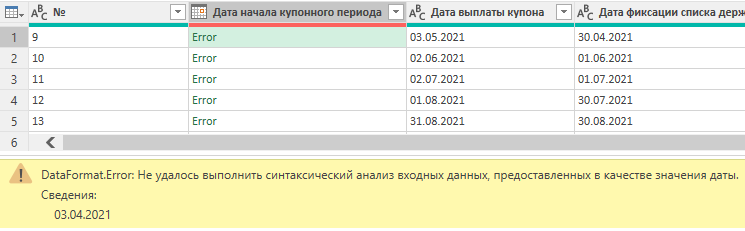
Решение
Если не получается преобразовать столбец с текстом в дату, то значит в строке присутствуют лишние символы.
С помощь функции Text.Length мы можем убедиться, что длина строки намного больше, чем ожидается. Мы видим 10 символов, но функция возвращает 15.
С помощью функции Text.Start извлечем 1 символ сначала строки. Потом получим код этого символа с помощью функции Character.ToNumber. Получаем 8206.
Далее воспользуемся функционалом замены подстроки и исправляем получившуюся формулу:
Table.ReplaceValue(
      get_table,
      Character.FromNumber(8206),
      "",
      Replacer.ReplaceText,
      {
         "Дата начала купонного периода",
         "Дата выплаты купона",
         "Дата фиксации списка держателей"
      }
   )
Примененные функции
- Text.Length
- Text.Start
- Character.ToNumber
- Web.Page
- Web.Contents
- Table.SelectRows
- Table.ReplaceValue
- Character.FromNumber
- Replacer.ReplaceText
- Table.TransformColumnTypes
Код
let
   source = Web.Page(
      Web.Contents(
         "https://www.moex.com/ru/issue.aspx?board=TQCB&code=RU000A102036#/bond_4"
      )
   ),
   get_table = Table.SelectRows(
      source,
      each ([ClassName] = "coupon-payment-schedule__table")
   ){0}[Data],
   cols_replace = Table.ReplaceValue(
      get_table,
      Character.FromNumber(8206),
      "",
      Replacer.ReplaceText,
      {
         "Дата начала купонного периода",
         "Дата выплаты купона",
         "Дата фиксации списка держателей"
      }
   ),
   cols_types = Table.TransformColumnTypes(
      cols_replace,
      {
         {"Дата начала купонного периода", type date},
         {"Дата выплаты купона", type date},
         {"Дата фиксации списка держателей", type date}
      }
   )
in
   cols_types
Этот урок входит в курс Работа с ошибками в Power Query
| Номер урока | Урок | Описание |
|---|---|---|
| 1 | Power Query Ошибки №1. Измененный тип, Неверная фильтрация в UI | Почему возникает ошибка Expression.Error Столбец таблицы не найден? Одна из причин — шаг Измененный тип. Почему в вашей итоговой таблицы не все данные, которые должны там оказаться? Вероятно вы совершили ошибку неверной фильтрации в пользовательском интерфейсе. |
| 2 | Power Query Ошибки №2. Фиксированная ширина столбца Excel | В этом уроке вы узнаете как отключить автоматическое определение ширины столбцов таблицы Excel при обновлении запроса Power Query. |
| 3 | Power Query Ошибки №3. Formula Firewall, запрос ссылается на… | Вы работаете в Power Query, но при попытке обновить все возникает ошибка Formula Firewall, запрос ссылается на… Что делать? Как исправить? |
| 4 | Power Query Ошибки №4. Доступ к веб-содержимому | В этом уроке вы узнаете как избавиться от надоедливого окна доступ к веб-содержимому. |
| 5 | Power Query Ошибки №5. Количество столбцов CSV | При импорте CSV получается неверное количество столбцов. |
| 6 | Power Query Ошибки №6. Не получается изменить тип данных (DataFormat.Error) | При попытке изменить тип данных с текстового на дату возникает ошибка DataFormat.Error. |
| 7 | Power Query Ошибки №7. Разные имена листов | В этом уроке мы решим проблему, когда в ваших источниках нужные вам данные находятся всегда на листах с разными именами. |
| 8 | Power Query Ошибки №8. Разные имена листов 2 | В этом уроке мы другими способами решим проблему, когда в ваших источниках нужные вам данные находятся всегда на листах с разными именами. |
| 9 | Power Query Ошибки №9. Разные имена столбцов, Table.TransformColumnNames | В этом уроке мы разберем проблему, когда нам присылают файлы, в которых всегда столбцы названы по-разному. |
| 10 | Power Query Ошибки №10. Как развернуть все столбцы | В этой задаче мы научимся разворачивать все столбцы табличного столбца не перечисляя каждый из них хардкодом. |
| 11 | Power Query Ошибки №11. Подключиться к последнему файлу | В этом уроке мы научимся подключаться к самому свежему файлу из нужной нам папки с нужным названием. |
| 12 | Power Query Ошибки №12. Консолидация и MissingField.Type | Бывает вы ходите выполнить добавление таблиц друг под другом с предварительной обработкой, но получаете ошибку Expression.Error: Столбец таблицы не найден. |
| 13 | Power Query Ошибки №13. Удалить пустые столбцы | Как без хардкода автоматически удалить пустые столбцы в Power Query, которые есть в импортируемой таблицы. Разберем 2 способа. Один из них прост до безобразия, а для второго понадобится функция Table.Profile. |
| 14 | Power Query Ошибки №14. Удалить лишние пробелы | В этом уроке мы разберем еще 1 способ удалить лишние пробелы в текстовом столбце Power Query. Для этого мы повторим и изучим несколько новых функций. Text.SplitAny List.Select Character.FromNumber Text.Combine |
| 15 | Power Query Ошибки №15. Плохо структурированный TXT | Как быть, если текстовый файл разбивается на столбцы неправильно? |
| 16 | Power Query Ошибки №16. При округлении не совпадает общая сумма | Разберем ошибку, которая возникает при необходимости разбить число на определенные доли, а результаты округлить до двух знаков после запятой. В такой ситуации может получиться, что сумма слагаемых не будет равняться исходному числу. |
| 17 | Power Query Ошибки №17. Удаление дубликатов, Подводные камни Table. Distinct | Что может пойти не так при использовании функции удаления дубликатов. |
| 18 | Power Query Ошибки №18. Удаление дубликатов 2, Подводные камни Table. Distinct | Что может пойти не так при использовании функции удаления дубликатов. Другое решение данной проблемы. |
| 19 | Power Query Ошибки №19. Неверная разбивка на столбцы | При импорте данных из CSV или TXT разбивка на столбцы происходит неправильно. |
| 20 | Power Query Ошибки №20. Пустая таблица при импорте Excel (XLSX, XLS) | Вы пытаетесь подключиться к книге Excel, но импортируется пустая таблица. |
| 21 | Power Query Ошибки №21. Подключение к PostgreSQL, Установка драйвера | Вы пытаетесь подключиться к PostgreSQL и получаете ошибку «Перед использование этого соединителя необходимо установить один или несколько дополнительных компонентов» |
Hello Community!
I’m facing an issue in Power Query and can’t seem to find a reason to why its happening. I could really use some advice on the reason to the problem.
This is the error I’m getting —
Expression.Error: We cannot convert the value "[Binary]" to type Binary. When am I facing it? — When trying to merge or append 2 queries.
What are the data soruces of the two queries? — 2 Excel files kept in folders in 2 different SharePoint sites. The privacy of both are kept as ‘Private’. (I’ve also faced this issue while trying to merge an SQL query with an Excel)
— Both are of type Text. (Also no Blank values are present in both columns).
Known Work Around
— Now, I have no idea why this error is shown, but I found a work around to this which is using ‘Merge as New Query’ or ‘Append as new query’. If I do that, then this error is not shown and previously when I faced this issue, I did that.
However now, I need to do 3 different merges on this table and if I use this work around method, I’d be making more and more tables which I dont really prefer now (Its getting really clustered/crowded by tables).
I just really want to know the reason behind this and find a proper solution once and for all. I have done other merges/appends on other tables in this file and havn’t seen this error. So, I’m not sure why its popping up for some.
If you have knowledge on this, kindly help me! I’d really appreciate it!
-
#1
While using Power Query for getting files from a folder, it gives the following error.
DataFormat.Error: The input couldn’t be recognized as a valid Excel document.
Details:
Binary
——————————————————————————-
Mod Edit: Moved to appropriate section
Last edited by a moderator: Dec 23, 2015
-
#2
Need more detail.
What file are you trying to get the data from? What was the original source of info? What version of Power Query are you using? etc etc…
If you can upload the file you are trying to import that would help.
If the file is in text format (.txt, .csv), first open it manually with Excel and see if error message comes up. If it does, save it as Excel file and see if that solves issue.
-
#3
The folder contains *.xlsx files. I am using Power Query in Excel 2016. There are different worksheets in each of those excel files. Please let me know what other information is required so that I can use Power Query to pull those details.
Thank you,
Arvind Jain
-
#4
Attached file shows the error that I received while using power query.
Attachments
-
31.5 KB
Views: 4
-
#5
There can be multiple reasons for this error.
Without looking at your source file etc, it’s difficult to say what’s causing it.
Few things you can try:
1. Have you opened the file itself without going through Power Query? Is there any error and/or message that pops up?
2. Check if the folder contains any other files. If so, go to Navigation step in the Applied steps window. Filter for only the type you need to process.
3. Go through the link below in detail and follow step by step to understand how to combine and append from multiple files.
https://www.powerquery.training/portfolio/append-data-from-files/
-
#6
Hey, got the same problem, trying to upload 5 dead simple .xlsx files into one table, can’t see what it doesn’t work.. Please help?
Attachments
-
39.3 KB
Views: 5
-
#7
Structure of data table isn’t ideal, and looking at your query, I’m not exactly sure what you are trying to accomplish.
If just combining data from 5 sheets. You’d create connection only query for each of the sheets. Then use query tool to append queries to single table.

See attached sample (you’ll need to change source for each data).
Attachments
-
18.7 KB
Views: 16