In this article, we will discuss how to fix the syntax error that is positional argument follows keyword argument in Python
An argument is a value provided to a function when you call that function. For example, look at the below program –
Python
def calculate_square(num):
return num * num
result = calculate_square(10)
print(result)
The calculate_square() function takes in an argument num which is an integer or decimal input, calculates the square of the number and returns the value.
Keyword and Positional Arguments in Python
There are two kind of arguments, namely, keyword and positional. As the name suggests, the keyword argument is identified by a function based on some key whereas the positional argument is identified based on its position in the function definition. Let us have a look at this with an example.
Python
def foo(a, b, c=10):
print('a =', a)
print('b =', b)
print('c =', c)
print("Function Call 1")
foo(2, 3, 8)
print("Function Call 2")
foo(2, 3)
print("Function Call 3")
foo(a=2, c=3, b=10)
Output:
Function Call 1
a = 2
b = 3
c = 8
Function Call 2
a = 2
b = 3
c = 10
Function Call 3
a = 2
b = 10
c = 3
Explanation:
- During the first function call, we provided 3 arguments with any keyword. Python interpreted in order of how they have been defined in the function that is considering position of these keywords.
- In the second function call, we provided 2 arguments, but still the output is shown because of we provided 2 positional argument and the function has a default value for the final argument c. So, it takes the default value into account for the final argument.
- In the third function call, three keyword arguments are provided. The benefit of providing this keyword argument is that you need not remember the positions but just the keywords that are required for the function call. These keywords can be provided in any order but function will take these as key-value pairs and not in the order which they are being passed.
SyntaxError: positional argument follows keyword argument
In the above 3 cases, we have seen how python can interpret the argument values that are being passed during a function call. Now, let us consider the below example which leads to a SyntaxError.
Python
def foo(a, b, c=10):
print('a =', a)
print('b =', b)
print('c =', c)
print("Function Call 4")
foo(a=2, c=3, 9)
Output:
File "<ipython-input-40-982df054f26b>", line 7
    foo(a=2, c=3, 9)
                 ^
SyntaxError: positional argument follows keyword argument
Explanation:
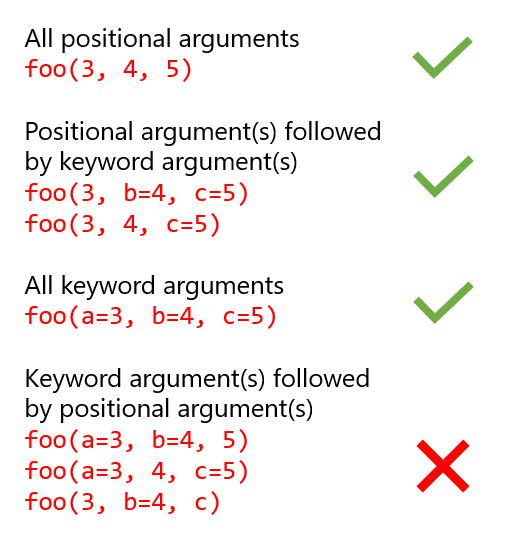
In this example, the error occurred because of the way we have passed the arguments during the function call. The error positional argument follows keyword argument means that the if any keyword argument is used in the function call then it should always be followed by keyword arguments. Positional arguments can be written in the beginning before any keyword argument is passed. Here, a=2 and c=3 are keyword argument. The 3rd argument 9 is a positional argument. This can not be interpreted by the python as to which key holds what value. The way python works in this regards is that, it will first map the positional argument and then any keyword argument if present.
How to avoid the error – Conclusion

17 авг. 2022 г.
читать 1 мин
Одна ошибка, с которой вы можете столкнуться в Python:
SyntaxError : positional argument follows keyword argument
Эта ошибка возникает, когда вы используете позиционный аргумент в функции после использования аргумента ключевого слова .
Вот разница между ними:
Позиционные аргументы — это аргументы, перед которыми нет «ключевого слова».
- Пример: my_function (2, 2)
Аргументы ключевых слов — это аргументы , перед которыми стоит «ключевое слово».
- Пример: my_function(a=2, b=2)
Если вы используете позиционный аргумент после аргумента ключевого слова, Python выдаст ошибку.
- Пример: my_function(a=2, 2)
В следующем примере показано, как эта ошибка может возникнуть на практике.
Пример: Аргумент позиции следует за аргументом ключевого слова
Предположим, у нас есть следующая функция в Python, которая умножает два значения, а затем делит на третье:
def do_stuff (a, b):
 return a * b / c
В следующих примерах показаны допустимые и недопустимые способы использования этой функции:
Правильный способ №1: все позиционные аргументы
Следующий код показывает, как использовать нашу функцию со всеми позиционными аргументами:
do_stuff( 4 , 10 , 5 )

8.0
Никакой ошибки не возникает, потому что Python точно знает, какие значения использовать для каждого аргумента в функции.
Верный способ № 2: все аргументы ключевых слов
Следующий код показывает, как использовать нашу функцию со всеми аргументами ключевого слова:
do_stuff(a= 4 , b= 10 , c= 5 )

8.0
И снова ошибка не возникает, потому что Python точно знает, какие значения использовать для каждого аргумента в функции.
Действенный способ № 3: позиционные аргументы перед ключевыми аргументами
Следующий код показывает, как использовать нашу функцию с позиционными аргументами, используемыми перед аргументами ключевого слова:
do_stuff(4, b=10, c=5)

8.0
Никакой ошибки не возникает, потому что Python знает, что аргументу a должно быть присвоено значение 4 .
Неверный способ: позиционные аргументы после аргументов ключевого слова
Следующий код показывает, как мы можем попытаться использовать функцию с позиционными аргументами, используемыми после аргументов ключевого слова:
do_stuff(a= 4, 10, 5)

SyntaxError : positional argument follows keyword argument
Возникает ошибка, потому что мы использовали позиционные аргументы после аргументов ключевого слова.
В частности, Python не знает, следует ли присваивать значения 10 и 5 аргументам b или c , поэтому он не может выполнить функцию.
Дополнительные ресурсы
В следующих руководствах объясняется, как исправить другие распространенные ошибки в Python:
Как исправить KeyError в Pandas
Как исправить: ValueError: невозможно преобразовать число с плавающей запятой NaN в целое число
Как исправить: ValueError: операнды не могли транслироваться вместе с фигурами
Table of Contents
Hide
- What is SyntaxError: positional argument follows keyword argument?
- How to fix SyntaxError: positional argument follows keyword argument?
- Scenario 1 – Use only Positional Arguments.
- Scenario 2 – Use only Keyword Arguments.
- Scenario 3 – Use Positional arguments first, followed by Keyword Arguments.
- Conclusion
If you provide the keyword argument first followed by a positional argument, the Python interpreter will raise SyntaxError: positional argument follows keyword argument.
In this tutorial, we will learn what SyntaxError: positional argument follows keyword argument means and how to resolve this error with examples.
An argument is a variable, value, or object passed to a method or function as an input. We have two types of arguments in Python, and we can pass these arguments while calling the methods.
Positional Argument -The positional arguments are the one that does not have any keyword in front of them.
Example
result = add_numbers(10, 20, 30)
Keyword Argument -The Keyword arguments are the one that has a keyword in front of them.
Example
result = add_numbers(a=10, b=20, c=30)Every programming language has its own set of rules. These rules are referred to as the syntax that needs to be followed while programming.
The positional and keyword arguments must appear in a specific order; otherwise, the Python interpreter will throw a Syntax error.
The Python rule says positional arguments must appear first, followed by the keyword arguments if we are using it together to call the method.
The SyntaxError: positional argument follows keyword argument means we have failed to follow the rules of Python while writing a code.
Let us take a simple example to demonstrate this error.
# Method that takes 3 arguments and returns sum of it
def add_numbers(a, b, c):
    return a+b+c

# call the method by passing the arguments
result = add_numbers(a=10, 20, 30)

# print the output
print("Addition of numbers is", result)
Output
  File "c:PersonalIJSCodemain.py", line 8
    result = add_numbers(a=10, 20, 30)
                                     ^
SyntaxError: positional argument follows keyword argument
We have passed the Keyword argument first in the above code and then followed by the Positional argument which breaks the rule and hence we get the SyntaxError.
How to fix SyntaxError: positional argument follows keyword argument?
There are several ways to fix the error. Let us look at all the correct ways to call the methods in Python.
Scenario 1 – Use only Positional Arguments.
The easier way to fix the issue is to use only Positional arguments while calling the method in Python.
Let us fix our example by passing only positional arguments and see what happens when we run the code.
# Method that takes 3 arguments and returns sum of it
def add_numbers(a, b, c):
    return a+b+c

# call the method by passing only positional arguments
result = add_numbers(10, 20, 30)

# print the output
print("Addition of numbers is", result)
Output
Addition of numbers is 60
The code runs without any error as Python knows which values to use for each argument in the function.
Scenario 2 – Use only Keyword Arguments.
Another way to resolve the error is to use only the Keyword arguments while calling the method in Python.
# Method that takes 3 arguments and returns sum of it
def add_numbers(a, b, c):
    return a+b+c


# call the method by passing only keyword arguments
result = add_numbers(a=10, b=20, c=30)

# print the output
print("Addition of numbers is", result)
Output
Addition of numbers is 60
The code runs without any error as Python knows which values to use for each argument in the function.
Scenario 3 – Use Positional arguments first, followed by Keyword Arguments.
If you need to use both positional and keyword arguments, you need to abide by the rules of Python.
The Positional arguments should always appear first, followed by the keyword arguments.

In the below example, we have fixed the issue by passing the two positional arguments first and then a keyword argument.
# Method that takes 3 arguments and returns sum of it
def add_numbers(a, b, c):
    return a+b+c


# pass all positional arguments first and then keyword arguments
result = add_numbers(10, 20, c=30)

# print the output
print("Addition of numbers is", result)
Output
Addition of numbers is 60
Conclusion
In Python, the SyntaxError: positional argument follows keyword argument occurs if you pass keyword arguments before the positional arguments. Since Python interprets positional arguments in the order in which they appear first and then followed by the keyword arguments as next.
We can resolve the SyntaxError by providing all the positional arguments first, followed by the keyword arguments at last.
Table of Contents
- Introduction
- Positional and Keyword Arguments in Python
- What is SyntaxError: positional argument follows keyword argument?
- How to Fix SyntaxError: positional argument follows keyword argument?
- Using Only Positional Arguments
- *args and **kwargs Parameters in Python
- Summary
- Next Steps
- References
Introduction
Arguments (or parameters) are a fundamental concept in Python programming. They allow you to provide inputs to your programs and functions that result in a varying output return value or varying set of steps performed by your program.
In Python, you might have encountered the error SyntaxError: Positional Argument Follows Keyword Argument when working with positional and keywords arguments together in one function. To resolve this error you must understand how arguments fundamentally work in Python.
In this article, you will learn how to fix the «SyntaxError: Positional Argument Follows Keyword Argument» in Python by understanding what positional and keyword arguments are and how they work, which will help you prevent this error from occurring in the future.
Positional and Keyword Arguments in Python
Arguments allow developers and users to provide input values to a program or function that returns a varying output based on the arguments supplied. In Python, arguments are most commonly used when calling functions and class methods — a class method is just a function defined as a part of a class. If you are familiar with the Linux command line, you likely have already used arguments with some Linux commands.
The terms «parameter» and «argument» are often used interchangeably. As a refresher, let’s quickly mention the difference these two terms:
- A parameter is a scoped variable defined in the function header.
- An argument is the value passed as input via a function call, which is mapped to a parameter.
Python has two important types of arguments, positional arguments and keyword arguments.
You are probably most familiar with positional arguments, since they are the default type in Python.
Positional arguments are simply an ordered list of inputs in a Python function call that correspond to the order of the parameters defined in the function header.
>>> def func(num1, num2):
...     print(f"Num 1: {num1}, Num 2: {num2}")
...
>>> func(1, 2)
Num 1: 1, Num 2: 2
>>>
>>> func(2, 1)
Num 1: 2, Num 2: 1
In this example, we have defined a the function func with parameters num1, and num2. When calling the function, the argument order matters. Python uses the position of the arguments to determine the parameter to map each input value to.
On the other hand, a keyword argument is supplied with both a parameter name AND its corresponding value.
>>> def func(num1, num2):
...     print(f"Num 1: {num1}, Num 2: {num2}")
...
>>> func(num1=1, num2=2)
Num 1: 1, Num 2: 2
>>>
>>> func(num2=2, num1=1)
Num 1: 1, Num 2: 2
Here, you can see how keyword arguments are used, and how changing the order of the arguments doesn’t matter because you specify exactly which parameter refers to which value.
What is SyntaxError: positional argument follows keyword argument?
The Python SyntaxError: positional argument follows keyword argument occurs when you try to specify a positional argument after a keyword argument in a function call.
>>> def func(num1, num2):
...     print(f"Num 1: {num1}, Num 2: {num2}")
...
>>> func(num1=1, 2)
  File "<stdin>", line 1
    func(num1=1, 2)
                  ^
SyntaxError: positional argument follows keyword argument
Here, the SyntaxError occurred because the keyword argument num1=1 is followed by the positional argument 2.
The logic behind why the SyntaxError occurs is that in order for Python to consistently map all supplied argument values to named parameters, all positional arguments must be specified before any keyword arguments.
How to Fix SyntaxError: positional argument follows keyword argument?
There are multiple ways to fix the Python exception SyntaxError: positional argument follows keyword and each method has its pros and cons.
Using Positional Arguments Followed by Keyword Arguments
One method is to simply do what the error states and specify all positional arguments before our keyword arguments!
>>> func(1, num2=2)
Num 1: 1, Num 2: 2
Here, we use the positional argument 1 followed by the keyword argument num2=2 which fixes the error. However, you might have noticed that in the previous example we used a keyword argument for the num1 parameter instead of the num2 parameter. If you want to use both positional and keyword arguments, all the positional arguments must come before the keyword arguments.
In Python, optional arguments can be implemented by specifying a default value for a parameter in the function header. This can be done using syntax like «def func(num1, num2=10):». This makes the num2 parameter totally optional. If it’s not specified in the function call, num2 will assume the default value of 10.
This method of using arguments is great when working with functions that have some required arguments, which you can use as positional arguments, and any additional optional arguments can be keyword arguments. This makes it clear which of the arguments passed were optional and which were required. Many times there can be a large number of optional arguments, and it would be impractical to refer to them without using keyword arguments.
Using Only Positional Arguments
Another way to resolve this error is to exclusively use positional arguments in your function call:
>>> func(1, 2)
Num 1: 1, Num 2: 2
This can be great when you have a few arguments and you want to keep things simple. However, this could make the code harder to understand as other developers don’t know what each argument means right away. They would have to look at the function definition or the function documentation. And it’s even worse as the number of arguments increases. It is also impossible to use this method with optional arguments, without passing the default values again in the function call. This is a bit redundant and prone to errors when specifying default values repeatedly in the function calls.
Using Only Keyword Arguments
Finally, you can fix the error by using only keyword arguments:
>>> func(num1=1, num2=2)
Num 1: 1, Num 2: 2
>>>
>>> func(num2=2, num1=1)
Num 1: 1, Num 2: 2
Using this method, you can explicitly state which parameter equals which value, and the order of the arguments doesn’t matter since Python knows which parameter name to map each value to. It also makes the code easier for other developers to understand since there is less ambiguity.
This method also easily works with optional arguments. The only downside of this method is that it can be pretty verbose, and you would need to know the name of every parameter when writing a function call.
*args and **kwargs Parameters in Python
Two more ways to define and pass arguments in Python are *args and **kwargs. Using the single asterisk * or double asterisk ** syntax before a parameter name in a function header allows you to pass a varying number of non-keyword or keyword arguments in a function call. Note that *args stands for «arguments» and **kwargs stands for «keyword arguments».
*args accepts any number of positional arguments which are ingested as a tuple object, with each argument value being included as an element in the tuple. **kwargs accepts any number of keyword arguments which are ingested as a dictionary object. Each keyword argument name is included as a key in the dictionary, and each corresponding keyword argument value is included as a value in the dictionary.
For example:
>>> def f_args(*args):
...     print(args)
...
>>> f_args(1, 2, 3)
(1, 2, 3)
>>>
>>> def f_kwargs(**kwargs):
...     print(kwargs)
...
>>> f_kwargs(a=1, b=2, c=3)
{'a': 1, 'b': 2, 'c': 3}
Here, we have two functions f_args and f_kwargs, which define *args and **kwargs parameters, respectively. You can see that *args stores a tuple of positional arguments in the variable args, and **kwargs stores a dictionary of keyword arguments in the variable kwargs.
Note that the variable names args and kwargs can be replaced with any other variable name, only the single * or double ** asterisk syntax is important to define how the arguments are ingested.
Here is another example usage of *args:
>>> def my_sum(*nums):
...     total = 0
...     for num in nums:
...             total += num
...     return total
...
>>> my_sum(1, 2, 3)
6
>>>
>>> my_sum(2, 2, 2, 5)
11
>>>
>>> my_sum()
0
The my_sum function accepts any amount of positional arguments (or no arguments at all), and returns the sum of those arguments.
You can also use both *args and **kwargs together:
>>> def f(*args, **kwargs):
...     print(args, kwargs)
...
>>> f(1, 2, a=3)
(1, 2) {'a': 3}
Here, all the positional arguments are included in the tuple args, and all the keyword arguments are included in the dictionary kwargs. Note that all positional * parameters must come before keyword ** parameters, or you’ll get an invalid syntax error as below:
>>> def f(**kwargs, *args):
  File "<stdin>", line 1
    def f(**kwargs, *args):
                    ^
SyntaxError: invalid syntax
>>>
Summary
In this article, you learned how to fix the Python error `SyntaxError: Positional Argument Follows Keyword Argument» using various methods and learned about the different types of arguments in Python.
First, you learned what arguments are and some terminology regarding arguments. Then you learned what positional arguments are and what keyword arguments are.
Next, you saw when the «SyntaxError: Positional Argument Follows Keyword Argument» occurs with an example, and why it occurs. Which was followed, with various methods to fix the error and the benefits and drawbacks of each method.
Additionally, you learned what the *args and **kwargs arguments are in Python and how to use them.
Next Steps
To learn more about the basics of Python, coding, and software development, check out our Coding Essentials Guidebook for Developers, where we cover the essential languages, concepts, and tools that you’ll need to become a professional developer.
Thanks and happy coding! We hope you enjoyed this article. If you have any questions or comments, feel free to reach out to jacob@initialcommit.io.
References
- Python args and kwargs: Demystifie — https://realpython.com/python-kwargs-and-args/
- Python Function Arguments — https://www.programiz.com/python-programming/function-argument
Final Notes
Ну, на самом деле, история аргументов в Python не такая уж и большая.
Я всегда удивлялся тому, что для работы с аргументами Python-функций достаточно лишь разобраться с *args и **kwargs. И удивлялся я не зря. Как оказалось, аргументы — это далеко не так просто. В этом материале я хочу дать общий обзор всего того, что связано с аргументами функций в Python. Надеюсь, что в итоге у меня, и правда, получится показать общую картину работы с аргументами, и что эта статья не станет очередной публикацией, в которой читателю не удастся найти ничего нового. А теперь — к делу.
Большинству читателей этой статьи, полагаю, понятна сущность аргументов функций. Для начинающих поясню, что это — объекты, отправляемые функции инициатором её вызова. При передаче аргументов функции выполняется множество действий, зависящих от того, объекты какого типа отправляют функции (изменяемые или неизменяемые объекты). Инициатор вызова функции — это сущность, которая вызывает функцию и передаёт ей аргументы. Говоря о вызове функций, стоит поразмыслить над некоторыми вещами, которые мы сейчас обсудим.
В аргументы, имена которых заданы при объявлении функции, записываются объекты, передаваемые функциям при вызове. При этом, если соответствующим локальным переменным функций, их параметрам, что-то присваивают, эта операция не влияет на передаваемые функциям неизменяемые объекты. Например:
def foo(a):
    a = a+5
    print(a)             # Выводит 15

a = 10
foo(a)
print(a)                 # Выводит 10
Как видно, вызов функции никак не повлиял на переменную a. Именно это происходит в том случае, если функции передаётся неизменяемый объект.
А если же функциям передают изменяемые объекты, то можно столкнуться с поведением системы, которое отличается от вышеописанного.
def foo(lst):
    lst = lst + ['new entry']
    print(lst)                # Выводит ['Book', 'Pen', 'new entry']

lst = ['Book', 'Pen']
print(lst)                    # Выводит ['Book', 'Pen']
foo(lst)
print(lst)                    # Выводит ['Book', 'Pen']
Заметили ли вы тут что-то новое? Если вы ответите «Нет», то будете правы. Но если как-то повлиять на элементы изменяемого объекта, переданного функции, мы станем свидетелями кое-чего другого.
def foo(lst):
    lst[1] = 'new entry'
    print(lst)                # Выводит ['Book', 'new entry']

lst = ['Book', 'Pen']
print(lst)                     # Выводит ['Book', 'Pen']
foo(lst)
print(lst)                     # Выводит ['Book', 'new entry']
Как видите, объект из параметра lst был изменён после вызова функции. Произошло это из-за того, что мы работаем со ссылкой на объект, хранящейся в параметре lst. В результате изменение содержимого этого объекта выходит за пределы функции. Избежать этого можно, просто выполняя глубокие копии подобных объектов и записывая их в локальные переменные функции.
def foo(lst):
    lst = lst[:]
    lst[1] = 'new entry'
    print(lst)                   # Выводит ['Book', 'new entry']

lst = ['Book', 'Pen']
print(lst)                       # Выводит ['Book', 'Pen']
foo(lst)
print(lst)                       # Выводит ['Book', 'Pen']
Это вас ещё не удивило? Если нет — тогда хотелось бы мне сделать так, чтобы вы, пропустив то, что вам известно, сразу же перешли к новому для вас материалу. А если да — то, помяните мои слова, вы, ближе знакомясь с аргументами, узнаете ещё много интересного.
Итак, вот что следует знать об аргументах функций:
- Порядок передачи функциям позиционных аргументов.
- Порядок передачи функциям именованных аргументов.
- Назначение значений аргументов, применяемых по умолчанию.
- Организация обработки наборов аргументов переменной длины.
- Распаковка аргументов.
- Использование аргументов, которые можно передавать только по имени (keyword-only).
Разберём каждый из этих пунктов.
1. Порядок передачи функциям позиционных аргументов
Позиционные аргументы обрабатываются слева направо. То есть оказывается, что позиция аргумента, переданного функции, находится в прямом соответствии с позицией параметра, использованного в заголовке функции при её объявлении.
def foo(d, e, f):
    print(d, e, f)

a, b, c = 1, 2, 3
foo(a, b, c)                  # Выводит 1, 2, 3
foo(b, a, c)                  # Выводит 2, 1, 3
foo(c, b, a)                  # Выводит 3, 2, 1
Переменные a, b и c имеют, соответственно, значения 1, 2 и 3. Эти переменные играют роль аргументов, с которыми вызывается функция foo. Они, при первом вызове функции, соответствуют параметрам d, e и f. Этот механизм применим практически во всех из вышеперечисленных выше 6 пунктов, касающихся того, что нужно знать об аргументах функций в Python. Место размещения позиционного аргумента, передаваемого функции при вызове, играет главную роль при назначении значений параметрам функции.
2. Порядок передачи функциям именованных аргументов
Именованные аргументы передают функциям с указанием имён этих аргументов, соответствующих тем именам, которые им назначены при объявлении функции.
def foo(arg1=0, arg2=0, arg3=0):
    print(arg1, arg2, arg3)

a, b, c = 1, 2, 3
foo(a,b,c)                          # Выводит 1 2 3
foo(arg1=a, arg2=b, arg3=c)         # Выводит 1 2 3
foo(arg3=c, arg2=b, arg1=a)         # Выводит 1 2 3
foo(arg2=b, arg1=a, arg3=c)         # Выводит 1 2 3
Как видите, функция foo принимает 3 аргумента. Эти аргументы имеют имена arg1, arg2 и arg3. Обратите внимание на то, как мы, при вызове функции, меняем позиции аргументов. Именованные аргументы обрабатываются не так, как позиционные, хотя система продолжает читать их слева направо. Python, при назначении соответствующих значений параметрам функций, учитывает имена аргументов, а не их позиции. В результате оказывается, что функция выводит одно и то же независимо от позиций переданных ей аргументов. Это — всегда 1 2 3.
Обратите внимание на то, что здесь продолжают действовать механизмы, описанные в пункте №1.
3. Назначение значений аргументов, применяемых по умолчанию
Именованным аргументам можно назначать значения, применяемые по умолчанию. При использовании этого механизма в функции определённые аргументы становятся необязательными. Объявление подобных функций выглядит как то, что мы рассматривали в пункте №2. Единственное различие заключается в том, как именно вызываются эти функции.
def foo(arg1=0, arg2=0, arg3=0):
    print(arg1, arg2, arg3)

a, b, c = 1, 2, 3
foo(arg1=a)                         # Выводит 1 0 0
foo(arg1=a, arg2=b )                # Выводит 1 2 0
foo(arg1=a, arg2=b, arg3=c)         # Выводит 1 2 3
Обратите внимание на то, что в этом примере мы не передаём функции все аргументы, описанные при её объявлении. В этих случаях соответствующим параметрам назначаются значения, заданные по умолчанию. Продолжим этот пример:
foo(arg2=b)                         # Выводит 0 2 0
foo(arg2=b, arg3=c )                # Выводит 0 2 3

foo(arg3=c)                         # Выводит 0 0 3
foo(arg3=c, arg1=a )                # Выводит 1 0 3
Это — простые и понятные примеры использования вышеописанных механизмов вызова функций с передачей ей именованных аргументов. А теперь давайте усложним наши эксперименты, объединив то, о чём мы до сих пор говорили в пунктах №1, №2 и №3:
foo(a, arg2=b)                      # Выводит 1 2 0
foo(a, arg2=b, arg3=c)              # Выводит 1 2 3
foo(a, b, arg3=c)                   # Выводит 1 2 3

foo(a)                              # Выводит 1 0 0
foo(a,b)                            # Выводит 1 2 0
Тут при вызове функции использованы и позиционные и именованные аргументы. При использовании позиционных аргументов порядок их указания играет, как и прежде, важнейшую роль в правильной передаче функции входных данных.
Здесь мне хотелось бы обратить ваше внимание на одну примечательную деталь. Она заключается в том, что позиционные аргументы нельзя указывать после именованных аргументов. Вот пример, который позволит вам лучше понять эту идею:
foo(arg1=a, b)
>>>
foo(arg1=a, b)
           ^
SyntaxError: positional argument follows keyword argument
foo(a, arg2=b, c)
>>>
foo(a, arg2=b, c)
              ^
SyntaxError: positional argument follows keyword argument
Вы можете воспринимать это как правило. Позиционные аргументы не должны следовать за именованными аргументами при вызове функции.
4. Организация обработки наборов аргументов переменной длины
Здесь речь пойдёт о конструкциях *args и **kwargs. Когда эти конструкции используются при объявлении функции, мы ожидаем, что при вызове функции наборы аргументов произвольной длины будут представлены в виде параметров args и kwargs. При применении конструкции *args в параметр args попадают позиционные аргументы, представляемые в виде кортежа. При применении **kwargs в kwargs попадают именованные аргументы, представленные в виде словаря.
def foo(*args):
    print(args)

a, b, c = 1, 2, 3

foo(a, b, c)                # Выводит (1, 2, 3)
foo(a, b)                   # Выводит (1, 2)
foo(a)                      # Выводит (1)
foo(b, c)                   # Выводит (2, 3)
Этот код доказывает то, что в параметре args хранится кортеж, содержащий то, что передано функции при её вызове.
def foo(**kwargs):
    print(kwargs)

foo(a=1, b=2, c=3)        # Выводит {'a': 1, 'b': 2, 'c': 3}
foo(a=1, b=2)             # Выводит {'a': 1, 'b': 2}
foo(a=1)                  # Выводит {'a': 1}
foo(b=2, c=3)             # Выводит {'b': 2, 'c': 3}
В вышеприведённом коде показано то, что в параметре kwargs хранится словарь, состоящий из пар ключ-значение и представляющий именованные аргументы, переданные функции при вызове.
Но надо отметить, что функции, рассчитанной на приём позиционных аргументов, нельзя передавать именованные аргументы (и наоборот).
def foo(*args):
    print(args)

foo(a=1, b=2, c=3)
>>>
foo(a=1, b=2, c=3)
TypeError: foo() got an unexpected keyword argument 'a'
#########################################################
def foo(**kwargs):
    print(kwargs)

a, b, c = 1, 2, 3
foo(a, b, c)
>>>
TypeError: foo() takes 0 positional arguments but 3 were given
А теперь давайте соберём вместе всё то, что мы разобрали в пунктах №1, №2, №3 и №4, и со всем этим поэкспериментируем, исследовав разные комбинации аргументов, которые можно передавать функциям при их вызове.
def foo(*args,**kwargs):
    print(args, kwargs)

foo(a=1,)
# () {'a': 1}

foo(a=1, b=2, c=3)
# () {'a': 1, 'b': 2, 'c': 3}

foo(1, 2, a=1, b=2)
# (1, 2) {'a': 1, 'b': 2}

foo(1, 2)
# (1, 2) {}
Как видите, в нашем распоряжении оказывается кортеж args и словарь kwargs.
А вот — ещё одно правило. Оно заключается в том, что конструкцию *args нельзя использовать после конструкции **kwargs.
def foo(**kwargs, *args):
    print(kwargs, args)
>>>
    def foo(**kwargs, *args):
                      ^
SyntaxError: invalid syntax
То же самое правило распространяется и на порядок указания аргументов при вызове функций. Позиционные аргументы не должны следовать за именованными.
foo(a=1, 1)
>>>
    foo(a=1, 1)
            ^
SyntaxError: positional argument follows keyword argument
foo(1, a=1, 2)
>>>
    foo(1, a=1, 2)
               ^
SyntaxError: positional argument follows keyword argument
При объявлении функций можно комбинировать позиционные аргументы, *args и *kwagrs следующим образом:
def foo(var, *args,**kwargs):
    print(var, args, kwargs)

foo(1, a=1,)                            # Вызов 1
# 1 () {'a': 1}

foo(1, a=1, b=2, c=3)                   # Вызов 2
# 1 () {'a': 1, 'b': 2, 'c': 3}

foo(1, 2, a=1, b=2)                     # Вызов 3
# 1 (2,) {'a': 1, 'b': 2}
foo(1, 2, 3, a=1, b=2)                  # Вызов 4
# 1 (2, 3) {'a': 1, 'b': 2}
foo(1, 2)                               # Вызов 5
# 1 (2,) {}
При объявлении функции foo мы исходили из того, что у неё должен быть один обязательный позиционный аргумент. За ним следует набор позиционных аргументов переменной длины, а за этим набором идёт набор именованных аргументов переменной длины. Зная это, мы легко сможем «расшифровать» каждый из вышеприведённых вызовов функции.
В Вызове 1 функции переданы аргументы 1 и a=1. Это, соответственно, позиционный и именованный аргументы. Вызов 2 — это разновидность Вызова 1. Здесь длина набора позиционных аргументов равна нулю.
В Вызове 3 мы передаём функции 1, 2 и a=1,b=2. Это значит, что она теперь принимает два позиционных аргумента и два именованных аргумента. В соответствии с объявлением функции оказывается, что 1 воспринимается как обязательный позиционный аргумент, 2 идёт в набор позиционных аргументов переменной длины, а a=1 и b=2 попадают в набор именованных аргументов переменной длины.
Для того чтобы правильно вызвать эту функцию, мы должны передать ей, как минимум, один позиционный аргумент. В противном случае мы столкнёмся с ошибкой.
def foo(var, *args,**kwargs):
    print(var, args, kwargs)

foo(a=1)
>>>
foo(a=1)
TypeError: foo() missing 1 required positional argument: 'var'
Ещё одной разновидностью подобной функции может стать функция, в объявлении которой указано, что она принимает один обязательный позиционный аргумент и один именованный аргумент, за которыми следуют наборы позиционных и именованных аргументов переменной длины.
def foo(var, kvar=0, *args,**kwargs):
    print(var, kvar, args, kwargs)

foo(1, a=1,)                               # Вызов 1
# 1 0 () {'a': 1}

foo(1, 2, a=1, b=2, c=3)                   # Вызов 2
# 1 0 () {'a': 1, 'b': 2, 'c': 3}

foo(1, 2, 3, a=1, b=2)                     # Вызов 3
# 1 2 () {'a': 1, 'b': 2}

foo(1, 2, 3, 4, a=1, b=2)                  # Вызов 4
# 1 2 (3,) {'a': 1, 'b': 2}

foo(1, kvar=2)                             # Вызов 5
# 1 2 () {}
Вызовы этой функции можно «расшифровать» так же, как это делалось при анализе предыдущей функции.
При вызове этой функции ей надо передавать, как минимум, один позиционный аргумент. Иначе мы столкнёмся с ошибкой:
foo()
>>>
foo()
TypeError: foo() missing 1 required positional argument: 'var'
foo(1)
# 1 0 () {}
Обратите внимание на то, что вызов foo(1) работает нормально. Дело тут в том, что в том случае, если функцию вызывают, не указывая значение для именованного аргумента, значение ему назначается автоматически.
А вот ещё некоторые ошибки, с которыми можно столкнуться при неправильном вызове этой функции:
foo(kvar=1)                             # Вызов 1
>>>
TypeError: foo() missing 1 required positional argument: 'var'
foo(kvar=1, 1, a=1)                      # Вызов 2
>>>
SyntaxError: positional argument follows keyword argument
foo(1, kvar=2, 3, a=2)                   # Вызов 3
>>>
SyntaxError: positional argument follows keyword argument
Обратите особое внимание на ошибку, возникающую при выполнении Вызова 3.
5. Распаковка аргументов
В предыдущих разделах мы говорили о том, как собирать в кортежи и словари наборы аргументов, передаваемых функциям. А здесь мы обсудим обратную операцию. А именно, разберём механизм, позволяющий распаковывать аргументы, подаваемые на вход функции.
args = (1, 2, 3, 4)
print(*args)                  # Выводит 1 2 3 4
print(args)                   # Выводит (1, 2, 3, 4)

kwargs = { 'a':1, 'b':2}
print(kwargs)                 # Выводит {'a': 1, 'b': 2}
print(*kwargs)                # Выводит a b
Распаковывать переменные можно с помощью синтаксических конструкций * и **. Вот как выглядит их использование при передаче в функции кортежей, списков и словарей.
def foo(a, b=0, *args, **kwargs):
    print(a, b, args, kwargs)

tup = (1, 2, 3, 4)
lst = [1, 2, 3, 4]
d = {'e':1, 'f':2, 'g':'3'}

foo(*tup)             # foo(1, 2, 3, 4)
# 1 2 (3, 4) {}

foo(*lst)             # foo(1, 2, 3, 4)
# 1 2 (3, 4) {}

foo(1, *tup)          # foo(1, 1, 2, 3, 4)
# 1 1 (2, 3, 4) {}

foo(1, 5, *tup)       # foo(1, 5, 1, 2, 3, 4)
# 1 5 (1, 2, 3, 4) {}

foo(1, *tup, **d)     # foo(1, 1, 2, 3, 4 ,e=1 ,f=2, g=3)
# 1 1 (2, 3, 4) {'e': 1, 'f': 2, 'g': '3'}

foo(*tup, **d)         # foo(1, 1, 2, 3, 4 ,e=1 ,f=2, g=3)
# 1 2 (3, 4) {'e': 1, 'f': 2, 'g': '3'}
d['b'] = 45
foo(2, **d)             # foo(1, e=1 ,f=2, g=3, b=45)
# 2 45 () {'e': 1, 'f': 2, 'g': '3'}
Разберите каждый из приведённых здесь вызовов функций, выполненный с использованием распаковки аргументов, и обратите внимание на то, как соответствующие вызовы выглядели бы без использования * и **. Постарайтесь понять то, что происходит при выполнении этих вызовов, и то, как именно распаковываются различные структуры данных.
Экспериментируя с распаковкой аргументов, можно столкнуться с новой ошибкой:
foo(1, *tup, b=5)
>>>
TypeError: foo() got multiple values for argument 'b'
foo(1, b=5, *tup)
>>>
TypeError: foo() got multiple values for argument 'b'
Эта ошибка возникает из-за конфликта именованного аргумента, b=5, и позиционного аргумента. Как мы выяснили в разделе №2, при передаче именованных аргументов их порядок значения не имеет. В результате в обоих случаях возникает одна и та же ошибка.
6. Использование аргументов, которые можно передавать только по имени (keyword-only)
В некоторых случаях нужно сделать так, чтобы функция принимала бы обязательные именованные аргументы. Если при объявлении функции описывают аргументы, которые можно передавать только по имени, то такие аргументы должны передаваться ей при любом её вызове.
def foo(a, *args, b):
    print(a, args, b)

tup = (1, 2, 3, 4)

foo(*tup, b=35)
# 1 (2, 3, 4) 35

foo(1, *tup, b=35)
# 1 (1, 2, 3, 4) 35

foo(1, 5, *tup, b=35)
# 1 (5, 1, 2, 3, 4) 35

foo(1, *tup, b=35)
# 1 (1, 2, 3, 4) 35

foo(1, b=35)
# 1 () 35

foo(1, 2, b=35)
# 1 (2,) 35

foo(1)
# TypeError: foo() missing 1 required keyword-only argument: 'b'

foo(1, 2, 3)
# TypeError: foo() missing 1 required keyword-only argument: 'b'
Как видите, ожидается, что функции обязательно будет передан именованный аргумент b, который, в объявлении функции, указан после *args. При этом в объявлении функции можно использовать просто символ *, после которого, через запятую, идут идентификаторы именованных аргументов, которые можно передавать функции только по имени. Такая функция не будет рассчитана на приём набора позиционных аргументов переменной длины.
def foo(a, *, b, c):
    print(a, b, c)

tup = (1, 2, 3, 4)

foo(1, b=35, c=55)
# 1 35 55

foo(c= 55, b=35, a=1)
# 1 35 55

foo(1, 2, 3)
# TypeError: foo() takes 1 positional argument but 3 were given

foo(*tup, b=35)
# TypeError: foo() takes 1 positional argument but 4 positional arguments (and 1 keyword-only argument) were given

foo(1, b=35)
# TypeError: foo() takes 1 positional argument but 4 positional arguments (and 1 keyword-only argument) were given
Функция, объявленная в предыдущем примере, принимает один позиционный аргумент и два именованных аргумента, которые можно передавать только по имени. Это приводит к тому, что для правильного вызова функции ей необходимо передавать оба именованных аргумента. После * можно описывать и именованные аргументы, которым заданы значения, применяемые по умолчанию. Это даёт нам определённую свободу при вызове подобных функций.
def foo(a, *, b=0, c, d=0):
    print(a, b, c, d)

foo(1, c=55)
# 1 0 55 0

foo(1, c=55, b=35)
# 1 35 55 0

foo(1)
# TypeError: foo() missing 1 required keyword-only argument: 'c'
Обратите внимание на то, что функцию можно нормально вызывать, не передавая ей аргументы b и d, так как для них заданы значения, применяемые по умолчанию.
Итоги
Пожалуй, у нас, и правда, получилась очень длинная история об аргументах. Надеюсь, читатели этого материала узнали что-то новое для себя. И, кстати, историю об аргументах функций в Python можно продолжать. Возможно, мы ещё о них поговорим.
Узнали ли вы из этого материала что-то новое об аргументах функций в Python?

One error you may encounter in Python is:
SyntaxError: positional argument follows keyword argument
This error occurs when you use a positional argument in a function after using a keyword argument.
Here’s the difference between the two:
Positional arguments are ones that have no “keyword” in front of them.
- Example: my_function(2, 2)
Keyword arguments are ones that do have a “keyword” in front of them.
- Example: my_function(a=2, b=2)
If you use a positional argument after a keyword argument then Python will throw an error.
- Example: my_function(a=2, 2)
The following example shows how this error may occur in practice.
Example: Positional Argument Follows Keyword Argument
Suppose we have the following function in Python that multiplies two values and then divides by a third:
def do_stuff(a, b):
    return a * b / c
The following examples show valid and invalid ways to use this function:
Valid Way #1: All Positional Arguments
The following code shows how to use our function with all positional arguments:
do_stuff(4, 10, 5)

8.0
No error is thrown because Python knows exactly which values to use for each argument in the function.
Valid Way #2: All Keyword Arguments
The following code shows how to use our function with all keyword arguments:
do_stuff(a=4, b=10, c=5)

8.0
Once again no error is thrown because Python knows exactly which values to use for each argument in the function.
Valid Way #3: Positional Arguments Before Keyword Arguments
The following code shows how to use our function with positional arguments used before keyword arguments:
do_stuff(4, b=10, c=5)

8.0
No error is thrown because Python knows that the value 4 must be assigned to the a argument.
Invalid Way: Positional Arguments After Keyword Arguments
The following code shows how we may attempt to use the function with positional arguments used after keyword arguments:
do_stuff(a=4, 10, 5)

SyntaxError: positional argument follows keyword argument
An error is thrown because we used positional arguments after keyword arguments.
Specifically, Python doesn’t know if the 10 and 5 values should be assigned to arguments b or c so it’s unable to execute the function.
Additional Resources
The following tutorials explain how to fix other common errors in Python:
How to Fix KeyError in Pandas
How to Fix: ValueError: cannot convert float NaN to integer
How to Fix: ValueError: operands could not be broadcast together with shapes
In Python, there are two types of arguments: positional and keyword arguments. These arguments must appear in a particular order otherwise the Python interpreter returns an error.
In this guide, we’re going to talk about the “positional argument follows keyword argument” error and why it is raised. We’ll look at an example code snippet with this error so that we can walk through how to solve it.

Find Your Bootcamp Match
- Career Karma matches you with top tech bootcamps
- Access exclusive scholarships and prep courses
Select your interest
First name
Last name
Phone number
By continuing you agree to our Terms of Service and Privacy Policy, and you consent to receive offers and opportunities from Career Karma by telephone, text message, and email.
Let’s get started!
The Problem: positional argument follows keyword argument
Let’s take a look at our full error:
SyntaxError: positional argument follows keyword argument
Like the English language, programming languages have their own rules. These rules are referred to as syntax. Our error is a syntax error which means that we have failed to follow one of the rules that governs how to write a Python code.
The next part of our error tells us what is causing this error. In this case, our code must have a positional argument that appears after a keyword argument.
Positional arguments are arguments that appear in their respective positions:
def add_numbers(a, b):
	return a + b

Let's call this function:

add_numbers(2, 3)
“a” and “b” become variables inside our function. This code works because we have specified two positional arguments. “a” is equal to 2 and “b” is equal to three. We can also specify these arguments as keyword arguments:
However, we cannot specify a positional argument first and then switch to the keyword syntax.
This is because Python has a special function called *args which processes multiple arguments in a function. Consider this code:
def show_users(a, b, *args):
	print(a, b, *args)
This code uses *args. This keyword represents a variable number of arguments. We can pass in as many arguments to our show_users() function as we want:
show_users("Alex", "Peter", "Violet', "Julie")
Our code returns: Alex Peter Violet Julie
Our first two arguments, “a” and “b”, have the values “Alex” and “Peter”, respectively.
This is because if you use positional syntax, arguments are assigned in the order in which they are passed. The last arguments appear in the order that they are stated because *args represents an unknown amount of additional arguments.
An Example Scenario
Let’s take a look at a code snippet that experiences this error:
def print_menu(salads, pizzas):
	print("Salad Menu")
	for s in salads:
		print(s)
	print("")
	print("Pizza Menu")
	for p in pizzas:
		print(p)
This function accepts two arguments: salads and pizzas. Our function prints out each salad on the salad menu and each pizza on the pizza menu to the console.
Let’s call our function:
salads = ["Tuna Salad", "Lettuce and Mango Salad", "Greek Salad"]
pizzas = ["Veggie Supreme", "Ham and Pineapple", "BBQ Chicken"]

print_menu(pizzas=pizzas, salads)
Our code returns:
File "main.py", line 13
	print_menu(pizzas=pizzas, salads)
                          	^
SyntaxError: positional argument follows keyword argument
There’s an error in our code, as we expected. Let’s fix it.
The Solution
To solve this problem, we need to make sure that all positional arguments come before keyword arguments. Let’s change how we call our function to reflect this rule:
print_menu(salads, pizzas)
We have specified two positional arguments: salads and pizzas. Alternatively, we could specify “pizzas” as as keyword argument after “salads”:
print_menu(salads, pizzas = pizzas)
In this example, it is unnecessary to add in any keyword arguments because we are not using the *args method. With that said, adding in keyword arguments can make code more readable depending on the number of values being passed into a function.
Let’s run our code with this revised function call:
Salad Menu
Tuna Salad
Lettuce and Mango Salad
Greek Salad

Pizza Menu
Veggie Supreme
Ham and Pineapple
BBQ Chicken
Our code successfully prints out our two Python lists.
Conclusion
Positional arguments must appear before a keyword argument in Python. This is because Python interprets positional arguments in the order in which they appear. Then, it interprets the keyword arguments that have been specified.
Now you’re ready to solve the “positional argument follows keyword argument” error like an expert Python developer!
Watch Now This tutorial has a related video course created by the Real Python team. Watch it together with the written tutorial to deepen your understanding: Identify Invalid Python Syntax
Python is known for its simple syntax. However, when you’re learning Python for the first time or when you’ve come to Python with a solid background in another programming language, you may run into some things that Python doesn’t allow. If you’ve ever received a SyntaxError when trying to run your Python code, then this guide can help you. Throughout this tutorial, you’ll see common examples of invalid syntax in Python and learn how to resolve the issue.
By the end of this tutorial, you’ll be able to:
- Identify invalid syntax in Python
- Make sense of
SyntaxErrortracebacks - Resolve invalid syntax or prevent it altogether
Invalid Syntax in Python
When you run your Python code, the interpreter will first parse it to convert it into Python byte code, which it will then execute. The interpreter will find any invalid syntax in Python during this first stage of program execution, also known as the parsing stage. If the interpreter can’t parse your Python code successfully, then this means that you used invalid syntax somewhere in your code. The interpreter will attempt to show you where that error occurred.
When you’re learning Python for the first time, it can be frustrating to get a SyntaxError. Python will attempt to help you determine where the invalid syntax is in your code, but the traceback it provides can be a little confusing. Sometimes, the code it points to is perfectly fine.
You can’t handle invalid syntax in Python like other exceptions. Even if you tried to wrap a try and except block around code with invalid syntax, you’d still see the interpreter raise a SyntaxError.
SyntaxError Exception and Traceback
When the interpreter encounters invalid syntax in Python code, it will raise a SyntaxError exception and provide a traceback with some helpful information to help you debug the error. Here’s some code that contains invalid syntax in Python:
 1# theofficefacts.py
 2ages = {
 3    'pam': 24,
 4    'jim': 24
 5    'michael': 43
 6}
 7print(f'Michael is {ages["michael"]} years old.')
You can see the invalid syntax in the dictionary literal on line 4. The second entry, 'jim', is missing a comma. If you tried to run this code as-is, then you’d get the following traceback:
$ python theofficefacts.py
File "theofficefacts.py", line 5
    'michael': 43
            ^
SyntaxError: invalid syntax
Note that the traceback message locates the error in line 5, not line 4. The Python interpreter is attempting to point out where the invalid syntax is. However, it can only really point to where it first noticed a problem. When you get a SyntaxError traceback and the code that the traceback is pointing to looks fine, then you’ll want to start moving backward through the code until you can determine what’s wrong.
In the example above, there isn’t a problem with leaving out a comma, depending on what comes after it. For example, there’s no problem with a missing comma after 'michael' in line 5. But once the interpreter encounters something that doesn’t make sense, it can only point you to the first thing it found that it couldn’t understand.
There are a few elements of a SyntaxError traceback that can help you determine where the invalid syntax is in your code:
- The file name where the invalid syntax was encountered
- The line number and reproduced line of code where the issue was encountered
- A caret (
^) on the line below the reproduced code, which shows you the point in the code that has a problem - The error message that comes after the exception type
SyntaxError, which can provide information to help you determine the problem
In the example above, the file name given was theofficefacts.py, the line number was 5, and the caret pointed to the closing quote of the dictionary key michael. The SyntaxError traceback might not point to the real problem, but it will point to the first place where the interpreter couldn’t make sense of the syntax.
There are two other exceptions that you might see Python raise. These are equivalent to SyntaxError but have different names:
IndentationErrorTabError
These exceptions both inherit from the SyntaxError class, but they’re special cases where indentation is concerned. An IndentationError is raised when the indentation levels of your code don’t match up. A TabError is raised when your code uses both tabs and spaces in the same file. You’ll take a closer look at these exceptions in a later section.
Common Syntax Problems
When you encounter a SyntaxError for the first time, it’s helpful to know why there was a problem and what you might do to fix the invalid syntax in your Python code. In the sections below, you’ll see some of the more common reasons that a SyntaxError might be raised and how you can fix them.
Misusing the Assignment Operator (=)
There are several cases in Python where you’re not able to make assignments to objects. Some examples are assigning to literals and function calls. In the code block below, you can see a few examples that attempt to do this and the resulting SyntaxError tracebacks:
>>>
>>> len('hello') = 5
  File "<stdin>", line 1
SyntaxError: can't assign to function call

>>> 'foo' = 1
  File "<stdin>", line 1
SyntaxError: can't assign to literal

>>> 1 = 'foo'
  File "<stdin>", line 1
SyntaxError: can't assign to literal
The first example tries to assign the value 5 to the len() call. The SyntaxError message is very helpful in this case. It tells you that you can’t assign a value to a function call.
The second and third examples try to assign a string and an integer to literals. The same rule is true for other literal values. Once again, the traceback messages indicate that the problem occurs when you attempt to assign a value to a literal.
It’s likely that your intent isn’t to assign a value to a literal or a function call. For instance, this can occur if you accidentally leave off the extra equals sign (=), which would turn the assignment into a comparison. A comparison, as you can see below, would be valid:
>>>
>>> len('hello') == 5
True
Most of the time, when Python tells you that you’re making an assignment to something that can’t be assigned to, you first might want to check to make sure that the statement shouldn’t be a Boolean expression instead. You may also run into this issue when you’re trying to assign a value to a Python keyword, which you’ll cover in the next section.
Misspelling, Missing, or Misusing Python Keywords
Python keywords are a set of protected words that have special meaning in Python. These are words you can’t use as identifiers, variables, or function names in your code. They’re a part of the language and can only be used in the context that Python allows.
There are three common ways that you can mistakenly use keywords:
- Misspelling a keyword
- Missing a keyword
- Misusing a keyword
If you misspell a keyword in your Python code, then you’ll get a SyntaxError. For example, here’s what happens if you spell the keyword for incorrectly:
>>>
>>> fro i in range(10):
  File "<stdin>", line 1
    fro i in range(10):
        ^
SyntaxError: invalid syntax
The message reads SyntaxError: invalid syntax, but that’s not very helpful. The traceback points to the first place where Python could detect that something was wrong. To fix this sort of error, make sure that all of your Python keywords are spelled correctly.
Another common issue with keywords is when you miss them altogether:
>>>
>>> for i range(10):
  File "<stdin>", line 1
    for i range(10):
              ^
SyntaxError: invalid syntax
Once again, the exception message isn’t that helpful, but the traceback does attempt to point you in the right direction. If you move back from the caret, then you can see that the in keyword is missing from the for loop syntax.
You can also misuse a protected Python keyword. Remember, keywords are only allowed to be used in specific situations. If you use them incorrectly, then you’ll have invalid syntax in your Python code. A common example of this is the use of continue or break outside of a loop. This can easily happen during development when you’re implementing things and happen to move logic outside of a loop:
>>>
>>> names = ['pam', 'jim', 'michael']
>>> if 'jim' in names:
...     print('jim found')
...     break
...
  File "<stdin>", line 3
SyntaxError: 'break' outside loop

>>> if 'jim' in names:
...     print('jim found')
...     continue
...
  File "<stdin>", line 3
SyntaxError: 'continue' not properly in loop
Here, Python does a great job of telling you exactly what’s wrong. The messages "'break' outside loop" and "'continue' not properly in loop" help you figure out exactly what to do. If this code were in a file, then Python would also have the caret pointing right to the misused keyword.
Another example is if you attempt to assign a Python keyword to a variable or use a keyword to define a function:
>>>
>>> pass = True
  File "<stdin>", line 1
    pass = True
         ^
SyntaxError: invalid syntax

>>> def pass():
  File "<stdin>", line 1
    def pass():
           ^
SyntaxError: invalid syntax
When you attempt to assign a value to pass, or when you attempt to define a new function called pass, you’ll get a SyntaxError and see the "invalid syntax" message again.
It might be a little harder to solve this type of invalid syntax in Python code because the code looks fine from the outside. If your code looks good, but you’re still getting a SyntaxError, then you might consider checking the variable name or function name you want to use against the keyword list for the version of Python that you’re using.
The list of protected keywords has changed with each new version of Python. For example, in Python 3.6 you could use await as a variable name or function name, but as of Python 3.7, that word has been added to the keyword list. Now, if you try to use await as a variable or function name, this will cause a SyntaxError if your code is for Python 3.7 or later.
Another example of this is print, which differs in Python 2 vs Python 3:
| Version | print Type |
Takes A Value |
|---|---|---|
| Python 2 | keyword | no |
| Python 3 | built-in function | yes |
print is a keyword in Python 2, so you can’t assign a value to it. In Python 3, however, it’s a built-in function that can be assigned values.
You can run the following code to see the list of keywords in whatever version of Python you’re running:
import keyword
print(keyword.kwlist)
keyword also provides the useful keyword.iskeyword(). If you just need a quick way to check the pass variable, then you can use the following one-liner:
>>>
>>> import keyword; keyword.iskeyword('pass')
True
This code will tell you quickly if the identifier that you’re trying to use is a keyword or not.
Missing Parentheses, Brackets, and Quotes
Often, the cause of invalid syntax in Python code is a missed or mismatched closing parenthesis, bracket, or quote. These can be hard to spot in very long lines of nested parentheses or longer multi-line blocks. You can spot mismatched or missing quotes with the help of Python’s tracebacks:
>>>
>>> message = 'don't'
  File "<stdin>", line 1
    message = 'don't'
                   ^
SyntaxError: invalid syntax
Here, the traceback points to the invalid code where there’s a t' after a closing single quote. To fix this, you can make one of two changes:
- Escape the single quote with a backslash (
'don't') - Surround the entire string in double-quotes instead (
"don't")
Another common mistake is to forget to close string. With both double-quoted and single-quoted strings, the situation and traceback are the same:
>>>
>>> message = "This is an unclosed string
  File "<stdin>", line 1
    message = "This is an unclosed string
                                        ^
SyntaxError: EOL while scanning string literal
This time, the caret in the traceback points right to the problem code. The SyntaxError message, "EOL while scanning string literal", is a little more specific and helpful in determining the problem. This means that the Python interpreter got to the end of a line (EOL) before an open string was closed. To fix this, close the string with a quote that matches the one you used to start it. In this case, that would be a double quote (").
Quotes missing from statements inside an f-string can also lead to invalid syntax in Python:
 1# theofficefacts.py
 2ages = {
 3    'pam': 24,
 4    'jim': 24,
 5    'michael': 43
 6}
 7print(f'Michael is {ages["michael]} years old.')
Here, the reference to the ages dictionary inside the printed f-string is missing the closing double quote from the key reference. The resulting traceback is as follows:
$ python theofficefacts.py
  File "theofficefacts.py", line 7
    print(f'Michael is {ages["michael]} years old.')
         ^
SyntaxError: f-string: unterminated string
Python identifies the problem and tells you that it exists inside the f-string. The message "unterminated string" also indicates what the problem is. The caret in this case only points to the beginning of the f-string.
This might not be as helpful as when the caret points to the problem area of the f-string, but it does narrow down where you need to look. There’s an unterminated string somewhere inside that f-string. You just have to find out where. To fix this problem, make sure that all internal f-string quotes and brackets are present.
The situation is mostly the same for missing parentheses and brackets. If you leave out the closing square bracket from a list, for example, then Python will spot that and point it out. There are a few variations of this, however. The first is to leave the closing bracket off of the list:
# missing.py
def foo():
    return [1, 2, 3

print(foo())
When you run this code, you’ll be told that there’s a problem with the call to print():
$ python missing.py
  File "missing.py", line 5
    print(foo())
        ^
SyntaxError: invalid syntax
What’s happening here is that Python thinks the list contains three elements: 1, 2, and 3 print(foo()). Python uses whitespace to group things logically, and because there’s no comma or bracket separating 3 from print(foo()), Python lumps them together as the third element of the list.
Another variation is to add a trailing comma after the last element in the list while still leaving off the closing square bracket:
# missing.py
def foo():
    return [1, 2, 3,

print(foo())
Now you get a different traceback:
$ python missing.py
  File "missing.py", line 6

                ^
SyntaxError: unexpected EOF while parsing
In the previous example, 3 and print(foo()) were lumped together as one element, but here you see a comma separating the two. Now, the call to print(foo()) gets added as the fourth element of the list, and Python reaches the end of the file without the closing bracket. The traceback tells you that Python got to the end of the file (EOF), but it was expecting something else.
In this example, Python was expecting a closing bracket (]), but the repeated line and caret are not very helpful. Missing parentheses and brackets are tough for Python to identify. Sometimes the only thing you can do is start from the caret and move backward until you can identify what’s missing or wrong.
Mistaking Dictionary Syntax
You saw earlier that you could get a SyntaxError if you leave the comma off of a dictionary element. Another form of invalid syntax with Python dictionaries is the use of the equals sign (=) to separate keys and values, instead of the colon:
>>>
>>> ages = {'pam'=24}
  File "<stdin>", line 1
    ages = {'pam'=24}
                 ^
SyntaxError: invalid syntax
Once again, this error message is not very helpful. The repeated line and caret, however, are very helpful! They’re pointing right to the problem character.
This type of issue is common if you confuse Python syntax with that of other programming languages. You’ll also see this if you confuse the act of defining a dictionary with a dict() call. To fix this, you could replace the equals sign with a colon. You can also switch to using dict():
>>>
>>> ages = dict(pam=24)
>>> ages
{'pam': 24}
You can use dict() to define the dictionary if that syntax is more helpful.
Using the Wrong Indentation
There are two sub-classes of SyntaxError that deal with indentation issues specifically:
IndentationErrorTabError
While other programming languages use curly braces to denote blocks of code, Python uses whitespace. That means that Python expects the whitespace in your code to behave predictably. It will raise an IndentationError if there’s a line in a code block that has the wrong number of spaces:
 1# indentation.py
 2def foo():
 3    for i in range(10):
 4        print(i)
 5  print('done')
 6
 7foo()
This might be tough to see, but line 5 is only indented 2 spaces. It should be in line with the for loop statement, which is 4 spaces over. Thankfully, Python can spot this easily and will quickly tell you what the issue is.
There’s also a bit of ambiguity here, though. Is the print('done') line intended to be after the for loop or inside the for loop block? When you run the above code, you’ll see the following error:
$ python indentation.py
  File "indentation.py", line 5
    print('done')
                ^
IndentationError: unindent does not match any outer indentation level
Even though the traceback looks a lot like the SyntaxError traceback, it’s actually an IndentationError. The error message is also very helpful. It tells you that the indentation level of the line doesn’t match any other indentation level. In other words, print('done') is indented 2 spaces, but Python can’t find any other line of code that matches this level of indentation. You can fix this quickly by making sure the code lines up with the expected indentation level.
The other type of SyntaxError is the TabError, which you’ll see whenever there’s a line that contains either tabs or spaces for its indentation, while the rest of the file contains the other. This might go hidden until Python points it out to you!
If your tab size is the same width as the number of spaces in each indentation level, then it might look like all the lines are at the same level. However, if one line is indented using spaces and the other is indented with tabs, then Python will point this out as a problem:
 1# indentation.py
 2def foo():
 3    for i in range(10):
 4        print(i)
 5    print('done')
 6
 7foo()
Here, line 5 is indented with a tab instead of 4 spaces. This code block could look perfectly fine to you, or it could look completely wrong, depending on your system settings.
Python, however, will notice the issue immediately. But before you run the code to see what Python will tell you is wrong, it might be helpful for you to see an example of what the code looks like under different tab width settings:
$ tabs 4 # Sets the shell tab width to 4 spaces
$ cat -n indentation.py
     1   # indentation.py
     2   def foo():
     3       for i in range(10)
     4           print(i)
     5       print('done')
     6
     7   foo()

$ tabs 8 # Sets the shell tab width to 8 spaces (standard)
$ cat -n indentation.py
     1   # indentation.py
     2   def foo():
     3       for i in range(10)
     4           print(i)
     5           print('done')
     6
     7   foo()

$ tabs 3 # Sets the shell tab width to 3 spaces
$ cat -n indentation.py
     1   # indentation.py
     2   def foo():
     3       for i in range(10)
     4           print(i)
     5      print('done')
     6
     7   foo()
Notice the difference in display between the three examples above. Most of the code uses 4 spaces for each indentation level, but line 5 uses a single tab in all three examples. The width of the tab changes, based on the tab width setting:
- If the tab width is 4, then the
printstatement will look like it’s outside theforloop. The console will print'done'at the end of the loop. - If the tab width is 8, which is standard for a lot of systems, then the
printstatement will look like it’s inside theforloop. The console will print'done'after each number. - If the tab width is 3, then the
printstatement looks out of place. In this case, line 5 doesn’t match up with any indentation level.
When you run the code, you’ll get the following error and traceback:
$ python indentation.py
  File "indentation.py", line 5
    print('done')
                ^
TabError: inconsistent use of tabs and spaces in indentation
Notice the TabError instead of the usual SyntaxError. Python points out the problem line and gives you a helpful error message. It tells you clearly that there’s a mixture of tabs and spaces used for indentation in the same file.
The solution to this is to make all lines in the same Python code file use either tabs or spaces, but not both. For the code blocks above, the fix would be to remove the tab and replace it with 4 spaces, which will print 'done' after the for loop has finished.
Defining and Calling Functions
You might run into invalid syntax in Python when you’re defining or calling functions. For example, you’ll see a SyntaxError if you use a semicolon instead of a colon at the end of a function definition:
>>>
>>> def fun();
  File "<stdin>", line 1
    def fun();
             ^
SyntaxError: invalid syntax
The traceback here is very helpful, with the caret pointing right to the problem character. You can clear up this invalid syntax in Python by switching out the semicolon for a colon.
In addition, keyword arguments in both function definitions and function calls need to be in the right order. Keyword arguments always come after positional arguments. Failure to use this ordering will lead to a SyntaxError:
>>>
>>> def fun(a, b):
...     print(a, b)
...
>>> fun(a=1, 2)
  File "<stdin>", line 1
SyntaxError: positional argument follows keyword argument
Here, once again, the error message is very helpful in telling you exactly what is wrong with the line.
Changing Python Versions
Sometimes, code that works perfectly fine in one version of Python breaks in a newer version. This is due to official changes in language syntax. The most well-known example of this is the print statement, which went from a keyword in Python 2 to a built-in function in Python 3:
>>>
>>> # Valid Python 2 syntax that fails in Python 3
>>> print 'hello'
  File "<stdin>", line 1
    print 'hello'
                ^
SyntaxError: Missing parentheses in call to 'print'. Did you mean print('hello')?
This is one of the examples where the error message provided with the SyntaxError shines! Not only does it tell you that you’re missing parenthesis in the print call, but it also provides the correct code to help you fix the statement.
Another problem you might encounter is when you’re reading or learning about syntax that’s valid syntax in a newer version of Python, but isn’t valid in the version you’re writing in. An example of this is the f-string syntax, which doesn’t exist in Python versions before 3.6:
>>>
>>> # Any version of python before 3.6 including 2.7
>>> w ='world'
>>> print(f'hello, {w}')
  File "<stdin>", line 1
    print(f'hello, {w}')
                      ^
SyntaxError: invalid syntax
In versions of Python before 3.6, the interpreter doesn’t know anything about the f-string syntax and will just provide a generic "invalid syntax" message. The problem, in this case, is that the code looks perfectly fine, but it was run with an older version of Python. When in doubt, double-check which version of Python you’re running!
Python syntax is continuing to evolve, and there are some cool new features introduced in Python 3.8:
- Walrus operator (assignment expressions)
- F-string syntax for debugging
- Positional-only arguments
If you want to try out some of these new features, then you need to make sure you’re working in a Python 3.8 environment. Otherwise, you’ll get a SyntaxError.
Python 3.8 also provides the new SyntaxWarning. You’ll see this warning in situations where the syntax is valid but still looks suspicious. An example of this would be if you were missing a comma between two tuples in a list. This would be valid syntax in Python versions before 3.8, but the code would raise a TypeError because a tuple is not callable:
>>>
>>> [(1,2)(2,3)]
Traceback (most recent call last):
  File "<stdin>", line 1, in <module>
TypeError: 'tuple' object is not callable
This TypeError means that you can’t call a tuple like a function, which is what the Python interpreter thinks you’re doing.
In Python 3.8, this code still raises the TypeError, but now you’ll also see a SyntaxWarning that indicates how you can go about fixing the problem:
>>>
>>> [(1,2)(2,3)]
<stdin>:1: SyntaxWarning: 'tuple' object is not callable; perhaps you missed a comma?
Traceback (most recent call last):
  File "<stdin>", line 1, in <module>
TypeError: 'tuple' object is not callable
The helpful message accompanying the new SyntaxWarning even provides a hint ("perhaps you missed a comma?") to point you in the right direction!
Conclusion
In this tutorial, you’ve seen what information the SyntaxError traceback gives you. You’ve also seen many common examples of invalid syntax in Python and what the solutions are to those problems. Not only will this speed up your workflow, but it will also make you a more helpful code reviewer!
When you’re writing code, try to use an IDE that understands Python syntax and provides feedback. If you put many of the invalid Python code examples from this tutorial into a good IDE, then they should highlight the problem lines before you even get to execute your code.
Getting a SyntaxError while you’re learning Python can be frustrating, but now you know how to understand traceback messages and what forms of invalid syntax in Python you might come up against. The next time you get a SyntaxError, you’ll be better equipped to fix the problem quickly!
Watch Now This tutorial has a related video course created by the Real Python team. Watch it together with the written tutorial to deepen your understanding: Identify Invalid Python Syntax