ПокерСтарс несомненно является самым продвинутым и функциональным покер-румом, однако даже лучший софт может иногда давать сбои, поэтому у некоторых пользователей покерного сайта могут появляться ошибки, ограничивающие доступ к игре.
Самая распространённые ошибки: error code 2 87 PokerStars и error code 118 pokerstars. Далеe в материале вы узнаете, как исправить клиент ПокерСтарс.
Error code 2 87 PokerStars – проблема соединения с сервером
Эта ошибка свидетельствует о том, что ваш брандмауэр блокирует доступ к покер-руму. В некоторых случаях код ошибки может быть – 2 67.
Чтобы исправить проблему, для начала совершите несколько простых действий:
- Перезагрузите ваш персональный компьютер;
- Выключите/включите устройство, которое используете для соединения с интернетом (роутер, модем, точку доступа);
- Убедившись в соединении с интернетом, попробуйте запустить клиент PokerStars;
Если проблема не устранена, тогда необходимо самостоятельно настроить ваш брандмауэр:
Брандмауэр Windows – это одна из составляющих Центра обеспечения безопасности операционной системы, которая контролирует доступ программ в сеть.
- Войдите в брандмауэр (отыскать его можно в меню Пуск, либо иконка может находиться возле часов в Windows);
- Откройте вкладку «Программы», где в списке может быть несколько компонентов ПокерСтарс: PokerStars.exe, PokerStarsUpdate.exe, PokerStarsCommunicate.exe, PokerstarsBr.exe, Tracer.exe, xc.exe, xcw.exe, xcwxp.exe;
- Каждому компоненту необходимо предоставить неограниченный доступ «Разрешить всё», после чего перезагрузите ПК;
Если проблема не будет исправлена, тогда обратитесь в службу поддержки покер-рума по адресу: [email protected]
Error code 118 PokerStars – универсального решения не существует
Периодически покеристы сталкиваются с данной ошибкой, но она не носит массовый характер. До сих пор не существует универсального решения, поэтому в случае неурядицы – обращайтесь в саппорт ПокерСтарс: [email protected]
Error code 102 PokerStars – проблема при вводе пин-кода
Данная ошибка возникает при неправильном вводе пин-кода. В таком случае, вам нужно сразу же обратиться в службу поддержки PokerStars [email protected] Отправьте логи и скрин-шоты подтверждения, что именно вы неправильно ввели пин-код, после чего вам будет восстановлен доступ.
Error code 105 PokerStars – проблема с запретом доступа
Чаще всего такая ошибка возникает тогда, когда провайдер блокирует вам доступ к сайте по каким-либо причинам. Для решения этой проблемы используйте VPN.
Error code 101 PokerStars – проблема с запретом доступа
Такая ошибка возникает при отсутствии подключения клиента к сети. В таком случае вам нужно обратиться к провайдеру для устранения этой ошибки.
Error code 107 PokerStars – универсального решения не существует
Периодически покеристы сталкиваются с данной ошибкой, но она не носит массовый характер. До сих пор не существует универсального решения, поэтому в случае неурядицы – обращайтесь в саппорт ПокерСтарс: [email protected]
На самом деле ошибка с кодом 107 появляется уже не первый год и каждый раз говорят, что разработчики уже знают о ней и занимаются исправлением. Судя по историческим данным и тому, что до сих пор сбой продолжает появляться, скорее всего вам придется самостоятельно искать решения. Вы попали в нужное место, ведь мы нашли несколько интересных исправлений, скорее даже костылей, но они работают и это главное.
Содержание
- Как исправить ошибку 107 в Steam?
- Способ 1: обновить Steam
- Способ 2: очистить куки браузера Steam
- Способ 3: отключить бета-версию
- Способ 4: активировать синхронизацию времени по интернету
- Способ 5: изменить DNS
Как исправить ошибку 107 в Steam?
Ошибка с кодом 107 может появляться при запуске игрового клиента, но в большинстве случаев она появляется при попытке совершить какую-то покупку в магазине. Порой даже просто при загрузке страницы с профилем. При чем она появляется даже после обновления и может то пропадать, то снова появляться. Перечисленные проблемы можно обойти несколькими способами, описанными далее.
Способ 1: обновить Steam
Так как ошибка с кодом 107 появляется только при покупке через приложение Steam, есть большая вероятность проблемы с самим клиентом. Помочь может обновление до свежей версии платформы. Это является обязательным условием работоспособности Steam, поэтому мы поставили способ на первое место.
Способ 2: очистить куки браузера Steam
Этот способ предложил на форуме Reddit один из пользователей и многие из тех, кто столкнулся со сбоем, сообщили о положительном результате после его выполнения. Суть заключается в том, что для взаимодействия с интернетом Steam используется встроенный браузер, он тоже забивается кэшем и куки. Если их почистить, проблема может уйти.
Как это сделать:
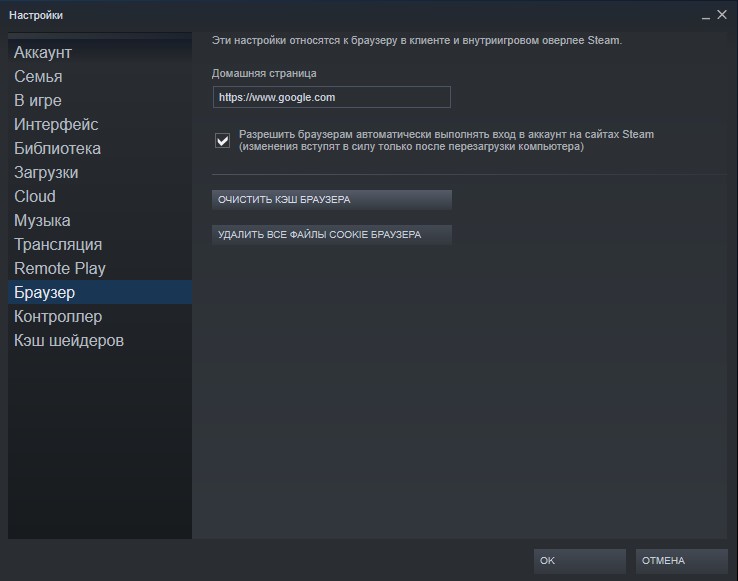
- Открываем Steam, нажимаем на одноименную кнопку (верхний левый угол) и переходим в «Настройки».
- Идем в раздел «Браузер».
- Жмем на кнопку «Очистить кэш браузера» и «Удалить все файлы cookie браузера».
- После каждого из действий жмем на кнопку «Ок» и проверяем результат.
Способ 3: отключить бета-версию
Многие пользователи выдвинули предположение, что проблема периодически проскакивает в Steam Beta. Люди с подпиской на бета-версию клиента чаще остальных сталкиваются с данным сбоем. Возможность опробовать самые новые возможности клиента связаны с меньшей стабильностью сборки. Если не повезло столкнуться с ошибкой 107 в Steam, лучше отказаться от данной возможности. К ней можно будет вернуться после, когда выйдет обновленная версия клиента. Для этого достаточно перейти по пути C:Steampackage и удалить бета-файл.
Способ 4: активировать синхронизацию времени по интернету
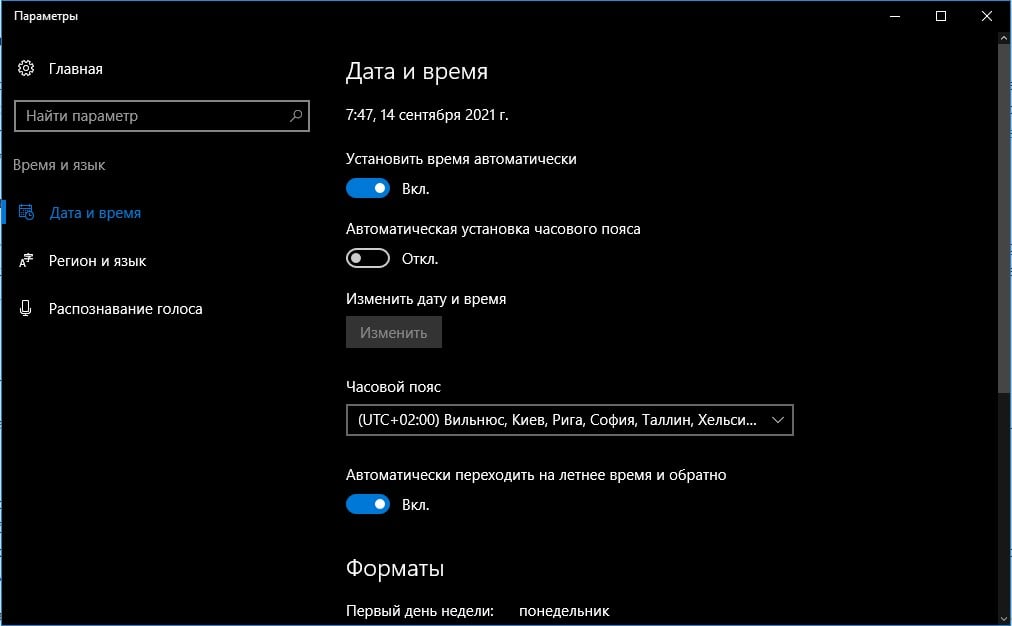
Некоторые пользователи видят ошибку 107 в Steam только потому, что у них неправильно установлена дата или время. Автоматическое сравнение этих параметров с эталонными, хранящимися на сервере, должно сработать. Для этого достаточно открыть «Параметры», раздел «Настройки даты и времени», а затем активировать пункты «Установить время автоматически» и «Установить часовой пояс автоматически».
Способ 5: изменить DNS
Те DNS, что предоставляются провайдером по умолчанию, часто работают не лучшим образом. Куда предпочтительнее использовать Google DNS, DNS Cloudflares или OpenDNS.
Как изменить DNS:
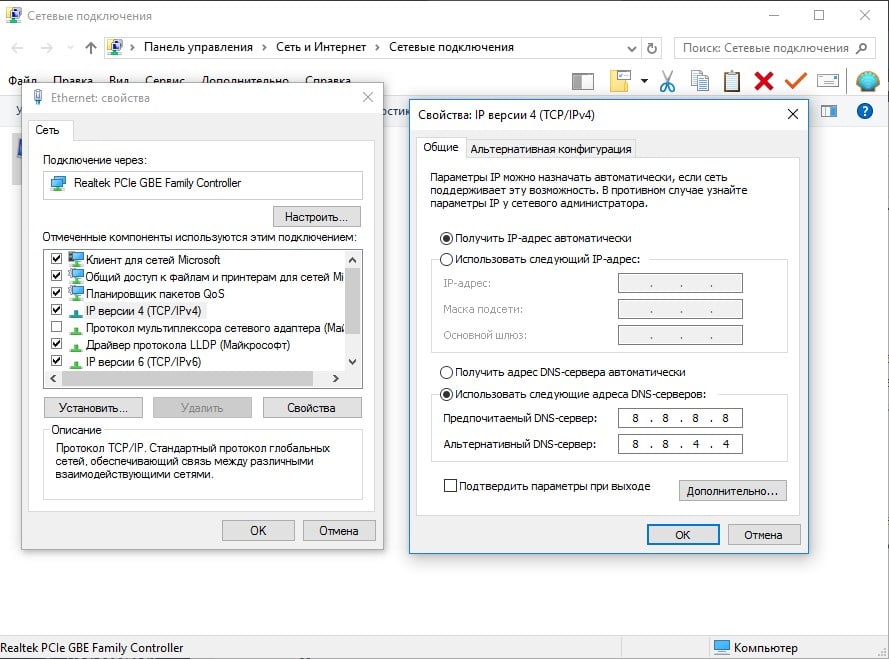
- Жмем правой кнопкой мыши по иконке подключения к интернету и выбираем «Центр управления сетями».
- На странице «Изменение параметров адаптера» находим активное подключение и переходим в «Свойства».
- Двойным кликом открываем «IP версии 4» и устанавливаем подходящие IP для DNS серверов. К примеру, вариант от Google: основной – 8.8.8.8, дополнительный – 8.8.4.4.
- Применяем изменения и проверяем результат.
В большинстве случаев ошибка Steam 107 уходила после одного из перечисленных действий. Однако есть вероятность, что сбой появляется и по причине каких-то работ на серверах. Они будут завершены и возможность покупки в магазине восстановится сама собой.

Compatibility : Windows 7, 8, Vista, XP
Download Size : 6MB
Requirements : 300 MHz Processor, 256 MB Ram, 22 MB HDD
Limitations: This download is a free evaluation version. To unlock all features and tools, a purchase is required.
Pokerstars Error 2 67 Error Codes are caused in one way or another by misconfigured system files in your windows operating system.
If you have Pokerstars Error 2 67 errors then we strongly recommend that you Download (Pokerstars Error 2 67) Repair Tool .
This article contains information that shows you how to fix Pokerstars Error 2 67 both (manually) and (automatically) , In addition, this article will help you troubleshoot some common error messages related to Pokerstars Error 2 67 error code that you may receive.
Note: This article was updated on 2023-01-09 and previously published under WIKI_Q210794
Contents
What is Pokerstars Error 2 67 error?
The Pokerstars Error 2 67 error is the Hexadecimal format of the error caused. This is common error code format used by windows and other windows compatible software and driver vendors.
This code is used by the vendor to identify the error caused. This Pokerstars Error 2 67 error code has a numeric error number and a technical description. In some cases the error may have more parameters in Pokerstars Error 2 67 format .This additional hexadecimal code are the address of the memory locations where the instruction(s) was loaded at the time of the error.
What causes Pokerstars Error 2 67 error?
The Pokerstars Error 2 67 error may be caused by windows system files damage. The corrupted system files entries can be a real threat to the well being of your computer.
There can be many events which may have resulted in the system files errors. An incomplete installation, an incomplete uninstall, improper deletion of applications or hardware. It can also be caused if your computer is recovered from a virus or adware/spyware attack or by an improper shutdown of the computer. All the above actives may result in the deletion or corruption of the entries in the windows system files. This corrupted system file will lead to the missing and wrongly linked information and files needed for the proper working of the application.
How to easily fix Pokerstars Error 2 67 error?
There are two (2) ways to fix Pokerstars Error 2 67 Error:
Advanced Computer User Solution (manual update):
1) Start your computer and log on as an administrator.
2) Click the Start button then select All Programs, Accessories, System Tools, and then click System Restore.
3) In the new window, select «Restore my computer to an earlier time» option and then click Next.
4) Select the most recent system restore point from the «On this list, click a restore point» list, and then click Next.
5) Click Next on the confirmation window.
6) Restarts the computer when the restoration is finished.
Novice Computer User Solution (completely automated):

2) Install program and click Scan button.
3) Click the Fix Errors button when scan is completed.
4) Restart your computer.
How does it work?
This tool will scan and diagnose, then repairs, your PC with patent pending technology that fix your windows operating system registry structure.
basic features: (repairs system freezing and rebooting issues , start-up customization , browser helper object management , program removal management , live updates , windows structure repair.)
Источник
Решение технических ошибок PokerStars

Каждая система может давать сбой. Иногда это происходит по техническим причинам, а порой из-за недостаточной осведомленности пользователей про тот или иной сервер.
В этой статье мы рассмотрим некоторые ошибки, с которыми может столкнуться пользователь PokerStars, а также определим их решение.
Коды ошибок PokerStars
- Error code -2/83 (программное обеспечение блокирует порт 80);
- Error code -2/67, -2/87 (брандмауэр блокирует доступ к интернету);
- Error code -3/0, -6/0, -2/99 (проблема с компонентом обновления программы).
Решение: перезагрузить компьютер – выключить и включить устройство для соединения с интернетом – перезагрузить компьютер – проверить подключение к интернету – открыть программу.
- Error code -2/89 (проблема с прокси-сервером).
Решение: нажать одновременно Win+R – напечатать inetcpl.cpl – нажать ОК – выбрать «Подключения» – выбрать «Настройки локальной сети» – снять флажок «Использовать прокси-сервер для Вашей локальной сети».
- Error code -2/75, -2/77 (сертификат безопасности просрочен или недействителен).
Решение: проверить правильность установки времени и даты.
- Error code -2/-79 (невозможно получить последнюю версию программного обеспечения с сервера).
Решение: запустить клиент без обновления через pokerstars.exe – переустановить клиент.
- Error code 102/1001, 164/1001, 165/1001 или 109/1001 (блокировка/бан отделом безопасности).
Решение: написать письмо по адресу [email protected] и прикрепить свои лог-файлы.
В случае, если метод решения не сработал, обращайтесь в службу поддержки PokerStars прикрепив к сообщению лог-файлы. Для этого:
- Откройте клиентскую программу (для выполнения этого действия выполнять вход не нужно);
- Нажмите кнопку «Справка» в лобби клиентской программы (нажмите «Еще», если кнопка не видна);
- Выберите пункт «Файлы логов» (укажите свое имя пользователя PokerStars и детально опишите причину, по которой Вы отправляете файлы логов);
- Нажмите кнопку «отправить лог-файлы», после чего файлы и Ваши пояснения будут отправлены нам автоматически.
Если у вас проблемы с установкой игрового клиента на компьютер или мобильное устройство, убедитесь, что вы загрузили инсталляционный файл через подходящее Покер Старс зеркало. Возможно вы зашли на копию основной страницы, созданной для другого региона.
Источник
Pokerstars error code 2 67

08 июл 2016, 07:22

08 июл 2016, 08:50
Служба поддержки Stars — проблемы соединения
Спасибо за Ваше письмо. Мы сожалеем, что Вы столкнулись с проблемами с соединением.
Некоторые из провайдеров Вашего региона блокируют доступ к нашим сайтам.
Команда наших разработчиков в настоящее время занимается поиском решения этой проблемы. Пока же, мы просим Вас использовать временное решение.
Для этого Вам надо изменить строку в текстовом файле «user» или «user.ini». Это один и тот же файл , просто он может выглядеть по-разному, если не видно расширение. Вы найдете этот файл в нашем лобби в меню «Справка» — «Открыть папку мои настройки». Вы также можете найти этот файл, следуя данным инструкциям:
Для Windows XP и более старых систем:
1. Щелкните 2 раза на «Мой компьютер» на рабочем столе или в меню «Старт»;
2. Откройте диск «C:» для просмотра данных на жестком диске;
3. Откройте папку «Программные файлы»;
4. Найдите папку «PokerStars» (или PokerStars.NET) и войдите в нее;
5. Найдите файл «user» или «user.ini» и внесите изменения, как указано ниже.
Для Windows Vista и Windows 7, Windows 8, Windows 10 (C:Users[username]AppDataLocalPokerStars):
1. Нажмите «Win + R» (Кнопка «Win» (Windows) расположена в нижней левой части клавиатуры, между кнопками «Ctrl» и «Alt»);
2. В поисковой строке напишите или скопируйте: %USERPROFILE%AppDataLocalPokerStars (или PokerStars.NET) и нажмите ввод (Enter);
3. Найдите файл «user» или «user.ini» и внесите изменения, как указано ниже.
Далее закройте программу PokerStars, после чего откройте файл «user» в любом текстовом формате кроме Word. Мы рекомендуем использовать блокнот (notepad). Для этого Вы можете нажать на файл правой клавишей мышки и из открывшегося меню выбрать опцию «Открыть с», и выберите «Notepad» (блокнот)
Найдите раздел [Connect], если его нет, добавьте его в начало или в конец списка разделов. После Ваших изменений раздел [Connect] должен выглядеть следующим образом:
Если это не решит проблему, пожалуйста, пришлите нам новую копию Ваших лог-файлов, чтобы мы могли продолжить решение этого вопроса.
Источник
Error code 2 87 PokerStars – что за ошибка и как решить

ПокерСтарс несомненно является самым продвинутым и функциональным покер-румом, однако даже лучший софт может иногда давать сбои, поэтому у некоторых пользователей покерного сайта могут появляться ошибки, ограничивающие доступ к игре.
Самая распространённые ошибки: error code 2 87 PokerStars и error code 118 pokerstars. Далеe в материале вы узнаете, как исправить клиент ПокерСтарс.
Error code 2 87 PokerStars – проблема соединения с сервером
Эта ошибка свидетельствует о том, что ваш брандмауэр блокирует доступ к покер-руму. В некоторых случаях код ошибки может быть – 2 67.
Чтобы исправить проблему, для начала совершите несколько простых действий:
- Перезагрузите ваш персональный компьютер;
- Выключите/включите устройство, которое используете для соединения с интернетом (роутер, модем, точку доступа);
- Убедившись в соединении с интернетом, попробуйте запустить клиент PokerStars;
Если проблема не устранена, тогда необходимо самостоятельно настроить ваш брандмауэр:
Брандмауэр Windows – это одна из составляющих Центра обеспечения безопасности операционной системы, которая контролирует доступ программ в сеть.
- Войдите в брандмауэр (отыскать его можно в меню Пуск, либо иконка может находиться возле часов в Windows);
- Откройте вкладку «Программы», где в списке может быть несколько компонентов ПокерСтарс: PokerStars.exe, PokerStarsUpdate.exe, PokerStarsCommunicate.exe, PokerstarsBr.exe, Tracer.exe, xc.exe, xcw.exe, xcwxp.exe;
- Каждому компоненту необходимо предоставить неограниченный доступ «Разрешить всё», после чего перезагрузите ПК;
Если проблема не будет исправлена, тогда обратитесь в службу поддержки покер-рума по адресу: [email protected]
Error code 118 PokerStars – универсального решения не существует
Периодически покеристы сталкиваются с данной ошибкой, но она не носит массовый характер. До сих пор не существует универсального решения, поэтому в случае неурядицы – обращайтесь в саппорт ПокерСтарс: [email protected]
Error code 102 PokerStars – проблема при вводе пин-кода
Данная ошибка возникает при неправильном вводе пин-кода. В таком случае, вам нужно сразу же обратиться в службу поддержки PokerStars [email protected] Отправьте логи и скрин-шоты подтверждения, что именно вы неправильно ввели пин-код, после чего вам будет восстановлен доступ.
Error code 105 PokerStars – проблема с запретом доступа
Чаще всего такая ошибка возникает тогда, когда провайдер блокирует вам доступ к сайте по каким-либо причинам. Для решения этой проблемы используйте VPN.
Error code 101 PokerStars – проблема с запретом доступа
Такая ошибка возникает при отсутствии подключения клиента к сети. В таком случае вам нужно обратиться к провайдеру для устранения этой ошибки.
Error code 107 PokerStars – универсального решения не существует
Периодически покеристы сталкиваются с данной ошибкой, но она не носит массовый характер. До сих пор не существует универсального решения, поэтому в случае неурядицы – обращайтесь в саппорт ПокерСтарс: [email protected]
Источник
Error code 2 87 PokerStars – what does that mean and how to resolve it

PokerStars is undoubtedly the most advanced and functional poker room, however even the best software might sometimes have glitches, and therefore some users of the poker website may face the errors that restrict access to the game.
The most common errors are error code 2 87 PokerStars and error code 118 pokerstars. In this article, you will learn how to fix the given problems.
Error code 2 87 PokerStars
This error indicates that your firewall is blocking the access to the poker room. In some cases, the error code may be 2 67.
In order to fix this problem, you need to implement a few simple actions:
•Reboot your personal computer.
•Switch off/switch on a device you use to connect the Internet (router, modem, access point).
•Make sure you have an Internet connection and then try to run the PokerStars client.
If the problem is not resolved, then you need to configure the firewall yourself:
Windows Firewall is one of the components of the OS Security Centre that controls program access to the Internet.
- Enter the firewall (you can find it in the Start menu or its icon may be located near the Windows system clock).
- Open the «Programs» tab. There may be several components of PokerStars in the list: PokerStars.exe, PokerStarsUpdate.exe, PokerStarsCommunicate.exe, PokerstarsBr.exe, Tracer.exe, xc.exe, xcw.exe, xcwxp.exe.
- You need to provide open access to each item — click on «Permit all». Then reboot your PC.
If the problem is not fixed, then contact the support service of the poker room at [email protected] .
Error code 118 PokerStars – there is no universal solution
Poker players periodically face the given error, but it’s not common. There is no universal solution so far, therefore if you face such difficulty – contact the support service of PokerStars: [email protected] .






1. Players must be aged 18 and above to participate in this promotion.
2. Welcome Bonus and Honeymoon promotion for new players only over a limited period .
3. Welcome Bonus only available to new players that make an initial deposit. The minimum deposit necessary to obtain a matched bonus is $10, or if a player chooses the $100 in rewards the minimum deposit necessary is $20.
4. $50 Free Play offer made up of $52.50 in free All-In Or Fold SNG tickets from Welcome Bonus and $2.50 in free tickets from Daily Freebie.
5. Free tickets automatically credited to eligible players’ accounts over a six day period.
6. A 100% matched deposit bonus worth a maximum of $600 can be claimed by players selecting ‘Match Bonus’ when making their first deposit(s) over a limited period.
7. Bonus cash is released at a rate of $1 for every $5 paid in net rake/tournament fees.
GGPoker standard rules apply. Play responsibly. www.begambleaware.org.
18+ T&Cs Apply. Welcome Bonus promotion for new players only; minimum deposit requried. Please Play Responsibly. www.begambleaware.org

The following are the terms and conditions of the «£20 Bonus Package Promotion» (the «Promotion») for www.888poker.com (the “Site”). The Promotion is organized by 888 UK Limited.
This Promotion is an ongoing Promotion, currently without an end date, we will provide reasonable notice of when the Promotion is to come to an end (the “Promotion Period”).
888poker may cancel, modify or suspend the promotion, and any of the bonuses or benefits offered hereunder, where required for security reasons, to comply with applicable law or regulation, due to abuse or otherwise where the promotion is not capable of being conducted as specified as a result of exceptional circumstances. Other than where necessary to prevent fraud or other similar unlawful behavior, any such modification, suspension or cancellation will not apply to you if you have already opted into the promotion, made a deposit in expectation of receipt of a bonus or other benefits offered, and/or commenced play in relation to the promotion, bonus or special offer prior to the date of the communication of the modification, suspension or cancellation.
No-one under the age of 18 may participate in the Promotion and the Promotion is only available to eligible members located in the UK.
You may be asked at any stage to provide us with a proof of age and/or identity.
You may only enter this Promotion once.
For security and verification purposes, we reserve the right to limit participation in this Promotion to: (i) one per household; (ii) one per computer terminal; or (iii) one per mobile device.
During their engagement period and for a period of 24 months thereafter, none of our officers, directors, employees, consultants or agents or any other company within our group of companies or our suppliers, vendors or white label partners are permitted to participate in the Promotion, nor is any supplier or vendor. This restriction also applies to relatives of such persons and for this purpose ‘relative’ means any of a spouse, partner, parent, child or sibling.
If you have a pending message on the Site’s cashier regarding your recent gaming activity, we reserve the right to revoke your eligibility to participate and/or continue to participate in this promotion. In such event, any bonus and/or other benefit which you have received and/or are eligible to receive under this promotion, shall be forfeited by you.
The Promotion is a new registration offer with the Site and completely replaces any similar registration offer with the Site.
All bonuses and promotional offers, and any winnings generated through the wagering of either of the aforesaid, will be cancelled at withdrawal if any of the applicable conditions have not been met in full.
You hereby agree to these terms and conditions which govern the Promotion, along with the «User Agreement» which includes but is not limited to the «Bonus Policy».
Withdrawing funds your deposit balance (otherwise known as “Transaction Balance” in our Withdrawal Policy) is available for withdrawal at any time. General withdrawal terms apply, for further info see our Withdrawal Policy.
In order to meet the applicable wagering requirement, no real money shall be deemed to contribute (in full or in part) to the wagering requirement, unless otherwise specified by us.
Available funds will always be used before Restricted Funds (to include Money transferred) and the balance of both will be displayed in your My Account
You may only participate in the Promotion, if you have not previously registered with the Site. If you benefit from this Promotion you will not be eligible to benefit from any other first deposit bonus or first deposit offer with the Site. If you have benefited from another first deposit offer with the Site you are not eligible to benefit from this Promotion.
You may not combine this registration offer with any other type of registration offer provided by the Site.
In order to be eligible and receive the Tournament Tickets (as defined below) granted under the Promotion, during the Promotion Period: (i) you must either download the 888poker client on PC or mobile application or click ‘Instant Play’ on the English non-download version of the Site; (ii) open a new user account with the Site; and (iii) verify his/her e-mail address by clicking on a link within the e-mail body or by SMS to the phone number entered within 14 days of the Site sending the email to you, otherwise the bonus offer will expire and you shall forfeit the bonus offer.».
Under the terms of this Promotion, eligible players will be entitled to receive £20 worth bonus (granted in USD at equivalent value of USD 25 in accordance with the Exchange Rate as defined in the User Agreement referenced above) that will be given as Tournament Tickets, according to the following allocation: 50 tickets of $0.1buy-in and 20 tickets of $1 buy-in.
Once claimed, Tournament Tickets will be granted in batches as follows:
First batch worth $5 (10 tickets of $0.1buy-in and 4 tickets of $1buy in) will be granted following your fulfilment of point 3 above.
Second batch worth $10 (20 tickets of $0.1buy-in and 8 tickets of $1buy in) will be granted 3 days after the bonus was claimed.
Third batch worth $10 (20 tickets of $0.1buy-in and 8 tickets of $1buy in) will be granted 7 days after the bonus was claimed.
If you don’t use the Tournament Tickets granted under the Promotion within 24 hours of being credited to your account, such Tournament Tickets shall expire and you shall forfeit each of such Tournament Tickets.
A Tournament Ticket possesses a fixed value and may only be used in tournaments that have a buy-in equal to that of the value of the Tournament Ticket. For the avoidance of doubt, Tournament Tickets may not be used as a buy-in for a tournament where the buy-in is less than the value of a Tournament Ticket.
A Tournament Ticket can’t be used by a player to re-buy chips or to add chips to his/her stack during a tournament.
Tournament Tickets may not be: (i) exchanged or converted into cash; (ii) joined together to create a higher value ticket; or (iii) transferred by a player to another player.
For further terms and conditions in relation to the use of Tournament Tickets, please see our Bonus Policy.
UK new players only. £20 free bonus: Full T&C apply. Bonus granted in Tournament Tickets over 7 days after claim. Each granted Tournament Ticket expires after 24 h. 200% up to £800: Full T&C’s apply. First deposit only. Min. deposit $10. Bonus granted in $10 chunks subject to wagering restrictions of 100 Bonus Points per chunk. Wins capped at $500. Valid for selected games only, when playing Casino. Wagering req. vary by game. Bonus expires in 90 days.

100% First Deposit Bonus
Make your first-ever real money deposit using the bonus code ‘STARS600’, and we will give you a 100% bonus up to $600. To claim the full value of the bonus, you can make up to three qualifying deposits in 60 days.
Alternatively, deposit using code ‘THIRTY’ and claim $30 of free play.
How the 100% First Deposit Bonus works
Once you’ve made your deposit, you need to earn redemption points by playing real money games. Unless stated otherwise, you will earn 5 redemption points for every USD $1 you pay in rake or tournament fees (6.5 points per £1, 4 points per CAD $1, or 5.5 points per EUR €1).
Every time you reach 180 redemption points we’ll credit your Stars Account with $10 cash. You have four months after each qualifying deposit to earn all the redemption points needed to release your bonus.
You may only take advantage of one of our first deposit offers, but may be eligible for further deposit bonuses open to existing players. You can view any bonuses you have, alongside information on expiry dates, redemption point requirements and more, under the ‘My Stars’ menu.
Please note that redemption points will not be earned at pot-limit or no-limit tables with blinds of $5/$10 or higher, 8-game tables with stakes of $20/$40 or higher, or other limit games with stakes of $20/$40 or higher.
First-time depositors only. Min. deposit £10. Use Bonus Code ‘SPINANDGO’. Free Play given as Spin & Go tickets over 6 days. Tickets expire after 24 hours. Withdrawal restricted during bonus period. Terms apply.

For sender corporate and licence details please visit our Imprint page.
The promotion will run from 11:00 on 15 June to 23:59 (CET) on 31 December 2022 (the «Promotional Period»). This offer is not available in conjunction with any other offer. By taking part in this promotion, you hereby agree to these Specific Promotional Terms and Conditions and to our General Terms and Conditions. In order to participate in this promotion, an Eligible Player (as defined below) must place an Eligible Deposit (as defined below) during the Promotional Period.
be aged 18 or over;
be a new player on www.partypoker.com.
(an “Eligible Player”)
An Eligible Deposit is a real money deposit that complies with the following requirements:
it is made within the Promotional period;
it is a minimum of $10 USD made in one transaction (split deposits will not qualify).
(an “Eligible Deposit”)
If an Eligible Player makes an Eligible Deposit (as defined above) during the Promotional Period, we shall credit them with a pending bonus equal to 100% of their Eligible Deposit up to a maximum of $600 USD (“the Deposit Bonus”); plus up to $30 USD in tickets. The Deposit Bonus shall be credited to the Eligible Player’s account automatically on a successful Eligible Deposit.
Bonus type: ‘release restricted’: the Deposit Bonus funds are pending and shall be visible in the account section, but shall not be available to play with until the loyalty point requirements (as set out below) are met and the bonus funds are released. The pending Deposit Bonus shall be released to a player in increments of 10% of the Deposit Bonus amount as a player accumulates 10% of the Total Loyalty Points (as defined below). The tickets bonus will be credited up to 6 days as part of the up to $30 USD.
100% up to $600 USD Terms and Conditions
To release the full Deposit Bonus amount the player must accumulate 4x the Deposit Bonus amount in loyalty points (“Total Loyalty Points”). The Total Loyalty Points must be accumulated within 90 days from the date of the Eligible Deposit (the “Time Limit”). Each time the player accumulates 10% of the Total Loyalty Points required, they will receive a 10% increment of the Deposit Bonus.
Player A makes an Eligible Deposit of $20 USD and receives a pending Deposit Bonus of $20 USD. To release the full Deposit Bonus amount ($20 USD), Player A is required to accumulate 4 x $20 USD in loyalty points = 80 (Total Loyalty Points) within 90 days from the date of the Eligible Deposit. As Player A accumulates 10% of the Total Loyalty Points requirement (i.e. 8 loyalty points), 10% of the Deposit Bonus ($2 USD) is released
A player accumulates 1 point for every $1 USD (or currency equivalent) rake on poker. Loyalty points may only be accumulated on poker. The player shall lose any increments of the Deposit Bonus that are not released within the Time Limit. Each increment of the Deposit Bonus that is released shall be credited as cash to the Eligible Player’s account automatically once the player reaches the loyalty point requirement.
Up to $30 USD in tickets Terms and Conditions
When an Eligible Player places an Eligible Deposit on the Website on any day during the Promotional Period, their account will be credited with a bundle of their choice up to $30 USD worth of free play tickets over a six-day period as follows:
Option 1: $10 USD Free Play
Day 1 = 2x $1 USD SPINS tickets + 1x $5.50 USD MTT ticket
Day 2 = 4x $0.25 USD SPINS ticket
Day 4 = 1x $3.30 USD MTT ticket
Day 6 = 4x $0.25 USD SPINS tickets
Option 2: $30 USD Free Play
Day 1 = 1x $5.50 USD MTT ticket
Day 2 = 2x $1 USD SPINS ticket
Day 3 = 1x $5.5 USD MTT ticket
Day 4 = 1x $5 USD SPINS ticket
Day 5 = 3x $2.20 USD MTT tickets
Day 6 = 2x $3 USD SPINS tickets + 1x $3.30 USD MTT ticket.
SPINS & MTT Tickets Terms and Conditions
Tickets awarded as part of this promotion:
will be credited to an Eligible Player’s account automatically each day over a six-day period from the date the Eligible Deposit is made;
will allow entry into SPINS and/or Multi-Table Tournaments. Details will be specified on the tickets themselves, details of which can be found in the “My Tickets” section of the Eligible Player’s Website account;
will expire after 7 days from issue;
cannot be sold or transferred to other players; and
are not refundable and cannot be exchanged for cash.
Where a sum of money is noted in this promotion (“Promotional Amount”), and there is a requirement for such Promotional Amount to be converted from the advertised currency into your account currency, then this will be subject to the exchange rates offered by us at the time of conversion. You can keep track of your bonuses in the bonus section of your account. You may withdraw your cash funds at any time before the Total Loyalty Points have been generated, this will mean you forfeit any increments of the Deposit Bonus that have not been credited to your account yet. Where the company suspects that a winning player is guilty of fraudulent activity, the company reserves the right to suspend or remove that player from the Promotion, and/or suspend that player’s account and/or suspend the Promotion pending further investigation. We reserve the right to alter, discontinue or terminate the promotion in accordance with the terms of our Standard Promotional Terms and Conditions.
18+; new UK players only; min £10 deposit; 100% up to £400 generated as cash. £40 Free Play generated as tickets. 7-day ticket expiry. Full T&Cs apply.
Источник
 |
Номер ошибки: | Ошибка 107 |
| Название ошибки: | ERROR_DISK_CHANGE | |
| Описание ошибки: | Программа была остановлена, так как нужный диск вставлен не был. | |
| Шестнадцатеричный код: | 0x6B | |
| Разработчик: | Microsoft Corporation | |
| Программное обеспечение: | Windows Operating System | |
| Относится к: | Windows XP, Vista, 7, 8, 10, 11 |
ERROR_DISK_CHANGE проблемы с Windows 10 чаще всего связаны с повреждением или отсутствием исполняемого файла, и зачастую возникают во время запуска 0x6B. В большинстве случаев скачивание и замена файла ERROR_DISK_CHANGE позволяет решить проблему. В качестве дополнительного шага по устранению неполадок мы настоятельно рекомендуем очистить все пути к неверным файлам и ссылки на расширения файлов ERROR_DISK_CHANGE, которые могут способствовать возникновению такого рода ошибок, связанных с Windows 10.
Распространенные проблемы Windows 10
Частичный список ошибок Windows 10 0x6B:
- «Ошибка в приложении: Windows 10»
- «Недопустимая программа Win32: Windows 10»
- «Извините за неудобства — Windows 10 имеет проблему. «
- «К сожалению, мы не можем найти Windows 10. «
- «Windows 10 не может быть найден. «
- «Ошибка запуска в приложении: Windows 10. «
- «Файл Windows 10 не запущен.»
- «Отказ Windows 10.»
- «Ошибка в пути к программному обеспечению: Windows 10. «
Эти сообщения об ошибках ERROR_DISK_CHANGE могут появляться во время установки программы, в то время как программа, связанная с Windows 10 (например, 0x6B) работает, во время запуска или завершения работы Windows, или даже во время установки операционной системы Windows. При появлении ошибки Windows 10 запишите вхождения для устранения неполадок 0x6B и чтобы HelpMicrosoft Corporation найти причину.
Создатели Windows 10 Трудности
Большинство проблем Windows 10 связаны с отсутствующим или поврежденным Windows 10, вирусной инфекцией или недействительными записями реестра Windows, связанными с 0x6B.
Более конкретно, данные ошибки Windows 10 могут быть вызваны следующими причинами:
- Недопустимая или поврежденная запись Windows 10.
- Зазаражение вредоносными программами повредил файл Windows 10.
- Вредоносное удаление (или ошибка) Windows 10 другим приложением (не 0x6B).
- Windows 10 конфликтует с другой программой (общим файлом).
- 0x6B (Windows 10) поврежден во время загрузки или установки.
Продукт Solvusoft
Загрузка
WinThruster 2022 — Проверьте свой компьютер на наличие ошибок.
Совместима с Windows 2000, XP, Vista, 7, 8, 10 и 11
Установить необязательные продукты — WinThruster (Solvusoft) | Лицензия | Политика защиты личных сведений | Условия | Удаление
Коды системных ошибок Windows в базе знаний
Идентификатор статьи:
120946
Автор статьи:
Последнее обновление:
Популярность:
star rating here
Загрузка (Исправление ошибки)
Информация о статусе сервера обновлена только что.
 Проверить снова
Что делать, если сайт недоступен?
Pokerstars.com не работает сегодня январь 2023?
Узнайте, работает ли Pokerstars.com в нормальном режиме или есть проблемы сегодня
Статус Pokerstars.com : возможные проблемы Почему?
Pokerstars.com сбои за последние 24 часа
| Город | Сбои |
|---|---|
| Брест, Brestskaya Oblast’ | 3 |
| Алматы | 2 |
| Липецк, Липецкая область | 2 |
| Червень, Минская Область | 1 |
| Минск | 1 |
Не работает Pokerstars.com?
Не открывается, не грузится, не доступен, лежит или глючит?
Самые частые проблемы Pokerstars.com
Не определены.
Что делать, если сайт POKERSTARS.COM недоступен?
Если POKERSTARS.COM работает, однако вы не можете получить доступ к сайту или отдельной его странице, попробуйте одно из возможных решений:
Кэш браузера.
Чтобы удалить кэш и получить актуальную версию страницы, обновите в браузере страницу с помощью комбинации клавиш Ctrl + F5.
Блокировка доступа к сайту.
Очистите файлы cookie браузера и смените IP-адрес компьютера.
Антивирус и файрвол.
Проверьте, чтобы антивирусные программы (McAfee, Kaspersky Antivirus или аналог) или файрвол, установленные на ваш компьютер — не блокировали доступ к POKERSTARS.COM.
DNS-кэш.
Очистите DNS-кэш на вашем компьютере и повторите попытку доступа на сайт.
Смотреть видео-инструкцию ↓
VPN и альтернативные службы DNS.
VPN: например, мы рекомендуем NordVPN.
Альтернативные DNS: OpenDNS или Google Public DNS.
Плагины браузера.
Например, расширение AdBlock вместе с рекламой может блокировать содержимое сайта. Найдите и отключите похожие плагины для исследуемого вами сайта.
Сбой драйвера микрофона
Быстро проверить микрофон: Тест Микрофона.
Форум Pokerstars.com
Подсказки? Разочарования? Обсуждаем проблемы сервиса с другими посетителями сайта:
Чат с регистрацией
идентификация не требуется
комментарии с нецензурной лексикой и оскорблениями удаляются
Виктор
•
117 дней назад
#
6 октября 2022
+
0
—
потерял соединение с сайтом 3 часа назад прямо во время турнира .до сих пор не могу войти.видимо полетел сервер.
Вячеслав
•
117 дней назад
#
5 октября 2022
+
0
—
Не могу войти в учетную запись Покерстарз. Я так понимаю на площадке что-то произошло.
владимир
•
326 дней назад
#
10 марта 2022
+
0
—
пора бы свой российский сделать покерный сайт этому сочи . сейчас вот санкции пришли нас всех бортанули ..надо ж было предвидеть это
Alex
•
565 дней назад
#
14 июля 2021
+
0
—
Приложение не запускается
Guest
•
565 дней назад
#
14 июля 2021
+
0
—
Не входит приложение
Гев
•
606 дней назад
#
+
0
—
Подскажите почему не работает .тех перерыв у них ?
Я
•
606 дней назад
#
+
0
—
Очень длинные 30 минут работы на сервере)))
гость
•
606 дней назад
#
+
0
—
состояние сети весит. и на етом всё …
Гость
•
635 дней назад
#
+
0
—
Сайт опять полетел