
Minecraft’s multiplayer may be a neat and very important addition to the game, but you’ll likely face quite a few different issues as you play multiplayer more and more. One of the many errors which you’ll face is that flying is not enabled on this server error in Minecraft, which is also one of the most annoying issues in the game. You’ll get kicked for flying in any server even if you didn’t actually fly. This is a common issue and luckily we’ve been able to find a few different solutions which you can learn more about through the text below.
1. Change Server Properties
The first and arguably the best fix for this issue can be accessed through the server.properties file of Minecraft. All you have to do is go and find this file on your PC and then open it. You’ll have to choose a method of access if you haven’t accessed this file below. It doesn’t really matter as long what you choose as all the options presented to you will likely be suitable for this fix. You’ll now have to locate a line which says ‘’allow-flight=false’’. You can also add it into the file yourself if you’ve searched for quite some time but still weren’t able to locate it, as it could be that it simply isn’t in the file.
Now you’ll have to make some adjustments to this specific line by replacing the ‘’false’’ with ‘’true’’. Make sure that the resultant line spells ‘’allow-flight=true’’ and that there isn’t any extra space at the end as the solution won’t work properly. Also, remember to restart the game after editing and saving this line into the file. Once you perform all this correctly the issue should no longer occur and you should be able to play multiplayer Minecraft without getting kicked for flying, even when you didn’t.
2. Switch Your Game Version
This was actually a bug in the older versions of Minecraft which was fixed later on. Despite this, it still occurs on these versions randomly and can be quite annoying. It is recommended that you try switching to one of the newer versions, preferably 1.6 or higher, and then try playing multiplayer again. The bug didn’t exist in this version or the ones after it, meaning that you should likely not face it anymore after you switch to them.
3. Use Mods to Fix the Issue
There are quite a few mods that cause problems if you’re trying to play multiplayer Minecraft, but there are a few that can actually help you as well. There are a couple of different mods that you can use to stop facing this issue, and it is recommended that you try them out if all else fails. One example is the ‘’Gotta Go Fast’’ mod for Minecraft, which was able to help out a lot of players who were frequently encountering this error.
Flying is an essential aspect in the final stages of Minecraft. While it’s fast, fun, and a great way to move around, using an elytra or a jetpack to fly might result in being removed from the server by default.
To fix the ‘flying is not enabled on this server’ error, our resident gamers listed their tried and tested troubleshooting tips below:
Method #1: Change the Settings on Your Server
A surefire way to fix this persisting issue is to tweak the settings on your server. Here are the general steps to do to enable flying again in the game:

Step #1: Open Your Server’s Control Panel
Locate your server’s control panel and open the settings.
Step #2: Find the Config Files
Locate your server’s Config Files and click to open.
Step #3: Open the Server Settings
Step #4: Enable the ‘Allow Flying’ Option
Find the Allow Flying field option on the top and set it to Enabled. Scroll down and click Save.

Step #5: Start the Server
Restart the server when it prompts you for the change to be saved.
Method #2: Tweak Server Properties File
Another best remedy is in Minecraft’s server.properties file. You need to locate and open this file on your computer. To do this, you’ll need to pick an access method. It doesn’t really matter what you select, as long as you know that the possibilities provided are likely to work.
Find the line “allow-flight=false” If you’ve searched for it and can’t find it, you can add it to the file yourself. Replace “false” with “true” in this line. Make sure the resultant line reads “allow-flight=true” and has no additional spaces at the end.

After saving this line, restart the game. Once you do this, you shouldn’t get booted for flying in multiplayer Minecraft anymore.
Method #3: Update Game Version
This was a problem in earlier versions of Minecraft but was later fixed. However, there are times this error occurs on previous versions, and it’s a real pain. It is advised that you first try playing multiplayer on a newer version, preferably 1.6 or higher.
There are no bugs in this and the succeeding versions, so you shouldn’t have to deal with it anymore if you upgrade to those. You can also avoid Minecraft authentication servers going down by doing so.
Method #4: Use Mods
Several mods might genuinely aid your experience when playing Minecraft with other players. If nothing else works, you should give these changes a shot to resolve gaming concern.
For instance, Minecraft’s “Gotta Go Fast” mod was able to aid several gamers who were experiencing this problem.
FAQ
How do I enable flying in my Minecraft server on Scalacube?
To enable flying on a Minecraft server on Scalacube, you need to edit the ‘allow-flight’ settings on the server. To do this, follow these steps:
- Log into your Scalacube account
- Go to Manage server > Manage > Settings > server.properties
- Change allow-flight from false to true
- Save settings and restart your server
- Log back onto your server
Conclusion
While the inclusion of multiplayer in Minecraft is a welcome one, the more you play, the more problems you’ll run across [1]. In particular, the ‘flying is not enabled on this server’ issue is the most common and frustrating. All you need to do is follow the fixes that involve quick edits on your servers’ settings and version, as shared by our experienced gamers above.
3 способа исправить полет не включен в этой ошибке сервера в Minecraft (01.30.23)
 полет не включен на этом сервере minecraft
Многопользовательский режим Minecraft может быть изящным и очень важным дополнением к игре, но вы, вероятно, столкнетесь с множеством различных проблем, когда будете играть в многопользовательский режим все больше и больше. Одна из многих ошибок, с которыми вы столкнетесь, заключается в том, что при этой ошибке сервера в Minecraft не включен полет, что также является одной из самых неприятных проблем в игре. Вас выгонят за полеты на любом сервере, даже если вы на самом деле не летали. Это распространенная проблема, и, к счастью, мы смогли найти несколько различных решений, о которых вы можете узнать больше из текста ниже.
Полет не включен при этой ошибке сервера в Minecraft
1 . Изменить свойства сервера
Популярные уроки Minecraft
Первый и, возможно, лучшее решение этой проблемы можно получить через файл server.properties Minecraft. Все, что вам нужно сделать, это найти этот файл на своем компьютере, а затем открыть его. Вам нужно будет выбрать метод доступа, если вы еще не открывали этот файл ниже. На самом деле не имеет значения, что вы выберете, поскольку все представленные вам варианты, вероятно, подойдут для этого исправления. Теперь вам нужно найти строку с надписью «allow-flight = false». Вы также можете добавить его в файл самостоятельно, если вы долгое время искали, но так и не смогли найти его, так как могло случиться так, что его просто нет в файле.
Теперь вам нужно внести некоторые изменения в эту строку, заменив «false» на «true». Убедитесь, что в результирующей строке написано «allow-flight = true» и что в конце нет лишних пробелов, так как решение не сработает должным образом. Также не забудьте перезапустить игру после редактирования и сохранения этой строки в файл. После того, как вы выполните все это правильно, проблема больше не должна возникать, и вы сможете играть в многопользовательский Minecraft без пинков за полет, даже если вы этого не сделали.
2. Сменить версию игры
На самом деле это была ошибка в более старых версиях Minecraft, которая была исправлена позже. Несмотря на это, в этих версиях это происходит случайно и может сильно раздражать. Рекомендуется попробовать переключиться на одну из более новых версий, желательно 1.6 или выше, а затем снова попробовать сыграть в многопользовательском режиме. Ошибка не существовала ни в этой, ни в последующих версиях, а это значит, что вы, скорее всего, больше не столкнетесь с ней после перехода на них.
3. Используйте моды для устранения проблемы
Существует довольно много модов, которые вызывают проблемы, если вы пытаетесь играть в многопользовательский Minecraft, но есть несколько, которые могут на самом деле тоже поможет вам. Есть несколько разных модов, которые вы можете использовать, чтобы не сталкиваться с этой проблемой, и рекомендуется попробовать их, если все остальное не поможет. Одним из примеров является мод «Gotta Go Fast» для Minecraft, который помог многим игрокам, которые часто сталкивались с этой ошибкой.

YouTube видео: 3 способа исправить полет не включен в этой ошибке сервера в Minecraft
01, 2023
-

garikos
Активный участник- Баллы:
- 88
- Skype:
- Gar1kos
- Имя в Minecraft:
- Gariko
-
garikos
Активный участник- Баллы:
- 88
- Skype:
- Gar1kos
- Имя в Minecraft:
- Gariko
ололо, ну дык это его работа — замечать кто что делает и кикать
короче говоря — зайди в конфиг фаил этого плагина, там где-то есть пометка что делать с нарушающими законы игроками -
garikos
Активный участник- Баллы:
- 88
- Skype:
- Gar1kos
- Имя в Minecraft:
- Gariko
хм, тут могут быть две причины
или ноучит тупит, либо сервер посылает неправильные координаты плагину….ноучит самый свежий ?
-
У меня еще 1.8 да него нового нет =/
-
garikos
Активный участник- Баллы:
- 88
- Skype:
- Gar1kos
- Имя в Minecraft:
- Gariko
-
А можно настроить что бы работала защита , но не кикала
-
garikos
Активный участник- Баллы:
- 88
- Skype:
- Gar1kos
- Имя в Minecraft:
- Gariko
блин, я же написал
«короче говоря — зайди в конфиг фаил этого плагина, там где-то есть пометка что делать с нарушающими законы игроками» -
Ты тут не один =/ Не чё не нашёл с киком
moving.runfly.check = true
moving.runfly.walkingspeedlimit = 22
moving.runfly.sprintingspeedlimit = 40
moving.runfly.jumpheight = 135
moving.runfly.checksneaking = true
moving.runfly.sneakingspeedlimit = 14
moving.runfly.checkswimming = true
moving.runfly.swimmingspeedlimit = 18
moving.runfly.actions.0 = moveLogLowShort moveCancel
moving.runfly.actions.100 = moveLogMedShort moveCancel
moving.runfly.actions.400 = moveLogHighShort moveCancel
moving.runfly.checknofall = true
moving.runfly.nofallmultiplier = 200
moving.runfly.nofallactions.0 = nofallLog nofallDamage
moving.runfly.allowlimitedflying = false
moving.runfly.flyingspeedlimitvertical = 100
moving.runfly.flyingspeedlimithorizontal = 60
moving.runfly.flyingactions.0 = moveLogLowShort moveCancel
moving.runfly.flyingactions.100 = moveLogMedShort moveCancel
moving.runfly.flyingactions.400 = moveLogHighShort moveCancel -
garikos
Активный участник- Баллы:
- 88
- Skype:
- Gar1kos
- Имя в Minecraft:
- Gariko
Сайт разрабов
If such behaviour is identified, a multitude of actions will be executed automatically (customizable by you, read the Instructions.txt file that gets generated when you run the plugin the first time), that may include logging the incident, informing an admin, stopping the player from doing whatever he did, or something else (you have a lot of freedom here).
Но это для 1.1, для 1.8 я не знаю что да как
-
Так можно как-то настроить что бы не кикало
Up -

zZzO.oMyyy
Активный участник- Баллы:
- 88
- Skype:
- minecrafterok
- Имя в Minecraft:
- Cellardoor
КАРОЧЕ НЕ ПАРЬСЯ УДАЛИ ЕГО ***** ПУСТЬ ИГРАЮТ

-
zZzO.oMyyy
Активный участник- Баллы:
- 88
- Skype:
- minecrafterok
- Имя в Minecraft:
- Cellardoor
Поставь Anti-Xray и не парься
 Пусть летают
 -
Раз пост открыт, значит наверное пригодится, не создателю поста, так другим.
В корне сервера есть файлик server.properties, наверняка знаете.
Так прописать в него нужно allow-flight=true, в любом месте, главное что бы на новой строке.Трололошки которые после моей масеги попытаются тыкать меня носом в дату поста. Ребятки, вы кто такие? Дайте до свидания!
-
Собственно , а что это эта команда делает? Запрещает летать , смысл?
Оригинало_о нравится это.
-
При дефолтной конфигурации сервак, именно сервак кикает клиента.
Зачем это сделано, да хз, наверное во избежании каких-либо хаков.Главное что данной командой решается проблема, например, если аварийно вылетает клиент а игрок в этот момент был в прыжке. Естественно плагин авторизации при входе требует залогиниться но времени на ввод пароля не хватает и сервак чуя, что кто-то летает кикает клиента.
Stalkerdeni971 нравится это.
-

Bars
Старожил
Девелопер
ПользовательЧтобы флайхак не юзали (чит на полёты).
-

SaMEC
Старожил
Пользователь- Баллы:
- 173
- Skype:
- support.meedway
- Имя в Minecraft:
- Nick
Вообще то очень часто кикает сам плагин авторизации при заходе на сервер если у кого-то стоит плагин AuthMe то нужно исправить кое-что teleportUnAuthedToSpawn: true он делает тп игрока на спавн во время ввода пароля поле на старое место буть то он на лету или стоя на земле! НоЧит не кикает просто так за всякую ерунду по стандарту он настроен на стандартную скорость, часто он помогает для ловли сх,фх, читов!

Поделиться этой страницей


Have you ever been kicked out from your server for the reason Flying is not enabled on this server ? Even if you are not flying? No worries about that.
You just need to enable flying on your server.

This is a default Minecraft Server configuration that can be changed in your control panel. Basely it was a way to prevent non-authorized users from flying. Sometimes it can kick unwanted players for reasons such as lag and spikes.
✈️ How to Enable Flying In Your Server ✈️
In order to enable flying on your server please do the following:
Log into your Multicraft here and stop your server.
Click on Files, then on Config Files.

Click on Server Settings.

Find the option Allow Flying, set it to Enabled, and click on Save.

Note that the line position of the `Allow Flying` box can vary depending on your server type.Start your server.
You just enabled flying into your server.
If you find any issues enabling flying into your server please contact us on live chat or via the ticket system.
❕ Useful Links ❕
— Players can’t break blocks (Spawn Protection)
— Implement a custom resource pack/texture pack in your server
— Connection Timed Out — An existing connection was forcibly closed by the remote host.
Updated on: 02/09/2021
-
#3
server.properties, значение allow-flight.
не работает, забыл добавить.
И мне нужно это как нибудь в коде мода сделать, чтобы не кикало уже с сервера. Я щас пока ищу, если не найду то буду просто делать allowFlying или isFlying и надеятся, что игрок не додумается взлететь следующие 15 секунд способности.
Последнее редактирование: 10 Апр 2021
-
#10
Хукнись в метод контроля полёта(где-то в нетворке) и вставь проверку на свою способность. Это более правильное решение будет чем костылить через allowFlight и isFlight, который нужно постоянно синхронить, да и там ещё сверху куча проблем всплывает
Ну да, это куда легче, чем 1 переменную сетать в тру, каждый тик проверяя на доступ к полёту
If you or your players have been kicked from your server with this error message:
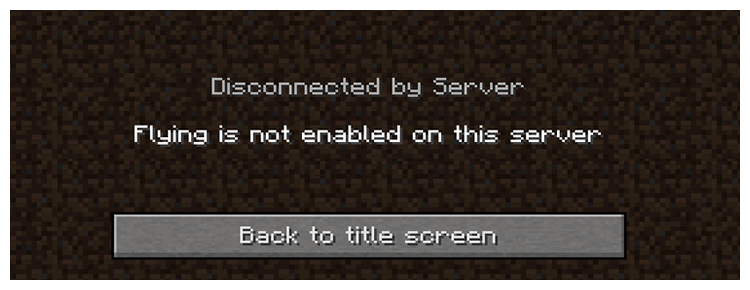
Then this guide will take you through some very quick and easy steps to prevent it from happening again.
How to Fix
To fix this error you want to tell the server to allow players to fly, to do this follow the steps below:
- Log into Multicraft.
-
Scroll down on the server until you see the
World Settingssection. -
Change
Allow Flightto beEnabled

-
Once it has been changed, press the
Update & Restartbutton in the section. This change needs a restart to change it, if you do not restart the server players will keep getting kicked for flying until you restart.
Further Reading & External Links
- Updating The Server.properties file
- How to Upload and Download Files Using FTP
StickyPiston Support
If you use our services or not, we are always happy to help. Open a support ticket and our dedicated team will be in touch.
Open Support Ticket
- Thread Status:
-
Not open for further replies.
-
How to change it ?
Im using this plugin: http://forums.bukkit.org/threads/fu…awesome-flying-permission-support-1060.13105/Thanks !

plz help
EDIT by Moderator: merged posts, please use the edit button instead of double posting.
Last edited by a moderator: May 19, 2016
-
ok open up your server.properties and set allow-flight to true
-
umm.. yeah
your query was: Flying is not enable in this server!How do i fix this
and the answer is what i said above -
Thanks is solved !!!
- Thread Status:
-
Not open for further replies.
Share This Page
