New World — игра от Amazon, которая набрала за неделю наивысшую популярность обогнав CS GO и DOTA 2. После обновления от 6 октября я столкнулся с ошибкой при запуске игры New World, которая звучала следующим образом:
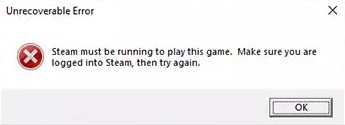
Unrecoverable Error
Steam must be running to play this game. Make sure you are logged into Steam, then try again.
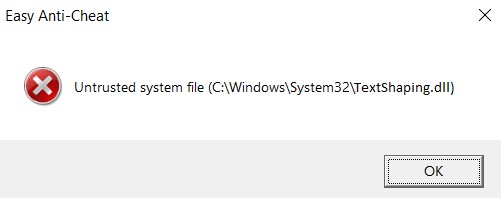
Easy Anti-Cheat
Untrusted system file (C:WindowsSystem32TextShaping.dll)
Так как в игру поиграть лично мне не удается какую уже неделю, так как очередь на гипербории всё время, я решил изучить ошибку. Дело оказалось в моем случае с сертификатами, которые Steam не мог обработать и считывал некоторые файлы как небезопасные. Давайте разберем, поэтапно, что я сделал и как устранить ошибки Unrecoverable Error и Easy Anti-Cheat.
Удалить сертификаты
1. Откройте Steam и нажмите на «Библиотека«. Далее нажмите правой кнопкой мыши по игре New World и выберите «Управление» > «Посмотреть локальные файлы«.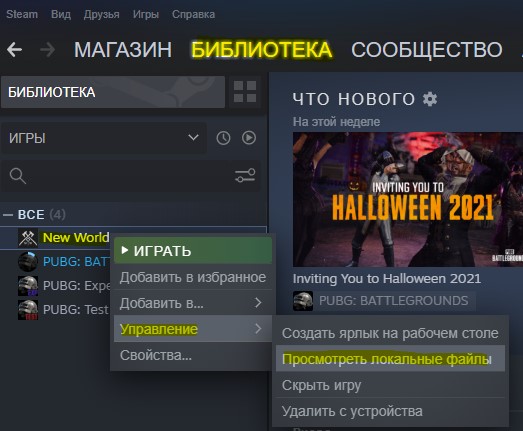
2. Откройте папку EasyAntiCheat потом Certificates и удалите всё, что имеется в данной папке.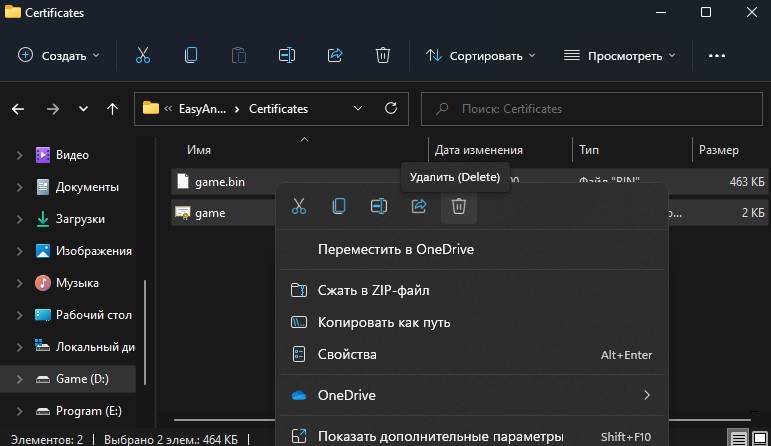
3. Вернитесь обратно в библиотеку с играми и нажмите снова правой кнопкой мыши по игре New World, после чего выберите «Свойства«. Далее нажмите «Локальные файлы» и справа на «Проверить целостность игровых файлов«.
Исправить службу Easy AntiCheat
Если вышеуказанный способ не помог устранить ошибку запуска игры New World, то восстановим службу Easy AntiCheat.
1. Откройте просмотр локальных файлов игры New World, как описано в шаге 1 выше, затем откройте папку EasyAntiCheat.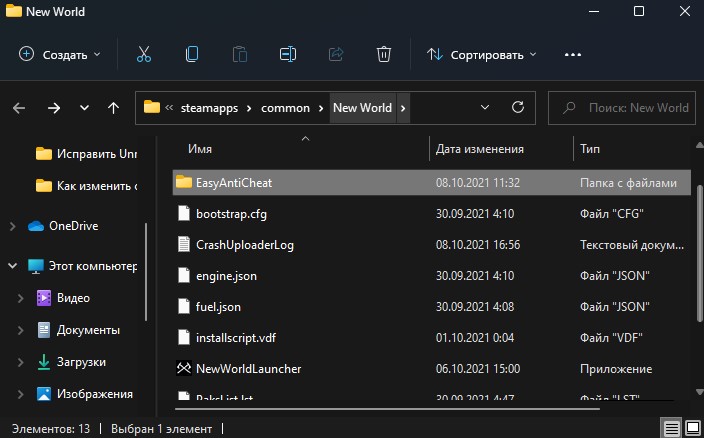
2. Нажмите правой кнопкой мыши по EasyAntiCheat_Setup.exe и выберите «Запуск от имени администратора«.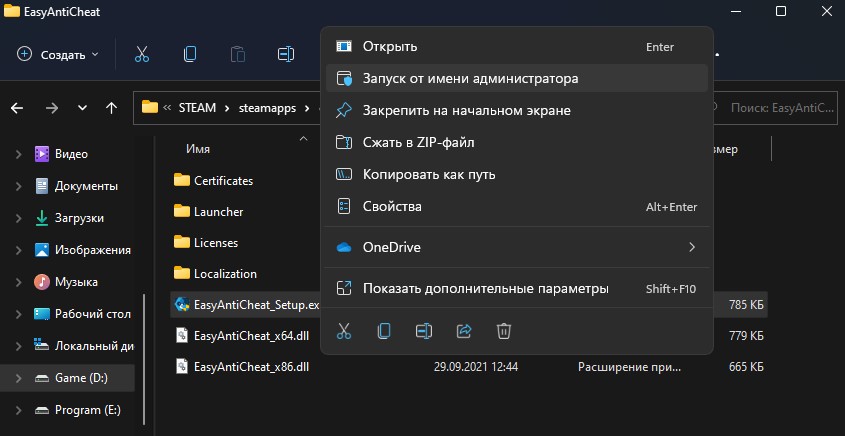
3. Убедитесь, что стоит игра New World, после чего нажмите на «Помощь в восстановлении«. Дождитесь окончание процесса и запустите игру.
Смотрите еще:
- Minecraft: io.netty.channel.AbstractChannel — Что делать?
- Не подключается игра PUBG к игровому процессу с лобби
- Произошла ошибка при обновлении игры в Steam
- Исправить ошибку Denuvo driver. Error code: 2148204812
- Как изменить изображение (Аватар) в профиле Steam
[ Telegram | Поддержать ]
-
MiniTool
-
MiniTool News Center
- 5 Fixes for New World Unrecoverable Error in Windows 11/10
By Vera | Follow |
Last Updated February 17, 2022

New World unrecoverable error no product information found or steam must be running is a common issue when playing this game. If you encounter such an error in Windows 11/10, how can you remove it from your PC? MiniTool gives some efficient ways in this post to help you out.
Unrecoverable Error New World
New World is an open-world MMO (Massive Multiplayer Online) PC game developed by Amazon Games. For excited players, the worst thing is to encounter an error a bug in the game. When playing New World, the common issue is that “Unrecoverable Error” appears on the computer screen.
The error message says “Steam must be running to play this game. Make sure you are logged into Steam, then try again”. Sometimes, the screen shows “No product information found, cannot initialize Game. Please contact Customer Service for this product”.
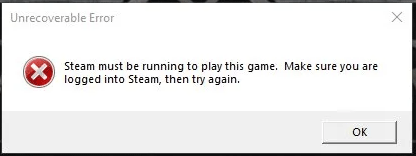
The error is not uncommon but it is easy to fix. Go to the following part to look for solutions now.
Fixes for New World No Product Information Found Windows 11/Steam Must Be Running
Check System Specifications
To play a game on a PC, the machine should meet the minimum system requirements and New World is not an exception. If you get unrecoverable error, perhaps the PC cannot meet the requirements of this game. Go to check your PC specifications and here is a related article — How to Check PC Full Specs Windows 10 in 5 Ways.
New World Minimum Specifications
- System: Windows® 10 64-bit
- CPU: Intel® Core™ i5-2400 / AMD CPU with 4 physical cores @ 3Ghz
- Memory: 8 GB RAM
- Graphics: NVIDIA® GTX 670 2GB / AMD Radeon™ R9 280 or better
- Storage: 50 GB available space
- DirectX: Version 12
If your PC is capable of running New World, try other fixes below.
Restart/Reinstall New World
To fix New World unrecoverable error steam must be running/no product information found in Windows 11/10, you can try to restart this game. If this won’t work, go to uninstall New World from your PC and then reinstall it to see if the error is removed.
Repair Easy Anti-Cheat
According to users, Easy Anti-Cheat may be the root of unrecoverable error, and repairing it may fix it.
Related article: What is EasyAntiCheat.exe on Your Computer?
Step 1: Go to Steam and click Library.
Step 2: Locate New World, go to Settings > Manage > Browse local files to open the folder of this game in File Explorer.
Step 3: In the EasyAntiCheat folder, double-click the EasyAntiCheat_Setup.exe file.
Step 4: Click Repair Service.

Verify Integrity of Game Files
Game file corruption could lead to unrecoverable error in New World. So, you can try to check if game files are damaged and replace them in this way.
Step 1: Launch Steam and go to Library.
Step 2: Locate New World, right-click on it and choose Properties.
Step 3: In the Local Files section, click Verify integrity of game files.
Disable IPv6
If you encounter New World unrecoverable error no product information found, disabling IPv6 is a good solution, and follow the instructions below.
Step 1: Launch Control Panel and view items by Category.
Step 2: Click Network and Internet > Network and Sharing Center.
Step 3: Click your network connection and click Properties.
Step 4: Uncheck the box of Internet Protocol Version 6 (TCP/IPv6) and click OK.

Verdict
Get New World unrecoverable error steam must be running/no product information found in Windows 11/10? After trying these ways, you should remove it from your PC. If you have other ways, tell us in the following comment. Thanks.
About The Author

Position: Columnist
Vera is an editor of the MiniTool Team since 2016 who has more than 5 years’ writing experiences in the field of technical articles. Her articles mainly focus on disk & partition management, PC data recovery, video conversion, as well as PC backup & restore, helping users to solve some errors and issues when using their computers. In her spare times, she likes shopping, playing games and reading some articles.
Для новых игроков, с нетерпением ожидающих начала игры New World, самое худшее — столкнуться с ошибкой. Однако некоторые игроки столкнулись со сбоем при запуске, который отображается как «Unrecoverable». К счастью, есть несколько быстрых способов устранения этой ошибки, нарушающей игру.
Первое невероятно простое: Перезагрузите компьютер. Перезагрузка компьютера устраняет проблему в 99% случаев, и она не должна повториться.
Второй способ немного сложнее, но не сложный. Переустановка игры в большинстве случаев устраняет проблему. Она не должна повторяться, и, вероятно, связана с повреждением файлов игры. Эта проблема решается во время переустановки.
Последний способ — самый сложный. Некоторые специалисты по устранению неполадок связывают проблему с интернет-протоколом IPv6. Этот протокол связан с передачей данных из конца в конец и иногда может вызывать ошибки при работе с онлайн-играми или программами обмена данными peer-to-peer.
Чтобы устранить «Неисправимую ошибку», необходимо отключить протокол IPv6. Для этого перейдите в Панель управления. Обязательно измените Вид на Крупные значки. Оттуда нажмите на Центр управления сетями и общим доступом.


После того, как вы открыли это, щелкните правой кнопкой мыши на вашем активном сетевом подключении. Прокрутите вниз до Свойства, и это даст вам список активных элементов, который включает протоколы. Прокрутите вниз и снимите флажок с пункта Протокол Интернета версии 6 (TCP/IPv6).

New World теперь должен запускаться без проблем. Если у вас возникнут дополнительные проблемы, повторяйте предыдущие шаги до тех пор, пока не добьетесь успеха. Удачи!
“Unrecoverable error” messages are creeping up in player systems all over the globe in New World and an immediate fix is what the community needs. In this guide, we’ll walk through all steps you can take to fix this unrecoverable error in New World.
How to Fix Unrecoverable Error in New World
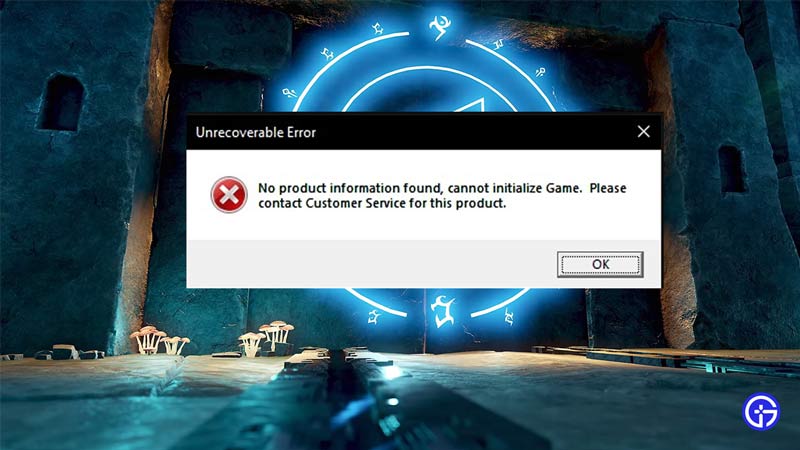
You can fix the unrecoverable error by simply reconfiguring your internet settings with respect to the game files and New World will start right back up without any problems. Here are a few steps you can follow to solve the unrecoverable error in New World.
Check Your Internet
It’s possible that your internet isn’t stable at the moment of running the game. You can check this by heading to fast.com or speedtest.net and if your internet has an issue, simply wait until it gets back to normal. However, if the internet isn’t the issue, follow the alternative fixes below.
Verify Your System’s Specs
Sometimes, games like New World will run on minimal requirements but then face errors later on as the game progresses. To avoid this, check beforehand if your system is compatible with the requirements of New World. If it isn’t, you might want to consider upgrading your system. However, if your system is capable of running New World without stress, follow the alternative fixes below.
Restart New World
The oldest trick in the book has always worked for some reason. Restarting your game clears out any accidental unread game files during launch and relaunches the game. This fix works on most occasions for the “unrecoverable error”. If it doesn’t, follow the alternative fixes below.
Restart your System and Wifi provision device
Like the previous fix, the trick works with these as well. Restarting your system lets your CPU re-analyze what may have previously been launched or parsed incorrectly. The same works with restarting your router or hotspot. Bear in mind that restarting is the single greatest fix in all of technology. New World should work fine now.
Uninstall and Reinstall New World to fix Unrecoverable Error
If the above-mentioned methods didn’t solve the error then it’s possible that a portion of your game files hasn’t been installed correctly. To fix this you’ll need to uninstall the game then reinstall it. If possible, consider installing New World on an SSD.
Fix Unrecoverable Error Disable IpV6 Protocol for New World
The Internet Protocol version 6 was introduced as a replacement for IPv4. However, the community of New World has already identified IPV6 to be one of the reasons leading to the “Unrecoverable error”. This has a solution that is a bit complex to absorb. To help you out, we’ve listed a step-by-step route to disable IPV6 and solve the “Unrecoverable Error”. Here’s how you can do it.
- In the windows start menu, locate “Control Panel”
- From here select the “Network and Internet” option.
- Now click on “Network and Sharing Center”.
- From here click on your main connection.
- At the bottom left of the box, click on “Properties”.
- From the list, locate “Internet Protocol Version 6 (TCP/IPv6)” and uncheck the box on its left.
- Hit OK and Apply.
- Now simply launch New World.
- The “unrecoverable error” won’t appear anymore.
- New World is now fixed.
- Your game will now run smoothly without problems.
- To ensure problems don’t persist launch the game with Steam.
That’s pretty much all there is to know about how you can fix the “unrecoverable error” in New World. There are some things you can do to tweak your system to get the best out of New World. If you wish to play a smoother and better, more enhanced version of the game, here’s an article on how to boost and improve fps in New World.
Errors and issues are common among PC video games and New World is no exception. New World is an MMO and doesn’t require a beefy PC. However, PC players are reporting errors and issues with the game, among them is the New World Unrecoverable error telling players that “no product information found, can’t initialize the game”. Here is how to fix New World Unrecoverable error on PC.
The following is the full error message that New World PC players are experiencing and are unable to play the game.
No Product information found, cannot initialize game. Please contact Customer Service for this product.
One reason behind the Unrecoverable error is possibly your anti-virus. Disable your anti-virus and the error will be fixed.
In case the error persists, then players need to disable IPv6 to fix the error. For Windows 10 users, open Settings > Network & Internet > Change Adapter Options > right-click your active internet connection > properties > uncheck “Internet Protocol Version 6 (TCP/IPv6)” and press OK. Launch the game and the Unrecoverable Error won’t pop up again.
That is all for our fix for New World Unrecoverable Error on PC. In case you are facing other errors and issues with New World, then also check out New World Errors and Fixes Guide. If you are facing errors and issues with other PC games or your PC then also see our hub for commonly occurring PC errors and their fixes.
How to fix New World Unrecoverable Error ‘No Product Information Found, Cannot Initialize Game’

New world has gotten the popular moniker Bug world due to the huge number of bugs it had at release. Over time some of the bugs have been fixed but still, there is a lot that is yet to be fixed. Occasionally you may run into the New World ‘No Product Information Found, Cannot Initialize Game’ error.
You can verify steam files or restart the system the error still won’t go away.
From what I tested the error comes from an incorrect application setup of ipv6 IP address protocol by new world which makes the game unplayable and you will see the following error again and again. The way to fix it is by renewing the ipv6 addresses. I went for a simple GUI fix rather than a command prompt fix so that it’s easier for people. If you are a tech guy you can renew ipv6 addresses using the command prompt
Step 1: Close the game.
Step 2: Go to your windows settings

Step 3: Go to network options as shown in the image below

Step 4: Go to network adapter settings

Step 5: Right-click on your LAN or wifi whatever you are using for the internet and click on disable

Step 6: Wait for a minute and then reenable the adapter the same way you disabled it.
Now you will be able to play the game without the error. By disabling and enabling the adapters we can flush the IP addresses which are causing the problem.
That’s all folks. I hope this guide and helps you out. If you have any issues let me know in the comments below:
Happy to help you guys out. Peace
Happy Gaming.
If you want to play with me just come to Erewhon New World Europe Server. You will find me chilling.
The «No product information found, cannot initialize Game. Please contact Customer Service for this product.» We will try to solve the problem in this article.
New World players are restricted from accessing the game by encountering the error «Unrecoverable Error.No product information found, cannot initialize Game. Please contact Customer Service for this product.» after running the game. If you are facing suchaproblem, you can findasolution by following the suggestions below.
- What is New World Unrecoverable Error?
- How To Fix New World Unrecoverable Error
- Disable IPv6 Protocol
- Don’t Run Steam as Administrator
- Register Another DNS Server
- Check Your Link
- Close Unnecessary Applications
- Reload New World
What is New World Unrecoverable Error?
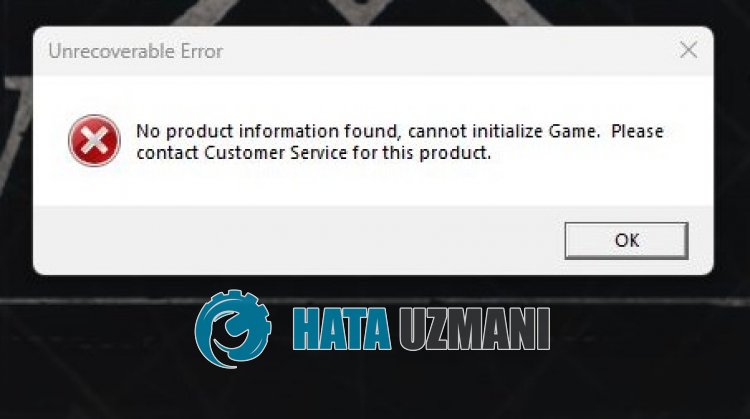
Although it is not known exactly what caused this error, some users who solved the error state that this error is related to the internet. Of course, we may encounter various errorslike this not only because of this problem, but also because of many problems. For this, we will give you information on how to fix the problem by mentioningafew suggestions.
How To Fix New World Unrecoverable Error
To fix this error, you can find the solution to the problem by following the suggestions below.
1-) Disable IPv6 Protocol
Some users state that they fixed the problem by disabling the IPv6 protocol. We can eliminate the problem by applying this suggestion. You can follow the step below to apply this setting.
- First of all, close the Ubisoft Connect application completely with the help ofatask manager.
- Open Control Panel and select Network and Internet
- Open Network and Sharing Center on the screen that opens.
- Click on Change adapter settings on the left.
- Right-click on your Connection Type to open the Properties menu.
- Disable the «Internet Protocol Version 6» option in the new window that opens and click the «OK» button.
After performing this operation, check if the problem persists.
2-) Do not run Steam as Administrator
Some players state that they encountered the «Unrecoverable Error» problem after running the Steam application as an administrator. If you are running the Steam application as an administrator, you can check if the problem persists by running it normally.
3-) Register Another DNS Server
We can eliminate the problem by registering another dns server on the computer.
- Open Control Panel and select Network and Internet
- Open Network and Sharing Center on the screen that opens.
- Click on Change adapter settings on the left.
- Right-click on your Connection Type to open the Properties menu.
- Double-click Internet Protocol Version 4 (TCP /IPv4).
- Let’s apply the settings by typing the Google DNS server we will give below.
- Preferred DNS server: 8.8.8.8
- Other DNS server: 8.8.4.4
- Then click on Verify settings on exit option and press OK button to perform the actions.
After this process, follow the suggestion below.
4-) Check Your Connection
The problem with the internet connection can cause many errors. If your internet connection is slowing down or disconnected, let’s giveafew suggestions to fix it.
- If your internet speed is slowing down, turn your modem off and then on again. This process will relieve your internet alittle bit.
- We can eliminate the problem by clearing the Internet cache.
Clear DNS Cache
- Type «cmd» in the start search screen and run it as administrator.
- Command prompt screen by typing the followinglines of code one after the other and press enter.
- ipconfig /flushdns
- netsh int ipv4 reset
- netsh int ipv6 reset
- netsh winhttp reset proxy
- netsh winsock reset
- ipconfig /registerdns
- After this operation, it will show that your dns cache and proxies have been cleared successfully.
After this process, you can restart the computer and check if the problem persists.
5-) Close Unnecessary Applications
Some unnecessary applications running in the background can trigger the game and prevent it from opening. For this, we can close unnecessary applications with the help ofatask manager.
6-) Reload New World
A Reddit user states that when he encounters the «Unrecoverable Error» problem in the New World game, he completely uninstalls the game from his device and reinstalls it and does not encounter such an error again. If none of these steps is the solution for you, let’s remove the New World game completely from the device and reinstall it and check it.
Yes, friends, we have solved our problem under this title. If your problem persists, you can ask about the errors you encounter by entering our FORUM platform.

So you just bought New World and eagerly want to be the best adventurer Aeternum has ever seen? Well, it won’t be possible until the game launches; something that “Unrecoverable Error” prevents from happening!
When you launch New World via Steam, the start-up screen will appear. Unfortunately, it will be accompanied by an error message that reads
Unrecoverable Error. Steam must be running to play this game. Make sure you are logged into Steam, then try again.
OR
No Product Information Found, Cannot Initialize Game. Please Contact Customer Service For This Product.
If you, too, have encountered this annoying bug and are looking for an immediate fix, you’re at the right place! We have jotted down umpteen fixes to ensure this glitch doesn’t get the best of your precious gaming time.

To fix the Unrecoverable Error in New World, you should restart your PC. If restarting doesn’t fix the issue, reinstall New World, reinstall or repair Easy Anti-Cheat, verify the integrity of game files, or disable IPv6.
I. Restarting your PC
Just like your grandma deals with any technological problem, you, too, should just turn off your PC then turn it back on to fix the unrecoverable error in New World. In many cases, this old-school solution worked and helped players dive into Aeternum.
II. Reinstalling New World
If rebooting turned out to be futile, feel free to install New World once again, but I won’t recommend it as this method doesn’t guarantee results. Instead, it’s better to restart your PC again and again.
III. Reinstalling Easy Anti-Cheat
Installing Easy Anti-Cheat once again is your best weapon to fight the “unrecoverable error” in New World, as even Amazon recommended this fix to enthusiasts. Apparently, EAC is the source of this nuisance.
You can also fix EAC if reinstalling is too much of a task for you. To do so:
- Open your Steam Library, and head to New World -> Settings -> Manage -> Browse local files. Your New World folder will open in File Explorer now.
- Look for and click on the Easy Anti-Cheat folder and run EasyAntiCheat_Setup.exe as an administrator.
- Select New World from the drop-down menu.
- Choose Repair Service.
Once repaired, you might be able to get into New World.
IV. Verifying the Integrity of Game Files
If nothing has worked for you so far, then it’s best to check the integrity of New World files.
- Open your Steam Library and right-click on New World.
- Select Properties -> Local Files -> Verify Integrity of Game Files
If this doesn’t work, you will have to delete the certificates. To make it happen:
- Go to Steam Library and right-click on New World
- Choose Manage and head to Browse local files
- Open the EAC folder, within which you’ll find the Certificates folder.
- Get rid of the Certificates by pressing Shift + Delete.
Now check the integrity of the game files once again, and hopefully, the issue will cease to exist.
V. Disabling IPv6
- Head to Windows Settings
- Choose Network and Internet
- Select Wi-Fi and look for Change adapter option
- Right-click your connection and move to Properties
- Uncheck the box right beside Internet Protocol Version 6 to disable it.
These solutions will get the job done but if you are on the unlucky side of things, then remain patient and just repeat the steps. Believe me; the problem will vanish in no time.
Fix for ‘Failed to Join Login Queue Connection Error’ in New World
About New World
New World is an upcoming massively multiplayer online role-playing game (MMORPG) by Amazon Games set to be released on August 31, 2021. The game was previously scheduled to release in May 2020 but was delayed to its current date.
Set in the mid-1600s, players colonize a fictional land known as Aeternum Island, modeled after North and South Americas in the Atlantic Ocean. The game will be using a buy-to-play business model, meaning there will be no monthly subscription fee.
Gaming Dope is the one stop page for everything Gaming & Technology. The new home of news, views and reviews. From the new tech we get our hands on to the gaming junkies that can’t play enough and can’t stop talking about it. We are building a home for nerds, geeks and anyone else that is likely to rule the world with the lot of us.
More from Gaming Dope