На чтение 3 мин Просмотров 54 Опубликовано 3 октября, 2022
Как и любая MMO с живым сервисом, New World подвержена множеству ошибок, некоторые из которых связаны с сетью, некоторые связаны с оборудованием, а некоторые возникают по вине разработчиков. конец, например, проблемы с сервером и тому подобное. Среди всех проблем, с которыми сталкиваются игроки New World во время игры или запуска игры, у нас есть одна, когда они получают сообщение об ошибке «Нет информации о продукте», которое возникает из-за проблем с совместимостью. В этом руководстве рассказывается о том, как исправить ошибку New World No Product Information Found.
Как исправить ошибку New World No Product Information Found
Как упоминалось ранее, ошибка New World No Product Information Found возникает при наличии проблемы совместимости. В большинстве случаев это связано с ОС, установленной на вашем ПК, а иногда это происходит, когда вы используете последние конфигурации iPV6, VPN и другие подобные вещи.
Итак, как исправить ошибку «Нет информации о продукте» в MMO Amazons New World? Вы можете решить проблему, перезагрузив компьютер. Всякий раз, когда мы получали сообщение об ошибке «Информация о продукте не найдена» при попытке сыграть в «New World», мы исправляли ее, перезагружая компьютер.
Еще одна вещь, которую многие игроки со старыми системами, как правило, упускают из виду, это то, что в системных требованиях New Worlds четко упоминаются требования к ОС как 64-разрядная версия Windows 10. Поэтому, если у вас установлена 32-битная ОС, есть большая вероятность, что вы не сможете запустить New World, а если вы используете Windows 7 или 8, вы можете получить сообщение об ошибке No Product Information Found при запуске New World. Итак, убедитесь, что вы используете Windows 10 64 разрядной или более поздней версии и последнюю сборку ОС.
Хотя это то, что почти никто из игроков не упускает, все же убедитесь, что у вас установлена самая последняя версия New World и нет ожидающих обновлений.
Если описанное выше устранение неполадок не помогает, попробуйте отключить IPv6 для своей сети, выполнив следующие действия:
- Щелкните правой кнопкой мыши параметр Wifi или Network на панели задач. и выберите «Открыть центр управления сетями и общим доступом».
- Выберите «Изменить настройки адаптера» в правом меню.
- Выберите и щелкните правой кнопкой мыши активный сетевой адаптер.
- Снимите переключатель для TCP/IPv6.
- Нажмите «ОК» для подтверждения
< li>Теперь нажмите «Свойства».
Это должно исправить ошибка Новый Свет Информация о продукте не найдена. Также убедитесь, что вы не используете VPN и прокси.
Вот и все. На этом мы завершаем наше гайд по устранению ошибки «Нет информации о продукте» в New World.
New Worldэто открытый мир. MMO от Amazon в настоящее время доступна на платформе ПК через Steam.

How to fix New World Unrecoverable Error ‘No Product Information Found, Cannot Initialize Game’

New world has gotten the popular moniker Bug world due to the huge number of bugs it had at release. Over time some of the bugs have been fixed but still, there is a lot that is yet to be fixed. Occasionally you may run into the New World ‘No Product Information Found, Cannot Initialize Game’ error.
You can verify steam files or restart the system the error still won’t go away.
From what I tested the error comes from an incorrect application setup of ipv6 IP address protocol by new world which makes the game unplayable and you will see the following error again and again. The way to fix it is by renewing the ipv6 addresses. I went for a simple GUI fix rather than a command prompt fix so that it’s easier for people. If you are a tech guy you can renew ipv6 addresses using the command prompt
Step 1: Close the game.
Step 2: Go to your windows settings

Step 3: Go to network options as shown in the image below

Step 4: Go to network adapter settings

Step 5: Right-click on your LAN or wifi whatever you are using for the internet and click on disable

Step 6: Wait for a minute and then reenable the adapter the same way you disabled it.
Now you will be able to play the game without the error. By disabling and enabling the adapters we can flush the IP addresses which are causing the problem.
That’s all folks. I hope this guide and helps you out. If you have any issues let me know in the comments below:
Happy to help you guys out. Peace
Happy Gaming.
If you want to play with me just come to Erewhon New World Europe Server. You will find me chilling.
-
MiniTool
-
MiniTool News Center
- 5 Fixes for New World Unrecoverable Error in Windows 11/10
By Vera | Follow |
Last Updated February 17, 2022

New World unrecoverable error no product information found or steam must be running is a common issue when playing this game. If you encounter such an error in Windows 11/10, how can you remove it from your PC? MiniTool gives some efficient ways in this post to help you out.
Unrecoverable Error New World
New World is an open-world MMO (Massive Multiplayer Online) PC game developed by Amazon Games. For excited players, the worst thing is to encounter an error a bug in the game. When playing New World, the common issue is that “Unrecoverable Error” appears on the computer screen.
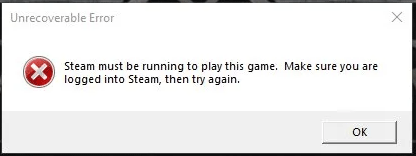
The error message says “Steam must be running to play this game. Make sure you are logged into Steam, then try again”. Sometimes, the screen shows “No product information found, cannot initialize Game. Please contact Customer Service for this product”.
The error is not uncommon but it is easy to fix. Go to the following part to look for solutions now.
Fixes for New World No Product Information Found Windows 11/Steam Must Be Running
Check System Specifications
To play a game on a PC, the machine should meet the minimum system requirements and New World is not an exception. If you get unrecoverable error, perhaps the PC cannot meet the requirements of this game. Go to check your PC specifications and here is a related article — How to Check PC Full Specs Windows 10 in 5 Ways.
New World Minimum Specifications
- System: Windows® 10 64-bit
- CPU: Intel® Core™ i5-2400 / AMD CPU with 4 physical cores @ 3Ghz
- Memory: 8 GB RAM
- Graphics: NVIDIA® GTX 670 2GB / AMD Radeon™ R9 280 or better
- Storage: 50 GB available space
- DirectX: Version 12
If your PC is capable of running New World, try other fixes below.
Restart/Reinstall New World
To fix New World unrecoverable error steam must be running/no product information found in Windows 11/10, you can try to restart this game. If this won’t work, go to uninstall New World from your PC and then reinstall it to see if the error is removed.
Repair Easy Anti-Cheat
According to users, Easy Anti-Cheat may be the root of unrecoverable error, and repairing it may fix it.
Related article: What is EasyAntiCheat.exe on Your Computer?
Step 1: Go to Steam and click Library.
Step 2: Locate New World, go to Settings > Manage > Browse local files to open the folder of this game in File Explorer.
Step 3: In the EasyAntiCheat folder, double-click the EasyAntiCheat_Setup.exe file.
Step 4: Click Repair Service.

Verify Integrity of Game Files
Game file corruption could lead to unrecoverable error in New World. So, you can try to check if game files are damaged and replace them in this way.
Step 1: Launch Steam and go to Library.
Step 2: Locate New World, right-click on it and choose Properties.
Step 3: In the Local Files section, click Verify integrity of game files.
Disable IPv6
If you encounter New World unrecoverable error no product information found, disabling IPv6 is a good solution, and follow the instructions below.
Step 1: Launch Control Panel and view items by Category.
Step 2: Click Network and Internet > Network and Sharing Center.
Step 3: Click your network connection and click Properties.
Step 4: Uncheck the box of Internet Protocol Version 6 (TCP/IPv6) and click OK.

Verdict
Get New World unrecoverable error steam must be running/no product information found in Windows 11/10? After trying these ways, you should remove it from your PC. If you have other ways, tell us in the following comment. Thanks.
About The Author

Position: Columnist
Vera is an editor of the MiniTool Team since 2016 who has more than 5 years’ writing experiences in the field of technical articles. Her articles mainly focus on disk & partition management, PC data recovery, video conversion, as well as PC backup & restore, helping users to solve some errors and issues when using their computers. In her spare times, she likes shopping, playing games and reading some articles.
The long-awaited MMO from Amazon Games Studios, New World, launched its closed beta earlier today. And while many players have already started their journey in Aeternum, others are being locked out by an unfortunate error message when launching the game.
The error that some players receive reads “no product information found, the game cannot be initialized,” and it prevents players from diving into New World. But the error is easily fixable and can be solved within moments thanks to a few straightforward solutions.
First and foremost, if your computer isn’t running Windows 10, you won’t be able to run New World. Update your computer to Windows 10 if you’re looking to join in on the closed beta. Players looking to run the game through Windows 7 or Windows 8 will find that New World doesn’t offer support for those operating systems.
Additionally, you want to make sure that your Amazon and Steam accounts are linked if you purchased New World through Amazon. Once you link your accounts, the problem should be solved in most cases.
If you’re still receiving the message while running Windows 10, the first solution you could try is to restart your PC completely. In nearly all cases, a full restart of your computer will solve this error message.
If a restart doesn’t do the trick, though, the last possible solution you could attempt would be disabling IPv6 on your PC. To do this, you’ll have to right-click the internet icon on your taskbar tray, open “Network and Internet Settings,” and navigate your way to “Change adapter settings.” From there, right-click on the network adapter, click on “Properties,” and deactivate Internet Protocol version 6 (IPv6).
If you’re still experiencing issues, Amazon Games Studios offers a support network through New World’s official website.
One of the errors that New World players are running into displays a message that states, “No product information found, cannot initialize Game.” This unrecoverable error will prevent players from launching New World, and pressing “OK” immediately takes them back to the desktop. Fortunately, there is are fixes for the no product information found error, but many players won’t be happy with the solution.
How to fix the “No product information found, cannot initialize Game,” Unrecoverable Error in New World
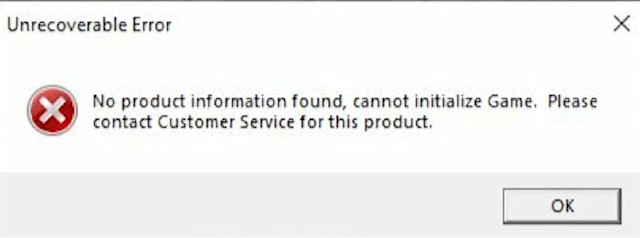
To fix the no product information found error in New World players need to update to Windows 10 or later. New World is one of the few games out now to remove support for Windows 7 and 8 entirely. Unlike the issues with queues or connection failed errors, attempting to launch the title on those operating systems will result in an unrecoverable error, and it won’t even try to initialize.
While OS compatibility is the leading cause of this issue, there are some other fixes that players have reported working. First, those who purchased the game from Amazon should ensure that their Steam and Amazon accounts are linked. Players should have had to link accounts to download New World in the first place, but there’s a possibility that they could have become unlinked in the interim.
If EasyAntiCheat isn’t able to initialize, then the product not recognized error might occur as well. If a user has disabled it for any reason, they should make sure that it’s installed and set to launch as usual. If it’s not, then restarting the computer or uninstalling and reinstalling the game may fix things.
Some players have also reported that connecting to the internet via IPv6 can also cause this issue. Users can deactivate this via Network and Internet Settings. However, users shouldn’t poke around in here if they’re not sure what they’re doing. Changing the settings in these menus can cause a user’s computer to be unable to connect to a network or the internet, which adds one more layer of problems to the stack.

If you’ve been trying to play the New World beta, you may well have stumbled across the New World unrecoverable error «No Product Information Found, Cannot Initialise Game». When this happens, players cannot access the open world of New World. If this has effected your journey to Aeternum, then this article is for you. Read on, for our top tips on how you might be able to overcome this first challenge in your New World adventure.
How to fix the ‘Cannot Initialize Game’ error
This particular beta only launched a few days ago, on 20th of July. It runs until August 2nd, so you only have a narrow window of opportunity to play in this phase of testing. This particular error does seem to have a pretty clearly defined set of causes, which means the fixes are equally clear. Here’s what you need to know:
- The first thing to do is make sure that your Amazon account and Steam accounts are linked. This is if you made your New World purchase via Amazon.
- Users have also found that disabling something called IPv6 has fixed this error. To do this:
- Right-click the internet icon on your taskbar
- Open Network and Internet Settings
- Click Change adapter settings
- Right-click the network adapter
- Click on Properties
- Deactivate Internet Protocol version 6
- Make sure that EasyAntiCheat has not been disabled. As with many games, disabling the anti-cheat software can stop games from launching. Press Windows key + R > type Services.msc and ensure EasyAntiCheat is set to either manual or automatic.
- Finally, as always, turning your computer off and back on again can sometimes be all you need to do, to overcome an error.
click to enlarge
If none of these remedies work, then it may well be time to contact customer services for additional support. Or wait until the game is officially released at the end of August. By then, hopefully all of these glitches will have been addressed.
Read More: New World release date: When does the Amazon MMO come out on PC, and will it launch on PS4 as well?
What causes New World unrecoverable error?
The «cannot Initialise Game» error seems to have a few fundamental causes, most of which are highlighted above: Issues with EasyAntiCheat, IPv6, or unlinked accounts. But there is one additional point which is worth mentioning. If it applies to you, then none of these other solutions will work.
If you are still on Windows 7 or Windows 8, New World will not work. The system requirements of the game specify a 64-bit Windows 10 OS as a minimum. So if you are on an earlier version of Windows, you aren’t going to be able to participate. Even if you are on Windows 10, it’s worth making sure your OS is fully up-to-date if you are being effected by this error.
Ultimately, errors are to be expected in the beta testing phase. At least this one has a workaround.
Read More: New World Connection Error: How To Fix Unable To Establish Connection With The Server Error And Check Server Status11
Kit on Genshin Impact – A Review and Critique
Laddy O on New World – Best Starmetal Farming Route
Didier on Cyberpunk 2077: How to get Adam Smashers secret room and legendary – Cyberpunk Secrets – Ba Xing Chong
Scarlett medellin on Friday Night Funkin’ – Minus Garcello Full Week Mod
Midboy on Castle Crashers 2
Lucas on Tiny Tina’s Wonderlands SUCKS
Tweikid on Will To Live Online – Complete Guide – ft. Noe Sparks
joe on Roxy Naked in Five Nights at Freddy’s: Security Breach
Marcus on Halo Infinite SUCKS
At Dead Of Night – Game review — MGN on New World Weapon Mastery Guide Part 6 – The Bow
At Dead Of Night – Game review — MGN on Horror Squad – Game Review
At Dead Of Night – Game review — MGN on New World Weapon Mastery Guide Part 7 – War Hammer
Niko on FNF | VS. EDD & UBERKIDS | Friday Night Funkin’ ONLINE | Hard/Mods
Moonlight Wanser on Friday Night Funkin’ VS Tails.EXE FULL WEEK
Gregory Sablan Diestro on FNF Character Test | Gameplay VS Playground | Tails.EXE
superanime6549 on FNF Character Test | Gameplay VS Playground | Tails.EXE
MYNAMEJEFF on FNF Character Test | Gameplay VS Playground | Tails.EXE
iyan on Will To Live Online – Complete Guide – ft. Noe Sparks
iyan on Will To Live Online – Complete Guide – ft. Noe Sparks
Purty8 on Back 4 Blood Sucks
EnchantedMOB on Poppy Playtime – Game Review
Devin on Back 4 Blood Sucks
SplitSocks on Back 4 Blood Sucks
Chris Ashley on Cyberpunk 2077: Equip Johnny Silverhands ARM (Legendary Cybernetic Clothes Location)
spacefoxy on Friday Night Funkin’ VS Accelerant Hank UPDATE – MOD
Matthew Thao on Friday Night Funkin’ VS Accelerant Hank UPDATE – MOD
Matthew Thao on Friday Night Funkin’ VS Accelerant Hank UPDATE – MOD
Matthew Thao on Friday Night Funkin’ VS Accelerant Hank UPDATE – MOD
HIHI on Poppy Playtime – Game Review
Jerry Hood on Back 4 Blood Sucks
cole on Friday Night Funkin’ VS Accelerant Hank UPDATE – MOD
Euan-Gabriel Lachlan on FRIDAY NIGHT FUNKIN’ – GF Loses BF to Pico | VS Soft Mod
ivan salgado on Haunt Chaser – Review
Jorine Lancan on Friday Night Funkin’ VS Accelerant Hank UPDATE – MOD
Jorine Lancan on Friday Night Funkin’ VS Accelerant Hank UPDATE – MOD
ayleen zeman on Friday Night Funkin’ VS Accelerant Hank UPDATE – MOD
Christy on New World – The Frontiersman – A High-Powered DPS Starter Build!
Jamil Sanchez on Friday Night Funkin’ VS Accelerant Hank UPDATE – MOD
VALERIA on Friday Night Funkin’ VS Accelerant Hank UPDATE – MOD
Deadpool on Bloodwash – Game review
twisty on Dark Deception (Chapter 4) – Update Review
aposdifasd on Friday Night Funkin’ VS Accelerant Hank UPDATE – MOD
ioanna on Friday Night Funkin’ VS Accelerant Hank UPDATE – MOD
Curtis Pyke on Game Boy is coming to the Nintendo Switch!
L. P. Cowling on Tormented Souls – Review
senior success on The Secret Lore of Friday Night Funkin’ – Game Theory
Wilson Alejo on Dreamscaper – Full Release – Review (PC Version)
RubiS on Dreamscaper – Full Release – Review (PC Version)
fabriel maria on Dreamscaper – Full Release – Review (PC Version)
Noamsnsa on Friday Night Funkin’ – VS Bob 2.0 – Bob’s Onslaught Mod
Cyanorange on Friday Night Funkin’ – Top 5 Depressing Mods
Cyanorange on Friday Night Funkin’ – Top 5 Depressing Mods
Tranxx4 on Will To Live Online – Complete Guide – ft. Noe Sparks
MILES on Friday Night Funkin’ – V.S. Luca 1.2 MOD
ethanhall on Friday Night Funkin’ – V.S. Luca 1.2 MOD
Animyl on Will To Live Online – Complete Guide – ft. Noe Sparks
Luke Cowling on New World Beta Guide – Everything You Need To Know
Camelia on Friday Night Funkin’ – VS Big Brother – Big Brother MOD
Farelgood112224433 on Friday Night Funkin’ – Download ALL Mods
Mike on Friday Night Funkin’ V.S. AGOTI Full Week – MOD Showcase
MadI on Friday Night Funkin’ – VS Kapi – Arcade Showdown
love on Teamfight Manager – MGN Impressions Game Review
dan on Friday Night Funkin’ – Tricky Phase 4
Mcgoo Fatboi on Friday Night Funkin – V.S. Monika Mod – Full Week
bruh on Friday Night Funkin – V.S. Monika Mod – Full Week
Psycho on Will To Live Online – Complete Guide – ft. Noe Sparks
zamier on Friday Night Funkin’ – Tricky Phase 4
zamier on Friday Night Funkin’ – Tricky Phase 4
Chad Kobe B. Masongsong on Friday Night Funkin’ – Smoke ‘Em Out VS Garcello Mod
Plasma on Friday Night Funkin’ – Vs. Tricky Version 2 / Tricky Phase 3 Mod
isaiah on Friday Night Funkin’ – Vs. Tricky Version 2 / Tricky Phase 3 Mod
Lux on Friday Night Funkin’ but Different Characters Sings “Ugh” (Remastered)
iyan on Will To Live Online – Complete Guide – ft. Noe Sparks
Luke Cowling on Vivid Knight – Review
Trevor Hale on Friday Night Funkin’ Mod SKID & PUMP VS EVIL PICO DAY 3!!!
Trevor Hale on Friday Night Funkin’ Mod SKID & PUMP VS EVIL PICO DAY 3!!!
Leon on Friday Night Funkin But Tankman Vs Whitty – By Fera Animations
Hayato Taichi on Friday Night Funkin’ V.S. AGOTI Full Week – MOD Showcase
ERICK FERNANDO SCHUMACHER on Friday Night Funkin’ V.S. AGOTI Full Week – MOD Showcase
Curtis on Dark Deity – Worth a Wishlist!
Shane on Outriders – RARÓG’S GAZE Legendary Weapon Review
Luke Cowling on Fire Emblem: Three Houses – The Golden Deer – Which House is Best for You?
Curtis Pyke on Fire Emblem: Three Houses – The Golden Deer – Which House is Best for You?
blueorange on Outriders Technomancer: A Beginner’s Guide
Curtis on Hades – How to reveal the hidden Aspects
Curtis on Outriders Technomancer: A Beginner’s Guide
thatawesomekk on Sky Factory 4 | Modded Minecraft – Part 1
ninderOP on Sky Factory 4 | Modded Minecraft – Part 1
Curtis on Outriders Demo – First Impressions
George Vanous on Minecraft: Fast and Easy Way To Make Netherite Tools
Charles Charalambous on Minecraft: Fast and Easy Way To Make Netherite Tools
Big on Hitman 3 : Chongqing Fuse Cell Location – China Fuse Cell