Are you experiencing the 50352-MW1 error code when trying to play Monster Hunter: World online? Read on to learn what’s causing it.
Since launch day, Monster Hunter: World has been plagued by several reoccurring error codes that have frustrated players who are attempting to play online with friends. 50352-MW1 is one of the more popular error codes, but the root of this issue is also the cause of these codes:
- 5038F-MW1
- 50382-MW1
- 50352-MW1
Judging by this naming convention, you can safely assume that any error during online play with a prefix of «503» is related to this same issue. Let’s look into what’s causing these error codes to come up.
Monster Hunter: World Team’s Response to Error Codes
On January 26th, these error codes were affecting PS4 players. The official Monster Hunter: World Twitter replied as follows:
It’s come to our attention that some PS4 players have been unable to successfully accept some of the event quests released today. If this issue affects you, please restart the game and try accepting the event quests again. Apologies for the inconvenience.
— Monster Hunter (@monsterhunter) January 26, 2018
The next day, they acknowledged another issue affecting XB1 players:
Hello Hunters, we’re aware of the Xbox matchmaking issues and dev team is actively investigating it, we’ll update you as soon as we can.
— Monster Hunter (@monsterhunter) January 27, 2018
Both issues revolve around an inability to make a proper connection with Monster Hunter: World‘s servers. Based on many reactions on Reddit, forums, and other communities, this naturally prompts players to question the connection to Monster Hunter: World‘s servers as provided by their ISP. Players across a multitude of ISPs and connection types have been experiencing these error codes, and although Capcom has not addressed it, it seems safe to conclude that these are errors caused by Monster Hunter: World‘s servers.
How to Fix Error Code 50352-MW1 in Monster Hunter: World
Due to the lack of details provided by Capcom, there is no confirmed solution for how to to fix these issues. However, all signs point to them being out of the user’s control. These errors will persist until Monster Hunter: World‘s servers stabilize and can handle the amount of requests being sent to them. It’s very common to see issues with serving online content for games in the first week of their launch.
The only possible fix lies within one of the aforementioned tweets, where they suggest closing the game and restarting it (or even your console). If this doesn’t fix the issue, don’t drive yourself crazy trying to tweak your connection to fix it. It’s very likely out of your control, and patience is the only thing that will solve it as the Monster Hunter: World servers deal with the surge in traffic after launch.
If you’re experiencing this issue, you have the options of playing offline or creating your own session. You’ll probably find that you can create online sessions and invite others to private sessions. Every now and then, you may be able to get into matchmaking and find yourself disconnected moments later. The effect of these errors and the server stability is very sporadic.
—
Be sure to check out some of our other Monster Hunter: World content:
- The Single Best High Rank Armor Set in Monster Hunter: World
- Monster Hunter World — Where to Get Every Sac Type
- Monster Hunter: World — Ultimate Guide to High Rank
- Monster Hunter World Hardbone Location Guide
Published Jan. 30th 2018
Автор:
Lewis Jackson
Дата создания:
11 Май 2021
Дата обновления:
23 Январь 2023

Содержание
- Охотник на Монстров: Мир
С момента запуска, Охотник на Монстров: Мир из-за нескольких повторяющихся кодов ошибок, которые расстраивали игроков, которые пытаются играть в онлайн с друзьями. 50352-MW1 является одним из наиболее популярных кодов ошибок, но корень этой проблемы также является причиной этих кодов:
- 5038F-MW1
- 50382-MW1
- 50352-MW1
Судя по этому соглашению об именах, вы можете смело предположить, что любая ошибка во время онлайн-игры с префиксом «503» связана с этой же проблемой. Давайте посмотрим, что вызывает появление этих кодов ошибок.
Охотник на Монстров: Мир
Из-за отсутствия подробной информации, предоставленной Capcom, не существует подтвержденного решения о том, как решить эти проблемы. Однако все признаки указывают на то, что они находятся вне контроля пользователя. Эти ошибки будут сохраняться до Охотник на Монстров: МирСерверы стабилизируются и могут обрабатывать количество запросов, отправляемых им. Очень часто встречаются проблемы с подачей онлайн-контента для игр на первой неделе их запуска.
Единственное возможное исправление находится в одном из вышеупомянутых твитов, где они предлагают закрыть игру и перезапустить ее (или даже вашу консоль). Если это не решает проблему, не сводите себя с ума, пытаясь настроить ваше соединение, чтобы исправить это. Это очень вероятно, вне вашего контроля, и терпение это единственное, что решит это как Охотник на Монстров: Мир серверы справляются с ростом трафика после запуска.
Если у вас возникла эта проблема, у вас есть возможность играть в автономном режиме или создать свой собственный сеанс. Вы, вероятно, обнаружите, что можете создавать онлайн-сеансы и приглашать других в частные сеансы. Время от времени вы можете заняться сватовством и через несколько секунд почувствовать себя отсоединенным. Влияние этих ошибок и стабильности сервера очень спорадическое.
—
Обязательно ознакомьтесь с некоторыми другими нашими Охотник на Монстров: Мир содержание:
- Единственная лучшая броня высокого ранга, установленная в Охотник на Монстров: Мир
- Monster Hunter World — Где взять каждый тип саквояжа
- Охотник на Монстров: Мир — Окончательный путеводитель по высокому званию
- Monster Hunter World Hardbone Location Guide
-
The 2022 Games of the Year results are in! Thank you to everyone that took the time to vote, and congratulations to all the winners!
You should upgrade or use an alternative browser.

-
#51
It’s a bit like when you order on Amazon and the delivery guy from UPS fucked up your package. You’re not going to yell at the delivery company but to Amazon.

-
#52
Edit: Ah, thread title changed. What a surprise.
-
#53
Hopefully a mod will edit and possibly close this.

-
#54

-
#55
I stand corrected. It’s Sony -and- Microsoft that are charging for a premium service and delivering substandard product.
We pay so that our credit cards do not get compromised.
Actually i kinda agree with op in this case. Sony is charging us paid subscription for online mhw, so at least they also have the responsibility to provide us coziness in mp

-
#56
OP’s right. We are paying money to play online games. This money goes to Microsoft/Sony, it’s their responsibility to make sure the service runs fine and that the games use proper dedicated server.
It’s a bit like when you order on Amazon and the delivery guy from UPS fucked up your package. You’re not going to yell at the delivery company but to Amazon.
In MHW you can still join Online Sessions even if you don’t have PSPlus, but you can still get the error. So its definitely Capcom issue.
Playing in PS4 and the error actually happen to me even now. From my observation, it have something to do with your connection to the session host.

-
#57
When I pay for an online service, I expect it to work. And the buck, quite literally, stops with the company that I am paying to make it work. If Sony and Microsoft are not willing to expend resources to make sure online play works, they shouldn’t be charging for it.
It is not reasonable for Microsoft and Sony to pay for the servers of every game on their hardware. That is also not what you are paying for — and no where in any advertisement or documentation does Sony or Microsoft promise anything like that. You are paying for a unified friends list, looking for group, and Games With Gold/Plus Instant Library. If Sony/Microsoft had to take responsibility for every developer’s servers/netcode, they would get out of the gaming business because the cost would be astronomical.
-
#58
No paid for online service has ever been this shoddy. No game from Steam, Uplay, or Battle.net has ever been this terrible, all free services. No game on the PS3, before PSN started charging for their «service,» or after, has ever given me this much trouble.
Oh the hyperbole. I don’t even play that many online games and even I know this isn’t even remotely true.

-
#59

-
#60
I can get into an empty session by myself. I can play other PS4 MP games fine. MHW is just broken, and I’m surprised there aren’t a lot of reports about it.

-
#61
When I first started playing MHW (1 month after release), I couldn’t create or connect to any online session.
NAT type 2 was detected (should have been fine) and UPnP was working at intended.
Every other MP games on PS4 or PC were fine.
I was behind 2 routers on my LAN and to make it work I had to move the PS4 on the same subnet as my modem.
So it seems MHW netcode is little a weird and a bit more restrictive compared to others.
-
The 2022 Games of the Year results are in! Thank you to everyone that took the time to vote, and congratulations to all the winners!
You should upgrade or use an alternative browser.
-
#51
It’s a bit like when you order on Amazon and the delivery guy from UPS fucked up your package. You’re not going to yell at the delivery company but to Amazon.
-
#52
Edit: Ah, thread title changed. What a surprise.
-
#53
Hopefully a mod will edit and possibly close this.
-
#54
-
#55
I stand corrected. It’s Sony -and- Microsoft that are charging for a premium service and delivering substandard product.
We pay so that our credit cards do not get compromised.
Actually i kinda agree with op in this case. Sony is charging us paid subscription for online mhw, so at least they also have the responsibility to provide us coziness in mp
-
#56
OP’s right. We are paying money to play online games. This money goes to Microsoft/Sony, it’s their responsibility to make sure the service runs fine and that the games use proper dedicated server.
It’s a bit like when you order on Amazon and the delivery guy from UPS fucked up your package. You’re not going to yell at the delivery company but to Amazon.
In MHW you can still join Online Sessions even if you don’t have PSPlus, but you can still get the error. So its definitely Capcom issue.
Playing in PS4 and the error actually happen to me even now. From my observation, it have something to do with your connection to the session host.
-
#57
When I pay for an online service, I expect it to work. And the buck, quite literally, stops with the company that I am paying to make it work. If Sony and Microsoft are not willing to expend resources to make sure online play works, they shouldn’t be charging for it.
It is not reasonable for Microsoft and Sony to pay for the servers of every game on their hardware. That is also not what you are paying for — and no where in any advertisement or documentation does Sony or Microsoft promise anything like that. You are paying for a unified friends list, looking for group, and Games With Gold/Plus Instant Library. If Sony/Microsoft had to take responsibility for every developer’s servers/netcode, they would get out of the gaming business because the cost would be astronomical.
-
#58
No paid for online service has ever been this shoddy. No game from Steam, Uplay, or Battle.net has ever been this terrible, all free services. No game on the PS3, before PSN started charging for their «service,» or after, has ever given me this much trouble.
Oh the hyperbole. I don’t even play that many online games and even I know this isn’t even remotely true.
-
#59
-
#60
I can get into an empty session by myself. I can play other PS4 MP games fine. MHW is just broken, and I’m surprised there aren’t a lot of reports about it.
-
#61
When I first started playing MHW (1 month after release), I couldn’t create or connect to any online session.
NAT type 2 was detected (should have been fine) and UPnP was working at intended.
Every other MP games on PS4 or PC were fine.
I was behind 2 routers on my LAN and to make it work I had to move the PS4 on the same subnet as my modem.
So it seems MHW netcode is little a weird and a bit more restrictive compared to others.

So I keep getting this code every time I try to join an online session and am promptly booted from the session. My psn is working fine and so is my internet. Is anyone else experiencing this? I’ve looked up the code and only found articles and reddit posts from last year. Does it still just happen to random people at random times?
level 1
· 3 yr. ago
Lance: Why dodge when you can block?
Yeah, I had this problem tonight. I couldn’t find a solution, so I just played solo in offline mode. I’m guess it’s some sort of server error because as far as I could tell my internet and PSN were working fine otherwise.
level 1
Happening to me right now. Managed to get a few quests in and spend some time in GL, but I keep getting booted and dropped from quests.
level 2
I was able to play for a little bit after I got off work, but around 6 or 7 (CT) I was booted the first time and it got progressively worse from there.
level 1
I guess it’s happening to a lot of players. It happened to me too several times, couldn’t stay in a session for more than a minute
level 1
Yeah this sucks been happening all day
level 1
Yea i have been having that same issue. It sucks that they still have the same server issues even after 1 and a half years later
level 1
This happened to me for 2 weeks straight during the release of iceborne I tried everything , I finally just got a WiFi extender just because I play on wifi connection 100% anyways fixed my problem right away
level 2
I have a wired connection, oof
level 1
This error is so annoying.It prevents me and a specific friend from joining each other..
level 2
You or your friend might have a closed NAT type. I found with some of my friends that have a closed NAT it’s almost impossible to play with them on Monster Hunter world unless we both join someone else’s session and get lucky. If you are playing on console it will tell you either you have type 1 2 or 3 Type 3 is closed type 2 is moderate and type 1 is open.
level 1
Anyone still having this problem? Had it all night last night. Hoped it would clear up today but it’s still happening tonight. Been disconnected over 5 times now since I started playing tonight.
level 2
That’s really shitty, luckily mine has been working fine today. So hopefully everyone else’s clears up soon.
level 1
If you also get an error with your NAT type then its your ISP
level 1
There seems to be connection errors in Iceborne compared to the base game.
Monster Hunter, как известно, планируется, как масштабная и «долгоиграющая» франшиза, и новая Monster Hunter World в версии для ПК и Xbox One — это всего лишь первый её эпизод.
Тем не менее, игра очень яркая и увлекательная. И ведь есть в ней, чем увлекаться. Мир сразу со старта приятно радует и даже удивляет огромными вирутальными просторами.
Ну, и разнообразием жуткой фауны, за которой, собственно, геймеру хоть в одиночку, хоть совместно с коллегами по опасному бизнесу как раз и предстоит охотиться.
В общем, обзоров и гайдов в YouTube уже много. Смотреть, не пересмотреть. Мы же расскажем о наиболее актуальных проблемах технического характера в игре и попробуем дать ответы на некоторые гораздо менее интересные, но тоже весьма «увлекательные».
Если игрушку вы уже поставили, то наверняка уже знаете, что по ходу выполнения миссий и в целом прохождения Monster Hunter World постоянно отслеживает каждого отдельного монстра и то, как он взаимодействует с другими монстрами. Потому игра чрезвычайно требовательна к «железу». И потому с него мы и начнем.
Значит, если Monster Hunter World вы только планируете ставить или уже установили, а она «не идет», то напиминаем:
минимальные системные параметры (более-менее качественный геймплей на 30 FPS):
- требуются 64-разрядные процессор и ОС;
- ОС: WINDOWS 7, 8, 8.1, 10 (64-разр);
- проц: Intel Core i5-4460 на 3.20 ГГц или AMD FX-6300;
- оперативка: 8 GB;
- видеокарта: NVIDIA GeForce GTX 760 или AMD Radeon R7 260x (VRAM 2GB);
- DirectX: v.11
- связь: широкополосный интернет;
- место на диске: 20;
- звуковая карта: DirectSound (DirectX® 9.0c).
рекомендованные системные параметры:
- требуются 64-разрядные процессор и ОС;
- проц: Intel Core i7 3770 (3.4ГГц), Intel Core i3 8350 4ГГц или AMD Ryzen 5 1500X;
- оперативка: 8 GB;
- видеокарта: NVIDIA GeForce GTX 1060 (VRAM 3GB) или AMD Radeon RX 570 (VRAM 4GB);
- DirectX: v.11
- связь: широкополосный интернет;
- место на диске: 20;
- звуковая карта: DirectSound (DirectX® 9.0c или лучше).
Ну, а теперь о то, что и где может не работать, и что сделать, чтобы заработало. Итак, по порядку:
Monster Hunter World «вылетает» на этапе запуска
Происходить это может по нескольким причинам, однако устаняется трабл сравнительно просто (в особенности, если комп у вас с процессором AMD):
- так вот, если комп у вас с процессором AMD, то следует в обязательном порядке обновить драйвейра, иначе старые так и будут «выбивать» MHW;
- если у вас стоит видеокарта Nvidia, то попробуйте переустановить её драйвер (удалить и установить по-новой);
- «вылетать» MHW может также из-за того, что какие-то из приложений на компе конфликтуют со встроенной защитой Denuvo DRM в игре (на форумах юзеры чаще всего пишут о моде FAR для NieR Automata, и советуют его либо удалить, либо зайти в настройки и остановить вручную);
- сама защита Denuvo DRM также работает не со всеми процессорами, а только начиная с 4-го поколения Intel Haswell. Так что, если у вас проц постарше, то Monster Hunter World запускаться не будет, по крайней мере, до тех, пока Capcom не выпустит патч, устраняющий данную проблему.
игра сама включает режим Big Picture
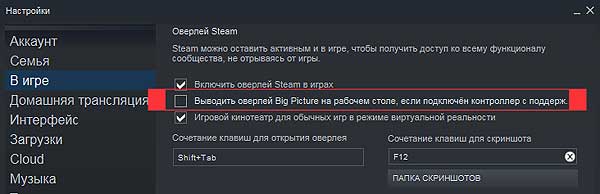
… и часто это действительно мешает. А чтобы больше не мешало, открываем клиент Steam, жмем Steam (в левом верхнем углу окна) -> «Настройки» -> «В игре«, отключаем опцию «Выводить оверлей Big Picture на рабочем столе, если подключен контроллер с поддержкой…» и кликаем «ОК» внизу окна. Должно сработать:
как устранить ошибку подключения 5038f-MW1
Ошибка 5038f-MW1, по данным разработчика, возникает именно по причине каких-то сбоев в подключении игры. Её наверняка тоже пропатчат в ближайшее время, а пока не пропатчили, делаем следующее:
- находим на рабочем столе ярлык клиента Steam;
- кликаем по нему правой кнопкой мыши;
- в появившемся меню выбираем «Свойства«;
- далее в окне «Свойства: Steam» во вкладке «Ярлык» находим поле «Объект«, в котором по умолчанию указан путь к файлу Steam.exe (примерно такой «C:Program Files (x86)SteamSteam.exe«);
- в конце строки пути просто добавляем через пробел один из двух доппараметров:
nofriendsui -udp

nofriendsui -tcp
- жмем «Применить» (по итогу должно быть либо «C:Program Files (x86)SteamSteam.exe» -nofriendsui -udp либо «C:Program Files (x86)SteamSteam.exe» nofriendsui -tcp).
Monster Hunter World не сохраняет и/или «виснет» на этапе создания персонажа
То есть, своего персонажа вы «нарисовали», но сохранить его не получается (игра спрашивает, нужно ли сохранять, но не сохраняет) и поиграть потом, само собой, тоже. Чтобы эту устранить эту проблему, нужно просто запустить клиент Steam с правами администратора системы. Для этого кликаем правой кнопкой мышт по ярлыку Steam, в меню выбираем «Свойства«, в окне «Свойства: Steam» открываем вкладку «Совместимость«, в разделе «Уровень прав» активируем опцию «Выполнять эту программу от имени администратора» и жмем «Применить«.
игра не находит сервер (Server is not reachable)
Проблема непростая. Способ её устранения тоже есть, но, похоже, срабатывает он не на каждом компе. «Суть басни» — в том, что подключиться к серверу MHW, а точнее системе Denuvo, мешают антивирус или штатный Защитник Windows. Происходит такое, как правило, после очередного апдейта игры.
Потому сначала проверяем статус сервера (иногда там тоже бывают сбои), и если он функционирует нормально, то:
- либо вручную вносим игру и отдельные её программные компоненты (в частности Denuvo) в список исключений антивируса и/или Защитника;
- либо отключаем на время антивирус и/или Защитник, чтобы Monster Hunter World подключилась к серверу;
- либо переустанавливаем игру.
не работает объемный звук 7.1
Дело — в настройках воспроизведения звука ОС Windows. Потому в трее кликаем по значку динамика, в меню выбираем «Устройства воспроизведения», в списке кликаем по названию своей гарнитуры или колонок и затем жмем кнопку «Настроить» ниже слева. Настраиваем звучание устройства согласно инструкции, жмем «Готово«, заходим в игру и тестируем результат. Звук 7.1 должен появиться.
как исправить err12: graphics device crashed
Судя по отзывам, эта ошибка в большинстве случаев происходит или сразу при запуске игры, или когда игрок заходит в Астеру. Устраняется она путем обновления драйверов видеокарты компа.
черный экран в Monster Hunter World
Причин тому может быть две, и обе совершенно стандартные. Первая: если черный экран наблюдается сразу же по факту запуска игры, то, вероятнее всего, разрешение игры выше, чем разрешение монитора компа. Потому, не выключая игру, просто переводим её в оконный режим (ALT+ENTER), открываем настройки монитора, запоминаем разрешение, потом заходим в настройки Dark Souls Remastered и устанавливаем соответствующее разрешение «картинки» в игре.
Вторая: если отображается черный экран в игре (любой), то тоже надо проверить драйвер видеокарты и при необходимости обновить его.
не работает геймпад, не работает Steam Controller
Проблема в том, что в игре изначально предусмотрена так называемая «частичная поддержка» контроллеров, потому и c DualShock, и Xbox-геймпадом вопросы возникают и будут возникать. Но кое-что сделать тоже можно и нужно.
Так что, если глючить начал Dualshock или Xbox-геймпад, то сразу же открываем клиент Steam, кликаем Steam -> «Настройки» -> «Контроллер» -> «Основные настройки контроллера» и включаем опции «Пользовательские настройки« для Playstation и Xbox.
Со Steam controller-ом примерно то же самое: если собираемся играть с ним, что сначала открываем клиент Steam, кликаем Steam -> «Настройки» -> «Контроллер» -> «Основные настройки контроллера» и включаем опцию «Пользовательские настройки для обычного геймпада«.
ошибка E-Fail_hr
Если при запуске игра «вылетает», показывая ошибку «E-Fail_hr«, попробуйте сначала уменьшить разрешение экрана, снова запустите игру и потом, после того, как она нормально запустится, снова переключитесь на прежнее разрешение.
если Monster Hunter World запускается в «оконном» режиме
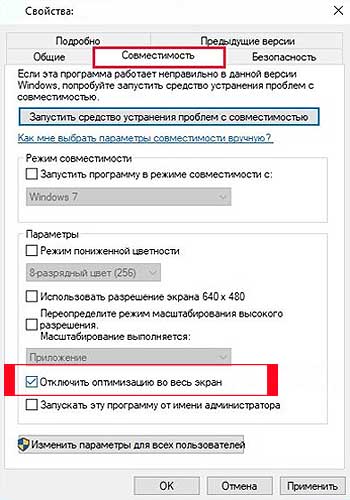
… притом, что в настройках включен полноэкранный режим. В таком случае, кликаем правой кнопкой мыши по ярлыку Steam, в меню выбираем «Свойства«, в следующем окне переходим во вкладку «Совместимость«, активируем опцию «Отключить оптимизацию во весь экран» (ставим флажок) и жмем «Применить«:
низкий FPS в Monster Hunter World
Как мы сказали с самого начала, данная игра относится к категории ресурсоемких, потому даже если ваш комп и соответствует рекомендованным требованиям, то все равно лучше перед тем, как её запускать, повырубать лишние/ненужные фоновые процессы в компе и освободить немного мощности процессора, про запас.
Плюс к этому, если у вас Nvidia, то поднять немного FPS можно также за счет оптимизации работы видеокарты. Для этого открываем Панель управления Nvidia, жмем «Управление параметрами 3D«, в списке программ выбираем Monster Hunter World, затем в списке опцию ниже находим строку «Вертикальный синхроимпульс«, кликаем по ней и в меню для нее устанавливаем значение «Быстро«.
Ну, вот пока как-то так… Продолжаем охоту!
-
The 2022 Games of the Year results are in! Thank you to everyone that took the time to vote, and congratulations to all the winners!
You should upgrade or use an alternative browser.

-
#1
I’m sure Capcom bears quite a bit of the blame, and the fact that they were clearly willing to devote substandard resources to making the game’s basic functionality work on the platform because the install base was smaller is inexcusable. But if our subscription dollars are paying for any improvement at all in the online experience, then surely they should pay for making sure a tentpole release runs their servers properly.
EDIT: Apparently this is something that affects both PSN and Xbox Live. I’m leaving up the original version of the post to be honest about it, but I don’t think it changes anything substantive aside from the fact that both Microsoft and Sony are charging premium prices for a subpar product, not just Microsoft.
-
#2
-
#3
Xbox Live doesn’t pay for Capcoms shit servers bruv
Which is why our subscription dollars should be paying for Microsoft to run dedicated servers.
-
#4

-
#5

Judge
Vault-Tec Seal of Approval
-
#6
That error code happens on the PlayStation 4 version as well. Certainly seems like a Capcom-only problem.
So, ya.

-
#7
Which is why our subscription dollars should be paying for Microsoft to run dedicated servers.
They have them on their games using Azure servers (Titanfall 1, Halo 5, Gears of War 4, etc). Other companies are allowed to use them as well, but it’s on Capcom to have better servers. 🙂
Also, yeah see above post. lol

-
#8
So yeah, the error isn’t exclusive to Xbox Live (HA!). It seems more like a Capcom thing.
-
#9

-
#10
The new Monster Hunter update is out, and predictably, the online error codes have returned. Every time I want to play this game in a way that is slightly different from the rigid way I’ve used to circumvent the error, the online servers spazz out like I forgot a period in a lengthy IP address in 1996. No paid for online service has ever been this shoddy. No game from Steam, Uplay, or Battle.net has ever been this terrible, all free services. No game on the PS3, before PSN started charging for their «service,» or after, has ever given me this much trouble. The Xbox version of Monster Hunter manages to be more user unfriendly than trying to get Pokemon romhacks to connect to each other on a gameboy advance emulator.I’m sure Capcom bears quite a bit of the blame, and the fact that they were clearly willing to devote substandard resources to making the game’s basic functionality work on the platform because the install base was smaller is inexcusable. But if our subscription dollars are paying for any improvement at all in the online experience, then surely they should pay for making sure a tentpole release runs their servers properly.
We pay so that our credit cards do not get compromised.

-
#11
I stand corrected. It’s Sony -and- Microsoft that are charging for a premium service and delivering substandard product.
……not sure how this isn’t 100% a Capcom/MHW issue.
-
#12
I stand corrected. It’s Sony -and- Microsoft that are charging for a premium service and delivering substandard product.
No, Capcom is
-
#13

-
#14
When I pay for an online service, I expect it to work. And the buck, quite literally, stops with the company that I am paying to make it work. If Sony and Microsoft are not willing to expend resources to make sure online play works, they shouldn’t be charging for it.
Ditch your consoles and go PC I guess.

-
#15
That error code happens on the PlayStation 4 version as well. Certainly seems like a Capcom-only problem.
I stand corrected. It’s Sony -and- Microsoft that are charging for a premium service and delivering substandard product.
You’re unbelievable.

-
#16
When I pay for an online service, I expect it to work. And the buck, quite literally, stops with the company that I am paying to make it work. If Sony and Microsoft are not willing to expend resources to make sure online play works, they shouldn’t be charging for it.
But its Capcoms problem…

-
#17

-
#18

-
#19
When I pay for an online service, I expect it to work. And the buck, quite literally, stops with the company that I am paying to make it work. If Sony and Microsoft are not willing to expend resources to make sure online play works, they shouldn’t be charging for it.
If there were more people like you, in all honesty, these gaming consoles would be better. Alas there are more conformant people in the world than all your posts on resetera times 1000.

-
#20
Which is why our subscription dollars should be paying for Microsoft to run dedicated servers.
They do. For all first party games. MS has no obligation to pay for servers for third party publishers.

-
#21
I stand corrected. It’s Sony -and- Microsoft that are charging for a premium service and delivering substandard product.
Why the fuck are Microsoft and Sony responsible for Capcom’s inability to do basic online functionality?

-
#22

-
#23
-
#24

-
#25
Someone else on this forum is having the same issue on PSN. I’m hoping capcom fixes this issue.
-
#26
Been PLAGUED by these fucking error codes. I don’t get it. Sometimes I think I solve it, but then it returns with a vengeance. I honestly gave up. Put 120 hours into the game. I’m done with it for awhile.
You’d think by now they would have solved it, but I guess not by the OP.


-
#28
I stand corrected. It’s Sony -and- Microsoft that are charging for a premium service and delivering substandard product.
How is it Sony’s or Microsoft’s fault when Capcom is running this game on their servers? Especially when the latter offers options to use their dedicated servers.
MS first party gmes are all on their dedicated servers.

-
#29
Do you blame the streets, or your car?

-
#30
How is it Sony’s or Microsoft’s fault when Capcom is running this game on their servers? Especially when the latter offers options to use their dedicated servers.MS first party gmes are all on their dedicated servers.

-
#31


-
#33
When I pay for an online service, I expect it to work. And the buck, quite literally, stops with the company that I am paying to make it work. If Sony and Microsoft are not willing to expend resources to make sure online play works, they shouldn’t be charging for it.
How are you not seeing that this is a Capcom issue?
You should be more upset that you paid for a game that isn’t working properly instead.
-
#35
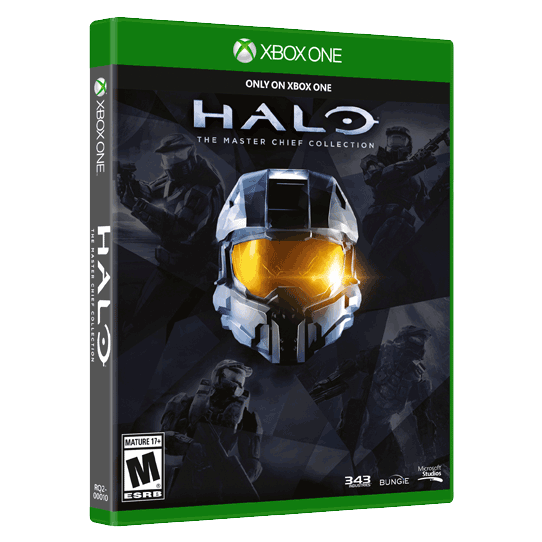
There was way more issues on MCC then dedicated servers. That package was a mess from the start. It’s getting a huge update soon which should fix all its problems.
Their other games like Gears, Halo 5, Forza series, and SoT run fine without issues on their servers.

-
#36
it usually means the quest spots are already taken before you could connect afaik
-
#37
There was way more issues on MCC then dedicated servers. That package was a mess from the start. It’s getting a huge update soon which should fix all its problems.Their other games like Gears, Halo 5, Forza series, and SoT run fine without issues on their servers.
Gears is broken on PC still, which uses their servers
Halo mcc was broken the second it went from a «private network» to actual xbl.
And op, downdetector says xbl is having issues with other games besides yours, so dont feel bad. It still makes me laugh how upset people were at MS for trying to go all digital, but you cant play most games unless you have an online connection anyways, which you pay a sub to both console manufacturers for.
Ive complained about this before on this forum, so ill just say it sucks to pay for an online service that fails and $60 for a game that you cant play when said service fails.

-
#38
Also, because people are willing to pay for the services/monthly games and MS/Sony would be very silly not to take it. Businesses like money.

-
#39

-
#40

-
#41
When I pay for an online service, I expect it to work. And the buck, quite literally, stops with the company that I am paying to make it work.
The online service is working, the game isn’t
You’re confused about what MS has been charging you for

-
#42
Xbox live is working flawlessly right now. All other games are also working except MH. Why? Go figure :p
-
#43
Gears is broken on PC still, which uses their servers
Halo mcc was broken the second it went from a «private network» to actual xbl.And op, downdetector says xbl is having issues with other games besides yours, so dont feel bad. It still makes me laugh how upset people were at MS for trying to go all digital, but you cant play most games unless you have an online connection anyways, which you pay a sub to both console manufacturers for.
Ive complained about this before on this forum, so ill just say it sucks to pay for an online service that fails and $60 for a game that you cant play when said service fails.
You don’t pay for live to play on PC, so you can’t expect same quality experience as Xbox. You cant put Windows store online in same basket as Xbox live that we get on Xbox One coz team handling both stores are different which is main cause of the problem. Windows team sucks compared to Xbox team . If they let Xbox team handle everything then Windows store will become much better.
MCC was bad not coz of live but game code itself had problem making people connect with matchmaking. It was 343’s fault entirely.

-
#44
When I pay for an online service, I expect it to work. And the buck, quite literally, stops with the company that I am paying to make it work. If Sony and Microsoft are not willing to expend resources to make sure online play works, they shouldn’t be charging for it.
The network can be rock solid, but that’s not going to do squat if the server itself is poorly coded.

-
- Oct 25, 2017
-
- 11,979
-
- Texas
-
#45

-
#46
Why do I pay Comcast for internet if Xbox live doesn’t work
I get complaints like these from time to time. «You said your service is free but I have to pay for my internet access, so you’re lying!». Never thought I’d find one on Era though.
-
#47
When I pay for an online service, I expect it to work. And the buck, quite literally, stops with the company that I am paying to make it work. If Sony and Microsoft are not willing to expend resources to make sure online play works, they shouldn’t be charging for it.
What are you talking about? The service is working, the game is not.
I get that you are angry, but please stop making a fool of yourself.

-
#48

-
#50
Gears is broken on PC still, which uses their servers
Halo mcc was broken the second it went from a «private network» to actual xbl.And op, downdetector says xbl is having issues with other games besides yours, so dont feel bad. It still makes me laugh how upset people were at MS for trying to go all digital, but you cant play most games unless you have an online connection anyways, which you pay a sub to both console manufacturers for.
Ive complained about this before on this forum, so ill just say it sucks to pay for an online service that fails and $60 for a game that you cant play when said service fails.
you don’t pay for gears on pc do you?
Also Halo MCC was broken the second it started coming together.
What about all their other IPs though? Halo 5 especially has been working flawlessly since launch. Gears 4 and FH3 are the same way.
I have been a member of Live for 14 years now and yah it goes down sometimes but 99% of the time I hardly have issues with their service. I am also on a pretty fast network so that helps.