-
Contents
-
Table of Contents
-
Bookmarks
Quick Links
MATRIX 6/816
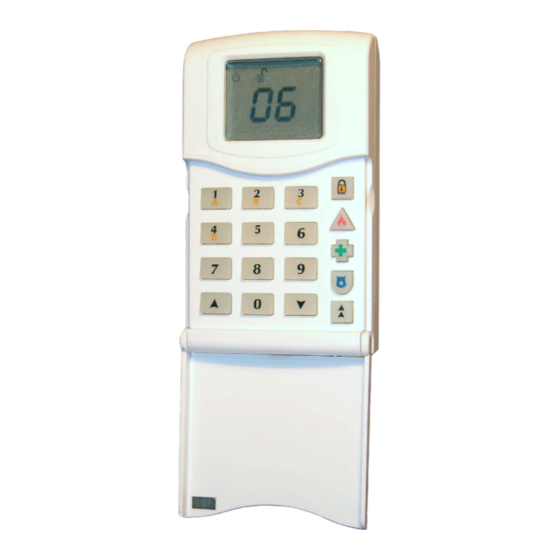
Control Panel with Remote Keypads
Software Version 1.34
USER MANUAL
RINS545-7
Related Manuals for Pyronix MATRIX 6
Summary of Contents for Pyronix MATRIX 6
-
Page 1
MATRIX 6/816 Control Panel with Remote Keypads Software Version 1.34 USER MANUAL RINS545-7… -
Page 2: Table Of Contents
CONTENTS 1. GENERAL OVERVIEW……………………… 1 1.1 Keypad Buttons……………………..1 1.2 Keypad Display ……………………..2 1.3 Common Keypad Indications ………………….3 1.4 System Fault Indications……………………4 2. YOUR PANEL DETAILS ……………………. 5 2.1 Zone Configuration……………………… 5 2.2 Timers ……………………….6 2.3 Arm Options ………………………. 6 2.4 Your Servicing Company Details ………………….
-
Page 3: General Overview
Matrix 6/816 User Manual 1. GENERAL OVERVIEW Thank you for purchasing the Matrix control panel which has been designed and manufactured using the latest technology. This manual has been written to help you become familiar with all the available functions, enabling to get the best out of your alarm system.
-
Page 4: Keypad Display
Matrix 6/816 User Manual 1.2 Keypad Display Rest Of The World Denmark, Finland, Norway & Sweden Supply Illuminated Correct AC & DC power sources AC power is OK Blinking Indicates DC source (battery) fault Indicates an AC fault Extinguished Indicates AC fault / no power to panel No power to the panel…
-
Page 5: Common Keypad Indications
Matrix 6/816 User Manual 1.3 Common Keypad Indications Disarmed Mode Disarmed Mode The premises are not armed. All The premises are not armed. zones are closed (detectors are There open zones. not activated). System is ready to example, Zone 6. The system is be armed.
-
Page 6: System Fault Indications
Matrix 6/816 User Manual 1.4 System Fault Indications System Fault 2 System Fault 3 Auxiliary Fuse Fail Battery Missing System Fault 4 System Fault 5 Battery Low Mains Fail System Fault 6 System Fault 8 Telephone Line Fail Failed To Report…
-
Page 7: Your Panel Details
Matrix 6/816 User Manual 2. YOUR PANEL DETAILS The Matrix control panel is supplied with the factory default configuration. However, the panel configuration is flexible and can be changed to meet your requirements. Ask your engineer to fill in the following tables, noting any changes he might have made to the default settings.
-
Page 8: Timers
Matrix 6/816 User Manual 2.2 Timers Programmed Default Entry Time 20 sec Exit Time 20 sec Final Exit Delay 7 sec Bell Time 4 min 2.3 Arm Options Programmed Default Arm Option For Mode A Timed Exit Arm Option For Mode B…
-
Page 9: Hidden Display Mode
Matrix 6/816 User Manual 2.7 Hidden Display Mode The Matrix alarm panel incorporates a hidden display (confidential mode) feature that can be enabled / disabled by your installation engineer. This feature hides all of the panel information from the keypad display if the keypad has not been used for the last 20 seconds.
-
Page 10: Arming And Disarming The Panel
Matrix 6/816 User Manual 3. ARMING AND DISARMING THE PANEL 3.1 Arm Modes Explained The panel can be armed in one of 4 different arm modes. These arm modes are identified as A, B, C or D. The default arm mode is A.
-
Page 11: Disarming The Panel
Matrix 6/816 User Manual 3.2.3 Quick Arming It is possible to arm the panel in any of the four arm modes simply by pressing a key (if enabled by the engineer). Follow the procedure below. Hold down the arm mode key This starts the arming procedure.
-
Page 12: Disarm After Alarm
Matrix 6/816 User Manual 3.4 Disarm After Alarm Open the Entry/Exit door to enter the premises This will disarm the system. The system enters FTA (First To Enter your user code Alarm) mode. ffff Example shows Zone 2 was the first zone to activate.
-
Page 13: Activating Alarms From The Keypad
Matrix 6/816 User Manual 3.6 Activating Alarms from the Keypad 3.6.1 Personal Attack The Personal Attack alarm will either activate all sounders or will be silent (the Hold down the = button event will only be reported to the Central Monitoring Station) depending on how for 2 seconds.
-
Page 14: User Menu
Matrix 6/816 User Manual 4. USER MENU Most of the user operations (except for arm, disarm and reset alarm) are only accessible from the user menu. User 1 is the Master User and has access to all user menu items, while access for Users 2 to 15 is limited.
-
Page 15: Chime On/Off
Matrix 6/816 User Manual 4.2 Chime On/Off The keypad will sound an acknowledgement tone each time, Press `11 signalling the chime has been toggled on or off. However, there is no visual indication if the chime is on of off.
-
Page 16: Change Keypad Volume
Matrix 6/816 User Manual 4.5 Change Keypad Volume Press `14 The keypad sounder volume will increase or decrease with each Use the [ and ] keys to button press. adjust the volume Press ` to save the settings 4.6 Change Keypad Brightness…
-
Page 17: Change System Date (Master User Only)
Matrix 6/816 User Manual 4.8 Change System Date (Master User Only) Enter `22 This starts the function. 1 = Monday 2 = Tuesday 3 = Wednesday Enter the day 4 = Thursday 5 = Friday 6 = Saturday 7 = Sunday Enter the year as a 2-digit number Example shows 2004.
-
Page 18: Change User Code (Master User Only)
Matrix 6/816 User Manual 4.9 Change User Code (Master User Only) Press `25 The panel requests a user number. Enter the user to be edited.… Example shows User 2. If you wish to change the user code, enter the new code twice. If you wish to edit the user The system shows attribute option 1.
-
Page 19: Open 1Hr Download Window (Master User Only)
Matrix 6/816 User Manual 4.11 Open 1Hr Download Window (Master User Only) The one-hour window for remote Press `28 access is opened. 4.12 System Test (Master User Only) Press `50 All the symbols will flash. Press 0 to start the sounder The Entry/Exit tones will sound.
-
Page 20: Detailed Description
Matrix 6/816 User Manual 5. DETAILED DESCRIPTION This section is devoted to a more detailed description of the main panel features. If you require any information beyond the present manual, please contact your servicing company or the installer of your alarm system.
-
Page 21: Entry/Exit Procedure
Matrix 6/816 User Manual 5.2 Entry/Exit Procedure Follow the procedures below for arming the alarm panel before leaving the premises, and for entering the premises and disarming the alarm panel: ENTRY When the panel is armed, entering the premises using the Entry/Exit zone will trigger the Entry timer.
-
Page 22: Viewing The Event Log After A Zone Alarm
Matrix 6/816 User Manual 6. VIEWING THE EVENT LOG AFTER A ZONE ALARM Enter user menu mode. Enter the Log function `13. Move to the top of the log by pressing the [ key until two underscores are displayed. Keypress…
-
Page 23: Event Log Information
Matrix 6/816 User Manual 6.1 Event Log Information 6.1.1 Intruder, Panic, Fire and Medical Alarms Fragment 1 Fragment 2 Indicator System Event pq … qy Entry time expired after Entry Exit or Shunt Keypad zone triggering pq … qy –…
-
Page 24
Matrix 6/816 User Manual 6.1.3 Restoral Fragment 1 Fragment 2 System Event – User code after alarm (FTA mode entered) – Bell time expired Power supply applied (restored) to panel from de-energized state – Auxiliary fuse restoral Battery missing restoral (DC voltage on terminals +BAT- restored) Battery low voltage restoral (DC voltage on terminals +BAT- >… -
Page 25
Matrix 6/816 User Manual 6.1.6 Up / Downloading Events Fragment 1 Fragment 2 System Event Panel answered the telephone Panel hung up the telephone Full configuration data downloaded to panel Data upload from panel Partial configuration data downloaded to panel… -
Page 26: Zone Type Descriptions
Matrix 6/816 User Manual 6.2 Zone Type Descriptions Display Type Description This is a zone that allows limited-time access to the premises in order to arm Entry Exit or disarm the system. This zone is typically connected to a magnetic door contact.
-
Page 27: Quick Reference
Matrix 6/816 User Manual 7. QUICK REFERENCE NOTE: ffff(ff) = User Code (Default 1234 — Master) Arm/Disarm ffff(ff) Arm the panel in Mode A ffff(ff) + -b Arm the panel in Mode B ffff(ff) + -c Arm the panel in Mode C…
-
Page 28
Pyronix Limited Pyronix House Braithwell Way Hellaby, Rotherham S66 8QY, UK Customer Support Line (UK Only): 0900 803 7800 This is a premium rate line where calls are charged at 50p per minute (Prices correct at date of publication (02/11/2004)) Hours of business: 08:30 AM –…
-
Contents
-
Table of Contents
-
Bookmarks
Quick Links
MATRIX 6/816
Control Panel with Remote Keypads
Software Version 1.34
USER MANUAL
RINS545-7
Related Manuals for Pyronix MATRIX 6
Summary of Contents for Pyronix MATRIX 6
-
Page 1
MATRIX 6/816 Control Panel with Remote Keypads Software Version 1.34 USER MANUAL RINS545-7… -
Page 2: Table Of Contents
CONTENTS 1. GENERAL OVERVIEW……………………… 1 1.1 Keypad Buttons……………………..1 1.2 Keypad Display ……………………..2 1.3 Common Keypad Indications ………………….3 1.4 System Fault Indications……………………4 2. YOUR PANEL DETAILS ……………………. 5 2.1 Zone Configuration……………………… 5 2.2 Timers ……………………….6 2.3 Arm Options ………………………. 6 2.4 Your Servicing Company Details ………………….
-
Page 3: General Overview
Matrix 6/816 User Manual 1. GENERAL OVERVIEW Thank you for purchasing the Matrix control panel which has been designed and manufactured using the latest technology. This manual has been written to help you become familiar with all the available functions, enabling to get the best out of your alarm system.
-
Page 4: Keypad Display
Matrix 6/816 User Manual 1.2 Keypad Display Rest Of The World Denmark, Finland, Norway & Sweden Supply Illuminated Correct AC & DC power sources AC power is OK Blinking Indicates DC source (battery) fault Indicates an AC fault Extinguished Indicates AC fault / no power to panel No power to the panel…
-
Page 5: Common Keypad Indications
Matrix 6/816 User Manual 1.3 Common Keypad Indications Disarmed Mode Disarmed Mode The premises are not armed. All The premises are not armed. zones are closed (detectors are There open zones. not activated). System is ready to example, Zone 6. The system is be armed.
-
Page 6: System Fault Indications
Matrix 6/816 User Manual 1.4 System Fault Indications System Fault 2 System Fault 3 Auxiliary Fuse Fail Battery Missing System Fault 4 System Fault 5 Battery Low Mains Fail System Fault 6 System Fault 8 Telephone Line Fail Failed To Report…
-
Page 7: Your Panel Details
Matrix 6/816 User Manual 2. YOUR PANEL DETAILS The Matrix control panel is supplied with the factory default configuration. However, the panel configuration is flexible and can be changed to meet your requirements. Ask your engineer to fill in the following tables, noting any changes he might have made to the default settings.
-
Page 8: Timers
Matrix 6/816 User Manual 2.2 Timers Programmed Default Entry Time 20 sec Exit Time 20 sec Final Exit Delay 7 sec Bell Time 4 min 2.3 Arm Options Programmed Default Arm Option For Mode A Timed Exit Arm Option For Mode B…
-
Page 9: Hidden Display Mode
Matrix 6/816 User Manual 2.7 Hidden Display Mode The Matrix alarm panel incorporates a hidden display (confidential mode) feature that can be enabled / disabled by your installation engineer. This feature hides all of the panel information from the keypad display if the keypad has not been used for the last 20 seconds.
-
Page 10: Arming And Disarming The Panel
Matrix 6/816 User Manual 3. ARMING AND DISARMING THE PANEL 3.1 Arm Modes Explained The panel can be armed in one of 4 different arm modes. These arm modes are identified as A, B, C or D. The default arm mode is A.
-
Page 11: Disarming The Panel
Matrix 6/816 User Manual 3.2.3 Quick Arming It is possible to arm the panel in any of the four arm modes simply by pressing a key (if enabled by the engineer). Follow the procedure below. Hold down the arm mode key This starts the arming procedure.
-
Page 12: Disarm After Alarm
Matrix 6/816 User Manual 3.4 Disarm After Alarm Open the Entry/Exit door to enter the premises This will disarm the system. The system enters FTA (First To Enter your user code Alarm) mode. ffff Example shows Zone 2 was the first zone to activate.
-
Page 13: Activating Alarms From The Keypad
Matrix 6/816 User Manual 3.6 Activating Alarms from the Keypad 3.6.1 Personal Attack The Personal Attack alarm will either activate all sounders or will be silent (the Hold down the = button event will only be reported to the Central Monitoring Station) depending on how for 2 seconds.
-
Page 14: User Menu
Matrix 6/816 User Manual 4. USER MENU Most of the user operations (except for arm, disarm and reset alarm) are only accessible from the user menu. User 1 is the Master User and has access to all user menu items, while access for Users 2 to 15 is limited.
-
Page 15: Chime On/Off
Matrix 6/816 User Manual 4.2 Chime On/Off The keypad will sound an acknowledgement tone each time, Press `11 signalling the chime has been toggled on or off. However, there is no visual indication if the chime is on of off.
-
Page 16: Change Keypad Volume
Matrix 6/816 User Manual 4.5 Change Keypad Volume Press `14 The keypad sounder volume will increase or decrease with each Use the [ and ] keys to button press. adjust the volume Press ` to save the settings 4.6 Change Keypad Brightness…
-
Page 17: Change System Date (Master User Only)
Matrix 6/816 User Manual 4.8 Change System Date (Master User Only) Enter `22 This starts the function. 1 = Monday 2 = Tuesday 3 = Wednesday Enter the day 4 = Thursday 5 = Friday 6 = Saturday 7 = Sunday Enter the year as a 2-digit number Example shows 2004.
-
Page 18: Change User Code (Master User Only)
Matrix 6/816 User Manual 4.9 Change User Code (Master User Only) Press `25 The panel requests a user number. Enter the user to be edited.… Example shows User 2. If you wish to change the user code, enter the new code twice. If you wish to edit the user The system shows attribute option 1.
-
Page 19: Open 1Hr Download Window (Master User Only)
Matrix 6/816 User Manual 4.11 Open 1Hr Download Window (Master User Only) The one-hour window for remote Press `28 access is opened. 4.12 System Test (Master User Only) Press `50 All the symbols will flash. Press 0 to start the sounder The Entry/Exit tones will sound.
-
Page 20: Detailed Description
Matrix 6/816 User Manual 5. DETAILED DESCRIPTION This section is devoted to a more detailed description of the main panel features. If you require any information beyond the present manual, please contact your servicing company or the installer of your alarm system.
-
Page 21: Entry/Exit Procedure
Matrix 6/816 User Manual 5.2 Entry/Exit Procedure Follow the procedures below for arming the alarm panel before leaving the premises, and for entering the premises and disarming the alarm panel: ENTRY When the panel is armed, entering the premises using the Entry/Exit zone will trigger the Entry timer.
-
Page 22: Viewing The Event Log After A Zone Alarm
Matrix 6/816 User Manual 6. VIEWING THE EVENT LOG AFTER A ZONE ALARM Enter user menu mode. Enter the Log function `13. Move to the top of the log by pressing the [ key until two underscores are displayed. Keypress…
-
Page 23: Event Log Information
Matrix 6/816 User Manual 6.1 Event Log Information 6.1.1 Intruder, Panic, Fire and Medical Alarms Fragment 1 Fragment 2 Indicator System Event pq … qy Entry time expired after Entry Exit or Shunt Keypad zone triggering pq … qy –…
-
Page 24
Matrix 6/816 User Manual 6.1.3 Restoral Fragment 1 Fragment 2 System Event – User code after alarm (FTA mode entered) – Bell time expired Power supply applied (restored) to panel from de-energized state – Auxiliary fuse restoral Battery missing restoral (DC voltage on terminals +BAT- restored) Battery low voltage restoral (DC voltage on terminals +BAT- >… -
Page 25
Matrix 6/816 User Manual 6.1.6 Up / Downloading Events Fragment 1 Fragment 2 System Event Panel answered the telephone Panel hung up the telephone Full configuration data downloaded to panel Data upload from panel Partial configuration data downloaded to panel… -
Page 26: Zone Type Descriptions
Matrix 6/816 User Manual 6.2 Zone Type Descriptions Display Type Description This is a zone that allows limited-time access to the premises in order to arm Entry Exit or disarm the system. This zone is typically connected to a magnetic door contact.
-
Page 27: Quick Reference
Matrix 6/816 User Manual 7. QUICK REFERENCE NOTE: ffff(ff) = User Code (Default 1234 — Master) Arm/Disarm ffff(ff) Arm the panel in Mode A ffff(ff) + -b Arm the panel in Mode B ffff(ff) + -c Arm the panel in Mode C…
-
Page 28
Pyronix Limited Pyronix House Braithwell Way Hellaby, Rotherham S66 8QY, UK Customer Support Line (UK Only): 0900 803 7800 This is a premium rate line where calls are charged at 50p per minute (Prices correct at date of publication (02/11/2004)) Hours of business: 08:30 AM –…
КОНТРОЛЛЕР SEGNETICS MATRIX
С каждым годом проекты по автоматизации становятся все сложнее. Необходимость в сборе больших объемов информации требует подключения огромного количества датчиков и получения данных через различные интерфейсы и протоколы. Для обработки таких объемов нужны дополнительные вычислительные мощности.
Быстродействие и совершенная периферия – такими свойствами должен обладать современный контроллер для АСУТП. А также быть отказоустойчивым и легко конфигурируемым под конкретную задачу.
Представляем Вам контроллер нового поколения Matrix, разработанный специально для работы с большими потоками внешних данных. Высокая скорость, впечатляющая периферия, современный дизайн и отличное качество — свойства Matrix, которые решат большинство задач автоматизации просто и недорого.

Высокоскоростная
системная шинаЗа счет высокой скорости шины стало возможным опрашивать модули синхронно с работой основной программы. Устанавливая Matrix, Вы получаете чрезвычайно устойчивую систему управления. Легкую в наладке и обслуживании.

Множество комбинаций
I/O на бортуАналоговые каналы теперь конфигурируются программно как дискретные. Возможность комбинировать платы УСО для получения оптимальных конфигураций I/O «на борту» контроллера.

Гибкая конфигурация
портовВ Matrix предусмотрен широкий набор коммуникационных карт, позволяющий поддерживать одновременную работу до 6-ти локальных сетей. Два порта RS-485 присутствуют в каждом контроллере независимо от исполнения.

Вы можете управлять, отслеживать состояние, производить обслуживание Ваших систем по всему миру. Беспроводная передача незаменима для обмена данными с устройствами в труднодоступных местах.
Высота
Ширина
Глубина
Вес
140 мм
110 мм
55 мм
360 гр
RS-485
(COM1)
RS-485
(COM2)
Разъём Ext
USB-device
Слот карт памяти **
GSM 3Gмодем **
HDMI **
Слот сетевых карт с дополнительными интерфейсами
Гальванически изолированный,
Разъём: клеммная колодка,
Протокол: Modbus-RTU
Гальванически неизолированный,
Разъём: клеммная колодка,
Протокол: Modbus-RTU или
System Bus (до 244 FMR)
Подлючение модулей MRL
(общее количество будет указано поздее)
USB 2.0,
Разъём: типа Micro-B
MircoSD, до 32 Гб
SIM-карты: стандарт MicroSIM,
Диапазоны: GSM/GPRS/EDGE + UMTS/HSPA до 7.2Мбит/с,
Сообщения SMS
1080p, True Color
Ethernet LAN 100 Мбит/с,
USB Host 2.0, RS-485 Modbus,
RS-232, CAN Bus, M-Bus
Количество
Номинальное напряжение
Гальваническая изоляция
до 32,
поддержка функции счетных входов
24В AC/DC
Групповая, по 8 входов в группе
Графический дисплей
Разрешение дисплея
Клавиатура
Часы реального времени
Звуковая сигнализация
Светодиодная индикация
TFT, цветной «TrueColor», 2.4″
320 х 240 точек
6 кнопок
Сменная батарея CR1632
Однотональная
4 индикатора: состояния, обмена, пользовательский,
До 32 индикаторов состояния I/O*
ВЫЧИСЛИТЕЛЬНАЯ ПОДСИСТЕМА
Процессор
Графический ускоритель
Встроенная память
Оперативная память
Операционная система
TI SITARA AM3354 с ядром Cortex-A8, 1 ГГц
PowerVR SGX
(1.6GFlops, OpenGL ES 2.0)
4 GB, eMMC Flash
256 Mb, DDR3
Linux Debian + автоматический
режим Suspend
Номинальное напряжение
Рабочий диапазон
Максимально допустимое напряжение
Потребляемая мощность
Питание от USB
Защита
24В AC/DC
16…48VDC, 18…36VAC
60В
до 5,4Вт
Для конфигурирования и
обновления ПО
Тип: Сменный плавкий предохранитель 2А,
Класс: III
Опторелейные
(opto)
Симисторные
(triac)
Релейные
(relay)
до 12,
Тип защиты: Комбинированный
до 8,
Тип защиты: Комбинированный
до 12,
Тип защиты: Отсутствует
от -20°С до +55°С
без замораживания
до 90% без конденсации
Количество
Поддержка типов температурных датчиков (задается программно)
Режимы работы (задается программно)
Тип защиты
До 8 универсальных
RTD, NTC,
Конфигурируемый пользователем,
Измерение температуры: разрешение 0,1ºC,
Измерение сигнала 0-10В: разрешение 3мВ,
Измерение сигнала 4-20мА: разрешение 6мкА
Режим дискретного входа
Комбинированный, до 36В
Количество
Максимально допустимый ток нагрузки
Тип защиты
до 4 выходов 0-10В
5мА
Комбинированный, до 36В
* Только для исполнений без дисплея.
** Дополнительные опции.
* Оставляя заявку, вы соглашаетесь
на обработку персональных данных
.
РУКОВОДСТВО ПОЛЬЗОВАТЕЛЯ И ПРОГРАММНОЕ ОБЕСПЕЧЕНИЕ
Получите подробную консультацию специалиста, заполнив форму.
* Оставляя заявку, вы
соглашаетесь на обработку персональных данных
.