Случается так, что принтер не хочет функционировать в нормальном режиме. Причин может быть масса, порой они зависят от определённой модели устройства. Далее разберём, почему HP Laserjet 1020 не печатает.
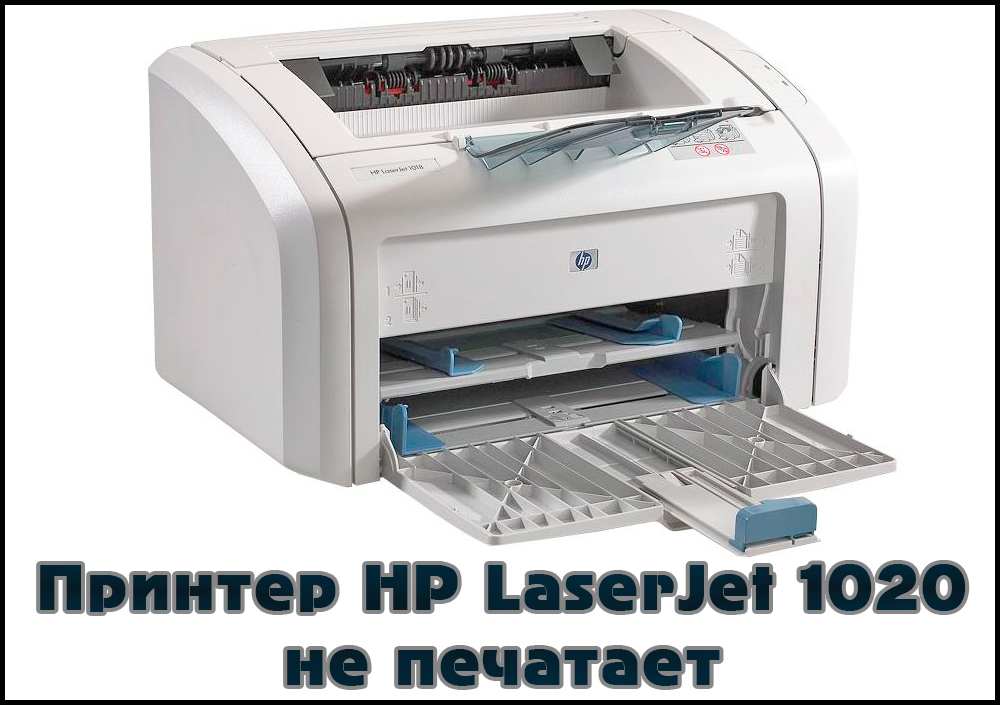
Как решить проблему, когда принтер HP Laserjet 1020 отказывается печатать.
Неполадки заключены либо в самом аппарате, либо в программной части компьютера. При последнем случае исправить всё гораздо быстрее и легче. Хотя если все драйвера стоят правильно, а принтер не распечатывает документы, это ещё не значит, что он сломан.
Тонер
Первым делом следует проверить уровень краски в картриджах. Как правило, именно отсутствие или низкий уровень тонера являются виной того, что машина не печатает — оно и очевидно — печатать попросту нечем. Заниматься разборкой и заправкой принтера самостоятельно не стоит, если только вы не являетесь профессионалом. Иначе рискуете испортить устройство. Лучше довериться мастеру, который с лёгкостью поменяет вам картридж за невысокую плату. Заправить картридж, как правило, тоже стоит недорого. Тем более что делать это приходится раз в несколько месяцев, если вы не используете принтер слишком часто.
ВАЖНО. Аппараты Laserjet 1020, 1018 и 1022 имеют взаимозаменяемые детали, к которым относится и картридж. Если всё-таки решили менять самостоятельно, можете использовать картридж от этих устройств. Нечёткая или грязная печать, кстати, тоже являются следствием нехватки чернил.
Драйверы
Это тоже довольно распространённая причина наравне с заправкой, по которой принтер не работает. Если с уровнем краски всё ОК, то дело, скорее всего, в неправильной работе драйверов. Заменить «дрова» можно несколькими способами. Сначала попробуйте просто скачать через официальный сайт.
- Отключаем устройство от ПК.
- Открываем раздел «Устройства и принтеры» (может называться немного по-другому) в Панели управления.
- Удаляем наше устройство.
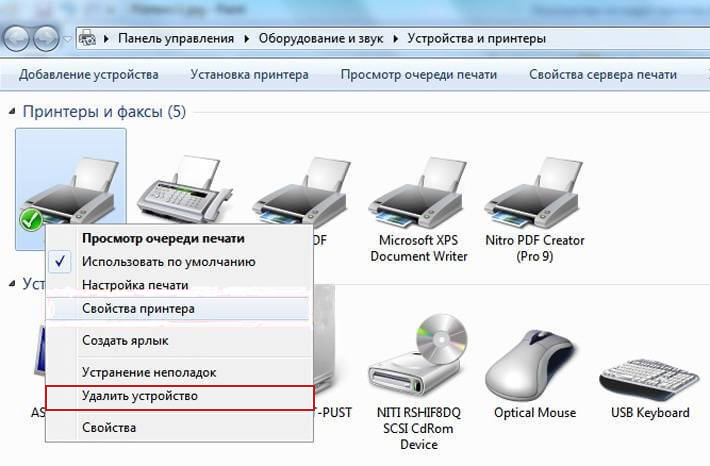
- Скачиваем драйвер для вашей версии Windows для Laserjet 1020 с официального сайта HP.
- Запускаем и следуем инструкциям по установке.
Если это не помогло, можно переустановить драйверы другим способом. А именно — при помощи программы HP Scan and Print Doctor. Она самостоятельно найдёт проблемные компоненты и перезагрузит их.
Другие проблемы
Аппарат может не выводить файлы на печать и по некоторым другим причинам.
- Повреждённый USB-порт или кабель. В таком случае стоит попробовать воспользоваться разными портами или купить новый USB-кабель. Обычно неполадки с проводом возникают, если он имеет явные видимые дефекты.
- Подключение через USB большого количества устройств. Если у вас слабый ПК, то он может не поддерживать одновременно мышь, клавиатуру, принтер и ещё что-нибудь, подключённые по USB. Попробуйте просто отключить лишнее.
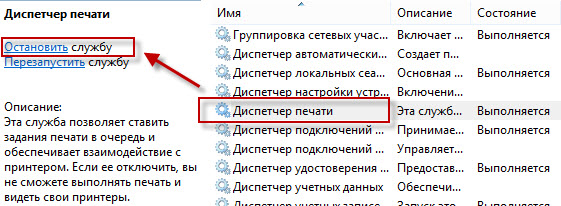
- Диспетчер печати. Попробуйте перезагрузить эту программу: открываем Диспетчер задач, находим там в разделе «Службы» соответствующую службу, останавливаем, перезагружаем компьютер.
Теперь вы знаете основные причины, по которым HP Laserjet 1020 отказывается распечатывать файлы.
Кроме них могут быть и другие, но если вы проверите, установлены ли драйвера и проведёте заправку картриджа вовремя, то, скорее всего, решите ситуацию.
- Sign up
- Sign in
- HP Community
- Printers
- LaserJet Printing
- Laserjet 1020 won’t print from Windows10; HP assistant can’t…


Create an account on the HP Community to personalize your profile and ask a question
Your account also allows you to connect with HP support faster, access a personal dashboard to manage all of your devices in one place, view warranty information, case status and more.

01-09-2017
09:51 PM

HP Recommended
- Mark as New
- Permalink
Product: Laserjet 1020
Operating System: Microsoft Windows 10 (64-bit)
Printer and Computer not communicating. It worked sporadically in the past. Print job is in cue but not printing. Tried to see if I have latest drivers and updates, but totally frustrated. Couldn’t find downloadable drivers on website. Downloaded HP Assistant and it doesn’t find printer (though it is checked on «Devices and Printer»). HP Print and Scan Doc doesn’t find printer. Tired unplugging and different USB ports. No help.
1 ACCEPTED SOLUTION


Rainbow23
11,286
755
592
22,252
HP Support Agent
7 REPLIES 7
Rainbow23
11,286
755
592
22,253
HP Support Agent
01-11-2017
01:11 AM
HP Recommended
- Mark as New
- Permalink
At first it worked fine, but again it’s stalling with a one page PDF waiting in cue for 5 -10 min. before printing. This has been an ongoing problem and I’ve uninstalled and reinstalled drivers before.
It’s odd that in the list of programs, the HP Laserjet is listsed, but without the Publisher’s name and without the size of the file.
Also, the HP Support Assistant can’t seem to find the printer, even though the Laserjet 1020 is checked in my Printers and Devices as my default Printer. Need an assistant to work the Assistant. LOL
01-11-2017
01:13 AM
HP Recommended
- Mark as New
- Permalink
Is this a typical ongoing problem with W10? Windows updates disable printer? You don’t have a good fix/update to make the software smoothly and reliably compatible?
Rainbow23
11,286
755
592
22,221
HP Support Agent
01-11-2017
01:51 PM
HP Recommended
- Mark as New
- Permalink
@happywriter, thank you for your reply, I’ll be more than glad to help you out.
I understand that the HP Support Assistant is not working.
Don’t worry as I have a few steps that should help fix this issue.
This issue could occur if the HP Support Assistant is corrupted.
Hence, you need you uninstall HP Support Assistant from control panel first and then uninstall HP Support Solution Framework and then download and install HP Support Assistant again. HP Support Solution Framework will automatically get installed after HP Support Assistant is installed.
Please follow the steps in the link: http://hp.care/2fvNQNc
Let me know how that works.
I hope you have a good day ahead.
Rainbow23
HP Support
01-16-2017
10:54 PM
HP Recommended
- Mark as New
- Permalink
The printer is working but very very slowly communicating with my computer. I uninstalled and reinstalled the assistant, but it still does not find the HP Printer. Solution didn’t work.
01-23-2017
11:22 PM
HP Recommended
- Mark as New
- Permalink
Did the uninstall, download and reinstall and still is NOT working.
Rainbow23
11,286
755
592
22,171
HP Support Agent
01-24-2017
12:00 PM
HP Recommended
- Mark as New
- Permalink
@happywriter,
Welcome to HP Forums, this is a great place to get support, find answers and tips.
Thank you for posting your query, I’ll be more than glad to help you out.
I understand that you are unable to print from your HP LaserJet 1020 Printer.
Don’t worry as I have a few steps that should help fix this issue.
And here’s the step by step guide for you in the link: http://hp.care/2jO8j1k
Let me know how that works.
I hope you have a good day ahead.
Rainbow23
HP Support

Be alert for scammers posting fake support phone numbers and/or email addresses on the community.
If you think you have received a fake HP Support message, please report it to us by clicking on «Flag Post».
† The opinions expressed above are the personal opinions of the authors, not of HP. By using this site, you accept the Terms of Use and Rules of Participation.

-
English
Open Menu

† The opinions expressed above are the personal opinions of the authors, not of HP. By using this site, you accept the <a href=»https://www8.hp.com/us/en/terms-of-use.html» class=»udrlinesmall»>Terms of Use</a> and <a href=»/t5/custom/page/page-id/hp.rulespage» class=»udrlinesmall»> Rules of Participation</a>.
- Sign up
- Sign in
- HP Community
- Printers
- LaserJet Printing
- Laserjet 1020 won’t print from Windows10; HP assistant can’t…
Create an account on the HP Community to personalize your profile and ask a question
Your account also allows you to connect with HP support faster, access a personal dashboard to manage all of your devices in one place, view warranty information, case status and more.
01-09-2017
09:51 PM
HP Recommended
- Mark as New
- Permalink
Product: Laserjet 1020
Operating System: Microsoft Windows 10 (64-bit)
Printer and Computer not communicating. It worked sporadically in the past. Print job is in cue but not printing. Tried to see if I have latest drivers and updates, but totally frustrated. Couldn’t find downloadable drivers on website. Downloaded HP Assistant and it doesn’t find printer (though it is checked on «Devices and Printer»). HP Print and Scan Doc doesn’t find printer. Tired unplugging and different USB ports. No help.
1 ACCEPTED SOLUTION
Rainbow23
11,286
755
592
22,252
HP Support Agent
7 REPLIES 7
Rainbow23
11,286
755
592
22,253
HP Support Agent
01-11-2017
01:11 AM
HP Recommended
- Mark as New
- Permalink
At first it worked fine, but again it’s stalling with a one page PDF waiting in cue for 5 -10 min. before printing. This has been an ongoing problem and I’ve uninstalled and reinstalled drivers before.
It’s odd that in the list of programs, the HP Laserjet is listsed, but without the Publisher’s name and without the size of the file.
Also, the HP Support Assistant can’t seem to find the printer, even though the Laserjet 1020 is checked in my Printers and Devices as my default Printer. Need an assistant to work the Assistant. LOL
01-11-2017
01:13 AM
HP Recommended
- Mark as New
- Permalink
Is this a typical ongoing problem with W10? Windows updates disable printer? You don’t have a good fix/update to make the software smoothly and reliably compatible?
Rainbow23
11,286
755
592
22,221
HP Support Agent
01-11-2017
01:51 PM
HP Recommended
- Mark as New
- Permalink
@happywriter, thank you for your reply, I’ll be more than glad to help you out.
I understand that the HP Support Assistant is not working.
Don’t worry as I have a few steps that should help fix this issue.
This issue could occur if the HP Support Assistant is corrupted.
Hence, you need you uninstall HP Support Assistant from control panel first and then uninstall HP Support Solution Framework and then download and install HP Support Assistant again. HP Support Solution Framework will automatically get installed after HP Support Assistant is installed.
Please follow the steps in the link: http://hp.care/2fvNQNc
Let me know how that works.
I hope you have a good day ahead.
Rainbow23
HP Support
01-16-2017
10:54 PM
HP Recommended
- Mark as New
- Permalink
The printer is working but very very slowly communicating with my computer. I uninstalled and reinstalled the assistant, but it still does not find the HP Printer. Solution didn’t work.
01-23-2017
11:22 PM
HP Recommended
- Mark as New
- Permalink
Did the uninstall, download and reinstall and still is NOT working.
Rainbow23
11,286
755
592
22,171
HP Support Agent
01-24-2017
12:00 PM
HP Recommended
- Mark as New
- Permalink
@happywriter,
Welcome to HP Forums, this is a great place to get support, find answers and tips.
Thank you for posting your query, I’ll be more than glad to help you out.
I understand that you are unable to print from your HP LaserJet 1020 Printer.
Don’t worry as I have a few steps that should help fix this issue.
And here’s the step by step guide for you in the link: http://hp.care/2jO8j1k
Let me know how that works.
I hope you have a good day ahead.
Rainbow23
HP Support
Be alert for scammers posting fake support phone numbers and/or email addresses on the community.
If you think you have received a fake HP Support message, please report it to us by clicking on «Flag Post».
† The opinions expressed above are the personal opinions of the authors, not of HP. By using this site, you accept the Terms of Use and Rules of Participation.
-
English
Open Menu

† The opinions expressed above are the personal opinions of the authors, not of HP. By using this site, you accept the <a href=»https://www8.hp.com/us/en/terms-of-use.html» class=»udrlinesmall»>Terms of Use</a> and <a href=»/t5/custom/page/page-id/hp.rulespage» class=»udrlinesmall»> Rules of Participation</a>.