Problem Formulation
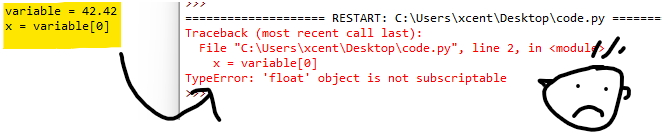
Consider the following minimal example where a TypeError: 'float' object is not subscriptable occurs:
variable = 42.42
x = variable[0]
This yields the following output:
Traceback (most recent call last):
  File "C:UsersxcentDesktopcode.py", line 2, in <module>
    x = variable[0]
TypeError: 'float' object is not subscriptable
Solution Overview
Python raises the TypeError: 'float' object is not subscriptable if you use indexing or slicing with the square bracket notation on a float variable that is not indexable.
However, the float class doesn’t define the __getitem__() method.
variable = 1.23
variable[0]     # TypeError!
variable[1:10]  # TypeError!
variable[-1]    # TypeError!
You can fix this error by
- converting the float to a string using the
str()function because strings are subscriptable, - removing the indexing or slicing call,
- defining a dummy
__getitem__()method for a custom float wrapper class.
🌍 Related Tutorials: Check out our tutorials on indexing and slicing on the Finxter blog to improve your skills!
Method 1: Convert Float to a String
If you want to access individual digits of the float value, consider converting the float to a string using the str() built-in function. A string is subscriptable so the error will not occur when trying to index or slice the converted string.
variable = 42.42
my_string = str(variable)

print(my_string[0])
# 4

print(my_string[1:4])
# 2.4

print(my_string[:-1])
# 42.4
Method 2: Put Float Into List
A simple way to resolve this error is to put the float into a list that is subscriptable—that is you can use indexing or slicing on lists that define the __getitem__() magic method.
variable = [42.42]
x = variable[0]
print(x)
# 42.42
Or another example with multiple float values—now it starts to actually make sense:
sensor = [1.2, 2.1, 3.2, 0.9, 4.2]

print(sensor[0])
# 1.2

print(sensor[-1])
# 4.2

print(sensor[:])
# [1.2, 2.1, 3.2, 0.9, 4.2]
Method 3: Define the __getitem__() Magic Method
You can also define your own wrapper type around the float variable that defines a (dummy) method for __getitem__() so that every indexing or slicing operation returns the same float.
class MyFloat:
    def __init__(self, f):
        self.f = f

    def __getitem__(self, index):
        return self.f


my_float = MyFloat(42.42)

print(my_float[0])
# 42.42

print(my_float[100])
# 42.42
This hack is generally not recommended, I included it just for comprehensibility and to teach you something new. 😉
Summary
The error message “TypeError: 'float' object is not subscriptable” happens if you access a float f like a list such as f[0]. To solve this error, avoid using slicing or indexing on a float but use a subscriptable object such as lists or strings.

While working as a researcher in distributed systems, Dr. Christian Mayer found his love for teaching computer science students.
To help students reach higher levels of Python success, he founded the programming education website Finxter.com. He’s author of the popular programming book Python One-Liners (NoStarch 2020), coauthor of the Coffee Break Python series of self-published books, computer science enthusiast, freelancer, and owner of one of the top 10 largest Python blogs worldwide.
His passions are writing, reading, and coding. But his greatest passion is to serve aspiring coders through Finxter and help them to boost their skills. You can join his free email academy here.
Values inside a float cannot be accessed using indexing syntax. This means that you cannot retrieve an individual number from a float. Otherwise, you’ll encounter a “typeerror: ‘float’ object is not subscriptable” in your program.
In this guide, we talk about what this error means and why you may see it. We walk through two example scenarios so you can figure out how to fix this problem.

Find Your Bootcamp Match
- Career Karma matches you with top tech bootcamps
- Access exclusive scholarships and prep courses
Select your interest
First name
Last name
Phone number
By continuing you agree to our Terms of Service and Privacy Policy, and you consent to receive offers and opportunities from Career Karma by telephone, text message, and email.
typeerror: ‘float’ object is not subscriptable
You can retrieve individual items from an iterable object. For instance, you can get one item from a Python list, or one item from a dictionary. This is because iterable objects contain a list of objects. These objects are accessed using indexing.
You cannot retrieve a particular value from inside a float. Floating-point numbers, like integers, are not iterable objects.
The “typeerror: ‘float’ object is not subscriptable” is commonly caused by:
- Trying to access a particular value from a floating-point number
- Using the wrong syntax to replace multiple items in a list
Let’s walk through each of these scenarios.
Scenario #1: Accessing an Item from a Float
We’re building a program that checks if a ticket holder in a raffle is a winner. If a user’s ticket number starts with 1 and ends in 7, they are a winner.
Let’s start by asking a user to insert a ticket number that should be checked:
ticket_number = float(input("Enter a ticket number: "))
We’ve converted this value to a float because it is a number.
Next, we use indexing syntax to retrieve the first and last numbers on a ticket:
first = ticket_number[0]
last = ticket_number[-1]
The first item in our ticket number is at the index position 0; the last item is at the index position -1. Next, we use an “if” statement to check if a user is a winner:
if first == "1" and last == "7":
	print("You are a winner!")
else:
	print("You are not a winner.")
If the value of “first” is equal to “1” and the value of “last” is equal to “7”, our “if” statement will run and inform a user they have won. Otherwise, our “else” statement will run, which will inform a user that they are not a winner.
Let’s run our code:
Enter a ticket number: 23
Traceback (most recent call last):
  File "main.py", line 3, in <module>
	first = ticket_number[0]
TypeError: 'float' object is not subscriptable
Our code does not work. This is because ticket numbers are stored as a float. We cannot use indexing syntax to retrieve individual values from a float.
To solve this error, we remove the float() conversion from our first line of code:
ticket_number = input("Enter a ticket number: ")
The input() method returns a string. We can manipulate a string using indexing, unlike a floating-point value. Let’s run our code again:
Enter a ticket number: 23
You are not a winner.
Our code appears to work successfully. Let’s test our code on a winning ticket:
Enter a ticket number: 117
You are a winner!
Our code works whether a ticket is a winner or not.
Scenario #2: Replacing Multiple Items
List slicing allows you to replace multiple items in a list. Slicing is where you specify a list of items in an iterable that you want to access or change.
Let’s build a program that resets the prices of all products in a list of donuts. We must build this program because a store is doing a “Donut Day” promotion where every donut is a particular price. We start by asking the user for the new price of donuts:
price = input("Enter the price of the donuts: ")
Next, we define a list of the current prices of donuts that we must change:
donuts = [2.50, 2.75, 1.80, 1.75, 2.60]
Now that we have these values, we’re ready to change our list. We can do this using indexing:
donuts[0][1][2][3][4] = [float(price)] * 5
print(donuts)
This code resets the values in the “donuts” list at the index positions 0, 1, 2, 3, and 4 to the value of “price”. We’ve converted the value of “price” to a floating point number.
We’ve then enclosed the price in square brackets and multiplied it by five. This creates a list of values which we can assign to our “donuts” list.
Finally, we print the new list of prices to the console. Let’s run our code:
Enter the price of the donuts: 2.50
Traceback (most recent call last):
  File "main.py", line 3, in <module>
	donuts[0][1][2][3][4] = [float(price)] * 5
TypeError: 'float' object is not subscriptable
When our code tries to change the values in the “donuts” list, an error is returned. Our code tries to retrieve the item at the index position [0][1][2][3][4]. This does not exist in our list because our list only contains floats. To solve this error, use slicing syntax to update our list.
donuts[0:5] = [float(price)] * 5
This code retrieves all the items in our list from the range of 0 to 5 (exclusive of 5). Then, we assign each value the value of “price”. Let’s try our new code:

«Career Karma entered my life when I needed it most and quickly helped me match with a bootcamp. Two months after graduating, I found my dream job that aligned with my values and goals in life!»
Venus, Software Engineer at Rockbot
Enter the price of the donuts: 2.50
[2.5, 2.5, 2.5, 2.5, 2.5]
Our code successfully replaces all the items in our list.
Conclusion
The “typeerror: ‘float’ object is not subscriptable” error occurs when you try to access items from a floating point number as if the number is indexed.
To solve this error, make sure you only use indexing or slicing syntax on a list of iterable objects. If you are trying to change multiple values in a list, make sure you use slicing to do so instead of specifying a list of index numbers whose values you want to change.
Now you’re ready to solve this error in your own code.
‘float’ object is not subscriptable is a general python error message which can occur when you try to perform any kind of indexing operation on float type object.
In this article we will study different aspects of this error message as such what is meant by ‘float’ object is not subscriptable? Why you are getting this error message and how to resolve it. Go through this article thoroughly to get rid of this error message.
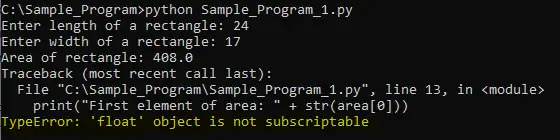
Let’s try to decode the error message. We have divided the error message into three parts as below for better understanding:
TypeError: It means you are trying to perform an invalid operation on the variable of a particular type. If the operation is not supported by the type of variable then it will give TypeError.
float: float is a type of object. It tells us that an illegal operation is performed on the float type of object.
object is not subscriptable: It tells us that float type of objects are not subscriptable, which means you cannot perform indexing operation on float type of object.
What are subscriptable and non- subscriptable objects?
Subscriptable Objects:
If objects store multiple values and these values can be accessed using indexing then these are called subscriptable objects.
Subscriptable objects internally implements __getitem__() method. We can access elements of subscriptable objects using the index as shown below:
# Sample Python program to access first element from the list
quad =['United States','Japan','India','Australia']
print(quad[0])
When executed above code will give the following result.
United States
Here quad is a list type of object. We accessed the first element of a quad list using quad[0]
Strings, Lists, Tuples, and Dictionaries are the subscriptable objects in Python on which you can perform the indexing operation.
Non-Subscriptable Objects:
If object stores single or whole value then these are called non-subscriptable objects.
We cannot access elements of non-subscriptable objects using the index position. It will result in an error message saying the object is not subscriptable.
int and float are the Non-Subscriptables objects on which we cannot perform indexing operations.
Why you are getting TypeError: ‘float’ object is not subscriptable?
You are getting ‘float’ object is not subscriptable means in your code you are trying to get the value of a float type of object using indexing which is an invalid operation.
A float is a non-subscriptable object. Indexing operation is not supported on non-subscriptable objects.
Either you have mistakenly tried to access the value of a float variable using an index or if you want to access particular positions element of the value and directly used an index to get the element of value. That results in the TypeError: ‘float’ object is not subscriptable error message.
How to solve TypeError: ‘float’ object is not subscriptable?
Here we will see two scenarios where this error can occur and the way to resolve it. So don’t waste your time and start evaluating.
1. Access the first digit of a float value
Below sample code calculates the area of a rectangle by taking length and width as an input from the user. Once the area is calculated code tries to get the first digit of a calculated area using the index position.
# File: Sample_Program_1.py
# Sample Python program to calculate area of rectangle

# get input arguments from user for length and width
length = float(input("Enter the length of a rectangle: "))
width = float(input("Enter the width of a rectangle: "))

# Area of rectangle is muliplication of width and length
area = length*width

#print first element of areaString values
print("Area of rectangle: " + str(area))
print("The first digit of an area: " + str(area[0]))
When the above code is executed it gives the following error message.
C:Sample_Program>python Sample_Program_1.py
Enter the length of a rectangle: 24
Enter the width of a rectangle: 17
Area of rectangle: 408.0
Traceback (most recent call last):
File “C:Sample_ProgramSample_Program_1.py”, line 13, in
print(“The first digit of an area: ” + str(area[0]))
TypeError: ‘float’ object is not subscriptable
We are getting this error message when the code tries to get the first digit of a calculated area using index i.e. area[0]. An area is a float type of object and it’s non-subscriptable, hence indexing operation cannot be performed on a float object.
Solution:
If you want to get the first digit of a calculated area then convert that float object into a string object first and then get the first character of string using index position as shown below.
# File: Sample_Program_1.py
# Sample Python program to perform append operation on the list

# get input arguments from user for length and width
length = float(input("Enter length of a rectangle: "))
width = float(input("Enter width of a rectangle: "))

# Area of rectangle is muliplication of width and length
area = length*width

# Convert area into string
areaString = str(area)

#print first element of areaString values
print("Area of rectangle: " + areaString)
print("The first digit of an area: " + areaString[0])
When the above code is executed it will give the following result.
C:Sample_Program>python Sample_Program_1.py
Enter the length of a rectangle: 24
Enter the width of a rectangle: 17
Area of rectangle: 408.0
The first digit of an area: 4
Note: string is subscriptable object hence it supports index operation
2. Accessing 2D values from a 1D list
In the following example, we are trying to access 2D values from a 1D list.
# File: Sample_Program_2.py
# Sample Python program to access values from the list object

# List object with some default values
valueList = [35.5, 41.956, 43.215, 54.884, 57.149]

#For loop to access all values of list object
for i in range(1, len(valueList)):
  iCnt = valueList[0][i]
  print(iCnt)
When the above code is executed it will give the following error message.
C:Sample_Program>python Sample_Program_2.py
Traceback (most recent call last):
File “C:Sample_ProgramSample_Program_2.py”, line 9, in
iCnt = valueList[0][i]
TypeError: ‘float’ object is not subscriptable
Solution:
Access values from a 1D list using the 1D index position as shown below:
# File: Sample_Program_2.py
# Sample Python program to access values from the list object

# List object with some default values
valueList = [35.5, 41.956, 43.215, 54.884, 57.149]

#For loop to access all the values of list object
for i in range(1, len(valueList)):
  iCnt = valueList[0],valueList[i]
  print(iCnt)
When the above code is executed it will give the following result.
C:Sample_Program>python Sample_Program_2.py
(35.5, 41.956)
(35.5, 43.215)
(35.5, 54.884)
(35.5, 57.149)
Conclusion:
We hope this article was informative and you got a clear idea about what are subscriptable objects and non-subscriptable objects. Always be careful while accessing the index value of variables. If you again face the same issue then make sure to validate all the code lines where you are trying to access the index value of an object.
For now, we are sure that you are able to get rid of an error message using the above methods. If you are still facing the issue then please do mention it in the comment section or you can reach out to us using the contact form. You can also contact us using our official mail id i.e. hello.technolads@gmail.com
Further Read:
TypeError: ‘builtin_function_or_method’ object is not subscriptable
TypeError: ‘float’ object is not subscriptable
In this article we will learn about the TypeError: ‘float’ object is not subscriptable.
This error occurs when we try to access a float type object using index numbers.
Non subscriptable objects are those whose items can’t be accessed using index numbers. Example float, int, etc.
Examples of subscriptable objects are strings, lists, dictionaries. Since we can access items of a strings, lists or a dictionaries using index numbers. Float object is not indexable and thus we can’t access it using index numbers.
Let us understand it more with the help of an example.
Example:
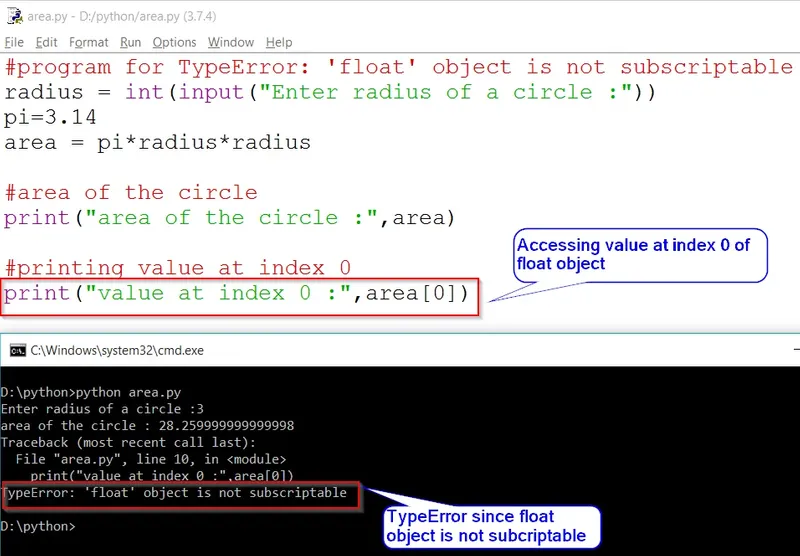
# Program for finding area of a circle

radius = int(input("Enter radius of a circle :"))
pi=3.14
area = pi*radius*radius
print("area of the circle :",area[0])
Output:
Enter radius of a circle :3
File "area.py", line 5, in <module>
print("area of the circle :",area[0])
TypeError: 'float' object is not subscriptable
In the above example we are trying to access the value at index 0 but as discussed above float is not indexable.
So accessing using index number will raise an error.
TypeError: ‘float’ object is not subscriptable.
Solution:
Do print(«area of the circle :»,area) instead of print(«area of the circle :»,area[0]) in line 10 of the code.
But what if we only want the value at index 0 and not the whole answer?
To solve this issue we can change the non subscriptable object to a subcriptable object.
In this case, we can try changing the float object to a string. As shown below.
Example:
# Program for TypeError: 'float' object is not subscriptable
radius = int(input("Enter radius of a circle :"))
pi=3.14
area = pi*radius*radius

# Area of the circle
print("area of the circle :",area)

# Converting float to string and printing value at index 0
print("value at index 0 :",str(area)[0])
Output:
Enter radius of a circle :3
area of the circle : 28.259999999999998
value at index 0 : 2AidaR_D, Я не знаю какие у Вас входные данные, поэтому взял ориентировочно следующие
| Python | ||
|
Строка 84
| Python | ||
|
выдает ошибку, так как список q одномерный ( в моем примере он [2.0, 2.0, 2.0, 2.0, 2.0] ) и поэтому к нему нельзя применять двойную индексацию [j-1][i+1].
Поэтому или разбирайтесь, почему элементами списка q являются числа float, а не списки или нужно оставить только один индекс q[…].
Если не использовать отладчик, то убедится в моих словах можно вставив перед указанной строкой
print(q), и увидеть, что находится в списке q .
Кликните здесь для просмотра всего текста
| Python | ||
|
В моем примере выводит:
| Python | ||
|
Добавлено через 7 минут
Вот он и ругается, потому, что к числу float не применим индекс. float[i] выдает ошибку.
Добавлено через 1 минуту
Пока я разбирался, Вам уже все объяснили.
Список частых ошибок в Python и их исправление.
TypeError: object is not subscriptable
Ошибка, которая сообщает, что обращение идет к элементам не правильно. Возможно, это другой тип объекта, а не тот, который вам кажется. Проверить можно командой type().
Например, такое может быть, если это список (list), а в обращаетесь за элементом к словарю (dictionary).
TypeError: unsupported type for timedelta days component: str
Ожидается число, а передается в timedelta строка. Исправить просто, если уверены, что передается цифра, то достаточно явно преобразовать в число: int(days)
Failed execute: tuple index out of range
Означает что передаётся меньше данных, чем запрашивается.
ModuleNotFoundError: No module named ‘bot.bot_handler’; ‘bot’ is not a package
venv/bin/python bot/bot.py
Traceback (most recent call last):
File «bot/bot.py», line 4, in
from bot.bot_handler import BotHandler
File «bot/bot.py», line 4, in
from bot.bot_handler import BotHandler
ModuleNotFoundError: No module named ‘bot.bot_handler’; ‘bot’ is not a package
Конфилкт имени файла и директории — они не должны быть здесь одинаковыми. Поменяйте название директории или имени файла.
ValueError: a coroutine was expected, got
Traceback (most recent call last):
File «test.py», line 41, in
asyncio.run(update.update_operations)
File «/usr/local/Cellar/python/3.7.4_1/Frameworks/Python.framework/Versions/3.7/lib/python3.7/asyncio/runners.py», line 37, in run
raise ValueError(«a coroutine was expected, got {!r}».format(main))
ValueError: a coroutine was expected, got
Забыта скобки () у функции в команде asyncio.run(update.update_operations).