
Topic: Receiver Yamaha RX-V577 DC PRT 000L protection problem (Read 14187 times)
0 Members and 1 Guest are viewing this topic.
Hello,
I have a Yamaha RX-V577 receiver with protection mode activated. When i started self-diagnostic function, is show in your display DC PRT 000L. Based on the service manual, is a DC amplifier problem. So i checked the amplifier board and i found a -48.1 V in the collector transistor (Q2129), but the manual says it should have -1.033 V in the collector transistor. The attached image shows the transistor problem. I already did the replacement transistor 2sc2229 without success. Does anyone have any suggestion? Sorry my bad english.
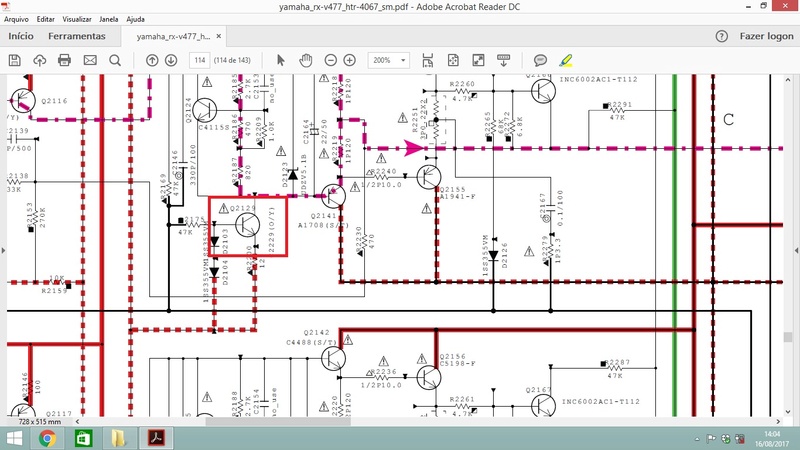
The service manual can be downloaded by link:
https://www.4shared.com/office/Wd2r_eB-ei/service_manual_yamaha_rx-v477_.html
« Last Edit: August 22, 2017, 02:53:45 am by briangg191 »

Logged
Just FYI… you’ll need to put the image somewhere other than Photobucket for anyone to see it. 
Logged
Thanks for reply. I changed the image server.
Logged
What is the DC voltage at the EMITTERS of the output transistors? On the affected channel — or is there a DC problem on all channels?
This is critical information.
Logged
Hello,
The problem is just at the center channel. I have the same DC voltage (-44.0V) at the emitters of the output transistors (Q2155, Q2154). But if i take off (Q2129) transistor, i have 0V DC voltage at the emitters of the output transistors.
Logged
What are your voltages like around Q2116 and Q2124? I am guessing that there may be a lack of bias current at Q2124 via Q2116. This would leave the collector at Q2129 floating close to the negative rail voltage as soon as it is turned on.
Perhaps resistor R2145 is o/c?
« Last Edit: August 24, 2017, 02:46:56 pm by WaveyDipole »
Logged
I’m suspecting the differential pair Q2102 and Q2109. Pretty common problem. Yamaha recommends replacing those transistors on all seven channels. Fourteen transistors in all.
Part number WK452300
These are surface mount transistors.
Logged
WaveyDipole,
The voltages like arround Q2116 and Q2124 are -44.0 V DC. The same voltage at the Q2129 transistor collector. The R2145 resistor measures 100 ohms, that´s ok.
Logged
mzacharias,
I ordered the 2SC2713 transistor parts.
Sorry for my delay answers.
Thanks guys.
Logged
Hey guys,
So i replaced the fourteen 2SC2713 transistors, but the the problem to be continued. Any more suggestions?
Logged
The differential pair’s emitter current might be too low, check the 10K resistor and that it has the correct voltage across it.
The voltage across R2145 will indicate the Voltage Amplifier’s operating current. About 5ma.
« Last Edit: October 20, 2017, 06:47:23 am by xavier60 »
Logged
Hioki AS100D vom, HP 54645A dso, Fluke 87V dmm, AN8008 dmm, Agilent U8002A psu, FY6600 function gen, New! Brymen BM857S-(With Battery)
I see you have a service manual? Have you used the Protection Cancel Mode to facilitate troubleshooting?
«If the protection function works and causes hindrance
to troubleshooting, cancel the protection function by
the procedure below, and it will be possible to enter the
selfdiagnostic function mode. (The protection functions
other than the excess current detect function will be
disabled.)
While pressing the “TONE CONTROL” and “INFO” keys,
press the (Power) key to turn on the power and keep
pressing those 2 keys and (Power) key for 3 seconds
or longer.
The self-diagnostic function mode is activated with the
protection functions disabled.
In this mode, the “SLEEP” segment of the FL display
flashes to indicate that the mode is self-diagnostic
function mode with the protection functions disabled.»
This will allow you to troubleshoot at your leisure without interference from the protection circuit. You can look at any of the protection triggers, and see what monitored voltages are wrong or missing.
« Last Edit: October 21, 2017, 01:32:19 pm by mzacharias »
Logged
Helo guys.
The topic creator has moved on I imagine, but I am having the same problems with a Yamaha RX-A3040.
It started with a noise like a tv with no signal on the front channels and after a while progressed to all channels.
I still used it as a processor for a while, with an external amp, but the decided to run a firmware update to clean the software.
After that, it worked for a few seconds, turned off and now it only powers up with the protection bypass procedure.
It the shows these codes
DSP MARGIN
&
DC PRT 0000L
I´ll check tonite if there is really DC on the outputs, but reading the topic it seems that it might be a little bit difficult to debug than that, right ?
Until then, any educated guesses ?
Thank you very much for any and all help.
Mauricio
Logged
All channels are outputing around -10VDC
Logged
In the service manual there is a «Protection Cancel» mode that allows you to troubleshoot a problem such as this. Press and hold Tone/Balance and Info and continue to hold them down while pressing Main Zone (Power), and continue to hold them for 2-3 seconds.
The problem is likely some power supply voltage missing or wrong, or an amplifier offsetting bias voltage missing.
You seem to have the service manual; the procedure is described on page 30 of the PDF.
I tried to upload the manual to HiFi Engine but the upload «hung» at 99% twice in a row — don’t know if it made it.
There’s some latency there anyhow, could be a few days before it would show up.
Logged
|
|
#1 |
|
New Member Join Date: May 2020 City & State: California My Country: USA I’m a: Knowledge Seeker Posts: 18 |
Manual says DC output of power amplifier is abnormal. Power supply board looks to be ok, 5.5V is good. Looks like I need to go deeper, where do I start? |

|
|


|
|
#2 |
|
Badcaps Veteran Join Date: Jun 2012 City & State: ☻ My Country: Canada I’m a: Professional Tech Posts: 8,597 |
Check for shorted output transistors |
|
|
|

|
|
#3 |
|
New Member Join Date: May 2020 City & State: California My Country: USA I’m a: Knowledge Seeker Posts: 18 |
Thanks for the tip. So I’m looking on the MAIN amp board, powered off, measuring impedance on all transistors. Will have to do some disassembly first to get to them all. |
|
|
|
|
|
#4 |
|
New Member Join Date: May 2020 City & State: California My Country: USA I’m a: Knowledge Seeker Posts: 18 |
Ok, the big transistors on the heat sink all seem to be not-shorted. Any advice on next step? Thanks in advance. |
|
|
|
|
|
#5 |
|
Badcaps Veteran Join Date: Jun 2012 City & State: ☻ My Country: Canada I’m a: Professional Tech Posts: 8,597 |
Check the voltage on all the output channels, this is usually at the common point of the ceramic emitter resistors of the output transistors or the output to the speakers BEFORE the output protection relay. This offset voltage needs to be close to 0 volts. Upload the service manual
Last edited by R_J; 05-13-2020 at 05:13 PM..
|
|
|
|
|
|
#6 |
|
New Member Join Date: May 2020 City & State: California My Country: USA I’m a: Knowledge Seeker Posts: 18 |
Service manual attached. What boards do I need to reconnect and power up to check these voltages? |
|
|
|
|
|
#7 |
|
Badcaps Veteran Join Date: Jun 2012 City & State: ☻ My Country: Canada I’m a: Professional Tech Posts: 8,597 |
Which boards do you have disconnected? I would think you need all of them connected. Check the voltages on (page 108) the center of R2249 for the FL channel. or any point on that line that you can access like SCN-SCN 5P and 4P |
|
|
|
|
|
#8 |
|
New Member Join Date: May 2020 City & State: California My Country: USA I’m a: Knowledge Seeker Posts: 18 |
I took the digital board and Operation(4) board out to get to the output transistors. Once I put the boards back, getting to measure more than 2 of these resistors (C + FL) will be a bit tricky to impossible. |
|
|
|
|
|
#9 |
|
Badcaps Veteran Join Date: Jun 2012 City & State: ☻ My Country: Canada I’m a: Professional Tech Posts: 8,597 |
what about the position on page 21, that should allow access to the main board. Don’t forget the ground jumper leads.
Last edited by R_J; 05-13-2020 at 08:32 PM..
|
|
|
|
|
|
#10 |
|
New Member Join Date: May 2020 City & State: California My Country: USA I’m a: Knowledge Seeker Posts: 18 |
Quote:
Originally Posted by R_J what about the position on page 21, that should allow access to the main board. Don’t forget the ground jumper leads. That looks doable. Let me reassemble and pop the back off. |
|
|
|

|
|
#11 |
|
New Member Join Date: May 2020 City & State: California My Country: USA I’m a: Knowledge Seeker Posts: 18 |
Quote:
Originally Posted by R_J Which boards do you have disconnected? I would think you need all of them connected. Check the voltages on (page 108) the center of R2249 for the FL channel. or any point on that line that you can access like SCN-SCN 5P and 4P All the ceramic resistors are 0V, except R2249, showing -9.8VDC on the 3 legs. |
|
|
|
|
|
#12 |
|
New Member Join Date: May 2020 City & State: California My Country: USA I’m a: Knowledge Seeker Posts: 18 |
Some voltage readings: |
|
|
|
|
|
#13 |
|
Badcaps Veteran Join Date: Jun 2012 City & State: ☻ My Country: Canada I’m a: Professional Tech Posts: 8,597 |
That will be the problem channel, You should be able to compare resistance etc. to a good channel to find the problem. It is only -10v so it might be hard to locate the cause of the offset. |
|
|
|
|
|
#14 |
|
New Member Join Date: May 2020 City & State: California My Country: USA I’m a: Knowledge Seeker Posts: 18 |
Thanks R_J, To confirm, I’ll power down and check device resistance & compare to good channel? Looking at everything from resistors, diodes, transistors and caps? |
|
|
|
|
|
#15 |
|
New Member Join Date: May 2020 City & State: California My Country: USA I’m a: Knowledge Seeker Posts: 18 |
Found some components that don�t meter like the others. Time to order some parts. |
|
|
|
|
|
#16 |
|
New Member Join Date: May 2020 City & State: California My Country: USA I’m a: Knowledge Seeker Posts: 18 |
Also found C2165 to have lower resistance. This one is a mlyar cap, hard to find. Seems like only NTE has it, so I’ll order everything from there, as best they have it. |
|
|
|
|
|
#17 |
|
Badcaps Veteran Join Date: Jun 2012 City & State: ☻ My Country: Canada I’m a: Professional Tech Posts: 8,597 |
I doubt the cap C2165 has a problem, they are very reliable. there are many things that can throw off the readings, The meter uses a small voltage to check resistance so ANY stray voltage in the circuit will throw off the reading one way or the other. I would suspect either a resistor that change value (went high in value) or a leaky transistor, which might not show up in a resistance check. slightly biased on a bit more than Q2136 or Q2150. You might need to chack as farback in the circuit as Q2114, Q2121. There are dc voltages given on the schematic, did you check how close they were?
Last edited by R_J; 05-20-2020 at 12:25 PM..
|
|
|
|
|
|
#18 |
|
New Member Join Date: May 2020 City & State: California My Country: USA I’m a: Knowledge Seeker Posts: 18 |
The parts arrived and sat for a few weeks. Finally pulled the unit off the shelf and started pulling parts. C2135 was dead for sure, no capacitance measured. Replaced. I also replaced Q2107 & Q2114. The rest of the suspect parts I pulled from the board and measured out of circuit, all came in fine. The unit now powers up fine. I’m getting a 39-40 mV reading on R2249 (all 3 legs are the same). Other resistors are 0.000V. It was -9.8V before, so much better. Should I be worried about 40mV there? I guess I can start looking at circuit voltages and compare to the schematic. |
|
|
|
|
|
#19 |
|
New Member Join Date: May 2020 City & State: California My Country: USA I’m a: Knowledge Seeker Posts: 18 |
Voltages measured in protect mode is showing 50mV. (prior measurement showing 40mV was not in protect mode). I’m not smart enough with analog circuits to figure out where the issue lies. |
|
|
|
|
|
#20 |
|
Badcaps Veteran Join Date: Jan 2015 City & State: worcester My Country: United Kingdom I’m a: Knowledge Seeker Posts: 3,466 |
q21174 q2107 need a matched pair . |
|
|
|
Post by dmaumau on Oct 16, 2019 12:36:57 GMT -5Hello guys, I have an Aventage 3040 and the front channels began showing some crackling sounds, as if the amps had no current to drive the speakers and some time later just heavy noise. Sometime later all channels went down the same way. Now I got it in protect mode and bypassing it the error code I got is dc-prt-000l-protection-problem Also I got -10VDC in all channels. I´ve been looking for tips all around and found several threads ranging from output transistors, low DC voltages (?) and even something related to HDMI boards. Do anyone have had some experiences like this and could point me to the right direction ? mastertech I´ve seen you in some related posts, so any thoughts ? Also, anyone has the service manual for this receiver ? Thank you very much guys. |
|
|
Last Edit: Oct 16, 2019 12:48:14 GMT -5 by dmaumau |
|
rh1 New Member
Posts: 9 |
Post by rh1 on Apr 23, 2020 15:58:57 GMT -5Hi dmaumau, |


- 19 Май 2015
Прошу помочь,кто сталкивался с этим ресивером,было выбито 2 канала унч на нижней плате (центр и левый фронт) ,был залит (хотя точно неизвестно от чего он сдох ) После всех отмывок выпаял дохлые выходники и раскачку в обоих дохлых каналах,попытался запустить-в диагностику входит с надписью Ps PRT:000 J, при отключении разьема с защитами С8453 от процессорной платы ошибка Ps PRT:059J.-проц работает..В AD DATA CHECK: DC:007 PS:000. Опытным путем выяснил,что на значение PS PRT отвечает контакт PRV,а детектом постоянки на выходе (DC) сигнал PRO…. что должно быть на PRV в рабочем режиме???? (даже без питания на унч ведет себя также абсолютно,унч восстановил)
- 20 Май 2015
- 21 Май 2015
sergeisam сказал(а):
А в мануале не указано ?
http://monitor.net.ru/forum/yamaha-…-ax757se-rx-v657-htr-5860-download-18299.htmlГде находится этот контакт «PRV» ?
У меня, сейчас в ремонте есть YAMAHA RX-397. Если там подобное построение защиты, могу посмотреть и замерить .
Там все защиты одним коннектором идут на процовую плату.у меня какаято проблема еще образовалась.с бп через линейный стаб идет 3.3 вольта (3.3d)так при включении ресака на этом контакте появляется 5.5 вольт….идет именно не с бп а с платы…хз пока разбиоаюсь…и нет сигнала с датчика температуры (тупо 3 выводной) питание земля и выход…на выходе должно быть 1 вольт.у меня 0.5…
- 22 Май 2015
Все разобрался.кондеры после кренок и саме главное не было болта на нижней плате унч.все поставил и защита заработала штатно.
- 22 Май 2015
aurum сказал(а):
jenek, а отметить «решено» ?
Модераторы разве что сжалятся, отметят как «нерешенную» твою тему, а если нет, то создаешь новую с пометкой «продолжение» .
-
#1
-
- Aug 27, 2008
-
- 14,936
-
- 144
-
- 103,240
- 9,248
-
#2
If the receiver is an expensive one then a good tech would be needed. If there isn’t a local one United Radio in Syracuse NY is excellent.
If it’s not a mid to high end model it may not be worth the expense to repair. You could try contacting Yamaha. They might offer you a deal on a «B» stock unit.
-
#3
-
#4
-
#5
No, I just gave up on the project and just bought an Onkyo. They have more features and are usually just better.
| Thread starter | Similar threads | Forum | Replies | Date |
|---|---|---|---|---|
|
|
Question Preventing Yamaha RX-V671 AV amp switching on when Samsung S95B TV is switched on | Streaming Video & TVs | 0 | Sep 1, 2022 |
|
S
|
Question ARC output stopped working after Nintendo Switch turned on — Samsung TV and Yamaha receiver model included | Streaming Video & TVs | 1 | Jul 20, 2022 |
|
F
|
Question Yamaha AVR RX-v385/Samsung TV/ Streaming — random audio drops | Streaming Video & TVs | 2 | Jun 13, 2022 |
|
|
Question AVR and 4k help | Streaming Video & TVs | 0 | Mar 8, 2022 |
|
R
|
Question Yamaha soundbar 5600 connected via ARC to samsung 8k tv | Streaming Video & TVs | 0 | Feb 13, 2022 |
|
|
Question Roku & Yamaha RX-V671 — No Rear Sound on 5.1 Surround | Streaming Video & TVs | 0 | Jan 16, 2022 |
|
K
|
Question Yamaha Soundbar no sound through ARC | Streaming Video & TVs | 0 | Dec 14, 2021 |
|
R
|
Question Yamaha RX-A680 Receiver to Samsung TV problem | Streaming Video & TVs | 1 | Oct 14, 2021 |
|
D
|
Question Can’t get Vizio TV to work with Yamaha sound bar | Streaming Video & TVs | 0 | Sep 16, 2021 |
|
A
|
Solved! How to Connect my Wii to Samsung TV? | Streaming Video & TVs | 1 | Jul 13, 2021 |
|
|
Question Connect Epson Pro EX9220 to Yamaha RX-A680BL Receiver | Streaming Video & TVs | 0 | May 1, 2021 |
|
J
|
Question Problems with Samsung TV QN82Q90RAFXZA, Yamaha RX-V781 7.1.2 setup and Hue Sync Box | Streaming Video & TVs | 3 | Oct 29, 2020 |
|
A
|
Question Samsung uni remote doesn’t power on Yama AVR | Streaming Video & TVs | 5 | Jun 17, 2020 |
|
O
|
Solved! Samsung TV cannot find Yamaha receiver | Streaming Video & TVs | 1 | Jun 8, 2020 |
|
B
|
Solved! Yamaha RX-V385 AV Reciever- Chromecast | Streaming Video & TVs | 1 | May 2, 2020 |
|
P
|
Question ARC issue with Yamaha receiver and Samsung TV | Streaming Video & TVs | 4 | Mar 25, 2020 |
|
B
|
Solved! How to run HULU TV through Yamaha TER-7850??? | Streaming Video & TVs | 2 | Nov 21, 2019 |
|
G
|
Solved! Samsung to Yamaha audio connection | Streaming Video & TVs | 2 | Jun 14, 2019 |
|
I
|
Question Chromecast 5.1 | Streaming Video & TVs | 4 | Mar 16, 2019 |
|
|
Solved! HDMI source not supported on Epson Projector. | Streaming Video & TVs | 4 | Mar 1, 2019 |


- Advertising
- Cookies Policies
- Privacy
- Term & Conditions
- Topics
Форум РадиоКот • Просмотр темы — не работает Receiver Yamaha HTR-5940
Сообщения без ответов | Активные темы
| ПРЯМО СЕЙЧАС: |
| Автор | Сообщение |
|---|---|
|
|
Заголовок сообщения: не работает Receiver Yamaha HTR-5940
|
|
Открыл глаза
Зарегистрирован: Ср мар 16, 2011 06:47:09 Рейтинг сообщения: 0
|
Не включается, изредка включится и через секунду выключается.на аккум. 5в есть,с БП 10в и 5в есть.на кнопке 5в есть-нажмешь=0.Манипулируя релюшкой сетевого питания и кнопкой «standby/on» удается войти в режим диагностики.пока тыкал кнопки выбора всяких каналов,режимов, прошло с час ,повеяло теплым воздухом от радиатора,померял нагрев, примерно одинаков около 30*- транс-радиатор-резюки по 0.22 Ом.Нагрузку не подключал. |
| Вернуться наверх |
Профиль
|
 |

 Добавлено: Ср мар 30, 2011 19:28:35
| Реклама | |
|
|
|
|
|
KRAB |
Заголовок сообщения: Re: не работает Receiver Yamaha HTR-5940
|
||
Карма: -6 Рейтинг сообщения: 0
|
Уникальный подход к ремонту! Для начала — найди МАНУАЛ на него, а потом начинай что-то делать! Вариантов ошибок — масса, а уж их причин — тем более … Как пример: http://monitor.net.ru/forum/viewtopic.php?t=58282 — но для Панасоника — посмотри, СКОЛЬКО причин приводит только к ОДНОЙ ошибке …. так что — ИЩИ МАНУАЛ! |
||
| Вернуться наверх | |||
|

| Реклама | |
|
|
|
|

|
mc.56 |
Заголовок сообщения: Re: не работает Receiver Yamaha HTR-5940
|
|
Зарегистрирован: Ср мар 16, 2011 06:47:09 Рейтинг сообщения: 0
|
дык мануал то есть http://fo.metincom.net/uploads/739b115fda6f8253762dbdea4c0597e3.rar , напруги то я откуда сравнивал. а танцы с бубном заключаются в подаче 5в с DSP в цепь управл. реле на блоке питания-иначе может 1раз в сутки включиться на пару сек. Я отключал питание только выходных, потом и их цепи, все равно не включается. по ошибкам весь аппарат не должен работать.потому и спрашиваю что сам уже не знаю куда смотреть. он должен включаться и диагностить или на оборот? почему не удается Нормально включить самодиагностику? |
| Вернуться наверх | |
|
|
KRAB |
Заголовок сообщения: Re: не работает Receiver Yamaha HTR-5940
|
||
Карма: -6 Рейтинг сообщения: 0
|
Ты знаешь ВСЕ условия старта проца?! Питания Что из ЭТОГО ты проверил?! |
||
| Вернуться наверх | |||
|
| Реклама | |

|
Как выбрать батарейки для IoT-устройств – обзор эксперта
Как выбрать химические источники тока (ХИТ, батарейки) для устройств промышленного и бытового интернета вещей? В чем различие критериев выбора и ключевых параметров? Какие изделия популярных брендов FANSO и POWER FLASH удовлетворяют этим критериям? Подробнее>> |
|
|
mc.56 |
Заголовок сообщения: Re: не работает Receiver Yamaha HTR-5940
|
|
Зарегистрирован: Ср мар 16, 2011 06:47:09 Рейтинг сообщения: 0
|
KRAB Цитата: Шины Порты локалки, ФП и т.п. Прошивка ЕЕПРОМ с этим можно какнить поподробнее, если не затруднит? видимо изза принуд. включения реле чопопало выдает то _TMP PRT: 000H, то _NO PROTECT, то _DC PRT: 014H, то _Sci Fi. |
| Вернуться наверх | |
|
| Реклама | |
|
|
|
|
| Реклама | |

|
Выгодные LED-драйверы MOSO для индустриальных приложений Компэл представляет выгодные светодиодные драйверы MOSO для промышленных решений с высоким классом защиты от внешних воздействующих факторов, хорошей устойчивостью к импульсным помехам и высокой надежностью. В ряде серий реализована возможность дистанционного контроля, кроме того, отдельные версии драйверов могут программироваться на работу в автономном режиме по заранее заданному сценарию. Рассмотрим подробнее их характеристики. Подробнее>> |
|
|
KRAB |
Заголовок сообщения: Re: не работает Receiver Yamaha HTR-5940
|
||
Карма: -6 Рейтинг сообщения: 0
|
Шины — SCL и SDA к EEPROM и саундпроцу (+м.б. тюнеру) |
||
| Вернуться наверх | |||
|
|
mc.56 |
Заголовок сообщения: Re: не работает Receiver Yamaha HTR-5940
|
||
|
Зарегистрирован: Ср мар 16, 2011 06:47:09 Рейтинг сообщения: 0
|
KRAB писал(а): Шины — SCL и SDA к EEPROM и саундпроцу (+м.б. тюнеру)Порты «локалки» — порты проца для подключения клавиатуры — не «завешены» ли?Порт ФП — ==== IR везде какие то напряжения, не более 5в, некоторые изменяются как самнасам так и при включении реле. нигде нет какого либо постоянного значения. у меня к вам вопрос по осцилу с1-55 : возможно ли с такими возможностями сделать замер относит. времени.0,02 мкс/дел-20 мс/дел (с 5-кратной растяжкой)
|
||
| Вернуться наверх | |||
|

|
KRAB |
Заголовок сообщения: Re: не работает Receiver Yamaha HTR-5940
|
||
Карма: -6 Рейтинг сообщения: 0
|
Ну а почему нет? Генерация на кварце? Щуп-делитель нужен! |
||
| Вернуться наверх | |||
|
|
KRAB |
Заголовок сообщения: Re: не работает Receiver Yamaha HTR-5940
|
||
Карма: -6 Рейтинг сообщения: 0
|
Ну а почему нет? Генерация на кварце? Щуп-делитель нужен! |
||
| Вернуться наверх | |||
|
|
mc.56 |
Заголовок сообщения: Re: не работает Receiver Yamaha HTR-5940
|
|
Зарегистрирован: Ср мар 16, 2011 06:47:09 Рейтинг сообщения: 0
|
Да,16мгц. самому можно его сделать? дело в том что мне достался сам осцилл -вообще без шнуров. |
| Вернуться наверх | |
|
|
KRAB |
Заголовок сообщения: Re: не работает Receiver Yamaha HTR-5940
|
||
Карма: -6 Рейтинг сообщения: 0
|
Можно — инфы масса в Гугле и тут на форуме! |
||
| Вернуться наверх | |||
|
Кто сейчас на форуме |
|
Сейчас этот форум просматривают: нет зарегистрированных пользователей и гости: 23 |
| Вы не можете начинать темы Вы не можете отвечать на сообщения Вы не можете редактировать свои сообщения Вы не можете удалять свои сообщения Вы не можете добавлять вложения |
