
Зарегистрирован: 28 фев 2015, 14:15
Сообщения: 10

 Чистая установка Cisco AnyConnect — не коннектит
Столкнулся с проблемой… После, казалось, вполне себе стандартной установки, программа отказывается куда-либо подключаться с ошибкой:
Код:
18:26:24 Connection attempt has failed.
18:26:24 Unable to contact хх.хх.хх.хх
Выводя сообщение о следующей ошибке:
Код:
Connection attempt has timed out. Please verify Internet connectivity.
Якобы, программа не видит интернет… Хотя всё на самом деле в норме.
Устанавливал везде пакеты anyconnect-win-4.0.00051-pre-deploy-k9
Установка производилась на чистых машинах с Windows 7/8.1… Везде результат один и тот же. НО! Так же один клиент был установлен на рабочую машину, которая давным давно в эксплуатации и AnyConnect успешно производит подключение к одному и тому же хосту.
Гугление по этой ошибки сводилось лишь к мануалу Cisco, где указано истечение внутреннего таймера таймаут.
Пробовал отключать фаервол, безрезультатно…
Так же пробовал ставить режимы совместимости, проверять корректность названия подключения в реестре, всё безуспешно… Такое ощущение, что клиенту явно чего-то не хватает для подключения. На старой машине работает идеально, на свежих не хочет, в виду отсутствия некоего компонента. Установка Java ничего не даёт, т.к. она нужна только в случае загрузки того же самого клиента с веб-морды шлюза.
Который день не могу разобраться с этой проблемой. В требования указана лишь совместимость с той или иной OS.
Причём, хочу заметить, та же ситуация и с OS X! Поставил AnyConnect на OS X, аналогично — не видит инет.
Очень признателен за помощь!

Nikolay_
Зарегистрирован: 01 янв 1970, 03:00
Сообщения: 1877
Re: Чистая установка Cisco AnyConnect — не коннектит
Это, конечно, хорошо, что Вы везде (верояно, руками) устанавливаете anyconnect-win-4.0.00051-pre-deploy-k9.
А на самом роутере/ASA какой pkg стоит?
С новых машин на портал WebVPN зайти можете?
Xasser
Зарегистрирован: 28 фев 2015, 14:15
Сообщения: 10
Re: Чистая установка Cisco AnyConnect — не коннектит
На самом ASA стоит 4.0.00051 — аналогичный устанавливаемому.
Дело в том, что WebVPN закрыт, клиенты устанавливаются с флешек. Один такой клиент с флешки и был установлен на рабочую машину, где он идеально подключается даже с разделением туннеля.
Ещё добавлю, что если в адрес вбивать любой, придуманный из головы, то ничего не изменится, будет так же ругаться на отсутствие подключения к интернету. Следовательно, делаю вывод, грабли не в настройках ASA…
Bessmertniy

Зарегистрирован: 03 апр 2013, 16:21
Сообщения: 1517
Re: Чистая установка Cisco AnyConnect — не коннектит
Прокси и закрытые порты, не?
Xasser
Зарегистрирован: 28 фев 2015, 14:15
Сообщения: 10
Re: Чистая установка Cisco AnyConnect — не коннектит
Без прокси, порты открыты…
Nikolay_
Зарегистрирован: 01 янв 1970, 03:00
Сообщения: 1877
Re: Чистая установка Cisco AnyConnect — не коннектит
Адреса удаленных сетей split tunnel и сети в которой находится хост с any connect не одинаковые?
Попробуйте открыть портал и зайти на него каким-нибудь броузером.
MikeloVV
Зарегистрирован: 18 янв 2013, 13:28
Сообщения: 94
Re: Чистая установка Cisco AnyConnect — не коннектит
Если в настройках anyconnect адрес сервера указывали не IP, а FQDN, то проверьте что резолвится адрес нормально в нужный IP.
Xasser
Зарегистрирован: 28 фев 2015, 14:15
Сообщения: 10
Re: Чистая установка Cisco AnyConnect — не коннектит
Доберусь до железяки, отпишусь! Спасибо!
_2e_
Зарегистрирован: 14 май 2009, 12:57
Сообщения: 2067
Откуда: Волгоград
Re: Чистая установка Cisco AnyConnect — не коннектит
На 8/8.1 часто надо ставить фикс MicrosoftFixit51033.msi
Если не помогает — переустанавливать стек tcp/ip.

zoperz
Зарегистрирован: 01 янв 1970, 03:00
Сообщения: 127
Re: Чистая установка Cisco AnyConnect — не коннектит
А что в логах на ASA ? Ошибка на клиенте конечно говорит что сервер не видит, но не очевидно…
С лицензиями как ? Для AnyConnect 4 нужны новые лицензии (Plus или Apex), со старыми циска говорит что нельзя (хотя по факту работает, но это я думаю «пока работает»).
Demm
Зарегистрирован: 01 янв 1970, 03:00
Сообщения: 496
Re: Чистая установка Cisco AnyConnect — не коннектит
У меня была похожая проблема на некоторых клиентах (на клиенте писал тоже самое), после смены провайдера. Решилось все пересозданием сертификатов
Xasser
Зарегистрирован: 28 фев 2015, 14:15
Сообщения: 10
Re: Чистая установка Cisco AnyConnect — не коннектит
В общем проблема решилась включением SSL (Clientless SSL IPSec)… Все машины, включая смартфоны, коннектятся без проблем. Видимо, забыл учесть этот маленький нюанс, ведь давно не перенастраивал ASA с нуля…WebVPN тоже поднят теперь для удобства пользователей.  Осталось теперь пересоздать правильный белый сертификат и проблем совсем не будет.
Вопрос только в том — стоит ли заморачиваться с платными белыми сертификатами типа Comodo/Norton и прочими? Или же можно как-то в самой ASA создать правильный?
Nikolay_
Зарегистрирован: 01 янв 1970, 03:00
Сообщения: 1877
Re: Чистая установка Cisco AnyConnect — не коннектит
Ваш платный сертификат даст только то, что клиент при подключении не будет ругаться на untrusted server.
Больше ничего.
crash
Зарегистрирован: 10 окт 2012, 09:51
Сообщения: 2678
Re: Чистая установка Cisco AnyConnect — не коннектит
и не надо говорить пользователю, что зайдите в настройку и галочку там уберите. Так что, если не хочется лишний раз пользователям объяснять, то можно и купить
Xasser
Зарегистрирован: 28 фев 2015, 14:15
Сообщения: 10
Re: Чистая установка Cisco AnyConnect — не коннектит
То есть, такие правильные сертификаты создаются только за деньги? Или же есть варианты создать белый абсолютно бесплатно?
_2e_
Зарегистрирован: 14 май 2009, 12:57
Сообщения: 2067
Откуда: Волгоград
Re: Чистая установка Cisco AnyConnect — не коннектит
avinchakov
Зарегистрирован: 13 мар 2013, 06:44
Сообщения: 239
Re: Чистая установка Cisco AnyConnect — не коннектит
Что вам мешает с клиентским сертификатом устанавливать CA сертификат в trusted?
Objective
The objective of this document is to show you basic troubleshooting steps on some common errors on the Cisco
AnyConnect Secure Mobility Client. When installing the Cisco AnyConnect Secure Mobility Client, errors may occur
and troubleshooting may be needed
for a
successful setup.
Note that the errors discussed in this document is not an exhaustive list and varies with the configuration of the device used.
For additional information on AnyConnect licensing on the RV340 series routers, check out the article AnyConnect
Licensing for the RV340 Series Routers.
Software Version
-
AnyConnect v4.x (Link to download)
Basic Troubleshooting on Cisco AnyConnect Secure Mobility Client Errors
Note: Before attempting to troubleshoot, it is recommended to gather some important information
first about your
system that might be needed during the troubleshooting process. To learn how, click here.
1. Problem: Network Access Manager fails to recognize your wired adapter.
Solution: Try unplugging your network cable and reinserting it. If this does not work, you may
have a link issue.
The Network Access Manager may not be able to determine the correct link state of your adapter. Check the
Connection Properties of your Network Interface Card (NIC) driver. You may have a «Wait for Link»
option in the Advanced Panel. When the setting is On, the wired NIC driver initialization code waits for auto
negotiation to complete and then determines if a link is present.
2. Problem: When AnyConnect attempts to establish a connection, it authenticates successfully
and builds the Secure Socket Layer (SSL)session, but then the AnyConnect client
crashes in the vpndownloader if using Label-Switched Path (LSP) or NOD32
Antivirus.
Solution: Remove the Internet Monitor component in version 2.7 and upgrade to version 3.0 of
ESET NOD32 AV.
3. Problem: If you are using an AT&T Dialer, the client operating system sometimes experiences a
blue screen, which causes the creation of a mini dump file.
Solution: Upgrade to the latest 7.6.2 AT&T Global Network Client.
4. Problem: When using McAfee Firewall 5, a User Datagram Protocol
(UDP)Datagram Transport Layer Security (DTLS) connection
cannot be established.
Solution: In the McAfee Firewall central console, choose Advanced Tasks >
Advanced options and
Logging and uncheck the Block incoming fragments automatically check box in McAfee
Firewall.
5. Problem: The connection fails due to lack of credentials.
Solution: The third-party load balancer has no insight into the load on the Adaptive Security
Appliance (ASA)
devices. Because the load balance functionality in the ASA is intelligent enough to evenly distribute the VPN
load across the devices, using the internal ASA load balancing instead is recommended.
6. Problem: The AnyConnect client fails to download and produces the following error message:

Solution: Upload the patch update to version 1.2.1.38 to resolve all dll issues.
7. Problem: If you are using Bonjour Printing Services, the AnyConnect event logs indicate a failure
to identify the IP forwarding table.
Solution: Disable the Bonjour Printing Service by typing net stop “bonjour
service” at the
command prompt. A new version of mDNSResponder (1.0.5.11) has been produced by Apple. To resolve this issue, a
new version of Bonjour is bundled with iTunes and made available as a separate download from the Apple web site.
8. Problem: An error indicates that the version of TUN or network tunnel is already
installed on this system and is incompatible with the AnyConnect client.
Solution: Uninstall the Viscosity OpenVPN Client.
9. Problem: If a Label-Switched Path (LSP) module is present on the client, a
Winsock catalog conflict may occur.
Solution: Uninstall the LSP module.
10. Problem: If you are connecting with a Digital Subscriber Line (DSL)
router, DTLS traffic may fail even if successfully negotiated.
Solution: Connect to a Linksys router with factory settings. This setting allows a stable DTLS
session and no
interruption in pings. Add a rule to allow DTLS return traffic.
11. Problem: When using AnyConnect on some Virtual Machine Network Service devices, performance
issues have resulted.
Solution: Uncheck the binding for all IM devices within the AnyConnect virtual adapter. The
application
dsagent.exe resides in C:WindowsSystemdgagent. Although it does not appear in the process list, you can see
it by opening sockets with TCPview (sysinternals). When you terminate this process, normal operation of
AnyConnect returns.
12. Problem: You receive an “Unable to Proceed, Cannot Connect to the VPN Service” message. The VPN
service for AnyConnect is not running.
Solution: Determine if another application conflicted with the service by going to the Windows
Administration
Tools then make sure that the Cisco AnyConnect VPN Agent is not running. If it is
running and the error message still appears, another VPN application on the workstation may need to be disabled
or even uninstalled. After taking that action, reboot, and repeat this step.
13. Problem: When Kaspersky 6.0.3 is installed (even if disabled), AnyConnect connections to the
ASA fail right after CSTP state = CONNECTED. The following message appears:

Solution: Uninstall Kaspersky and refer to their forums for additional updates.
14. Problem: If you are using Routing and Remote Access
Service (RRAS), the following termination error is returned to the event log when
AnyConnect attempts to establish a connection to the host device:

Solution: Disable the RRAS service.
15. Problem: If you are using a EVDO wireless card and Venturi driver while a client disconnect occurred, the
event log reports the following:

Solutions:
- Check the Application, System, and AnyConnect event logs for a relating disconnect event and determine if a
NIC card reset was applied at the same time. - Ensure that the Venturi driver is up to date. Disable Use Rules Engine in the 6.7 version
of the AT&T Communications Manager.
If you encounter other errors, contact the support center for your device.
For further information and community discussion on AnyConnect licensing updates, click
here.
For AnyConnect Licensing FAQs, click here.
На чтение 10 мин. Опубликовано 15.12.2019
Я пытаюсь подключиться к VPN на своем рабочем месте, но Cisco AnyConnect не работает после запуска соединения. Появляется ошибка с сообщением The VPN client failed to establish a connection , после чего появляется другая ошибка: AnyConnect was not able to establish a connection to the specified secure gateway. Please try connecting again. Я все пробовал. Переустановка, перезапуск и другие другие функции, такие как отключение ICS (общий доступ к подключению Интернета). Я попробовал это на своем ноутбуке, и веб-установщик работал нормально. Он установил клиента и подключился отлично, так что это должно быть что-то с этим ПК. Я пытаюсь понять это примерно в течение 5 часов, и Google не помогает. Вот история сообщений от AnyConnect:
[11/11/2013 1:55:55 PM] Ready to connect. [11/11/2013 1:57:05 PM] Contacting —.—.—.— [11/11/2013 1:57:07 PM] Please enter your username and password. [11/11/2013 1:57:08 PM] User credentials entered. [11/11/2013 1:57:08 PM] Establishing VPN session. [11/11/2013 1:57:09 PM] Checking for profile updates. [11/11/2013 1:57:09 PM] Checking for product updates. [11/11/2013 1:57:10 PM] Checking for customization updates. [11/11/2013 1:57:10 PM] Performing any required updates. [11/11/2013 1:57:15 PM] Establishing VPN session. [11/11/2013 1:57:15 PM] Establishing VPN — Initiating connection. [11/11/2013 1:57:16 PM] Disconnect in progress, please wait. [11/11/2013 1:57:29 PM] Connection attempt has failed. [11/11/2013 1:59:31 PM] Ready to connect.
Я попытался отключить брандмауэр и антивирус. Я не думал, что это будет иметь значение, поскольку мой ноутбук использует тот же брандмауэр и антивирус, и мне не нужно было его отключать. Мой ноутбук использует Windows 7 Home 64-bit, а мой компьютер с ошибкой использует 64-разрядную версию Windows 7 Ultimate.
Содержание
- 6 ответов
- Problem
- Solution
6 ответов
Решением для меня было отключить общий доступ к подключению Интернета (ICS).
Чтобы устранить эту проблему:
- Нажмите кнопку Windows Start .
- Нажмите Control Panel .
- Установите View by: в Category .
- Нажмите View network status and tasks в Network and Internet .
- Нажмите Change adapter settings .
- Найдите Shared в столбце Status и щелкните его правой кнопкой мыши и нажмите Properties .
- Перейдите на вкладку Sharing .
- Снимите флажок Allow other network users to connect through this computer’s Internet connection .
- Нажмите OK .
- Переустановите Cisco AnyConnect.
Я вижу, что отключение ICS не работало для OP, но это работало для меня и многих других, по мнению различных форумов, кажется.
Это может быть проблема с ThinkPad. Lenovo опубликовала рекомендательную статью , указывающую, что их программное обеспечение Access Connections мешает AnyConnect. Решение состоит в отключении ICS. У меня нет способа установить, является ли это фактической причиной моей проблемы, но решение работает.
ответ Натана на этой странице не работал для меня, потому что флажки Allow other network users[. ] были очищены для всех все равно.
Я отключил ICS таким образом:
Введите services.msc в меню Windows после нажатия кнопки «Пуск». Щелкните правой кнопкой мыши на services.msc , который появляется после завершения поиска, и Run as Administrator.
Найдите Internet Connection Sharing , остановите его и установите для запуска Manually .
KB ID 0001279В DtdВ 31/01/17
Problem
We had a firewall fail at work this week, as part of the rebuild the latest OS was put on it, version 9.7(1). I thought no more about it until I tried to VPN in and got this;
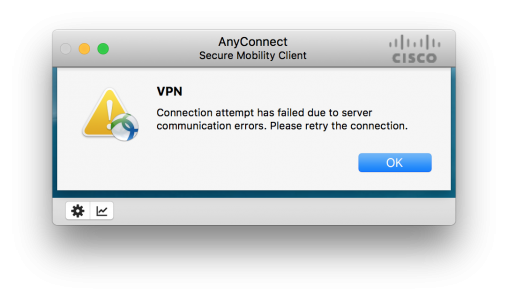
I used my Windows 10 VM and that connected fine, only my MacBook could not connect, this VPN tunnel is a big deal I need it to get onto client’s networks. I tried my other VPN connections and every one was fine, only the recently rebuilt one didn’t work? Ive seen OSX throw a wobbly with AnyConnect in the past so I did a complete uninstall, В deleted the opt/cisco folder and put on the latest version (4.4.00243 at time of writing) no change.
Connection attempt has failed due to server communication errors. Please retry the connection
A look in the client message history showed me this..

No valid certificates available for authentication.
I checked my certificates, and the certificate on the firewall both they, (and the certificate chain,) were fine.
Debugging AnyConnect gave NO OUTPUT at all, but debugging SSL showed me this;
Try Googling that and getting a result! In fact that’s probably what brought you here.
Solution
If you change a Cisco OS and things like this stop working normally it’s because they’ve dropped support for something that’s got a security hole in it. In the wake of the Poodle Exploit I assumed it was an SSL/TLS problem, but that wasn’t it.
I was in the right ball park though, and a bit of lateral thinking and SSL cipher problems I’ve had with ASDM, made me think, what if it’s SHA that’s been dropped because everyone is dropping SHA1 cause it’s the hashing algorithm of Satan?
Well as soon as I added a SHA1 ciphers back in, everything started working again!
Disclaimer: SHA1 is bad, where practical all cert ciphers should be at least SHA256
» means nesting-related): — Failed at: @displayUserCertifications user_id [in template «custom.author-acclaim-certifications» at line 4, column 9] ——>
- Mark as New
- Bookmark
- Subscribe
- Mute
- Subscribe to RSS Feed
- Permalink
- Email to a Friend
- Report Inappropriate Content
Hi all, I’m very new in AnyConnect and I’m doing something wrong.
If I navigate to https://myIP I can successfully log into the portal, download and install the AnyConnect Client and also CONNECT to the VPN.
But if I disconnect to the VPN, and try to login again through the try icon, I get a «connection attempt has failed».
So the only way I have to connect again is to navigate another time to the web portal and then, after login again, the VPN connection is successfully done.
Thanks for your help!
» means nesting-related): — Failed at: @displayUserCertifications user_id [in template «custom.author-acclaim-certifications» at line 4, column 9] ——>
- Mark as New
- Bookmark
- Subscribe
- Mute
- Subscribe to RSS Feed
- Permalink
- Email to a Friend
- Report Inappropriate Content
Glad you worked it out. Please consider marking as answered and rating helpful post so this can be useful to others who may run into the same issues.
If this posts answers your question or is helpful, please consider rating it and/or marking as answered.
» means nesting-related): — Failed at: @displayUserCertifications user_id [in template «custom.author-acclaim-certifications» at line 4, column 9] ——>
- Mark as New
- Bookmark
- Subscribe
- Mute
- Subscribe to RSS Feed
- Permalink
- Email to a Friend
- Report Inappropriate Content
Are you using a Router or ASA has the VPN gateway? If you are using an ASA, check your DAP policy under Configuration, Network (Client) Access, Dynamic Access Policies. If there are policies there, chose the profile that is mapped to the tunnel you are connecting too and then go to «Access Method». Ensure «Web Portal» isn’t checked. If you want to be able use the portal and the client, you need to change it to one of the «Both» choices. If there is no DAP, we’ll have to dig a little deeper.
If this posts answers your question or is helpful, please consider rating it and/or marking as answered.
» means nesting-related): — Failed at: @displayUserCertifications user_id [in template «custom.author-acclaim-certifications» at line 4, column 9] ——>
- Mark as New
- Bookmark
- Subscribe
- Mute
- Subscribe to RSS Feed
- Permalink
- Email to a Friend
- Report Inappropriate Content
Hello Christopher, thanks for your answer.
I’m using an ASA, and in DAP I only have the DfltAccess, and I changed the Access Method from Unchanged to Both, but I have the same problem.
Now I have a question (sorry if it is obvious), using the portal, I provide the login/passwd, but using only the client it doesn’t ask me for credentials, it only shows the certificate error (cause it is self-signed), and when I accept it, the connection fails.
» means nesting-related): — Failed at: @displayUserCertifications user_id [in template «custom.author-acclaim-certifications» at line 4, column 9] ——>
- Mark as New
- Bookmark
- Subscribe
- Mute
- Subscribe to RSS Feed
- Permalink
- Email to a Friend
- Report Inappropriate Content
When you go to login through the AC client, what is in the «Connect To:» box? It may be an issue regarding the AC profile that gets downloaded after successfully logging in and downloading the client via web portal.
**Please remember to rate helpful posts as well as mark the question as ‘answered’ once your issue is resolved. This will help others to find your solution faster.
» means nesting-related): — Failed at: @displayUserCertifications user_id [in template «custom.author-acclaim-certifications» at line 4, column 9] ——>
- Mark as New
- Bookmark
- Subscribe
- Mute
- Subscribe to RSS Feed
- Permalink
- Email to a Friend
- Report Inappropriate Content
Hi, in the connect To box there is the public IP of the ASA, so I think it might be correct. Then appears an Untrusted VPN Certificate warning, and after clicking «Connect Anyway» it shows the error.
I have the anyconnect-win-3.1.04063-k9.pkg client software, should I try a lower version?
Maybe I’ll try to create the certificate through a Windows Server CA and then import to ASA and to the client, so see if it solves the issue.
» means nesting-related): — Failed at: @displayUserCertifications user_id [in template «custom.author-acclaim-certifications» at line 4, column 9] ——>
- Mark as New
- Bookmark
- Subscribe
- Mute
- Subscribe to RSS Feed
- Permalink
- Email to a Friend
- Report Inappropriate Content
First try this. Open the AnyConnect Client, go to the Preferrences tab, and make sure the box that says «Block Untrusted Servers» is NOT checked.
If this posts answers your question or is helpful, please consider rating it and/or marking as answered.
» means nesting-related): — Failed at: @displayUserCertifications user_id [in template «custom.author-acclaim-certifications» at line 4, column 9] ——>
- Mark as New
- Bookmark
- Subscribe
- Mute
- Subscribe to RSS Feed
- Permalink
- Email to a Friend
- Report Inappropriate Content
Hi Christopher, that was the first I have to do in order to be able to connect when I connect to the VPN (through the web) for the first time. So I can confirm it is unchecked.
Thanks for the advice
» means nesting-related): — Failed at: @displayUserCertifications user_id [in template «custom.author-acclaim-certifications» at line 4, column 9] ——>
- Mark as New
- Bookmark
- Subscribe
- Mute
- Subscribe to RSS Feed
- Permalink
- Email to a Friend
- Report Inappropriate Content
Do you have access to ASDM or a syslog server? It would be best if you could grab the exact error message in the logs when you try to connect.
Also, if you are using ASDM — make sure you have «Enable Cisco AnyConnect VPN Client Access on the intefaces in the table below» checked. Assuming you are using the «outside» interface, check that one and enable DTLS. Then click «Device Certificate» and make sure you have the correct certificate chosen for the SSL connection (probably the ASAs self signed certificate».
Make sure «Bypass interface access lists for inbound VPN sessions» is checked as well.
If this posts answers your question or is helpful, please cons />