I successfully compiled following codes, but when I tried to run the codes, a «Bus error (core dumped)» occurred every time I finished my first input of «cin >> instruct >> name >> Bal». I searched online about the bus error, but I still couldn’t find my error. Please help me with this, thanks a lot !!
  // Bank.h
     1 #ifndef BANK_H
     2 #define BANK_H
     3 using namespace std;
     4
     5 class BankAccount{
     6     private:
     7     string _name;
     8     double _balance;
     9
     10     public:
     11     BankAccount(string, double);
     12     string getName();
     13     void setName(string);
     14     double getBalance();
     15     void setBalance(double);
     16     void Withdraw(double);
     17     void Deposite(double);
     18     void interest(int, int);
     19
     20 };
     21 #endif

 //Bank.cpp
 1 #include<iostream>
 2 #include<string>
 3 #include "Bank.h"
 4 using namespace std;
 5
 6 BankAccount::BankAccount(string name, double balance):_name(name),
 7 _balance(balance){}
 8
 9 string BankAccount::getName(){ return _name;}
 10
 11 double BankAccount::getBalance(){ return _balance;}
 12
 13 void BankAccount::setName(string name){
 14     _name = name;
 15     return;
 16 }
 17
 18 void BankAccount::setBalance(double balance){
 19     _balance = balance;
 20     return;
 21 }
 22
 23 void BankAccount::Withdraw(double balance)
 24 {
 25
 26     _balance = _balance - balance;
 27     return;
 28 }
 29
 30 void BankAccount::Deposite(double balance)
 31 {
 32
 33     _balance = _balance + balance;
 34     return;
 35 }
 36
 37 void BankAccount::interest(int interestRate, int M)
 38 {
 39     double interest;
 40
 41     interest = _balance*(interestRate/1200*1.0)*M;
 42     _balance  = _balance + interest;
 43
 44     return;
 45 }


  //BankMain.cpp
  1 #include<iostream>
  2 #include<string>
  3 #include "Bank.h"
  4 using namespace std;
  5
  6 int main()
  7 {
  8     int x, p, check=1, i=0, j;
  9     double Bal;
 10     BankAccount* Account[100];
 11     string name;
 12     string instruct;
 13
 14     cin >> x >> p;
 15
 16     while(check)
 17     {
 18         cin >> instruct >> name >> Bal;
 19
 20         if(instruct == "Create")
 21         {
 22             Account[i]->setName(name);
 23             Account[i]->setBalance(Bal);
 24             Account[i]->interest(x, p);
 25             i++;
 26         }
 27         else
 28         {
 29             if(instruct == "Withdraw")
 30             {
 31                 for(j=0; j<i;j++)
 32                 {
 33                     if(Account[j]->getName() == name)
 34                         break;
 35                         }
 36                         Account[j]->Withdraw(Bal);
 37
 38             }
 39
 40             if(instruct == "Deposite")
 41             {
 42                 for(j=0; j<i; j++)
 43                 {
 44                     if(Account[j]->getName() == name)
 45                         break;
 46                 }
 47                 Account[j]->Deposite(Bal);
 48             }
 49         }
 50
 51         if(instruct == "0")
 52             check = 0;
 53     }
 54
 55     cout << i;
 56     for(j=0; j<i; j++)
 57     {
 58        cout << Account[j]->getName() << " " << Account[j]->getBalance();
 59         cout << endl;
 60     }
 61
 62     return 0;
 63 }
Ошибка сегментации шины C
Два общихОшибка выполнения:
bus error (core dumped)-Ошибка автобуса (информация сброшена)segmentation fault (core dumped)-Segmentation fault (информация сброшена)
Сообщение об ошибке не дает простого объяснения ошибок исходного кода, которые вызывают эти две ошибки. Приведенная выше информация не дает подсказок о том, как найти ошибки в коде, и разница между ними не очень ясна. Тем не менее так.
Ошибка — это аномалия, обнаруженная операционной системой, и об этой аномалии сообщается, насколько это возможно, исходя из принципа удобства операционной системы. Точные причины ошибок шины и ошибок сегментации различаются в зависимости от версии операционной системы.Здесь описаны два типа ошибок, которые возникают в SunOS, работающей на архитектуре SPARC, и причины ошибок.
Обе эти ошибки возникают, когда оборудование сообщает операционной системе о проблемной ссылке на память.Операционная система связывается с неисправным процессом, отправляя сигнал.Сигнал — это разновидность уведомления о событии или программного прерывания, широко используется в системном программировании UNIX, но практически не используется в прикладном программировании.По умолчанию процесс получаетОшибка шиныилиSegfaultПосле сигнала информация будет сброшена и прекращена. Однако для этих сигналов можно установить обработчик сигналов, чтобы изменить ответ процесса по умолчанию.
Сигнал генерируется из-за аппаратного прерывания.Программирование прерываний очень сложно, потому что они происходят асинхронно (время их возникновения непредсказуемо). Прочтите основной документ и файл заголовка сигналаusr/include/sys/signal.h。
1. Захватить сигнал на ПК
Функция обработки сигналов является частью ANSI C и, как и UNIX, также подходит для ПК. Например, программисты ПК могут использоватьsignal() Функция перехвата сигнала Ctrl-Break, чтобы пользователи не прерывали программу таким образом.
В любом исходном файле, который использует сигналы, перед файлом должна быть добавлена строка#include <singal.h>。
Этого сообщенияcore dumped Частично это происходит из очень раннего прошлого, когда вся память была сделана из колец из оксида железа (то есть сердечников). Полупроводники были основным материалом для изготовления памяти более пятнадцати лет, ноcore Это слово до сих пор используется как синоним памяти.
сердечник [kɔː (r)]: сущ. ядро, острие, сердечник плода, магнитный сердечник vt. копать сердечник ...
2. Ошибка шины
По факту,Ошибки шины почти всегда вызваны несогласованным чтением или записью. Это называется ошибкой шины, потому что, когда происходит запрос доступа к невыровненной памяти, заблокированный компонент является адресной шиной.Выравнивание означает, что элементы данных могут храниться только в тех ячейках памяти, адреса которых кратны размеру элемента данных. В современных компьютерных архитектурах, особенно в архитектурах RISC, требуется выравнивание данных, потому что дополнительная логика, связанная с произвольным выравниванием, делает всю систему памяти больше и медленнее. Принудительно ограничивая каждый доступ к памяти строкой кэша или отдельной страницей, можно значительно упростить (и ускорить) такое оборудование, как контроллер кэша и блок управления памятью.
Наш способ выражения правила «элементы данных не могут пересекать страницы или границы кеша» несколько сомнительный, потому что мы используем термин «выравнивание адресов», чтобы обозначить эту проблему, а не прямо заявлять, что межстраничный доступ к памяти запрещен, но они говорят в то же время вещь. Например, при доступе к 8-байтовым данным типа double адрес может быть только целым числом, кратным 8. Таким образом, двойные данные могут храниться по адресу 24, 8008 или 32768, но не по адресу 1006 (потому что он не делится на 8 без остатка).Размер страницы и кеша тщательно продуман, чтобы при соблюдении правил выравнивания можно было гарантировать, что элемент атомарных данных не пересечет границу страницы или блока кэша.
2.1 Программа, вызвавшая ошибку шины
//============================================================================
// Name        : main
// Author      : Yongqiang Cheng
// Version     : Version 1.0.0
// Copyright   : Copyright (c) 2019 Yongqiang Cheng
// Description : Hello World in C++, Ansi-style
//============================================================================

#include <stdio.h>

int main(int argc, char *argv[])
{
	union union_name
	{
		char a[10];
		int i;
	} union_object;

	printf("argc = %dn", argc);

	for (int idx = 0; idx < argc; ++idx)
	{
		printf("argv[%d] --> %sn", idx, argv[idx]);
	}

	printf("argv[argc] = %pnn", (void*)argv[argc]);

	int *pt = (int *)&(union_object.a[1]);
	int *pi = (int *)&(union_object.i);

	*pt = 17;

	printf("*pt = %dn", *pt);
	printf("pt = %pn", pt);
	printf("pi = %pn", pi);

	return 0;
}
argc = 1
argv[0] --> D:visual_studio_workspaceyongqiangDebugyongqiang.exe
argv[argc] = 00000000

*pt = 17
pt = 008FFA39
pi = 008FFA38
Пожалуйста, нажмите любую клавишу, чтобы продолжить ...

Никаких ошибок в реальной работе не было, Операционная среда выглядит следующим образом:

Hey everyone,
I am writing a basic program titled, «LMC.c» that takes the contents from a file «LMC.s», and outputs them into another file «LMC.o»
Here is the input file, LMC.s
Code:
INP 00
STO 90
INP 00
ADD 90
OUT 00
STOP 00
Then here is the program that reads the input file, LMC.c
Code:
#include<stdio.h>
#include<string.h>

int main()
{
	FILE *input,*output;
	char opcode[5],address[5];
	char binopcode[10], binaddress[10];
	int i;

	/* the following codes open the file for reading and the file for output */
	input = fopen("LMC.s","r");
	output = fopen("LMC.o","w");


	while(fscanf(input,"%s %s",opcode,address)!=EOF)
		{
			printf("Opcode: %s ttAddress: %sn",opcode,address);

		if(strcmp(opcode, "INP") == 0)
		{
			strcpy(binopcode,"10000000");
			strcpy(binaddress," ");
		}
		else if(strcmp(opcode,"STO") == 0)
		{
			strcpy(binopcode,"00000011");
			strcpy(binaddress,"01011010");
		}
		else if(strcmp(opcode,"ADD") == 0)
		{
			strcpy(binopcode,"00000001");
			strcpy(binaddress,"01011010");
		}
		else if(strcmp(opcode,"OUT") == 0)
		{
			strcpy(binopcode,"01000000");
			strcpy(binaddress,"");
		}
		else if(strcmp(opcode,"STOP") == 0)
		{
			strcpy(binopcode,"00000000");
			strcpy(binaddress,"");
		}
		/* now put the results to the output file */

		fprintf(output,"%s %sn",binopcode,binaddress);
		printf( "%s %sn",binopcode,binaddress);


		} /*end while*/


	fclose(output);
	fclose(input);

	return 0;
	}
I cannot get it to output the file into «LMC.o» though. I keep getting a «Bus error (core dumped)» when I compile it. Any suggestions why this might be?
Thanks,
MATT
What happened:
I’m getting Bus error (core dumped) on some images after updating from 1.9 to 1.12.
Firstly, I thought it was my fault, so I completely removed kuberntes from all nodes and reinstalled it.
But it didn’t helped. I thought it was problem with shared memory. I tried to mount some volumes to /dev/shm/, but it didn’t help. On the plain docker at the same host everything works fine. Here are some images, I’ve got issue with:
postgres:9.6.5 — but I guess it’s not problem with this version (docker-library/postgres#451)
The files belonging to this database system will be owned by user "postgres".
This user must also own the server process.
 The database cluster will be initialized with locale "en_US.utf8".
The default database encoding has accordingly been set to "UTF8".
The default text search configuration will be set to "english".
 Data page checksums are disabled.
 fixing permissions on existing directory /var/lib/postgresql/data ... ok
creating subdirectories ... ok
selecting default max_connections ... 10
selecting default shared_buffers ... 400kB
selecting dynamic shared memory implementation ... posix
creating configuration files ... ok
Bus error (core dumped)
child process exited with exit code 135
initdb: removing contents of data directory "/var/lib/postgresql/data"
running bootstrap script ...
gitlab:gitlab/gitlab-ce:10.3.3-ce.0 — error, at the same place as in postgres, on initdb.
richarvey/nginx-php-fpm — on some images based on this it works fine, but on some not.
webdevops/php-nginx:alpine-php7 — almost like previous, but this one has auto restart, and (omg) it started on 150’th try.:
.....
2018-11-19 21:44:23,484 INFO exited: php-fpmd (terminated by SIGBUS (core dumped); not expected)
2018-11-19 21:44:24,486 INFO spawned: 'php-fpmd' with pid 348
-> Executing /opt/docker/bin/service.d/php-fpm.d//10-init.sh
2018-11-19 21:44:24,494 INFO success: php-fpmd entered RUNNING state, process has stayed up for > than 0 seconds (startsecs)
Setting php-fpm user to application
2018-11-19 21:44:24,683 INFO exited: php-fpmd (terminated by SIGBUS (core dumped); not expected)
2018-11-19 21:44:25,685 INFO spawned: 'php-fpmd' with pid 354
-> Executing /opt/docker/bin/service.d/php-fpm.d//10-init.sh
2018-11-19 21:44:25,695 INFO success: php-fpmd entered RUNNING state, process has stayed up for > than 0 seconds (startsecs)
Setting php-fpm user to application
.....

2018-11-19 21:46:28,206 INFO exited: php-fpmd (terminated by SIGBUS (core dumped); not expected)
2018-11-19 21:46:29,209 INFO spawned: 'php-fpmd' with pid 948
-> Executing /opt/docker/bin/service.d/php-fpm.d//10-init.sh
2018-11-19 21:46:29,220 INFO success: php-fpmd entered RUNNING state, process has stayed up for > than 0 seconds (startsecs)
Setting php-fpm user to application
2018-11-19 21:46:29,417 INFO exited: php-fpmd (terminated by SIGBUS (core dumped); not expected)
2018-11-19 21:46:30,418 INFO spawned: 'php-fpmd' with pid 953
-> Executing /opt/docker/bin/service.d/php-fpm.d//10-init.sh
2018-11-19 21:46:30,423 INFO success: php-fpmd entered RUNNING state, process has stayed up for > than 0 seconds (startsecs)
Setting php-fpm user to application
[19-Nov-2018 21:46:30] NOTICE: fpm is running, pid 953
[19-Nov-2018 21:46:30] NOTICE: ready to handle connections
wordpress — problem on executing php script:
/usr/local/bin/docker-entrypoint.sh: line 242: 181 Bus error (core dumped) TERM=dumb php -- <<'EOPHP'
And heres is part of the content of this file:
                TERM=dumb php -- <<'EOPHP'
<?php
// database might not exist, so let's try creating it (just to be safe)

$stderr = fopen('php://stderr', 'w');

// https://codex.wordpress.org/Editing_wp-config.php#MySQL_Alternate_Port
//   "hostname:port"
// https://codex.wordpress.org/Editing_wp-config.php#MySQL_Sockets_or_Pipes
//   "hostname:unix-socket-path"
list($host, $socket) = explode(':', getenv('WORDPRESS_DB_HOST'), 2);
$port = 0;
if (is_numeric($socket)) {
        $port = (int) $socket;
        $socket = null;
}
$user = getenv('WORDPRESS_DB_USER');
$pass = getenv('WORDPRESS_DB_PASSWORD');
$dbName = getenv('WORDPRESS_DB_NAME');

$maxTries = 10;
do {
        $mysql = new mysqli($host, $user, $pass, '', $port, $socket);
        if ($mysql->connect_error) {
                fwrite($stderr, "n" . 'MySQL Connection Error: (' . $mysql->connect_errno . ') ' . $mysql->connect_error . "n");
                --$maxTries;
                if ($maxTries <= 0) {
                        exit(1);
                }
                sleep(3);
        }
} while ($mysql->connect_error);

if (!$mysql->query('CREATE DATABASE IF NOT EXISTS `' . $mysql->real_escape_string($dbName) . '`')) {
        fwrite($stderr, "n" . 'MySQL "CREATE DATABASE" Error: ' . $mysql->error . "n");
        $mysql->close();
        exit(1);
}

$mysql->close();
EOPHP
        fi

        # now that we're definitely done writing configuration, let's clear out the relevant envrionment variables (so that stray "phpinfo()" calls don't leak secrets from our code)
        for e in "${envs[@]}"; do
                unset "$e"
        done
fi

exec "$@"
What you expected to happen:
I want to get rid of Core dumped error, like it was on kubernets v1.9
How to reproduce it (as minimally and precisely as possible):
apiVersion: v1
kind: Namespace
metadata:
  name: test
---
apiVersion: v1
kind: Pod
metadata:
  name: postgresql
  namespace: test
  labels:
    app: postgresql
spec:
  nodeSelector:
    kubernetes.io/hostname: md2
  containers:
  - name: postgres
    image: postgres:9.6.5
    ports:
    - containerPort: 5432
      hostPort: 5432
    volumeMounts:
    - mountPath: /dev/shm
      name: dshm
  volumes:
  - name: dshm
#    hostPath:
#      path: /dev/shm
    emptyDir:
      medium: Medium
Anything else we need to know?:
Environment:
- Kubernetes version (use
kubectl version):
Client Version: version.Info{Major:"1", Minor:"12", GitVersion:"v1.12.2", GitCommit:"17c77c7898218073f14c8d573582e8d2313dc740", GitTreeState:"clean", BuildDate:"2018-10-24T06:54:59Z", GoVersion:"go1.10.4", Compiler:"gc", Platform:"linux/amd64"}
Server Version: version.Info{Major:"1", Minor:"12", GitVersion:"v1.12.2", GitCommit:"17c77c7898218073f14c8d573582e8d2313dc740", GitTreeState:"clean", BuildDate:"2018-10-24T06:43:59Z", GoVersion:"go1.10.4", Compiler:"gc", Platform:"linux/amd64"}
- Cloud provider or hardware configuration:
Bare metal:
lshw
sudo output:
description: Rack Mount Chassis
product: ProLiant DL20 Gen9 (823556-B21)
vendor: HP
serial: CZ274504G1
width: 64 bits
capabilities: smbios-2.8 dmi-2.8 vsyscall32
configuration: boot=normal chassis=rackmount family=ProLiant sku=823556-B21 uuid=38323335-3536-435A-3237-343530344731
*-core
description: Motherboard
product: ProLiant DL20 Gen9
vendor: HP
physical id: 0
serial: CZ274504G1
*-cache:0
description: L1 cache
physical id: 0
slot: L1-Cache
size: 256KiB
capacity: 256KiB
capabilities: synchronous internal write-back unified
configuration: level=1
*-cache:1
description: L2 cache
physical id: 1
slot: L2-Cache
size: 1MiB
capacity: 1MiB
capabilities: synchronous internal varies unified
configuration: level=2
*-cache:2
description: L3 cache
physical id: 2
slot: L3-Cache
size: 8MiB
capacity: 8MiB
capabilities: synchronous internal varies unified
configuration: level=3
*-cpu
description: CPU
product: Intel(R) Core(TM) i7-7700 CPU @ 3.60GHz
vendor: Intel Corp.
physical id: 3
bus info: cpu@0
version: Intel(R) Core(TM) i7-7700 CPU @ 3.60GHz
serial: To Be Filled By O.E.M.
slot: Proc 1
size: 940MHz
capacity: 3900MHz
width: 64 bits
clock: 100MHz
capabilities: x86-64 fpu fpu_exception wp vme de pse tsc msr pae mce cx8 apic sep mtrr pge mca cmov pat pse36 clflush dts acpi mmx fxsr sse sse2 ss ht tm pbe syscall nx pdpe1gb rdtscp constant_tsc art arch_perfmon pebs bts rep_good nopl xtopology nonstop_tsc aperfmperf eagerfpu pni pclmulqdq dtes64 monitor ds_cpl vmx smx est tm2 ssse3 sdbg fma cx16 xtpr pdcm pcid sse4_1 sse4_2 x2apic movbe popcnt tsc_deadline_timer aes xsave avx f16c rdrand lahf_lm abm 3dnowprefetch epb intel_pt tpr_shadow vnmi flexpriority ept vpid fsgsbase tsc_adjust bmi1 hle avx2 smep bmi2 erms invpcid rtm mpx rdseed adx smap clflushopt xsaveopt xsavec xgetbv1 dtherm ida arat pln pts hwp hwp_notify hwp_act_window hwp_epp cpufreq
configuration: cores=4 enabledcores=4 threads=8
*-firmware
description: BIOS
vendor: HP
physical id: 4
version: U22
date: 10/02/2017
size: 64KiB
capacity: 15MiB
capabilities: pci pnp upgrade shadowing escd cdboot bootselect edd int13floppy360 int13floppy1200 int13floppy720 int5printscreen int9keyboard int14serial int17printer int10video acpi usb biosbootspecification netboot uefi
*-memory
description: System Memory
physical id: 6
slot: System board or motherboard
size: 64GiB
*-bank:0
description: DIMM Synchronous 2133 MHz (0.5 ns)
product: NOT AVAILABLE
vendor: UNKNOWN
physical id: 0
slot: PROC 1 DIMM 1
size: 16GiB
width: 64 bits
clock: 2133MHz (0.5ns)
*-bank:1
description: DIMM Synchronous 2133 MHz (0.5 ns)
product: NOT AVAILABLE
vendor: UNKNOWN
physical id: 1
slot: PROC 1 DIMM 2
size: 16GiB
width: 64 bits
clock: 2133MHz (0.5ns)
*-bank:2
description: DIMM Synchronous 2133 MHz (0.5 ns)
product: NOT AVAILABLE
vendor: UNKNOWN
physical id: 2
slot: PROC 1 DIMM 3
size: 16GiB
width: 64 bits
clock: 2133MHz (0.5ns)
*-bank:3
description: DIMM Synchronous 2133 MHz (0.5 ns)
product: NOT AVAILABLE
vendor: UNKNOWN
physical id: 3
slot: PROC 1 DIMM 4
size: 16GiB
width: 64 bits
clock: 2133MHz (0.5ns)
*-pci
description: Host bridge
product: Intel Corporation
vendor: Intel Corporation
physical id: 100
bus info: pci@0000:00:00.0
version: 05
width: 32 bits
clock: 33MHz
*-usb
description: USB controller
product: Sunrise Point-H USB 3.0 xHCI Controller
vendor: Intel Corporation
physical id: 14
bus info: pci@0000:00:14.0
version: 31
width: 64 bits
clock: 33MHz
capabilities: pm msi xhci bus_master cap_list
configuration: driver=xhci_hcd latency=0
resources: iomemory:2f0-2ef irq:27 memory:2ffff00000-2ffff0ffff
*-usbhost:0
product: xHCI Host Controller
vendor: Linux 4.4.0-104-lowlatency xhci-hcd
physical id: 0
bus info: usb@3
logical name: usb3
version: 4.04
capabilities: usb-3.00
configuration: driver=hub slots=6 speed=5000Mbit/s
*-usbhost:1
product: xHCI Host Controller
vendor: Linux 4.4.0-104-lowlatency xhci-hcd
physical id: 1
bus info: usb@2
logical name: usb2
version: 4.04
capabilities: usb-2.00
configuration: driver=hub slots=12 speed=480Mbit/s
*-usb
description: USB hub
product: Hub
vendor: Standard Microsystems Corp.
physical id: 3
bus info: usb@2:3
version: 8.01
capabilities: usb-2.00
configuration: driver=hub maxpower=2mA slots=2 speed=480Mbit/s
*-communication UNCLAIMED
description: Communication controller
product: Sunrise Point-H CSME HECI #1
vendor: Intel Corporation
physical id: 16
bus info: pci@0000:00:16.0
version: 31
width: 64 bits
clock: 33MHz
capabilities: pm msi bus_master cap_list
configuration: latency=0
resources: iomemory:2f0-2ef memory:2ffff11000-2ffff11fff
*-storage
description: SATA controller
product: Sunrise Point-H SATA controller [AHCI mode]
vendor: Intel Corporation
physical id: 17
bus info: pci@0000:00:17.0
version: 31
width: 32 bits
clock: 66MHz
capabilities: storage msi pm ahci_1.0 bus_master cap_list
configuration: driver=ahci latency=0
resources: irq:28 memory:92c80000-92c87fff memory:92c8c000-92c8c0ff ioport:2040(size=8) ioport:2048(size=4) ioport:2020(size=32) memory:92c00000-92c7ffff
*-pci:0
description: PCI bridge
product: Sunrise Point-H PCI Express Root Port #9
vendor: Intel Corporation
physical id: 1d
bus info: pci@0000:00:1d.0
version: f1
width: 32 bits
clock: 33MHz
capabilities: pci pciexpress msi pm normal_decode bus_master cap_list
configuration: driver=pcieport
resources: irq:25 ioport:1000(size=4096) memory:90000000-92afffff
*-generic:0 UNCLAIMED
description: System peripheral
product: Integrated Lights-Out Standard Slave Instrumentation & System Support
vendor: Hewlett-Packard Company
physical id: 0
bus info: pci@0000:01:00.0
version: 06
width: 32 bits
clock: 33MHz
capabilities: pm msi pciexpress bus_master cap_list
configuration: latency=0
resources: ioport:1200(size=256) memory:92a8d000-92a8d1ff ioport:1100(size=256)
*-display UNCLAIMED
description: VGA compatible controller
product: MGA G200EH
vendor: Matrox Electronics Systems Ltd.
physical id: 0.1
bus info: pci@0000:01:00.1
version: 01
width: 32 bits
clock: 33MHz
capabilities: pm msi pciexpress vga_controller bus_master cap_list
configuration: latency=0
resources: memory:91000000-91ffffff memory:92a88000-92a8bfff memory:92000000-927fffff
*-generic:1
description: System peripheral
product: Integrated Lights-Out Standard Management Processor Support and Messaging
vendor: Hewlett-Packard Company
physical id: 0.2
bus info: pci@0000:01:00.2
version: 06
width: 32 bits
clock: 33MHz
capabilities: pm msi pciexpress bus_master cap_list
configuration: driver=hpilo latency=0
resources: irq:17 ioport:1000(size=256) memory:92a8c000-92a8c0ff memory:92900000-929fffff memory:92a00000-92a7ffff memory:92a80000-92a87fff memory:92800000-928fffff
*-usb
description: USB controller
product: Integrated Lights-Out Standard Virtual USB Controller
vendor: Hewlett-Packard Company
physical id: 0.4
bus info: pci@0000:01:00.4
version: 03
width: 32 bits
clock: 33MHz
capabilities: msi pciexpress pm uhci bus_master cap_list
configuration: driver=uhci_hcd latency=0
resources: irq:17 ioport:1300(size=32)
*-usbhost
product: UHCI Host Controller
vendor: Linux 4.4.0-104-lowlatency uhci_hcd
physical id: 1
bus info: usb@1
logical name: usb1
version: 4.04
capabilities: usb-1.10
configuration: driver=hub slots=2 speed=12Mbit/s
*-pci:1
description: PCI bridge
product: Sunrise Point-H PCI Express Root Port #11
vendor: Intel Corporation
physical id: 1d.2
bus info: pci@0000:00:1d.2
version: f1
width: 32 bits
clock: 33MHz
capabilities: pci pciexpress msi pm normal_decode bus_master cap_list
configuration: driver=pcieport
resources: irq:26 memory:fe800000-fe8fffff ioport:92b00000(size=1048576)
*-network:0
description: Ethernet interface
product: NetXtreme BCM5720 Gigabit Ethernet PCIe
vendor: Broadcom Corporation
physical id: 0
bus info: pci@0000:02:00.0
logical name: eno1
version: 00
serial: ec:eb:b8:5d:5a:e8
size: 1Gbit/s
capacity: 1Gbit/s
width: 64 bits
clock: 33MHz
capabilities: pm vpd msi msix pciexpress bus_master cap_list rom ethernet physical tp 10bt 10bt-fd 100bt 100bt-fd 1000bt 1000bt-fd autonegotiation
configuration: autonegotiation=on broadcast=yes driver=tg3 driverversion=3.137 duplex=full firmware=5720-v1.39 NCSI v1.4.16.0 ip=89.184.66.47 latency=0 link=yes multicast=yes port=twisted pair speed=1Gbit/s
resources: irq:18 memory:92b30000-92b3ffff memory:92b40000-92b4ffff memory:92b50000-92b5ffff memory:fe800000-fe83ffff
*-network:1 DISABLED
description: Ethernet interface
product: NetXtreme BCM5720 Gigabit Ethernet PCIe
vendor: Broadcom Corporation
physical id: 0.1
bus info: pci@0000:02:00.1
logical name: eno2
version: 00
serial: ec:eb:b8:5d:5a:e9
capacity: 1Gbit/s
width: 64 bits
clock: 33MHz
capabilities: pm vpd msi msix pciexpress bus_master cap_list rom ethernet physical tp 10bt 10bt-fd 100bt 100bt-fd 1000bt 1000bt-fd autonegotiation
configuration: autonegotiation=on broadcast=yes driver=tg3 driverversion=3.137 firmware=5720-v1.39 NCSI v1.4.16.0 latency=0 link=no multicast=yes port=twisted pair
resources: irq:19 memory:92b00000-92b0ffff memory:92b10000-92b1ffff memory:92b20000-92b2ffff memory:fe840000-fe87ffff
*-isa
description: ISA bridge
product: Sunrise Point-H LPC Controller
vendor: Intel Corporation
physical id: 1f
bus info: pci@0000:00:1f.0
version: 31
width: 32 bits
clock: 33MHz
capabilities: isa bus_master
configuration: latency=0
*-memory UNCLAIMED
description: Memory controller
product: Sunrise Point-H PMC
vendor: Intel Corporation
physical id: 1f.2
bus info: pci@0000:00:1f.2
version: 31
width: 32 bits
clock: 33MHz (30.3ns)
capabilities: bus_master
configuration: latency=0
resources: memory:92c88000-92c8bfff
*-serial
description: SMBus
product: Sunrise Point-H SMBus
vendor: Intel Corporation
physical id: 1f.4
bus info: pci@0000:00:1f.4
version: 31
width: 64 bits
clock: 33MHz
configuration: driver=i801_smbus latency=0
resources: iomemory:2f0-2ef irq:16 memory:2ffff10000-2ffff100ff ioport:efa0(size=32)
*-scsi:0
physical id: 5
logical name: scsi0
capabilities: emulated
*-disk
description: ATA Disk
product: ST1000DM010-2EP1
vendor: Seagate
physical id: 0.0.0
bus info: scsi@0:0.0.0
logical name: /dev/sda
version: CC43
serial: Z9A8H9QD
size: 931GiB (1TB)
capabilities: partitioned partitioned:dos
configuration: ansiversion=5 logicalsectorsize=512 sectorsize=4096 signature=1bde66a3
*-volume:0
description: EXT4 volume
vendor: Linux
physical id: 1
bus info: scsi@0:0.0.0,1
logical name: /dev/sda1
version: 1.0
serial: c519e927-efc2-457b-a2b3-e9936253909d
size: 237MiB
capacity: 237MiB
capabilities: primary bootable multi journaled extended_attributes large_files huge_files dir_nlink extents ext4 ext2 initialized
configuration: created=2017-12-29 18:59:23 filesystem=ext4 modified=2017-12-29 18:59:23 state=clean
*-volume:1
description: Linux swap volume
physical id: 2
bus info: scsi@0:0.0.0,2
logical name: /dev/sda2
version: 1
serial: d3552ee3-1cf8-4af9-ab61-9d391485a57f
size: 119GiB
capacity: 119GiB
capabilities: primary multi swap initialized
configuration: filesystem=swap pagesize=4096
*-volume:2
description: EXT4 volume
vendor: Linux
physical id: 3
bus info: scsi@0:0.0.0,3
logical name: /dev/sda3
version: 1.0
serial: d34dfb91-afe5-4074-b5ce-56fd14cf7830
size: 372GiB
capacity: 372GiB
capabilities: primary multi journaled extended_attributes large_files huge_files dir_nlink extents ext4 ext2 initialized
configuration: created=2017-12-29 19:00:47 filesystem=ext4 modified=2017-12-29 19:00:47 state=clean
*-volume:3
description: EXT4 volume
vendor: Linux
physical id: 4
bus info: scsi@0:0.0.0,4
logical name: /dev/sda4
version: 1.0
serial: 0d7301bc-6882-4770-8a97-6065e504e193
size: 439GiB
capacity: 439GiB
capabilities: primary multi journaled extended_attributes large_files huge_files dir_nlink extents ext4 ext2 initialized
configuration: created=2017-12-29 19:00:49 filesystem=ext4 modified=2017-12-29 19:00:49 state=clean
*-scsi:1
physical id: 7
logical name: scsi1
capabilities: emulated
*-disk
description: ATA Disk
product: ST1000DM010-2EP1
vendor: Seagate
physical id: 0.0.0
bus info: scsi@1:0.0.0
logical name: /dev/sdb
version: CC43
serial: Z9A8D6CD
size: 931GiB (1TB)
capabilities: partitioned partitioned:dos
configuration: ansiversion=5 logicalsectorsize=512 sectorsize=4096 signature=e01a79e7
*-volume:0
description: EXT4 volume
vendor: Linux
physical id: 1
bus info: scsi@1:0.0.0,1
logical name: /dev/sdb1
version: 1.0
serial: 2af99ccb-f00f-4c0f-8eaa-ede0c4e2f769
size: 237MiB
capacity: 237MiB
capabilities: primary bootable multi journaled extended_attributes large_files huge_files dir_nlink extents ext4 ext2 initialized
configuration: created=2017-12-29 18:59:23 filesystem=ext4 modified=2017-12-29 18:59:23 state=clean
*-volume:1
description: Linux swap volume
physical id: 2
bus info: scsi@1:0.0.0,2
logical name: /dev/sdb2
version: 1
serial: 7e221fb2-312c-4af3-b7c5-5c1e26c1d3ad
size: 119GiB
capacity: 119GiB
capabilities: primary multi swap initialized
configuration: filesystem=swap pagesize=4096
*-volume:2
description: EXT4 volume
vendor: Linux
physical id: 3
bus info: scsi@1:0.0.0,3
logical name: /dev/sdb3
version: 1.0
serial: bf7c2da4-0621-46b4-9ffc-d93a446ff606
size: 372GiB
capacity: 372GiB
capabilities: primary multi journaled extended_attributes large_files huge_files dir_nlink extents ext4 ext2 initialized
configuration: created=2017-12-29 19:02:59 filesystem=ext4 modified=2017-12-29 19:02:59 state=clean
*-volume:3
description: EXT4 volume
vendor: Linux
physical id: 4
bus info: scsi@1:0.0.0,4
logical name: /dev/sdb4
version: 1.0
serial: ca144958-7752-48b4-b33a-05fac0c3dd68
size: 439GiB
capacity: 439GiB
capabilities: primary multi journaled extended_attributes large_files huge_files dir_nlink extents ext4 ext2 initialized
configuration: created=2017-12-29 19:03:01 filesystem=ext4 modified=2017-12-29 19:03:01 state=clean
*-scsi:2
physical id: 8
logical name: scsi4
capabilities: emulated
*-disk
description: ATA Disk
product: Samsung SSD 850
physical id: 0.0.0
bus info: scsi@4:0.0.0
logical name: /dev/sdc
version: 4B6Q
serial: S39KNX0J745113J
size: 238GiB (256GB)
capabilities: partitioned partitioned:dos
configuration: ansiversion=5 logicalsectorsize=512 sectorsize=512 signature=2dfc3098
*-volume
description: EXT4 volume
vendor: Linux
physical id: 1
bus info: scsi@4:0.0.0,1
logical name: /dev/sdc1
logical name: /db/ssd
version: 1.0
serial: 85e87f84-1b0b-42f9-8782-f8d09df568c2
size: 238GiB
capacity: 238GiB
capabilities: primary journaled extended_attributes large_files huge_files dir_nlink recover extents ext4 ext2 initialized
configuration: created=2017-12-29 18:59:33 filesystem=ext4 lastmountpoint=/db/ssd modified=2018-11-17 02:23:09 mount.fstype=ext4 mount.options=rw,relatime,data=ordered mounted=2018-11-17 02:23:09 state=mounted
*-power UNCLAIMED
description: Power Supply 1
vendor: HP
physical id: 1
capacity: 32768mWh
*-network
description: Ethernet interface
physical id: 2
logical name: flannel.1
serial: f6:18:0a:c3:f2:77
capabilities: ethernet physical
configuration: broadcast=yes driver=vxlan driverversion=0.1 ip=10.244.0.0 link=yes multicast=yes
- OS (e.g. from /etc/os-release):
NAME="Ubuntu"
VERSION="16.04.5 LTS (Xenial Xerus)"
ID=ubuntu
ID_LIKE=debian
PRETTY_NAME="Ubuntu 16.04.5 LTS"
VERSION_ID="16.04"
HOME_URL="http://www.ubuntu.com/"
SUPPORT_URL="http://help.ubuntu.com/"
BUG_REPORT_URL="http://bugs.launchpad.net/ubuntu/"
VERSION_CODENAME=xenial
UBUNTU_CODENAME=xenial
- Kernel (e.g.
uname -a):
Linux md1 4.4.0-104-lowlatency Configurable restart behavior #127-Ubuntu SMP PREEMPT Mon Dec 11 13:07:12 UTC 2017 x86_64 x86_64 x86_64 GNU/Linux - Install tools:
kubeadm - Others:
/kind bug
/sig app
/sig release
- Forum
- UNIX/Linux Programming
- Bus error (core dumped)
Bus error (core dumped)

why my mode is pointer???? when it an array
xcode run it!
|
|
Last edited on
Arrays decay to a pointer when you use their name.
see: http://stackoverflow.com/questions/1461432/what-is-array-decaying
Last edited on
Thank you! beside those is there any error that cause Bus error?
Line 71: y[k] = count;
y has 30 elements, k can go from 0 to size2-1, you are going out of bounds of the array.
Line 36 and 37 mode(read, size1); print_array(read, size1); at this pointer read become a pointer? Can anyone show me how to fix so it not a pointer?
Can anyone show me how to fix so it not a pointer?
No, you can not pass an array to a function as an array, it is decayed to a pointer.
Topic archived. No new replies allowed.
Recently wrote a linux-based logging system, encountered two errors halfway:
bus error(core dumped) and segmentation fault(core dumped).
These two errors are very tormenting. The error message does not give a simple explanation of the source code errors that caused these two errors. The above information does not provide how to find errors in the code Clues. Therefore, it is often difficult to locate the specific error.
Most of the problems stem from the fact that the error is an abnormality detected by the operating system (OS), and this abnormality is reported as easily as possible by the OS. The exact cause of bus errors and segmentation errors differs in different OS versions.
These two errors occur when the OS detects a problematic memory reference. The OS communicates with the wrong process by sending a signal. The signal is an event notification or a software interrupt. By default, the process will dump the information and stop the operation after receiving the «bus error» or «segment error» signal. But you can also set a signal handler for these signals to modify the default response of the process.
In fact, bus errors are almost always caused by misaligned reads or writes. The reason it is called a bus error is because when an unaligned memory access request occurs, the component that is blocked is the address bus. Alignment means that data items can only be stored in memory whose address is an integer multiple of the size of the data item. In modern computer architectures, especially RISC architectures, data alignment is required because the additional logic related to arbitrary alignment makes the entire memory system larger and slower. By forcing each memory access to be limited to a cache line or a separate page, you can greatly simplify and accelerate hardware such as cache controllers and memory management units (MMUs).
We use the term address alignment to state this issue, rather than bluntly saying that memory cross-page access is prohibited, but they say the same thing. For example, when accessing an 8-byte double data, the address is only allowed to be an integer multiple of 8. So a double data can be stored at address 24, address 8008 or 32768, but not at address 1006 (because it cannot be divided by 8).
The size of the page and cache are carefully designed so that as long as the alignment rules are followed, an atomic data item will not cross the boundary of a page or cache block.
The book «C Expert Programming» gives an example of bus errors,
#include<stdio.h>

union {
    char a[10];
    int i;
} u;

int main(void)
{
#if defined(__GNUC__)
# if defined(__i386__)
    /* Enable Alignment Checking on x86 */
    __asm__("pushfnorl $0x40000,(%esp)npopf");
# elif defined(__x86_64__)
    /* Enable Alignment Checking on x86_64 */
    __asm__("pushfnorl $0x40000,(%rsp)npopf");
# endif
#endif

    int *p = (int *) (&(u.a[1]));

    /**
     * Unaligned addresses in p will cause bus errors,
           * Because the combination of array and int ensures that a is aligned according to 4 bytes of int,
           * So "a+1" is definitely not int aligned
     */
    *p = 17;
    printf("%d %p %p %pn", *p, &(u.a[0]), &(u.a[1]), &(u.i));
    printf("%lu %lun", sizeof(char), sizeof(int));
    return 0;
}
operation result:
Bus error (core dumped)The assembly enclosed by the conditional compilation at the beginning of the main function is to enable alignment check on the x86 platform. By default, the alignment check is not performed on the x86 platform. If you remove that piece of code, the executable file will not report an error, and the obtained result is:
17 0x601030 0x601031 0x601030
1 4
This is because the x86 architecture will align the address, visit it twice, and then put together the tail of the first time and the head of the second time. So it creates the illusion of misalignment and access.
During the test, it was found that if the -O3 option is added to gcc during the compilation process, the code can also run normally.
Test environment: Ubuntu 12.04.5 LTS, x86_64, gcc (Ubuntu/Linaro 4.6.3-1ubuntu5) 4.6.3
2. Segfault
The segfault is caused by an exception in the memory management unit (MMU), which is usually caused by referencing a pointer that is not initialized or illegal. If the pointer refers to an address that is not in the process address space, this error is raised.
The book «C Expert Programming» gives the simplest example of segfault,
int *p = 0;
*p = 17;
The pointer p points to an empty address, so the assignment statement writes an empty address to 17, so it will report a Segmentation fault.
A subtlety is that the pointers that have illegal values are usually caused by different programming errors.
A worse case is that if the uninitialized pointer happens to have an unaligned value, it will generate a bus error instead of a segfault. This is true for most computer architectures, because the CPU sees the address before sending it to the MMU.
There are several direct causes of segfaults:
-
Reference a pointer containing an illegal value
-
Reference a null pointer (often caused by returning a null pointer from a function and using it without checking)
-
Access without getting the correct permissions. For example, trying to store a value in a read-only text segment will cause a segfault.
-
Run out of heap or stack space.
In order of frequency of occurrence, common programming errors that may eventually lead to segmentation faults are:
-
Bad pointer value error
- The memory pointed to by the pointer is referenced without assigning a value to the pointer
- Pass a bad pointer to the library function
- After the memory pointed to by the pointer is released, the memory is accessed again. You can do this as follows, so that if you continue to use the pointer after the pointer is released, at least the program can perform a core dump before terminating.
 free(p);
 p = NULL;
-
overwrite error
- Use the pointer across the array boundary
-
Write data outside the ends of dynamically allocated memory, for example, dynamically allocated memory, the memory address p obtained by the user contains the data structure of the heap management. If you write a value to the address p, it may destroy the heap management. structure. Or write a value after the address p, causing the next memory in the heap to be destroyed. Both of these situations can cause internal errors in the heap.
p = malloc(256);
p[-1] = 0;
p[256] = 0
-
Error caused by pointer release
- Free the same memory twice
- The free block is not memory allocated using malloc
- free memory still in use
-
free an invalid pointer
For example, when iterating a linked list like the following, the next time the loop iterates, the program will refer to the memory that has been released again, and unpredictable results will occur.
for(p=start;p;p=p->next)
free(p);
A tmp pointer should be introduced to save.
for(p=start;p;) {
 tmp = p;
 p = p->next;
 free(tmp);
}
Here is another example of a segfault I encountered:
#include <stdio.h>

#define SZ (64*1024*1024)

void func(void)
{
    char buf[SZ];
    printf("sizeof buf=%lun", sizeof(buf));
}

int main(void)
{
    func();
    return 0;
}
This is the error of running out of stack space.
In fact, the problem I encountered was not so obvious. The space SZ I allocated was not so large, so it is normal under normal circumstances. When my program is running, the data is more and more, when it exceeds this SZ, then write the data to buf and report a segmentation error. So strictly speaking, my mistake is to destroy the stack space.
3. How to troubleshoot such difficult errors
This kind of error is very difficult to troubleshoot. Remember to debug it by adding printf to the source code when you have no experience. Now think about how inefficient this method is. If you encounter probabilistic problems, there is basically no way. Later, after reviewing it, I learned to make full use of core files. The biggest benefit of a core dump is the ability to save the state at the time of the problem. Even if the problem is not reproduced, as long as the kernel dump is obtained, it can be debugged. Through the executable file and kernel dump, you can know the state of the process at that time, know the scene when the problem occurs, and even locate the statement that has the problem.
Under Ubuntu, core dump is not enabled by default.
3.1 Open core file
You can view it by entering the following command in the terminal:
ulimit -cThe display is zero, indicating that the size of the core file is limited to 0, that is, no core file is generated.
Set the core file size limit to 1G blocks, you can enter in the terminal:
ulimit -c 1073741824Or do not limit the core file size:
ulimit -c unlimited3.2 Debugging with gdb
Enter the following command in the terminal to debug
gdb executable-file core-fileTaking the above example of assigning a value of 17 to an empty address as an example, when the core file is produced in the current directory, enter it in the terminal
gdb ./a.out coreTo get the following result
...
[New LWP 6950]

warning: Can not read pathname for load map: Input/output error.

warning: no loadable sections found in added symbol-file system-supplied DSO at 0x7ffe32533000
Core was generated by ./a.out.
Program terminated with signal 11, Segmentation fault.
#0  0x00000000004005bb in main () at segmentation_error.c:14
14      *p = 17;
(gdb)
Very powerful is that you can re-run and debug the executable file, set breakpoints, view variables, very convenient.
For detailed information about core file settings, please refer toCoredump setting method
。
Reference:
1. «The C Programming Language Chinese Version (2nd Edition. New Edition)»
2. «C Expert Programming»
3. Ubuntu core dump setting method
Improve Article
Save Article
Improve Article
Save Article
Segmentation fault(SIGSEGV) and Bus error(SIGBUS) are signals generated when serious program error is detected by the operating system and there is no way the program could continue to execute because of these errors.
1) Segmentation Fault (also known as SIGSEGV and is usually signal 11) occur when the program tries to write/read outside the memory allocated for it or when writing memory which can only be read.In other words when the program tries to access the memory to which it doesn’t have access to. SIGSEGV is abbreviation for “Segmentation Violation”.
Few cases where SIGSEGV signal generated are as follows,
-> Using uninitialized pointer
-> De-referencing a NULL pointer
-> Trying to access memory that the program doesn’t own (eg. trying to access an array element
out of array bounds).
-> Trying to access memory which is already de-allocated (trying to use dangling pointers).
Please refer this article for examples.
2) Bus Error (also known as SIGBUS and is usually signal 10) occur when a process is trying to access memory that the CPU cannot physically address.In other words the memory tried to access by the program is not a valid memory address.It caused due to alignment issues with the CPU (eg. trying to read a long from an address which isn’t a multiple of 4). SIGBUS is abbreviation for “Bus Error”.
SIGBUS signal occurs in below cases,
-> Program instructs the CPU to read or write a specific physical memory address which is not valid / Requested physical address is unrecognized by the whole computer system.
-> Unaligned access of memory (For example, if multi-byte accesses must be 16 bit-aligned, addresses (given in bytes) at 0, 2, 4, 6, and so on would be considered aligned and therefore accessible, while addresses 1, 3, 5, and so on would be considered unaligned.)
The main difference between Segmentation Fault and Bus Error is that Segmentation Fault indicates an invalid access to a valid memory, while Bus Error indicates an access to an invalid address.
Below is an example of Bus Error taken from wikipedia.
C
#include <stdlib.h>
int main(int argc, char **argv)
{
#if defined(__GNUC__)
# if defined(__i386__)
__asm__("pushfnorl $0x40000,(%esp)npopf");
# elif defined(__x86_64__)
__asm__("pushfnorl $0x40000,(%rsp)npopf");
# endif
#endif
char *cptr = malloc(sizeof(int) + 1);
int *iptr = (int *) ++cptr;
*iptr = 42;
return 0;
}
Output :
Bad memory access (SIGBUS)
This article is contributed by Prashanth Pangera. If you like GeeksforGeeks and would like to contribute, you can also write an article using write.geeksforgeeks.org or mail your article to review-team@geeksforgeeks.org. See your article appearing on the GeeksforGeeks main page and help other Geeks.
Please write comments if you find anything incorrect, or you want to share more information about the topic discussed above.
I am writing a Stack template. The stack is declared as an array.
[
template <typename T, size_t N>; // N is 100
class TStack
{
…
private:
T data_[N];
…
}
I have several functions in this class template, Pop() //removes last item of stack, Push() //pushes an item to the stack, Size() //returns the size of the stack, Capacity()// returns N
I have a cpp program that tests the functionality of my template using a menu interface. When I choose Pop() without pushing anything to the stack, I get a Bus Error(core dumped).
[
template <typename T, size_t N>
… ::Pop()
{
if (size_ == 0) {std::cerr << «Stack is empty’n'»;}
else {return data_[size_-1];} //size_ is initialized to 0 and incremented when item are pushed to the stack and decremented when they are popped
}
]
When I Push() an item to the stack and then choose Pop(), it does what is expected.
What should I do to data_ to ensure that this does not happen. I understand that the Bus Error is a segmentation fault and it happens because I am trying to acces a value that is not allocated memory, but am not sure how to fix it in this situation. In the guidelines I am not allowed to use operator new or delete to insure allocation.
Thanks in advance.
Вводная
C является «небезопасным» («unmanaged») языком, поэтому программы могут «вылетать» — аварийно завершать работу без сохранения данных пользователя, сообщения об ошибке и т.п. — стоит только, например, залезть в не инициализированную память. Например:
void fall()
{
  char * s = "short_text";
  sprintf(s,"This is very long text");
}
или
void fall()
{
  int * pointer = NULL;
  *pointer = 13;
}
Всем было бы лучше, если бы мы могли «отловить» падение программы — точно так же, как в java ловим исключения — и выполнить хоть что-то перед тем, как программа упадет (сохранить документ пользователя, вывести диалог с сообщением об ошибке и т.п.)
Общего решения задача не имеет, так как C не имеет собственной модели обработки исключений, связанных с работой с памятью. Тем не менее, мы рассмотрим два способа, использующих особенности операционной системы, вызвавшей исключение.
Есть 2 класса:
1) UI
//UI.h
#ifndef UI_H
#define UI_H
#include <map>
#include <string>
#include <FL/Fl_Button.H>
#include <FL/Fl_Window.H>
#include <FL/Fl_Box.H>
#include <FL/Fl_Output.H>
#include <FL/Fl_Widget.H>
using namespace std;

class App;
class Calculator;

class UI {
public:
    Fl_Window *flWindow;
    map< string, Fl_Box* > flBox;
    map< string, Fl_Button*> flButtons;

    Fl_Output *output;
    App *app;
    Calculator *calc;

    UI(App* app);
    void startWindow();
    void endWindow();
    void createUI();

    static void resetOutputCb(Fl_Widget *w, void *data);

    void changeOutputValue();
    void prepareOutput(string& insertedValue, bool isNewAction);
};
#endif /* UI_H */
2) Calculator:
//Calculator.h
#ifndef CALCULATOR_H
#define CALCULATOR_H
#include <string>
#include <FL/Fl_Widget.H>
using namespace std;

class UI;

class Calculator {
public:
    Calculator(UI *ui);
    UI *ui;

    string leftOperand;
    string action;
    string rightOperand;

    static void clickButtonCb(Fl_Widget *w, void *data);
    bool isNewAction(string action);
private:
    void makeCalc(bool isNewValue);
    double plus(double x, double y);
};

#endif /* CALCULATOR_H */
Класс UI инициализирует класс Calсulator и передает ему указатель на самого себя:
UI::UI(App *app) {
    this->app = app;
    this->calc = new Calculator(this);
}
Класс Calculator в свою очередь записывает указатель на UI в одно из своих свойств:
Calculator::Calculator(UI *ui) :
leftOperand("0"),
rightOperand(""),
action("") {
    this->ui = ui;
}
}
Однако теперь при попытке вызвать из Calculator метод класса UI:
void UI::prepareOutput(string& insertedValue, bool isNewAction) {
    if (calc->action != "" && !isNewAction) { // странно, что при calc->action != "" ошибки нет
        if (calc->rightOperand == "0") {
            calc->rightOperand = "";
        }
        calc->rightOperand  = insertedValue; // НО ВОТ ТУТ Возникает ошибка при работе с calc->rightOperand
    } else if (!isNewAction) {
        if (calc->leftOperand == "0") {
            calc->leftOperand = "";
        }
        calc->leftOperand  = insertedValue;
    }
    if (isNewAction && calc->rightOperand == "" && calc->action != "" && insertedValue != "=") {
        calc->action = insertedValue;
    }
}
возникает ошибка:
Segmentation fault; core dumped;
Такая же возникает ошибка, если в классе Calculator сделать что-то вроде :
string str = this->ui->calc->leftOperand; // Segmentation fault; core dumpedПри дебаге в переменных видны “странные” для меня значения, ведь ожидаются простые строки: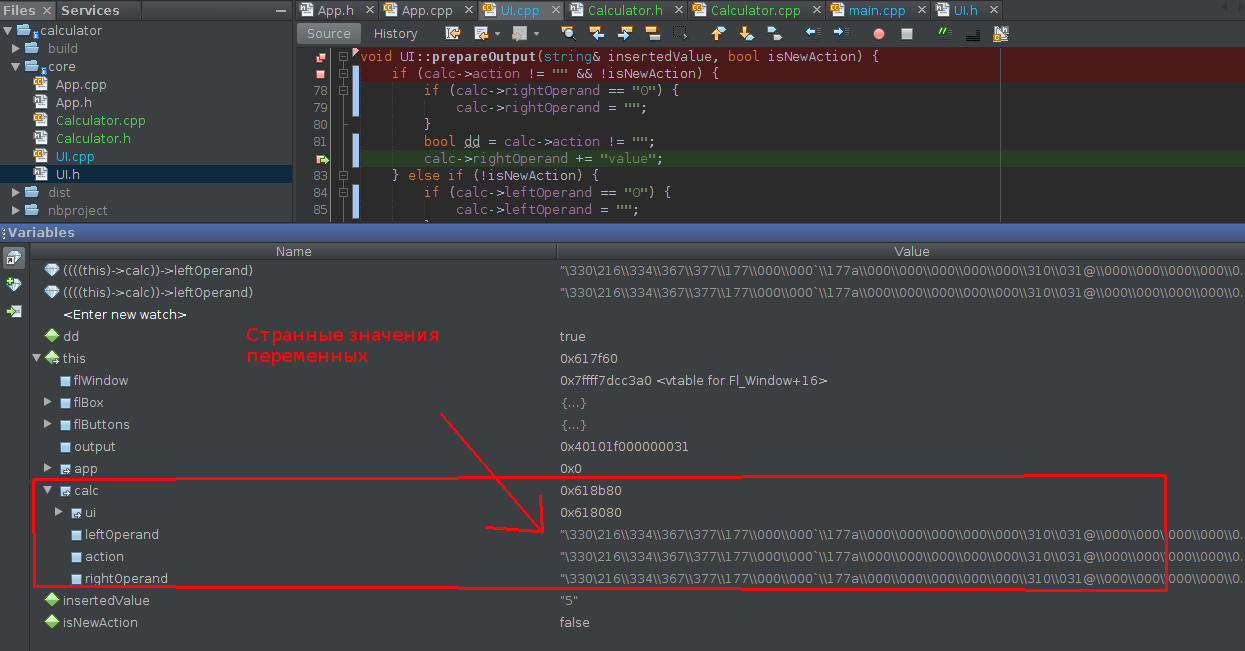
Почему возникает эта ошибка и как ее исправить?
Не запускается сервер
Ошибка segmentation fault (core dumped)
Есть данный код на СИ, суть в том, чтобы в двумерном массиве с помощью потоков (Linux) найти самую большую последовательность чисел по возрастанию. При компиляции всё хорошо, а как запускаю программу появляется ошибка Segmentation fault (core dumped)
#include <unistd.h>
#include <stdio.h>
#include <pthread.h>
#include <stdlib.h>
#include <sys/types.h>
#include <time.h>


void random1(int arr[5][100]) {
int i,j;
for(i=0; i<5;i  )
{
for(j=0; j<100;j  )
{
arr[i][j]=rand()0;
printf("%dt", arr[i][j]);
}
printf("n");
}
printf("n");
}

void* thread_func1(int arr[5][100]){

int buffer = 1, maxbuffer=0, max=0, minElement=0, maxElement;
int i,j;
for(i=0;i<5;i  )
{
for(j=0;j<100;j  )
{
if(arr[i][j 1]>arr[i][j])
{
buffer  ;
max=buffer;
if(maxbuffer<max)
{
maxbuffer = max;
maxElement = arr[i][j 1];
}
}
if(arr[i][j 1]<=arr[i][j])
{
max=buffer;
if(maxbuffer<max)
{ maxbuffer = max;
maxElement = arr[i][j 1];
}
buffer = 1;
}
}
minElement = (maxElement 1)-maxbuffer;

for( i = minElement; i<=maxElement; i  )
{

printf("%dt", arr[i][j]);
}
}
}


int main() {

int A[5][100];
int stime;
stime=time(NULL);
srand(stime);
random1(A);
pthread_t k1,k2;
pthread_create(&k1, NULL, (void*)thread_func1,(int*)A);
pthread_join(k1,NULL);
printf("%ld",k1);
exit (0);
}
Еще один пример реализации функции thread_func1, но там тоже выходит эта ошибка
void* thread_func1(int arr[5][100]){
int start=0, lenght=1, max_start=0, max_lenght=0;
int i,j;
for(i=0;i<5;i  ){
for(j=0;j<100;j  ){
for(int k=j 1;k<100;k  )
{
if(arr[i][j]<arr[i][k])
lenght  ;
else{
if(lenght>max_lenght)
max_lenght= lenght, max_start=start;
start = k, lenght = 1;
}
}
}
}
for(i = max_start; i<max_start max_lenght; i  ){
for (j=max_start; i<max_start max_lenght; i  ){
printf("%p", arr[i][j]);}}}
Ошибка:segmentation fault (core dumped): как можно исправить (shared memory) c
Ошибка слишком проста – Вы пытаетесь обращаться к объекту, который не создали
std::queue<std::string>* str = (std::queue<std::string>*)shmat(ShmID, 0, 0);
то есть, str указывает на память, но что там… а кто его знает. Если обычную структуру так можно размещать, то с классы нужно только через конструктор.
// получим указатель на память
void *p = shmat(ShmID, 0, 0);
// используем placement new для создания объекта по месту
std::queue<std::string> * str = new(p)std::queue<std::string>();
после такого изменения уже не падает. Но нужно не забыть вызвать деструктор (delete str;). И видимо его нужно вызвать только в одном из процессов. И самое главное – не вызвать его тогда, когда ещё другой процесс использует его.
Также нужно аккуратно посинхронизировать обращения к памяти, а то может быть очень весело – std::queue не ожидает, что он работает с разных процессов.
Способ 1: seh
Если Вы используете OS Windows в качестве целевой ОС и Visual C в качестве компилятора, то Вы можете использовать
— расширение языка С от Microsoft, позволяющее отлавливать любые исключения, происходящие в программе.
Общий синтаксис обработки исключений выглядит следующим образом:
__try
{
  segfault1();
}
__except( condition1 )
{
  // обработка исключения, если condition1 == EXCEPTION_EXECUTE_HANDLER.
  // в condition1 может (должен) быть вызов метода, проверяющего
  //    тип исключения, и возвращающего EXCEPTION_EXECUTE_HANDLER
  //    если тип исключения соответствует тому, что мы хотим обработать
}
__except( condition2 )
{
  // еще один обработчик
}
__finally
{
  // то, что выполнится если ни один из обработчиков не почешется
}
Вот «работающий пример» — «скопируй и вставь в Visual Studio»
#include <stdio.h>
#include <windows.h>
#include <excpt.h>

int memento() // обработка Segfault
{
	MessageBoxA(NULL,"Memento Mori","Exception catched!",NULL);
	return 0;
}

void fall() // генерация segfault
{
	  int* p = 0x00000000;
	  *p = 13;
}

int main(int argc, char *argv[])
{
	__try
	{
		fall();
	}
	__except (EXCEPTION_EXECUTE_HANDLER)
	{
		memento();
	}
}
Мне лично не удалось заставить заработать __finally (поэтому я и написал __except с кодом проверки, который всегда работает), но это, возможно, кривизна моих рук.
Данная методика, при всей ее привлекательности, имеет ряд минусов:
- Один компилятор. Одна ОС. Не «чистый С ». Если Вы хотите работать без средств MS — Вы не сможете использовать эту методику
- Один поток — одна таблица. Если Вы напишете конструкцию из __try… __except, внутри __try запустите другой поток и, не выходя из __try второй поток вызовет segfault, то… ничего не произойдет, программа упадет «как обычно». Потому, что на каждый поток нужно писать отдельный обработчик SEH.
Минусов оказалось настолько много, что приходится искать второе решение.
Способ 2: posix — сигналы
Способ рассчитан на то, что в момент падения программа получает POSIX-сообщение SIGSEGV. Это безусловно так во всех UNIX-системах, но это фактически так (хотя никто не гарантировал, windows — не posix-совместима) и в windows тоже.
Методика простая — мы должны написать обработчик сообщения SIGSEGV, в котором программа совершит «прощальные действия» и, наконец, упадет:
void posix_death_signal(int signum)
{
	memento(); // прощальные действия
        signal(signum, SIG_DFL); // перепосылка сигнала
	exit(3); //выход из программы. Если не сделать этого, то обработчик будет вызываться бесконечно.
}
после чего мы должны зарегистрировать этот обработчик:
signal(SIGSEGV, posix_death_signal);
Вот готовый пример:
#include <stdio.h>
#include <stdio.h>
#include <windows.h>
#include <stdlib.h>
#include <signal.h>


int memento()
{
	int a=0;
	MessageBoxA(NULL,"Memento mori","POSIX Signal",NULL);
	return 0;
}
void fall()
{
	  int* p = 0x00000000;
	  *p = 13;
}
void posix_death_signal(int signum)
{
	memento();
	signal(signum, SIG_DFL);
	exit(3);
}


int main(int argc, char *argv[])
{
	signal(SIGSEGV, posix_death_signal);
	fall();
}
В отличие от SEH, это работает всегда: решение «многопоточное» (вы можете уронить программу в любом потоке, обработчик запустится в любом случае) и «кроссплатформенное» — работает под любым компилятором, и под любой POSIX-совместимой ОС.