#1

Bill52
-

- Members
- 1 posts
-

Australia
Posted 11 May 2007 — 08:53 PM
Hi there,
PXE network boot:
When the client connects, the message window appears but the bootfile is not transfered.
IP is allocated OK.
I receive the above error message (in the log window).
What can I do about it?
I can’t see what am I doing wrong.
Thanks,
Bill
- Back to top
#2
Ph. Jounin
Ph. Jounin
-

-
Developer
-

- 54 posts
Member
- Location:Lyon (France)
Posted 14 May 2007 — 09:24 PM
The acknowlegde of block 0 is sent by the client when the server uses specific options. Thus, you should have a trouble in the settings.
You can try to check/uncheck Option negotiation. You may also try PXE compatibilty.
- Back to top
#3
Computer Angel
Computer Angel
-

- Members
-

- 14 posts
Newbie
-

Pakistan
Posted 03 October 2008 — 08:11 PM
hi i am having the same problem. i am trying to boot windows 98 cd image through tftp.. my logs are the followings:
Using local port 3893 [03/10 14:04:36.890]
OACK: <tsize=797149248,blksize=1440,> [03/10 14:04:36.890]
Using local port 3894 [03/10 14:04:36.906]
TIMEOUT waiting for Ack block #0 [03/10 14:04:41.734]
TIMEOUT waiting for Ack block #0 [03/10 14:04:41.750]
TIMEOUT waiting for Ack block #0 [03/10 14:04:45.609]
TIMEOUT waiting for Ack block #0 [03/10 14:04:45.625]
TIMEOUT waiting for Ack block #0 [03/10 14:04:51.890]
TIMEOUT waiting for Ack block #0 [03/10 14:04:51.906]
TIMEOUT waiting for Ack block #460527 [03/10 14:07:54.234]
after this my laptop resets! can anyone guide me y this is happening?
- Back to top
#4
AcmeUK
AcmeUK
-

- Members
- 1 posts
-

United Kingdom
Posted 27 October 2008 — 11:55 PM
PXE network boot:
When the client connects, the message window appears but the bootfile is not transfered.
IP is allocated OK.
I receive the above error message (in the log window).
Hi
I had the same problem. I found out here http://blog.webpirates.co.uk/?p=56 that the PC you want to boot MUST be on the same subnet as your TFTP server.
My server was on 192.168.1.xx, I had set up the Tftp32 DHCP to the 10.1.1.xx range and got the timeout error. Changing the DHCP addresses to the 192.168.1.xx range sorted the problem for me.
Hope this helps
BillP
- Back to top
Ошибка при подключении по TFTP TIMEOUT waiting for Ack block #1
При подключении по TFTP (Tftpd64 Service Edition by Ph. Jounin) возникает следующее сообщение:

Connection received from 10.90.0.3 on port 62204 [01/03 18:43:41.307]
Read request for file <README_FIRST.txt>. Mode netascii [01/03 18:43:41.338]
Using local port 49595 [01/03 18:43:41.338]
Connection received from 10.90.0.3 on port 62204 [01/03 18:43:42.298]
Read request for file <README_FIRST.txt>. Mode netascii [01/03 18:43:42.313]
Using local port 49596 [01/03 18:43:42.313]
Connection received from 10.90.0.3 on port 62204 [01/03 18:43:44.307]
Read request for file <README_FIRST.txt>. Mode netascii [01/03 18:43:44.307]
Using local port 49597 [01/03 18:43:44.307]
Connection received from 10.90.0.3 on port 62204 [01/03 18:43:48.310]
Read request for file <README_FIRST.txt>. Mode netascii [01/03 18:43:48.310]
Using local port 49598 [01/03 18:43:48.310]
Connection received from 10.90.0.3 on port 62204 [01/03 18:43:56.325]
Read request for file <README_FIRST.txt>. Mode netascii [01/03 18:43:56.325]
Using local port 49599 [01/03 18:43:56.325]
TIMEOUT waiting for Ack block #1 [01/03 18:43:56.386]
TIMEOUT waiting for Ack block #1 [01/03 18:43:57.351]
TIMEOUT waiting for Ack block #1 [01/03 18:43:59.346]
TIMEOUT waiting for Ack block #1 [01/03 18:44:03.370]
Из данного лога понятно, что сервер пытается организовать исходящее соединение к клиенту, перебирая порты.
На клиентской стороне видим следующее сообщение:

C:>tftp 10.0.10.10 GET README_FIRST.txt d:TempREADME_FIRST.txt
Timeout occurred
Connect request failed
Проблема в настройках брандмауэра (filewall) на клиентской стороне, т.к. TFTP-сервер организует входящее соединение.
Необходимо добавить разрешающее правило для TFTP-клиента на входящие соединения.
Для этого заходим в настройки Filewall и создаем новое правило:
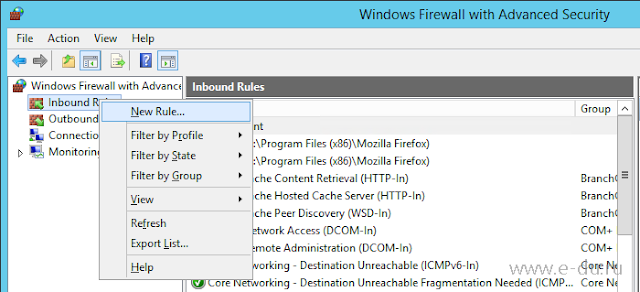
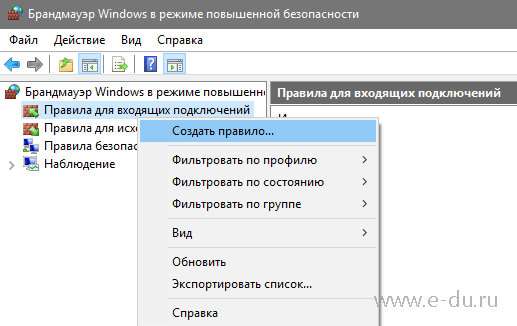
Тип правила — «Для программы» (Program):
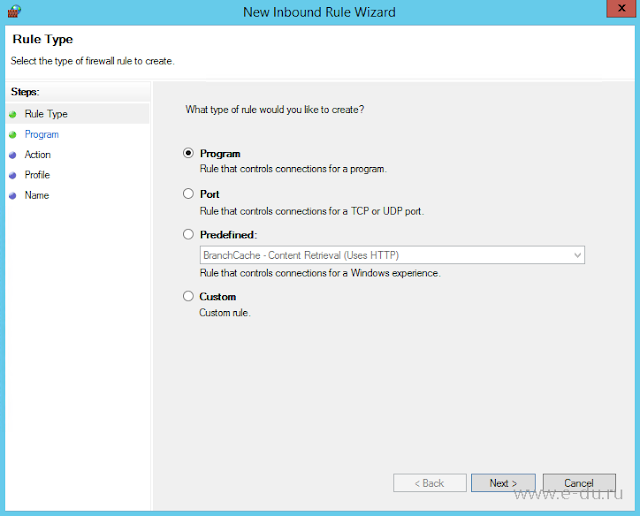
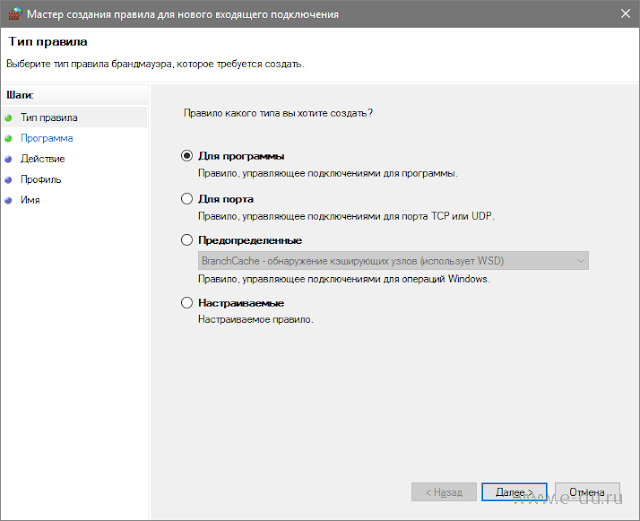
Для TFTP Клиента (TFTP Client), входящего в состав Windows необходимо добавить следующий путь:
%WinDir%System32TFTP.EXE
Или, например, так:
«C:WindowsSystem32TFTP.EXE»
Если используется другой TFTP-клиент, то надо указать соответствующий путь к его исполняемому файлу:
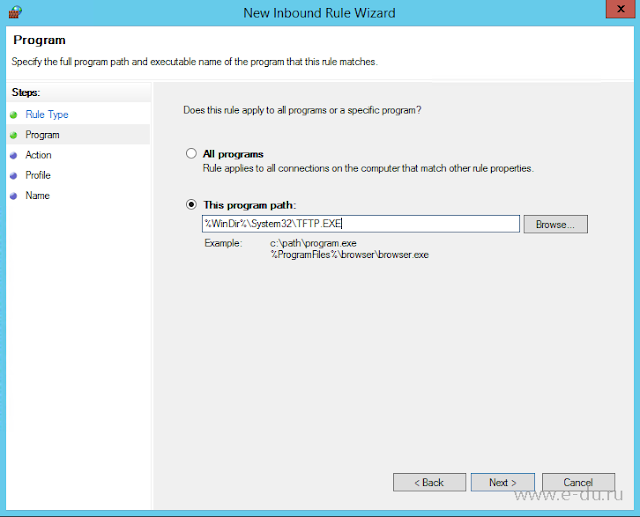
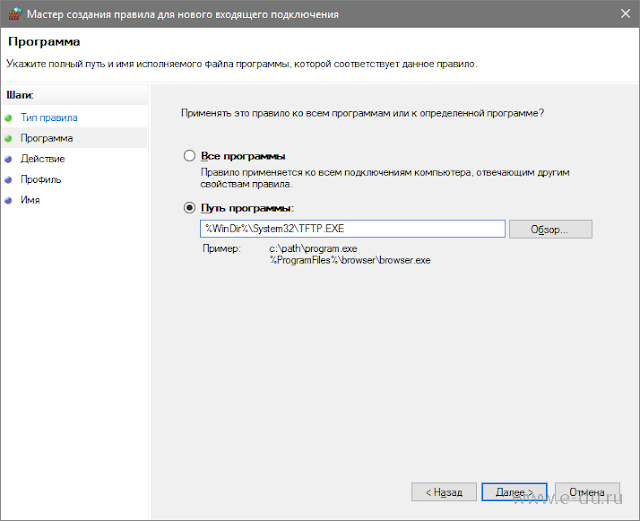
Далее «Разрешить подключение» (Allow the connection):
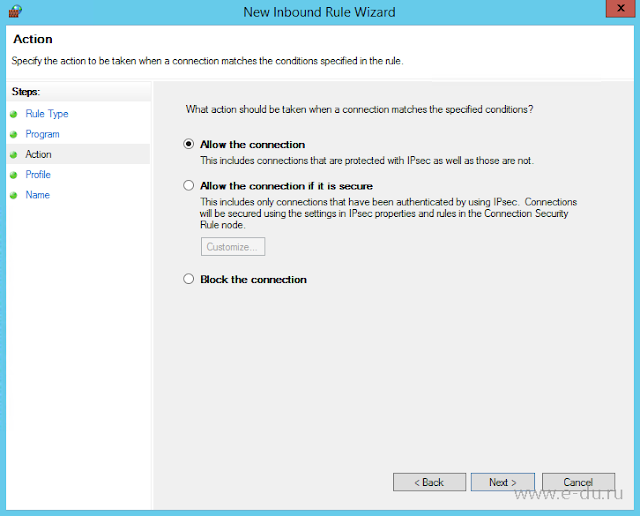
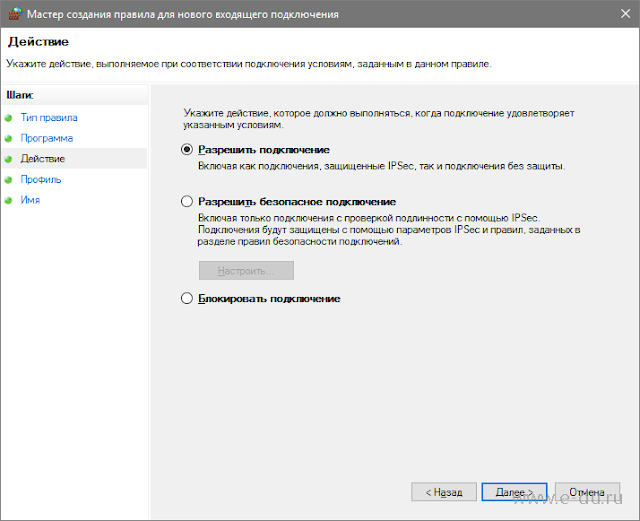
Выбираем все профили:
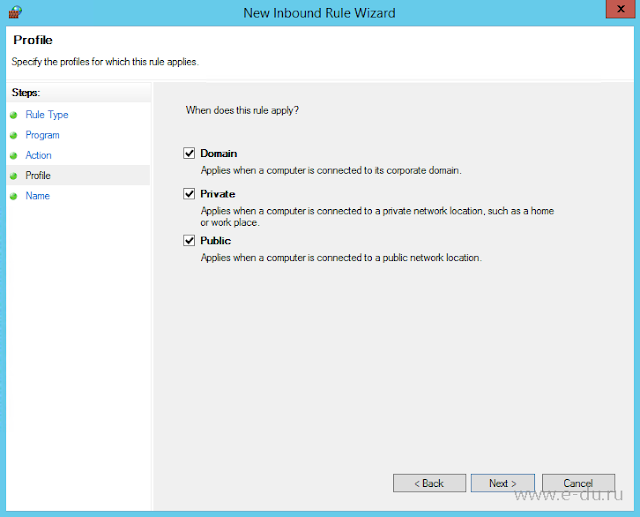
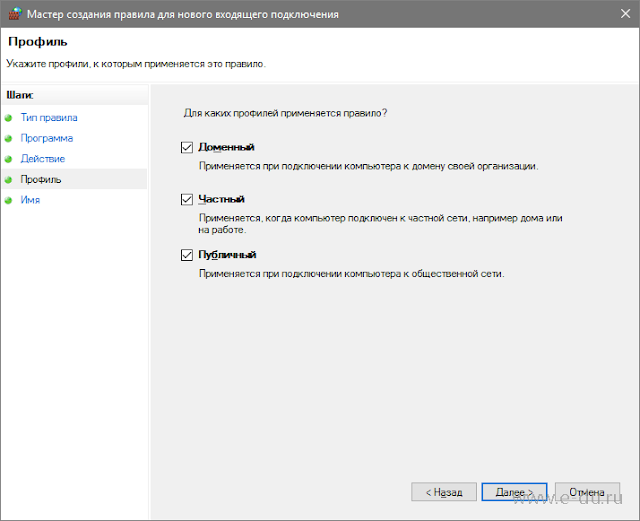
В конце задаем имя правилу:
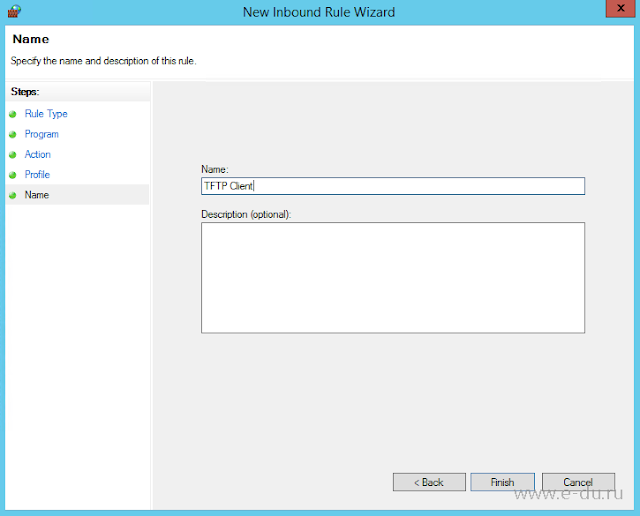
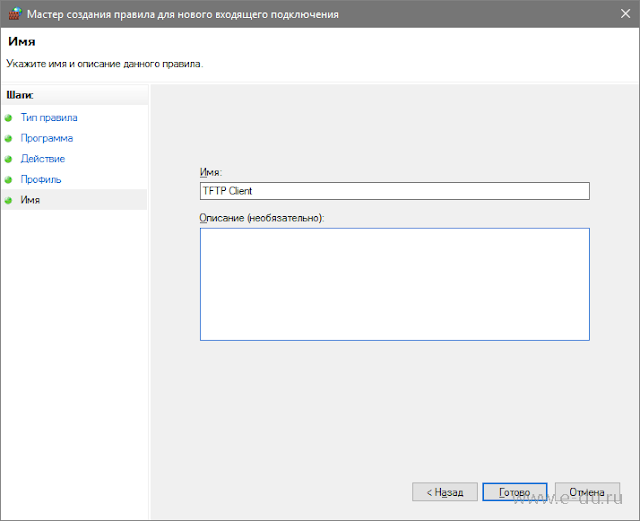
После данной настройки успешное соединение будет выглядеть примерно так:

C:tftp 10.0.10.10 GET README_FIRST.txt d:TempREADME_FIRST.txt
Transfer successful: 522 bytes in 1 second(s), 522 bytes/s
(с) Ella S.
Если Вам понравилась статья, пожалуйста, поставьте лайк, сделайте репост или оставьте комментарий. Если у Вас есть какие-либо замечания, также пишите комментарии.
Модераторы: GRooVE, alexco
Правила форума
Убедительная просьба юзать теги [code] при оформлении листингов.
Сообщения не оформленные должным образом имеют все шансы быть незамеченными.
-
doker
- сержант
- Сообщения: 207
- Зарегистрирован: 2008-11-18 16:20:26
ошибка в работе tftp
день добрый, столкнулся с проблмой, настраиваю встроенный в FreeBSD 7.2 tftp сервер
inetd.conf
Код: Выделить всё
tftp dgram udp wait root /usr/libexec/tftpd tftpd -l -s /var/tftpboot -u user_back
Код: Выделить всё
# netstat -a | grep tftp
udp4       0      0 *.tftp                 *.*
при скачке все волшебно, но при заливке
Код: Выделить всё
# tftp 10.10.10.10
tftp> put dovecot-1.1.11.tar.gz
Error code 3: Disk full or allocation exceeded
Sent 9216 bytes in 5.0 seconds
xferlog
Код: Выделить всё
tftpd[65420]: Filename: 'dovecot-1.1.11.tar.gz'
tftpd[65420]: Mode: 'netascii'
tftpd[65420]: 10.10.10.10: write request for dovecot-1.1.11.tar.gz: error 102
tftpd[65418]: Timeout #0 on DATA block 1
tftpd[65418]: write_file returned 0
tftpd[65420]: Timeout #0 on DATA block 1
tftpd[65420]: Timeout #1 on DATA block 1
tftpd[65420]: Timeout #2 on DATA block 1
tftpd[65420]: Timeout #3 on DATA block 1
tftpd[65420]: Timeout #4 on DATA block 1
tftpd[65420]: Timeout #5 on DATA block 1, giving up
пермишены
Код: Выделить всё
# cd /var
# ls -all | grep tftpboot
drwx---rwx   2 user_back  user_back   512 12 ноя 17:34 tftpboot
места на диске вагон
Код: Выделить всё
# df -h
Filesystem     Size    Used   Avail Capacity  Mounted on
/dev/ad0s1a    135G     82G     42G    66%    /
devfs          1.0K    1.0K      0B   100%    /dev
есть у кого какие мысли ?
гугль непомог
-

Хостинг HostFood.ru
Услуги хостинговой компании Host-Food.ru
Хостинг HostFood.ru
Тарифы на хостинг в России, от 12 рублей: https://www.host-food.ru/tariffs/hosting/
Тарифы на виртуальные сервера (VPS/VDS/KVM) в РФ, от 189 руб.: https://www.host-food.ru/tariffs/virtualny-server-vps/
Выделенные сервера, Россия, Москва, от 2000 рублей (HP Proliant G5, Intel Xeon E5430 (2.66GHz, Quad-Core, 12Mb), 8Gb RAM, 2x300Gb SAS HDD, P400i, 512Mb, BBU):
https://www.host-food.ru/tariffs/vydelennyi-server-ds/
Недорогие домены в популярных зонах: https://www.host-food.ru/domains/
-
doker
- сержант
- Сообщения: 207
- Зарегистрирован: 2008-11-18 16:20:26
Re: ошибка в работе tftp
Непрочитанное сообщение
doker » 2009-11-13 11:46:41
pol писал(а):Эм …
Код: Выделить всё
touch /var/tftpboot/dovecot-1.1.11.tar.gz
chmod 666 /var/tftpboot/dovecot-1.1.11.tar.gz
?
под user_back создаеться без проблем
Код: Выделить всё
$ touch /var/tftpboot/dovecot-1.1.11.tar.gz
$ chmod 666 /var/tftpboot/dovecot-1.1.11.tar.gz
$ ls -all | grep dovecot
-rw-rw-rw-   1 user_back  user_back       0 Nov 13 11:52 dovecot-1.1.11.tar.gz
-
doker
- сержант
- Сообщения: 207
- Зарегистрирован: 2008-11-18 16:20:26
Re: ошибка в работе tftp
Непрочитанное сообщение
doker » 2009-11-13 11:51:21
BirdGovorun писал(а):Похоже проблема с правами на папку, куда заливаешь.
какие ?, стоят 707
-
pol
- проходил мимо
Re: ошибка в работе tftp
Непрочитанное сообщение
pol » 2009-11-13 11:59:06
Я подумал о:
man tftpd
-w Allow write requests to create new files. By default tftpd
requires that the file specified in a write request exist. Note
that this only works in directories writable by the user speci-
fied with -u option
-
doker
- сержант
- Сообщения: 207
- Зарегистрирован: 2008-11-18 16:20:26
Re: ошибка в работе tftp
Непрочитанное сообщение
doker » 2009-11-13 12:03:02
pol писал(а):Я подумал о:
man tftpd
-w Allow write requests to create new files. By default tftpd
requires that the file specified in a write request exist. Note
that this only works in directories writable by the user speci-
fied with -u option
в точку ))))
огромное спасибо
Решение и попытка TFTPD32 не может передавать данные
Предыстория: однажды, чтобы провести эксперимент с топологией GNS3, вам нужно передать файл конфигурации GNS3 на локальный компьютер, поэтому я загрузил TFTPD32. Краткая диаграмма топологии выглядит следующим образом. После настройки его можно пропинговать, но нельзя передать. Это почти сбивает с толку. Такого рода судебное разбирательство длилось 3 часа … действительно глупо (вручную смешно)

Первый способ ошибки: добавить системный TFTP
В случае PING было неизбежно думать, что это проблема TFTP, и я начал думать, что это проблема системы. Я использовал систему GHOST, но я чувствовал, что она оптимизирована. Порт 69 был заблокирован. Через функцию программы панели управления — —Добавить программу WINDOS — TFTP-клиент.


Не работает …
Глупо думать об этом сейчас, как я хочу передавать данные из GNS3 на локальную, это тоже сторона сервера, открытие клиента — это позор!
Вторая попытка ошибки: проблема с программой TFTPD32.
Сделав неправильную попытку, я почувствовал, что завис и проблема с системой решена (Привет!) Поэтому я начал задаваться вопросом, есть ли проблема с настройкой TFTPD32, и я запустил Baidu для поиска правильной настройки TFTPD32, потому что мой был на английском языке, и Зеленого нет, значит, вначале был бардак … Сначала возьмите переводную картинку

Это моя собственная фотография

Не работает …
Неправильная третья попытка — N
Размышляя об этом, можно выделить разные:
1. Очевидно, что PING подключен, но я думаю, что есть проблема с этим адресом класса B, можно ли его изменить на класс C … (крупные компании не используют серию TFTP)
2. Перезагрузите компьютер, он будет работать? Перезагрузите GNS3, перезапустите TFTPD32 (тройное управление сетью)
3. Будет ли 360 заблокирован? Закройте его!
А, 360?
Вот и волшебный поворот
Правильная попытка первая:
Подумав о том, блокирует ли 360 информацию, я наконец вспомнил, что в WINDOS есть брандмауэр, который всегда будет игнорироваться …


Это оно!(Что я делал раньше )
Думаю, я могу написать статью «О необходимости отсутствия системного межсетевого экрана》。
Правильная попытка вторая:
Существование разумно, так что лучше найти способ обойти это. Довольно неприятно отключать подсказку в правом нижнем углу.

TFTP — это передача с небольшой пропускной способностью, поэтому это UDP.

Следующий шаг …

Здесь его можно отключить.
Это конец эксперимента, и я оплакиваю одну секунду IQ. OTL …
I am trying to netboot a PC with no CD Drive and no USB Booting options (Available in BIOS but does not recognise USB, broken perhaps somehow).
Anyhow here is the log from TFTP32:
Rcvd DHCP Discover Msg for IP 0.0.0.0, Mac 00:1F:D0:8D:8B:09 [06/12 13:06:48.916]
DHCP: proposed address 192.168.2.1 [06/12 13:06:48.917]
Rcvd DHCP Rqst Msg for IP 0.0.0.0, Mac 00:1F:D0:8D:8B:09 [06/12 13:06:51.113]
Previously allocated address 192.168.2.1 acked [06/12 13:06:51.113]
Connection received from 192.168.2.1 on port 2070 [06/12 13:06:51.125]
Read request for file <netbootpxelinux.0>. Mode octet [06/12 13:06:51.126]
Using local port 53708 [06/12 13:06:51.127]
Connection received from 192.168.2.1 on port 2071 [06/12 13:06:53.125]
Read request for file <netbootpxelinux.0>. Mode octet [06/12 13:06:53.126]
Using local port 53709 [06/12 13:06:53.127]
Connection received from 192.168.2.1 on port 2072 [06/12 13:06:57.136]
Read request for file <netbootpxelinux.0>. Mode octet [06/12 13:06:57.137]
Using local port 53710 [06/12 13:06:57.137]
Connection received from 192.168.2.1 on port 2073 [06/12 13:07:03.122]
Read request for file <netbootpxelinux.0>. Mode octet [06/12 13:07:03.123]
Using local port 53711 [06/12 13:07:03.124]
TIMEOUT waiting for Ack block #1  [06/12 13:07:06.129]
TIMEOUT waiting for Ack block #1  [06/12 13:07:08.129]
Connection received from 192.168.2.1 on port 2074 [06/12 13:07:11.086]
Read request for file <netbootpxelinux.0>. Mode octet [06/12 13:07:11.087]
Using local port 53717 [06/12 13:07:11.088]
TIMEOUT waiting for Ack block #1  [06/12 13:07:12.139]
TIMEOUT waiting for Ack block #1  [06/12 13:07:18.126]
TIMEOUT waiting for Ack block #1  [06/12 13:07:26.090]
Also when I ping the computer I get:
Pinging 192.168.2.1 with 32 bytes of data:
Reply from 10.20.21.188: Destination net unreachable.
Reply from 10.20.21.188: Destination net unreachable.
Reply from 10.20.21.188: Destination net unreachable.
Reply from 10.20.21.188: Destination net unreachable.

Ping statistics for 192.168.2.1:
    Packets: Sent = 4, Received = 4, Lost = 0 (0% loss),
PS C:Windowssystem32>
If anyone has any ideas as to how I might go about rectifying this it would be most appreciated.
Regards
EDIT_>
Additional information that might be useful
-
I am not using a crossover cable; however, the network card on my server computer is a gigabit one, I’m not sure if that means I still need a crossover cable, however. The two PCs are connected by only a fast Ethernet switch.
-
The final objective of the netboot is to install Debian on the client computer. I am currently running an Apache server but I haven’t yet ascertained what the next steps will be. I am booting pxelinux.0 (not really sure yet what it actually is, I got it from the Debian tar.gz file I downloaded from the net following the guide here).
мне нужно создать резервную копию конфигураций на моих маршрутизаторах и основных коммутаторах. Я установил tftpd64.exe инструмент на моем локальном компьютере, и я доступ к маршрутизатору через Telnet. Я связал IP соответствующим образом и настроен следующим образом:
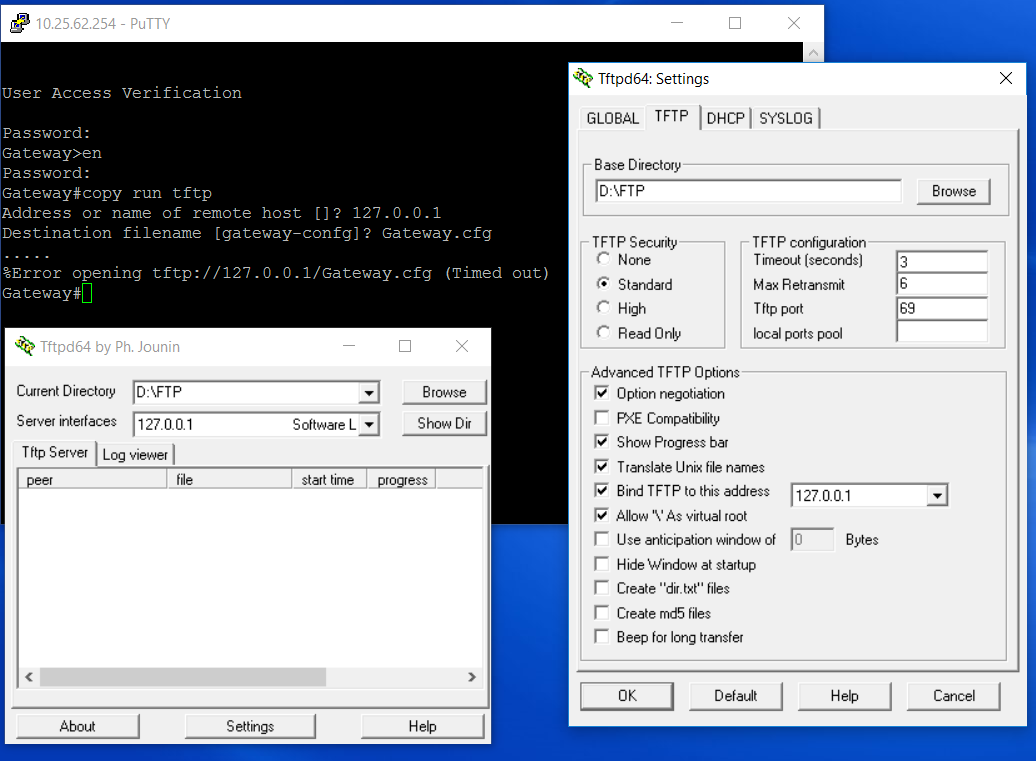
инструкции для этого были получены здесь (все то же самое, за исключением того, что я использую 64-битную версию).
когда я запускаю команду, которую я нашел здесь, Я получаю ошибку, показанную на изображении. Ничто не появляется в журналах TFTP, таким образом, похоже, что отказывает соединение. Теперь я протестировал установку TFTP, открыв командную строку и перейдя в локальную папку и применив команду следующим образом:
на самом деле, файл не был передан, и я получил ошибку «файл не найден» в журнале TFTP. Однако, когда я попробовал снова, как это,
файл успешно передан. Этот находится в противоречии с правильной командной строкой, определенной в видео в ссылке, которую я предоставил. Я не уверен, как это связано с ошибкой, которую я получаю с командой Telnet «copy run», но это указывает на потенциальную неправильную конфигурацию или что-то еще, поэтому я подумал, что это относится к обсуждению.
мой вопрос, как я могу сделать это соединение Telnet скопировать файл конфигурации с моего маршрутизатора? Кажется, что все настроено правильно и работает на стороне клиента, но не с правильная команда «get». Как устранить это? Маршрутизатор является Cisco Catalyst 3750, и я использую Windows 10 Professional 64 бит.
Office 365, AD, Active Directory, Sharepoint, C#, Powershell. Технические статьи и заметки.
Ошибка при подключении по TFTP TIMEOUT waiting for Ack block #1
При подключении по TFTP (Tftpd64 Service Edition by Ph. Jounin) возникает следующее сообщение:
Connection received from 10.90.0.3 on port 62204 [01/03 18:43:41.307]
Read request for file . Mode netascii [01/03 18:43:41.338]
Using local port 49595 [01/03 18:43:41.338]
Connection received from 10.90.0.3 on port 62204 [01/03 18:43:42.298]
Read request for file . Mode netascii [01/03 18:43:42.313]
Using local port 49596 [01/03 18:43:42.313]
Connection received from 10.90.0.3 on port 62204 [01/03 18:43:44.307]
Read request for file . Mode netascii [01/03 18:43:44.307]
Using local port 49597 [01/03 18:43:44.307]
Connection received from 10.90.0.3 on port 62204 [01/03 18:43:48.310]
Read request for file . Mode netascii [01/03 18:43:48.310]
Using local port 49598 [01/03 18:43:48.310]
Connection received from 10.90.0.3 on port 62204 [01/03 18:43:56.325]
Read request for file . Mode netascii [01/03 18:43:56.325]
Using local port 49599 [01/03 18:43:56.325]
TIMEOUT waiting for Ack block #1 [01/03 18:43:56.386]
TIMEOUT waiting for Ack block #1 [01/03 18:43:57.351]
TIMEOUT waiting for Ack block #1 [01/03 18:43:59.346]
TIMEOUT waiting for Ack block #1 [01/03 18:44:03.370]
Из данного лога понятно, что сервер пытается организовать исходящее соединение к клиенту, перебирая порты.
На клиентской стороне видим следующее сообщение:
C:>tftp 10.0.10.10 GET README_FIRST.txt d:TempREADME_FIRST.txt
Timeout occurred
Connect request failed
Проблема в настройках брандмауэра (filewall) на клиентской стороне, т.к. TFTP-сервер организует входящее соединение.
Необходимо добавить разрешающее правило для TFTP-клиента на входящие соединения.
Для этого заходим в настройки Filewall и создаем новое правило:
Тип правила — «Для программы» (Program):
Для TFTP Клиента (TFTP Client), входящего в состав Windows необходимо добавить следующий путь:
%WinDir%System32TFTP.EXE
Или, например, так:
«C:WindowsSystem32TFTP.EXE»
Если используется другой TFTP-клиент, то надо указать соответствующий путь к его исполняемому файлу:
Далее «Разрешить подключение» (Allow the connection):
Выбираем все профили:
В конце задаем имя правилу:
После данной настройки успешное соединение будет выглядеть примерно так:
Вчера все-таки решил заняться перепрошивкой роутера NetGear WNR612-2EMRUS, любезно предоставленного компанией Дом.Ру при подключении к интернету.
Казалось бы, работает — не трогай? Ан нет — неинтересно мне видеть web-интерфейс роутера (довольно, кстати, неплохого) с одной лишь кнопкой — «Подключить» 🙂 Ну и проброс портов, динамический dns и прочие вкусности тоже иногда хочется поюзать.
Поискав в сети статьи и обсуждения на эту тему, я понял, что не один имею такое желание. Итак, собственно, сам процесс.
С официального сайта NetGear скачал прошивку wnr612v2-V1.0.0.2_1.0.3.img, но, после некоторых поисков, нашел локализованный вариант wnr612v2-V1.0.0.1_1.0.5RU.img. Пусть версия и не последняя, но для России.
1. Вставляем патч от компьютера в первый LAN-порт роутера;
2. Настраиваем сетевое подключение на компьютере:
3. Выключаем питание роутера (из розетки или выдергиваем шнур из самого роутера — как удобнее);
4. Запускаем ping 192.168.1.1 -t ;
5. Нажимаем скрепкой утопленную кнопку на задней панели роутера и держим;
6. Включаем питание роутера, скрепку держим;
7. Секунд через 10-15 ping до роутера проходит и лампочка питания начинает мигать. Отпускаем скрепку и с помощью утилиты tftp заливаем прошивку на роутер:
tftp -i 192.168.1.1 put c:wnr612v2-V1.0.0.1_1.0.5RU.img
Если все прошло успешно, то появится надпись — передано столько-то байт.
Ждем около 5 минут, перезагружаем роутер и сбрасываем настройки на заводские — надо нажать скрепкой ту же самую кнопку на 10 секунд при включенном роутере.
Теперь можно заходить на роутер через web-интерфейс по адресу 192.168.1.1 или www.routerlogin.net и настраивать по вашему усмотрению 🙂 Логин/пароль по умолчанию: admin/password .
В 7-ом пункте, вероятнее всего, надо не «тормозить», потому что пинг (лично у меня) пропадал секунд через 5 и прошивка отказывалась заливаться — приходилось начинать все с начала. Как только я успел залить её после первого же пинга, всё получилось.
Upd (11.10.12): Только что прошил такой же роутер на новую прошивку wnr612v2-V1.0.0.4_1.0.3RU через Ubuntu. Все получилось.
sudo apt-get install tftp
$ tftp
tftp> binary
tftp> connect 192.168.1.1
tftp> put /home/fray/wnr612v2-V1.0.0.4_1.0.3RU.img
Sent 3342336 bytes in 4.7 seconds
Update (26.12.16) from dani1m:
It looks like the tcpdump output contains only requests and not any responses at all. If this is what is actually happening, then a timeout error is to be expected.
In the server_args line of your TFTP configuration for xinetd, you have -u tftp. That tells in.tftpd to run as user tftp. In light of that, this message logged by in.tftpd might be important:
Jan 15 13:13:21 tools in.tftpd[7955]: no user tftp: Success
It says «no user tftp». Does the tftp user account actually exist on your system?
The Success at the end of the log message requires a bit of C programming knowledge to understand. It is likely to come from a minimalist error-handling function that probably just calls perror() and then does any necessary clean-up before exiting.
The perror() function takes a message from its caller and then appends to it a standard error message corresponding to the current value of the errno variable. It is designed to be used in situations where a previous system call has failed; the custom message should describe what the program was doing when the error was encountered, and the standard message should then clarify the type of problem encountered.
But if the programmer has used their error-handling function to report an error that has been caught some other way, the standard error message part will read Success.
My guess is that the in.tftpd process gets started by xinetd, prepares to switch to user tftp, and finds out that such user does not exist. So the in.tftpd process outputs that log message and dies without sending anything to the client.
The terse message with a misleading «Success» at the end is an example of the old concept of «if your only tool is a hammer, you tend to treat everything as nails.» In this case, the programmer has probably used their only error handling function in a situation to which its output format does not quite fit.
Also, these requests look a little odd:
12:34:33.477401 IP 172.16.1.202.ah-esp-encap > tools.dmz.tuxme.dk.tftp:  27 RRQ "pxelinux.0" octet tsize 0
12:34:35.481131 IP 172.16.1.202.acp-port > tools.dmz.tuxme.dk.tftp:  27 RRQ "pxelinux.0" octet tsize 0
12:34:39.490793 IP 172.16.1.202.msync > tools.dmz.tuxme.dk.tftp:  27 RRQ "pxelinux.0" octet tsize 0
12:34:45.477712 IP 172.16.1.202.gxs-data-port > tools.dmz.tuxme.dk.tftp:  27 RRQ "pxelinux.0" octet tsize 0
12:34:53.441801 IP 172.16.1.202.vrtl-vmf-sa > tools.dmz.tuxme.dk.tftp:  27 RRQ "pxelinux.0" octet tsize 0
The tsize 0 indicates the client is expecting a TFTP transfer with a file size of 0 bytes total.
Are you aware that the UEFI PXE specification, as it existed in UEFI version 2.3 or so, requires the DHCP server to tell the PXE client the size of the file it’s supposed to load? If you’re using ISC DHCP server, the required option could be specified as
option boot-size <size value>;
The <size value> should be the size of the boot file in bytes divided by 512, then rounded up.
FreeBSD v13 9.1-RELEASE
Исправили параметры при запуске и перестартовали сервис inetd:
[[email protected] /]# cat /etc/inetd.conf | grep tftp
tftp    dgram   udp     wait    root    /usr/libexec/tftpd      tftpd -ldw -s /var/tftp
Пробуем от клиента 192.168.112.36 отправить файл 888.cfg:
[[email protected] /]# tail -f /var/log/xferlog
Oct  6 14:42:50 v13 tftpd[5533]: Filename: '888.cfg'
Oct  6 14:42:50 v13 tftpd[5533]: Mode: 'octet'
Oct  6 14:42:50 v13 tftpd[5533]: 192.168.112.36: write request for 888.cfg: error 102
Oct  6 14:42:55 v13 tftpd[5533]: Timeout #0 on DATA block 1
Не заработало! По сообщениям об ошибке ничего толкового найти не смог.
Ставлю /usr/ports/ftp/tftp-hpa
Далее конфигурим по инструкции из интернета.
[[email protected] /]# pw groupadd tftpd
[[email protected] /]# pw useradd tftpd -c tftp_manager -d /nonexistent -g tftpd -s /usr/sbin/nologin
[[email protected] /]# chown tftpd:tftpd /var/tftp
[[email protected] /]# chmod 750 /var/tftp
[[email protected] /]# touch /usr/local/etc/tftpd-remap.conf
[[email protected] /]# chmod 440 /usr/local/etc/tftpd-remap.conf
[[email protected] /]# chown tftpd:tftpd /usr/local/etc/tftpd-remap.conf
Скрипт запуска /usr/local/etc/rc.d/tftpd (.sh) после make install уже был. По инструкции его раньше делали с нуля:
[[email protected] /] touch /usr/local/etc/rc.d/tftpd
[[email protected] /] chmod +x /usr/local/etc/rc.d/tftpd
[[email protected] /]# cat /usr/local/etc/tftpd-remap.conf
# Rename all files
# If WRQ: filename -> IP-filename
# If RRQ: IP-filename -> filename

# Полученные файлы будут переименовываться в -<имя файла>
r .* i-
[[email protected] /]# cat /usr/local/etc/rc.d/tftpd
#!/bin/sh
#
# tftp-hpa init script
# Copyright ╘ 2006 by Alexey Tsvetnov, [email protected]
#
# PROVIDE: tftpd
# REQUIRE: DAEMON
# BEFORE: LOGIN
# KEYWORD: shutdown
#
# Define these tftpd_* variables in one of these files:
#       /etc/rc.conf
#       /etc/rc.conf.local
#       /etc/rc.conf.d/tftpd
#
# tftpd_enable (bool):          Set it to "YES" to enable tftpd.
#                                           Default is "NO"
# tftpd_pidfile (path):           Set full path to tftpd.pid.
#                                           Default is /var/run/tftpd.pid
# tftpd_remapfile (path):      Set full path to remap file.
#                                           Default is /usr/local/etc/tftpd-remap.conf
# tftpd_datadir (path):         Set full path to directory with data.
#                                           Default is /var/tftp
# tftpd_flags (str):                Extra flags passed to start command.
#                                           Default is "-cps -u tftpd -U 037 -B 14682"
#

. /etc/rc.subr

name="tftpd"
rcvar=tftd_enable

load_rc_config $name

# DO NOT CHANGE THESE DEFAULT VALUES HERE

: ${tftpd_enable="NO"}
: ${tftpd_pidfile="/var/run/tftpd.pid"}
: ${tftpd_remapfile="/usr/local/etc/tftpd-remap.conf"}
: ${tftpd_datadir="/var/tftp"}
: ${tftpd_flags="-vcps -u tftpd -U 037 -B 1468"}

extra_commands="reload"
start_cmd="tftpd_start"
stop_postcmd="tftpd_poststop"
reload_cmd="tftpd_reload"
required_files="/usr/local/etc/tftpd-remap.conf"
pidfile=$tftpd_pidfile
procname="/usr/local/libexec/in.tftpd"

tftpd_start() {
      /bin/echo -n "Starting tftpd"
      /usr/local/libexec/in.tftpd $tftpd_flags -l -m $tftpd_remapfile $tftpd_datadir
      /bin/ps x | /usr/bin/grep in.tftpd | /usr/bin/grep -v grep | /usr/bin/awk '{print $1}' > $tftpd_pidfile
      /bin/echo "."
}

tftpd_poststop() {
    /bin/rm -f $tftpd_pidfile
}

tftpd_reload() {
    /bin/kill -1 `cat $tftpd_pidfile`
}

run_rc_command "$1"
[[email protected] /]# cat /etc/rc.conf | grep tftp
tftpd_enable="YES"
tftpd_flags="--ipv4 -vcps -u tftpd -U 037 -B 1468"
Стартуем:
[[email protected] /]# /usr/local/etc//rc.d/tftpd start
Starting tftpd.
Проверяем:
[[email protected] /]# ps -ax | grep tftpd
 8641 ??  Is       0:00.00 /usr/local/libexec/in.tftpd --ipv4 -vcps -u tftpd -U 037 -B 1468 -l -m /usr/local/etc/tftpd-remap.conf /var/tftp
 8649  0  S+       0:00.00 grep tftpd

[[email protected] /]# sockstat | grep 69
root     in.tftpd   8641  4  udp4   *:69                  *:*
Загрузаем файл 555.cfg c хоста 192.168.112.36:
[[email protected] /]# tail -f /var/log/xferlog
Oct  6 16:56:40 v13 in.tftpd[8676]: WRQ from 192.168.112.36 filename 555.cfg remapped to 192.168.112.36-555.cfg
После этого заккоментарил строку /usr/local/etc/tftpd-remap.conf
Загрузаем файл 555.cfg c хоста 192.168.112.36 повторно:
[[email protected] /]# tail -f /var/log/xferlog
Oct  6 17:22:38 v13 in.tftpd[8937]: WRQ from 192.168.112.36 filename 555.cfg
Теперь так как нужно. Вопрос закрыт.
Просмотров:
442