Bin packet’s size is too small, maybe it has been destructed SPD Tool Error
If you are on this page that means you are facing error Bin packet’s size is too small, maybe it has been destructed in SPD flash tool. And now want to know how to flash SPD phone without bin packet error?
Here in this tutorial we will discuss all about “SPD tool bin packet error” and its solution. Probably you may know that there are many different SPD flash tools are available to flash official firmware on SPD phones like SPD factory download tool or SPD upgradeDownload tool or SPD researchdownload tool etc. All these SPD tools are completely free for download and use without any hardware. In short, users can flash their device without box. But main problem is, sometimes it shows Bin packet’s size is too small, maybe it has been destructed error at the time of loading .pac file.
Reason Of Bin packet’s size is too small Error For SPD Phone
In case, you are getting load packet error for SPD tool then you can’t flash firmware. But it’s really not a big issue. This type of error comes because of unsupported or outdated SPD tool version. Each and every tools version comes with some special configurations. So that, they can flash or support compatible device only. But if you will try to flash latest SPD chipset based android phone with outdated tool then tool can’t read the .pac files properly and shows Bin packet’s size is too small error.
To avoid this error, we tried SPD researchdownload tool and SPD upgradeDownload tool but it was showing the same error.
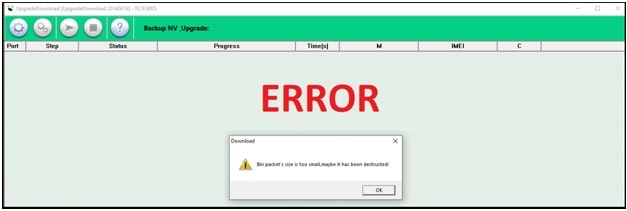
Reason of load bin packet failed Error
In single word, unsupported or outdated spd tool version is the only reason of Bin packet’s size is too small error or spd bin packet error.
Solution To Fix Bin packet’s size is too small, maybe it has been destructed SPD Tool Error In SPD Tool
Now it’s very clear that lower version of SPD tool or unsupported SPD flash tool is the main reason of load packet error for SPD tool. As a solution, use the upgraded version of SPD tool which you were using at the time of error or try to download & use latest SPD tool.
Latest or upgraded flash tool is the only one solution to avoid load packet error in SPD tool. For example, if you are facing this error at the time of using “SPD_Factory_Tool_R2.9.7007” version then use the just above upgraded version of this tool or use latest “SPD_Factory_Tool_R23.0.0001” version.
load bin packet failed research download Tool : Download Latest SPD ResearchDownload Tool
load bin packet failed upgrade download Tool : Download Latest SPD Upgrade download Tool
load bin packet failed factory download Tool : Download Latest SPD factory download Tool
Conclusion
Use the latest version or upgraded version of the SPD tool to fix load bin packet failed error. No need to configure the tool manually or no need to download lower stock ROM version to flash SPD phone.

Jagmohan Singh Negi
I am Jagmohan Singh Negi A Tech Enthusiastic Person. I always want to explore something new and experiment on Android Smartphones, here on 99mediasector.com i share solutions of Latest Android Bugs and Their Fixes, Latest Android launches, and How-to-Type Solutions for All Android Smartphones.
-
Скачивание файлов платно!
Купить Доступ -
язык форума русский и никакой другой! чем писать посты на английском, лучше вовсе не писать! для тех кто против, есть кнопка «Выйти»
-
Форум
-
Мобильные устройства
-
Другие модели телефонов и планшетов
-
Fly
-
Fly — программный ремонт
- Строго купля, продажа
-
Автор темы
sam2110
-
Дата начала
19/5/18



S
sam2110
.
- 19/5/18
- 1
- 0
-
россия москва

-
19/5/18
-
#1
Автор Темы:
sam2110
FACTORYDOWNLOAD_R2.9.7003 пишет bin packet’s size is too small maybe it has been destructed (
размер пакета bin слишком мал, возможно, он был разрушен) прошивка FS517_SW_20180319_SW24_FLY

GreyDog
.
- 26/8/05
- 2 602
- 339
-
Тольятти

-
19/5/18
-
#2
В Москве нет мастерских или нет денег на ремонт? :icq12:

kazsopin
.
- 29/4/06
- 2 613
- 2 292
-
Казань

-
19/5/18
-
#3
FACTORYDOWNLOAD_R2.9.7003 старый. Нужен UPGRADEDOWNLOAD_R3.16.0201.
Для ответа нужно войти/зарегистрироваться
Похожие Темы
-
Р
KMDH6001DA-B422 после прошивки уменьшилась память
- Автор РУС-ТИК
- 13/10/22
- Ответы: 12
Easy JTAG Plus
-

Решено «Error writing at address: 000000000000»
- Автор Layder
- 9/4/19
- Ответы: 0
Инструкции по работе c EasyJTAG / EasyJTAGPlus
-
E
ошибка записи GP1
- Автор expert-gsm
- 17/12/19
- Ответы: 8
Easy JTAG Plus
-
Ю
Вопрос Mi 11i не включается
- Автор юрий126
- 26/10/22
- Ответы: 5
Xiaomi — аппаратный ремонт
-
T
восстаносление EMMC с тест поинтом.
- Автор titnikolastit
- 26/12/18
- Ответы: 9
Easy JTAG Plus
Кто читал эту тему (всего: 23)
Детально
- yurbann
- Грайр
- Никола 148
- kromylive
- zdobnov_r
- Evg61
- vita_65
- Slava691
- vangaboy0303030
- Alekc15
- vladivir
- player_on
- kivrr
- jj.isaak
- Александр
- Bargest
- grandprix
- yra31
- Slobojanes
- kandybin1985
- KHB
Поделиться:
Электронная почта
Ссылка
-
Форум
-
Мобильные устройства
-
Другие модели телефонов и планшетов
-
Fly
-
Fly — программный ремонт
[FIX] Bin Packet’s Size is Too Small in UpgradeDownload Tool
Hello guys & Welcome to Mkg Tech
Today i’m Going to Give A Guide To Fix (Bin Packet’s Size is Too Small in UpgradeDownload
Tool)
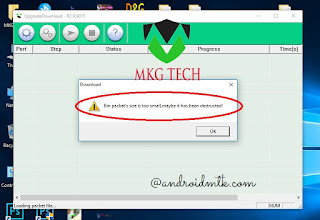
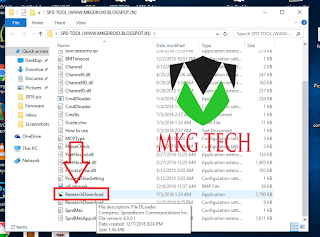
Extract To Desktop
Open ResearchDownload.exe
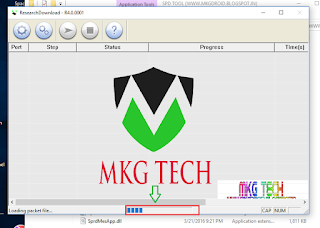
CLICK ON LOAD PACKET ICON &
BROWSE YOUR FIRMWARE
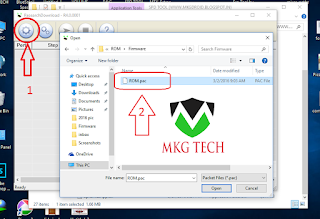
WAIT WHILE IT LOADS
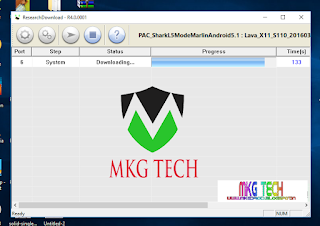
CLICK ON PLAY BUTTON

WAIT WHILE FLASHING PROCESS COMPLETES
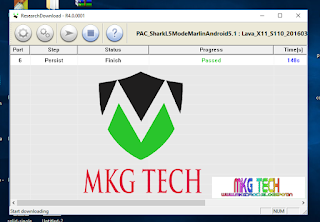
WHEN YOU SEE PASSED
REMOVE BATTERY FROM YOUR SMARTFONE RE INSRET & POWER IT ON
DONE………………….
Popular posts from this blog
Hello Bhaiyo. Or Behno I’ m Back With Fully Tested And Trustable Link For GTa 5 Some Screenshots From My Pc: Minimum Specs As Per Rockstar Games OS: Windows 8.1 64 Bit, Windows 8 64 Bit, Windows 7 64 Bit Service Pack 1, Windows Vista 64 Bit Service Pack 2* (*NVIDIA video card recommended if running Vista OS) Processor: Intel Core 2 Quad CPU Q6600 @ 2.40GHz (4 CPUs) / AMD Phenom 9850 Quad-Core Processor (4 CPUs) @ 2.5GHz Memory: 4GB Video Card: NVIDIA 9800 GT 1GB / AMD HD 4870 1GB (DX 10, 10.1, 11) Sound Card: 100% DirectX 10 compatible HDD Space: 65GB But Don’t Worry I’m Playing In Extremely Low Pc:: cpu= intel dual core pentium e5700 3.00ghz Ram= 6gb DDR3 GUP= Zotac Nvidia gt-710 2gb Very smoothly Note:- It’s Little bit hard to Install You Must Watch the installation Video click here to DOWNLOAD GAME INSTALLATION VIDEO THANKS I’M HAPPY YOU’RE HERE FACING ERROR
L ong-term evolution (LTE), also known as 4G, is a rapidly growing common global technology that’s continuously evolving to offer you unprecedented data rates, higher capacity, and new levels of user experience. S n apdragon Android Phones users can lock the band via qpst but its to hard for beginners. But here is an app called Network Signal Guru for Snapdragon device Snapdragon Android Phones user can easily lock 4G LTE bands 2300 Band 40, 1800 band 10, 850 Band 5 to get better speed and network coverage. Guide to Lock LTE Bands :- 1.) Download and install Network Signal G. on your android phone. 2.) First Time connect wifi and Open Network Signal G. app wait for complete config download . 3.) Now ‘ tap ‘ on Magic icon then band locking . 4.) Select ‘ LTE ‘ 4.) Select a band you like to lock i will suggest band 2300 and 850 for India LTE network like Jio 5.) now press ok. 6.) Done.. Enjoy Much faster Internet On your
GSM-Forum
(https://forum.gsmhosting.com/vbb/)
— Lenovo
(https://forum.gsmhosting.com/vbb/f958/)
— — Lenovo a1000 firmware
(https://forum.gsmhosting.com/vbb/f958/lenovo-a1000-firmware-2063644/)
Lenovo a1000 firmware
i want firmware for lenovo a1000 cpu spd 7731
| Gsm-Cdma | 04-13-2016 10:02 |
lenovo a1000 is SPD7731g chipset device
your 1st post link is MTK flashfile and flashtool
2nd post link is spd file.
but not done!
error while loading pac file with SPD Upgrade Tool vR2.9.9015
Bin packet’s size is too small,maybe it has been destructed
| ayat1978 | 04-13-2016 10:20 |
also for me i try this and i get the same message
try use another version rsd tool, recomended version 9005
| phone2world | 04-26-2016 09:18 |
I have tried with 9015 and 9005 versions but still problem is same
Bin packet’s size is too small,maybe it has been destructed
| phone2world | 04-26-2016 09:33 |
Great Got success with
ResearchDownload-R2.2.9017
| abulkasamshepon | 05-20-2016 15:58 |
ResearchDownload-R2.2.9017 File Load But Open JIG Contoral port filed Problem
use upgrade download R2.10.1003….. sucess……..100%
| darmobiles | 07-19-2016 10:50 |
can you please share flash file spd 7731
| gsmview.11 | 07-31-2016 19:51 |
lenovo a1000 (phone) Spreadtrum SC7731 chipset? hey i’m looking for the same firmware. anyone out here who can help out… i’m asking someone to flash the firmware to the phone, see i’m new to this flashing and rooting thing. better to ask someone well versed on this matter. but we need the firmware. anyone kind enough to point to the right link? 🙂
thanks in advance!
| gsmview.11 | 07-31-2016 20:21 |
does these two work? i think i have downloaded the 1st link. and had asked the friend for the dirty job. that one was not successful, on the way downloading the 2nd one. will know in a day or two if it will work too bad my download is…..that. a turtle would have been quicker!! :rolleyes:
| ReDouaNe27 | 08-08-2016 03:29 |
YES WITH ResearchDownload-R2.2.9017
| joeldg23 | 08-08-2016 05:52 |
use research download for flashing
vBulletin Optimisation provided by
vB Optimise (Pro) —
vBulletin Mods & Addons Copyright © 2023 DragonByte Technologies Ltd.
— GSM Hosting Ltd. — 1999-2022 —
Page generated in 0.11971 seconds with 6 queries
If you are facing Bin Packet Error while loading the firmware in SPD Flash Tool, then we recommend you to use SPD Flash Tool R2.9.9005 to fix the issue.

Download SPD Flash Tool for Bin Packet Error
SPD Upgrade Tool allows you to flash the Stock firmware on your Spreadtrum powered Smartphone, Tablet and FeaturePhone. By using any of the Mirror Link, you can get the tool on your computer:
File Name: SPD_Upgrade_Tool_R2.9.9005.zip
File Size: 1.6 MB
How to Use: Read Instructions
How to Download: See Example
Compatible With: Windows Computer
Mirror 1 (Pcloud)Mirror 2 (AFH)Mirror 3 (Mega)
Readme Once:
[*] How to use SPD Upgrade Tool: If you want to learn to use SPD Upgrade Tool to flash or install firmware (ROM), then head over to How to use SPD Upgrade Tool page.
[*] Download Latest version of SPD Research Tool: If you are looking for the latest version of SPD Research Tool, then head over to the Research Tool Section page.
[*] Download Latest version of SPD Upgrade Tool: If you are looking for the latest version of SPD Upgrade Tool, then head over to the Upgrade Tool Section page.
[*] Download Latest version of SPD Factory Tool: If you are looking for the latest version of SPD Factory Tool, then head over to the Factory Tool Section page.
[*] Download SPD/Unisoc Driver: If you are looking for SPD/Unisoc USB Driver compatible with the SPD Flash Tool, then head over to Download SPD USB Driver page.
[*] Always Scan First: We have officially scanned the SPD_Upgrade_Tool_R2.9.9005.zip file before sharing it online. You can see the Scan Data of SPD_Upgrade_Tool_R2.9.9005.zip on VirusTotal.
[*] Hot-linking Not Allowed: If you are willing to share the above tool with your friends or on any website, forums, then use the page URL. Please don’t use the direct file link, as it will be re-directed to this website’s homepage.
hero
Active member
- Joined
- Aug 11, 2016
- Messages
- 1,394
- Reaction score
- 0
- Points
- 36
- Location
-
bangalore
-
#1
set get hung on logo
w1316
no other things to type

- Joined
- Apr 22, 2016
- Messages
- 3,532
- Reaction score
- 2
- Points
- 38
- Age
- 32
- Location
-
Delhi
hero
Active member
- Joined
- Aug 11, 2016
- Messages
- 1,394
- Reaction score
- 0
- Points
- 36
- Location
-
bangalore
-
#3
update tool r2.9.9015
bin packet size is too small,maybe it has been destructed
The_Alien
New member
- Joined
- Mar 22, 2016
- Messages
- 582
- Reaction score
- 0
- Points
- 0
 Attention!
Prestigio Muze A5 — Firmware
 ssett , Made according to the instructions?
denyshodak,
Yes, I’d connect the body to a computer, it shall find it, well, there is even utter a word, and silence
Help solve the problem
After installationPacRom CM 13.1 Instead of the phone lock screen shows a black screen to turn on every time you need to reboot the phone. When you load a model shows Samsung Galaxy Grand Prime VE Duos SM-G531H .
Next putCyanogenmod 12.1 the problem persists, please back to FireOS (Which worked fine) but now the ship is infinitely logo animation.
Now, even after installing drain lock screen black and Samsung boot screen.
I cleaned everything but the memory card, rebooted and installed in rekaveri. Tell me how to clean this trouble?
Put please complete backup of the runoff
xxxres Why you need a backup? Here is archive with stock firmware
yan100,
Thanks for the advice! Put the drain, then I tried to put afterCyanogenmod 12.1 IRS .. same. Again, drain and afterwards tested FireOS and everything is fine TFA TFA))
Why can not I re-flash via PC? windose 10, phone is not included.
Attached images

Post has been editedASerezga99 — 14.11.18, 18:19
How to install TWRP Recovery or by a computer if the phone is not loaded on the logo! And when formatting or simply Radney Recovery an error! HELP!!!!!
When firmware bear did not and if it is sewn, and then disable any izmeeny! How to pick formatnut fshlesh memory ??
Posted on 20/11/2018, 13:54:
ASerezga99,
campaign is the same crap as me!
Attached images


makarichev999999 Try through fastboot this way: adb download from the Internet, extract to C: adb on a computer in the same folder throw rekaveri .img file, hold down the shift, right-click on an empty space in the Windows Explorer to the folder, select Open Command Window , turn the phone into rekaveri, connect to your computer and type: fastboot devices. You should see the serial number. If does not appear, then the instruction is not appropriate. Then enter fastboot flash recovery imya_fayla.img and rekaveri should thank you. Instructions are not accurate and can not come to the phone.
yan100 , Thanks uchtu but you’re late, I fried the phone
Posted on 20/11/2018, 22:09:
yan100 , Almost did but little other teams. It is a pity that had not received a reply
makarichev999999 As roasted phone, if not a secret?
yan100 After removing the memory stopped at all so I cut one psihanul and roast it in the edge
Psihanul percent of sealed generally vzhopu his Chinese shit. Well, I think if you want to restore, and the donor can
Posted on 20/11/2018, 22:28:
yan100 , There is a tablet with a similar problem. But there is a different case. After flashing in tvrp at the time of restarting the battery sat or passed out. Now is included, Piquette, and does not react to grip buttons. Apparatus zenpad 8.0 z380knl
yan100 Hi there, see ASUS tablet that I spoke of is now connected to a computer sees as a port of 9008 but to revive him, I do not know. Prompt that either?
People, help. The phone will not boot on screen with the books. Xs why so: I took out of his pocket and saw him already at boot reset to factory settings through rekaveri — did not help. I wanted to flash through researchdownload according to instructions in the header, but in all the download time for the insertion (of the same message, where instruction flashing via PC) provides top error (sc77xx_no_internal_sd: [file name of the firmware]). Tried to flash through upgradedownload — «Bin packet`s size is too small, maybe it has been destructed»
How can I fix it?
UPD phone is on, but writes from above, that is not enough memory, though her enough. Because of this, as I understand it, does not want to install any apps (apk) — after a few seconds — «not installed.» Maybe someone knows what could be the problem? I would be very grateful …
Post has been editedGunter is the best — 12.12.18, 16:03
Gunter is the best , Died memory, it was the same, and then completely stopped included. Sent for repairs died said memory replacement motherboard 3500, took no repair (for the money you can buy a new better) to send their children toys.
Gunter is the best @ 12.12.18, 14:25
Tried to flash through upgradedownload — «Bin packet`s size is too small, maybe it has been destructed»
1. Perhaps the curve archiver version which incorrectly Unpack the archive with the pac-file.
2. The viruses on the computer, that spoil the firmware bin-files after raspakivki pac-file.
3. Winchester with bad clusters (files after unpacking EEPROM are invalid resolution due to falling broken clusters)
What is your operating system? where to download the firmware?
Gunter is the best,
pac file unpacks the program itself-flasher (ResearshDownload), immediately after the indication of the file.
To try using the flash from ResearshDownloadthis archive.
Post has been editedLumen4 — 23.12.18, 11:54
makarichev999999 @ 20.11.18, 18:52
How to install TWRP Recovery or by a computer if the phone is not loaded on the logo! And when formatting or simply Radney Recovery an error! HELP!!!!!
When firmware bear did not and if it is sewn, and then disable any izmeeny! How to pick formatnut fshlesh memory ??
Greetings! Has anyone figured out how to restore the device, the same error, it fails to do ?? (((((