При разработке проекта на ASP.NET MVC возникла необходимость сделать собственную страницу ошибки 404. Я рассчитывал, что справлюсь с этой задачей за несколько минут. Через 6 часов работы я определил два варианта ее решения разной степени сложности. Описание — далее.
В ASP.NET MVC 3, с которой я работаю, появились глобальные фильтры. В шаблоне нового проекта, уже встроено ее использование для отображения собственной страницы ошибок (через HandleErrorAttribute). Замечательный метод, только он не умеет обрабатывать ошибки с кодом 404 (страница не найдена). Поэтому пришлось искать другой красивый вариант обработки этой ошибки.
Обработка ошибки 404 через Web.config
Платформа ASP.NET предоставляет возможность произвольно обрабатывать ошибки путем нехитрой настройки файла Web.config. Для это в секцию system.web нужно добавить следующий код:
<customErrors mode="On" >
       <error statusCode="404" redirect="/Errors/Error404/" />
</customErrors>
При появлении ошибки 404 пользователь будет отправлен на страницу yoursite.ru/Errors/Error404/?aspxerrorpath=/Not/Found/Url. Кроме того, что это не очень красиво и удобно (нельзя отредактировать url), так еще и плохо для SEO — статья на habr.ru.
Способ можно несколько улучшить, добавив redirectMode=«ResponseRewrite» в customErrors:
<customErrors mode="On" redirectMode="ResponseRewrite" >
       <error statusCode="404" redirect="/Errors/Error404/" />
</customErrors>
В данном случае должен происходить не редирект на страницу обработки ошибки, а подмена запрошенного ошибочного пути содержимым указанной страницы. Однако, и здесь есть свои сложности. На ASP.NET MVC этот способ в приведенном виде не работает. Достаточно подробное обсуждение (на английском) можно прочитать в топике. Кратко говоря, этот метод основан на методе Server.Transfer, который используется в классическом ASP.NET и, соответственно, работает только со статическими файлами. С динамическими страницами, как в примере, он работать отказывается (так как не видит на диске файл ‘/Errors/Error404/’). То есть, если заменить ‘/Errors/Error404/’ на, например, ‘/Errors/Error404.htm’, то описанные метод будет работать. Однако в этом случае не получится выполнять дополнительные действия по обработке ошибок, например, логирование.
В указанном топике было предложено добавить в каждую страницу следующий код:
Response.TrySkipIisCustomErrors = true;Этот способ работает только с IIS 7 и выше, поэтому проверить этот метод не удалось — используем IIS 6. Поиски пришлось продолжить.
Танцы с бубном и Application_Error
Если описанный выше метод применить по каким-либо причинам не удается, то придется писать больше строк кода. Частичное решение приведено в статье.
Наиболее полное решение «с бубном» я нашел в топике. Обсуждение ведется на английском, поэтому переведу текст решения на русский.
Ниже приведены мои требования к решению проблемы отображения ошибки 404 NotFound:
- Я хочу обрабатывать пути, для которых не определено действие.
- Я хочу обрабатывать пути, для которых не определен контроллер.
- Я хочу обрабатывать пути, которые не удалось разобрать моему приложению. Я не хочу, чтобы эти ошибки обрабатывались в Global.asax или IIS, потому что потом я не смогу сделать редирект обратно на мое приложение.
- Я хочу обрабатывать собственные (например, когда требуемый товар не найден по ID) ошибки 404 в едином стиле.
- Я хочу, чтобы все ошибки 404 возвращали MVC View, а не статическую страницу, чтобы потом иметь возможность получить больше данных об ошибках. И они должны возвращать код статуса 404.
Я думаю, что Application_Error в Global.asax должен быть использован для целей более высокого уровня, например, для обработки необработанных исключений или логирования, а не работы с ошибкой 404. Поэтому я стараюсь вынести весь код, связанный с ошибкой 404, вне файла Global.asax.
Шаг 1: Создаем общее место для обработки ошибки 404
Это облегчит поддержку решение. Используем ErrorController, чтобы можно было легче улучшать страницу 404 в дальнейшем. Также нужно убедиться, что контроллер возвращает код 404!
public class ErrorController : MyController
{
    #region Http404

    public ActionResult Http404(string url)
    {
        Response.StatusCode = (int)HttpStatusCode.NotFound;
        var model = new NotFoundViewModel();
        // Если путь относительный ('NotFound' route), тогда его нужно заменить на запрошенный путь
        model.RequestedUrl = Request.Url.OriginalString.Contains(url) & Request.Url.OriginalString != url ?
            Request.Url.OriginalString : url;
        // Предотвращаем зацикливание при равенстве Referrer и Request
        model.ReferrerUrl = Request.UrlReferrer != null &&
            Request.UrlReferrer.OriginalString != model.RequestedUrl ?
            Request.UrlReferrer.OriginalString : null;

        // TODO: добавить реализацию ILogger

        return View("NotFound", model);
    }
    public class NotFoundViewModel
    {
        public string RequestedUrl { get; set; }
        public string ReferrerUrl { get; set; }
    }

    #endregion
}
Шаг 2: Используем собственный базовый класс для контроллеров, чтобы легче вызывать метод для ошибки 404 и обрабатывать HandleUnknownAction
Ошибка 404 в ASP.NET MVC должна быть обработана в нескольких местах. Первое — это HandleUnknownAction.
Метод InvokeHttp404 является единым местом для перенаправления к ErrorController и нашему вновь созданному действию Http404. Используйте методологию DRY!
public abstract class MyController : Controller
{
    #region Http404 handling

    protected override void HandleUnknownAction(string actionName)
    {
        // Если контроллер - ErrorController, то не нужно снова вызывать исключение
        if (this.GetType() != typeof(ErrorController))
            this.InvokeHttp404(HttpContext);
    }

    public ActionResult InvokeHttp404(HttpContextBase httpContext)
    {
        IController errorController = ObjectFactory.GetInstance<ErrorController>();
        var errorRoute = new RouteData();
        errorRoute.Values.Add("controller", "Error");
        errorRoute.Values.Add("action", "Http404");
        errorRoute.Values.Add("url", httpContext.Request.Url.OriginalString);
        errorController.Execute(new RequestContext(
             httpContext, errorRoute));

        return new EmptyResult();
    }

    #endregion
}
Шаг 3: Используем инъекцию зависимостей в фабрике контроллеров и обрабатываем 404 HttpException
Например, так (не обязательно использовать StructureMap):
Пример для MVC1.0:
public class StructureMapControllerFactory : DefaultControllerFactory
{
    protected override IController GetControllerInstance(Type controllerType)
    {
        try
        {
            if (controllerType == null)
                return base.GetControllerInstance(controllerType);
        }
        catch (HttpException ex)
        {
            if (ex.GetHttpCode() == (int)HttpStatusCode.NotFound)
            {
                IController errorController = ObjectFactory.GetInstance<ErrorController>();
                ((ErrorController)errorController).InvokeHttp404(RequestContext.HttpContext);

                return errorController;
            }
            else
                throw ex;
        }

        return ObjectFactory.GetInstance(controllerType) as Controller;
    }
}
Пример для MVC2.0:
 protected override IController GetControllerInstance(RequestContext requestContext, Type controllerType)
{
    try
    {
        if (controllerType == null)
            return base.GetControllerInstance(requestContext, controllerType);
    }
    catch (HttpException ex)
    {
        if (ex.GetHttpCode() == 404)
        {
            IController errorController = ObjectFactory.GetInstance<ErrorController>();
            ((ErrorController)errorController).InvokeHttp404(requestContext.HttpContext);

            return errorController;
        }
        else
            throw ex;
    }

    return ObjectFactory.GetInstance(controllerType) as Controller;
}
Я думаю, что лучше отлавливать ошибки в месте их возникновения. Поэтому я предпочитаю метод, описанный выше, обработке ошибок в Application_Error.
Это второе место для отлова ошибок 404.
Шаг 4: Добавляем маршрут NotFound в Global.asax для путей, которые не удалось определить нашему приложению
Этот маршрут должен вызывать действие Http404. Обратите внимание, что параметр url будет относительным адресом, потому что движок маршрутизации отсекает часть с доменным именем. Именно поэтому мы добавили все эти условные операторы на первом шаге.
        routes.MapRoute("NotFound", "{*url}",
            new { controller = "Error", action = "Http404" });
Это третье и последнее место в приложении MVC для отлова ошибок 404, которые Вы не вызываете самостоятельно. Если здесь не удалось сопоставить входящий путь ни какому контроллеру и действию, то MVC передаст обработку этой ошибки дальше платформе ASP.NET (в файл Global.asax). А мы не хотим, чтобы это случилось.
Шаг 5: Наконец, вызываем ошибку 404, когда приложению не удается что-либо найти
Например, когда нашему контроллеру Loan, унаследованному от MyController, передан неправильный параметр ID:
//
// GET: /Detail/ID

public ActionResult Detail(int ID)
{
    Loan loan = this._svc.GetLoans().WithID(ID);
    if (loan == null)
        return this.InvokeHttp404(HttpContext);
    else
        return View(loan);
}
Было бы замечательно, если бы можно было все это реализовать меньшим количеством кода. Но я считаю, что это решение легче поддерживать, тестировать, и в целом оно более удобно.
Библиотека для второго решения
Ну и на последок: уже готова библиотека, позволяющая организовать обработку ошибок описанным выше способом. Найти ее можно здесь — github.com/andrewdavey/NotFoundMvc.
Заключение
Интереса ради я посмотрел, как эта задача решена в Orchard. Был удивлен и несколько разочарован — разработчики решили вообще не обрабатывать это исключение — собственные страницы ошибок 404, на мой взгляд, давно стали стандартом в веб-разработке.
В своем приложении я использовал обработку ошибки через Web.config с использованием роутинга. До окончания разработки приложения, а останавливаться на обработке ошибки 404 довольно опасно — можно вообще приложение тогда никогда не выпустить. Ближе к окончанию, скорее всего, внедрю второе решение.
Ссылки по теме:
- ASP.NET, HTTP 404 и SEO.
- CustomErrors does not work when setting redirectMode=«ResponseRewrite».
- How can I properly handle 404 in ASP.NET MVC?
- Обработка ошибок для всего сайта в ASP.NET MVC 3.
- ASP.NET MVC 404 Error Handling.
- HandleUnknownAction in ASP.NET MVC – Be Careful.
- github.com/andrewdavey/NotFoundMvc.
Сегодня обсудим, как на asp.net mvc можно настроить обработку ошибок 404, 500, ну и любых других. Рассмотрим на примере 404 и 500, как наиболее популярных и важных. Как вместо стандартного не очень красивого желтого окна ошибки показывать свои собственные красивые интересные страницы, и при этом как правильно отдавать код ошибки в браузер пользователя.
Казалось бы, задача довольно тривиальная и может быть решена написанием буквально пары строк кода. Действительно, так и есть, если вы используете любую популярную серверную технологию. Но только не ASP.NET. Если ваше приложение написано на ASP.NET MVC, и вы первый раз сталкиваетесь с проблемой обработки ошибок, очень легко запутаться и сделать неправильные настройки. Что впоследствии негативно отразится на продвижении сайта в поисковых системах, удобстве работы для пользователя, SEO-оптимизации.
Рассмотрим два подхода, как настроить страницы ошибок. Они в целом похожи, какой выбрать – решать вам.
Для начала вспомним, что означают наиболее популярные коды ошибок, которые отдает сервер.
Код ответа 200. Это значит что все ОК. Запрос клиента обработан успешно, и сервер отдал затребованные клиентом данные в полном объеме. Например, пользователь кликнул по гиперссылке, и в ответ на это в браузере отобразилась нужная ему информация.
Код ответа 404. Это означает, что запрошенный клиентом ресурс не найден на сервере. Например, указанная в адресе гиперссылки статья не найдена, или *.pdf файл был удален и теперь недоступен для скачивания.
Код ответа 500. Внутренняя ошибка на сайте. Что-то сломалось. Это может быть все что угодно, от неправильно написанного кода программистом, до отказа оборудования на сервере.
Допустим, мы только что создали новое веб-приложение типа MVC. На текущий момент, если никаких дополнительных действий для обработки ошибок не принимать, то стандартный сценарий обработки ошибок будет работать как нужно. В браузер пользователя будет отдаваться правильный код ошибки, пользователю будет показана стандартная страница с ошибкой и ее описанием.
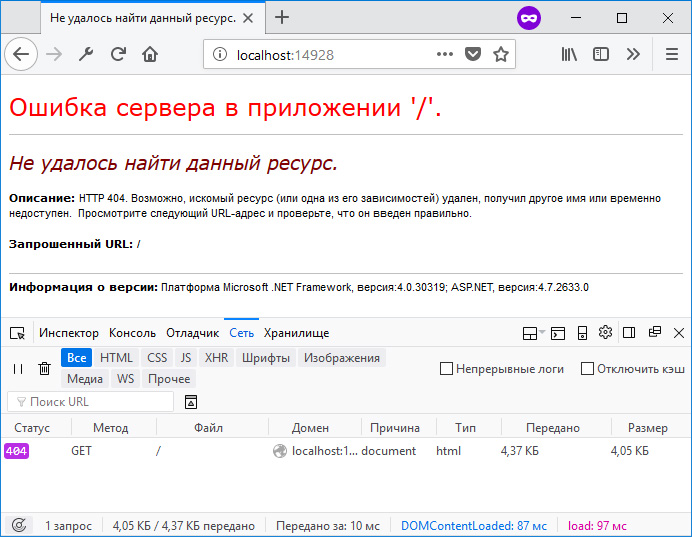
Стандартная страница ошибки
Теперь займемся настройкой собственных страниц ошибок. При этом для нас важно не только показать пользователю красивую страницу ошибки, но также сохранить правильный код ответа сервера.
Вариант 1. Ссылка на статичные заранее подготовленные html-страницы.
Первым делом в файле web.config в разделе system.web добавляем новую секцию customErrors со следующими настройками:
web.config
<system.web>
  <customErrors mode="On" redirectMode="ResponseRewrite" defaultRedirect="~/404.aspx">
    <error statusCode="404" redirect="~/404.aspx"/>
    <error statusCode="500" redirect="~/500.aspx"/>
  </customErrors>
  ...
</system.web>
Эта секция служит для обработки ошибок на уровне платформы ASP.NET.
Атрибут mode=»On» определяет, что пользовательские страницы ошибок включены. Также допустимы значения Off / RemoteOnly.
Атрибут redirectMode=»ResponseRewrite» определяет, следует ли изменять URL-адрес запроса при перенаправлении на пользовательскую страницу ошибки. Естественно, нам этого не нужно.
Атрибут defaultRedirect=»~/404.aspx» указывает на то, какая страница ошибки будет показана в случае возникновения кода ответа сервера, который мы не описали в настройках. Пусть при любых других ошибках пользователь будет думать, что страница не найдена.
И уже внутри этой секции мы определяем два кода, для которых у нас будут кастомные страницы ошибок.
Далее, как видно из настроек выше, нам понадобятся *.aspx файлы, на которые будет делаться редирект. Обратите внимание, что мы ссылаемся именно на *.aspx файлы, а не на *.html. Эти файлы являются проходными, служебными, в них содержатся настройки для ответа сервера. Содержимое файла 404.aspx:
404.aspx
<%@ Page Language="C#" %>

<%
    var filePath = MapPath("~/404.html");
    Response.StatusCode = 404;
    Response.ContentType = "text/html; charset=utf-8";
    Response.WriteFile(filePath);
%>
В коде выше мы указываем путь непосредственно до конечного *.html файла, а также дополняем настройки ответа сервера. Указываем код ответа, тип отдаваемого контента и кодировку. Если не указать кодировку, то браузер пользователя может интерпретировать ответ от сервера как не отформатированную строку, и, соответственно, не преобразует ее в html-разметку. А если не указать StatusCode = 404 , то получится следующая интересная ситуация:
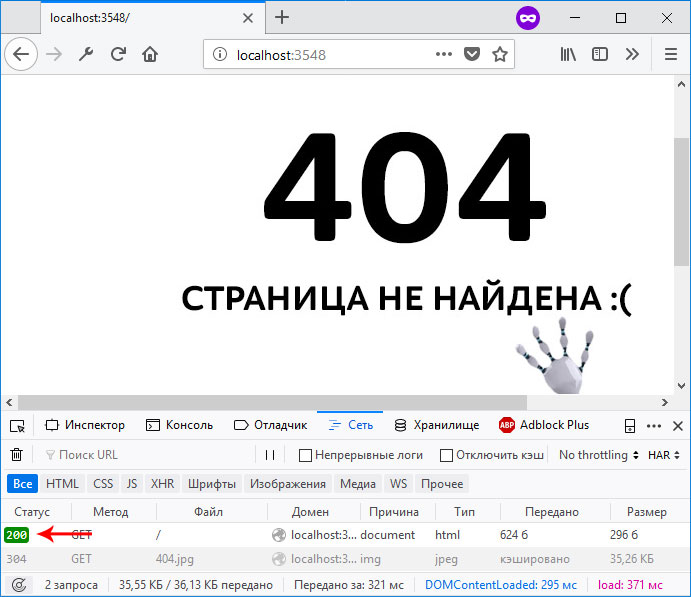
Код ответа сервера отдается неверно
И хотя на рисунке выше нам показывается пользовательская страница с ошибкой, при этом код ответа 200 — это конечно же неверно. Когда-то давно на форумах Microsoft такое поведение зарепортили как баг. Однако Microsoft возразила, что это не баг, а фича и не стала ничего менять в будущих релизах ASP.NET. Поэтому приходится это исправлять вручную, и вручную в *.aspx файле в ответе сервера указывать код ответа 404.
Попробуйте собственноручно намеренно убрать какую-нибудь из объявленных на данный момент настроек из секции customErrors и понаблюдайте за результатом.
Также по аналогии создаем подобный *.aspx файл для ошибки 500.
И уже после этого нам нужно создать статичные html-файлы, соответственно для ошибок 404 и 500. Пусть они лежат в корне нашего проекта.
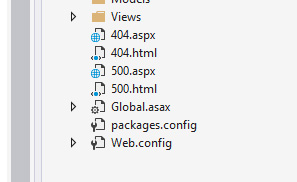
Статичные файлы расположены в корне проекта
Здесь же в файле web.config определяем раздел system.WebServer, если он еще не определен, и в нем объявляем секцию httpErrors:
web.config
  <system.webServer>
    <httpErrors errorMode="Custom" defaultResponseMode="File" defaultPath="c:projectsmysite404.html">
      <remove statusCode="404" />
      <remove statusCode="500" />
      <error statusCode="404" path="404.html" responseMode="File" />
      <error statusCode="500" path="500.html" responseMode="File" />
    </httpErrors>
  </system.webServer>
Эта секция служит для обработки ошибок на уровне сервера IIS. Суть в том, что иногда обработка запроса происходит непосредственно на уровне ASP.NET. А иногда ASP.NET просто определяет нужный код ответа и пропускает запрос выше, на уровень сервера. Такой сценарий может случиться, если, например, мы в действии контроллера возвращаем экземпляр класса HttpNotFound:
Или же когда система маршрутизации в MVC-приложении не может определить, к какому маршруту отнести запрошенный пользователем URL-адрес:
https://site.com/long/long/long/long/path
Для секции httpErrors важно отметить следующее. Так как мы ссылаемся на статичные *.html файлы, то и в качестве значений для нужных атрибутов здесь также указываем File . Для атрибута defaultPath необходимо указать абсолютный путь до файла ошибки. Относительный путь именно в этом месте работать не будет. Сам атрибут defaultPath определяет файл, который будет выбран для всех других ошибок, которые мы явно не указали. Но здесь есть одна небольшая проблема. Дело в том, что этот атрибут по умолчанию заблокирован на сервере IIS Express. Если вы разрабатываете свое приложение именно на локальном сервере, то это ограничение нужно снять. Для этого в директории своего проекта нужно найти файл конфигурации сервера и удалить этот атрибут из заблокированных, как это показано на рисунке:

Расположение файла applicationhost.config
Также проверьте папку App_Start. Если вы создали не пустое приложение, а работаете над реальным проектом, там может находиться класс FilterConfig, в котором регистрируются все глобальные фильтры в приложении. В методе регистрации удалите строчку кода, где регистрируется HandleErrorAttribute, в нашем случае он не понадобится.
Вот такой комплекс мер нужно предпринять, чтобы настроить обработку ошибок 404, 500, и любых других. Это настройки в файле web.config, и добавление в наш проект статичных файлов.
Вариант 2. Обработка ошибок с использованием специального контроллера.
Второй подход немного отличается от первого. Здесь нам не понадобится секция customErrors, так как обработку всех ошибок мы будем передавать сразу из приложения на уровень сервера, и он уже будет решать что делать. Можно удалить или закомментировать эту секцию в файле web.config.
Далее создадим специальный контроллер, который будет принимать все ошибки, которые мы хотим обрабатывать:
public class ErrorController : Controller
{
    public ActionResult NotFound()
    {
        Response.StatusCode = 404;
        return View();
    }

    public ActionResult Internal()
    {
        Response.StatusCode = 500;
        return View();
    }
}
Также создадим соответствующие представления с нужной нам красивой разметкой.
Также в файле web.config нам нужно изменить настройки в секции httpErrors. Если раньше мы ссылались на статичные html-файлы, то теперь мы будем обращаться по указанным URL, которые мы определили в ErrorController’е, чтобы именно там обрабатывать ошибки:
web.config
<httpErrors errorMode="Custom" existingResponse="Replace" defaultResponseMode="ExecuteURL" defaultPath="/Error/NotFound">
  <remove statusCode="404"/>
  <remove statusCode="500"/>
  <error statusCode="404" path="/Error/NotFound" responseMode="ExecuteURL"/>
  <error statusCode="500" path="/Error/Internal" responseMode="ExecuteURL"/>
</httpErrors>
Вариант 3. Фильтр HandleErrorAttribute
Замечу, что есть еще один способ взять под свой контроль обработку ошибок в приложении – это наследоваться от стандартного класса HandleErrorAttribute и написать свой фильтр. Но это уже более частный случай, когда нужно реализовать какую-то особенную логику при возникновении той или иной ошибки. В большинстве же более менее стандартных приложений наша проблема решается двумя выше описанными способами и в этом фильтре нет необходимости. Более подробную информацию, как работать с классом HandleErrorAttribute можно найти в официальной документации в интернете по этой ссылке.
Итого
Мы посмотрели на два разных подхода, которые можно применить при обработке ошибок на платформе ASP.NET. Опять же повторюсь, что если для вас не принципиально настраивать собственные страницы ошибок, то лучше не изменять эти настройки, так как даже одна упущенная деталь или неверно сконфигурированный параметр может очень сильно навредить репутации вашего сайта для конечного пользователя и в поисковых системах.
Настройка страниц ошибок
Данное руководство устарело. Актуальное руководство: Руководство по ASP.NET Core
Последнее обновление: 22.07.2016
С помощью двух секций customErrors и httpErrors в файле конфигурации мы можем задать в ASP.NET MVC 5 обработку статусных кодов ошибок.
Секция customErrors в web.config позволяет задать собственные страницы ошибок для различных статусных кодов HTTP. Правда, применение этой секции имеет ограничения.
Вначале добавим в проект свои страницы ошибок. Например, для обработки ошибки 404 добавим в корень проекта файл 404.html:
<!DOCTYPE html>
<html>
<head>
    <title>Ошибка 404</title>
	<meta charset="utf-8" />
</head>
<body>
    <h2>Ошибка 404. Ресурс не найден</h2>
</body>
</html>
Подобным образом добавим файлы и для других ошибок.
Далее найдем в файле конфигурации web.config секцию system.web и поместим в нее подсекцию
customErrors (если эта подсекция уже есть, изменим ее):
<system.web>
   <compilation debug="true" targetFramework="4.6" />
   <httpRuntime targetFramework="4.6" />

   <customErrors mode="On">
      <error statusCode="404" redirect="~/404.html"/>
      <error statusCode="403" redirect="~/403.html"/>
   </customErrors>
</system.web>
Внутри секции customErrors помещаются элементы error, каждый из которых задает код ошибки (атрибут statusCode)
и страницу переадресации при ошибке (атрибут redirect)
Если мы сейчас запустим приложение и обратимся к несуществующему ресурсу, то нам отобразится наша страница с ошибкой:
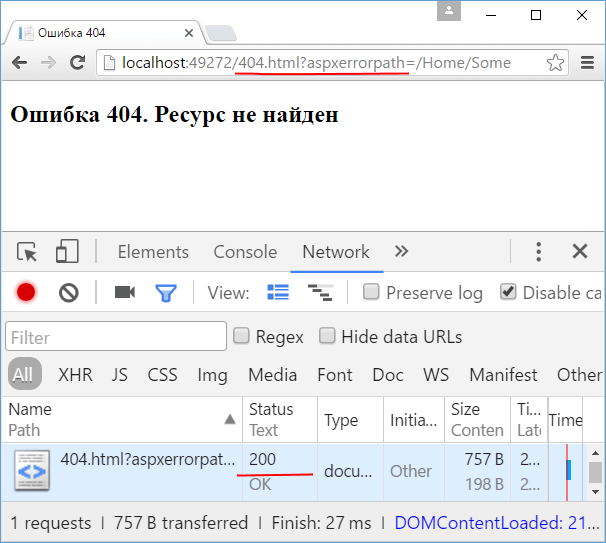
Однако при такой переадресации мы сталкиваемся с рядом проблем. Во-первых, в качестве адреса используется не оригинальный путь, к которому идет
обращение, а 404.html. То есть вместо строки запроса /Home/Some, мы получаем /404.html?aspxerrorpath=/Home/Some.
Во-вторых, при отдаче ответа клиент получает статусный код 200, то есть запрос успешно обработан, вместо кода 404.
Чтобы решить первую проблему, добавим к определению секции атрибут redirectMode="ResponseRewrite":
<customErrors mode="On" redirectMode="ResponseRewrite">
    <error statusCode="404" redirect="~/404.html"/>
    <error statusCode="403" redirect="~/403.html"/>
</customErrors>
Теперь страницу с ошибкой можно будет увидеть напрямую по запрошенному пути. Однако клиенту все равно будут отдаваться статусный код 200.
Более того у нас есть еще и другая проблема. Если мы напрямую возвратим из метода контроллера статусный код ошибки, то этот код никак не будет обрабатываться, и настройки в
customErrors на него не подействуют. Например:
public class HomeController : Controller
{
    public ActionResult Index()
    {
        return HttpNotFound();
    }
}
При обращении к нему мы получим стандартное сообщение об ошибке:
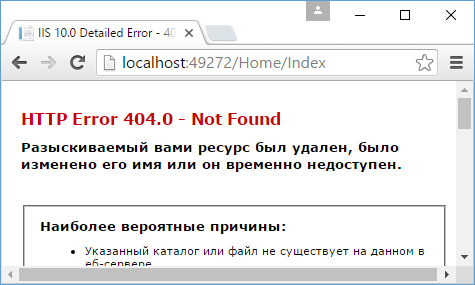
И для решения возникших проблем нам надо использовать не customErrors, а элемент httpErrors.
Вначале для обработки ошибок добавим в приложение новый контроллер ErrorController:
public class ErrorController : Controller
{
    public ActionResult NotFound()
    {
        Response.StatusCode = 404;
        return View();
    }

    public ActionResult Forbidden()
    {
        Response.StatusCode = 403;
        return View();
    }
}
Добавим представление для метода NotFound:
@{
    ViewBag.Title = "Ошибка 404";
}

<h2>Ошибка 404. Ресурс не найден</h2>
Подобным образом добавим представление и для других методов.
Далее добавим элемент httpErrors. Этот элемент помещается внутрь секции system.webServer. Если
этой секции внутри web.config нет, то ее можно добавить. А узел customErrors мы можем удалить или закомментировать:
<system.web>
   <compilation debug="true" targetFramework="4.6" />
   <httpRuntime targetFramework="4.6" />

   <!--<customErrors mode="On"  redirectMode="ResponseRewrite">
    <error statusCode="404" redirect="~/Error/NotFound"/>
    <error statusCode="403" redirect="~/Error/Forbidden"/>
  </customErrors>-->
</system.web>

<system.webServer>
  <httpErrors errorMode="Custom" existingResponse="Replace">
    <clear/>
    <error statusCode="404" path="/Error/NotFound" responseMode="ExecuteURL"/>
    <error statusCode="403" path="/Error/Forbidden" responseMode="ExecuteURL"/>
  </httpErrors>
</system.webServer>
Элемент httpErrors имеет ряд настроек. Чтобы протестировать настройки локально, устанавливается атрибут errorMode="Custom".
Если тестирование необязательно, и приложение уже развернуто для использования, то можно установить значение errorMode="DetailedLocalOnly".
Значение existingResponse="Replace" позволит отобразить ошибку по оригинальному запрошенному пути без переадресации.
Внутри элемента httpErrors с помощью отдельных элементов error устанавливается обработка ошибок. Атрибут statusCode
задает статусный код, атрибут path — адрес url, который будет вызываться, а атрибут responseMode указывает, как будет обрабатываться ответ вызванному url.
Атрибут responseMode может принимать три значения:
-
ExecuteURL: производит рендеринг ответа полученного при вызове адреса url из атрибута path -
Redirect: выполняет переадресацию со статусным кодом 302 -
File: рассматривает адрес url из атрибута path как статическую страницу и использует ее в качестве ответа
Настройки элемента httpErrors могут наследоваться с других уровней, например, от файла конфигурации machine.config. И чтобы удалить
все унаследованные настройки, применяется элемент <clear />. Чтобы удалить настройки для отдельных ошибок, применяется элемент
<remove />:
<httpErrors errorMode="Custom" existingResponse="Replace">
    <remove statusCode="404"/>
    <remove statusCode="403"/>
    <error statusCode="404" path="/Error/NotFound" responseMode="ExecuteURL"/>
    <error statusCode="403" path="/Error/Forbidden" responseMode="ExecuteURL"/>
</httpErrors>
И теперь, если мы запустим приложение и обратимся по несуществующему пути или к методу, который возвращает статусный код 404, то у нас отобразится ответ от метода NotFound контроллера
ErrorController:
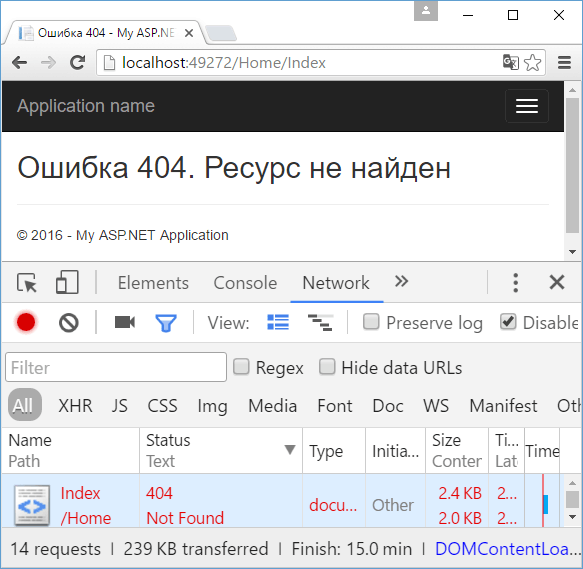
Установка атрибута responseMode="File" позволяет использовать в качестве ответа статические файлы. Например, используем ранее определенные файлы ошибок:
<httpErrors errorMode="Custom" existingResponse="Replace">
    <remove statusCode="404"/>
    <remove statusCode="403"/>
    <error statusCode="404" path="404.html" responseMode="File"/>
    <error statusCode="403" path="403.html" responseMode="File"/>
</httpErrors>
Just recently I realized this blog had a small issue.
While there was a custom error page for 404s, it was done with a redirect, and the view was returned with a 200 OK.
This meant that in my telemetry, I would see the PageNotFound entries, but not what page they tried to access.
So I set out to fix this issue along with some other related things.
This is how I implemented custom error pages for 404s and exceptions on this blog.
Custom error pages
So what is a custom error page?
It is a nice-looking view that is meant to be used when something goes wrong in a production environment.
In development you would use:
app.UseDeveloperExceptionPage();
Now when an exception occurs, you will see a view that describes what went wrong and where.
But it should not be used in production as it could lead to security problems.
Users might also consider your site less stable, and never visit again.
So we want to show them something that says something like:
Oops! Something went wrong. We are very sorry, please try again in a moment. If the error persists…
In case of a 404 status code, by default ASP.NET Core just returns a white page.
Instead we would like to show something like:
Hey that thing you tried to access does not exist. Please check the URL is correct.
Exception handler middleware
Let’s start by handling exceptions properly.
In our application pipeline configuration, we will add the exception handler middleware:
if(!env.IsDevelopment())
{
    app.UseExceptionHandler("/error/500");
}
So what does this middleware do?
Well, put simply it:
- Calls the next middleware with a try-catch block
- If an exception is caught, the next middleware is called again with the request path set to what you gave as an argument
This re-execution means the original URL is preserved in the browser.
The controller and action that is implemented looks like this:
[Route("error")]
public class ErrorController : Controller
{
    private readonly TelemetryClient _telemetryClient;

    public ErrorController(TelemetryClient telemetryClient)
    {
        _telemetryClient = telemetryClient;
    }

    [Route("500")]
    public IActionResult AppError()
    {
        var exceptionHandlerPathFeature = HttpContext.Features.Get<IExceptionHandlerPathFeature>();
        _telemetryClient.TrackException(exceptionHandlerPathFeature.Error);
        _telemetryClient.TrackEvent("Error.ServerError", new Dictionary<string, string>
        {
            ["originalPath"] = exceptionHandlerPathFeature.Path,
            ["error"] = exceptionHandlerPathFeature.Error.Message
        });
        return View();
    }
}
I took a look at the source code of the exception handler middleware,
and found that it sets this IExceptionHandlerPathFeature on the context before re-executing the request.
Here we access it to get the relative URL the user tried to access and the exception that occurred.
We use Application Insights to track the exception.
The view is pretty simple:
@{
    ViewBag.Title = "Error occurred";
}

<h1>We have a problem</h1>

<p>Sorry, an error occurred while executing your request.</p>
Now when an exception is thrown:
- The exception is logged in Application Insights
- User gets a nice-looking view instead of a stack trace
- The original URL is preserved in the browser so the user can try to refresh
- The response comes back with a 500 status code so it is tracked as a failed request in Application Insights
Handling 404s
We also want to handle 404 status codes gracefully.
In this blog, it could happen because the URL did not map to a controller action.
Or it might have, but we could not find something in the database.
404s are handled with a small middleware that is placed before the MVC middleware:
app.Use(async (ctx, next) =>
{
    await next();

    if(ctx.Response.StatusCode == 404 && !ctx.Response.HasStarted)
    {
        //Re-execute the request so the user gets the error page
        string originalPath = ctx.Request.Path.Value;
        ctx.Items["originalPath"] = originalPath;
        ctx.Request.Path = "/error/404";
        await next();
    }
});
Re-executing a request is not hard as you can see.
We just call await next(); again.
Here we grab the original URL and put it in the HttpContext.Items collection.
This is the action that then handles the error in the ErrorController introduced earlier:
[Route("404")]
public IActionResult PageNotFound()
{
    string originalPath = "unknown";
    if (HttpContext.Items.ContainsKey("originalPath"))
    {
        originalPath = HttpContext.Items["originalPath"] as string;
    }
    _telemetryClient.TrackEvent("Error.PageNotFound", new Dictionary<string, string>
    {
        ["originalPath"] = originalPath
    });
    return View();
}
We track the event with a custom event in Application Insights, and include the original URL in the properties.
The view is quite simple again:
@{
    ViewBag.Title = "404";
}

<h1>404 - Page not found</h1>

<p>Oops, better check that URL.</p>
Go ahead, try accessing this link to see how it looks like: Test 404.
If you open the browser DevTools, you can again see we get the right status code: 404.
And the original URL is preserved in the browser.
Conclusions
Thanks for reading!
Feel free to add a comment if you have questions or improvement suggestions.
Official error handling docs can be found here: docs.asp.net.
This tutorial is part of series that covers error handling in ASP.NET. You can find additional information on:
* Errors And Exceptions In ASP.NET — covers different kinds of errors, try-catch blocks, introduces Exception object, throwing an exception and page_error procedure.
* Application Level Error Handling in ASP.NET — goes a level higher and explains handling of unhandled errors by using Application_Error procedure in Global.asax file, using of custom Http modules, sending notification e-mail to administrator, show different error pages based on roles and logging errors to text files, database or EventLog.
This tutorial deals with user experience when error occurs. When error is occurred on ASP.NET web application, user will get default error page (which is not so nice looking, also known as «Yellow screen of death»). This error page confuses average visitor who don’t know the meaning of «Runtime Error». Although developers like to know many details about an error, it is better to show more friendly error page to your users.
Web.config file contains a customErrors section inside <System.web>. By default, this section looks like this:
<customErrors
mode=«RemoteOnly« />
As you see, there is mode parameter inside customErrors tag which value is «RemoteOnly». This means that detailed messages will be shown only if site is accessed through a http://localhost. Site visitors, who access from external computers will see other, more general message, like in image bellow:
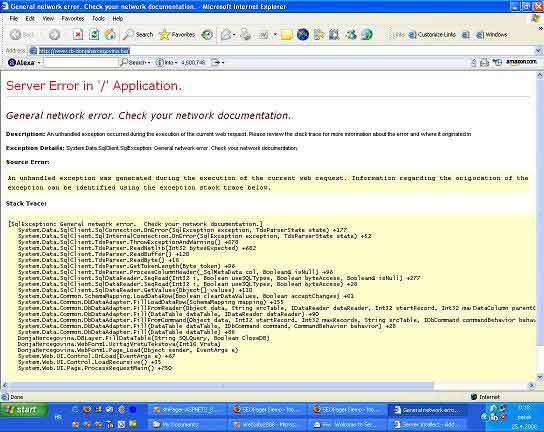
Default ASP.NET error message
mode parameter can have three possible values:
— RemoteOnly — this is default value, detailed messages are shown if you access through a localhost, and more general (default) error message to remote visitors.
— On — default error message is shown to everyone. This could be a security problem since part of source code where error occurred is shown too.
— Off — detailed error message is shown to everyone.
Default ASP.NET error message hides details about error, but still is not user friendly. Instead of this page, ASP.NET allows you to create your own error page. After custom error page is created, you need to add a reference to it in customErrors section by using a defaultRedirect parameter, like in code snippet bellow:
<customErrors
mode=«RemoteOnly» defaultRedirect=«~/DefaultErrorPage.htm« />
When error occured, ASP.NET runtime will redirect visitor to DefaultErrorPage.htm. On custom error page you can gently inform your visitors what happened and what they can do about it.
DefaultErrorPage.htm will display when any error occurs. Also, there is a possibility to show different custom error pages for different types of exceptions. We can do that by using <error > sub tag. In code sample bellow, specialized pages are shown for errors 404 (File Not Found) and error 403 (Forbidden).
<customErrors
mode=«On»
defaultRedirect=«~/DefaultErrorPage.htm« >
<error
statusCode=«404« redirect=«~/FileNotFound.htm«/>
<error
statusCode=«403« redirect=«~/Forbidden.htm«/>
</customErrors>
How to set error page for every ASP.NET page
Custom pages configured in Web.config affect complete web site. It is possible also to set error page for every single ASP.NET page. We can do this by using @Page directive. Code could look like this:
<%@
Page language=»C#» Codebehind=»SomePage.aspx.cs»
errorPage=»MyCustomErrorPage.htm»
AutoEventWireup=»false»%>
Http Error page codes
There are different Http codes that your web application could return. Some
errors are more often than others. You probably don’t need to cover all cases. It is ok to place custom error pages for the most common error codes and place default error page for the rest.
400 Bad Request
Request is not recognized by server because of errors in syntax. Request should
be changed with corrected syntax.
401 Not Authorized
This error happens when request doesn’t contain authentication or authorization
is refused because of bad credentials.
402 Payment Required
Not in use, it is just reserved for the future
403 Forbidden
Server refused to execute request, although it is in correct format. Server may
or may not provide information why request is refused.
404 Not Found
Server can not find resource requested in URI. This is very common error, you
should add custom error page for this code.
405 Method Not Allowed
There are different Http request methods, like POST, GET, HEAD, PUT, DELETE etc. that could be used by client. Web server can be configured to allow or disallow specific method. For example, if web site has static pages POST method could be disabled. There are many theoretical options but in reality this error usually occurs if POST method is not allowed.
406 Not Acceptable
Web client (browser or robot) could try to receive some data from web server. If that data are not acceptable web server will return this error. Error will not happen (or very rarely) when web browser request the page.
407 Proxy Authentication Required
This error could occur if web client accesses to web server through a proxy. If proxy authentication is required you must first login to proxy server and then navigate to wanted page. Because of that this error is similar to error 401 Not Authorized, except that here is problem with proxy authentication.
408 Request Timeout
If connection from web client and server is not established in some time period, which is defined on web server, then web server will drop connection and send error 408 Request Timeout. The reason could be usually temporarily problem with Internet connection or even to short time interval on web server.
409 Conflict
This error rarely occurs on web server. It means that web request from client is in conflict with some server or application rule on web server.
410 Gone
This error means that web server can’t find requested URL. But, as opposed to error 404 Not Found which says: «That page is not existing», 410 says something like: «The page was here but not anymore». Depending of configuration of web server, after some time period server will change error message to 404 Not Found.
411 Length Required
This error is rare when web client is browser. Web server expects Content-Length parameter included in web request.
412 Precondition Failed
This is also rare error, especially if client is web browser. Error occurs if Precondition parameter is not valid for web server.
413 Request Entity Too Large
This error occurs when web request is to large. This is also very rare error, especially when request is sent by web browser.
414 Request URI Too Long
Similar like error 413, error occurs if URL in the web request is too long. This limit is usually 2048 to 4096 characters. If requested URL is longer than server’s limit then this error is returned. 2048 characters is pretty much, so this error occurs rarely. If your web application produces this error, then it is possible that is something wrong with your URLs, especially if you build it dynamically with ASP.NET server side code.
415 Unsupported Media Type
This error occurs rarely, especially if request is sent by web browser. It could be three different reasons for this error. It is possible that requested media type doesn’t match media type specified in request, or because of incapability to handle current data for the resource, or it is not compatible with requested Http method.
416 Requested Range Not Satisfied
This is very rare error. Client request can contain Range parameter. This parameter represents expected size of resource requested. For example, if client asks for an image, and range is between 0 and 2000, then image should not be larger from 2000 bytes. If image is larger, this error is returned. However, web page hyperlinks usually don’t specify any Range value so this error rarely occurs.
417 Expectation Failed
This is also rare error, especially if client is web browser. There is Expect parameter of request, if this Expect is not satisfied Expectation error is returned.
500 Internal Server Error
This is very common error; client doesn’t know what the problem is. Server only tells that there is some problem on server side. But, on the server side are usually more information provided. If server hosts ASP.NET application, then this often means that there is an error in ASP.NET application. More details about error could be logged to EventLog, database or plain text files. To see how to get error details take a look at Application Level Error Handling In ASP.NET tutorial.
501 Not Implemented
This is rare error. It means that web server doesn’t support Http method used in request. Common Http methods are POST, GET, HEAD, TRACE etc. If some other method is used and web server can’t recognize it, this error will be returned.
502 Bad Gateway
This error occurs when server is working as gateway and need to proceed request to upstream web server. If upstream web server response is not correct, then first server will return this error. The reason for this error is often bad Internet connection some problem with firewall, or problem in communication between servers.
503 Service unavailable
This error means that server is temporally down, but that is planned, usually because a maintenance. Of course, it is not completely down because it can send 503 error :), but it is not working properly. Client should expect that system administrator is working on the server and server should be up again after problem is solved.
504 Gateway Timeout
Similar to error 502 Bad Gateway, there is problem somewhere between server and upstream web server. In this case, upstream web server takes too long to respond and first server returned this error. This could happen for example if your Internet connection is slow, or it is slow or overloaded communication in your local network.
505 HTTP Version Not Supported
Web server doesn’t support Http version used by web client. This should be very rare error. It could happen eventually if web client tries to access to some very old web server, which doesn’t support newer Http protocol version (before v. 1.x).
Show different error pages based on roles
By using of RemoteOnly value for customErrors mode parameter in Web.config you can get detailed messages when you access through a localhost and custom messages if you access remotely. This could be a problem, because sometime you need to access remotely to web application and still see detailed messages. If you have shared hosting than this is only option. Of course, you still don’t want to show error details to end users.
If you use some role based security architecture you can show detailed message to single logged user (you) or to all users that belong to some role, for example «Developers». On this way, developers logged in to web application will see detailed error messages and your users will still see just friendly custom notification.
To implement this idea we need to add some code to Application_Error procedure in Global.asax file. Code could look like this:
[ C# ]
void Application_Error(object sender, EventArgs e)
{
if(Context != null)
{
// Of course, you don’t need to use both conditions bellow
// If you want, you can use only your user name or only role name
if(Context.User.IsInRole(«Developers») ||
(Context.User.Identity.Name == «YourUserName») )
{
// Use Server.GetLastError to recieve current exception object
Exception CurrentException = Server.GetLastError();
// We need this line to avoid real error page
Server.ClearError();
// Clear current output
Response.Clear();
// Show error message as a title
Response.Write(«<h1>Error message: « + CurrentException.Message + «</h1>»);
// Show error details
Response.Write(«<p>Error details:</p>»);
Response.Write(CurrentException.ToString());
}
}
}
[ VB.NET ]
Sub Application_Error(ByVal sender As Object, ByVal e As EventArgs)
If Context IsNot Nothing Then
‘ Of course, you don’t need to use both conditions bellow
‘ If you want, you can use only your user name or only role name
If Context.User.IsInRole(«Developers») Or _
(Context.User.Identity.Name = «YourUserName») Then
‘ Use Server.GetLastError to recieve current exception object
Dim CurrentException As Exception = Server.GetLastError()
‘ We need this line to avoid real error page
Server.ClearError()
‘ Clear current output
Response.Clear()
‘ Show error message as a title
Response.Write(«<h1>Error message: « & _
CurrentException.Message & «</h1>»)
‘ Show error details
Response.Write(«<p>Error details:</p>»)
Response.Write(CurrentException.ToString())
End If
End If
End Sub
ASP.NET Custom Error Pages Remarks
By using custom error pages you can achieve more professional look for your ASP.NET web application. Although your visitors will not be happy if something is not working, it will be much better if you told them that something is wrong, but you are aware of that and you will correct it as soon as possible. That will connect you closer to your users. Errors are almost unavoidable, but your competence to deal with them makes difference.
I hope that you find this tutorial helpful. Happy programming!
Tutorial toolbar: Tell A Friend | Add to favorites | Feedback | Google
I want a custom error page shown for 500, 404 and 403. Here’s what I have done:
-
Enabled custom errors in the web.config as follows:
<customErrors mode="On" defaultRedirect="~/Views/Shared/Error.cshtml"> <error statusCode="403" redirect="~/Views/Shared/UnauthorizedAccess.cshtml" /> <error statusCode="404" redirect="~/Views/Shared/FileNotFound.cshtml" /> </customErrors> -
Registered
HandleErrorAttributeas a global action filter in theFilterConfigclass as follows:public static void RegisterGlobalFilters(GlobalFilterCollection filters) { filters.Add(new CustomHandleErrorAttribute()); filters.Add(new AuthorizeAttribute()); } -
Created a custom error page for each of the above messages. The default one for 500 was already available out of the box.
-
Declared in each custom error page view that the model for the page is
System.Web.Mvc.HandleErrorInfo
For 500, it shows the custom error page. For others, it doesn’t.
Is there something I am missing?
It does look like this is not all there is to displaying custom errors as I read through the code in the OnException method of the HandleErrorAttribute class and it is handling only 500.
What do I have to do to handle other errors?

H. Pauwelyn
13.1k26 gold badges80 silver badges139 bronze badges
asked Dec 16, 2012 at 20:23

Water Cooler v2Water Cooler v2
32.1k47 gold badges158 silver badges328 bronze badges
3
My current setup (on MVC3, but I think it still applies) relies on having an ErrorController, so I use:
<system.web>
    <customErrors mode="On" defaultRedirect="~/Error">
      <error redirect="~/Error/NotFound" statusCode="404" />
    </customErrors>
</system.web>
And the controller contains the following:
public class ErrorController : Controller
{
    public ViewResult Index()
    {
        return View("Error");
    }
    public ViewResult NotFound()
    {
        Response.StatusCode = 404;  //you may want to set this to 200
        return View("NotFound");
    }
}
And the views just the way you implement them. I tend to add a bit of logic though, to show the stack trace and error information if the application is in debug mode. So Error.cshtml looks something like this:
@model System.Web.Mvc.HandleErrorInfo
@{
    Layout = "_Layout.cshtml";
    ViewBag.Title = "Error";
}
<div class="list-header clearfix">
    <span>Error</span>
</div>
<div class="list-sfs-holder">
    <div class="alert alert-error">
        An unexpected error has occurred. Please contact the system administrator.
    </div>
    @if (Model != null && HttpContext.Current.IsDebuggingEnabled)
    {
        <div>
            <p>
                <b>Exception:</b> @Model.Exception.Message<br />
                <b>Controller:</b> @Model.ControllerName<br />
                <b>Action:</b> @Model.ActionName
            </p>
            <div style="overflow:scroll">
                <pre>
                    @Model.Exception.StackTrace
                </pre>
            </div>
        </div>
    }
</div>

kyrylomyr
11.9k8 gold badges50 silver badges79 bronze badges
answered Dec 16, 2012 at 21:57

21
I’ve done pablo solution and I always had the error (MVC4)
The view ‘Error’ or its master was not found or no view engine supports the searched location.
To get rid of this, remove the line
filters.Add(new HandleErrorAttribute());
in FilterConfig.cs
answered Apr 7, 2014 at 18:02

MachinegonMachinegon
1,8381 gold badge27 silver badges45 bronze badges
3
I do something that requires less coding than the other solutions posted.
First, in my web.config, I have the following:
<customErrors mode="On" defaultRedirect="~/ErrorPage/Oops">
   <error redirect="~/ErrorPage/Oops/404" statusCode="404" />
   <error redirect="~/ErrorPage/Oops/500" statusCode="500" />
</customErrors>
And the controller (/Controllers/ErrorPageController.cs) contains the following:
public class ErrorPageController : Controller
{
    public ActionResult Oops(int id)
    {
        Response.StatusCode = id;

        return View();
    }
}
And finally, the view contains the following (stripped down for simplicity, but it can conta:
@{ ViewBag.Title = "Oops! Error Encountered"; }

<section id="Page">
  <div class="col-xs-12 well">
    <table cellspacing="5" cellpadding="3" style="background-color:#fff;width:100%;" class="table-responsive">
      <tbody>
        <tr>
          <td valign="top" align="left" id="tableProps">
            <img width="25" height="33" src="~/Images/PageError.gif" id="pagerrorImg">
          </td>
          <td width="360" valign="middle" align="left" id="tableProps2">
            <h1 style="COLOR: black; FONT: 13pt/15pt verdana" id="errortype"><span id="errorText">@Response.Status</span></h1>
          </td>
        </tr>
        <tr>
          <td width="400" colspan="2" id="tablePropsWidth"><font style="COLOR: black; FONT: 8pt/11pt verdana">Possible causes:</font>
          </td>
        </tr>
        <tr>
          <td width="400" colspan="2" id="tablePropsWidth2">
            <font style="COLOR: black; FONT: 8pt/11pt verdana" id="LID1">
                            <hr>
                            <ul>
                                <li id="list1">
                                    <span class="infotext">
                                        <strong>Baptist explanation: </strong>There
                                        must be sin in your life. Everyone else opened it fine.<br>
                                    </span>
                                </li>
                                <li>
                                    <span class="infotext">
                                        <strong>Presbyterian explanation: </strong>It's
                                        not God's will for you to open this link.<br>
                                    </span>
                                </li>
                                <li>
                                    <span class="infotext">
                                        <strong> Word of Faith explanation:</strong>
                                        You lack the faith to open this link. Your negative words have prevented
                                        you from realizing this link's fulfillment.<br>
                                    </span>
                                </li>
                                <li>
                                    <span class="infotext">
                                        <strong>Charismatic explanation: </strong>Thou
                                        art loosed! Be commanded to OPEN!<br>
                                    </span>
                                </li>
                                <li>
                                    <span class="infotext">
                                        <strong>Unitarian explanation:</strong> All
                                        links are equal, so if this link doesn't work for you, feel free to
                                        experiment with other links that might bring you joy and fulfillment.<br>
                                    </span>
                                </li>
                                <li>
                                    <span class="infotext">
                                        <strong>Buddhist explanation:</strong> .........................<br>
                                    </span>
                                </li>
                                <li>
                                    <span class="infotext">
                                        <strong>Episcopalian explanation:</strong>
                                        Are you saying you have something against homosexuals?<br>
                                    </span>
                                </li>
                                <li>
                                    <span class="infotext">
                                        <strong>Christian Science explanation: </strong>There
                                        really is no link.<br>
                                    </span>
                                </li>
                                <li>
                                    <span class="infotext">
                                        <strong>Atheist explanation: </strong>The only
                                        reason you think this link exists is because you needed to invent it.<br>
                                    </span>
                                </li>
                                <li>
                                    <span class="infotext">
                                        <strong>Church counselor's explanation:</strong>
                                        And what did you feel when the link would not open?
                                    </span>
                                </li>
                            </ul>
                            <p>
                                <br>
                            </p>
                            <h2 style="font:8pt/11pt verdana; color:black" id="ietext">
                                <img width="16" height="16" align="top" src="~/Images/Search.gif">
                                HTTP @Response.StatusCode - @Response.StatusDescription <br>
                            </h2>
                        </font>
          </td>
        </tr>
      </tbody>
    </table>
  </div>
</section>
It’s just as simple as that. It could be easily extended to offer more detailed error info, but ELMAH handles that for me & the statusCode & statusDescription is all that I usually need.
answered Nov 15, 2014 at 11:41

Brandon OsborneBrandon Osborne
8481 gold badge12 silver badges26 bronze badges
2
There seem to be a number of steps here jumbled together. I’ll put forward what I did from scratch.
-
Create the
ErrorPagecontrollerpublic class ErrorPageController : Controller { public ActionResult Index() { return View(); } public ActionResult Oops(int id) { Response.StatusCode = id; return View(); } } -
Add views for these two actions (right click -> Add View). These should appear in a folder called ErrorPage.
-
Inside
App_Startopen upFilterConfig.csand comment out the error handling filter.public static void RegisterGlobalFilters(GlobalFilterCollection filters) { // Remove this filter because we want to handle errors ourselves via the ErrorPage controller //filters.Add(new HandleErrorAttribute()); } -
Inside web.config add the following
<customerErrors>entries, underSystem.Web<customErrors mode="On" defaultRedirect="~/ErrorPage/Oops"> <error redirect="~/ErrorPage/Oops/404" statusCode="404" /> <error redirect="~/ErrorPage/Oops/500" statusCode="500" /> </customErrors> -
Test (of course). Throw an unhandled exception in your code and see it go to the page with id 500, and then use a URL to a page that does not exist to see 404.

TylerH
20.4k62 gold badges75 silver badges96 bronze badges
answered May 28, 2015 at 9:11

VictorySaberVictorySaber
3,0541 gold badge25 silver badges43 bronze badges
5
I would Recommend to use Global.asax.cs File.
 protected void Application_Error(Object sender, EventArgs e)
{
    var exception = Server.GetLastError();
    if (exception is HttpUnhandledException)
    {
        Server.Transfer("~/Error.aspx");
    }
    if (exception != null)
    {
        Server.Transfer("~/Error.aspx");
    }
    try
    {
        // This is to stop a problem where we were seeing "gibberish" in the
        // chrome and firefox browsers
        HttpApplication app = sender as HttpApplication;
        app.Response.Filter = null;
    }
    catch
    {
    }
}
answered Feb 11, 2014 at 4:47

maxspanmaxspan
12.9k14 gold badges72 silver badges100 bronze badges
3
Building on the answer posted by maxspan, I’ve put together a minimal sample project on GitHub showing all the working parts.
Basically, we just add an Application_Error method to global.asax.cs to intercept the exception and give us an opportunity to redirect (or more correctly, transfer request) to a custom error page.
    protected void Application_Error(Object sender, EventArgs e)
    {
        // See http://stackoverflow.com/questions/13905164/how-to-make-custom-error-pages-work-in-asp-net-mvc-4
        // for additional context on use of this technique

        var exception = Server.GetLastError();
        if (exception != null)
        {
            // This would be a good place to log any relevant details about the exception.
            // Since we are going to pass exception information to our error page via querystring,
            // it will only be practical to issue a short message. Further detail would have to be logged somewhere.

            // This will invoke our error page, passing the exception message via querystring parameter
            // Note that we chose to use Server.TransferRequest, which is only supported in IIS 7 and above.
            // As an alternative, Response.Redirect could be used instead.
            // Server.Transfer does not work (see https://support.microsoft.com/en-us/kb/320439 )
            Server.TransferRequest("~/Error?Message=" + exception.Message);
        }

    }
Error Controller:
/// <summary>
/// This controller exists to provide the error page
/// </summary>
public class ErrorController : Controller
{
    /// <summary>
    /// This action represents the error page
    /// </summary>
    /// <param name="Message">Error message to be displayed (provided via querystring parameter - a design choice)</param>
    /// <returns></returns>
    public ActionResult Index(string Message)
    {
        // We choose to use the ViewBag to communicate the error message to the view
        ViewBag.Message = Message;
        return View();
    }

}
Error page View:
<!DOCTYPE html>

<html>
<head>
    <title>Error</title>
</head>
<body>

    <h2>My Error</h2>
    <p>@ViewBag.Message</p>
</body>
</html>
Nothing else is involved, other than disabling/removing filters.Add(new HandleErrorAttribute()) in FilterConfig.cs
public class FilterConfig
{
    public static void RegisterGlobalFilters(GlobalFilterCollection filters)
    {
        //filters.Add(new HandleErrorAttribute()); // <== disable/remove
    }
}
While very simple to implement, the one drawback I see in this approach is using querystring to deliver exception information to the target error page.
answered Aug 23, 2015 at 17:02

I had everything set up, but still couldn’t see proper error pages for status code 500 on our staging server, despite the fact everything worked fine on local development servers.
I found this blog post from Rick Strahl that helped me.
I needed to add Response.TrySkipIisCustomErrors = true; to my custom error handling code.
answered May 8, 2015 at 1:57

DCShannonDCShannon
2,3544 gold badges18 silver badges32 bronze badges
1
Here is my solution. Use [ExportModelStateToTempData] / [ImportModelStateFromTempData] is uncomfortable in my opinion.
~/Views/Home/Error.cshtml:
@{
    ViewBag.Title = "Error";
    Layout = "~/Views/Shared/_Layout.cshtml";
}

<h2>Error</h2>
<hr/>

<div style="min-height: 400px;">

    @Html.ValidationMessage("Error")

    <br />
    <br />

    <button onclick="Error_goBack()" class="k-button">Go Back</button>
    <script>
        function Error_goBack() {
            window.history.back()
        }
    </script>

</div>
~/Controllers/HomeController.sc:
public class HomeController : BaseController
{
    public ActionResult Index()
    {
        return View();
    }

    public ActionResult Error()
    {
        return this.View();
    }

    ...
}
~/Controllers/BaseController.sc:
public class BaseController : Controller
{
    public BaseController() { }

    protected override void OnActionExecuted(ActionExecutedContext filterContext)
    {
        if (filterContext.Result is ViewResult)
        {
            if (filterContext.Controller.TempData.ContainsKey("Error"))
            {
                var modelState = filterContext.Controller.TempData["Error"] as ModelState;
                filterContext.Controller.ViewData.ModelState.Merge(new ModelStateDictionary() { new KeyValuePair<string, ModelState>("Error", modelState) });
                filterContext.Controller.TempData.Remove("Error");
            }
        }
        if ((filterContext.Result is RedirectResult) || (filterContext.Result is RedirectToRouteResult))
        {
            if (filterContext.Controller.ViewData.ModelState.ContainsKey("Error"))
            {
                filterContext.Controller.TempData["Error"] = filterContext.Controller.ViewData.ModelState["Error"];
            }
        }

        base.OnActionExecuted(filterContext);
    }
}
~/Controllers/MyController.sc:
public class MyController : BaseController
{
    public ActionResult Index()
    {
        return View();
    }

    public ActionResult Details(int id)
    {
        if (id != 5)
        {
            ModelState.AddModelError("Error", "Specified row does not exist.");
            return RedirectToAction("Error", "Home");
        }
        else
        {
            return View("Specified row exists.");
        }
    }
}
I wish you successful projects 😉
answered Jan 5, 2015 at 19:35

ADM-ITADM-IT
3,45125 silver badges25 bronze badges
You can get errors working correctly without hacking global.cs, messing with HandleErrorAttribute, doing Response.TrySkipIisCustomErrors, hooking up Application_Error, or whatever:
In system.web (just the usual, on/off)
<customErrors mode="On">
  <error redirect="/error/401" statusCode="401" />
  <error redirect="/error/500" statusCode="500" />
</customErrors>
and in system.webServer
<httpErrors existingResponse="PassThrough" />
Now things should behave as expected, and you can use your ErrorController to display whatever you need.
answered Dec 14, 2015 at 12:45

3
In web.config add this under system.webserver tag as below,
<system.webServer>
<httpErrors errorMode="Custom" existingResponse="Replace">
  <remove statusCode="404"/>
  <remove statusCode="500"/>
  <error statusCode="404" responseMode="ExecuteURL" path="/Error/NotFound"/>
  <error statusCode="500" responseMode="ExecuteURL"path="/Error/ErrorPage"/>
</httpErrors>
and add a controller as,
public class ErrorController : Controller
{
    //
    // GET: /Error/
    [GET("/Error/NotFound")]
    public ActionResult NotFound()
    {
        Response.StatusCode = 404;

        return View();
    }

    [GET("/Error/ErrorPage")]
    public ActionResult ErrorPage()
    {
        Response.StatusCode = 500;

        return View();
    }
}
and add their respected views, this will work definitely I guess for all.
This solution I found it from: Neptune Century
answered Aug 30, 2017 at 8:06

Dpk-KumarDpk-Kumar
1191 silver badge8 bronze badges
1
It seems i came late to the party, but you should better check this out too.
So in system.web for caching up exceptions within the application such as return HttpNotFound()
  <system.web>
    <customErrors mode="RemoteOnly">
      <error statusCode="404" redirect="/page-not-found" />
      <error statusCode="500" redirect="/internal-server-error" />
    </customErrors>
  </system.web>
and in system.webServer for catching up errors that were caught by IIS and did not made their way to the asp.net framework
 <system.webServer>
    <httpErrors errorMode="DetailedLocalOnly">
      <remove statusCode="404"/>
      <error statusCode="404" path="/page-not-found" responseMode="Redirect"/>
      <remove statusCode="500"/>
      <error statusCode="500" path="/internal-server-error" responseMode="Redirect"/>
  </system.webServer>
In the last one if you worry about the client response then change the responseMode="Redirect" to responseMode="File" and serve a static html file, since this one will display a friendly page with an 200 response code.
answered Aug 11, 2017 at 16:38

OrElseOrElse
9,46539 gold badges139 silver badges251 bronze badges
1
| title | author | description | monikerRange | ms.author | ms.custom | ms.date | uid |
|---|---|---|---|---|---|---|---|
|
Handle errors in ASP.NET Core |
rick-anderson |
Discover how to handle errors in ASP.NET Core apps. |
>= aspnetcore-3.1 |
riande |
mvc |
01/18/2023 |
fundamentals/error-handling |
Handle errors in ASP.NET Core
:::moniker range=»>= aspnetcore-7.0″
By Tom Dykstra
This article covers common approaches to handling errors in ASP.NET Core web apps. See xref:web-api/handle-errors for web APIs.
Developer exception page
The Developer Exception Page displays detailed information about unhandled request exceptions. ASP.NET Core apps enable the developer exception page by default when both:
- Running in the Development environment.
- App created with the current templates, that is, using WebApplication.CreateBuilder. Apps created using the
WebHost.CreateDefaultBuildermust enable the developer exception page by callingapp.UseDeveloperExceptionPageinConfigure.
The developer exception page runs early in the middleware pipeline, so that it can catch unhandled exceptions thrown in middleware that follows.
Detailed exception information shouldn’t be displayed publicly when the app runs in the Production environment. For more information on configuring environments, see xref:fundamentals/environments.
The Developer Exception Page can include the following information about the exception and the request:
- Stack trace
- Query string parameters, if any
- Cookies, if any
- Headers
The Developer Exception Page isn’t guaranteed to provide any information. Use Logging for complete error information.
Exception handler page
To configure a custom error handling page for the Production environment, call xref:Microsoft.AspNetCore.Builder.ExceptionHandlerExtensions.UseExceptionHandler%2A. This exception handling middleware:
- Catches and logs unhandled exceptions.
- Re-executes the request in an alternate pipeline using the path indicated. The request isn’t re-executed if the response has started. The template-generated code re-executes the request using the
/Errorpath.
[!WARNING]
If the alternate pipeline throws an exception of its own, Exception Handling Middleware rethrows the original exception.
Since this middleware can re-execute the request pipeline:
- Middlewares need to handle reentrancy with the same request. This normally means either cleaning up their state after calling
_nextor caching their processing on theHttpContextto avoid redoing it. When dealing with the request body, this either means buffering or caching the results like the Form reader. - For the xref:Microsoft.AspNetCore.Builder.ExceptionHandlerExtensions.UseExceptionHandler(Microsoft.AspNetCore.Builder.IApplicationBuilder,System.String) overload that is used in templates, only the request path is modified, and the route data is cleared. Request data such as headers, method, and items are all reused as-is.
- Scoped services remain the same.
In the following example, xref:Microsoft.AspNetCore.Builder.ExceptionHandlerExtensions.UseExceptionHandler%2A adds the exception handling middleware in non-Development environments:
:::code language=»csharp» source=»error-handling/samples/7.x/ErrorHandlingSample/Program.cs» id=»snippet_UseExceptionHandler» highlight=»3,5″:::
The Razor Pages app template provides an Error page (.cshtml) and xref:Microsoft.AspNetCore.Mvc.RazorPages.PageModel class (ErrorModel) in the Pages folder. For an MVC app, the project template includes an Error action method and an Error view for the Home controller.
The exception handling middleware re-executes the request using the original HTTP method. If an error handler endpoint is restricted to a specific set of HTTP methods, it runs only for those HTTP methods. For example, an MVC controller action that uses the [HttpGet] attribute runs only for GET requests. To ensure that all requests reach the custom error handling page, don’t restrict them to a specific set of HTTP methods.
To handle exceptions differently based on the original HTTP method:
- For Razor Pages, create multiple handler methods. For example, use
OnGetto handle GET exceptions and useOnPostto handle POST exceptions. - For MVC, apply HTTP verb attributes to multiple actions. For example, use
[HttpGet]to handle GET exceptions and use[HttpPost]to handle POST exceptions.
To allow unauthenticated users to view the custom error handling page, ensure that it supports anonymous access.
Access the exception
Use xref:Microsoft.AspNetCore.Diagnostics.IExceptionHandlerPathFeature to access the exception and the original request path in an error handler. The following example uses IExceptionHandlerPathFeature to get more information about the exception that was thrown:
:::code language=»csharp» source=»error-handling/samples/7.x/ErrorHandlingSample/Pages/Error.cshtml.cs» id=»snippet_Class» highlight=»15-27″:::
[!WARNING]
Do not serve sensitive error information to clients. Serving errors is a security risk.
Exception handler lambda
An alternative to a custom exception handler page is to provide a lambda to xref:Microsoft.AspNetCore.Builder.ExceptionHandlerExtensions.UseExceptionHandler%2A. Using a lambda allows access to the error before returning the response.
The following code uses a lambda for exception handling:
:::code language=»csharp» source=»error-handling/samples/7.x/ErrorHandlingSample/Snippets/Program.cs» id=»snippet_UseExceptionHandlerInline» highlight=»5-29″:::
[!WARNING]
Do not serve sensitive error information to clients. Serving errors is a security risk.
UseStatusCodePages
By default, an ASP.NET Core app doesn’t provide a status code page for HTTP error status codes, such as 404 — Not Found. When the app sets an HTTP 400-599 error status code that doesn’t have a body, it returns the status code and an empty response body. To enable default text-only handlers for common error status codes, call xref:Microsoft.AspNetCore.Builder.StatusCodePagesExtensions.UseStatusCodePages%2A in Program.cs:
:::code language=»csharp» source=»error-handling/samples/7.x/ErrorHandlingSample/Snippets/Program.cs» id=»snippet_UseStatusCodePages» highlight=»9″:::
Call UseStatusCodePages before request handling middleware. For example, call UseStatusCodePages before the Static File Middleware and the Endpoints Middleware.
When UseStatusCodePages isn’t used, navigating to a URL without an endpoint returns a browser-dependent error message indicating the endpoint can’t be found. When UseStatusCodePages is called, the browser returns the following response:
Status Code: 404; Not Found
UseStatusCodePages isn’t typically used in production because it returns a message that isn’t useful to users.
[!NOTE]
The status code pages middleware does not catch exceptions. To provide a custom error handling page, use the exception handler page.
UseStatusCodePages with format string
To customize the response content type and text, use the overload of xref:Microsoft.AspNetCore.Builder.StatusCodePagesExtensions.UseStatusCodePages%2A that takes a content type and format string:
:::code language=»csharp» source=»error-handling/samples/7.x/ErrorHandlingSample/Snippets/Program.cs» id=»snippet_UseStatusCodePagesContent» highlight=»10″:::
In the preceding code, {0} is a placeholder for the error code.
UseStatusCodePages with a format string isn’t typically used in production because it returns a message that isn’t useful to users.
UseStatusCodePages with lambda
To specify custom error-handling and response-writing code, use the overload of xref:Microsoft.AspNetCore.Builder.StatusCodePagesExtensions.UseStatusCodePages%2A that takes a lambda expression:
:::code language=»csharp» source=»error-handling/samples/7.x/ErrorHandlingSample/Snippets/Program.cs» id=»snippet_UseStatusCodePagesInline» highlight=»9-16″:::
UseStatusCodePages with a lambda isn’t typically used in production because it returns a message that isn’t useful to users.
UseStatusCodePagesWithRedirects
The xref:Microsoft.AspNetCore.Builder.StatusCodePagesExtensions.UseStatusCodePagesWithRedirects%2A extension method:
- Sends a 302 — Found status code to the client.
- Redirects the client to the error handling endpoint provided in the URL template. The error handling endpoint typically displays error information and returns HTTP 200.
:::code language=»csharp» source=»error-handling/samples/7.x/ErrorHandlingSample/Snippets/Program.cs» id=»snippet_UseStatusCodePagesRedirect» highlight=»9″:::
The URL template can include a {0} placeholder for the status code, as shown in the preceding code. If the URL template starts with ~ (tilde), the ~ is replaced by the app’s PathBase. When specifying an endpoint in the app, create an MVC view or Razor page for the endpoint.
This method is commonly used when the app:
- Should redirect the client to a different endpoint, usually in cases where a different app processes the error. For web apps, the client’s browser address bar reflects the redirected endpoint.
- Shouldn’t preserve and return the original status code with the initial redirect response.
UseStatusCodePagesWithReExecute
The xref:Microsoft.AspNetCore.Builder.StatusCodePagesExtensions.UseStatusCodePagesWithReExecute%2A extension method:
- Returns the original status code to the client.
- Generates the response body by re-executing the request pipeline using an alternate path.
:::code language=»csharp» source=»error-handling/samples/7.x/ErrorHandlingSample/Snippets/Program.cs» id=»snippet_UseStatusCodePagesReExecute» highlight=»9″:::
If an endpoint within the app is specified, create an MVC view or Razor page for the endpoint.
This method is commonly used when the app should:
- Process the request without redirecting to a different endpoint. For web apps, the client’s browser address bar reflects the originally requested endpoint.
- Preserve and return the original status code with the response.
The URL template must start with / and may include a placeholder {0} for the status code. To pass the status code as a query-string parameter, pass a second argument into UseStatusCodePagesWithReExecute. For example:
:::code language=»csharp» source=»error-handling/samples/7.x/ErrorHandlingSample/Snippets/Program.cs» id=»snippet_UseStatusCodePagesReExecuteQueryString»:::
The endpoint that processes the error can get the original URL that generated the error, as shown in the following example:
:::code language=»csharp» source=»error-handling/samples/7.x/ErrorHandlingSample/Pages/StatusCode.cshtml.cs» id=»snippet_Class» highlight=»12-21″:::
Since this middleware can re-execute the request pipeline:
- Middlewares need to handle reentrancy with the same request. This normally means either cleaning up their state after calling
_nextor caching their processing on theHttpContextto avoid redoing it. When dealing with the request body, this either means buffering or caching the results like the Form reader. - Scoped services remain the same.
Disable status code pages
To disable status code pages for an MVC controller or action method, use the [SkipStatusCodePages] attribute.
To disable status code pages for specific requests in a Razor Pages handler method or in an MVC controller, use xref:Microsoft.AspNetCore.Diagnostics.IStatusCodePagesFeature:
:::code language=»csharp» source=»error-handling/samples/7.x/ErrorHandlingSample/Snippets/Pages/Index.cshtml.cs» id=»snippet_OnGet»:::
Exception-handling code
Code in exception handling pages can also throw exceptions. Production error pages should be tested thoroughly and take extra care to avoid throwing exceptions of their own.
Response headers
Once the headers for a response are sent:
- The app can’t change the response’s status code.
- Any exception pages or handlers can’t run. The response must be completed or the connection aborted.
Server exception handling
In addition to the exception handling logic in an app, the HTTP server implementation can handle some exceptions. If the server catches an exception before response headers are sent, the server sends a 500 - Internal Server Error response without a response body. If the server catches an exception after response headers are sent, the server closes the connection. Requests that aren’t handled by the app are handled by the server. Any exception that occurs when the server is handling the request is handled by the server’s exception handling. The app’s custom error pages, exception handling middleware, and filters don’t affect this behavior.
Startup exception handling
Only the hosting layer can handle exceptions that take place during app startup. The host can be configured to capture startup errors and capture detailed errors.
The hosting layer can show an error page for a captured startup error only if the error occurs after host address/port binding. If binding fails:
- The hosting layer logs a critical exception.
- The dotnet process crashes.
- No error page is displayed when the HTTP server is Kestrel.
When running on IIS (or Azure App Service) or IIS Express, a 502.5 — Process Failure is returned by the ASP.NET Core Module if the process can’t start. For more information, see xref:test/troubleshoot-azure-iis.
Database error page
The Database developer page exception filter xref:Microsoft.Extensions.DependencyInjection.DatabaseDeveloperPageExceptionFilterServiceExtensions.AddDatabaseDeveloperPageExceptionFilter%2A captures database-related exceptions that can be resolved by using Entity Framework Core migrations. When these exceptions occur, an HTML response is generated with details of possible actions to resolve the issue. This page is enabled only in the Development environment. The following code adds the Database developer page exception filter:
:::code language=»csharp» source=»error-handling/samples/7.x/ErrorHandlingSample/Program.cs» id=»snippet_AddDatabaseDeveloperPageExceptionFilter» highlight=»3″:::
Exception filters
In MVC apps, exception filters can be configured globally or on a per-controller or per-action basis. In Razor Pages apps, they can be configured globally or per page model. These filters handle any unhandled exceptions that occur during the execution of a controller action or another filter. For more information, see xref:mvc/controllers/filters#exception-filters.
Exception filters are useful for trapping exceptions that occur within MVC actions, but they’re not as flexible as the built-in exception handling middleware, xref:Microsoft.AspNetCore.Builder.ExceptionHandlerExtensions.UseExceptionHandler%2A. We recommend using UseExceptionHandler, unless you need to perform error handling differently based on which MVC action is chosen.
Model state errors
For information about how to handle model state errors, see Model binding and Model validation.
Problem details
[!INCLUDE]
The following code configures the app to generate a problem details response for all HTTP client and server error responses that don’t have a body content yet:
:::code language=»csharp» source=»error-handling/samples/7.x/ErrorHandlingSample/Snippets/Program.cs» id=»snippet_AddProblemDetails» highlight=»3″:::
The next section shows how to customize the problem details response body.
Customize problem details
The automatic creation of a ProblemDetails can be customized using any of the following options:
- Use
ProblemDetailsOptions.CustomizeProblemDetails - Use a custom
IProblemDetailsWriter - Call the
IProblemDetailsServicein a middleware
CustomizeProblemDetails operation
The generated problem details can be customized using xref:Microsoft.AspNetCore.Http.ProblemDetailsOptions.CustomizeProblemDetails, and the customizations are applied to all auto-generated problem details.
The following code uses xref:Microsoft.AspNetCore.Http.ProblemDetailsOptions to set xref:Microsoft.AspNetCore.Http.ProblemDetailsOptions.CustomizeProblemDetails:
:::code language=»csharp» source=»error-handling/samples/7.x/ErrorHandlingSample/Snippets/Program.cs» id=»snippet_CustomizeProblemDetails» highlight=»3-5″:::
For example, an HTTP Status 400 Bad Request endpoint result produces the following problem details response body:
{
  "type": "https://tools.ietf.org/html/rfc9110#section-15.5.1",
  "title": "Bad Request",
  "status": 400,
  "nodeId": "my-machine-name"
}
Custom IProblemDetailsWriter
An xref:Microsoft.AspNetCore.Http.IProblemDetailsWriter implementation can be created for advanced customizations:
:::code language=»csharp» source=»~/../AspNetCore.Docs.Samples/fundamentals/middleware/problem-details-service/SampleProblemDetailsWriter.cs» :::
Problem details from Middleware
An alternative approach to using xref:Microsoft.AspNetCore.Http.ProblemDetailsOptions with xref:Microsoft.AspNetCore.Http.ProblemDetailsOptions.CustomizeProblemDetails is to set the xref:Microsoft.AspNetCore.Http.ProblemDetailsContext.ProblemDetails in middleware. A problem details response can be written by calling IProblemDetailsService.WriteAsync:
:::code language=»csharp» source=»~/../AspNetCore.Docs.Samples/fundamentals/middleware/problem-details-service/Program.cs» id=»snippet_middleware» highlight=»5,19-40″:::
In the preceding code, the minimal API endpoints /divide and /squareroot return the expected custom problem response on error input.
The API controller endpoints return the default problem response on error input, not the custom problem response. The default problem response is returned because the API controller has written to the response stream, Problem details for error status codes, before IProblemDetailsService.WriteAsync is called and the response is not written again.
The following ValuesController returns xref:Microsoft.AspNetCore.Mvc.BadRequestResult, which writes to the response stream and therefore prevents the custom problem response from being returned.
:::code language=»csharp» source=»~/../AspNetCore.Docs.Samples/fundamentals/middleware/problem-details-service/Controllers/ValuesController.cs» id=»snippet» highlight=»9-17,27-35″:::
The following Values3Controller returns ControllerBase.Problem so the expected custom problem result is returned:
:::code language=»csharp» source=»~/../AspNetCore.Docs.Samples/fundamentals/middleware/problem-details-service/Controllers/ValuesController.cs» id=»snippet3″ highlight=»16-21″:::
Produce a ProblemDetails payload for exceptions
Consider the following app:
:::code language=»csharp» source=»~/../AspNetCore.Docs.Samples/fundamentals/middleware/problem-details-service/Program.cs» id=»snippet_apishort» highlight=»4,8″:::
In non-development environments, when an exception occurs, the following is a standard ProblemDetails response that is returned to the client:
{
"type":"https://tools.ietf.org/html/rfc7231#section-6.6.1",
"title":"An error occurred while processing your request.",
"status":500,"traceId":"00-b644<snip>-00"
}
For most apps, the preceding code is all that’s needed for exceptions. However, the following section shows how to get more detailed problem responses.
An alternative to a custom exception handler page is to provide a lambda to xref:Microsoft.AspNetCore.Builder.ExceptionHandlerExtensions.UseExceptionHandler%2A. Using a lambda allows access to the error and writing a problem details response with IProblemDetailsService.WriteAsync:
:::code language=»csharp» source=»~/../AspNetCore.Docs.Samples/fundamentals/middleware/problem-details-service/Program.cs» id=»snippet_lambda» :::
[!WARNING]
Do not serve sensitive error information to clients. Serving errors is a security risk.
An alternative approach to generate problem details is to use the third-party NuGet package Hellang.Middleware.ProblemDetails that can be used to map exceptions and client errors to problem details.
Additional resources
- View or download sample code (how to download)
- xref:test/troubleshoot-azure-iis
- xref:host-and-deploy/azure-iis-errors-reference
:::moniker-end
:::moniker range=»= aspnetcore-6.0″
By Tom Dykstra
This article covers common approaches to handling errors in ASP.NET Core web apps. See xref:web-api/handle-errors for web APIs.
Developer exception page
The Developer Exception Page displays detailed information about unhandled request exceptions. ASP.NET Core apps enable the developer exception page by default when both:
- Running in the Development environment.
- App created with the current templates, that is, using WebApplication.CreateBuilder. Apps created using the
WebHost.CreateDefaultBuildermust enable the developer exception page by callingapp.UseDeveloperExceptionPageinConfigure.
The developer exception page runs early in the middleware pipeline, so that it can catch unhandled exceptions thrown in middleware that follows.
Detailed exception information shouldn’t be displayed publicly when the app runs in the Production environment. For more information on configuring environments, see xref:fundamentals/environments.
The Developer Exception Page can include the following information about the exception and the request:
- Stack trace
- Query string parameters, if any
- Cookies, if any
- Headers
The Developer Exception Page isn’t guaranteed to provide any information. Use Logging for complete error information.
Exception handler page
To configure a custom error handling page for the Production environment, call xref:Microsoft.AspNetCore.Builder.ExceptionHandlerExtensions.UseExceptionHandler%2A. This exception handling middleware:
- Catches and logs unhandled exceptions.
- Re-executes the request in an alternate pipeline using the path indicated. The request isn’t re-executed if the response has started. The template-generated code re-executes the request using the
/Errorpath.
[!WARNING]
If the alternate pipeline throws an exception of its own, Exception Handling Middleware rethrows the original exception.
In the following example, xref:Microsoft.AspNetCore.Builder.ExceptionHandlerExtensions.UseExceptionHandler%2A adds the exception handling middleware in non-Development environments:
:::code language=»csharp» source=»error-handling/samples/6.x/ErrorHandlingSample/Program.cs» id=»snippet_UseExceptionHandler» highlight=»3,5″:::
The Razor Pages app template provides an Error page (.cshtml) and xref:Microsoft.AspNetCore.Mvc.RazorPages.PageModel class (ErrorModel) in the Pages folder. For an MVC app, the project template includes an Error action method and an Error view for the Home controller.
The exception handling middleware re-executes the request using the original HTTP method. If an error handler endpoint is restricted to a specific set of HTTP methods, it runs only for those HTTP methods. For example, an MVC controller action that uses the [HttpGet] attribute runs only for GET requests. To ensure that all requests reach the custom error handling page, don’t restrict them to a specific set of HTTP methods.
To handle exceptions differently based on the original HTTP method:
- For Razor Pages, create multiple handler methods. For example, use
OnGetto handle GET exceptions and useOnPostto handle POST exceptions. - For MVC, apply HTTP verb attributes to multiple actions. For example, use
[HttpGet]to handle GET exceptions and use[HttpPost]to handle POST exceptions.
To allow unauthenticated users to view the custom error handling page, ensure that it supports anonymous access.
Access the exception
Use xref:Microsoft.AspNetCore.Diagnostics.IExceptionHandlerPathFeature to access the exception and the original request path in an error handler. The following example uses IExceptionHandlerPathFeature to get more information about the exception that was thrown:
:::code language=»csharp» source=»error-handling/samples/6.x/ErrorHandlingSample/Pages/Error.cshtml.cs» id=»snippet_Class» highlight=»15-27″:::
[!WARNING]
Do not serve sensitive error information to clients. Serving errors is a security risk.
Exception handler lambda
An alternative to a custom exception handler page is to provide a lambda to xref:Microsoft.AspNetCore.Builder.ExceptionHandlerExtensions.UseExceptionHandler%2A. Using a lambda allows access to the error before returning the response.
The following code uses a lambda for exception handling:
:::code language=»csharp» source=»error-handling/samples/6.x/ErrorHandlingSample/Snippets/Program.cs» id=»snippet_UseExceptionHandlerInline» highlight=»5-29″:::
[!WARNING]
Do not serve sensitive error information to clients. Serving errors is a security risk.
UseStatusCodePages
By default, an ASP.NET Core app doesn’t provide a status code page for HTTP error status codes, such as 404 — Not Found. When the app sets an HTTP 400-599 error status code that doesn’t have a body, it returns the status code and an empty response body. To enable default text-only handlers for common error status codes, call xref:Microsoft.AspNetCore.Builder.StatusCodePagesExtensions.UseStatusCodePages%2A in Program.cs:
:::code language=»csharp» source=»error-handling/samples/6.x/ErrorHandlingSample/Snippets/Program.cs» id=»snippet_UseStatusCodePages» highlight=»9″:::
Call UseStatusCodePages before request handling middleware. For example, call UseStatusCodePages before the Static File Middleware and the Endpoints Middleware.
When UseStatusCodePages isn’t used, navigating to a URL without an endpoint returns a browser-dependent error message indicating the endpoint can’t be found. When UseStatusCodePages is called, the browser returns the following response:
Status Code: 404; Not Found
UseStatusCodePages isn’t typically used in production because it returns a message that isn’t useful to users.
[!NOTE]
The status code pages middleware does not catch exceptions. To provide a custom error handling page, use the exception handler page.
UseStatusCodePages with format string
To customize the response content type and text, use the overload of xref:Microsoft.AspNetCore.Builder.StatusCodePagesExtensions.UseStatusCodePages%2A that takes a content type and format string:
:::code language=»csharp» source=»error-handling/samples/6.x/ErrorHandlingSample/Snippets/Program.cs» id=»snippet_UseStatusCodePagesContent» highlight=»10″:::
In the preceding code, {0} is a placeholder for the error code.
UseStatusCodePages with a format string isn’t typically used in production because it returns a message that isn’t useful to users.
UseStatusCodePages with lambda
To specify custom error-handling and response-writing code, use the overload of xref:Microsoft.AspNetCore.Builder.StatusCodePagesExtensions.UseStatusCodePages%2A that takes a lambda expression:
:::code language=»csharp» source=»error-handling/samples/6.x/ErrorHandlingSample/Snippets/Program.cs» id=»snippet_UseStatusCodePagesInline» highlight=»9-16″:::
UseStatusCodePages with a lambda isn’t typically used in production because it returns a message that isn’t useful to users.
UseStatusCodePagesWithRedirects
The xref:Microsoft.AspNetCore.Builder.StatusCodePagesExtensions.UseStatusCodePagesWithRedirects%2A extension method:
- Sends a 302 — Found status code to the client.
- Redirects the client to the error handling endpoint provided in the URL template. The error handling endpoint typically displays error information and returns HTTP 200.
:::code language=»csharp» source=»error-handling/samples/6.x/ErrorHandlingSample/Snippets/Program.cs» id=»snippet_UseStatusCodePagesRedirect» highlight=»9″:::
The URL template can include a {0} placeholder for the status code, as shown in the preceding code. If the URL template starts with ~ (tilde), the ~ is replaced by the app’s PathBase. When specifying an endpoint in the app, create an MVC view or Razor page for the endpoint.
This method is commonly used when the app:
- Should redirect the client to a different endpoint, usually in cases where a different app processes the error. For web apps, the client’s browser address bar reflects the redirected endpoint.
- Shouldn’t preserve and return the original status code with the initial redirect response.
UseStatusCodePagesWithReExecute
The xref:Microsoft.AspNetCore.Builder.StatusCodePagesExtensions.UseStatusCodePagesWithReExecute%2A extension method:
- Returns the original status code to the client.
- Generates the response body by re-executing the request pipeline using an alternate path.
:::code language=»csharp» source=»error-handling/samples/6.x/ErrorHandlingSample/Snippets/Program.cs» id=»snippet_UseStatusCodePagesReExecute» highlight=»9″:::
If an endpoint within the app is specified, create an MVC view or Razor page for the endpoint.
This method is commonly used when the app should:
- Process the request without redirecting to a different endpoint. For web apps, the client’s browser address bar reflects the originally requested endpoint.
- Preserve and return the original status code with the response.
The URL template must start with / and may include a placeholder {0} for the status code. To pass the status code as a query-string parameter, pass a second argument into UseStatusCodePagesWithReExecute. For example:
:::code language=»csharp» source=»error-handling/samples/6.x/ErrorHandlingSample/Snippets/Program.cs» id=»snippet_UseStatusCodePagesReExecuteQueryString»:::
The endpoint that processes the error can get the original URL that generated the error, as shown in the following example:
:::code language=»csharp» source=»error-handling/samples/6.x/ErrorHandlingSample/Pages/StatusCode.cshtml.cs» id=»snippet_Class» highlight=»12-21″:::
Disable status code pages
To disable status code pages for an MVC controller or action method, use the [SkipStatusCodePages] attribute.
To disable status code pages for specific requests in a Razor Pages handler method or in an MVC controller, use xref:Microsoft.AspNetCore.Diagnostics.IStatusCodePagesFeature:
:::code language=»csharp» source=»error-handling/samples/6.x/ErrorHandlingSample/Snippets/Pages/Index.cshtml.cs» id=»snippet_OnGet»:::
Exception-handling code
Code in exception handling pages can also throw exceptions. Production error pages should be tested thoroughly and take extra care to avoid throwing exceptions of their own.
Response headers
Once the headers for a response are sent:
- The app can’t change the response’s status code.
- Any exception pages or handlers can’t run. The response must be completed or the connection aborted.
Server exception handling
In addition to the exception handling logic in an app, the HTTP server implementation can handle some exceptions. If the server catches an exception before response headers are sent, the server sends a 500 - Internal Server Error response without a response body. If the server catches an exception after response headers are sent, the server closes the connection. Requests that aren’t handled by the app are handled by the server. Any exception that occurs when the server is handling the request is handled by the server’s exception handling. The app’s custom error pages, exception handling middleware, and filters don’t affect this behavior.
Startup exception handling
Only the hosting layer can handle exceptions that take place during app startup. The host can be configured to capture startup errors and capture detailed errors.
The hosting layer can show an error page for a captured startup error only if the error occurs after host address/port binding. If binding fails:
- The hosting layer logs a critical exception.
- The dotnet process crashes.
- No error page is displayed when the HTTP server is Kestrel.
When running on IIS (or Azure App Service) or IIS Express, a 502.5 — Process Failure is returned by the ASP.NET Core Module if the process can’t start. For more information, see xref:test/troubleshoot-azure-iis.
Database error page
The Database developer page exception filter xref:Microsoft.Extensions.DependencyInjection.DatabaseDeveloperPageExceptionFilterServiceExtensions.AddDatabaseDeveloperPageExceptionFilter%2A captures database-related exceptions that can be resolved by using Entity Framework Core migrations. When these exceptions occur, an HTML response is generated with details of possible actions to resolve the issue. This page is enabled only in the Development environment. The following code adds the Database developer page exception filter:
:::code language=»csharp» source=»error-handling/samples/6.x/ErrorHandlingSample/Program.cs» id=»snippet_AddDatabaseDeveloperPageExceptionFilter» highlight=»3″:::
Exception filters
In MVC apps, exception filters can be configured globally or on a per-controller or per-action basis. In Razor Pages apps, they can be configured globally or per page model. These filters handle any unhandled exceptions that occur during the execution of a controller action or another filter. For more information, see xref:mvc/controllers/filters#exception-filters.
Exception filters are useful for trapping exceptions that occur within MVC actions, but they’re not as flexible as the built-in exception handling middleware, xref:Microsoft.AspNetCore.Builder.ExceptionHandlerExtensions.UseExceptionHandler%2A. We recommend using UseExceptionHandler, unless you need to perform error handling differently based on which MVC action is chosen.
Model state errors
For information about how to handle model state errors, see Model binding and Model validation.
Additional resources
- View or download sample code (how to download)
- xref:test/troubleshoot-azure-iis
- xref:host-and-deploy/azure-iis-errors-reference
:::moniker-end
:::moniker range=»>= aspnetcore-5.0 < aspnetcore-6.0″
By Kirk Larkin, Tom Dykstra, and Steve Smith
This article covers common approaches to handling errors in ASP.NET Core web apps. See xref:web-api/handle-errors for web APIs.
View or download sample code. (How to download.) The network tab on the F12 browser developer tools is useful when testing the sample app.
Developer Exception Page
The Developer Exception Page displays detailed information about unhandled request exceptions. The ASP.NET Core templates generate the following code:
:::code language=»csharp» source=»error-handling/samples/5.x/ErrorHandlingSample/Startup.cs» id=»snippet» highlight=»3-6″:::
The preceding highlighted code enables the developer exception page when the app is running in the Development environment.
The templates place xref:Microsoft.AspNetCore.Builder.DeveloperExceptionPageExtensions.UseDeveloperExceptionPage%2A early in the middleware pipeline so that it can catch unhandled exceptions thrown in middleware that follows.
The preceding code enables the Developer Exception Page only when the app runs in the Development environment. Detailed exception information shouldn’t be displayed publicly when the app runs in the Production environment. For more information on configuring environments, see xref:fundamentals/environments.
The Developer Exception Page can include the following information about the exception and the request:
- Stack trace
- Query string parameters if any
- Cookies if any
- Headers
The Developer Exception Page isn’t guaranteed to provide any information. Use Logging for complete error information.
Exception handler page
To configure a custom error handling page for the Production environment, call xref:Microsoft.AspNetCore.Builder.ExceptionHandlerExtensions.UseExceptionHandler%2A. This exception handling middleware:
- Catches and logs unhandled exceptions.
- Re-executes the request in an alternate pipeline using the path indicated. The request isn’t re-executed if the response has started. The template-generated code re-executes the request using the
/Errorpath.
[!WARNING]
If the alternate pipeline throws an exception of its own, Exception Handling Middleware rethrows the original exception.
In the following example, xref:Microsoft.AspNetCore.Builder.ExceptionHandlerExtensions.UseExceptionHandler%2A adds the exception handling middleware in non-Development environments:
:::code language=»csharp» source=»error-handling/samples/5.x/ErrorHandlingSample/Startup.cs» id=»snippet_DevPageAndHandlerPage» highlight=»5-9″:::
The Razor Pages app template provides an Error page (.cshtml) and xref:Microsoft.AspNetCore.Mvc.RazorPages.PageModel class (ErrorModel) in the Pages folder. For an MVC app, the project template includes an Error action method and an Error view for the Home controller.
The exception handling middleware re-executes the request using the original HTTP method. If an error handler endpoint is restricted to a specific set of HTTP methods, it runs only for those HTTP methods. For example, an MVC controller action that uses the [HttpGet] attribute runs only for GET requests. To ensure that all requests reach the custom error handling page, don’t restrict them to a specific set of HTTP methods.
To handle exceptions differently based on the original HTTP method:
- For Razor Pages, create multiple handler methods. For example, use
OnGetto handle GET exceptions and useOnPostto handle POST exceptions. - For MVC, apply HTTP verb attributes to multiple actions. For example, use
[HttpGet]to handle GET exceptions and use[HttpPost]to handle POST exceptions.
To allow unauthenticated users to view the custom error handling page, ensure that it supports anonymous access.
Access the exception
Use xref:Microsoft.AspNetCore.Diagnostics.IExceptionHandlerPathFeature to access the exception and the original request path in an error handler. The following code adds ExceptionMessage to the default Pages/Error.cshtml.cs generated by the ASP.NET Core templates:
:::code language=»csharp» source=»error-handling/samples/5.x/ErrorHandlingSample/Pages/Error.cshtml.cs» id=»snippet»:::
[!WARNING]
Do not serve sensitive error information to clients. Serving errors is a security risk.
To test the exception in the sample app:
- Set the environment to production.
- Remove the comments from
webBuilder.UseStartup<Startup>();inProgram.cs. - Select Trigger an exception on the home page.
Exception handler lambda
An alternative to a custom exception handler page is to provide a lambda to xref:Microsoft.AspNetCore.Builder.ExceptionHandlerExtensions.UseExceptionHandler%2A. Using a lambda allows access to the error before returning the response.
The following code uses a lambda for exception handling:
:::code language=»csharp» source=»error-handling/samples/5.x/ErrorHandlingSample/StartupLambda.cs» id=»snippet»:::
[!WARNING]
Do not serve sensitive error information from xref:Microsoft.AspNetCore.Diagnostics.IExceptionHandlerFeature or xref:Microsoft.AspNetCore.Diagnostics.IExceptionHandlerPathFeature to clients. Serving errors is a security risk.
To test the exception handling lambda in the sample app:
- Set the environment to production.
- Remove the comments from
webBuilder.UseStartup<StartupLambda>();inProgram.cs. - Select Trigger an exception on the home page.
UseStatusCodePages
By default, an ASP.NET Core app doesn’t provide a status code page for HTTP error status codes, such as 404 — Not Found. When the app sets an HTTP 400-599 error status code that doesn’t have a body, it returns the status code and an empty response body. To provide status code pages, use the status code pages middleware. To enable default text-only handlers for common error status codes, call xref:Microsoft.AspNetCore.Builder.StatusCodePagesExtensions.UseStatusCodePages%2A in the Startup.Configure method:
:::code language=»csharp» source=»error-handling/samples/5.x/ErrorHandlingSample/StartupUseStatusCodePages.cs» id=»snippet» highlight=»13″:::
Call UseStatusCodePages before request handling middleware. For example, call UseStatusCodePages before the Static File Middleware and the Endpoints Middleware.
When UseStatusCodePages isn’t used, navigating to a URL without an endpoint returns a browser-dependent error message indicating the endpoint can’t be found. For example, navigating to Home/Privacy2. When UseStatusCodePages is called, the browser returns:
Status Code: 404; Not Found
UseStatusCodePages isn’t typically used in production because it returns a message that isn’t useful to users.
To test UseStatusCodePages in the sample app:
- Set the environment to production.
- Remove the comments from
webBuilder.UseStartup<StartupUseStatusCodePages>();inProgram.cs. - Select the links on the home page on the home page.
[!NOTE]
The status code pages middleware does not catch exceptions. To provide a custom error handling page, use the exception handler page.
UseStatusCodePages with format string
To customize the response content type and text, use the overload of xref:Microsoft.AspNetCore.Builder.StatusCodePagesExtensions.UseStatusCodePages%2A that takes a content type and format string:
:::code language=»csharp» source=»error-handling/samples/5.x/ErrorHandlingSample/StartupFormat.cs» id=»snippet» highlight=»13-14″:::
In the preceding code, {0} is a placeholder for the error code.
UseStatusCodePages with a format string isn’t typically used in production because it returns a message that isn’t useful to users.
To test UseStatusCodePages in the sample app, remove the comments from webBuilder.UseStartup<StartupFormat>(); in Program.cs.
UseStatusCodePages with lambda
To specify custom error-handling and response-writing code, use the overload of xref:Microsoft.AspNetCore.Builder.StatusCodePagesExtensions.UseStatusCodePages%2A that takes a lambda expression:
:::code language=»csharp» source=»error-handling/samples/5.x/ErrorHandlingSample/StartupStatusLambda.cs» id=»snippet» highlight=»13-20″:::
UseStatusCodePages with a lambda isn’t typically used in production because it returns a message that isn’t useful to users.
To test UseStatusCodePages in the sample app, remove the comments from webBuilder.UseStartup<StartupStatusLambda>(); in Program.cs.
UseStatusCodePagesWithRedirects
The xref:Microsoft.AspNetCore.Builder.StatusCodePagesExtensions.UseStatusCodePagesWithRedirects%2A extension method:
- Sends a 302 — Found status code to the client.
- Redirects the client to the error handling endpoint provided in the URL template. The error handling endpoint typically displays error information and returns HTTP 200.
:::code language=»csharp» source=»error-handling/samples/5.x/ErrorHandlingSample/StartupSCredirect.cs» id=»snippet» highlight=»13″:::
The URL template can include a {0} placeholder for the status code, as shown in the preceding code. If the URL template starts with ~ (tilde), the ~ is replaced by the app’s PathBase. When specifying an endpoint in the app, create an MVC view or Razor page for the endpoint. For a Razor Pages example, see Pages/MyStatusCode.cshtml in the sample app.
This method is commonly used when the app:
- Should redirect the client to a different endpoint, usually in cases where a different app processes the error. For web apps, the client’s browser address bar reflects the redirected endpoint.
- Shouldn’t preserve and return the original status code with the initial redirect response.
To test UseStatusCodePages in the sample app, remove the comments from webBuilder.UseStartup<StartupSCredirect>(); in Program.cs.
UseStatusCodePagesWithReExecute
The xref:Microsoft.AspNetCore.Builder.StatusCodePagesExtensions.UseStatusCodePagesWithReExecute%2A extension method:
- Returns the original status code to the client.
- Generates the response body by re-executing the request pipeline using an alternate path.
:::code language=»csharp» source=»error-handling/samples/5.x/ErrorHandlingSample/StartupSCreX.cs» id=»snippet» highlight=»13″:::
If an endpoint within the app is specified, create an MVC view or Razor page for the endpoint. Ensure UseStatusCodePagesWithReExecute is placed before UseRouting so the request can be rerouted to the status page. For a Razor Pages example, see Pages/MyStatusCode2.cshtml in the sample app.
This method is commonly used when the app should:
- Process the request without redirecting to a different endpoint. For web apps, the client’s browser address bar reflects the originally requested endpoint.
- Preserve and return the original status code with the response.
The URL and query string templates may include a placeholder {0} for the status code. The URL template must start with /.
The endpoint that processes the error can get the original URL that generated the error, as shown in the following example:
:::code language=»csharp» source=»error-handling/samples/5.x/ErrorHandlingSample/Pages/MyStatusCode2.cshtml.cs» id=»snippet»:::
For a Razor Pages example, see Pages/MyStatusCode2.cshtml in the sample app.
To test UseStatusCodePages in the sample app, remove the comments from webBuilder.UseStartup<StartupSCreX>(); in Program.cs.
Disable status code pages
To disable status code pages for an MVC controller or action method, use the [SkipStatusCodePages] attribute.
To disable status code pages for specific requests in a Razor Pages handler method or in an MVC controller, use xref:Microsoft.AspNetCore.Diagnostics.IStatusCodePagesFeature:
:::code language=»csharp» source=»error-handling/samples/5.x/ErrorHandlingSample/Pages/Privacy.cshtml.cs» id=»snippet»:::
Exception-handling code
Code in exception handling pages can also throw exceptions. Production error pages should be tested thoroughly and take extra care to avoid throwing exceptions of their own.
Response headers
Once the headers for a response are sent:
- The app can’t change the response’s status code.
- Any exception pages or handlers can’t run. The response must be completed or the connection aborted.
Server exception handling
In addition to the exception handling logic in an app, the HTTP server implementation can handle some exceptions. If the server catches an exception before response headers are sent, the server sends a 500 - Internal Server Error response without a response body. If the server catches an exception after response headers are sent, the server closes the connection. Requests that aren’t handled by the app are handled by the server. Any exception that occurs when the server is handling the request is handled by the server’s exception handling. The app’s custom error pages, exception handling middleware, and filters don’t affect this behavior.
Startup exception handling
Only the hosting layer can handle exceptions that take place during app startup. The host can be configured to capture startup errors and capture detailed errors.
The hosting layer can show an error page for a captured startup error only if the error occurs after host address/port binding. If binding fails:
- The hosting layer logs a critical exception.
- The dotnet process crashes.
- No error page is displayed when the HTTP server is Kestrel.
When running on IIS (or Azure App Service) or IIS Express, a 502.5 — Process Failure is returned by the ASP.NET Core Module if the process can’t start. For more information, see xref:test/troubleshoot-azure-iis.
Database error page
The Database developer page exception filter AddDatabaseDeveloperPageExceptionFilter captures database-related exceptions that can be resolved by using Entity Framework Core migrations. When these exceptions occur, an HTML response is generated with details of possible actions to resolve the issue. This page is enabled only in the Development environment. The following code was generated by the ASP.NET Core Razor Pages templates when individual user accounts were specified:
:::code language=»csharp» source=»error-handling/samples/5.x/StartupDBexFilter.cs» id=»snippet» highlight=»6″:::
Exception filters
In MVC apps, exception filters can be configured globally or on a per-controller or per-action basis. In Razor Pages apps, they can be configured globally or per page model. These filters handle any unhandled exceptions that occur during the execution of a controller action or another filter. For more information, see xref:mvc/controllers/filters#exception-filters.
Exception filters are useful for trapping exceptions that occur within MVC actions, but they’re not as flexible as the built-in exception handling middleware, UseExceptionHandler. We recommend using UseExceptionHandler, unless you need to perform error handling differently based on which MVC action is chosen.
:::code language=»csharp» source=»error-handling/samples/5.x/ErrorHandlingSample/Startup.cs» id=»snippet» highlight=»9″:::
Model state errors
For information about how to handle model state errors, see Model binding and Model validation.
Additional resources
- xref:test/troubleshoot-azure-iis
- xref:host-and-deploy/azure-iis-errors-reference
:::moniker-end
:::moniker range=»< aspnetcore-5.0″
By Tom Dykstra, and Steve Smith
This article covers common approaches to handling errors in ASP.NET Core web apps. See xref:web-api/handle-errors for web APIs.
View or download sample code. (How to download.)
Developer Exception Page
The Developer Exception Page displays detailed information about request exceptions. The ASP.NET Core templates generate the following code:
:::code language=»csharp» source=»error-handling/samples/2.x/ErrorHandlingSample/Startup.cs» id=»snippet_DevPageAndHandlerPage» highlight=»1-4″:::
The preceding code enables the developer exception page when the app is running in the Development environment.
The templates place xref:Microsoft.AspNetCore.Builder.DeveloperExceptionPageExtensions.UseDeveloperExceptionPage%2A before any middleware so exceptions are caught in the middleware that follows.
The preceding code enables the Developer Exception Page only when the app is running in the Development environment. Detailed exception information should not be displayed publicly when the app runs in production. For more information on configuring environments, see xref:fundamentals/environments.
The Developer Exception Page includes the following information about the exception and the request:
- Stack trace
- Query string parameters if any
- Cookies if any
- Headers
Exception handler page
To configure a custom error handling page for the Production environment, use the Exception Handling Middleware. The middleware:
- Catches and logs exceptions.
- Re-executes the request in an alternate pipeline for the page or controller indicated. The request isn’t re-executed if the response has started. The template generated code re-executes the request to
/Error.
In the following example, xref:Microsoft.AspNetCore.Builder.ExceptionHandlerExtensions.UseExceptionHandler%2A adds the Exception Handling Middleware in non-Development environments:
:::code language=»csharp» source=»error-handling/samples/2.x/ErrorHandlingSample/Startup.cs» id=»snippet_DevPageAndHandlerPage» highlight=»5-9″:::
The Razor Pages app template provides an Error page (.cshtml) and xref:Microsoft.AspNetCore.Mvc.RazorPages.PageModel class (ErrorModel) in the Pages folder. For an MVC app, the project template includes an Error action method and an Error view in the Home controller.
Don’t mark the error handler action method with HTTP method attributes, such as HttpGet. Explicit verbs prevent some requests from reaching the method. Allow anonymous access to the method if unauthenticated users should see the error view.
Access the exception
Use xref:Microsoft.AspNetCore.Diagnostics.IExceptionHandlerPathFeature to access the exception and the original request path in an error handler controller or page:
:::code language=»csharp» source=»error-handling/samples/2.x/ErrorHandlingSample/Pages/MyFolder/Error.cshtml.cs» id=»snippet_ExceptionHandlerPathFeature»:::
[!WARNING]
Do not serve sensitive error information to clients. Serving errors is a security risk.
To trigger the preceding exception handling page, set the environment to productions and force an exception.
Exception handler lambda
An alternative to a custom exception handler page is to provide a lambda to xref:Microsoft.AspNetCore.Builder.ExceptionHandlerExtensions.UseExceptionHandler%2A. Using a lambda allows access to the error before returning the response.
Here’s an example of using a lambda for exception handling:
:::code language=»csharp» source=»error-handling/samples/2.x/ErrorHandlingSample/Startup.cs» id=»snippet_HandlerPageLambda»:::
In the preceding code, await context.Response.WriteAsync(new string(' ', 512)); is added so the Internet Explorer browser displays the error message rather than an IE error message. For more information, see this GitHub issue.
[!WARNING]
Do not serve sensitive error information from xref:Microsoft.AspNetCore.Diagnostics.IExceptionHandlerFeature or xref:Microsoft.AspNetCore.Diagnostics.IExceptionHandlerPathFeature to clients. Serving errors is a security risk.
To see the result of the exception handling lambda in the sample app, use the ProdEnvironment and ErrorHandlerLambda preprocessor directives, and select Trigger an exception on the home page.
UseStatusCodePages
By default, an ASP.NET Core app doesn’t provide a status code page for HTTP status codes, such as 404 — Not Found. The app returns a status code and an empty response body. To provide status code pages, use Status Code Pages middleware.
The middleware is made available by the Microsoft.AspNetCore.Diagnostics package.
To enable default text-only handlers for common error status codes, call xref:Microsoft.AspNetCore.Builder.StatusCodePagesExtensions.UseStatusCodePages%2A in the Startup.Configure method:
:::code language=»csharp» source=»error-handling/samples/2.x/ErrorHandlingSample/Startup.cs» id=»snippet_StatusCodePages»:::
Call UseStatusCodePages before request handling middleware (for example, Static File Middleware and MVC Middleware).
When UseStatusCodePages isn’t used, navigating to a URL without an endpoint returns a browser dependent error message indicating the endpoint can’t be found. For example, navigating to Home/Privacy2. When UseStatusCodePages is called, the browser returns:
Status Code: 404; Not Found
UseStatusCodePages with format string
To customize the response content type and text, use the overload of xref:Microsoft.AspNetCore.Builder.StatusCodePagesExtensions.UseStatusCodePages%2A that takes a content type and format string:
:::code language=»csharp» source=»error-handling/samples/2.x/ErrorHandlingSample/Startup.cs» id=»snippet_StatusCodePagesFormatString»:::
UseStatusCodePages with lambda
To specify custom error-handling and response-writing code, use the overload of xref:Microsoft.AspNetCore.Builder.StatusCodePagesExtensions.UseStatusCodePages%2A that takes a lambda expression:
:::code language=»csharp» source=»error-handling/samples/2.x/ErrorHandlingSample/Startup.cs» id=»snippet_StatusCodePagesLambda»:::
UseStatusCodePagesWithRedirects
The xref:Microsoft.AspNetCore.Builder.StatusCodePagesExtensions.UseStatusCodePagesWithRedirects%2A extension method:
- Sends a 302 — Found status code to the client.
- Redirects the client to the location provided in the URL template.
:::code language=»csharp» source=»error-handling/samples/2.x/ErrorHandlingSample/Startup.cs» id=»snippet_StatusCodePagesWithRedirect»:::
The URL template can include a {0} placeholder for the status code, as shown in the example. If the URL template starts with ~ (tilde), the ~ is replaced by the app’s PathBase. If you point to an endpoint within the app, create an MVC view or Razor page for the endpoint. For a Razor Pages example, see Pages/StatusCode.cshtml in the sample app.
This method is commonly used when the app:
- Should redirect the client to a different endpoint, usually in cases where a different app processes the error. For web apps, the client’s browser address bar reflects the redirected endpoint.
- Shouldn’t preserve and return the original status code with the initial redirect response.
UseStatusCodePagesWithReExecute
The xref:Microsoft.AspNetCore.Builder.StatusCodePagesExtensions.UseStatusCodePagesWithReExecute%2A extension method:
- Returns the original status code to the client.
- Generates the response body by re-executing the request pipeline using an alternate path.
:::code language=»csharp» source=»error-handling/samples/2.x/ErrorHandlingSample/Startup.cs» id=»snippet_StatusCodePagesWithReExecute»:::
If you point to an endpoint within the app, create an MVC view or Razor page for the endpoint. Ensure UseStatusCodePagesWithReExecute is placed before UseRouting so the request can be rerouted to the status page. For a Razor Pages example, see Pages/StatusCode.cshtml in the sample app.
This method is commonly used when the app should:
- Process the request without redirecting to a different endpoint. For web apps, the client’s browser address bar reflects the originally requested endpoint.
- Preserve and return the original status code with the response.
The URL and query string templates may include a placeholder ({0}) for the status code. The URL template must start with a slash (/). When using a placeholder in the path, confirm that the endpoint (page or controller) can process the path segment. For example, a Razor Page for errors should accept the optional path segment value with the @page directive:
The endpoint that processes the error can get the original URL that generated the error, as shown in the following example:
:::code language=»csharp» source=»error-handling/samples/2.x/ErrorHandlingSample/Pages/StatusCode.cshtml.cs» id=»snippet_StatusCodeReExecute»:::
Don’t mark the error handler action method with HTTP method attributes, such as HttpGet. Explicit verbs prevent some requests from reaching the method. Allow anonymous access to the method if unauthenticated users should see the error view.
Disable status code pages
To disable status code pages for an MVC controller or action method, use the [SkipStatusCodePages] attribute.
To disable status code pages for specific requests in a Razor Pages handler method or in an MVC controller, use xref:Microsoft.AspNetCore.Diagnostics.IStatusCodePagesFeature:
var statusCodePagesFeature = HttpContext.Features.Get<IStatusCodePagesFeature>();

if (statusCodePagesFeature != null)
{
    statusCodePagesFeature.Enabled = false;
}
Exception-handling code
Code in exception handling pages can throw exceptions. It’s often a good idea for production error pages to consist of purely static content.
Response headers
Once the headers for a response are sent:
- The app can’t change the response’s status code.
- Any exception pages or handlers can’t run. The response must be completed or the connection aborted.
Server exception handling
In addition to the exception handling logic in your app, the HTTP server implementation can handle some exceptions. If the server catches an exception before response headers are sent, the server sends a 500 — Internal Server Error response without a response body. If the server catches an exception after response headers are sent, the server closes the connection. Requests that aren’t handled by your app are handled by the server. Any exception that occurs when the server is handling the request is handled by the server’s exception handling. The app’s custom error pages, exception handling middleware, and filters don’t affect this behavior.
Startup exception handling
Only the hosting layer can handle exceptions that take place during app startup. The host can be configured to capture startup errors and capture detailed errors.
The hosting layer can show an error page for a captured startup error only if the error occurs after host address/port binding. If binding fails:
- The hosting layer logs a critical exception.
- The dotnet process crashes.
- No error page is displayed when the HTTP server is Kestrel.
When running on IIS (or Azure App Service) or IIS Express, a 502.5 — Process Failure is returned by the ASP.NET Core Module if the process can’t start. For more information, see xref:test/troubleshoot-azure-iis.
Database error page
Database Error Page Middleware captures database-related exceptions that can be resolved by using Entity Framework migrations. When these exceptions occur, an HTML response with details of possible actions to resolve the issue is generated. This page should be enabled only in the Development environment. Enable the page by adding code to Startup.Configure:
if (env.IsDevelopment())
{
    app.UseDatabaseErrorPage();
}
xref:Microsoft.AspNetCore.Builder.DatabaseErrorPageExtensions.UseDatabaseErrorPage%2A requires the Microsoft.AspNetCore.Diagnostics.EntityFrameworkCore NuGet package.
Exception filters
In MVC apps, exception filters can be configured globally or on a per-controller or per-action basis. In Razor Pages apps, they can be configured globally or per page model. These filters handle any unhandled exception that occurs during the execution of a controller action or another filter. For more information, see xref:mvc/controllers/filters#exception-filters.
[!TIP]
Exception filters are useful for trapping exceptions that occur within MVC actions, but they’re not as flexible as the Exception Handling Middleware. We recommend using the middleware. Use filters only where you need to perform error handling differently based on which MVC action is chosen.
Model state errors
For information about how to handle model state errors, see Model binding and Model validation.
Additional resources
- xref:test/troubleshoot-azure-iis
- xref:host-and-deploy/azure-iis-errors-reference
:::moniker-end
The CustomErrors element inside an ASP.NET/MVC/Web API Web.config file, is something almost everyone uses somehow, however, many people’s experiences don’t work like they expect. During my years coding primarily ASP.NET MVC, I’ve used the custom errors element again and again. I have also spent countless hours Googling issues and browsing through StackOverflow. This post is an attempt to put down all of the things I have learned on «paper,» so you can avoid having to go through the same pain I did.
Let’s start by discussing what we can do with the customErrors element. When errors happen on your ASP.NET application, you want to tell the user that an error happened. Out of the box, ASP.NET provides an error page often referred to as the «Yellow Screen of Death» (YSoD):
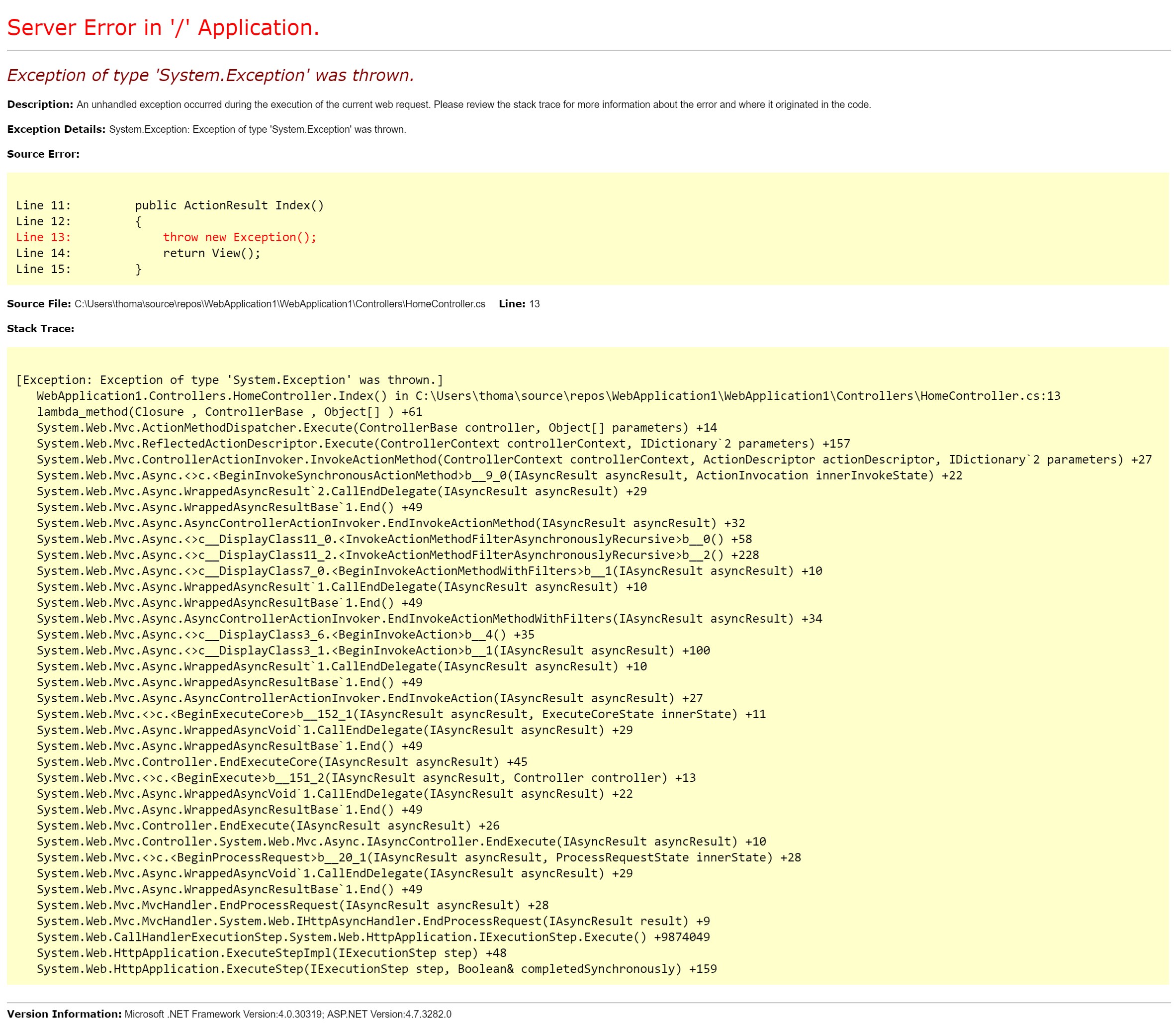
The YSoD is the default fallback when no custom error page has been configured. YSoD works after deploying it to another server, but it looks different:
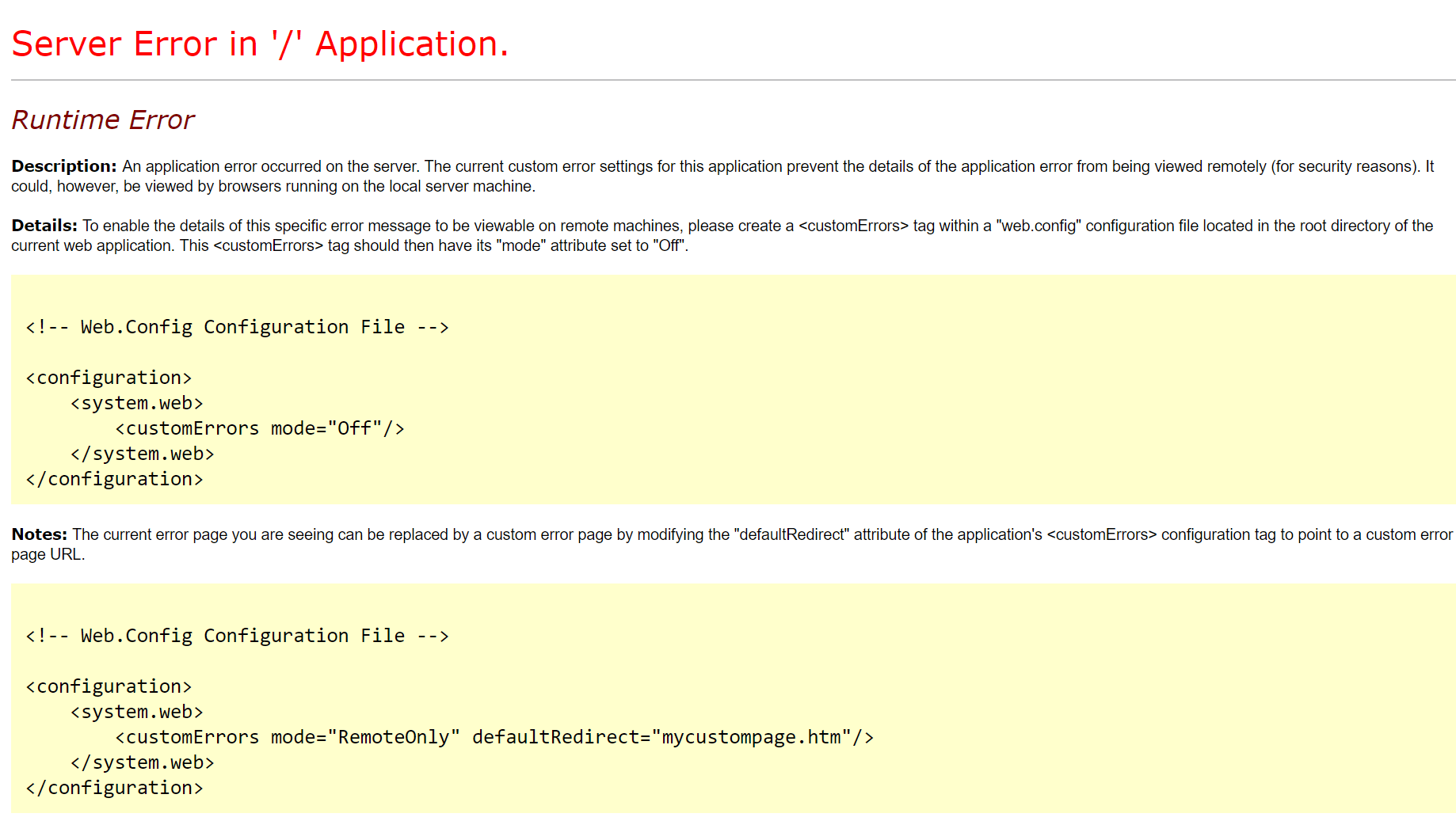
It’s the same page, but one is accessed through localhost and the other through a remote name. ASP.NET hides an application’s specific details like the stack trace, file locations, .NET version, etc., as a security feature. While the first example is quite fine when running locally and where you want to track down errors, the second is not very user-friendly.
Before we start digging down into custom error pages, let me put a few words in on the possibilities listed in the screenshot above. As mentioned, you can add the following to the system.web element:
<configuration>
  <system.web>
    <customErrors mode="Off"/>
    ...
  </system.web>
  ...
</configuration>
Doing so will give you the detailed error message from the first screenshot, even when running in production. This approach is used by some developers while setting up the production environment or if everything fails.
I discourage you from disabling custom errors on the production environment. Everyone will be able to inspect details about your application that could be potential fuel for hackers. Always use an error logging solution (like ELMAH or elmah.io) instead, since they will log the details and still only show the generic error message to the user.
Finally, let’s talk about some custom errors. So what exactly is a custom error? Actually, it’s just an HTML (typically) document like everything else. The page should explain to the user that something went wrong and it’s preferable to help the user move on by either proposing alternatives or giving them a way to contact support.
Different versions of ASP.NET come with different features. I’ll explain how MVC defines error pages later in this post, and why I’ll focus on ASP.NET WebForms first. We have already seen a possible value of the mode attribute (mode="Off"). To enable an error page, set the value to On and specify an error page in the defaultRedirect attribute:
<configuration>
  <system.web>
    <customErrors mode="On" defaultRedirect="~/Error.aspx"/>
    ...
  </system.web>
  ...
</configuration>
When an exception occurs, ASP.NET will automatically redirect the user to /Error?aspxerrorpath=/default.aspx. The aspxerrorpath parameter is appended to the URL specified in defaultRedirect to help identify the page that caused the error. If you want ASP.NET to keep the user on the failing URL, but still show the error page, you can use the redirectMode attribute:
<configuration>
  <system.web>
    <customErrors mode="On" defaultRedirect="~/Error.aspx" redirectMode="ResponseRewrite"/>
    ...
  </system.web>
  ...
</configuration>
When setting redirectMode to ResponseRewrite the error page is shown, but the URL stays on /Default.aspx (which is the page where I’m throwing an exception). If you want to go back to the old behavior, either remove the redirectMode attribute or set it to ResponseRedirect.
If you are coding along you may have noticed that ASP.NET now shows the custom error page when running localhost. If you are using elmah.io or something similar to inspect your errors, this may not be a problem. But in most cases, having the YSoD when running locally is a huge advantage. To get this behavior, set mode to RemoteOnly:
<configuration>
  <system.web>
    <customErrors mode="RemoteOnly" defaultRedirect="~/Error.aspx"/>
    ...
  </system.web>
  ...
</configuration>
As expected, ASP.NET now only redirects the user to the error page if the web application is accessed on a remote name other than localhost.
Another feature worth mentioning is the option of having multiple error pages. You may have a «funny» 404 page and another page reassuring users who experience a 500 that you are indeed looking at the error. To do just this, use error child elements:
<configuration>
  <system.web>
    <customErrors mode="RemoteOnly" defaultRedirect="~/Error.aspx">
      <error statusCode="404" redirect="~/Notfound.aspx" />
    </customErrors>
    ...
  </system.web>
  ...
</configuration>
The added error element tells ASP.NET to redirect the user to /Notfound.aspx if an exception is thrown and the status code is 404. You can define multiple error elements with each «listening» for an individual status code. If the returned status code doesn’t match one already specified in an error element, ASP.NET uses the value in defaultRedirect as a fallback.
ASP.NET MVC
ASP.NET MVC introduces new features for custom error pages, but everything is still built on top of the ASP.NET pipeline. When creating a new project using the template available in Visual Studio, you get an error page generated (Views/Shared/Error.cshtml) which you can style to meet your needs. The page is triggered using a combination of setting mode to On or RemoteOnly in web.config (as shown multiple times already) and by adding the MVC filter HandleErrorAttribute either on individual controllers and/or actions or simply as a global filter in FilterConfig.cs:
public class FilterConfig
{
    public static void RegisterGlobalFilters(GlobalFilterCollection filters)
    {
        filters.Add(new HandleErrorAttribute());
    }
}
This kind of custom error page can be fine for simple projects. However, in real life you want to look into something more elaborate since the HandleErrorAttribute only handles errors that happen within the context of MVC (500s basically).
Another downside of using the HandleErrorAttribute is that it may end up swallowing exceptions. This means that error logging platforms like ELMAH and elmah.io don’t work as intended. To overcome this, people have been specifying their own specialization of the HandleErrorAttribute that logs the error to ELMAH as discussed here. If you MUST use the error attribute available in MVC, I recommend you use Alexander Beletsky’s Elmah.MVC package, which automatically handles this issue for you. In case you are an elmah.io user, install the Elmah.Io.Mvc package. This package installs the Elmah.MVC package to make everything run smoothly.
We use ASP.NET MVC on elmah.io for some of our applications (we want to migrate everything to ASP.NET Core eventually, but we are not there yet). In those projects, we have settled on a solution very similar to the one shown when discussing ASP.Net WebForms. This means we are not using the HandleErrorAttribute anywhere. Instead, we have defined a new controller named StatusCodeController:
public class StatusCodeController : Controller
{
    public ActionResult NotFound()
    {
        return View();
    }

    public ActionResult InternalServerError()
    {
        return View();
    }
}
In the web.config file we use the routes given by MVC:
<configuration>
  <system.web>
    <customErrors mode="RemoteOnly" defaultRedirect="/statuscode/internalservererror">
      <error statusCode="404" redirect="/statuscode/notfound" />
    </customErrors>
    ...
  </system.web>
  ...
</configuration>
Setting up custom error pages like this ensures that any errors thrown in our application are redirecting to the correct error page.
elmah.io: Error logging and Uptime Monitoring for your web apps
This blog post is brought to you by elmah.io. elmah.io is error logging, uptime monitoring, deployment tracking, and service heartbeats for your .NET and JavaScript applications. Stop relying on your users to notify you when something is wrong or dig through hundreds of megabytes of log files spread across servers. With elmah.io, we store all of your log messages, notify you through popular channels like email, Slack, and Microsoft Teams, and help you fix errors fast.
See how we can help you monitor your website for crashes
Monitor your website