Обработка ошибок
Данное руководство устарело. Актуальное руководство: Руководство по ASP.NET Core 7
Последнее обновление: 06.11.2019
Ошибки в приложении можно условно разделить на два типа: исключения, которые возникают в процессе выполнения кода (например, деление на 0), и
стандартные ошибки протокола HTTP (например, ошибка 404).
Обычные исключения могут быть полезны для разработчика в процессе создания приложения, но простые пользователи не должны будут их видеть.
UseDeveloperExceptionPage
Если мы создаем проект ASP.NET Core, например, по типу Empty (да и в других типах проектов), то в классе Startup мы можем найти в начале метода Configure() следующие строки:
if (env.IsDevelopment())
{
	app.UseDeveloperExceptionPage();
}
Если приложение находится в состоянии разработки, то с помощью middleware app.UseDeveloperExceptionPage() приложение перехватывает исключения и
выводит информацию о них разработчику.
Например, изменим класс Startup следующим образом:
public class Startup
{
	public void Configure(IApplicationBuilder app, IWebHostEnvironment env)
	{
		if (env.IsDevelopment())
		{
			app.UseDeveloperExceptionPage();
		}
		app.Run(async (context) =>
		{
			int x = 0;
			int y = 8 / x;
			await context.Response.WriteAsync($"Result = {y}");
		});
	}
}
В middleware app.Run симулируется генерация исключения при делении ноль. И если мы запустим проект, то в браузере мы увидим
информацию об исключении:
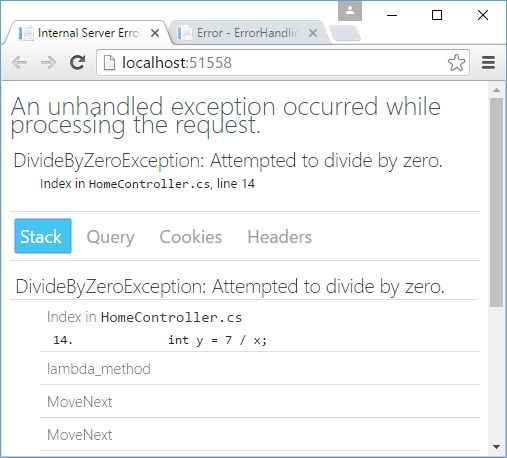
Этой информации достаточно, чтобы определить где именно в коде произошло исключение.
Теперь посмотрим, как все это будет выглядеть для простого пользователя. Для этого изменим метод Configure:
public void Configure(IApplicationBuilder app, IWebHostEnvironment env)
{
	env.EnvironmentName = "Production";
	if (env.IsDevelopment())
	{
		app.UseDeveloperExceptionPage();
	}
	app.Run(async (context) =>
	{
		int x = 0;
		int y = 8 / x;
		await context.Response.WriteAsync($"Result = {y}");
	});
}
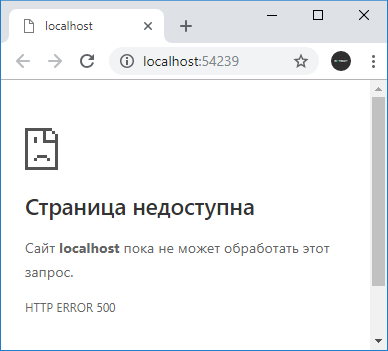
Выражение env.EnvironmentName = "Production"; устанавливает режим развертывания вместо режима разработки. В этом случае выражение if (env.IsDevelopment()) будет возвращать false, и мы увидим в браузере что-то наподобие «HTTP ERROR 500»
UseExceptionHandler
Это не самая лучшая ситуация, и нередко все-таки возникает необходимость дать пользователям некоторую информацию о том, что же все-таки произошло. Либо потребуется как-то обработать данную ситуацию.
Для этих целей можно использовать еще один встроенный middleware в виде метода UseExceptionHandler(). Он перенаправляет
при возникновении исключения на некоторый адрес и позволяет обработать исключение. Например, изменим метод Configure следующим образом:
public void Configure(IApplicationBuilder app, IWebHostEnvironment env)
{
	env.EnvironmentName = "Production";

	if (env.IsDevelopment())
	{
		app.UseDeveloperExceptionPage();
	}
	else
	{
		app.UseExceptionHandler("/error");
	}

	app.Map("/error", ap => ap.Run(async context =>
	{
		await context.Response.WriteAsync("DivideByZeroException occured!");
	}));

	app.Run(async (context) =>
	{
		int x = 0;
		int y = 8 / x;
		await context.Response.WriteAsync($"Result = {y}");
	});
}
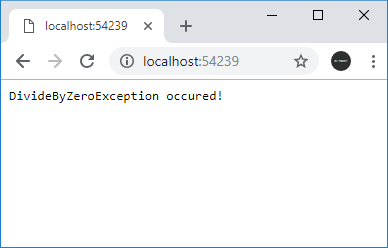
Метод app.UseExceptionHandler("/error"); перенаправляет при возникновении ошибки на адрес «/error».
Для обработки пути по определенному адресу здесь использовался метод app.Map(). В итоге при возникновении исключения будет срабатывать делегат
из метода app.Map.
Следует учитывать, что оба middleware — app.UseDeveloperExceptionPage() и app.UseExceptionHandler()
следует помещать ближе к началу конвейера middleware.
Обработка ошибок HTTP
В отличие от исключений стандартный функционал проекта ASP.NET Core почти никак не обрабатывает ошибки HTTP, например, в случае если ресурс не найден.
При обращении к несуществующему ресурсу мы увидим в браузере пустую страницу, и только через консоль веб-браузера мы сможем увидеть статусный код.
Но с помощью компонента StatusCodePagesMiddleware можно добавить в проект отправку информации о статусном коде.
Для этого добавим в метод Configure() класса Startup вызов app.UseStatusCodePages():
public void Configure(IApplicationBuilder app, IWebHostEnvironment env)
{
	if (env.IsDevelopment())
	{
		app.UseDeveloperExceptionPage();
	}

	// обработка ошибок HTTP
	app.UseStatusCodePages();

	app.Map("/hello", ap => ap.Run(async (context) =>
	{
		await context.Response.WriteAsync($"Hello ASP.NET Core");
	}));
}
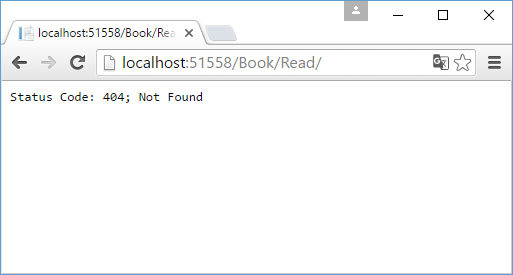
Здесь мы можем обращаться только по адресу «/hello». При обращении ко всем остальным адресам браузер отобразит базовую информацию об ошибке:
Данный метод позволяет настроить отправляемое пользователю сообщение. В частности, мы можем изменить вызов метода так:
app.UseStatusCodePages("text/plain", "Error. Status code : {0}");
В качестве первого параметра указывается MIME-тип ответа, а в качестве второго — собственно то сообщение, которое увидит пользователь. В сообщение мы можем
передать код ошибки через плейсхолдер «{0}».
Вместо метода app.UseStatusCodePages() мы также можем использовать еще пару других, которые также обрабатываю ошибки HTTP.
С помощью метода app.UseStatusCodePagesWithRedirects() можно выполнить переадресацию на определенный метод, который непосредственно обработает статусный код:
app.UseStatusCodePagesWithRedirects("/error?code={0}");
Здесь будет идти перенаправление по адресу «/error?code={0}». В качестве параметра через плейсхолдер «{0}» будет передаваться статусный код
ошибки.
Но теперь при обращении к несуществующему ресурсу клиент получит статусный код 302 / Found. То есть формально несуществующий ресурс будет существовать, просто статусный код 302
будет указывать, что ресурс перемещен на другое место — по пути «/error/404».
Подобное поведение может быть неудобно, особенно с точки зрения поисковой индексации, и в этом случае мы можем применить другой метод
app.UseStatusCodePagesWithReExecute():
app.UseStatusCodePagesWithReExecute("/error", "?code={0}");
Первый параметр метода указывает на путь перенаправления, а второй задает параметры строки запроса, которые будут передаваться при перенаправлении.
Вместо плейсхолдера {0} опять же будет передаваться статусный код ошибки. Формально мы получим тот же ответ, так как так же будет идти перенаправление на путь «/error?code=404». Но теперь браузер получит оригинальный статусный код 404.
Пример использования:
public void Configure(IApplicationBuilder app)
{
	// обработка ошибок HTTP
	app.UseStatusCodePagesWithReExecute("/error", "?code={0}");

	app.Map("/error", ap => ap.Run(async context =>
	{
		await context.Response.WriteAsync($"Err: {context.Request.Query["code"]}");
	}));

	app.Map("/hello", ap => ap.Run(async (context) =>
	{
		await context.Response.WriteAsync($"Hello ASP.NET Core");
	}));
}
Настройка обработки ошибок в web.config
Еще один способ обработки кодов ошибок представляет собой определение и настройка в файле конфигурации web.config элемента
httpErrors. Этот способ в принципе использовался и в других версиях ASP.NET.
В ASP.NET Core он также доступен, однако имеет очень ограниченное действие. В частности, мы его можем использовать только при развертывании на IIS, а также не можем использовать ряд настроек.
Итак, добавим в корень проекта новый элемент Web Configurarion File, который естественно назовем web.config:
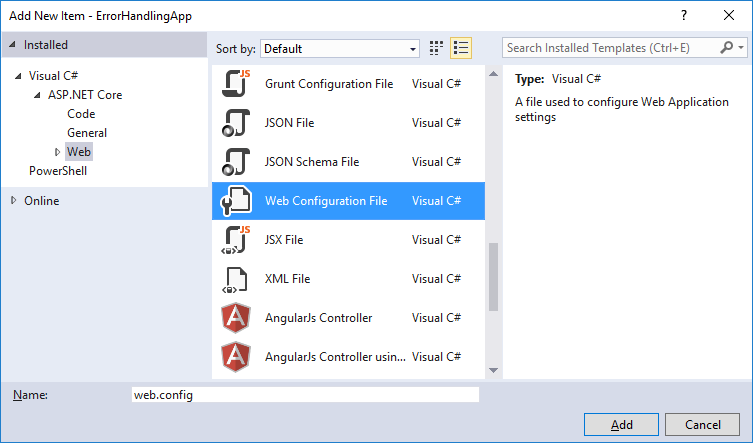
Изменим его следующим образом:
<?xml version="1.0" encoding="utf-8"?>
<configuration>

  <system.webServer>
	<httpErrors errorMode="Custom" existingResponse="Replace">
      <remove statusCode="404"/>
	  <remove statusCode="403"/>
      <error statusCode="404" path="404.html" responseMode="File"/>
      <error statusCode="403" path="403.html" responseMode="File"/>
	</httpErrors>

    <handlers>
      <add name="aspNetCore" path="*" verb="*" modules="AspNetCoreModule" resourceType="Unspecified"/>
    </handlers>
    <aspNetCore processPath="%LAUNCHER_PATH%" arguments="%LAUNCHER_ARGS%" stdoutLogEnabled="false" stdoutLogFile=".logsstdout" forwardWindowsAuthToken="false"/>
  </system.webServer>
</configuration>
Также для обработки ошибок добавим в корень проекта новый файл 404.html:
<!DOCTYPE html>
<html>
<head>
    <meta charset="utf-8" />
    <title>Ошибка 404</title>
</head>
<body>
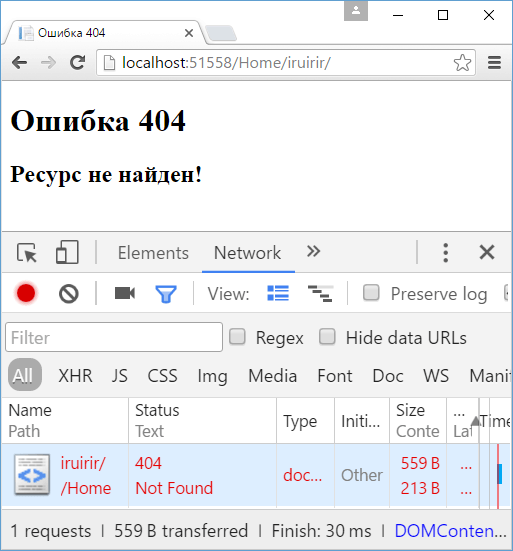
    <h1>Ошибка 404</h1>
    <h2>Ресурс не найден!</h2>
</body>
</html>
По аналогии можно добавить файл 403.html для ошибки 403.
Итак, элемент httpErrors имеет ряд настроек. Для тестирования настроек локально, необходимо установить атрибут errorMode="Custom".
Если тестирование необязательно, и приложение уже развернуто для использования, то можно установить значение errorMode="DetailedLocalOnly".
Значение existingResponse="Replace" позволит отобразить ошибку по оригинальному запрошенному пути без переадресации.
Внутри элемента httpErrors с помощью отдельных элементов error устанавливается обработка ошибок. Атрибут statusCode
задает статусный код, атрибут path — адрес url, который будет вызываться, а атрибут responseMode указывает, как будет обрабатываться ответ вызванному url.
Атрибут responseMode имеет значение File, что позволяет рассматривать адрес url из атрибута path как статическую страницу и использовать ее в качестве ответа
Настройки элемента httpErrors могут наследоваться с других уровней, например, от файла конфигурации machine.config. И чтобы удалить
все унаследованные настройки, применяется элемент <clear />. Чтобы удалить настройки для отдельных ошибок, применяется элемент
<remove />.
Для тестирования используем следующий класс Startup:
public class Startup
{
	public void Configure(IApplicationBuilder app)
	{
		app.Map("/hello", ap => ap.Run(async (context) =>
		{
			await context.Response.WriteAsync($"Hello ASP.NET Core");
		}));
	}
}
И после обращения к несуществующему ресурсу в приложении отобразится содержимое из файла 404.html.
| title | author | description | monikerRange | ms.author | ms.custom | ms.date | uid |
|---|---|---|---|---|---|---|---|
|
Handle errors in ASP.NET Core |
rick-anderson |
Discover how to handle errors in ASP.NET Core apps. |
>= aspnetcore-3.1 |
riande |
mvc |
01/18/2023 |
fundamentals/error-handling |
Handle errors in ASP.NET Core
:::moniker range=»>= aspnetcore-7.0″
By Tom Dykstra
This article covers common approaches to handling errors in ASP.NET Core web apps. See xref:web-api/handle-errors for web APIs.
Developer exception page
The Developer Exception Page displays detailed information about unhandled request exceptions. ASP.NET Core apps enable the developer exception page by default when both:
- Running in the Development environment.
- App created with the current templates, that is, using WebApplication.CreateBuilder. Apps created using the
WebHost.CreateDefaultBuildermust enable the developer exception page by callingapp.UseDeveloperExceptionPageinConfigure.
The developer exception page runs early in the middleware pipeline, so that it can catch unhandled exceptions thrown in middleware that follows.
Detailed exception information shouldn’t be displayed publicly when the app runs in the Production environment. For more information on configuring environments, see xref:fundamentals/environments.
The Developer Exception Page can include the following information about the exception and the request:
- Stack trace
- Query string parameters, if any
- Cookies, if any
- Headers
The Developer Exception Page isn’t guaranteed to provide any information. Use Logging for complete error information.
Exception handler page
To configure a custom error handling page for the Production environment, call xref:Microsoft.AspNetCore.Builder.ExceptionHandlerExtensions.UseExceptionHandler%2A. This exception handling middleware:
- Catches and logs unhandled exceptions.
- Re-executes the request in an alternate pipeline using the path indicated. The request isn’t re-executed if the response has started. The template-generated code re-executes the request using the
/Errorpath.
[!WARNING]
If the alternate pipeline throws an exception of its own, Exception Handling Middleware rethrows the original exception.
Since this middleware can re-execute the request pipeline:
- Middlewares need to handle reentrancy with the same request. This normally means either cleaning up their state after calling
_nextor caching their processing on theHttpContextto avoid redoing it. When dealing with the request body, this either means buffering or caching the results like the Form reader. - For the xref:Microsoft.AspNetCore.Builder.ExceptionHandlerExtensions.UseExceptionHandler(Microsoft.AspNetCore.Builder.IApplicationBuilder,System.String) overload that is used in templates, only the request path is modified, and the route data is cleared. Request data such as headers, method, and items are all reused as-is.
- Scoped services remain the same.
In the following example, xref:Microsoft.AspNetCore.Builder.ExceptionHandlerExtensions.UseExceptionHandler%2A adds the exception handling middleware in non-Development environments:
:::code language=»csharp» source=»error-handling/samples/7.x/ErrorHandlingSample/Program.cs» id=»snippet_UseExceptionHandler» highlight=»3,5″:::
The Razor Pages app template provides an Error page (.cshtml) and xref:Microsoft.AspNetCore.Mvc.RazorPages.PageModel class (ErrorModel) in the Pages folder. For an MVC app, the project template includes an Error action method and an Error view for the Home controller.
The exception handling middleware re-executes the request using the original HTTP method. If an error handler endpoint is restricted to a specific set of HTTP methods, it runs only for those HTTP methods. For example, an MVC controller action that uses the [HttpGet] attribute runs only for GET requests. To ensure that all requests reach the custom error handling page, don’t restrict them to a specific set of HTTP methods.
To handle exceptions differently based on the original HTTP method:
- For Razor Pages, create multiple handler methods. For example, use
OnGetto handle GET exceptions and useOnPostto handle POST exceptions. - For MVC, apply HTTP verb attributes to multiple actions. For example, use
[HttpGet]to handle GET exceptions and use[HttpPost]to handle POST exceptions.
To allow unauthenticated users to view the custom error handling page, ensure that it supports anonymous access.
Access the exception
Use xref:Microsoft.AspNetCore.Diagnostics.IExceptionHandlerPathFeature to access the exception and the original request path in an error handler. The following example uses IExceptionHandlerPathFeature to get more information about the exception that was thrown:
:::code language=»csharp» source=»error-handling/samples/7.x/ErrorHandlingSample/Pages/Error.cshtml.cs» id=»snippet_Class» highlight=»15-27″:::
[!WARNING]
Do not serve sensitive error information to clients. Serving errors is a security risk.
Exception handler lambda
An alternative to a custom exception handler page is to provide a lambda to xref:Microsoft.AspNetCore.Builder.ExceptionHandlerExtensions.UseExceptionHandler%2A. Using a lambda allows access to the error before returning the response.
The following code uses a lambda for exception handling:
:::code language=»csharp» source=»error-handling/samples/7.x/ErrorHandlingSample/Snippets/Program.cs» id=»snippet_UseExceptionHandlerInline» highlight=»5-29″:::
[!WARNING]
Do not serve sensitive error information to clients. Serving errors is a security risk.
UseStatusCodePages
By default, an ASP.NET Core app doesn’t provide a status code page for HTTP error status codes, such as 404 — Not Found. When the app sets an HTTP 400-599 error status code that doesn’t have a body, it returns the status code and an empty response body. To enable default text-only handlers for common error status codes, call xref:Microsoft.AspNetCore.Builder.StatusCodePagesExtensions.UseStatusCodePages%2A in Program.cs:
:::code language=»csharp» source=»error-handling/samples/7.x/ErrorHandlingSample/Snippets/Program.cs» id=»snippet_UseStatusCodePages» highlight=»9″:::
Call UseStatusCodePages before request handling middleware. For example, call UseStatusCodePages before the Static File Middleware and the Endpoints Middleware.
When UseStatusCodePages isn’t used, navigating to a URL without an endpoint returns a browser-dependent error message indicating the endpoint can’t be found. When UseStatusCodePages is called, the browser returns the following response:
Status Code: 404; Not Found
UseStatusCodePages isn’t typically used in production because it returns a message that isn’t useful to users.
[!NOTE]
The status code pages middleware does not catch exceptions. To provide a custom error handling page, use the exception handler page.
UseStatusCodePages with format string
To customize the response content type and text, use the overload of xref:Microsoft.AspNetCore.Builder.StatusCodePagesExtensions.UseStatusCodePages%2A that takes a content type and format string:
:::code language=»csharp» source=»error-handling/samples/7.x/ErrorHandlingSample/Snippets/Program.cs» id=»snippet_UseStatusCodePagesContent» highlight=»10″:::
In the preceding code, {0} is a placeholder for the error code.
UseStatusCodePages with a format string isn’t typically used in production because it returns a message that isn’t useful to users.
UseStatusCodePages with lambda
To specify custom error-handling and response-writing code, use the overload of xref:Microsoft.AspNetCore.Builder.StatusCodePagesExtensions.UseStatusCodePages%2A that takes a lambda expression:
:::code language=»csharp» source=»error-handling/samples/7.x/ErrorHandlingSample/Snippets/Program.cs» id=»snippet_UseStatusCodePagesInline» highlight=»9-16″:::
UseStatusCodePages with a lambda isn’t typically used in production because it returns a message that isn’t useful to users.
UseStatusCodePagesWithRedirects
The xref:Microsoft.AspNetCore.Builder.StatusCodePagesExtensions.UseStatusCodePagesWithRedirects%2A extension method:
- Sends a 302 — Found status code to the client.
- Redirects the client to the error handling endpoint provided in the URL template. The error handling endpoint typically displays error information and returns HTTP 200.
:::code language=»csharp» source=»error-handling/samples/7.x/ErrorHandlingSample/Snippets/Program.cs» id=»snippet_UseStatusCodePagesRedirect» highlight=»9″:::
The URL template can include a {0} placeholder for the status code, as shown in the preceding code. If the URL template starts with ~ (tilde), the ~ is replaced by the app’s PathBase. When specifying an endpoint in the app, create an MVC view or Razor page for the endpoint.
This method is commonly used when the app:
- Should redirect the client to a different endpoint, usually in cases where a different app processes the error. For web apps, the client’s browser address bar reflects the redirected endpoint.
- Shouldn’t preserve and return the original status code with the initial redirect response.
UseStatusCodePagesWithReExecute
The xref:Microsoft.AspNetCore.Builder.StatusCodePagesExtensions.UseStatusCodePagesWithReExecute%2A extension method:
- Returns the original status code to the client.
- Generates the response body by re-executing the request pipeline using an alternate path.
:::code language=»csharp» source=»error-handling/samples/7.x/ErrorHandlingSample/Snippets/Program.cs» id=»snippet_UseStatusCodePagesReExecute» highlight=»9″:::
If an endpoint within the app is specified, create an MVC view or Razor page for the endpoint.
This method is commonly used when the app should:
- Process the request without redirecting to a different endpoint. For web apps, the client’s browser address bar reflects the originally requested endpoint.
- Preserve and return the original status code with the response.
The URL template must start with / and may include a placeholder {0} for the status code. To pass the status code as a query-string parameter, pass a second argument into UseStatusCodePagesWithReExecute. For example:
:::code language=»csharp» source=»error-handling/samples/7.x/ErrorHandlingSample/Snippets/Program.cs» id=»snippet_UseStatusCodePagesReExecuteQueryString»:::
The endpoint that processes the error can get the original URL that generated the error, as shown in the following example:
:::code language=»csharp» source=»error-handling/samples/7.x/ErrorHandlingSample/Pages/StatusCode.cshtml.cs» id=»snippet_Class» highlight=»12-21″:::
Since this middleware can re-execute the request pipeline:
- Middlewares need to handle reentrancy with the same request. This normally means either cleaning up their state after calling
_nextor caching their processing on theHttpContextto avoid redoing it. When dealing with the request body, this either means buffering or caching the results like the Form reader. - Scoped services remain the same.
Disable status code pages
To disable status code pages for an MVC controller or action method, use the [SkipStatusCodePages] attribute.
To disable status code pages for specific requests in a Razor Pages handler method or in an MVC controller, use xref:Microsoft.AspNetCore.Diagnostics.IStatusCodePagesFeature:
:::code language=»csharp» source=»error-handling/samples/7.x/ErrorHandlingSample/Snippets/Pages/Index.cshtml.cs» id=»snippet_OnGet»:::
Exception-handling code
Code in exception handling pages can also throw exceptions. Production error pages should be tested thoroughly and take extra care to avoid throwing exceptions of their own.
Response headers
Once the headers for a response are sent:
- The app can’t change the response’s status code.
- Any exception pages or handlers can’t run. The response must be completed or the connection aborted.
Server exception handling
In addition to the exception handling logic in an app, the HTTP server implementation can handle some exceptions. If the server catches an exception before response headers are sent, the server sends a 500 - Internal Server Error response without a response body. If the server catches an exception after response headers are sent, the server closes the connection. Requests that aren’t handled by the app are handled by the server. Any exception that occurs when the server is handling the request is handled by the server’s exception handling. The app’s custom error pages, exception handling middleware, and filters don’t affect this behavior.
Startup exception handling
Only the hosting layer can handle exceptions that take place during app startup. The host can be configured to capture startup errors and capture detailed errors.
The hosting layer can show an error page for a captured startup error only if the error occurs after host address/port binding. If binding fails:
- The hosting layer logs a critical exception.
- The dotnet process crashes.
- No error page is displayed when the HTTP server is Kestrel.
When running on IIS (or Azure App Service) or IIS Express, a 502.5 — Process Failure is returned by the ASP.NET Core Module if the process can’t start. For more information, see xref:test/troubleshoot-azure-iis.
Database error page
The Database developer page exception filter xref:Microsoft.Extensions.DependencyInjection.DatabaseDeveloperPageExceptionFilterServiceExtensions.AddDatabaseDeveloperPageExceptionFilter%2A captures database-related exceptions that can be resolved by using Entity Framework Core migrations. When these exceptions occur, an HTML response is generated with details of possible actions to resolve the issue. This page is enabled only in the Development environment. The following code adds the Database developer page exception filter:
:::code language=»csharp» source=»error-handling/samples/7.x/ErrorHandlingSample/Program.cs» id=»snippet_AddDatabaseDeveloperPageExceptionFilter» highlight=»3″:::
Exception filters
In MVC apps, exception filters can be configured globally or on a per-controller or per-action basis. In Razor Pages apps, they can be configured globally or per page model. These filters handle any unhandled exceptions that occur during the execution of a controller action or another filter. For more information, see xref:mvc/controllers/filters#exception-filters.
Exception filters are useful for trapping exceptions that occur within MVC actions, but they’re not as flexible as the built-in exception handling middleware, xref:Microsoft.AspNetCore.Builder.ExceptionHandlerExtensions.UseExceptionHandler%2A. We recommend using UseExceptionHandler, unless you need to perform error handling differently based on which MVC action is chosen.
Model state errors
For information about how to handle model state errors, see Model binding and Model validation.
Problem details
[!INCLUDE]
The following code configures the app to generate a problem details response for all HTTP client and server error responses that don’t have a body content yet:
:::code language=»csharp» source=»error-handling/samples/7.x/ErrorHandlingSample/Snippets/Program.cs» id=»snippet_AddProblemDetails» highlight=»3″:::
The next section shows how to customize the problem details response body.
Customize problem details
The automatic creation of a ProblemDetails can be customized using any of the following options:
- Use
ProblemDetailsOptions.CustomizeProblemDetails - Use a custom
IProblemDetailsWriter - Call the
IProblemDetailsServicein a middleware
CustomizeProblemDetails operation
The generated problem details can be customized using xref:Microsoft.AspNetCore.Http.ProblemDetailsOptions.CustomizeProblemDetails, and the customizations are applied to all auto-generated problem details.
The following code uses xref:Microsoft.AspNetCore.Http.ProblemDetailsOptions to set xref:Microsoft.AspNetCore.Http.ProblemDetailsOptions.CustomizeProblemDetails:
:::code language=»csharp» source=»error-handling/samples/7.x/ErrorHandlingSample/Snippets/Program.cs» id=»snippet_CustomizeProblemDetails» highlight=»3-5″:::
For example, an HTTP Status 400 Bad Request endpoint result produces the following problem details response body:
{
  "type": "https://tools.ietf.org/html/rfc9110#section-15.5.1",
  "title": "Bad Request",
  "status": 400,
  "nodeId": "my-machine-name"
}
Custom IProblemDetailsWriter
An xref:Microsoft.AspNetCore.Http.IProblemDetailsWriter implementation can be created for advanced customizations:
:::code language=»csharp» source=»~/../AspNetCore.Docs.Samples/fundamentals/middleware/problem-details-service/SampleProblemDetailsWriter.cs» :::
Problem details from Middleware
An alternative approach to using xref:Microsoft.AspNetCore.Http.ProblemDetailsOptions with xref:Microsoft.AspNetCore.Http.ProblemDetailsOptions.CustomizeProblemDetails is to set the xref:Microsoft.AspNetCore.Http.ProblemDetailsContext.ProblemDetails in middleware. A problem details response can be written by calling IProblemDetailsService.WriteAsync:
:::code language=»csharp» source=»~/../AspNetCore.Docs.Samples/fundamentals/middleware/problem-details-service/Program.cs» id=»snippet_middleware» highlight=»5,19-40″:::
In the preceding code, the minimal API endpoints /divide and /squareroot return the expected custom problem response on error input.
The API controller endpoints return the default problem response on error input, not the custom problem response. The default problem response is returned because the API controller has written to the response stream, Problem details for error status codes, before IProblemDetailsService.WriteAsync is called and the response is not written again.
The following ValuesController returns xref:Microsoft.AspNetCore.Mvc.BadRequestResult, which writes to the response stream and therefore prevents the custom problem response from being returned.
:::code language=»csharp» source=»~/../AspNetCore.Docs.Samples/fundamentals/middleware/problem-details-service/Controllers/ValuesController.cs» id=»snippet» highlight=»9-17,27-35″:::
The following Values3Controller returns ControllerBase.Problem so the expected custom problem result is returned:
:::code language=»csharp» source=»~/../AspNetCore.Docs.Samples/fundamentals/middleware/problem-details-service/Controllers/ValuesController.cs» id=»snippet3″ highlight=»16-21″:::
Produce a ProblemDetails payload for exceptions
Consider the following app:
:::code language=»csharp» source=»~/../AspNetCore.Docs.Samples/fundamentals/middleware/problem-details-service/Program.cs» id=»snippet_apishort» highlight=»4,8″:::
In non-development environments, when an exception occurs, the following is a standard ProblemDetails response that is returned to the client:
{
"type":"https://tools.ietf.org/html/rfc7231#section-6.6.1",
"title":"An error occurred while processing your request.",
"status":500,"traceId":"00-b644<snip>-00"
}
For most apps, the preceding code is all that’s needed for exceptions. However, the following section shows how to get more detailed problem responses.
An alternative to a custom exception handler page is to provide a lambda to xref:Microsoft.AspNetCore.Builder.ExceptionHandlerExtensions.UseExceptionHandler%2A. Using a lambda allows access to the error and writing a problem details response with IProblemDetailsService.WriteAsync:
:::code language=»csharp» source=»~/../AspNetCore.Docs.Samples/fundamentals/middleware/problem-details-service/Program.cs» id=»snippet_lambda» :::
[!WARNING]
Do not serve sensitive error information to clients. Serving errors is a security risk.
An alternative approach to generate problem details is to use the third-party NuGet package Hellang.Middleware.ProblemDetails that can be used to map exceptions and client errors to problem details.
Additional resources
- View or download sample code (how to download)
- xref:test/troubleshoot-azure-iis
- xref:host-and-deploy/azure-iis-errors-reference
:::moniker-end
:::moniker range=»= aspnetcore-6.0″
By Tom Dykstra
This article covers common approaches to handling errors in ASP.NET Core web apps. See xref:web-api/handle-errors for web APIs.
Developer exception page
The Developer Exception Page displays detailed information about unhandled request exceptions. ASP.NET Core apps enable the developer exception page by default when both:
- Running in the Development environment.
- App created with the current templates, that is, using WebApplication.CreateBuilder. Apps created using the
WebHost.CreateDefaultBuildermust enable the developer exception page by callingapp.UseDeveloperExceptionPageinConfigure.
The developer exception page runs early in the middleware pipeline, so that it can catch unhandled exceptions thrown in middleware that follows.
Detailed exception information shouldn’t be displayed publicly when the app runs in the Production environment. For more information on configuring environments, see xref:fundamentals/environments.
The Developer Exception Page can include the following information about the exception and the request:
- Stack trace
- Query string parameters, if any
- Cookies, if any
- Headers
The Developer Exception Page isn’t guaranteed to provide any information. Use Logging for complete error information.
Exception handler page
To configure a custom error handling page for the Production environment, call xref:Microsoft.AspNetCore.Builder.ExceptionHandlerExtensions.UseExceptionHandler%2A. This exception handling middleware:
- Catches and logs unhandled exceptions.
- Re-executes the request in an alternate pipeline using the path indicated. The request isn’t re-executed if the response has started. The template-generated code re-executes the request using the
/Errorpath.
[!WARNING]
If the alternate pipeline throws an exception of its own, Exception Handling Middleware rethrows the original exception.
In the following example, xref:Microsoft.AspNetCore.Builder.ExceptionHandlerExtensions.UseExceptionHandler%2A adds the exception handling middleware in non-Development environments:
:::code language=»csharp» source=»error-handling/samples/6.x/ErrorHandlingSample/Program.cs» id=»snippet_UseExceptionHandler» highlight=»3,5″:::
The Razor Pages app template provides an Error page (.cshtml) and xref:Microsoft.AspNetCore.Mvc.RazorPages.PageModel class (ErrorModel) in the Pages folder. For an MVC app, the project template includes an Error action method and an Error view for the Home controller.
The exception handling middleware re-executes the request using the original HTTP method. If an error handler endpoint is restricted to a specific set of HTTP methods, it runs only for those HTTP methods. For example, an MVC controller action that uses the [HttpGet] attribute runs only for GET requests. To ensure that all requests reach the custom error handling page, don’t restrict them to a specific set of HTTP methods.
To handle exceptions differently based on the original HTTP method:
- For Razor Pages, create multiple handler methods. For example, use
OnGetto handle GET exceptions and useOnPostto handle POST exceptions. - For MVC, apply HTTP verb attributes to multiple actions. For example, use
[HttpGet]to handle GET exceptions and use[HttpPost]to handle POST exceptions.
To allow unauthenticated users to view the custom error handling page, ensure that it supports anonymous access.
Access the exception
Use xref:Microsoft.AspNetCore.Diagnostics.IExceptionHandlerPathFeature to access the exception and the original request path in an error handler. The following example uses IExceptionHandlerPathFeature to get more information about the exception that was thrown:
:::code language=»csharp» source=»error-handling/samples/6.x/ErrorHandlingSample/Pages/Error.cshtml.cs» id=»snippet_Class» highlight=»15-27″:::
[!WARNING]
Do not serve sensitive error information to clients. Serving errors is a security risk.
Exception handler lambda
An alternative to a custom exception handler page is to provide a lambda to xref:Microsoft.AspNetCore.Builder.ExceptionHandlerExtensions.UseExceptionHandler%2A. Using a lambda allows access to the error before returning the response.
The following code uses a lambda for exception handling:
:::code language=»csharp» source=»error-handling/samples/6.x/ErrorHandlingSample/Snippets/Program.cs» id=»snippet_UseExceptionHandlerInline» highlight=»5-29″:::
[!WARNING]
Do not serve sensitive error information to clients. Serving errors is a security risk.
UseStatusCodePages
By default, an ASP.NET Core app doesn’t provide a status code page for HTTP error status codes, such as 404 — Not Found. When the app sets an HTTP 400-599 error status code that doesn’t have a body, it returns the status code and an empty response body. To enable default text-only handlers for common error status codes, call xref:Microsoft.AspNetCore.Builder.StatusCodePagesExtensions.UseStatusCodePages%2A in Program.cs:
:::code language=»csharp» source=»error-handling/samples/6.x/ErrorHandlingSample/Snippets/Program.cs» id=»snippet_UseStatusCodePages» highlight=»9″:::
Call UseStatusCodePages before request handling middleware. For example, call UseStatusCodePages before the Static File Middleware and the Endpoints Middleware.
When UseStatusCodePages isn’t used, navigating to a URL without an endpoint returns a browser-dependent error message indicating the endpoint can’t be found. When UseStatusCodePages is called, the browser returns the following response:
Status Code: 404; Not Found
UseStatusCodePages isn’t typically used in production because it returns a message that isn’t useful to users.
[!NOTE]
The status code pages middleware does not catch exceptions. To provide a custom error handling page, use the exception handler page.
UseStatusCodePages with format string
To customize the response content type and text, use the overload of xref:Microsoft.AspNetCore.Builder.StatusCodePagesExtensions.UseStatusCodePages%2A that takes a content type and format string:
:::code language=»csharp» source=»error-handling/samples/6.x/ErrorHandlingSample/Snippets/Program.cs» id=»snippet_UseStatusCodePagesContent» highlight=»10″:::
In the preceding code, {0} is a placeholder for the error code.
UseStatusCodePages with a format string isn’t typically used in production because it returns a message that isn’t useful to users.
UseStatusCodePages with lambda
To specify custom error-handling and response-writing code, use the overload of xref:Microsoft.AspNetCore.Builder.StatusCodePagesExtensions.UseStatusCodePages%2A that takes a lambda expression:
:::code language=»csharp» source=»error-handling/samples/6.x/ErrorHandlingSample/Snippets/Program.cs» id=»snippet_UseStatusCodePagesInline» highlight=»9-16″:::
UseStatusCodePages with a lambda isn’t typically used in production because it returns a message that isn’t useful to users.
UseStatusCodePagesWithRedirects
The xref:Microsoft.AspNetCore.Builder.StatusCodePagesExtensions.UseStatusCodePagesWithRedirects%2A extension method:
- Sends a 302 — Found status code to the client.
- Redirects the client to the error handling endpoint provided in the URL template. The error handling endpoint typically displays error information and returns HTTP 200.
:::code language=»csharp» source=»error-handling/samples/6.x/ErrorHandlingSample/Snippets/Program.cs» id=»snippet_UseStatusCodePagesRedirect» highlight=»9″:::
The URL template can include a {0} placeholder for the status code, as shown in the preceding code. If the URL template starts with ~ (tilde), the ~ is replaced by the app’s PathBase. When specifying an endpoint in the app, create an MVC view or Razor page for the endpoint.
This method is commonly used when the app:
- Should redirect the client to a different endpoint, usually in cases where a different app processes the error. For web apps, the client’s browser address bar reflects the redirected endpoint.
- Shouldn’t preserve and return the original status code with the initial redirect response.
UseStatusCodePagesWithReExecute
The xref:Microsoft.AspNetCore.Builder.StatusCodePagesExtensions.UseStatusCodePagesWithReExecute%2A extension method:
- Returns the original status code to the client.
- Generates the response body by re-executing the request pipeline using an alternate path.
:::code language=»csharp» source=»error-handling/samples/6.x/ErrorHandlingSample/Snippets/Program.cs» id=»snippet_UseStatusCodePagesReExecute» highlight=»9″:::
If an endpoint within the app is specified, create an MVC view or Razor page for the endpoint.
This method is commonly used when the app should:
- Process the request without redirecting to a different endpoint. For web apps, the client’s browser address bar reflects the originally requested endpoint.
- Preserve and return the original status code with the response.
The URL template must start with / and may include a placeholder {0} for the status code. To pass the status code as a query-string parameter, pass a second argument into UseStatusCodePagesWithReExecute. For example:
:::code language=»csharp» source=»error-handling/samples/6.x/ErrorHandlingSample/Snippets/Program.cs» id=»snippet_UseStatusCodePagesReExecuteQueryString»:::
The endpoint that processes the error can get the original URL that generated the error, as shown in the following example:
:::code language=»csharp» source=»error-handling/samples/6.x/ErrorHandlingSample/Pages/StatusCode.cshtml.cs» id=»snippet_Class» highlight=»12-21″:::
Disable status code pages
To disable status code pages for an MVC controller or action method, use the [SkipStatusCodePages] attribute.
To disable status code pages for specific requests in a Razor Pages handler method or in an MVC controller, use xref:Microsoft.AspNetCore.Diagnostics.IStatusCodePagesFeature:
:::code language=»csharp» source=»error-handling/samples/6.x/ErrorHandlingSample/Snippets/Pages/Index.cshtml.cs» id=»snippet_OnGet»:::
Exception-handling code
Code in exception handling pages can also throw exceptions. Production error pages should be tested thoroughly and take extra care to avoid throwing exceptions of their own.
Response headers
Once the headers for a response are sent:
- The app can’t change the response’s status code.
- Any exception pages or handlers can’t run. The response must be completed or the connection aborted.
Server exception handling
In addition to the exception handling logic in an app, the HTTP server implementation can handle some exceptions. If the server catches an exception before response headers are sent, the server sends a 500 - Internal Server Error response without a response body. If the server catches an exception after response headers are sent, the server closes the connection. Requests that aren’t handled by the app are handled by the server. Any exception that occurs when the server is handling the request is handled by the server’s exception handling. The app’s custom error pages, exception handling middleware, and filters don’t affect this behavior.
Startup exception handling
Only the hosting layer can handle exceptions that take place during app startup. The host can be configured to capture startup errors and capture detailed errors.
The hosting layer can show an error page for a captured startup error only if the error occurs after host address/port binding. If binding fails:
- The hosting layer logs a critical exception.
- The dotnet process crashes.
- No error page is displayed when the HTTP server is Kestrel.
When running on IIS (or Azure App Service) or IIS Express, a 502.5 — Process Failure is returned by the ASP.NET Core Module if the process can’t start. For more information, see xref:test/troubleshoot-azure-iis.
Database error page
The Database developer page exception filter xref:Microsoft.Extensions.DependencyInjection.DatabaseDeveloperPageExceptionFilterServiceExtensions.AddDatabaseDeveloperPageExceptionFilter%2A captures database-related exceptions that can be resolved by using Entity Framework Core migrations. When these exceptions occur, an HTML response is generated with details of possible actions to resolve the issue. This page is enabled only in the Development environment. The following code adds the Database developer page exception filter:
:::code language=»csharp» source=»error-handling/samples/6.x/ErrorHandlingSample/Program.cs» id=»snippet_AddDatabaseDeveloperPageExceptionFilter» highlight=»3″:::
Exception filters
In MVC apps, exception filters can be configured globally or on a per-controller or per-action basis. In Razor Pages apps, they can be configured globally or per page model. These filters handle any unhandled exceptions that occur during the execution of a controller action or another filter. For more information, see xref:mvc/controllers/filters#exception-filters.
Exception filters are useful for trapping exceptions that occur within MVC actions, but they’re not as flexible as the built-in exception handling middleware, xref:Microsoft.AspNetCore.Builder.ExceptionHandlerExtensions.UseExceptionHandler%2A. We recommend using UseExceptionHandler, unless you need to perform error handling differently based on which MVC action is chosen.
Model state errors
For information about how to handle model state errors, see Model binding and Model validation.
Additional resources
- View or download sample code (how to download)
- xref:test/troubleshoot-azure-iis
- xref:host-and-deploy/azure-iis-errors-reference
:::moniker-end
:::moniker range=»>= aspnetcore-5.0 < aspnetcore-6.0″
By Kirk Larkin, Tom Dykstra, and Steve Smith
This article covers common approaches to handling errors in ASP.NET Core web apps. See xref:web-api/handle-errors for web APIs.
View or download sample code. (How to download.) The network tab on the F12 browser developer tools is useful when testing the sample app.
Developer Exception Page
The Developer Exception Page displays detailed information about unhandled request exceptions. The ASP.NET Core templates generate the following code:
:::code language=»csharp» source=»error-handling/samples/5.x/ErrorHandlingSample/Startup.cs» id=»snippet» highlight=»3-6″:::
The preceding highlighted code enables the developer exception page when the app is running in the Development environment.
The templates place xref:Microsoft.AspNetCore.Builder.DeveloperExceptionPageExtensions.UseDeveloperExceptionPage%2A early in the middleware pipeline so that it can catch unhandled exceptions thrown in middleware that follows.
The preceding code enables the Developer Exception Page only when the app runs in the Development environment. Detailed exception information shouldn’t be displayed publicly when the app runs in the Production environment. For more information on configuring environments, see xref:fundamentals/environments.
The Developer Exception Page can include the following information about the exception and the request:
- Stack trace
- Query string parameters if any
- Cookies if any
- Headers
The Developer Exception Page isn’t guaranteed to provide any information. Use Logging for complete error information.
Exception handler page
To configure a custom error handling page for the Production environment, call xref:Microsoft.AspNetCore.Builder.ExceptionHandlerExtensions.UseExceptionHandler%2A. This exception handling middleware:
- Catches and logs unhandled exceptions.
- Re-executes the request in an alternate pipeline using the path indicated. The request isn’t re-executed if the response has started. The template-generated code re-executes the request using the
/Errorpath.
[!WARNING]
If the alternate pipeline throws an exception of its own, Exception Handling Middleware rethrows the original exception.
In the following example, xref:Microsoft.AspNetCore.Builder.ExceptionHandlerExtensions.UseExceptionHandler%2A adds the exception handling middleware in non-Development environments:
:::code language=»csharp» source=»error-handling/samples/5.x/ErrorHandlingSample/Startup.cs» id=»snippet_DevPageAndHandlerPage» highlight=»5-9″:::
The Razor Pages app template provides an Error page (.cshtml) and xref:Microsoft.AspNetCore.Mvc.RazorPages.PageModel class (ErrorModel) in the Pages folder. For an MVC app, the project template includes an Error action method and an Error view for the Home controller.
The exception handling middleware re-executes the request using the original HTTP method. If an error handler endpoint is restricted to a specific set of HTTP methods, it runs only for those HTTP methods. For example, an MVC controller action that uses the [HttpGet] attribute runs only for GET requests. To ensure that all requests reach the custom error handling page, don’t restrict them to a specific set of HTTP methods.
To handle exceptions differently based on the original HTTP method:
- For Razor Pages, create multiple handler methods. For example, use
OnGetto handle GET exceptions and useOnPostto handle POST exceptions. - For MVC, apply HTTP verb attributes to multiple actions. For example, use
[HttpGet]to handle GET exceptions and use[HttpPost]to handle POST exceptions.
To allow unauthenticated users to view the custom error handling page, ensure that it supports anonymous access.
Access the exception
Use xref:Microsoft.AspNetCore.Diagnostics.IExceptionHandlerPathFeature to access the exception and the original request path in an error handler. The following code adds ExceptionMessage to the default Pages/Error.cshtml.cs generated by the ASP.NET Core templates:
:::code language=»csharp» source=»error-handling/samples/5.x/ErrorHandlingSample/Pages/Error.cshtml.cs» id=»snippet»:::
[!WARNING]
Do not serve sensitive error information to clients. Serving errors is a security risk.
To test the exception in the sample app:
- Set the environment to production.
- Remove the comments from
webBuilder.UseStartup<Startup>();inProgram.cs. - Select Trigger an exception on the home page.
Exception handler lambda
An alternative to a custom exception handler page is to provide a lambda to xref:Microsoft.AspNetCore.Builder.ExceptionHandlerExtensions.UseExceptionHandler%2A. Using a lambda allows access to the error before returning the response.
The following code uses a lambda for exception handling:
:::code language=»csharp» source=»error-handling/samples/5.x/ErrorHandlingSample/StartupLambda.cs» id=»snippet»:::
[!WARNING]
Do not serve sensitive error information from xref:Microsoft.AspNetCore.Diagnostics.IExceptionHandlerFeature or xref:Microsoft.AspNetCore.Diagnostics.IExceptionHandlerPathFeature to clients. Serving errors is a security risk.
To test the exception handling lambda in the sample app:
- Set the environment to production.
- Remove the comments from
webBuilder.UseStartup<StartupLambda>();inProgram.cs. - Select Trigger an exception on the home page.
UseStatusCodePages
By default, an ASP.NET Core app doesn’t provide a status code page for HTTP error status codes, such as 404 — Not Found. When the app sets an HTTP 400-599 error status code that doesn’t have a body, it returns the status code and an empty response body. To provide status code pages, use the status code pages middleware. To enable default text-only handlers for common error status codes, call xref:Microsoft.AspNetCore.Builder.StatusCodePagesExtensions.UseStatusCodePages%2A in the Startup.Configure method:
:::code language=»csharp» source=»error-handling/samples/5.x/ErrorHandlingSample/StartupUseStatusCodePages.cs» id=»snippet» highlight=»13″:::
Call UseStatusCodePages before request handling middleware. For example, call UseStatusCodePages before the Static File Middleware and the Endpoints Middleware.
When UseStatusCodePages isn’t used, navigating to a URL without an endpoint returns a browser-dependent error message indicating the endpoint can’t be found. For example, navigating to Home/Privacy2. When UseStatusCodePages is called, the browser returns:
Status Code: 404; Not Found
UseStatusCodePages isn’t typically used in production because it returns a message that isn’t useful to users.
To test UseStatusCodePages in the sample app:
- Set the environment to production.
- Remove the comments from
webBuilder.UseStartup<StartupUseStatusCodePages>();inProgram.cs. - Select the links on the home page on the home page.
[!NOTE]
The status code pages middleware does not catch exceptions. To provide a custom error handling page, use the exception handler page.
UseStatusCodePages with format string
To customize the response content type and text, use the overload of xref:Microsoft.AspNetCore.Builder.StatusCodePagesExtensions.UseStatusCodePages%2A that takes a content type and format string:
:::code language=»csharp» source=»error-handling/samples/5.x/ErrorHandlingSample/StartupFormat.cs» id=»snippet» highlight=»13-14″:::
In the preceding code, {0} is a placeholder for the error code.
UseStatusCodePages with a format string isn’t typically used in production because it returns a message that isn’t useful to users.
To test UseStatusCodePages in the sample app, remove the comments from webBuilder.UseStartup<StartupFormat>(); in Program.cs.
UseStatusCodePages with lambda
To specify custom error-handling and response-writing code, use the overload of xref:Microsoft.AspNetCore.Builder.StatusCodePagesExtensions.UseStatusCodePages%2A that takes a lambda expression:
:::code language=»csharp» source=»error-handling/samples/5.x/ErrorHandlingSample/StartupStatusLambda.cs» id=»snippet» highlight=»13-20″:::
UseStatusCodePages with a lambda isn’t typically used in production because it returns a message that isn’t useful to users.
To test UseStatusCodePages in the sample app, remove the comments from webBuilder.UseStartup<StartupStatusLambda>(); in Program.cs.
UseStatusCodePagesWithRedirects
The xref:Microsoft.AspNetCore.Builder.StatusCodePagesExtensions.UseStatusCodePagesWithRedirects%2A extension method:
- Sends a 302 — Found status code to the client.
- Redirects the client to the error handling endpoint provided in the URL template. The error handling endpoint typically displays error information and returns HTTP 200.
:::code language=»csharp» source=»error-handling/samples/5.x/ErrorHandlingSample/StartupSCredirect.cs» id=»snippet» highlight=»13″:::
The URL template can include a {0} placeholder for the status code, as shown in the preceding code. If the URL template starts with ~ (tilde), the ~ is replaced by the app’s PathBase. When specifying an endpoint in the app, create an MVC view or Razor page for the endpoint. For a Razor Pages example, see Pages/MyStatusCode.cshtml in the sample app.
This method is commonly used when the app:
- Should redirect the client to a different endpoint, usually in cases where a different app processes the error. For web apps, the client’s browser address bar reflects the redirected endpoint.
- Shouldn’t preserve and return the original status code with the initial redirect response.
To test UseStatusCodePages in the sample app, remove the comments from webBuilder.UseStartup<StartupSCredirect>(); in Program.cs.
UseStatusCodePagesWithReExecute
The xref:Microsoft.AspNetCore.Builder.StatusCodePagesExtensions.UseStatusCodePagesWithReExecute%2A extension method:
- Returns the original status code to the client.
- Generates the response body by re-executing the request pipeline using an alternate path.
:::code language=»csharp» source=»error-handling/samples/5.x/ErrorHandlingSample/StartupSCreX.cs» id=»snippet» highlight=»13″:::
If an endpoint within the app is specified, create an MVC view or Razor page for the endpoint. Ensure UseStatusCodePagesWithReExecute is placed before UseRouting so the request can be rerouted to the status page. For a Razor Pages example, see Pages/MyStatusCode2.cshtml in the sample app.
This method is commonly used when the app should:
- Process the request without redirecting to a different endpoint. For web apps, the client’s browser address bar reflects the originally requested endpoint.
- Preserve and return the original status code with the response.
The URL and query string templates may include a placeholder {0} for the status code. The URL template must start with /.
The endpoint that processes the error can get the original URL that generated the error, as shown in the following example:
:::code language=»csharp» source=»error-handling/samples/5.x/ErrorHandlingSample/Pages/MyStatusCode2.cshtml.cs» id=»snippet»:::
For a Razor Pages example, see Pages/MyStatusCode2.cshtml in the sample app.
To test UseStatusCodePages in the sample app, remove the comments from webBuilder.UseStartup<StartupSCreX>(); in Program.cs.
Disable status code pages
To disable status code pages for an MVC controller or action method, use the [SkipStatusCodePages] attribute.
To disable status code pages for specific requests in a Razor Pages handler method or in an MVC controller, use xref:Microsoft.AspNetCore.Diagnostics.IStatusCodePagesFeature:
:::code language=»csharp» source=»error-handling/samples/5.x/ErrorHandlingSample/Pages/Privacy.cshtml.cs» id=»snippet»:::
Exception-handling code
Code in exception handling pages can also throw exceptions. Production error pages should be tested thoroughly and take extra care to avoid throwing exceptions of their own.
Response headers
Once the headers for a response are sent:
- The app can’t change the response’s status code.
- Any exception pages or handlers can’t run. The response must be completed or the connection aborted.
Server exception handling
In addition to the exception handling logic in an app, the HTTP server implementation can handle some exceptions. If the server catches an exception before response headers are sent, the server sends a 500 - Internal Server Error response without a response body. If the server catches an exception after response headers are sent, the server closes the connection. Requests that aren’t handled by the app are handled by the server. Any exception that occurs when the server is handling the request is handled by the server’s exception handling. The app’s custom error pages, exception handling middleware, and filters don’t affect this behavior.
Startup exception handling
Only the hosting layer can handle exceptions that take place during app startup. The host can be configured to capture startup errors and capture detailed errors.
The hosting layer can show an error page for a captured startup error only if the error occurs after host address/port binding. If binding fails:
- The hosting layer logs a critical exception.
- The dotnet process crashes.
- No error page is displayed when the HTTP server is Kestrel.
When running on IIS (or Azure App Service) or IIS Express, a 502.5 — Process Failure is returned by the ASP.NET Core Module if the process can’t start. For more information, see xref:test/troubleshoot-azure-iis.
Database error page
The Database developer page exception filter AddDatabaseDeveloperPageExceptionFilter captures database-related exceptions that can be resolved by using Entity Framework Core migrations. When these exceptions occur, an HTML response is generated with details of possible actions to resolve the issue. This page is enabled only in the Development environment. The following code was generated by the ASP.NET Core Razor Pages templates when individual user accounts were specified:
:::code language=»csharp» source=»error-handling/samples/5.x/StartupDBexFilter.cs» id=»snippet» highlight=»6″:::
Exception filters
In MVC apps, exception filters can be configured globally or on a per-controller or per-action basis. In Razor Pages apps, they can be configured globally or per page model. These filters handle any unhandled exceptions that occur during the execution of a controller action or another filter. For more information, see xref:mvc/controllers/filters#exception-filters.
Exception filters are useful for trapping exceptions that occur within MVC actions, but they’re not as flexible as the built-in exception handling middleware, UseExceptionHandler. We recommend using UseExceptionHandler, unless you need to perform error handling differently based on which MVC action is chosen.
:::code language=»csharp» source=»error-handling/samples/5.x/ErrorHandlingSample/Startup.cs» id=»snippet» highlight=»9″:::
Model state errors
For information about how to handle model state errors, see Model binding and Model validation.
Additional resources
- xref:test/troubleshoot-azure-iis
- xref:host-and-deploy/azure-iis-errors-reference
:::moniker-end
:::moniker range=»< aspnetcore-5.0″
By Tom Dykstra, and Steve Smith
This article covers common approaches to handling errors in ASP.NET Core web apps. See xref:web-api/handle-errors for web APIs.
View or download sample code. (How to download.)
Developer Exception Page
The Developer Exception Page displays detailed information about request exceptions. The ASP.NET Core templates generate the following code:
:::code language=»csharp» source=»error-handling/samples/2.x/ErrorHandlingSample/Startup.cs» id=»snippet_DevPageAndHandlerPage» highlight=»1-4″:::
The preceding code enables the developer exception page when the app is running in the Development environment.
The templates place xref:Microsoft.AspNetCore.Builder.DeveloperExceptionPageExtensions.UseDeveloperExceptionPage%2A before any middleware so exceptions are caught in the middleware that follows.
The preceding code enables the Developer Exception Page only when the app is running in the Development environment. Detailed exception information should not be displayed publicly when the app runs in production. For more information on configuring environments, see xref:fundamentals/environments.
The Developer Exception Page includes the following information about the exception and the request:
- Stack trace
- Query string parameters if any
- Cookies if any
- Headers
Exception handler page
To configure a custom error handling page for the Production environment, use the Exception Handling Middleware. The middleware:
- Catches and logs exceptions.
- Re-executes the request in an alternate pipeline for the page or controller indicated. The request isn’t re-executed if the response has started. The template generated code re-executes the request to
/Error.
In the following example, xref:Microsoft.AspNetCore.Builder.ExceptionHandlerExtensions.UseExceptionHandler%2A adds the Exception Handling Middleware in non-Development environments:
:::code language=»csharp» source=»error-handling/samples/2.x/ErrorHandlingSample/Startup.cs» id=»snippet_DevPageAndHandlerPage» highlight=»5-9″:::
The Razor Pages app template provides an Error page (.cshtml) and xref:Microsoft.AspNetCore.Mvc.RazorPages.PageModel class (ErrorModel) in the Pages folder. For an MVC app, the project template includes an Error action method and an Error view in the Home controller.
Don’t mark the error handler action method with HTTP method attributes, such as HttpGet. Explicit verbs prevent some requests from reaching the method. Allow anonymous access to the method if unauthenticated users should see the error view.
Access the exception
Use xref:Microsoft.AspNetCore.Diagnostics.IExceptionHandlerPathFeature to access the exception and the original request path in an error handler controller or page:
:::code language=»csharp» source=»error-handling/samples/2.x/ErrorHandlingSample/Pages/MyFolder/Error.cshtml.cs» id=»snippet_ExceptionHandlerPathFeature»:::
[!WARNING]
Do not serve sensitive error information to clients. Serving errors is a security risk.
To trigger the preceding exception handling page, set the environment to productions and force an exception.
Exception handler lambda
An alternative to a custom exception handler page is to provide a lambda to xref:Microsoft.AspNetCore.Builder.ExceptionHandlerExtensions.UseExceptionHandler%2A. Using a lambda allows access to the error before returning the response.
Here’s an example of using a lambda for exception handling:
:::code language=»csharp» source=»error-handling/samples/2.x/ErrorHandlingSample/Startup.cs» id=»snippet_HandlerPageLambda»:::
In the preceding code, await context.Response.WriteAsync(new string(' ', 512)); is added so the Internet Explorer browser displays the error message rather than an IE error message. For more information, see this GitHub issue.
[!WARNING]
Do not serve sensitive error information from xref:Microsoft.AspNetCore.Diagnostics.IExceptionHandlerFeature or xref:Microsoft.AspNetCore.Diagnostics.IExceptionHandlerPathFeature to clients. Serving errors is a security risk.
To see the result of the exception handling lambda in the sample app, use the ProdEnvironment and ErrorHandlerLambda preprocessor directives, and select Trigger an exception on the home page.
UseStatusCodePages
By default, an ASP.NET Core app doesn’t provide a status code page for HTTP status codes, such as 404 — Not Found. The app returns a status code and an empty response body. To provide status code pages, use Status Code Pages middleware.
The middleware is made available by the Microsoft.AspNetCore.Diagnostics package.
To enable default text-only handlers for common error status codes, call xref:Microsoft.AspNetCore.Builder.StatusCodePagesExtensions.UseStatusCodePages%2A in the Startup.Configure method:
:::code language=»csharp» source=»error-handling/samples/2.x/ErrorHandlingSample/Startup.cs» id=»snippet_StatusCodePages»:::
Call UseStatusCodePages before request handling middleware (for example, Static File Middleware and MVC Middleware).
When UseStatusCodePages isn’t used, navigating to a URL without an endpoint returns a browser dependent error message indicating the endpoint can’t be found. For example, navigating to Home/Privacy2. When UseStatusCodePages is called, the browser returns:
Status Code: 404; Not Found
UseStatusCodePages with format string
To customize the response content type and text, use the overload of xref:Microsoft.AspNetCore.Builder.StatusCodePagesExtensions.UseStatusCodePages%2A that takes a content type and format string:
:::code language=»csharp» source=»error-handling/samples/2.x/ErrorHandlingSample/Startup.cs» id=»snippet_StatusCodePagesFormatString»:::
UseStatusCodePages with lambda
To specify custom error-handling and response-writing code, use the overload of xref:Microsoft.AspNetCore.Builder.StatusCodePagesExtensions.UseStatusCodePages%2A that takes a lambda expression:
:::code language=»csharp» source=»error-handling/samples/2.x/ErrorHandlingSample/Startup.cs» id=»snippet_StatusCodePagesLambda»:::
UseStatusCodePagesWithRedirects
The xref:Microsoft.AspNetCore.Builder.StatusCodePagesExtensions.UseStatusCodePagesWithRedirects%2A extension method:
- Sends a 302 — Found status code to the client.
- Redirects the client to the location provided in the URL template.
:::code language=»csharp» source=»error-handling/samples/2.x/ErrorHandlingSample/Startup.cs» id=»snippet_StatusCodePagesWithRedirect»:::
The URL template can include a {0} placeholder for the status code, as shown in the example. If the URL template starts with ~ (tilde), the ~ is replaced by the app’s PathBase. If you point to an endpoint within the app, create an MVC view or Razor page for the endpoint. For a Razor Pages example, see Pages/StatusCode.cshtml in the sample app.
This method is commonly used when the app:
- Should redirect the client to a different endpoint, usually in cases where a different app processes the error. For web apps, the client’s browser address bar reflects the redirected endpoint.
- Shouldn’t preserve and return the original status code with the initial redirect response.
UseStatusCodePagesWithReExecute
The xref:Microsoft.AspNetCore.Builder.StatusCodePagesExtensions.UseStatusCodePagesWithReExecute%2A extension method:
- Returns the original status code to the client.
- Generates the response body by re-executing the request pipeline using an alternate path.
:::code language=»csharp» source=»error-handling/samples/2.x/ErrorHandlingSample/Startup.cs» id=»snippet_StatusCodePagesWithReExecute»:::
If you point to an endpoint within the app, create an MVC view or Razor page for the endpoint. Ensure UseStatusCodePagesWithReExecute is placed before UseRouting so the request can be rerouted to the status page. For a Razor Pages example, see Pages/StatusCode.cshtml in the sample app.
This method is commonly used when the app should:
- Process the request without redirecting to a different endpoint. For web apps, the client’s browser address bar reflects the originally requested endpoint.
- Preserve and return the original status code with the response.
The URL and query string templates may include a placeholder ({0}) for the status code. The URL template must start with a slash (/). When using a placeholder in the path, confirm that the endpoint (page or controller) can process the path segment. For example, a Razor Page for errors should accept the optional path segment value with the @page directive:
The endpoint that processes the error can get the original URL that generated the error, as shown in the following example:
:::code language=»csharp» source=»error-handling/samples/2.x/ErrorHandlingSample/Pages/StatusCode.cshtml.cs» id=»snippet_StatusCodeReExecute»:::
Don’t mark the error handler action method with HTTP method attributes, such as HttpGet. Explicit verbs prevent some requests from reaching the method. Allow anonymous access to the method if unauthenticated users should see the error view.
Disable status code pages
To disable status code pages for an MVC controller or action method, use the [SkipStatusCodePages] attribute.
To disable status code pages for specific requests in a Razor Pages handler method or in an MVC controller, use xref:Microsoft.AspNetCore.Diagnostics.IStatusCodePagesFeature:
var statusCodePagesFeature = HttpContext.Features.Get<IStatusCodePagesFeature>();

if (statusCodePagesFeature != null)
{
    statusCodePagesFeature.Enabled = false;
}
Exception-handling code
Code in exception handling pages can throw exceptions. It’s often a good idea for production error pages to consist of purely static content.
Response headers
Once the headers for a response are sent:
- The app can’t change the response’s status code.
- Any exception pages or handlers can’t run. The response must be completed or the connection aborted.
Server exception handling
In addition to the exception handling logic in your app, the HTTP server implementation can handle some exceptions. If the server catches an exception before response headers are sent, the server sends a 500 — Internal Server Error response without a response body. If the server catches an exception after response headers are sent, the server closes the connection. Requests that aren’t handled by your app are handled by the server. Any exception that occurs when the server is handling the request is handled by the server’s exception handling. The app’s custom error pages, exception handling middleware, and filters don’t affect this behavior.
Startup exception handling
Only the hosting layer can handle exceptions that take place during app startup. The host can be configured to capture startup errors and capture detailed errors.
The hosting layer can show an error page for a captured startup error only if the error occurs after host address/port binding. If binding fails:
- The hosting layer logs a critical exception.
- The dotnet process crashes.
- No error page is displayed when the HTTP server is Kestrel.
When running on IIS (or Azure App Service) or IIS Express, a 502.5 — Process Failure is returned by the ASP.NET Core Module if the process can’t start. For more information, see xref:test/troubleshoot-azure-iis.
Database error page
Database Error Page Middleware captures database-related exceptions that can be resolved by using Entity Framework migrations. When these exceptions occur, an HTML response with details of possible actions to resolve the issue is generated. This page should be enabled only in the Development environment. Enable the page by adding code to Startup.Configure:
if (env.IsDevelopment())
{
    app.UseDatabaseErrorPage();
}
xref:Microsoft.AspNetCore.Builder.DatabaseErrorPageExtensions.UseDatabaseErrorPage%2A requires the Microsoft.AspNetCore.Diagnostics.EntityFrameworkCore NuGet package.
Exception filters
In MVC apps, exception filters can be configured globally or on a per-controller or per-action basis. In Razor Pages apps, they can be configured globally or per page model. These filters handle any unhandled exception that occurs during the execution of a controller action or another filter. For more information, see xref:mvc/controllers/filters#exception-filters.
[!TIP]
Exception filters are useful for trapping exceptions that occur within MVC actions, but they’re not as flexible as the Exception Handling Middleware. We recommend using the middleware. Use filters only where you need to perform error handling differently based on which MVC action is chosen.
Model state errors
For information about how to handle model state errors, see Model binding and Model validation.
Additional resources
- xref:test/troubleshoot-azure-iis
- xref:host-and-deploy/azure-iis-errors-reference
:::moniker-end
Quick and Easy Exception Handling
Simply add this middleware before ASP.NET routing into your middleware registrations.
app.UseExceptionHandler(c => c.Run(async context =>
{
    var exception = context.Features
        .Get<IExceptionHandlerPathFeature>()
        .Error;
    var response = new { error = exception.Message };
    await context.Response.WriteAsJsonAsync(response);
}));
app.UseMvc(); // or .UseRouting() or .UseEndpoints()
Done!
Enable Dependency Injection for logging and other purposes
Step 1. In your startup, register your exception handling route:
// It should be one of your very first registrations
app.UseExceptionHandler("/error"); // Add this
app.UseEndpoints(endpoints => endpoints.MapControllers());
Step 2. Create controller that will handle all exceptions and produce error response:
[AllowAnonymous]
[ApiExplorerSettings(IgnoreApi = true)]
public class ErrorsController : ControllerBase
{
    [Route("error")]
    public MyErrorResponse Error()
    {
        var context = HttpContext.Features.Get<IExceptionHandlerFeature>();
        var exception = context.Error; // Your exception
        var code = 500; // Internal Server Error by default

        if      (exception is MyNotFoundException) code = 404; // Not Found
        else if (exception is MyUnauthException)   code = 401; // Unauthorized
        else if (exception is MyException)         code = 400; // Bad Request

        Response.StatusCode = code; // You can use HttpStatusCode enum instead

        return new MyErrorResponse(exception); // Your error model
    }
}
A few important notes and observations:
- You can inject your dependencies into the Controller’s constructor.
[ApiExplorerSettings(IgnoreApi = true)]is needed. Otherwise, it may break your Swashbuckle swagger- Again,
app.UseExceptionHandler("/error");has to be one of the very top registrations in your StartupConfigure(...)method. It’s probably safe to place it at the top of the method. - The path in
app.UseExceptionHandler("/error")and in controller[Route("error")]should be the same, to allow the controller handle exceptions redirected from exception handler middleware.
Here is the link to official Microsoft documentation.
Response model ideas.
Implement your own response model and exceptions.
This example is just a good starting point. Every service would need to handle exceptions in its own way. With the described approach you have full flexibility and control over handling exceptions and returning the right response from your service.
An example of error response model (just to give you some ideas):
public class MyErrorResponse
{
    public string Type { get; set; }
    public string Message { get; set; }
    public string StackTrace { get; set; }

    public MyErrorResponse(Exception ex)
    {
        Type = ex.GetType().Name;
        Message = ex.Message;
        StackTrace = ex.ToString();
    }
}
For simpler services, you might want to implement http status code exception that would look like this:
public class HttpStatusException : Exception
{
    public HttpStatusCode Status { get; private set; }

    public HttpStatusException(HttpStatusCode status, string msg) : base(msg)
    {
        Status = status;
    }
}
This can be thrown from anywhere this way:
throw new HttpStatusCodeException(HttpStatusCode.NotFound, "User not found");
Then your handling code could be simplified to just this:
if (exception is HttpStatusException httpException)
{
    code = (int) httpException.Status;
}
HttpContext.Features.Get<IExceptionHandlerFeature>() WAT?
ASP.NET Core developers embraced the concept of middlewares where different aspects of functionality such as Auth, MVC, Swagger etc. are separated and executed sequentially in the request processing pipeline. Each middleware has access to request context and can write into the response if needed. Taking exception handling out of MVC makes sense if it’s important to handle errors from non-MVC middlewares the same way as MVC exceptions, which I find is very common in real world apps. So because built-in exception handling middleware is not a part of MVC, MVC itself knows nothing about it and vice versa, exception handling middleware doesn’t really know where the exception is coming from, besides of course it knows that it happened somewhere down the pipe of request execution. But both may needed to be «connected» with one another. So when exception is not caught anywhere, exception handling middleware catches it and re-runs the pipeline for a route, registered in it. This is how you can «pass» exception handling back to MVC with consistent content negotiation or some other middleware if you wish. The exception itself is extracted from the common middleware context. Looks funny but gets the job done :).

In this article, we will see how to return HTTP Status codes in .NET Core methods based on the HTTP Operation in API.
We shall also see the most commonly asked format like returning HTTP Status code 500 Internal server error etc.
We will cover the below aspects in today’s article,
- Built-in HTTPS Status Code for .NET Core
- HTTP Status Code – 200 (OK)
- What is HTTP Status Ok or 200?
- HTTP Status Code – 400 (Bad Request)
- HTTP Status Code – 500 (InternalServerError )
- Return HTTP 500 using the Status code
- Using ProblemDetails and Best practices
- Unhandled exception in API Pipeline?
- Summary
Example: One may return Web API with ASP.NET Core MVC 200, 500, or 503 error codes
RESTFul services principle talks about HTTP Status code and their usage. It’s important to follow these REST HTTP Status codes appropriately when following REST specifications.
.NET Core has inbuilt support for all basic HTTP Status codes and they are easy to configure for almost all standard HTTP status codes.
RFC7231 defines the specification for this HTTP Status code in detail.
References:
- https://tools.ietf.org/html/rfc7231#section-6.5.1
RFC7807 defines the specification for error response for HTTP error operation
References:
- RFC7807 Problem Details HTTP error – Guidelines and Best practices
Built-in HTTPS Status Code for .NET Core
Please note that ASP.NET core provides built-in support for both RFC7231 and RFC7807, giving you direct capability on returning the standards HTTP status code plus additional details in case of error operations based on RFC specifications.
HTTP Status Code – 200 (OK)
If your controller method returns IActionResult,
What is HTTP Status Ok or 200?
- The HTTP 200 (OK) status code indicates success.
- This response also meant the response has the payload.
- If no payload is desired, the server should send a 204 (NoContent) status code.
One can use the built-in type Ok() as below,
       [HttpGet]
        public IActionResult GetSynchrounous(string id)
        {
            Book book = null;
            //run method - Synchronously
            book = _bookService.Get(id);
            return Ok(book);
        }
This built-in type does support sending additional details with its overloaded API. Please do leverage those when required.

HTTP Status Code – 400 (Bad Request)
This status code means the server cannot process the request due to malformed requests, invalid requests, etc.
One can use the built-in type BadRequest() as below,
Example:
        [HttpGet("book/{id}")]
        public IActionResult GetAccount(string id)
        {
            if (id == null)
            {
                return BadRequest();
            }
            return Ok();
        }
Below is the response for the above request (Using Chrome) will produce Status Code: 400 Bad Request,
Request URL: http://localhost:60213/api/books/book/1
Request Method: GET
Status Code: 400 Bad Request
Remote Address: [::1]:60213
Referrer Policy: no-referrer-when-downgrade
This built-in type does support sending additional details with its overloaded API.
The below response is based on RFC7807 which is a specification around how to use ProblemDetails.

Note: Controller method returning IActionResult has built-in supported Error response based on the RFC7807 Porblem details specifications.
HTTP Status Code – 500 (InternalServerError )
This status code means the server encountered an unexpected condition that prevented it from fulfilling the input request.
- Use built-in type StatusCode()
- Use Problem() or ProblemDetails() as per RFC7807
Return HTTP 500 using the Status code
Return HTTP 500 using the Status code below,
public IActionResult GetAccount1(string id)
        {
            Book book = null;
            try
            {
                //run method - Synchronously
                book = _bookService.Get(id);

                if (book == null)
                {
                    return NotFound();
                }
                book.Price = 10;
            }
            catch (Exception ex)
            {
              return StatusCode(500, "Internal Server Error. Something went Wrong!");
            }
            return Ok(book);
Using ProblemDetails and Best practices
You can return the HTTP status code using ProblemDetails. Kindly visit the below guidelines for more details,
- Using ProblemDetails in ASP.NET Core – Guidelines
Return HTTP 500 using ProblemDetails,
           catch (Exception ex)
            {
              return Problem("Internal Server Error.Something went Wrong!");
            }
Below is the response for the above request (Using Chrome) which produces Status Code: 500 Internal Server Error

Client-side,
{
    "type": "https://tools.ietf.org/html/rfc7231#section-6.6.1",
    "title": "An error occured while processing your request.",
    "status": 500,
    "detail": "Internal Server Error.Something went Wrong!",
    "traceId": "|5b367172-44fadfb7f6df04a9."
}
This built-in type does support sending additional details with its overloaded API.
- StatusCode( int statusCode, object value);
- StatusCode( int statusCode);
StatusCode can be used as an alternative for all other HTTP status codes where the built-in type is missing.
StatusCode class caN be used for all below-supported codes,
 public static class StatusCodes
    {
        public const int Status100Continue = 100;
        public const int Status412PreconditionFailed = 412;
        public const int Status413PayloadTooLarge = 413;
        public const int Status413RequestEntityTooLarge = 413;
        public const int Status414RequestUriTooLong = 414;
        public const int Status414UriTooLong = 414;
        public const int Status415UnsupportedMediaType = 415;
        public const int Status416RangeNotSatisfiable = 416;
        public const int Status416RequestedRangeNotSatisfiable = 416;
        public const int Status417ExpectationFailed = 417;
        public const int Status418ImATeapot = 418;
        public const int Status419AuthenticationTimeout = 419;
        public const int Status421MisdirectedRequest = 421;
        public const int Status422UnprocessableEntity = 422;
        public const int Status423Locked = 423;
        public const int Status424FailedDependency = 424;
        public const int Status426UpgradeRequired = 426;
        public const int Status428PreconditionRequired = 428;
        public const int Status429TooManyRequests = 429;
        public const int Status431RequestHeaderFieldsTooLarge = 431;
        public const int Status451UnavailableForLegalReasons = 451;
        public const int Status500InternalServerError = 500;
        public const int Status501NotImplemented = 501;
        public const int Status502BadGateway = 502;
        public const int Status503ServiceUnavailable = 503;
        public const int Status504GatewayTimeout = 504;
        public const int Status505HttpVersionNotsupported = 505;
        public const int Status506VariantAlsoNegotiates = 506;
        public const int Status507InsufficientStorage = 507;
        public const int Status508LoopDetected = 508;
        public const int Status411LengthRequired = 411;
        public const int Status510NotExtended = 510;
        public const int Status410Gone = 410;
        public const int Status408RequestTimeout = 408;
        public const int Status101SwitchingProtocols = 101;
        public const int Status102Processing = 102;
        public const int Status200OK = 200;
        public const int Status201Created = 201;
        public const int Status202Accepted = 202;
        public const int Status203NonAuthoritative = 203;
        public const int Status204NoContent = 204;
        public const int Status205ResetContent = 205;
        public const int Status206PartialContent = 206;
        public const int Status207MultiStatus = 207;
        public const int Status208AlreadyReported = 208;
        public const int Status226IMUsed = 226;
        public const int Status300MultipleChoices = 300;
        public const int Status301MovedPermanently = 301;
        public const int Status302Found = 302;
        public const int Status303SeeOther = 303;
        public const int Status304NotModified = 304;
        public const int Status305UseProxy = 305;
        public const int Status306SwitchProxy = 306;
        public const int Status307TemporaryRedirect = 307;
        public const int Status308PermanentRedirect = 308;
        public const int Status400BadRequest = 400;
        public const int Status401Unauthorized = 401;
        public const int Status402PaymentRequired = 402;
        public const int Status403Forbidden = 403;
        public const int Status404NotFound = 404;
        public const int Status405MethodNotAllowed = 405;
        public const int Status406NotAcceptable = 406;
        public const int Status407ProxyAuthenticationRequired = 407;
        public const int Status409Conflict = 409;
        public const int Status511NetworkAuthenticationRequired = 511;
    }
Unhandled exception in API Pipeline?
It’s recommended to use the Global exception middleware or handler approach for any unhandled exception in the API pipeline.
Users should vary on what exception should reach the consumer as a business exception Vs what can be logged in the form of technical server logging.
Kindly see below the reference article on best practices of exception handling,
- Best Practices for Exception Handling in .NET Core
- RFC7807 Problem Details HTTP error – Guidelines and Best practices
Do you have any comments or ideas or any better suggestions to share?
Please sound off your comments below.
Happy Coding !!
References :
- API Versioning Best practices in ASP.NET Core with Examples
- Global Exception Handling in ASP.NET Core using Middleware component
Summary
It’s important to follow HTTP Status codes appropriately when following REST specifications for any communication between client and servicer. Today we learned that .NET Core has provided support for using almost all HTTP status codes allowing us to follow specifications and principles around the same based on standards RFC guidelines.
Please bookmark this page and share it with your friends. Please Subscribe to the blog to get a notification on freshly published best practices and guidelines for software design and development.
User1501362304 posted
Hi,
I am using Default project of .Net Core Web API. In this I have a model validated through data annotations.
For simplicity, I have a basic model with Name required property. In Web API action I want to return custom error message as BadRequest when validation fails but it seems to be returning default format which .Net Core API sends.
Below is error message which .Net Core API is sending.
{
    "type": "https://tools.ietf.org/html/rfc7231#section-6.5.1",
    "title": "One or more validation errors occurred.",
    "status": 400,
    "traceId": "|ab22995a-483ab490bf59f517.",
    "errors": {
        "Name": [
            "Name is required"
        ]
    }
}
While I am expecting this
{
    "Succeeded": false,
    "Message": "One or more validation errors occurred.",
    "Errors": {
        "Name": [
            "Name is required"
        ]
    }
}
My custom response model is
public class APIResponse<T>
    {
        public bool Succeeded { get; set; }
        public T Data { get; set; }
        public string Message { get; set; }
        public Dictionary<string, List<string>> Errors { get; set; }
    }
My custom validation filter looks like
public class ValidateModelAttribute : ActionFilterAttribute
    {
        public override void OnActionExecuting(ActionExecutingContext context)
        {
            if (!context.ModelState.IsValid)
            {
                APIResponse<bool> apiResponse = new APIResponse<bool>
                {
                    Succeeded = false,
                    Message = "One or more validation errors occurred.",
                    Errors = new Dictionary<string, List<string>>()
                };

                foreach (var modelState in context.ModelState)
                {
                    apiResponse.Errors.Add(modelState.Key, modelState.Value.Errors.Select(a => a.ErrorMessage).ToList());
                }

                //context.Result = new BadRequestObjectResult(context.ModelState);
                context.Result = new BadRequestObjectResult(apiResponse);
            }
            //base.OnActionExecuting(context);
        }
    }
And Core API action seems
[Route("[action]")]
        [HttpPost]
        [ValidateModel]
        public async Task<IActionResult> RegisterUser(UserModel model)
        {
            APIResponse<bool> result = await userAccount.SaveUserAsync(model);
            return Ok(result);
        }
Please let me know how I can send my own custom response within BadRequest?
Thanks!!
В преддверии старта курса «C# ASP.NET Core разработчик» подготовили традиционный перевод полезного материала.
Также рекомендуем посмотреть вебинар на тему
«Отличия структурных шаблонов проектирования на примерах». На этом открытом уроке участники вместе с преподавателем-экспертом познакомятся с тремя структурными шаблонами проектирования: Заместитель, Адаптер и Декоратор.

Введение
Сегодня в этой статье мы обсудим концепцию обработки исключений в приложениях ASP.NET Core. Обработка исключений (exception handling) — одна из наиболее важных импортируемых функций или частей любого типа приложений, которой всегда следует уделять внимание и правильно реализовывать. Исключения — это в основном средства ориентированные на обработку рантайм ошибок, которые возникают во время выполнения приложения. Если этот тип ошибок не обрабатывать должным образом, то приложение будет остановлено в результате их появления.
В ASP.NET Core концепция обработки исключений подверглась некоторым изменениям, и теперь она, если можно так сказать, находится в гораздо лучшей форме для внедрения обработки исключений. Для любых API-проектов реализация обработки исключений для каждого действия будет отнимать довольно много времени и дополнительных усилий. Но мы можем реализовать глобальный обработчик исключений (Global Exception handler), который будет перехватывать все типы необработанных исключений. Преимущество реализации глобального обработчика исключений состоит в том, что нам нужно определить его всего лишь в одном месте. Через этот обработчик будет обрабатываться любое исключение, возникающее в нашем приложении, даже если мы объявляем новые методы или контроллеры. Итак, в этой статье мы обсудим, как реализовать глобальную обработку исключений в ASP.NET Core Web API.
Создание проекта ASP.NET Core Web API в Visual Studio 2019
Итак, прежде чем переходить к обсуждению глобального обработчика исключений, сначала нам нужно создать проект ASP.NET Web API. Для этого выполните шаги, указанные ниже.
-
Откройте Microsoft Visual Studio и нажмите «Create a New Project» (Создать новый проект).
-
В диалоговом окне «Create New Project» выберите «ASP.NET Core Web Application for C#» (Веб-приложение ASP.NET Core на C#) и нажмите кнопку «Next» (Далее).

-
В окне «Configure your new project» (Настроить новый проект) укажите имя проекта и нажмите кнопку «Create» (Создать).
-
В диалоговом окне «Create a New ASP.NET Core Web Application» (Создание нового веб-приложения ASP.NET Core) выберите «API» и нажмите кнопку «Create».
-
Убедитесь, что флажки «Enable Docker Support» (Включить поддержку Docker) и «Configure for HTTPS» (Настроить под HTTPS) сняты. Мы не будем использовать эти функции.
-
Убедитесь, что выбрано «No Authentication» (Без аутентификации), поскольку мы также не будем использовать аутентификацию.
-
Нажмите ОК.
Используем UseExceptionHandler middleware в ASP.NET Core.
Чтобы реализовать глобальный обработчик исключений, мы можем воспользоваться преимуществами встроенного Middleware ASP.NET Core. Middleware представляет из себя программный компонент, внедренный в конвейер обработки запросов, который каким-либо образом обрабатывает запросы и ответы. Мы можем использовать встроенное middleware ASP.NET Core UseExceptionHandler в качестве глобального обработчика исключений. Конвейер обработки запросов ASP.NET Core включает в себя цепочку middleware-компонентов. Эти компоненты, в свою очередь, содержат серию делегатов запросов, которые вызываются один за другим. В то время как входящие запросы проходят через каждый из middleware-компонентов в конвейере, каждый из этих компонентов может либо обработать запрос, либо передать запрос следующему компоненту в конвейере.
С помощью этого middleware мы можем получить всю детализированную информацию об объекте исключения, такую как стектрейс, вложенное исключение, сообщение и т. д., а также вернуть эту информацию через API в качестве вывода. Нам нужно поместить middleware обработки исключений в configure() файла startup.cs. Если мы используем какое-либо приложение на основе MVC, мы можем использовать middleware обработки исключений, как это показано ниже. Этот фрагмент кода демонстрирует, как мы можем настроить middleware UseExceptionHandler для перенаправления пользователя на страницу с ошибкой при возникновении любого типа исключения.
public void Configure(IApplicationBuilder app, IWebHostEnvironment env)
{
    app.UseExceptionHandler("/Home/Error");
    app.UseMvc();
}
Теперь нам нужно проверить сообщение об исключении. Для этого откройте файл WeatherForecastController.cs и добавьте следующий экшн-метод, чтобы пробросить исключение:
[Route("GetExceptionInfo")]
[HttpGet]
public IEnumerable<string> GetExceptionInfo()
{
     string[] arrRetValues = null;
     if (arrRetValues.Length > 0)
     { }
     return arrRetValues;
}
Если мы хотим получить подробную информацию об объектах исключения, например, стектрейс, сообщение и т. д., мы можем использовать приведенный ниже код в качестве middleware исключения —
app.UseExceptionHandler(
                options =>
                {
                    options.Run(
                        async context =>
                        {
                            context.Response.StatusCode = (int)HttpStatusCode.InternalServerError;
                            context.Response.ContentType = "text/html";
                            var exceptionObject = context.Features.Get<IExceptionHandlerFeature>();
                            if (null != exceptionObject)
                            {
                                var errorMessage = $"<b>Exception Error: {exceptionObject.Error.Message} </b> {exceptionObject.Error.StackTrace}";
                                await context.Response.WriteAsync(errorMessage).ConfigureAwait(false);
                            }
                        });
                }
            );
Для проверки вывода просто запустите эндпоинт API в любом браузере:

Определение пользовательского Middleware для обработки исключений в API ASP.NET Core
Кроме того, мы можем написать собственное middleware для обработки любых типов исключений. В этом разделе мы продемонстрируем, как создать типичный пользовательский класс middleware. Пользовательское middleware также обеспечивает гораздо большую гибкость для обработки исключений. Мы можем добавить стекатрейс, имя типа исключения, код ошибки или что-нибудь еще, что мы захотим включить как часть сообщения об ошибке. В приведенном ниже фрагменте кода показан типичный пользовательский класс middleware:
using Microsoft.AspNetCore.Http;
using Newtonsoft.Json;
using System;
using System.Collections.Generic;
using System.Linq;
using System.Net;
using System.Threading.Tasks;

namespace API.DemoSample.Exceptions
{
    public class ExceptionHandlerMiddleware
    {
        private readonly RequestDelegate _next;

        public ExceptionHandlerMiddleware(RequestDelegate next)
        {
            _next = next;
        }

        public async Task Invoke(HttpContext context)
        {
            try
            {
                await _next.Invoke(context);
            }
            catch (Exception ex)
            {

            }
        }
    }
}
В приведенном выше классе делегат запроса передается любому middleware. Middleware либо обрабатывает его, либо передает его следующему middleware в цепочке. Если запрос не успешен, будет выброшено исключение, а затем будет выполнен метод HandleExceptionMessageAsync в блоке catch. Итак, давайте обновим код метода Invoke, как показано ниже:
public async Task Invoke(HttpContext context)
{
    try
    {
        await _next.Invoke(context);
    }
    catch (Exception ex)
    {
        await HandleExceptionMessageAsync(context, ex).ConfigureAwait(false);
    }
}
Теперь нам нужно реализовать метод HandleExceptionMessageAsync, как показано ниже:
private static Task HandleExceptionMessageAsync(HttpContext context, Exception exception)
{
    context.Response.ContentType = "application/json";
    int statusCode = (int)HttpStatusCode.InternalServerError;
    var result = JsonConvert.SerializeObject(new
    {
        StatusCode = statusCode,
        ErrorMessage = exception.Message
    });
    context.Response.ContentType = "application/json";
    context.Response.StatusCode = statusCode;
    return context.Response.WriteAsync(result);
}
Теперь, на следующем шаге, нам нужно создать статический класс с именем ExceptionHandlerMiddlewareExtensions и добавить приведенный ниже код в этот класс,
using Microsoft.AspNetCore.Builder;
using System;
using System.Collections.Generic;
using System.Linq;
using System.Threading.Tasks;

namespace API.DemoSample.Exceptions
{
    public static class ExceptionHandlerMiddlewareExtensions
    {
        public static void UseExceptionHandlerMiddleware(this IApplicationBuilder app)
        {
            app.UseMiddleware<ExceptionHandlerMiddleware>();
        }
    }
}
На последнем этапе, нам нужно включить наше пользовательское middleware в методе Configure класса startup, как показано ниже:
app.UseExceptionHandlerMiddleware(); Заключение
Обработка исключений — это по сути сквозная функциональность для любого типа приложений. В этой статье мы обсудили процесс реализации концепции глобальной обработки исключений. Мы можем воспользоваться преимуществами глобальной обработки исключений в любом приложении ASP.NET Core, чтобы гарантировать, что каждое исключение будет перехвачено и вернет правильные сведения, связанные с этим исключением. С глобальной обработкой исключений нам достаточно в одном месте написать код, связанный с обработкой исключений, для всего нашего приложения. Любые предложения, отзывы или запросы, связанные с этой статьей, приветствуются.
Узнать подробнее о курсе «C# ASP.NET Core разработчик».
Посмотреть вебинар на тему «Отличия структурных шаблонов проектирования на примерах».
Handling errors in an ASP.NET Core Web API
This post looks at the best ways to handle exceptions, validation and other invalid requests such as 404s in ASP.NET Core Web API projects and how these approaches differ from MVC error handling.
Why do we need a different approach from MVC?
In .Net Core, MVC and Web API have been combined so you now have the same controllers for both MVC actions and API actions. However, despite the similarities, when it comes to error handling, you almost certainly want to use a different approach for API errors.
MVC actions are typically executed as a result of a user action in the browser so returning an error page to the browser is the correct approach. With an API, this is not generally the case.
API calls are most often called by back-end code or javascript code and in both cases, you never want to simply display the response from the API. Instead we check the status code and parse the response to determine if our action was successful, displaying data to the user as necessary. An error page is not helpful in these situations. It bloats the response with HTML and makes client code difficult because JSON (or XML) is expected, not HTML.
While we want to return information in a different format for Web API actions, the techniques for handling errors are not so different from MVC. Much of the time, it is practically the same flow but instead of returning a View, we return JSON. Let’s look at a few examples.
The minimal approach
With MVC actions, failure to display a friendly error page is unacceptable in a professional application. With an API, while not ideal, empty response bodies are far more permissible for many invalid request types. Simply returning a 404 status code (with no response body) for an API route that does not exist may provide the client with enough information to fix their code.
With zero configuration, this is what ASP.NET Core gives us out of the box.
Depending on your requirements, this may be acceptable for many common status codes but it will rarely be sufficient for validation failures. If a client passes you invalid data, returning a 400 Bad Request is not going to be helpful enough for the client to diagnose the problem. At a minimum, we need to let them know which fields are incorrect and ideally, we would return an informative message for each failure.
With ASP.NET Web API, this is trivial. Assuming that we are using model binding, we get validation for free by using data annotations and/or IValidatableObject. Returning the validation information to the client as JSON is one easy line of code.
Here is our model:
public class GetProductRequest : IValidatableObject
{
    [Required]
    public string ProductId { get; set; }

    public IEnumerable<ValidationResult> Validate(ValidationContext validationContext)
    {
        if (...)
        {
            yield return new ValidationResult("ProductId is invalid", new[] { "ProductId" });
        }
    }
}
And our controller action:
[HttpGet("product")]
public IActionResult GetProduct(GetProductRequest request)
{
    if (!ModelState.IsValid)
    {
        return BadRequest(ModelState);
    }

    ...
}
A missing ProductId results in a 400 status code plus a JSON response body similar to the following:
{
    "ProductId":["The ProductId field is required."]
}
This provides an absolute minimum for a client to consume our service but it is not difficult to improve upon this baseline and create a much better client experience. In the next few sections we will look at how simple it is to take our service to the next level.
Returning additional information for specific errors
If we decide that a status code only approach is too bare-bones, it is easy to provide additional information. This is highly recommended. There are many situations where a status code by itself is not enough to determine the cause of failure. If we take a 404 status code as an example, in isolation, this could mean:
- We are making the request to the wrong site entirely (perhaps the ‘www’ site rather than the ‘api’ subdomain)
- The domain is correct but the URL does not match a route
- The URL correctly maps to a route but the resource does not exist
If we could provide information to distinguish between these cases, it could be very useful for a client. Here is our first attempt at dealing with the last of these:
[HttpGet("product")]
public async Task<IActionResult> GetProduct(GetProductRequest request)
{
    ...

    var model = await _db.Get(...);

    if (model == null)
    {
        return NotFound("Product not found");
    }

    return Ok(model);
}
We are now returning a more useful message but it is far from perfect. The main problem is that by using a string in the NotFound method, the framework will return this string as a plain text response rather than JSON.
As a client, a service returning a different content type for certain errors is much harder to deal with than a consistent JSON service.
This issue can quickly be rectified by changing the code to what is shown below but in the next section, we will talk about a better alternative.
return NotFound(new { message = "Product not found" });
Customising the response structure for consistency
Constructing anonymous objects on the fly is not the approach to take if you want a consistent client experience. Ideally our API should return the same response structure in all cases, even when the request was unsuccessful.
Let’s define a base ApiResponse class:
public class ApiResponse
{
    public int StatusCode { get; }

    [JsonProperty(NullValueHandling = NullValueHandling.Ignore)]
    public string Message { get; }

    public ApiResponse(int statusCode, string message = null)
    {
        StatusCode = statusCode;
        Message = message ?? GetDefaultMessageForStatusCode(statusCode);
    }

    private static string GetDefaultMessageForStatusCode(int statusCode)
    {
        switch (statusCode)
        {
            ...
            case 404:
                return "Resource not found";
            case 500:
                return "An unhandled error occurred";
            default:
                return null;
        }
    }
}
We’ll also need a derived ApiOkResponse class that allows us to return data:
public class ApiOkResponse : ApiResponse
{
    public object Result { get; }

    public ApiOkResponse(object result)
        :base(200)
    {
        Result = result;
    }
}
Finally, let’s declare an ApiBadRequestResponse class to handle validation errors (if we want our responses to be consistent, we will need to replace the built-in functionality used above).
public class ApiBadRequestResponse : ApiResponse
{
    public IEnumerable<string> Errors { get; }

    public ApiBadRequestResponse(ModelStateDictionary modelState)
        : base(400)
    {
        if (modelState.IsValid)
        {
            throw new ArgumentException("ModelState must be invalid", nameof(modelState));
        }

        Errors = modelState.SelectMany(x => x.Value.Errors)
            .Select(x => x.ErrorMessage).ToArray();
    }
}
These classes are very simple but can be customised to your own requirements.
If we change our action to use these ApiResponse based classes, it becomes:
[HttpGet("product")]
public async Task<IActionResult> GetProduct(GetProductRequest request)
{
    if (!ModelState.IsValid)
    {
        return BadRequest(new ApiBadRequestResponse(ModelState));
    }

    var model = await _db.Get(...);

    if (model == null)
    {
        return NotFound(new ApiResponse(404, $"Product not found with id {request.ProductId}"));
    }

    return Ok(new ApiOkResponse(model));
}
The code is slightly more complicated now but all three types of response from our action (success, bad request and not found) now use the same general structure.
Centralising Validation Logic
Given that validation is something that you do in practically every action, it makes to refactor this generic code into an action filter. This reduces the size of our actions, removes duplicated code and improves consistency.
public class ApiValidationFilterAttribute : ActionFilterAttribute
{
    public override void OnActionExecuting(ActionExecutingContext context)
    {
        if (!context.ModelState.IsValid)
        {
            context.Result = new BadRequestObjectResult(new ApiBadRequestResponse(context.ModelState));
        }

        base.OnActionExecuting(context);
    }
}
Handling global errors
Responding to bad input in our controller actions is the best way to provide specific error information to our client. Sometimes however, we need to respond to more generic issues. Examples of this include:
-
A 401 Unauthorized code returned from security middleware.
-
A request URL that does not map to a controller action resulting in a 404.
-
Global exceptions. Unless you can do something about a specific exception, you should not clutter your actions with try catch blocks.
As with MVC, the easiest way to deal with global errors is by using StatusCodePagesWithReExecute and UseExceptionHandler.
We talked about StatusCodePagesWithReExecute last time but to reiterate, when a non-success status code is returned from inner middleware (such as an API action), the middleware allows you to execute another action to deal with the status code and return a custom response.
UseExceptionHandler works in a similar way, catching and logging unhandled exceptions and allowing you to execute another action to handle the error. In this example, we configure both pieces of middleware to point to the same action.
We add the middleware in startup.cs:
app.UseStatusCodePagesWithReExecute("/error/{0}");
app.UseExceptionHandler("/error/500");
...
//register other middleware that might return a non-success status code
Then we add our error handling action:
[Route("error/{code}")]
public IActionResult Error(int code)
{
    return new ObjectResult(new ApiResponse(code));
}
With this in place, all exceptions and non-success status codes (without a response body) will be handled by our error action where we return our standard ApiResponse.
Custom Middleware
For the ultimate in control, you can replace or complement built-in middleware with your own custom middleware. The example below handles any bodiless response and returns our simple ApiResponse object as JSON. If this is used in conjunction with code in our actions to return ApiResponse objects, we can ensure that both success and failure responses share the same common structure and all requests result in both a status code and a consistent JSON body:
public class ErrorWrappingMiddleware
{
    private readonly RequestDelegate _next;
    private readonly ILogger<ErrorWrappingMiddleware> _logger;

    public ErrorWrappingMiddleware(RequestDelegate next, ILogger<ErrorWrappingMiddleware> logger)
    {
        _next = next;
        _logger = logger ?? throw new ArgumentNullException(nameof(logger));
    }

    public async Task Invoke(HttpContext context)
    {
        try
        {
            await _next.Invoke(context);
        }
        catch(Exception ex)
        {
            _logger.LogError(EventIds.GlobalException, ex, ex.Message);

            context.Response.StatusCode = 500;
        }

        if (!context.Response.HasStarted)
        {
            context.Response.ContentType = "application/json";

            var response = new ApiResponse(context.Response.StatusCode);

            var json = JsonConvert.SerializeObject(response);

            await context.Response.WriteAsync(json);
        }
    }
}
Conclusion
Handling errors in ASP.NET Core APIs is similar but different from MVC error code. At the action level, we want to return custom objects (serialised as JSON) rather than custom views.
For generic errors, we can still use the StatusCodePagesWithReExecute middleware but need to modify our code to return an ObjectResult instead of a ViewResult.
For full control, it is not difficult to write your own middleware to handle errors exactly as required.
Useful or Interesting?
If you liked the article, I would really appreciate it if you could share it with your Twitter followers.
Share
on Twitter
Comments
The exception handling features help us deal with the unforeseen errors which could appear in our code. To handle exceptions we can use the try-catch block in our code as well as finally keyword to clean up resources afterward.
Even though there is nothing wrong with the try-catch blocks in our Actions in Web API project, we can extract all the exception handling logic into a single centralized place. By doing that, we make our actions more readable and the error handling process more maintainable. If we want to make our actions even more readable and maintainable, we can implement Action Filters. We won’t talk about action filters in this article but we strongly recommend reading our post Action Filters in .NET Core.
In this article, we are going to handle errors by using a try-catch block first and then rewrite our code by using built-in middleware and our custom middleware for global error handling to demonstrate the benefits of this approach. We are going to use an ASP.NET Core Web API project to explain these features and if you want to learn more about it (which we strongly recommend), you can read our ASP.NET Core Web API Tutorial.
VIDEO: Global Error Handling in ASP.NET Core Web API video.
To download the source code for our starting project, you can visit the Global error handling start project.
For the finished project refer to Global error handling end project.
Let’s start.
Error Handling With Try-Catch Block
To start off with this example, let’s open the Values Controller from the starting project (Global-Error-Handling-Start project). In this project, we can find a single Get() method and an injected Logger service.
It is a common practice to include the log messages while handling errors, therefore we have created the LoggerManager service. It logs all the messages to the C drive, but you can change that by modifying the path in the nlog.config file. For more information about how to use Nlog in .NET Core, you can visit Logging with NLog.
Now, let’s modify our action method to return a result and log some messages:
using System;
using LoggerService;
using Microsoft.AspNetCore.Mvc;

namespace GlobalErrorHandling.Controllers
{
    [Route("api/[controller]")]
    [ApiController]
    public class ValuesController : ControllerBase
    {
        private ILoggerManager _logger;

        public ValuesController(ILoggerManager logger)
        {
            _logger = logger;
        }

        [HttpGet]
        public IActionResult Get()
        {
            try
            {
                _logger.LogInfo("Fetching all the Students from the storage");

                var students = DataManager.GetAllStudents(); //simulation for the data base access

                _logger.LogInfo($"Returning {students.Count} students.");

                return Ok(students);
            }
            catch (Exception ex)
            {
                _logger.LogError($"Something went wrong: {ex}");
                return StatusCode(500, "Internal server error");
            }
        }
    }
}
When we send a request at this endpoint, we will get this result:
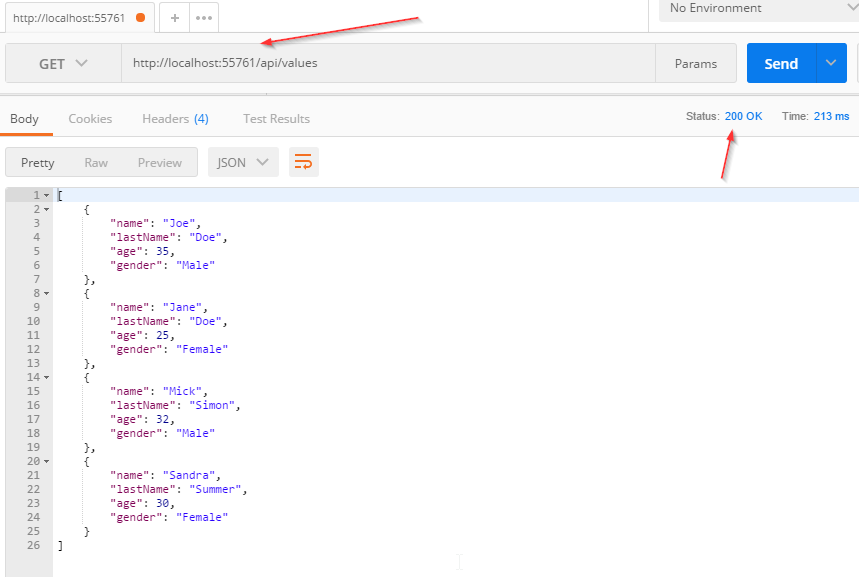
And the log messages:

Wanna join Code Maze Team, help us produce more awesome .NET/C# content and get paid? >> JOIN US! <<
We see that everything is working as expected.
Now let’s modify our code, right below the GetAllStudents() method call, to force an exception:
throw new Exception("Exception while fetching all the students from the storage.");
Now, if we send a request:
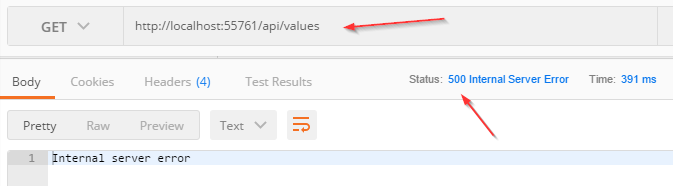
And the log messages:

So, this works just fine. But the downside of this approach is that we need to repeat our try-catch blocks in all the actions in which we want to catch unhandled exceptions. Well, there is a better approach to do that.
Handling Errors Globally With the Built-In Middleware
The UseExceptionHandler middleware is a built-in middleware that we can use to handle exceptions in our ASP.NET Core Web API application. So, let’s dive into the code to see this middleware in action.
Wanna join Code Maze Team, help us produce more awesome .NET/C# content and get paid? >> JOIN US! <<
First, we are going to add a new class ErrorDetails in the Models folder:
using System.Text.Json;

namespace GlobalErrorHandling.Models
{
    public class ErrorDetails
    {
        public int StatusCode { get; set; }
        public string Message { get; set; }

        public override string ToString()
        {
            return JsonSerializer.Serialize(this);
        }
    }
}
We are going to use this class for the details of our error message.
To continue, let’s create a new folder Extensions and a new static class ExceptionMiddlewareExtensions.cs inside it.
Now, we need to modify it:
using GlobalErrorHandling.Models;
using LoggerService;
using Microsoft.AspNetCore.Builder;
using Microsoft.AspNetCore.Diagnostics;
using Microsoft.AspNetCore.Http;
using System.Net;

namespace GlobalErrorHandling.Extensions
{
    public static class ExceptionMiddlewareExtensions
    {
        public static void ConfigureExceptionHandler(this IApplicationBuilder app, ILoggerManager logger)
        {
            app.UseExceptionHandler(appError =>
            {
                appError.Run(async context =>
                {
                    context.Response.StatusCode = (int)HttpStatusCode.InternalServerError;
                    context.Response.ContentType = "application/json";

                    var contextFeature = context.Features.Get<IExceptionHandlerFeature>();
                    if(contextFeature != null)
                    {
                        logger.LogError($"Something went wrong: {contextFeature.Error}");

                        await context.Response.WriteAsync(new ErrorDetails()
                        {
                            StatusCode = context.Response.StatusCode,
                            Message = "Internal Server Error."
                        }.ToString());
                    }
                });
            });
        }
    }
}
In the code above, we’ve created an extension method in which we’ve registered the UseExceptionHandler middleware. Then, we populate the status code and the content type of our response, log the error message and finally return the response with the custom-created object.
To be able to use this extension method, let’s modify the Configure method inside the Startup class for .NET 5 project:
public void Configure(IApplicationBuilder app, IWebHostEnvironment env, ILoggerManager logger)
{
    if (env.IsDevelopment())
    {
        app.UseDeveloperExceptionPage();
    }

    app.ConfigureExceptionHandler(logger);

    app.UseHttpsRedirection();

    app.UseRouting();

    app.UseAuthorization();

    app.UseEndpoints(endpoints =>
    {
        endpoints.MapControllers();
    });
}
Or if you are using .NET 6 and above:
Wanna join Code Maze Team, help us produce more awesome .NET/C# content and get paid? >> JOIN US! <<
var app = builder.Build();

var logger = app.Services.GetRequiredService<ILoggerManager>();
app.ConfigureExceptionHandler(logger);
Finally, let’s remove the try-catch block from our code:
public IActionResult Get()
{
    _logger.LogInfo("Fetching all the Students from the storage");

     var students = DataManager.GetAllStudents(); //simulation for the data base access

     throw new Exception("Exception while fetching all the students from the storage.");

     _logger.LogInfo($"Returning {students.Count} students.");

     return Ok(students);
}
And there you go. Our action method is much cleaner now and what’s more important we can reuse this functionality to write more readable actions in the future.
So let’s inspect the result:
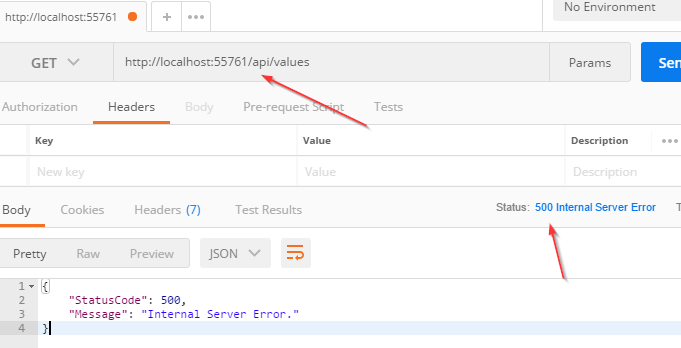
And the log messages:

Excellent.
Now, we are going to use custom middleware for global error handling.
Handling Errors Globally With the Custom Middleware
Let’s create a new folder named CustomExceptionMiddleware and a class ExceptionMiddleware.cs inside it.
We are going to modify that class:
public class ExceptionMiddleware
{
    private readonly RequestDelegate _next;
    private readonly ILoggerManager _logger;

    public ExceptionMiddleware(RequestDelegate next, ILoggerManager logger)
    {
        _logger = logger;
        _next = next;
    }

    public async Task InvokeAsync(HttpContext httpContext)
    {
        try
        {
            await _next(httpContext);
        }
        catch (Exception ex)
        {
            _logger.LogError($"Something went wrong: {ex}");
            await HandleExceptionAsync(httpContext, ex);
        }
    }

    private async Task HandleExceptionAsync(HttpContext context, Exception exception)
    {
        context.Response.ContentType = "application/json";
        context.Response.StatusCode = (int)HttpStatusCode.InternalServerError;

        await context.Response.WriteAsync(new ErrorDetails()
        {
            StatusCode = context.Response.StatusCode,
            Message = "Internal Server Error from the custom middleware."
        }.ToString());
    }
}
The first thing we need to do is to register our IloggerManager service and RequestDelegate through the dependency injection. The _next parameter of RequestDeleagate type is a function delegate that can process our HTTP requests.
After the registration process, we create the InvokeAsync() method. RequestDelegate can’t process requests without it.
If everything goes well, the _next delegate should process the request and the Get action from our controller should generate a successful response. But if a request is unsuccessful (and it is, because we are forcing an exception), our middleware will trigger the catch block and call the HandleExceptionAsync method.
In that method, we just set up the response status code and content type and return a response.
Now let’s modify our ExceptionMiddlewareExtensions class with another static method:
public static void ConfigureCustomExceptionMiddleware(this IApplicationBuilder app)
{
    app.UseMiddleware<ExceptionMiddleware>();
}
In .NET 6 and above, we have to extend the WebApplication type:
Wanna join Code Maze Team, help us produce more awesome .NET/C# content and get paid? >> JOIN US! <<
public static void ConfigureCustomExceptionMiddleware(this WebApplication app)
{
    app.UseMiddleware<ExceptionMiddleware>();
}
Finally, let’s use this method in the Configure method in the Startup class:
//app.ConfigureExceptionHandler(logger);
app.ConfigureCustomExceptionMiddleware();
Great.
Now let’s inspect the result again:
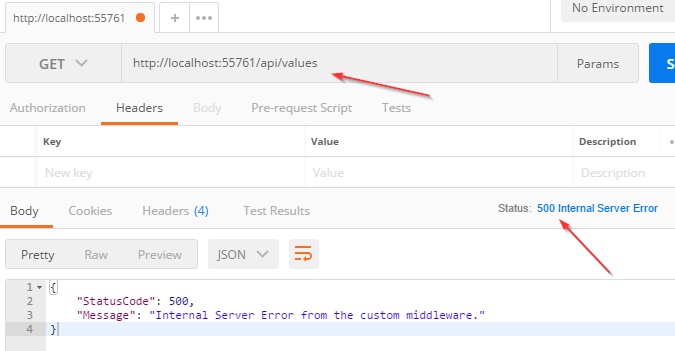
There we go. Our custom middleware is implemented in a couple of steps.
Customizing Error Messages
If you want, you can always customize your error messages from the error handler. There are different ways of doing that, but we are going to show you the basic two ways.
First of all, we can assume that the AccessViolationException is thrown from our action:
[HttpGet]
public IActionResult Get()
{
    _logger.LogInfo("Fetching all the Students from the storage");

    var students = DataManager.GetAllStudents(); //simulation for the data base access

    throw new AccessViolationException("Violation Exception while accessing the resource.");

    _logger.LogInfo($"Returning {students.Count} students.");

    return Ok(students);
}
Now, what we can do is modify the InvokeAsync method inside the ExceptionMiddleware.cs class by adding a specific exception checking in the additional catch block:
Wanna join Code Maze Team, help us produce more awesome .NET/C# content and get paid? >> JOIN US! <<
public async Task InvokeAsync(HttpContext httpContext)
{
    try
    {
        await _next(httpContext);
    }
    catch (AccessViolationException avEx)
    {
        _logger.LogError($"A new violation exception has been thrown: {avEx}");
        await HandleExceptionAsync(httpContext, avEx);
    }
    catch (Exception ex)
    {
        _logger.LogError($"Something went wrong: {ex}");
        await HandleExceptionAsync(httpContext, ex);
    }
}
And that’s all. Now if we send another request with Postman, we are going to see in the log file that the AccessViolationException message is logged. Of course, our specific exception check must be placed before the global catch block.
With this solution, we are logging specific messages for the specific exceptions, and that can help us, as developers, a lot when we publish our application. But if we want to send a different message for a specific error, we can also modify the HandleExceptionAsync method in the same class:
private async Task HandleExceptionAsync(HttpContext context, Exception exception)
{
    context.Response.ContentType = "application/json";
    context.Response.StatusCode = (int)HttpStatusCode.InternalServerError;

    var message = exception switch
    {
        AccessViolationException =>  "Access violation error from the custom middleware",
        _ => "Internal Server Error from the custom middleware."
    };

    await context.Response.WriteAsync(new ErrorDetails()
    {
        StatusCode = context.Response.StatusCode,
        Message = message
    }.ToString());
}
Here, we are using a switch expression pattern matching to check the type of our exception and assign the right message to the message variable. Then, we just use that variable in the WriteAsync method.
Now if we test this, we will get a log message with the Access violation message, and our response will have a new message as well:
{
    "StatusCode": 500,
    "Message": "Access violation error from the custom middleware"
}
One thing to mention here. We are using the 500 status code for all the responses from the exception middleware, and that is something we believe it should be done. After all, we are handling exceptions and these exceptions should be marked with a 500 status code. But this doesn’t have to be the case all the time. For example, if you have a service layer and you want to propagate responses from the service methods as custom exceptions and catch them inside the global exception handler, you may want to choose a more appropriate status code for the response. You can read more about this technique in our Onion Architecture article. It really depends on your project organization.
Conclusion
That was awesome.
We have learned, how to handle errors in a more sophisticated way and cleaner as well. The code is much more readable and our exception handling logic is now reusable for the entire project.
Thank you for reading this article. We hope you have learned new useful things.
Wanna join Code Maze Team, help us produce more awesome .NET/C# content and get paid? >> JOIN US! <<