Обработка ошибок
Данное руководство устарело. Актуальное руководство: Руководство по ASP.NET Core 7
Последнее обновление: 06.11.2019
Ошибки в приложении можно условно разделить на два типа: исключения, которые возникают в процессе выполнения кода (например, деление на 0), и
стандартные ошибки протокола HTTP (например, ошибка 404).
Обычные исключения могут быть полезны для разработчика в процессе создания приложения, но простые пользователи не должны будут их видеть.
UseDeveloperExceptionPage
Если мы создаем проект ASP.NET Core, например, по типу Empty (да и в других типах проектов), то в классе Startup мы можем найти в начале метода Configure() следующие строки:
if (env.IsDevelopment())
{
	app.UseDeveloperExceptionPage();
}
Если приложение находится в состоянии разработки, то с помощью middleware app.UseDeveloperExceptionPage() приложение перехватывает исключения и
выводит информацию о них разработчику.
Например, изменим класс Startup следующим образом:
public class Startup
{
	public void Configure(IApplicationBuilder app, IWebHostEnvironment env)
	{
		if (env.IsDevelopment())
		{
			app.UseDeveloperExceptionPage();
		}
		app.Run(async (context) =>
		{
			int x = 0;
			int y = 8 / x;
			await context.Response.WriteAsync($"Result = {y}");
		});
	}
}
В middleware app.Run симулируется генерация исключения при делении ноль. И если мы запустим проект, то в браузере мы увидим
информацию об исключении:
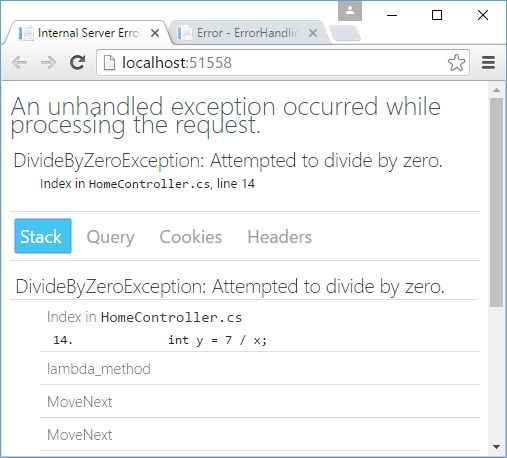
Этой информации достаточно, чтобы определить где именно в коде произошло исключение.
Теперь посмотрим, как все это будет выглядеть для простого пользователя. Для этого изменим метод Configure:
public void Configure(IApplicationBuilder app, IWebHostEnvironment env)
{
	env.EnvironmentName = "Production";
	if (env.IsDevelopment())
	{
		app.UseDeveloperExceptionPage();
	}
	app.Run(async (context) =>
	{
		int x = 0;
		int y = 8 / x;
		await context.Response.WriteAsync($"Result = {y}");
	});
}
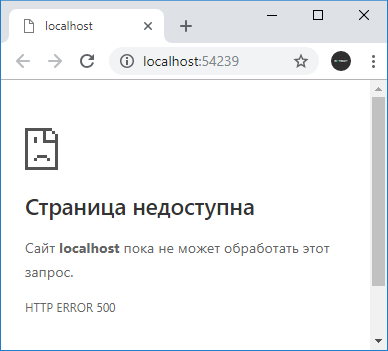
Выражение env.EnvironmentName = "Production"; устанавливает режим развертывания вместо режима разработки. В этом случае выражение if (env.IsDevelopment()) будет возвращать false, и мы увидим в браузере что-то наподобие «HTTP ERROR 500»
UseExceptionHandler
Это не самая лучшая ситуация, и нередко все-таки возникает необходимость дать пользователям некоторую информацию о том, что же все-таки произошло. Либо потребуется как-то обработать данную ситуацию.
Для этих целей можно использовать еще один встроенный middleware в виде метода UseExceptionHandler(). Он перенаправляет
при возникновении исключения на некоторый адрес и позволяет обработать исключение. Например, изменим метод Configure следующим образом:
public void Configure(IApplicationBuilder app, IWebHostEnvironment env)
{
	env.EnvironmentName = "Production";

	if (env.IsDevelopment())
	{
		app.UseDeveloperExceptionPage();
	}
	else
	{
		app.UseExceptionHandler("/error");
	}

	app.Map("/error", ap => ap.Run(async context =>
	{
		await context.Response.WriteAsync("DivideByZeroException occured!");
	}));

	app.Run(async (context) =>
	{
		int x = 0;
		int y = 8 / x;
		await context.Response.WriteAsync($"Result = {y}");
	});
}
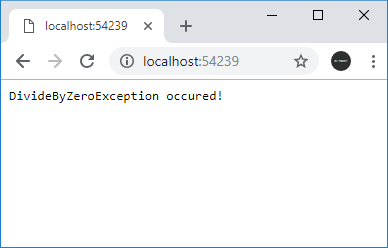
Метод app.UseExceptionHandler("/error"); перенаправляет при возникновении ошибки на адрес «/error».
Для обработки пути по определенному адресу здесь использовался метод app.Map(). В итоге при возникновении исключения будет срабатывать делегат
из метода app.Map.
Следует учитывать, что оба middleware — app.UseDeveloperExceptionPage() и app.UseExceptionHandler()
следует помещать ближе к началу конвейера middleware.
Обработка ошибок HTTP
В отличие от исключений стандартный функционал проекта ASP.NET Core почти никак не обрабатывает ошибки HTTP, например, в случае если ресурс не найден.
При обращении к несуществующему ресурсу мы увидим в браузере пустую страницу, и только через консоль веб-браузера мы сможем увидеть статусный код.
Но с помощью компонента StatusCodePagesMiddleware можно добавить в проект отправку информации о статусном коде.
Для этого добавим в метод Configure() класса Startup вызов app.UseStatusCodePages():
public void Configure(IApplicationBuilder app, IWebHostEnvironment env)
{
	if (env.IsDevelopment())
	{
		app.UseDeveloperExceptionPage();
	}

	// обработка ошибок HTTP
	app.UseStatusCodePages();

	app.Map("/hello", ap => ap.Run(async (context) =>
	{
		await context.Response.WriteAsync($"Hello ASP.NET Core");
	}));
}
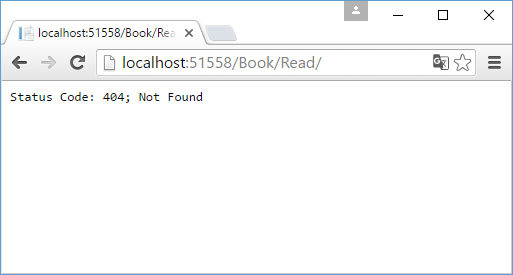
Здесь мы можем обращаться только по адресу «/hello». При обращении ко всем остальным адресам браузер отобразит базовую информацию об ошибке:
Данный метод позволяет настроить отправляемое пользователю сообщение. В частности, мы можем изменить вызов метода так:
app.UseStatusCodePages("text/plain", "Error. Status code : {0}");
В качестве первого параметра указывается MIME-тип ответа, а в качестве второго — собственно то сообщение, которое увидит пользователь. В сообщение мы можем
передать код ошибки через плейсхолдер «{0}».
Вместо метода app.UseStatusCodePages() мы также можем использовать еще пару других, которые также обрабатываю ошибки HTTP.
С помощью метода app.UseStatusCodePagesWithRedirects() можно выполнить переадресацию на определенный метод, который непосредственно обработает статусный код:
app.UseStatusCodePagesWithRedirects("/error?code={0}");
Здесь будет идти перенаправление по адресу «/error?code={0}». В качестве параметра через плейсхолдер «{0}» будет передаваться статусный код
ошибки.
Но теперь при обращении к несуществующему ресурсу клиент получит статусный код 302 / Found. То есть формально несуществующий ресурс будет существовать, просто статусный код 302
будет указывать, что ресурс перемещен на другое место — по пути «/error/404».
Подобное поведение может быть неудобно, особенно с точки зрения поисковой индексации, и в этом случае мы можем применить другой метод
app.UseStatusCodePagesWithReExecute():
app.UseStatusCodePagesWithReExecute("/error", "?code={0}");
Первый параметр метода указывает на путь перенаправления, а второй задает параметры строки запроса, которые будут передаваться при перенаправлении.
Вместо плейсхолдера {0} опять же будет передаваться статусный код ошибки. Формально мы получим тот же ответ, так как так же будет идти перенаправление на путь «/error?code=404». Но теперь браузер получит оригинальный статусный код 404.
Пример использования:
public void Configure(IApplicationBuilder app)
{
	// обработка ошибок HTTP
	app.UseStatusCodePagesWithReExecute("/error", "?code={0}");

	app.Map("/error", ap => ap.Run(async context =>
	{
		await context.Response.WriteAsync($"Err: {context.Request.Query["code"]}");
	}));

	app.Map("/hello", ap => ap.Run(async (context) =>
	{
		await context.Response.WriteAsync($"Hello ASP.NET Core");
	}));
}
Настройка обработки ошибок в web.config
Еще один способ обработки кодов ошибок представляет собой определение и настройка в файле конфигурации web.config элемента
httpErrors. Этот способ в принципе использовался и в других версиях ASP.NET.
В ASP.NET Core он также доступен, однако имеет очень ограниченное действие. В частности, мы его можем использовать только при развертывании на IIS, а также не можем использовать ряд настроек.
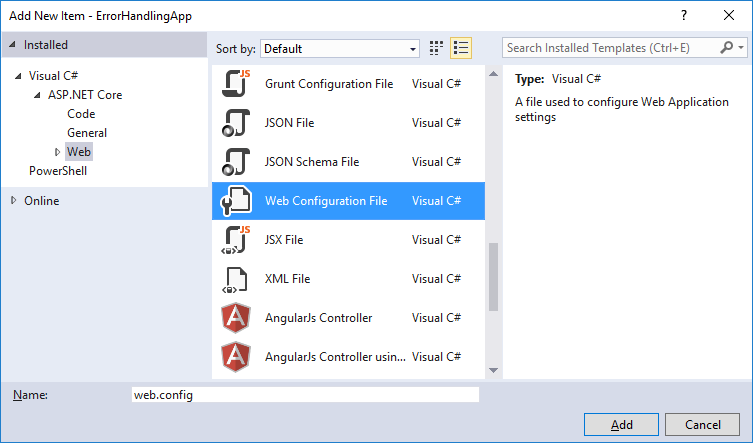
Итак, добавим в корень проекта новый элемент Web Configurarion File, который естественно назовем web.config:
Изменим его следующим образом:
<?xml version="1.0" encoding="utf-8"?>
<configuration>

  <system.webServer>
	<httpErrors errorMode="Custom" existingResponse="Replace">
      <remove statusCode="404"/>
	  <remove statusCode="403"/>
      <error statusCode="404" path="404.html" responseMode="File"/>
      <error statusCode="403" path="403.html" responseMode="File"/>
	</httpErrors>

    <handlers>
      <add name="aspNetCore" path="*" verb="*" modules="AspNetCoreModule" resourceType="Unspecified"/>
    </handlers>
    <aspNetCore processPath="%LAUNCHER_PATH%" arguments="%LAUNCHER_ARGS%" stdoutLogEnabled="false" stdoutLogFile=".logsstdout" forwardWindowsAuthToken="false"/>
  </system.webServer>
</configuration>
Также для обработки ошибок добавим в корень проекта новый файл 404.html:
<!DOCTYPE html>
<html>
<head>
    <meta charset="utf-8" />
    <title>Ошибка 404</title>
</head>
<body>
    <h1>Ошибка 404</h1>
    <h2>Ресурс не найден!</h2>
</body>
</html>
По аналогии можно добавить файл 403.html для ошибки 403.
Итак, элемент httpErrors имеет ряд настроек. Для тестирования настроек локально, необходимо установить атрибут errorMode="Custom".
Если тестирование необязательно, и приложение уже развернуто для использования, то можно установить значение errorMode="DetailedLocalOnly".
Значение existingResponse="Replace" позволит отобразить ошибку по оригинальному запрошенному пути без переадресации.
Внутри элемента httpErrors с помощью отдельных элементов error устанавливается обработка ошибок. Атрибут statusCode
задает статусный код, атрибут path — адрес url, который будет вызываться, а атрибут responseMode указывает, как будет обрабатываться ответ вызванному url.
Атрибут responseMode имеет значение File, что позволяет рассматривать адрес url из атрибута path как статическую страницу и использовать ее в качестве ответа
Настройки элемента httpErrors могут наследоваться с других уровней, например, от файла конфигурации machine.config. И чтобы удалить
все унаследованные настройки, применяется элемент <clear />. Чтобы удалить настройки для отдельных ошибок, применяется элемент
<remove />.
Для тестирования используем следующий класс Startup:
public class Startup
{
	public void Configure(IApplicationBuilder app)
	{
		app.Map("/hello", ap => ap.Run(async (context) =>
		{
			await context.Response.WriteAsync($"Hello ASP.NET Core");
		}));
	}
}
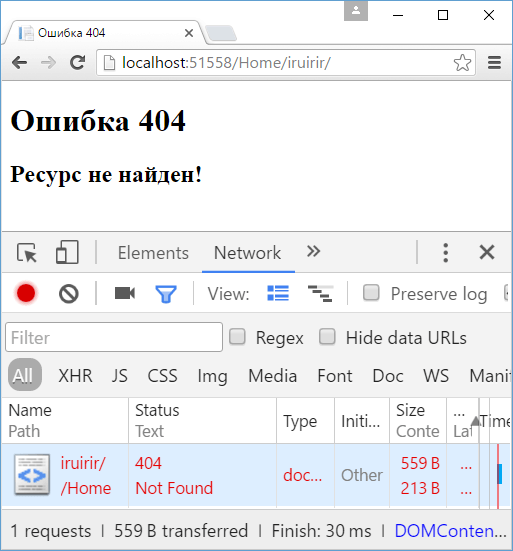
И после обращения к несуществующему ресурсу в приложении отобразится содержимое из файла 404.html.

In this article, we will see how to return HTTP Status codes in .NET Core methods based on the HTTP Operation in API.
We shall also see the most commonly asked format like returning HTTP Status code 500 Internal server error etc.
We will cover the below aspects in today’s article,
- Built-in HTTPS Status Code for .NET Core
- HTTP Status Code – 200 (OK)
- What is HTTP Status Ok or 200?
- HTTP Status Code – 400 (Bad Request)
- HTTP Status Code – 500 (InternalServerError )
- Return HTTP 500 using the Status code
- Using ProblemDetails and Best practices
- Unhandled exception in API Pipeline?
- Summary
Example: One may return Web API with ASP.NET Core MVC 200, 500, or 503 error codes
RESTFul services principle talks about HTTP Status code and their usage. It’s important to follow these REST HTTP Status codes appropriately when following REST specifications.
.NET Core has inbuilt support for all basic HTTP Status codes and they are easy to configure for almost all standard HTTP status codes.
RFC7231 defines the specification for this HTTP Status code in detail.
References:
- https://tools.ietf.org/html/rfc7231#section-6.5.1
RFC7807 defines the specification for error response for HTTP error operation
References:
- RFC7807 Problem Details HTTP error – Guidelines and Best practices
Built-in HTTPS Status Code for .NET Core
Please note that ASP.NET core provides built-in support for both RFC7231 and RFC7807, giving you direct capability on returning the standards HTTP status code plus additional details in case of error operations based on RFC specifications.
HTTP Status Code – 200 (OK)
If your controller method returns IActionResult,
What is HTTP Status Ok or 200?
- The HTTP 200 (OK) status code indicates success.
- This response also meant the response has the payload.
- If no payload is desired, the server should send a 204 (NoContent) status code.
One can use the built-in type Ok() as below,
       [HttpGet]
        public IActionResult GetSynchrounous(string id)
        {
            Book book = null;
            //run method - Synchronously
            book = _bookService.Get(id);
            return Ok(book);
        }
This built-in type does support sending additional details with its overloaded API. Please do leverage those when required.

HTTP Status Code – 400 (Bad Request)
This status code means the server cannot process the request due to malformed requests, invalid requests, etc.
One can use the built-in type BadRequest() as below,
Example:
        [HttpGet("book/{id}")]
        public IActionResult GetAccount(string id)
        {
            if (id == null)
            {
                return BadRequest();
            }
            return Ok();
        }
Below is the response for the above request (Using Chrome) will produce Status Code: 400 Bad Request,
Request URL: http://localhost:60213/api/books/book/1
Request Method: GET
Status Code: 400 Bad Request
Remote Address: [::1]:60213
Referrer Policy: no-referrer-when-downgrade
This built-in type does support sending additional details with its overloaded API.
The below response is based on RFC7807 which is a specification around how to use ProblemDetails.

Note: Controller method returning IActionResult has built-in supported Error response based on the RFC7807 Porblem details specifications.
HTTP Status Code – 500 (InternalServerError )
This status code means the server encountered an unexpected condition that prevented it from fulfilling the input request.
- Use built-in type StatusCode()
- Use Problem() or ProblemDetails() as per RFC7807
Return HTTP 500 using the Status code
Return HTTP 500 using the Status code below,
public IActionResult GetAccount1(string id)
        {
            Book book = null;
            try
            {
                //run method - Synchronously
                book = _bookService.Get(id);

                if (book == null)
                {
                    return NotFound();
                }
                book.Price = 10;
            }
            catch (Exception ex)
            {
              return StatusCode(500, "Internal Server Error. Something went Wrong!");
            }
            return Ok(book);
Using ProblemDetails and Best practices
You can return the HTTP status code using ProblemDetails. Kindly visit the below guidelines for more details,
- Using ProblemDetails in ASP.NET Core – Guidelines
Return HTTP 500 using ProblemDetails,
           catch (Exception ex)
            {
              return Problem("Internal Server Error.Something went Wrong!");
            }
Below is the response for the above request (Using Chrome) which produces Status Code: 500 Internal Server Error

Client-side,
{
    "type": "https://tools.ietf.org/html/rfc7231#section-6.6.1",
    "title": "An error occured while processing your request.",
    "status": 500,
    "detail": "Internal Server Error.Something went Wrong!",
    "traceId": "|5b367172-44fadfb7f6df04a9."
}
This built-in type does support sending additional details with its overloaded API.
- StatusCode( int statusCode, object value);
- StatusCode( int statusCode);
StatusCode can be used as an alternative for all other HTTP status codes where the built-in type is missing.
StatusCode class caN be used for all below-supported codes,
 public static class StatusCodes
    {
        public const int Status100Continue = 100;
        public const int Status412PreconditionFailed = 412;
        public const int Status413PayloadTooLarge = 413;
        public const int Status413RequestEntityTooLarge = 413;
        public const int Status414RequestUriTooLong = 414;
        public const int Status414UriTooLong = 414;
        public const int Status415UnsupportedMediaType = 415;
        public const int Status416RangeNotSatisfiable = 416;
        public const int Status416RequestedRangeNotSatisfiable = 416;
        public const int Status417ExpectationFailed = 417;
        public const int Status418ImATeapot = 418;
        public const int Status419AuthenticationTimeout = 419;
        public const int Status421MisdirectedRequest = 421;
        public const int Status422UnprocessableEntity = 422;
        public const int Status423Locked = 423;
        public const int Status424FailedDependency = 424;
        public const int Status426UpgradeRequired = 426;
        public const int Status428PreconditionRequired = 428;
        public const int Status429TooManyRequests = 429;
        public const int Status431RequestHeaderFieldsTooLarge = 431;
        public const int Status451UnavailableForLegalReasons = 451;
        public const int Status500InternalServerError = 500;
        public const int Status501NotImplemented = 501;
        public const int Status502BadGateway = 502;
        public const int Status503ServiceUnavailable = 503;
        public const int Status504GatewayTimeout = 504;
        public const int Status505HttpVersionNotsupported = 505;
        public const int Status506VariantAlsoNegotiates = 506;
        public const int Status507InsufficientStorage = 507;
        public const int Status508LoopDetected = 508;
        public const int Status411LengthRequired = 411;
        public const int Status510NotExtended = 510;
        public const int Status410Gone = 410;
        public const int Status408RequestTimeout = 408;
        public const int Status101SwitchingProtocols = 101;
        public const int Status102Processing = 102;
        public const int Status200OK = 200;
        public const int Status201Created = 201;
        public const int Status202Accepted = 202;
        public const int Status203NonAuthoritative = 203;
        public const int Status204NoContent = 204;
        public const int Status205ResetContent = 205;
        public const int Status206PartialContent = 206;
        public const int Status207MultiStatus = 207;
        public const int Status208AlreadyReported = 208;
        public const int Status226IMUsed = 226;
        public const int Status300MultipleChoices = 300;
        public const int Status301MovedPermanently = 301;
        public const int Status302Found = 302;
        public const int Status303SeeOther = 303;
        public const int Status304NotModified = 304;
        public const int Status305UseProxy = 305;
        public const int Status306SwitchProxy = 306;
        public const int Status307TemporaryRedirect = 307;
        public const int Status308PermanentRedirect = 308;
        public const int Status400BadRequest = 400;
        public const int Status401Unauthorized = 401;
        public const int Status402PaymentRequired = 402;
        public const int Status403Forbidden = 403;
        public const int Status404NotFound = 404;
        public const int Status405MethodNotAllowed = 405;
        public const int Status406NotAcceptable = 406;
        public const int Status407ProxyAuthenticationRequired = 407;
        public const int Status409Conflict = 409;
        public const int Status511NetworkAuthenticationRequired = 511;
    }
Unhandled exception in API Pipeline?
It’s recommended to use the Global exception middleware or handler approach for any unhandled exception in the API pipeline.
Users should vary on what exception should reach the consumer as a business exception Vs what can be logged in the form of technical server logging.
Kindly see below the reference article on best practices of exception handling,
- Best Practices for Exception Handling in .NET Core
- RFC7807 Problem Details HTTP error – Guidelines and Best practices
Do you have any comments or ideas or any better suggestions to share?
Please sound off your comments below.
Happy Coding !!
References :
- API Versioning Best practices in ASP.NET Core with Examples
- Global Exception Handling in ASP.NET Core using Middleware component
Summary
It’s important to follow HTTP Status codes appropriately when following REST specifications for any communication between client and servicer. Today we learned that .NET Core has provided support for using almost all HTTP status codes allowing us to follow specifications and principles around the same based on standards RFC guidelines.
Please bookmark this page and share it with your friends. Please Subscribe to the blog to get a notification on freshly published best practices and guidelines for software design and development.
| title | author | description | monikerRange | ms.author | ms.custom | ms.date | uid |
|---|---|---|---|---|---|---|---|
|
Handle errors in ASP.NET Core web APIs |
rick-anderson |
Learn about error handling with ASP.NET Core web APIs. |
>= aspnetcore-3.1 |
riande |
mvc |
10/14/2022 |
web-api/handle-errors |
Handle errors in ASP.NET Core web APIs
:::moniker range=»>= aspnetcore-7.0″
This article describes how to handle errors and customize error handling with ASP.NET Core web APIs.
Developer Exception Page
The Developer Exception Page shows detailed stack traces for server errors. It uses xref:Microsoft.AspNetCore.Diagnostics.DeveloperExceptionPageMiddleware to capture synchronous and asynchronous exceptions from the HTTP pipeline and to generate error responses. For example, consider the following controller action, which throws an exception:
:::code language=»csharp» source=»handle-errors/samples/6.x/HandleErrorsSample/Controllers/ErrorsController.cs» id=»snippet_Throw»:::
When the Developer Exception Page detects an unhandled exception, it generates a default plain-text response similar to the following example:
HTTP/1.1 500 Internal Server Error
Content-Type: text/plain; charset=utf-8
Server: Kestrel
Transfer-Encoding: chunked

System.Exception: Sample exception.
   at HandleErrorsSample.Controllers.ErrorsController.Get() in ...
   at lambda_method1(Closure , Object , Object[] )
   at Microsoft.AspNetCore.Mvc.Infrastructure.ActionMethodExecutor.SyncActionResultExecutor.Execute(IActionResultTypeMapper mapper, ObjectMethodExecutor executor, Object controller, Object[] arguments)
   at Microsoft.AspNetCore.Mvc.Infrastructure.ControllerActionInvoker.InvokeActionMethodAsync()
   at Microsoft.AspNetCore.Mvc.Infrastructure.ControllerActionInvoker.Next(State& next, Scope& scope, Object& state, Boolean& isCompleted)
   at Microsoft.AspNetCore.Mvc.Infrastructure.ControllerActionInvoker.InvokeNextActionFilterAsync()

...
If the client requests an HTML-formatted response, the Developer Exception Page generates a response similar to the following example:
HTTP/1.1 500 Internal Server Error
Content-Type: text/html; charset=utf-8
Server: Kestrel
Transfer-Encoding: chunked

<!DOCTYPE html>
<html lang="en" xmlns="http://www.w3.org/1999/xhtml">
    <head>
        <meta charset="utf-8" />
        <title>Internal Server Error</title>
        <style>
            body {
    font-family: 'Segoe UI', Tahoma, Arial, Helvetica, sans-serif;
    font-size: .813em;
    color: #222;
    background-color: #fff;
}

h1 {
    color: #44525e;
    margin: 15px 0 15px 0;
}

...
To request an HTML-formatted response, set the Accept HTTP request header to text/html.
[!WARNING]
Don’t enable the Developer Exception Page unless the app is running in the Development environment. Don’t share detailed exception information publicly when the app runs in production. For more information on configuring environments, see xref:fundamentals/environments.
Exception handler
In non-development environments, use Exception Handling Middleware to produce an error payload:
-
In
Program.cs, call xref:Microsoft.AspNetCore.Builder.ExceptionHandlerExtensions.UseExceptionHandler%2A to add the Exception Handling Middleware::::code language=»csharp» source=»handle-errors/samples/6.x/HandleErrorsSample/Program.cs» id=»snippet_Middleware» highlight=»7″:::
-
Configure a controller action to respond to the
/errorroute::::code language=»csharp» source=»handle-errors/samples/6.x/HandleErrorsSample/Controllers/ErrorsController.cs» id=»snippet_HandleError»:::
The preceding HandleError action sends an RFC 7807-compliant payload to the client.
[!WARNING]
Don’t mark the error handler action method with HTTP method attributes, such asHttpGet. Explicit verbs prevent some requests from reaching the action method.For web APIs that use Swagger / OpenAPI, mark the error handler action with the [ApiExplorerSettings] attribute and set its xref:Microsoft.AspNetCore.Mvc.ApiExplorerSettingsAttribute.IgnoreApi%2A property to
true. This attribute configuration excludes the error handler action from the app’s OpenAPI specification:[ApiExplorerSettings(IgnoreApi = true)]Allow anonymous access to the method if unauthenticated users should see the error.
Exception Handling Middleware can also be used in the Development environment to produce a consistent payload format across all environments:
-
In
Program.cs, register environment-specific Exception Handling Middleware instances::::code language=»csharp» source=»handle-errors/samples/6.x/HandleErrorsSample/Snippets/Program.cs» id=»snippet_ConsistentEnvironments»:::
In the preceding code, the middleware is registered with:
- A route of
/error-developmentin the Development environment. - A route of
/errorin non-Development environments.
- A route of
-
Add controller actions for both the Development and non-Development routes:
:::code language=»csharp» source=»handle-errors/samples/6.x/HandleErrorsSample/Controllers/ErrorsController.cs» id=»snippet_ConsistentEnvironments»:::
Use exceptions to modify the response
The contents of the response can be modified from outside of the controller using a custom exception and an action filter:
-
Create a well-known exception type named
HttpResponseException::::code language=»csharp» source=»handle-errors/samples/6.x/HandleErrorsSample/Snippets/HttpResponseException.cs» id=»snippet_Class»:::
-
Create an action filter named
HttpResponseExceptionFilter::::code language=»csharp» source=»handle-errors/samples/6.x/HandleErrorsSample/Snippets/HttpResponseExceptionFilter.cs» id=»snippet_Class»:::
The preceding filter specifies an
Orderof the maximum integer value minus 10. ThisOrderallows other filters to run at the end of the pipeline. -
In
Program.cs, add the action filter to the filters collection::::code language=»csharp» source=»handle-errors/samples/6.x/HandleErrorsSample/Snippets/Program.cs» id=»snippet_AddHttpResponseExceptionFilter»:::
Validation failure error response
For web API controllers, MVC responds with a xref:Microsoft.AspNetCore.Mvc.ValidationProblemDetails response type when model validation fails. MVC uses the results of xref:Microsoft.AspNetCore.Mvc.ApiBehaviorOptions.InvalidModelStateResponseFactory to construct the error response for a validation failure. The following example replaces the default factory with an implementation that also supports formatting responses as XML, in Program.cs:
:::code language=»csharp» source=»handle-errors/samples/6.x/HandleErrorsSample/Snippets/Program.cs» id=»snippet_ConfigureInvalidModelStateResponseFactory»:::
Client error response
An error result is defined as a result with an HTTP status code of 400 or higher. For web API controllers, MVC transforms an error result to produce a xref:Microsoft.AspNetCore.Mvc.ProblemDetails.
The automatic creation of a ProblemDetails for error status codes is enabled by default, but error responses can be configured in one of the following ways:
- Use the problem details service
- Implement ProblemDetailsFactory
- Use ApiBehaviorOptions.ClientErrorMapping
Default problem details response
The following Program.cs file was generated by the web application templates for API controllers:
:::code language=»csharp» source=»~/../AspNetCore.Docs.Samples/fundamentals/middleware/problem-details-service/Program.cs» id=»snippet_default»:::
Consider the following controller, which returns xref:Microsoft.AspNetCore.Http.HttpResults.BadRequest when the input is invalid:
:::code language=»csharp» source=»~/../AspNetCore.Docs.Samples/fundamentals/middleware/problem-details-service/Controllers/ValuesController.cs» id=»snippet_1″:::
A problem details response is generated with the previous code when any of the following conditions apply:
- The
/api/values2/divideendpoint is called with a zero denominator. - The
/api/values2/squarerootendpoint is called with a radicand less than zero.
The default problem details response body has the following type, title, and status values:
{
  "type": "https://tools.ietf.org/html/rfc7231#section-6.5.1",
  "title": "Bad Request",
  "status": 400,
  "traceId": "00-84c1fd4063c38d9f3900d06e56542d48-85d1d4-00"
}
Problem details service
ASP.NET Core supports creating Problem Details for HTTP APIs using the xref:Microsoft.AspNetCore.Http.IProblemDetailsService. For more information, see the Problem details service.
The following code configures the app to generate a problem details response for all HTTP client and server error responses that don’t have a body content yet:
:::code language=»csharp» source=»~/../AspNetCore.Docs.Samples/fundamentals/middleware/problem-details-service/Program.cs» id=»snippet_apishort» highlight=»4,8-9,13″:::
Consider the API controller from the previous section, which returns xref:Microsoft.AspNetCore.Http.HttpResults.BadRequest when the input is invalid:
:::code language=»csharp» source=»~/../AspNetCore.Docs.Samples/fundamentals/middleware/problem-details-service/Controllers/ValuesController.cs» id=»snippet_1″:::
A problem details response is generated with the previous code when any of the following conditions apply:
- An invalid input is supplied.
- The URI has no matching endpoint.
- An unhandled exception occurs.
The automatic creation of a ProblemDetails for error status codes is disabled when the xref:Microsoft.AspNetCore.Mvc.ApiBehaviorOptions.SuppressMapClientErrors%2A property is set to true:
:::code language=»csharp» source=»~/../AspNetCore.Docs.Samples/fundamentals/middleware/problem-details-service/Program.cs» id=»snippet_disable» highlight=»4-7″:::
Using the preceding code, when an API controller returns BadRequest, an HTTP 400 response status is returned with no response body. SuppressMapClientErrors prevents a ProblemDetails response from being created, even when calling WriteAsync for an API Controller endpoint. WriteAsync is explained later in this article.
The next section shows how to customize the problem details response body, using xref:Microsoft.AspNetCore.Http.ProblemDetailsOptions.CustomizeProblemDetails, to return a more helpful response. For more customization options, see Customizing problem details.
Customize problem details with CustomizeProblemDetails
The following code uses xref:Microsoft.AspNetCore.Http.ProblemDetailsOptions to set xref:Microsoft.AspNetCore.Http.ProblemDetailsOptions.CustomizeProblemDetails:
:::code language=»csharp» source=»~/../AspNetCore.Docs.Samples/fundamentals/middleware/problem-details-service/Program.cs» id=»snippet_api_controller» highlight=»6″:::
The updated API controller:
:::code language=»csharp» source=»~/../AspNetCore.Docs.Samples/fundamentals/middleware/problem-details-service/Controllers/ValuesController.cs» id=»snippet» highlight=»9-17,27-35″:::
The following code contains the MathErrorFeature and MathErrorType, which are used with the preceding sample:
:::code language=»csharp» source=»~/../AspNetCore.Docs.Samples/fundamentals/middleware/problem-details-service/MathErrorFeature.cs» :::
A problem details response is generated with the previous code when any of the following conditions apply:
- The
/divideendpoint is called with a zero denominator. - The
/squarerootendpoint is called with a radicand less than zero. - The URI has no matching endpoint.
The problem details response body contains the following when either squareroot endpoint is called with a radicand less than zero:
{
  "type": "https://en.wikipedia.org/wiki/Square_root",
  "title": "Bad Input",
  "status": 400,
  "detail": "Negative or complex numbers are not allowed."
}
View or download sample code
Implement ProblemDetailsFactory
MVC uses xref:Microsoft.AspNetCore.Mvc.Infrastructure.ProblemDetailsFactory?displayProperty=fullName to produce all instances of xref:Microsoft.AspNetCore.Mvc.ProblemDetails and xref:Microsoft.AspNetCore.Mvc.ValidationProblemDetails. This factory is used for:
- Client error responses
- Validation failure error responses
- xref:Microsoft.AspNetCore.Mvc.ControllerBase.Problem%2A?displayProperty=nameWithType and xref:Microsoft.AspNetCore.Mvc.ControllerBase.ValidationProblem%2A?displayProperty=nameWithType
To customize the problem details response, register a custom implementation of xref:Microsoft.AspNetCore.Mvc.Infrastructure.ProblemDetailsFactory in Program.cs:
:::code language=»csharp» source=»handle-errors/samples/6.x/HandleErrorsSample/Snippets/Program.cs» id=»snippet_ReplaceProblemDetailsFactory»:::
Use ApiBehaviorOptions.ClientErrorMapping
Use the xref:Microsoft.AspNetCore.Mvc.ApiBehaviorOptions.ClientErrorMapping%2A property to configure the contents of the ProblemDetails response. For example, the following code in Program.cs updates the xref:Microsoft.AspNetCore.Mvc.ClientErrorData.Link%2A property for 404 responses:
:::code language=»csharp» source=»handle-errors/samples/6.x/HandleErrorsSample/Snippets/Program.cs» id=»snippet_ClientErrorMapping»:::
Additional resources
- How to Use ModelState Validation in ASP.NET Core Web API
- View or download sample code
- Hellang.Middleware.ProblemDetails
:::moniker-end
:::moniker range=»= aspnetcore-6.0″
This article describes how to handle errors and customize error handling with ASP.NET Core web APIs.
Developer Exception Page
The Developer Exception Page shows detailed stack traces for server errors. It uses xref:Microsoft.AspNetCore.Diagnostics.DeveloperExceptionPageMiddleware to capture synchronous and asynchronous exceptions from the HTTP pipeline and to generate error responses. For example, consider the following controller action, which throws an exception:
:::code language=»csharp» source=»handle-errors/samples/6.x/HandleErrorsSample/Controllers/ErrorsController.cs» id=»snippet_Throw»:::
When the Developer Exception Page detects an unhandled exception, it generates a default plain-text response similar to the following example:
HTTP/1.1 500 Internal Server Error
Content-Type: text/plain; charset=utf-8
Server: Kestrel
Transfer-Encoding: chunked

System.Exception: Sample exception.
   at HandleErrorsSample.Controllers.ErrorsController.Get() in ...
   at lambda_method1(Closure , Object , Object[] )
   at Microsoft.AspNetCore.Mvc.Infrastructure.ActionMethodExecutor.SyncActionResultExecutor.Execute(IActionResultTypeMapper mapper, ObjectMethodExecutor executor, Object controller, Object[] arguments)
   at Microsoft.AspNetCore.Mvc.Infrastructure.ControllerActionInvoker.InvokeActionMethodAsync()
   at Microsoft.AspNetCore.Mvc.Infrastructure.ControllerActionInvoker.Next(State& next, Scope& scope, Object& state, Boolean& isCompleted)
   at Microsoft.AspNetCore.Mvc.Infrastructure.ControllerActionInvoker.InvokeNextActionFilterAsync()

...
If the client requests an HTML-formatted response, the Developer Exception Page generates a response similar to the following example:
HTTP/1.1 500 Internal Server Error
Content-Type: text/html; charset=utf-8
Server: Kestrel
Transfer-Encoding: chunked

<!DOCTYPE html>
<html lang="en" xmlns="http://www.w3.org/1999/xhtml">
    <head>
        <meta charset="utf-8" />
        <title>Internal Server Error</title>
        <style>
            body {
    font-family: 'Segoe UI', Tahoma, Arial, Helvetica, sans-serif;
    font-size: .813em;
    color: #222;
    background-color: #fff;
}

h1 {
    color: #44525e;
    margin: 15px 0 15px 0;
}

...
To request an HTML-formatted response, set the Accept HTTP request header to text/html.
[!WARNING]
Don’t enable the Developer Exception Page unless the app is running in the Development environment. Don’t share detailed exception information publicly when the app runs in production. For more information on configuring environments, see xref:fundamentals/environments.
Exception handler
In non-development environments, use Exception Handling Middleware to produce an error payload:
-
In
Program.cs, call xref:Microsoft.AspNetCore.Builder.ExceptionHandlerExtensions.UseExceptionHandler%2A to add the Exception Handling Middleware::::code language=»csharp» source=»handle-errors/samples/6.x/HandleErrorsSample/Program.cs» id=»snippet_Middleware» highlight=»7″:::
-
Configure a controller action to respond to the
/errorroute::::code language=»csharp» source=»handle-errors/samples/6.x/HandleErrorsSample/Controllers/ErrorsController.cs» id=»snippet_HandleError»:::
The preceding HandleError action sends an RFC 7807-compliant payload to the client.
[!WARNING]
Don’t mark the error handler action method with HTTP method attributes, such asHttpGet. Explicit verbs prevent some requests from reaching the action method.For web APIs that use Swagger / OpenAPI, mark the error handler action with the [ApiExplorerSettings] attribute and set its xref:Microsoft.AspNetCore.Mvc.ApiExplorerSettingsAttribute.IgnoreApi%2A property to
true. This attribute configuration excludes the error handler action from the app’s OpenAPI specification:[ApiExplorerSettings(IgnoreApi = true)]Allow anonymous access to the method if unauthenticated users should see the error.
Exception Handling Middleware can also be used in the Development environment to produce a consistent payload format across all environments:
-
In
Program.cs, register environment-specific Exception Handling Middleware instances::::code language=»csharp» source=»handle-errors/samples/6.x/HandleErrorsSample/Snippets/Program.cs» id=»snippet_ConsistentEnvironments»:::
In the preceding code, the middleware is registered with:
- A route of
/error-developmentin the Development environment. - A route of
/errorin non-Development environments.
- A route of
-
Add controller actions for both the Development and non-Development routes:
:::code language=»csharp» source=»handle-errors/samples/6.x/HandleErrorsSample/Controllers/ErrorsController.cs» id=»snippet_ConsistentEnvironments»:::
Use exceptions to modify the response
The contents of the response can be modified from outside of the controller using a custom exception and an action filter:
-
Create a well-known exception type named
HttpResponseException::::code language=»csharp» source=»handle-errors/samples/6.x/HandleErrorsSample/Snippets/HttpResponseException.cs» id=»snippet_Class»:::
-
Create an action filter named
HttpResponseExceptionFilter::::code language=»csharp» source=»handle-errors/samples/6.x/HandleErrorsSample/Snippets/HttpResponseExceptionFilter.cs» id=»snippet_Class»:::
The preceding filter specifies an
Orderof the maximum integer value minus 10. ThisOrderallows other filters to run at the end of the pipeline. -
In
Program.cs, add the action filter to the filters collection::::code language=»csharp» source=»handle-errors/samples/6.x/HandleErrorsSample/Snippets/Program.cs» id=»snippet_AddHttpResponseExceptionFilter»:::
Validation failure error response
For web API controllers, MVC responds with a xref:Microsoft.AspNetCore.Mvc.ValidationProblemDetails response type when model validation fails. MVC uses the results of xref:Microsoft.AspNetCore.Mvc.ApiBehaviorOptions.InvalidModelStateResponseFactory to construct the error response for a validation failure. The following example replaces the default factory with an implementation that also supports formatting responses as XML, in Program.cs:
:::code language=»csharp» source=»handle-errors/samples/6.x/HandleErrorsSample/Snippets/Program.cs» id=»snippet_ConfigureInvalidModelStateResponseFactory»:::
Client error response
An error result is defined as a result with an HTTP status code of 400 or higher. For web API controllers, MVC transforms an error result to produce a xref:Microsoft.AspNetCore.Mvc.ProblemDetails.
The error response can be configured in one of the following ways:
- Implement ProblemDetailsFactory
- Use ApiBehaviorOptions.ClientErrorMapping
Implement ProblemDetailsFactory
MVC uses xref:Microsoft.AspNetCore.Mvc.Infrastructure.ProblemDetailsFactory?displayProperty=fullName to produce all instances of xref:Microsoft.AspNetCore.Mvc.ProblemDetails and xref:Microsoft.AspNetCore.Mvc.ValidationProblemDetails. This factory is used for:
- Client error responses
- Validation failure error responses
- xref:Microsoft.AspNetCore.Mvc.ControllerBase.Problem%2A?displayProperty=nameWithType and xref:Microsoft.AspNetCore.Mvc.ControllerBase.ValidationProblem%2A?displayProperty=nameWithType
To customize the problem details response, register a custom implementation of xref:Microsoft.AspNetCore.Mvc.Infrastructure.ProblemDetailsFactory in Program.cs:
:::code language=»csharp» source=»handle-errors/samples/6.x/HandleErrorsSample/Snippets/Program.cs» id=»snippet_ReplaceProblemDetailsFactory»:::
Use ApiBehaviorOptions.ClientErrorMapping
Use the xref:Microsoft.AspNetCore.Mvc.ApiBehaviorOptions.ClientErrorMapping%2A property to configure the contents of the ProblemDetails response. For example, the following code in Program.cs updates the xref:Microsoft.AspNetCore.Mvc.ClientErrorData.Link%2A property for 404 responses:
:::code language=»csharp» source=»handle-errors/samples/6.x/HandleErrorsSample/Snippets/Program.cs» id=»snippet_ClientErrorMapping»:::
Custom Middleware to handle exceptions
The defaults in the exception handling middleware work well for most apps. For apps that require specialized exception handling, consider customizing the exception handling middleware.
Produce a ProblemDetails payload for exceptions
ASP.NET Core doesn’t produce a standardized error payload when an unhandled exception occurs. For scenarios where it’s desirable to return a standardized ProblemDetails response to the client, the ProblemDetails middleware can be used to map exceptions and 404 responses to a ProblemDetails payload. The exception handling middleware can also be used to return a xref:Microsoft.AspNetCore.Mvc.ProblemDetails payload for unhandled exceptions.
Additional resources
- How to Use ModelState Validation in ASP.NET Core Web API
- View or download sample code (How to download)
:::moniker-end
:::moniker range=»< aspnetcore-6.0″
This article describes how to handle and customize error handling with ASP.NET Core web APIs.
View or download sample code (How to download)
Developer Exception Page
The Developer Exception Page is a useful tool to get detailed stack traces for server errors. It uses xref:Microsoft.AspNetCore.Diagnostics.DeveloperExceptionPageMiddleware to capture synchronous and asynchronous exceptions from the HTTP pipeline and to generate error responses. To illustrate, consider the following controller action:
:::code language=»csharp» source=»handle-errors/samples/3.x/Controllers/WeatherForecastController.cs» id=»snippet_GetByCity»:::
Run the following curl command to test the preceding action:
curl -i https://localhost:5001/weatherforecast/chicago
The Developer Exception Page displays a plain-text response if the client doesn’t request HTML-formatted output. The following output appears:
HTTP/1.1 500 Internal Server Error
Transfer-Encoding: chunked
Content-Type: text/plain
Server: Microsoft-IIS/10.0
X-Powered-By: ASP.NET
Date: Fri, 27 Sep 2019 16:13:16 GMT

System.ArgumentException: We don't offer a weather forecast for chicago. (Parameter 'city')
   at WebApiSample.Controllers.WeatherForecastController.Get(String city) in C:working_folderaspnetAspNetCore.Docsaspnetcoreweb-apihandle-errorssamples3.xControllersWeatherForecastController.cs:line 34
   at lambda_method(Closure , Object , Object[] )
   at Microsoft.Extensions.Internal.ObjectMethodExecutor.Execute(Object target, Object[] parameters)
   at Microsoft.AspNetCore.Mvc.Infrastructure.ActionMethodExecutor.SyncObjectResultExecutor.Execute(IActionResultTypeMapper mapper, ObjectMethodExecutor executor, Object controller, Object[] arguments)
   at Microsoft.AspNetCore.Mvc.Infrastructure.ControllerActionInvoker.<InvokeActionMethodAsync>g__Logged|12_1(ControllerActionInvoker invoker)
   at Microsoft.AspNetCore.Mvc.Infrastructure.ControllerActionInvoker.<InvokeNextActionFilterAsync>g__Awaited|10_0(ControllerActionInvoker invoker, Task lastTask, State next, Scope scope, Object state, Boolean isCompleted)
   at Microsoft.AspNetCore.Mvc.Infrastructure.ControllerActionInvoker.Rethrow(ActionExecutedContextSealed context)
   at Microsoft.AspNetCore.Mvc.Infrastructure.ControllerActionInvoker.Next(State& next, Scope& scope, Object& state, Boolean& isCompleted)
   at Microsoft.AspNetCore.Mvc.Infrastructure.ControllerActionInvoker.InvokeInnerFilterAsync()
--- End of stack trace from previous location where exception was thrown ---
   at Microsoft.AspNetCore.Mvc.Infrastructure.ResourceInvoker.<InvokeFilterPipelineAsync>g__Awaited|19_0(ResourceInvoker invoker, Task lastTask, State next, Scope scope, Object state, Boolean isCompleted)
   at Microsoft.AspNetCore.Mvc.Infrastructure.ResourceInvoker.<InvokeAsync>g__Logged|17_1(ResourceInvoker invoker)
   at Microsoft.AspNetCore.Routing.EndpointMiddleware.<Invoke>g__AwaitRequestTask|6_0(Endpoint endpoint, Task requestTask, ILogger logger)
   at Microsoft.AspNetCore.Authorization.AuthorizationMiddleware.Invoke(HttpContext context)
   at Microsoft.AspNetCore.Diagnostics.DeveloperExceptionPageMiddleware.Invoke(HttpContext context)

HEADERS
=======
Accept: */*
Host: localhost:44312
User-Agent: curl/7.55.1
To display an HTML-formatted response instead, set the Accept HTTP request header to the text/html media type. For example:
curl -i -H "Accept: text/html" https://localhost:5001/weatherforecast/chicago
Consider the following excerpt from the HTTP response:
HTTP/1.1 500 Internal Server Error
Transfer-Encoding: chunked
Content-Type: text/html; charset=utf-8
Server: Microsoft-IIS/10.0
X-Powered-By: ASP.NET
Date: Fri, 27 Sep 2019 16:55:37 GMT

<!DOCTYPE html>
<html lang="en" xmlns="http://www.w3.org/1999/xhtml">
    <head>
        <meta charset="utf-8" />
        <title>Internal Server Error</title>
        <style>
            body {
    font-family: 'Segoe UI', Tahoma, Arial, Helvetica, sans-serif;
    font-size: .813em;
    color: #222;
    background-color: #fff;
}
The HTML-formatted response becomes useful when testing via tools like Postman. The following screen capture shows both the plain-text and the HTML-formatted responses in Postman:
:::image source=»handle-errors/_static/developer-exception-page-postman.gif» alt-text=»Test the Developer Exception Page in Postman.»:::
[!WARNING]
Enable the Developer Exception Page only when the app is running in the Development environment. Don’t share detailed exception information publicly when the app runs in production. For more information on configuring environments, see xref:fundamentals/environments.Don’t mark the error handler action method with HTTP method attributes, such as
HttpGet. Explicit verbs prevent some requests from reaching the action method. Allow anonymous access to the method if unauthenticated users should see the error.
Exception handler
In non-development environments, Exception Handling Middleware can be used to produce an error payload:
-
In
Startup.Configure, invoke xref:Microsoft.AspNetCore.Builder.ExceptionHandlerExtensions.UseExceptionHandler%2A to use the middleware::::code language=»csharp» source=»handle-errors/samples/3.x/Startup.cs» id=»snippet_UseExceptionHandler» highlight=»9″:::
-
Configure a controller action to respond to the
/errorroute::::code language=»csharp» source=»handle-errors/samples/3.x/Controllers/ErrorController.cs» id=»snippet_ErrorController»:::
The preceding Error action sends an RFC 7807-compliant payload to the client.
Exception Handling Middleware can also provide more detailed content-negotiated output in the local development environment. Use the following steps to produce a consistent payload format across development and production environments:
-
In
Startup.Configure, register environment-specific Exception Handling Middleware instances:public void Configure(IApplicationBuilder app, IWebHostEnvironment env) { if (env.IsDevelopment()) { app.UseExceptionHandler("/error-local-development"); } else { app.UseExceptionHandler("/error"); } }
In the preceding code, the middleware is registered with:
- A route of
/error-local-developmentin the Development environment. - A route of
/errorin environments that aren’t Development.
- A route of
-
Apply attribute routing to controller actions:
:::code language=»csharp» source=»handle-errors/samples/3.x/Controllers/ErrorController.cs» id=»snippet_ErrorControllerEnvironmentSpecific»:::
The preceding code calls ControllerBase.Problem to create a xref:Microsoft.AspNetCore.Mvc.ProblemDetails response.
Use exceptions to modify the response
The contents of the response can be modified from outside of the controller. In ASP.NET 4.x Web API, one way to do this was using the xref:System.Web.Http.HttpResponseException type. ASP.NET Core doesn’t include an equivalent type. Support for HttpResponseException can be added with the following steps:
-
Create a well-known exception type named
HttpResponseException::::code language=»csharp» source=»handle-errors/samples/3.x/Exceptions/HttpResponseException.cs» id=»snippet_HttpResponseException»:::
-
Create an action filter named
HttpResponseExceptionFilter::::code language=»csharp» source=»handle-errors/samples/3.x/Filters/HttpResponseExceptionFilter.cs» id=»snippet_HttpResponseExceptionFilter»:::
The preceding filter specifies an
Orderof the maximum integer value minus 10. ThisOrderallows other filters to run at the end of the pipeline. -
In
Startup.ConfigureServices, add the action filter to the filters collection::::code language=»csharp» source=»handle-errors/samples/3.x/Startup.cs» id=»snippet_AddExceptionFilter»:::
Validation failure error response
For web API controllers, MVC responds with a xref:Microsoft.AspNetCore.Mvc.ValidationProblemDetails response type when model validation fails. MVC uses the results of xref:Microsoft.AspNetCore.Mvc.ApiBehaviorOptions.InvalidModelStateResponseFactory to construct the error response for a validation failure. The following example uses the factory to change the default response type to xref:Microsoft.AspNetCore.Mvc.SerializableError in Startup.ConfigureServices:
:::code language=»csharp» source=»handle-errors/samples/3.x/Startup.cs» id=»snippet_DisableProblemDetailsInvalidModelStateResponseFactory» highlight=»4-13″:::
Client error response
An error result is defined as a result with an HTTP status code of 400 or higher. For web API controllers, MVC transforms an error result to a result with xref:Microsoft.AspNetCore.Mvc.ProblemDetails.
The error response can be configured in one of the following ways:
- Implement ProblemDetailsFactory
- Use ApiBehaviorOptions.ClientErrorMapping
Implement ProblemDetailsFactory
MVC uses xref:Microsoft.AspNetCore.Mvc.Infrastructure.ProblemDetailsFactory?displayProperty=fullName to produce all instances of xref:Microsoft.AspNetCore.Mvc.ProblemDetails and xref:Microsoft.AspNetCore.Mvc.ValidationProblemDetails. This factory is used for:
- Client error responses
- Validation failure error responses
- xref:Microsoft.AspNetCore.Mvc.ControllerBase.Problem%2A?displayProperty=nameWithType and xref:Microsoft.AspNetCore.Mvc.ControllerBase.ValidationProblem%2A?displayProperty=nameWithType >
To customize the problem details response, register a custom implementation of xref:Microsoft.AspNetCore.Mvc.Infrastructure.ProblemDetailsFactory in Startup.ConfigureServices:
public void ConfigureServices(IServiceCollection serviceCollection)
{
    services.AddControllers();
    services.AddTransient<ProblemDetailsFactory, CustomProblemDetailsFactory>();
}
Use ApiBehaviorOptions.ClientErrorMapping
Use the xref:Microsoft.AspNetCore.Mvc.ApiBehaviorOptions.ClientErrorMapping%2A property to configure the contents of the ProblemDetails response. For example, the following code in Startup.ConfigureServices updates the type property for 404 responses:
:::code language=»csharp» source=»index/samples/3.x/Startup.cs» id=»snippet_ConfigureApiBehaviorOptions» highlight=»8-9″:::
Custom Middleware to handle exceptions
The defaults in the exception handling middleware work well for most apps. For apps that require specialized exception handling, consider customizing the exception handling middleware.
Producing a ProblemDetails payload for exceptions
ASP.NET Core doesn’t produce a standardized error payload when an unhandled exception occurs. For scenarios where it’s desirable to return a standardized ProblemDetails response to the client, the ProblemDetails middleware can be used to map exceptions and 404 responses to a ProblemDetails payload. The exception handling middleware can also be used to return a xref:Microsoft.AspNetCore.Mvc.ProblemDetails payload for unhandled exceptions.
:::moniker-end
Request and response are the backbones of any RESTful Web API. Every status code has a specific meaning and during the development, we must make sure that we are returning a valid response with a valid status code.
What is the Status Code
Status code is a numeric value, and it is the main component of HTTP Response. The status code is issued by the server based on the operation, input data, and some other parameters.
The status code gives some useful information about the behavior of the response.
Status code categories
All status codes are divided into the following 5 categories,
- 1xx – Informational
- 2xx – Successful
- 3xx – Redirection
- 4xx – Client Error
- 5xx – Server Error
Asp.Net Core Web API has some built-in methods to return the proper status code.
Setup the project
Let us create a new Asp.Net Core Web API application. Now in this application let’s add a new class Employee.cs under the Model folder.
- public class Employee
- {
- public int Id { get; set; }
- public string Name { get; set; }
- public string Email { get; set; }
- }
We also need to add a new controller with name EmployeesController at the Controllers folder.
- [Route(«api/[controller]»)]
- [ApiController]
- public class EmployeesController : ControllerBase
- {
- }
Time to create some hard-coded, in-memory data for employees. because we are only learning about the status code and how to return them from asp.net core web api so hard code data will work for the demo app. In a real application, you will get the data from a database.
For this, we will create a new private method in the EmployeesController.
- private List<Employee> EmployeeData()
- {
- return new List<Employee>()
- {
- new Employee(){ Id=1, Name = «Employee 1», Email = «employee1@nitishkaushik.com»},
- new Employee(){ Id=2, Name = «Employee 2», Email = «employee2@nitishkaushik.com»},
- new Employee(){ Id=3, Name = «Employee 3», Email = «employee3@nitishkaushik.com»},
- new Employee(){ Id=4, Name = «Employee 4», Email = «employee4@nitishkaushik.com»},
- new Employee(){ Id=5, Name = «Employee 5», Email = «employee5@nitishkaushik.com»}
- };
- }
Let us learn about the status code and how to return them from Asp.Net Core Web API,
200 status code
This is the most common status code that is returned from Web API.
This 200 status code belongs to the Successful category. It means everything about the operation is successful.
Example
- Get all employees data
- Get single employee data
Asp.Net Core has Ok() method to return 200 status code.
- public IActionResult GetEmployees()
- {
- return Ok();
- }
This Ok() method can have none or object parameters.
- public IActionResult GetEmployees()
- {
- var employees = EmployeeData();
- return Ok(employees);
- }
201 Status code
201 status code indicates that the new resource has been created successfully and the server will return the link to get that newly created resource.
In Asp.Net Core we can use the following methods to return the 201 status code.
- Created
- CreatedAtAction
- CreatedAtRoute
All these methods need the URL to get the newly created resource.
Created
- [HttpPost(«»)]
- public IActionResult AddEmployee([FromBody] Employee model)
- {
- return Created(«~api/employees/1», model);
- }
CreatedAtAction
- [HttpGet(«{id}»)]
- public IActionResult GetEmployeeById([FromRoute] int id)
- {
- var employee = EmployeeData().Where(x => x.Id == id).FirstOrDefault();
- return Ok(employee);
- }
- [HttpPost(«»)]
- public IActionResult AddEmployee([FromBody] Employee model)
- {
- int newEmployeeId = 1;
- return CreatedAtAction(«GetEmployeeById», new { id = newEmployeeId }, model);
- }
CreatedAtRoute
- [HttpGet]
- [Route(«{id}», Name = «getEmployeeRoute»)]
- public IActionResult GetEmployeeById([FromRoute] int id)
- {
- var employee = EmployeeData().Where(x => x.Id == id).FirstOrDefault();
- return Ok(employee);
- }
- [HttpPost(«»)]
- public IActionResult AddEmployee([FromBody] Employee model)
- {
- int newEmployeeId = 1;
- return CreatedAtRoute(«getEmployeeRoute», new { id = newEmployeeId }, model);
- }
This method will add a new response header with a key Location and a URL in the value to get this resource.
202 status code
202 status indicates that the request has been accepted but the processing is not yet complete.
In Asp.Net Core we can use the following methods to return the 202 status code.
- Accepted
- AcceptedAtAction
- AcceptedAtRoute
- [HttpPost(«»)]
- public IActionResult AddEmployee([FromBody] Employee model)
- {
- return Accepted();
- }
400 status code
400 status code indicated the bad request. It means there is something wrong in the request data.
In asp.net core we can return 400 status using the BadRequest method.
- [HttpPost(«»)]
- public IActionResult AddEmployee([FromBody] Employee model)
- {
- return BadRequest();
- }
404 status code
If we are looking for a resource that does not exist, then the server returns a 404 status code.
In asp.net core we can return 404 status using the NotFound() method.
- [HttpGet]
- [Route(«{id}», Name = «getEmployeeRoute»)]
- public IActionResult GetEmployeeById([FromRoute] int id)
- {
- var employee = EmployeeData().Where(x => x.Id == id).FirstOrDefault();
- if (employee == null)
- {
- return NotFound();
- }
- return Ok(employee);
- }
301 & 302 Status code
301 & 302 are used for local redirection. It means if you are trying to access an action method and from that action method you are redirecting the call to some other action method within the same application then in the response of this request there will be a 301 or 302 status code and a new response header with name Location.
The client will send another request on the value given in the Location header.
In case you are redirecting temporary then the status code will be 302. Or if you are redirecting permanently then the status code will be 301.
In asp.net core we can return 302 status using the LocalRedirect() method.
- [HttpGet]
- [Route(«{id}», Name = «getEmployeeRoute»)]
- public IActionResult GetEmployeeById([FromRoute] int id)
- {
- return LocalRedirect(«~/api/employees»);
- }
In asp.net core we can return 302 status using the LocalRedirectPermanent() method.
- [HttpGet]
- [Route(«{id}», Name = «getEmployeeRoute»)]
- public IActionResult GetEmployeeById([FromRoute] int id)
- {
- return LocalRedirectPermanent(«~/api/employees»);
- }
Other than this there are lots more built-in methods to return different status codes.
Click below to learn more about Asp.Net Core Web API,
- Asp.Net Core Web API Complete, Free and Step by Step Tutorial
Back to: ASP.NET Core Web API Tutorials
In this article, I am going to discuss HTTP Status Code in ASP.NET Core Web API. Returning the response with a proper status code is the backbone of any restful Web APIs. Now, it is time to learn how can we format the response with the proper response code as per our business requirement.
HTTP Status Codes:
The HyperText Transport Protocol status code is one of the important components of HTTP Response. The Status code is issued from the server and they give information about the response. Whenever we get any response from the server, in that Response, we must have one HTTP Status code. All the HTTP Status codes are divided into five categories. They are as follows. Here, XX will represent the actual number.
- 1XX: Informational Response (Example: 100, 101, 102, etc.)
- 2XX: Successful, whenever you get 2XX as the response code, it means the request is successful. For example, we get 200 HTTP Status Code for the success of a GET request, 201 if a new resource has been successfully created. 204 status code is also for success but in return, it does not return anything just like if the client has performed a delete operation and in return doesn’t really expect something back.
- 3XX: 3XX HTTP status codes are basically used for redirection. Whenever you get 3XX as the response code, it means it is re-directional. for example, to tell a client that the requested resource like page, the image has been moved to another location.
- 4XX: 4XX HTTP status codes are meant to state errors or Client Error. Whenever you get 4XX as the response code, it means there is some problem with your request. For example, status code 400 means Bad Request, 401 is Unauthorized that is invalid authentication credentials or details have been provided by the client, 403 HTTP Status code means that authentication is a success, but the user is not authorized. 404 HTTP Status code means the requested resource is not available.
- 5XX: 5XX HTTP status codes are meant for Server Error. Whenever you get 5XX as the response code, it means there is some problem in the server. Internal Server Error exception is very common, which contains code 500. This error means that there is some unexpected error on the server and the client cannot do anything about it.
Frequently used HTTP Status Codes in ASP.NET Core Web API:
The following are some of the frequently used Status codes.
- 100: 100 means Continue. The HTTP 100 Continue informational status response code indicates that everything so far is OK and that the client should continue with the request or ignore it if it is already finished.
- 200: 200 means OK. The HTTP 200 OK success status response code indicates that the request has succeeded. If you are searching for some data and you got the data properly. That means the request is successful and, in that case, you will get 200 OK as the HTTP status code.
- 201: 201 means a new resource created. The HTTP 201 Created success status response code indicates that the request has succeeded and has led to the creation of a resource. The new resource is effectively created before this response is sent back and the new resource is returned in the body of the message, its location being either the URL of the request or the content of the Location header. If you are adding successfully a new resource by using the HTTP Post method, then in that case you will get 201 as the Status code.
- 204: 204 means No Content. The HTTP 204 No Content success status response code indicates that a request has succeeded, but that the client doesn’t need to navigate away from its current page. If the server processed the request successfully and it is not returning any content, then in that case you will get a 204-response status code.
- 301: 301 means Moved Permanently. If you are getting 301 as a status code from the server, it means the resource you are looking for is moved permanently to the URL given by the Location headers.
- 302: 302 means Found. If you are getting 302 as a status code from the server, it means the resource you are looking for is moved temporarily to the URL given by the Location headers.
- 400: 400 means Bad Request. If you are getting 400 as the status code from the server, then the issue is with the client request. If the request contains some wrong data such as malformed request syntax, invalid request message framing, or deceptive request routing, then we will get this 400 Bad Request status code.
- 401: 401 means Unauthorized. If you are trying to access the resource for which you don’t have access (Invalid authentication credentials), then you will get a 401 unauthorized status code from the server.
- 404: 404 means Not Found. If you are looking for a resource that does not exist, then you will get this 404 Not Found status code from the server. Links that lead to a 404 page are often called broken or dead links.
- 405: 405 means Method Not Allowed. The 405 Method Not Allowed response status code indicates that the request method is known by the server but is not supported by the target resource. For example, we have one method which is a POST method in the server and we trying to access that method from the client using GET Verb, then, in that case, you will get a 405-status code.
- 500: 500 means Internal Server Error. If there is some error in the server, then you will get a 500 Internal Server Error status code.
- 503: 503 means Service Unavailable. The 503 Service Unavailable server error response code indicates that the server is not ready to handle the request. If the server is down for maintenance or the server is overloaded then in that case, you will get the 503 Service Unavailable Status code.
- 504: 504 means Gateway Timeout. The 504 Gateway Timeout server error response code indicates that the server while acting as a gateway or proxy, did not get a response in time from the upstream server that is needed in order to complete the request.
Why HTTP Status Codes are Important?
If we want to consume any Restful API, then we will send an HTTP Request and in return, we will get the response and the response include data as well as an HTTP Status code. The HTTP Status codes are important because they tell the client (client means who initiate the request, for example, Web, Android, iOS, Postman, IoT, Fiddler, etc) about what exactly happened to the request. If you send a wrong HTTP Status code, then that will confuse the client i.e. the consumer of the API.
The client should know that its request has been taken care of or not, and if the response is not as expected, then the Status Code should tell the client where the problem is? Whether the problem is at the Client level or at the API level.
Suppose there is a situation where the client gets the response with the HTTP status code as 200, but at the API level, there is some problem or issue. In that case, as the client gets 200 HTTP Status code, so the client will get a false assumption of everything being fine, whereas that won’t be the case.
So, if there is something wrong at the API level or there are some errors that occurred on the server, the HTTP status code 500 should be sent to the client so that the client knows there is something wrong with the request being sent. This is the reason why sending proper HTTP Response code from Restful APIs is important.
In our next article, we will discuss how to return 200 HTTP Status Codes in ASP.NET Core Web API. Here, in this article, I try to give an overview of HTTP Status Code in ASP.NET Core Web API.
Сегодня обсудим, как на asp.net mvc можно настроить обработку ошибок 404, 500, ну и любых других. Рассмотрим на примере 404 и 500, как наиболее популярных и важных. Как вместо стандартного не очень красивого желтого окна ошибки показывать свои собственные красивые интересные страницы, и при этом как правильно отдавать код ошибки в браузер пользователя.
Казалось бы, задача довольно тривиальная и может быть решена написанием буквально пары строк кода. Действительно, так и есть, если вы используете любую популярную серверную технологию. Но только не ASP.NET. Если ваше приложение написано на ASP.NET MVC, и вы первый раз сталкиваетесь с проблемой обработки ошибок, очень легко запутаться и сделать неправильные настройки. Что впоследствии негативно отразится на продвижении сайта в поисковых системах, удобстве работы для пользователя, SEO-оптимизации.
Рассмотрим два подхода, как настроить страницы ошибок. Они в целом похожи, какой выбрать – решать вам.
Для начала вспомним, что означают наиболее популярные коды ошибок, которые отдает сервер.
Код ответа 200. Это значит что все ОК. Запрос клиента обработан успешно, и сервер отдал затребованные клиентом данные в полном объеме. Например, пользователь кликнул по гиперссылке, и в ответ на это в браузере отобразилась нужная ему информация.
Код ответа 404. Это означает, что запрошенный клиентом ресурс не найден на сервере. Например, указанная в адресе гиперссылки статья не найдена, или *.pdf файл был удален и теперь недоступен для скачивания.
Код ответа 500. Внутренняя ошибка на сайте. Что-то сломалось. Это может быть все что угодно, от неправильно написанного кода программистом, до отказа оборудования на сервере.
Допустим, мы только что создали новое веб-приложение типа MVC. На текущий момент, если никаких дополнительных действий для обработки ошибок не принимать, то стандартный сценарий обработки ошибок будет работать как нужно. В браузер пользователя будет отдаваться правильный код ошибки, пользователю будет показана стандартная страница с ошибкой и ее описанием.
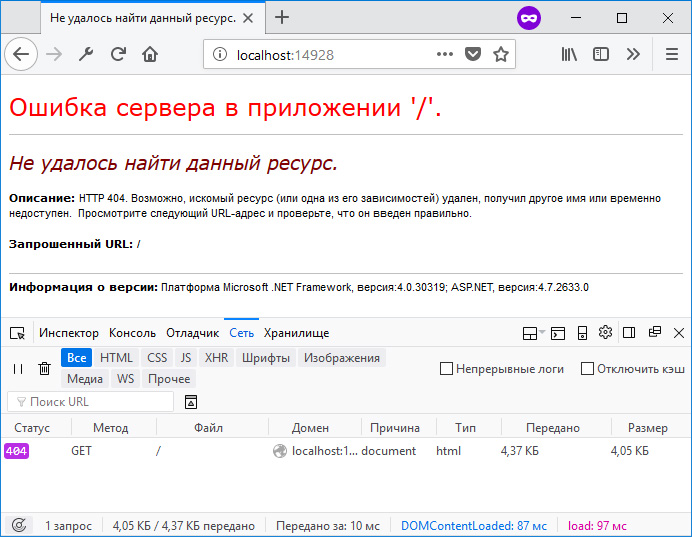
Стандартная страница ошибки
Теперь займемся настройкой собственных страниц ошибок. При этом для нас важно не только показать пользователю красивую страницу ошибки, но также сохранить правильный код ответа сервера.
Вариант 1. Ссылка на статичные заранее подготовленные html-страницы.
Первым делом в файле web.config в разделе system.web добавляем новую секцию customErrors со следующими настройками:
web.config
<system.web>
  <customErrors mode="On" redirectMode="ResponseRewrite" defaultRedirect="~/404.aspx">
    <error statusCode="404" redirect="~/404.aspx"/>
    <error statusCode="500" redirect="~/500.aspx"/>
  </customErrors>
  ...
</system.web>
Эта секция служит для обработки ошибок на уровне платформы ASP.NET.
Атрибут mode=»On» определяет, что пользовательские страницы ошибок включены. Также допустимы значения Off / RemoteOnly.
Атрибут redirectMode=»ResponseRewrite» определяет, следует ли изменять URL-адрес запроса при перенаправлении на пользовательскую страницу ошибки. Естественно, нам этого не нужно.
Атрибут defaultRedirect=»~/404.aspx» указывает на то, какая страница ошибки будет показана в случае возникновения кода ответа сервера, который мы не описали в настройках. Пусть при любых других ошибках пользователь будет думать, что страница не найдена.
И уже внутри этой секции мы определяем два кода, для которых у нас будут кастомные страницы ошибок.
Далее, как видно из настроек выше, нам понадобятся *.aspx файлы, на которые будет делаться редирект. Обратите внимание, что мы ссылаемся именно на *.aspx файлы, а не на *.html. Эти файлы являются проходными, служебными, в них содержатся настройки для ответа сервера. Содержимое файла 404.aspx:
404.aspx
<%@ Page Language="C#" %>

<%
    var filePath = MapPath("~/404.html");
    Response.StatusCode = 404;
    Response.ContentType = "text/html; charset=utf-8";
    Response.WriteFile(filePath);
%>
В коде выше мы указываем путь непосредственно до конечного *.html файла, а также дополняем настройки ответа сервера. Указываем код ответа, тип отдаваемого контента и кодировку. Если не указать кодировку, то браузер пользователя может интерпретировать ответ от сервера как не отформатированную строку, и, соответственно, не преобразует ее в html-разметку. А если не указать StatusCode = 404 , то получится следующая интересная ситуация:
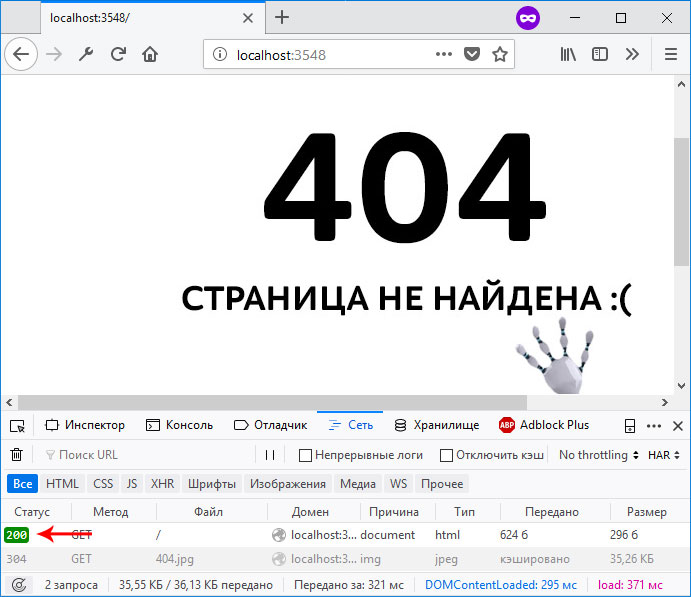
Код ответа сервера отдается неверно
И хотя на рисунке выше нам показывается пользовательская страница с ошибкой, при этом код ответа 200 — это конечно же неверно. Когда-то давно на форумах Microsoft такое поведение зарепортили как баг. Однако Microsoft возразила, что это не баг, а фича и не стала ничего менять в будущих релизах ASP.NET. Поэтому приходится это исправлять вручную, и вручную в *.aspx файле в ответе сервера указывать код ответа 404.
Попробуйте собственноручно намеренно убрать какую-нибудь из объявленных на данный момент настроек из секции customErrors и понаблюдайте за результатом.
Также по аналогии создаем подобный *.aspx файл для ошибки 500.
И уже после этого нам нужно создать статичные html-файлы, соответственно для ошибок 404 и 500. Пусть они лежат в корне нашего проекта.
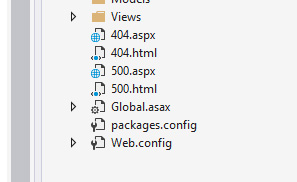
Статичные файлы расположены в корне проекта
Здесь же в файле web.config определяем раздел system.WebServer, если он еще не определен, и в нем объявляем секцию httpErrors:
web.config
  <system.webServer>
    <httpErrors errorMode="Custom" defaultResponseMode="File" defaultPath="c:projectsmysite404.html">
      <remove statusCode="404" />
      <remove statusCode="500" />
      <error statusCode="404" path="404.html" responseMode="File" />
      <error statusCode="500" path="500.html" responseMode="File" />
    </httpErrors>
  </system.webServer>
Эта секция служит для обработки ошибок на уровне сервера IIS. Суть в том, что иногда обработка запроса происходит непосредственно на уровне ASP.NET. А иногда ASP.NET просто определяет нужный код ответа и пропускает запрос выше, на уровень сервера. Такой сценарий может случиться, если, например, мы в действии контроллера возвращаем экземпляр класса HttpNotFound:
Или же когда система маршрутизации в MVC-приложении не может определить, к какому маршруту отнести запрошенный пользователем URL-адрес:
https://site.com/long/long/long/long/path
Для секции httpErrors важно отметить следующее. Так как мы ссылаемся на статичные *.html файлы, то и в качестве значений для нужных атрибутов здесь также указываем File . Для атрибута defaultPath необходимо указать абсолютный путь до файла ошибки. Относительный путь именно в этом месте работать не будет. Сам атрибут defaultPath определяет файл, который будет выбран для всех других ошибок, которые мы явно не указали. Но здесь есть одна небольшая проблема. Дело в том, что этот атрибут по умолчанию заблокирован на сервере IIS Express. Если вы разрабатываете свое приложение именно на локальном сервере, то это ограничение нужно снять. Для этого в директории своего проекта нужно найти файл конфигурации сервера и удалить этот атрибут из заблокированных, как это показано на рисунке:

Расположение файла applicationhost.config
Также проверьте папку App_Start. Если вы создали не пустое приложение, а работаете над реальным проектом, там может находиться класс FilterConfig, в котором регистрируются все глобальные фильтры в приложении. В методе регистрации удалите строчку кода, где регистрируется HandleErrorAttribute, в нашем случае он не понадобится.
Вот такой комплекс мер нужно предпринять, чтобы настроить обработку ошибок 404, 500, и любых других. Это настройки в файле web.config, и добавление в наш проект статичных файлов.
Вариант 2. Обработка ошибок с использованием специального контроллера.
Второй подход немного отличается от первого. Здесь нам не понадобится секция customErrors, так как обработку всех ошибок мы будем передавать сразу из приложения на уровень сервера, и он уже будет решать что делать. Можно удалить или закомментировать эту секцию в файле web.config.
Далее создадим специальный контроллер, который будет принимать все ошибки, которые мы хотим обрабатывать:
public class ErrorController : Controller
{
    public ActionResult NotFound()
    {
        Response.StatusCode = 404;
        return View();
    }

    public ActionResult Internal()
    {
        Response.StatusCode = 500;
        return View();
    }
}
Также создадим соответствующие представления с нужной нам красивой разметкой.
Также в файле web.config нам нужно изменить настройки в секции httpErrors. Если раньше мы ссылались на статичные html-файлы, то теперь мы будем обращаться по указанным URL, которые мы определили в ErrorController’е, чтобы именно там обрабатывать ошибки:
web.config
<httpErrors errorMode="Custom" existingResponse="Replace" defaultResponseMode="ExecuteURL" defaultPath="/Error/NotFound">
  <remove statusCode="404"/>
  <remove statusCode="500"/>
  <error statusCode="404" path="/Error/NotFound" responseMode="ExecuteURL"/>
  <error statusCode="500" path="/Error/Internal" responseMode="ExecuteURL"/>
</httpErrors>
Вариант 3. Фильтр HandleErrorAttribute
Замечу, что есть еще один способ взять под свой контроль обработку ошибок в приложении – это наследоваться от стандартного класса HandleErrorAttribute и написать свой фильтр. Но это уже более частный случай, когда нужно реализовать какую-то особенную логику при возникновении той или иной ошибки. В большинстве же более менее стандартных приложений наша проблема решается двумя выше описанными способами и в этом фильтре нет необходимости. Более подробную информацию, как работать с классом HandleErrorAttribute можно найти в официальной документации в интернете по этой ссылке.
Итого
Мы посмотрели на два разных подхода, которые можно применить при обработке ошибок на платформе ASP.NET. Опять же повторюсь, что если для вас не принципиально настраивать собственные страницы ошибок, то лучше не изменять эти настройки, так как даже одна упущенная деталь или неверно сконфигурированный параметр может очень сильно навредить репутации вашего сайта для конечного пользователя и в поисковых системах.
| Воскресенье, 3 марта, 2013
Метки: ASP.NET Web API Комментарии: 0
ASP.NET Web API упрощает разработку HTTP-сервисов, а также предоставляет много способов возврата полных и информативных сообщений об ошибках для различных ситуаций. Рассмотрим эти возможности.
Для начала, посмотрим как выглядит обычное сообщение об ошибке для Web API:
{
"Message": "No HTTP resource was found that matches the request URI 'http://localhost/Foo'.",
"MessageDetail": "No type was found that matches the controller named 'Foo'."
}
То есть ошибка, это просто коллекция пар ключей и значений, которая сообщает нам, что пошло не так. Эта коллекция отсылается клиенту через HTTP-запросы. В примере выше содержимое представлено в формате JSON.
Но если указать в запросе в заголовке Accept «text/html», то ответ будет в xml виде:
<Error>
  <Message>No HTTP resource was found that matches the request URI 'http://localhost/Foo'.</Message>
  <MessageDetail>No type was found that matches the controller named 'Foo'.</MessageDetail>
</Error>
Этот простой формат предоставляет информацию клиентам об ошибках, что дает возможность делать запись в журнал, либо отсылать отчеты на email.
HttpError
Примеры приведенные выше — это объекты HttpError, сериализованные с помощью Json.NET и DataContactSerializer.
Тип HttpError определяет содержательный и расширяемый способ передачи информации об ошибках между различными платформами. Фактически, это просто класс Dictionary, который предоставляет еще несколько вспомогательных конструкторов для создания сообщений об ошибках, исключениях и некорректных состояниях модели.
public HttpError();
public HttpError(string message);
public HttpError(Exception exception, bool includeErrorDetail);
public HttpError(ModelStateDictionary modelState, bool includeErrorDetail);
Так выглядят исключения в формате JSON:
{
"Message": "An error has occurred.",
"ExceptionMessage": "Index was outside the bounds of the array.",
"ExceptionType": "System.IndexOutOfRangeException",
"StackTrace": "   at WebApiTest.TestController.Post(Uri uri) in c:\Temp\WebApiTest\WebApiTest\TestController.cs:line 18rn   at System.Web.Http.Controllers.ReflectedHttpActionDescriptor.ActionExecutor.<>c__DisplayClassf.<GetExecutor>b__9(Object instance, Object[] methodParameters)rn   at System.Web.Http.Controllers.ReflectedHttpActionDescriptor.ActionExecutor.Execute(Object instance, Object[] arguments)rn   at System.Threading.Tasks.TaskHelpers.RunSynchronously[TResult](Func`1 func, CancellationToken cancellationToken)"
}
Так некорректная модель:
{
  "Message": "The request is invalid.",
  "ModelState":
   {
       "s": [ "Required property 's' not found in JSON. Path '', line 1, position 2."  ]
   }
}
Можно создавать и собственные виды ошибок в классе HttpError, например так:
public HttpResponseMessage Get()
{
   HttpError myCustomError = new HttpError("My custom error message") { { "CustomErrorCode", 37 } };
   return Request.CreateErrorResponse(HttpStatusCode.BadRequest, myCustomError);
}
Результат будет таким:
{
  "Message": "My custom error message",
  "CustomErrorCode": 37
}
В этом примере метод возвращает ошибку с помощью Request.CreateErrorMessage. Пользовательская ошибка обернута в класс HttpResponseMessage. Это рекомендованный способ создания ответов c сообщениями об ошибках. Ниже приведены расширяемые методы для возврата такой информации:
public static HttpResponseMessage CreateErrorResponse(this HttpRequestMessage request, HttpStatusCode statusCode, Exception exception);
public static HttpResponseMessage CreateErrorResponse(this HttpRequestMessage request, HttpStatusCode statusCode, HttpError error);
public static HttpResponseMessage CreateErrorResponse(this HttpRequestMessage request, HttpStatusCode statusCode, ModelStateDictionary modelState);
public static HttpResponseMessage CreateErrorResponse(this HttpRequestMessage request, HttpStatusCode statusCode, string message);
public static HttpResponseMessage CreateErrorResponse(this HttpRequestMessage request, HttpStatusCode statusCode, string message, Exception exception);
Но можно и просто генерировать любое исключение в методе действия. Web API автоматически перехватывает исключение, конвертирует в ответ сервера с кодом 500 (Internal Server Error) и возвращает сообщение в точно таком же формате, как и с методом CreateErrorResponse.
HttpResponseException
Но как быть, если нужно вернуть ошибку в методе, который возвращает объекты не являющиеся классами HttpResponseMessage? Тут на помощь приходит класс HttpResponseException. Данный тип исключения определен специально для Web API и служит двум целям:
- Позволяет возвращать специальные ответы HTTP из методов, которые не возвращают HttpResponseMethod.
- Упрощает код в методах Web API, выполняя вывод ответа сервера с информацией об ошибке немедленно.
Технически, HttpResponseException может быть использован для возврата любых http-ответов, но особенно полезен данный класс для ошибок. Это позволяет нам писать методы следующим образом:
public Person Get(int id)
{
   if (!_contacts.ContainsKey(id))
   {
      throw new HttpResponseException(Request.CreateErrorResponse(HttpStatusCode.NotFound, String.Format("Contact {0} not found.", id)));
   }
   return _contacts[id];
}
Метод предназначен для возврата типа Person, но мы можем также и вернуть пользовательскую ошибку в случае отсутствия возвращаемого значения.
Подробное описание ошибок
В начале статьи в примере упоминался параметр «includeErrorDetails» в конструкторе класса HttpError. Это для случаев, когда клиенту нужно предоставить отладочную информацию, для разрешения проблем на сервере. По умолчанию подробная информация не высылается удаленным клиентам, но предоставляется клиентам на локальном компьютере. В самом первом примере статьи, локальный клиент получит:
{
"Message": "No HTTP resource was found that matches the request URI 'http://localhost/Foo'.",
"MessageDetail": "No type was found that matches the controller named 'Foo'."
}
А до удаленного клиента дойдет только:
{
"Message": "No HTTP resource was found that matches the request URI 'http://localhost/Foo'."
}
MessageDetails содержит специфичную информацию, которую удаленные клиенты в большинстве случаев видеть не должны. То есть ошибки содержащие отладочную информацию (exception message, exception type, stack trace) не предоставляют подробное описание по умолчанию, но ошибки состояния моделей (кроме исключений) подробно отсылаются и удаленным клиентам.
Явно задавать возврат подробной информации можно в объекте HttpConfiguration:
config.IncludeErrorDetailPolicy = IncludeErrorDetailPolicy.LocalOnly;
config.IncludeErrorDetailPolicy = IncludeErrorDetailPolicy.Always;
config.IncludeErrorDetailPolicy = IncludeErrorDetailPolicy.Never;
Как было упомянуто выше, значение по умолчанию LocalOnly.
Обработка ошибок для некорректных моделей
Еще один распространенный способ использования обработки ошибок Web API – это немедленный возврат ошибки в случае некорректной модели. Для этого лучше всего реализовать следующий фильтр метода действия:
public class ValidationFilterAttribute : ActionFilterAttribute
{
    public override void OnActionExecuting(HttpActionContext actionContext)
    {
        if (!actionContext.ModelState.IsValid)
        {
            actionContext.Response =
                 actionContext.Request.CreateErrorResponse(HttpStatusCode.BadRequest,
                 actionContext.ModelState);
         }
     }
}
Можно прописать этот фильтр для каждого метода а можно зарегистрировать его глобально сразу для всех методов:
config.Filters.Add(new ValidationFilterAttribute());
Это позволяет не писать проверку модели в каждом методе, а сразу возвращать ошибку клиенту в случае некорректной модели.
Никто еще не оставил здесь комментарий.
- Download PDF Article — 1.6 MB
- Download source — 213.1 KB
Introduction
This article in the «Web API with ASP.NET Core» series will focus on topics like returning HTTP Status Codes from API and their importance, returning sub resources, serializer strings and content negotiation. We learned how to create an API in ASP.NET Core and how to return resources in last article and paused at Status Codes. We’ll continue to explore the importance of status codes and practical examples as well. We’ll also explore resource creation and returning the child resources as well in this article. We can use the same source code as we got at the completion of last article of the series.

While consuming an API an Http Request is sent and in return, a response is sent along with return data and an HTTP code. The HTTP Status Codes are important because they tell the consumer about what exactly happened to their request; a wrong HTTP code can confuse the consumer. A consumer should know (via a response) that its request has been taken care of or not, and if the response is not as expected, then the Status Code should tell the consumer where the problem is if it is at consumer level or at API level.
Suppose there is a situation where the consumer gets a response as status code 200, but at the service level there is some problem or issue in that case consumer will get a false assumption of everything being fine, whereas that won’t be a case. So if there is something wrong at service or there occurs some error on the server, the status code 500 should be sent to consumer, so that the consumer knows that there actaully is something wrong with the request it sent. In general, there are a lot of access codes. One can find the complete here, but not all are so important except the few. Few status code are very frequently used with the normal CURD operations that a service perform, so service does not necessarily have to support all of them.Let’s have a glance over few of the important status codes.

When we talk about the levels of status codes, there are 5 levels. Level 100 status codes are more of informal nature. Level 200 status codes are specifically for request being sent well. We get 200 codes for success of a GET request, 201 if a new resource has been successfully created. 204 status codes is also for success but in return it does not returns anything, just like if consumer has performed delete operation and in return doesn’t really expect something back. Level 300 http status codes are basically used for redirection, for e.g. to tell a consumer that the requested resource like page, image has been moved to another location. Level 400 status codes are meant to state errors or client error for e.g. status code 400 means Bad Request, 401 is Unauthorized that is invalid authentication credentials or details have been provided by the consumer, 403 means that authentication is a success, but the user is not authorized. 404 are very common and we often encounter which mean that the requested resource is not available. Level 500 are for server errors. Internal Server Error exception is very common, that contains the code 500. This error means that there is some unexpected error on the server and client cannot do anything about it. We’ll cover how we can use these HTTP status codes in our application.
RoadMap
We’ll follow a roadmap to learn and cover all the aspects of ASP.NET Core in detail. Following is the roadmap or list of articles that will cover the entire series.

- Create API with ASP.NET Core (Day 1): Getting Started and ASP.NET Core Request Pipeline
- Create API with ASP.NET Core (Day 2): Create an API and return resources in ASP.NET Core
- Create API with ASP.NET Core (Day 3): Working with HTTP Status Codes, Serializer Settings and Content Negotiation in ASP.NET Core API
- Create API with ASP.NET Core (Day 4): Understanding Resources in ASP.NET CORE API
- Create API with ASP.NET Core (Day 5): Inversion of Control and Dependency Injection in ASP.NET CORE API
- Create API with ASP.NET Core (Day 6): Getting Started with Entity Framework Core
- Create API with ASP.NET Core (Day 7): Entity Framework Core in ASP.NET CORE API
HTTP Status Codes Implementation
Let’s try to tweak our implementation, and try to return HTTP Status Codes from API. Now in the EmployeesController, we need to return the JSON result along with the status code in response. Right now we return only the JSON result as shown below.

If we look closely at JsonResult class and press F12 to see its definition. We find that it is derived from ActionResult class which purposely formats the object in the form of a JSON object. ActionResult class implements IActionResult interface.

Ideally API should not only return JSON all the time, they should return what consumer is expecting i.e. via inspecting the request headers, and ideally we should be able to return the Status Code also along with the result.
We’ll see that it could also be possible with the JSonResult that we return. So if you assign the JSON result that we create to any variable say «employees», you can find the StatusCode property associated with that variable, we can set that StatusCode property.

So we can set the status code to 200 and return this variable as shown below.
[HttpGet()]
 public JsonResult GetEmployees()
 {
   var employees= new JsonResult(EmployeesDataStore.Current.Employees);
   employees.StatusCode = 200;
   return employees;
 }
But that would be a tedious job to do everytime. There are predefined methods in ASP.NET core that create IActionResult, and all those are mapped to correct status codes (i.e. NotFound if the resource doesn’t exist or BadRequest for erroneous requests, etc.).
So replace the return type of methods with IActionResult instead of JsonResult, and in the GetEmployee method make the implementation as if there is a request of Employee with the id that does not exists, we can return NotFound, else Employee data with the status code OK. In the similar way for the first method where we return the list of employees, we can directly return Ok with the data. There is no scope of NotFound in this method, because even if no records exist an empty list could be returned with HTTP Status Code OK. So, our code becomes something like shown below,
using Microsoft.AspNetCore.Mvc;
using System.Linq;

namespace EmployeeInfo.API.Controllers
{
  [Route("api/employees")]
  public class EmployeesInfoController : Controller
  {
    [HttpGet()]
    public IActionResult GetEmployees()
    {
      return Ok(EmployeesDataStore.Current.Employees);
    }

    [HttpGet("{id}")]
    public IActionResult GetEmployee(int id)
    {
      var employee = EmployeesDataStore.Current.Employees.FirstOrDefault(emp => emp.Id == id);
      if (employee == null)
        return NotFound();
      return Ok(employee);

    }
  }
}
Compile the application and run it. Now go to postman and try to make requests. In the last article, we made a request of an employee with the Id 8, that does not exist and we got the following result.

The result said null, that is not ideally a correct response. So try to make the same request now with this new implementation that we did. In this case, we get a proper status 404 with Not Found message as shown below,

Since we know that we can also send the request from web browsers as browsers support HTTP Request. If we try to access our API via browser, we get an empty page with the error or response in the developer’s tool as shown below.

We can make our responses more meaningful by displaying the same on the page itself as ASP.NET Core contains a middle ware for Status Codes as well. Just open the configure method of the startup class and add following line to the method.
app.UseStatusCodePages();
That is adding it to our request pipe line. So the method will look like,
public void Configure(IApplicationBuilder app, IHostingEnvironment env, ILoggerFactory loggerFactory)
    {
      loggerFactory.AddConsole();

      if (env.IsDevelopment())
      {
        app.UseDeveloperExceptionPage();
      }
      else
      {
        app.UseExceptionHandler();
      }

      app.UseStatusCodePages();

      app.UseMvc();


    }
Now again make the same API request from browser and we get the following message on the browser page itself.

Returning Sub Resources
In the EmployeeDto, we have a property named NumberOfCompaniesWorkedWith, considering this as a sub resource or child resource, we might want to return this as a result as well. Let’s see how we can achieve that. Add a DTO class named NumberOfCompaniesWorkedDto to the Model folder, and add Id, name and Description to that newly added class.

NumberOfCompaniesWorkedDto.cs
namespace EmployeeInfo.API.Models
{
  public class NumberOfCompaniesWorkedDto
  {
    public int Id { get; set; }
    public string Name { get; set; }
    public string Description { get; set; }
  }
}
Now in the EmployeeDto class add a property w.r.t. this NumberOfCompaniesWorkedDto that returns the collection of all companies an employee has worked with.
EmployeeDto.cs
using System.Collections.Generic;

namespace EmployeeInfo.API.Models
{
  public class EmployeeDto
  {
    public int Id { get; set; }
    public string Name { get; set; }
    public string Designation { get; set; }
    public string Salary { get; set; }
    public int NumberOfCompaniesWorkedWith
    {
      get
      {
        return CompaniesWorkedWith.Count;
      }
    }

    public ICollection<NumberOfCompaniesWorkedDto> CompaniesWorkedWith { get; set; } = new List<NumberOfCompaniesWorkedDto>();

  }
}
In the above code, we added a new property that returns the list of companies an employee has worked with. For the property NumberOfCompaniesWorkedWith, we calculated the count from the collection that we have. We initialized the CompaniesWorkedWith property to return an empty list so that we do not end up having null-reference exceptions. Now add some mock data of CompaniesWorkedWith to the EmployeesDataStore class.
EmployeesDataStore.cs
using EmployeeInfo.API.Models;
using System.Collections.Generic;

namespace EmployeeInfo.API
{
  public class EmployeesDataStore
  {
    public static EmployeesDataStore Current { get; } = new EmployeesDataStore();
    public List<EmployeeDto> Employees { get; set; }

    public EmployeesDataStore()
    {

      Employees = new List<EmployeeDto>()
            {
                new EmployeeDto()
                {
                     Id = 1,
                     Name = "Akhil Mittal",
                     Designation = "Technical Manager",
                     Salary="$50000",
                     CompaniesWorkedWith=new List<NumberOfCompaniesWorkedDto>()
                     {
                       new NumberOfCompaniesWorkedDto()
                       {
                         Id=1,
                         Name="Eon Technologies",
                         Description="Financial Technologies"
                       },
                       new NumberOfCompaniesWorkedDto()
                       {
                         Id=2,
                         Name="CyberQ",
                         Description="Outsourcing"
                       },
                       new NumberOfCompaniesWorkedDto()
                       {
                         Id=3,
                         Name="Magic Software Inc",
                         Description="Education Technology and Fin Tech"
                       }
                     }
                },
                new EmployeeDto()
                {
                     Id = 2,
                     Name = "Keanu Reaves",
                     Designation = "Developer",
                     Salary="$20000",
                     CompaniesWorkedWith=new List<NumberOfCompaniesWorkedDto>()
                     {
                       new NumberOfCompaniesWorkedDto()
                       {
                         Id=1,
                         Name="Eon Technologies",
                         Description="Financial Technologies"
                       }
                     }
                },
                 new EmployeeDto()
                {
                     Id = 3,
                     Name = "John Travolta",
                     Designation = "Senior Architect",
                     Salary="$70000",
                     CompaniesWorkedWith=new List<NumberOfCompaniesWorkedDto>()
                     {
                       new NumberOfCompaniesWorkedDto()
                       {
                         Id=1,
                         Name="Eon Technologies",
                         Description="Financial Technologies"
                       },
                       new NumberOfCompaniesWorkedDto()
                       {
                         Id=2,
                         Name="CyberQ",
                         Description="Outsourcing"
                       }
                     }
                },
                  new EmployeeDto()
                {
                     Id = 4,
                     Name = "Brad Pitt",
                     Designation = "Program Manager",
                     Salary="$80000",
                     CompaniesWorkedWith=new List<NumberOfCompaniesWorkedDto>()
                     {
                       new NumberOfCompaniesWorkedDto()
                       {
                         Id=1,
                         Name="Infosys Technologies",
                         Description="Financial Technologies"
                       },
                       new NumberOfCompaniesWorkedDto()
                       {
                         Id=2,
                         Name="Wipro",
                         Description="Outsourcing"
                       },
                       new NumberOfCompaniesWorkedDto()
                       {
                         Id=3,
                         Name="Magic Software Inc",
                         Description="Education Technology and Fin Tech"
                       }
                     }
                },
                   new EmployeeDto()
                {
                     Id = 5,
                     Name = "Jason Statham",
                     Designation = "Delivery Head",
                     Salary="$90000",
                     CompaniesWorkedWith=new List<NumberOfCompaniesWorkedDto>()
                     {
                       new NumberOfCompaniesWorkedDto()
                       {
                         Id=1,
                         Name="Fiserv",
                         Description="Financial Technologies"
                       },
                       new NumberOfCompaniesWorkedDto()
                       {
                         Id=2,
                         Name="Wipro",
                         Description="Outsourcing"
                       },
                       new NumberOfCompaniesWorkedDto()
                       {
                         Id=3,
                         Name="Magic Software Inc",
                         Description="Education Technology and Fin Tech"
                       }
                       ,
                       new NumberOfCompaniesWorkedDto()
                       {
                         Id=4,
                         Name="Sapient",
                         Description="Education Technology and Fin Tech"
                       }
                     }
                }
            };

    }
  }
}
Now add a new controller named CompaniesWorkedWithController in the same way as we created EmployeesController in the last article. The new controller should be derived from Controller class.

Since CompaniesWorkedWith is directly related to Employees, if we put a default route to «api/companiesworkedwith» won’t look good and justifiable. If this is related to employees, the URI of the API should also show that. CompaniesWorkedWith could be considered as a sub resource of Employees or child resource of Employee. So the companies worked with as a resource should be accessed via employees, therefore the URI will be somewhat like «api/employees/<employee id>/companiesworkedwith». Therefore, the controller route will be «api/employees» as it would be common to all the actions.

Since the child resource is dependent on parent resources, we take Id of the parent resource to get child resource.
The following is the actual implementation for returning the list of companies of an employee.
[HttpGet("{employeeid}/companiesworkedwith")]
public IActionResult GetCompaniesWorkedWith(int employeeId)
{
  var employee = EmployeesDataStore.Current.Employees.FirstOrDefault(emp => emp.Id == employeeId);
  if (employee == null) return NotFound();
  return Ok(employee.CompaniesWorkedWith);
}
If we look at the above code, we first find an employee with the passed id, and we’ll have to do so because if there is no employee with that id then it is understood that his companies worked with won’t exist even, that gives us the liberty to send the status code NotFound if there is no employee, on the other hand if we find an employee, we can send the companiesworkedwith to the consumer.
In a similar way, we write the code for getting a single company worked with information. In that case, we should pass two IDs one for the employee and the other for the company like shown in below code.
[HttpGet("{employeeid}/companyworkedwith/{id}")]
 public IActionResult GetCompanyWorkedWith(int employeeId, int Id)
 {
   var employee = EmployeesDataStore.Current.Employees.FirstOrDefault(emp => emp.Id == employeeId);
   if (employee == null) return NotFound();

   var companyWorkedWith = employee.CompaniesWorkedWith.FirstOrDefault(comp => comp.Id == Id);
   if (companyWorkedWith == null) return NotFound();
   return Ok(companyWorkedWith);
 }
So in the code above, we first get the employee for the ID passed. If the employee exists we go further to fetch the company with the passed ID, else, we return Not Found. If the company does not exist, we again return NotFound, else, we return the result OK with the company object. We can try to check these implementations on Postman.
Companiesworkedwith for existing employee

Companiesworkedwith for non existing employee

Particular Companiesworkedwith for a particular employee
Non existing Companyworkedwith for a particular employee

Get All Employees

So we see that we get the results as expected. For example, in the similar way as the API is written and in those cases consumer also gets the correct response and the response does not confuse the consumer. We also see that we get the related or child resources along with Employees if we send a request to get all employees. Well this scenario would not be an ideal for every request. For example, the consumer may only want employees and not the related companies worked with data. Yes, we can also control this with the help of Entity Framework that we’ll cover in the later articles of the series. Notice that we can also control the casing of the JSON data that is returned as the consumer may expect the properties to be in upper case, we can also do this with the help of serializer settings that we’ll cover now.
Serializer Settings in ASP.NET Core API
By default, ASP.NET Core uses JSON for serialization and de-serialization, but the best thing is that we can also configure this in our code. We used the ConfigureServices method in the startup class to configure the services use be the container, in a similar way we can configure for MVC.

We can add JSON options to the added MVC service.

Since the AddJsonOptions method expects an action, we supply a lambda expression there as options parameter through which we can easily access the serializer settings as shown in above image. We fetch the contract resolver as we’ll override the default settings of naming strategy. The line var resolver = opt.SerializerSettings.ContractResolver as DefaultContractResolver; takes out the contract resolver and cast ot to the default contract resolver, we can now override its NamingStrategy property and mark it to null. So now it should not typically follow that lower letters convention, which it followed by default. We use the DefaultContractResolver class which is part of Newtonsoft.Json.Serialization, so we’ll have to add the namespace for it as well. The code will be as shown below:
public void ConfigureServices(IServiceCollection services)
    {
      services.AddMvc().AddJsonOptions(opt =>
      {
        if (opt.SerializerSettings.ContractResolver != null)
        {
          var resolver = opt.SerializerSettings.ContractResolver as DefaultContractResolver;
          resolver.NamingStrategy = null;
        }
      });
    }
Now let’s test this with Postman. In the last request, we got the JSON properties in small case letters as shown below:
Now run the application and make a request for the same API from postman as consumer.

Now we get the JSON properties in capital letters (i.e. overridden by our implementation). This implementation is on need basis or based on the kind of JSON the consumer wants. Here comes the concept of content negotiation where a response is sent based on consumers request parameters.
Content Negotiation and Formatters in ASP.NET Core API
Content negotiation is one of the important concepts when we develop an API. This enables an API to select best representation for a desired response when there are more than one representations available. Suppose we build an API for multiple consumers and clients we are not sure that whether all the clients would be able to consume the default representation that an API sends in the form JSON. Some consumers may expect XML as a response or any other format. In that case it would be hard for the consumers to understand and work with JSON instead of XML.
There is always an option to the consumer to send a request for a specific format by specifying the requested media type in the Accept header. For example, if in the accept header the requested format is XML, the API should send the response in XML format and if it is JSON, the API should send the response in JSON format. If there is no header specified, then API can take liberty to send the response in the default format that it has. For example, JSON in our case. ASP.NET Core also supports this functionality via output formatters. Output formatter (as the name suggests) mostly deals with the output. The consumer in that case can request any specific type of output that it wants by setting the accept header to request media type such as Application/JSON or Application/XML. It also works with the input formats in a way that supposes there is a POST request to an API for creating a resource, the input media type and the content that comes along with the request is then identified by content-type header in the request. Let’s cover this with practical implementations. Let’s try to request the list of employees with the JSON accept header. So, we’ll set Header key as «Accept» and Value as «application/json», and we get JSON as shown below.

Now make a request with accept header application/xml, we still get JSON.

But ideally, the API should return XML. Let’s see how we can configure our service to return the same. If we go to the Startup class’s ConfigureService method, we have an option to add MvcOptions to the service, which in turn has options to add input and output formatters.

If we need to use the Xml Output formatter, we’ll have to install a nugget package named Microsoft.AspNetCore.MVC.Formatters.Xml as shown below. So right click on the project, go to manage nugget packages and search online for this package and install it.

Now if we can add the XML output formatter as shown in following code:
services.AddMvc()
        .AddMvcOptions(opt => opt.OutputFormatters.Add(new XmlDataContractSerializerOutputFormatter()));
Similarly, Input formatters can also be added with XmlDataContractSerializerInputFormatter. So, build the solution, run the project and then now again try to request the employees list.
First with default or JSON formatter, we get JSON as shown below.

And now with the XML accept header we get XML as shown below.

Hence now a consumer can request the response in desired format and our API is capable of delivering that as well.
Our code for the Startup class looks like the following:
using Microsoft.AspNetCore.Builder;
using Microsoft.AspNetCore.Hosting;
using Microsoft.Extensions.DependencyInjection;
using Microsoft.Extensions.Logging;
using Microsoft.AspNetCore.Mvc.Formatters;

namespace EmployeeInfo.API
{
  public class Startup
  {


    public void ConfigureServices(IServiceCollection services)
    {
      services.AddMvc()
        .AddMvcOptions(opt => opt.OutputFormatters.Add(new XmlDataContractSerializerOutputFormatter()));


    }


    public void Configure(IApplicationBuilder app, IHostingEnvironment env, ILoggerFactory loggerFactory)
    {
      loggerFactory.AddConsole();

      if (env.IsDevelopment())
      {
        app.UseDeveloperExceptionPage();
      }
      else
      {
        app.UseExceptionHandler();
      }

      app.UseStatusCodePages();

      app.UseMvc();


    }
  }
}
Conclusion
In this article, we learned about the HTTP Codes and their importance and how we can configure our service to use HTTP Codes. We also focused on how sub resources or child resources could be sent via an API. We learnt about serializer settings and most importantly the formatters and how we can enable the API to support content negotiation as well. In the next article of learning ASP.NET Core API we’ll do some more practical stuff when we perform CRUD operations.
<< Previous Article
Source Code on Github
Source Code
References
- https://www.asp.net/core
- https://www.pluralsight.com/courses/asp-dotnet-core-api-building-first
Akhil Mittal is an Ex-Microsoft MVP(Most Valuable Professional), C# Corner MVP, Codeproject MVP, a blogger, author and likes to write/read technical articles. Akhil has an experience of around 12 years in developing, designing, architecting enterprises level applications primarily in Microsoft Technologies. Akhil enjoys working on technologies like MVC, Web API, Entity Framework, Angular, C# and BlockChain. Akhil is an MCP( Microsoft Certified Professional) in Web Applications (MCTS-70-528, MCTS-70-515) and .Net Framework 2.0 (MCTS-70-536). Visit Akhil Mittal’s personal blog CodeTeddy for some good and informative articles.
LinkedIn: https://www.linkedin.com/in/akhilmittal/