#1

OFFLINE
Отправлено 05 Февраль 2013 — 20:03
Добрый день!
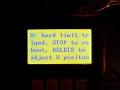
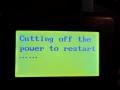
У знакомого, сидящего в далёкой тайге и имеющего крайне ограниченный доступ к интернету стоит китайский фрезер с пультом DSP 0501. Станок новый, пользуется совсем мало, ещё не разобрался что к чему. Кто то полазил в настройках и теперь такая ситуация: при включении выдаёт сообщение, показанное на фото 0204. Нажимает Delete, выходит
1x-542.639 run
1y-451.100 f2
1z 2700.007 low
x-hard limit
cutting off the power to restart…..
При нажатии на Меню ничего не изменяется. Шпиндель сам идёт при включении домой. При нажатии Delete выдаёт x-hard limit. После нажатия стоп выходит пожелание рестарт — фото 0208.
Я так понимаю у него размер рабочего стола не верно прописан, либо сильно сбился ноль по XY. Хотя размер стола по X -1000. Зато по Z него явное превышение, но он ничего на этот счёт не говорит. Пытались обнулить и по XY, и по Z — не выходит. В меню зайти проверить размеры рабочего стола невозможно. Просьба помочь.
Похожие темы:
Z- hard limit triged
-
0
- Наверх
#2
OFFLINE
3D-BiG
3D-BiG
- Пол:Мужчина
- Город:Ареал обитания — вся страна, но обычно встречаюсь в Новосибирске…
- Интересы:Полежать на диване, пофлудить на форуме….
- Из:СССР
Отправлено 05 Февраль 2013 — 21:38
Ну зачем включили хардлимиты, если у станка их нет… В переведенной доке на этот комплект все есть…
-
0
Лужу, паяю, станки ЧПУ починяю….
Еще частенько здесь болтаю: Телеграм сообщество ЧПУшников: t.me/cncunion
- Наверх
#3
OFFLINE
Серга
Серга
-

- Пользователи
-

- 2 сообщений
Абитуриент
- Пол:Мужчина
- Из:Псков
Отправлено 06 Февраль 2013 — 12:10
добрый день!
хардлимиты были включены случайно….и что бы их выключить необходимо войти в menu(так ведь?),а кнопка меnu не реагирует на клик. может есть ещё какой-то способ вхождения в menu(может какая-то комбинация кнопок на пульте)?
-
0
- Наверх
#4
OFFLINE
DEDAlex
DEDAlex
- Пол:Мужчина
- Город:Северодонецк/Москва
- Интересы:Любознательный дилетант широкого профиля
- Из:Украина/Московия
Отправлено 06 Февраль 2013 — 12:31
Отсоедините разъем от пульта и подкиньте его (пульт) ЮСБ-шным кабелем к компу. И попробуйте без станка войти в меню…
-
1
ДАВНО ЖИВУ-ПРИВЫК УЖЕ…
Самый хороший учитель в жизни — опыт. Берет, правда, дорого, но объясняет доходчиво.
Ничто так не украшает человека, как дружба с собственной головой.
Работать надо не 12 часов, а головой. © Стив Джобс
Только тогда, когда ваши мечты будут сильнее ваших страхов — они начнут сбываться.
Любая достаточно развитая технология неотличима от волшебства (с) Артур Кларк
- Наверх
#5
OFFLINE
3D-BiG
3D-BiG
- Пол:Мужчина
- Город:Ареал обитания — вся страна, но обычно встречаюсь в Новосибирске…
- Интересы:Полежать на диване, пофлудить на форуме….
- Из:СССР
Отправлено 06 Февраль 2013 — 14:17
и еще — подключите к компу и через программу сделайте — вроде через действия пульта при включении можно сделать ( там только английский выбрать. а остальное — по умолчанию)… Вроде так у одного клиента убирал — давно это было…
-
0
Лужу, паяю, станки ЧПУ починяю….
Еще частенько здесь болтаю: Телеграм сообщество ЧПУшников: t.me/cncunion
- Наверх
#6
OFFLINE
Серга
Серга
-
- Пользователи
-
- 2 сообщений
Абитуриент
- Пол:Мужчина
- Из:Псков
Отправлено 06 Февраль 2013 — 15:59
Отсоедините разъем от пульта и подкиньте его (пульт) ЮСБ-шным кабелем к компу. И попробуйте без станка войти в меню…
ещё раз,здравствуйте!
всё получилось….премного вам благодарен за дельную подсказку!
общался с китайскими товарищами 2дня -не удалось разобраться. а тут быстро и толково подсказали… здорово,теперь буду знать, где искать помощи.
-
0
- Наверх
#7
OFFLINE
mamedovg
mamedovg
-

- Пользователи
-
- 3 сообщений
Абитуриент
- Пол:Мужчина
- Город:Балканабат, Туркменистан
- Из:Туркменистан, город Балканабат
Отправлено 01 Июнь 2013 — 01:00
Во время работы самопроизвольно остановился и потерял координаты HOME, то есть доходит до конца и пытается проеъать дальше. Остановили нажатием CANCEL. После залезли сами не помня куда получили надпись X — hard limit trigget и никак не знаем как его убрать. Подскажите в чем наша ошибка.
Сообщение отредактировал Admin: 01 Июнь 2013 — 07:00
Перенесено
-
0
- Наверх
#8
OFFLINE
3D-BiG
3D-BiG
- Пол:Мужчина
- Город:Ареал обитания — вся страна, но обычно встречаюсь в Новосибирске…
- Интересы:Полежать на диване, пофлудить на форуме….
- Из:СССР
Отправлено 01 Июнь 2013 — 15:25
в этой теме решение проблемы описано полностью…
-
0
Лужу, паяю, станки ЧПУ починяю….
Еще частенько здесь болтаю: Телеграм сообщество ЧПУшников: t.me/cncunion
- Наверх
#9
OFFLINE
mamedovg
mamedovg
-
- Пользователи
-
- 3 сообщений
Абитуриент
- Пол:Мужчина
- Город:Балканабат, Туркменистан
- Из:Туркменистан, город Балканабат
Отправлено 03 Июнь 2013 — 15:07
Всем привет.
А как выглядит шнур для подключения пульта к компу?
-
0
- Наверх
#10
OFFLINE
MiG
MiG
- Пол:Мужчина
- Из:Россия , Ковров
Отправлено 03 Июнь 2013 — 15:10

…от принтера возьмите
Сообщение отредактировал MiG: 03 Июнь 2013 — 15:12
-
0
- Наверх
#11
OFFLINE
mamedovg
mamedovg
-
- Пользователи
-
- 3 сообщений
Абитуриент
- Пол:Мужчина
- Город:Балканабат, Туркменистан
- Из:Туркменистан, город Балканабат
Отправлено 03 Июнь 2013 — 18:03
Спасибо огромное. Подключился к компу и открыл меню, а дальше не пойму как и где отключит хард лимиты. Подскажите пожалуйста, как это делается.
-
0
- Наверх
#12
OFFLINE
f1futn4l
f1futn4l
-
- Пользователи
-
- 7 сообщений
Абитуриент
- Пол:Мужчина
- Город:Ростов-на-Дону
- Интересы:В графе «интересы» запрещено указывать информацию, которая может относиться к рекламе!
- Из:Ростов-на-Дону
Отправлено 25 Июнь 2014 — 00:54
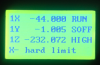
Доброй ночи..я что то наклацал..
Теперь не знаю что и куда!!
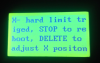
Ниже преложил фото…помогите!
Сообщение отредактировал Admin: 25 Июнь 2014 — 06:57
Перенесено!
-
0
- Наверх
#13
OFFLINE
008shadow
008shadow
- Пол:Мужчина
- Из:Almaty
Отправлено 25 Июнь 2014 — 01:00
На первом фото все же написано! Достигнут лимит по Х, если нажмете STOP -будет перезагрузка, DELETE -установить положение по Х.
На форуме есть мануал поищите. Надо же иногда смотреть что за настройки вы собираетесь изменить. Или вы все подряд жмете…
Сообщение отредактировал 008shadow: 25 Июнь 2014 — 01:02
-
0
- Наверх
#14
OFFLINE
Andrey KM
Andrey KM
- Пол:Мужчина
- Город:Красноуфимск
- Из:Свердловская обл.
Отправлено 07 Август 2014 — 12:01
Всем доброго времени суток! Присоединюсь к теме,есть проблемка.Станок при выполнении программы встает шпиндель работает, на пульте выскакивает :Cutting off the power to restart….. Переводил нифига не понял чего он хочет,выключаешь включаешь начинает с места остановки и через некоторое время опять.Гад!
-
0
- Наверх
#15
OFFLINE
тот еще наладчик
тот еще наладчик
- Из:екатеринбург
Отправлено 07 Август 2014 — 17:48
возможно питание пропадало
-
0
- Наверх
#16
OFFLINE
Andrey KM
Andrey KM
- Пол:Мужчина
- Город:Красноуфимск
- Из:Свердловская обл.
Отправлено 16 Август 2014 — 16:44
Всем доброго времени суток! Да вроде с питанием все в порядке,а проблема стала ешё хуже.Треть программы выполнит останавливается выскакивает надпись: Cutting off the power to restart…,включишь, выключишь начинает снова и тут же опять такая фигня невозможно работать.Я уже и кабель с пульта поменял.Помогите люди добрые кто чем может.
-
0
- Наверх
#17
OFFLINE
3D-BiG
3D-BiG
- Пол:Мужчина
- Город:Ареал обитания — вся страна, но обычно встречаюсь в Новосибирске…
- Интересы:Полежать на диване, пофлудить на форуме….
- Из:СССР
Отправлено 16 Август 2014 — 17:46
Перепрошить пульт не пробовали?
-
0
Лужу, паяю, станки ЧПУ починяю….
Еще частенько здесь болтаю: Телеграм сообщество ЧПУшников: t.me/cncunion
- Наверх
#18
OFFLINE
Andrey KM
Andrey KM
- Пол:Мужчина
- Город:Красноуфимск
- Из:Свердловская обл.
Отправлено 16 Август 2014 — 17:49
-
0
- Наверх
#19
OFFLINE
3D-BiG
3D-BiG
- Пол:Мужчина
- Город:Ареал обитания — вся страна, но обычно встречаюсь в Новосибирске…
- Интересы:Полежать на диване, пофлудить на форуме….
- Из:СССР
Отправлено 16 Август 2014 — 19:53
а для этого в него залазить НЕ надо — подключаете к компу через USB-кабель, запускаете программу для прошивок и шьете…Описвапл здесь это несколько раз и даже прошивки выкладывал…
-
0
Лужу, паяю, станки ЧПУ починяю….
Еще частенько здесь болтаю: Телеграм сообщество ЧПУшников: t.me/cncunion
- Наверх
#20
OFFLINE
Andrey KM
Andrey KM
- Пол:Мужчина
- Город:Красноуфимск
- Из:Свердловская обл.
Отправлено 17 Август 2014 — 16:32
Всем доброго времени суток! 3D-BIG а настройки станка не слетят при прошивке ?Я этого боюсь!
Да я еще заметил при включении появляется ошибка F218,и после того как станок постоит ночь включаешь работает долго ,а потом опять начинает кровь сворачивать как будто нагревается а за ночь остывает,хотя везде щупал не горячо.
-
0
- Наверх
#1
OFFLINE
Fearless
- Пол:Мужчина
- Город:Москва
- Из:Москва
Отправлено 23 Февраль 2012 — 17:38
При включении станка после выполнения команды go to home появляется надпись Z- hard limit triged, STOP to reboot, DELETE to abjust Z position. Нажимаем Delet и загружается обычное окно правдо внизу надпись Z- hard limit при этом кнопка меню не работает еще раз нажимаю Delet получаем Cutting off the power to restart ……
В меню удается заходить если при появлении надписи Go to home нажать delete
Контроллер RZNC-D5416 черный, такая байда скорей всего вышла в результате неправильной настройки FUNCTION CONFIGURE знающие люди пожалуйста подскажите как исправить …
И кстати всех с праздником! 
Похожие темы:
При включении пульт выдаёт сообщение Hard limit trigged
-
0
Запилим любую балясину
- Наверх
#2
OFFLINE
MiG
MiG
- Пол:Мужчина
- Из:Россия , Ковров
Отправлено 23 Февраль 2012 — 19:14
отключите «Hard limit sensors» в «FUNCTION CONFIGURE»
-
0
- Наверх
#3
OFFLINE
Fearless
Fearless
- Пол:Мужчина
- Город:Москва
- Из:Москва
Отправлено 23 Февраль 2012 — 22:33
MiG пасибо пульт настроил, но видимо что то упустил. В режиме ручного перемещения при нажатии допустим на x+ должно произойти перемещение на 1 шаг 0.5 мм, но вместо этого он улетает то на 2.5 иногда на 4.5 хотя в окне редактирования скоростей все как надо:
High spd, mm/min
X Axis: 3000.00
Y Axis: 3000.00
Z Axis: 1000.00
High grid 0.500
-
0
Запилим любую балясину
- Наверх
#4
OFFLINE
rafail-a
rafail-a
-
- Пользователи
-
- 7 сообщений
Абитуриент
- Из:Шарыпово
Отправлено 05 Март 2012 — 13:09
MiG пасибо пульт настроил, но видимо что то упустил. В режиме ручного перемещения при нажатии допустим на x+ должно произойти перемещение на 1 шаг 0.5 мм, но вместо этого он улетает то на 2.5 иногда на 4.5 хотя в окне редактирования скоростей все как надо:
High spd, mm/min
X Axis: 3000.00
Y Axis: 3000.00
Z Axis: 1000.00
High grid 0.500
Надо настроить частотник (управление двигателем) по каждой оси.
Я делал так:
Задавал перемещение допустим 100 мм, реально проходит 105 мм. По формуле К * 105/100= новый К
К это коэффициент для частотника , см. в настройках. И так по каждой оси.
-
0
- Наверх
#5
OFFLINE
3D-BiG
3D-BiG
- Пол:Мужчина
- Город:Ареал обитания — вся страна, но обычно встречаюсь в Новосибирске…
- Интересы:Полежать на диване, пофлудить на форуме….
- Из:СССР
Отправлено 05 Март 2012 — 13:31
Вернее всего не частотник, а драйвер шагового двигателя…
Сообщение отредактировал 3D-BiG: 05 Март 2012 — 13:31
-
0
Лужу, паяю, станки ЧПУ починяю….
Еще частенько здесь болтаю: Телеграм сообщество ЧПУшников: t.me/cncunion
- Наверх
#6
OFFLINE
MiG
MiG
- Пол:Мужчина
- Из:Россия , Ковров
Отправлено 05 Март 2012 — 13:39
rafail-a
импульсы тут не причем,точность перемещения как я понял Fearless нормально настроил…
у него в режиме»Continuous» при коротком нажатии кнопки перемещения должно
сдвинутся на определенный шаг(по умолчанию 0,5),а сдвигается произвольно…
как исправить не знаю,было такое на одном пульте — перепрошивки не помогли,оставили как есть(незначительное неудобство).
Сообщение отредактировал MiG: 05 Март 2012 — 13:40
-
0
- Наверх
#7
OFFLINE
Nihilisto
Nihilisto
-
- Пользователи
-
- 9 сообщений
Абитуриент
- Пол:Мужчина
- Из:Владимир
Отправлено 02 Март 2016 — 15:22
В режиме ручного перемещения при нажатии допустим на x+ должно произойти перемещение на 1 шаг 0.5 мм, но вместо этого он улетает то на 2.5 иногда на 4.5 хотя в окне редактирования скоростей все как надо:
Если для кого-то еще актуально решение:
Function Configure — It is in traditional manual mode? — NO (кнопка STOP CANCEL).
-
0
- Наверх
extrimus

- Регистрация
- 29.03.2019
- Сообщения
- 5 893
- Реакции
- 5 206
- Баллы
- 250
- Возраст
- 56
- Адрес
- Россия
- Город
- Иваново
- Имя
- Андрей
- Плата
- Woodpecker 3.2
- Прошивка
- GBRL 1.1f
- Рекомендованный
- #301
Когда запускаю LaserGRBL, делаю ресет. Далее нажимаю дом, ничего не происходит, программа пишет Hard Limits и просит ресет. Просто свободное перемещение каретки — то же самое.
Жесткие пределы и поиск дома в прошивке GRBL включены, мягкие нет.
В LaserGRBL как то не нашел полного отключения оси Z.
Пробовал концевики повесить на пины для оси Z, но все то же самое.
К этой гребенке еще подключен TTL лазера, может как то влияет.
Поверьте концевики. Они должны быть нормально-разомкнуты. У вас, похоже, наоборот.
Efenia

- Регистрация
- 24.08.2018
- Сообщения
- 6 801
- Реакции
- 5 873
- Баллы
- 205
- Возраст
- 52
- Город
- Долгопрудный
- Имя
- Владимир
- Плата
- MKS DLC GRBL
- #302
Поверьте концевики. Они должны быть нормально-разомкнуты. У вас, похоже, наоборот.
я не знаю, какое это имеет значение., грбл все равно замкнуты или разомкнуты, он срабатывает на изменение с 0 на 1 и наоборот, тоесть ему все равно, лишь бы изменений не было, иначе авария
extrimus
- Регистрация
- 29.03.2019
- Сообщения
- 5 893
- Реакции
- 5 206
- Баллы
- 250
- Возраст
- 56
- Адрес
- Россия
- Город
- Иваново
- Имя
- Андрей
- Плата
- Woodpecker 3.2
- Прошивка
- GBRL 1.1f
- #303
я не знаю, какое это имеет значение., грбл все равно замкнуты или разомкнуты, он срабатывает на изменение с 0 на 1 и наоборот, тоесть ему все равно, лишь бы изменений не было, иначе авария
Большое значение. Если концевики нормально-замкнуты, а параметр $5 =0, так и будет происходить, как описал Romario73, постоянный Hard Limits. Тут или менять $5 на единицу, или перепаивать концевики.
Efenia
- Регистрация
- 24.08.2018
- Сообщения
- 6 801
- Реакции
- 5 873
- Баллы
- 205
- Возраст
- 52
- Город
- Долгопрудный
- Имя
- Владимир
- Плата
- MKS DLC GRBL
- #304
Вот честно признаюсь, я на дятле, и так и так подсоединял, про $5 можно сказать что только сейчас от вас услышал, и работало все… А подключал и оптику, ( она нормально замкнута) и индуцкционные (то же нормально замкнутые) и обычный контактный (нормально разомкнутый) и никаких параметров не менял.
extrimus
- Регистрация
- 29.03.2019
- Сообщения
- 5 893
- Реакции
- 5 206
- Баллы
- 250
- Возраст
- 56
- Адрес
- Россия
- Город
- Иваново
- Имя
- Андрей
- Плата
- Woodpecker 3.2
- Прошивка
- GBRL 1.1f
- #305
Вот честно признаюсь, я на дятле, и так и так подсоединял, про $5 можно сказать что только сейчас от вас услышал, и работало все… А подключал и оптику, ( она нормально замкнута) и индуцкционные (то же нормально замкнутые) и обычный контактный (нормально разомкнутый) и никаких параметров не менял.
И у меня дятел. Оптику и индукционные не пробовал, а на контактных без $5 мой дятел артачится.
Romario73

- Регистрация
- 27.05.2019
- Сообщения
- 102
- Реакции
- 9
- Баллы
- 38
- Город
- Москва
- #306
Забавно, установил параметр $5 -1 и S21-1, ура, заработали концевики по оси X.
Когда подсоединяю по оси Y — все выключается, каретка не движется, программа GRBL выбрасывает постоянный hard limts, и все как раньше.
Хотя все 4 концевика одинаковые NO, запаяны идентично.
В чем причина?
tutochkin

- Регистрация
- 30.06.2019
- Сообщения
- 159
- Реакции
- 107
- Баллы
- 68
- Возраст
- 41
- Адрес
- Подмосковье
- Город
- Раменское
- Имя
- Илья
- Отчество
- Алексеевич
- Плата
- Woodpecker 3.3
- Прошивка
- grbl 1.1f
- #307
Прозванивал состояние концевика, или опираешься на буковки на корпусе?
extrimus
- Регистрация
- 29.03.2019
- Сообщения
- 5 893
- Реакции
- 5 206
- Баллы
- 250
- Возраст
- 56
- Адрес
- Россия
- Город
- Иваново
- Имя
- Андрей
- Плата
- Woodpecker 3.2
- Прошивка
- GBRL 1.1f
- #308
Забавно, установил параметр $5 -1 и S21-1, ура, заработали концевики по оси X.
Когда подсоединяю по оси Y — все выключается, каретка не движется, программа GRBL выбрасывает постоянный hard limts, и все как раньше.
Хотя все 4 концевика одинаковые NO, запаяны идентично.
В чем причина?
А так ли запаяны-то? Надо бы прозвонить их. Возможно какой-нибудь из них или брачный или залип. Если прозвон покажет что так, попробуйте рабочие концевики Х подключить на место Y, и наоборот.
Romario73
- Регистрация
- 27.05.2019
- Сообщения
- 102
- Реакции
- 9
- Баллы
- 38
- Город
- Москва
- #309
Дело не в концевиках, они одинаковые, нормально разомкнутые и 10 раз переставлял с оси на ось.
extrimus
- Регистрация
- 29.03.2019
- Сообщения
- 5 893
- Реакции
- 5 206
- Баллы
- 250
- Возраст
- 56
- Адрес
- Россия
- Город
- Иваново
- Имя
- Андрей
- Плата
- Woodpecker 3.2
- Прошивка
- GBRL 1.1f
- #310
Дело не в концевиках, они одинаковые, нормально разомкнутые и 10 раз переставлял с оси на ось.
Значит сама плата дурит. Проверьте, нет ли где соплей от пайки.
tutochkin
- Регистрация
- 30.06.2019
- Сообщения
- 159
- Реакции
- 107
- Баллы
- 68
- Возраст
- 41
- Адрес
- Подмосковье
- Город
- Раменское
- Имя
- Илья
- Отчество
- Алексеевич
- Плата
- Woodpecker 3.3
- Прошивка
- grbl 1.1f
- #311
Дело не в концевиках, они одинаковые, нормально разомкнутые и 10 раз переставлял с оси на ось.
Не верю(с)
Когда плата работает без подключенного провода (двух проводов) идущего к концевику это равносильно наличию присоединённого ИСПРАВНОГО РАЗОМКНУТОГО концевика и ИСПРАВНОГО НЕ ЗАКОРОЧЕННОГО кабеля.
Если плата работает без подключения кабеля(концевика) и не работает с подключенным — ищите траблу в концевике и проводе.
Romario73
- Регистрация
- 27.05.2019
- Сообщения
- 102
- Реакции
- 9
- Баллы
- 38
- Город
- Москва
- #312
Концевики и плата в порядке, дело скорее всего в каких то настройках только в каких, либо в прошиве, она самая последняя.
Концевик деталь простейшая — три контакта и подвижный замыкающий, особых там каких то секретов нет.
Попробую единственно другой кабель перепаять
extrimus
- Регистрация
- 29.03.2019
- Сообщения
- 5 893
- Реакции
- 5 206
- Баллы
- 250
- Возраст
- 56
- Адрес
- Россия
- Город
- Иваново
- Имя
- Андрей
- Плата
- Woodpecker 3.2
- Прошивка
- GBRL 1.1f
- #313
Концевики и плата в порядке, дело скорее всего в каких то настройках только в каких, либо в прошиве, она самая последняя.
Концевик деталь простейшая — три контакта и подвижный замыкающий, особых там каких то секретов нет.
Попробую единственно другой кабель перепаять
Нет, ни в настройках. Заработали же концевики по оси X. А настройки либо включают, либо выключают СРАЗУ ВСЕ концевики.
Romario73
- Регистрация
- 27.05.2019
- Сообщения
- 102
- Реакции
- 9
- Баллы
- 38
- Город
- Москва
- #314
Провожу опыты. Спаял два абсолютно новых кабеля с концевиками для оси Y. Нормально разомкнутые. Прозвонил эту сложнейшую конструкцию тестером. Работает В GRBL включены только Hard Limits.
И вот что заметил когда плата драйвер с ардуино просто подключена по ЮСБ, все концевики работают нормально.
Включаю в нее блок питания — срабатывают концевики ось Y.
Выключаю, нажимаю, опять работают все концевики.
Что это может быть?
extrimus
- Регистрация
- 29.03.2019
- Сообщения
- 5 893
- Реакции
- 5 206
- Баллы
- 250
- Возраст
- 56
- Адрес
- Россия
- Город
- Иваново
- Имя
- Андрей
- Плата
- Woodpecker 3.2
- Прошивка
- GBRL 1.1f
- #315
Провожу опыты. Спаял два абсолютно новых кабеля с концевиками для оси Y. Нормально разомкнутые. Прозвонил эту сложнейшую конструкцию тестером. Работает
В GRBL включены только Hard Limits.
И вот что заметил когда плата драйвер с ардуино просто подключена по ЮСБ, все концевики работают нормально.
Включаю в нее блок питания — срабатывают концевики ось Y.
Выключаю, нажимаю, опять работают все концевики.
Что это может быть?
Что-то странное и непонятное у вас творится. Каким образом вы выяснили, что всё работает нормально без подключения БП? И как именно срабатывают концевики оси Y? Сами по себе?

Welcome to Our Community
Some features disabled for guests. Register Today.
-

Builder
- Joined:
- Oct 9, 2018
- Messages:
- 16
- Likes Received:
- 13
Hi, I am having a similar issue with Error 9 triggered by «Alarm 1 hard limit triggered». I disabled hard limits in my GRBL settings and rebooted and it worked flawlessly for a short cut test. So, I am assuming this means I have an issue with my limit switches? I read the gnea/grbl as recommended but a lot is over my head. Also updated the FDTI drivers on my macbook just to be safe. I read the «debugging limit switch» thread, but I am unsure if my limit switches, EMI, USB or what the issue is. Homing still works fine and machine ran through a simple file when I disabled hard limits. What can I deduce from this, as far as narrowing down the problem? Sorry if this is the wrong thread for this.
-

Staff Member
Moderator
Builder
Resident Builder- Joined:
- Mar 1, 2017
- Messages:
- 10,931
- Likes Received:
- 3,474
-

Builder
- Joined:
- Aug 3, 2020
- Messages:
- 27
- Likes Received:
- 10
I am new to CNC and bought a LEAD 1515 and have not been able to complete the «Hello World» Air-Cut shown in the startup video due to errors. Following the steps in the video using the CAM software (default 1515 settings) then sending it Control software, Homing, then starting the air-cut. The errors I get are as followed:
[ ALARM ] ALARM: 1 — Hard limit triggered. Machine position is likely lost due to sudden and immediate halt. Re-homing is highly recommended. [ G1 F1000 X98.8992 Y114.6215 Z-1.0000 S1000 ]
[ ] ALARM: 1 — Hard limit triggered. Machine position is likely lost due to sudden and immediate halt. Re-homing is highly recommended. [ G1 F1000 X98.8992 Y114.6215 Z-1.0000 S1000 ]
[ ] error: 9 — G-code locked out during alarm or jog state [ G1 F1000 X98.5002 Y116.2066 Z-1.0000 S1000 ]<hr>This error may just be a symptom of an earlier event:<br> ALARM: 1 — Hard limit triggered. Machine position is likely lost due to sudden and immediate halt. Re-homing is highly recommended.
[ ERROR ] error: 9 — G-code locked out during alarm or jog state [ G1 F1000 X98.5002 Y116.2066 Z-1.0000 S1000 ]
This error may just be a symptom of an earlier event:
ALARM: 1 — Hard limit triggered. Machine position is likely lost due to sudden and immediate halt. Re-homing is highly recommended.[ G1 F1000 X98.5002 Y116.2066 Z-1.0000 S1000 ] error:9
[ ] error: 9 — G-code locked out during alarm or jog state [ G1 F1000 X97.8621 Y117.5245 Z-1.0000 S1000 ]<hr>This error may just be a symptom of an earlier event:<br> ALARM: 1 — Hard limit triggered. Machine position is likely lost due to sudden and immediate halt. Re-homing is highly recommended.
[ ERROR ] error: 9 — G-code locked out during alarm or jog state [ G1 F1000 X97.8621 Y117.5245 Z-1.0000 S1000 ]
[ ERROR ] error: 9 — G-code locked out during alarm or jog state [ G1 F1000 X97.8621 Y117.5245 Z-1.0000 S1000 ]
This error may just be a symptom of an earlier event:
ALARM: 1 — Hard limit triggered. Machine position is likely lost due to sudden and immediate halt. Re-homing is highly recommended.
[11:04:02] [ G1 F1000 X97.8621 Y117.5245 Z-1.0000 S1000 ] error:9[ ] error: 9 — G-code locked out during alarm or jog state [ G1 F1000 X96.9863 Y118.6172 Z-1.0000 S1000 ]<hr>This error may just be a symptom of an earlier event:<br> ALARM: 1 — Hard limit triggered. Machine position is likely lost due to sudden and immediate halt. Re-homing is highly recommended.
[ ERROR ] error: 9 — G-code locked out during alarm or jog state [ G1 F1000 X96.9863 Y118.6172 Z-1.0000 S1000 ]
This error may just be a symptom of an earlier event:
ALARM: 1 — Hard limit triggered. Machine position is likely lost due to sudden and immediate halt. Re-homing is highly recommended.[ G1 F1000 X96.9863 Y118.6172 Z-1.0000 S1000 ] error:9
I am having a hard time believing that I just bought a $3000.00 CNC machine that does not work out of the box without having to replace wiring with shielded wires, ferrite cores or magically suspending wires in mid-air away from other stepper motor wiring. right?
-
Staff Member
Moderator
Builder
Resident Builder- Joined:
- Mar 1, 2017
- Messages:
- 10,931
- Likes Received:
- 3,474
Check:
a) is the machine hitting a limit switch (ie forgot to zero, axis reversed and going wrong way, etc) or
b) it is actually a false alarm (nothing near the switches) — then see docs:blackbox:faq-emi [OpenBuilds Documentation] -
Builder
- Joined:
- Aug 3, 2020
- Messages:
- 27
- Likes Received:
- 10
Peter,
It does home to all 3 limit switches, touch them and back away and then touch again. Then move away. After that it is trying to start the «Hello World» and then triggers the Z limit switch and keeps it depressed while all of the error messages stated above fly by one after the other. -
Staff Member
Moderator
Builder
Resident Builder- Joined:
- Mar 1, 2017
- Messages:
- 10,931
- Likes Received:
- 3,474
Sounds like you forgot to jog toward to the stock, and set zero
Rewatch the Hello World tutorial: docs:blackbox:hello-world [OpenBuilds Documentation] — notice between homing, and running, you first have to tell the machine where the Stock is located (set the origin, set zero)
-
Builder
- Joined:
- Aug 3, 2020
- Messages:
- 27
- Likes Received:
- 10
So, I did a reboot on the CNC Workstation, reset the BB, reset Software, tightened the ball screws again, tested all directions to make sure none were reversed, verified all wires we plugged in and not near other motor wires, verified all limit switches were working via finger touch, jog out to 4″, zero’d, positioned and secured test material…and poof! Perfection. Almost!
 Thanks for all your help! The Probe seems to be a little off or maybe its the start point on the material because some of the lettering was cut off. Software also said my $15 junk bits were 3.20 and not 3.175 in dia. Well still a work in progress.
Attached Files:
-

Staff Member
Moderator
Builder
Resident Builder- Joined:
- Mar 23, 2018
- Messages:
- 1,891
- Likes Received:
- 1,302
Mine is. I know others are as well. In the probe wizard screen, click on probe type and change to custom. Then click on the gear icon to adjust your offset. Mine is off by .4mm.
In doing this, you wont be able to run the automatic probe, but you can still run all the other ones.
-

Staff Member
Moderator
Builder
Resident Builder- Joined:
- Jan 24, 2015
- Messages:
- 2,597
- Likes Received:
- 1,451
I am impressed. You got extra endmill added to your endmill! I have yet to get a cheap 1/8″ endmill to hit the 3.175mm mark. The closest so far has been 3.17mm. That is why I measure each one with a caliper to ensure I get accurate cuts. In defense of the cheap endmills, I have some expensive ones that were not accurate either. I have found that the $32 per endmill mark is where I have started seeing them hit the claimed specs. I only have a couple of these.
-

Builder
- Joined:
- Dec 15, 2013
- Messages:
- 1,441
- Likes Received:
- 720
It’s pretty normal for end mills not to hit exact spec; they’re really just stating the size of the bar stock they’re starting with, once it’s ground to shape and finish it’s unlikely to be exact. Most machines have wear comp offsets that can be adjusted at the control so it’s irrelevant anyway. Of course grbl doesn’t, which makes life more difficult.
WOPR73 and Giarc like this.
-
Builder
- Joined:
- Aug 3, 2020
- Messages:
- 27
- Likes Received:
- 10
*sigh* ALARM: 1 and error:9. again! yeah. yeah. docs:blackbox:faq-emi [OpenBuilds Documentation] sure would be nice if it worked as intended out of the box. Seems like every time I try to work on this its on again and off again.Now I guess I need to order filters of some sort…. or new shield wires to replace the wires supplied. It seems that you can not have any limit switch wires running parallel to the Nema 23 HT motors or you have a random chance that it will trigger a ALARM 1 and then a error: 9 at random mid project. It would be nice to get past these error so I can complete tramming my machine. Someday…
-
Staff Member
Moderator
Builder
Resident Builder- Joined:
- Mar 1, 2017
- Messages:
- 10,931
- Likes Received:
- 3,474
Seperate low voltage signal wires like Limit switch wiring, from high current wires like Motors and Spindle.
-
Builder
- Joined:
- Aug 3, 2020
- Messages:
- 27
- Likes Received:
- 10
Yep, thats what I had kinda going on. But, it was a temporary setup to make sure I could get the machine setup. During replacing the cast 90 deg corners with milled corners. I ended up moving some wires just a few inches which was enough to trigger the errors. I know that I must keep the router power cord and nema 23 HT motors away from the end stops wiring. Which cases issues for using the wire management system. Not sure shielded wires will be enough to resolve the emi issue so I can use the management system again. Someday I’ll get it working.

Share This Page
This topic has been deleted. Only users with topic management privileges can see it.
-
Hi All,
I’m running the Duet 3 on a CNC machine, and I’m finding that the duet obeys the limit switches while homing (via the G1 H2 command), but it ignores the limit switches during normal operation. How do I make it obey limit switches by default? I keep smashing limit switches, and it’s doing my head in.
-
Limit switches are only active during homing moves (G1 H1). Otherwise the firmware will enforce the travel limits set by M208. The switches can be reconfigured as E stops after homing so that triggering them will halt the machine. So if you are hitting the ends of travel in normal operation you might need to adjust the M208 limits to match the physical limits.
-
Ok… that’s a good point, and its linked to another problem I haven’t yet solved. — That of using multiple work coordinate systems (G54, G55 etc).
I have changed my working envelope to be -80 to +80 in the Z axis so that when I set the top of my work piece as Z=0 I can still move up and down. If I set them as 0 to +80, then I couldn’t move down.
For now, I’m setting my home at the front left corner, top of the job as zero using G92 X0 Y0 Z0. With the previous control board, I would have used G10 L2 P2 X0 Y0 Z0. With the Duet I can’t see any evidence that the G54, G55 etc work offsets have any effect.
I’m going to try using the Ooznest web control, and see if that helps with this problem…
Any other suggestions are welcomed.
-
According to your description for home limit locations, mine is setup very similar (X min, Y min, Z max — stall detected). Z is also allowed to go below 0.
When I set the origin of the stock, I have a macro that simply runs
G10 L20 P2 X0 Y0. I run this when I am happy with the current XY as being on top where the cutting should be, and it will show as XY 0 after running (also a good idea to set G54 so that you switch to the first work offset — mine is set in my config, so I am always in it).Right after the probe, to determine the top of the stock, I run
G10 L20 P1 Z24.25— The Z24.25 is my measured height of the probe block.The idea of the Work coordinates is that while the machine knows exactly where the spindle is, it can run relative commands related to an origin. As long as the stock does not cross to the outside of the limit switches, it should work as expected.
-
Hi Jacotheron,
I think you’ve highlighted my problem without realising it… I was using G10 L2 instead of G10 L20… I was working off memory which clearly isn’t as reliable as I would like.
I’ll try that and report back.
Regards
-
Hi All,
I’m back on this problem after smashing another 2 Z limit switches on the weekend, while hooking up a tool height probe.
Is there a way to hook up the limit switch — either to the switch pins or to other IO pins whereby I can prevent further travel in that direction of that axis only, without interfering with the program running (i.e. I don’t want to hook it up to an E-stop).
There’s no good reason why the machine should crash and for CNC machines there’s no reliable way to define the working envelope without using end stops.
What are other people doing? I can’t be the only person with this problem…Cheers
-
@Gerrard said in Obey hard limit switches?:
Is there a way to hook up the limit switch — either to the switch pins or to other IO pins whereby I can prevent further travel in that direction of that axis only, without interfering with the program running (i.e. I don’t want to hook it up to an E-stop).
Hi,
I’m not sure why you don’t want to use an e-stop input. Can you explain?
And when you mention interfering with the program running what do you mean? How can you stop movement without interfering in some way?
Thanks.
Frederick
-
@fcwilt
I don’t wan’t to E-stop on a travel limit for a few reasons — Keeping in mind this is a CNC application:
-
Z up travel limit can easily be trivial — i.e. user has defined a tool lift of 20mm between moves, which works fine on some jobs, but others (different Z=0 height) it might be too much — and I would need to adjust my programming to compensate — whereas if the Z limit switch just stopped FURTHER travel it would continue the program without error. Soft limits (work boundary) already has this effect.
-
E-stop causes the home (G10) position to be lost.
What I expect is either:
- Replicate the effect of the soft limits — i.e. continue with program, no further movement in that axis until coordinates come back within limits. (This also has negative effects, but it’s a lesser impact).
- Pause program completely (stop in place — do not use pause.g) wait for operator input
Ignoring the endstop (current practice) is the worst possible action.
-
-
Hi,
Thanks for the feedback. I think I understand.
A couple of thoughts.
-
End stop inputs don’t do anything special unless they are configured to do so.
-
Inputs can be configured to run specific chunks of code called triggers. Have you investigated them?
Frederick
-
-
@fcwilt
Thanks for the reply.
- How can I configure end stops to do what I want? What are my options for configuring?
- I haven’t looked into triggers, but I will.
-
@Gerrard
Regards triggers: You use M581 to configures triggers.
Frederick
-
https://duet3d.dozuki.com/Wiki/Gcode#Section_M581_Configure_external_trigger
Because RRF is configured on the fly you can define a piece of hardware at the time of usage. So in your homing files you can define the endstops as endstops, and then your G1 H1 moves will trigger the endstop and set the axis position limits. Then you can configure the endstops as triggers at the start of the job. The trigger could be an e stop, or it could execute whatever gcode you want to put in the trigger file. You could pause the job, for instance.
-
OK, thanks for that, I think we’re getting somewhere… If I’m reading this right, there are 32 available triggers on the Duet3, the event that occurs is defined in a gcode file — triggerX.g (X for trigger number) and it’s called by the T parameter of M581.
So that takes care of the triggers during jobs, but what about other Macros or manual movement (jogging etc)? Is there an overriding default behaviour? Should it be defined as a trigger in config.g, then configured as an endstop for the homing operations and a trigger again after homing?
-
@Gerrard said in Obey hard limit switches?:
So that takes care of the triggers during jobs, but what about other Macros or manual movement (jogging etc)? Is there an overriding default behaviour? Should it be defined as a trigger in config.g, then configured as an endstop for the homing operations and a trigger again after homing?
Since it’s configure on the fly, the last configuration will stand, so it’s probably best to have the endstops defined in config.g as you normally would. Then in your homing files define them again as endstops for homing, since you don’t know exactly what state might be in place before homing. Then if you want it defined as triggers before a job, you can use the macro file start.g which gets run before a job starts.
-
personnally here is what i do and i use G54 and G55
I have an end stop to the max Z height, i use it to home Z
i also have a simple probe
i use it with G31 so when the prob is done i have the z position of the tip of my endmill from the spoil board.after that what i do is a G0 Z67 F400 H3 (z67 is my maximum z height)
so the z carriage will go up trigger the zstop and replace the actual z value as z limitand about the G54 G55, what i do is i always configure my origine point as teh bottom left down point of either my stock or my object in fusion 360
then on my cnc i go in X and Y to what i want to be the 0,0 position (d’ont care about the Z as i allways know my hieght from the spoil board) then i do
G10 L20 P2 X0 Y0
G54
go to my tool change position perform the tool change it’s a manual one) then do the z probe as explained earlier
do a G55 and go to 0,0
and start the milling operationsthe only thing i have to do is to reset the z limit height at 67 at the end and do a zhome and a G54.
-
i knwo there is a lot oof redundancy with G54 G55 then G54 without doing anything but my code is generated by a post processor.
G90 G21 M84 S0 M451 ;Switching to G54 workspace G54 M291 P"using current X and Y coordinates as X0 and Y0 for G55 workspace" R"XY origins" S3 X1 Y1 Z1 G54 ;Saving machine coordinates to slot 0, use G0 R0 X0 Y0 to return G60 S0 ;using current X and Y coordinates as X0 and Y0 for G55 workspace G10 L20 P2 X0 Y0 ;Switching to G55 workspace G55 G54 G28 Z10 G0 Z67 F400 G0 X550 Y30 F10000 M291 P"Tool 24 D=2 CR=0 " R"Tool change" S3 X1 Y1 Z1 ; COMMAND_TOOL_MEASURE M291 P"Attach ZProbe" R"Probe" S3 ;Switching to G54 workspace G54 ;Z probe at current position G30 ;Switching to G55 workspace G55 G0 Z67 F400 H3 M400 M291 P"Detach ZProbe" R"Probe" S3 ;Returning to S0 position G0 R0 X0 Y0 F10000 M114 ;Switching to G55 workspace ; *** START end *** -
@Phaedrux
For the life of me I can’t understand why end-stops would be ignored EVER.On a 3D printer reaching an endstop simply means that maybe some steps were skipped and you get a bad print. Not a big problem. On a CNC subtractive machine when you reach an endstop things break. Heaven forbid that you have a carbide tool running an 24000 RPM and it goes past an endstop. When that happens stuff goes flying at projectile speeds. Someone is going to get seriously hurt.
Honestly, telling a customer that they need to write their own macros to make end-stops function the way that every other CNC motion controller works already is not right. I think you should REALLY think about limiting your liability and include the capability to use hardware end-stops ALL THE TIME. As your product is applied more and more in the CNC realm your solution needs to keep up.
-
@maxspongebob I made a small tweak to the firmware to add a support for my own M113 command — I tested it and using a trigger option when an endstop is triggered, the command runs and the duet stops immediately and reboots — exactly how mach3 handles this condition. Yes I don’t understand why there is no such similar behavior in duet by default, and I totally don’t understand why have have hard limit switches if the machine is allowed to blow past them, CNC or 3D printer, but my solution is 4 lines of code in the firmware and a few lines in gcode scripts.
To be honest — I thought this was baked in by default. I was sorta confused when I started doing my mill cnc conversion using duet 3 to find that there is no way to even do it. There is actually no way. If you setup a eStop trigger you have to reset or powercycle the board, no good. My custom M113 does exactly what eStop button in the webui / panel due does— stop the world (immediately) and reboot. Works perfectly -
@maxspongebob I’m not saying this is how it should be, I’m simply explaining how it is currently. Having the option to obey endstops at all times when in CNC mode may be possible and is a valid firmware request. I’ll raise that.
You can also make a thread in the firmware wishlist forum explaining how and why you think it should work if you want.
-
@Gerrard said in Obey hard limit switches?:
So that takes care of the triggers during jobs, but what about other Macros or manual movement (jogging etc)? Is there an overriding default behaviour? Should it be defined as a trigger in config.g, then configured as an endstop for the homing operations and a trigger again after homing?
You can configure a trigger to be active only when running a job from SD card.
-
@kazolar said in Obey hard limit switches?:
There is actually no way. If you setup a eStop trigger you have to reset or powercycle the board, no good. My custom M113 does exactly what eStop button in the webui / panel due does— stop the world (immediately) and reboot.
Would it be better if emergency stop (M112) rebooted the board automatically?
The disadvantage i can see with doing that is that if the board is being fed GCodes via USB or from an attached SBC, it may start executing commands again immediately. I think that’s why M122 was defined originally to require a manual reset. Similar how a proper Emergency Stop switch has be reset before you can run the machine again.
-
In my travels I have come across M564. Would a M564 H1 S1 at the start of my print, or just after the first layer keep the motion within the end-stops?
-
No, but if you set your maximum travel range the firmware will stay within that regardless of end stops. So if your motion system is dimensioned to not skip steps you’ll be fine.
Otherwise add the macro to pause or e-stop if end stops are tripped.
-
@dc42 In answer you your question, I believe that a E-Stop signal should just stop all motion. It should not reboot the board as that would clear any of the events or activity that caused the problem and hamper investigation of the cause. On a CNC machine the E-Stop should also turn off the power to the servo’s and spindle. That is unless they are equipped with a braking mechanism and in that case the brake should be applied first then power off.
The point is SAFETY. E-Stop is what you press if a problem exists that is going to cause damage to you or the machine. The stop or feed hold button is what you press if you think there may be a problem.