Languages:
English •
Creating an Error 404 Page 日本語
(Add your language)
While you work hard to make sure that every link actually goes to a specific web page on your site, there is always a chance that a link clicked will slam dunk and become a famous 404 ERROR PAGE NOT FOUND.
All is not lost. If your visitors encounter an error, why not be a helpful WordPress site administrator and present them with a message more useful than «NOT FOUND».
This lesson will teach you how to edit your «error» and «page not found» messages so they are more helpful to your visitors. We’ll also show how to ensure your web server displays your helpful custom messages. Finally, we’ll go over how to create a custom error page consistent with your Theme’s style.
Contents
- 1 An Ounce of Prevention
- 2 Understanding Web Error Handling
- 3 Editing an Error 404 Page
- 4 Creating an Error 404 Page
- 5 Tips for Error Pages
- 5.1 Writing Friendly Messages
- 5.2 Add Useful Links
- 6 Testing 404 Error Messages
- 7 Help Your Server Find the 404 Page
- 8 Questions About Error Files
An Ounce of Prevention
Some errors are avoidable, you should regularly check and double check all your links. Also, if you are deleting a popular but out-of-date post, consider deleting the body of the post, and replacing it with a link referring visitors to the new page.
Understanding Web Error Handling
Visitors encounter errors at even the best websites. As site administrator, you may delete out-of-date posts, but another website may have a link to your inside page for that post.
When a user clicks on a link to a missing page, the web server will send the user an error message such as 404 Not Found. Unless your webmaster has already written custom error messages, the standard message will be in plain text and that leaves the users feeling a bit lost.
Most users are quite capable of hitting the back key, but then you’ve lost a visitor who may not care to waste their time hunting for the information. So as not to lose that visitor, at the very least, you’ll want your custom message to provide a link to your home page.
The friendly way to handle errors is to acknowledge the error and help them find their way. This involves creating a custom Error Page or editing the one that came with your WordPress Theme.
Editing an Error 404 Page
Every theme that is shipped with WordPress has a 404.php file, but not all Themes have their own custom 404 error template file. If they do, it will be named 404.php. WordPress will automatically use that page if a Page Not Found error occurs.
The normal 404.php page shipped with your Theme will work, but does it say what you want it to say, and does it offer the kind of help you want it to offer? If the answer is no, you will want to customize the message in the template file.
To edit your Theme’s 404 error template file, open it in your favorite text editor and edit the message text to say what you want it to say. Then save your changes and upload it to the theme directory of your WordPress install.
While you are examining and editing your 404 template file, take a look at the simple structure of the 404.php file that is shipped with Twenty Thirteen. It basically features tags that display the header, sidebar, and footer, and also an area for your message:
<?php
/**
 * The template for displaying 404 pages (Not Found)
 *
 * @package WordPress
 * @subpackage Twenty_Thirteen
 * @since Twenty Thirteen 1.0
 */

get_header(); ?>

	<div id="primary" class="content-area">
		<div id="content" class="site-content" role="main">

			<header class="page-header">
				<h1 class="page-title"><?php _e( 'Not Found', 'twentythirteen' ); ?></h1>
			</header>

			<div class="page-wrapper">
				<div class="page-content">
					<h2><?php _e( 'This is somewhat embarrassing, isn’t it?', 'twentythirteen' ); ?></h2>
					<p><?php _e( 'It looks like nothing was found at this location. Maybe try a search?', 'twentythirteen' ); ?></p>

					<?php get_search_form(); ?>
				</div><!-- .page-content -->
			</div><!-- .page-wrapper -->

		</div><!-- #content -->
	</div><!-- #primary -->

<?php get_footer(); ?>
So, to change the error message your visitor sees, revise the text within the h1 heading and within the page-content class; if necessary, add more paragraphs below that.
Creating an Error 404 Page
If your WordPress Theme does not include a template file named 404.php, you can create your own.
Because every theme is different, there is no guarantee that copying over the 404.php template file found in the Twenty Thirteen Theme will work, but it’s a good place to start. The error page you copy from the Twenty Thirteen Theme will adopt the style of the current theme because it actually calls the header and footer of the current theme. That’s less work for you, and you may only have to edit the message to suit your particular needs.
To use the 404.php template file from the WordPress Twenty Thirteen Theme:
- Copy the file /wp-content/themes/twentythirteen/404.php into the directory of your current theme.
- Then, as described in the previous section, edit the error message to present your desired error message.
If copying the default 404.php into your theme directory does not work well with your theme, you can also:
- Change the Default Theme’s 404.php template file’s header, sidebar, footer, and other codes to match the rest of the Theme’s layout.
Or
- Copy the index.php file of your current theme to a file called 404.php.
- Open that file and delete all sections dealing with posts or comments, see The Loop.
- Then, edit your 404 error message.
Tips for Error Pages
There are various improvements you can make to your 404 Error web pages so let’s look at some of your options.
Writing Friendly Messages
When an error message is displayed, you can say many things to help a visitor feel reassured they’ve only encountered a minor glitch, and you’re doing the best you can to help them find the information they want. You can say something clever like:
"Oops, I screwed up and you discovered my fatal flaw.
Well, we're not all perfect, but we try.  Can you try this
again or maybe visit our <a
title="Our Site" href="http://example.com/index.php">Home
Page</a> to start fresh.  We'll do better next time."
You should also attempt to show the user what they want. Check out the AskApache Google 404 Plugin to add google search results to your 404.php
Or, say something shorter and sweeter. Almost anything you say is better than 404 Error Page Not Found. You can find more information about writing 404 Error pages on the Internet, like List Apart’s Perfect 404.
As an implementation of the Perfect 404 page, this solution will tell the user it’s not their fault and email the site admin.
Helpful 404 page
When a visitor gets a 404 error page, it can be intimidating, and unhelpful. Using WordPress, you can take the edge off a 404 and make it helpful to users, and yourself, too, by emailing whenever the user clicks a link to a non-existent page.
<p>You
<?php
#some variables for the script to use
#if you have some reason to change these, do.  but wordpress can handle it
$adminemail = get_option('admin_email'); #the administrator email address, according to wordpress
$website = get_bloginfo('url'); #gets your blog's url from wordpress
$websitename = get_bloginfo('name'); #sets the blog's name, according to wordpress

  if (!isset($_SERVER['HTTP_REFERER'])) {
    #politely blames the user for all the problems they caused
        echo "tried going to "; #starts assembling an output paragraph
	$casemessage = "All is not lost!";
  } elseif (isset($_SERVER['HTTP_REFERER'])) {
    #this will help the user find what they want, and email me of a bad link
	echo "clicked a link to"; #now the message says You clicked a link to...
        #setup a message to be sent to me
	$failuremess = "A user tried to go to $website"
        .$_SERVER['REQUEST_URI']." and received a 404 (page not found) error. ";
	$failuremess .= "It wasn't their fault, so try fixing it.
        They came from ".$_SERVER['HTTP_REFERER'];
	mail($adminemail, "Bad Link To ".$_SERVER['REQUEST_URI'],
        $failuremess, "From: $websitename <noreply@$website>"); #email you about problem
	$casemessage = "An administrator has been emailed
        about this problem, too.";#set a friendly message
  }
  echo " ".$website.$_SERVER['REQUEST_URI']; ?>
and it doesn't exist. <?php echo $casemessage; ?>  You can click back
and try again or search for what you're looking for:
  <?php include(TEMPLATEPATH . "/searchform.php"); ?>
</p>
Add Useful Links
If you encounter a «page not found» situation on the WordPress site, it is filled with helpful links to direct you to the various categories and areas of information within the WordPress site. Check it out at http://wordpress.org/brokenlink.php.
To add similar useful links to your 404 page, create a list, or a paragraph, so the visitor can easily determine which section might be useful to visit. Information of that nature is much better than having the user just reach a dead-end. To help you understand how to link to documents within your site, especially to Pages and Categories, see Linking_Posts_Pages_and_Categories.
Testing 404 Error Messages
To test your custom 404 page and message, just type a URL address into your browser for your website that doesn’t exist. Make one up or use something like:
http://example.com/fred.php
This is sure to result in an error unless you actually have a php file called fred. If your error page doesn’t look «right», you can go back and edit it so it works correctly and matches your Theme’s look and feel.
Help Your Server Find the 404 Page
By default, if WordPress cannot find a particular page it will look for the 404.php web page. However, there may be cases where the web server encounters a problem before WordPress is aware of it. In that case, you can still guarantee that your web server sends the visitor to your 404.php template file by configuring your web server for custom 404 error handling.
To tell your web server to use your custom error files, you’ll need to edit the .htaccess file in the main directory (where main index.php file resides) of your WordPress installation. If you don’t have an .htaccess file, see Editing Rewrite Rules (.htaccess) on how to create an .htaccess file.
To ensure the server finds your 404 page, add the following line to your .htaccess file:
ErrorDocument 404 /index.php?error=404
The url /index.php is root-relative, which means that the forward slash begins with the root folder of your site. If WordPress is in a subfolder or subdirectory of your site’s root folder named ‘wordpress’, the line you add to your .htaccess file might be:
ErrorDocument 404 /wordpress/index.php?error=404
Questions About Error Files
- Why not just hard code the path all the way to the 404.php file?
- By allowing index.php to call the error file, you ensure that the 404.php file used will change automatically as you change your theme.
- What happens if I switch to a theme that does not have a 404.php file?
- Visitors clicking on a broken link will just see a copy of the home page of your WordPress site (index.php), but the URL they see will be the URL of the broken link. That can confuse them, especially since there is no acknowledgement of the error. But this is still better than a getting a «NOT FOUND» message without any links or information that could help them find what they seek.

Рассмотрим, как настроить шаблон ошибки 404 в WordPress, чтобы создать полезную страницу, которая поможет пользователям сориентироваться на вашем сайте и улучшить поведенческие факторы.
Что такое ошибка 404 и почему важно правильно настроить страницу?
Ошибка 404 возникает, когда посетитель пытается получить доступ к странице, которая не существует. Многие склонны игнорировать эту страницу при использовании шаблонов WordPress и не задумываются о ее существовании. Тем не менее, если вы потратите время на создание удобной страницы 404, это поможет задержать пользователя на вашем сайте.
Интернет-адрес, ведущий на страницу с ошибкой 404, может оказаться просто неправильно набранным URL либо возникнуть со временем, если вы удалили проиндексированную страницу и забыли об этом. При выдаче кода 404 WordPress настроен на автоматический поиск файла 404.php. Базовый шаблон с этой ошибкой включен в некоторые темы WordPress. Если же этого файла нет, то будет показано системное сообщение, которое не несет полезной для пользователя информации.
Как создать страницу 404 ошибки, если ее нет в шаблоне — настройка
Не все темы WordPress имеют собственный файл шаблона ошибки 404. Если разработчик темы предусмотрел это, такой файл будет называться 404.php. WordPress автоматически использует эту страницу, когда возникает ошибка 404. Если в вашей теме нет этого файла, его можно создать самостоятельно.
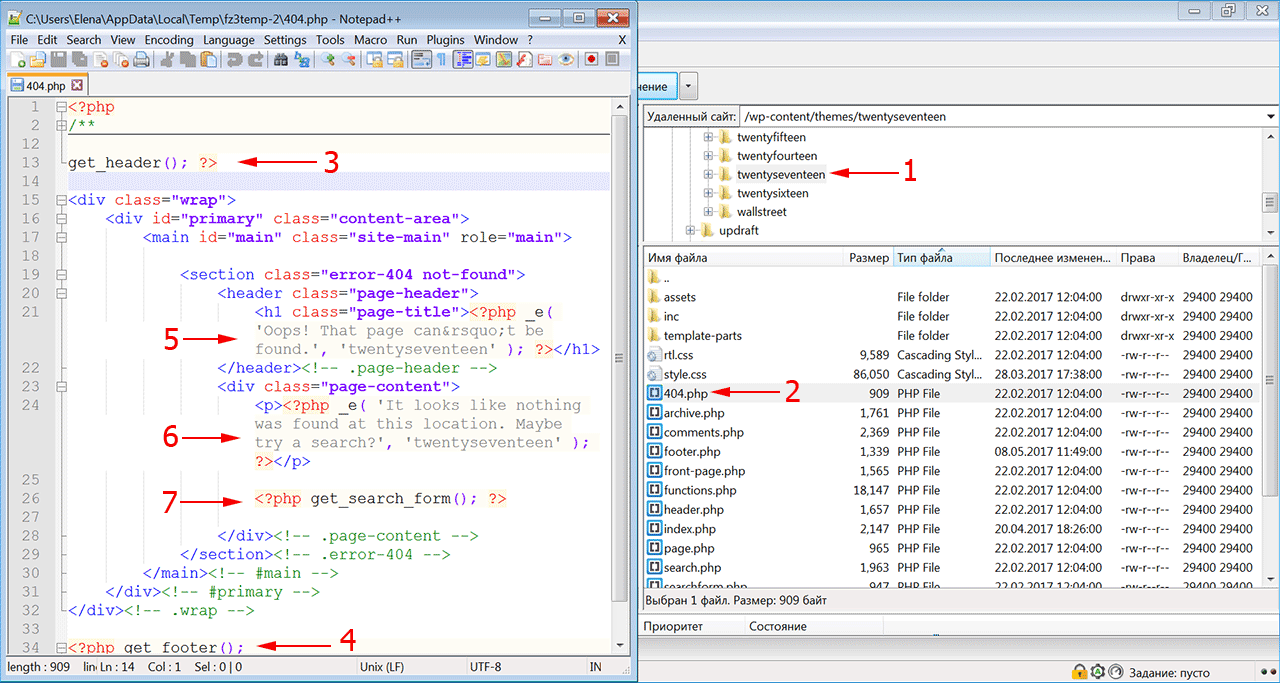
- Первое, что нужно сделать, это сформировать настраиваемый шаблон, например, редактируя файл 404.php, скопированный из другой темы. Если вы редактируете свою тему напрямую, настоятельно рекомендуется сделать резервную копию темы WordPress.
- Файл ошибки 404 расположен по адресу: /wp-content/themes/имя-темы/404.php
- Страница ошибки примет стиль активной темы, поскольку она вызывает шапку
- И подвал текущей темы.
- Понадобится только отредактировать заголовок и сообщение на странице в соответствии с вашими конкретными потребностями.
- Для этого откройте файл шаблона ошибки 404 в редакторе кода и измените текст сообщения на свое усмотрение.
- Добавьте в шаблон строку поиска, если ее там нет. Затем сохраните файл и загрузите его в каталог темы установки WordPress.
Поскольку все темы различаются, нет никакой гарантии, что простое копирование файла шаблона 404.php будет работать. Чтобы сервер нашел страницу 404, добавьте следующую строку в файл .htaccess:
ErrorDocument 404/index.php?error=404
Файл index.php расположен в корневой папке вашего сайта. Если WordPress находится в подкаталоге с именем «wordpress», код, добавляемый в файл .htaccess, должен быть:
ErrorDocument 404/wordpress/index.php?error=404
Что разместить на wordpress странице 404
Когда пользователь обнаруживает вместо искомой страницы сообщение об ошибке 404, разочарование может заставить его покинуть ваш сайт преждевременно. Задача веб-мастера помочь найти посетителю информацию, которую он искал, и тем самым снизить процент отказа и улучшить поведенческие факторы на сайте.
Рекомендуется указать пользователю правильное направление действий, которое заставит его задержаться на сайте. Это можно сделать несколькими способами:
- предоставить информацию о других разделах вашего интернет-ресурса, которые можно посмотреть;
- дать посетителю возможность связаться с вами по указанным контактным данным;
- добавить ссылки на популярные сообщения, последние комментарии, архивы;
- разместить строку поиска, чтобы посетитель сам нашел нужную информацию на сайте.
Чтобы сделать страницу уникальной, вы можете снабдить ее фоновым изображением в стиле оформления сайта. Допустимо также использовать html-теги и css-стили, чтобы придать шаблону индивидуальность.
Как создать в вордпресс 404 страницу при помощи плагина
Создать собственную страницу 404, как и любую другую страницу в WordPress можно при помощи плагина 404page (https://wordpress.org/plugins/404page/). Важной особенностью этого плагина является то, что он не создает перенаправление, а формирует правильный ответ сервера с кодом 404. Он сообщает поисковым системам, что страница не существует и должна быть удалена из индексирования, тогда как перенаправление приведет к HTTP-коду 301 или 302 и URL-адрес останется в индексе поиска.
Установите плагин 404page из меню админки «Плагин -> Добавить новый» и активируйте его.
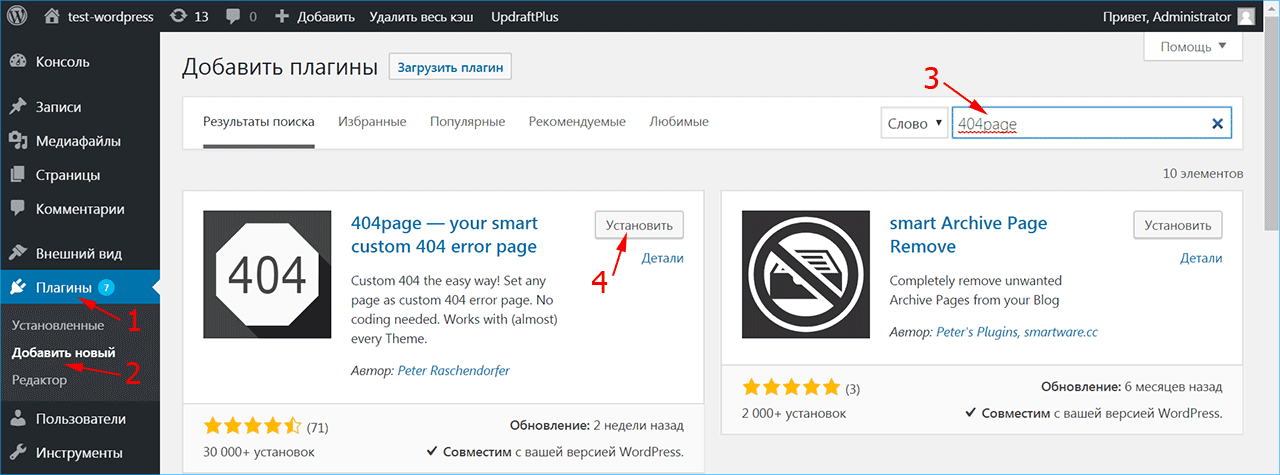
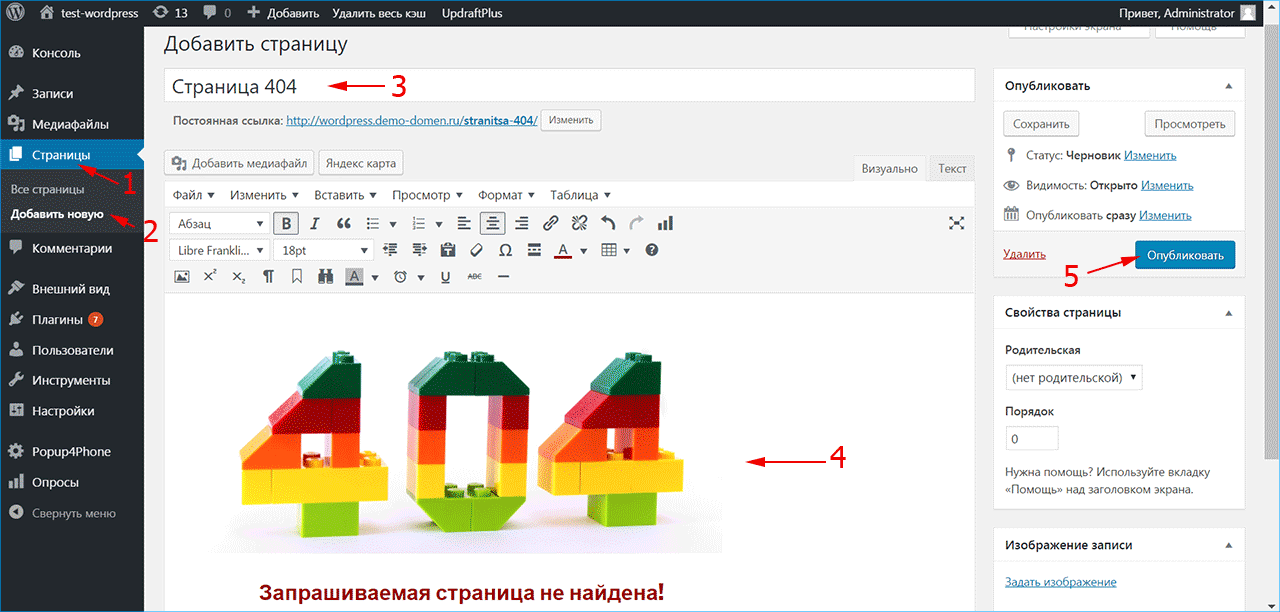
Создайте страницу 404 как обычную страницу WordPress из меню «Страницы -> Добавить новую». Внесите в нее всю необходимую информацию, которую вы хотите показать посетителю, и нажмите кнопку «Опубликовать». Плагин 404page также добавляет CSS-класс error404 в тег <body>, который можно использовать для задания дополнительных стилей на странице.
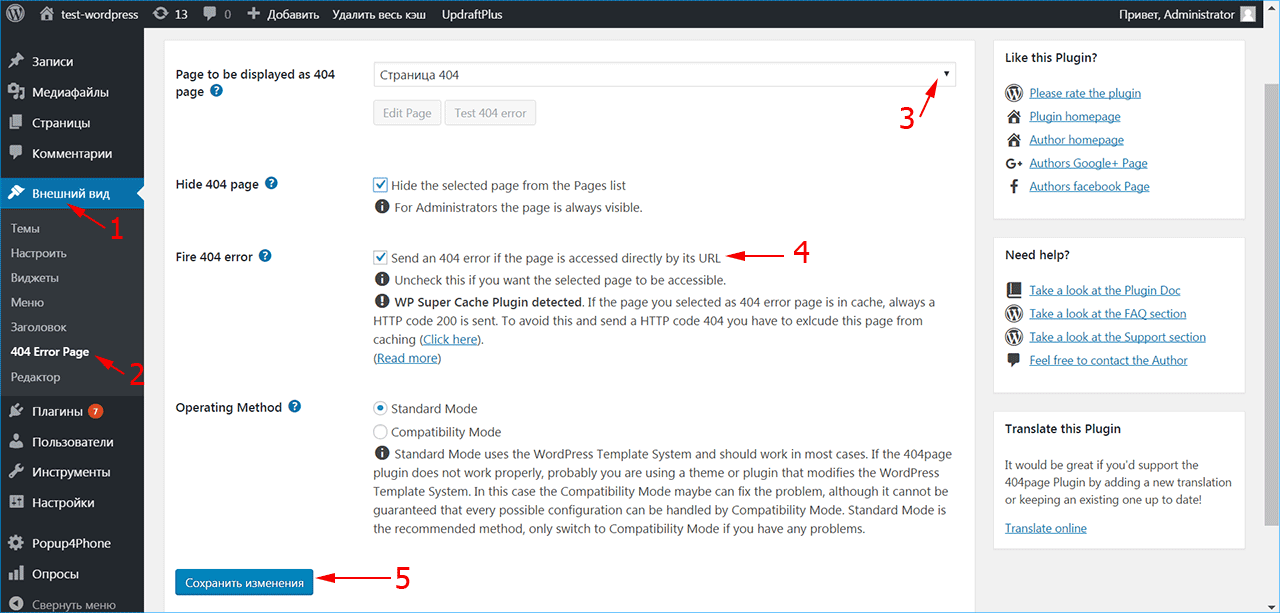
После активирования плагина в меню «Внешний вид» (1) появился раздел «404 Error Page» (2), в котором можно настроить отображение страницы ошибки.
Выберите созданную страницу 404 из списка страниц сайта (3). Убедитесь, что отмечен флажок (4), чтобы сервер отдавал код 404 при доступе к этой странице. Если вы используете кэширование, плагин выдаст предупреждение – страница из кэша будет отдавать код 200, поэтому ее нужно исключить из кэширования.
При возникновении проблем или конфликта с другими плагинами 404page может быть запущен в режиме совместимости. Нажмите кнопку «Сохранить изменения» (5).
Чтобы включить обработку ошибок 404 в WordPress, нужно установить структуру ссылок в меню «Настройки -> Постоянные ссылки» на любой пункт, кроме «По умолчанию». В противном случае ошибка 404 обрабатывается сервером, а не движком WordPress.
iPipe – надёжный хостинг-провайдер с опытом работы более 15 лет.
Мы предлагаем:
- Виртуальные серверы с NVMe SSD дисками от 299 руб/мес
- Безлимитный хостинг на SSD дисках от 142 руб/мес
- Выделенные серверы в наличии и под заказ
- Регистрацию доменов в более 350 зонах
WordPress – Страница 404
Настало время настроить страницу ошибок 404 в WordPress. Сегодня поговорим о разных вариантах реализации данной страницы.
Вступление:
Независимо от того, насколько сильно вы пытаетесь создать идеальный сайт, вы, вероятно, уже поняли что это просто невозможно. Пока вы публикуете новый контент, новые страницы и меняете структуру своего сайта, возникают проблемы. Без исключений. Но не беспокойтесь! В конце концов, ваша задача сделать отличную работу, управляя всеми ее аспектами.
Сегодня давайте оставим другие ошибки и проблемы в стороне, и сосредоточимся на одной из наиболее распространенных проблем, с которой сталкиваются обычные пользователи Интернета во время просмотра. Даже те, у кого нет опыта работы в веб-технологиях, знают о 404 странице ошибок. Вы видели множество из них в своей онлайн-жизни, не так ли?
Задача сегодняшнего поста – настроить эту страницу ошибок и сделать ее более удобной для пользователя.
Что такое 404 страницы ошибок?
Когда конкретная страница не может быть найдена на вашем сайте, сервер будет отправлять сообщение об ошибке 404 браузеру. Это означает, что страница или сообщение не находятся на этом веб-сайте (больше вообще не находятся 🙂 ) . Обычно это происходит, когда пользователь вводит URL-адрес вашего сайта, но попадает на же удаленную страницу, которая ранее была проиндексирована поисковыми системами и связана с другими источниками.
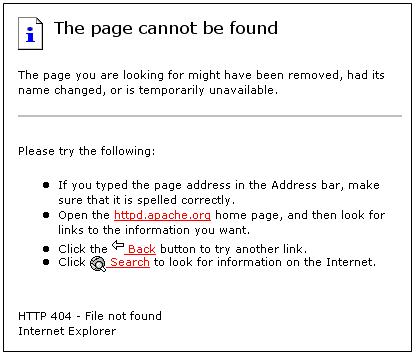
Например, если у вас есть контактная страница на сайте www.yoursite.com/contact, и кто-то пытается перейти на www.yoursite.com/contacts , WordPress сделает перенаправление на страницу 404.php.
Страница ошибки в WordPress по умолчанию
По умолчанию каждая тема WordPress поставляется с шаблоном 404.php, который отвечает за отображение сообщения об ошибке незадачливым читателям. К сожалению, эти страницы по умолчанию довольно скудны и содержат только основную информацию. Итак, если пользователь перешел на страницу 404.php, WordPress просто сообщит ему, что запрошенный ресурс не найден на сервере. Как вы можете видеть на скриншоте, страница 404 стоковой темы Twenty Seventeen не совсем приятна на вид. Вы просто должны изменить эту страницу, не так ли?

Если вам повезет, тема, которую вы используете, уже содержит несколько 404 шаблонов страниц ошибок. Возможно, это даже позволит вам настроить страницу через удобный интерфейс. Но если это не так, не беспокойтесь. Сегодня я настроен показать Вам, как создать страницу самостоятельно и предоставить её в приятном для читателя виде.
Что делает хорошую страницу ошибок в WordPress?
Не все страницы ошибок одинаковы. Иногда обычного стиля будет достаточно, чтобы привлечь внимание ваших посетителей. Но более вероятно, что вам понадобится еще несколько элементов, чтобы все внешний вид страницы был приятен пользователям сайта. По моему опыту, хороший шаблон 404 должен иметь большинство следующих элементов:
-
Апология – пользовательское личное сообщение, хорошо видимое на странице
-
Изображение – (смешное) изображение, которое делает страницу с ошибкой менее страшной
-
Контакт – Показать контактную информацию или форму
-
Поле поиска – пусть люди ищут на Вашем сайте другой контент
-
Последние сообщения – позволяют посетителям открывать одну из последних статей
-
Популярные сообщения – позволяют посетителям увидеть ваши самые популярные записи
Очевидно, что элементы страницы будут зависеть от сайта. Иногда забавная картинка просто не может быть частью серьезных бизнес-сайтов, и иногда вы будете работать на сайтах, на которых вообще не будет сообщений в блоге. Но извлеките лучшее из списка и подумайте дважды, прежде чем добавлять элементы на странице 404.
Где черпать идеи для создания страницы 404?
Я столкнулся с некоторыми удивительными страницами ошибок, которые могут помочь вам получить идеи и глядя на них придумать свои решения. Как правило, это хорошая идея сделать вашу 404-страничную забавной. Поскольку вы должны признать ошибку, ваши посетители захотят увидеть что-то забавное на странице (это обычная психология)

Если вы достигнете внимания посетителей, даже если они перешли на несуществующую страницу, вы можете быть уверены, что они останутся на более длительное время для просмотра сайта и вернутся снова. И, безусловно, вы можете сделать так, чтобы страница с ошибками была удобной, но об этом мы поговорим позже. На данный момент давайте посмотрим несколько примеров красиво разработанных 404 страниц ошибок:
Создайте собственной страницы ошибок 404
Во-первых, хотел бы напомнить, что изменение файлов вашей темы не является лучшей практикой. Прежде чем приступать к внесению изменений, хотел бы предложить использовать дочернюю тему. Когда вы создаете дочернюю тему для своего сайта, все изменения в ее файлах не будут затронуты обновлениями, которые вы будете устанавливать для вашей обычной темы. В этом случае создание файла 404.php в дочерней теме не повлияет на исходный, но файл все равно будет отображаться.
Не поймите неправильно, при изменении исходного файла изменений не будет. Но в этом случае обязательно создайте резервную копию, чтобы вы могли восстанавливать изменения после обновления.
Давайте сделаем вид, что вы не поленились и подготовили дочернюю тему. Итак, первый шаг – создать новый файл:
- Откройте папку, в которой вы создали дочернюю тему
- Создайте файл 404.php
- Откройте файл в удобном для Вас редакторе
-
Скопируйте и вставьте следующий код:
<?php get_header(); ?><div id="main-content"><div class="container"><div id="content-area" class="clearfix"><div id="left-area"><article id="post-0" <?php post_class( 'et_pb_post not_found' ); ?>><img data-src="https://techblog.sdstudio.top/wp-content/uploads/2020/03/post-9340-5e76bb3f25a0a.png"><h1><?php esc_html_e('Page Not Found','WP Loop'); ?></h1><p><?php esc_html_e('Oh No! The page you opened does not exist. Please use the links below to navigate to a safer place.', 'WP Loop'); ?></p></article> </div> <?php get_sidebar(); ?></div> </div> </div> <?php get_footer(); ?> - Измените путь к вашему изображению в строке # 7
- Изменить заголовок в строке $ 8
- Напишите пользовательское сообщение в строке # 9
- Сохраните изменения
Вы создали собственный шаблон. Если вы просматриваете страницу, все, что вы увидите, — это изображение, сообщение и стандартный заголовок, боковая панель и нижний колонтитул, которые у вас есть на всех других страницах. Тем не менее, это далеко не то, что я описал ранее, поскольку нет виджетов, поэтому придерживайтесь еще нескольких моментов, пока мы не создадим тот идеальный 404.php, который вы хотите. Кроме того, было бы неплохо добавить некоторые стили на страницу.
Добавление пользовательских виджетов
Хотя можно скопировать всю страницу с нуля, в этом нет необходимости. WordPress уже позволяет добавлять виджеты, которые помогут вам отображать самые последние и популярные статьи. Начиная с версии 4.8, вы даже можете добавлять мультимедиа в специализированные виджеты, так почему бы не воспользоваться этим?
Чтобы добавить новые виджеты специально на страницу 404.php , предлагаю создать новую виджетную область (пространство на вашей странице, которое позволяет добавлять виджеты). В некоторых случаях темы WordPress позволяют создавать новые виджетные области на панели управления. Итак, быстро взгляните в Appearance -> Widgets. Если вам повезет, у вас будет возможность создать эту область для вас. Если нет, давайте создадим её быстро, чтобы на вашей новой странице могли быть разные виджеты:
- Перейдите в папку вашей дочерней темы
- Откройте или создайте файл functions.php
-
Скопируйте и вставьте код:
function widget_area_404 () {register_sidebar (массивсив'name' => '404 Page','id' => '404','description' => __ ('Виджеты для страницы ошибки 404.'),'before_widget' => '<div class = "et_pb_post">','after_widget' => '</ div>','before_title' => '<h4 class = "widgettitle">','after_title' => '</ h4>',));}add_action ('widgets_init', 'widget_area_404'); - Сохранить изменения
- Откройте файл 404.php, который вы изменили ранее.
-
Скопируйте и вставьте следующий код, где вы хотите показать новые виджеты (например, после названия и текста):
<? php dynamic_sidebar ('404'); ?> - Сохранить изменения
После того, как WordPress сообщит, где будет отображаться новая область виджета, настало время добавить виджеты. Итак, перейдите в Appearance -> Widgets , выберите «Недавние сообщения», «Популярные сообщения» или любой другой виджет, который вы хотели бы иметь на своей новой странице 404 (другой пример – бесплатный виджет Google Maps для показа вашего местоположения). Не забудьте настроить виджеты по своему вкусу и помните, что есть новые мультимедийные виджеты, если вы хотите добавить изображения, видео или аудиофайлы на страницу.
Используйте плагин для создания настраиваемой страницы 404
Если вы следовали всем шагам, поздравляю – у вас есть страница ошибки 404, которая будет загружена для любого из посетителей. Но даже если создание настраиваемого шаблона не так сложно, когда вам просто нужно скопировать и вставить код, который мы предоставили, многие из вас предпочтут работать в удобном для пользователя интерфейсе. В этом случае я хотели бы показать вам простой плагин, который будет создавать пользовательские 404 страницы для вас.
Плагин 404page — your smart custom 404 error page
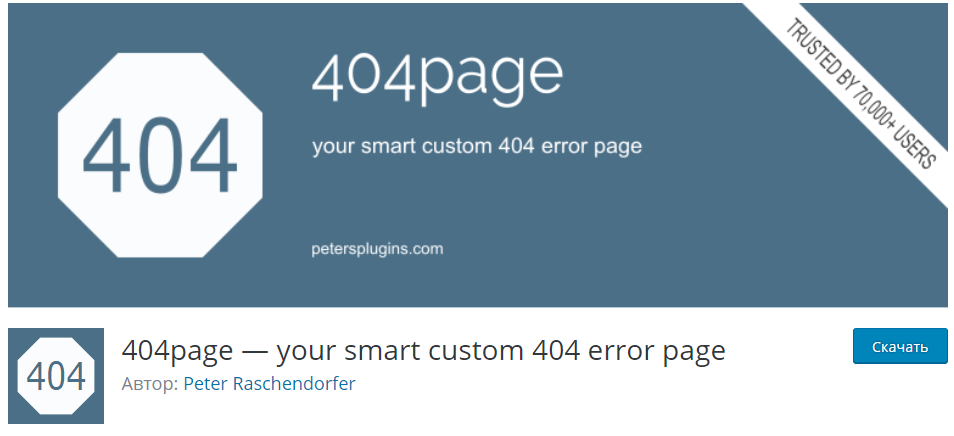
Этот плагин позволит вам легко создавать собственную страницу ошибок 404 без каких-либо усилий, которая будет адекватно работать практически с любой темой.
Затем перейдите на страницу «Внешний вид» -> «Страница ошибки 404» и выберите созданную страницу как свою страницу с ошибкой 404. Вот и все!
Загрузить плагин:
Создание страницы 404 при помощи виджетов и контента из KingComposer в теме Cactus
Зарегистрируйте новую область для применения виджета:
register_sidebar( array('name' => '404 Page','id' => '404','description' => __( 'Widgets for 404 error page.' ),'before_widget' => '<div class="et_pb_post">','after_widget' => '</div>','before_title' => '<h4 class="widgettitle">','after_title' => '</h4>', ) );После регистрации данной области мы можем применить вывод виджетов при помощи:
<?php dynamic_sidebar( '404' ); ?>Далее откройте файл 404.php
И замените его содержание кодом ниже:
<?php get_header();?><?php echo apply_filters('cactus_page_title_bar','','');?><div class="page-wrap"><?php do_action('cactus_before_page_wrap');?><div class="container"><div class="page-inner row no-aside"><div class="col-main"><section class="post-main" role="main" id="content"><article class="post-entry text-left"><?php dynamic_sidebar( '404' ); ?><a href="javascript:;" onClick="javascript :history.back(-1);"><span class="cactus-btn cactus-primary"><?php echo esc_attr('<< Назад', 'cactus');?></span></a><?php do_action('cactus_after_page_content');?></article></section></div></div></div></div><?php get_footer();Далее создайте новую секцию в King Composer с любым содержанием, после чего добавьте в область виджета отображение секции. Для этого перейдите к виджетам и перетяните компонент “KC Content”:

В область виджета для страницы 404:
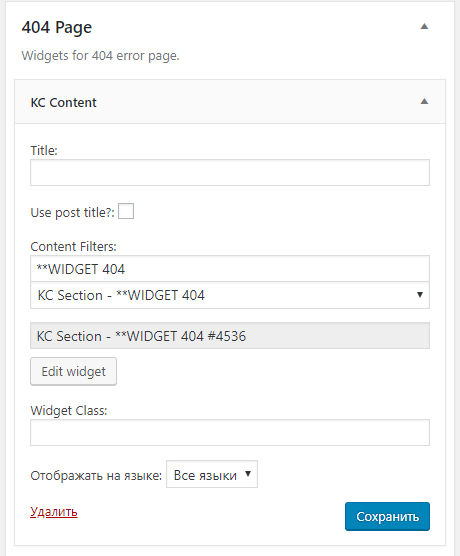
Когда компонент был перенесен введите в поле “Content Filters” название секции, у Вас под полем ввода должно появится выпадающее меню для выбора секции с похожим названием. Выберите секцию, для которой Вы подготовили контент.
Если по какой-то причине выпадающий список не отображается нажмите кнопку “Сохранить” и повторите попытку.
Источник записи:
Пользователь может столкнуться с ошибкой 404 по разным причинам. Как владелец сайта, вы должны быть уверены, что пользователь не будет чувствовать себя потерянным или озадаченным, когда это произойдет.
Чтобы быть уверенным, что посетитель останется на вашем сайте, даже столкнувшись с ошибкой 404, можно создать свою страницу 404, что очень просто сделать с помощью шаблона 404.php в вашей теме.

Что такое страница 404?
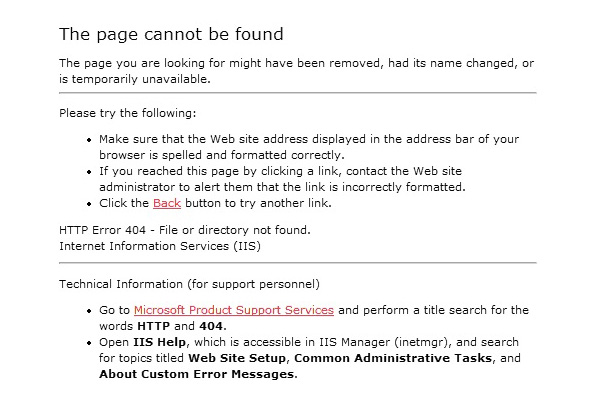 Страница 404 («Не найдена») — это страница, которую генерирует сервер, чтобы сообщить вам, что контент, доступ к которому вы пытались получить, не может быть найден. Обычно вы сталкиваетесь с ошибкой 404, когда что-то было перенесено или удалено, или когда вы переходите по ссылке/набираете адрес сайта с опечаткой.
Я сталкиваюсь со страницей 404 в основном потому, что я часто вручную набираю адрес сайта (не используя закладки), и у меня неуклюжие пальцы. Это часто приводит меня к запросу www.google.com/mial вместо необходимой мне страницы Gmail. Очень раздражает.
Еще несколько лет назад страницы 404 были просто стандартными страницами 404 сервера, но в последнее время разработчики и дизайнеры стараются создавать более дружественные 404 страницы, чтобы дать знать пользователю, где он находится, почему он туда попал, и куда он может пойти сейчас.
Как добавить свою страницу 404 в тему WordPress
Теперь давайте посмотрим, как же добавить 404 страницу, заточенную под вашу тему.
Добавить свою 404 страницу просто: все, что вам необходимо — это наличие в папке темы файла под названием «404.php«.
Конечно, если ваш файл «404.php» пуст, то страница «404», которая будет показываться вашим пользователям, будет пустой.
Быстрый метод создания своей страницы 404, которая будет хорошо подходить к вашей теме – это копирование всего содержимого файла «page.php» вашей темы в ваш новый файл «404.php«. Сделав это, удалите весь код, который относится к циклу, и замените его следующим кодом:
<h1>Page Not Found</h1>
<p>Sorry, but the page you requested has not been found</p>
Как сделать вашу страницу 404 отличной
Если пользователь попал на 404 страницу сайта, что вам действительно нужно — это помочь ему добраться до контента, который он рассчитывал получить. Если показывается стандартная страница 404 сервера, то велика вероятность того, что посетитель нажмет «Назад» и найдет нужный ему контент в другом месте.
Чтобы помочь пользователю получить контент, который он ищет, вам нужно добавить на свою страницу 404 элементы, перечисленные ниже. Эти вещи могут уже быть в вашей теме, и, следовательно, в вашей странице 404 (например, если вы скопировали код со своего файла «page.php«), в таком случае вам необходимо обратить на них внимание пользователя:
- Показать сообщение с извинением, которое объяснит, что контент, который искал пользователь, не найден. Упоминание кода «404» не обязательно, но вы можете его написать, если хотите.
- Предложить пользователю проверить адресную строку и убедиться, что в адресе сайта нет опечаток.
- Показать / обратить внимание пользователя на блок поиска, который поможет ему найти нужный контент на вашем сайте.
- Предложить материалы, которые, возможно, ищет посетитель, основываясь на странице, которую он запрашивал, или на популярных страницах сайта.
- Дать пользователю список вариантов «что теперь делать», например, перейти на главную страницу или посмотреть ваши архивы.
- Наконец, дать возможность пользователю сообщить об ошибке, добавив ссылку на пост / контактную форму / твиттер аккаунт, чтобы вы могли исправить ошибку, где это будет необходимо.
В моей воображаемой теме, я бы сделал это как-то так:
<?php get_header(); ?>
<div id="page">
    <h1>Page Not Found</h1>
    <p>We're very sorry, but the page you requested has not been found! It may have been moved or deleted.</p>
    <p>I'm not blaming you, but have you checked your address bar? There might be a typo in the URL.</p>
    <p>If there isn't, you could try searching my website for the content you were looking for:</p>
    <?php get_search_form(); ?>
    <p>Or maybe you were looking for one of my popular posts:</p>
    <ul>
        <li><a href="http://www.website.com/popular-post1">Popular Post 1</a></li>
        <li><a href="http://www.website.com/popular-post2">Popular Post 2</a></li>
        <li><a href="http://www.website.com/popular-post3">Popular Post 3</a></li>
        <li><a href="http://www.website.com/popular-post4">Popular Post 4</a></li>
    </ul>
    <p>Alternatively, you can go to <a href="http://www.website.com">my home page</a> or <a href="http://www.website.com/archives">browse my archives</a></p>
    <p>One last thing, if you're feeling so kind, please <a href="mailto:webmaster@website.com">tell me</a> about this error, so that I can fix it. Thanks!</p>
</div>
<?php get_sidebar(); get_footer(); ?>

Ключевые элементы
Если вы справитесь с «полезной» частью страницы 404, после этого можете добавить юмора и дизайнерских штук. Только не ставьте телегу впереди лошади. Давайте разберем ключевые элементы, которые мы использовали:
- Базовые: используем имя файла 404.php , чтобы WordPress использовал его как шаблон страницы ошибки
- Наш заголовок страницы (заключенный в тег H1) четко указывает, что страница не найдена.
- Даем короткое текстовое объяснение и предлагаем некоторые альтернативные решения (проверить URL)
- Предоставляем поиск (используя стандартную функцию WP search form)
- В завершение предоставляем ссылку на архивы. Продвинутые пользователи могут добавить сюда также список страниц, категорий или тегов.
- Предоставляем контакты для сообщения об ошибке.
И хотя бывает очень заманчиво добавить смешную картинку или надпись на вашей странице 404 , постарайтесь в первую очередь быть максимально полезными, а уже потом остроумными.
Невзирая на то, что существуют целые сайты, посвященные веселым 404 страницам, ваша основная задача – убедиться, что пользователь останется на вашем сайте и вернется к нему потом (разве что вы вознамерились попасть на один из таких сайтов, в таком случае – дерзайте!)
Другие факторы
Если пользователь попадает на страницу 404 не потому, что он сделал опечатку в URL (большинство пользователей не вводит напрямую адрес), велика вероятность того, что вы что-то перенесли или удалили.
Перенаправление старого контента
При переносе контента, всегда нужно перенаправлять старый URL на новый URL – это простой и эффективный способ убедиться, что все посетители, которые захотят увидеть этот контент, смогут это сделать. Перенаправление в WordPress можно легко сделать с помощью популярного плагина Redirection.
Этот плагин также позволяет отслеживать ошибки 404, сгенерированные вашим сервером, и адреса страниц, запрашиваемые при генерации 404 ошибки. Это позволяет вам перенаправить этот адрес на правильное расположение контента, улучшая общее впечатление пользователя.
Идем еще дальше
Как мы упоминали ранее, действительно хорошая 404 страница даже не обязательно должна быть похожа на 404 страницу. Добавив туда список страниц, категорий и тегов, вы можете дать пользователям непосредственно ссылки для перехода вместо того, чтобы заставлять их тратить время на уточнение поиска.
Также рассмотрите вариант с добавлением «популярного» контента: иногда популярный контент может быть даже лучшим вариантом, чем соответствующий начальному запросу контент, если ваша цель – удержать посетителей 404 страницы на сайте.
Не удаляйте посты. Удаляйте контент
И наконец, удаляя контент, подумайте, может быть стоит просто удалить содержимое поста / страницы (а не удалять весь пост / страницу), и сообщить пользователям, зачем вы удалили контент.
Вы можете пойти дальше и порекомендовать альтернативные источники, где пользователь сможет найти контент, похожий на тот, который вы удалили. Это поможет избежать «мертвых ссылок» на вашем сайте, при этом контент, который вы хотите удалить, будет удален.
Источник: WP Tuts
Смотрите также:

Изучает сайтостроение с 2008 года. Практикующий вебмастер, специализирующий на создание сайтов на WordPress. Задать вопрос Алексею можно на https://profiles.wordpress.org/wpthemeus/
An error 404 is when a visitor tries to access a page that does not exist. Sometimes people tend to overlook this feature, and never think about designing for it. Taking the time to make a user-friendly 404 page could mean the difference in a user staying on your website, or leaving.
Chances are you have created your website and checked multiple times to be sure that every link leads to somewhere. Eventually over time you may forget about a link that leads to a post you removed, or possibly changed the name to. Even if a visitor is searching for a page directly and they don’t get it right, then they will be taken to the error 404 page.
These can be made very user-friendly utilizing the WordPress template tags, and little bit of know-how.
Understanding The Error 404
The error 404 is a message that the visitor will receive when a page or post is not located. This is by default included within WordPress, but not with all themes. If you have created a custom theme, then you can increase the chances of a user sticking around even though they didn’t find what they were looking for with a properly designed 404 page.
The Basic Error 404 Template
The basic error 404 template is included with some WordPress themes but not all. WordPress is set to automatically look for the file 404.php when an error 404 is reached. If this file is not present, then it will give a basic error message which is not user-friendly.
If you do not already have this file you can create it. Make a new blank file and name it 404.php
Here is the basic code we will start with:
The 404.php File
<?php get_header(); ?>


<h2>Error 404 - Page Not Found.</h2>


<?php get_sidebar(); ?>

<?php get_footer(); ?>
The above code within the 404.php file would give a simple output wrapped in H2 tags that would read “Error 404 – Page Not Found.” – It would also get the WordPress Header, Sidebar, and Footer. These are all optional and should be modified to fit your WordPress theme.
We want to take this a few steps further to achieve our goal. Make a note that I am using the get_header() along with get_sidebar and footer to call our theme template files. Your’s may vary slightly and you will have to adjust your 404.php file accordingly.
Starting To Work On It
First, We will add the search form to our basic 404 page to make it a bit more helpful. This way even if a visitor lands on your 404, they then have the option of searching your site. This is the first method to help users stick around instead of leaving.
404.php File – Added Search Form
<?php get_header(); ?>

<h2>Error 404 - Page Not Found.</h2>

Search:

<?php include(TEMPLATEPATH . "/searchform.php"); ?>

<?php get_sidebar(); ?>

<?php get_footer(); ?>
Making It More Dynamic
To create a more dynamic error 404 page you can use redirects so that the user only sees the error briefly, then gets redirected to your home page. This page can be made to be somewhat SEO friendly as well.
For this next example we can start by editing the header.php file of your template. Within the meta tags at the top of your header.php file you can add the following:
The header.php File
<?php if (is_404()) { $redirectHome = get_option('home'); ?>
<?php echo $redirectHome; ?>
After this is added we will then edit our 404.php file to look like this:
404.php File
<?php get_header(); ?>

<h1>Error 404 - File Not Found.</h1>

<h3>Please <a href="<?php bloginfo('home'); ?>" Click here</a> to return to our home page, or you can wait to be redirected in 15 seconds.</h3>

<?php get_footer(); ?>
The above example will allow the user to land on the 404 error page but then automatically take them back to the home page. This will also help users stick around instead of them being left confused and leaving your website.
This example may not always be the best solution for everyone but can be helpful to someone looking for something specific on your site.
Making sure it works
You can test your 404 error page by typing your URL and following it with a page that you know does not exist.
Example: http://www.yourwebsitedomain.com/test404page.php
That should bring you to your 404 page for viewing and testing.
If it doesn’t work
If by chance your server is not automatically bringing you to your 404.php file we can modify our .htaccess file to make it work. Locate your .htaccess file within your WordPress install and add the following line to it:
ErrorDocument 404 /index.php?error=404
If your WordPress install is not in the root directory you will need to make sure the above code reflects that. If you have installed WordPress into a subfolder then modify your .htaccess like this:
ErrorDocument 404 /YOURSUBFOLDERNAME/index.php?error=404
This will force the use of your 404.php file.
A full example
The code below is a full demonstration that will show you some ways you can use the 404.php file to help users that have found something that doesn’t exist. Take a look at it and notice the options we are giving them to keep them around, and to help them find content.
<?php get_header(); ?>

<h1>404 Error</h1>

We cannot seem to find what you were looking for.

Maybe we can still help you.

<ul>

<li>You can search our site using the form provided below.</li>

<li>You can visit <a href="<?php bloginfo?>"</a></li>

<a href="<?php ('url'); ?>" the homepage.</a>

<li>Or you can view some of our recent posts.</li>

</ul>

Search:

TEMPLATEPATH . "/searchform.php"); ?>

<h3>Recent Posts</h3>

<ul>
	<?php query_posts('posts_per_page=5'); if (have_posts()) : while (have_posts()) : the_post(); ?>

<li><a href="<?php the_permalink() ?>" title="Permalink for : <?php the_title(); ?>"><?php the_title(); ?></a>
	endwhile; endif; ?>
	</ul>

<?php get_footer(); ?>
Anything above can be changed and styled to fit your needs. In the above example we are displaying that there was an error, and then following it with a list of options for the user. We are also still giving them the option to search our site, and have now added the ability for them to view our recent posts.
The combination of all of these gives the user that reached the page options. These options can be used to ensure a user doesn’t leave right away if they didn’t find exactly what they wanted.
Make it More User Friendly
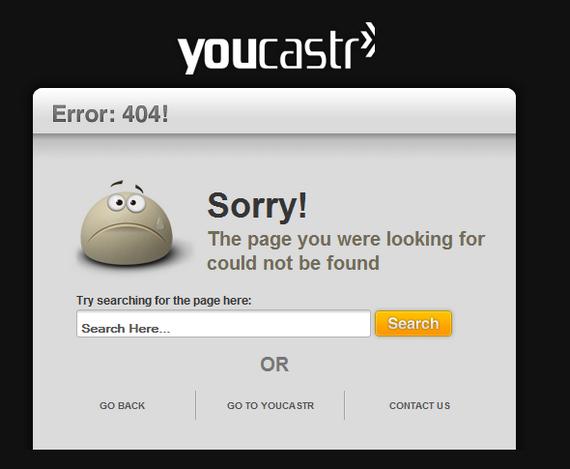
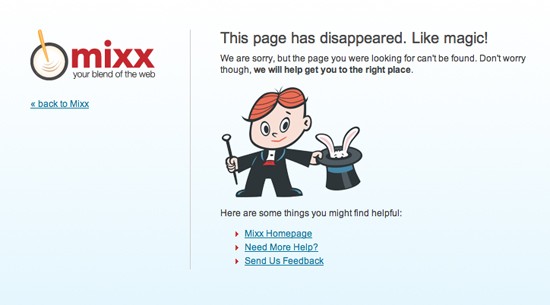
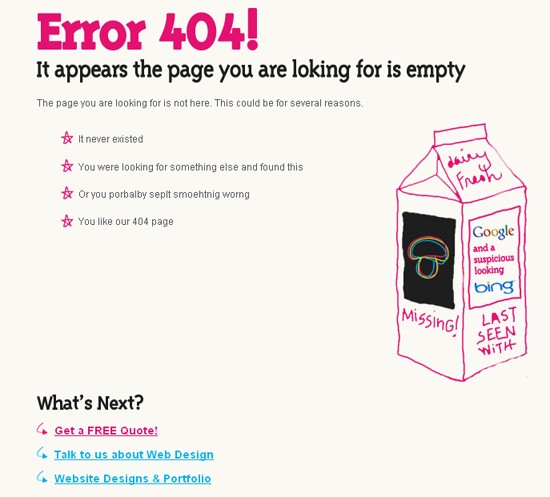
To make it more user friendly and unique you could consider using the above examples with a different background image of your choice. You can also use html within the 404.php file to make a page all in itself for your error page. Here are some examples of unique error 404 pages for inspiration:
1. Mundofox.com

2. CSSRemix.com

3. CSSRemix.com

4. ChrisJennings.com

5. ook.co.uk
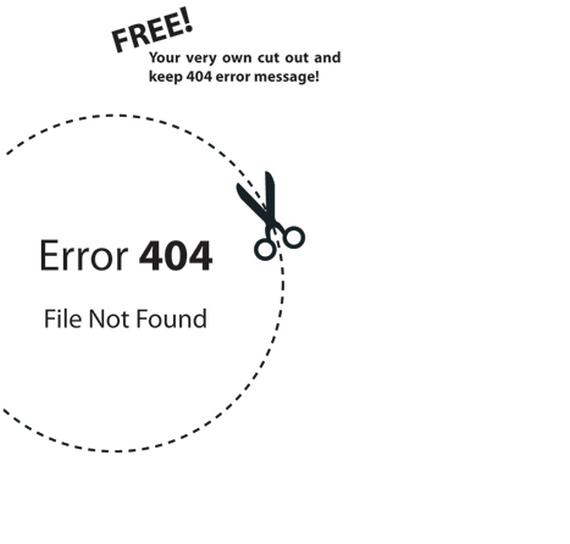
6. Youcastr.com
7. Mixx.com
8. JustCreativeDesign.com

9. Agens.no

10. Mushroomdigital.co.uk
Using it Wisely
It is always good practice for both WordPress and static HTML sites to make use of the 404 page. Either using ads on it to monetize, or using it to better help your visitors navigate your website.
There are many ways to create your own custom 404 error page, and just as many ways to allow it to help website visitors. Use the examples above freely, and experiment with what works best for you.
This post may contain affiliate links. See our disclosure about affiliate links here.
Если страница на вашем сайте больше не существует или если ссылка была написана неверно, ваши пользователи увидят стандартный код ответа HTTP, страницу 404. 404 Not Found — это ответа сервера, означающий, что запрошенный ресурс не может быть найден.
Привет друзья! Чтобы привлечь посетителей на свой сайт, требуется потратить много усилий и времени. Каждый пользователь драгоценен и его не хочется терять. Когда клиент запрашивает страницу, которой не существует, сервер отдает ему ошибку 404. Page not found 404.php это стандартный файл шаблона wordpress. Если такого файла в теме нет, то браузер отрисует свою страницу ошибки, которая выглядит некрасиво.
К сожалению дефолтная страница 404 на wordpress в бесплатных темах выглядит не только непривлекательно, но и не содержит никакой ценной для пользователя информации. Обычно на ней выводится текст «Страница не найдена» и под ним расположена форма поиска по сайту. В моей теме она выглядит так.
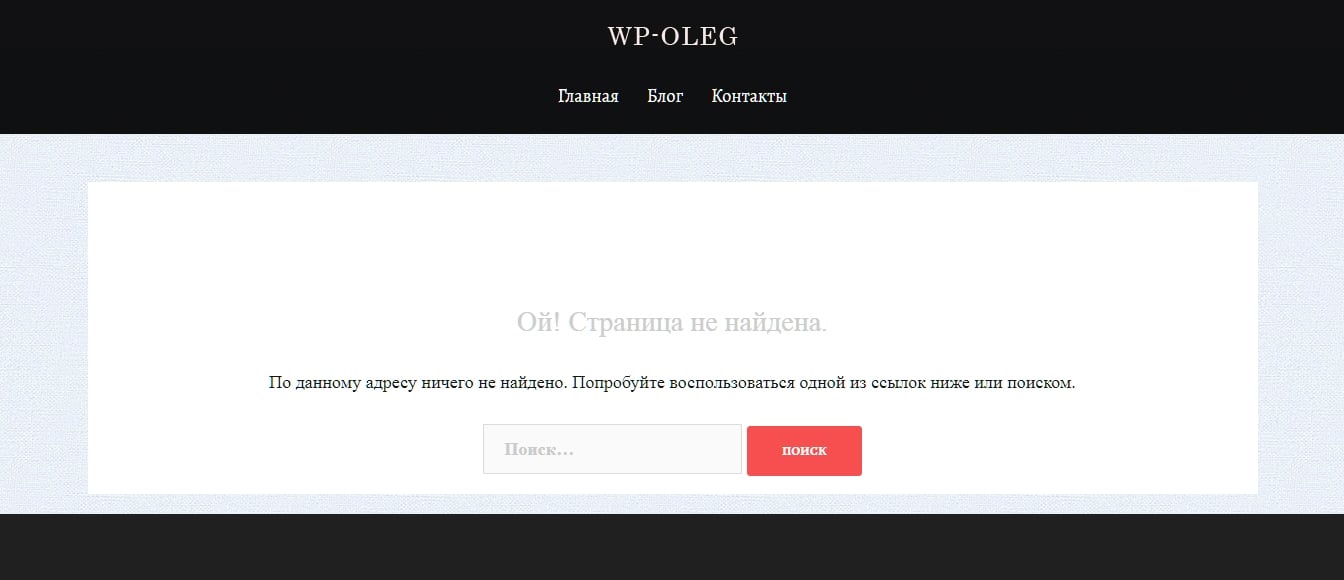
Первый посетитель, попавший на страницу ошибки и не знакомый с вашим сайтом, скорее всего, покинет его. Если правильно оформить 404 страницу на wordpress, то посетителя можно задержать на сайте и предложить ему полезную информацию.
Ошибки 404 нельзя избежать, поэтому нет нужды говорить, что иметь пользовательскую страницу error not found важно. Чтобы ее создать и настроить требуется установить плагины:
- 404page – your smart custom 404 error page
- Page Builder by SiteOrigin
- SiteOrigin сборник виджетов
Кого-то может возмутить тот факт, что для того чтобы создать кастомную страницу 404 на wordpress требуется установить 3 плагина. На самом деле они могут вам пригодиться и для других целей, поскольку обладают богатым функционалом.
Page Builder – это популярный бесплатный строитель страниц. С его помощью можно сделать разметку любой сложности. А сборник виджетов SiteOrigin это поставщик содержимого для пэйдж билдера.
В данный сборник входит около 26-ти виджетов с помощью которых можно добавить и красочно оформить любой контент на веб-странице, в том числе на странице 404. Поэтому есть смысл установить оба плагина, так как они предлагают много полезных «плюшек» и облегчают разработку сайтов.
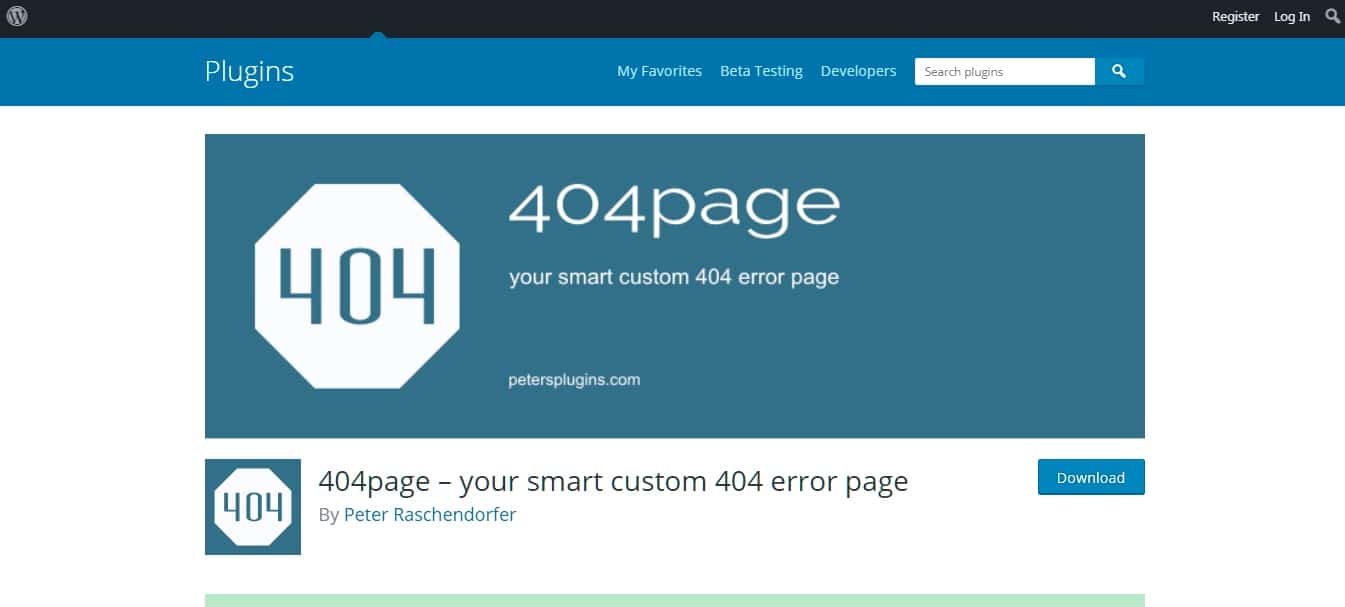
Особенности плагина 404page
По умолчанию ваша тема имеет свою страницу ошибки. С помощью плагинов 404page и Page Builder, создать кастомную страницу 404 на wordpress стало намного быстрее и проще. По сути, вы можете определить любую страницу вашего сайта как страницу 404. При этом от вас не требуется навыков программирования.
Вы можете добавить на нее полезные ссылки, фотографии, текст, контактную форму и форму поиска. Это отличный способ привлечь пользователей и помочь им найти нужный контент.
Также данный плагин не создает перенаправлений 301 и 302 и генерирует правильный 404 код ошибки. С его помощью создается «настоящая» 404 страница и в отличие от других подобных плагинов он не делает дополнительных запросов к серверу. Работает он с большинством тем, так как использует иерархию шаблонов вордпресс.
Установка плагина
Установите и активируйте все вышеупомянутые плагины. Активируйте нужные вам виджеты, так как не все они активированы по умолчанию. Затем создайте пользовательскую страницу 404 в редакторе вордпресс так же как вы создаете любую другую страницу.
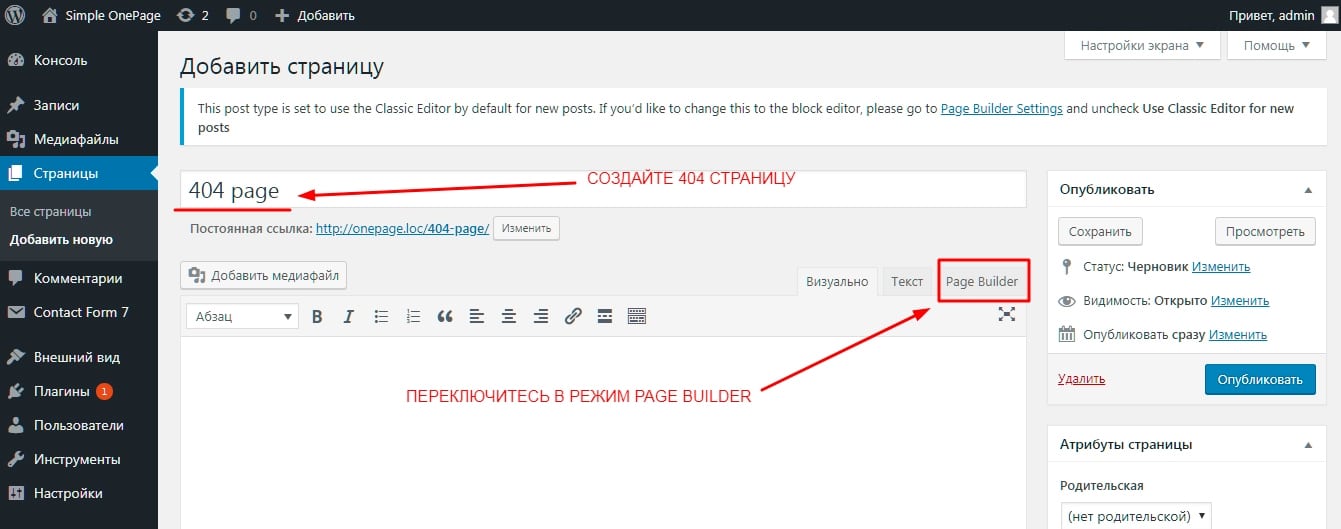
После зайдите во вкладку Внешний вид > 404 error page и в настройках выберите пользовательскую страницу 404 и сохраните.
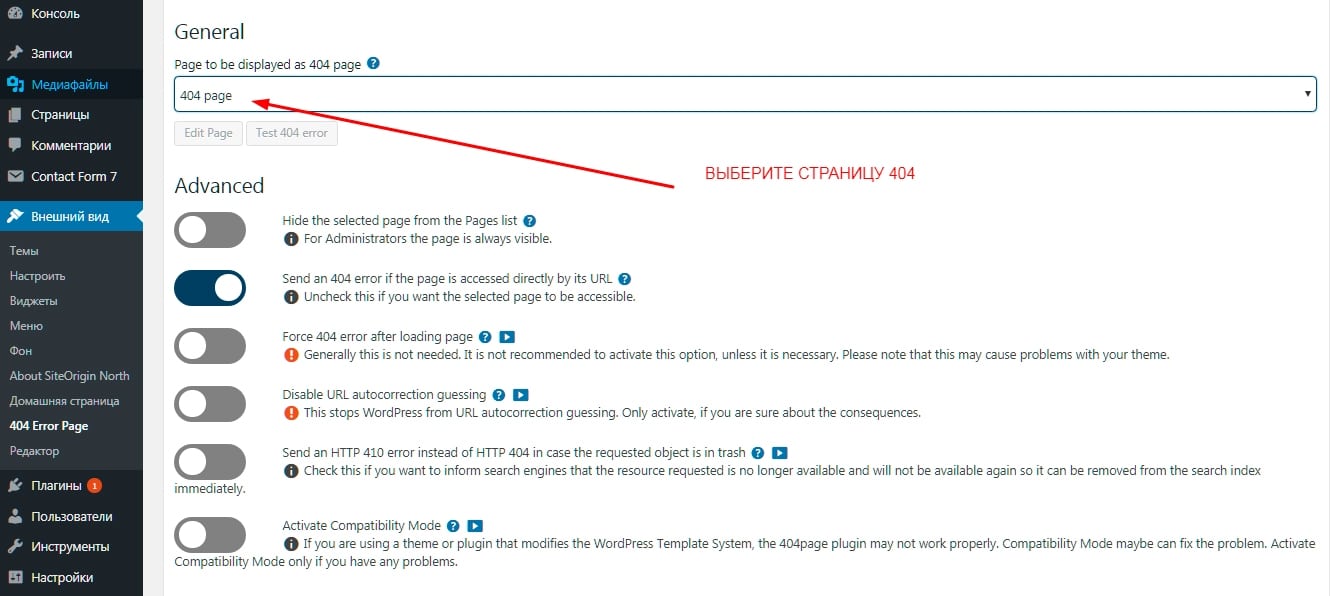
Редактирование пользовательской страницы 404
Перейдите на страницу ошибки, которую вы только создали, и переключитесь в режим пейдж билдера чтобы начать ее редактировать. Вы можете создать сами нужную вам разметку страницы с помощью конструктора страниц и виджетов или сделать импорт уже готовой разметки.
Чтобы сделать импорт войдите в Layouts > Импорт / Export и импортируйте готовый файл макета с расширением json. Скачать его можно здесь https://siteorigin.com/wp-content/uploads/2018/11/404.json. После импорта данных вы получите такую разметку.
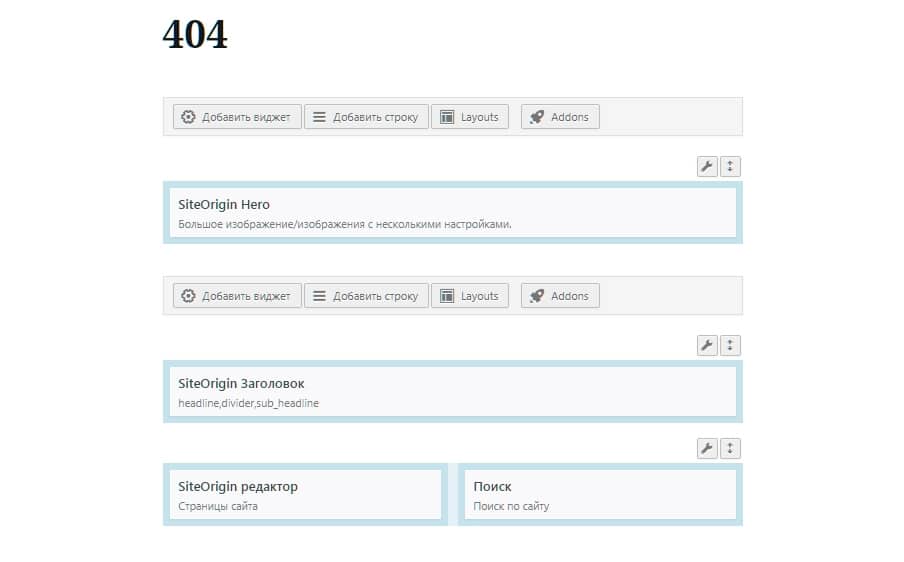
В первом ряду здесь вставлено большое изображение на всю ширину экрана, с текстом, написанным по левой стороне. Сделан он с помощью виджета Hero.
Во второй ряд вставляются заголовки с h1-h6, параграф и разделитель между ними. Здесь же можно подключить google шрифты, настроить цвет, размер заголовков и отступы между ними.
В третьей строке, слева расположены ссылки на важные страницы сайта. Вставлены они в виджет Site Origin редактор. Справа находится дефолтный поиск по сайту wordpress.
Вставьте свой текст, фотографию, ссылки на важные страницы сайта, выберите любой виджет, который для этого понадобится. В общем, отредактируйте страницу 404, так как вам нужно.
Мне пришлось немного поправить стили css чтобы форма поиска по сайту вместилась в один ряд и так же я изменил фотографию и текст на ней. На этом все, теперь вы знаете, как создать пользовательскую страницу 404 на wordpress.

Что у меня получилось, вы можете посмотреть, перейдя по ссылке. Если вам помогла статья, то закрепите ее на странице ваших социальных сетей, поделитесь ей и оставьте свои комментарии. Пока
When searching for creative, impactful, and modern free 404 error page templates, that’s when our collection comes into play.
Many of the premium website templates provide a separate 404 error page template and their package. If this is not the case for you, you can greatly use these free alternatives.
Before getting into the error page templates list, let us see what makes a perfect professional 404 page.
You must decide what the user must do after landing on an error page. Also, you can directly show them suggestions that are closely related to their search term.
You might have seen this approach on many news websites, and even some of the news and magazine website templates give you this option by default. Or else you can directly provide a search box or a button to take the user back to their previous page or your homepage.
These and many other features are great ways to retain your visitors. If a user lands on an error page, you do not want them to leave your site entirely.
You can also stay creative with your 404 pages. Some use interactive animations, other interesting text messages, videos, etc.
Waste no time and spice your 404 error page with any web designs below.
Colorlib 404 Customizer (WordPress plugin)
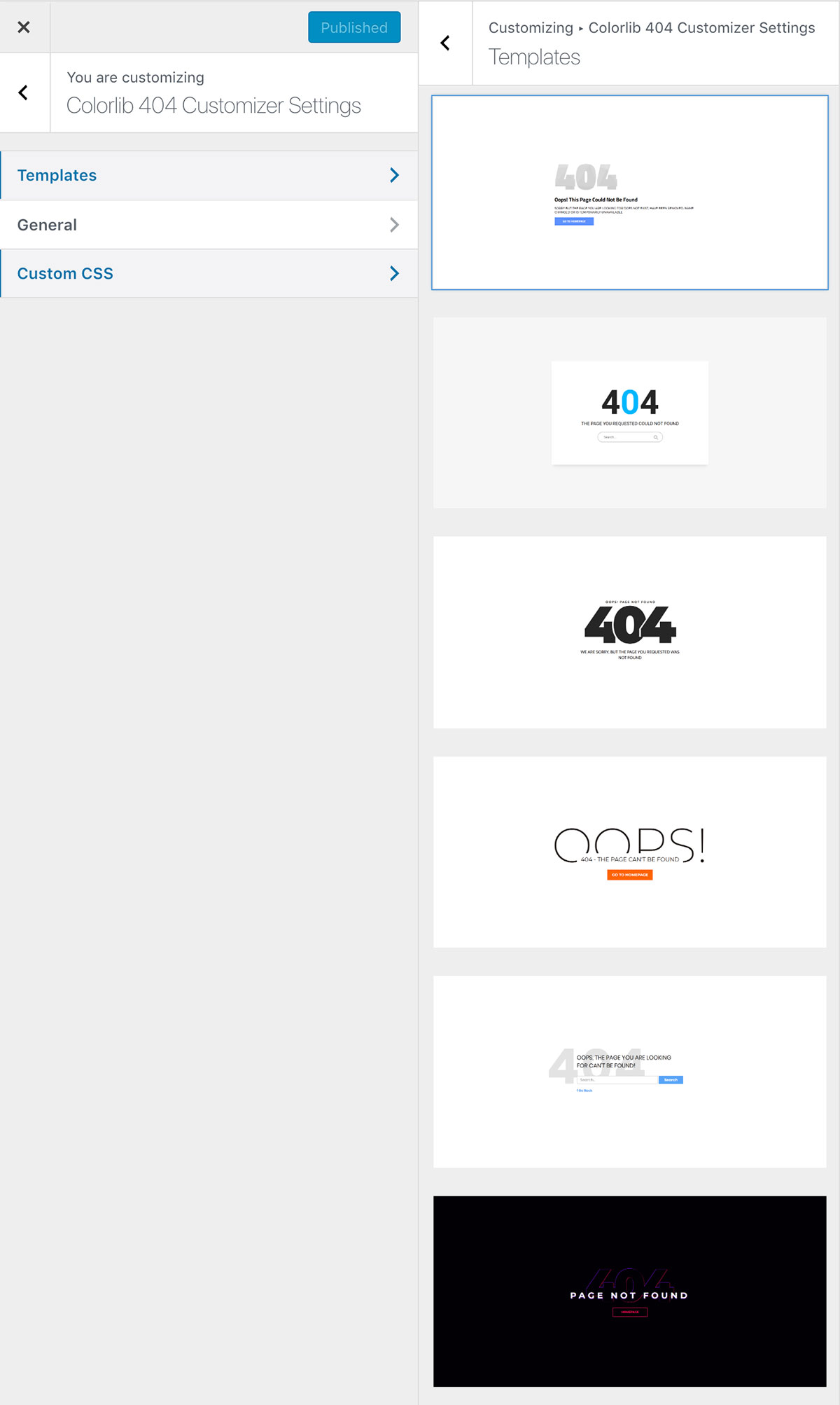
This is the only WordPress plugin that made a list. It is very easy to use and has great design, templates, and customization options.
More info / Download
Colorlib 404 v1
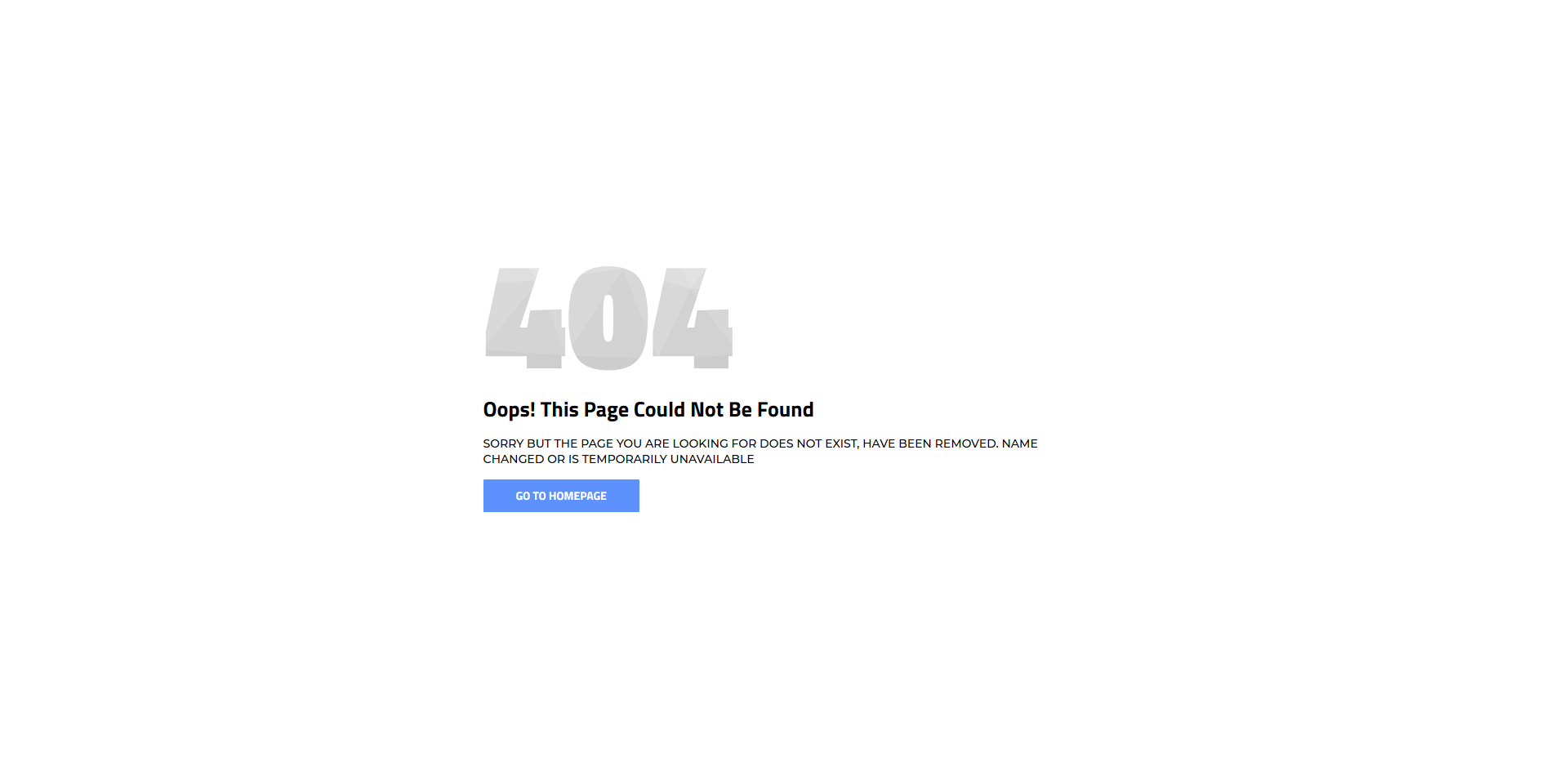
When a user types a false URL or tries to search for something that your website does not feature, a solid 404 page is necessary. Also, you might have some content that is no more live on your page, again, sort things out with a 404 page. To save you from the hassle of creating one yourself, we bring you a massive collection of free 404 error page templates to start ASAP. Download this clean-looking layout with text and a call-to-action button that leads the user back to the home page. Whether you are still in the process of establishing your page or already have it live but missing an error page, you can now add it sooner rather than later.
More info / Download Demo
Colorlib 404 v2
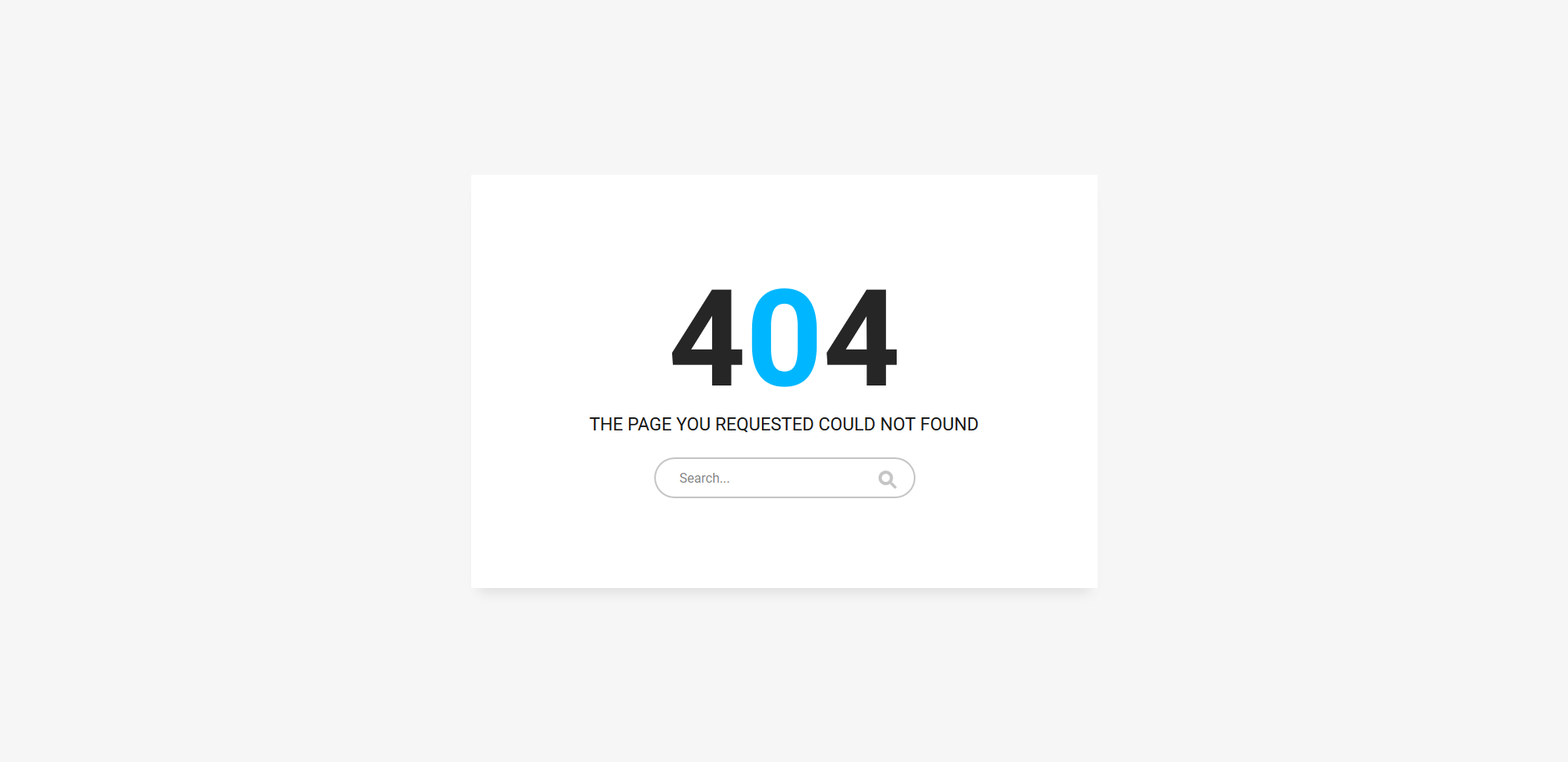
An error page could be some text, or you can keep them engaged with an additional feature. One of such things could be a search function that helps them find the exact page they are looking for. After all, if they ended on an error page, the page is missing, and that could be because they entered the wrong keyword to your search bar. They can now try again with this cool free 404 error page template without going back. This will help you with the bounce rate, too! Try it out, it is free of charge.
More info / Download Demo
Colorlib 404 v3

Simple and bold error page is ready and set for you to use right away. It is a cool design that will tell your users they landed on the wrong page. If your main website rocks a minimalistic look, this free 404 error page template might fit your branding needs ideally. On the other hand, we are still beginning this magnificent collection of layouts for error pages. With versatility and adaptability, you will surely find the one that resonates with your project best.
More info / Download Demo
Colorlib 404 v4

Error pages could be boring, or they could be cool and attention-grabbing. Hey, you should keep your site visitors impressed and fascinated. Even with a 404 error page, you can have it in tune with your page style and keep the branding intact. On top of that, call-to-action button links back to your index page, and, chances are, they will take action. Regardless of what part or segment of your website, make sure you have it enhanced and customized to the last detail. They will notice your seriousness and not be distracted, even if an OOPS! page appears in front of them.
More info / Download Demo
Colorlib 404 v5
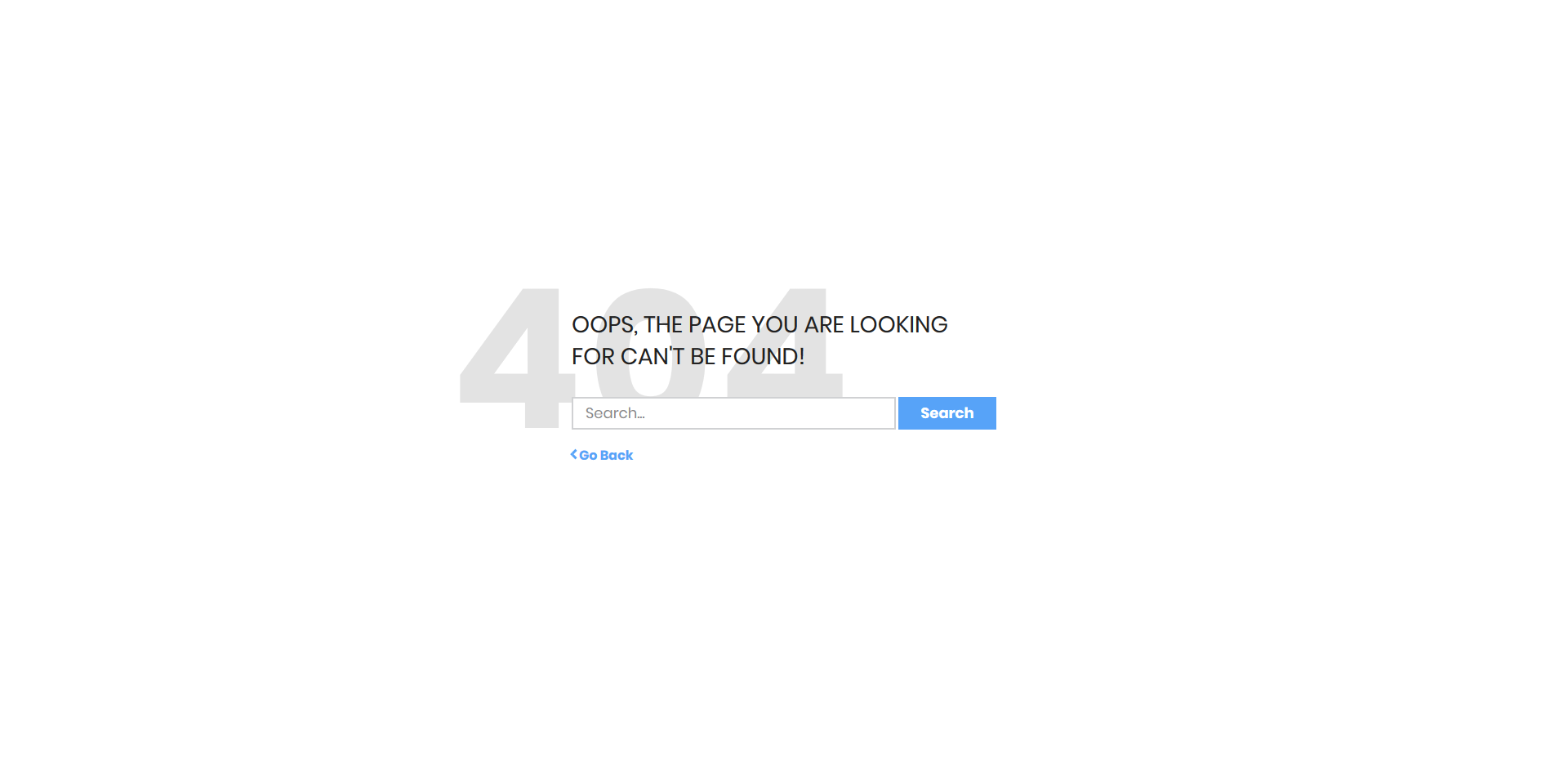
If you want to offer your users something more than just a notice that they landed on an error page, this free 404 error page template is for you. Not only does it have a search function integrated into the web design, but it also features a back button. Either they fill the search bar or press the back button and are back on track. You can now add this exact layout to your site and even alter it slightly if necessary. After all, you want it to follow your regulations, so it does not feel like they are on an entirely different platform.
More info / Download Demo
Colorlib 404 v6

If your main web design sports a dark layout, you can almost directly implement this free 404 error page template. By default, it links them to the home page, but you can also do your thing and customize the experience. Enhanced with a creative touch, you can now redirect all users who landed on an error page with a call-to-action button.
More info / Download Demo
Colorlib 404 v7
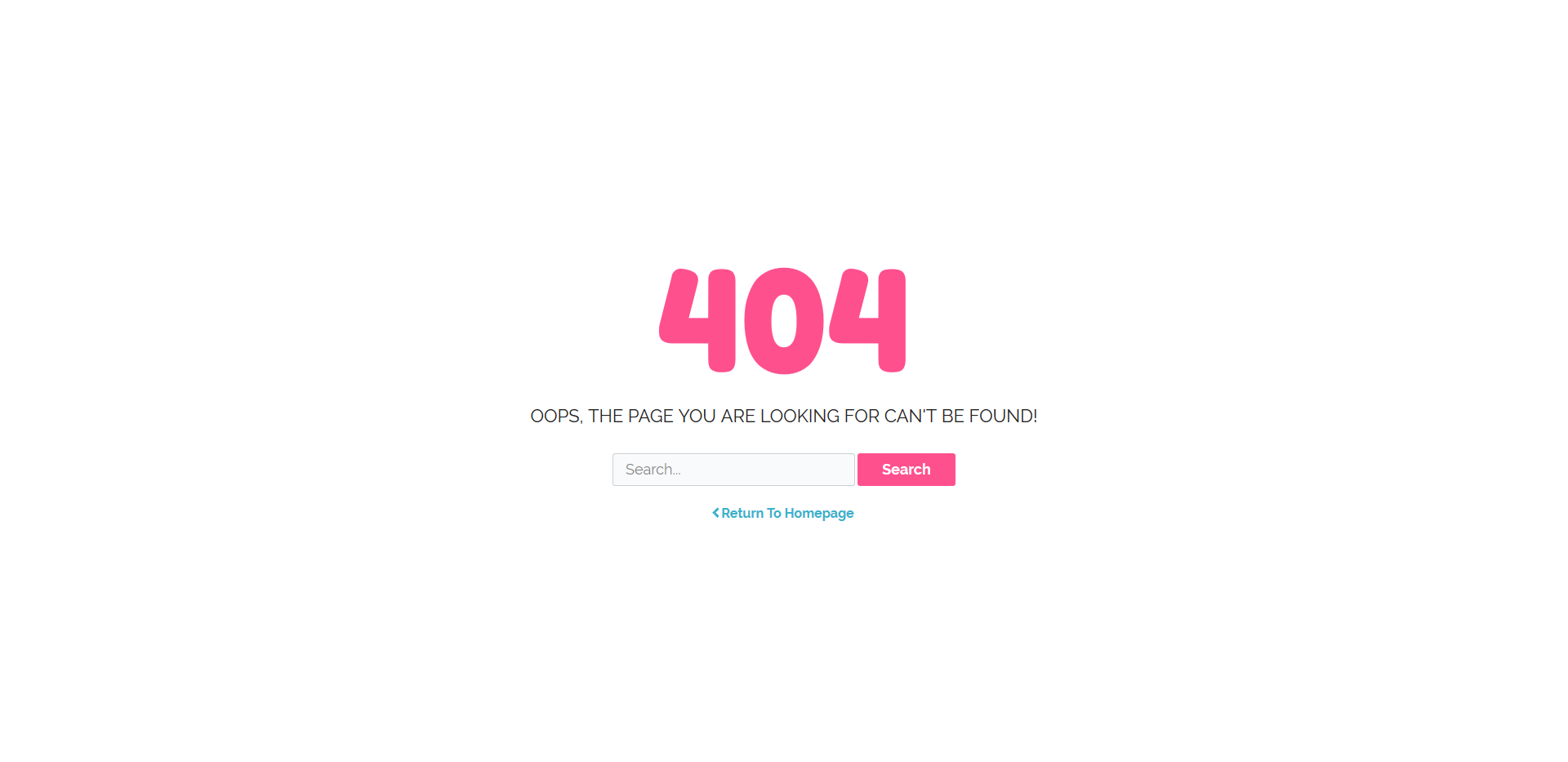
When they search for a topic you do not have on your website or the original page is no more, do not just let them land on a blank page. If this happens, they will probably run away from your page as quickly as possible. To solve the issue, add a cool-looking error page to your webspace and keep them around for longer. For instance, this free 404 error page rock a search function and can go back to your home in just a click. Have your entire online presence sorted out in full.
More info / Download Demo
Colorlib 404 v8

It should be first-class no matter what part of your website they visit. For the most part, websites rock a light web design, but there are occasions when the owner prefers a dark look. We bring you another stunning, elegant, and professional free 404 error page template if the latter is you. It is simple, yet at the same time, sophisticated, which will match your branding requirements effortlessly. Customize the text if needed and make the call-to-action button active by linking it to your first page. After you are fully satisfied with your brand new 404 page, introduce it to your page; the rest is history.
More info / Download Demo
Colorlib 404 v9
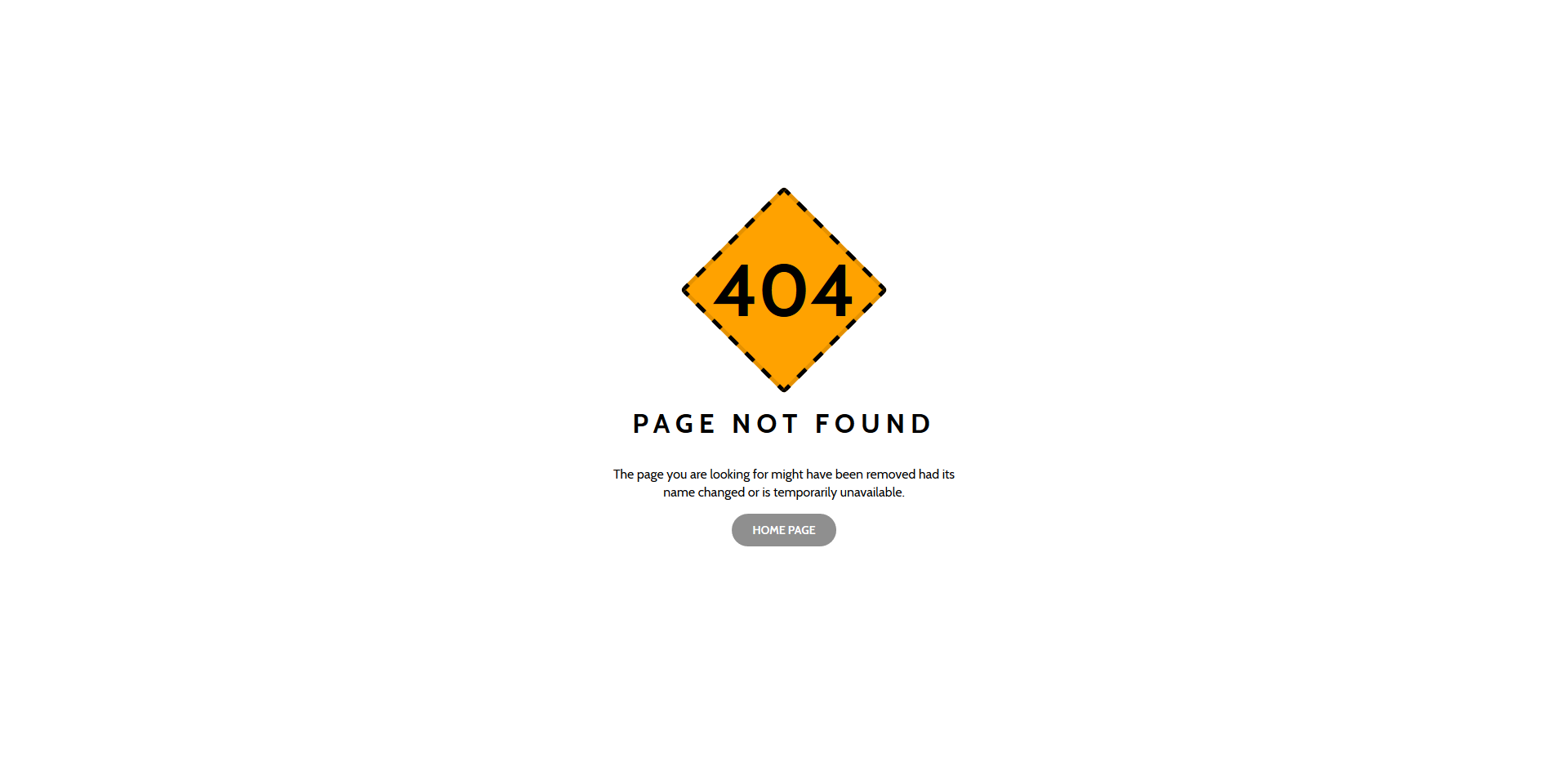
If you feel like stepping things up and not just having some text on your error page, you came to the right place. This one is cool and engaging, but we also have a set of free 404 error page templates that will do the trick for you. Without hassle, you will find the one that meets your needs precisely, and before you know it, it will already be live on your page. Sometimes, it is wise to have a link or even a search bar on your error page to avoid losing many users. Whether they typed the wrong search query or your page is not live anymore when they end up on a 404 page, keep their attention intact.
More info / Download Demo
Colorlib 404 v10
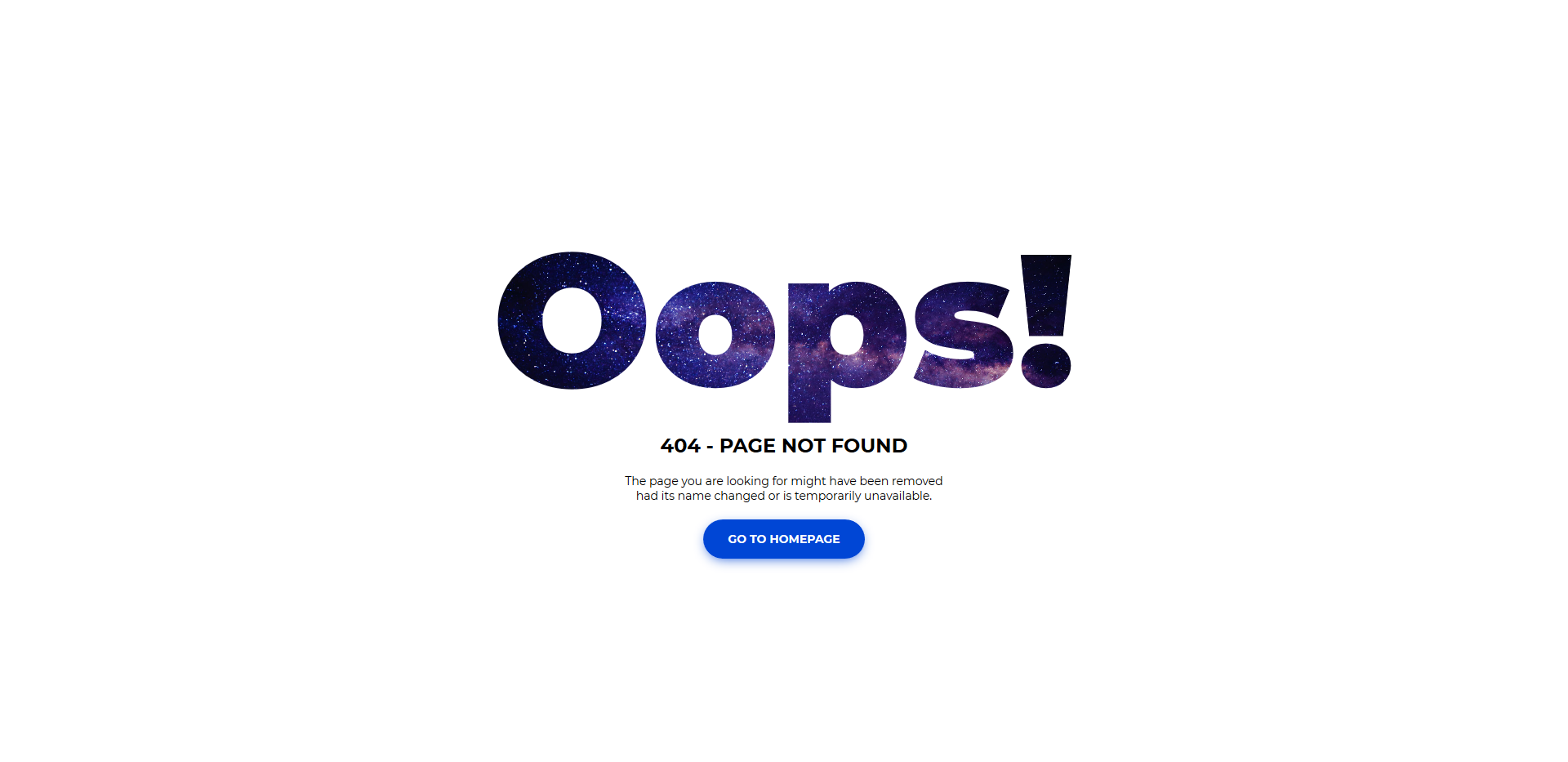
It could be OOPS!, Error, or a simple 404 sign, whatever the case, you can play around with different options when picking up the ideal free 404 error page template for your site. Keeping things simple and clean with a touch of creativity is a winning combination. Of course, you might look at “simple” and “creative” differently than I am. We have an array of contrasting web designs ready and set for you to use and find out what works best almost instantly. Pick accordingly and expand your online space with a neat mobile-ready error page.
More info / Download Demo
Colorlib 404 v11
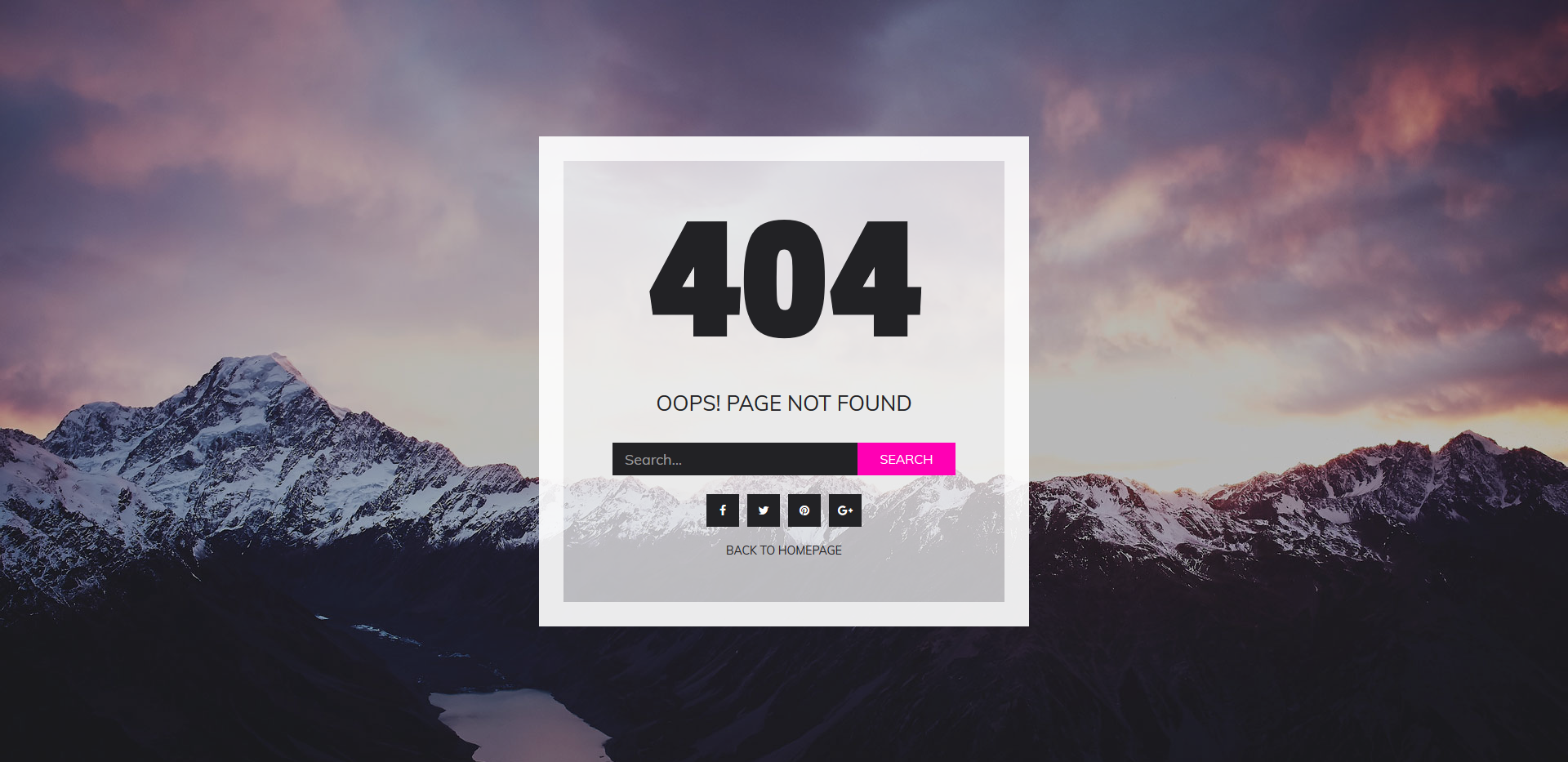
Let’s say you are a photographer. You want your outstanding images featured all over your website, right? And this goes for the error page, too! If you are rocking a boring old 404 page, make a difference today with this free 404 error page template. It features an image background, a search bar, and social media icons. Besides, there is also a back-to-home button just in case. With this type of layout, you will decrease the number of users that leave your site after accidentally landing on the error page. Keep the flow going strong all the time.
More info / Download Demo
Colorlib 404 v12
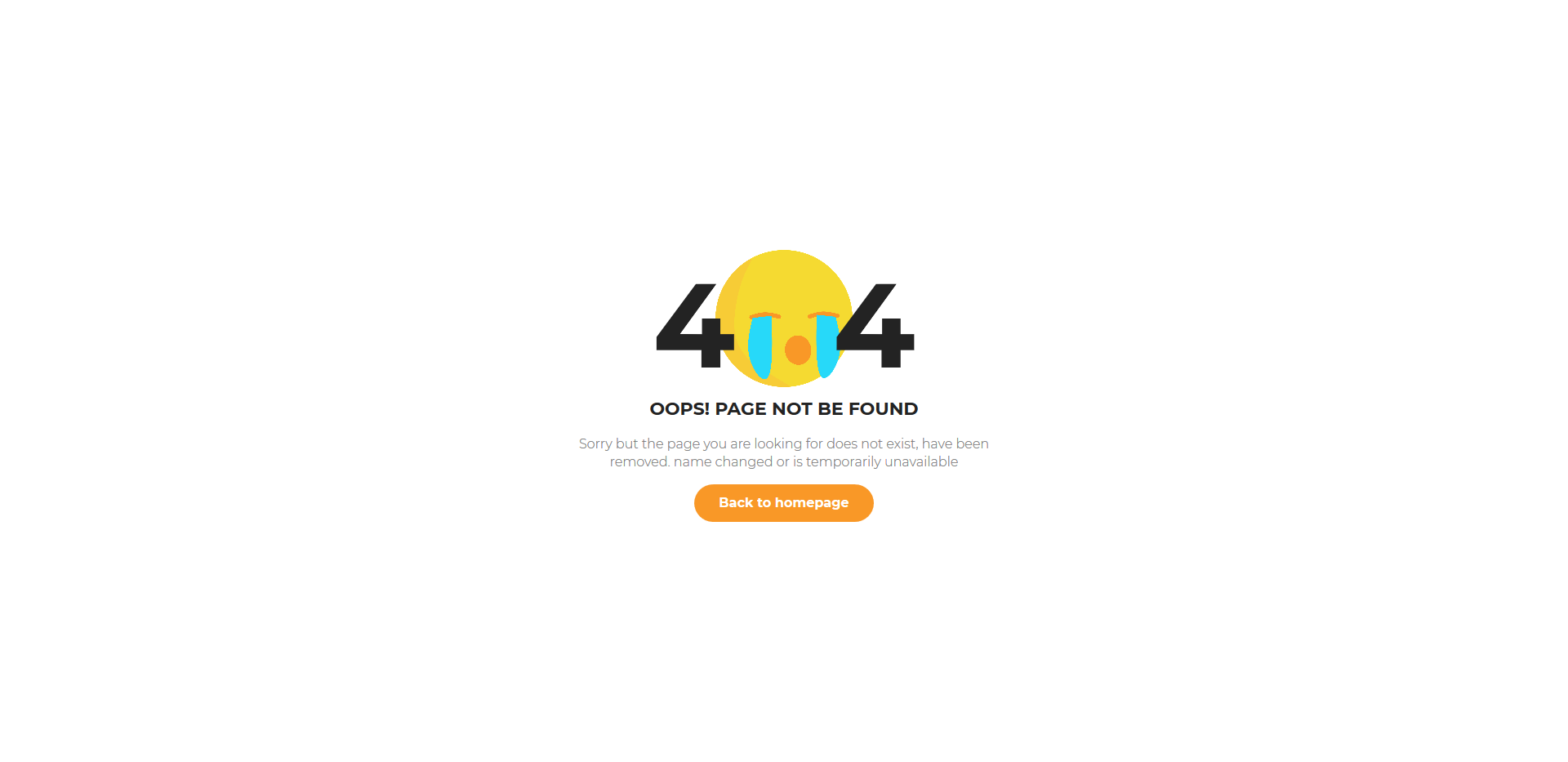
There is no reason why you would not want to have some fun when they happen to land on an error page. With this smart free 404 error page template, you can bring a joyful experience that will take them back to your home page. This way, they won’t just leave your website but keep browsing your remarkable content, products, or services. Help them find exactly what they are looking for, and they will be happy to return. This layout features a crying emoji with some text and a call-to-action button. It will be a small breeze implementing it into your current webspace that is for sure.
More info / Download Demo
Colorlib 404 v13

Cool icons can positively impact your users, especially regarding error pages. Do not make them dull and unattractive instead, make them fun and exciting. Not only that but engaging enough so they will stay around for several additional minutes. With a simple call-to-action, they can return to your first page and find the exact content they are searching for. Sometimes, the wrong search query takes them to the 404 page. However, it is also possible that not all of your sites are still live. But you can now solve the little inconvenience with a free error page template.
More info / Download Demo
Colorlib 404 v14
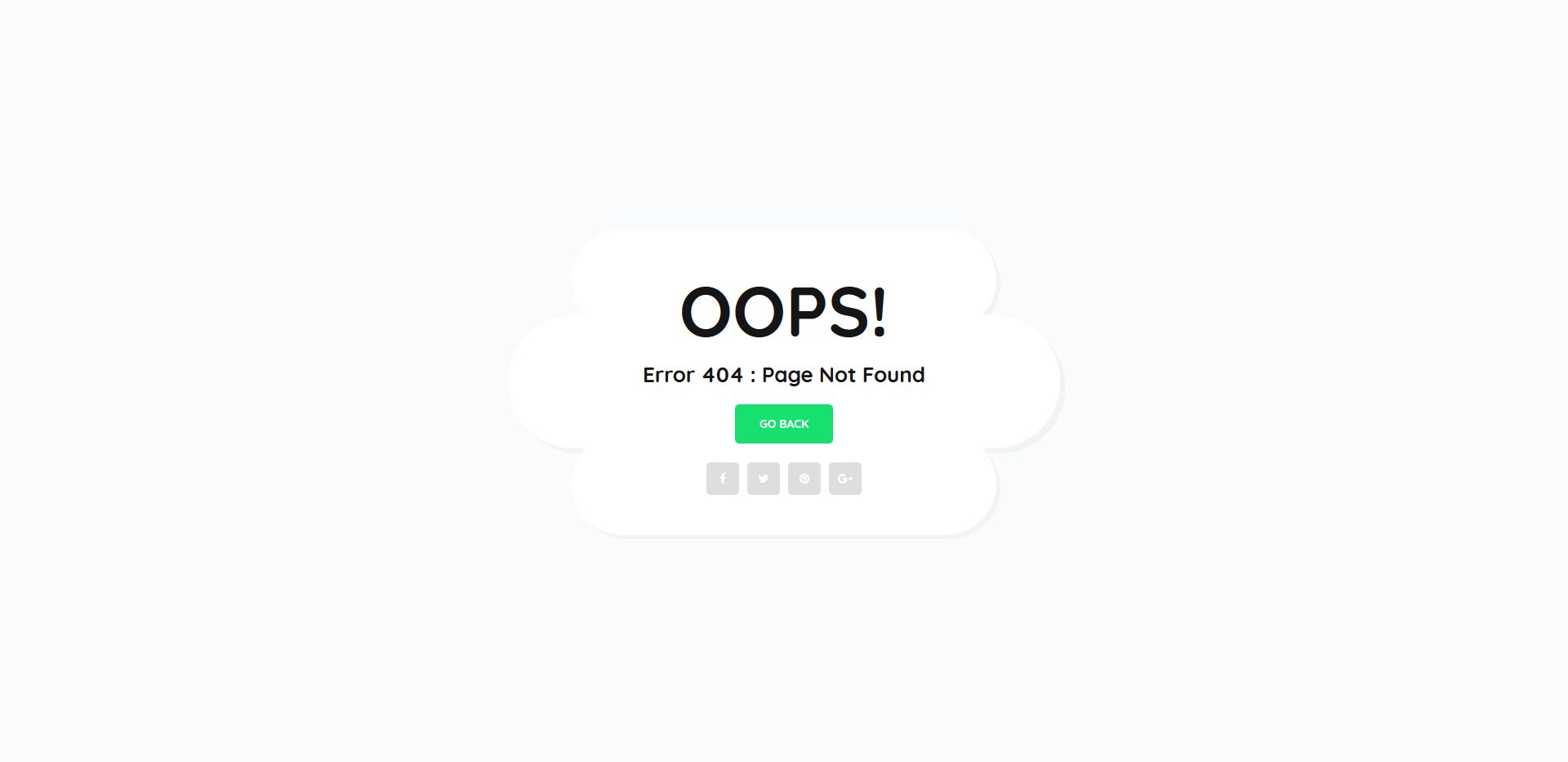
To keep the cool vibes consistent across all parts of your site, you want to pick one of our free 404 error page templates. These come in all shapes and sizes, making sure your users, readers, and random site visitors keep their presence by going back to your home page or visiting your social media accounts. You can achieve fantastic results with a responsive, mobile-ready, easy-to-use tool, like Colorlib 404 v15 page template. Say “OOPS!” in a funky way, and they will continue their browsing experience by heading over to the right section of your page.
More info / Download Demo
Colorlib 404 v15
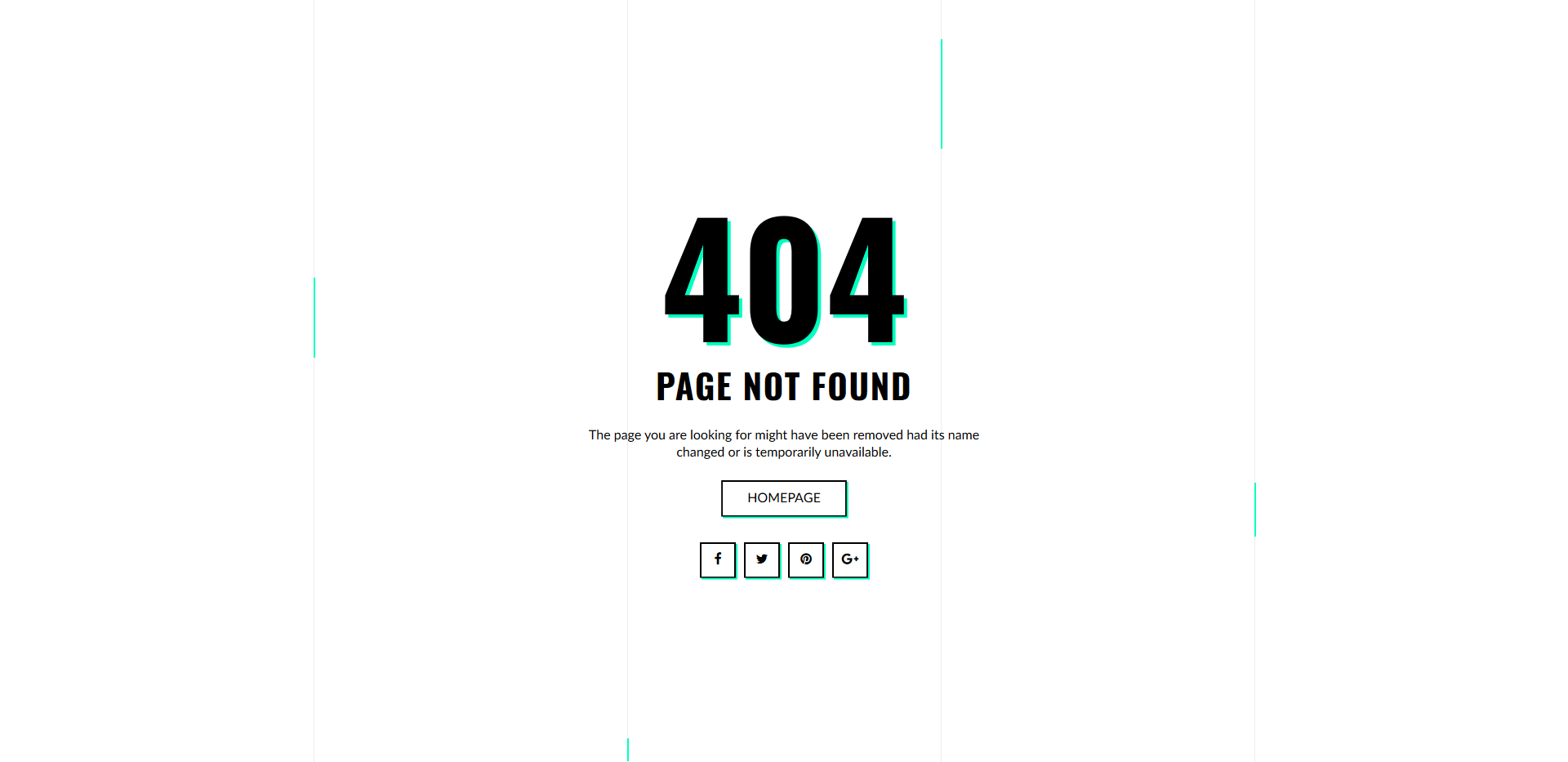
We always bring you all sorts of different free templates for your websites. Some folks like to keep things bare minimum, while others enjoy additional animations and special effects. If you fall in the latter bucket, we have an impressive and attention-grabbing free 404 error page template. It sports vibrant colors and a call-to-action (CTA) button to guide your users to your home page. You will also notice that social media buttons are included in the web design for your convenience. Also, do state (customize) why they see an error page.
More info / Download Demo
Colorlib 404 v16

If you would like to hit your users heavy (in a positive way) with your error page, we have a special treat here for you. Meet a smooth, responsive, mobile-ready, cool, effect-free 404 error page template with a striking red design. Your branding might have some red going on, making this site skin more than ideal. Moreover, you might even want to use it exactly as is, making the social icons and call-to-action active, and you are ready to roll. Of course, you can alter the message, too, and write down something even more catchy.
More info / Download Demo
Colorlib 404 v17

While you can take the time and build your custom error page, we have many stylish, modern, clean and professional free templates that will get you going quickly. Download the tool and put it to use right away. Of course, you can also perform different customization tweaks and make the one layout you fancy follow your needs and regulations exactly. But do feel free to use it exactly as is if you are in a hurry. Instead of featuring just an icon and some text, introduce a button and lead them to your home page or other section of your page.
More info / Download Demo
Colorlib 404 v18

Whoever is missing an error page or is using the default one spice things up with any of our free 404 error page templates. You can now set it up quickly and efficiently without breaking a single drop of sweat. A sad emoji, 404 sign and additional text explaining the situation with a back-to-homepage button is all you need. Even if you like to keep things simple and basic, you can still create a cool environment that keeps them engaged. And this also goes for error pages, occupying their presence at all times.
More info / Download Demo
Colorlib 404 v19

Since you all run different websites, we made sure that the free 404 error page templates we bring to the table are of as different styles as possible. No doubt, you will find one that meets your expectation without hassle. Even if you are a picky user, there is something for every taste. On top of that, the web designs are customizable to fine-tune them further.
More info / Download Demo
Colorlib 404 v20

Instead of keeping your website’s default one, elevate your online presence with a modern 404 section and keep your knowledge intact. 404 sign, text and additional information about why your users see an error page is what this page template treats you to. You will also notice a call-to-action button to make functional and take your site guests back to the home page. Or if you would like to push your compelling blog section, you can link the CTA button there. As a result, you have a quick fix that will sort out your error page.
More info / Download Demo
Build Your 404 Error Page
These are some of the best free 404 error page templates you can use for your HTML website templates. All the templates use the latest CSS framework, so you get modern design elements and trendy colors with these templates. Again, you can’t simply unzip the file and use it directly on your site, you have to spend some time to get these templates into your site.
Are you looking for the best 404 error page design examples?
The right 404 page will keep visitors on your site for longer and encourage them to convert. By creating an engaging, helpful, and entertaining 404 page, you can give visitors a great experience, even when they see an error.
In this article, we’re sharing some of the best 404 error page designs.

Why You Need to Optimize Your 404 Design
A 404 error happens when the server can’t reach the page someone is trying to visit. Instead of showing them a blank screen, the server displays a 404 page instead.
Most WordPress themes come with a basic 404 template, but these designs are usually basic and simple.

They also won’t show any content from your website, such as popular posts that the visitor may want to read, or your site’s navigation menu.
If you show visitors a boring, unhelpful 404 page then they’re more likely to leave your WordPress website, which will increase your bounce rate and hurt your WordPress SEO.
With that in mind, it’s smart to create a custom 404 page that has your own branding and content. You can also help visitors find what they’re looking for by adding search bars, menus, links, and other helpful content.
The easiest way to create a custom 404 design is by using the SeedProd plugin. It is the most popular drag and drop landing page builder, so you can create a custom 404 page without writing any code.
SeedProd also has lots of professionally-designed 404 templates to help you create a beautiful error page, fast.
Once you’ve installed SeedProd, it’s a good idea to turn to your competitors for inspiration. With that in mind, we’ve collected the best 404 error page designs for you to look at.
1. DFY
Many websites use countdown timers to create a sense of urgency and get more conversions using FOMO. However, DFY had made the unusual decision to add a countdown timer to their 404 page.

This timer counts down the seconds until the visitor is automatically redirected to the homepage. By creating a time limit, DFY immediately makes their 404 page more engaging and pushes visitors to make a decision before time runs out. It’s also an unusual design choice, so it’s guaranteed to grab the visitor’s attention.
The 404 page’s messaging adds to this sense of urgency, making this a very dramatic and compelling page design.
For more information about using time limits on your site, please see our guide on how to add a timer widget in WordPress.
2. OptinMonster
OptinMonster is one of the best email capture plugins for WordPress used by over 1.2 million websites. It has everything you need to turn visitors into subscribers and customers.
Unsurprisingly, OptinMonster uses their 404 page as a lead generation tool with an eye-catching animation and clear call to action.
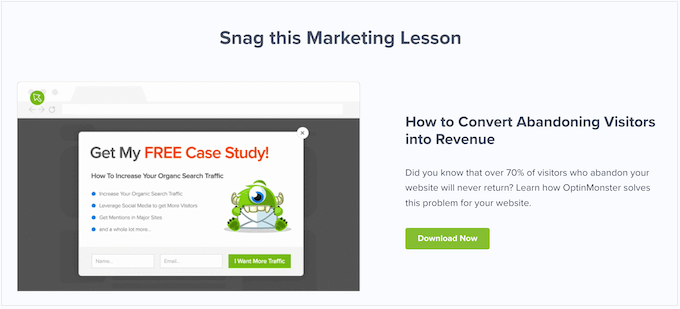
Even better, their pitch relates to the visitor’s situation.
When someone lands on a 404 page, there’s a big chance they’ll give up and abandon your website, since they can’t find what they’re looking for.
OptinMonster’s pitch plays into this, by asking: ‘Did you know that over 70% of visitors who abandon your website will never return?’
Since the visitor is already thinking about website abandonment, they’re more likely to act on this statistic. The call to action then offers visitors a free ebook that promises to convert abandoning website visitors into subscribers.
Clicking on the ‘Download Now’ button opens a popup where the person can type in their email address and get their free download.
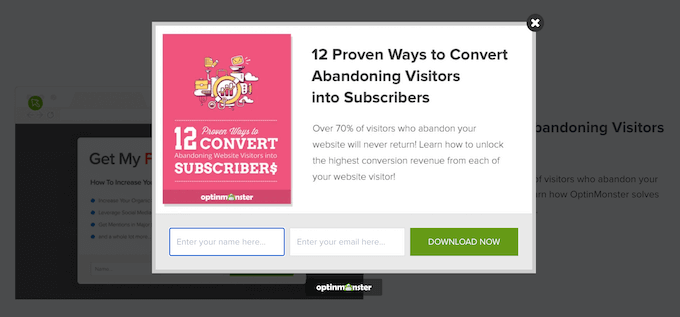
As we can see, OptinMonster uses the 404 error to their advantage by creating a pitch that feels very relevant and timely.
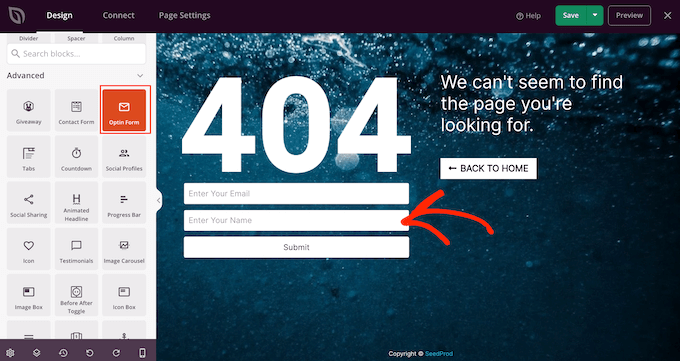
If you want to use your own 404 page for lead generation, then you can collect email addresses using SeedProd’s Giveaway, Contact Form, and Optin Form blocks.
3. Kualo
Many websites use gamification to build customer loyalty and keep people coming back to their site.
Kualo have taken this one step further and gamified their 404 page.
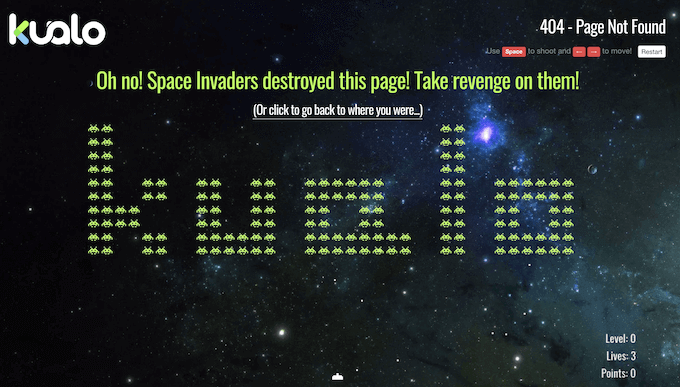
Instead of helping visitors find their way back to the main Kualo website, the 404 page challenges them to a space invaders game.
This turns a frustrating error message into a fun surprise.
Even better, when you run out of lives Kualo gives you an incentive to carry on playing.
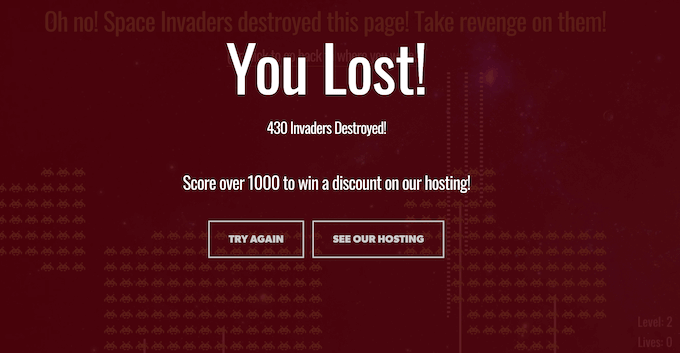
The popup offers players a discount on hosting if they manage to score over 1000 points. This is a perfect example of a 404 page that keeps visitors on your website for longer, and adds value to the user experience.
4. TripAdvisor
TripAdvisor’s 404 page is fun and functional, and opens with a joke that’s specific to the travel industry.
When someone lands on your 404 page, they may be frustrated with their experience. Humor can be a great way to re-engage these people.
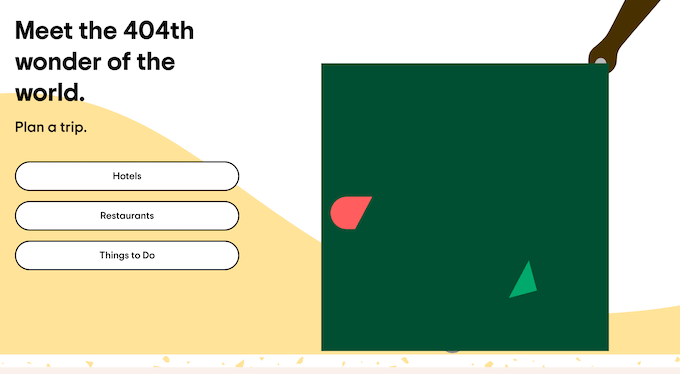
Even better, the jokes always tie into the TripAdvisor brand.
Branding is one of the major benefits of replacing the standard WordPress 404 page with a custom design, and TripAdvisor’s page shows that branding isn’t just custom logos and images. The words on your 404 page are just as important as the graphics.
The 404 page also highlights all the major areas of the TripAdvisor website, which helps visitors find what they’re looking for.
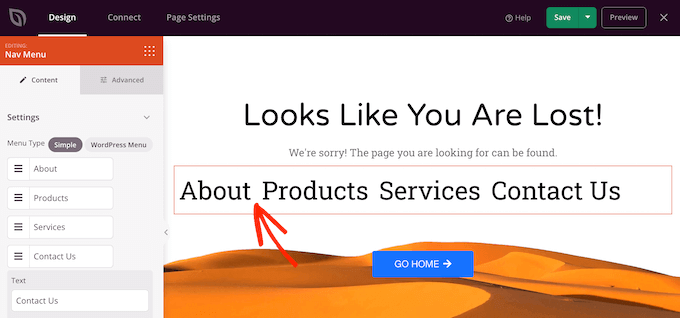
Since navigation is so important, we recommend looking at SeedProd’s Nav Menu block as it lets you build all kinds of menus directly inside the page editor.
5. Brett Terpstra
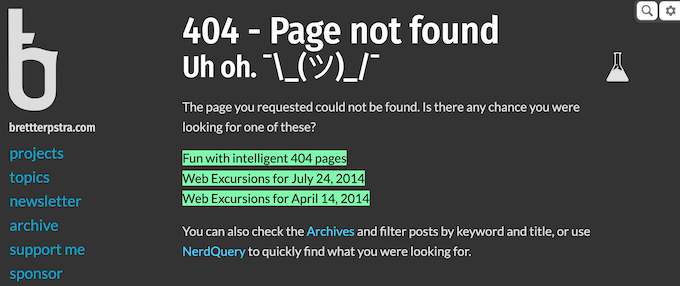
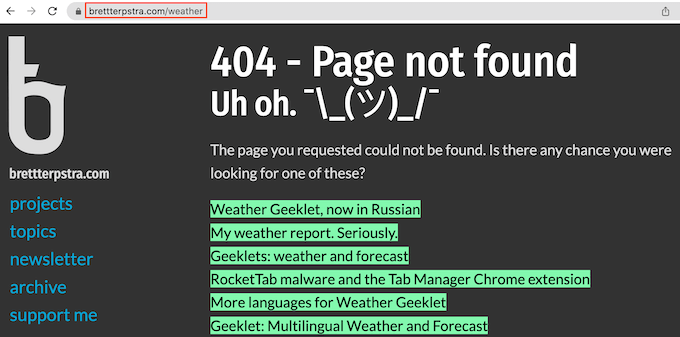
At first glance, Brett Terpstra’s 404 page may look basic but the real power lies in its list of suggested posts.
Brett Terpstra’s 404 page shows a list of posts containing keywords related to the link the visitor was trying to access when they got the 404 error.
It’s a simple trick that adds a lot to the visitor experience.
Personalized content can make your site more useful, engaging, and appealing so it makes sense to extend this to your 404 page.
To learn more about targeted content, please see our guide on how to show personalized content to different users in WordPress.
6. Constant Contact
Constant Contact is another 404 page that uses humor to win over frustrated visitors. The email service provider uses informal language to appeal to their target audience, while also giving visitors an easy route back to the homepage.

If you scroll down the page, then you’ll find links to some other important areas of the Constant Contact website.
However, what we really like is the short hover animation that plays every time you move the mouse over one of the blue blocks.
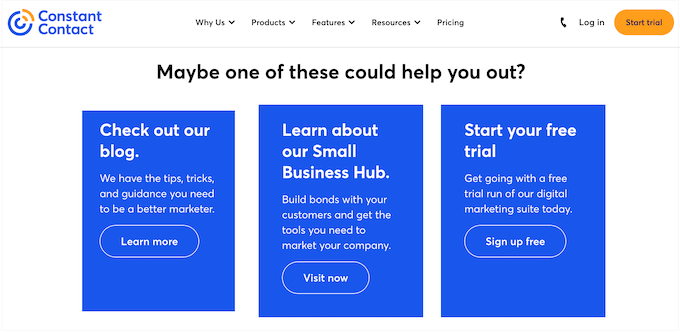
Animation can make a page more engaging, and the multiple hover animations creates a storytelling element as the visitor moves around the 404 page.
There are a few different ways to animate your 404 page, including highlighting and rotating your text using the SeedProd Animated Headline block. For more information, please see our guide on how to add CSS animations in WordPress.
7. IMDB
Most people will encounter your 404 page when looking for something else entirely. Since the 404 error is unexpected, it’s important to reassure visitors that they’re still on your site by maintaining brand familiarity.
IMDB do this in a very subtle and light-hearted way, by showing a famous quote from a movie or TV show.
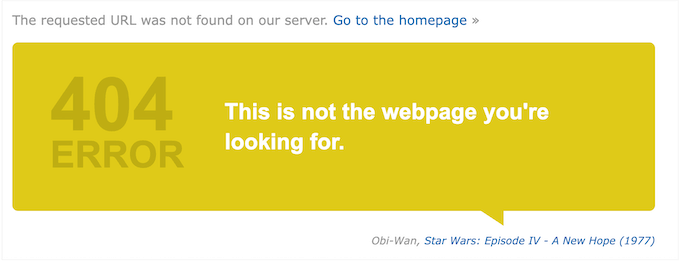
They also include a link to learn more about the TV show or movie that they’re quoting.
In this way, IMDB’s 404 page reinforces their brand while also giving visitors a fun way to explore their content.
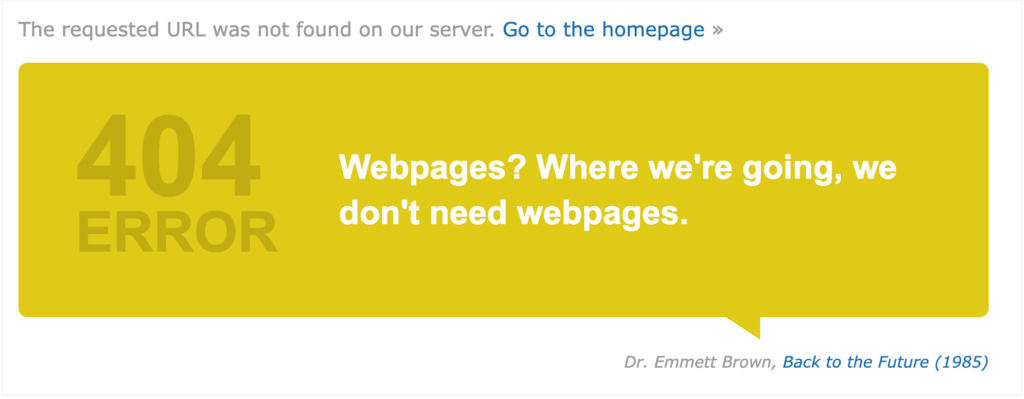
Showing random quotes on your 404 page can be fun and engaging. However, it’s still a good idea to provide links to your site’s most important content, just in case the visitor isn’t interested in the link that you’ve chosen at random.
IMDB shows this doesn’t have to be complicated, by including a link to their homepage.
8. Steve Madden
Steve Madden tries to turn an error message into sales by showing their best selling products on the 404 page.

Even better, they’ve added filters so customers can browse the different products directly from the 404 page.
If you run an online store, then you can easily display your most popular products, products that are on sale, your newest products, and more. Simply add the ‘Best Selling Products’ block to your 404 page and SeedProd will find these products and then add them to your 404 page automatically.
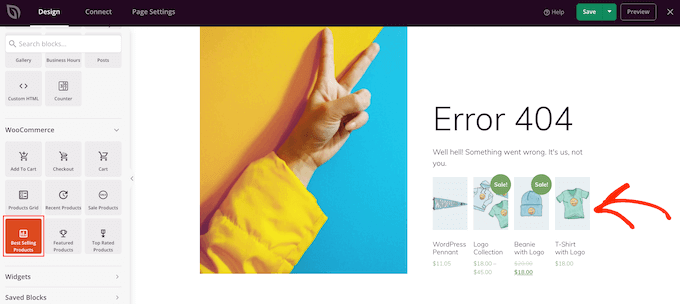
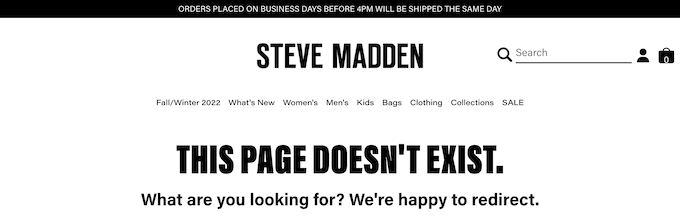
When designing your own 404 page, it’s a good idea to use the same header and footer as the rest of your website. This will reinforce your branding and stop visitors from wondering whether they’re in the right place.
This is exactly what we see with Steve Madden’s 404 page, but we particularly like how much content they manage to fit into these two small areas.
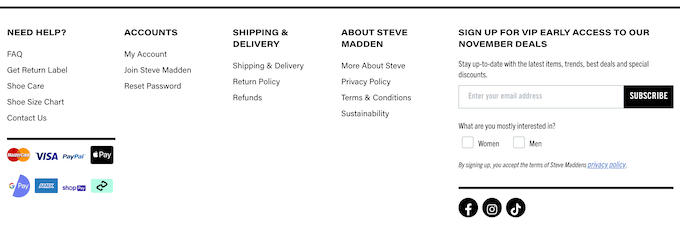
The header and footer helps visitors jump straight to any part of the Steve Madden store, or even third-party sites such as the company’s Twitter and Facebook page.
They even provide access to interactive areas, including a smart product search bar.
9. Apartment Therapy
This 404 design from Apartment Therapy immediately catches the visitor’s attention with a big hero image.
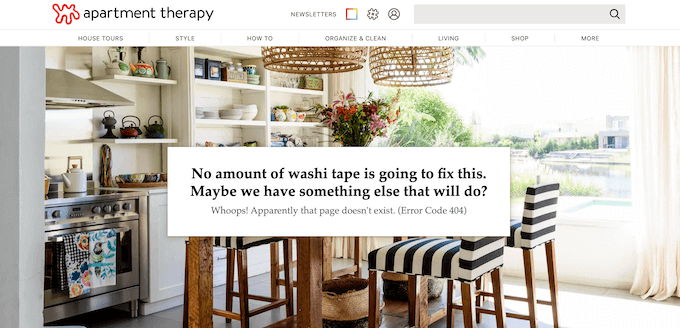
Apartment Therapy also uses this space to reinforce their brand identity, by showing a stylish photo of a kitchen along with a joke about washi tape.
If you want to add a hero image to your design, then SeedProd has lots of ready-made hero sections. These are collections of images, call to actions, and even simple lead collection forms that you can add to your 404 design with a click of a button.
There’s even a section that would look right at home on the Apartment Therapy website.

10. Screaming Frog
Similar to some of the other 404 pages on this list, Screaming Frog uses humor to try and engage with visitors.
However, unlike the other businesses on this list, Screaming Frog creates a tool that helps website owners find and fix broken links. Their 404 page wastes no time pointing out the irony of the Screaming Frog website having a broken URL.
By poking fun at themselves, Screaming Frog delivers a memorable 404 page that doesn’t take itself too seriously.
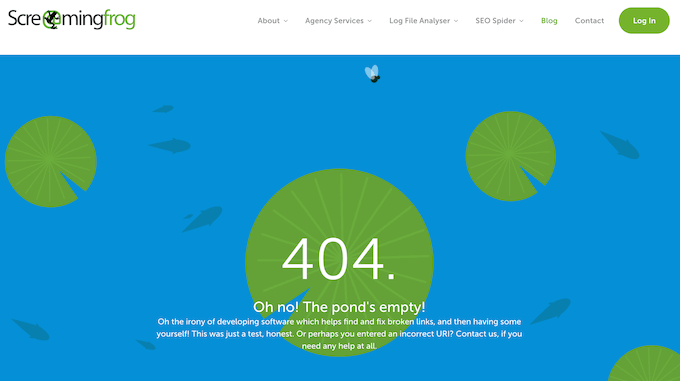
The animated background also helps this 404 design stand out from the crowd.
Videos and animations are a great way to make your 404 page more engaging. However, they can add to the 404 page’s loading times so we recommend following our tips to speed up WordPress performance, particularly if you’re using lots of large or high-resolution videos in your 404 design.
11. MonsterInsights
MonsterInsights is the best WordPress plugin for Google Analytics. It allows you to easily install Google analytics in WordPress and shows helpful reports in the WordPress dashboard.
The MonsterInsights is a good example of a branded page. As soon as visitors arrive on this page, they’ll see a unique graphic based on the MonsterInsights logo.
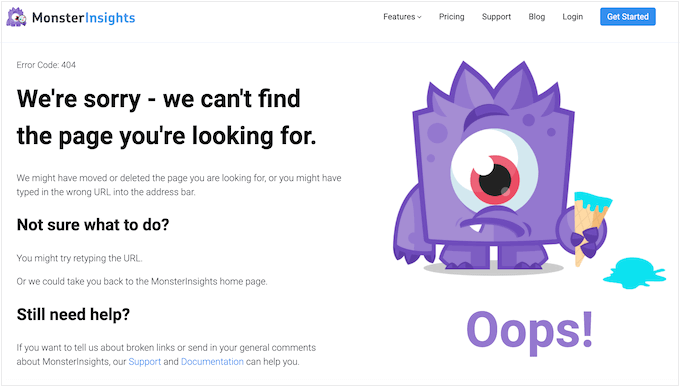
This is a fun way to let visitors know that they’re still on the MonsterInsights website, even if they’ve followed a broken link.
This page also explains what a 404 error is and suggests some things the visitor can do to fix the error. Helping people solve the 404 error themselves can improve the visitor experience, so it’s a good idea to include this information on your own 404 page.
Even if you encourage visitors to fix the problem themselves, it’s still important to include links to your site’s most important content. The MonsterInsights 404 page gives people a few options by including links to the support page, the MonsterInsights documentation, and the pricing page.
12. MAD
MAD has created a simple but highly interactive page by using toggles to create a 404 error message. You can remove this message by turning all the toggles off, or even create your own message by activating the toggles.
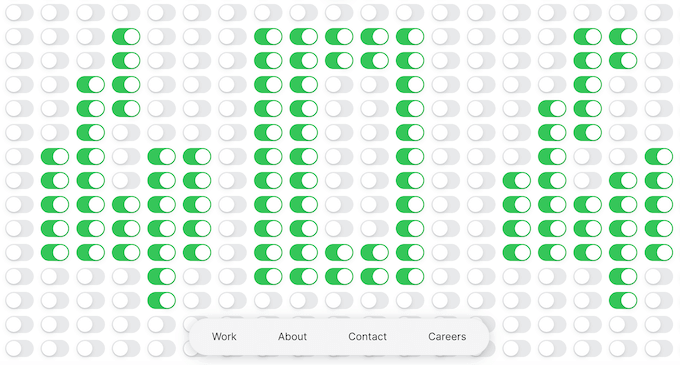
It’s a very straightforward but enjoyable experience that’s designed to get lots of interaction from visitors. It’s also a very unique 404 page that visitors will remember, and perhaps even share with other people.
This striking design proves that you can build a memorable and entertaining 404 page from a simple idea.
13. Southwest
Southwest’s 404 page tries to help visitors get back on track by explaining what a 404 is and why they may be seeing the error. They even suggest some possible fixes, which might be helpful if your target audience isn’t very familiar with 404 errors.
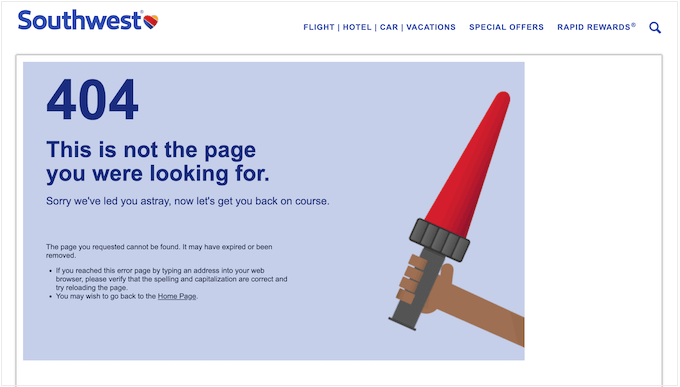
Where this design really stands out is the sheer number of links it manages to display and how neatly these URLs are organized.
If you scroll to the bottom of the screen, then you’ll notice social media links, contact information, a link to join their email list, and dozens of other links all arranged in clear and user-friendly categories.

The Southwest 404 page is a great example of how much information you can pack into a page without overwhelming the visitor.
Here, the right layout is key and Southwest does a great job of using categories, lists, and different sections to create a 404 page that’s information-packed but still easy to read.
We hope this article has helped you find the best 404 error page design examples. You may also want to check out our guide on the best WordPress page builder plugins and our comparison of best email marketing services to turn potential leads into paying customers.
If you liked this article, then please subscribe to our YouTube Channel for WordPress video tutorials. You can also find us on Twitter and Facebook.
Disclosure: Our content is reader-supported. This means if you click on some of our links, then we may earn a commission. See how WPBeginner is funded, why it matters, and how you can support us.

Editorial Staff at WPBeginner is a team of WordPress experts led by Syed Balkhi. We have been creating WordPress tutorials since 2009, and WPBeginner has become the largest free WordPress resource site in the industry.