RILNotifier or Radio Interface Layer Notifier on Android is a system service accountable to keep an eye on Active wireless connection on your smartphone and notify other apps about the network type the device is connected to.
What is RILNotifier on Android? What is it used for? What permission do you RILNotifier have on your Android smartphone and devices? Is it safe? And how to troubleshoot the data connection error caused by RILNotifier? Let’s find the answers.
Read also:
- Not Registered on Network Error on Android
- What is Ant HAL Services?
- What is com.sec.android.app.popupcalculator?
- What is DQA app on Android? What is it used for?
RILNotifier- Introduction
RILNotifier Is it pre-installed system apps on all Android devices used to notify other apps about the connected wireless network type.
The app tends to keep running in the background and detect any changes in network connection in terms of internet connectivity.
For example, Android phone is using LTE network and suddenly it’s used to Wi-Fi network, the RILNotifier then comes in the action and notifies each app installed on the device about the change in internet connectivity.
- App Name: RIL Notifier
- Pacakge Name: com.sec.app.rilerrornotifier
- By:Samsung Electronics Pvt. Ltd.
In order to understand about RILNotifier you must know the RIL.
RIL stands for Radio Interface Layer. It works as a layer between Android telephony services and radio hardware(ANT Radio). The RIL itself relies on other components RIL Deamon and Vendor RIL in the Android architect.
Read Also: What is Daemon app and Services App on Android?
What is RILNotifier Used for?
The basic use of RILNotifer on Android is to keep tracking the active internet connection type the device is connected to. The service app keeps running in the background and notifies all the apps on the device the about connection type should be used to access the internet.
Any change in active internet connection on the device is noticed by and later the information is sent to the apps to use that active connection for internet access.
In a nutshell, the RILNotifer helps the app to switch between Wi-Fi network or LTE network for internet access when available.
What permissions do RILNotifer have?
RILNotifer keeps running in the background and plays a significant role to save your mobile data by switching to Wi-Fi network once connected. However, it does not have any specific permissions like media, contacts, or call logs. It relies on only phone permission.
But in some other cases, the RILNotifer might have access permission to the storage.
Is RILNotifier Safe?
Android phones have several pre-installed system apps that play a significant role in the stability and normal functionality of the device. Some of these system apps like RoseEukor, and MCM client are well known as bloatware.
Any pre-installed system apps including RILNotifier on android device are completely safe and does not contain any spyware or Malware.
Read Also: How to Fix a Hacked Android Phone?
Can I Uninstall RILNotifier?
RILNotifier and other system apps cannot be uninstalled like any other standard apps on your Android. These apps play a significant role to run specific services on the device.
Uninstalling or removing them might cause an error for the service running on the device.
The only method to remove or uninstall RILNotifier from Android is to have root access. But routing is quite risky and also it may void your device warranty.
If you are already using a rooted device you can use System app remover to uninstall RILNotifier.
Note: RILNotifier is a system app and should not be uninstalled even if you are getting “Unable to Establish a Wireless Data Connection”.
RILNotifier High Battery Consumption
Users have reported the RILNotifier for consuming battery on the phone. However, the is no significant evidence or proof of RILNotifier eating the battery faster.
RILNotifier and other system apps in the android device tend to keep running in the background and this may use the battery power. If you have any doubt regarding the RILNotifier and battery consumption. You can always try to force stop it.
How to Stop RILNotifier?
RILNotifier is a system app and it is not possible to disable or uninstall it normally. But, if you find the RILNotifier causing any error like battery consumption and others, you can stop the app from running in the background by killing the process.
Follow the steps below to force stop the app.
- Open Settings on Android.
- Open Apps.
- Open the Eclipse menu(Three verticle dots at top right corner) and select “Show system apps”.
- Open RILNotifier.
- Tap on Force Stop.
This will immediately stop RILNotifier and all related packages from running until the device is restarted.
FAQ
Is RILNotifier Used for Hacking?
No, RILNotifier is a system app on Samsung Android phones and there is no evidence of the app being used for hacking or Spyware attacks.
How to uninstall or disable RILnotifier?
It is not possible to uninstall RILNotifier from Android. However, you can root your device and use ADB or app remover to uninstall it.
Does RILnotifier cause Wifi Connection error?
RILnotifier is used to notify the apps on the device for active internet connection change. It has nothing to do with wifi connection error on the device. You can follow the steps here to fix Wifi connection error.
Final Words:
RILNotifier or Radio Interface Layer Notifier on Android is a system service accountable to keep an eye on Active wireless connection on your smartphone and notify other apps about the network type the device is connected to. This system app is pre-installed on Samsung phone(Package Name:com.sec.app.rilerrornotifier). The app is completely safe and doesn’t contain any malware or spyware.
OTHER SYSTEM APPS
- What is captive portal login
- What Is KLMS Agent?
- What is com.android.incallui?
- What Is DiagMonAgent?
- What is Samsung Accessory Service?
- What is the RootPA app on Android?
Before explaining what is RilNotifier app on an Android phone? it is important to understand the meaning of RIL. RIL is an acronym for Radio Interface Layer, the bridge between radio hardware and android telephony services. RIL has two distinct components; Vendor RIL and RIL Daemon, whose functions are explained later.
Some people search for information about Ril Notifier probably because their devices are consuming too much battery or RilNotifier cannot create a wireless data connection. Individuals not having Wi-Fi connections access internet services via a mobile data connection. The usage of mobile data connection could result in RilNotifier errors that affect data connectivity.
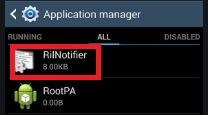
RilNotifier is an in-built application in an android system that informs the other apps in your device of the type of wireless mobile network connection for your device. For instance, if your android phone is connected to Wi-Fi and then you switch to the LTE network. The RilNotifier will notify the other apps about the change.
The developers of RilNotifier do not provide any additional information about the workings of the app. Still, it is reasonable to believe that it affects how these apps respond to the change if it sends notifications of network change to other apps. For instance, Google Play Store will identify the network type and request if you would like to download or update the application through Wi-Fi or cellular network.
How Safe is The RilNotifier App?
RilNotifier is part of a system app. Almost all android devices have this app built inside, though, in some devices, it is called Service Mode RIL. However, some users think that RilNotifier is malware or spyware, while others think hackers use it to control their phones and steal personal information.

RilNotifier sometimes sends a notification on your phone’s screen informing the user that the system cannot establish a wireless data connection. These notifications are not viruses or malware; it is the system app doing its work of notifying other apps what is going on with the network.
You can confirm that the RilNotifier app is not a virus such as the OMACP app by clearing the cache or data in the app settings, or you could factory reset your device. Ril Notifier does not monitor calls nor is it used by hackers to steal personal information or control your device. Yes, RilNotifier is safe on your Android phone.
Ril Notifier App and High Battery Consumptions
Quick battery drain from your device can be frustrating and annoying. Forcing users to budget for power banks or constantly charge the battery, which is not healthy for battery life.
Some people link the battery problem or google play services keep stopping to RilNotifier; however, this claim is nearly impossible. The app occupies a small space in your phone and does not result in battery issues with most devices.
If you are convinced it is the ril notifier causing your battery problem, you could try force-stopping the app and then monitor to see if the issue persists.
How to correct the Rilnotifier problem “unable to establish a wireless data connection”?
Many users of Samsung S9 and S10 have frequently reported connection issues, with some users thinking this problem is caused by Sprint. However, users ought to know that a RilNotifier notification on unable to establish data connection appears on the screen when your device cannot get data services, and it is not affected by only Sprint. Fixing this connection problem may require you to try various methods as outlined below.
Method 1: Turn your mobile data off and on again.
If the connection notification comes while using the mobile data, try turning the mobile data off and on again to determine if the problem is fixed. The switching off data could take at least five minutes before turning it on again.
Tips: You could remove the Sim card from the device and then reinsert it to help optimize the data connection and fix RILnotifier.
Method 2: Reboot your device
Some individuals claim that starting the device provides only a short-term solution to the problem. Nevertheless, it is worth trying, and it takes a short period to accomplish.
Rebooting your phone will require that you long press the power button until the restart button appears on the screen, then click on the button for a restart process.
Method 3: Update your device’s preferred roaming list (PRL)
Updating the device’s PRL can also prove helpful in solving the problem of mobile data connection. You will be interested in looking for any software updates on PRL and continuing to update to fix the problem. The procedure will be as follows:
- Open the Settings app on your smartphone
- Check for application updates in the system
- Tap on update PRL if there are any updates
- Tap on OK, and the update will take effect immediately, correcting any errors in the data connection.
Method 4: Turn the RilNotifier notifications off.
Turning off the notification may not be an ideal solution for solving the problem since it is only the notifications you won’t see, but the problem will persist. As previously mentioned.
The RilNotifier app will show a notification when your device cannot get data services, which means before you find a permanent solution to the problem, turning off the notifications will be the best idea. Furthermore, it is safe, and you can enable the notification anytime you want. The following steps can help you to disable RilNotifier notifications.
- Open the Settings app by clicking on it
- Tap permission and notification
- Click on see all apps and then click on the ellipsis icon (the three lines on the top right corner)
- Tap on show system apps
- Click on the dropdown list and tap on all apps
- Scroll to RilNotifier and, using the toggle switch disable the notification.
Remember that the above steps could be different depending on which phone model you are using. Switching off the notifications can also solve constant com Samsung android messaging, and it is especially suitable for individuals with promising internet and data connection.
What About Uninstalling RilNotifier App?
System apps are not like other apps you have installed from the App store or websites. System apps cannot be disabled or uninstalled, similar to the other app like configAPK or mdmapp. Still, you can disable them by using third-party apps such as system app remover which accesses the root of the app and acts as an android debug bridge to aid in uninstalling a system app.
System app remover works well when your device is rooted; otherwise, you will have to root the device first. The rooting process is contingent on the model of your device. Older smartphone versions are often rooted by an android app such as Kingoroot, while the latest version is rooted using the root apps’ PC version.
However, if your device is not rooted, you can use the android debug bridge (ADB) method to uninstall system apps. It is fast and does not need root access. If your know the commands to use, you can easily use ADB to uninstall/disable any in-built android app. Uninstalling RilNotifier needs its package with the name com.sec.app.rilerrornotifier
The bottom line
RilNotifier is a system Android app that comes with your new phone and is not installed from the App store. It is responsible for informing the other apps of data connectivity changes. If there are data connection issues, it gives notifications about your device’s inability to access a wireless data connection. Some confuse the RilNotifier app with a virus or malware that steals personal information and drain battery; however, that is not true. This app is not a virus and does not cause battery drain from our device.
Author Recommendations
- How to fix chromecontunie?
- What is com.android.captiveportallogin?
 Всем привет
  Сегодня я расскажу о том что такое com.sec.android.app, ну то что это из Андроида, думаю и так понятно. Начал искать и выяснил что com.sec.android.app… ну это не совсем программа. Это идентификатор, но проблема в том, что это только часть. Так бы сказать основное, не полный идентификаторы, а только его главная часть, понимаете?
Поэтому мне нет смысла писать о том что такое com.sec.android.app — лучше я напишу о некоторых идентификаторах, в которых упоминается com.sec.android.app, окей? 
com.sec.android.app.sbrowser
Это ребята как я понял фирменный браузер Samsung Internet. Его наверно можно встретить на телефонах Самсунг и вполне возможно что приложение системное. Вот нашел картинку, тут отображено кто сколько кушает батарею и видно что браузер немного кушает — всего 6%:

В телефонах этот браузер может просто называться как Интернет:

Ну и еще одна картинка и все:

Так, с com.sec.android.app.sbrowser разобрались — это браузер. Файл apk этого браузера может иметь название примерно такое — SBrowser_3.0.38_LATEST.apk.
Если с браузером проблемы — то.. стоит обратится в поддержку Самсунг, все таки их браузер. В самом крайнем случае можно заморозить, удалять не советую все таки. Для заморозки используйте Titanium Backup
Так.. а вот я что-то странное нашел — упоминание в сообщениях такого:
content://com.sec.android.app.sbrowser/
Что это может быть? Вот мои мысли:
- Возможно что это какой-то фирменный вид адреса сайтов в браузере.
- Может это адрес сохраненной страницы в браузере, вроде есть там такая функция. Тем более что я видел адреса, в которых было слово savepage. Но были и те адреса, где упоминалось readinglist — переводится как список для чтения
В общем к сожалению с этими адресами content:// не совсем понятно и внятной инфы в интернете не могу найти 
com.sec.android.app.myfiles
Это программа Samsung My Files (Мои файлы) — файловый менеджер, можно управлять всеми файлами, которые есть на Андроиде. То есть это стандартный диспетчер файлов на телефоне Самсунг. Что еще интересно, если этой проги нет, то могут быть ошибки. Например один человек хотел загрузить мелодию в будильник — но не получилось, ибо выдало ему ошибку:
com.sec.android.app.myfiles not found
Так что делаем вывод — лучше не удалять, в крайнем случае можно попробовать заморозить
Файл apk может называться так — SecMyFiles2015.apk  Кстати вот я его и нашел:

А вот как выглядит приложение Мои файлы, смотрите:

Правда это у нас не смартфон, это планшет, а то как-той экран необычный как для смарта..
com.sec.android.app.simsettingmgr
Теперь поговорим про com.sec.android.app.simsettingmgr, значит поискал и выяснил что это какой-то диспетчер SIM-карт.
Если посмотреть на само название, то есть на com.sec.android.app.simsettingmgr, то.. смотрите тут есть слово app, это значит приложение, и есть слово simsettingmgr, его можно разобрать как sim, setting и mgr. Что такое sim — понятно, это симка. Setting — настройка. Ну а mgr — возможно манагер, то есть менеджер.
В интернете информации вообще нет никакой 
На этом все ребята. Удачи вам и всех благ! 
На главную!
13.11.2018