
2

13
14.07.2014, 05:02
Возможно, проблема заключается в антивирусе или файрволе, блокирующем установку расширения Adblock Plus.
14
2
11.08.2014, 05:26
Adblock Plus не устанавливается ни с антивирусом ни без него.
Пишет network failed
1
2
01.09.2014, 16:59
Разработчики программы советуют, если не помог антивирус или детектор шпионов, то нужно переустановить сам Chrome. Насколько известно, такая ошибка встречается только в Хроме.
9
4
27.10.2014, 16:57
вот вот дибильная программа, че тока не делали все равно выдает ошибку
Произошла ошибка
NETWORK_FAILED
ОБНОВИТЬ ЗАКРЫТЬ
3
8
09.12.2014, 09:55
перед установкой хрома снесите его полностью у себя на диске,и потом установите его заново, была такая же проблема! если устанавливать хром поверх старого пролема не решается, только если стереть с диска полностью и не забывайте сначала скачать установку перед его удалением
3
1
19.04.2015, 06:52
«перед установкой хрома снесите его полностью у себя на диске,и потом установите его заново, была такая же проблема! если устанавливать хром поверх старого пролема не решается, только если стереть с диска полностью и не забывайте сначала скачать установку перед его удалением»
снесла и переустановила, и всё равно выдаёт:
«Произошла ошибка
NETWORK_FAILED
ОБНОВИТЬ ЗАКРЫТЬ»
Достало всё это, если честно! Как защитить комп от идиотской рекламы и порнухи? Помогите!!!
3
0
21.04.2015, 08:12
«перед установкой хрома снесите его полностью у себя на диске,и потом установите его заново, была такая же проблема! если устанавливать хром поверх старого пролема не решается, только если стереть с диска полностью и не забывайте сначала скачать установку перед его удалением»
снесла и переустановила, и всё равно выдаёт:
«Произошла ошибка
NETWORK_FAILED
ОБНОВИТЬ ЗАКРЫТЬ»
Достало всё это, если честно! Как защитить комп от идиотской рекламы и порнухи? Помогите!!!
В ответ на сообщение от Гость
#127525
4
0
21.04.2015, 08:14
Елена
Гость
«перед установкой хрома снесите его полностью у себя на диске,и потом установите его заново, была такая же проблема! если устанавливать хром поверх старого пролема не решается, только если стереть с диска полностью и не забывайте сначала скачать установку перед его удалением»
снесла и переустановила, и всё равно выдаёт:
«Произошла ошибка
NETWORK_FAILED
ОБНОВИТЬ ЗАКРЫТЬ»
Достало всё это, если честно! Как защитить комп от идиотской рекламы и порнухи? Помогите!!!
И у меня точно такая же проблема, люди помогите!!!!!!!!
В ответ на сообщение от Елена
#127741
4
0
24.06.2015, 15:35
Та же проблема,и тоже не могу ее решить,и переустанавливала тоже, все полетело в тар тарары,и рекламу тоже блокировать не может,а раньше работало
9
5
20.07.2015, 10:06
0
4
21.07.2015, 08:38
СПАСИБО ДОКТОР!!! Полдня промаялась)) а теперь все супер)))
2
0
31.07.2015, 13:06
короче гугл твердо решил банить ад блок, он им рекламу всю перекрывает, а программа ad guard скрывает рекламу частично, самый минимум, рекомендую проучить этих фалосов с гугл и попробовать opera
2
0
04.08.2015, 18:08
У меня проблема со всеми расширениями, перепробовала все советы и ничего не помогает.
3
0
16.08.2015, 11:10
Даня Даня
короче гугл твердо решил банить ад блок, он им рекламу всю перекрывает, а программа ad guard скрывает рекламу частично, самый минимум, рекомендую проучить этих фалосов с гугл и попробовать opera
Долго заморачивался с этим и помог элементарный способ,скачать addblock архивом,распаковал и в включив режим разработчика в хроме перетянул расширение в браузер и «о чудо!!!»,всё прекрасно работает.
В ответ на сообщение от Даня Даня
#135886
44
0
28.08.2015, 00:57
Otvet
C:WindowsSystem32driversetc
hots -удалить

Я просидела два с половиной часа переустанавливая свой браузер, читая форумы, удаляя все подряд. Прочитав ваш комментарий я подумала » а ну его нахер, сломаю, снесу винду» И О БОЖЕ!!!! Вы гений! Я преклоняюсь! Спасибо вам!
В ответ на сообщение от Otvet
#136988
27
0
04.09.2015, 06:14
Otvet
C:WindowsSystem32driversetc
hots -удалить
Вы, ГЕНИЙ. Спасибо за самое простое решение.
В ответ на сообщение от Otvet
#136988
8
0
05.09.2015, 19:56
Otvet
C:WindowsSystem32driversetc
hots -удалить
РЕСПЕКТ!
В ответ на сообщение от Otvet
#136988
3
0
05.09.2015, 23:25
Otvet
C:WindowsSystem32driversetc
hots -удалить
Спасибо!
В ответ на сообщение от Otvet
#136988
5
0
06.09.2015, 21:07
Otvet
C:WindowsSystem32driversetc
hots -удалить
спасибо старина. ты лучший. ты мощный;))
В ответ на сообщение от Otvet
#136988
4
0
19.09.2015, 08:14
Otvet
C:WindowsSystem32driversetc
hots -удалить
Спасибо! Все работает!
В ответ на сообщение от Otvet
#136988
9
0
20.09.2015, 20:04
Otvet
C:WindowsSystem32driversetc
hots -удалить
Спасибо с 2015!
В ответ на сообщение от Otvet
#136988
1
0
22.09.2015, 12:36
Спасибище!!!! Огромадное . все наладилось
7
0
25.09.2015, 13:43
Otvet
C:WindowsSystem32driversetc
hots -удалить
Огромное спасибо тебе добрый человек!!! Гуглевцы засранцы специально это сделали их рекламу банит!
В ответ на сообщение от Otvet
#136988
На чтение 4 мин. Опубликовано 15.12.2019
Иногда в браузере Google Chrome появляется ошибка NETWORK_FAILED при установке Adblock или какого-нибудь другого расширения или дополнения.
 Произошла ошибка NETWORK_FAILED Adblock не установился
Что делать если не устанавливаются расширения в Chrome
Обычно эта ошибка NETWORK_FAILED пропадает после переустановки или обновления гугл хрома.
Google Chrome обычно обновляется автоматически, но если нет то нужно включить автоматическое обновление Google Chrome.
Включается обновление Google Chrome через редактор реестра.
Чтобы открыть редактор реестра нужно нажать на клавиатуре сразу две клавиши WIN+R.
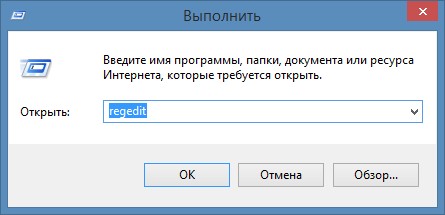 Запускайте команду выполнить если произошла ошибка NETWORK_FAILED
Откроется команда выполнить в которой нужно вписать «regedit» и нажать кнопку «ОК».
Перед вами откроется редактор реестра.
Теперь нужно в левом окошке пройти по пути:
HKEY_LOCAL_MACHINE
SOFTWARE
Policies
Google
Update
В правом окошке нужно нажать правой кнопкой мыши на Update Default и в появившемся контекстном меню нужно выбрать «Изменить».
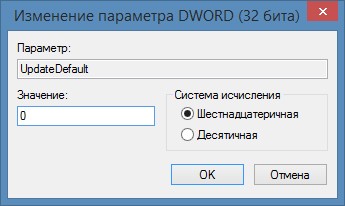 Изменение параметра значения в редакторе реестра
Откроется маленькое окошко в котором нужно изменить значение с 0 на 1 и нажать кнопку «ОК».
Теперь нужно браузер Google Chrome перезапустить и он обновиться.
После этого ошибка в хроме NETWORK_FAILED при установке расширений не должна появляться.
Итак, вывод такой, если не устанавливаются расширения в Google Chrome то нужно обновить Google Chrome.
Но проще удалить с компьютера ваш браузер Google Chrome и установить его по новому.
Появляется окошко с выбором «добавить» и «отмена» — нажимаю добавить и ничего не происходит О_о ?

После того как вы загрузите расширение Adblock Plus из маркета гугл хром. Зайдите в настройки (четыре черточки в правом верхнем углу) и выбираете строчку с надписью настройки.
В настройках выберите строчку расширения.
Если Adblock Plus вы только загрузили, то эта строчка будет первая.
Напротив нее будет стоять квадрат для галочки и надпись Включено.
Думаю дальше понятно, чтобы включить поставили галочку, чтобы выключить сняли.
Имейте ввиду иногда некоторые операции с браузером у вас могут не пойти при включенном Adblock Plus. Я не смог сделать проплату через веб-мани, жму оплатить, а в ответ никаких действий. Как только отключил Adblock Plus, то зразу все заработало.
Буквально 20 минут назад по московскому времени вылетело сообщение, что Adblock и другие плагины перестали работать совсем на Огнелисе.
Товарищи, у всех сейчас данный ппц или я такой везунчик? Или что произошло?

Дубликаты не найдены
Все дополнения Firefox отключились и попали в список «устаревшие расширения» из-за истечения срока сертификата Mozilla
У меня стоят и 66.0.3 с включенным «режимом исследований» и 56-ая версия. На обеих перестали работать адд-оны. Замена через «about:config» у «xpinstall.signatures.requiredc» значения с «true» на «false» не помогла, к сожалению. Но нашёл такое решение, которое в добавление к вышенаписанному уже помогло: также через «about:config» ищем «app.normandy.run_interval_seconds» и меняем его значение с «21600» на «1». После перезагрузки браузера отключенные дополнения включились. Надеюсь, и вам этот способ поможет. Аддоны заработали и в TOR 8.0.8. Если они до этого чудного «обновления» были у вас, но слетели, заново ставятся без проблем. Проверено!
Найдено здесь: https://www.reddit.com/r/firefox/comments/bkjz15/1250_pm_utc_looks_like_a_fix_is_starting_to_be/emh7nsk/
«Figured it out, with the help of another post on the subreddit. Go and make sure that studies are enabled in the browser settings. Go to about:config and search for
app.normandy.run_interval_seconds change that value to 1. I let that sit for a little while just to ensure that whatever needed to be downloaded could be, then I quit
firefox through the hamburger menu instead of through native OS close button. When I launched it again it seemed to be good. Upon relaunch change that config
Ошибка NETWORK_FAILED Chrome что делать
Иногда в браузере Google Chrome появляется ошибка NETWORK_FAILED при установке Adblock или какого-нибудь другого расширения или дополнения.
Что делать если не устанавливаются расширения в Chrome
Обычно эта ошибка NETWORK_FAILED пропадает после переустановки или обновления гугл хрома.
Google Chrome обычно обновляется автоматически, но если нет то нужно включить автоматическое обновление Google Chrome.
Включается обновление Google Chrome через редактор реестра.
Чтобы открыть редактор реестра нужно нажать на клавиатуре сразу две клавиши WIN+R.
Откроется команда выполнить в которой нужно вписать «regedit» и нажать кнопку «ОК».
Перед вами откроется редактор реестра.

Теперь нужно в левом окошке пройти по пути:
HKEY_LOCAL_MACHINE
SOFTWARE
Policies
Google
Update
В правом окошке нужно нажать правой кнопкой мыши на Update Default и в появившемся контекстном меню нужно выбрать «Изменить».
Откроется маленькое окошко в котором нужно изменить значение с 0 на 1 и нажать кнопку «ОК».
Теперь нужно браузер Google Chrome перезапустить и он обновиться.
После этого ошибка в хроме NETWORK_FAILED при установке расширений не должна появляться.
Итак, вывод такой, если не устанавливаются расширения в Google Chrome то нужно обновить Google Chrome.
Но проще удалить с компьютера ваш браузер Google Chrome и установить его по новому.
- Installation in Thunderbird and Prism
- Installation in K-Meleon
- Dealing with «not compatible» error message
- Other problems during installation
Installation in Thunderbird and Prism
In Thunderbird and Prism you cannot navigate to addons.mozilla.org directly. To install Adblock Plus nevertheless, go to addons.mozilla.org in your browser, right-click the big green installation button and choose «Save Link As» from the context menu. Choose a location to download Adblock Plus to. Then switch to Thunderbird or Prism and go to the menu Tools / Add-ons. Click the «Install» button at the bottom of the dialog and select the Adblock Plus package you downloaded previously. Restart the application when asked.
Installation in K-Meleon
K-Meleon doesn’t have an extension installation mechanism. Because of that Adblock Plus for K-Meleon is a ZIP file that needs to be extracted into K-Meleon’s application directory. See Adblock Plus for K-Meleon page for installation packages and detailed installation instructions.
Dealing with «not compatible» error message
If you cannot install Adblock Plus because it is «not compatible», this might mean two things:
- Your application is too old and a newer version has been out for some time already. Adblock Plus cannot support old application versions for an indefinite amount of time, already because after a while too few people use that application version and bugs no longer get noticed. Best solution is updating to a new application version and installing Adblock Plus then. If for some reason that is not possible, as a temporary solution you can also have a look at older Adblock Plus versions, one of them might be compatible.
- Your application is too new and Adblock Plus hasn’t been marked compatible with it yet. If you didn’t do that already, try installing from addons.mozilla.org and make sure that JavaScript is enabled — installation from addons.mozilla.org will provide the browser with more current compatibility information. If that doesn’t help either, please create a new topic in the forum (no registration required).
Other problems during installation
There is a number of other problems that can occur during extension installation. Please have a look at the MozillaZine Knowledge Base for solutions.
Cookie preferences
We use some cookies to give you the best experience on our website. By using our site you are aware that we are using cookies and you can change this any time. Learn more
Necessary cookies
Used to remember your privacy preferences. They cannot be switched off.
Tracking cookies
We use these to analyze website traffic.
A/B testing cookies
We use these Google Optimize cookies for A/B testing based on the analytics data.
by Milan Stanojevic
Milan has been enthusiastic about technology ever since his childhood days, and this led him to take interest in all PC-related technologies. He’s a PC enthusiast and he… read more
Updated on July 20, 2022
Fact checked by
Alex Serban

After moving away from the corporate work-style, Alex has found rewards in a lifestyle of constant analysis, team coordination and pestering his colleagues. Holding an MCSA Windows Server… read more
- If your installed Adblock doesn’t block ads, some adware might cause the problem.
- Using third-party software to remove possible malware is also a great solution.
- Make sure you try different Adblock extensions for your current browser.
- Easy migration: use the Opera assistant to transfer exiting data, such as bookmarks, passwords, etc.
- Optimize resource usage: your RAM memory is used more efficiently than in other browsers
- Enhanced privacy: free and unlimited VPN integrated
- No ads: built-in Ad Blocker speeds up loading of pages and protects against data-mining
- Gaming friendly: Opera GX is the first and best browser for gaming
- Download Opera
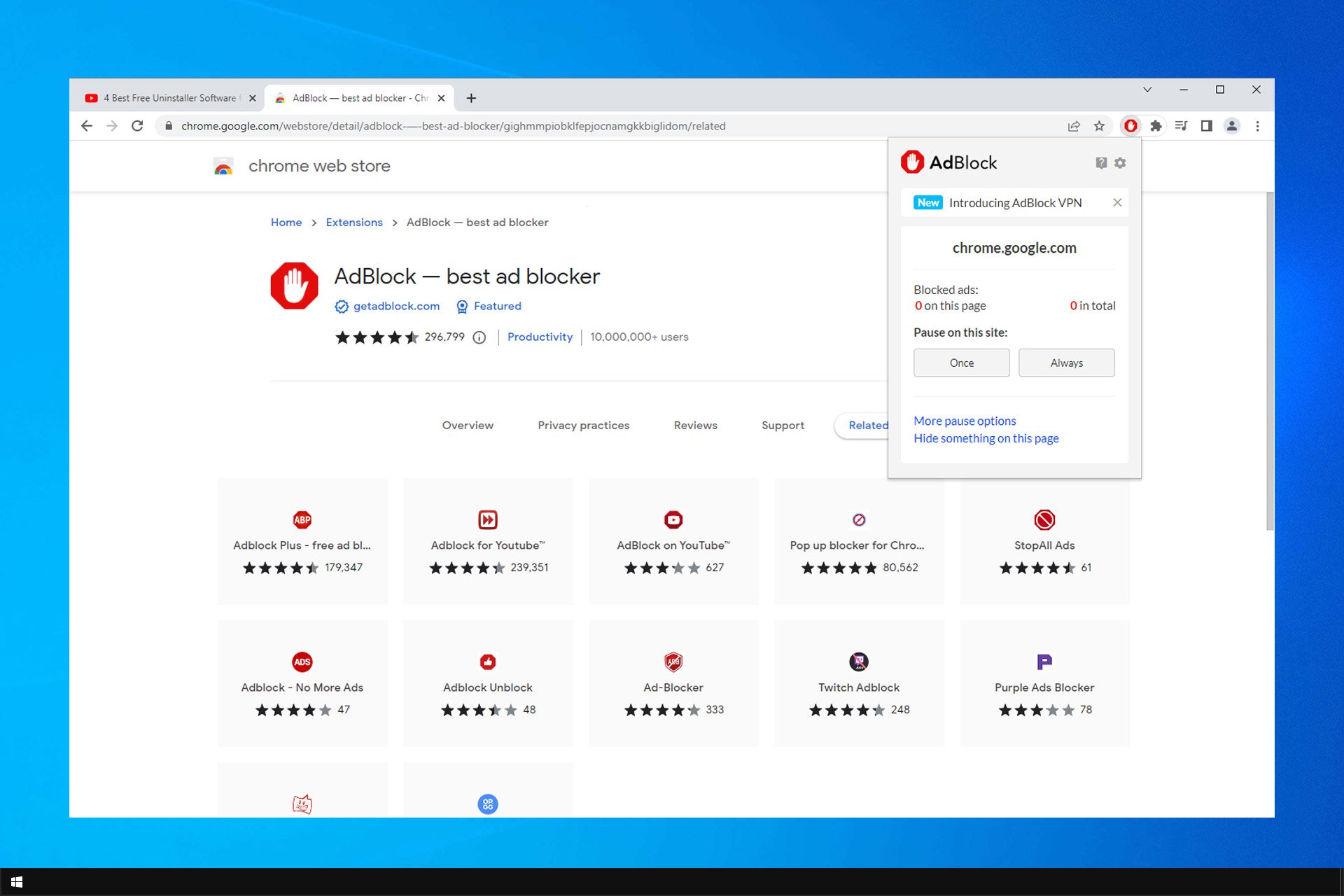
Many users use extensions to prevent ads from appearing. However, issues can occur and many reported that AdBlock doesn’t block ads.
A great number of users have reported that even though they tried a good number of ad-blockers, they still end up being annoyed by ads while browsing the Internet.
This can be extremely frustrating, especially because you think you tried everything you could to stop those annoying ads from popping up.
Unfortunately, this is somewhat common, and we already wrote about AdBlock not working on Twitch in our previous guides.
For these reasons, in this article, we will discuss what could be the reasons why AdBlock is not working on Chrome, and finally, we will discuss the best way to solve this issue. Read on to find out more.
The following solutions are also useful if you are having these issues:
- Adblock not blocking ads – This can happen due to configuration issues. Check your extension settings to fix it.
- Adblock doesn’t block ads anymore – If you adjusted any of the extension settings, you might experience this issue on your PC.
- Adblock isn’t blocking ads – This can happen if you whitelist a specific website. Fixing this is simple and requires changing a few settings.
Why does my AdBlock not block ads?
If AdBlock isn’t working on your browser, perhaps you don’t have the right block lists enabled. You can fix that by adjusting your settings.
It’s also possible that the issue is caused by your antivirus or malware. Therefore, check your antivirus settings and scan your PC for malware.
Why does AdBlock not work on some websites?
If the issue appears only on some websites, it’s possible that that website is whitelisted in your settings. Navigate to AdBlock settings and make sure that everything is in order.
Many users reported that AdBlock is not blocking ads on YouTube. As previously mentioned, this is caused by your settings.
In case the issue is still there, you might have to add the website manually to the list of blocked web pages.
Is AdBlock Plus better than AdBlock?
Both are quite the same and share many features, such as the same list of blocked ads, and the ability to whitelist websites or block individual elements.
AdBlock has a unique feature that lets you allow ads only on specific YouTube channels, and that can come in handy, but for the most part, both extensions are the same.
However, many users reported that AdBlock Plus is not blocking ads, but there are ways to fix that.
What do I do if Adblock isn’t blocking ads?
If AdBlock is not blocking ads on Twitch, then maybe you should consider switching to a browser. There are many browsers that have a built-in ad-blocker.
One such example is Opera. This web browser uses the Chromium engine, making it very fast and powerful, and it comes with several privacy tools that can help you surf the Internet undisturbed.
These include a VPN and an ad-blocker, both of which are very efficient, and without any limitations.
Opera is a very versatile browser. It comes in multiple versions, each one specialized in something, such as VPN, Gaming, etc. There surely is an Opera browser for everyone.
Besides being a great search engine, the browser also has low bandwidth and has little to no impact on system performance. Other browsers such as Chrome eat up lots of RAM.

Opera
Enjoy browsing the Internet without being bothered by pesky ads thanks to this browser that comes with all of the privacy tools you may ever need
2. Make sure the ads that appear are not caused by malware
- Download and install ESET Internet Security
- Open the ESET software.
- From the Dashboard, select Scan Now to start scanning your PC for malware.
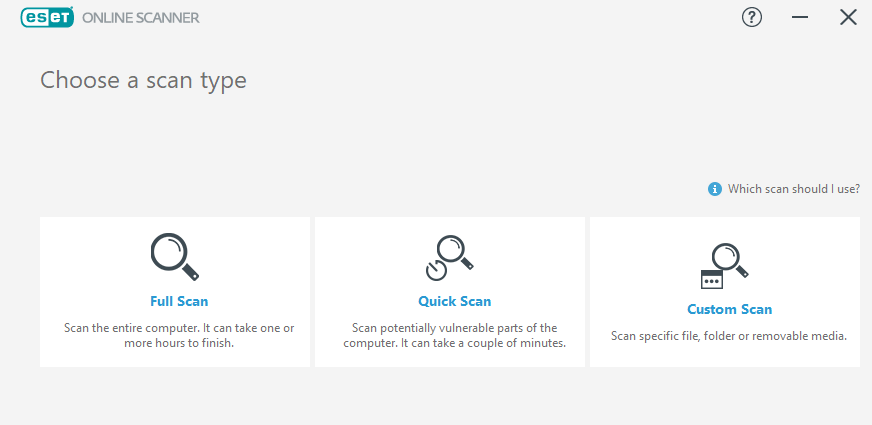
- After the process is completed, remove any threats that were identified.
- Restart your PC, and check to see if the issue is solved.
A lot of times the ads that appear may be caused by malware that’s already on your PC. This is especially true if you see the ads when visiting less secure websites.
To prevent this type of adware and malware threats on your computer’s system, we advise you to confidently detect viruses with ESET Internet Security.
How do I know if AdBlock is working?
Check your extensions, and if you see the red AdBlock icon, it means that it’s enabled. Also, if you notice that ads aren’t appearing on the pages you visit, it means that the AdBlock is working.

Sometimes you need to adjust your settings and disable open to show non-intrusive ads in order to completely disable all ads.
If the AdBlock not blocking pop-ups, it means that it’s not working properly, but you can fix it with the solutions from above.
- 7 Best Ways to Block Ads on Your Spotify Browser [2022 Guide]
- uBlock Origin not blocking Twitch ads [Full Fix]
- Edge Shortcut Keeps Appearing on Desktop: 5 Easy Fixes
In this article, we discussed the reasons for which your browser ad-blocker add-ons might now work, and also the solution to this issue.
So if AdBlock is not blocking Facebook ads, be sure to try the solutions that we mentioned in this guide.
If you don’t have any malware on your PC, you can simply download and set Opera as your default browsing software.
This isn’t the only issue, and many reported that Adblock doesn’t work in Crunchyroll, but we covered that issue in a separate guide, so be sure to check it out.
Did you find a different solution to this problem? If so, share it in the comments section with us.
Still having issues? Fix them with this tool:
SPONSORED
If the advices above haven’t solved your issue, your PC may experience deeper Windows problems. We recommend downloading this PC Repair tool (rated Great on TrustPilot.com) to easily address them. After installation, simply click the Start Scan button and then press on Repair All.

Newsletter
by Milan Stanojevic
Milan has been enthusiastic about technology ever since his childhood days, and this led him to take interest in all PC-related technologies. He’s a PC enthusiast and he… read more
Updated on July 20, 2022
Fact checked by
Alex Serban
After moving away from the corporate work-style, Alex has found rewards in a lifestyle of constant analysis, team coordination and pestering his colleagues. Holding an MCSA Windows Server… read more
- If your installed Adblock doesn’t block ads, some adware might cause the problem.
- Using third-party software to remove possible malware is also a great solution.
- Make sure you try different Adblock extensions for your current browser.
- Easy migration: use the Opera assistant to transfer exiting data, such as bookmarks, passwords, etc.
- Optimize resource usage: your RAM memory is used more efficiently than in other browsers
- Enhanced privacy: free and unlimited VPN integrated
- No ads: built-in Ad Blocker speeds up loading of pages and protects against data-mining
- Gaming friendly: Opera GX is the first and best browser for gaming
- Download Opera
Many users use extensions to prevent ads from appearing. However, issues can occur and many reported that AdBlock doesn’t block ads.
A great number of users have reported that even though they tried a good number of ad-blockers, they still end up being annoyed by ads while browsing the Internet.
This can be extremely frustrating, especially because you think you tried everything you could to stop those annoying ads from popping up.
Unfortunately, this is somewhat common, and we already wrote about AdBlock not working on Twitch in our previous guides.
For these reasons, in this article, we will discuss what could be the reasons why AdBlock is not working on Chrome, and finally, we will discuss the best way to solve this issue. Read on to find out more.
The following solutions are also useful if you are having these issues:
- Adblock not blocking ads – This can happen due to configuration issues. Check your extension settings to fix it.
- Adblock doesn’t block ads anymore – If you adjusted any of the extension settings, you might experience this issue on your PC.
- Adblock isn’t blocking ads – This can happen if you whitelist a specific website. Fixing this is simple and requires changing a few settings.
Why does my AdBlock not block ads?
If AdBlock isn’t working on your browser, perhaps you don’t have the right block lists enabled. You can fix that by adjusting your settings.
It’s also possible that the issue is caused by your antivirus or malware. Therefore, check your antivirus settings and scan your PC for malware.
Why does AdBlock not work on some websites?
If the issue appears only on some websites, it’s possible that that website is whitelisted in your settings. Navigate to AdBlock settings and make sure that everything is in order.
Many users reported that AdBlock is not blocking ads on YouTube. As previously mentioned, this is caused by your settings.
In case the issue is still there, you might have to add the website manually to the list of blocked web pages.
Is AdBlock Plus better than AdBlock?
Both are quite the same and share many features, such as the same list of blocked ads, and the ability to whitelist websites or block individual elements.
AdBlock has a unique feature that lets you allow ads only on specific YouTube channels, and that can come in handy, but for the most part, both extensions are the same.
However, many users reported that AdBlock Plus is not blocking ads, but there are ways to fix that.
What do I do if Adblock isn’t blocking ads?
If AdBlock is not blocking ads on Twitch, then maybe you should consider switching to a browser. There are many browsers that have a built-in ad-blocker.
One such example is Opera. This web browser uses the Chromium engine, making it very fast and powerful, and it comes with several privacy tools that can help you surf the Internet undisturbed.
These include a VPN and an ad-blocker, both of which are very efficient, and without any limitations.
Opera is a very versatile browser. It comes in multiple versions, each one specialized in something, such as VPN, Gaming, etc. There surely is an Opera browser for everyone.
Besides being a great search engine, the browser also has low bandwidth and has little to no impact on system performance. Other browsers such as Chrome eat up lots of RAM.
Opera
Enjoy browsing the Internet without being bothered by pesky ads thanks to this browser that comes with all of the privacy tools you may ever need
2. Make sure the ads that appear are not caused by malware
- Download and install ESET Internet Security
- Open the ESET software.
- From the Dashboard, select Scan Now to start scanning your PC for malware.
- After the process is completed, remove any threats that were identified.
- Restart your PC, and check to see if the issue is solved.
A lot of times the ads that appear may be caused by malware that’s already on your PC. This is especially true if you see the ads when visiting less secure websites.
To prevent this type of adware and malware threats on your computer’s system, we advise you to confidently detect viruses with ESET Internet Security.
How do I know if AdBlock is working?
Check your extensions, and if you see the red AdBlock icon, it means that it’s enabled. Also, if you notice that ads aren’t appearing on the pages you visit, it means that the AdBlock is working.
Sometimes you need to adjust your settings and disable open to show non-intrusive ads in order to completely disable all ads.
If the AdBlock not blocking pop-ups, it means that it’s not working properly, but you can fix it with the solutions from above.
- 7 Best Ways to Block Ads on Your Spotify Browser [2022 Guide]
- uBlock Origin not blocking Twitch ads [Full Fix]
- Edge Shortcut Keeps Appearing on Desktop: 5 Easy Fixes
- Did Not Connect: Potential Security Issue In Firefox: Fix
- Chrome not Loading Pages: 7 Fixes to Properly Load Websites
- There Is A Problem With Adobe Acrobat/Reader: Fix
In this article, we discussed the reasons for which your browser ad-blocker add-ons might now work, and also the solution to this issue.
So if AdBlock is not blocking Facebook ads, be sure to try the solutions that we mentioned in this guide.
If you don’t have any malware on your PC, you can simply download and set Opera as your default browsing software.
This isn’t the only issue, and many reported that Adblock doesn’t work in Crunchyroll, but we covered that issue in a separate guide, so be sure to check it out.
Did you find a different solution to this problem? If so, share it in the comments section with us.
Still having issues? Fix them with this tool:
SPONSORED
If the advices above haven’t solved your issue, your PC may experience deeper Windows problems. We recommend downloading this PC Repair tool (rated Great on TrustPilot.com) to easily address them. After installation, simply click the Start Scan button and then press on Repair All.