If your web server fails to establish secure communication, your users will see certification. In the meantime, you may see “SChannel error state is 960” message in Event Viewer. Here is the full error message:
A fatal alert was generated and sent to the remote endpoint. This may result in termination of the connection. The TLS protocol defined fatal error code is 20. The Windows SChannel error state is 960.
Cause
The root cause of this issue is that the different or incompatible chiper suites used in web server and load balancer. Cipher suites (chiper blocks) are encryption methods (RSA, DHE etc.).
If there is a conflict or mismatch in the chiper suites, web server cannot decrypt the encrypted request logs this error message: “The TLS protocol defined fatal error code is 20. The Windows SChannel error state is 960.”
How to solve “SChannel error state is 960”
You can fix secure connection failures and Schannel by enabling custom chiper suite and editing the list of chiper suites in your web server. Here are steps to edit chiper suites:
- Log onto the server using an account that is in the Local Administrators group
- Go to “Start > Run“. Enter: gpedit.msc
- Expand “Computer Configuration > Administrative Templates > Network > SSL Configuration Settings“
- In the right pane, right click on “SSL Cipher Suite Order” and choose “Edit”
- Click “Enabled”
- Copy the content of “SSL Cipher Suites” text box and paste it notepad
- Make sure that this list matches the chipper suite list used in your load balancer. General recommendation:
- Move TLS_RSA chiper suites to the top
- Copy TLS_ECDHE ones after them
- Remove these two chiper suites as they have known interoperability issues:
TLS_DHE_RSA_WITH_AES_128_CBC_SHA
TLS_DHE_RSA_WITH_AES_256_CBC_SHA
- In the “SSL Cipher Suite Order” window, click “OK”
- Reboot the server
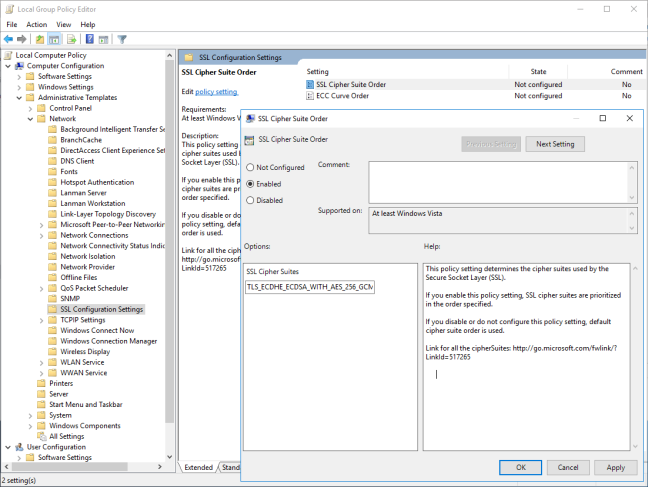
Note: The list you provide in the Step 7 cannot exceed 1023 characters. In order to reduce it, make sure to give priority to the ones at top in the default cipher list. This list is ordered from strongest chipper suites to the weakest ones. Additionally, you can remove the suites that are in the black list for HTTP/2. Here is more information about HTTP/2 black list.
If the error still occurs
A less likely cause of this issue is that a change in MAC (Message Authentication Code) (Source). Web servers use this code to determine that the request hasn’t changed on the way (request forgery or man-in-the-middle attack). If the web server finds out that the MAC has changed, it drops the connection. In order to solve it, make sure that your load balancer doesn’t make any changes to the MAC value.
Another possible cause is a Windows update (KB4457129) that reportedly breaks NLB (Network Load Balancer) Cluster. Uninstalling this update or installing the patch (KB4457133) solves the issue (Source).
- Remove From My Forums
-
Question
-
Can Anyone tell me why I see this system entry? And what may be causing it?
Please suggest/advice at the earliest.
Thanks!
— <Event xmlns=»http://schemas.microsoft.com/win/2004/08/events/event»>
— <System>
<Provider Name=»Schannel» Guid=»{1F678132-5938-4686-9FDC-C8FF68F15C85}» />
<EventID>36888</EventID>
<Version>0</Version>
<Level>2</Level>
<Task>0</Task>
<Opcode>0</Opcode>
<Keywords>0x8000000000000000</Keywords>
<TimeCreated SystemTime=»2016-07-05T07:40:04.867986800Z» />
<EventRecordID>87794</EventRecordID>
<Correlation />
<Execution ProcessID=»636″ ThreadID=»688″ />
<Channel>System</Channel>
<Computer>KESEAMDB01.kes-gse.local</Computer>
<Security UserID=»S-1-5-18″ />
</System>
— <EventData>
<Data Name=»AlertDesc»>20</Data>
<Data Name=»ErrorState»>960</Data>
</EventData>
</Event>Regards,
Pradeep
- Remove From My Forums
-
Question
-
User593475320 posted
HI Team,
I am getting sit down issue often few sites in my IIS server. when i debug it in Even Log i got below error
The following fatal alert was generated.20. the internal error state is 960 . May of them suggested its a certificate corrupt error. need to renew the new certificate.
But in my case un-bind and bind the certificate resolves the issue. May i know why it works once bind it again if its a corrupt certificate.
Please suggest me any permanent fix?
Answers
-
User1278090636 posted
Hi,
Error 20 comes up as
bad record macThis alert is returned if a record is received with an incorrect MAC. This alert also MUST be returned if an alert is sent because a TLSCiphertext decrypted in an invalid way: either it wasn’t an even multiple of the block length, or its padding values,
when checked, weren’t correct. This message is always fatal and should never be observed in communication between proper implementations (except when messages were corrupted in the network).Best Regards,
Jean
-
Marked as answer by
Tuesday, September 28, 2021 12:00 AM
-
Marked as answer by
- Remove From My Forums
-
Question
-
User593475320 posted
HI Team,
I am getting sit down issue often few sites in my IIS server. when i debug it in Even Log i got below error
The following fatal alert was generated.20. the internal error state is 960 . May of them suggested its a certificate corrupt error. need to renew the new certificate.
But in my case un-bind and bind the certificate resolves the issue. May i know why it works once bind it again if its a corrupt certificate.
Please suggest me any permanent fix?
Answers
-
User1278090636 posted
Hi,
Error 20 comes up as
bad record macThis alert is returned if a record is received with an incorrect MAC. This alert also MUST be returned if an alert is sent because a TLSCiphertext decrypted in an invalid way: either it wasn’t an even multiple of the block length, or its padding values,
when checked, weren’t correct. This message is always fatal and should never be observed in communication between proper implementations (except when messages were corrupted in the network).Best Regards,
Jean
-
Marked as answer by
Tuesday, September 28, 2021 12:00 AM
-
Marked as answer by
- Remove From My Forums
-
Question
-
Can Anyone tell me why I see this system entry? And what may be causing it?
Please suggest/advice at the earliest.
Thanks!
— <Event xmlns=»http://schemas.microsoft.com/win/2004/08/events/event»>
— <System>
<Provider Name=»Schannel» Guid=»{1F678132-5938-4686-9FDC-C8FF68F15C85}» />
<EventID>36888</EventID>
<Version>0</Version>
<Level>2</Level>
<Task>0</Task>
<Opcode>0</Opcode>
<Keywords>0x8000000000000000</Keywords>
<TimeCreated SystemTime=»2016-07-05T07:40:04.867986800Z» />
<EventRecordID>87794</EventRecordID>
<Correlation />
<Execution ProcessID=»636″ ThreadID=»688″ />
<Channel>System</Channel>
<Computer>KESEAMDB01.kes-gse.local</Computer>
<Security UserID=»S-1-5-18″ />
</System>
— <EventData>
<Data Name=»AlertDesc»>20</Data>
<Data Name=»ErrorState»>960</Data>
</EventData>
</Event>Regards,
Pradeep
- Remove From My Forums
-
Question
-
Can Anyone tell me why I see this system entry? And what may be causing it?
Please suggest/advice at the earliest.
Thanks!
— <Event xmlns=»http://schemas.microsoft.com/win/2004/08/events/event»>
— <System>
<Provider Name=»Schannel» Guid=»{1F678132-5938-4686-9FDC-C8FF68F15C85}» />
<EventID>36888</EventID>
<Version>0</Version>
<Level>2</Level>
<Task>0</Task>
<Opcode>0</Opcode>
<Keywords>0x8000000000000000</Keywords>
<TimeCreated SystemTime=»2016-07-05T07:40:04.867986800Z» />
<EventRecordID>87794</EventRecordID>
<Correlation />
<Execution ProcessID=»636″ ThreadID=»688″ />
<Channel>System</Channel>
<Computer>KESEAMDB01.kes-gse.local</Computer>
<Security UserID=»S-1-5-18″ />
</System>
— <EventData>
<Data Name=»AlertDesc»>20</Data>
<Data Name=»ErrorState»>960</Data>
</EventData>
</Event>Regards,
Pradeep
Обновлено 18.08.2016

Ошибка 36882 и ошибка 36888. Решение-0
Всем привет сегодня расскажу как я решил проблему с ошибкой 36882 и ошибкой 36888 в Windows Server 2012 R2. Данные ошибки у меня возникли после чистой установки Windows Server 2012 R2. Данные ошибки с полными тестами можно как обычно посмотреть в оснастке Просмотр событий.
Ошибка 36882
Сертификат, полученный от удаленного сервера, был выдан ненадежным центром сертификации. Из-за этого данные сертификата нельзя проверить. Запрос на SSL-подключение не удалось выполнить. В прилагаемых данных содержится сертификат сервера
Ошибка 36888
Оповещение о неустранимой ошибке было создано и отправлено удаленной конечной точке. Это может привести к разрыву соединения. Определенный в протоколе TLS код оповещения о неустранимой ошибке: 48. Состояние ошибки Windows SChannel: 552.
Вот более наглядно как выглядят данные ошибки.
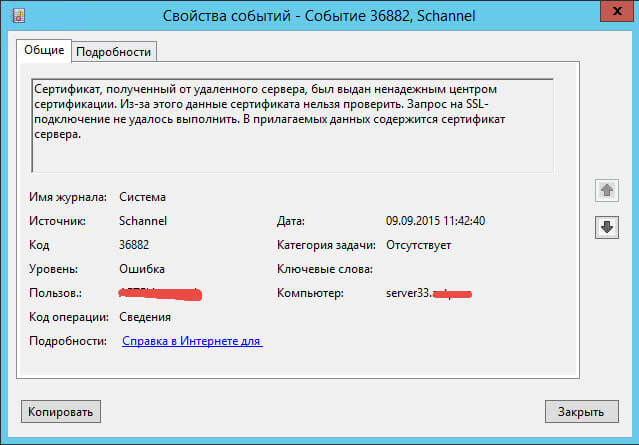
Ошибка 36882 и ошибка 36888. Решение-02
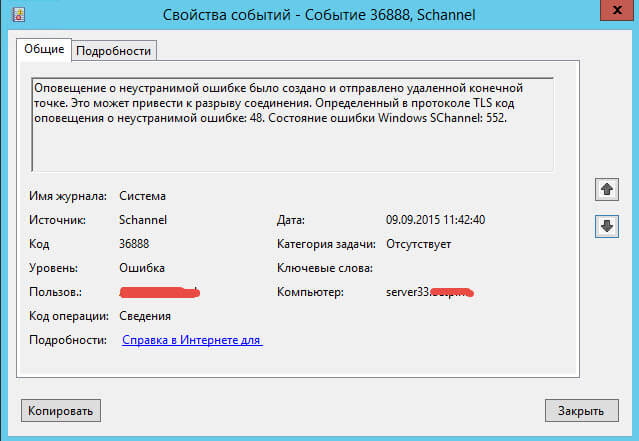
Ошибка 36882 и ошибка 36888. Решение-03
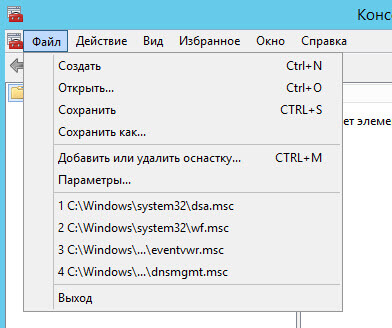
У меня данные ошибки возникают из за того что на моем сервере есть сертификат, и по какой то причине не установились корневые сертификаты. посмотреть это можно открыть пуск ввести mmc.
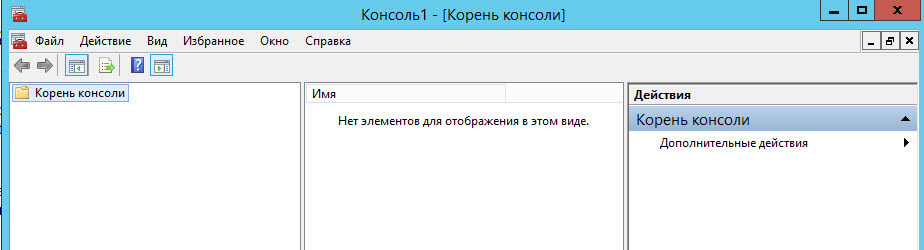
Ошибка 36882 и ошибка 36888. Решение-04
Добавляем оснастку
Ошибка 36882 и ошибка 36888. Решение-05
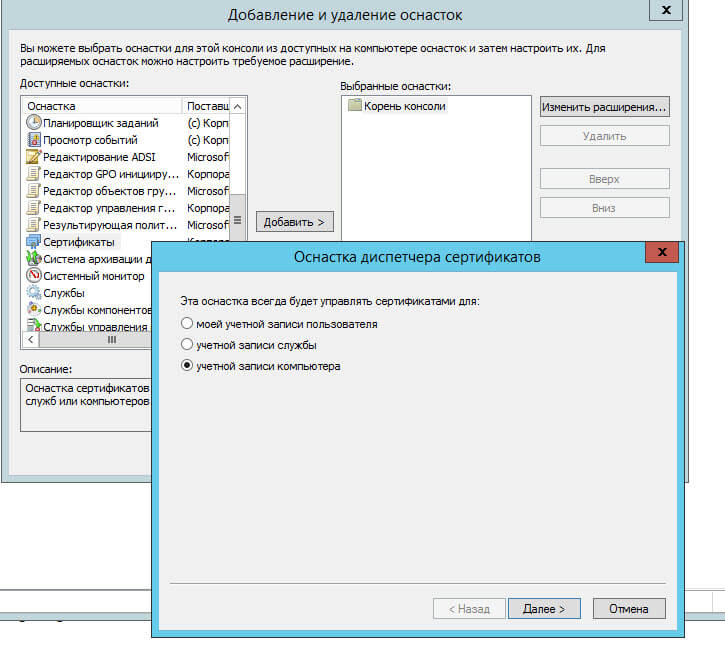
Выбираем оснастку сертификаты и перемещаем ее вправо, далее указываем для учетной записи компьютера
Ошибка 36882 и ошибка 36888. Решение-06
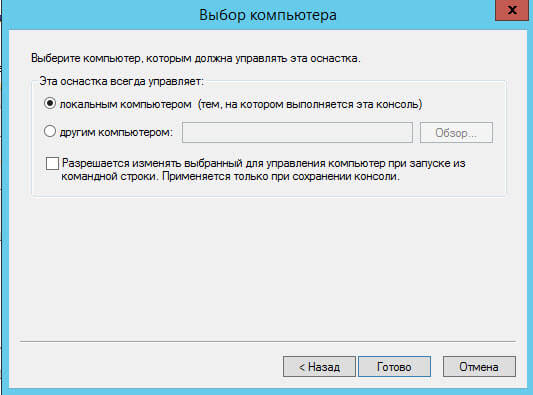
Готово
Ошибка 36882 и ошибка 36888. Решение-07
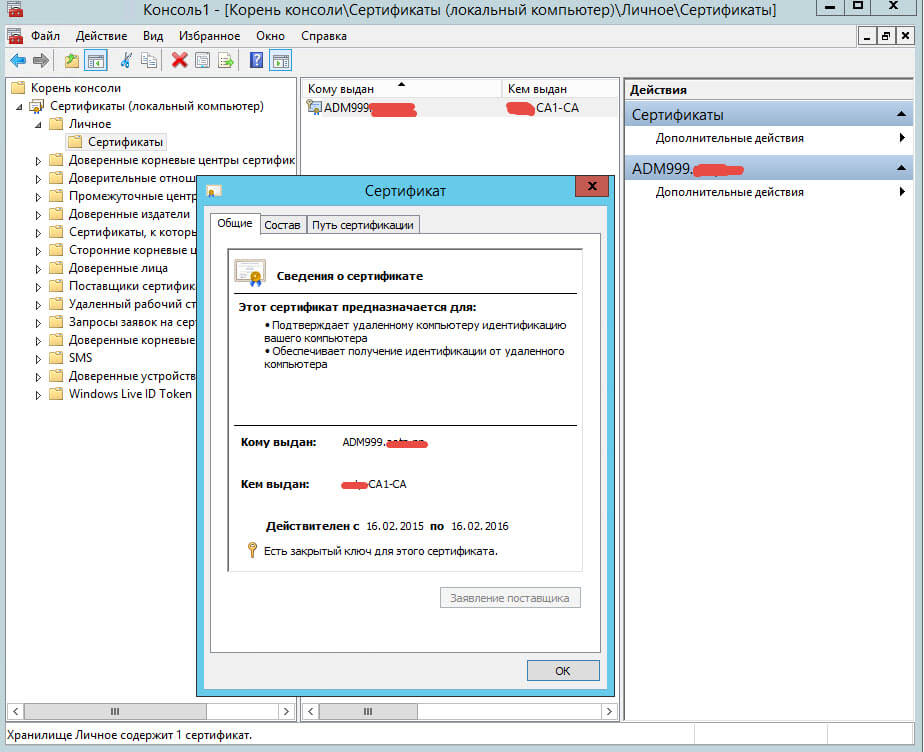
Далее в оснастке идем в Сертификаты-Личное-Сертификаты в поле кому выдан, видим ваш сертификат, нужно удостовериться что в сведениях о сертификате все ок и нет красноты
Ошибка 36882 и ошибка 36888. Решение-09
Если у вас данная ошибка в SQL server 2012 то вам нужно включить Enable Encrypted Connections to the Database Engine.
Вот так вот решается ошибка 36882 и ошибка 36888.
Материал сайта pyatilistnik.org
Авг 18, 2016 23:01
Имеем сервер 2008R2, на котором работает MSSQLSERVER. Из ролей — только Файловый сервер. в локальной сети 5 клиентов ОС -Вин7, 3 шт DIGI SM100 и DIGI SM500, два ФР и два банковских терминала, роутер Линксис Е900. На всех машинах установлена лицензионная Авира.
Проблема: стала падать локальная сеть через не равные промежутки времени, но примерно минут через 30. Клиенты перестают видеть сервер и друг друга. примерно через 2-5 мин работа сети восстанавливается. Изучение логов системы выявило такие ошибки:
«Событие 56, TermDD
Уровень безопасности сервера терминалов обнаружил ошибку в потоке протокола и отключил этот клиент. IP-адрес клиента: 213.123.235.17″, (таких адресов несколько) и
«Событие 36888, Schannel
Возникло следующее неустранимое предупреждение: 10. Внутреннее состояние ошибки: 1203.»
Результатом поиска стало отключение удаленного доступа и отмена правила проброса порта на роутере. Ошибки не появляются, но сеть продолжает падать регулярно.
После дальнейших поисков было предпринято следующее:
— на сервере была заменена сетевая карта на новую, старая была отключена и удалена из устройств.
— был заменен свитч на новый
— поочередное отключение клиентов явной взаимосвязи с падением сети не показало
— на всех клиентах проведен сброс и заново настройка сетевых карт
— с сервера удалена Авира, после чего сеть работала на 15 мин. дольше, но все равно упала.
— на сервер установлен SEP со своим файрволом
— сейчас качаю обновления от МС, но без особого рассчета на успех.
Из мыслей осталась только восстановить систему из образа двухлетней давности и пока всё (
Есть ли идеи по выходу из ситуации, поделитесь пожалуйста? Заранее благодарен.