Если после очередного обновления Oracle VirtualBox на MacOS, при запуске любой виртуальной машины, вы получили ошибку «Kernel driver not installed (rc=-1908)», то вот вам проверенный способ как ее победить.
Проверено как минимум пять раз на разных устройствах и разных версиях MacOS (BigSur, Catalina).
Не торопитесь ничего удалять, или переустанавливать, как это иногда рекомендуют. Паниковать так же не стОит, и даже срочно делать резервную копию не обязательно (хотя в целом это хорошая практика делать регулярные резервные копии).
На этот случай у VirtualBox есть скрипт, который вам поможет всё починить.
Итак,
1. открываем терминал, и выполняем следующую команду:
sudo /Library/Application Support/VirtualBox/LaunchDaemons/VirtualBoxStartup.sh restart
2. Вводим свой пароль, и в ответ получаем что-то типа такого:
Loading VBoxDrv.kext
Error Domain=KMErrorDomain Code=28 «Loading extension(s): org.virtualbox.kext.VBoxDrv requires a reboot» UserInfo={NSLocalizedDescription=Loading extension(s): org.virtualbox.kext.VBoxDrv requires a reboot}
Error: Failed to load org.virtualbox.kext.VBoxDrv
Executing: /usr/bin/kmutil unload -b org.virtualbox.kext.VBoxUSB
Error Domain=KMErrorDomain Code=71 «Kernel request failed: (libkern/kext) not found (-603947002)» UserInfo={NSLocalizedDescription=Kernel request failed: (libkern/kext) not found (-603947002)}
Fatal error: VirtualBox
Таких строк может быть несколько, это не важно.
3. Обратите внимание, что среди всего прочего, в ответе присутствуют просьба перезагрузить систему «requires a reboot». Не сопротивляемся, перезагружаемся. Если не просит, то вывод будет такой как в шаге 5.
4. После перезагрузки, еще раз открываем терминал, и выполняем команду из шага 1.
5. Теперь вывод будет (должен быть) вот такой:
Unloading VBoxUSB.kext
Unloading VBoxNetFlt.kext
Unloading VBoxNetAdp.kext
Unloading VBoxDrv.kext
Loading VBoxDrv.kext
Loading VBoxUSB.kext
Loading VBoxNetFlt.kext
Loading VBoxNetAdp.kext
Отлично! То что нам и нужно было.
6. Запускаем VirtualBox. Он скорее всего скажет что нужно установить свежую версию VirtualBox Extension Pack. Все нормально, идем на сайт https://www.virtualbox.org/wiki/Downloads, скачиваем актуальную версию Extension Pack, и устанавливаем.
Все, теперь можно продолжать работать.
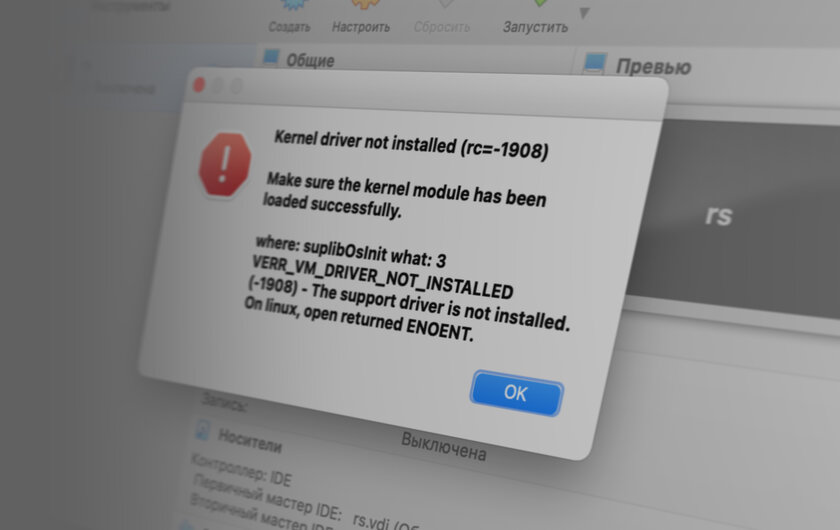
Пользователи macOS (в особенности Big Sur) сталкиваются со следующей ошибкой при использовании виртуализации VirtualBox от Oracle:
Kernel driver not installed (rc=-1908)
Make sure the kernel module has been loaded successfully.
where: suplibOsInit what: 3
VERR_VM_DRIVER_NOT_INSTALLED
(-1908) — The support driver is not installed.
On linux, open returned ENOENT.
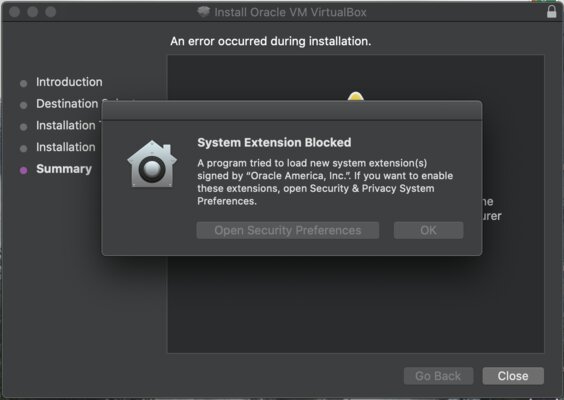
Исправить эту ошибку крайне просто. Вероятнее всего, причина её возникновения в том, что на этапе установки VirtualBox вы проигнорировали уведомление о том, что в настойках нужно предоставить одно из разрешений:
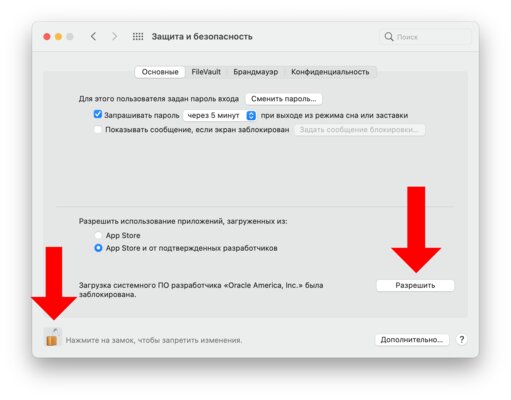
Чтобы исправить это, перейдите в «Системные настройки» macOS, откройте раздел «Защита и безопасность». В нём снимите замок в левом нижнем углу, а затем кликните на кнопку «Разрешить» рядом с появившемся пунктом «Загрузка системного ПО разработчика „Oracle America, Inc.” была заблокирована».
Если этого пункта у вас нет, попробуйте переустановить VirtualBox.
- 10 функций macOS Ventura, которые нужно попробовать сразу после установки
Содержание
- How to Fix “Kernal Driver Not Installed (rc=-1908)” Error on Mac
- Fix: VERR_VM_DRIVER_NOT_INSTALLED (-1908)
- Allow Oracle Certificate through System Preferences
- Allow VirtualBox Kernel Extensions through the Terminal
- Disable Secure Boot on your Mac
- Как исправить ошибку Kernel driver not installed (rc=-1908) в VirtualBox на macOS
- VirtualBox на Mac — Kernel driver not installed (rc=-1908). Проверенное решение
- virtualbox.org
- Kernel driver not installed (rc=-1908)
- Kernel driver not installed (rc=-1908)
- Re: Kernel driver not installed (rc=-1908)
- Re: Kernel driver not installed (rc=-1908)
- Re: Kernel driver not installed (rc=-1908)
- Re: Kernel driver not installed (rc=-1908)
- Re: Kernel driver not installed (rc=-1908)
- Re: Kernel driver not installed (rc=-1908)
- Re: Kernel driver not installed (rc=-1908)
- Re: Kernel driver not installed (rc=-1908)
- Re: Kernel driver not installed (rc=-1908)
- Re: Kernel driver not installed (rc=-1908)
- Re: Kernel driver not installed (rc=-1908)
- Who is online
How to Fix “Kernal Driver Not Installed (rc=-1908)” Error on Mac
Fix: VERR_VM_DRIVER_NOT_INSTALLED (-1908)
Oracle VM VirtualBox is one of the most notorious and free virtual machine hypervisors that is available for macOS along with other paid applications like VMware or Parallel. When you install VirtualBox on your macOS and try to use it by installing a virtual machine, it is very likely that you get the “Kernel driver not installed (rc=-1908)” error message. The error message here does not matter on the operating system that you are trying to install on the virtual machine but rather the problem in question appears when you install Oracle products like VirtualBox for the first time on your Mac.
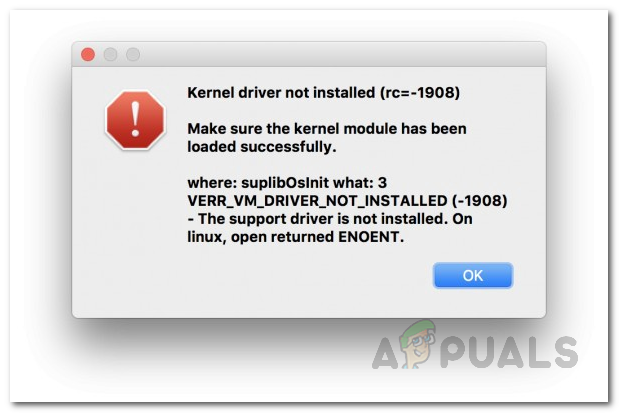 Kernel Driver Not Installed (rc=-1908) Error Message on Mac
As it turns out, the problem is pretty similar to the VirtualBox installation failed error that appears when you are trying to install VirtualBox on your machine. The error message is caused because the Oracle certificate is blocked by your operating system i.e. macOS. In addition to this, the kernel extensions for VirtualBox are disabled by macOS as well during the installation process which is why you are facing the error message in question here. To resolve this, you will have to allow the Oracle certificate by adding it to the authorization list. This has to be done explicitly by giving VirtualBox the required permissions.
You can do this in multiple ways. First, of all, you can allow the certificate through the System and Privacy settings located in the System Preferences menu. In addition to that, you can also use the terminal on your system and execute a few commands that will load the kernel extensions and allow it to be run on the system. With that said, without further ado, let us show you can do this in more detail so just follow through.
Allow Oracle Certificate through System Preferences
As it turns out, the first way you can resolve this problem is through the System Preferences menu on your machine. When macOS blocks software from loading kernel extensions or anything else, you will be shown a message in the System and Privacy settings.
However, this message is only there for 30 minutes and if you have been facing the error message for a while, you will have to uninstall VirtualBox from your system. Once you have uninstalled VirtualBox, move the App to the trash folder and also delete any remaining files. After doing that, you can go ahead and download the installer again to install VirtualBox on your system. Once you have installed VirtualBox, you will have to quickly follow the instructions given down below within the first 30 minutes or it will disappear again and you will have to start over again. With that said, follow the instructions given down below to allow Oracle through the System Preferences menu:
- First of all, open up the System Preferences app by clicking on the Apple icon located on the menu bar at the top. From the drop-down list, choose System Preferences.
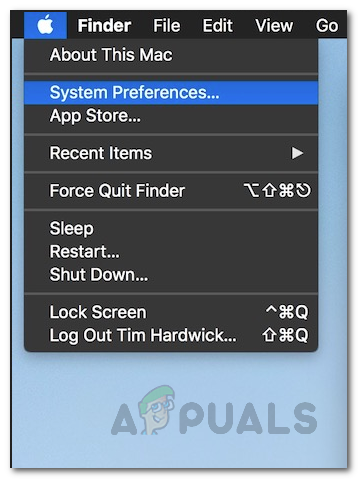 Opening up System Preferences
 - Then, once you have opened the System Preferences window, click on the Security and Privacy option.
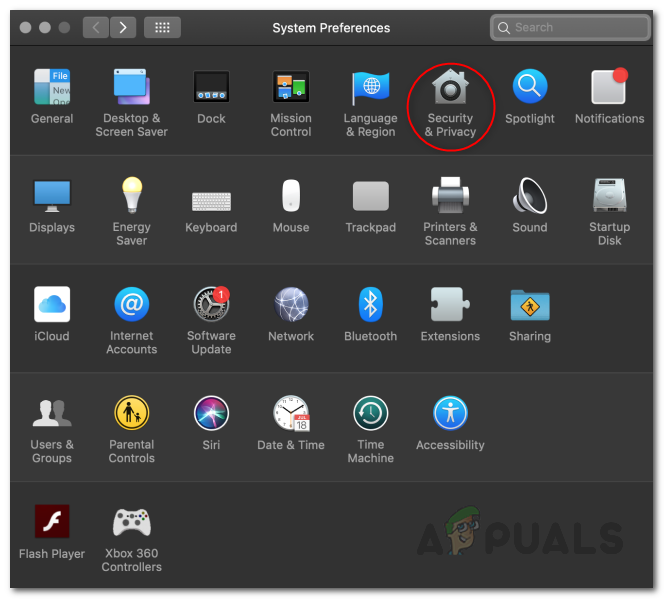 Opening Security and Privacy through System Preferences
 - On the Security and Privacy screen under General, at the bottom, you should see a “System Software from developer ‘Oracle America, Inc.’ was blocked from Loading” message. In case you do not see this, that means 30 minutes have passed as it is only there for the said time period like we mentioned above. If this case is applicable, go ahead and reinstall VirtualBox on your system to be able to do this.
- In case you see the message, simply go ahead and click the Allow button.
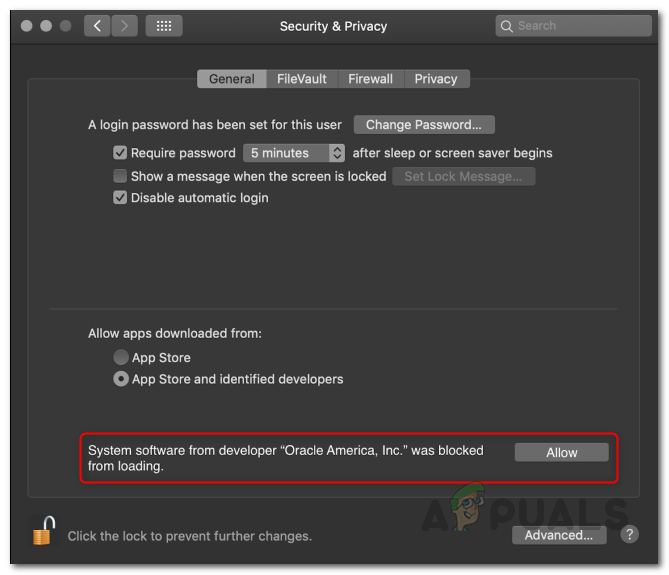 Allowing Oracle through Security and Privacy
 - After you have done that, open up VirtualBox again and try installing a virtual machine to see if the issue persists.
Allow VirtualBox Kernel Extensions through the Terminal
For the more tech-savvy and hardcore users out there, there is also another way you can resolve the issue which requires you to enter a command to the Terminal prompt. This will do the same thing that we were doing above, just through the Terminal window. In addition, if you choose to follow this method, it won’t require you to reinstall VirtualBox as it did in the method mentioned above as we will be using the Terminal here.
However, to do this, we will have to boot into the Recovery Mode in order to do this. Recovery mode lets you restore Mac to a previous date as well as allowing you to reinstall macOS along with many more other things. Follow the instructions given down below to do this:
- First of all, go ahead and restart your Mac by clicking the Apple icon in the top menu bar and then choosing Restart from the drop-down menu.
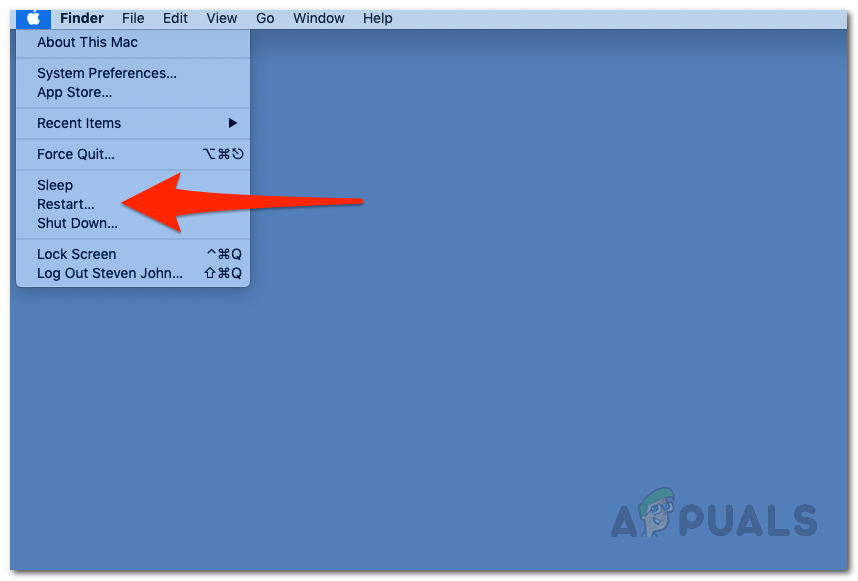 Restarting Mac
 - As your Mac restarts, hold down the Command and R keys on your keyboard until you see the Apple logo on the screen.
 Hold Down Command and R to Boot into Recovery Mode
 - This will boot your Mac into Recovery Mode and you will be shown the macOS Utilities window.
- On the top menu bar, click the Utilities drop-down menu and then choose Terminal from there.
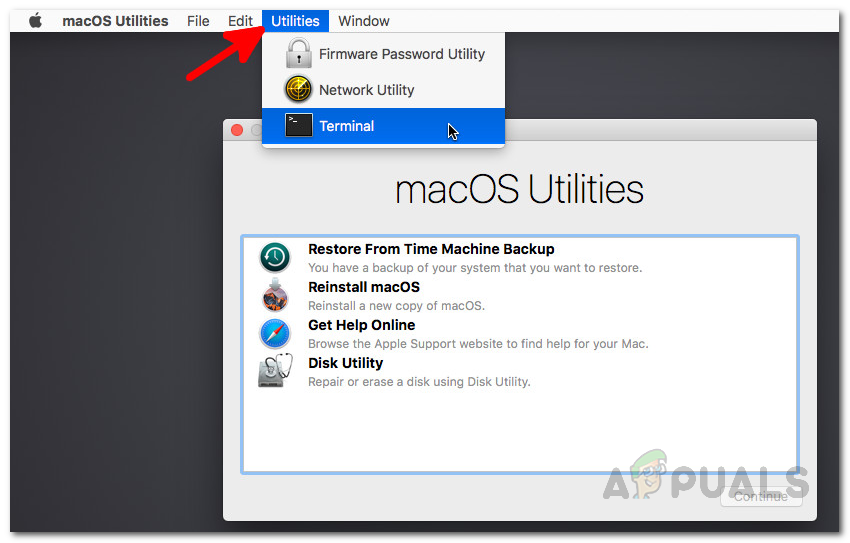 Opening up Terminal in Recovery Mode
 - Once the Terminal window has opened up, type in the following command and then hit the Enter key:
- After doing that, go ahead and restart your device again. To do this, in your Terminal window, enter the following command:
- Alternatively, you can click on the Apple logo on the top menu bar and choose Restart from the drop-down menu. Recovery Mode
- Once your device boots up, open up VirtualBox again and see if you face any issues while installing a virtual machine on your Mac.
Disable Secure Boot on your Mac
If the above methods do not work out for you, in some cases, the issue can also be related to the Secure Boot on your BIOS. Secure Boot is basically a security feature of UEFI, also known as Unified Extensible Firmware Interface. When you have Secure Boot enabled and configured, it can help your computer resist malware attacks and infections. As it turns out, since it is a security feature, it can also cause issues with some applications on your device which could be the case here.
Therefore, you will have to disable it on your machine and see if that works out. To do this, follow the instructions given down below:
- First of all, go ahead and boot into the Recovery Mode as shown above.
- Once you are in the Recovery mode, click on Utilities located on the top menu bar.
- From the drop-down menu, choose Startup Security Utility.
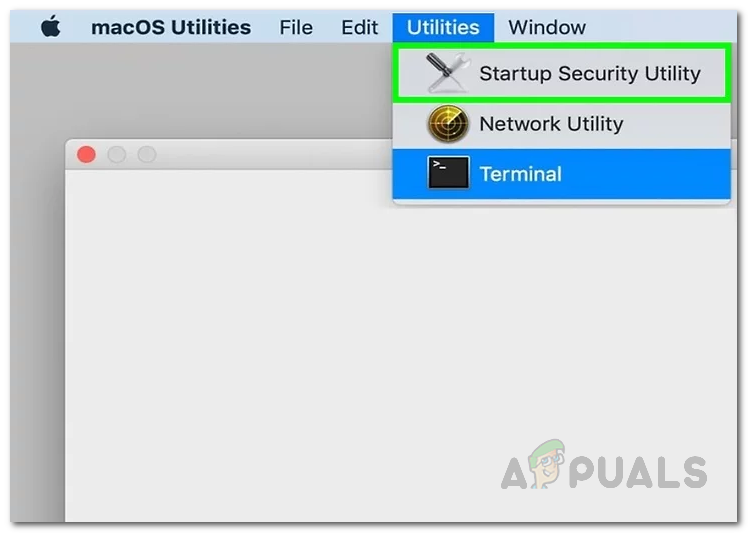 Opening up Startup Security Utility
 - On the Secure Boot prompt that appears, choose No Security.
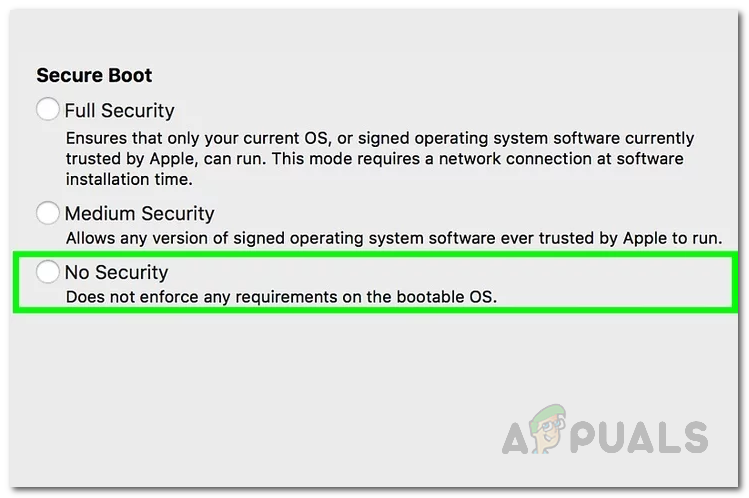 Disabling Secure Boot
 - Once you have done, go ahead and restart your device by clicking the Apple icon in the menu bar and choosing Restart. Recovery Mode
- After your Mac boots up, open up VirtualBox to see if the issue is still there.
In case you are not able to disable Secure Boot from Recovery mode, then in such a case, you will have to get into your BIOS settings and change it from there.
Источник
Как исправить ошибку Kernel driver not installed (rc=-1908) в VirtualBox на macOS
Пользователи macOS (в особенности Big Sur) сталкиваются со следующей ошибкой при использовании виртуализации VirtualBox от Oracle:
Kernel driver not installed (rc=-1908)
Make sure the kernel module has been loaded successfully.
where: suplibOsInit what: 3
VERR_VM_DRIVER_NOT_INSTALLED
(-1908) — The support driver is not installed.
On linux, open returned ENOENT.
Исправить эту ошибку крайне просто. Вероятнее всего, причина её возникновения в том, что на этапе установки VirtualBox вы проигнорировали уведомление о том, что в настойках нужно предоставить одно из разрешений:
Чтобы исправить это, перейдите в «Системные настройки» macOS, откройте раздел «Защита и безопасность». В нём снимите замок в левом нижнем углу, а затем кликните на кнопку «Разрешить» рядом с появившемся пунктом «Загрузка системного ПО разработчика „Oracle America, Inc.” была заблокирована».
Если этого пункта у вас нет, попробуйте переустановить VirtualBox.
Источник
VirtualBox на Mac — Kernel driver not installed (rc=-1908). Проверенное решение
Если после очередного обновления Oracle VirtualBox на MacOS, при запуске любой виртуальной машины, вы получили ошибку » Kernel driver not installed (rc=-1908)» , то вот вам проверенный способ как ее победить.
Проверено как минимум пять раз на разных устройствах и разных версиях MacOS (BigSur, Catalina).
Не торопитесь ничего удалять, или переустанавливать, как это иногда рекомендуют. Паниковать так же не стОит, и даже срочно делать резервную копию не обязательно (хотя в целом это хорошая практика делать регулярные резервные копии).
На этот случай у VirtualBox есть скрипт, который вам поможет всё починить.
Итак,
1. открываем терминал, и выполняем следующую команду:
2. Вводим свой пароль, и в ответ получаем что-то типа такого:
Таких строк может быть несколько, это не важно.
3. Обратите внимание, что среди всего прочего, в ответе присутствуют просьба перезагрузить систему «requires a reboot». Не сопротивляемся, перезагружаемся. Если не просит, то вывод будет такой как в шаге 5.
4. После перезагрузки, еще раз открываем терминал, и выполняем команду из шага 1.
5. Теперь вывод будет (должен быть) вот такой:
Отлично! То что нам и нужно было.
6. Запускаем VirtualBox. Он скорее всего скажет что нужно установить свежую версию VirtualBox Extension Pack. Все нормально, идем на сайт https://www.virtualbox.org/wiki/Downloads, скачиваем актуальную версию Extension Pack, и устанавливаем.
Все, теперь можно продолжать работать.
Согласен, описанное выше уже не/не всегда работает.
Для восстановления работоспособности VirtualBox:
— обновил VirtualBox
— поставил дополнительно VirtualBox Extension Pack
— зашел в Системные настройки, разблокировал, в разделе «Разрешить использование приложений» перевел тумблер с «App Store и др» на «App Store» и потом обратно на «App Store и др»
— зашел в раздел «Дополнительно» (на том же окне настроек кнопка ниже), система показала набор недавно обновленных программ
— при выходе из раздела «Дополнительно» система предложила перезгрузить Мак для применения разрешений
— все работает
Источник
virtualbox.org
End user forums for VirtualBox
- Board index‹General‹VirtualBox on Mac OS X Hosts
- Change font size
- Print view
- FAQ
- Login
Kernel driver not installed (rc=-1908)
Kernel driver not installed (rc=-1908)
by Niouk57 » 29. May 2018, 17:42
Yesterday I installed Virtualbox on my Mac. Everything worked very well, I installed Kali and since today morning I get this issue when I try to start my machine:
Kernel driver not installed (rc=-1908)
Make sure the kernel module has been loaded successfully.
where: suplibOsInit what: 3 VERR_VM_DRIVER_NOT_INSTALLED (-1908) — The support driver is not installed. On linux, open returned ENOENT.
The virtual machine ‘Ethique’ has terminated unexpectedly during startup with exit code 1 (0x1).
Error Code : NS_ERROR_FAILURE (0x80004005)
Composant : MachineWrap
Interface : IMachine
I saw a lot of tutorials to fix this issue but I it didn’t solved mine. Most of them are for Linux users.
Could you please help me?
Re: Kernel driver not installed (rc=-1908)
by socratis » 29. May 2018, 17:50
Re: Kernel driver not installed (rc=-1908)
by Niouk57 » 29. May 2018, 17:55
Thanks for the quick response!
What is the output? I pasted
Re: Kernel driver not installed (rc=-1908)
by Niouk57 » 29. May 2018, 17:58
I reinstalled VB, here is the attachment :
I also have to say that now it is working!
Re: Kernel driver not installed (rc=-1908)
by socratis » 29. May 2018, 18:01
Re: Kernel driver not installed (rc=-1908)
by Niouk57 » 29. May 2018, 18:02
Re: Kernel driver not installed (rc=-1908)
by socratis » 29. May 2018, 18:22
- Reboot.
- Start VirtualBox. If it crashes, open «Console.app» and look at «
/Library/Logs «. Is there a VirtualBox related log with the current date/time? ZIP and attach that file.
PS. Next time, if you have to include an image, please downsize it by 50% (at least), or simply change its DPI to 72. Not everyone is blessed with a HiDPI display
Re: Kernel driver not installed (rc=-1908)
by zane.a.karl » 7. Sep 2018, 03:52
I encountered the same error after restoring my new computer (OSX 10.13.2) from a backup that contained my VirtualBox (5.2.18) vm.
After following along this forum post exchange:
[1] I get no output from kextstat | grep -v com.apple exactly as the OP
[2] I attached the installer logs after trying to re-install VBox
[3] I rebooted, looked at the console app logs under
/Library/Logs, and saw no VBox entries.
[4] I ran the three commands mentioned after and have attached their outputs in a ZIPPED txt file
If anyone was able to solve this problem, any and all advice is very much appreciated!
Re: Kernel driver not installed (rc=-1908)
by dsp_sd » 7. Sep 2018, 21:38
Your VirtualBox kernel extensions have been disabled by the new Mac security policy.
Try the solution posted at viewtopic.php?f=39&t=84778&start=15#p412500 :
ilg wrote: If the GUI solution does not work, reboot in Recovery mode and enter:
Code: Select all Expand viewCollapse view spctl kext-consent add VB5E2TV963
Reboot in normal mode and install should be ok.
This command does not disable the Apple security mechanism, it simply adds Oracle to the list of approved developers.
When he says ‘install should be ok’ he means ‘just redo the install and let VirtualBox finish it’.
Re: Kernel driver not installed (rc=-1908)
by zane.a.karl » 8. Sep 2018, 02:48
This worked like a charm!
Note: for future people that find this feed the previous answer worked for me porting my vm over from another mac and had nothing to do with RE-INSTALLING VBox, though I assume that the previous answer would work for that as well.
Re: Kernel driver not installed (rc=-1908)
by homersheineken » 23. Oct 2018, 23:29
I had this same error after upgrading to Mojave (10.14) from 10.12.xx.
I reinstalled VM to 5.2.20 from 5.2.6 (I think it was .6) and it works correctly now.
Hope this helps someone.
Re: Kernel driver not installed (rc=-1908)
by socratis » 6. Nov 2018, 16:42
Who is online
Users browsing this forum: No registered users and 11 guests
Источник
- Печать
Страницы: [1] Вниз

Тема: Ошибка Kernel driver not installed (rc=-1908) Virtualbox (Прочитано 15835 раз)
0 Пользователей и 1 Гость просматривают эту тему.

ubuntu beginner
При попытке запуска виртуальной машины появляется ошибка Kernel driver not installed (rc=-1908)
The VirtualBox Linux kernel driver (vboxdrv) is either not loaded or there is a permission problem with /dev/vboxdrv. Please reinstall virtualbox-dkms package and load the kernel module by executing
'modprobe vboxdrv'
as root.
where: suplibOsInit what: 3 VERR_VM_DRIVER_NOT_INSTALLED (-1908) - The support driver is not installed. On linux, open returned ENOENT.
Пробовала ‘modprobe vboxdrv’, как советовала ошибка, директории не существует,в чём я после этого благополучно убедилась. Удалила ‘virtualbox-dkms’, при попытке установить его снова
● virtualbox.service - LSB: VirtualBox Linux kernel module
   Loaded: loaded (/etc/init.d/virtualbox; generated)
   Active: failed (Result: exit-code) since Thu 2018-10-04 23:44:55 EET; 19ms ago
     Docs: man:systemd-sysv-generator(8)
  Process: 21085 ExecStart=/etc/init.d/virtualbox start (code=exited, status=1/FAILURE)
окт 04 23:44:55 myPC systemd[1]: Starting LSB: VirtualBox Linux kernel module...
окт 04 23:44:55 myPC virtualbox[21085]: * Loading VirtualBox kernel modules...
окт 04 23:44:55 myPC virtualbox[21085]: * modprobe vboxdrv failed. Please use 'dmesg' to find out why
окт 04 23:44:55 myPC virtualbox[21085]: ...fail!
окт 04 23:44:55 myPC systemd[1]: virtualbox.service: Control process exited, code=exited status=1
окт 04 23:44:55 myPC systemd[1]: virtualbox.service: Failed with result 'exit-code'.
окт 04 23:44:55 myPC systemd[1]: Failed to start LSB: VirtualBox Linux kernel module.
И конечно же, при запуске Virtualbox через терминал вижу следующее:
WARNING: The character device /dev/vboxdrv does not exist.
	 Please install the virtualbox-dkms package and the appropriate
	 headers, most likely linux-headers-generic.
You will not be able to start VMs until this problem is fixed.
Заголовки для ядра установлены.
Люди добрые, помогите, пожалуйста, решить проблему! Излазила кучу сайтов, форумов, ничего не помогает 
« Последнее редактирование: 05 Октября 2018, 01:08:56 от ubuntu beginner »
Dzhoser
The VirtualBox Linux kernel driver (vboxdrv) is either not loaded or there is a permission problem with /dev/vboxdrv. Please reinstall virtualbox-dkms package and load the kernel module by executing
‘modprobe vboxdrv’
as root.
where: suplibOsInit what: 3 VERR_VM_DRIVER_NOT_INSTALLED (-1908) — The support driver is not installed. On linux, open returned ENOENT.
Поддержка виртуального драйвера Linux не загружена или проблемы с доступом к /dev/vboxdrv. Подалуста переустановите virtualbox-dkms пакет и загрузите модуль ядра с параметром modprobe virtualbox как root
Пользователь добавил сообщение 05 Октября 2018, 10:38:07:
Как ставите?
ecc83
ubuntu beginner, у меня достаточно давно установлен virtualbox. Устанавливал отсюда.
Добавил их репозиторий и установил последнюю версию. Всё работает отлично.
Перед установкой данного пакета, необходимо удалить все предыдущие эксперименты.
xuser73
sudo /sbin/vboxconfig на 16.04 мне помогла, когда появились проблемы с драйвером виртуалбокса. Это было, кажется, после обновления ядра.
Настоящему коту всегда март.
ubuntu beginner
Dzhoser, пробовала переустанавливать virtualbox-dkms несколько раз, никак не встаёт из-за неведомой ошибки. Не подскажете, как выявить пролемы с доступом? и с чем они могут быть связаны?
Пользователь добавил сообщение 09 Октября 2018, 00:51:46:
xuser73, команда не найдена
« Последнее редактирование: 09 Октября 2018, 00:51:46 от ubuntu beginner »
ALiEN175
ubuntu beginner, уверены, что заголовки ядра стоят? По всем симптомам — похоже, не установлены.
Покажите на всякий:
sudo dpkg -l | grep headers
И еще, самое важное — есть ли поддержка виртуализации в самом процессоре
grep -E '(vmx|svm)' /proc/cpuinfo
« Последнее редактирование: 09 Октября 2018, 04:35:01 от ALiEN175 »
ASUS P5K-C :: Intel Xeon E5450 @ 3.00GHz :: 8 GB DDR2 :: Radeon R7 260X :: XFCE
ACER 5750G :: Intel Core i5-2450M @ 2.50GHz :: 6 GB DDR3 :: GeForce GT 630M :: XFCE
Dzhoser
Dzhoser, пробовала переустанавливать virtualbox-dkms несколько раз, никак не встаёт из-за неведомой ошибки. Не подскажете, как выявить пролемы с доступом? и с чем они могут быть связаны?
Запустите в терминале,ошибку сюда скопируйте.
ubuntu beginner
ALiEN175,
Вывод команды «sudo dpkg -l | grep headers»
ii linux-generic 4.15.0.34.36 amd64 Complete Generic Linux kernel and headersА это «grep -E ‘(vmx|svm)’ /proc/cpuinfo»
ii linux-headers-4.15.0-29 4.15.0-29.31 all Header files related to Linux kernel version 4.15.0
ii linux-headers-4.15.0-29-generic 4.15.0-29.31 amd64 Linux kernel headers for version 4.15.0 on 64 bit x86 SMP
ii linux-headers-4.15.0-34 4.15.0-34.37 all Header files related to Linux kernel version 4.15.0
ii linux-headers-4.15.0-34-generic 4.15.0-34.37 amd64 Linux kernel headers for version 4.15.0 on 64 bit x86 SMP
ii linux-headers-generic 4.15.0.34.36 amd64 Generic Linux kernel headers
ii linux-signed-generic 4.15.0.34.36 amd64 Complete Signed Generic Linux kernel and headers (dummy transitional package)
flags		: fpu vme de pse tsc msr pae mce cx8 apic sep mtrr pge mca cmov pat pse36 clflush dts acpi mmx fxsr sse sse2 ss ht tm pbe syscall nx rdtscp lm constant_tsc arch_perfmon pebs bts rep_good nopl xtopology tsc_reliable nonstop_tsc cpuid aperfmperf tsc_known_freq pni pclmulqdq dtes64 monitor ds_cpl vmx est tm2 ssse3 cx16 xtpr pdcm sse4_1 sse4_2 movbe popcnt tsc_deadline_timer aes rdrand lahf_lm 3dnowprefetch epb pti tpr_shadow vnmi flexpriority ept vpid tsc_adjust smep erms dtherm ida arat
flags		: fpu vme de pse tsc msr pae mce cx8 apic sep mtrr pge mca cmov pat pse36 clflush dts acpi mmx fxsr sse sse2 ss ht tm pbe syscall nx rdtscp lm constant_tsc arch_perfmon pebs bts rep_good nopl xtopology tsc_reliable nonstop_tsc cpuid aperfmperf tsc_known_freq pni pclmulqdq dtes64 monitor ds_cpl vmx est tm2 ssse3 cx16 xtpr pdcm sse4_1 sse4_2 movbe popcnt tsc_deadline_timer aes rdrand lahf_lm 3dnowprefetch epb pti tpr_shadow vnmi flexpriority ept vpid tsc_adjust smep erms dtherm ida arat
flags		: fpu vme de pse tsc msr pae mce cx8 apic sep mtrr pge mca cmov pat pse36 clflush dts acpi mmx fxsr sse sse2 ss ht tm pbe syscall nx rdtscp lm constant_tsc arch_perfmon pebs bts rep_good nopl xtopology tsc_reliable nonstop_tsc cpuid aperfmperf tsc_known_freq pni pclmulqdq dtes64 monitor ds_cpl vmx est tm2 ssse3 cx16 xtpr pdcm sse4_1 sse4_2 movbe popcnt tsc_deadline_timer aes rdrand lahf_lm 3dnowprefetch epb pti tpr_shadow vnmi flexpriority ept vpid tsc_adjust smep erms dtherm ida arat
flags		: fpu vme de pse tsc msr pae mce cx8 apic sep mtrr pge mca cmov pat pse36 clflush dts acpi mmx fxsr sse sse2 ss ht tm pbe syscall nx rdtscp lm constant_tsc arch_perfmon pebs bts rep_good nopl xtopology tsc_reliable nonstop_tsc cpuid aperfmperf tsc_known_freq pni pclmulqdq dtes64 monitor ds_cpl vmx est tm2 ssse3 cx16 xtpr pdcm sse4_1 sse4_2 movbe popcnt tsc_deadline_timer aes rdrand lahf_lm 3dnowprefetch epb pti tpr_shadow vnmi flexpriority ept vpid tsc_adjust smep erms dtherm ida arat
Пользователь добавил сообщение 09 Октября 2018, 23:09:42:
Dzhoser, это я снова пытаюсь установить virtualbox-dkms из aptitude
Следующие НОВЫЕ пакеты будут установлены:
  virtualbox-dkms
0 пакетов обновлено, 1 установлено новых, 0 пакетов отмечено для удаления, и 86 пакетов не обновлено.
Необходимо получить 0 Б/657 kБ архивов. После распаковки 5 408 kБ будет занято.
Выбор ранее не выбранного пакета virtualbox-dkms.
(Чтение базы данных … на данный момент установлено 175040 файлов и каталогов.)
Подготовка к распаковке …/virtualbox-dkms_5.2.10-dfsg-6ubuntu18.04.1_all.deb …
Распаковывается virtualbox-dkms (5.2.10-dfsg-6ubuntu18.04.1) …
Настраивается пакет virtualbox-dkms (5.2.10-dfsg-6ubuntu18.04.1) …
Loading new virtualbox-5.2.10 DKMS files...
Building for 4.15.0-34-generic
Building initial module for 4.15.0-34-generic
Done.
vboxdrv:
Running module version sanity check.
- Original module
- No original module exists within this kernel
- Installation
- Installing to /lib/modules/4.15.0-34-generic/updates/dkms/
vboxnetadp.ko:
Running module version sanity check.
- Original module
- No original module exists within this kernel
- Installation
- Installing to /lib/modules/4.15.0-34-generic/updates/dkms/
vboxnetflt.ko:
Running module version sanity check.
- Original module
- No original module exists within this kernel
- Installation
- Installing to /lib/modules/4.15.0-34-generic/updates/dkms/
vboxpci.ko:
Running module version sanity check.
- Original module
- No original module exists within this kernel
- Installation
- Installing to /lib/modules/4.15.0-34-generic/updates/dkms/
depmod...
DKMS: install completed.
Job for virtualbox.service failed because the control process exited with error code.
See "systemctl status virtualbox.service" and "journalctl -xe" for details.
invoke-rc.d: initscript virtualbox, action "restart" failed.
● virtualbox.service - LSB: VirtualBox Linux kernel module
Loaded: loaded (/etc/init.d/virtualbox; generated)
Active: failed (Result: exit-code) since Tue 2018-10-09 22:08:00 EET; 30ms ago
Docs: man:systemd-sysv-generator(8)
Process: 10475 ExecStart=/etc/init.d/virtualbox start (code=exited, status=1/FAILURE)
окт 09 22:08:00 myPC systemd[1]: Starting LSB: VirtualBox Linux kernel module...
окт 09 22:08:00 myPC virtualbox[10475]: * Loading VirtualBox kernel modules...
окт 09 22:08:00 myPC virtualbox[10475]: * modprobe vboxdrv failed. Please use 'dmesg' to find out why
окт 09 22:08:00 myPC virtualbox[10475]: ...fail!
окт 09 22:08:00 myPC systemd[1]: virtualbox.service: Control process exited, code=exited status=1
окт 09 22:08:00 myPC systemd[1]: virtualbox.service: Failed with result 'exit-code'.
окт 09 22:08:00 myPC systemd[1]: Failed to start LSB: VirtualBox Linux kernel module.
« Последнее редактирование: 09 Октября 2018, 23:09:42 от ubuntu beginner »
ARTGALGANO
ubuntu beginner, secure boot отключен?
ubuntu beginner
ARTGALGANO, как раз таки включен. в процессе установки virtualbox-dkms терминал просил поставить пароль на secure boot
ARTGALGANO
ubuntu beginner
ARTGALGANO, как это сделать?
Пользователь добавил сообщение 10 Октября 2018, 01:07:15:
ARTGALGANO, OMG! Получилось!  Я отключила secure boot через BIOS, встал пакет virtualbox-dkms, сделала modprobe vboxdrv, и вуяля! Моя виртуальная машина запустилась))) Спасибо большое!)
« Последнее редактирование: 10 Октября 2018, 01:07:15 от ubuntu beginner »
- Печать
Страницы: [1] Вверх
| Введение | |
| your current centos software installation requires of available space | |
| (rc=-1908) Kernel driver not installed | |
| This system is currently not set up to build kernel modules | |
| (rc=-1912) The VirtualBox kernel modules do not match this version of VirtualBox | |
| Nonexistent host networking interface | |
| Cannot unregister the machine |
Возможные проблемы
Если что-то не получилось, особенно в самом начале, например возникла ошибка 1908

wwww.andreyolegovich.ru
и

wwww.andreyolegovich.ru
Советую подумать:
- Всё ли сделано по инструкции с сайта debian.org
- Обновлено ли у вас ядро хотя бы до той версии, что у меня.
Если все так — попробуйте сделать то, что советует virtualbox
/etc/init.d/vboxdrv setup
Однако, этого пути может и не существовать.
Есть форумы, где обсуждалась эта проблема — поyahooярьте, пояндексите. Правда, когда
у меня на ноутбуке возникла такая проблема, ничего
оттуда не помогло. Но у меня было старое ядро!
your current centos software installation requires of available space
При попытке установить новую вирутальную ОС может появиться
следующая ошибка
virtualbox your current centos software installation requires of available space including for software and for swap space
Нажмите Reclaim Space

ww.andreyolegovich.ru

ww.andreyolegovich.ru
Kernel driver not installed (rc=-1908)
Довольно затруднительная ситуация когда при выполнении
virtualbox
Получаете предупреждение
WARNING: The character device /dev/vboxdrv does not exist.
Please install the virtualbox-dkms package and the appropriate
headers, most likely linux-headers-generic.
You will not be able to start VMs until this problem is fixed.
А в UI следующая ошибка

ww.andreyolegovich.ru
Попытки установить всё перечисленное выше и сделать apt upgrade могут не принести результата
sudo apt install virtualbox-dkms
Reading package lists… Done
Building dependency tree
Reading state information… Done
The following packages were automatically installed and are no longer required:
libfprint-2-tod1 libllvm10 libllvm10:i386 linux-headers-5.4.0-59
linux-headers-5.4.0-59-generic linux-headers-5.6.0-1020-oem
linux-headers-5.6.0-1036-oem linux-headers-5.6.0-1039-oem
linux-image-5.4.0-59-generic linux-image-5.6.0-1020-oem
linux-image-5.6.0-1036-oem linux-image-5.6.0-1039-oem
linux-modules-5.4.0-59-generic linux-modules-5.6.0-1020-oem
linux-modules-5.6.0-1036-oem linux-modules-5.6.0-1039-oem
linux-modules-extra-5.4.0-59-generic
linux-modules-nvidia-450-5.4.0-59-generic linux-oem-5.6-headers-5.6.0-1020
linux-oem-5.6-headers-5.6.0-1036 linux-oem-5.6-headers-5.6.0-1039
Use ‘sudo apt autoremove’ to remove them.
The following additional packages will be installed:
linux-headers-5.4.0-60 linux-headers-5.4.0-60-generic
The following NEW packages will be installed:
linux-headers-5.4.0-60 linux-headers-5.4.0-60-generic linux-headers-generic
0 upgraded, 3 newly installed, 0 to remove and 1 not upgraded.
Need to get 12.2 MB of archives.
After this operation, 85.4 MB of additional disk space will be used.
Do you want to continue? [Y/n] Y
Get:1 http://fi.archive.ubuntu.com/ubuntu focal-updates/main amd64 linux-headers-5.4.0-60 all 5.4.0-60.67 [11.0 MB]
Get:2 http://fi.archive.ubuntu.com/ubuntu focal-updates/main amd64 linux-headers-5.4.0-60-generic amd64 5.4.0-60.67 [1,232 kB]
Get:3 http://fi.archive.ubuntu.com/ubuntu focal-updates/main amd64 linux-headers-generic amd64 5.4.0.60.63 [2,468 B]
Fetched 12.2 MB in 2s (6,333 kB/s)
Selecting previously unselected package linux-headers-5.4.0-60.
(Reading database … 382700 files and directories currently installed.)
Preparing to unpack …/linux-headers-5.4.0-60_5.4.0-60.67_all.deb …
Progress: [ 8%] [#####………………………………………………………..]
Selecting previously unselected package linux-headers-5.4.0-60-generic……………………..]
Preparing to unpack …/linux-headers-5.4.0-60-generic_5.4.0-60.67_amd64.deb …
Unpacking linux-headers-5.4.0-60-generic (5.4.0-60.67) …
Selecting previously unselected package linux-headers-generic.
Preparing to unpack …/linux-headers-generic_5.4.0.60.63_amd64.deb …
Unpacking linux-headers-generic (5.4.0.60.63) …
Setting up linux-headers-5.4.0-60 (5.4.0-60.67) …
Setting up linux-headers-5.4.0-60-generic (5.4.0-60.67) …
/etc/kernel/header_postinst.d/dkms:
* dkms: running auto installation service for kernel 5.4.0-60-generic
Kernel preparation unnecessary for this kernel. Skipping…
applying patch disable_fstack-clash-protection_fcf-protection.patch…patching file Kbuild
Hunk #1 succeeded at 84 (offset 13 lines).
Building module:
cleaning build area…
unset ARCH; [ ! -h /usr/bin/cc ] && export CC=/usr/bin/gcc; env NV_VERBOSE=1 ‘make’ -j8 NV_EXCLUDE_BUI
LD_MODULES=» KERNEL_UNAME=5.4.0-60-generic IGNORE_XEN_PRESENCE=1 IGNORE_CC_MISMATCH=1 SYSSRC=/lib/mod
Progress: [ 69%] [#######################################………..#####…………………….]
Signing module:
— /var/lib/dkms/nvidia/450.80.02/5.4.0-60-generic/x86_64/module/nvidia-uvm.ko
— /var/lib/dkms/nvidia/450.80.02/5.4.0-60-generic/x86_64/module/nvidia.ko
— /var/lib/dkms/nvidia/450.80.02/5.4.0-60-generic/x86_64/module/nvidia-modeset.ko
— /var/lib/dkms/nvidia/450.80.02/5.4.0-60-generic/x86_64/module/nvidia-drm.ko
Nothing to do.
cleaning build area…
DKMS: build completed.
nvidia.ko:
Running module version sanity check.
— Original module
— No original module exists within this kernel
— Installation
— Installing to /lib/modules/5.4.0-60-generic/updates/dkms/
nvidia-modeset.ko:
Running module version sanity check.
— Original module
— No original module exists within this kernel
— Installation
— Installing to /lib/modules/5.4.0-60-generic/updates/dkms/
nvidia-drm.ko:
Running module version sanity check.
— Original module
— No original module exists within this kernel
— Installation
— Installing to /lib/modules/5.4.0-60-generic/updates/dkms/
nvidia-uvm.ko:
Running module version sanity check.
— Original module
— No original module exists within this kernel
— Installation
— Installing to /lib/modules/5.4.0-60-generic/updates/dkms/
depmod…
DKMS: install completed.
Kernel preparation unnecessary for this kernel. Skipping…
Building module:
cleaning build area…
make -j8 KERNELRELEASE=5.4.0-60-generic -C /lib/modules/5.4.0-60-generic/build M=/var/lib/dkms/virtual
box/6.1.10/build……
Signing module:
— /var/lib/dkms/virtualbox/6.1.10/5.4.0-60-generic/x86_64/module/vboxdrv.ko
— /var/lib/dkms/virtualbox/6.1.10/5.4.0-60-generic/x86_64/module/vboxnetadp.ko
— /var/lib/dkms/virtualbox/6.1.10/5.4.0-60-generic/x86_64/module/vboxnetflt.ko
Nothing to do.
cleaning build area…
DKMS: build completed.
vboxdrv.ko:
Running module version sanity check.
— Original module
— No original module exists within this kernel
— Installation
— Installing to /lib/modules/5.4.0-60-generic/updates/dkms/
vboxnetadp.ko:
Running module version sanity check.
— Original module
— No original module exists within this kernel
— Installation
— Installing to /lib/modules/5.4.0-60-generic/updates/dkms/
vboxnetflt.ko:
Running module version sanity check.
— Original module
— No original module exists within this kernel
— Installation
— Installing to /lib/modules/5.4.0-60-generic/updates/dkms/
depmod…
DKMS: install completed.
…done.
Setting up linux-headers-generic (5.4.0.60.63) …
sudo modprobe vboxdrv
modprobe: FATAL: Module vboxdrv not found in directory /lib/modules/5.8.0-34-generic
sudo dpkg-reconfigure virtualbox-dkms
——— Uninstall Beginning ———
Module: virtualbox
Version: 6.1.10
Kernel: 5.4.0-60-generic (x86_64)
————————————-
Status: Before uninstall, this module version was ACTIVE on this kernel.
vboxdrv.ko:
— Uninstallation
— Deleting from: /lib/modules/5.4.0-60-generic/updates/dkms/
— Original module
— No original module was found for this module on this kernel.
— Use the dkms install command to reinstall any previous module version.
vboxnetadp.ko:
— Uninstallation
— Deleting from: /lib/modules/5.4.0-60-generic/updates/dkms/
— Original module
— No original module was found for this module on this kernel.
— Use the dkms install command to reinstall any previous module version.
vboxnetflt.ko:
— Uninstallation
— Deleting from: /lib/modules/5.4.0-60-generic/updates/dkms/
— Original module
— No original module was found for this module on this kernel.
— Use the dkms install command to reinstall any previous module version.
depmod…
DKMS: uninstall completed.
——— Uninstall Beginning ———
Module: virtualbox
Version: 6.1.10
Kernel: 5.6.0-1036-oem (x86_64)
————————————-
Status: Before uninstall, this module version was ACTIVE on this kernel.
vboxdrv.ko:
— Uninstallation
— Deleting from: /lib/modules/5.6.0-1036-oem/updates/dkms/
— Original module
— No original module was found for this module on this kernel.
— Use the dkms install command to reinstall any previous module version.
vboxnetadp.ko:
— Uninstallation
— Deleting from: /lib/modules/5.6.0-1036-oem/updates/dkms/
— Original module
— No original module was found for this module on this kernel.
— Use the dkms install command to reinstall any previous module version.
vboxnetflt.ko:
— Uninstallation
— Deleting from: /lib/modules/5.6.0-1036-oem/updates/dkms/
— Original module
— No original module was found for this module on this kernel.
— Use the dkms install command to reinstall any previous module version.
depmod…
DKMS: uninstall completed.
——— Uninstall Beginning ———
Module: virtualbox
Version: 6.1.10
Kernel: 5.6.0-1039-oem (x86_64)
————————————-
Status: Before uninstall, this module version was ACTIVE on this kernel.
vboxdrv.ko:
— Uninstallation
— Deleting from: /lib/modules/5.6.0-1039-oem/updates/dkms/
— Original module
— No original module was found for this module on this kernel.
— Use the dkms install command to reinstall any previous module version.
vboxnetadp.ko:
— Uninstallation
— Deleting from: /lib/modules/5.6.0-1039-oem/updates/dkms/
— Original module
— No original module was found for this module on this kernel.
— Use the dkms install command to reinstall any previous module version.
vboxnetflt.ko:
— Uninstallation
— Deleting from: /lib/modules/5.6.0-1039-oem/updates/dkms/
— Original module
— No original module was found for this module on this kernel.
— Use the dkms install command to reinstall any previous module version.
depmod…
DKMS: uninstall completed.
——— Uninstall Beginning ———
Module: virtualbox
Version: 6.1.10
Kernel: 5.6.0-1042-oem (x86_64)
————————————-
Status: Before uninstall, this module version was ACTIVE on this kernel.
vboxdrv.ko:
— Uninstallation
— Deleting from: /lib/modules/5.6.0-1042-oem/updates/dkms/
— Original module
— No original module was found for this module on this kernel.
— Use the dkms install command to reinstall any previous module version.
vboxnetadp.ko:
— Uninstallation
— Deleting from: /lib/modules/5.6.0-1042-oem/updates/dkms/
— Original module
— No original module was found for this module on this kernel.
— Use the dkms install command to reinstall any previous module version.
vboxnetflt.ko:
— Uninstallation
— Deleting from: /lib/modules/5.6.0-1042-oem/updates/dkms/
— Original module
— No original module was found for this module on this kernel.
— Use the dkms install command to reinstall any previous module version.
depmod…
DKMS: uninstall completed.
——————————
Deleting module version: 6.1.10
completely from the DKMS tree.
——————————
Done.
Loading new virtualbox-6.1.10 DKMS files…
Building for 5.8.0-34-generic 5.8.0-36-generic
Building initial module for 5.8.0-34-generic
ERROR: Cannot create report: [Errno 17] File exists: ‘/var/crash/virtualbox-dkms.0.crash’
Error! Bad return status for module build on kernel: 5.8.0-34-generic (x86_64)
Consult /var/lib/dkms/virtualbox/6.1.10/build/make.log for more information.
sudo dpkg-reconfigure virtualbox
Job for vboxweb.service failed because the service did not take the steps required by its unit configuration.
See «systemctl status vboxweb.service» and «journalctl -xe» for details.
Job for virtualbox.service failed because the control process exited with error code.
See «systemctl status virtualbox.service» and «journalctl -xe» for details.
invoke-rc.d: initscript virtualbox, action «restart» failed.
● virtualbox.service — LSB: VirtualBox Linux kernel module
Loaded: loaded (/etc/init.d/virtualbox; generated)
Active: failed (Result: exit-code) since Fri 2021-01-08 15:31:23 EET; 4ms ago
Docs: man:systemd-sysv-generator(8)
Process: 66734 ExecStart=/etc/init.d/virtualbox start (code=exited, status=1/FAILURE)
Jan 08 15:31:23 LL-USER2 systemd[1]: Starting LSB: VirtualBox Linux kernel module…
Jan 08 15:31:23 LL-USER2 virtualbox[66734]: * Loading VirtualBox kernel modules…
Jan 08 15:31:23 LL-USER2 virtualbox[66734]: * No suitable module for running kernel found
Jan 08 15:31:23 LL-USER2 virtualbox[66734]: …fail!
Jan 08 15:31:23 LL-USER2 systemd[1]: virtualbox.service: Control process exited, code=exited, status=1/FAILURE
Jan 08 15:31:23 LL-USER2 systemd[1]: virtualbox.service: Failed with result ‘exit-code’.
Jan 08 15:31:23 LL-USER2 systemd[1]: Failed to start LSB: VirtualBox Linux kernel module.
Содержание man SYSTEMD-SYSV-GENERATOR (8)
SYSTEMD-SYSV-GENERATOR (8)
systemd-sysv-generator S
NAME
systemd-sysv-generator — Unit generator for SysV init scripts
SYNOPSIS
/lib/systemd/system-generators/systemd-sysv-generator
DESCRIPTION
systemd-sysv-generator is a generator that creates wrapper .service
units for SysV init[1] scripts in /etc/init.d/* at boot and when
configuration of the system manager is reloaded. This will allow
systemd(1) to support them similarly to native units.
LSB headers[2] in SysV init scripts are interpreted, and the ordering
specified in the header is turned into dependencies between the
generated unit and other units. The LSB facilities «$remote_fs»,
«$network», «$named», «$portmap», «$time» are supported and will be
turned into dependencies on specific native systemd targets. See
systemd.special(7) for more details.
SysV runlevels have corresponding systemd targets (runlevelX.target).
The wrapper unit that is generated will be wanted by those targets
which correspond to runlevels for which the script is enabled.
systemd does not support SysV scripts as part of early boot, so all
wrapper units are ordered after basic.target.
systemd-sysv-generator implements systemd.generator(7).
SEE ALSO
systemd(1), systemd.service(5), systemd.target(5)
NOTES
1.
SysV init
https://savannah.nongnu.org/projects/sysvinit
2.
LSB headers
http://refspecs.linuxbase.org/LSB_3.1.1/LSB-Core-generic/LSB-Core-generic/iniscrptact.html
systemd 245 SYSTEMD-SYSV-GENERATOR(8)
sudo apt install —reinstall linux-headers-$(uname -r) virtualbox-dkms dkms
Reading package lists… Done
Building dependency tree
Reading state information… Done
The following packages were automatically installed and are no longer required:
libfprint-2-tod1 libllvm10 libllvm10:i386 linux-headers-5.4.0-59 linux-headers-5.4.0-59-generic
linux-headers-5.6.0-1020-oem linux-headers-5.6.0-1036-oem linux-headers-5.6.0-1039-oem
linux-image-5.4.0-59-generic linux-image-5.6.0-1020-oem linux-image-5.6.0-1036-oem
linux-image-5.6.0-1039-oem linux-modules-5.4.0-59-generic linux-modules-5.6.0-1020-oem
linux-modules-5.6.0-1036-oem linux-modules-5.6.0-1039-oem linux-modules-extra-5.4.0-59-generic
linux-modules-nvidia-450-5.4.0-59-generic linux-oem-5.6-headers-5.6.0-1020
linux-oem-5.6-headers-5.6.0-1036 linux-oem-5.6-headers-5.6.0-1039
Use ‘sudo apt autoremove’ to remove them.
0 upgraded, 0 newly installed, 3 reinstalled, 0 to remove and 1 not upgraded.
Need to get 1,990 kB of archives.
After this operation, 0 B of additional disk space will be used.
Get:1 http://fi.archive.ubuntu.com/ubuntu focal/main amd64 dkms all 2.8.1-5ubuntu1 [66.6 kB]
Get:2 http://fi.archive.ubuntu.com/ubuntu focal-updates/main amd64 linux-headers-5.8.0-34-generic amd64 5.8.0-34.37~20.04.2 [1,236 kB]
Get:3 http://fi.archive.ubuntu.com/ubuntu focal-updates/multiverse amd64 virtualbox-dkms amd64 6.1.10-dfsg-1~ubuntu1.20.04.1 [687 kB]
Fetched 1,990 kB in 0s (7,308 kB/s)
(Reading database … 412468 files and directories currently installed.)
Preparing to unpack …/dkms_2.8.1-5ubuntu1_all.deb …
Unpacking dkms (2.8.1-5ubuntu1) over (2.8.1-5ubuntu1) …
Preparing to unpack …/linux-headers-5.8.0-34-generic_5.8.0-34.37~20.04.2_amd64.deb …
Unpacking linux-headers-5.8.0-34-generic (5.8.0-34.37~20.04.2) over (5.8.0-34.37~20.04.2) …
Preparing to unpack …/virtualbox-dkms_6.1.10-dfsg-1~ubuntu1.20.04.1_amd64.deb …
——————————
Deleting module version: 6.1.10
completely from the DKMS tree.
——————————
Done.
Unpacking virtualbox-dkms (6.1.10-dfsg-1~ubuntu1.20.04.1) over (6.1.10-dfsg-1~ubuntu1.20.04.1) …
Setting up linux-headers-5.8.0-34-generic (5.8.0-34.37~20.04.2) …
/etc/kernel/header_postinst.d/dkms:
* dkms: running auto installation service for kernel 5.8.0-34-generic
…done.
Setting up dkms (2.8.1-5ubuntu1) …
Setting up virtualbox-dkms (6.1.10-dfsg-1~ubuntu1.20.04.1) …
Loading new virtualbox-6.1.10 DKMS files…
Building for 5.8.0-34-generic 5.8.0-36-generic
Building initial module for 5.8.0-34-generic
ERROR: Cannot create report: [Errno 17] File exists: ‘/var/crash/virtualbox-dkms.0.crash’
Error! Bad return status for module build on kernel: 5.8.0-34-generic (x86_64)
Consult /var/lib/dkms/virtualbox/6.1.10/build/make.log for more information.
dpkg: error processing package virtualbox-dkms (—configure):
installed virtualbox-dkms package post-installation script subprocess returned error exit status 10
Processing triggers for man-db (2.9.1-1) …
Errors were encountered while processing:
virtualbox-dkms
E: Sub-process /usr/bin/dpkg returned an error code (1)
This system is currently not set up to build kernel modules.
This system is currently not set up to build kernel modules.
Please install the gcc make perl packages from your distribution.
modprobe vboxguest failed
The log file /var/log/vboxadd-setup.log may contain further information.
Установите
gcc
В
Rocky
,
CentOS
и RedHat это делается следующим образом
yum install gcc
The VirtualBox kernel modules do not match this version of VirtualBox
RTR3InitEx failed with rc=-1912 (rc=-1912)
The VirtualBox kernel modules do not match this version of VirtualBox. The installation of VirtualBox was apparently not successful. Executing
‘/sbin/vboxconfig’
may correct this. Make sure that you are not mixing builds of VirtualBox from different sources.
where: supR3HardenedMainInitRuntime what: 4 VERR_VM_DRIVER_VERSION_MISMATCH (-1912) — The installed support driver doesn’t match the version of the user.
Возможно, существует более цивилизованный способ решения этой проблемы, но мне приходится удалять текущий VirtualBox
sudo apt remove —purge virtualbox
sudo apt install virtualbox
Иногда рекомендуют установить также virtualbox-dkms
sudo apt install virtualbox-dkms
Однажды мне помогло скачивание новой версии и устанавка из .deb
sudo dpkg -i virtualbox-6.1_6.1.28-147628~Ubuntu~eoan_amd64.deb
Nonexistent host networking interface
VBoxManage: error: Nonexistent host networking interface, name » (VERR_INTERNAL_ERROR)
Выполните, заменив ubuntu20 на имя вашей машины
VBoxManage showvminfo ubuntu20
У какого-то интерфейса вы обнаружите пустое место там где должно быть название сети. В данном примере
это NIC 1
NIC 1: MAC: 08002706DACE, Attachment: Host-only Interface » Cable connected: on, Trace: off (file: none), Type: 82540EM, Reported speed: 0 Mbps, Boot priority: 0, Promisc Policy: deny, Bandwidth group: none
Убедитесь, что у вас есть нужная сеть и добавьте интерфейс туда
VBoxManage modifyvm ubuntu20 —nic1 hostonly —hostonlyadapter1 vboxnet0
Подробнее читайте в статье
«Подключение сетевого адаптераф»
Cannot unregister the machine
VBoxManage: error: Cannot unregister the machine ‘ubuntu’ while it is locked
Значит, что ваша машина в данный момент запущена.
Скорее всего в режиме headless, иначе бы вы её увидели и выключили бы.
Нужно найти запущенный процесс и закончить его. Например, с помощью
grep
ps -A | grep VBoxHeadless
10226 ? 00:01:01 VBoxHeadless
kill -9 10226
Или с помощью
awk
kill $(ps -A | grep VBoxHeadless | awk {‘print $1’})
| VirtualBox | |
| Установка | |
| Виртуальная CentOS 7 на Ubuntu | |
| Терминал VirtualBox | |
| Windows 7 на VirtualBox Debian | |
| NatNetwork | |
| VBoxManage Manual | |
| Разбор ошибок | |
| DevOps | |
| CentOS | |
| Ubuntu |
I tried to set up an virtual machine on Ubuntu 12.10.I installed Oracle Vm VirtualBox Manager.
Then, i followed the steps and i choose .iso file from settings>storage.Then clicked live cd/dvd option.Then OK,when i clicked to start button i get such an error :
 Kernel driver not installed (rc=-1908)

 The VirtualBox Linux kernel driver (vboxdrv) is either not loaded or there is a
 permissionproblem with /dev/vboxdrv. Please reinstall the kernel module by
 executing

 '/etc/init.d/vboxdrv setup'

 as root. If it is available in your distribution, you should install the DKMS package
 first. This package keeps track of Linux kernel changes and recompiles the vboxdrv
 kernel module if necessary.
I reinstalled program and rebooted pc, but not worked.Also, updated kernel driver but not worked.What can be done to solve it ?

asked Dec 2, 2012 at 14:25
2
Thought I’d give my 2 cents for those who use MACs
sudo /Library/Application Support/VirtualBox/LaunchDaemons/VirtualBoxStartup.sh restart
answered Nov 12, 2013 at 22:31

AlexAlex
8138 silver badges15 bronze badges
11
sudo apt-get remove virtualbox-dkms
sudo apt-get install virtualbox-dkms
source: http://ubuntuforums.org/showthread.php?t=1885936&page=6
ps. I have this issue everytime I get a Linux kernel update in Ubuntu. The instructions that it gives do not work for me but these two commands work everytime. It would be nice if everytime I got a kernel update these two commands would automatically run afterwards…
answered Mar 25, 2013 at 13:09

Elijah LynnElijah Lynn
11.8k10 gold badges57 silver badges86 bronze badges
2
I have a solution that works for MacOS users:
-
You have to restart your system and press Command (⌘) + R during the loading. It will start the Recovery mode.
-
Now that you’re on the Recovery Mode, click on Utilities (top bar) and Terminal.
-
You have your terminal opened? Enter, it will add Oracle in the authorisation list to access the kernel.
spctl kext-consent add VB5E2TV963
-
Restart again.
You’re welcome.
answered Jun 25, 2019 at 16:07

idknidkn
4122 gold badges7 silver badges13 bronze badges
3
(I’m on a Mac with this solution) I tried the first few answers on this board (so you might need those as well first), but then finally I Allowed Oracle to «load software» under System Preferences -> Security & Privacy -> in the bottom right, click «Allow…»
Then a dialog box with checkbox options might come up, search for Oracle and check the box next to it. Click OK out of everything. (I also updated the preference above the «Allow…» button to Allow apps downloaded from: to «App store and identified developers«)
After all of this I rebooted and I no longer see this -1908 error when running a VM.
Again, I’m on a Mac, running Big Sur 11.2.1.

Dharman♦
29.2k21 gold badges79 silver badges131 bronze badges
answered Feb 18, 2021 at 12:04

skittlebizskittlebiz
3303 silver badges8 bronze badges
2
Personally, on my Mac installing the latest version of VirtualBox solved the problem
answered Aug 19, 2018 at 19:49

Vic SeedoubleyewVic Seedoubleyew
10.4k6 gold badges52 silver badges72 bronze badges
1
Goto BIOS setup and Make secure boot Disable
It worked for me.
answered Mar 31, 2019 at 11:42

Had recently the same problem on Ubuntu 18.04. Apparently, virtual box 6.+ has some issues with gcc-7. These steps did the job for me:
Removing virtualbox
sudo apt-get purge virtualbox-*
installing gcc-8
sudo apt-get install gcc-8 g++-8
setting default gcc to gcc-8
sudo update-alternatives --install /usr/bin/gcc gcc /usr/bin/gcc-8 800 --slave /usr/bin/g++ g++ /usr/bin/g++-8
and reinstalling virtualbox with the debian installer did it for me!
answered Feb 20, 2020 at 20:05

Thommy257Thommy257
7056 silver badges21 bronze badges
0
did you try the command /etc/init.d/vboxdrv setup
What was the output ?
answered Dec 2, 2012 at 14:36

5
First you have to install dkms packages (but optional)
sudo apt-get install dkms
Then run this
sudo /etc/init.d/vboxdrv setup
But in my case I had to run only second one.
answered Sep 15, 2015 at 5:15

Follow the following steps for Linux:
cd /etc/yum.repos.d/vim epel.repo- Make every
"enabled=1" yum install dkms

Ivan Aracki
4,56311 gold badges57 silver badges68 bronze badges
answered Jan 24, 2016 at 9:52

there were only linux-lts kernel in my system so far. i just install linux-lts-headers using pacman and then i rebooted pc.it worked for me.
answered Jul 7, 2019 at 3:24

1
This one in recovery mode answered by @idkn worked for me.
spctl kext-consent add VB5E2TV963
answered Dec 8, 2019 at 11:13

vipin goyalvipin goyal
65111 silver badges16 bronze badges
The below code seems to fix the error. It might recur when you update your distrbution, so make sure to rerun it.
sudo modprobe vboxdrv
answered Dec 22, 2019 at 18:22

0
did you try the command:
sudo kextload /Library/Extensions/VBoxDrv.kext/
answered Apr 17, 2014 at 17:36

GereGere
2,03424 silver badges23 bronze badges
2
Firstly open a terminal and write this command:
sudo apt-get remove virtualbox-dkms
and after finish this operation, write this command:
sudo apt-get install virtualbox-dkms
This solved the problem.
Do not worry, your files will not be lost.
Ivan Aracki
4,56311 gold badges57 silver badges68 bronze badges
answered Sep 13, 2018 at 9:12

I had the same problem and I fixed it by running this command:
sudo /etc/init.d/vboxdrv setup
Ivan Aracki
4,56311 gold badges57 silver badges68 bronze badges
answered Mar 24, 2015 at 16:20

FaribaFariba
6431 gold badge11 silver badges27 bronze badges
Перейти к содержимому
Заметил как-то ошибку в VirtualBox работая в системе Linux Ubuntu Desktop 16.04:
Kernel driver not installed (rc=-1908)
The VirtualBox Linux kernel driver (vboxdrv) is either not loaded or there is a permission problem with /dev/vboxdrv. Please install virtualbox-dkms package and load the kernel module by executing
‘modprobe vboxdrv’
as root. If it is available in your distribution, you should install the DKMS package first. This package keeps track of Linux kernel changes and recompiles the vboxdrv kernel module if necessary.
where: suplibOsInit what: 3 VERR_VM_DRIVER_NOT_INSTALLED (-1908) — The support driver is not installed. On linux, open returned ENOENT.
Чтобы решить проблему понадобилось отключить в BIOS безопасную загрузку (secure boot), в моём случает было выбрано «Windows UEFI», изменил на «Другие ОС».
Потом после запуска системы выполнил команду от root пользователя:
modprobe vboxdrv
В Ubuntu на root можно переключится командой:
sudo -i
Все, ошибка решена.
Я использую Oracle VirtualBox для тестирования различных дистрибутивов Linux и Unix.
На данный момент я проверил сотни виртуальных машин в VirtualBox.
Сегодня я запустил серверную виртуальную машину Ubuntu 18.04 на своем рабочем столе Ubuntu 18.04 и получил следующую ошибку.
error.
Kernel driver not installed (rc=-1908)

The VirtualBox Linux kernel driver (vboxdrv) is either not loaded or there is a permission problem with /dev/vboxdrv. Please reinstall virtualbox-dkms package and load the kernel module by executing

'modprobe vboxdrv'

as root.

where: suplibOsInit what: 3 VERR_VM_DRIVER_NOT_INSTALLED (-1908) - The support driver is not installed. On linux, open returned ENOENT.
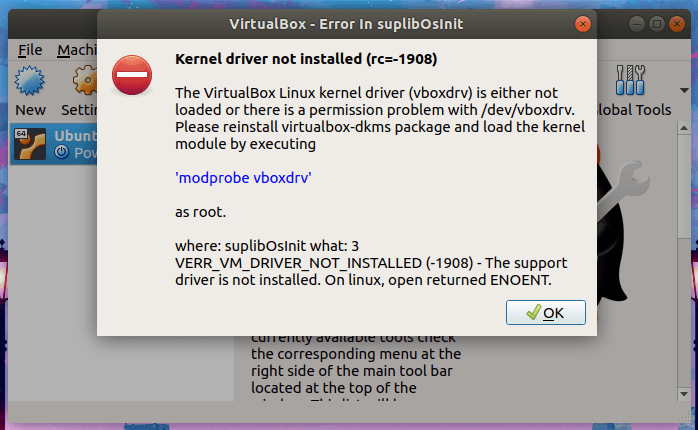
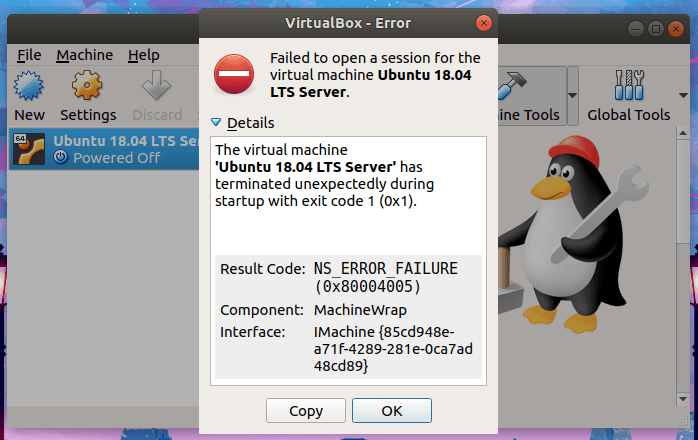
Я нажал «ОК», чтобы закрыть окно сообщения, и увидел еще один момент на заднем плане.
Failed to open a session for the virtual machine Ubuntu 18.04 LTS Server.

The virtual machine 'Ubuntu 18.04 LTS Server' has terminated unexpectedly during startup with exit code 1 (0x1).

Result Code:
NS_ERROR_FAILURE (0x80004005)
Component:
MachineWrap
Interface:
IMachine {85cd948e-a71f-4289-281e-0ca7ad48cd89}
Я не знал, что делать в первую очередь.
Я запустил следующую команду, чтобы проверить, поможет ли это.
$ sudo modprobe vboxdrv
И я получил эту ошибку.
modprobe: FATAL: Module vboxdrv not found in directory /lib/modules/5.0.0-23-generic
Внимательно прочитав оба сообщения об ошибках, я понял, что должен обновить приложение Virtualbox.
Если вы когда-нибудь сталкивались с этой ошибкой в Ubuntu и ее вариантах, таких как Linux Mint, все, что вам нужно сделать, это просто переустановить или обновить пакет «virtualbox-dkms» с помощью команды:
$ sudo apt install virtualbox-dkms
Или гораздо лучше обновить всю систему:
$ sudo apt upgrade
Теперь ошибка исчезла, и я мог без проблем запускать виртуальные машины из VirtualBox.