Writing views
A view function, or view for short, is a Python function that takes a
web request and returns a web response. This response can be the HTML contents
of a web page, or a redirect, or a 404 error, or an XML document, or an image .
. . or anything, really. The view itself contains whatever arbitrary logic is
necessary to return that response. This code can live anywhere you want, as long
as it’s on your Python path. There’s no other requirement–no “magic,” so to
speak. For the sake of putting the code somewhere, the convention is to
put views in a file called views.py, placed in your project or
application directory.
A simple view
Here’s a view that returns the current date and time, as an HTML document:
from django.http import HttpResponse
import datetime

def current_datetime(request):
    now = datetime.datetime.now()
    html = "<html><body>It is now %s.</body></html>" % now
    return HttpResponse(html)
Let’s step through this code one line at a time:
-
First, we import the class
HttpResponsefrom the
django.httpmodule, along with Python’sdatetimelibrary. -
Next, we define a function called
current_datetime. This is the view
function. Each view function takes anHttpRequest
object as its first parameter, which is typically namedrequest.Note that the name of the view function doesn’t matter; it doesn’t have to
be named in a certain way in order for Django to recognize it. We’re
calling itcurrent_datetimehere, because that name clearly indicates
what it does. -
The view returns an
HttpResponseobject that
contains the generated response. Each view function is responsible for
returning anHttpResponseobject. (There are
exceptions, but we’ll get to those later.)
Django’s Time Zone
Django includes a TIME_ZONE setting that defaults to
America/Chicago. This probably isn’t where you live, so you might want
to change it in your settings file.
Mapping URLs to views
So, to recap, this view function returns an HTML page that includes the current
date and time. To display this view at a particular URL, you’ll need to create a
URLconf; see URL dispatcher for instructions.
Returning errors
Django provides help for returning HTTP error codes. There are subclasses of
HttpResponse for a number of common HTTP status codes
other than 200 (which means “OK”). You can find the full list of available
subclasses in the request/response
documentation. Return an instance of one of those subclasses instead of a
normal HttpResponse in order to signify an error. For
example:
from django.http import HttpResponse, HttpResponseNotFound

def my_view(request):
    # ...
    if foo:
        return HttpResponseNotFound('<h1>Page not found</h1>')
    else:
        return HttpResponse('<h1>Page was found</h1>')
There isn’t a specialized subclass for every possible HTTP response code,
since many of them aren’t going to be that common. However, as documented in
the HttpResponse documentation, you can also pass the
HTTP status code into the constructor for HttpResponse
to create a return class for any status code you like. For example:
from django.http import HttpResponse

def my_view(request):
    # ...

    # Return a "created" (201) response code.
    return HttpResponse(status=201)
Because 404 errors are by far the most common HTTP error, there’s an easier way
to handle those errors.
The Http404 exception
-
class
django.http.Http404
When you return an error such as HttpResponseNotFound,
you’re responsible for defining the HTML of the resulting error page:
return HttpResponseNotFound('<h1>Page not found</h1>')
For convenience, and because it’s a good idea to have a consistent 404 error page
across your site, Django provides an Http404 exception. If you raise
Http404 at any point in a view function, Django will catch it and return the
standard error page for your application, along with an HTTP error code 404.
Example usage:
from django.http import Http404
from django.shortcuts import render
from polls.models import Poll

def detail(request, poll_id):
    try:
        p = Poll.objects.get(pk=poll_id)
    except Poll.DoesNotExist:
        raise Http404("Poll does not exist")
    return render(request, 'polls/detail.html', {'poll': p})
In order to show customized HTML when Django returns a 404, you can create an
HTML template named 404.html and place it in the top level of your
template tree. This template will then be served when DEBUG is set
to False.
When DEBUG is True, you can provide a message to Http404 and
it will appear in the standard 404 debug template. Use these messages for
debugging purposes; they generally aren’t suitable for use in a production 404
template.
Customizing error views
The default error views in Django should suffice for most web applications,
but can easily be overridden if you need any custom behavior. Specify the
handlers as seen below in your URLconf (setting them anywhere else will have no
effect).
The page_not_found() view is overridden by
handler404:
handler404 = 'mysite.views.my_custom_page_not_found_view'
The server_error() view is overridden by
handler500:
handler500 = 'mysite.views.my_custom_error_view'
The permission_denied() view is overridden by
handler403:
handler403 = 'mysite.views.my_custom_permission_denied_view'
The bad_request() view is overridden by
handler400:
handler400 = 'mysite.views.my_custom_bad_request_view'
Testing custom error views
To test the response of a custom error handler, raise the appropriate exception
in a test view. For example:
from django.core.exceptions import PermissionDenied
from django.http import HttpResponse
from django.test import SimpleTestCase, override_settings
from django.urls import path


def response_error_handler(request, exception=None):
    return HttpResponse('Error handler content', status=403)


def permission_denied_view(request):
    raise PermissionDenied


urlpatterns = [
    path('403/', permission_denied_view),
]

handler403 = response_error_handler


# ROOT_URLCONF must specify the module that contains handler403 = ...
@override_settings(ROOT_URLCONF=__name__)
class CustomErrorHandlerTests(SimpleTestCase):

    def test_handler_renders_template_response(self):
        response = self.client.get('/403/')
        # Make assertions on the response here. For example:
        self.assertContains(response, 'Error handler content', status_code=403)
Async views
As well as being synchronous functions, views can also be asynchronous
(“async”) functions, normally defined using Python’s async def syntax.
Django will automatically detect these and run them in an async context.
However, you will need to use an async server based on ASGI to get their
performance benefits.
Here’s an example of an async view:
import datetime
from django.http import HttpResponse

async def current_datetime(request):
    now = datetime.datetime.now()
    html = '<html><body>It is now %s.</body></html>' % now
    return HttpResponse(html)
You can read more about Django’s async support, and how to best use async
views, in Asynchronous support.
-
Getting Help
-
el
-
es
-
fr
-
id
-
it
-
ja
-
ko
-
pl
-
pt-br
-
zh-hans
- Language: en
-
1.8
-
1.10
-
1.11
-
2.0
-
2.1
-
2.2
-
3.0
-
3.1
-
3.2
-
4.0
-
4.2
-
dev
-
Documentation version:
4.1
Built-in Views
Several of Django’s built-in views are documented in
Writing views as well as elsewhere in the documentation.
Serving files in development
-
static.serve(request, path, document_root, show_indexes=False)
There may be files other than your project’s static assets that, for
convenience, you’d like to have Django serve for you in local development.
The serve() view can be used to serve any directory
you give it. (This view is not hardened for production use and should be
used only as a development aid; you should serve these files in production
using a real front-end web server).
The most likely example is user-uploaded content in MEDIA_ROOT.
django.contrib.staticfiles is intended for static assets and has no
built-in handling for user-uploaded files, but you can have Django serve your
MEDIA_ROOT by appending something like this to your URLconf:
from django.conf import settings
from django.urls import re_path
from django.views.static import serve

# ... the rest of your URLconf goes here ...

if settings.DEBUG:
    urlpatterns += [
        re_path(r'^media/(?P<path>.*)$', serve, {
            'document_root': settings.MEDIA_ROOT,
        }),
    ]
Note, the snippet assumes your MEDIA_URL has a value of
'media/'. This will call the serve() view,
passing in the path from the URLconf and the (required) document_root
parameter.
Since it can become a bit cumbersome to define this URL pattern, Django
ships with a small URL helper function static()
that takes as parameters the prefix such as MEDIA_URL and a dotted
path to a view, such as 'django.views.static.serve'. Any other function
parameter will be transparently passed to the view.
Error views
Django comes with a few views by default for handling HTTP errors. To override
these with your own custom views, see Customizing error views.
The 404 (page not found) view
-
defaults.page_not_found(request, exception, template_name=‘404.html’)
When you raise Http404 from within a view, Django loads a
special view devoted to handling 404 errors. By default, it’s the view
django.views.defaults.page_not_found(), which either produces a “Not
Found” message or loads and renders the template 404.html if you created it
in your root template directory.
The default 404 view will pass two variables to the template: request_path,
which is the URL that resulted in the error, and exception, which is a
useful representation of the exception that triggered the view (e.g. containing
any message passed to a specific Http404 instance).
Three things to note about 404 views:
- The 404 view is also called if Django doesn’t find a match after
checking every regular expression in the URLconf. - The 404 view is passed a
RequestContextand
will have access to variables supplied by your template context
processors (e.g.MEDIA_URL). - If
DEBUGis set toTrue(in your settings module), then
your 404 view will never be used, and your URLconf will be displayed
instead, with some debug information.
The 500 (server error) view
-
defaults.server_error(request, template_name=‘500.html’)
Similarly, Django executes special-case behavior in the case of runtime errors
in view code. If a view results in an exception, Django will, by default, call
the view django.views.defaults.server_error, which either produces a
“Server Error” message or loads and renders the template 500.html if you
created it in your root template directory.
The default 500 view passes no variables to the 500.html template and is
rendered with an empty Context to lessen the chance of additional errors.
If DEBUG is set to True (in your settings module), then
your 500 view will never be used, and the traceback will be displayed
instead, with some debug information.
The 403 (HTTP Forbidden) view
-
defaults.permission_denied(request, exception, template_name=‘403.html’)
In the same vein as the 404 and 500 views, Django has a view to handle 403
Forbidden errors. If a view results in a 403 exception then Django will, by
default, call the view django.views.defaults.permission_denied.
This view loads and renders the template 403.html in your root template
directory, or if this file does not exist, instead serves the text
“403 Forbidden”, as per RFC 7231#section-6.5.3 (the HTTP 1.1 Specification).
The template context contains exception, which is the string
representation of the exception that triggered the view.
django.views.defaults.permission_denied is triggered by a
PermissionDenied exception. To deny access in a
view you can use code like this:
from django.core.exceptions import PermissionDenied

def edit(request, pk):
    if not request.user.is_staff:
        raise PermissionDenied
    # ...
The 400 (bad request) view
-
defaults.bad_request(request, exception, template_name=‘400.html’)
When a SuspiciousOperation is raised in Django,
it may be handled by a component of Django (for example resetting the session
data). If not specifically handled, Django will consider the current request a
‘bad request’ instead of a server error.
django.views.defaults.bad_request, is otherwise very similar to the
server_error view, but returns with the status code 400 indicating that
the error condition was the result of a client operation. By default, nothing
related to the exception that triggered the view is passed to the template
context, as the exception message might contain sensitive information like
filesystem paths.
bad_request views are also only used when DEBUG is False.
Back to Top
Simply way to do it, you can use raise Http404, here is your views.py
from django.http import Http404

from rest_framework import status
from rest_framework.response import Response
from rest_framework.views import APIView

from yourapp.models import Snippet
from yourapp.serializer import SnippetSerializer


class SnippetDetailView(APIView):

    def get_object(self, pk):
        try:
            return Snippet.objects.get(pk=pk)
        except Snippet.DoesNotExist:
            raise Http404

    def get(self, request, pk, format=None):
        snippet = self.get_object(pk)
        serializer = SnippetSerializer(snippet)
        return Response(serializer.data, status=status.HTTP_200_OK)
You also can handle it with Response(status=status.HTTP_404_NOT_FOUND), this answer is how to do with it: https://stackoverflow.com/a/24420524/6396981
But previously, inside your serializer.py
from rest_framework import serializers

from yourapp.models import Snippet


class SnippetSerializer(serializers.ModelSerializer):
    user = serializers.CharField(
        source='user.pk',
        read_only=True
    )
    photo = serializers.ImageField(
        max_length=None,
        use_url=True
    )
    ....

    class Meta:
        model = Snippet
        fields = ('user', 'title', 'photo', 'description')

    def create(self, validated_data):
        return Snippet.objects.create(**validated_data)
To test it, an example using curl command;
$ curl -X GET http://localhost:8000/snippets/<pk>/

# example;

$ curl -X GET http://localhost:8000/snippets/99999/
Hope it can help..
Update
If you want to handle for all error 404 urls with DRF, DRF also provide about it with APIException, this answer may help you; https://stackoverflow.com/a/30628065/6396981
I’ll give an example how do with it;
1. views.py
from rest_framework.exceptions import NotFound

def error404(request):
    raise NotFound(detail="Error 404, page not found", code=404)
2. urls.py
from django.conf.urls import (
  handler400, handler403, handler404, handler500)

from yourapp.views import error404

handler404 = error404
Makesure your
DEBUG = False
- Home
- Django 1.10 Tutorial
- Showing 404 errors In Django
Last updated on July 27, 2020
Visit a category page which doesn’t exist for example, http://127.0.0.1:8000/category/cat_not_exists/. You should see DoesNotExist exception like this:
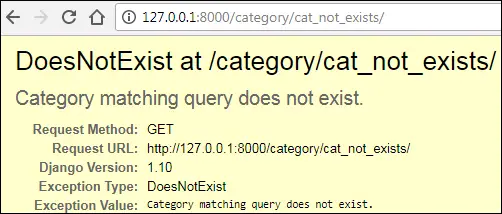
As there is no such category in the database the URL http://127.0.0.1:8000/blog/category/cat_not_exists/ is completely invalid. In production (i.e when DEBUG=True), instead of throwing a DoesNotExist exception Django will show 500 Internal Server Error.
From the point of view of Search Engine Optimization (SEO), it would be much better to show an HTTP 404 error for the non-existent page instead of showing Internal Server Error or DoesNotExist exception.
The same problem exists in the tag page and the post detail page. Visit any tag or post detail page which doesn’t exist like http://127.0.0.1:8000/tag/tag_not_exists/ or http://127.0.0.1:8000/97712/ and see it yourself.
Showing an HTTP 404 page #
Django provides two ways to show 404 error.
HttpResponseNotFoundclassHttp404exception
Let’s start with HttpResponseNotFound class.
HttpResponseNotFound class #
The HttpResponseNotFound class is an extension of HttpResponse class. It works just like HttpResponse but instead of returning a 200 status code , it returns 404 (which means page not found). To see how it works, open views.py and modify the post_detail() view as follows:
TGDB/django_project/blog/views.py
1 2 3 4 5 6 7 8 9 10 11 12 13 |
from django.http import HttpResponse, HttpResponseNotFound #... # view function to display a single post def post_detail(request, pk): try: post = Post.objects.get(pk=pk) except Post.DoesNotExist: return HttpResponseNotFound("Page not found") return render(request, 'blog/post_detail.html', {'post': post}) #... |
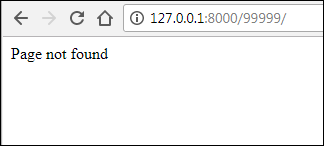
Here we are wrapping the code which might throw an exception in the try and except block. Now, If get() method throws a DoesNotExist exception then instead of displaying an error page, Django will show a 404 error page with "Page not found" response. Save the changes and visit http://127.0.0.1:8000/99999/, you should get a response like this:
Http404 exception #
Another way to show a 404 error page is to raise Http404 exception. Notice that unlike HttpResponseNotFound class, Http404 is an exception. Http404 uses a default 404 page which Django provides. To use it just raise Http404 exception in your code like this:
You can also provide an error message while raising Http404 exception.
raise Http404("Some error message")
Open views.py file and amend post_detail() view as follows:
TGDB/django_project/blog/views.py
1 2 3 4 5 6 7 8 9 10 11 12 13 |
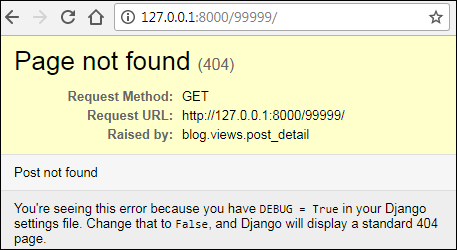
from django.http import HttpResponse, HttpResponseNotFound, Http404 #... # view function to display a single post def post_detail(request, pk): try: post = Post.objects.get(pk=pk) except Post.DoesNotExist: raise Http404("Post not found") return render(request, 'blog/post_detail.html', {'post': post}) #... |
Save the file and visit http://127.0.0.1:8000/blog/99999/, you will see the following 404 error page.
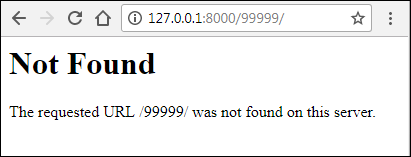
We are currently in development mode. In production (i.e when DEBUG=False) Django will show 404 page which looks like this:
The get_object_or_404() method #
Most of the time our views function goes like this:
- Code try and except block.
- Query the database in the try block.
- If an exception is thrown, catch the exception in the except block and show a 404 page.
This pattern is so common that Django a provides a shortcurt method called get_object_or_404(). Here is the syntax of get_object_or_404().
Syntax: get_object_or_404(klass, **kwargs)
The klass can be a model, a manager or a Queryset object.
The **kwargs represents all keyword arguments as well as lookup parameters that we have been using with the get() and filter() method.
On success, it returns a single object of the given model, if it can’t find any records then it raises a Http404 exception.
Internally this method calls get() method of objects manager, so you must always use this method to get a single record.
To use get_object_or_404() first import it from django.shortcuts using the following code.
from django.shortcuts import get_object_or_404
The following examples shows how to use get_object_or_404() method with models, queryset and managers. It also shows that when a matching record is not found, get_object_or_404() raises a Http404 exception.
Example 1: where klass is model
1 2 3 4 5 6 7 8 9 10 11 12 13 14 15 |
>>> >>> from django.shortcuts import get_object_or_404 >>> from blog.models import Category, Post, Tag, Author >>> post = get_object_or_404(Post, pk=1) >>> >>> post <Post: Post 1> >>> >>> >>> post = get_object_or_404(Post, pk=990) Traceback (most recent call last): ... django.http.response.Http404: No Post matches the given query. >>> >>> |
The above code is equivalent to:
>>> >>> try: ... post = Post.objects.get(pk=1) ... except Post.DoesNotExist: ... raise Http404("Post not found") ... >>> |
Example 2: where klass is queryset
>>> >>> queryset = Post.objects.filter(title__contains="Post 1") >>> queryset <QuerySet [<Post: Post 1>]> >>> >>> post = get_object_or_404(queryset, pk=1) >>> >>> post <Post: Post 1> |
>>> >>> >>> post = get_object_or_404(queryset, pk=10) # get_object_or_404() will now raise an exception Traceback (most recent call last): ... raise Http404('No %s matches the given query.' % queryset.model._meta.object _name) django.http.response.Http404: No Post matches the given query. >>> >>> |
Example 3: where klass is manager
>>> >>> c = Category.objects.get(name='java') >>> c <Category: java> |
1 2 3 4 5 6 7 8 9 10 11 12 13 14 |
>>> >>> post = get_object_or_404(c.post_set, title__contains="Post 2") >>> >>> post <Post: Post 2> >>> >>> >>> post = get_object_or_404(c.post_set, title__contains="tagged") Traceback (most recent call last): ... raise Http404('No %s matches the given query.' % queryset.model._meta.object_name) django.http.response.Http404: No Post matches the given query. >>> >>> |
Let’s update our post_detail() view to use get_object_or_404() method.
TGDB/django_project/blog/views.py
#... from django.shortcuts import render, get_object_or_404 #... # view function to display a single post def post_detail(request, pk): post = get_object_or_404(Post, pk=pk) return render(request, 'blog/post_detail.html', {'post': post}) #... |
The get_list_or_404() method #
The get_list_or_404() works just like get_object_or_404() method, but instead of returning a single result, it returns a queryset object. If no matching results found, it raises a Http404 exception.
Open views.py file and update post_by_category() and post_by_tag() view functions to use get_list_or_404() method as follows:
TGDB/django_project/blog/views.py
1 2 3 4 5 6 7 8 9 10 11 12 13 14 15 16 17 18 19 20 21 22 23 24 25 |
#... from django.shortcuts import render, get_object_or_404, get_list_or_404 #... # view function to display post by category def post_by_category(request, category_slug): category = get_object_or_404(Category, slug=category_slug) posts = get_list_or_404(Post, category=category) context = { 'category': category, 'posts': posts } return render(request, 'blog/post_by_category.html', context) # view function to display post by tag def post_by_tag(request, tag_slug): tag = get_object_or_404(Tag, slug=tag_slug) posts = get_list_or_404(Post, tags=tag) context = { 'tag': tag, 'posts': posts, } return render(request, 'blog/post_by_tag.html', context ) |
After updating views, visit any non-existent category page, tag page or post detail page, you should get a proper HTTP 404 error.
Creating SEO friendly URLs #
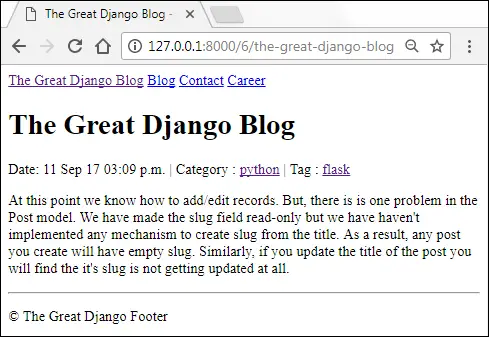
As the situation stands, our post detail page URLs looks like http://127.0.0.1:8000/6/. Although it is working fine, the problem is that by looking at the URL nobody can tell what the post is about. It would be good to create URLs which describes something about the post.
For our blog, we will create a URL pattern like the following:
http://example.com/post-pk/post-slug
Let’s implement this URL pattern.
Open urls.py in the blog app and amend post_detail URL pattern as follows:
TGDB/django_project/blog/urls.py
#... urlpatterns = [ url(r'^category/(?P<category_slug>[w-]+)/$', views.post_by_category, name='post_by_category'), url(r'^tag/(?P<tag_slug>[w-]+)/$', views.post_by_tag, name='post_by_tag'), url(r'^(?P<pk>d+)/(?P<post_slug>[wd-]+)$', views.post_detail, name='post_detail'), url(r'^$', views.post_list, name='post_list'), ] |
Update post_detail() view function to accept another parameter called post_slug as follows:
TGDB/django_project/blog/views.py
#... # view function to display a single post def post_detail(request, pk, post_slug): post = get_object_or_404(Post, pk=pk) return render(request, 'blog/post_detail.html', {'post': post}) #... |
At last, we need to modify the get_absolute_url() method of the Post model. Open models.py and update get_absolute_url() method of Post model as follows:
TGDB/django_project/blog/models.py
#... class Post(models.Model): #... def get_absolute_url(self): return reverse('post_detail', args=[self.id, self.slug]) #... |
As we are using get_absolute_url() method to generate links to post detail page in our templates, we don’t need to modify anything else. All templates will pick the changes automatically.
To view the updated URL visit http://127.0.0.1:8000/ and click on any post detail page.
Listing posts in reverse chronological order #
Currently, all pages of our site display posts in the order in which they are inserted into the database. For usability purpose, it would be much better to display posts in reverse chronological order i.e latest first, oldest last.
This change would be very simple. Open views.py in the blog app and update post_list(), post_by_category() and post_by_tag() views as follows:
TGDB/django_project/blog/views.py
1 2 3 4 5 6 7 8 9 10 11 12 13 14 15 16 17 18 19 20 21 22 23 24 25 26 27 28 29 30 31 32 33 34 |
#... # view function to display a list of posts def post_list(request): posts = Post.objects.order_by("-id").all() return render(request, 'blog/post_list.html', {'posts': posts}) # view function to display a single post def post_detail(request, pk, post_slug): post = get_object_or_404(Post, pk=pk) return render(request, 'blog/post_detail.html', {'post': post}) # view function to display post by category def post_by_category(request, category): category = get_object_or_404(Category, slug=category_slug) posts = get_list_or_404(Post.objects.order_by("-id"), category=category) context = { 'category': category, 'posts': posts } return render(request, 'blog/post_by_category.html', context) # view function to display post by tag def post_by_tag(request, tag): tag = get_object_or_404(Tag, slug=tag_slug) posts = get_list_or_404(Post.objects.order_by("-id"), tags=tag) context = { 'tag': tag, 'posts': posts } return render(request, 'blog/post_by_tag.html', context ) |
From now on, all the pages of our blog will display posts in reverse chronological order.
Note: To checkout this version of the repository type git checkout 18a.

Написание представлений
Функция представления, или сокращенно view, — это функция Python, которая принимает веб-запрос и возвращает веб-ответ. Этим ответом может быть HTML-содержимое веб-страницы, или перенаправление, или ошибка 404, или XML-документ, или изображение … или что угодно. Само представление содержит любую произвольную логику, необходимую для возврата ответа. Этот код может находиться где угодно, лишь бы он был в пути Python. Нет никаких других требований — никакой «магии», так сказать. Для того, чтобы код был где-то, принято помещать представления в файл с именем views.py, расположенный в каталоге проекта или приложения.
Простое представление
Вот представление, которое возвращает текущую дату и время в виде HTML-документа:
from django.http import HttpResponse
import datetime

def current_datetime(request):
    now = datetime.datetime.now()
    html = "<html><body>It is now %s.</body></html>" % now
    return HttpResponse(html)
Давайте пройдемся по этому коду по одной строке за раз:
-
Сначала мы импортируем класс
HttpResponseиз модуляdjango.httpвместе с библиотекой Pythondatetime. -
Затем мы определяем функцию под названием
current_datetime. Это функция просмотра. Каждая функция представления принимает в качестве первого параметра объектHttpRequest, который обычно называетсяrequest.Обратите внимание, что имя функции представления не имеет значения; его не нужно называть определенным образом, чтобы Django мог его распознать. Мы называем это здесь
current_datetime, потому что это имя четко указывает на то, что он делает. -
Представление возвращает объект
HttpResponse, содержащий сгенерированный ответ. Каждая функция представления отвечает за возврат объектаHttpResponse. (Есть исключения, но мы вернемся к ним позже.)
Часовой пояс Джанго
Django включает параметр TIME_ZONE, который по умолчанию имеет значение Америка/Чикаго. Вероятно, это не то место, где вы живете, поэтому вы можете изменить это в своем файле настроек.
Сопоставление URL-адресов с представлениями
Итак, напомним, эта функция возвращает HTML-страницу, которая включает текущую дату и время. Чтобы отобразить это представление по определенному URL-адресу, вам необходимо создать URLconf; смотрите Диспетчер URL для получения инструкций.
Возврат ошибок
Django предоставляет помощь по возврату кодов ошибок HTTP. Существуют подклассы HttpResponse для ряда общих кодов состояния HTTP, кроме 200 (что означает «OK»). Вы можете найти полный список доступных подклассов в документации request/response. Вернуть экземпляр одного из этих подклассов вместо обычного HttpResponse, чтобы обозначить ошибку. Например:
from django.http import HttpResponse, HttpResponseNotFound

def my_view(request):
    # ...
    if foo:
        return HttpResponseNotFound('<h1>Page not found</h1>')
    else:
        return HttpResponse('<h1>Page was found</h1>')
Не существует специального подкласса для каждого возможного кода ответа HTTP, поскольку многие из них не будут такими распространенными. Однако, как описано в документации HttpResponse, вы также можете передать код состояния HTTP в конструктор для HttpResponse, чтобы создать класс возврата для любого статуса, который вам нравится. Например:
from django.http import HttpResponse

def my_view(request):
    # ...

    # Return a "created" (201) response code.
    return HttpResponse(status=201)
Поскольку ошибки 404 являются наиболее распространенной ошибкой HTTP, есть более простой способ справиться с этими ошибками.
Исключение Http404
-
class
django.http.Http404
Когда вы возвращаете ошибку, такую как HttpResponseNotFound, вы отвечаете за определение HTML страницы с ошибкой:
return HttpResponseNotFound('<h1>Page not found</h1>')
Для удобства, а также потому, что рекомендуется иметь последовательную страницу с ошибкой 404 на вашем сайте, Django предоставляет исключение Http404. Если вы вызовете Http404 в любой точке функции представления, Django поймает его и вернет стандартную страницу ошибки для вашего приложения вместе с кодом ошибки HTTP 404.
Пример использования:
from django.http import Http404
from django.shortcuts import render
from polls.models import Poll

def detail(request, poll_id):
    try:
        p = Poll.objects.get(pk=poll_id)
    except Poll.DoesNotExist:
        raise Http404("Poll does not exist")
    return render(request, 'polls/detail.html', {'poll': p})
Чтобы отображать настроенный HTML-код, когда Django возвращает 404, вы можете создать HTML-шаблон с именем 404.html и поместить его на верхний уровень вашего дерева шаблонов. Затем этот шаблон будет обслуживаться, если DEBUG имеет значение False.
Когда DEBUG имеет значение True, вы можете предоставить сообщение для Http404, и оно появится в стандартном шаблоне отладки 404. Используйте эти сообщения для отладки; они обычно не подходят для использования в рабочем шаблоне 404.
Настройка представлений ошибок
Стандартные представления ошибок в Django должны быть достаточными для большинства веб-приложений, но их можно легко переопределить, если вам нужно любое пользовательское поведение. Укажите обработчики, как показано ниже, в вашей URLconf (установка их в любом другом месте не будет иметь никакого эффекта).
Представление page_not_found() переопределяет handler404:
handler404 = 'mysite.views.my_custom_page_not_found_view'
Представление server_error() переопределяет handler500:
handler500 = 'mysite.views.my_custom_error_view'
Представление permission_denied() переопределяет handler403:
handler403 = 'mysite.views.my_custom_permission_denied_view'
Представление bad_request() переопределяет handler400:
handler400 = 'mysite.views.my_custom_bad_request_view'
См.также
Используйте параметр CSRF_FAILURE_VIEW, чтобы переопределить просмотр ошибок CSRF.
Тестирование пользовательских представлений ошибок
Чтобы проверить реакцию настраиваемого обработчика ошибок, вызовите соответствующее исключение в тестовом представлении. Например:
from django.core.exceptions import PermissionDenied
from django.http import HttpResponse
from django.test import SimpleTestCase, override_settings
from django.urls import path


def response_error_handler(request, exception=None):
    return HttpResponse('Error handler content', status=403)


def permission_denied_view(request):
    raise PermissionDenied


urlpatterns = [
    path('403/', permission_denied_view),
]

handler403 = response_error_handler


# ROOT_URLCONF must specify the module that contains handler403 = ...
@override_settings(ROOT_URLCONF=__name__)
class CustomErrorHandlerTests(SimpleTestCase):

    def test_handler_renders_template_response(self):
        response = self.client.get('/403/')
        # Make assertions on the response here. For example:
        self.assertContains(response, 'Error handler content', status_code=403)
Асинхронные представления
Представления могут быть не только синхронными, но и асинхронными («async») функциями, обычно определяемыми с использованием синтаксиса Python async def. Django автоматически обнаружит их и запустит в асинхронном контексте. Однако вам нужно будет использовать асинхронный сервер на основе ASGI, чтобы получить их преимущества в производительности.
Вот пример асинхронного представления:
import datetime
from django.http import HttpResponse

async def current_datetime(request):
    now = datetime.datetime.now()
    html = '<html><body>It is now %s.</body></html>' % now
    return HttpResponse(html)
Вы можете узнать больше о поддержке async в Django и о том, как лучше всего использовать асинхронные представления, в : doc:/topics/async.
{% load static %}
<!DOCTYPE html>
<html class="no-js" lang="en">
<head>
<meta charset="utf-8">
<title>Web Developer</title>
<link href="{% static 'img/Demo/favicon.png' %}" rel="shortcut icon"/>
<meta charset="UTF-8" />
<meta http-equiv="X-UA-Compatible" content="IE=edge">
<meta name="description" content="Alphaandroid - Creative Agency of web developers">
<meta name="author" content="Pavan And Romil">
<meta name="keywords" content="Web developer (using coding), Digital Marketing" />
<meta name="viewport" content="width=device-width, initial-scale=1, maximum-scale=1">
<link rel="stylesheet" href="{% static 'css/error404/base.css' %}">
<link rel="stylesheet" href="{% static 'css/error404/main.css' %}">
<link rel="stylesheet" href="{% static 'css/error404/vendor.css' %}">
<script src="{% static 'js/error404/modernizr.js' %}"></script>
<link rel="icon" type="image/png" href="{% static 'favicon.png' %}">
<script>(function(w,d,s,l,i){w[l]=w[l]||[];w[l].push({'gtm.start':
new Date().getTime(),event:'gtm.js'});var f=d.getElementsByTagName(s)[0],
j=d.createElement(s),dl=l!='dataLayer'?'&l='+l:'';j.async=true;j.src=
})(window,document,'script','dataLayer','GTM-MRJ5QRJ');
</script>
</head>
<body>
height="0" width="0" style="display:none;visibility:hidden"></iframe></noscript>
{% comment %}
<header class="main-header">
<div class="row">
<div class="logo">
<a href="index.html">Alpha Android</a>
</div>
</div>
<a class="menu-toggle" href="#"><span>Menu</span></a>
</header>
{% endcomment %}
{% comment %}
<nav id="menu-nav-wrap">
<h5>Site Pages</h5>
<ul class="nav-list">
<li><a href="/" title="">Home</a></li>
<li><a href="#" title="">About</a></li>
<li><a href="#" title="">Contact</a></li>
</ul>
<h5>Some Text</h5>
<p>Lorem ipsum Non non Duis adipisicing pariatur eu enim Ut in aliqua dolor esse sed est in sit exercitation eiusmod aliquip consequat.</p>
</nav>
{% endcomment %}
<main id="main-404-content" class="main-content-particle-js">
<div class="content-wrap">
<div class="shadow-overlay"></div>
<div class="main-content">
<div class="row">
<div class="col-twelve">
<h1 class="kern-this">404 Error.</h1>
<p>
Oooooops! Looks like nothing was found at this location.
Maybe try on of the links below, click on the top menu
or try a search?
</p>
{% comment %}
<div class="search">
<form>
<input type="text" id="s" name="s" class="search-field" placeholder="Type and hit enter …">
</form>
</div>
{% endcomment %}
</div>
</div>
</div>
<footer>
<div class="row">
<div class="col-seven tab-full social-links pull-right">
<ul>
<li><a href="#"><i class="fa fa-facebook"></i></a></li>
<li><a href="#"><i class="fa fa-behance"></i></a></li>
<li><a href="#"><i class="fa fa-twitter"></i></a></li>
<li><a href="#"><i class="fa fa-dribbble"></i></a></li>
<li><a href="#"><i class="fa fa-instagram"></i></a></li>
</ul>
</div>
<div class="col-five tab-full bottom-links">
<ul class="links">
<li><a href="/">Homepage</a></li>
<li><a href="/about-us/">About Us</a></li>
{% comment %}
<li><a href="/contact-us/">Contact Us</a></li>
{% endcomment %}
<li><a href="mailto:Contact@alphaandroid.com">Report Error</a></li>
</ul>
<div class="credits">
</div>
</div>
</div>
</footer>
</div>
</main>
<div id="preloader">
<div id="loader"></div>
</div>
<script src="{% static 'js/error404/jquery-2.1.3.min.js' %}"></script>
<script src="{% static 'js/error404/plugins.js' %}"></script>
<script src="{% static 'js/error404/main.js' %}"></script>
</body>
</html>
There are a few ways to redirect to a 404 page (or page not found error) in Django. The easiest way is to raise Django’s built in 404 exception, like so:
from django.http import Http404

def myView(request, param):
  if not param:
    raise Http404

  return render_to_response('myView.html')
You can add a file called 404.html to your templates folder and Django will use this content to display to users during 404 errors.
If you want something a little more raw, you could do this:
from django.http import HttpResponseNotFound

def myView(request, param):
  if not param:
    return HttpResponseNotFound('<h1>No Page Here</h1>')

  return render_to_response('myView.html')
By default, if a url is not found in urls.py and ‘DEBUG = False’ in your settings.py, Django will redirect the user to a 404 page.
Here is a reference for returning errors in views and more detail on Request and Response objects.

Django, HTTPResponse, python, Redirect
Продолжим рассмотрение Views в Django и переходим к написанию полезных вещей. Каждое представление отвечает за два действия – это возвращение HttpResponse с объектом данных для запрашиваемой страницы либо генерацию исключения, например, Http404. Все остальное зависит от нашей фантазии. Мы можем реализовать любой необходимый функционал, который позволяет нам Python. Будь-то чтение из БД, вывод XML или генерация PDF-файлов. При этом, мы можем использовать базовую систему шаблонов Django или подключить сторонюю по-необходимости.
Давайте изменим наше первое представление главной страницы index(), добавив него несколько строчек кода, которые будут сначала запрашивать из БД 5 последних вопросов. Затем преобразуем результат в строку используя простой метод join() и передадим результат на вывод. Выглядеть это будет так:
from django.http import HttpResponse
from .models import Question

def index(request):
    latest_question_list = Question.objects.order_by('-pub_date')[:5]
    output = ', '.join([q.question_text for q in latest_question_list])
    return HttpResponse(output)
Однако этот код содержит проблему, суть которой в том, что дизайн страницы жестко закодирован в представлении. Если нам необходимо будет изменить внешний вид страницы, то придется каждый раз редактировать код Python. Для того, чтобы этого не делать, необходимо использовать систему шаблонов Django и отделить дизайн от кода на Python. Создадим шаблон, который будет использовать наше представление.
Прежде всего, создадим каталог с именем templates в каталоге приложения polls. Джанго будет искать шаблоны в нем.
Файл настроек по умолчанию определяет так, что Django ищет шаблоны в поддиректориях каждого созданного приложения. При этом дополнительно нам необходимо создать подкаталог, соответствующий названию приложения. В конечном итоге у нас должно быть так “polls/templates/polls”.
Далее создадим файл index.html и поместим туда следующий код:
# polls/templates/polls/index.html
{% if latest_question_list %}
    <ul>
    {% for question in latest_question_list %}
        <li><a href="/polls/{{ question.id }}/">{{ question.question_text }}</a></li>
    {% endfor %}
    </ul>
{% else %}
    <p>No polls are available.</p>
{% endif %}
Осталось подключить использование данного шаблона в представлении:
from django.http import HttpResponse
from django.template import loader
from .models import Question

def index(request):
    latest_question_list = Question.objects.order_by('-pub_date')[:5]
    template = loader.get_template('polls/index.html')
    context = {
        'latest_question_list': latest_question_list,
    }
    return HttpResponse(template.render(context, request))
Этот код загружает шаблон с именем polls/index.html и передает ему контекст. Контекст представляет собой словарь, сопоставляющий имена переменных и объекты языка Python.
Теперь можем запустить наш dev-сервер и перейти на страницу “/polls/”. В результате мы должны увидеть список добавленных ранее вопросов. Ссылки указывают на страницу деталей.
Модернизируем представление при помощи render()
Загрузить шаблон, заполнить контекст и вернуть объект HttpResponse для визуализации шаблона является типичной задачей. Для упрощения Django предлагает нам функцию render().
Функция render() принимает объект запроса в качестве первого аргумента, имя шаблона в качестве второго аргумента и словарь в качестве необязательного третьего аргумента. Функция возвращает объект HttpResponse с заданным контекстом. Перепишем наше представление с использованием render():
# polls/views.py
from django.shortcuts import render
from .models import Question

def index(request):
    latest_question_list = Question.objects.order_by('-pub_date')[:5]
    context = {'latest_question_list': latest_question_list}
    return render(request, 'polls/index.html', context)
Как видим, код стал проще и короче, что безусловно плюс.
Возврат ошибок 404
При работе с web-приложениями часто бывает так, что выполняемый запрос не возвращает данные для отображения, т.к. их не существует. Важно, чтобы во всех таких случаях возвращалась корректная ошибка Http404. Изменим наше представление detail() следующим образом:
from django.http import HttpResponse, Http404
from .models import Question
# ...
def detail(request, question_id):
    try:
        question = Question.objects.get(pk=question_id)
    except Question.DoesNotExist:
        raise Http404("Question does not exist")
    return render(request, 'polls/detail.html', {'question': question})
Представление будет вызываеть ошибку Http404 в случае, если не будет получен результат по конкретному question_id.
Чтобы этот вариант представления detail() работал, создадим файл polls/templates/polls/detail.html и поместим в него пока только следующий код:
# polls/templates/polls/detail.html
{{ question }}
Теперь, если мы в браузере введем запрос, указав неверный id вопроса, например, “/polls/555/”, то в ответ получим ответ следующего вида:

В будущем мы сможем изменить эту страницу и выводить что-то более изящное, но для текущих целей оставим как есть.
Необходимость возврата ошибки 404 в ответ на запрос несуществующих объектов является типичным для работы с Django. Для упрощения этой задачи можно использовать отдельную функцию get_object_or_404(), которая сокращает код представления. С учетом этого, модернизируем наше представление следующим образом:
from django.http import HttpResponse
from django.shortcuts import render, get_object_or_404
from .models import Question
# ...
def detail(request, question_id):
    question = get_object_or_404(Question, pk=question_id)
    return render(request, 'polls/detail.html', {'question': question})
# ...
Также в Джанго существует функция get_list_or_404 (), которая работает аналогично get_object_or_404 () с разницей в том, что внутри использует метод filter() вместо get(). Возвращает ошибку Http404, если список пуст.
На этом этапе мы разобрались с базовыми моментами написания представлений в Джанго. Следующим этапом будем дорабатывать нашим шаблоны, чтобы они выводили больше необходимой информации в нужном нам виде.