Code Error 800A0408 – Invalid Character
Troubleshooting Code 800A0408 – Invalid Character
Introduction to Code 800A0408
This error code, 800A0408 occurs when you execute a VBScript. A wild guess a problem with an apostrophe, possibly in a ‘REM statement.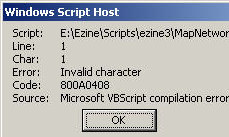
The Symptoms You Get
The script does not execute as you had hoped. Instead you get a WSH message box like this picture:
The Cause of error 800A0408
Your VBScript contains an illegal character, often at the beginning of a line. It can happen if you copy the script from word, then paste into notepad. For example, to ‘Rem out a line we need the apostrophe, which is ASCII character 39; however if you paste from word you may get ASCII 96 (Grave accent).
Note the clue Source: Microsoft VBScript compilation error, this means a syntax error in your script.
The Solutions
Check the punctuation marks in your VBScript, particularly look out for apostrophes and commas that do not display correctly. The reference to Line: 1 Char 1, means that the very first symbol that is probably wrong.
‡
Example 1 of error code 800A0408 – Invalid Character
Note: The error ‘Rem VBScript
It should be ‘ Rem VBScript
‘ Rem VBScript
Set WshShell = WScript.CreateObject(«WScript.Shell»)
Set WshNetwork = WScript.CreateObject(«WScript.Network»)
Set AllDrives = WshNetwork.EnumNetworkDrives()
DriveLetter = «N:» ‘must be capitalized
RemotePath = «\alanhome»
AlreadyConnected = False
For i = 0 To AllDrives.Count – 1 Step 2
If AllDrives.Item(i) = DriveLetter Then AlreadyConnected = True
Next
If AlreadyConnected = False then
WShNetwork.MapNetworkDrive DriveLetter, RemotePath
WshShell.PopUp «Drive » & DriveLetter & » connected successfully.»
Else
WShNetwork.RemoveNetworkDrive DriveLetter
WshShell.PopUp «Drive » & DriveLetter & » disconnected.»
End if
»
Example 2 Code 800A0408 – Invalid Character
I include this screen shot just to emphasise that Char: number need not be one. Thus Char: 20, or what ever your char number is, becomes a big clue in tracing obscure characters that may have sneaked into your script.

See More Windows Update Error Codes 8004 Series
• Error 800A101A8 Object Required •Error 800A0046 •Error 800A10AD •Error 800A000D
• Error 80048820 •Error 800A0401 •Review of SolarWinds Permissions Monitor
• Error 80040E14 • Error 800A03EA • Error 800A0408 • Error 800A03EE
 Guy Recommends: WMI Monitor and It’s Free!
Windows Management Instrumentation (WMI) is one of the hidden treasures of Microsoft operating systems. Fortunately, SolarWinds have created the WMI Monitor so that you can examine these gems of performance information for free. Take the guess work out of which WMI counters to use for applications like Microsoft Active Directory, SQL or Exchange Server.
Download your free copy of WMI Monitor
Do you need additional help?
- For interpreting the WSH messages check Diagnose 800 errors.
- For general advice try my 7 Troubleshooting techniques.
- See master list of 0800 errors.
- Codes beginning 08004…
- Codes beginning 08005…
- Codes beginning 08007…
- Codes beginning 0800A…
Give something back?
Would you like to help others? If you have a good example of this error, then please email me, I will publish it with a credit to you:
If you like this page then please share it with your friends
About The Author

Guy Thomas
VBS
Сообщение «Ошибка: Недопустимый знак» при запуске скрипта
04.08.2016, 17:16. Показов 8598. Ответов 1

Здравствуйте. С VBS так вплотную не раотаю, по этому если проблема очевидна то не бросайтесь тапками… В общем при запуске vbs выдаёт ошибку : Строка 5, символ 29, недопустимый знак. Вот сам код:
| Visual Basic | ||
|
__________________
Помощь в написании контрольных, курсовых и дипломных работ, диссертаций здесь
0
Я получаю сообщение об ошибке компиляции, когда пытаюсь запустить следующий код vbs из командной строки в Windows 7.
Option Explicit
Dim objNetwork, strRemotePath1, strRemotePath2, strRemotePath3
Dim strDriveLetter1, strDriveLetter2, strDriveLetter3, strUserName

Set objNetwork = CreateObject("WScript.Network")
strUserName = objNetwork.UserName

strDriveLetter1 = "H:"
strDriveLetter2 = "P:"
strDriveLetter3 = "S:"
strRemotePath1 = "\testpublicusers" & strUserName & ""
strRemotePath2 = "\testpublicgroups"
strRemotePath3 = "\testscans"


'Section which maps two drives, M: and P: and S:
objNetwork.MapNetworkDrive strDriveLetter1, strRemotePath1
objNetwork.MapNetworkDrive strDriveLetter2, strRemotePath2
objNetwork.MapNetworkDrive strDriveLetter3, strRemotePath3

'Extra code just to add a message box
WScript.Echo "Map drives " & strDriveLetter1 & " & " & strDriveLetter2 & " & " & strDriveLetter3

Wscript.Quit
В нем говорится, что проблема связана с линией 1, символ 1. Есть идеи?
3 ответы
Возможная проблема заключается в том, как был закодирован ваш файл; попробуйте сохранить его как ANSI и запустить снова.
Создан 10 янв.

FYI для тех, у кого такая же проблема в будущем, чтобы исправить это:
- Откройте .vbs в блокноте
- Перейти к файлу и «сохранить как»
- Прямо под полем имени файла вы увидите раскрывающееся меню для кодирования. Выбирать ANSI.
ответ дан 31 окт ’13, 17:10

Убедитесь, что вы не используете расширенный символ, например á é í ó ú ñ в имени переменной
Создан 07 фев.

Не тот ответ, который вы ищете? Просмотрите другие вопросы с метками
vbscript
or задайте свой вопрос.
I get a compilation error when I try to run the following vbs code from a command prompt in Windows 7 Vista. I’ve already Coverted it to ANSI but it still has the same problem
Set wshShell =wscript.CreateObject(“WScript.Shell”)
do
wscript.sleep 100
wshshell.sendkeys “{CAPSLOCK}”
wshshell.sendkeys “{NUMLOCK}”
wshshell.sendkeys “{SCROLLLOCK}”
loop
it says the issue is in Line 1 Char 36… Got Any Ideas?
asked Apr 7, 2015 at 21:42

This should works just give a try :
Because this “ is diffrent from this « and this ” diffrent from «
Set wshShell = CreateObject("WScript.Shell")
do
wscript.sleep 100
wshshell.sendkeys "{CAPSLOCK}"
wshshell.sendkeys "{NUMLOCK}"
wshshell.sendkeys "{SCROLLLOCK}"
loop
answered Apr 7, 2015 at 21:56

HackooHackoo
18k3 gold badges40 silver badges67 bronze badges
You used Word as an editor, Word uses smart quotes. Autocorrect in Word changes » to opening and closing printers’s quotes (ie 66 and 99).
Press Ctrl + Z to undo the change while typing or change options in Tools — Options — Autocorrect.
answered Apr 7, 2015 at 23:04

I get a compilation error when I try to run the following vbs code from a command prompt in Windows 7 Vista. I’ve already Coverted it to ANSI but it still has the same problem
Set wshShell =wscript.CreateObject(“WScript.Shell”)
do
wscript.sleep 100
wshshell.sendkeys “{CAPSLOCK}”
wshshell.sendkeys “{NUMLOCK}”
wshshell.sendkeys “{SCROLLLOCK}”
loop
it says the issue is in Line 1 Char 36… Got Any Ideas?
asked Apr 7, 2015 at 21:42
This should works just give a try :
Because this “ is diffrent from this « and this ” diffrent from «
Set wshShell = CreateObject("WScript.Shell")
do
wscript.sleep 100
wshshell.sendkeys "{CAPSLOCK}"
wshshell.sendkeys "{NUMLOCK}"
wshshell.sendkeys "{SCROLLLOCK}"
loop
answered Apr 7, 2015 at 21:56
HackooHackoo
18k3 gold badges40 silver badges67 bronze badges
You used Word as an editor, Word uses smart quotes. Autocorrect in Word changes » to opening and closing printers’s quotes (ie 66 and 99).
Press Ctrl + Z to undo the change while typing or change options in Tools — Options — Autocorrect.
answered Apr 7, 2015 at 23:04
Я получаю ошибку компиляции, когда пытаюсь запустить следующий код vbs из командной строки в Windows 7.
Option Explicit
Dim objNetwork, strRemotePath1, strRemotePath2, strRemotePath3
Dim strDriveLetter1, strDriveLetter2, strDriveLetter3, strUserName

Set objNetwork = CreateObject("WScript.Network")
strUserName = objNetwork.UserName

strDriveLetter1 = "H:"
strDriveLetter2 = "P:"
strDriveLetter3 = "S:"
strRemotePath1 = "testpublicusers" & strUserName & ""
strRemotePath2 = "testpublicgroups"
strRemotePath3 = "testscans"


'Section which maps two drives, M: and P: and S:
objNetwork.MapNetworkDrive strDriveLetter1, strRemotePath1
objNetwork.MapNetworkDrive strDriveLetter2, strRemotePath2
objNetwork.MapNetworkDrive strDriveLetter3, strRemotePath3

'Extra code just to add a message box
WScript.Echo "Map drives " & strDriveLetter1 & " & " & strDriveLetter2 & " & " & strDriveLetter3

Wscript.Quit
Он говорит, что проблема заключается в строке 1 Char 1. Есть идеи?
3 ответов
возможная проблема заключается в том, как ваш файл был закодирован; попробуйте сохранить его как ANSI и запустить его снова.
FYI для тех, кто с той же проблемой в будущем, чтобы исправить это:
- открыть .VBS в блокноте
- перейдите в файл и»сохранить как»
- справа в поле Имя файла, вы увидите выпадающее меню для кодирования. Выберите в ANSI.
Регистрация вы не используете расширенный характер, как á é í ó ú ñ в имени переменной
I got a VB SCRIPT off the internet to create new mail alerts for secondary email accounts in Outlook(2010).
Now this is the first part of the code, and when running Outlook, it gives me the following error:
«Compile Error: Invalid Character»
The debugger underlines the _ character in the following line: «sndPlaySoundA» _
'On the next line change the file name and path of the sound you want to play.'
Public Const SOUND_TO_PLAY = "C:WindowsMediaSpeech On.wav"
Public Const SND_ASYNC = &H1

Public Declare Function sndPlaySound Lib "winmm.dll" Alias "sndPlaySoundA" _
(ByVal lpszSoundName As String, ByVal uFlags As Long) As Long Public Declare Function    MessageBox _
    Lib "User32" Alias "MessageBoxA" _
        (ByVal hWnd As Long, _
        ByVal lpText As String, _
        ByVal lpCaption As String, _
        ByVal wType As Long) _
    As Long


Function OpenOutlookFolder(strFolderPath As String) As Outlook.MAPIFolder
    ' Purpose: Opens an Outlook folder from a folder path.'
    ' Written: 4/24/2009'
    ' Author:  BlueDevilFan'
    ' Outlook: All versions'
    Dim arrFolders As Variant, _
        varFolder As Variant, _
        bolBeyondRoot As Boolean
    On Error Resume Next
    If strFolderPath = "" Then
        Set OpenOutlookFolder = Nothing
    Else
        Do While Left(strFolderPath, 1) = ""
            strFolderPath = Right(strFolderPath, Len(strFolderPath) - 1)
        Loop
        arrFolders = Split(strFolderPath, "")
        For Each varFolder In arrFolders
            Select Case bolBeyondRoot
                Case False
                    Set OpenOutlookFolder = Outlook.Session.Folders(varFolder)
                    bolBeyondRoot = True
                Case True
                    Set OpenOutlookFolder = OpenOutlookFolder.Folders(varFolder)
            End Select
            If Err.Number <> 0 Then
                Set OpenOutlookFolder = Nothing
                Exit For
            End If
        Next
    End If
    On Error GoTo 0
End Function
UPDATE: A new error has risen: (After I fixed the New line issue on line 1 after «sndPlaySoundA») as refered to by Adrian below)
«Compile Error Expected: End of statement» and the following word is highlighted: «Public»
UPDATE2: Next error:
Compile Error: User defined type not defined(For «Mailbox — supportdeskInbox»)
Dim objFM1 As FolderMonitor

Private Sub Application_Quit()
    Set objFM1 = Nothing
End Sub

Private Sub Application_Startup()
    Set objFM1 = New FolderMonitor
    'Edit the folder path on the next line as needed.'
    objFM1.FolderToWatch OpenOutlookFolder("Mailbox - supportdeskInbox")
    End Sub
I got a VB SCRIPT off the internet to create new mail alerts for secondary email accounts in Outlook(2010).
Now this is the first part of the code, and when running Outlook, it gives me the following error:
«Compile Error: Invalid Character»
The debugger underlines the _ character in the following line: «sndPlaySoundA» _
'On the next line change the file name and path of the sound you want to play.'
Public Const SOUND_TO_PLAY = "C:WindowsMediaSpeech On.wav"
Public Const SND_ASYNC = &H1

Public Declare Function sndPlaySound Lib "winmm.dll" Alias "sndPlaySoundA" _
(ByVal lpszSoundName As String, ByVal uFlags As Long) As Long Public Declare Function    MessageBox _
    Lib "User32" Alias "MessageBoxA" _
        (ByVal hWnd As Long, _
        ByVal lpText As String, _
        ByVal lpCaption As String, _
        ByVal wType As Long) _
    As Long


Function OpenOutlookFolder(strFolderPath As String) As Outlook.MAPIFolder
    ' Purpose: Opens an Outlook folder from a folder path.'
    ' Written: 4/24/2009'
    ' Author:  BlueDevilFan'
    ' Outlook: All versions'
    Dim arrFolders As Variant, _
        varFolder As Variant, _
        bolBeyondRoot As Boolean
    On Error Resume Next
    If strFolderPath = "" Then
        Set OpenOutlookFolder = Nothing
    Else
        Do While Left(strFolderPath, 1) = ""
            strFolderPath = Right(strFolderPath, Len(strFolderPath) - 1)
        Loop
        arrFolders = Split(strFolderPath, "")
        For Each varFolder In arrFolders
            Select Case bolBeyondRoot
                Case False
                    Set OpenOutlookFolder = Outlook.Session.Folders(varFolder)
                    bolBeyondRoot = True
                Case True
                    Set OpenOutlookFolder = OpenOutlookFolder.Folders(varFolder)
            End Select
            If Err.Number <> 0 Then
                Set OpenOutlookFolder = Nothing
                Exit For
            End If
        Next
    End If
    On Error GoTo 0
End Function
UPDATE: A new error has risen: (After I fixed the New line issue on line 1 after «sndPlaySoundA») as refered to by Adrian below)
«Compile Error Expected: End of statement» and the following word is highlighted: «Public»
UPDATE2: Next error:
Compile Error: User defined type not defined(For «Mailbox — supportdeskInbox»)
Dim objFM1 As FolderMonitor

Private Sub Application_Quit()
    Set objFM1 = Nothing
End Sub

Private Sub Application_Startup()
    Set objFM1 = New FolderMonitor
    'Edit the folder path on the next line as needed.'
    objFM1.FolderToWatch OpenOutlookFolder("Mailbox - supportdeskInbox")
    End Sub