- Giclub.tv »
- GI Premier, GI iTV912, GI Lunn 18, GI Lunn 28, GI Lunn 216 »
- GI Lunn 18, GI Lunn 28, GI Lunn 216 (Модераторы: ooolexa, -WadimArt-, wolow) »
- Обновление прошивки GI Lunn с ПК через программу USB Burning Tool
GI 99953D
GI 98953D
GI 88953D
GI 81803D
GI 81203D
GI 82903D
GI 76993D
GI 91963D
GI 61263D
GI 21263D
GI 11163D
GI 10263D
GI 66383D
GI 10163D
GI Genius3D
GI HD Mini3D
GI 21383D
GI VU+ Solo23D
 Внимание! Исходя из последних событий по блокировке ресурсов в сети. Хочу предупредить всех наших пользователей!
Публикация любых плейлистов содержащих телеканал «Наш Футбол» (эфирное название «Матч!Премьер» и «Матч! Футбол») ЗАПРЕЩЕНА!
К пользователям которые нарушат правила могут быть применены штрафные санкции!

Тема: Обновление прошивки GI Lunn с ПК через программу USB Burning Tool (Прочитано 16777 раз)
0 Пользователей и 1 Гость просматривают эту тему.
Прошиться можно с помощью microSD карты.
Инструкцию по подготовке такой карты найдёте в сети.
Один важный момент.
Вставляем в слот подготовленную microSD карту, направляем пульт на приставку, начинаем быстро нажимать на пульте кнопку включения и в это время подключаем бокс к сети, увидев на экране ТВ что прошивка началась, откладываем пульт в сторону.
Восстанавливал этим способом такие приставки много раз, всегда успешно.
Эти пользователи сказали Вам СПАСИБО:

Записан
попробовал. всё без толку. изображение на тв не появилось… пробовал даже два разных пульта. один от INVIN KM5 он практически такой же. и проц тотже. фокус не удался… видимо трупик )….
Записан
Эти пользователи сказали Вам СПАСИБО:
Записан
GI ET11000, GI ET7000mini, GI iTV912, GI Uni, GI Spark2&3Combo, VU+ Duo2, VU+ Solo2, VU+ SoloSE, GI 9995, GI 9895, GI 8895, GI 8180, GI 8120, GI HD Slim& Plus& Combo
Satellite: 4w, 1.9е, 4.9e, 7e, 9e, 13e, 16е, 19e, 23.5e, 36e, 53e, 55e, 75e, 85.2e, 90e
Всем привет, приставка Gi Lunn 28,
Подскажите…
при прошивке ….при пороге 4% появляется сообщение:
Device is removed
[15:13:04 618][HUB1-2][Inf]—Detect Device connect timeout
[15:13:04 618][HUB1-2][Inf]—Close device handle 0x00000914
[15:13:04 680][HUB1-2][Err]—Device path is null or device connect status is error
[15:13:04 770][HUB1-2][Err]—[0x10302001]Romcode/Switch status/Check connect/Enum device error
Чем лечится?
Записан
Записан
bassalex, cuc333, если не выходит выполнить восстановление, то отправляйте в сервисный центр.
Эти пользователи сказали Вам СПАСИБО:
Записан
GI ET11000, GI ET7000mini, GI iTV912, GI Uni, GI Spark2&3Combo, VU+ Duo2, VU+ Solo2, VU+ SoloSE, GI 9995, GI 9895, GI 8895, GI 8180, GI 8120, GI HD Slim& Plus& Combo
Satellite: 4w, 1.9е, 4.9e, 7e, 9e, 13e, 16е, 19e, 23.5e, 36e, 53e, 55e, 75e, 85.2e, 90e
Что можно сделать?
Версия UBT не подходит, старее надо
Добавлено: 24 Январь 2021, 18:11:14
Парни, всем здравствовать!
Какая версия прошивки самая стабильная?
Записан
Прошиться можно с помощью microSD карты.
Инструкцию по подготовке такой карты найдёте в сети.
Один важный момент.
Вставляем в слот подготовленную microSD карту, направляем пульт на приставку, начинаем быстро нажимать на пульте кнопку включения и в это время подключаем бокс к сети, увидев на экране ТВ что прошивка началась, откладываем пульт в сторону.
Восстанавливал этим способом такие приставки много раз, всегда успешно.Ну Так почему бы не обьяснить добрым людям подробно как ты это делал ,подготовка карты и все по шагам.
Записан
Версия UBT не подходит, старее надо
Добавлено: 24 Январь 2021, 18:11:14
Парни, всем здравствовать!
Какая версия прошивки самая стабильная?
я пробовал всеми версиями бурнинг тула , ошибка или на 2% или на 4% и отключается , видимо сдохла память. а товарищу выше можно попробовать с этого поста. человек так поднял кирпичь. https://4pda.to/forum/index.php?showtopic=703938&view=findpost&p=46784379
Записан
- Giclub.tv »
- GI Premier, GI iTV912, GI Lunn 18, GI Lunn 28, GI Lunn 216 »
- GI Lunn 18, GI Lunn 28, GI Lunn 216 (Модераторы: ooolexa, -WadimArt-, wolow) »
- Обновление прошивки GI Lunn с ПК через программу USB Burning Tool
Форум РадиоКот • Просмотр темы — Восстановление прошивки тв бокса
Сообщения без ответов | Активные темы
| ПРЯМО СЕЙЧАС: |
| Автор | Сообщение |
|---|---|
|
|
Заголовок сообщения: Восстановление прошивки тв бокса
|
|
Первый раз сказал Мяу!
Зарегистрирован: Сб мар 10, 2012 13:10:53 Рейтинг сообщения: 0
|
Уважаемые коты прошу помощи!После не удачной прошивки через USB_Burning_Tool-бокс перестал видиться компом,поначалу он выдавал ошибку при прошивке,потом я снял галку с erase Bootloader прошивка прошла до конца и все бокс висит на бутлупе не в рикавери никуда не заходит.Можно ли его как то ввести Mask ROM Mode или прошить через UART ?Чтобы здесь не засорять фотками тему дам ссылку на фотки бокса на freaktabе. |
| Вернуться наверх |
Профиль
|
 |

 Добавлено: Чт мар 26, 2020 14:06:46
| Реклама | |
|
|
|
|
|
an.ig.nik |
Заголовок сообщения: Re: Восстановление прошивки тв бокса
|
|
Карма: 4 Рейтинг сообщения: 0
|
|
| Вернуться наверх | |
|
| Реклама | |
|
|
|
|

|
Spider1973 |
Заголовок сообщения: Re: Восстановление прошивки тв бокса
|
|
Зарегистрирован: Сб мар 10, 2012 13:10:53 Рейтинг сообщения: 0
|
уже бы давно попробовал если бы в этом боксе был слот по карту |
| Вернуться наверх | |
|
|
musor |
Заголовок сообщения: Re: Восстановление прошивки тв бокса
|
||
Карма: 112 Рейтинг сообщения: 0
|
а Добавлено after 2 minutes 14 seconds: |
||
| Вернуться наверх | |||
|

| Реклама | |

|
Как выбрать батарейки для IoT-устройств – обзор эксперта
Как выбрать химические источники тока (ХИТ, батарейки) для устройств промышленного и бытового интернета вещей? В чем различие критериев выбора и ключевых параметров? Какие изделия популярных брендов FANSO и POWER FLASH удовлетворяют этим критериям? Подробнее>> |
|
|
Spider1973 |
Заголовок сообщения: Re: Восстановление прошивки тв бокса
|
|
Зарегистрирован: Сб мар 10, 2012 13:10:53 Рейтинг сообщения: 0
|
осталось только понять где взять файлы как в статье по раскирпичиванию,в стоковой прошиве имеем только :aml_sdc_burn.ini ,aml_upgrade_package.img и u-boot.bin.sd.bin |
| Вернуться наверх | |
|
| Реклама | |
|
|
|
|
| Реклама | |

|
Выгодные LED-драйверы MOSO для индустриальных приложений Компэл представляет выгодные светодиодные драйверы MOSO для промышленных решений с высоким классом защиты от внешних воздействующих факторов, хорошей устойчивостью к импульсным помехам и высокой надежностью. В ряде серий реализована возможность дистанционного контроля, кроме того, отдельные версии драйверов могут программироваться на работу в автономном режиме по заранее заданному сценарию. Рассмотрим подробнее их характеристики. Подробнее>> |
|
|
an.ig.nik |
Заголовок сообщения: Re: Восстановление прошивки тв бокса
|
|
Карма: 4 Рейтинг сообщения: 0
|
|
| Вернуться наверх | |
|
|
Spider1973 |
Заголовок сообщения: Re: Восстановление прошивки тв бокса
|
|
Зарегистрирован: Сб мар 10, 2012 13:10:53 Рейтинг сообщения: 0
|
сомнительное видео,у автора 3 способ именно по раскирпичиванию это прошивка с помощью компа,интересно ,как бы он это делал если ,как у меня бокс перестал бы видеть комп. |
| Вернуться наверх | |
|
|
musor |
Заголовок сообщения: Re: Восстановление прошивки тв бокса
|
||
Карма: 112 Рейтинг сообщения: 0
|
савсем? неужелит при втычке не появлется дажне на короткое ремя «найдено неизвмное устройств МТКхххх» лодер в этих чипахи апаратный в кистале и должен работать по идее |
||
| Вернуться наверх | |||
|
|
Spider1973 |
Заголовок сообщения: Re: Восстановление прошивки тв бокса
|
|
Зарегистрирован: Сб мар 10, 2012 13:10:53 Рейтинг сообщения: 0
|
в том то и дело пока галку на стирании бутлодера не убирал всё появлялось а теперь,полный труп,ничего не булькает и ничего не появляется |
| Вернуться наверх | |
|
|
musor |
Заголовок сообщения: Re: Восстановление прошивки тв бокса
|
||
Карма: 112 Рейтинг сообщения: 0
|
вы путаеть бутлодер заливаемый в нанд(тот можно затереть) и бутлодер чипа в ряде чипоф тел и планцетоф (думаю и смарт боксах) он апаратныйи не стираемый но вот активировать его иногда можно ток замыкая при старте нужные EP PCB или того худе1 ноги чипа ищи подробности в сети я с этим девайсом не работал даже не вкурсе какой nmfv процик стоит а то б даташиту можно полискать и референц схекмки на том кристале.. |
||
| Вернуться наверх | |||
|
|
Spider1973 |
Заголовок сообщения: Re: Восстановление прошивки тв бокса
|
|
Зарегистрирован: Сб мар 10, 2012 13:10:53 Рейтинг сообщения: 0
|
в интернете по этому чипу нет ничего,да и как тут с бга чипами найти ноги для включения режима Mask ROM ,вот я и спрашиваю может можно как то через UART что то сделать |
| Вернуться наверх | |
|
|
musor |
Заголовок сообщения: Re: Восстановление прошивки тв бокса
|
||
Карма: 112 Рейтинг сообщения: 0
|
метод должен быть завот паяет туда непрошитые чипы и прошивает на месте |
||
| Вернуться наверх | |||
|
|
Spider1973 |
Заголовок сообщения: Re: Восстановление прошивки тв бокса
|
|
Зарегистрирован: Сб мар 10, 2012 13:10:53 Рейтинг сообщения: 0
|
а если с рабочей коробки попробовать считать флеш и сюда влить программатором или бесполезно,биты защиты не дадут?Просто есть вторая такая же но с горелым портом HDMI но по VGA работает |
| Вернуться наверх | |
|
|
musor |
Заголовок сообщения: Re: Восстановление прошивки тв бокса
|
||
Карма: 112 Рейтинг сообщения: 0
|
если обе одинаковые пересадите нанду с живой на труп если оборудование и опыт есть если нет -забейте просите спеца -а то вместо 1х 200 +1х 300 будет 2х 200… |
||
| Вернуться наверх | |||
|
Кто сейчас на форуме |
|
Сейчас этот форум просматривают: нет зарегистрированных пользователей и гости: 9 |
| Вы не можете начинать темы Вы не можете отвечать на сообщения Вы не можете редактировать свои сообщения Вы не можете удалять свои сообщения Вы не можете добавлять вложения |

Всем привет! 
Лежала давно неисправная приставка T95Q S905X2.
Так вот, решил ради интереса заняться его ремонтом, в итоге причиной его неработаспособности оказался процессор.
Ради интереса заказал процессор с Алика, и заменил.
И ВУалЯ, приставка включилась и запустилась.
Стояла стоковая прошивка 20003.
С целью обновится на другую прошивку, получил кирпич.
Теперь, опознается компом не с первого раза и без замыкания пятоков, для ввода в режим раскирпичивания.
Делал все по инструкции, скачал стоковую 20003, запустил USB Burning Tool, открыл файл aml_upgrade_package.img, нажал старт, подключаю и сразу как опознается, получаю ошибки
[0x00101004] Erase bootloader/Lowper/Identify/Error result
или
[0x10101002] Romcode/Initialize DDR/Identify/USB Control setup
Пробовал в нескольких версиях USB Burning Tool.
Так-же пробовал разные прошивки.
Так-же пробовал на другом ПК.
Подключал через UART, чтоб увидеть что происходит.
Если просто включить приставку, вот что мы видим:
Цитата:
G12A:BL:0253b8:61aa2d;FEAT:C0F97000:802000;POC:F;RCY:0;EMMC:0;READ:0;CHK:1F;READ:0;CHK:1F;READ:0;CHK:1F;SD?:20000;USB:8;
или
Цитата:
LOOP:8;EMMC:0;READ:0;CHK:1F;READ:0;CHK:1F;READ:0;CHK:1F;SD?:0;SD:800;USB:8;
LOOP:9;EMMC:0;READ:0;CHK:1F;READ:0;CHK:1F;READ:0;CHK:1F;SD?:0;SD:800;USB:8;
LOOP:A;EMMC:0;READ:0;CHK:1F;READ:0;CHK:1F;READ:0;CHK:1F;SD?:0;SD:800;USB:8;
LOOP:B;EMMC:0;READ:0;CHK:1F;READ:0;CHK:1F;READ:0;CHK:1F;SD?:0;SD:800;USB:8;
и т.д…
А когда процесс обрывается на 2% [0x10101002] Romcode/Initialize DDR/Identify/USB Control setup
Вот что происходит в логе:
Так-же где то читал, что не прошивается так-как был стерт bootloader, перед началом прошивки нужно было убрать галку Erase bootloader, о чем я и не знал.
Так как, ранее прошивал много приставок S809, S905X, S905W, такой проблемы не было.
Думаю нужно найти способ прошить bootloader.
Или-же, проблема в железе, может где-то не хватает необходимого питания, или оно отсутствует.
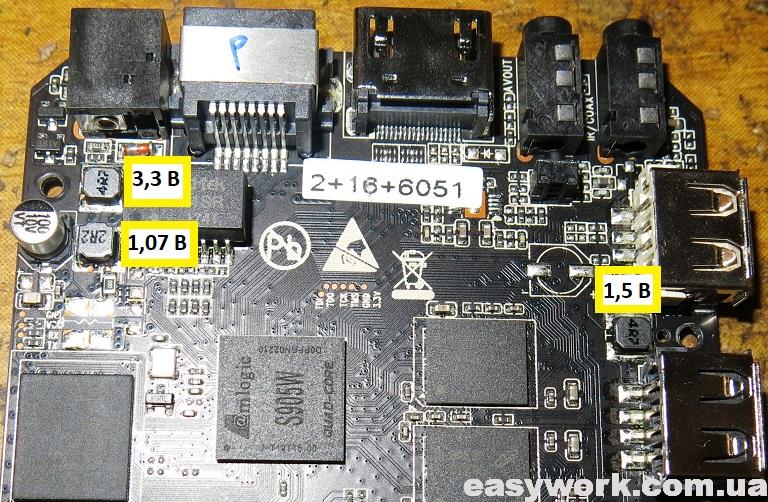
Прилагаю фото платы с замерами.
Думал может проц. плохо сел, решил его пошатать, не это не помогло.
Так-же, приставка отказывается запускаться с SD-карты.
Пробовал создать CoreELEC, на SD-карту.
P.S. Распаковал стоковую прошивку и обнаружил что в нем нет файла bootloader.PARTITION
Сравнивал между прошивкой от T95M которую прошивал ранее после замены eMMC, там после распаковки я обнаружил наличие файла bootloader.PARTITION
Не знаю имеет ли это отношения к тому что оно не прошивается.
Так-же обращался в ветку T95Q на 4PDA, там помочь никто не смог.
Содержание
- atvXperience : The Forum
- [HELP] h96 pro+ How to solve Romcode/Initialize DDR/Read initialize status.
- atvXperience : The Forum
- [INSTALL] Common USB Burning Tool Errors and Fixes
- Announcement
- USB Burning Tool errors
- USB Burning Tool errors
- Comment
- Comment
- Comment
- Comment
- Comment
- Comment
- Comment
- Comment
- Comment
- Romcode Initialize/USB Control Setup Error
- Attachments
- Villa
- Announcement
- USB Burning Tool problem
- USB Burning Tool problem
- Comment
- Comment
atvXperience : The Forum
One of the Biggest Android TV Box Forums on the internet!
[HELP] h96 pro+ How to solve Romcode/Initialize DDR/Read initialize status.
I’m trying to recover my tv box, but whenever I try, the same error appears.
[Romcode / Initialize DDR / Read initialize status / USB Control setup error]
I tried some roms from atvxperience but they all return the same problem, at 2% for and return the mentioned error. 
My Tv Box (h96 pro + (s32-v6 lpddr3)), can someone help me?



Try one of these versions for LPDDR3:

Put your device in MASK Rom mode by shortening the pins on NAND chip and flash good working stock ROM or atvX LPDDR3 image from post above.
em3ka wrote: ↑ Mon May 25, 2020 11:19 am Put your device in MASK Rom mode by shortening the pins on NAND chip and flash good working stock ROM or atvX LPDDR3 image from post above.
em3ka wrote: ↑ Mon May 25, 2020 11:19 am Put your device in MASK Rom mode by shortening the pins on NAND chip and flash good working stock ROM or atvX LPDDR3 image from post above.
I’m having the same problem..
do I have to pinch those 2 pins and keep pinching them while I’m connecting the USB cable to my box and then press the Start button on the program ( USB burning tool ) or I have to keep pinching the pins even after I click the start button .
also please give me the URL link for the correct firmware for my box ..because when I download the ones in the google drive that you added, the USB burning tool is giving me this message (( Parse burning image fail )) .
it’s like the USB burning tool is not accepting that image file.
Источник
atvXperience : The Forum
One of the Biggest Android TV Box Forums on the internet!
So, having problems with usb burning tool?
Well, here’s how you do it. Don’t forget to reply to this topic if you want to add anything.
1. Don’t forget to plug in power cable if you get lowper error.
2. If your device isn’t getting detected, even after pushing the reset button, try shorting nand pins. You can find a video tutorial on mxq project YouTube channel.
3. DDR Error? Tried using different ddr version atvX? DDR3, DDR4, LPDDR to name a few.
4. Flashed but not working? Try flashing again, or a different image. Still getting a black screen?
a) If you see the bootlogo but not the UI after booting, try atvx on a 1080p tv.
b) If you don’t see anything at all, the device is incompatible, Sorry
5. 7% Uboot error? Try another image or version. Chances are, your box uses a modded uboot which doesn’t accept other original uboot partitions. Fix? Point 6.
6. 2GB/3GB RAM but after flashing it’s 1GB/2GB? You’ve got a fake box. Your uboot was modified to read wrong dtb header to show more RAM than the actual physical one(maybe). The only way to fix(fake your ram) this is unpacking atvx and your stock rom to level 1 with Ricky’s customization tool and replacing your stock’s system, boot, recovery and bootloader partitions with atvx’s and re-packing.
Источник
Announcement

I have been using USB burning tool v2.0.6.2 to update my OTT MXQ Pro 4K box a couple of times but recently I have been getting these errors below and have not been able to flash the firmware:
— Romcode/Initialize DDR/Initialize PLL/USB Control setup error
— Erase bootloader/Lowper/Identify/ Error result
I have tried using a few other PCs with USB 2 ports but were getting the same errors and I only managed to erase the bootloader once.
Can any one help?
I had the same problem, but ended up getting it to work by doing the following. Frustrated, I tried different versions of USB Burning tool with no success. The 2.0.5.15 works just fine. You click the middle (2nd) Chinese writing on the upper left corner and select «English.» Remember to open, load, start, then, connect.
1. Open the USB Burning Tool as an Administrator
2. Load the Firmware image file
3. Press «Start»
4. Connect your box via USB
How.did you load the license in the flastool i cant get i right
Sent from my SM-N9300 using Tapatalk
- Join Date: Jun 2014
- Posts: 6441
And were can i find the license it doent come with the rar compressed file
Sent from my SM-N9300 using Tapatalk
- Join Date: Jun 2014
- Posts: 6441
We have a bricked T95u Pro 3/32. USB burning tool now sees the box after a pin short. It goes to 7 percent and then errors out. Any help to get it running again would be greatly appreciated
this is the error we see
[10:12:07 517][Global][Inf]—DevPath:\?pci#ven_8086&dev_293c&subsys_02be1028& rev_03#3&11583659&0&d7#<3abf6f2d-71c4-462a-8a92-1e6861e6af27>
[10:12:07 517][Global][Inf]—->Roothub:USB#ROOT_HUB20#4&13e35410&0#
[10:12:07 589][Global][Inf]———>[Port0]NoDeviceConnected
[10:12:07 589][Global][Inf]———>[Port1]NoDeviceConnected
[10:12:07 589][Global][Inf]———>[Port2]NoDeviceConnected
[10:12:07 589][Global][Inf]———>[Port3]NoDeviceConnected
[10:12:07 589][Global][Inf]———>[Port4]NoDeviceConnected
[10:12:07 590][Global][Inf]———>[Port5]Other device
[10:12:07 590][Global][Inf]—Scan USB host controller complete
[10:12:07 591][Global][Inf]—Update data center with HubMap
[10:12:13 935][Global][Inf]—User click open button
[10:12:58 786][Global][Inf]—Image path C:UsersajcdnDownloadsT95UT95U_S912_03092017_A ndroidTVBox.euT95U_S912_03092017_AndroidTVBox.eu aml_upgrade_package.img
[10:13:22 934][Global][Inf]—Parsing burning package
[10:13:22 934][Global][Inf]—Load configuration file C:Program Files (x86)AmlogicUSB_Burning_Tooltemp
[10:13:22 935][Global][Inf]—Parse burning configuration file C:Program Files (x86)AmlogicUSB_Burning_Tooltempburn_config.xm l
[10:13:22 938][Global][Inf]—Get burning key
can you advise us please?
I had the same problem, but ended up getting it to work by doing the following. Frustrated, I tried different versions of USB Burning tool with no success. The 2.0.5.15 works just fine. You click the middle (2nd) Chinese writing on the upper left corner and select «English.» Remember to open, load, start, then, connect.
1. Open the USB Burning Tool as an Administrator
2. Load the Firmware image file
3. Press «Start»
4. Connect your box via USB
I have a Mecool M8s PRO L and i got this 2% error when i try to connect only with USB male to male to the pc:
«Romcode/Initialize DDR/Read initialize status/USB Control setup error»
Even if i try to short the reset pins out. Blue LED on the box stays allways on.
If i plug the power cable when we tries to pass the 2% error, we reaches 7% and the following error:
UBOOT/Disk initialize/Send command/Error result’
Источник
Romcode Initialize/USB Control Setup Error
Member
Hi Guys
I have this problem while flashing my U9H:
[12:11:25 210][HUB1-6][Inf]—2-2-0-0
[12:11:25 210][HUB1-6][Inf]—Control write pll reg1 0xd9000000:0x000000b1
[12:11:25 713][HUB1-6][Inf]—Control write pll reg1 0xd9000000:0x00005183
[12:11:26 217][HUB1-6][Inf]—Control write pll reg1 0xd9000000:0x000000b1
[12:11:26 719][HUB1-6][Inf]—Control write pll reg1 0xd9000000:0x00005183
[12:11:27 223][HUB1-6][Inf]—Write initial succeed
[12:11:27 223][HUB1-6][Inf]—Upload encrypt at 0xc8100228
[12:11:27 225][HUB1-6][Inf]—ulValue = 0xadfd718c
[12:11:27 225][HUB1-6][Inf]—Read encrypt value succeed
[12:11:27 225][HUB1-6][Inf]—Download DDR.USB,size: 49152!
[12:11:27 238][HUB1-6][Inf]—Transfer complete 49152
[12:11:27 240][HUB1-6][Inf]—Run at address 0xd9000000
[12:11:27 246][HUB1-6][Inf]—RunInRam success
[12:11:27 271][HUB1-6][Inf]—2-2-0-0-0-1-0-0
[12:11:27 271][HUB1-6][Inf]—CheckFileRunState succeed
[12:11:42 275][HUB1-6][Err]—usbReadFile failed ret = -116
[12:11:42 275][HUB1-6][Err]—ReadPara failed
[12:11:42 282][HUB1-6][Err]—[0x10105002]Romcode/Initialize DDR/Read initialize status/USB Control setup error
[12:11:42 283][HUB1-6][Inf]—Close device handle 0x00000b44
Is there somebody else, with the same problem? Actually tried to flash the Latest Official Firmware because (after a long pause while it was offline) my box didnt want to boot (splash screen appear with Android logo and then nothing happened). For additional info there is a screenshot attached.
Attachments

Villa
Hi Guys
I have this problem while flashing my U9H:
[12:11:25 210][HUB1-6][Inf]—2-2-0-0
[12:11:25 210][HUB1-6][Inf]—Control write pll reg1 0xd9000000:0x000000b1
[12:11:25 713][HUB1-6][Inf]—Control write pll reg1 0xd9000000:0x00005183
[12:11:26 217][HUB1-6][Inf]—Control write pll reg1 0xd9000000:0x000000b1
[12:11:26 719][HUB1-6][Inf]—Control write pll reg1 0xd9000000:0x00005183
[12:11:27 223][HUB1-6][Inf]—Write initial succeed
[12:11:27 223][HUB1-6][Inf]—Upload encrypt at 0xc8100228
[12:11:27 225][HUB1-6][Inf]—ulValue = 0xadfd718c
[12:11:27 225][HUB1-6][Inf]—Read encrypt value succeed
[12:11:27 225][HUB1-6][Inf]—Download DDR.USB,size: 49152!
[12:11:27 238][HUB1-6][Inf]—Transfer complete 49152
[12:11:27 240][HUB1-6][Inf]—Run at address 0xd9000000
[12:11:27 246][HUB1-6][Inf]—RunInRam success
[12:11:27 271][HUB1-6][Inf]—2-2-0-0-0-1-0-0
[12:11:27 271][HUB1-6][Inf]—CheckFileRunState succeed
[12:11:42 275][HUB1-6][Err]—usbReadFile failed ret = -116
[12:11:42 275][HUB1-6][Err]—ReadPara failed
[12:11:42 282][HUB1-6][Err]—[0x10105002]Romcode/Initialize DDR/Read initialize status/USB Control setup error
[12:11:42 283][HUB1-6][Inf]—Close device handle 0x00000b44
Is there somebody else, with the same problem? Actually tried to flash the Latest Official Firmware because (after a long pause while it was offline) my box didnt want to boot (splash screen appear with Android logo and then nothing happened). For additional info there is a screenshot attached.
Why do you have «Erase flash» set to «Erase all»? «Normal erase» should be sufficient!
Also you shouldn’t have «Reset after success» and «Whether overwrite key» Enabled.
Источник
Announcement
I have H96 pro tv box, I’m trying to install a new firmware but I have a problem with the usb connection.
Whenever I try to connect the box to usb ,it recognized for 1-2 seconds and then disconnecting.
I tried it with 4 different computers (including desktop), I installed the driver, I tried 2 different usb cables — all with the same results.
I tried to press the reset button and then to start the box — it doesn’t recognized at all.
I tried to connect it to the power adapter ,then to start the box and then to connect it to usb- it doesn’t recognized at all.
I tried to connect the hdmi cable so I can see what happens when it starts ,I see that when i press the reset button it goes into the recovery menu — but it seems that when it in this menu it doesn’t recognized by usb.
this is the error that I get:
[2018-11-23 13:50:21 662][HUB2-2][0x10102002]Romcode/Initialize DDR/Initialize PLL/USB Control setup error
[2018-11-23 13:51:36 983][HUB2-2][0x10105002]Romcode/Initialize DDR/Read initialize status/USB Control setup error
- Join Date: May 2014
- Posts: 1316
Which version of USB Burn Tool?
Which version of Windows?
(Which China Box revision. update to which firmware? (Not immediately important to your question.)
Do you have a firewall running?
Do you have Anti-Virus running?
I suggest that you you give more info.
(All 4 computers only recognize connection (1-2 sec.)?
USB burn tool v.2.0.7.2, I also use the usbview.exe to see if the box recognized.
I tried on win7 and win10
box version you can see attached, trying to install h96pro.H96PRO+_2G(16)_HS2734A_1000M_7.1.2018.04.10 .20.38
I don’t have a firewall
I have Symantec Endpoint Protection
I attached the log files
- Join Date: May 2014
- Posts: 1316
Amlogic Worldcup Drivers..no longer installed properly??
«Romcode/Initialize DDR/Initialize PLL/USB Control setup error
Romcode/Initialize DDR/Read initialize status/USB Control setup error.»
2018-11-23. «attempting to erase bootloader». Did USB Burn Tool succeed in seeing and flashing your China Box?
Источник
-
Nayam
- Administrator & Developer
- Posts: 1274
- Joined: Mon Jun 11, 2018 11:58 pm
- Has thanked: 195 times
- Been thanked: 436 times
- Contact:
Mon Dec 24, 2018 5:07 pm
So, having problems with usb burning tool?
Well, here’s how you do it. Don’t forget to reply to this topic if you want to add anything.
1. Don’t forget to plug in power cable if you get lowper error.
2. If your device isn’t getting detected, even after pushing the reset button, try shorting nand pins. You can find a video tutorial on mxq project YouTube channel.
3. DDR Error? Tried using different ddr version atvX? DDR3, DDR4, LPDDR to name a few.
4. Flashed but not working? Try flashing again, or a different image. Still getting a black screen?
a) If you see the bootlogo but not the UI after booting, try atvx on a 1080p tv.
b) If you don’t see anything at all, the device is incompatible, Sorry5. 7% Uboot error? Try another image or version. Chances are, your box uses a modded uboot which doesn’t accept other original uboot partitions. Fix? Point 6.
6. 2GB/3GB RAM but after flashing it’s 1GB/2GB? You’ve got a fake box. Your uboot was modified to read wrong dtb header to show more RAM than the actual physical one(maybe). The only way to fix(fake your ram) this is unpacking atvx and your stock rom to level 1 with Ricky’s customization tool and replacing your stock’s system, boot, recovery and bootloader partitions with atvx’s and re-packing.
Contribute more points by commenting below 
BE NICE, BE RESPECTFUL
RESPECT THE MODERATORS
PM ONLY WHEN IMPORTANT
ENJOY!
My Devices:
X96 Mini, A95X Pro, H96 Pro Stick, A95X Max
-
hugodias
- Posts: 1
- Joined: Sun Mar 03, 2019 8:49 am
#2
Sun Mar 03, 2019 8:54 am
is there a way of burning to usb flash drive? I can get box in recovery mode but pc doesn’t recognise it even after trying all options. if I can get the firmware update in a usb flash drive in the right format I can update directly
-

ricklar
- Moderator
- Posts: 889
- Joined: Fri Nov 30, 2018 10:30 pm
- Has thanked: 139 times
- Been thanked: 249 times
#3
Thu Apr 18, 2019 4:44 am
Update
If having problems with Amlogic USB Burning Tool try using the latest version 2.1.7 — This is the most recent version I have come across and it will be needed for the new Amlogic SoC S905x2 TV boxes.
Link:
https://mega.nz/#!5ZExnYKD!6Y-fz1MARAF8 … xh4-k69vb8
BE KIND, BE NICE, BE RESPECTFUL TO OTHERS, RESPECT THE MODERATORS,
*IMPORTANT NOTE* ONLY PM MODERATORS OR DEVELOPERS AS A LAST RESORT!!!
 My test device: H96 Pro+ 3gb/32gb DDR4 Plus own Tanix, Beelink, Alfawise, X96S, Odroid-N2, Khadas VIM3L, X3, ADT-3, X96-Air
GEARBEST.com
PLEASE ENJOY ATVX!
-
WebofThrones
- Verified Member
- Posts: 18
- Joined: Mon Jul 09, 2018 8:06 am
- Been thanked: 1 time
#4
Wed Jun 05, 2019 8:44 am
Hi there how do you unpack the firmware you mentioned in point 6 : The only way to fix(fake your ram) this is unpacking atvx and your stock rom to level 1 with Ricky’s customization tool and replacing your stock’s system, boot, recovery and bootloader partitions with atvx’s and re-packing.
As im stuck with error 5, UBOOT
-
ricklar
- Moderator
- Posts: 889
- Joined: Fri Nov 30, 2018 10:30 pm
- Has thanked: 139 times
- Been thanked: 249 times
#5
Fri Jun 07, 2019 4:53 am
WebofThrones wrote: ↑Wed Jun 05, 2019 8:44 am
Hi there how do you unpack the firmware you mentioned in point 6 : The only way to fix(fake your ram) this is unpacking atvx and your stock rom to level 1 with Ricky’s customization tool and replacing your stock’s system, boot, recovery and bootloader partitions with atvx’s and re-packing.As im stuck with error 5, UBOOT
Read some of the other tutorials as well. Check this one for more info on Bootloader/UBOOT =
viewtopic.php?f=16&t=799
BE KIND, BE NICE, BE RESPECTFUL TO OTHERS, RESPECT THE MODERATORS,
*IMPORTANT NOTE* ONLY PM MODERATORS OR DEVELOPERS AS A LAST RESORT!!!
My test device: H96 Pro+ 3gb/32gb DDR4 Plus own Tanix, Beelink, Alfawise, X96S, Odroid-N2, Khadas VIM3L, X3, ADT-3, X96-Air
GEARBEST.com
PLEASE ENJOY ATVX!
-
OpJbud
- Posts: 1
- Joined: Mon Apr 22, 2019 4:33 am
#6
Sun Aug 11, 2019 11:40 pm
Hey fellas I hope its ok to ask questions or to seek help here. I relatively new to the scene at least posting anything i been following along for a little over a year tho. So thank you for all the tools and firmware and knowledge you give I have learned a great deal from you. I have an issue with this usb burning tool i have been searching for the answer but cant find or i just don’t understand. I keep getting error [22:32:06 879][HUB2-2][Err]—[0x10102002]Romcode/Initialize DDR/Initialize PLL/USB Control setup error. The box im on is beelink GT1 mini witch i just got and i was trying to install twrp is was successful took a backup before i was going to install ATVX’s rom but the dang thing wouldn’t reboot cant even force it into recovery just gets stuck on boot nothing but the beelink emblem. So i figured just flash the new rom well i continue to get that error i’ve tried different ddr different ports uninstalling and reinstalling usb burn tool i’ve always had to fidget with the tool but eventual it would work but i cant figure this dang thing out. If you have any ideas please i welcome all of them. So frustrated after waiting forever to receive my new box i cant even use it. And i’m sorry if im in the wrong place for what i’m asking if so just point me in the right direction and my apologies. And thanks again for all that you guys do it it is greatly appreciated.
-
Praveen99
- Posts: 1
- Joined: Wed Dec 04, 2019 4:58 am
- Been thanked: 1 time
#9
Sat Dec 14, 2019 5:44 am
Hello, I’m having a Tanix Tx3 max and I’ve tried to install atv. But the flash process stucked at 7%. But after few tries the process was done. But there’s nothing showing up on the tv , just black screen. I tried to flash the stock firmware but the process again stucked at 7% diskinitial error. I’ve tried several roms for tx3 max. But still couldn’t get passed. I even tried all the versions for usb burning tool. Am I missing something?
Have had a U9-h for 2 years now. No problems till this summer. While streaming video (using apps, not Kodi) my screen would go black, but audio would carry on. Sometimes video would return back to normal; other times the screen would go blue. Had to turn it off and reboot to get going again.
Now the problem is getting worse. I get a black screen sometimes without doing anything (i.e. at the Launcher screen). Have tried a factory reset to no avail. Any suggestions to rectify the situation?
To make matters worse, I have an old MXQ Pro which functions fine (except that it is much slower than the U9-h.
Any suggestions you might have would be greatly appreciated.

Firmware is up to date. No updates per the OTA firmware check.

Any suggestions you might have would be greatly appreciated.
Try with another hdmi cable
Firmware is up to date. No updates per the OTA firmware check.
You have to flash the firmware via manual update with usb burning tool and not via OTA (automatic).
Tried the manual update. Got through to 38% complete and received the following error message:
[0x30403003] UBoot/Partition System/Download Buffer/Data Transfer Error
Now my PC will not even recognize the U9-h as an external device. Any suggestions?
Tried the manual update. Got through to 38% complete and received the following error message:
[0x30403003] UBoot/Partition System/Download Buffer/Data Transfer Error
Now my PC will not even recognize the U9-h as an external device. Any suggestions?
Did you try a Factory Reset before this?
Gave it one last try. Got much further this time, but stopped on the 1-yard line (i.e. 98%) and received this message:
[0x30401002]UBoot/Partition Bootloader/Identify/USB Control Setup Error. Suggestions?

Gave it one last try. Got much further this time, but stopped on the 1-yard line (i.e. 98%) and received this message:
[0x30401002]UBoot/Partition Bootloader/Identify/USB Control Setup Error. Suggestions?
Try it a third time .
Have tried numerous times with both the Android 6 and Android 7 versions. Both get me to the 98% mark with the error message as noted above. Also tried hooking the unit back up with my TV. No start up. As well, nothing happens when I hold the Power Button down for 6+ seconds to try to get to the Factory Reset screen. Is this the end?
Did you try a Factory Reset before this?
If you performed a Factory Reset, why did you then progress to burning the image?
nothing happens when I hold the Power Button down for 6+ seconds to try to get to the Factory Reset screen.
As your device has been partly flashed then Factory Reset will no longer be an option as it needs a fully flashed firmware to do this.
Have had a U9-h for 2 years now. No problems till this summer. While streaming video (using apps, not Kodi) my screen would go black, but audio would carry on. Sometimes video would return back to normal; other times the screen would go blue. Had to turn it off and reboot to get going again.
Now the problem is getting worse. I get a black screen sometimes without doing anything (i.e. at the Launcher screen). Have tried a factory reset to no avail. Any suggestions to rectify the situation?
To make matters worse, I have an old MXQ Pro which functions fine (except that it is much slower than the U9-h.
Any suggestions you might have would be greatly appreciated.
I have kind off the same problem but my minix reboot after +/_ 1 hour of streaming… I just wondering do you use a VPN app?
Приставка X96 mini 2/16 Gb широко распространена. Данный экземпляр при подключении к телевизору не выдает изображение и не реагирует на пульт.

Светодиод горит тускло красным цветом и не меняет свой цвет на синий.

Маркировка используемого блока питания — RSF-DY009-0502000.

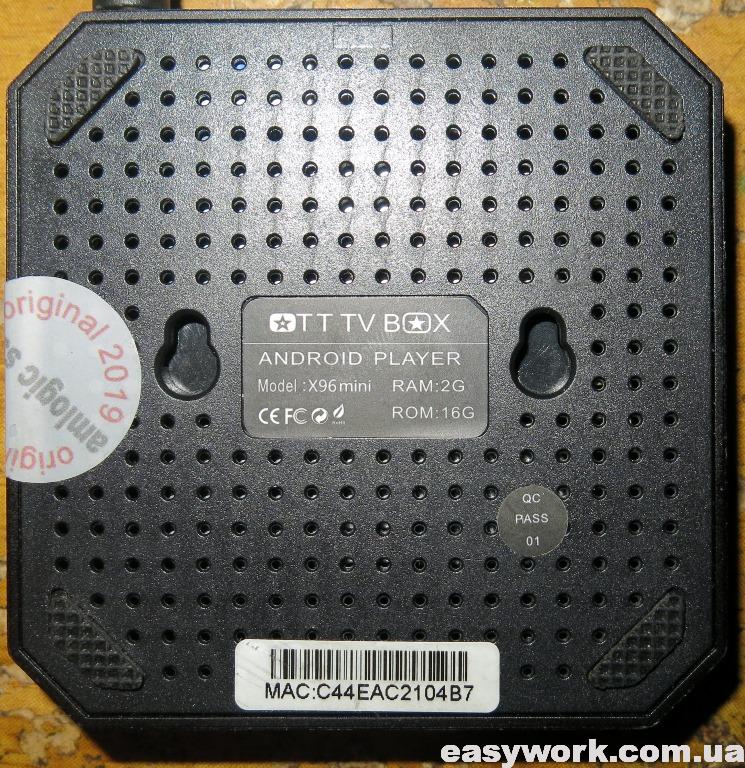
Приставка со стороны задней крышки выглядит следующим образом. На ней наклейка с точным названием модели.
Крышка отщелкивается и мы можем получить доступ к плате. Запоминаем расположение крышки, т.к. на ней находится термопрокладка, которая должна попасть на процессор Amlogic S905W.

Маркировка платы Q6X V2.2 17355. По отзывам на 4PDA данная маркировка имеет проблемы при прошивке.

С обратной стороны плата выглядит следующим образом.

Входное напряжение равно 5.2 В и поэтому неисправность внешнего блока питания исключается.

Далее входное напряжение понижается при помощи DC/DC преобразователей с маркировкой S15BLQ.

Напряжения на плате распределены следующим образом. Также необходимо обратить внимание на исправность электролитического конденсатора 100 мкФ х 10 В. Он один на плате.
Для прошивки устройства я использовал программу USB Burning Tool 2.09. При подключении необходимо выполнить сброс приставки. Для этого удобно использовать спичку (токонепроводящий предмет). USB шнур необходимо вставлять в белый разъем. Вот подробная инструкция по прошивке через ПК. Если кому-то не нравится — то вот другая.

После этого в программе отображается устройство с пометкой Connect success.

Однако прошивка прерывалась на 7%. Ошибка была либо [0x30201004]UBOOT/Disk initialize/Send command/Error result.
![Ошибка [0x30201004]](https://easywork.com.ua/wp-content/uploads/2020/01/remont-pristavki-x96-mini-2-16-gb-ne-vklyuchaetsya-13.jpg)
В версии программы USB Burning Tool 2.12 код ошибки сменился на [0x32030201]Uboot/Get result/DiskInitial error.
![Ошибка [0x32030201]](https://easywork.com.ua/wp-content/uploads/2020/01/remont-pristavki-x96-mini-2-16-gb-ne-vklyuchaetsya-14.jpg)
Кому-то помог при прошивке выбор опции «Force Erase All». Однако при этом придется в дальнейшем восстанавливать MAC-адрес. Такая проблема может быть при проблемах с флеш-памятью.
В таком случае можно попробовать воспользоваться оболочкой LibreELEC. По следующей ссылке описана штатная установка LibreELEC — KODI — 8.2.3.1 на X96 Mini Amlogic S905W. Нас интересует вариант полноценной загрузки LibreELEC с miniSD карты, описанный тут и тут.

Задействованные программы Win32DiskImager и Burn_Card_Maker. Однако мне это не помогло, т.к. неисправность была где-то гораздо глубже. Возможно кому-то данная инструкция и вышеуказанные ссылки помогут.
Ранее прошивал TV Box X96 mini, которая зависала на заставке.