The TypeError: unsupported operand type(s) for +: ‘int’ and ‘str’ error occurs when an integer value is added with a string that could contain a valid integer value. Python does not support auto casting. You can add an integer number with a different number. You can’t add an integer with a string in Python. The Error TypeError: unsupported operand type(s) for +: ‘int’ and ‘str’ will be thrown if an integer value is added to the python string.
In python, the plus “+” is used to add two numbers as well as two strings. The arithmetic addition of the two numbers is for numbers. For strings, two strings are concatenated. There is a need to concatenate a number and a string in programming. The plus “+” operator can not be used for this reason. When you concatenate an integer and a string, this error TypeError: unsupported operand type(s) for +: ‘int’ and ‘str’ is thrown.
The objects other than numbers can not use for arithmetic operation such as addition, subtraction etc. If you try to add a number to a string containing a number, the error TypeError: unsupported operand type(s) for +: ‘int’ and ‘str’ will be shown. The string should be converted to an integer before it is added to another number.
Exception
Through this article, we can see what this error TypeError: unsupported operand type(s) for +: ‘int’ and ‘str’ is, how this error can be solved. This type error is a mismatch of the concatenation of two different data type variables. The error would be thrown as like below.
Traceback (most recent call last):
  File "/Users/python/Desktop/test.py", line 3, in <module>
    print x + y
TypeError: unsupported operand type(s) for +: 'int' and 'str'
[Finished in 0.1s with exit code 1]
How to reproduce this issue
Create two separate data type variables in python, say an integer value and a string value. Using the plus “+” operator to concatenate these values. This error TypeError: unsupported operand type(s) for +: ‘int’ and ‘str’ will be seen due to the mismatch between the data types of the values.
The code below indicates the concatenation of two separate data type values. The value of x is the integer of y. The value of y is a string.
x = 5
y = "Yawin Tutor"
print x + y
Output
Traceback (most recent call last):
  File "/Users/python/Desktop/test.py", line 3, in <module>
    print x + y
TypeError: unsupported operand type(s) for +: 'int' and 'str'
[Finished in 0.1s with exit code 1]
Different Variation of the error
TypeError: unsupported operand type(s) for +: 'int' and 'str'
TypeError: unsupported operand type(s) for -: 'int' and 'str'
TypeError: unsupported operand type(s) for /: 'int' and 'str'
TypeError: unsupported operand type(s) for %: 'int' and 'str'
TypeError: unsupported operand type(s) for //: 'int' and 'str'
TypeError: unsupported operand type(s) for ** or pow(): 'int' and 'str'
TypeError: unsupported operand type(s) for +=: 'int' and 'str'
TypeError: unsupported operand type(s) for -=: 'int' and 'str'
TypeError: unsupported operand type(s) for /=: 'int' and 'str'
TypeError: unsupported operand type(s) for %=: 'int' and 'str'
TypeError: unsupported operand type(s) for //=: 'int' and 'str'
TypeError: unsupported operand type(s) for ** or pow(): 'int' and 'str'
TypeError: unsupported operand type(s) for &=: 'int' and 'str'
TypeError: unsupported operand type(s) for |=: 'int' and 'str'
TypeError: unsupported operand type(s) for ^=: 'int' and 'str'
TypeError: unsupported operand type(s) for <<=: 'int' and 'str'
TypeError: unsupported operand type(s) for >>=: 'int' and 'str'
Root Cause
The error is due to the mismatch of the data type. Operators in python support the operation of the same data type. When an operator is used for two different data types, this type mismatch error will be thrown.
In the program, if two separate data types, such as integer and string, are used with plus “+” operators, they should first be converted to the same data type, and then an additional operation should be carried out.
Solution 1
Python cannot add a number and a string. Either both the variable to be converted to a number or a string. If the variables are changed to a number, the mathematical addition operation will be done. The error “TypeError: unsupported operand type(s) for +: ‘int’ and ‘str’” will be resolved.
x = 5
y = 8
print x + y
Output
13
[Finished in 0.1s]
Solution 2
In the above program, The variables are converted to a string. Python interpreter concatenate two variables. the variable value is joined together. The example below shows the result of addition of two strings.
x = '5'
y = '8'
print x + y
Output
58
[Finished in 0.1s]
Solution 3
The above program is trying to add a string and an integer. Since python does not allow a string and an integer to be added, both should be converted to the same data type. The python function str() is used to convert an int to a string. Use the str() function to convert the integer number to the program.
x = 5
y = "Yawin Tutor"
print str(x) + y
Output
5Yawin Tutor
[Finished in 0.1s]
Solution 4
If two variables are added to the print statement, the print statement allows more than one parameter to be passed. Set the string statement and the integer as two parameters in the print statement. The print statement internally converts all values to the string statement. The code below shows how to use your print statement.
x = 5
y = "Yawin Tutor"
print x , y
Output
5Yawin Tutor
[Finished in 0.1s]
Solution 5
The Python program allows you to create a string by dynamically passing arguments. Create a string with a place holder. In the run-time, python replaces the place holder with the actual value.
x = 5
y = "Yawin Tutor"
print "{}".format(x) + y

or

print "{} Yawin Tutor".format(x)
Output
5 Yawin Tutor
[Finished in 0.1s]How come I’m getting this error?
My code:
def cat_n_times(s, n):
    while s != 0:
        print(n)
        s = s - 1

text = input("What would you like the computer to repeat back to you: ")
num = input("How many times: ")

cat_n_times(num, text)
Error:
TypeError: unsupported operand type(s) for -: 'str' and 'int'

ppwater
2,3174 gold badges15 silver badges29 bronze badges
asked Mar 4, 2010 at 2:13
0
-
The reason this is failing is because (Python 3)
inputreturns a string. To convert it to an integer, useint(some_string). -
You do not typically keep track of indices manually in Python. A better way to implement such a function would be
def cat_n_times(s, n): for i in range(n): print(s) text = input("What would you like the computer to repeat back to you: ") num = int(input("How many times: ")) # Convert to an int immediately. cat_n_times(text, num) -
I changed your API above a bit. It seems to me that
nshould be the number of times andsshould be the string.

Jess
3451 gold badge3 silver badges17 bronze badges
answered Mar 4, 2010 at 2:31

Mike GrahamMike Graham
72.3k14 gold badges99 silver badges130 bronze badges
2
For future reference Python is strongly typed. Unlike other dynamic languages, it will not automagically cast objects from one type or the other (say from str to int) so you must do this yourself. You’ll like that in the long-run, trust me!
answered Mar 4, 2010 at 2:46

jathanismjathanism
32.7k9 gold badges68 silver badges86 bronze badges
0
For future readers, use annotations to prevent such mistakes:
def cat_n_times(s: str, n: int):
    for i in range(n):
        print(s)


text = input("What would you like the computer to repeat back to you: ")
num = input("How many times: ")  # Convert to an int immediately.

cat_n_times(text, num)
Mypy gives a nice error:
annotations.py:9: error: Argument 2 to "cat_n_times" has incompatible type "str"; expected "int"
Found 1 error in 1 file (checked 1 source file)
answered Jul 29, 2022 at 21:53

funnydmanfunnydman
7,9393 gold badges32 silver badges51 bronze badges
1
Как исправить: TypeError: неподдерживаемые типы операндов для -: 'str' и 'int'

17 авг. 2022 г.
читать 1 мин
Одна ошибка, с которой вы можете столкнуться при использовании Python:
TypeError : unsupported operand type(s) for -: 'str' and 'int'
Эта ошибка возникает при попытке выполнить вычитание со строковой переменной и числовой переменной.
В следующем примере показано, как устранить эту ошибку на практике.
Как воспроизвести ошибку
Предположим, у нас есть следующие Pandas DataFrame:
import pandas as pd

#create DataFrame
df = pd.DataFrame({'team': ['A', 'B', 'C', 'D', 'E', 'F', 'G', 'H'],
 'points_for': ['18', '22', '19', '14', '14', '11', '20', '28'],
 'points_against': [5, 7, 17, 22, 12, 9, 9, 4]})

#view DataFrame
print(df)

 team points_for points_against
0 A 18 5
1 B 22 7
2 C 19 17
3 D 14 22
4 E 14 12
5 F 11 9
6 G 20 9
7 H 28 4

#view data type of each column
print(df.dtypes )

team object
points_for object
points_against int64
dtype: object
Теперь предположим, что мы пытаемся вычесть столбец points_against из столбца points_for :
#attempt to perform subtraction
df['diff'] = df.points_for - df.points_against

TypeError : unsupported operand type(s) for -: 'str' and 'int'
Мы получаем TypeError , потому что столбец points_for является строкой, а столбец points_against — числовым.
Для выполнения вычитания оба столбца должны быть числовыми.
Как исправить ошибку
Чтобы устранить эту ошибку, мы можем использовать .astype(int) для преобразования столбца points_for в целое число перед выполнением вычитания:
#convert points_for column to integer
df['points_for'] = df['points_for'].astype (int)

#perform subtraction
df['diff'] = df.points_for - df.points_against

#view updated DataFrame
print(df)

 team points_for points_against diff
0 A 18 5 13
1 B 22 7 15
2 C 19 17 2
3 D 14 22 -8
4 E 14 12 2
5 F 11 9 2
6 G 20 9 11
7 H 28 4 24

#view data type of each column
print(df.dtypes )

team object
points_for int32
points_against int64
diff int64
dtype: object
Обратите внимание, что мы не получаем ошибку, потому что оба столбца, которые мы использовали для вычитания, являются числовыми столбцами.
Дополнительные ресурсы
В следующих руководствах объясняется, как исправить другие распространенные ошибки в Python:
Как исправить KeyError в Pandas
Как исправить: ValueError: невозможно преобразовать число с плавающей запятой NaN в целое число
Как исправить: ValueError: операнды не могли транслироваться вместе с фигурами
Ситуация: начинающий программист более-менее освоил JavaScript и перешёл к Python. Чтобы освоить новый язык на практике, программист решил переписать свой старый проект с JavaScript на Python и столкнулся с таким фрагментом:
var a = 2;
var b = ' ствола';
var c = a + b;
Программист помнит, что в Python для переменных не нужен var, а можно просто объявлять их в нужном месте, поэтому он написал такой код:
a = 2

b = ‘ ствола’

c = a + b
Но при запуске проекта компьютер указал на последнюю строку и выдал ошибку:
 Exception has occurred: TypeError

unsupported operand type(s) for +: ‘int’ and ‘str’
Почему так происходит: в JavaScript есть автоматическое приведение типов, и компьютер берёт на себя перевод данных из одного типа в другой. В нашем примере он сделает так:
- Возьмёт число и строку.
- Увидит, что их нужно сложить.
- Посмотрит по своим правилам, к какому одному типу проще всего привести всё в этой ситуации.
- Поймёт, что проще перевести число в строку, чем наоборот.
- Сделает так и на выходе получит строку «2 ствола»
Но Python так не умеет — ему нужно, чтобы данные были одного типа или хотя бы из одного семейства: оба числовые, оба строковые и так далее. Так как сейчас идёт сложение разных типов данных, то Питон говорит, что он так делать не будет, и падает с ошибкой.
Что делать с ошибкой Exception has occurred: TypeError
Чтобы исправить эту ошибку, нужно вручную привести данные к одному типу или явно указать их при операции.
В нашем случае можно сделать так: при сложении сказать компьютеру напрямую, что мы хотим в сложении использовать переменную a как строку:
a = 2

b = ‘ ствола’

c = str(a) + b
Команда str() не меняет тип и содержимое переменной a, но зато компьютер понимает, что это временно стало строкой, и спокойно её складывает со второй строкой.
Integer values cannot be subtracted from string values and vice versa. This is because strings and integers are separate data types. If you try to subtract a string from an integer, you receive an error like “TypeError: unsupported operand type(s) for -: ‘str’ and ‘int’”.
In this guide, we talk about the significance of this error and why it is raised. We walk through an example to help you figure out how to solve this error in your code.

Find Your Bootcamp Match
- Career Karma matches you with top tech bootcamps
- Access exclusive scholarships and prep courses
Select your interest
First name
Last name
Phone number
By continuing you agree to our Terms of Service and Privacy Policy, and you consent to receive offers and opportunities from Career Karma by telephone, text message, and email.
TypeError: unsupported operand type(s) for -: ‘str’ and ‘int’
Unlike other programming languages, Python syntax is strongly typed. One consequence of this is you have to change the types of objects, like strings and integers, if you want to treat them as a different type of data.
When you try to subtract a string for an integer or vice versa, Python does not know what to do. This is because you cannot subtract string values.
Similarly, you cannot add a string to an integer or divide a string by an integer. These operations all return an “unsupported operand type(s)” error.
An Example Scenario
We’re going to build a spending application that tracks how much money someone will have left on their budget after making a purchase. This application asks a user to insert the value of each purchase they make. This will be subtracted from the total amount a user has in their budget.
To start, ask a user to set a budget using the input() method:
budget = int(input("What is your budget for this month? "))
We have converted this value to an integer using the int() method. Next, we ask a user to provide some details about their purchase. We ask about what they purchased and how much their purchase cost:
purchase = input("What did you purchase? ")
price = input("How much was this purchase? ")
Next, we subtract the value of “price” from “budget”. This tells us how much a user has left in their budget.
We do this using the subtraction operator (-):
money_left = budget - price
print("You have ${} left in your budget.".format(money_left))
Run our code to see if our program works:
What is your budget for this month? 400
What did you purchase? Monitor stand
How much was this purchase? 35

Traceback (most recent call last):
  File "main.py", line 5, in <module>
	money_left = budget - price
TypeError: unsupported operand type(s) for -: 'int' and 'str'
We’ve told our program our budget is $400 for the month. We have just purchased a monitor stand that cost $35. Our program fails to calculate our new budget. Let’s fix this error.
The Solution
To solve this error, we convert the value of “price” to a string.
By default, input() returns a string. We changed the value of “budget” to be an integer earlier in our code. However, we did not change the value of “price”. This results in our code subtracting an integer from a string which is not possible.
Python cannot automatically convert a string to an integer because Python is statically typed.
We solve this error by replacing the “price” declaration with this code:
price = int(input("How much was this purchase? "))
We have surrounded the input() statement with int(). This makes the value stored in the “price” variable an integer. This converts the value a user inserts into our program to an integer. Run our code with this revised line of code:
What is your budget for this month? 400
What did you purchase? Monitor stand
How much was this purchase? 35
You have $365 left in your budget.
Our code runs successfully. Our code subtracts 35 from 400. Our program then prints out how much money we have left in our budget to the console.
Similar Errors
There are a number of “unsupported operand type(s)” errors in Python.
These errors mean the same thing: you are trying to perform a mathematical operation on a string and a numerical value. Because strings do not support mathematical operations, you’ll encounter an error.
For instance, you see this error if you try to add a string and an integer:
TypeError: unsupported operand type(s) for +: 'int' and 'str'
Similarly, you see this error if you try to find the remainder of a string and an integer:
TypeError: unsupported operand type(s) for %: 'int' and 'str'
To solve this error in all cases, make sure you convert any string values to an integer before you use them in your code. You can do this using the int() method.
Conclusion
The “TypeError: unsupported operand type(s) for -: ‘str’ and ‘int’” error is raised when you try to subtract a string from an integer.
You solve this error by converting all strings to integers using the int() method before performing a mathematical operation.
Now you’re ready to solve this common Python error like a professional developer!
When working in Python, you might have used concatenation for joining two values. The concatenation operator “+” is used for this. But while doing so, a common error that is encountered is “TypeError unsupported operand type(s) for + ‘int’ and ‘str’”. This happens when the two or more values that you are trying to add are not of the same data type.
The best way to fix this is to add the values that have the same data type. You can also change the data types to avoid the error.
In this article, we will look at the different scenarios where you might encounter this error. Then we will find ways to fix it.
Examples of TypeError unsupported operand type(s) for + ‘int’ and ‘str’
Example 1
Let us consider the following piece of code:
# Python program to add two values
val1 = 10
val2 = '12'

# Add two values
out = val1 + val2
print('Sum of two values: ',out)
Output:
out = val1 + val2
TypeError: unsupported operand type(s) for +: 'int' and 'str'
In the above example you are trying to add an integer and a string. This is not possible.
val1 = 10 ## Declared as Integer
val2 = '12' ## Declared as string
Correct Code:
# Python program to add two values
val1 = 10
val2 = 12

# Add two values
out = val1 + val2
print('Sum of two values: ',out)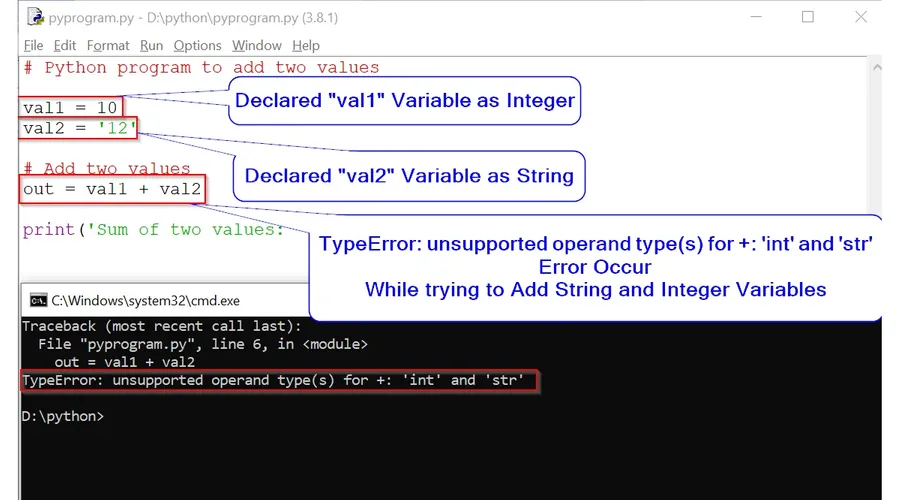
Example 2
Let us consider the following piece of code:
# Enter three integer value to create list
int1= int(input("Enter First Integer: "))
int2 = int(input("Enter Second Integer:"))
int3 = int(input("Enter Third Integer: "))

# Add all interger value in list
intlist = [int1, int2, int3]

# Print Integer List
print('List Created: ',intlist)
print("Remove Second Element from List")
print(intlist.pop(2) + " Second Element has Removed from List")
print("New List: " + str(intlist))
Output
After entering all the values of the variables int1, int2 and int3, the code returns this:
TypeError: unsupported operand type(s) for +: 'int' and 'str'You encounter this error as you are trying to add an integer and a string. This is not possible. You have to change this line print(intlist.pop(2) + » Second Element has Removed from List»). Change it using any of these processes described below:
print(intlist.pop(2)," Second Element has Removed from List")or
You can use string formatting like this:
print("{} Second Element has Removed from List".format(intlist.pop(2)))Correct Code:
# Enter three integer value to create list
int1= int(input("Enter First Integer: "))
int2 = int(input("Enter Second Integer:"))
int3 = int(input("Enter Third Integer: "))

# Add all interger value in list
intlist = [int1, int2, int3]

# Print Integer List
print('List Created: ',intlist)
print("Remove Second Element from List")
print(intlist.pop(2), " Second Element has Removed from List")
print("New List: " + str(intlist))