Почему возникает ошибка
Ошибка undefined index появляется при попытке обращения к не существующему элементу массива:
<?php
$arr = [];
echo $arr['title'];
Если в настройках PHP включено отображение ошибок уровня E_NOTICE, то при запуске этого кода в браузер выведется ошибка:
Notice: Undefined index: title in D:ProgramsOpenServerdomainstest.localindex.php on line 3Как исправить ошибку
Если элемента в массиве нет, значит нужно ещё раз проверить логику программы и понять, почему в массиве нет тех данных, что вы ожидаете. Проверить, что по факту лежит в переменной можно с помощью функции var_dump():
$arr = [];
var_dump($arr);
При работе с массивами $_GET и $_POST нет гарантии, что клиент (браузер) отправил абсолютно все нужные нам данные. В этом случае можно добавить проверку на их существование:
<?php
if(!isset($_GET['body'], $_GET['title']))
	die('Пришли не все данные');

// Далее что-то делаем с данными
Если ключ массива существует не всегда, можно указать для него значение по-умолчанию:
<?php
if(isset($_GET['id']))
	$id = $_GET['id'];
else
	$id = 0;
Сокращённый синтаксис:
// С тернарным оператором
$id = isset($_GET['id']) ? $_GET['id'] : 0;

// С оператором объединения с null (PHP 7+)
$id = $_GET['id'] ?? 0;
Или если нужно сохранить значение по-умолчанию в сам массив:
<?php
if(!isset($arr['title']))
	$arr['title'] = '';

// Или короче (PHP 7+)
$arr['title'] = $arr['title'] ?? '';

// Или ещё короче (PHP 7.4+)
$arr['title'] ??= '';
Пишите в комментариях, если столкнулись с этой ошибкой и не можете найти решение.
I’m new in PHP and I’m getting this error:
Notice: Undefined index: productid in /var/www/test/modifyform.php on
line 32Notice: Undefined index: name in /var/www/test/modifyform.php on line
33Notice: Undefined index: price in /var/www/test/modifyform.php on line
34Notice: Undefined index: description in /var/www/test/modifyform.php
on line 35
I couldn’t find any solution online, so maybe someone can help me.
Here is the code:
<form action="<?php echo $_SERVER['PHP_SELF'];?>" method="POST">
   <input type="hidden" name="rowID" value="<?php echo $rowID;?>">

   <p>
      Product ID:<br />
      <input type="text" name="productid" size="8" maxlength="8" value="<?php echo $productid;?>" />
   </p>

   <p>
      Name:<br />
      <input type="text" name="name" size="25" maxlength="25" value="<?php echo $name;?>" />
   </p>

   <p>
      Price:<br />
      <input type="text" name="price" size="6" maxlength="6" value="<?php echo $price;?>" />
   </p>

   <p>
      Description:<br />
      <textarea name="description" rows="5" cols="30">
      <?php echo $description;?></textarea>
   </p>

   <p>
      <input type="submit" name="submit" value="Submit!" />
   </p>
   </form>
   <?php
   if (isset($_POST['submit'])) {
      $rowID = $_POST['rowID'];
      $productid = $_POST['productid']; //this is line 32 and so on...
      $name = $_POST['name'];
      $price = $_POST['price'];
      $description = $_POST['description'];

}
What I do after that (or at least I’m trying) is to update a table in MySQL.
I really can’t understand why $rowID is defined while the other variables aren’t.
Thank you for taking your time to answer me.
Cheers!

Dyin
5,7708 gold badges43 silver badges67 bronze badges
asked May 16, 2012 at 7:04

9
Try:
<?php

if (isset($_POST['name'])) {
    $name = $_POST['name'];
}

if (isset($_POST['price'])) {
    $price = $_POST['price'];
}

if (isset($_POST['description'])) {
    $description = $_POST['description'];
}

?>

answered May 16, 2012 at 7:06

AdamAdam
1,67414 silver badges18 bronze badges
2
Apparently the index ‘productid’ is missing from your html form.
Inspect your html inputs first. eg <input type="text" name="productid" value="">
But this will handle the current error PHP is raising.
  $rowID = isset($_POST['rowID']) ? $_POST['rowID'] : '';
  $productid = isset($_POST['productid']) ? $_POST['productid'] : '';
  $name = isset($_POST['name']) ? $_POST['name'] : '';
  $price = isset($_POST['price']) ? $_POST['price'] : '';
  $description = isset($_POST['description']) ? $_POST['description'] : '';
answered May 16, 2012 at 7:14

Robert WilsonRobert Wilson
6391 gold badge12 silver badges28 bronze badges
This is happening because your PHP code is getting executed before the form gets posted.
To avoid this wrap your PHP code in following if statement and it will handle the rest no need to set if statements for each variables
       if(isset($_POST) && array_key_exists('name_of_your_submit_input',$_POST))
        {
             //process PHP Code
        }
        else
        {
             //do nothing
         }
answered Nov 28, 2016 at 18:27
1
TRY
<?php

  $rowID=$productid=$name=$price=$description="";

   if (isset($_POST['submit'])) {
      $rowID = $_POST['rowID'];
      $productid = $_POST['productid']; //this is line 32 and so on...
      $name = $_POST['name'];
      $price = $_POST['price'];
      $description = $_POST['description'];

}
answered Nov 4, 2014 at 6:18

0
There should be the problem, when you generate the <form>. I bet the variables $name, $price are NULL or empty string when you echo them into the value of the <input> field. Empty input fields are not sent by the browser, so $_POST will not have their keys.
Anyway, you can check that with isset().
Test variables with the following:
if(isset($_POST['key'])) ? $variable=$_POST['key'] : $variable=NULL
You better set it to NULL, because
NULL value represents a variable with no value.
answered May 16, 2012 at 7:14
DyinDyin
5,7708 gold badges43 silver badges67 bronze badges
1
Hey this is happening because u r trying to display value before assignnig it
U just fill in the values and submit form it will display correct output
Or u can write ur php code below form tags
It ll run without any errors
answered Dec 18, 2013 at 9:24

1
If you are using wamp server , then i recommend you to use xampp server .
you . i get this error in less than i minute but i resolved this by using (isset) function . and i get no error .
and after that i remove (isset) function and i don,t see any error.
by the way i am using xampp server
answered Jul 23, 2015 at 15:32

GerogeGeroge
11 silver badge2 bronze badges
this error occurred sometime method attribute ( valid passing method )
Error option :
method=»get» but called by $Fname = $_POST[«name»];
or
method="post" but called by $Fname = $_GET["name"];
More info visit http://www.doordie.co.in/index.php
answered May 29, 2014 at 11:57

OpenWebWarOpenWebWar
5847 silver badges16 bronze badges
To remove this error, in your html form you should do the following in enctype:
<form enctype="multipart/form-data">
The following down is the cause of that error i.e if you start with form-data in enctype, so you should start with multipart:
<form enctype="form-data/multipart">

xav
5,2547 gold badges46 silver badges57 bronze badges
answered Aug 2, 2014 at 7:30

Содержание
- How to Solve PHP Notice: Undefined Index?
- Undefined Index PHP Error
- How to Ignore PHP Notice: Undefined Index
- 1. php.ini
- 2. PHP Code
- Solution or Fix for PHP Notice: Undefined Index
- Undefined index in PHP $_get
- Notice: Undefined Variable
- Notice: Undefined Offset
- ( ! ) Notice: Undefined index… on line …
- Читайте также
- Комментарии к статье “ ( ! ) Notice: Undefined index… on line … ” (13)
- Avoiding undefined index / offset errors in PHP.
- What is an index?
- Undefined offset and index errors.
- $_POST, $_GET and $_SESSION.
- Avoiding index errors.
How to Solve PHP Notice: Undefined Index?
While working in PHP, you will come across two methods called $_POST and $_GET. These methods are used for obtaining values from the user through a form. When using them, you might encounter an error called “Notice: Undefined Index”.
This error means that within your code, there is a variable or constant that has no value assigned to it. But you may be trying to use the values obtained through the user form in your PHP code.
The error can be avoided by using the isset() function. This function will check whether the index variables are assigned a value or not, before using them.
Undefined Index PHP Error
An undefined index is a ‘notice’ such as the following:
“Notice: Undefined variable,”
“Notice: Undefined index” and “Notice: Undefined offset.”
As you can see above are all notices, here are two ways to deal with such notices.
1) Ignore such notices
2) Resolve such notices.
How to Ignore PHP Notice: Undefined Index
You can ignore this notice by disabling reporting of notice with option error_reporting.
1. php.ini
Open php.ini file in your favourite editor and search for text “error_reporting” the default value is E_ALL. You can change it to E_ALL &
By default:
Change it to:
Now your PHP compiler will show all errors except ‘Notice.’
2. PHP Code
If you don’t have access to make changes in the php.ini file, In this case, you need to disable the notice by adding the following code on the top of your php page.
Now your PHP compiler will show all errors except ‘Notice.’
Solution or Fix for PHP Notice: Undefined Index
Cause of error:
This error occurs with $ _POST and $ _GET method when you use index or variables which have not set through $ _POST or $ _GET method, but you are already using their value in your PHP code.
Undefined index in PHP $_get
Example using $_GET
In the following example, we have used two variables ‘ names’ & ‘age,’ but we did set only the name variable through the $_GET method, that’s why it throws the notice.
http://yoursite.com/index.php?name=ram
OUTPUT:
Solution
To solve such error, you can use the isset() function, which will check whether the index or variable is set or not, If not then don’t use it.
if(isset($_GET[index error name]))
Code with Error resolved using isset() function:
http://yoursite.com/index.php?name=ram
OUTPUT:
Set Index as blank
We can also set the index as blank index:
Notice: Undefined Variable
This notice occurs when you use any variable in your PHP code, which is not set.
Example:
Output:
In the above example, we are displaying value stored in the ‘name’ and ‘age’ variable, but we didn’t set the ‘age’ variable.
Solutions:
To fix this type of error, you can define the variable as global and use the isset() function to check if this set or not.
Notice: Undefined Offset
This type of error occurs with arrays when we use the key of an array, which is not set.
In the following, given an example, we are displaying the value store in array key 1, but we did not set while declaring array “$colorarray.”
Example:
Output:
Solutions:
Check the value of offset array with function isset() & empty(), and use array_key_exists() function to check if key exist or not.
Источник
( ! ) Notice: Undefined index… on line …
Исправляем сообщение об ошибке – Notice: Undefined index.
Причина ошибки в том, что PHP не находит содержимое переменной. Для исправления такого нотиса, надо убрать эту переменную из вида.
Например, ошибка сообщает:
Открываем соответствующий файл и смотрим на место, которое не нравится интерпретатору:
Видим что ругается на массив data, в котором находится ключ variable. А т.к. в данном случае, на этой странице, в массиве data ключ variable не содержится, то php ругается на его отсутствие.
Мы меняем этот код на другой:
И ошибка исправлена. На этот раз PHP интерпретатор не ищет специальный ключ, а смотрит существует ли он или нет.
Читайте также
У сайта нет цели самоокупаться, поэтому на сайте нет рекламы. Но если вам пригодилась информация, можете лайкнуть страницу, оставить комментарий или отправить мне подарок на чашечку кофе.
Комментарии к статье “ ( ! ) Notice: Undefined index… on line … ” (13)
Notice: Undefined index: response in /var/www/ilya/data/www/…/pages/addorder.php on line 139 Notice: Undefined index: response in /var/www/ilya/data/www/…/pages/addorder.php on line 140 Notice: Undefined index: response in /var/www/ilya/data/www/…/pages/addorder.php on line 141 Notice: Undefined index: response in /var/www/ilya/data/www/…/pages/addorder.php on line 149 Как это исправить…
Обратиться к строке, на которую указывается в ошибке. Там вызывается массив с ключом, которого нет. Убрать либо этот ключ либо проверить на его наличие и потом выполнять код.

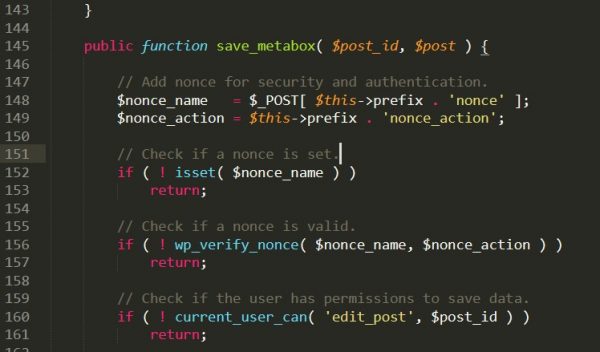
Здравствуйте! Подскажите, пожалуйста, как подправить код, если при добавлении на сайт новой записи (движок WP) выдаёт ошибку:
Notice: Undefined index: meta_posts_nonce in /home/…/metaboxes.php on line 151
Notice: Undefined index: meta_pages_nonce in /home/…/metaboxes.php on line 151
Notice: Undefined index: posts_thumb_nonce in /home/…/metaboxes.php on line 151
Notice: Undefined index: pages_thumb_nonce in /home/…/metaboxes.php on line 151
А когда нажимаю кнопку «Опубликовать» статью, то выдаёт такую ошибку:
Notice: Undefined index: meta_pages_nonce in /home/…/metaboxes.php on line 151
Notice: Undefined index: pages_thumb_nonce in /home/…/metaboxes.php on line 151
Notice: Undefined index: meta_pages_nonce in /home/…/metaboxes.php on line 151
Notice: Undefined index: pages_thumb_nonce in /home/…/metaboxes.php on line 151
Warning: Cannot modify header information — headers already sent by (output started at /home/…/metaboxes.php:151) in /home/…/wp-admin/post.php on line 222
Warning: Cannot modify header information — headers already sent by (output started at /home/…/metaboxes.php:151) in /home/…/wp-includes/pluggable.php on line 1251
Warning: Cannot modify header information — headers already sent by (output started at /home/…/metaboxes.php:151) in /home/…/wp-includes/pluggable.php on line 1254
Строка 151 имеет такой вид — см. скриншот ниже (в этой строке просто указаны комментарии от создателя WP темы).
Так сложно сказать, там может вмешиваться все что угодно.
Возможно какой-то плагин нарушает работу. Надо отключить все и по очередно включить каждый.
Спасибо за ответ. Жаль, но не помогло ((
Спасибо реально помог!! 1 часа уже ищу ответ
Добрый день. У меня в ошибочной строке такое
как это поменять? Спасибо.
Не понятно, что вы хотите сделать. Из сообщения также нельзя понять, что требуется сделать. Это просто строка с условием. Название ошибки в ней не содержится.
Добрый день. У меня выходит ошибка , то что в названии темы Исправляем сообщение об ошибке – Notice: Undefined index
Нашла файл по пути и строку, а в ней содержимое то, что я выше написала.
Эту ошибку выдает модуль Яндекс Кассы и открывает Белый лист
Notice: Undefined index: version in /home/c/cw56654/cks22/public_html/admin/controller/extension/payment/yandex_money.php on line 1631
Искала способ решения и увидела ваш пост.
Похоже у вас та же ошибка, что и ниже в комментарии. Написал, что за проблема в ответе ниже.
У меня такая же ошибка
private function setUpdaterData($data)
<
$data[‘update_action’] = $this->url->link(‘extension/payment/’.self::MODULE_NAME.’/update’,
‘user_token=’.$this->session->data[‘user_token’], true);
$data[‘backup_action’] = $this->url->link(‘extension/payment/’.self::MODULE_NAME.’/backups’,
‘user_token=’.$this->session->data[‘user_token’], true);
$version_info = $this->getModel()->checkModuleVersion(false);
$data[‘kassa_payments_link’] = $this->url->link(‘extension/payment/’.self::MODULE_NAME.’/payments’,
‘user_token=’.$this->session->data[‘user_token’], true);
if (version_compare($version_info[‘version’], self::MODULE_VERSION) >0) <
$data[‘new_version_available’] = true;
$data[‘changelog’] = $this->getModel()->getChangeLog(self::MODULE_VERSION,
$version_info[‘version’]);
$data[‘new_version’] = $version_info[‘version’];
> else <
$data[‘new_version_available’] = false;
$data[‘changelog’] = »;
$data[‘new_version’] = self::MODULE_VERSION;
>
$data[‘new_version_info’] = $version_info;
$data[‘backups’] = $this->getModel()->getBackupList();
У вас указана в ошибке строка on line 1631. Из кода здесь не понятно какое это место. Смотрите у себя в редакторе номер строки, когда откроете весь файл.
Скорее всего у вас тут пусто: $version_info[‘version’]. Код не находит ссылку на свойство version в переменной version_info;
Источник
Avoiding undefined index / offset errors in PHP.
This is a PHP tutorial on how to “fix” undefined index and undefined offset errors.
These are some of the most common notices that a beginner PHP developer will come across. However, there are two simple ways to avoid them.
What is an index?
Firstly, you will need to understand what an index is.
When you add an element to array, PHP will automatically map that element to an index number.
For example, if you add an element to an empty array, PHP will give it the index ““. If you add another element after that, it will be given the index “1“.
This index acts as an identifier that allows you to interact with the element in question. Without array indexes, we would be unable to keep track of which element is which.
Take the following array as an example.
As you can see, Cat has the index “” and Dog has the index “1“. If I want to print the word “Cat” out onto the page, I will need to access the “Cat” element via its array index.
As you can see, we were able to access the “Cat” element by specifying the index ““.
Similarly, if we want to print out the word “Dog”, then we can access it via the index “1“.
If we want to delete the “Dog” element from our PHP array, then we can do the following.
The unset function will remove the element in question. This means that it will no longer exist.
Undefined offset and index errors.
An undefined offset notice will occur if you attempt to access an index that does not exist.
This is where you’ll encounter nasty errors such as the following.
Notice: Undefined offset: 1 in /path/to/file.php on line 2
Or, if you are using array keys instead of numerical indexes.
PHP will display these notices if you attempt to access an array index that does not exist.
Although it is not a fatal error and the execution of your script will continue, these kind of notices tend to cause bugs that can lead to other issues.
$_POST, $_GET and $_SESSION.
A lot of beginner PHP developers fail to realize that $_POST, $_GET, $_SESSION, $_FILES, $_COOKIE, $_SERVER and $_REQUEST are all predefined arrays.
These are what we call superglobal variables.
In other words, they exist by default. Furthermore, developers should treat them like regular arrays.
When you access a GET variable in PHP, what you’re actually doing is accessing a GET variable that has been neatly packaged into an array called $_GET.
In the above piece of code, you are accessing an array element with the index “test”.
Avoiding index errors.
To avoid these errors, you can use two different methods.
The first method involves using the isset function, which checks to see if a variable exists.
The second method involves using the function array_key_exists, which specifically checks to see if an array index exists.
When you are dealing with GET variables and POST variables, you should never assume that they exist. This is because they are external variables.
In other words, they come from the client.
For example, a hacker can remove a GET variable or rename it. Similarly, an end user can inadvertently remove a GET variable by mistake while they are trying to copy and paste a URL.
Someone with a basic knowledge of HTML can delete form elements using the Inspect Element tool. As a result, you cannot assume that a POST variable will always exist either.
Источник
While working in PHP, you will come across two methods called $_POST and $_GET. These methods are used for obtaining values from the user through a form. When using them, you might encounter an error called “Notice: Undefined Index”.
This error means that within your code, there is a variable or constant that has no value assigned to it. But you may be trying to use the values obtained through the user form in your PHP code.
The error can be avoided by using the isset() function. This function will check whether the index variables are assigned a value or not, before using them.
.webp)
Undefined Index PHP Error
An undefined index is a ‘notice’ such as the following:
“Notice: Undefined variable,”
“Notice: Undefined index” and “Notice: Undefined offset.”
As you can see above are all notices, here are two ways to deal with such notices.
1) Ignore such notices
2) Resolve such notices.
How to Ignore PHP Notice: Undefined Index
You can ignore this notice by disabling reporting of notice with option error_reporting.
1. php.ini
Open php.ini file in your favourite editor and search for text “error_reporting” the default value is E_ALL. You can change it to E_ALL & ~E_NOTICE.
By default:
error_reporting = E_ALL
Change it to:
error_reporting = E_ALL & ~E_NOTICE
Now your PHP compiler will show all errors except ‘Notice.’
2. PHP Code
If you don’t have access to make changes in the php.ini file, In this case, you need to disable the notice by adding the following code on the top of your php page.
<?php error_reporting (E_ALL ^ E_NOTICE); ?>
Now your PHP compiler will show all errors except ‘Notice.’
Solution or Fix for PHP Notice: Undefined Index
Cause of error:
This error occurs with $ _POST and $ _GET method when you use index or variables which have not set through $ _POST or $ _GET method, but you are already using their value in your PHP code.
Undefined index in PHP $_get
Example using $_GET
In the following example, we have used two variables ‘ names’ & ‘age,’ but we did set only the name variable through the $_GET method, that’s why it throws the notice.
http://yoursite.com/index.php?name=ram
<?php
$name = $_GET['name'];
$age = $_GET['age'];

echo $name;
echo $age;
?>
OUTPUT:
Notice: Undefined index: age index.php on line 5
Solution
To solve such error, you can use the isset() function, which will check whether the index or variable is set or not, If not then don’t use it.
if(isset($_GET[index error name]))
Code with Error resolved using isset() function:
http://yoursite.com/index.php?name=ram
<?php
if(isset($_GET['name'])){
      $name = $_GET['name'];
 }else{
      $name = "Name not set in GET Method";
 }
if(isset($_GET['age'])){
      $name = $_GET['age'];
 }else{
      $name = "<br>Age not set in GET Method";
 }
echo $name;
echo $age;
?>
OUTPUT:
ram
Age not set in GET Method
Set Index as blank
We can also set the index as blank index:
// example with $_POST method

$name = isset($_POST['name']) ? $_POST['name'] : '';
$name = isset($_POST['age']) ? $_POST['age'] : '';

// example with $_GET method

$name = isset($_GET['name']) ? $_GET['name'] : '';
$name = isset($_GET['age']) ? $_GET['age'] : '';
Notice: Undefined Variable
This notice occurs when you use any variable in your PHP code, which is not set.
Example:
<?php
$name='RAM';

echo $name;
echo $age;
?>
Output:
Notice: Undefined variable: age in D:xampphtdocstestsite.locindex.php on line 7
In the above example, we are displaying value stored in the ‘name’ and ‘age’ variable, but we didn’t set the ‘age’ variable.
Solutions:
To fix this type of error, you can define the variable as global and use the isset() function to check if this set or not.
<?php
global $name;
global $age;
echo $name;
?>

<?php
if(isset($name)){echo $name;}
if(isset($age)){echo $age;}
?>

<?php
// Set Variable as Blank
$name = isset($name) ? $name : '';
$age= isset($age) ? $age: '';
?>
Notice: Undefined Offset
This type of error occurs with arrays when we use the key of an array, which is not set.
In the following, given an example, we are displaying the value store in array key 1, but we did not set while declaring array “$colorarray.”
Example:
<?php
// declare an array with key 2, 3, 4, 5
$colorarray = array(2=>'Red',3=>'Green',4=>'Blue',5=>'Yellow');

// echo value of array at offset 1.
echo $colorarray[1];
?>
Output:
Notice: Undefined offset: 1 in index.php on line 5
Solutions:
Check the value of offset array with function isset() & empty(), and use array_key_exists() function to check if key exist or not.
<?php
$colorarray = array(2=>'Red',3=>'Green',4=>'Blue',5=>'Yellow');

// isset() function to check value at offset 1 of array
if(isset($colorarray[1])){echo $colorarray[1];}

// empty() function to check value at offset 1 of array
if(!empty($colorarray[1])){echo $colorarray[1];}

// array_key_exists() of check if key 1 is exist or not
echo array_key_exists(1, $colorarray);
?>
Недавно при установке Laravel-приложения столкнулся с ошибкой:
In PackageManifest.php line 122:
Undefined index: name
Судя по гуглу, проблема существует последние полгода. Связано это с выходом второй версии композера, а также с регулярными обновлениями ядра Laravel.
Сначала попробуйте починить с помощью обновления композера до стабильной версии:
composer self-update --stableЕсли это не поможет, то попробуйте откатиться до первой версии композера:
sudo composer self-update --1В моём случае сработал откат до первой версии.
Поделиться
Поделиться
Отправить
Твитнуть
Вотсапнуть
Рейтинг 0
на основе 0 оценок

Разрабатываю сайты и онлайн-сервисы, использую для этого Laravel, Vue, WordPress. Люблю своё дело и занимаюсь этим уже больше 8 лет. Сделаю ваш проект — пишите!
Если вы разработчик, то подписывайтесь на фейсбук и телеграм-канал, чтобы не пропустить новые публикации.
Edit: See below for the solution
My composer.json:
{
    "name": "laravel/laravel",
    "type": "project",
    "description": "The Laravel Framework.",
    "keywords": [
        "framework",
        "laravel"
    ],
    "license": "MIT",
    "require": {
        "php": "^7.1.3",
        "area17/twill": "^2.1",
        "fideloper/proxy": "^4.0",
        "kalnoy/nestedset": "^5.0",
        "laravel/framework": "6.0.*",
        "laravel/helpers": "^1.2",
        "laravel/tinker": "^1.0"
    },
    "require-dev": {
        "barryvdh/laravel-debugbar": "3.*",
        "beyondcode/laravel-dump-server": "^1.0",
        "filp/whoops": "^2.0",
        "fzaninotto/faker": "^1.4",
        "mockery/mockery": "^1.0",
        "nunomaduro/collision": "^3.0",
        "phpunit/phpunit": "^7.5"
    },
    "config": {
        "optimize-autoloader": true,
        "preferred-install": "dist",
        "sort-packages": true
    },
    "extra": {
        "laravel": {
            "dont-discover": []
        }
    },
    "autoload": {
        "psr-4": {
            "App\": "app/"
        },
        "classmap": [
            "database/seeds",
            "database/factories"
        ]
    },
    "autoload-dev": {
        "psr-4": {
            "Tests\": "tests/"
        }
    },
    "minimum-stability": "dev",
    "prefer-stable": true,
    "scripts": {
        "post-autoload-dump": [
            "Illuminate\Foundation\ComposerScripts::postAutoloadDump",
            "@php artisan package:discover --ansi"
        ],
        "post-root-package-install": [
            "@php -r "file_exists('.env') || copy('.env.example', '.env');""
        ],
        "post-create-project-cmd": [
            "@php artisan key:generate --ansi"
        ]
    }
}
Output of composer diagnose:
Checking composer.json: OK
Checking platform settings: OK
Checking git settings: OK
Checking http connectivity to packagist: OK
Checking https connectivity to packagist: OK
Checking github.com rate limit: OK
Checking disk free space: OK
Checking pubkeys:
Tags Public Key Fingerprint: 57815BA2 7E54DC31 7ECC7CC5 573090D0 87719BA6 8F3BB723 4E5D42D0 84A14642
Dev Public Key Fingerprint: 4AC45767 E5EC2265 2F0C1167 CBBB8A2B 0C708369 153E328C AD90147D AFE50952
OK
Checking composer version: OK
Composer version: 2.0.1
PHP version: 7.3.7
PHP binary path: C:Program Filesphp7.3.7php.exe
OpenSSL version: OpenSSL 1.1.1c 28 May 2019
cURL version: 7.64.0 libz 1.2.11 ssl OpenSSL/1.1.1c
zip extension: OK
When I run this command:
composer update
I get the following output:
In PackageManifest.php line 122:
Undefined index: name
Script @php artisan package:discover —ansi handling the post-autoload-dump event returned with error code 1

Introduction to PHP Notice Undefined Index
Notice Undefined Index in PHP is an error which occurs when we try to access the value or variable which does not even exist in reality. Undefined Index is the usual error that comes up when we try to access the variable which does not persist. For instance, an array we are trying to access the index does not really exist in that, so in this scenario, we will get an Undefined Index in PHP. Undefined here means we have not defined its value and trying to access it.
Syntax of PHP Notice Undefined Index
There is no such syntax defined for an undefined index in php because it a kind of error we get when we try to access the value or variable in our code that does not really exist or no value assign to them, and we are trying to access its value somewhere in the code.
$myarray = array(value1, value2, value3, so on..)
$myarray[value_does_not_exists]
In the above lines of syntax, we are trying to access the array by passing a key which does not exist in the array. So this will throw us an Undefined index error in runtime.
Let’s see one example of how we can do this while programming:
Code:
$myarray = array(100, 200, 300, 400)
$myarray[1000]
In this way, we can replicate this error in PHP, but this can be prevented by using isst() method in PHP to make our code working in such a situation.
How does Notice Undefined Index work in PHP?
As of now, we know that an undefined index is a kind of exception, or we can say error in PHP. This will occur if we want to access a variable that does not really exist in our program. This needs to be handled; otherwise, it will cause a serious issue to our application and termination of the program. We have some methods defined in PHP to handle this kind of error in a program.
Here we will see one sample piece of code and its working, how this occurs in the program and how it should be handle.
Example:
Code:
<?php
// Your code here!
$myarray = array('200','300','400', '500', '600', '700', '1000');
echo $myarray[4];
echo $myarray['Hello '];
?>
In the above code lines, we create one array named ‘$myarray’, and we have initialized its value with some string integers inside it. In the second line, we are trying to access the variable of the array by using the value assigned to it and also, we are using the index. So index ‘4’ is present in the array, so this line would work fine as expected, but immediately after this line, we have another line in which we are trying to access the array element by its key. So, in this case, we will get Notice: Undefined Index in PHP with line number mentioned in it. We will now see how we can prevent this from happening in our code; for this, we have two methods available in PHP that can be used before accessing the element or value from the array.
Given below are the methods:
1. array_key_exists()
This method is used to check whether the key is present inside the array or not before access its value. This method can be used where we are trying to access the array element, and we are not sure about this. So before using the variable’s value, we can check by using this method whether the element or key exists.
This method takes two parameters as the input parameter. The first line is the key and the second one is an array itself.
Let’s see its syntax of the method
Signature:
array_key_exists(your_key, your_array)Here we pass two parameters the key we pass it checks it into the whole array. Its return type is Boolean; it will return true if the key is present in the array, else it will return false if the keys does not exist.
2. isset()
This method also checks variable is set in the program or not before accessing its value. It also checks for a NULL variable. It performs two things it; first checks variable is defined, and the other is it should not be NULL.
Signature:
isset(variables);Here we can pass our variable, which we want to check before accessing them in the program. The return type for this method is also Boolean; if it found the variable and it is not NULL, then it will return as true as the value. If the previous condition not specified, then it will return False.
Examples of PHP Notice Undefined Index
Given below are the examples of PHP Notice Undefined Index:
Example #1
In this example, we are trying to access the key that does not access the array, so while program execution, we will get Notice Undefined Index error in PHP.
Code:
<?php
// Your code here!
// creating an array here
$myarray = array(0=>'Hi',1=>'Hello',2=>'To', 3=>'All', 4=>'Stay', 5=>'Safe', 6=>'Enjoy !!');
//try to print values from array
echo $myarray[0]."n";
echo $myarray[1]."n";
echo $myarray[2]."n";
//trying to access the element which does not exists.
echo $myarray['World']."n";
?>
Output:

Example #2
To prevent this error while occurring in program execution.
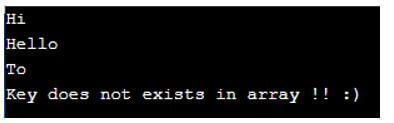
Code:
<?php
// Your code here!
// creating an array here
$myarray = array(0=>'Hi',1=>'Hello',2=>'To', 3=>'All', 4=>'Stay', 5=>'Safe', 6=>'Enjoy !!');
//try to print values from array
echo $myarray[0]."n";
echo $myarray[1]."n";
echo $myarray[2]."n";
//trying to access the element which does not exists.
if(array_key_exists('World', $myarray)){
echo "Key exists in array !!";
}else {
echo "Key does not exists in array !! :)";
}
?>
Output:
Conclusion
Notice Undefined Index is a kind of error we got in PHP when we try to access the non-existing element from the array or in our program. One more case is that it can occur when we try to access a NULL value in the program. So we can use two methods, isset() and array_key_exists() methods in PHP, to overcome this error in the application.
Recommended Articles
This is a guide to PHP Notice Undefined Index. Here we discuss the introduction, syntax, and working of notice undefined index in PHP along with different examples. You may also have a look at the following articles to learn more –
- PHP Output Buffering
- PHP json_decode
- PHP mail()
- PHP Global Variable
Scenario:
When I try to execute the PHP script the following error will occur
“Notice: Undefined index: my index C:wampwwwmypathindex.php on line 11”
Line 45 and 30 looks like this:
echo "Wikitechy index value is: " . $my_array["my_index"];
Reason:
<html>
    <head>
        <title>array in php</title>
    </head>
<body>
    <?php
        $data = array('WikitechyObject' => '100', 'php');
        echo $data['Bootstrap'];
    ?>
</body>
</html>
Here in this sample code the key is not defined in the array.
Here in this code we create an associative array whose name as “data” with its key as ‘WikitechyObject’ & their values as ‘100’, ‘php.
Here in this echo statement we print the value of the key “Bootstrap” but there is no available data’s in an array.
Fix :
Here initially we use if condition for checking whether the key is available (or) not
- For example, if the key is available it process the if section
- Otherwise it moves to else section.
Observe the following PHP script:
<html>
    <head>
        <title>array in php</title>
    </head>
<body>
    <?php
        $data = array('WikitechyObject' => '100', 'php');
        if (array_key_exists('Bootstrap', $data)) {
            //here we check the key value available (or) not
            echo $data['Bootstrap'];
            // available means print the Bootstrap key value
        }
        else {
            // Not available means executed this section
            echo 'No key Bootstrap in array';
        }
    ?>
</body>
</html>
Here we check whether the array key value is existing (or) not using array_key_exists function, apart from that if the key value is available it prints the key value of the “Bootstrap” otherwise it prints “No Key Bootstrap in array”.
Applies to:
- PHP 3 and 4
- PHP 5
- PHP 6 and Unicode
- PHP 7
Related Tags:
- PHP: «Notice: Undefined variable» and «Notice: Undefined index
- How to fix ‘Notice: Undefined index:’ in PHP form action?
- Undefined index in PHP
- PHP — Notice: Undefined index
- How to fix Notice: Undefined index in PHP form action?
- PHP Notice: Undefined index: & PHP Notice: Undefined variable