Typeerror: type object is not subscriptable error occurs while accessing type object with index. Actually only those python objects which implements __getitems__() function are subscriptable. In this article, we will first see the root cause for this error. We will also explore how practically we can check which object is subscriptable and which is not. At last but not least, we will see some real scenarios where we get this error. So let’s start the journey.
Typeerror: type object is not subscriptable ( Fundamental Cause) –
The root cause for this type object is not subscriptable python error is invoking type object by indexing. Let’s understand with some practical scenarios.
var_list=[1,2,3]
var=type(var_list)
var[0]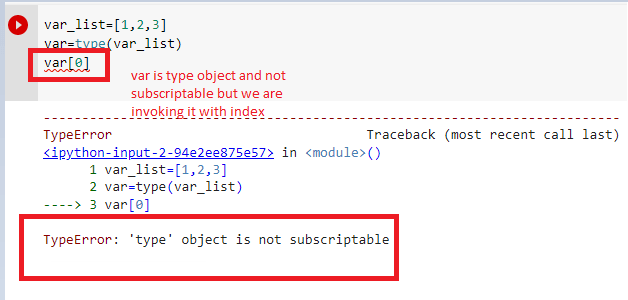
Here var is a type python object. In the place of same, the list is python subscriptable object. Hence we can invoke it via index. Moreover, Here is the implementation –
var_list=[1,2,3]
var=type(var_list)
var_list[0]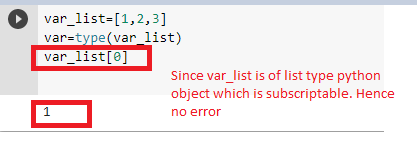
The best way to fix this error is using correct object for indexing. Let’s understand with one example.
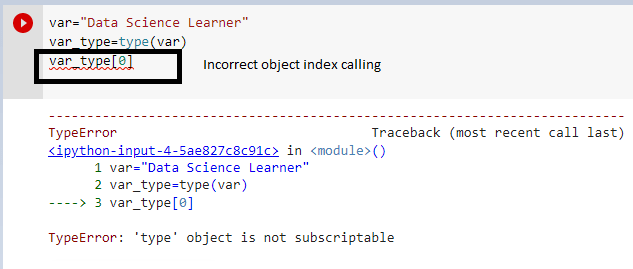
The fix is calling var[0] in the place of var_type[0] . Here ‘var’ is the correct object. It is a ‘str’ type object which is subscriptible python object.
How to check python object is subscriptable ?
Most importantly, As I explained clearly, Only those object which contains __getitems__() method in its object ( blueprint of its class) is subscriptible. Let’s see any subscriptible object and its internal method-
print(dir(var))The output is –
['__add__', '__class__', '__contains__', '__delattr__', '__dir__',
 '__doc__', '__eq__', '__format__', '__ge__', '__getattribute__', '__getitem__', '__getnewargs__',
 '__gt__', '__hash__', '__init__', '__init_subclass__', '__iter__', '__le__', '__len__', '__lt__',
'__mod__', '__mul__', '__ne__', '__new__', '__reduce__', '__reduce_ex__', '__repr__', '__rmod__',
'__rmul__', '__setattr__', '__sizeof__', '__str__', '__subclasshook__', 'capitalize', 'casefold',
 'center', 'count', 'encode', 'endswith', 'expandtabs', 'find', 'format', 'format_map', 'index',
'isalnum', 'isalpha', 'isascii', 'isdecimal', 'isdigit', 'isidentifier', 'islower', 'isnumeric',
'isprintable', 'isspace', 'istitle', 'isupper', 'join', 'ljust', 'lower', 'lstrip', 'maketrans',
 'partition', 'replace', 'rfind', 'rindex', 'rjust', 'rpartition', 'rsplit', 'rstrip', 'split',
'splitlines', 'startswith', 'strip', 'swapcase', 'title', 'translate', 'upper', 'zfill']
Firstly, As the internal method __getitem__() is available in the implementation of the object of var( list) hence it is subscriptible and that is why we are not getting any error while invoking the object with indexes. Hope this article is helpful for your doubt.
Similar Errors-
Typeerror int object is not subscriptable : Step By Step Fix
Typeerror nonetype object is not subscriptable : How to Fix ?
Thanks
Data Science Learner Team

Join our list
Subscribe to our mailing list and get interesting stuff and updates to your email inbox.
We respect your privacy and take protecting it seriously
Thank you for signup. A Confirmation Email has been sent to your Email Address.
Something went wrong.
“type” is a special keyword in Python that denotes a value whose type is a data type. If you try to access a value from an object whose data type is “type”, you’ll encounter the “TypeError: ‘type’ object is not subscriptable” error.
This guide discusses what this error means and why you may see it. It walks you through an example of this error so you can learn how to fix the error whenever it comes up.

Find Your Bootcamp Match
- Career Karma matches you with top tech bootcamps
- Access exclusive scholarships and prep courses
Select your interest
First name
Last name
Phone number
By continuing you agree to our Terms of Service and Privacy Policy, and you consent to receive offers and opportunities from Career Karma by telephone, text message, and email.
TypeError: ‘type’ object is not subscriptable
Python supports a range of data types. These data types are used to store values with different attributes. The integer data type, for instance, stores whole numbers. The string data type represents an individual or set of characters.
Each data type has a “type” object. This object lets you convert values to a particular data type, or create a new value with a particular data type. These “type” objects include:
- int()
- str()
- tuple()
- dict()
If you check the “type” of these variables, you’ll see they are “type” objects:
The result of this code is: “type”.
We cannot access values from a “type” object because they do not store any values. They are a reference for a particular type of data.
An Example Scenario
Build a program that displays information about a purchase made at a computer hardware store so that a receipt can be printed out. Start by defining a list with information about a purchase:
purchase = type(["Steelseries", "Rival 600 Gaming Mouse", 69.99, True])
The values in this list represent, in order:
- The brand of the item a customer has purchased
- The name of the item
- The price of the item
- Whether the customer is a member of the store’s loyalty card program
Next, use print() statements to display information about this purchase to the console:
print("Brand: " + purchase[0])
print("Product Name: " + purchase[1])
print("Price: $" + str(purchase[2]))
You print the brand, product name, and price values to the console. You have added labels to these values so that it is easy for the user to tell what each value represents.
Convert purchase[2] to a string using str() because this value is stored as a floating point number and you can only concatenate strings to other strings.
Next, check to see if a user is a member of the store’s loyalty card program. You do this because if a customer is not a member then they should be asked if they would like to join the loyalty card program:
if purchase[3] == False:
	    print("Would you like to join our loyalty card program?")
else:
	    print("Thanks for being a member of our loyalty card program. You have earned 10 points for making a purchase at our store.")
If a user is not a member of the loyalty card program, the “if” statement runs. Otherwise, the else statement runs and the user is thanked for making a purchase.
Run our code and see if it works:
Traceback (most recent call last):
  File "main.py", line 3, in <module>
	     print("Brand: " + purchase[0])
TypeError: 'type' object is not subscriptable
Our code returns an error.
The Solution
Take a look at the offending line of code:
print("Brand: " + purchase[0])
The “subscriptable” message says you are trying to access a value using indexing from an object as if it were a sequence object, like a string, a list, or a tuple. In the code, you’re trying to access a value using indexing from a “type” object. This is not allowed.
This error has occurred because you’ve defined the “purchase” list as a type object instead of as a list. To solve this error, remove the “type” from around our list:
purchase = ["Steelseries", "Rival 600 Gaming Mouse", 69.99, True]
There is no need to use “type” to declare a list. You only need to use “type” to check the value of an object. Run our code and see what happens:
Brand: Steelseries
Product Name: Rival 600 Gaming Mouse
Price: $69.99
Thanks for being a member of our loyalty card program. You have earned 10 points for making a purchase at our store.
The code prints out the information about the purchase. It also informs that the customer is a loyalty card member and so they have earned points for making a purchase at the store.
Conclusion
The “TypeError: ‘type’ object is not subscriptable” error is raised when you try to access an object using indexing whose data type is “type”. To solve this error, ensure you only try to access iterable objects, like tuples and strings, using indexing.
Now you’re ready to solve this error like a Python expert!
type
is a reserved keyword in Python. If print the
type
keyword, we get an object by name
<class type>
, we can also pass a data object to the
type(data_object)
to the
type()
function and get the data type of the object. If we treated a value returned by the
type()
function as a list object and try to perform indexing on that value, we will encounter the
TypeError: 'type' object is not subscriptable
.
In this Python guide, we will discuss this error in detail and learn how to solve it. We will also walk through a common example where you may encounter this error.
So without further ado, let’s get started with this error.
TypeError: 'type' object is not subscriptable
is a standard Python error, and like other error statements, it is divided into two parts.
-
Exception Type (
TypeError
)
-
Error Message (
'type' object is not subscriptable
)
1. TypeError
Type Error is a standard Python exception type, it occurs in Python we perform an invalid operation on a
Python data type
object. Performing an addition or concatenation operation between an integer value and a string value is a common Python TypeError exception error.
2. ‘type’ object is not subscriptable.
In Python, there are 3 standard objects which are subscriptable, list, tuples, and string. All these three objects support indexing, which allows us to perform the square bracket notation to access the individual elements or characters from these data-type objects.
Example
# python string
string = "Hello"
# python tuple
tuple_ = (1,2,3,4)
# python list
list_= [1,2,3,4]

# acessing string tuple and list with indexing

print(string[0])      #H
print(tuple_[1])      #2
print(list_[2])       #3
But if we perform the indexing notation on a value that is returned by the
type()
function, we will receive the Error Message
'type' object is not subscriptable
.
This Error message is simply telling us that we are performing a subscriptable notation like indexing on the
'type'
object, and the
'type'
object does not support indexing or
subscriptable
.
Error Example
name ="Rahul"

#data type of name
name_dt = type(name)       #<class 'str'>

# performing indexing on type object
print(name_dt[0])
Output
Traceback (most recent call last):
File "main.py", line 7, in <module>
print(name_dt[0])
TypeError: 'type' object is not subscriptable
Break the code
In this example, we are receiving the error at line 7 because we are performing indexing on
name_dt
variable which value is
<class 'str'>
and its data type is
<class 'type'>
. And when we perform an indexing operation on a
'type'
object we receive the
TypeError: 'type' object is not subscriptable
error.
Python «TypeError: ‘type’
object is not subscriptable
» Common Scenario.
Many new programmers encounter this error when they use the same name to store the string value and the data type of string returned by the
type()
function.
Example
# string
name = "Rahul"

# data type of name
name = type(name)

print("The Data type of name is: ", name)
print('The first character of name is: ', name[0])
Output
The Data type of name is: <class 'str'>

Traceback (most recent call last):
File "main.py", line 8, in <module>
print('The first character of name is: ', name[0])
TypeError: 'type' object is not subscriptable
Break the code
In this example, we are encountering the error in line 8 with
print('The first chracter of name is: ', name[0])
statement. This is because in line 5 we changed the value of
name
to
<class 'str'>
by assigning
type(name)
statement.
After that statement, the value of the name became
<class 'str'>
and its type became
<class 'type'>
. And when we try to access the first letter of value
'Rahul'
using
name[0]
statement, we got the error.
Solution
The solution for the above problem is very simple. All we need to do is provide the different variable names to the
type(name)
value.
# string
name = "Rahul"

# data type of name
name_dt = type(name)

print("The Data type of name is:", name_dt)
print('The first character of name is: ', name[0])
Output
The Data type of name is: <class 'str'>
The first character of name is: R
Conclusion
In this Python tutorial, we discussed the
TypeError: 'type' object is not subscriptable
error. This is a very common error and can be debugged with ease if you know how to read the errors. It occurs when we perform the indexing operation on a
type
Python object. To debug this problem, we need to make sure that we are not using indexing on the
type
object.
If you are still getting this error in your Python program, please share your code in the comment section. We will try to help you in debugging.
People are also reading:
-
Python IndentationError: unindent does not match any outer indentation level Solution
-
Input Output (I/O) and Import in Python
-
Python TypeError: cannot unpack non-iterable NoneType object Solution
-
Move File in Python: A Complete Guide
-
Python TypeError: unsupported operand type(s) for +: ‘NoneType’ and ‘str’ Solution
-
What is Tornado in Python?
-
Python TypeError: can only concatenate list (not “int”) to list Solution
-
Difference between Python List append and extend method
-
Python AttributeError: ‘list’ object has no attribute ‘split’ Solution
-
Chat Room Application in Python
Python throws error, ‘type’ object is not subscriptable, when we try to index or subscript an element of type type.
Consider this code –
print(list[0])

# TypeError: 'type' object is not subscriptable
The problem with this code is that list is a built-in function which converts a string into characters array. Here we are subscripting the list function as if it was a list array.
You may use this –
list = list("Captain America")
print(list[0])
This is perfectly valid but it should never be used. Never use built-in function names as variable names. Why? Check this post – ‘list’ object is not callable.
The correct way is this –
newList = list("Captain America")
print(newList[0])
Tweet this to help others
According to Python documentation, there are many built-in types –
- Boolean – bool
- Numeric – int, float, complex
- Iterator
- Sequence – list, tuple, range
- Text – str
- Binary – bytes, bytearray, memoryview
- Set – set, frozenset
- Mapping – dict
- Others
Built-in functions list
These are the built-in functions which will return either type or builtin_function_or_method as their type –
| abs() | dict() | help() | min() | setattr() |
| all() | dir() | hex() | next() | slice() |
| any() | divmod() | id() | object() | sorted() |
| ascii() | enumerate() | input() | oct() | staticmethod() |
| bin() | eval() | int() | open() | str() |
| bool() | exec() | isinstance() | ord() | sum() |
| bytearray() | filter() | issubclass() | pow() | super() |
| bytes() | float() | iter() | print() | tuple() |
| callable() | format() | len() | property() | type() |
| chr() | frozenset() | list() | range() | vars() |
| classmethod() | getattr() | locals() | repr() | zip() |
| compile() | globals() | map() | reversed() | __import__() |
| complex() | hasattr() | max() | round() | |
| delattr() | hash() | memoryview() | set() |
Functions with type as 'type'
Functions in the below list will return 'type' as their type and indexing or subscripting them will throw the error, ‘type’ object is not subscriptable. So check if you have used any of these functions in your code and subscripting them –
- dict
- slice
- object
- enumerate
- staticmethod
- int
- str
- bool
- bytearray
- filter
- super
- bytes
- float
- tuple
- property
- type
- frozenset
- list
- range
- classmethod
- zip
- map
- reversed
- complex
- memoryview
- set
This code example will show the type of all built-in functions –
print(type(abs))
print(type(dict))
print(type(help))
print(type(min))
print(type(setattr))
print(type(all))
print(type(dir))
print(type(hex))
print(type(next))
print(type(slice))
print(type(any))
print(type(divmod))
print(type(id))
print(type(object))
print(type(sorted))
print(type(ascii))
print(type(enumerate))
print(type(input))
print(type(oct))
print(type(staticmethod))
print(type(bin))
print(type(eval))
print(type(int))
print(type(open))
print(type(str))
print(type(bool))
print(type(exec))
print(type(isinstance))
print(type(ord))
print(type(sum))
print(type(bytearray))
print(type(filter))
print(type(issubclass))
print(type(pow))
print(type(super))
print(type(bytes))
print(type(float))
print(type(iter))
print(type(print))
print(type(tuple))
print(type(callable))
print(type(format))
print(type(len))
print(type(property))
print(type(type))
print(type(chr))
print(type(frozenset))
print(type(list))
print(type(range))
print(type(vars))
print(type(classmethod))
print(type(getattr))
print(type(locals))
print(type(repr))
print(type(zip))
print(type(compile))
print(type(globals))
print(type(map))
print(type(reversed))
print(type(__import__))
print(type(complex))
print(type(hasattr))
print(type(max))
print(type(round))
print(type(delattr))
print(type(hash))
print(type(memoryview))
print(type(set))
Live Demo


This is Akash Mittal, an overall computer scientist. He is in software development from more than 10 years and worked on technologies like ReactJS, React Native, Php, JS, Golang, Java, Android etc. Being a die hard animal lover is the only trait, he is proud of.
Related Tags
- Error,
- python error,
- python-short
![TypeError: 'int' object is not subscriptable [Solved Python Error]](https://www.freecodecamp.org/news/content/images/size/w2000/2022/10/in_not_subable.png)
The Python error «TypeError: ‘int’ object is not subscriptable» occurs when you try to treat an integer like a subscriptable object.
In Python, a subscriptable object is one you can “subscript” or iterate over.
You can iterate over a string, list, tuple, or even dictionary. But it is not possible to iterate over an integer or set of numbers.
So, if you get this error, it means you’re trying to iterate over an integer or you’re treating an integer as an array.
In the example below, I wrote the date of birth (dob variable) in the ddmmyy format. I tried to get the month of birth but it didn’t work. It threw the error “TypeError: ‘int’ object is not subscriptable”:
dob = 21031999
mob = dob[2:4]

print(mob)

# Output: Traceback (most recent call last):
#   File "int_not_subable..py", line 2, in <module>
#     mob = dob[2:4]
# TypeError: 'int' object is not subscriptable
How to Fix the «TypeError: ‘int’ object is not subscriptable» Error
To fix this error, you need to convert the integer to an iterable data type, for example, a string.
And if you’re getting the error because you converted something to an integer, then you need to change it back to what it was. For example, a string, tuple, list, and so on.
In the code that threw the error above, I was able to get it to work by converting the dob variable to a string:
dob = "21031999"
mob = dob[2:4]

print(mob)

# Output: 03
If you’re getting the error after converting something to an integer, it means you need to convert it back to string or leave it as it is.
In the example below, I wrote a Python program that prints the date of birth in the ddmmyy format. But it returns an error:
name = input("What is your name? ")
dob = int(input("What is your date of birth in the ddmmyy order? "))
dd = dob[0:2]
mm = dob[2:4]
yy = dob[4:]
print(f"Hi, {name}, nYour date of birth is {dd} nMonth of birth is {mm} nAnd year of birth is {yy}.")

#Output: What is your name? John Doe
# What is your date of birth in the ddmmyy order? 01011970
# Traceback (most recent call last):
#   File "int_not_subable.py", line 12, in <module>
#     dd = dob[0:2]
# TypeError: 'int' object is not subscriptable
Looking through the code, I remembered that input returns a string, so I don’t need to convert the result of the user’s date of birth input to an integer. That fixes the error:
name = input("What is your name? ")
dob = input("What is your date of birth in the ddmmyy order? ")
dd = dob[0:2]
mm = dob[2:4]
yy = dob[4:]
print(f"Hi, {name}, nYour date of birth is {dd} nMonth of birth is {mm} nAnd year of birth is {yy}.")

#Output: What is your name? John Doe
# What is your date of birth in the ddmmyy order? 01011970
# Hi, John Doe,
# Your date of birth is 01
# Month of birth is 01
# And year of birth is 1970.
Conclusion
In this article, you learned what causes the «TypeError: ‘int’ object is not subscriptable» error in Python and how to fix it.
If you are getting this error, it means you’re treating an integer as iterable data. Integers are not iterable, so you need to use a different data type or convert the integer to an iterable data type.
And if the error occurs because you’ve converted something to an integer, then you need to change it back to that iterable data type.
Thank you for reading.
Learn to code for free. freeCodeCamp’s open source curriculum has helped more than 40,000 people get jobs as developers. Get started
Список частых ошибок в Python и их исправление.
TypeError: object is not subscriptable
Ошибка, которая сообщает, что обращение идет к элементам не правильно. Возможно, это другой тип объекта, а не тот, который вам кажется. Проверить можно командой type().
Например, такое может быть, если это список (list), а в обращаетесь за элементом к словарю (dictionary).
TypeError: unsupported type for timedelta days component: str
Ожидается число, а передается в timedelta строка. Исправить просто, если уверены, что передается цифра, то достаточно явно преобразовать в число: int(days)
Failed execute: tuple index out of range
Означает что передаётся меньше данных, чем запрашивается.
ModuleNotFoundError: No module named ‘bot.bot_handler’; ‘bot’ is not a package
venv/bin/python bot/bot.py
Traceback (most recent call last):
File «bot/bot.py», line 4, in
from bot.bot_handler import BotHandler
File «bot/bot.py», line 4, in
from bot.bot_handler import BotHandler
ModuleNotFoundError: No module named ‘bot.bot_handler’; ‘bot’ is not a package
Конфилкт имени файла и директории — они не должны быть здесь одинаковыми. Поменяйте название директории или имени файла.
ValueError: a coroutine was expected, got
Traceback (most recent call last):
File «test.py», line 41, in
asyncio.run(update.update_operations)
File «/usr/local/Cellar/python/3.7.4_1/Frameworks/Python.framework/Versions/3.7/lib/python3.7/asyncio/runners.py», line 37, in run
raise ValueError(«a coroutine was expected, got {!r}».format(main))
ValueError: a coroutine was expected, got
Забыта скобки () у функции в команде asyncio.run(update.update_operations).
In this post, we will learn how to fix TypeError:object is not subscriptable error in Python. The TypeError is raised when trying to use an illegal operation on non subscriptable objects(set,int,float) or does not have this functionally. Python throws the TypeError object is not subscriptable if We use indexing with the square bracket notation on an object that is not indexable.
1.TypeError:object is not subscriptable Python
In this Python program example, accessing the integer variable values, accessing with the square bracket notation and since is not indexable.
number = 56789
print( number[0])
Output
print( number[0])
TypeError: 'int' object is not subscriptable
Solution TypeError:object is not subscriptable Python
We have to access the integer variable without index notation.Let us understand with the below example
number = 56789
print( ‘The value is :’,number)
Output
- TypeError:NoneType object is not subscriptable
- ValueError:Cannot convert non-finite values (NA or inf) to integer
- Fix ValueError: could not convert string to float
- Fixed Typeerror: nonetype object is not iterable Python
- ValueError:Cannot convert non-finite values (NA or inf) to integer
2.TypeError:object is not subscriptable set
We can’t access the set element by using the index notation.Running the below code will throw TypeError.To solve this error We have to use for loop to iterate over the set and display a single value.The Python object strings, lists, tuples, and dictionaries are subscribable their elements can be accessed using the index notation.
mySet = {3,6,9,12,15,18,121}
print(mySet[0])
Output
print(mySet[0])
TypeError: 'set' object is not subscriptable
Solution object is not subscriptable set
In this example we have for loop to iterate over the set and display each element in the set.
mySet = {3,6,9,12,15}
for inx in mySet:
print(inx,end=”,”)
Output
3.TypeError:object is not subscriptable Pandas
In this example, we are finding the sum of Pandas dataframe column “Marks” that has int type. While applying the Lambda function on the ‘Marks’ column using index notation or subscript operator and encountering with TypeError: ‘int’ object is not subscriptable in Pandas.
import pandas as pd

data = {
    'Name': ['Jack', 'Jack', 'Max', 'David'],
    'Marks':[97,97,100,100],
    'Subject': ['Math', 'Math', 'Math', 'Phy']
}

dfobj = pd.DataFrame(data)
print(dfobj.dtypes)

MarksGross = lambda x: int(x[1])
dfobj.Marks = dfobj.Marks.apply(MarksGross)

Print(dfobj.Marks.sum())
Output
  MarksGross = lambda x: int(x[1])
TypeError: 'int' object is not subscriptable
4. How to fix TypeError: int object is not Subscriptable Pandas
To solve Type Error with Pandas dataframe, We have not applied the lambda function using index notation instead use int(x) pass value of x inside () brackets.
import pandas as pd

data = {
    'Name': ['Jack', 'Jack', 'Max', 'David'],
    'Marks':[97,97,100,100],
    'Subject': ['Math', 'Math', 'Math', 'Phy']
}

dfobj = pd.DataFrame(data)
print(dfobj.dtypes)

MarksGross = lambda x: int(x)
dfobj.Marks = dfobj.Marks.apply(MarksGross)

print(dfobj.Marks.sum())
Output
Name       object
Marks       int64
Subject    object
dtype: object
394
Object Is Not Subscriptable
Overview
Example errors:
TypeError: object is not subscriptable
Specific examples:
TypeError: 'type' object is not subscriptableTypeError: 'function' object is not subscriptable
Traceback (most recent call last):
  File "afile.py", line , in aMethod
    map[value]
TypeError: 'type' object is not subscriptable
This problem is caused by trying to access an object that cannot be indexed as though it can be accessed via an index.
For example, in the above error, the code is trying to access map[value] but map is already a built-in type that doesn’t support accessing indexes.
You would get a similar error if you tried to call print[42], because print is a built-in function.
Initial Steps Overview
-
Check for built-in words in the given line
-
Check for reserved words in the given line
-
Check you are not trying to index a function
Detailed Steps
1) Check for built-in words in the given line
In the above error, we see Python shows the line
This is saying that the part just before [value] can not be subscripted (or indexed). In this particular instance, the problem is that the word map is already a builtin identifier used by Python and it has not been redefined by us to contain a type that subscripts.
You can see a full list of built-in identifiers via the following code:
# Python 3.0
import builtins
dir(builtins)

# For Python 2.0
import __builtin__
dir(__builtin__)
2) Check for instances of the following reserved words
It may also be that you are trying to subscript a keyword that is reserved by Python True, False or None
>>> True[0]
<stdin>:1: SyntaxWarning: 'bool' object is not subscriptable; perhaps you missed a comma?
Traceback (most recent call last):
  File "<stdin>", line 1, in <module>
TypeError: 'bool' object is not subscriptable
3) Check you are not trying to access elements of a function
Check you are not trying to access an index on a method instead of the results of calling a method.
txt = 'Hello World!'

# Incorrectly getting the first word
>>> txt.split[0]

Traceback (most recent call last):
  File "<stdin>", line 1, in <module>
TypeError: 'builtin_function_or_method' object is not subscriptable

# The correct way
>>> txt.split()[0]

'Hello'
You will get a similar error for functions/methods you have defined yourself:
def foo():
    return ['Hello', 'World']

# Incorrectly getting the first word
>>> foo[0]

Traceback (most recent call last):
  File "<stdin>", line 1, in <module>
TypeError: 'function' object is not subscriptable

# The correct way
>>> foo()[0]
'Hello'
Solutions List
A) Initialize the value
B) Don’t shadow built-in names
Solutions Detail
A) Initialize the value
Make sure that you are initializing the array before you try to access its index.
map = ['Hello']
print(map[0])

Hello
B) Don’t shadow built-in names
It is generally not a great idea to shadow a language’s built-in names as shown in the above solution as this can confuse others reading your code who expect map to be the builtin map and not your version.
If we hadn’t used an already taken name we would have also got a much more clear error from Python, such as:
>>> foo[0]
Traceback (most recent call last):
  File "<stdin>", line 1, in <module>
NameError: name 'foo' is not defined
But don’t just take our word for it: see here
Further Information
- Python 2: Subscriptions
- Python 3: Subscript notation
@Gerry
Do you encounter this stupid error?

You’re not alone—thousands of coders like you generate this error in thousands of projects every single month. This short tutorial will show you exactly why this error occurs, how to fix it, and how to never make the same mistake again. So, let’s get started!
Python throws the TypeError object is not subscriptable if you use indexing with the square bracket notation on an object that is not indexable. This is the case if the object doesn’t define the __getitem__() method. You can fix it by removing the indexing call or defining the __getitem__ method.
The following code snippet shows the minimal example that leads to the error:
variable = None
print(variable[0])
# TypeError: 'NoneType' object is not subscriptable
You set the variable to the value None. The value None is not a container object, it doesn’t contain other objects. So, the code really doesn’t make any sense—which result do you expect from the indexing operation?
Exercise: Before I show you how to fix it, try to resolve the error yourself in the following interactive shell:
If you struggle with indexing in Python, have a look at the following articles on the Finxter blog—especially the third!
Related Articles:
- Indexing in Python
- Slicing in Python
- Highly Recommended: Accessing the Index of Iterables in Python
Note that a similar problem arises if you set the variable to the integer value 42 instead of the None value. The only difference is that the error message now is "TypeError: 'int' object is not subscriptable".
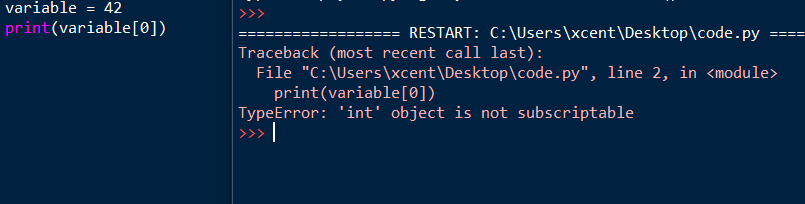
You can fix the non-subscriptable TypeError by wrapping the non-indexable values into a container data type such as a list in Python:
variable = [None]
print(variable[0])
# None
The output now is the value None and the script doesn’t throw an error anymore.
An alternative is to define the __getitem__ method in your code:
class X:
    def __getitem__(self, i):
        return f"Value {i}"

variable = X()
print(variable[0])
# Value 0
You overwrite the __getitem__ method that takes one (index) argument i (in addition to the obligatory self argument) and returns the i-th value of the “container”. In our case, we just return a string "Value 0" for the element variable[0] and "Value 10" for the element variable[10]. It doesn’t make a lot of sense here but is the minimal example that shows how it works.
I hope you’d be able to fix the bug in your code! Before you go, check out our free Python cheat sheets that’ll teach you the basics in Python in minimal time:
Related TypeError Messages
🌍 This was a very generic tutorial. You may have encountered a similar but slightly different variant of this error message. Have a look at the following tutorials to find out more about those!
- [Fixed] Matplotlib: TypeError: ‘AxesSubplot’ object is not subscriptable
- [Fixed] TypeError: ‘int’ object is not subscriptable
- [Fixed] Python TypeError: ‘float’ object is not subscriptable
- [Fixed] Python TypeError ‘set’ object is not subscriptable
- [Fixed] Python TypeError ‘bool’ object is not subscriptable
- (Solved) Python TypeError ‘Method’ Object is Not Subscriptable
- TypeError Built-in Function or Method Not Subscriptable (Fixed)
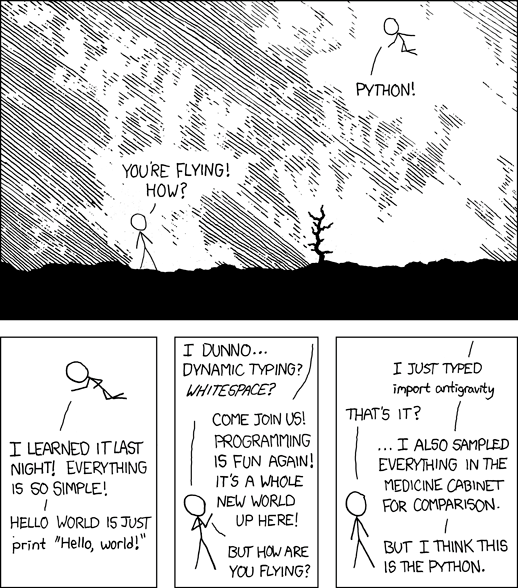
Programming Humor – Python

While working as a researcher in distributed systems, Dr. Christian Mayer found his love for teaching computer science students.
To help students reach higher levels of Python success, he founded the programming education website Finxter.com. He’s author of the popular programming book Python One-Liners (NoStarch 2020), coauthor of the Coffee Break Python series of self-published books, computer science enthusiast, freelancer, and owner of one of the top 10 largest Python blogs worldwide.
His passions are writing, reading, and coding. But his greatest passion is to serve aspiring coders through Finxter and help them to boost their skills. You can join his free email academy here.