If you try to call a tuple object, you will raise the error “TypeError: ‘tuple’ object is not callable”.
We use parentheses to define tuples, but if you define multiple tuples without separating them with commas, Python will interpret this as attempting to call a tuple.
To solve this error, ensure you separate tuples with commas and that you index tuples using the indexing operator [] not parentheses ().
This tutorial will go through how to solve this error with the help of code examples.
Table of contents
- TypeError: ‘tuple’ object is not callable
- What is a TypeError?
- What Does Callable Mean?
- Example #1: Not Using a Comma to Separate Tuples
- Solution
- Example #2: Incorrectly Indexing a Tuple
- Solution
- Summary
TypeError: ‘tuple’ object is not callable
What is a TypeError?
TypeError occurs in Python when you perform an illegal operation for a specific data type.
What Does Callable Mean?
Calling a function means the Python interpreter executes the code inside the function. In Python, we can only call functions. We can call functions by specifying the name of the function we want to use followed by a set of parentheses, for example, function_name(). Let’s look at an example of a working function that returns a string.
# Declare function

def simple_function():

    print("Hello World!")

# Call function

simple_function()
Hello World!
We declare a function called simple_function in the code, which prints a string. We can then call the function, and the Python interpreter executes the code inside simple_function().
We use tuples to store multiple items in a single variable. Tuples do not respond to a function call because they are not functions. If you try to call a tuple, the Python interpreter will raise the error TypeError: ‘tuple’ object is not callable. Let’s look at examples of raising the error and how to solve it:
Example #1: Not Using a Comma to Separate Tuples
Let’s look at an example where we define a list of tuples. Each tuple contains three strings. We will attempt to print the contents of each tuple as a string using the join() method.
# Define list of tuples

lst = [("spinach", "broccolli", "asparagus"),

       ("apple", "pear", "strawberry")

       ("rice", "maize", "corn")
]

# Print types of food

print(f"Vegetables: {' '.join(lst[0])}")

print(f"Fruits: {' '.join(lst[1])}")

print(f"Grains: {' '.join(lst[2])}")
Let’s run the code to see what happens:
---------------------------------------------------------------------------
TypeError                                 Traceback (most recent call last)
Input In [1], in <cell line: 3>()
      1 # Define list of tuples
      3 lst = [("spinach", "broccolli", "asparagus"),
      4
----> 5        ("apple", "pear", "strawberry")
      6
      7        ("rice", "maize", "corn")
      8 ]
     10 # Print types of food
     12 print(f"Vegetables: {' '.join(lst[0])}")

TypeError: 'tuple' object is not callable
We get the TypeError because we do not have a comma separating the second and third tuple item in the list. The Python Interpreter sees this as an attempt to call the second tuple with the contents of the third tuple as arguments.
Solution
To solve this error, we need to place a comma after the second tuple. Let’s look at the revised code:
# Define list of tuples

lst = [("spinach", "broccolli", "asparagus"),
       ("apple", "pear", "strawberry"),
       ("rice", "maize", "corn")
]

# Print types of food

print(f"Vegetables: {' '.join(lst[0])}")

print(f"Fruits: {' '.join(lst[1])}")

print(f"Grains: {' '.join(lst[2])}")
Let’s run the code to get the correct output:
Vegetables: spinach broccolli asparagus
Fruits: apple pear strawberry
Grains: rice maize corn
Example #2: Incorrectly Indexing a Tuple
Let’s look at an example where we have a tuple containing the names of three vegetables. We want to print each name by indexing the tuple.
# Define tuple

veg_tuple = ("spinach", "broccolli", "asparagus")

print(f"First vegetable in tuple: {veg_tuple(0)}")

print(f"Second vegetable in tuple: {veg_tuple(1)}")

print(f"Third vegetable in tuple: {veg_tuple(2)}")
Let’s run the code to see what happens:
---------------------------------------------------------------------------
TypeError                                 Traceback (most recent call last)
      1 veg_tuple = ("spinach", "broccolli", "asparagus")
      2
----≻ 3 print(f"First vegetable in tuple: {veg_tuple(0)}")
      4 print(f"Second vegetable in tuple: {veg_tuple(1)}")
      5 print(f"Third vegetable in tuple: {veg_tuple(2)}")

TypeError: 'tuple' object is not callable
The error occurs because we are using parentheses to index the tuple instead of the indexing operator []. The Python interpreter sees this as calling the tuple passing an integer argument.
Solution
To solve this error, we need to replace the parenthesis with square brackets. Let’s look at the revised code:
# Define tuple

veg_tuple = ("spinach", "broccolli", "asparagus")

print(f"First vegetable in tuple: {veg_tuple[0]}")

print(f"Second vegetable in tuple: {veg_tuple[1]}")

print(f"Third vegetable in tuple: {veg_tuple[2]}")
Let’s run the code to get the correct output:
First vegetable in tuple: spinach
Second vegetable in tuple: broccolli
Third vegetable in tuple: asparagus
Summary
Congratulations on reading to the end of this tutorial. To summarize, TypeError’ tuple’ object is not callable occurs when you try to call a tuple as if it were a function. To solve this error, ensure when you are defining multiple tuples in a container like a list that you use commas to separate them. Also, if you want to index a tuple, use the indexing operator [] , and not parentheses.
For further reading on not callable TypeErrors, go to the article: How to Solve Python TypeError: ‘float’ object is not callable.
To learn more about Python, specifically for data science and machine learning, go to the online courses page on Python.
Have fun and happy researching!
Introduction
In this article, we are exploring something new. From the title itself, you must be curious to know about the terms such as TypeError, tuple in python. So putting an end to your curiosity, let’s start with today’s tutorial on how to solve TypeError: ‘Tuple’ Object is not Callable in Python.
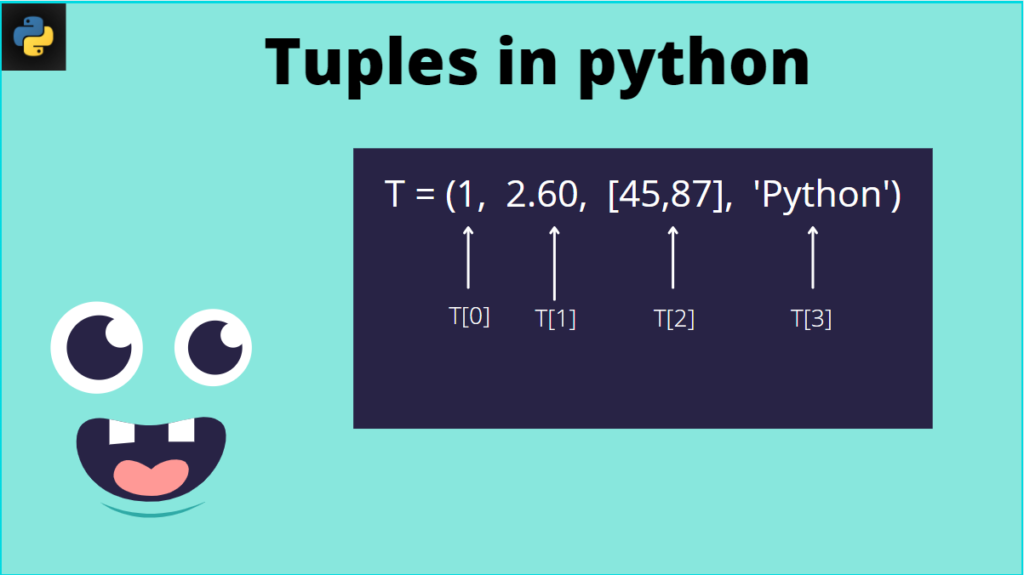
A tuple is one of the four in-built data structures provided by python. It is a collection of elements that are ordered and are enclosed within round brackets (). A tuple is immutable, which means that it cannot be altered or modified. Creating a tuple is simple, i.e., putting different comma-separated objects. For example: – T1 = (‘Chanda’, 11, ‘Kimmi’, 20).
What is Exception in python?
Sometimes we often notice that even though the statement is syntactically correct in the code, it lands up with an error when we try to execute them. These errors are known as exceptions. One of these exceptions is the TypeError exception. Generally, other exceptions, including the TypeError exception, are not handled by program. So let’s do some code to understand exceptions.
OUTPUT: - Traceback (most recent call last):
                       File "<stdin>", line 1, in <module>
                         ZeroDivisionError: division by zero
The last line of the error message indicates what kind of exception has occurred. The different types of exceptions are:
- ZeroDivisionError
- NameError
- TypeError
What is TypeError Exception in Python?
TypeError exception occurs when an operation is performed to an object of inappropriate data type. For example, performing the addition operation on a string and an integer value will raise the TypeError exception. Let’s do some code to have a clear understanding.
str = 'Favorite'
num = 5
print(str + num + str)
OUTPUT: - TypeError: Can't convert 'int' object to str implicitly
In the above example, the variable ‘str’ is a string, and the variable ‘num’ is an integer. The addition operator cannot be used between these two types, and hence TypeError is raised.
Let us understand different type of TypeError exception which is Incorrect type of list index.
list1 = ["physics", "chemistry", "mathematics", "english"]
index = "1"
print(list1[index])
OUTPUT: - TypeError: list indices must be integers or slices, not str
In the above-written Python code, the list index must always be an integer value. Since the index value used is a string, it generates a TypeError exception.
Till now, you must have understood the TypeError exception. Now let’s dive deeper into the concept of TypeError exception occurring in a tuple or due to a tuple.
TypeError: ‘tuple’ object is not callable
You must be wondering why this type of TypeError occurs. This is because tuples are enclosed with parenthesis creates confusion as parenthesis is also used for a function call wherein we pass parameters. Therefore, if you use parenthesis to access the elements from a tuple or forget to separate tuples with a comma, you will develop a “TypeError: ‘tuple’ object not callable” error. There are two causes for the “TypeError: ‘tuple’ object is not callable” error, and they are the following:
- Defining a list of tuples without separating each element with a comma.
- Using the wrong syntax for indexing.
Let’s us discuss in detail.
Cause 1. Missing Comma
Sometimes the “TypeError: ‘tuple’ object is not callable” error is caused because of a missing comma. Let’s start to code to understand this.
marks = [
	("Kimmi", 72),
	("chanda", 93)
	("Nupur", 27)
]
print(marks)
OUTPUT:-

Traceback (most recent call last):
  File "main.py", line 4, in <module>
    ("Nupur", 27)
TypeError: 'tuple' object is not callable
As expected, an error was thrown. This is because we have forgotten to separate all the tuples in our list with a comma. When python sees a set of parenthesis that follows a value, it treats the value as a function to call.
Cause 2: Incorrect syntax of an index
Let’s us first code to understand this cause.
marks = [
	("Kimmi", 72),
	("chanda", 93),
	("Nupur", 27)
]
for i in marks:
    print("Names: " +str(i(0)))
    print("Marks: " +str(i(1)))
OUTPUT: - Traceback (most recent call last):
  File "main.py", line 7, in <module>
    print("Names: " +str(i(0)))
TypeError: 'tuple' object is not callable
The above loop should print each value from all the tuples in the “marks” list. We converted each value to a string so that it is possible to concatenate them to the labels in our print statements, but our code throws an error.
The reason behind this is that we are trying to access each item from our tuple using round brackets. While tuples are defined using round brackets, i.e., (), their contents are made accessible using traditional indexing syntax. Still, the tuples are defined using round brackets. Therefore, their contents are made accessible using traditional indexing syntax.
You must be thinking now about what we should do to make our code executable. Well, it’s simple. But, first, we have to use square brackets [ ] to retrieve values from our tuples. So, Let’s look at our code.
marks = [
	("Kimmi", 72),
	("chanda", 93),
	("Nupur", 27)
]
for i in marks:
    print("Names: " +str(i[0]))
    print("Marks: " +str(i[1]))
OUTPUT: -

Names: chanda
Marks: 93
Names: Nupur
Marks: 27
Our code successfully executes the information about each student.
Also Read | NumPy.ndarray object is Not Callable: Error and Resolution
What objects are not callable in Python?
Previously, we discussed the Tuple object is not callable in python; other than that, we also have another object which is not callable, and that is the list.
1. typeerror: ‘list’ object is not callable
When you try to access items in a list using round brackets (), Python returns an error called the typeerror. This is because Python thinks that you are trying to call a function.
The solution to this problem is to use square brackets [ ] to access the items in a list. We know that round brackets are usually used to call a function in python.
2. typeerror: ‘module’ object is not callable
While using the functions, we also use modules to import and then use them. This might create confusion. because, in some cases, the module name and function name may be the same. For example, the getopt module provides the getopt() function, which may create confusion. Callable means that a given python object can call a function, but in this error, we warned that a given module could not be called like a function.
The solution to this problem is that we will use from and import statements. from is used to specify the module name, and import is used to point to a function name.
3. typeerror: ‘int’ object is not callable
Round brackets in Python have a special meaning. They are used to call a function. If you specify a pair of round brackets after an integer without an operator between them, the Python interpreter will think that you’re trying to call a function, and this will return a “TypeError: ‘int’ object is not callable” error.
4. typeerror: ‘str’ object is not callable
Mistakes are often committed, and it is a human error. Therefore, our error message is a TypeError. This tells us that we are trying to execute an operation on a value whose data type does not support that specific operation. From the above statement, I meant that when you try to call a string like you would a function, an error will be returned. This is because strings are not functions. To call a function, you add round brackets() to the end of a function name.
This error occurs when you assign a variable called “str” and then try to use the function. Python interprets “str” as a string, and you cannot use the str() function in your program.
Also, Read | How to Solve TypeError: ‘int’ object is not Subscriptable
Conclusion
The “TypeError: ‘tuple’ object is not callable” error occurs when you try to call a tuple as a function. This can happen if you use the wrong syntax to access an item from a tuple or if you forget to separate two tuples with a comma.
Ensure that when you access items from a tuple, you use square brackets and ensure that all tuples in your code should be separated with a comma.
Now you’re ready to fix this error in your code like a professional Python developer!. Till then, keep reading articles.
Tuples are enclosed within parentheses. This can be confusing because function calls also use parenthesis. If you use parentheses to access items from a tuple, or if you forget to separate tuples with a comma, you’ll encounter a “TypeError: ‘tuple’ object is not callable” error.
In this guide, we talk about what this error means and what causes it. We walk through two examples to help you understand how you can solve this error in your code.

Find Your Bootcamp Match
- Career Karma matches you with top tech bootcamps
- Access exclusive scholarships and prep courses
Select your interest
First name
Last name
Phone number
By continuing you agree to our Terms of Service and Privacy Policy, and you consent to receive offers and opportunities from Career Karma by telephone, text message, and email.
TypeError: ‘tuple’ object is not callable
Tuples are defined as a list of values that are enclosed within parentheses:
coffees = ("Macchiato", "Americano", "Latte")
The parenthesis distinguishes a tuple from a list or a dictionary, which are enclosed within square brackets and curly braces, respectively.
Tuple objects are accessed in the same way as a list item. Indexing syntax lets you retrieve an individual item from a tuple. Items in a tuple cannot be accessed using parenthesis.
There are two potential causes for the “TypeError: ‘tuple’ object is not callable” error:
- Defining a list of tuples without separating each tuple with a comma
- Using the wrong indexing syntax
Let’s walk through each cause individually.
Cause #1: Missing Comma
The “TypeError: ‘tuple’ object is not callable” error is sometimes caused by one of the most innocent mistakes you can make: a missing comma.
Define a tuple that stores information about a list of coffees sold at a coffee shop:
coffees = [
	("Americano", 72, 1.90),
	("Macchiato", 93, 2.10)
	("Latte", 127, 2.30)
]
The first value in each tuple is the name of a coffee. The second value is how many were sold yesterday at the cafe. The third value is the price of the coffee.
Now, let’s print “coffees” to the console so we can see its values in our Python shell:
Our code returns:
Traceback (most recent call last):
  File "main.py", line 3, in <module>
	("Macchiato", 93, 2.10)
TypeError: 'tuple' object is not callable
As we expected, an error is returned. This is because we have forgotten to separate all the tuples in our list of coffees with a comma.
When Python sees a set of parenthesis that follows a value, it treats the value as a function to call. In this case, our program sees:
("Macchiato", 93, 2.10)("Latte", 127, 2.30)
Our program tries to call (“Macchiato”, 93, 2.10) as a function. This is not possible and so our code returns an error.
To solve this problem, we need to make sure that all the values in our list of tuples are separated using commas:
coffees = [
	("Americano", 72, 1.90),
	("Macchiato", 93, 2.10),
	("Latte", 127, 2.30)
]

print(coffees)
We’ve added a comma after the tuple that stores information on the Macchiato coffee. Let’s try to run our code again:
[('Americano', 72, 1.9), ('Macchiato', 93, 2.1), ('Latte', 127, 2.3)]
Our code successfully prints out our list of tuples.
Cause #2: Incorrect Indexing Syntax
Here, we write a program that stores information on coffees sold at a coffee shop. Our program will then print out each piece of information about each type of coffee beverage.
Start by defining a list of coffees which are stored in tuples:
coffees = [
	("Americano", 72, 1.90),
	("Macchiato", 93, 2.10),
	("Latte", 127, 2.30)
]
Next, write a for loop that displays this information on the console:
for c in coffees:
	print("Coffee Name: " + str(c(0)))
	print("Sold Yesterday: " + str(c(1)))
	print("Price: $" + str(c(2))))
This for loop should print out each value from all the tuples in the “coffees” list. We convert each value to a string so that we can concatenate them to the labels in our print() statements.
Run our code and see what happens:
Traceback (most recent call last):
  File "main.py", line 8, in <module>
	print("Coffee Name: " + c(0))
TypeError: 'tuple' object is not callable
Our code returns an error.
This error is caused because we are trying to access each item from our tuple using curly brackets. While tuples are defined using curly brackets, their contents are made accessible using traditional indexing syntax.
To solve this problem, we have to use square brackets to retrieve values from our tuples:
for c in coffees:
	print("Coffee Name: " + str(c[0]))
	print("Sold Yesterday: " + str(c[1]))
	print("Price: $" + str(c[2]))
Let’s execute our code with this new syntax:

«Career Karma entered my life when I needed it most and quickly helped me match with a bootcamp. Two months after graduating, I found my dream job that aligned with my values and goals in life!»
Venus, Software Engineer at Rockbot
Coffee Name: Americano
Sold Yesterday: 72
Price: $1.9
Coffee Name: Macchiato
Sold Yesterday: 93
Price: $2.1
Coffee Name: Latte
Sold Yesterday: 127
Price: $2.3
Our code successfully prints out information about each coffee.
Conclusion
The “TypeError: ‘tuple’ object is not callable” error is raised when you try to call a tuple as a function. This can happen if you use the wrong syntax to access an item from a tuple or if you forget to separate two tuples with a comma.
Make sure when you access items from a tuple you use square brackets. Also ensure that all tuples in your code that appear in a list are separated with a comma.
Now you’re ready to solve this error like a Python pro!
Typeerror tuple object is not callable error occurs because of calling any tuple as function. Which is technically not possible for Python Interpreter. There are Few more scenarios where we get this error. For Example, Using “tuple” as the variable name, Incorrectly accessing or declaring a list of the tuple objects, and typecasting of tuple object in the “str” object. Well, In this article we will address each scenario with a real example.
Firstly we will address the root cause. Then We will also address the other scenario.
Case 1: Invoking Tuple object as Function (Root Cause)-
Let’s jump to the code directly.
new_var=tuple((2,5,7))
#invoking tuple as function
new_var()
In the above code, Firstly we have declared and initialized the tuple. After it, we have called (invoked) it as a function. That is why the interpreter raises the error Typeerror tuple object is not callable.

Case 2: Using tuple as the variable name –
Ideally, We can not use any python reserve keyword which declaring any variable name. Therefore, We should not use a tuple as a variable name. But Technically It is possible. So once we do it, We get the same error. For example-
tuple=(1,2,4)
new_var=tuple((2,5,7))
Case 3: incorrectly accessing or declaring list of the tuple –
When we need to create a list of tuples. We need to be extra careful. Actually, We get the above error (tuple object is not callable) when we miss the comma separator in a list of tuples.
list_tup=[(1,3)(1,5)]
Case 4: Typecasting of tuple object as str-
Lets take an example where we create a tuple object and typecast it as “str” object.
var=tuple(1,2,3)
var1=str(var)
Let’s see the output.
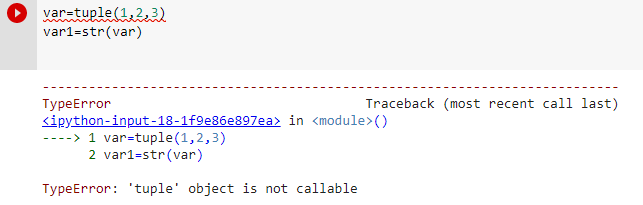
I hope now you will be able to understand the root cause of this error (tuple object is not callable).
Thanks
Data Science Learner Team

Join our list
Subscribe to our mailing list and get interesting stuff and updates to your email inbox.
We respect your privacy and take protecting it seriously
Thank you for signup. A Confirmation Email has been sent to your Email Address.
Something went wrong.
In this article, we will learn about an error called “TypeError ‘tuple’ object is not callable”. This error is raised when we try to call a tuple object. But the tuple objects are not callable Thus the error is raised. It may also be due to the syntax error.
Let’s understand this more briefly with the help of an example
# Declare a tuple with name "mytuple"
mytuple = ('Red','Green','White')

printtuple = mytuple('Orange','Blue','Green')
print(printtuple)
Error
  File "pyprogram.py", line 2, in <module>
    printtuple = mytuple('Orange','Blue','Green')
TypeError: 'tuple' object is not callable
In the above example, we at first created a tuple with the name «MyTuple«. And in the next line of the code, we called tuple object «MyTuple» as function MyTuple(‘Orange’,’Blue’,’Green’)
But we know that the tuples are uncallable, thus the line generates the TypeError.
printtuple = mytuple('Orange','Blue','Green')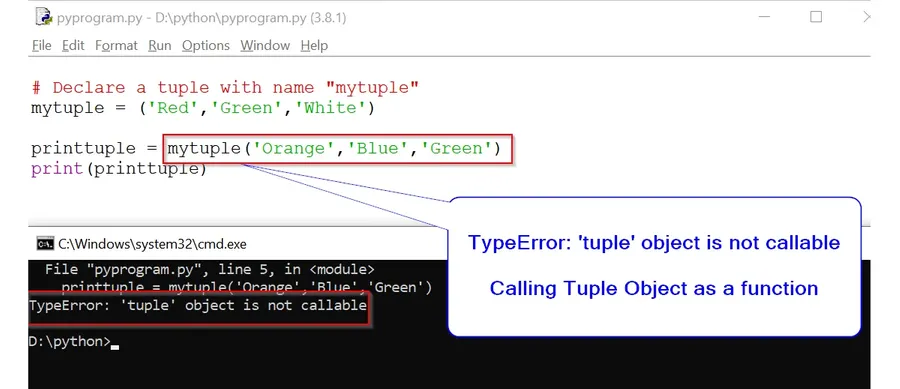
Solution:
mytuple = ('Red','Green','While')
mytuple2 = ('Orange','Blue','Green')
print(mytuple)
print(mytuple2)
Output:
('Red', 'Green', 'While')
('Orange', 'Blue', 'Green')
Explanation:
In the above solution, we created two tuples ‘MyTuple’ and ‘MyTuple2’.
They both have individual elements such as ‘Red’, ‘Green’, and ‘Orange’.
When the print() method is used for displaying the elements of the tuples, the output we get is
(‘Red’, ‘Green’, ‘While’)
(‘Orange’, ‘Blue’, ‘Green’)
Here, the TypeError: ‘tuple’ object is not callable is avoided. This is because the tuples are not called as functions as in the previous instance.
Conclusion:
In this article we learned about the error “TypeError: ‘tuple’ object is not callable”. This TypeError is generated when we try to access the tuple as a function. But since we know tuple is not callable thus the error is raised.
Пишу телеграм бота на библиотеке айограм, пытаюсь вывести значения из бд в инлайн кнопки, выдает ошибку:
tgitem = result()
TypeError: 'tuple' object is not callable
Код функции:
def item_kb():
    tg = InlineKeyboardMarkup(row_width=1)
    tgitem = result()
    for tovar in tgitem:
        btn_text = f'{tovar.name} | {tovar.price} | {tovar.colvo}'
        tg1 = InlineKeyboardButton(text=btn_text, callback_data='tg')
        tg.add(tg1)
Код запроса:
def get_item():
    with conn:
        result = cursor.execute("SELECT id, name, price, colvo FROM tovars").fetchone()
        return result


result = get_item()-
Вопрос задан02 окт. 2022
-
311 просмотров
result = cursor.execute("SELECT id, name, price, colvo FROM tovars").fetchone()
return result
fetchone() возвращает либо None, либо кортеж (tuple). Значит, get_item() возвращает None (если такой строки нет) или tuple (если она есть).
result = get_item()
tgitem = result()
Ты пытаешься вызвать (call) кортеж (tuple), как будто это функция. Так нельзя, и питон тебе так и говорит:
TypeError: 'tuple' object is not callable
Читай учебник, что такое кортежи.
Разобрался, можно было даже функцию запроса get_item не вносить в переменную result, т.е код получился таким:
def item_kb():
    tg = InlineKeyboardMarkup(row_width=1)
    tgitem = get_item()
    for tovar in tgitem:
        btn_text = f'{tovar[0]} | {tovar[1]} | {tovar[2]}'
        tg1 = InlineKeyboardButton(text=btn_text, callback_data='tg')
        tg.add(tg1)
    return tg
Код запроса:
def get_item():
    with conn:
        result = cursor.execute("SELECT id, name, price, colvo FROM tovars").fetchall()
        return result
Пригласить эксперта
-
Показать ещё
Загружается…
29 янв. 2023, в 03:07
300000 руб./за проект
29 янв. 2023, в 02:16
700000 руб./за проект
29 янв. 2023, в 01:54
5000 руб./за проект
Минуточку внимания
Python throws the error, ‘tuple’ object is not callable, when you forget to separate members using comma in single or multidimensional tuples.
Consider this example –
myTuple = (
    ("Captain America", "Shield")
    ("Ironman", "Suit")
    ("Thor", "Mjolnir")
    ("Hawkeye", "Bow-arrows")
    ("Spiderman", "Web Shooters")
)

print(myTuple)
# Error: 'tuple' object is not callable
This code will throw the tuple object not callable error because although we put commas in 2nd dimensional elements like ("Captain America", "Shield") we forgot to put one in 1st dimension like ("Captain America", "Shield") , ("Ironman", "Suit").
The correct way to write this code is –
myTuple = (
    ("Captain America", "Shield"),
    ("Ironman", "Suit"),
    ("Thor", "Mjolnir"),
    ("Hawkeye", "Bow-arrows"),
    ("Spiderman", "Web Shooters")
)

print(myTuple)
Tweet this to help others
Live Demo


This is Akash Mittal, an overall computer scientist. He is in software development from more than 10 years and worked on technologies like ReactJS, React Native, Php, JS, Golang, Java, Android etc. Being a die hard animal lover is the only trait, he is proud of.
Related Tags
- Error,
- python error,
- python-short