- Details
- Written by
- Last Updated on 05 November 2019 | Print Email
In Java web development with Tomcat, it’s very often that you get HTTP 404 error like this:
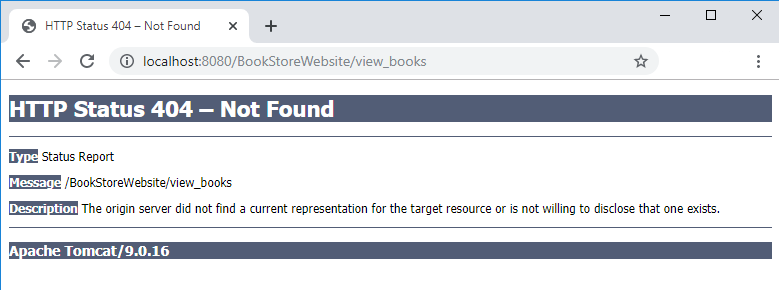
The error code is HTTP 404 (not found) and the description is:
The origin server did not find a current representation for the target resource or is not willing to disclose that one exists.
This error means the server could not find the requested resource (JSP, HTML, images…) and returns HTTP status code 404. Most of the time, you can fix this error by correcting the URL. However, sometimes it’s not easy like that, making it is an annoying error.
Here I suggest some possible reasons and how to fix the error HTTP 404 in Java web development with Tomcat.
1. The URL is not handled by any Java servlets
You need to check URL mapping in your servlet classes to make sure the requested URL is actually handled by a servlet. For example:
@WebServlet("/view_book")
public class ViewBookServlet extends HttpServlet {
...
}
This servlet handles the URL /view_book. If the request URL is /view_books the server will raise HTTP 404 error. You can fix by either correcting the URL or correcting the URL mapping in the @WebServlet annotation.
In older Java web application, you have to check the web deployment descriptor file web.xml because a Java servlet can be mapped to URL via XML like this:
<servlet-mapping>
    <servlet-name>ViewBookServlet</servlet-name>
    <url-pattern>/view_book</url-pattern>
</servlet-mapping>
2. Java servlet forwarding to a resource that does not exist
In this case, the requested URL is handled by a Java servlet, but code in the servlet forwards to a resource (JSP, HTML…) which does not exist, as shown in the following screenshot:
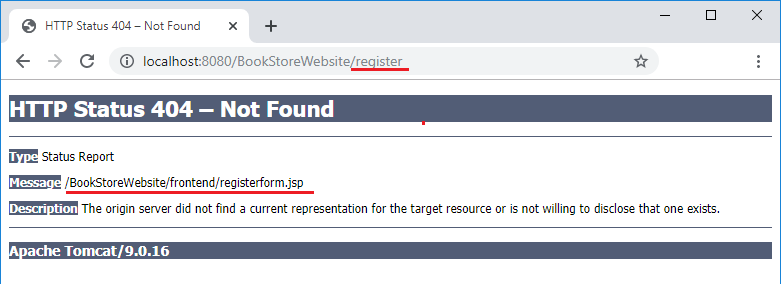
The code in the servlet class would look like this:
String registerForm = "frontend/registerform.jsp";
RequestDispatcher dispatcher = request.getRequestDispatcher(registerForm);
dispatcher.forward(request, response);
You can fix by correcting the forward path in the servlet, and make sure that the forwarded resource does actually exist in the given path.
3. URL is case-sensitive
Note that Tomcat treats URL as case-sensitive, for instance /Register is different than /register. So you need to check and use correct case for the letters in request URL.
Also pay attention to the webapp name in the URL, for instance http://localhost:8080/BookstoreWebsite/ is different than http://localhost:8080/BookStoreWebsite/
TIP: in Eclipse, you can right click on the project, then click Run As > Run on Server, the IDE will always use the correct name of the web application.
Finally, you should not let the user see the raw HTTP 404 error page rendered by the server. Instead, you should design your own user-friendly 404 error page – follow this tutorial: How to Handle Error for Java web applications.
You can also watch the video version below:
Other Java Servlet Tutorials:
- Java Servlet Quick Start for beginners (XML)
- Java Servlet for beginners (annotations)
- Java Servlet and JSP Hello World Tutorial with Eclipse, Maven and Apache Tomcat
- Handling HTML form data with Java Servlet
- Java File Download Servlet Example
About the Author:
 Nam Ha Minh is certified Java programmer (SCJP and SCWCD). He started programming with Java in the time of Java 1.4 and has been falling in love with Java since then. Make friend with him on Facebook and watch his Java videos you YouTube.
Add comment
Last Update:2017-05-24
Source: Internet
I’m going to make a POC, get an old project, use the war exploded to deploy to the native Tomcat (version 8.5)
When you start Tomcat by IntelliJ idea, you find that the login page of the system is http-status-404 error, and when you open http://localhost:8080 directly in the browser, you can open the Tomcat welcome page, It means Tomcat is up, but it doesn’t load the WebApps directory properly.
Even more strangely, the startup script under Tomcat’s Bin directory can start normally, either by double-clicking Startup.bat or by using Catalina.bat run under the directory’s CMD to start the project normally.
If you have a similar situation of friends, you can pay attention to the two startup mode at the start of the log environment variables, especially catalina_home.
Because the value of this variable is different on my machine when it is started in two ways, Catalina_home is the Tomcat directory where the bin is located when it is started by the bat script in the bin directory;
But when you start with IntelliJ idea, the value of the variable changes to: C:UsersCratical. Intellijidea2017.1systemtomcatunnamed_test-project_3_0_4
Two directories under the Conf folder, the folder inside the name and number of configuration files are the same, through the comparison, found in the Conf directory, Server.xml content There are some differences, note this line
autodeploy= «true» deployonstartup= » False «deployignore=» ^ (?! (manager) | (Tomee) $). * «>
Because in IntelliJ idea, a war format artifact can modify the location of the output directory, the default is the target folder under the current project root directory, if you use IntelliJ directly When idea started Tomcat, the WebApps directory under the Tomcat directory was unable to find the associated deployment folder.
IntelliJ idea is to achieve this goal by generating one of its own catalina_home, modifying the appbase in Server.xml.
Go back to that line of configuration, note that the deployignore property, my web directory name is exactly matched by the above regular expression, so Tomcat is directly ignored when loading, resulting in the 404 error.
The meanings of the various configurations in Tomcat Server.xml, see: http://www.importnew.com/17124.html
Intellij idea + Tomcat resolution for HTTP status 404 error
|
MichaelPak 0 / 0 / 0 Регистрация: 02.08.2011 Сообщений: 31 |
||||||||||||
|
1 |
||||||||||||
|
09.07.2014, 18:04. Показов 16933. Ответов 4 Метки нет (Все метки)
Проблема уже обсуждалась здесь, но никто так и не ответил. Создаю проект: Полсе этого сразу же пытаюсь запустить дефолтный index.jsp: В output следующее:
И браузер автоматически открывает страницу index.jsp, которую не может найти: И на последок конфигурации: Как и предыдущий новичок в этом деле, промучился около 4 часов. Подскажите, в чем может быть проблема? Добавлено через 5 минут
web.xml:
__________________
0 |



|
4087 / 3821 / 745 Регистрация: 18.05.2010 Сообщений: 9,331 Записей в блоге: 11 |
|
|
09.07.2014, 20:01 |
2 |
|
Решениеjava.net.BindException: Address already in use Кто-то уже пользуется одним из тех портов, которые вы указали. Если в командной строке выполнить:
0 |

 Сообщение было отмечено MichaelPak как решение
|
0 / 0 / 0 Регистрация: 02.08.2011 Сообщений: 31 |
|
|
09.07.2014, 23:46 [ТС] |
3 |
|
Вот такую штуку пишет: Миниатюры
0 |
|
2390 / 2216 / 564 Регистрация: 28.12.2010 Сообщений: 8,658 |
|
|
10.07.2014, 00:32 |
4 |
|
РешениеMichaelPak, найдите этот процесс в таск манагере (по айди) и убейте.
0 |
|
MichaelPak 0 / 0 / 0 Регистрация: 02.08.2011 Сообщений: 31 |
||||
|
10.07.2014, 12:45 [ТС] |
5 |
|||
|
Убить процесс с именем Java? Добавлено через 1 час 52 минуты Добавлено через 22 минуты
сервер заработал:
0 |
I’m having a problem with my first Web Application. I use IntelliJ as IDE and Tomcat as Webserver.
Every servlet I’ve tried to acces, throws an 404 Error. Even if I copy some youtube tutorials, which seems to work like a charm.
The button in the form sends me to: http://localhost:8080/IUBHQuiz/login
Can you tell me whats wrong? I am going nuts.
login.java
package com.example.IUBHQuiz;

import java.io.*;
import javax.servlet.*;
import javax.servlet.annotation.WebServlet;
import javax.servlet.http.*;
import java.sql.*;

@WebServlet("/login")
public class login extends HttpServlet {
    @Override
    protected void doPost(HttpServletRequest request, HttpServletResponse response)
            throws ServletException, IOException {
        response.setContentType("text/html;charset=UTF-8");
        PrintWriter out = response.getWriter();

        String email = request.getParameter("fmail");
        String pass = request.getParameter("fpw");

        if(email.equals("j") && pass.equals("j"))
        {
            RequestDispatcher rs = request.getRequestDispatcher("/main.jsp");
            rs.forward(request, response);
        }
        else
        {
            out.println("Username or Password incorrect");

            RequestDispatcher rs = request.getRequestDispatcher("/index.jsp");
            rs.include(request, response);
        }

        out.close();
    }
index.jsp
<%@ page contentType="text/html; charset=UTF-8" pageEncoding="UTF-8" %>
<!DOCTYPE html>
<html>
<head>
    <title>IUBH Quiz</title>
    <link href="./resources/css/style.css" rel="stylesheet">
</head>
<body>
    <div class="main">
        <div class="image-container">
           <img src="./resources/images/logo.png" alt="Logo">
        </div>
        <div class="Login">
            <h1>Willkommen beim IUBH-Quiz!</h1>
            <form action="login" method="post">
                E-Mail:<input type="text" id="fmail" name="fmail"><br><br>
                Passwort: <input type="password" id="fpw" name="fpw"><br><br>
                <input type="submit" value="Log In" class="button">
            </form>
        </div>
        <div class="Links">
            <a href="#">Passwort vergessen</a>
            <a href="#">Registrieren</a>
        </div>
    </div>
</body>
</html>
web.xml
<?xml version="1.0" encoding="UTF-8"?>
<web-app xmlns="http://xmlns.jcp.org/xml/ns/javaee"
         xmlns:xsi="http://www.w3.org/2001/XMLSchema-instance"
         xsi:schemaLocation="http://xmlns.jcp.org/xml/ns/javaee http://xmlns.jcp.org/xml/ns/javaee/web-app_4_0.xsd"
         version="4.0">
</web-app>