
As every developer will know (or is learning) – mysqli_connect() can be a finicky thing to work with despite it’s undoubted power. It’s finicky because it hides a lot of complexity under the hood. Most of the time that’s amazing – however, one time it is not amazing is error time where it cause a ton of frustration!
The error we are looking at today is:
mysqli_connect(): The server requested authentication method unknown to the clientCause
The cause of this error is quite simple in many ways and occurs as you are trying to authenticate (or provide your credentials) to the mysql_connect() function. This is obviously critical to any application development using mySQLi as without establishing the connection you can do nothing with the database – whether that be read, insert, update or delete.
At it’s most fundamental, mySQLi is trying to communicate to you hear that the authentication method you are trying to use is not understood (unknown) to the client and therefore cannot be used to connect.
It is NOT(!) saying that the credentials you are providing for your user or database name etc are incorrect (they could be, but you’ll only know this AFTER you fix this first issue.
Essentially, you’re at a front door and trying to use a keycard to let you in a traditional key lock entry. You might in theory be authorised to go in where you want to however the way you’re trying to get in isn’t correct. It’s the same whether we’re talking houses in the real world or, in this case, the digital front door to your mySQLi database.
Default Configuration
The default configuration that PHP uses is “mysql_native_password”. You can very this in your server.ini file:
[mysqld]
# The default authentication plugin to be used when connecting to the server
default_authentication_plugin=mysql_native_password
All is well using the default, technically speaking, and has been in use since MySQL v4.1. So why are people trying to change something so frequently if it’s not broken? As the old adage goes, “if it isn’t broke, don’t fix it”…
It is broke (security wise!)
However, mysql_native_password isn’t considered secure enough by many for sensitive data anymore so, unsurprisingly, many developers attempt to change away from this dated default authentication method and implement a newer, more secure, default authentication plugin. After all, most database driven websites and apps are handling sensitive data and with the number of data breaches going through the roof in the recent decade it’s very wise to look to prevent any issues before they occur.
And it’s not just MySQL – MariaDB have implemented scary warnings to encourage developers to move away – “It is not recommended to use the mysql_native_password authentication plugin for new installations that require high password security. If someone is able to both listen to the connection protocol and get a copy of the mysql.user table, then the person would be able to use this information to connect to the MariaDB server.”
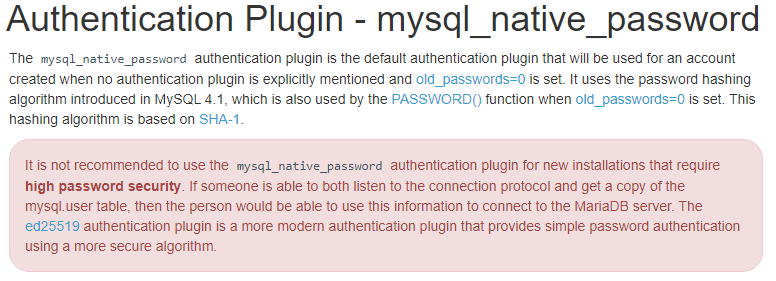
For many, this is where the issues with the dreaded ‘authentication method unknown’ error begins. As you can see MariaDB recommends the ed25519 plugin. MySQL have, since version 8.0, implemented SHA256 as the implementation of choice using either caching_sha2_password or sha256_password as the default authentication method.
Caching_SHA2_Password
Once you’ve updated your server.ini file to use caching_sha2_password it should look something like this:
[mysqld]
# The default authentication plugin to be used when connecting to the server
default_authentication_plugin=caching_sha2_password
And… this is where your errors have started. Quite simply, as explained by MySQL at the launch of v8.0 – not all clients/connectors supported caching_sha2_password at the time. Fortunately, in the time since the blog post, client/connector support has increased however this error can still be encountered in one of the two following circumstances:
- You’re using a client/connector that still doesn’t support caching_sha2_password
- You’re using an outdated client/connector.
The Solution
You could go back to the default mysql_native_password – that will work, but as discussed above, will leave you with the underlying security issues. A better idea is to upgrade your PHP version as PHP does now support caching_sha2_password. Many websites out there will still be running PHP 7.2.3 or below. In addition to getting access to patches and new features, upgrading will allow you to use caching_sha2_password as your authentication method.
Without changing your configuration, if you upgrade to PHP 7.4 this should instantly resolve your issue – as long as you remember to compile PHP with the mysqli extension of course! As it was introduced in MySQL v8.0 this also needs to be your minimum version there.
Summary Checklist
- Upgrade PHP to version 7.4 or above (v8.1.5 is the latest at the time of writing).
- Ensure you are running MySQL version 8.
- Change your server configuration file (server.ini) to use the caching_sha_2_password plugin for enhanced security over mysql_native_password
Hope that helps! Let us know in the comments below and post any questions you may have. Happy coding!
It seems as if with PHP 7.4 the issue is solved.
The following minimalist Docker set up does the trick without even touching the configuration in my.cnf.
docker-compose.yml:
version: "3.6"

services:
  php_fpm:
      build: .
      container_name: cheetah_php_fpm
      working_dir: /cheetah
      volumes:
          - .:/cheetah
          - ./docker/php/php.ini:/usr/local/etc/php/php.ini

  mysql:
      image: mysql:8.0
      container_name: cheetah_mysql
      volumes:
          - ./docker/mysql/conf.d/mysql.cnf:/etc/mysql/conf.d/mysql.cnf
      ports:
          - "3306:3306"
      environment:
          - MYSQL_DATABASE=${DB_DATABASE}
          - MYSQL_ROOT_PASSWORD=${DB_PASSWORD}
Dockerfile:
FROM php:7.4-fpm

RUN apt-get update && apt-get install -y
    git

RUN docker-php-ext-install pdo_mysql

RUN curl --silent --show-error https://getcomposer.org/installer | php &&
    mv composer.phar /usr/local/bin/composer

RUN pecl install mailparse
docker/mysql/conf.d/mysql.cnf:
# Copyright (c) 2015, 2016, Oracle and/or its affiliates. All rights reserved.
#
# This program is free software; you can redistribute it and/or modify
# it under the terms of the GNU General Public License, version 2.0,
# as published by the Free Software Foundation.
#
# This program is also distributed with certain software (including
# but not limited to OpenSSL) that is licensed under separate terms,
# as designated in a particular file or component or in included license
# documentation.  The authors of MySQL hereby grant you an additional
# permission to link the program and your derivative works with the
# separately licensed software that they have included with MySQL.
#
# This program is distributed in the hope that it will be useful,
# but WITHOUT ANY WARRANTY; without even the implied warranty of
# MERCHANTABILITY or FITNESS FOR A PARTICULAR PURPOSE.  See the
# GNU General Public License, version 2.0, for more details.
#
# You should have received a copy of the GNU General Public License
# along with this program; if not, write to the Free Software
# Foundation, Inc., 51 Franklin St, Fifth Floor, Boston, MA 02110-1301  USA

#
# The MySQL  Client configuration file.
#
# For explanations see
# http://dev.mysql.com/doc/mysql/en/server-system-variables.html

[mysql]
Получать MySQL error под Новый Год это уже стало доброй традицией для меня 🙂 . Буквально чуть больше года назад я получал ошибки связанные с БД и теперь снова получаю их обновившись до 8 версии…
Обновил свой MySQL до 8 версии и стал получать error connect ошибку при подключении к БД. А все потому что в 8 версии по умолчанию используется auth_socket соединения. В итоге, мои сайты, которые использовали пароли в конфигурации подключения к БД стали генерировать ошибку:
PHP with MySQL 8.0+ error: The server requested authentication method unknown to the client
MySQL error — как исправить ошибку?
Поэтому я активно начал искать выход из сложившейся ситуации. Быстрое гугление не дало никаких положительных результатов, пока не наткнулся на подходящую проблему на stackoverflow. Решение заключалось в изменении стандартного метода авторизации на mysql_native_password.
ALTER USER 'root'@'localhost' IDENTIFIED WITH mysql_native_password
BY 'password';
В коде выше замените ‘password’ на свой пароль или оставьте поле пустым в кавычках ». После этого ошибка должна исчезнуть и можно дальше работать 😎 .
Установив на свой компьютер nginx, php7 и MySQL 8 обнаружил, что я не могу подключиться к базам данных через adminer (офигенная легкая альтернатива phpmyadmin), получая сообщение SQLSTATE[HY000] [2054] The server requested authentication method unknown to the client. Ниже как побороть ошибку.
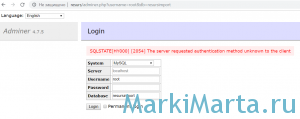
Рис.1. Ошибка аутентификации базы данных
В MySQL 8 была изменена схема хранения пароля, начиная с версии 8.0.4 длина хэша пароля увеличена до максимального (255 символов), а также изменили плагин аутентификации – вместо mysql_native_password используется caching_sha2_password. Потому, авторизоваться паролем, который был создан для root при установке базы данных, не получиться. Пароль пользователя надо обновить. Небольшой парадокс — для того, чтобы обновить пароль, с которым ты не можешь авторизоваться, нужно сначала авторизоваться 🙂 Как это сделать?
Первый вариант – использовать MySQL Workbench, которая идет в комплекте с MySQL. Она пускает по установленному паролю. В программе нужно откорыть окно создания нового запроса и ввести команду обновления пароля для root:
ALTER USER ‘root’@’localhost’ IDENTIFIED WITH mysql_native_password BY ‘newpassword’;
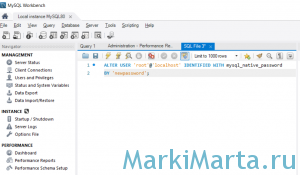
Рис.2. Обновление пароля root через MySQL Workbench
Второй вариант – если не установлен MySQL Workbench, можно запустить командную строку MySQL и там ввести ту же команду. При запуске консоли MySQL будет запрошен пароль root’а.
ALTER USER ‘root’@’localhost’ IDENTIFIED WITH mysql_native_password BY ‘newpassword’;
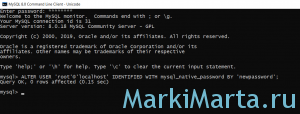
Рис.3. Обновление пароля root через консоль MySQL