Fix: Export Failed — Rendering Error in DaVinci Resolve
The other day I had issues exporting a video in DaVinci Resolve. It would reach at 99%, and then give me this error:
«Rendering Error
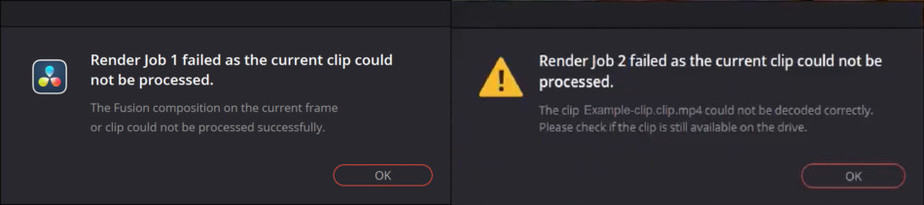
The Fusion composition on the current frame or clip could not be processed successfully.»
Here’s how I got around it:
- From DaVinci Resolve menu, click on Preferences.
- Navigate to the User tab.
- From the list on the left, make sure you are in UI Settings.
- Disable Stop renders when a frame or clip cannot be processed.
- Click Save.
Disclaimer: The content provided in this article is for informational purposes only. You are solely responsible for verifying the information as being appropriate for your personal use.
Popular posts from this blog
It is still uncertain when will NVIDIA release any Web Drivers for macOS Mojave, but we can try a workaround.
After installing 3rd-party kexts in /Library/Extensions, or replacing vanilla kexts with patched kexts in System/Library/Extensions, you may want to repair their permissions and rebuild the kext cache to ensure they work as intented. Here’s how.
Apple released 3 new Live Wallpapers for the iPhone Xs and Xs Max. Follow this simple and safe process below to download them onto an earlier model of iPhone that supports 3D Touch, such as an iPhone 8 or X.
Hi everyone!
So I’ve stumbled upon this issue as well, and I might have a temporary solution for some.
I noticed that the Fusion frames were rendering in the timeline correctly, however upon final export it fails. That’s where you can use one of resolve’s features to finish you render.
The feature is called «Use render cached images» and it’s under the «Advanced Settings» of your «Render Settings». What this does is it uses the already cached images in your timeline to finish the render.
That means that prior to rendering, you need to cache the whole clip that causes your render failures. To be able to cache Fusion compositions in your timeline you need to make sure you have a couple of settings set correctly:
- Under «Project Settings» check «Automatically cache composites in User Mode», «Automatically cache transitions in User Mode» and «Automatically cache Fusion Effects in User Mode»
- In your timeline, on the specific clip that causes problems, set «Render Cache Fusion Output» to «On» and check «Render Cache Color Output»
Next make sure all frames are cached in your timeline. This means that the bar on top of the timeline turned from red to blue for all frames of the clips that cause problems.
- What your timeline should look like
- Annotation 2020-01-07 010521.png (86 KiB) Viewed 76441 times
Now, if you render, the renderer should use the cached images and therefore skip the Fusion compositing part, resulting in a finished render.
However, I don’t know what this does to image quality. I’ve looked at the result and it looks fine by me, and because I’m working on a small client, it wouldn’t be that big of a deal. But there’s a reason renderers don’t use cached images by default.
Also, BlackMagic, this no reason for you not fix the issue. Please, make this a priority. I recently switched from Premiere to Resolve and I’ve been loving the performance and interface. However, Fusion seems to be lacking in performance and stability compared to After Affects, which was a real bummer.
To finish off, I’ve included some logging I found while debugging the issue. These all seem to be from the time I started rendering. I didn’t help me, because it’s a very generic error, but it might give your developers an indication as to where the problem is located.
- Code: Select all
[0x000073a0] | SyManager            | ERROR | 2020-01-07 00:36:51,450 | There is no current clip, SetCurrentFrame failed.
[0x00001470] | GPUManager           | ERROR | 2020-01-07 00:36:52,629 | Exception caught while running GPU algorithms: .
[0x00001470] | GPUManager           | INFO  | 2020-01-07 00:36:52,629 | Flushing GPU memory...
[0x00001470] | GPUManager           | ERROR | 2020-01-07 00:36:52,965 | Exception caught while running GPU algorithms: .
[0x00001470] | GPUManager           | INFO  | 2020-01-07 00:36:52,968 | Flushing GPU memory...
[0x00005d78] | UI                   | WARN  | 2020-01-07 00:36:53,018 | Unable to submit frame to GPU scopes, legacy OpenGL uploads not supported (Color Page).
[0x00001470] | GPUManager           | ERROR | 2020-01-07 00:36:53,537 | Exception caught while running GPU algorithms: .
[0x00001470] | GPUManager           | INFO  | 2020-01-07 00:36:53,537 | Flushing GPU memory...
[0x00001470] | GPUManager           | ERROR | 2020-01-07 00:36:53,918 | Exception caught while running GPU algorithms: .
[0x00001470] | GPUManager           | INFO  | 2020-01-07 00:36:53,921 | Flushing GPU memory...
[0x00005d78] | UI                   | WARN  | 2020-01-07 00:36:53,956 | Unable to submit frame to GPU scopes, legacy OpenGL uploads not supported (Color Page).
[0x00001470] | GPUManager           | ERROR | 2020-01-07 00:36:54,364 | Exception caught while running GPU algorithms: .
[0x00001470] | GPUManager           | INFO  | 2020-01-07 00:36:54,364 | Flushing GPU memory...
[0x00001470] | GPUManager           | ERROR | 2020-01-07 00:36:54,775 | Exception caught while running GPU algorithms: .
[0x00005d78] | UI                   | WARN  | 2020-01-07 00:36:54,798 | Unable to submit frame to GPU scopes, legacy OpenGL uploads not supported (Color Page).
[0x00005980] | GsManager            | INFO  | 2020-01-07 00:36:55,047 | Recording cancelled after 3 frames.
[0x00001470] | GPUManager           | INFO  | 2020-01-07 00:36:55,146 | Flushing GPU memory...
There are many reasons you might receive the “Render Job failed” error when rendering your videos in Davinci Resolve.
However, some of them are more common than others, therefore I’ve gathered the most common ones in this article.
I’ve seen there are two types of errors that occur for most people. The first one is related to rendering fusion composition & the second is a video file that could not be decoded correctly.
However, the solutions shared in this article will work on both error types.
Anyways, let’s solve this problem of yours!
1. Export Rendered Cache Files
This one is actually quite genius, and solved the problem immediately when I was facing this problem.
So let’s get to it! Here’s a picture of the two most normal errors to experience:
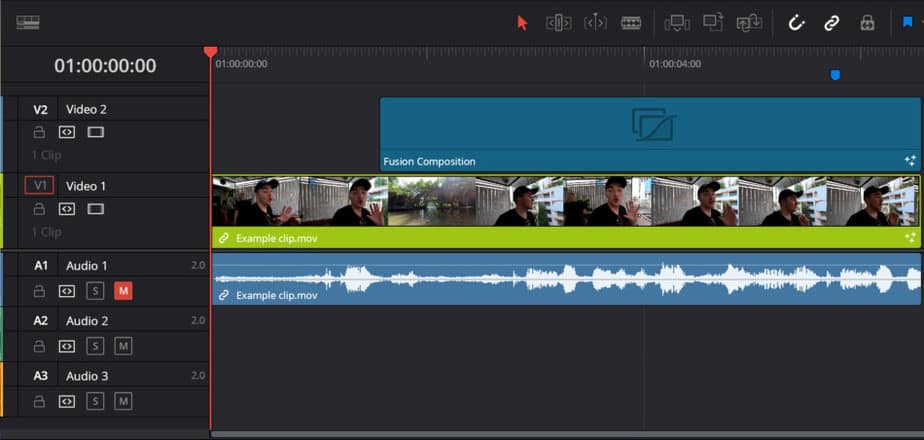
Here you can see my timeline, just a normal clip and a fusion composition which are causing this error:
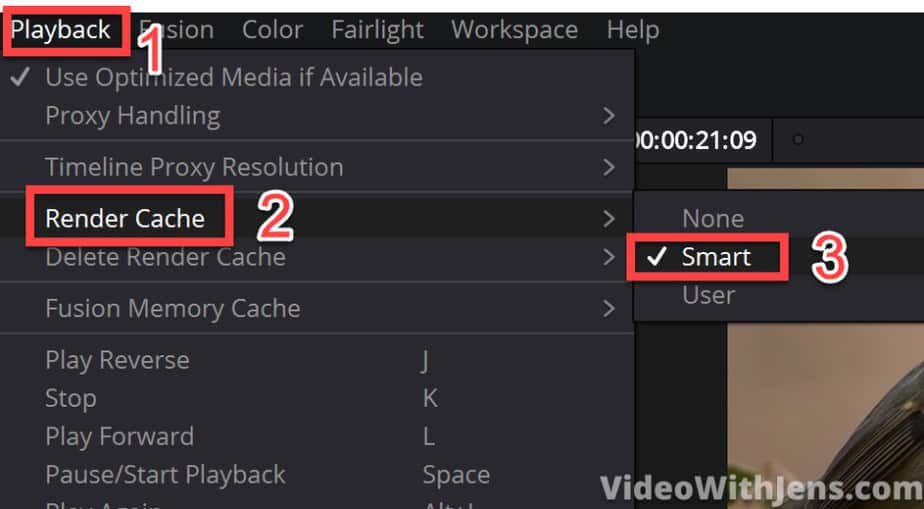
The first thing you want to do is open “Playback > Render Cache > Smart“:
Once that is done you will see a red line, which is slowly turning blue above your clips in the timeline. Let it finish rendering before moving on. At least it should render the clip which is causing you problems (if you know which it is).
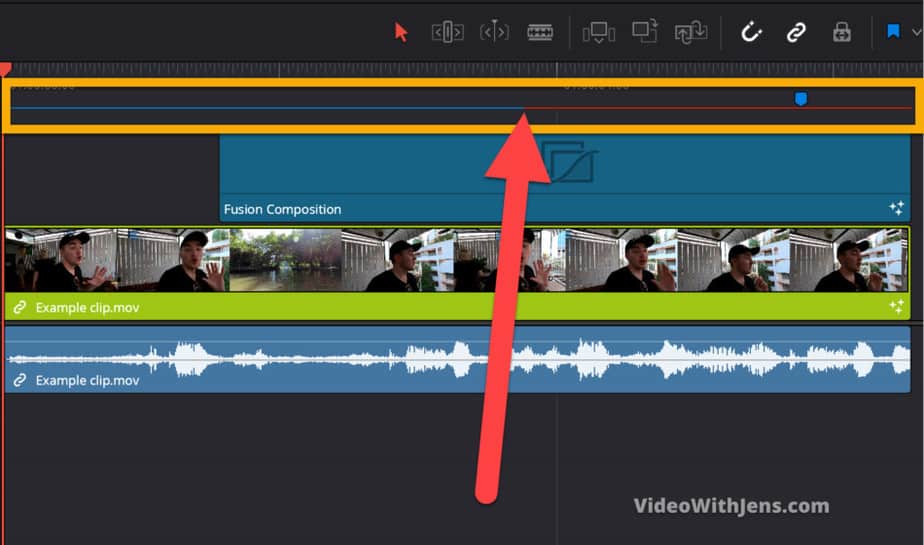
Once it’s done it will be totally blue like this:
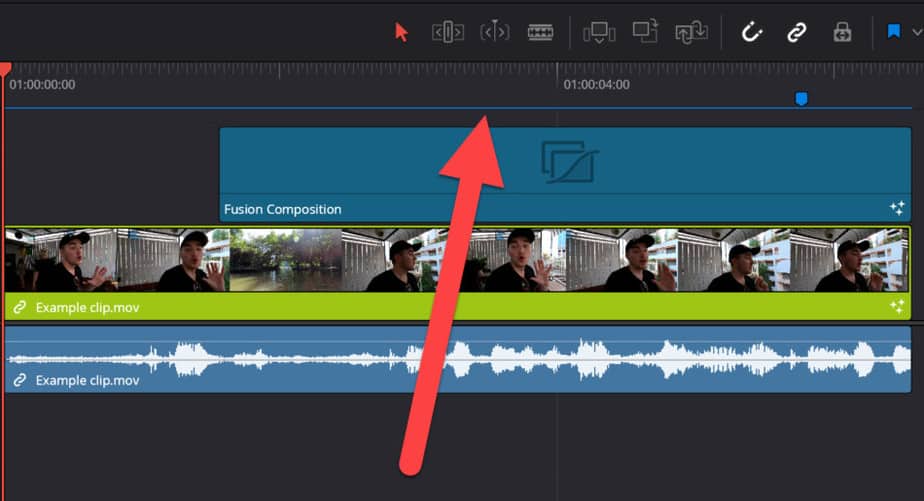
Now, go to the “Deliver” page:

Go to the “Render Settings” window:
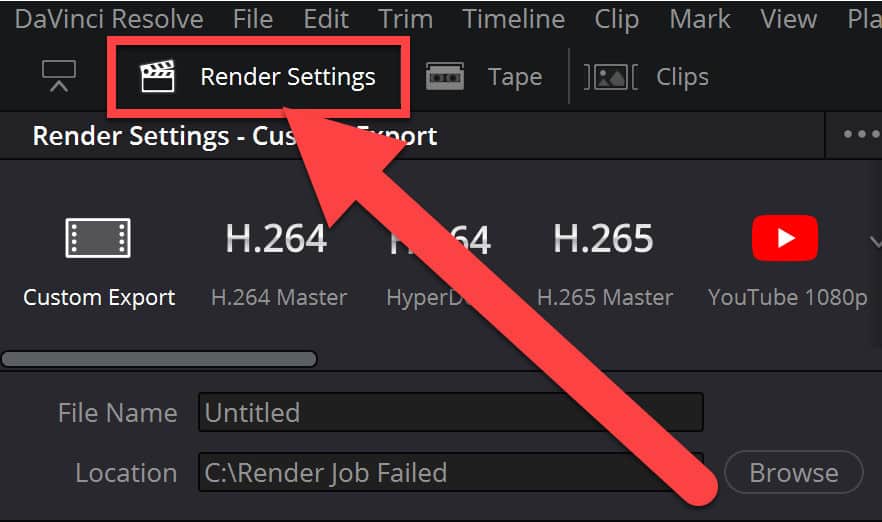
Now we are getting into more uncommon territory for a lot of people.
Go ahead and open the “Advanced Settings“:
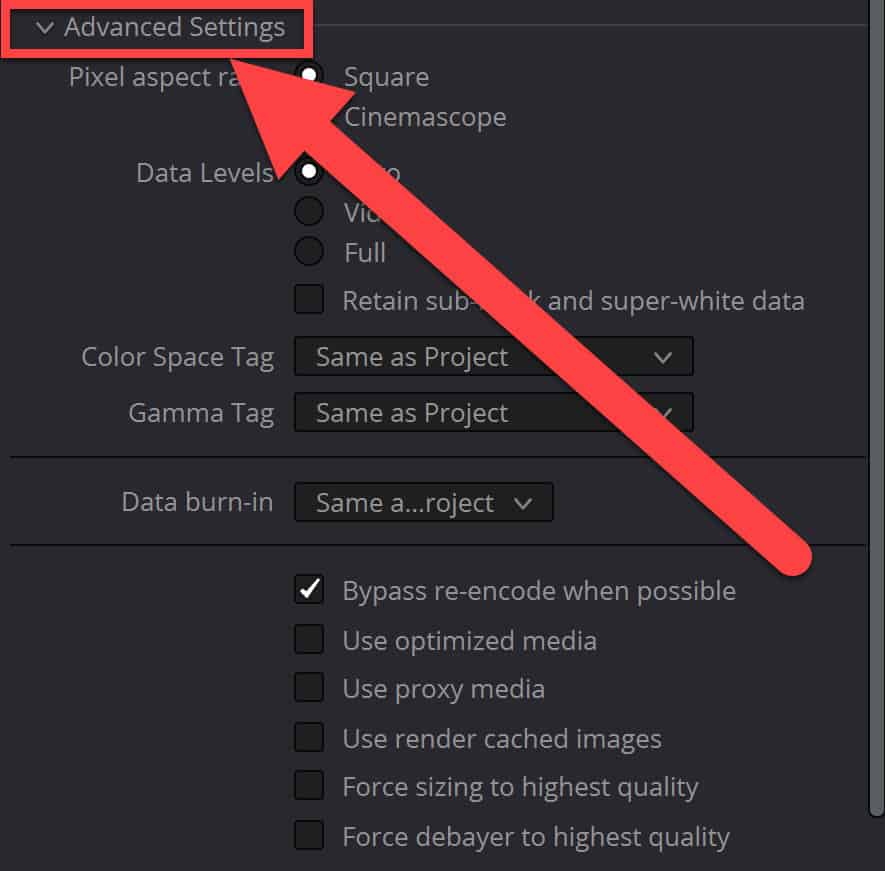
AND finally, we have found the golden nugget!
Now you want to tick off the box next to “Use render cached images“. What this does, is use the cached files we created when that red line turned blue. So it basically renders how the timeline memory created of your timeline and in that memory, all the files worked, thus they work in the rendered file as well!
So tick off the box next to “Use render cached images” and hit “Add to Render Queue“:
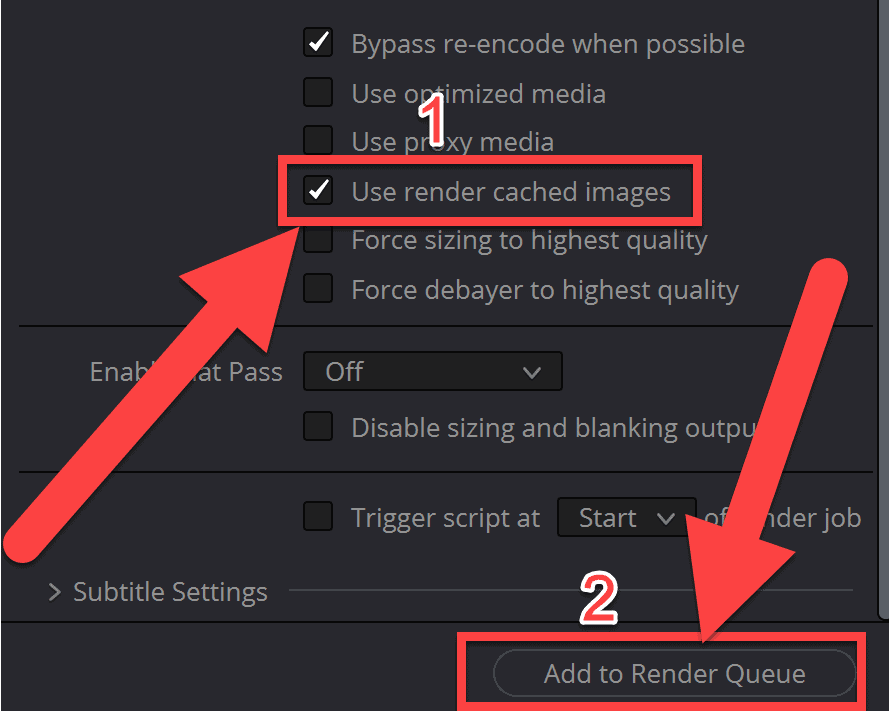
Now head over to the “Render Queue” and start the render job! Hopefully, once it’s done, it looks like the picture below:
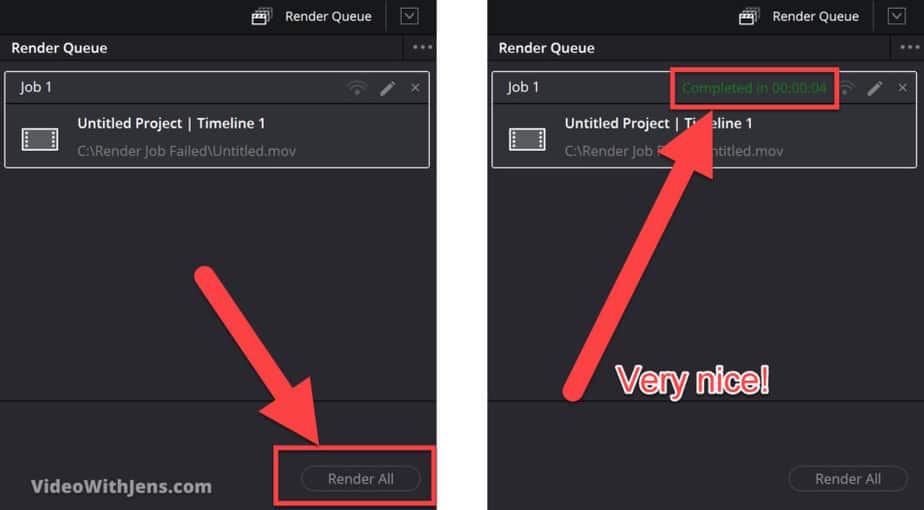
2. Copy the Timeline and Create a New Project
This one is very easy, which is the reason I’m placing it as number two on the list!
If it doesn’t work, no big deal just proceed to the next method.
So we are not going to copy the timeline as it sounds. Instead, we are going to copy all the clips in the timeline.
You can do this by simply pressing “CTRL+A” or “Cmd+A”(on a Mac), then press “CTRL+C” or “Cmd+C”(on a Mac) to copy.
If you are not the shortcut kind of person, you can select all your clips by dragging over them and then right-click a clip > Copy.
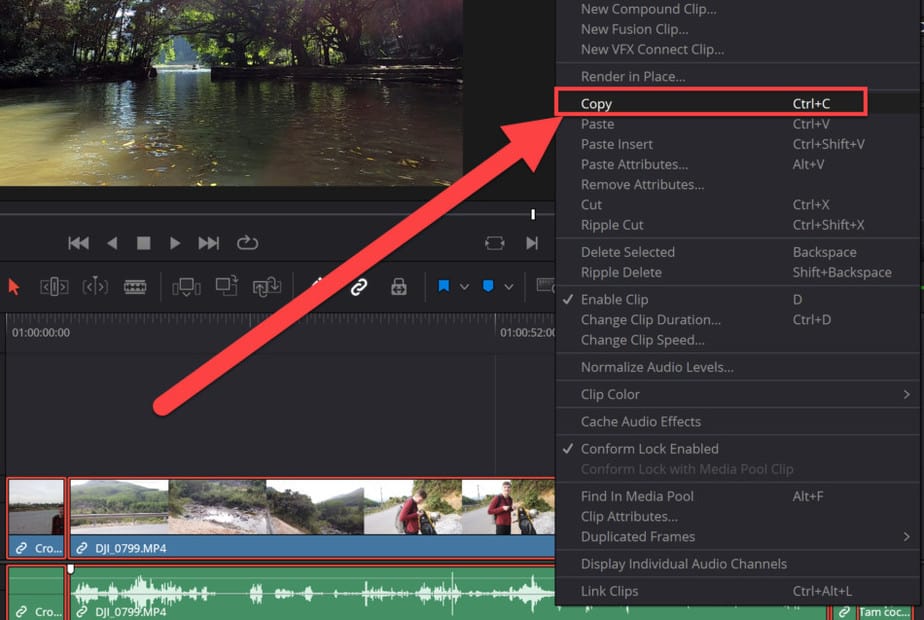
Next, save your current project.
Then, click on this house icon in the bottom right-hand corner:
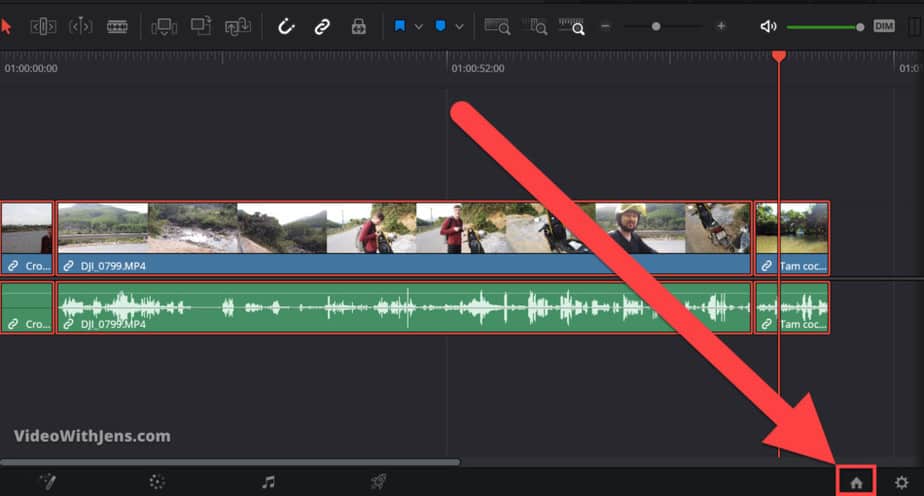
In this window go ahead and click on “New Project“, then call it whatever you want and click on “Create“:
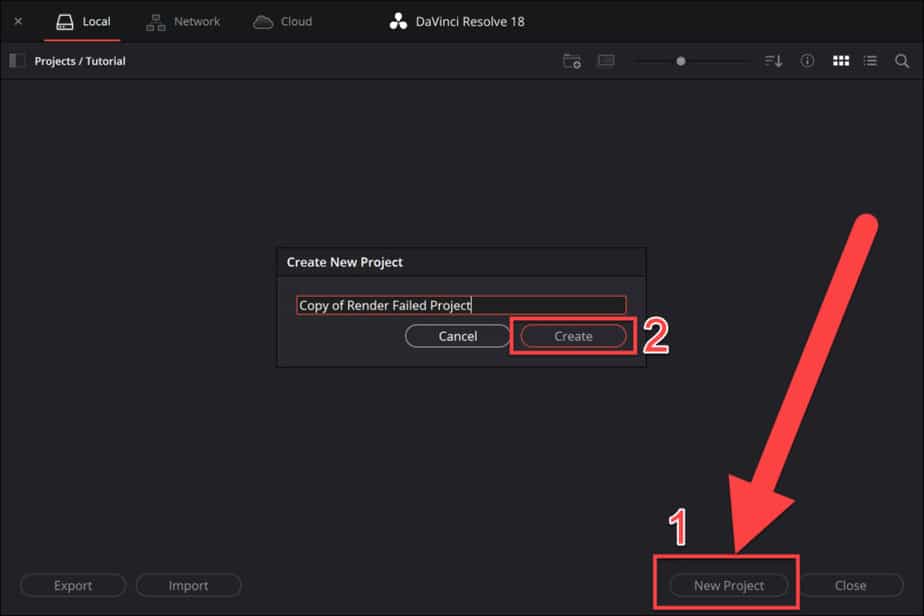
Inside your new project, click once on the timeline and then press “CTRL+V” or “Cmd+V” (on a Mac).
For those who don’t like shortcuts: Right-click on the timeline and click on “Paste“.
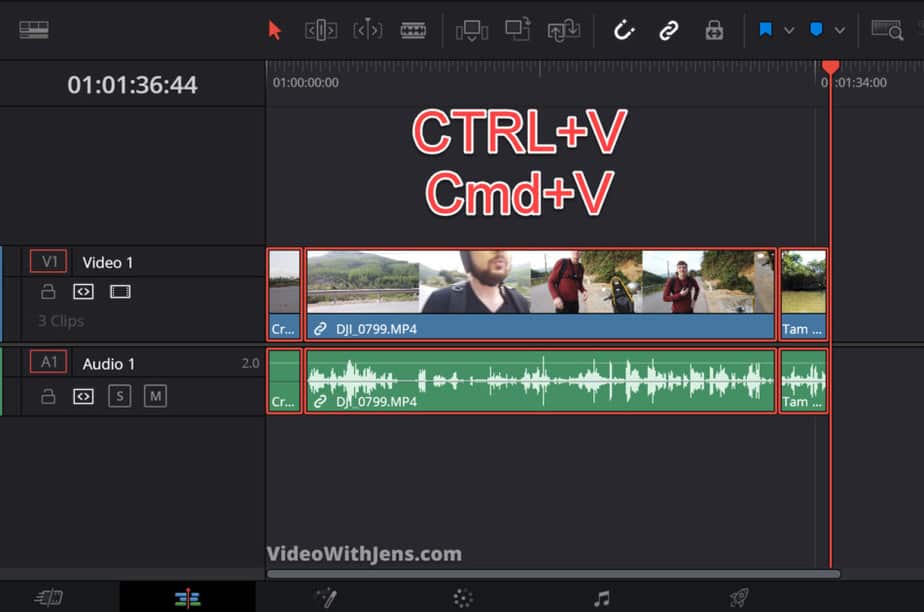
Once you’ve done this, go ahead and try to render!
If it didn’t work. We have other methods which has worked for a bunch of people:
3. Convert Your Videos to DNxHR
- Select the clips in your timeline.
- Right-click and click on “Render in Place…“
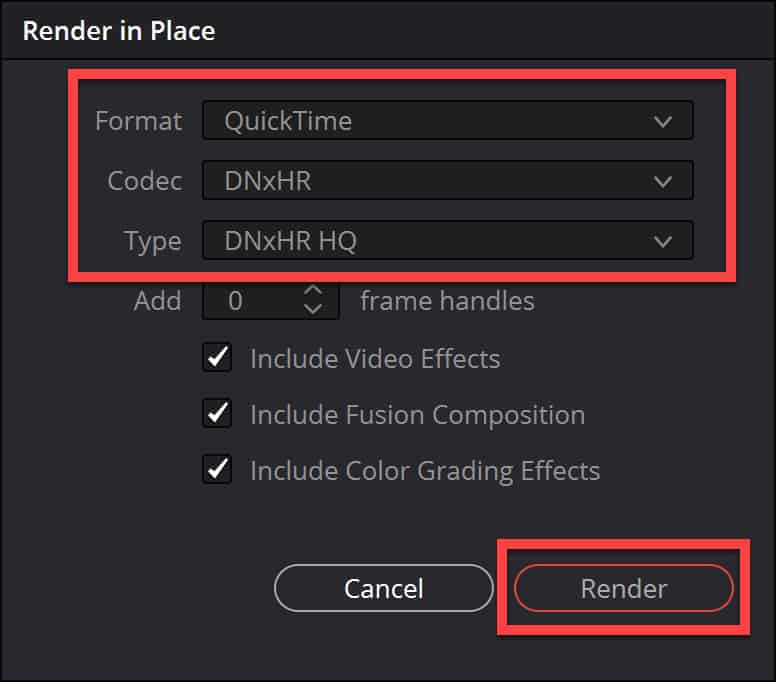
- Set “Format” to “QuickTime“.
- Set “Codec” to “DNxHR” and “Type” to “DNxHR HQ“.
- Click on “Render“.
This solution seems to have worked for some people as well.
If you’re having the fusion composition error, this solution most likely will not work. (All the others work for both errors).
However, let’s go into a bit more in detail on how to do it and some consequences of doing this.
The consequence of converting to the DNxHR codec is that the file size is HUGE. If you are used to handling such as .MP4 and .MOV.
Why is this?
We’ll not go too much into detail on this, however, DNxHR is utilizing something called intraframe compression. These are ALOT less compressed than a .MP4 which is normally paired with an H.264 codec which usually compresses the video a lot.
So by converting your video to DNxHR, it will be a lot less compressed, then it’s a lot easier on your computer when playing it back as well and gives you a better experience while editing.
Here’s how much larger your files will get:
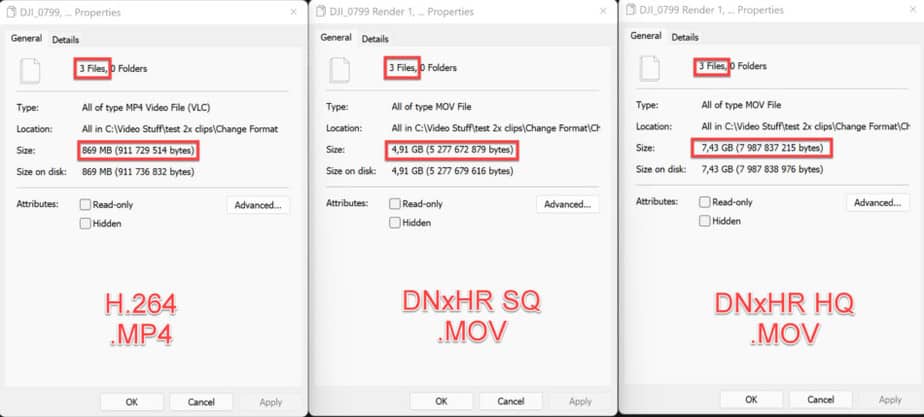
You can see it’s quite a lot, but if you have enough disk space, you can just delete it afterward, as you will still have your original footage.
It’s worth a shot! However, you could try the other solutions first.
Here’s a more detailed description of how to do it:
First, select the clips in your timeline, or if you know which clip is causing the error select that one.
Then click on “Render in Place…“
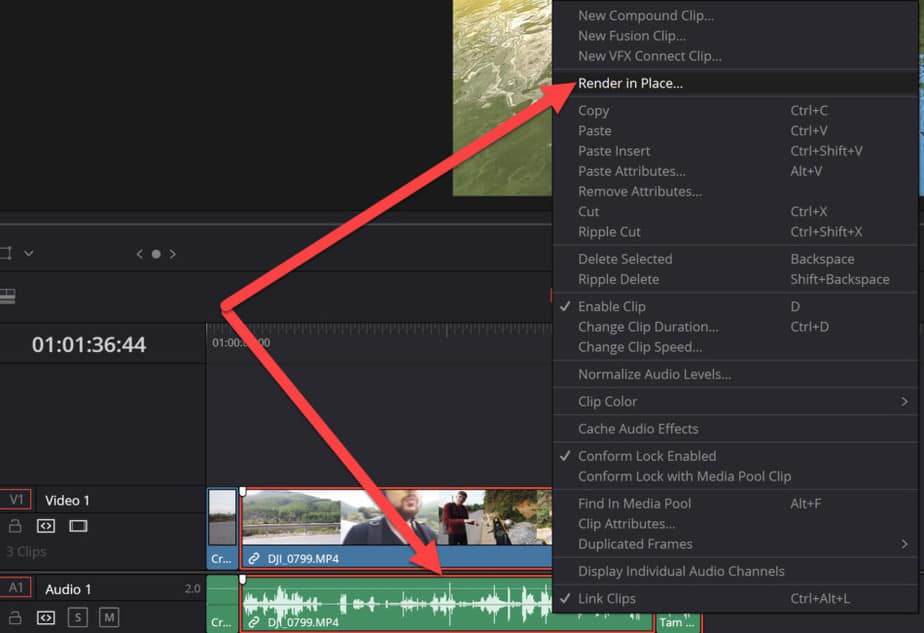
Next, you want to change the following:
- Format – QuickTime
- Codec – DNxHR
- Type – DNxHR HQ
If you want a bit smaller file size you could try changing to DNxHR ‘SQ’ instead of ‘HQ’. As the only difference is that HQ is of higher quality. That said people who have solved this error used ‘HQ’…
Choose one of them, and then click on “Render“:
The rendering takes a little bit of time.
Once it’s done you can see that you have now both your old format and new format in your “Media Pool“:
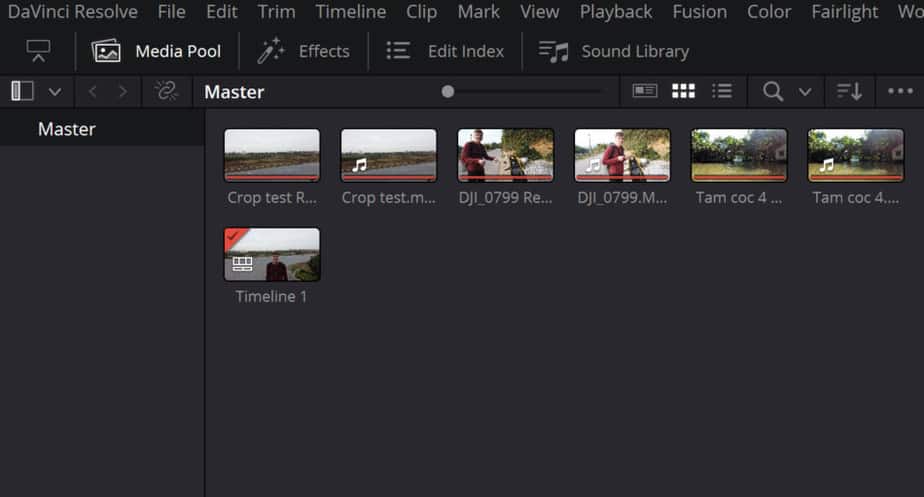
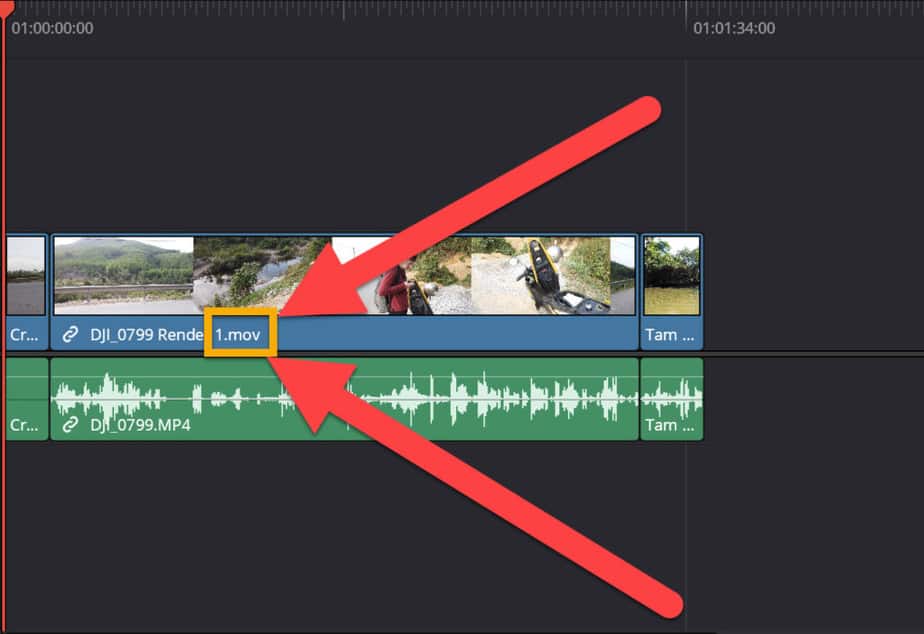
And you don’t have to add the new files to the timeline, as they will have swapped places as part of the render process! You can see in the picture below that it has changed from .mp4 to .mov.
.mov is representing the QuickTime format:
Next, go ahead and render your project! Fingers crossed…
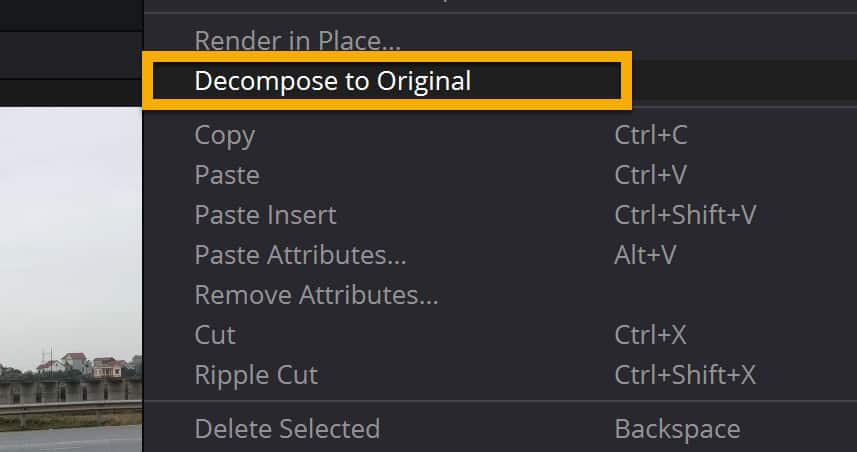
If you want to swap the clips in the timeline back to the original files, “select the clips > right-click > Decompose to Original”: (You will still have them on your computer and in the media pool.)
4. Change Workspace Options
This is the option almost everyone suggests. And my least favorite solution to the problem, which is why it’s the last on the list…
This solution does work, and most of these errors will get solved by using it. The problem with doing this you will render out your project even if there is an error, and then it will be included in your final product.
However, after experimenting a little bit with this solution, I’ve found that sometimes the error is just in the render faze, and I could not see any negative impact on the exported file.
So without further ado, here’s solution number 4:
Click on “Davinci Resolve” in the left-hand top corner of Davinci Resolve. Then click on “Preferences…“.
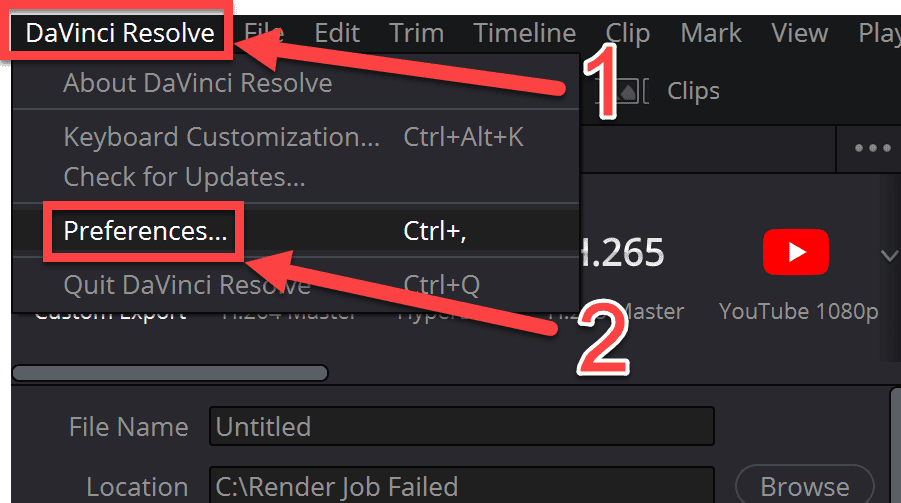
Then in the window that pops up, click on “User“, then “UI Settings“.
Next, uncheck the option called “Stop renders when a frame or clip cannot be processed“.
Watch the picture below:
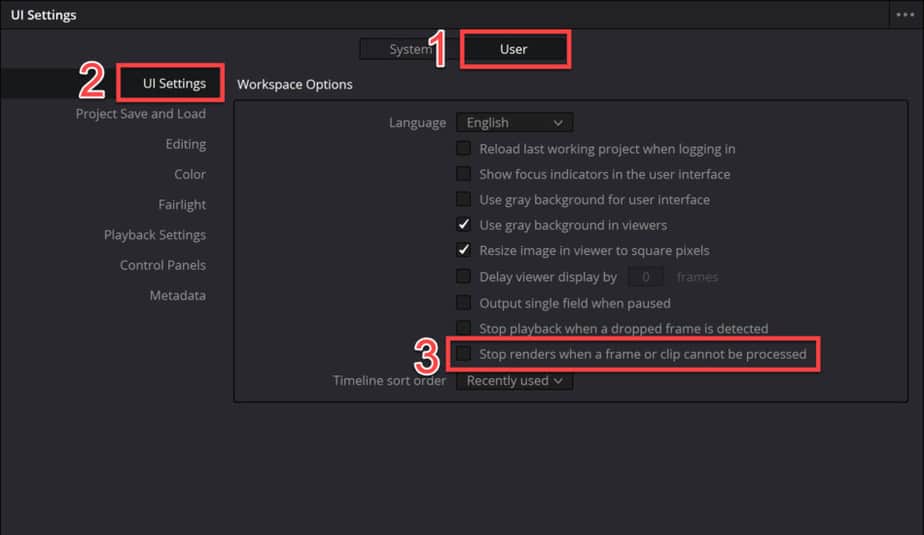
Once you have done this go ahead and click on “Save“, located in the lower right-hand corner of the window:

That’s it!
Now you can go ahead and try to render your video again.
Afterward, watch through your video if there are any errors, etc. A common one to watch out for is this:

There’s a big chance you have seen this one inside Davinci Resolve. However, it’s actually possible to render this one into your final product as well.
That’s it and I really hope one of these solutions solved your problem!
If you are facing problems with the “Add to Render Queue” button turning gray, check out this article.
Best regards,
Your friend, Jens.
How To Fix «Render Job Failed» Error, Davinci Resolve 16
Jake Earp
HD
05:48
How To Fix «Render Job Failed» Error, Davinci Resolve 16

Дата публикации:
28.08.2019 02:26
Продолжительность:
05:48
Ссылка:
https://thewikihow.com/video_3Ielsf2cpg4
Действия:
Источник:
Описание
**EDIT** If this solution did not work for you, please check out the comments. Some awesome viewers have left other solutions that have worked for them and others! Keep up the great work YOUTUBE COMMUNITY!
If you are having problems exporting your project through DaVinci Resolve 16 and are getting the “Render Job Failed Error”, don’t panic. There is a solution to get your project to render without giving the error and starting over.
Hopefully there will be a fix soon, this is the first beta version that has given me any issues with exporting.
Error Code — Render Job 1 failed as the current clip could not be processed.
The Fusion composition on the current frame or clip could not be processed successfully.
**Link to monitor is an affiliate link**
Most recent Jake Earp channel videos
- Mac Studio Max Unboxing 🖥 Feed
- Mac Studio Unboxing And Setup: Don’t Make The Same Mistake
- How To Install Flow Control On Rocket Appartamento Espresso Machine
Подписывайтесь на наш Telegram канал!@thewikihowоткрытьМониторим видео тренды 24/7
Explore more videos from Jake Earp
Фото обложки и кадры из видео
How To Fix «Render Job Failed» Error, Davinci Resolve 16, Jake Earp
https://thewikihow.com/video_3Ielsf2cpg4
Аналитика просмотров видео на канале Jake Earp
Гистограмма просмотров видео «How To Fix «Render Job Failed» Error, Davinci Resolve 16» в сравнении с последними загруженными видео.
Теги:
Davinci Resolve 16
Davinci Resolve 16 Editing Tutorial
Davinci Resolve
Render Failure
Fusion Error
Export Problems
Error
Gpu
Public Beta
Blackmagic
How To
Resolve
еще
Похожие видео

02:41
67 497 просмотров.

06:54
77 576 просмотров.

08:02
12 670 просмотров.
![Davinci Resolve 18 - Tutorial For Beginners In 15 Minutes! [ Complete ]](https://i.ytimg.com/vi/aLIHKHkvKMM/mqdefault.jpg)
15:17
298 903 просмотра.

05:26
25 880 просмотров.

03:10
46 145 просмотров.

06:37
630 946 просмотров.

13:27
64 039 просмотров.

07:30
94 405 просмотров.
Davinci resolve render error смотреть последние обновления за сегодня на .
How to fix «Render Job Failed» Error | DaVinci Resolve 16

206194

3607


929

00:05:48

27.08.2019
EDIT If this solution did not work for you, please check out the comments. Some awesome viewers have left other solutions that have worked for them and others! Keep up the great work YOUTUBE COMMUNITY!
If you are having problems exporting your project through DaVinci Resolve 16 and are getting the “Render Job Failed Error”, don’t panic. There is a solution to get your project to render without giving the error and starting over.
Hopefully there will be a fix soon, this is the first beta version that has given me any issues with exporting.
Ultrawide Curved Monitor I can’t imagine life without now: 🤍
Error Code: Render Job 1 failed as the current clip could not be processed.
The Fusion composition on the current frame or clip could not be processed successfully.
Link to monitor is an affiliate link
Rendering Failed — Davinci Resolve 17 — How to fix a rendering error
67497
2246
524
00:02:41
16.11.2020
Davinci Resolve 17 is fantastic and full of new features…however I’ve hit a rash of «Rendering Failed» issues that drives me nuts. Here is how I solve it! Never run into a rendering error showing render failures again!
Help me buy hardware for more benchmarking videos-
🤍
Davinci Resolve Studio
🤍
My Editing Workstation
Processor: 🤍
Motherboard: 🤍
GPU: 🤍
Memory: 🤍
Hard Drive 1: 🤍
Hard Drive 2: 🤍
Hard Drive 3: 🤍
Mouse: 🤍
Keyboard: 🤍
Color Grading Panel — 🤍
Case: 🤍
Fans and controller: 🤍 🤍
My favorite Photo Editor Company — 🤍
My Camera Setups
Cinema: Dreamy look 🤍
Crisp, action, Corporate look: 🤍
Favorite Lens of All Times: 🤍
Speedbooster to make it fit: 🤍
Gimbal that can support all of it: 🤍
Channel Graphics By Saad Shah (🤍GargoylesAtWork)
🤍
As an Amazon Associate I earn from qualifying purchases.
A production of John’s Films LLC
00:00 Intro
0:32 The error
0:41 The fix
1:57 Wrap up
Davinci Resolve, Rendering Failed, rendering failed davinci resolve, davinci resolve render error, davinci resolve failed, davinci resolve error, rendering error, render fail, rendering failed, could not be processed successfully, error, render error, rendering failure, resolve render error, resolve crash, render crash, davinci resolve 17,resolve 17 rendering failed, resolve 17 render error, render failure, resolve 16 error
Davinci Resolve Render Freezes / Crashes / Stops (EASY FIX)
55750
1101
194
00:05:21
12.10.2021
In this video I will show you guys how to fix any davinci resolve render issues such as freezing, crashing, slow rendering or glitches after your render. After watching this video I guarantee that you will be able to successfully render your video with no errors or crashes.
Full Tutorial: 🤍
#davinciresolve
How to fix Render Job has failed in Davinci Resolve 17 — Quick guide
14468
393
166
00:01:26
25.01.2022
How to fix Render Job has failed in Davinci Resolve 17
The Fusion composition on the current frame or clip could not be processed successfully.
Go to Preferences, User, UI
uncheck «Stop renders when a frame or clip cannot be processed»
Remember to delete the failed export file
Get a FREE Title pack for Davinci Resolve
🤍
Title Packs
🤍
Join the Facebook Group — For Davinci Resolve tutorials, tips, and secrets
🤍
Useful links
My online courses 🤍
Buy me a coffee 🤍
— Website Hosting —
US Hosting 🤍
UK Hosting 🤍
Siteground 🤍
Website Speed Up 🤍
Cloudflare CDN 🤍
Webmaster tools 🤍
— Website Page Builders —
Elementor Pro 🤍
Divi 🤍
— Video —
Titles Motion VFX 🤍
Tube Buddy 🤍
Music 🤍
Video Keyboards 🤍
Fiverr 🤍
VPN IpVanish 🤍
Email Marketing 🤍
Appsumo 🤍
My Gear 🤍
How To Prevent Davinci Resolve From Render Crashing | Crash Fix | Render Crash | Davinci Resolve 17
23308
797
144
00:02:09
13.04.2021
Do You Want To Learn How To Prevent Your Davinci Resolve 17 From Crashing in Rendering Process ?
Quick And Easy Method For Making Davinci Resolve 17 Crash Fix in Render Tab
▶ Music & Sound Effects I Use:
🔥 Artlist* ▶ 🤍 ( 2 Months FREE! )
▶ Stock Footage I Use:
🔥 Artgrid* ▶ 🤍
▶ Stock Footage,SFX,Plugins,Templates:
🔥 Motion Array* ▶ 🤍 (Click to Get $50 OFF!)
Business E-mail Here ➡ molin1994🤍abv.bg
Very quick tutorial showing the four very quick and easy fixes to stop Davinci Resolve 17 crashing on render.
All of that and many more coming up!
This is Easy and Fast Tutorial On How You Can Turn Solve Your Crashing Problem With Rendering Using Resolve 17
Quick and Easy Davinci Resolve 17 Begginers Tutorial
#davinciresolve #rendercrash #davinciresolve17
Dont Forget To LIKE, COMMENT and SUBSCRIBE ! It Helps ALOT 🙂
So if you are interested on improving yourself as a editor hit that Subscribe Button and let’s begin.
▶Make sure to like the video if it was useful to you, subscribe to the channel to make sure you dont miss a video and leave a comment if you have any ideas,suggestions or feedback. Thanks for being here 😇
DISCLAIMER:
—
The links above marked with * are affiliate links,
when you make a purchase on one of those sites,
I will get a small kickback to no extra cost for you!
Thanks for supporting me and my channel! Cheers!
How To Fix Rendering Error In Davinci Resolve 18 | #12
1511
19
10
00:01:14
07.08.2022
How To Fix Rendering Error In Davinci Resolve 18
Thank you for watching.
SOCIAL MEDIA
➣ YouTube 🤍
➣ Instagram 🤍
Last video:
How To Install Open Shell on Windows 11 🤍
♫ Music source:
Youtube music
➣ Copyright Disclaimer Under Section 107 of the Copyright Act 1976, allowance is made for «fair use» for purposes such as criticism, comment, news reporting, teaching, scholarship, and research. Fair use is a use permitted by copyright statute that might otherwise be infringing. Non-profit, educational or personal use tips the balance in favor of fair use.
✅ SOLUCIÓN al Error RENDER JOB FAILED // Davinci Resolve
4954
271
44
00:01:56
30.06.2021
✅ Solución al problema Rendering issues fix render job failed as the current clip could not be processed de Davilci Resolve.
🠟 🠟 🠟 APRENDE MÁS EN MI CANAL 🠟 🠟 🠟
💻 Videos más populares: 🤍
🐧 Linux y software libre — Aprende todo sobre linux: 🤍
🖌 Curso de GIMP — Tutoriales de HERRAMIENTAS y DISEÑO: 🤍
► Más contenido en Tutos PC: 🤍
✅¿Te gustó el video?🔔 Podes SUSCRIBIRTE y activar la CAMPANITA 🔔
Un ME GUSTA 👍 me ayuda a hacer crecer el canal 🙂
How To FIX Render STOP Problem in DaVinci Resolve
5500
93
35
00:04:14
27.03.2022
In this video, I will show you how to fix render issues such as freezing, crashing, slow rendering or glitches. After watching this video I am sure that you will be able to successfully render your video with no errors or crashes.
DaVinci Resolve rendering issues fix render job failed as the current clip could not be processed
107034
3535
1108
00:04:24
18.02.2020
Did you also get the render job failed as the current clip could not be processed?
Steps needed:
1-Open Preferences —
2- Click User (on top) —
3- be in UI settings tab —
4- uncheck the last option
It only took me 1:30 to get to the first step
Subscribe? Click like or share the videos with your fellow creators.
Thanks a ton for watching! 😀
Discord 💬 → 🤍
Steam 🎮→ 🤍
💼📧edimdoesbusiness🤍gmail.com
🤳-Socials-👀
🤍
🤍
🤍
How To Fix DaVinci Resolve Rendering Error
3340
68
20
00:01:52
15.09.2020
On DaVinci Resolve I was getting an error stating «Render failed as the current clip could not be processed.» In this video I show you how I was able to fix it, hint its as simple as changing a setting!
DaVinci Resolve render job failed Error beheben Tutorial deutsch [2022]
999
51
27
00:03:17
30.04.2022
In diesem DaVinci Resolve 17 Tutorial deutsch 2022 zeige ich Euch was man gegen den Fehler render job failed tun kann. Um diese Fehlermeldung zu beheben kann man viele Sachen in den Einstellungen und in dem Deliver Bereich bei dem man Videos exportieren kann tun. #davinciresolve #davinciresolvetutorials #davinciresolve17
🔎Seiten aus dem Video:
DaVinci Resolve: 🤍
🛒 Digitale Produkte [LUTs, Stream Overlays, Texturen und mehr]:
*Shop: 🤍
✨Persönliche Empfehlungen:
envato elements Millionen Animationen + Designs inklusive einer Vielzahl an Kursen: 🤍
Fiverr für Dienstleistungen: 🤍
Erfolgreich lernen: 🤍
100 Youtube Cash Nischen: 🤍
Einkommen per Youtube aufbauen: 🤍
Windows 10 Grundlagen: 🤍
💰Spenden:
Hier könnt Ihr meine Arbeit freiwillig unterstützen: 🤍
🔧Mein Equipment:
Kamera Sony Alpha 6600: 🤍
Objektiv Sigma 16mm 1.4: 🤍
Cam Link Elgato 4K: 🤍
Mikrofon Rode Podcaster: 🤍
Mikrofonarm TONOR inklusive Popschutz: 🤍
Kopfhörer SONY WH-1000XM3: 🤍
Tastatur K800 Illuminated: 🤍
Maus Roccat Kone AIMO Gaming: 🤍
LED Licht dimmbar Neewer 2er-Pack: 🤍
SSD Festplatte SanDisk 1TB: 🤍
Bildschirm iiyama: 🤍
Greenscreen Ständer: 🤍
Greenscreen Tuch: 🤍
Grafiktablet HUION HS610: 🤍
🎬Playlists:
►Twitch Playlist: 🤍
►Twitch Studio Playlist: 🤍
►Streamlabs OBS Playlist: 🤍
►Photoshop Playlist: 🤍
►Photoshop Werkzeuge Playlist: 🤍
►Youtube Playlist: 🤍
►DaVinci Resolve Playlist: 🤍
►Sonstige interessante Videos Playlist: 🤍
►Photoshop creation without voice Playlist: 🤍
►GIMP Playlist: 🤍
►OBS Studio Playlist: 🤍
🤝Lass und Freunde werden:
Instagram: 🤍
✉Contact:
contactandy342🤍gmail.com
*Eigenwerbung. Die mit * gekennzeichneten Links enthalten Werbung.
Die mit gekennzeichneten Links sind Affiliate Links. Über
diese Links erhalte ich eine kleine Provision von dem Kauf.
Für Dich enstehen dabei keine zusätzlichen Kosten.
Media Offline and Render Job Fail in Davinci Resolve Fixes
19722
491
124
00:06:36
16.01.2021
Media Offline can really derail your project! There are a lot of different reasons Media Offline might show up.
Here I’ve compiled a variety of reasons and tips on how to resolve the problem.
Hope these can help you and let me know in the comment section if it does!
Enjoy Davinci!
«NO» Sound from Freesound.com user Jorickhoofd
Fix Export Failed — Rendering Error in DaVinci Resolve
16857
00:01:19
17.05.2020
The other day I had issues exporting a video in DaVinci Resolve. It would reach at 99%, and then give me this error:
«Rendering Error
The Fusion composition on the current frame or clip could not be processed successfully.»
Here’s how I got around it.
Text version of the tutorial: 🤍
Follow us on:
Blog: 🤍
Shop: 🤍
Music: 🤍
Facebook: 🤍
Twitter: 🤍
YouTube: 🤍
SOLVED: Davinci Resolve Render Job Failed… Easy step by step fix
46145
3370
1768
00:03:10
05.05.2020
«Render Job Failed as the current clip could not be processed. Could not be decoded correctly. Please check if the clip is still available on the drive.»
Steps to Fix:
1. go to Davinci Resolve drop down menu
3. go to Preferences
3. go to User in the top section
4. Uncheck the box «Stop renders when a frame or clip cannot be processed.»
—
By me a Coffee: 🤍
Patreon: 🤍
Buy some Soap made by Shonna: 🤍
—
Thank you for Watching! Are you interested in MORE? Please, Subscribe!
Our Main Channel: 🤍
Watch it for Days: 🤍
PlayinIt Channel: 🤍
Nezumi Soaps: 🤍
Shonna’s Channel: 🤍
Nephew’s Channel: 🤍
—
#DavinciResolve #JobRenderFail #DavinciResolveFix
Fix RENDER Errors & SPEED UP EXPORTS in DaVinci Resolve 16!
20773
407
120
00:10:19
07.11.2020
Get my FREE Video Production Checklist! — 🤍
The video edited in this: 🤍
This will help you fix errors like failed to render and speed up your exports!
In this video, I’m showing you how to fix the GPU render errors that happen when you try to export a video in DaVinci Resolve 16. This tutorial has DaVinci Resolve Tips and Hacks that will help you speed up the delivery process with optimized media and render cache. DaVinci Resolve optimized media and render cache are two easily overlooked things when you’re going through your export settings. The best way to do this is to pick the correct render cache settings and delivery settings.
❓Quick Questions ❓
Is this something that you’re already using? Let me know in the comments!
Thank you for watching. If you liked this video hit the 👍 button for the algorithm, and consider subscribing and hitting the bell icon to stay up-to-date and get informed about any future videos!
#️⃣ SOCIAL MEDIA #️⃣
🔥 Instagram — 🤍
🔥 Facebook — 🤍
🔥 Twitter — 🤍
—
This video is NOT sponsored by anyone.
—
🎥 GEAR USED PRODUCING THIS VIDEO 🎥 — Full list available here: 🤍
—
📷 Canon EOS M50 Video Creator Kit — 🤍
🦍 Joby Gorillapod Kit — 🤍
💡 Studio Light Kit — 🤍
☀️ K&F Concept Variable ND Filter — 🤍
🔴 SanDisk Extreme Pro 64GB SD Card — 🤍
💽 LaCie 2big 8TB Thunderbolt 3 Dock — 🤍
📚 TABLE OF CONTENTS 📚
0:00 Intro
1:14 The Problem
1:37 2 Fixes
2:49 Render Cache Settings & Optimized Media
3:52 Using Optimized Media
5:08 Render Cache Options
6:44 Dealing with GPU Memory Errors
7:40 Dealing with Bad Clip Cache on Transitions
8:22 Delivery Settings
8:54 Rendering Out The Video
9:07 Summary
9:52 Quick Question & Outro
Affiliate Disclaimer: This video and description contain affiliate links. As an Amazon Associate, I earn from qualifying purchases.
Hashtags: #RayBeliveau #DaVinciResolve
⚠️ERROR RENDER CLIP en DAVINCI RESOLVE😡
727
45
26
00:02:11
21.05.2021
😡¿Cuánta rabia nos dan estos errores al renderizar?
Espero que esta sea vuestra solución💪
👇Deja en los comentarios tu experiencia para futuras actualizaciones👇
📲Mas información en nuestras redes sociales
Contacto: aforofilms🤍gmail.com
Síguenos:
Instagram 🤍
Facebook 🤍
📽️¿Qué equipo utilizo?
Sony A7 iii
Estabilizador Ronin S
Lente Tamron 28-75 f 2.8
Micro Rode Go
Micro Lavalier APGTEK
Adaptador lentes E-Mount 👉 EF canon
Jaula SmallRig
#ERRORDAVINCI #RENDERCLIP #EXPORTARDAVINCI
DaVinci Resolve 16 GPU Rendering Error 100% Official Fix
2710
10
6
00:26:16
18.09.2020
#VideoEditor #DaVinciResolve16 #OfficialFix
Please show some love here as I look and dig and found the one thing that we all overlooked and miss as a pretentious problem that many of us face with DR16. Thank you to my supporters and much love everyone but it’s time to end this chapter in my books. «The Problem Solver»
David Birch — E-Mount Sucks
MichaelTheMaven
Antonio Brown
Peter Kondziolka
Robin Ivarsson
Yuuki
Juri Choi
MorrisRamen
New Wireless LAV system here — SYNCO WMic-T1 — 🤍
⚡ SUBSCRIBE FOR MORE ⚡
💡💡SUPPORT THE CHANNEL 💡💡
🚀 💰DONATION by PAYPAL LINK HERE💰 🚀
🤍
Venmo 🤍 ThePandaPhotographerr
cash.app/$ThePandaPhotographer
Sigma 18-35 Art Lens for Canon, Nikon, Sony, and Pentax — 🤍
New GoPro HERO 9 Black — 🤍
GoPro Hero 8 BLACK — 🤍
GoPro 7 Black Bundle Kit — 🤍
GoPro Pro 3.5mm Mic Adapter — 🤍
GoPro Vlogging Protective Case for GoPro and Audio — 🤍
FEELWORLD FM8 Universal Compact Shotgun Video Microphone — 🤍
Chronos ND filters 4 pack — 🤍
Chronos ND Filters — 🤍
Chronos ND Filters — 🤍
CHECK UPDATED PRICES HERE
Sony Noise Cancelling Headphones WHXB900N — 🤍
Sony WH-H900N h.Ear on 2 Wireless Over-Ear — 🤍
Click now to buy
FEELWORLD FW568 5.5 — 🤍
CAMVATE Side Handgrip (Leather-Covered) L Type — 🤍
CAMVATE Super Clamp Articulated Mini Ball Head — 🤍
LimoStudio Camera L-Bracket — 🤍
VILTROX 8W/720LM 2500K~8500K Bi-Color — 🤍
BOYA BY-MM1 Shotgun Video Microphone — 🤍
Zhiyun Crane V2 Gimbal — 🤍
Zhiyun Crane 3 Gimbal — 🤍
Zecti 15.7″ Portable Carbon Fiber Camera Slider — 🤍
BUY NOW —
🤍
🤍
IrixLens 11mm F/4 — 🤍
IrixLens 15mm f/2.4 — 🤍
IrixLens 150mm F/2.8 Maro — 🤍
Camera backpack
Tenba Axis 32L —
Link 1: 🤍
Link 2: 🤍
Canon Gear —
Canon 80D: 🤍
Canon Portrait and Travel Two Lens Kit — 🤍
Canon Battery Grip — 🤍
LP-E6 LP E6N Rechargeable Battery Charger Set — 🤍
Canon EF 85mm f/1.8 — 🤍
━━━━━━━━━━━━━━━━━━━━━━━━━━━━━━━
🎧 — All music is non-copyrighted
👉 To optimize your Youtube channel with TubeBuddy.
🤍
👉 Shutterstock Ref Link:
🤍
👉 Pateron Link:
🤍
━━━━━━━━━━━━━━━━━━━━━━━━━━━━━━━
🤓 LET’S CONNECT! 🤘🏼
✅Official Website — 🤍
✅🤍
✅Twitter — 🤍
✅🤍
✅🤍
━━━━━━━━━━━━━━━━━━━━━━━━━━━━━━━
📣 Full Disclosure & Ethics Statement:
⚙️I am an Amazon affiliate
❤️❤️Sometimes I share the links to the products/services I’d review,
My opinions and reviews are ALWAYS honest. There will never be enough money to convince me to sell you garbage! But, if I really like a product, I have no problem helping to promote a company that has improved. I always appreciate your help and support! ❤️❤️
Come risolvere i problemi di render di DaVinci Resolve
10210
235
151
00:04:17
30.12.2019
Qualche volta capita che DaVinci Resolve si rifiuti di renderizzare la tua timeline. In questo episodio di minutaggio ti spiegheró un trucco che uso quando si verifica questo problema di render.
Se vuoi velocizzare DaVinci, guarda quest’altro video: 🤍
Minutaggio è la serie assolutamente gratuita sul videomaking e montaggio.
Animazione sigla fatta da:
🤍
Brano sigla di:
🤍
#minutaggio
how to fix «95% of all RENDERING ERROR» in DaVinci Resolve.
968
10
0
00:04:12
30.11.2021
In this video, I will share a small solution that will help to fix about 95% of all the rendering issue you face on DaVinci Resolve like video clips cannot be processed, fusion clips cannot be processed….
Subscribe for more.
Timestamp:
0:00 intro
0:22 limitation
0:52 prerequisite
2:02 solution
2:51 tips
3:52 outro
#techcycle #davinciresolve #davinciresolve17 #davinci17 #resolve17 #davinci #resolve #video #guide #tutorial #howto #performance #windows #windows11 #videoediting #editing #editingtips #tips #blackmagicdesign #blackmagic
Support us by using our affiliate link:
Amazon:
🤍 (International)
🤍 (India)
Social Media
Twitter: 🤍
Instagram: 🤍
How to fix FRAME DROPPED rendering issue in Davinci Resolve
22875
284
111
00:01:54
09.09.2019
In this video we are going to look at one of the solutions that worked for me to fix the TIME OUT WAITING FOR FRAME, FRAME DROPPED rendering issue in Davinci Resolve.
if the above fix is not working, try this
how to fix «95% of all RENDERING ERROR» in DaVinci Resolve.
🤍
How to fix VIDEO/FUSION clip cannot be processed error DaVinci Resolve
🤍
How to fix FUSION CLIP CANNOT BE PROCESSED error in Davinci Resolve
🤍
Subscribe for more.
#techcycle #resolve #davinciresolve #resolvetip #davinci #blackmagicdesign #blackmagic #videoediting #video #editor #editing #performance #render #videorender #rendererror #error #tips #editingtips
Support us by using our affiliate link:
Amazon:
🤍 (India)
🤍 (International)
Flipkart: 🤍
Contact us through WhatsApp: 🤍
Contact us through Telegram:
Telegram Channel: 🤍
Telegram Group: 🤍
Follow Us On
Twitter: 🤍
Instagram: 🤍
Facebook: 🤍
Music
Come Home — Declan DP
🤍
How To Fix Render Glitches On Davinci Resolve (2021)
8767
408
184
00:01:08
12.02.2021
Vlog Channel
🤍
My Discord Channel 🤍
My Twitch 🤍
My Twitter 🤍
My TikTok 🤍
Camera- IPod Touch (Garage Sale)
Editing Software- Davinci Resolve (Free)
Thumbnail Software- Pixlr (Free)
Microphone- Blue Yeti (Christmas)
(Clean, family-friendly content)
How To Fix “Render Job Error” | DaVinci Resolve 16
689
24
6
00:02:50
26.04.2020
In this quick video we show you how to fix DaVinci Resolve render error. When the message “Render job failed as current clip could not be processed” is shown this is how you correct it.
⚡️Try FILMORA 4 Free 👉👉 🤍
⚡️Filmora Video Editor Best For Beginners👇
🤍
Best Gear at budget
M50 Camera : 🤍
Boya BYM1 Mic : 🤍
🤔 ABOUT THIS VIDEO 👇
Davinci resolve is free video editing software that you can use to edit your videos. After you have edited your video with all the images and graphics and music, you may want to download it into your PC or desktop.
But sometimes you may get a render job fail error message.
How do you Fix a Davinci Resolve Render job error?
Well in this DaVinci Resolve short video tutorial we show you exactly how to go about correcting the render error message.
It is quite simple. Using the preference tab in Davinci Resolve 16 any one can easily render or export their video to their laptop.
📚 RECOMMENDED RESOURCES 👇
Get-Response Email Automation Free Trial: 🤍
Webhosting with Bluehost: 🤍
👇 FOR GREATE CONTENT, SUBSCRIBE TO OUR YOUTUBE CHANNEL 👇
🤍
★☆★ CLICK BELOW TO CONNECT TODAY AND GET MORE GREATE CONTENT ★☆★
PowaMax-Life Blog: 🤍
Facebook: 🤍
Pinterest: 🤍
Twitter: 🤍
#PowaMax-Life.com #davinciResolve16 #DavinciResolve #DavinciResolveTutorial #RenderingVideos #RenderingErrorResolved
To Your Success,
PowaMax-Life.com
SOLUCIÓN ERROR DE RENDERIZACIÓN DaVinci Resolve
144
15
6
00:01:58
14.01.2023
00:40 Esto solucionara tus problema al momento de hacer render
#davinciresolve18 #davinciresolve #davinciresolveerrorsolución
.
.
.
La rolita de fondo la tome de; Sessions: Diana | Colección segura para creadores | Riot Games Music
🤍
«Render Job Failed» Error QUICK FIX | Davinci Resolve Tutorial
2635
45
12
00:02:54
01.07.2020
DAVINCI RESOLVE TUTORIAL
Let me know if I went too fast. Here’s what I do to get rid of that pesky Render Job Failed pop up error, a few simple fixes.
Subscribe to my channel — 🤍
Follow me on Instagram — 🤍
Fresh LUTS — 🤍
Screen Record Software —
Monosnap
Video Editing Software:
Davinci Resolve 16
DaVinci Resolve Not Exporting Your Whole Video?
14948
547
213
00:00:45
30.10.2021
If you are only getting a *piece* of your video exported, this is the one for you! This video is in response to one of the most common questions I get on the channel, enjoy!
-If you enjoy the content, please consider doing one of these! 🤍
DaVinci Resolve 17 Glitch Export Render FIXED !!!!!!
26567
383
107
00:03:29
22.01.2021
DaVinci Resolve is one of my favorite video editing programs. But it has a couple different flaws I still like to make my Motion Graphics in After Effects and Export them as a mov file DaVinci Resolve has a problem when encoding fast-moving Graphics that causes some glitches when rendering out as H. 264. One of the only ways I’ve found personally to get around this is to render a h. 265 or a DNX flavor Style of encoding in my render settings when I do this the glitches go away. The only problem is the video file becomes extremely large which I don’t mind because I upload to Youtube and I let YouTube do the compressing.
🤍PortlandEventFilms.com
🤍Facebook.com/PortlandEventFilms
🤍instagram.com/portlandeventfilms/
Gear:
Sony A7Sii 🤍
Sony A6300 🤍
Rode VideoMic Pro 🤍
Sennheiser ew G3 🤍
Edelkrone Slider Small 🤍
Zoom H1 🤍
Tascam DR-40 🤍
Matchstick Lapel 🤍
Manfrotto Pixi Tripode 🤍
Manfrotto 502HD Tripode 🤍
Manfrotto 535 Carbon Fiber Video Tripode 🤍
Aputure AL-528w LED Light 🤍
Sony 16-35mm F4 🤍
Sony 55mm F1.8 🤍
How to get rid of rendering problem in Davinci resolve.(2020)
7647
128
17
00:05:49
03.10.2020
How to get rid of rendering problem in Davinci resolve.(2020)
How to get rid of rendering problem in Davinci resolve.(2020)
here I’m gonna show you how to get rid of the rendering problem in Davinci resolve…
first of all, let’s see the cases that most people stuck in
..number one is that after 1 or 2 minutes later it’s not rendering
number two your render job is not starting ..
number three you can’t add your job to the render queue
number four is that your pc stop working while rendering .. the list goes on and on…
so these are the cases most people complaining about..
..so today I’m gonna give you 16 tips to get rid of the rendering problem in Davinci resolve so without farther a do let’s get into the video ..
00:09 Restart Davinci Resolve
00:20 Delete your Rendered cache
00:44 Turn on Smart option
00:54 Quick Export
01:17 In & Out method
01:50 Video Depth
02:02 Correct Resolution
02:53 Save project
03:06 Compound clip
03:25 Not to use much application
03:32 Render speed
03:57 Do nothing while rendering
04:24 Clear temp and Prefetch
04:44 Disable internet connection
05:24 Restart your pc
#davinci
#resolve
#resolve16
#rendering_solution
#x_studio
#2020
#how_to _solve_rendering_problem?
How to fix VIDEO/FUSION clip cannot be processed error DaVinci Resolve
20675
571
201
00:02:25
25.06.2020
In this video, we will look into a way to fix, video clip cannot be processed, fusion clip cannot be processed rendering error in DaVinci Resolve. This fix can be used to solve all the rendering issues in DaVinci resolve. We are using the render cache option to fix the rendering error in DaVinci Resolve.
This video might also help to fix rendering issue
How to fix FRAME DROPPED rendering issue in Davinci Resolve
🤍
How to fix FUSION CLIP CANNOT BE PROCESSED error in Davinci Resolve
🤍
Subscribe for more.
#techcycle #davinciresolve #resolve16 #resolve #blackmagicdesign #davinciresolve16 #video #editing #videoediting #rendering #videorendering #guide #tutorial #fix #solution #youtube #youtuber #howto #tips
Support us by using our affiliate link:
Amazon:
🤍 (International)
🤍 (India)
Flipkart: 🤍
Contact us through WhatsApp: 🤍
Contact us through Telegram:
Telegram Channel: 🤍
Telegram Group: 🤍
Follow Us On
Twitter: 🤍
Instagram: 🤍
Facebook: 🤍
Music
Come Home — Declan DP
🤍
How To Fix DaVinci Resolve Render Job Failed as the Current Clip Could Not Be Processed Error
6602
188
49
00:00:41
26.03.2021
In This Video We Will See How To Fix DaVinci Resolve Render Job Failed as the Current Clip Could Not Be Processed Error
Here Are The Steps To Fix DaVinci Resolve Render Job Failed as the Current Clip Could Not Be Processed Error
1. Click OK Button
2. Remove Job From Render Queue
3. Click DaVinci Resolve
4. Click Preferences
5. Click User
6. Click UI Settings
7. Untick Stop renders when a frame or clip cannot be processed
8. Click Save Button
9. Again Add to Render Queue
10. Click Start Render
11. Done!
Contact Us
Facebook: 🤍
Twitter: 🤍
Wikipedia: 🤍
YouTube: 🤍
Don’t Forget To Like Share And Subscribe
SOLUCIÓN 🤗 RENDER JOB FAILED 🤯 Davinci Resolve 🖥
9904
263
81
00:05:25
26.05.2020
Solución al problema de render en davinci resolve:
«Render job 1 failed as the current clip could not be processed. The Fusion composition on the current frame or clip could not be processed successfully.»
Como exportar sin errores en Davinci Resolve
Como exportar cualquier archivo en Danvici Resolve
Solución definitiva para exportar en Davinci Resolve
Síguenos en nuestras redes sociales:
°FACEBOOK:
🤍
°INSTAGRAM:
🤍
°INSTAGRAM:
🤍
🤍
MÚSICA DE:
🤍
DaVinci Resolve 16 FIX ISSUES! — Slow Rendering Times and Render Job Failed
910
15
0
00:02:13
25.02.2021
In this video I’m going to show you how I have solved two of the most common issues many people are having with DaVinci Resolve. The first one is slow rendering times and the second one is when you start the rendering, but at some point it fails giving you a pop up message saying that rendering failed because of a certain video (render job failed as the current clip could not be processed).
If you are experiencing these two issues, watch this video till the end to check the solutions that worked in my case!
Let me know your thoughts on this in the comments below! Thanks for watching!
#DaVinciResolve #Resolve #FixVideo #FixFailedVideo #FixSlowSpeed
PC Configuration:
CPU: AMD Ryzen 5900X
GPU: NVIDIA GTX 1080Ti 11 GB RAM
RAM: 32 GB DDR4 3200 Mhz Corsair Vengeance RGB Pro
Storage: 1TB ADATA m.2 NVME SSD
Buy DaVinci Resolve from Amazon: 🤍
My Gear! (Affiliate Links)
Camera: 🤍
Lens: 🤍
Other lens: 🤍
ITX Case: 🤍
Video Card: 🤍
CPU: 🤍
m2 SSD: 🤍
SATA3 SSD1: 🤍
SATA3 SSD2: 🤍
PSU: 🤍
RAM: 🤍
Godox Light: 🤍
Portable LED: 🤍
Mic: 🤍
Cockpit: 🤍
Wheel: 🤍
Pedals: 🤍
Mouse: 🤍
Keyboard: 🤍
Headphones: 🤍
Subscribe to TechieSetup for weekly PC, gaming and tech videos!
FOLLOW ME:
Facebook: 🤍
Instagram: 🤍
Twitter: 🤍
Music:
🤍
Disclosure: Amazon links provided are linked to my Amazon Affiliate account & support the channel at no extra cost to you.
Davinci Resolve 17.4 — How To Fix Audio Artifacting/Issue After Rendering (2022)
956
34
12
00:02:26
19.11.2021
Hey, This is my second channel. My first is a Gaming channel generally around Diablo 2 which is exciting even though it is a 20 year old game. It has several new mods and was just announced that they are making Diablo 2 Ressurrected, which is an official Diablo 2 remake. Check it out and give me a Sub over there too.
🤍
Cara Memperbaiki Render dan Playback Bermasalah | Tutorial DaVinci Resolve
8309
229
79
00:04:11
16.06.2020
Render crash atau playback berhenti sendiri? coba cara ini
Download Footage dan Audio buat latihan di sini:
🤍 (login gmail)
Link download DaVinci Resolve 16 GRATIS:
🤍
Alternatif Link download DaVinci Resolve 16 GRATIS:
🤍
(cari file download di kotak Latest Downloads)
BELAJAR BASIC DAVINCI RESOLVE 16:
🤍
Setting keyboard kalian biar sama kayak keyboard gua:
🤍
Kepoin instagram:
🤍
Bisnis yok:
info🤍sineasore.com
#davinciresolveindonesia #rendercrash #playbackcrash
Mac Studio M1 MAX vs Windows — DaVinci Resolve 17 Performance and Rendering Error Fix
2288
54
17
00:08:14
18.06.2022
In this video, I compared the DaVinci Resolve 17 Free Version playback and render performance between my old windows PC and the new Mac Studio M1 Max basic model.
I also showed a way of fixing a render job failed error.
👉FREE 20+ Essential Templates in Package 2022: 🤍
👉Animated Ribbon Text Banner: 🤍
☕Like my video? Buy me a coffee: 🤍
Chapters
00:00 Mac Studio Intro
00:28 Testing Windows Environment
03:46 Testing Mac Studio M1 Max
05:25 Render Job Failed Error
07:00 Performance Summary
Thanks for watching!
Essential Video Editing
How to fix FUSION CLIP CANNOT BE PROCESSED error in Davinci Resolve
3974
49
20
00:01:39
20.08.2020
In this video, we will look into one of the ways by which you can fix the Fusion clip cannot be processed rendering error in Davinci resolve.
If the above guide is not working, you can follow these guides which might help you to fix the issue
How to fix VIDEO/FUSION clip cannot be processed error DaVinci Resolve
🤍
How to fix FRAME DROPPED rendering issue in Davinci Resolve
🤍
#techcycle #davinciresolve #resolve #davinci #davinci16 #resolve16 #blackmagicdesign #blackmagic #tutorial #editing #video #videoediting #guide #howto #windows #fusion #fusion16 #compositing
Support us by using our affiliate link:
Amazon:
🤍 (International)
🤍 (India)
Flipkart: 🤍
Contact us through WhatsApp: 🤍
Contact us through Telegram:
Telegram Channel: 🤍
Telegram Group: 🤍
Follow Us On
Twitter: 🤍
Instagram: 🤍
Music
Come Home — Declan DP
🤍
Colors Washed Out After Rendering — Davinci Resolve Issue FIXED
10014
385
57
00:05:13
04.04.2022
In this video, shot on my Canon R6, I tell you how I solve the Color Issue in Davinci Resolve when we export our video.
Get one month of free music to use in your videos by clicking this link:
🤍
Check out the prices of the gear I use:
My NEW Camera 🤍
My Awesome Camera: 🤍
My new favorite lens 🤍
Good Budget Lens for these cameras: 🤍
The great RF 35mm 1.8 🤍
Secondary Camera: 🤍
Entry level Camera: 🤍
The best ND filters money can buy 🤍
The best budget Variable ND filters 🤍
and 🤍 (they are great and affordable)
Very affordable alternative 🤍 (not the best but they do the job)
SD Cards 🤍
Camera bag 1 🤍
Gimbal: 1 🤍
Canon 24mm the pancake lens. 1 🤍
Canon 50mm 1.8 🤍
Yongnuo 50mm 1.8 🤍
Canon 10-18mm 🤍
Canon 55-250mm 🤍
smc PENTAX-M 1:1.7 50mm: 🤍
smc PENTAX 135mm F/3.5 🤍
Adapter: 🤍
🤍
Speed booster: 🤍
Lenses I am planning on buying this year (if I’ll have the money!)
🤍 or 🤍
🤍 or 🤍
🤍
🤍
My Microphones
Tonor TC-2030 🤍
Microphone Rode Videomicro, 🤍
Synco G1 🤍
Lavalier Boya By-M1 🤍
Tripods:
Manfrotto Pixie 🤍
AmazonBasics 🤍
Joby Gorillapod 3k 🤍
Andoer Tripod Ball Head 🤍
Joby Gorillapod 5K 🤍
Lights
Main light 🤍
Main Soft Box 🤍
Soft Boxes 🤍
Awesome Led 🤍
Viltrox Store 🤍
Other Leds: 🤍 🤍
without battery 🤍
with 2 batteries 🤍
🚨ERROR en TAREA DE RENDERIZACIÓN 1 DaVinci Resolve | SOLUCIÓN ✅
512
25
10
00:01:06
15.09.2022
Primero revisa que entre los clips no hay espacios vacíos ese es el error más común. Una vez revisado si el error vuelve a salir utiliza esta solución.
Como solucionar el error en tarea de renderización 1 debido a que no es posible procesar el clip actual.
DaVinci Resolve es el software de edición que utilizamos y es de los más completos del mercado, incluso en su versión gratuita puedes realizar buenos trabajos de edición. 👉🤍
¡Gracias por ver el video!
⭐ Es un placer leer comentarios y responderlos, no olvides dejar el tuyo.
🌎 — 🤍
🐦 — 🤍
📸 — 🤍
💬 — 🤍
🟣 — 🤍
📌 — info🤍liberbiz.com
Créditos:
🎬 — Elky Peña [Producción y Edición para liberbiz.com]
📱 — 🤍
Davinci Resolve Cache/gallery error windows fix
9701
167
39
00:04:19
04.11.2019
In this video I show you how I solved my error problem with Davinci resolve write errors. While this may not work for some it did stop the errors for me.
Check out Crafted Shutter for How To videos on Da Vinci Resolve: 🤍
Что ищут прямо сейчас на