The following article will handle “the execute permission was denied on the object” error appears on SQL Server. This error is clear and is related with the permissions of the user that is executing or running that object on database. To resolve this most probably you need to contact with your database administrator.
The error view example:
“The EXECUTE permission was denied on the object ‘XXXXX’, database ‘master’, schema ‘dbo’ “
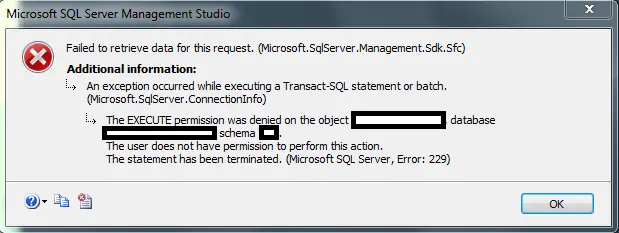
The EXECUTE Permission was Denied on the Object
Solutions for “The execute permission was denied on the object”
The reason of the error:
User has not permission to run “XXXXX” stored procedure in master database. If you are database admin then you need to give permission to the user performing the execution like below.
As user you can still try but it is not likely the same user that cannot execute the procedure also has the rights to change the permissions. If this does not work, you need to login on SQL Server as a user that has the rights to change the execute permissions. Or better contact a SQL Server Database Admin to resolve this for you.
1. How to resolve the error by Grant permission to specific object:
After you are login with an admin user or user that have rights to change execute permissions, you can grant permissions to the user executing this procedure like below:
use [master]
GO
GRANT EXECUTE ON [dbo].[XXXXX] TO [UserYY]
You can customize the above query by changing the procedure [dbo].[XXXXX] or [UserYY] as you need.
2. Resolve issue by grant permission to db_owner role:
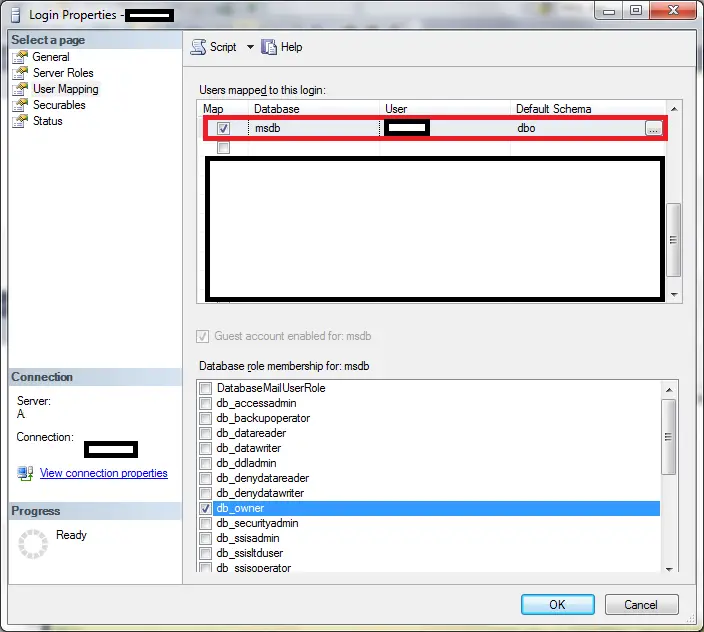
A solution is to add db_owner role to the user on the database where is trying to execute. You can add this easy by:
- Open SQL Server Management Studio and go to properties of User
- Click to User Mapping
- Check the Database where you are going to give the db_owner role
- Below this on “database role membership” section check db_owner role
- Click ok And try to execute the procedure.
3. Resolve by create a new database role:
Curiously there is no role to grant a user permission to execute stored procedures. The database administrators recommend to create a new database role like db_executor.
CREATE ROLE db_executor;
–Grant that role exec permission.
GRANT EXECUTE TO db_executor;
To add this new permission to user you need to:
- Go to the properties of the user
- Go to User Mapping
- Select the database where you have added new role
- New role will be visible in the Database role membership
- Check db_executor role and save
4. Resolve by giving everybody execution permission:
This extreme solutions in my opinion because is going to give to every user the execution permission. This can be happening by executing below query:
GRANT Execute on [dbo].your_object to [public]
“Public” is the default database role that all users are a member of.
Read Also: Reset SQL SA Password
5. Resolve by grant sysadmin server role to the user:
- Open SQL Server Management Studio and go to properties of User
- On Server Roles section check sysadmin and click ok
- Check if you can execute the procedure
Be careful because sysadmin server role grand all the permission for the all databases on that instance.
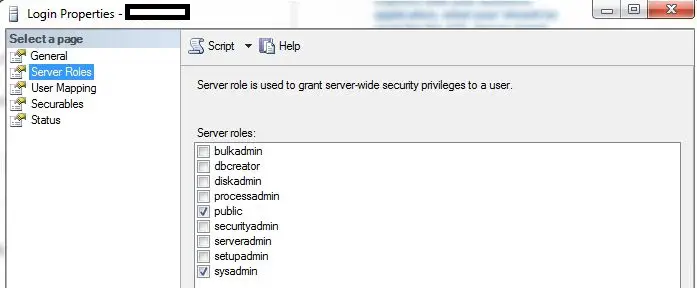
grant sysadmin server role
Conclusions:
So in the above article we added all the solutions to solve The EXECUTE Permission was Denied on the Object. If you find any other solutions just reply on comment. We will try to include it on our article.
- Remove From My Forums
-
Question
-
Hi Team,
While executing a sql query am getting bellow error message, could you please help on this
Msg 229, Level 14, State 5, Line 1
The EXECUTE permission was denied on the object ‘Function_Name’, database ‘db_name’, schema ‘dbo’.
Thanks Bala Narasimha
Answers
-
Hi Team,
While executing a sql query am getting bellow error message, could you please help on this
Msg 229, Level 14, State 5, Line 1
The EXECUTE permission was denied on the object ‘Function_Name’, database ‘db_name’, schema ‘dbo’.
Thanks Bala Narasimha
Hi Bala,
Firstly, you need to get the current user of the database, then grant the EXECUTE permission to the user.
--Session1 (the session you have got the error message)
USE [db_name]
GO
-- Get the current user(If the selected user is John)
SELECT CURRENT_USER;
GO


--Session2 (The new session)
USE [db_name]
GO
SELECT CURRENT_USER;  --current user is dbo

GRANT EXECUTE ON OBJECT::dbo.Function_Name to John;
GO
Best Regards,
Will
MSDN Community Support
Please remember to click «Mark as Answer» the responses that resolved your issue, and to click «Unmark as Answer» if not. This can be beneficial to other community members reading this thread. If you have any compliments or complaints to
MSDN Support, feel free to contact MSDNFSF@microsoft.com.-
Proposed as answer by
Wednesday, July 4, 2018 10:44 AM
-
Marked as answer by
BaluChalla
Tuesday, July 24, 2018 7:26 AM
-
Proposed as answer by
HI There
I have a user login that is executing an sp. It gets the follwoing error:
Msg 229, Level 14, State 5, Procedure sp_OACreate, Line 1
EXECUTE permission denied on object ‘sp_OACreate’, database ‘mssqlsystemresource’, schema ‘sys’.
Msg 229, Level 14, State 5, Procedure sp_OAMethod, Line 1
EXECUTE permission denied on object ‘sp_OAMethod’, database ‘mssqlsystemresource’, schema ‘sys’.
Msg 229, Level 14, State 5, Procedure sp_OAMethod, Line 1
EXECUTE permission denied on object ‘sp_OAMethod’, database ‘mssqlsystemresource’, schema ‘sys’.
Msg 229, Level 14, State 5, Procedure sp_OAMethod, Line 1
EXECUTE permission denied on object ‘sp_OAMethod’, database ‘mssqlsystemresource’, schema ‘sys’.
Msg 229, Level 14, State 5, Procedure sp_OAGetProperty, Line 1
EXECUTE permission denied on object ‘sp_OAGetProperty’, database ‘mssqlsystemresource’, schema ‘sys’.
Msg 229, Level 14, State 5, Procedure sp_OAGetProperty, Line 1
EXECUTE permission denied on object ‘sp_OAGetProperty’, database ‘mssqlsystemresource’, schema ‘sys’.
Msg 229, Level 14, State 5, Procedure sp_OADestroy, Line 1
EXECUTE permission denied on object ‘sp_OADestroy’, database ‘mssqlsystemresource’, schema ‘sys’.
Everything ic an find on the net refers to Sql Server 2000 but this is 2005, all the resolutions say you must grant exec permissions to the user account for these sp’s in the master database.
BUT is SS2005 they are in the mysqlsystemresource database.
WHen i try the following
grant exec on mssqlsystemresource.sys.sp_OACreate to UserLogin:
I get this error:
Cannot find the object sp_OACreate, becuase the object does not exist or you do not have permission.
I am logged in as sysadmin so i doubt it is permission.
How do i get a user login to be able to exec these sp’s?
Thanx
-
Posted on June 12, 2010 by
This error is pretty self explanatory. If you are here, I’m sure you simply want to know how to correct it, so here goes.
The user context in which you are executing does not have the rights to execute the procedure or function. So first, in order to find out which user you are, simply execute the following query from the connection that is failing.
[cc lang=”sql”]
SELECT CURRENT_USER
[/cc]
Now that you know this, you need to login as a user that has the rights to change the execute permissions. Though it is not likely this same user that cannot execute the procedure also has the rights to change the permissions, you can still try. Otherwise simply login as a user with ‘dbo’ access and execute this:
[cc lang=”sql”]
GRANT EXECUTE ON [dbo].[procname] TO [youruser]
[/cc]
If you see this error:
Cannot grant, deny, or revoke permissions to sa, dbo, entity owner, information_schema, sys, or yourself. Then you are out of luck. You are using SQL 2005+ and need to login as a different user.