-
24.06.2017 13:30
#1
Про Течстрим Techstream + miniVCI J2534
Не могу настроить подключение, Techstream 10 версия. Ставил на винду 8.1 и на ХР, дрова вроде легли нормально. А результат один и тот же — Unable to connect VIM
Если и брать Теслу, то дизельную(с)
-
24.06.2017 13:33
#2
в каком состоянии зажигание должно быть при подключении?
Если и брать Теслу, то дизельную(с)
-
24.06.2017 13:51
#3


Сообщение от A_SHOT

в каком состоянии зажигание должно быть при подключении?
Включено
T-WINDOM MCV20-ATPGK
T-PROGRES NC300, JCG11-AEAZH(W), 05.2005
-
24.06.2017 14:06
#4
как проверить работоспособность самого шнурка? диод горит
Если и брать Теслу, то дизельную(с)
-
24.06.2017 14:19
#5
Сообщение от A_SHOT
как проверить работоспособность самого шнурка? диод горит
Да должен гореть. На DLC3 всегда присутствует постоянное питание
T-WINDOM MCV20-ATPGK
T-PROGRES NC300, JCG11-AEAZH(W), 05.2005
-
24.06.2017 15:23
#6
На ХР течстрим работает точно,настройки скана проверь,на прадо клубе поищи тему про течстрим,там человек внятно расписал возможные проблемы и как их устранить.
Шнурок белый(прозрачный) или черный?Последний раз редактировалось Allexx; 24.06.2017 в 15:27.
-
24.06.2017 16:42
#7
шнурок прозрачный
на прадо клуб завтра слажу
взять бы у когонить заведомо рабочий шнурок для проверкиЕсли и брать Теслу, то дизельную(с)
-
24.06.2017 23:24
#8
Hitachi EX 5500LD — 6 остальное оффтоп
-
25.06.2017 04:50
#9
Сообщение от A_SHOT
шнурок прозрачный
на прадо клуб завтра слажу
взять бы у когонить заведомо рабочий шнурок для проверкиМогу свой дать,если в наших краях будешь.
-
25.06.2017 05:52
#10
Сообщение от Allexx
Могу свой дать,если в наших краях будешь.
на след неделе товарищ будет в нхк, если не решу до этого времени — шуману в личку, ок?
Если и брать Теслу, то дизельную(с)
-
25.06.2017 05:56
#11
Сообщение от Mini_Tracker
вторую ссылку я уже почти наизусть знаю) а первую вкратце пробежал
на данный момент затруднения в полной вычистке прежних дров из реестра, пытаюсь новые поставить а он автоматом старые дрова притягиваетЕсли и брать Теслу, то дизельную(с)
-
25.06.2017 06:06
#12
Сообщение от A_SHOT
вторую ссылку я уже почти наизусть знаю) а первую вкратце пробежал
на данный момент затруднения в полной вычистке прежних дров из реестра, пытаюсь новые поставить а он автоматом старые дрова притягиваетТак там и написано,что отказаться от установки автоматом.
Hitachi EX 5500LD — 6 остальное оффтоп
-
25.06.2017 11:26
#13
Есть рабочий шнурок если что.
-
25.06.2017 13:33
#14
Сообщение от A_SHOT
на след неделе товарищ будет в нхк, если не решу до этого времени — шуману в личку, ок?
Ок.
-
25.06.2017 13:41
#15

Сообщение от A_SHOT
Не могу настроить подключение, Techstream 10 версия. Ставил на винду 8.1 и на ХР, дрова вроде легли нормально. А результат один и тот же — Unable to connect VIM
Если ещё актуально — пиши в личку, помогу настроить. Себе настроил — пашет без проблем. Правда у меня не прозрачный, но суть там одна.
-
25.06.2017 13:45
#16
Тоже есть рабочий шнурок, цеплялся к Прадо 120, пиши, если надо.
-
25.06.2017 13:49
#17
Сообщение от alexsafronov
Есть рабочий шнурок если что.
отписал в личку
Если и брать Теслу, то дизельную(с)
-
25.06.2017 13:51
#18
Сообщение от GRTH32
Если ещё актуально — пиши в личку, помогу настроить. Себе настроил — пашет без проблем. Правда у меня не прозрачный, но суть там одна.
спасибо огромное, если проблема окажется не в шнурке, обращусь
Сообщение от vanyas
Тоже есть рабочий шнурок, цеплялся к Прадо 120, пиши, если надо.
спасибо, чуть позже выясню, надо ли
Если и брать Теслу, то дизельную(с)
-
25.06.2017 18:28
#19
В setup далее VIM select выбран ваш шнурок?
-
26.06.2017 00:13
#20
Сообщение от denis31
В setup далее VIM select выбран ваш шнурок?
Само собой
Если и брать Теслу, то дизельную(с)
- Назад
- 1
- 2
- 3
- 4
- 5
- 6
- Вперёд
- Страница 1 из 8
Рекомендованные сообщения

-
- Поделиться
#1
Крутанул пробег на Corolle2007, затем захотел связаться Течстримом с моторным на предмет наличия ошибок, прога ругается: «Unable to connect to VIM». Причем данное сообщение появляется как при подключенном к автомобилю адаптере, так и при отключенном вообще от шнура USB, т.е. прога не видит адаптер.
Должно ли появиться в окне программы уведомление что прога нашла OP2?
Таблетка подсунута, выбор типа адаптера в проге сделан, сам тактрикс рабочий — проверялся евосканом на лансерах, но ни одного удачного подключения через Течстрим не имею. До этого «на дурака» подключался к праворульке, есесно облом, а тут королла леворулька с тем же результатом. Тактрикс стоит на COM11. Что упустил?
Ссылка на сообщение

-
- Поделиться
#2
В настройках программы надо выбрать свою железку
Ссылка на сообщение

-
- Поделиться
#3
Делал недавно LEXSUS GS-300, с помощью ОП-2 через диагностику прошили оба процессора в моторном новыми прошивками взятыми с официального сайта. Прошло без проблем.
Изменено 22 октября 2010 пользователем tolik16
Ссылка на сообщение

-
- Поделиться
#4
Гыыы для непонятливых видимо…
Чем шили — заводской прогой и штатными прошивками?
Ссылка на сообщение
- Автор
-
- Поделиться
#5
Народ, не отвлекайтесь, по чиптюнингу с Опенпорт2.0 есть своя тема, а тут по диагностике с его помощью.
В настройках программы надо выбрать свою железку
Читайте внимательно первый пост:
выбор типа адаптера в проге сделан
Ссылка на сообщение
-
- Поделиться
#6
Шили софтом — Течстримом
Прошивки штатные взяты с офф сайта для обновления заводского софта.
это был не тюнинг, это был ремонт у машины были проблемы со вспрыском, подтраивала.
Изменено 22 октября 2010 пользователем tolik16
Ссылка на сообщение
- Автор
-
- Поделиться
#7
tolik16, прочитал несколько раз твои посты, но эта информация не помогла мне подружить Течстрим с Опенпортом. 
Из-под какой оси работает Течстрим у тебя, и на каком диске стоит? У меня XP(SP3) стоит на диске D:, дрова OP2 тоже на диске D:. Кроме выбора типа адаптера (VIM или OP2), какие ещ настройки в Течстриме крутил? Кстати, на торренте уже Течстрим 5.10 выложили.
Изменено 26 октября 2010 пользователем hash
Ссылка на сообщение

-
- Поделиться
#8
Не помню где то писали по этому поводу ,короче надо лазять в настройках по дому что прога забивает диск С его надо поменять на D /Блин не помни вроде как в систем32 в тачстриме.
Смысл такой дрова с опена встают на D а прога ищет его на С или на оборот не помню но смысл такой на окте пацан пытался опенпорт с опенбоксом подружить и причина была в том что ХР стоял на диске С ,у него получилось полазей там может поможет.
Ссылка на сообщение
- 4 недели спустя…

-
- Поделиться
#9
Уважаемые коллеги.Я занимаюсь в основном отечественными авто.Сейчас расширяю спектр авто переключаясь на импортные.Собираюсь приобрести Опенпорт 2,загрузил тачстрим 5 и хочу спросить:тачстрим смотрит тойоты исключительно рынка США и европы?И что надо для охвата праворульных тойот,и других японцев с внутреннего рынка ?Подскажите,плиз,как в тачстриме 5 проглядеть мануал по авто?
Ссылка на сообщение
- 5 месяцев спустя…
-
- Поделиться
#10
Techstream 6.01.021. Установил как обновление 5.01.10.Открывается путем замены файлов MainMenu.exe(5.10.029) В разделе Япония-проблема с отображением шрифта
Ссылка на сообщение
-
- Поделиться
#11
1. Корректируем Language.ini в папке C:Program FilesToyota DiagnosticsTechstreamJPDB чтобы выглядело как на картинке ниже.
2. Копируем файлы M_English.ddb, V_English.ddb, U_English.ddb из папки C:Program FilesToyota DiagnosticsTechstreamEUDB в папку C:Program FilesToyota DiagnosticsTechstreamJPDB
3. Выбираем в программе японский регион и в окошке с выбором языка кликаем на English
Ссылка на сообщение

-
- Поделиться
#12
ссылочку где скачать Techstream 6.01.021 кряком ,можно??
Ссылка на сообщение


-
- Поделиться
#15
в очередной раз пытаюсь зарегать течстрим, все никак.
1. нет выбора — КУДА ставить. у меня жесткий разбит на 3 диска (с-win98, d — winxp, е — остальное) и ставится у меня из под XP естественно на д. может в этом проблема?
2. что куда вводить. первый ключ в окно вбиваю, ищу строку. нахожу, но у меня там значения другие. пробовал как на скрине вбивать, толку ноль.
Ссылка на сообщение
-
- Поделиться
#16
разобрался.
всем спасибо. сам дурак 🙂
Ссылка на сообщение

-
- Поделиться
#17
в чем была ошибка? тоже не получаеться зарегить
Ссылка на сообщение
-
- Поделиться
#18
что конкретно не получается? там дел на пять минут
Ссылка на сообщение
-
- Поделиться
#19
Пароль прога не принимает, он у меня кстати не по тем адресам находиться
Ссылка на сообщение
-
- Поделиться
#20
Должна принимать, значит неправильно смотришь, особенно вторую часть.
первая часть кода две полных строки
вторая часть кода строка без двух байтов
вторая часть конец кода заканчивается перед точкой
рабочаая пара если смотреть в памяти поиском в самом низу
адреса естественно у всех отличаются, компы то разные))))
Ссылка на сообщение
-
- Поделиться
#21
первый код — по нескольким местам лежит, и их несколько. пробуйте все.
второй код вроде как один. на 027 начинается.
всего 48 бит код. первая часть 32 (2 строки) вторая часть 16 (1 строка)
посчитайте код и примера. его длину, и все поймете.
Ссылка на сообщение
-
- Поделиться
#23
подскажите пож а что за буквы в выборе модели по европе правда у меня mvci
Ссылка на сообщение
- 3 недели спустя…
-
- Поделиться
#24
разобрался.
всем спасибо. сам дурак 🙂
не один ты «сам дурак», я — такй же! Помоги зарег МАНГУСТА.
1.Надо его запитывать от а/м или нет при регистрации?
2. Где искать ЛИЦЕНЗИЮ? Там масса файлов!!!
Ссылка на сообщение
-
- Поделиться
#25
Про МАНГУСТА ничего не знаю, тема про течстрим,
как зарегить течстрим ВНИМАТЕЛЬНО читать пдф из 14 поста
если «угадал все буквы и не смог назвать слово» — это не твоё, отдай тому кто сможет ПРОЧИТАТЬ слово
Ссылка на сообщение

-
- Поделиться
#26
не один ты «сам дурак», я — такй же! Помоги зарег МАНГУСТА.
1.Надо его запитывать от а/м или нет при регистрации?
2. Где искать ЛИЦЕНЗИЮ? Там масса файлов!!!
Может это надо? Правда это от оригинала. Mongoose User Manual.pdf
Ссылка на сообщение
-
- Поделиться
#27
Про МАНГУСТА ничего не знаю, тема про течстрим,
как зарегить течстрим ВНИМАТЕЛЬНО читать пдф из 14 поста
если «угадал все буквы и не смог назвать слово» — это не твоё, отдай тому кто сможет ПРОЧИТАТЬ слово
ТЕЧСТРИМ — то же самое. Хорошая и полезная мысль написать инструкцию, но если уж писать, то писать надо «на дурака». Простые вопросы там не описаны, поэтому ставят в тупик:
1. При регистрации УСТРОЙСТВО подключать к а/м?
2. При запуске winhex, как называется набор данных, в котором надо искать ЛИЦЕНЗИОННЫЙ КЛЮЧ?
3. Как добиться такой же картинки?
4. Что означает на листе 2 второй дамп? Как выбрать именно эту — вторую часть кода и какой в конце концов результирующий код?
5. Если ты разобрался, то, думаю, поможешь и тупым(мне).
Если не поможешь, то зачем тогда вообще писать инструкцию?
Ссылка на сообщение

-
- Поделиться
#28
Что то в HEX редакторе не нашол ключа
Ссылка на сообщение

-
- Поделиться
#29
Подключатся не надо.
1. Запускаем Techstream
2. Нажимаем на кнопку регистрации.
3. Вводим a491e5cded52a51e8307311d069e7e1602701101251721
4. Регистрация не проходит (оставляем в покое)
5. Запускаем WinHex
6. В WinHex идём в “Tools”, в “Tools-е” открываем “Open Ram”
7. В окне “Edit Main Memory” выбираем “Mainmenu” и 2-а раза кликаем на “Entire memory”
8. Делаем сочетание клавиш “CTRL+F”
9. В строке поиска вводим “LicenseKey” (именно так! играет роль регистр букв)
10. Жмём ОК!
11. Продолжаем поиск, жмём F3
12. Появляется такая строчка (у вас другие цифры) LicenseKey=31c9c78e5d70brbfc63c15ac24e85cd7 r=TexasRangers02708101255721
13. Собираем вместе вот так 31c9c78e5d70brbfc63c15ac24e85cd702708101255721
14. И теперь вводим в окно регистрации программы Techstream
Ссылка на сообщение
-
- Поделиться
#30
Простые вопросы там не описаны, поэтому ставят в тупик:
1. При регистрации УСТРОЙСТВО подключать к а/м?
2. При запуске winhex, как называется набор данных, в котором надо искать ЛИЦЕНЗИОННЫЙ КЛЮЧ?
3. Как добиться такой же картинки?
4. Что означает на листе 2 второй дамп? Как выбрать именно эту — вторую часть кода и какой в конце концов результирующий код?
5. Если ты разобрался, то, думаю, поможешь и тупым(мне).
Если не поможешь, то зачем тогда вообще писать инструкцию?
1 нет (если бы нужно было подключать то так и написал бы)
2 запускаем WinHex- TOOLS — Open Ram — Mainmenu — Entire memory
3 смотрим пункт 2
4 это не второй дамп, а нижняя часть того же дампа (смотрим название дампа слева), сделано так потому что
скрин целиком дампа не входит на экран)
результирующий код это две части кода вместе, правильный код для проверки создает течстрим, вот его то мы и копируем и подсовываем ему.
5 КАК я еще могу помочь, если ВСЁ расписал пошагово????? только приехать и самому зарегить прогу (самолет за Ваш счёт)
Что то в HEX редакторе не нашол ключа
как не нашел? выложи скрин с запущенным винхексом.
млииин.. писал в три раза дольше чем регистрация всех четырех регионов времени заняла
Ссылка на сообщение
- Назад
- 1
- 2
- 3
- 4
- 5
- 6
- Вперёд
- Страница 1 из 8
This morning a customer contacted me because his Techstream software for MVCI Toyota prompted “unable to connect VIM”.
“I installed from both the supplied disk and the Skydrive, also tried all the different installation instructions on my Dell laptop. No problem installing Techstream. But when I applied it to a 1999 Toyota Yaris, I got the error: unable to connect to VIM.”
He provide two pictures of the error message and the software interface: 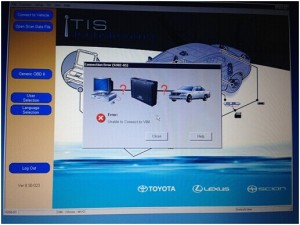
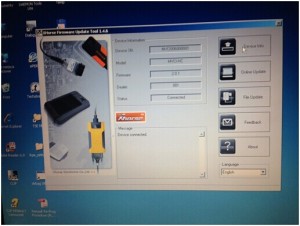
The tool he bought is an original Xhorse MVCI diagnostic tool. It is highly recommended by professional Toyota mechanics. Usually the reason that the error pops up is not with the tool. So I inquired the customer and found out that he run both the Techstream and Xhorse firmware at the same time.
If you own a MVCI and are reading this article, please be aware that do not use Techstream when the firmware is in use; vice versa.
This is because the softwares will both communicate with MVCI 3 in 1 hardware, and interrupt Techstream working. Here is the solution to the problem:
Solution 1:
Restart laptop.
open Techsream, click “Setup”, then “Techstream conficuration”.
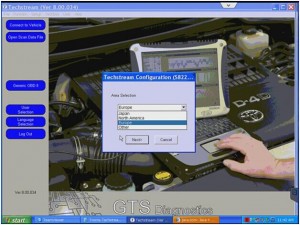
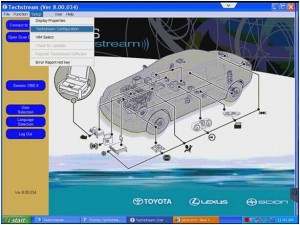 2. Select “Area Selection”, get a country list and then select “Europe”.
 3. Select “Default Language Selection” and choose “English”.
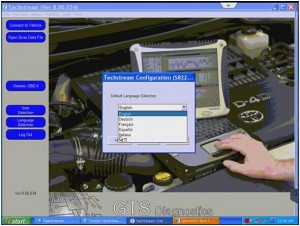 4. Click “Ok” in the next window.
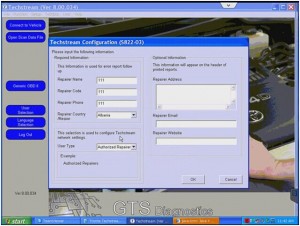 Solution 2:
Install MVCI 3 in 1 software and drive on a desktop with Windows XP system.
Run Techstream separately.
Sometimes it could be with the laptop that Techstream is installed on. If the software works, it means the laptop does not support the software.
Страницы: 1 2 [3] 4 5 … 188 Вниз
- Печать

Автор
Тема: ПО (Techstream) и устройства для диагностики ЭБУ (Прочитано 346687 раз)
Заказал шнурок, подпишусь на темку

Записан

Не спорь с дураками: они опустят тебя до своего уровня а затем победят на своей территории.
было бы полезно найти руководство пользователя, может у ОД есть?
Записан
TLC 150 UAE, 2TR-FE
было бы полезно найти руководство пользователя, может у ОД есть?
У ОД другие приборы диагностики…и стоят в сотни раз дороже…)))
Записан
было бы полезно найти руководство пользователя, может у ОД есть?
У ОД другие приборы диагностики…и стоят в сотни раз дороже…)))
к примеру, Toyota TIS TechStream, который также работает с ПО TechStream.
на ютюбе нашел наглядные инструкции_http://www.youtube.com/v/8w1Jf6lJk5I&feature=related
Записан
TLC 150 UAE, 2TR-FE
заказал на ебее сей шнурок Очень хочется поползать по машине
Записан
Получил сегодня шнур, установил драйвера. Пытался проверить шнур вхолостую, без подключения к авто, но программа выдала ошибку Unable to Connect VIM. Подключение к авто обязательно или нет?
Записан
TLC 150 UAE, 2TR-FE
Получил сегодня шнур, установил драйвера. Пытался проверить шнур вхолостую, без подключения к авто, но программа выдала ошибку Unable to Connect VIM. Подключение к авто обязательно или нет?
обязательно, также нужно убедится, что в настройках Течстрима (setup) в пункте выбора адаптера (VIM Select) стоит xhorse mvci, иначе работать не будет. Так как драйверы заточены под Windows XP 32, в других опреационках возможно работать не будет.
У меня 7-ка 64, значит не будет работать  придется искать дрова или комп просить с 32. Может есть какие либо решения на 64?
Записан
TLC 150 UAE, 2TR-FE
Записан
«Остановите землю — я сойду»
- Печать
Страницы: 1 2 [3] 4 5 … 188 Вверх

-

- Joined:
- Jun 6, 2013
- 61
- 10
- 0
- Vehicle:
- 2006 Prius
- Model:
- II
Unable to connect to vim techstream error.
I plugged up to my OBD2 diagnostic port and plug the USB into my car and I am getting this message when the car is running or if I have it just on accessory power
I am not clear when I run techstream should I have the car running or not?
Do I need to update drivers or something so that my computer recognizes the USB plug could that be my issue?
I am connecting to the white OBD2 port near my right knee is that the correct location
-
- Joined:
- Jun 6, 2013
- 61
- 10
- 0
- Vehicle:
- 2006 Prius
- Model:
- II
bump bump
Anyone running the xhorse vim software instead of the techstream vim software? I see a lot of info on xhorse on the internet but it’s all people talking about it in 2015 at the latest. I also can’t find where to download the xhorse software without loading all kinds of other spyware on it
-
I followed this, and it works for me no problem, if followed to a T. Hopefully this has an answer to your question about drivers.
Techstream TIS VCI Installation Guide (64-bit OS) Including All Software Needed! — Scion FR-S Forum | Subaru BRZ Forum | Toyota 86 GT 86 Forum | AS1 Forum — FT86CLUB
I have an updated version of Techstream on a Windows 7 laptop. Techstream is always a bit janky — sometimes requires a laptop reboot, restart of software and/or plug/unplug of cable. Definitely expect to wait at least 30 seconds for almost everything.
My process is:
1. Connect USB cable to laptop
2. Start laptop
3. Start Techstream
4. Start Car (Can also be in ACC ON, but get better results generally with car in Ready)
5. Plug OBD to car
6. Connect via TechstreamHow the USB cable works basically is it has a USB to serial port converter in it. Sometimes when plugging/unplugging it gets a new serial port number. Might try looking in the Techstream software and see if re-selecting the right cable solves the problem.
Raytheeagle and SFO like this.
-
Please offer up where you’re located (you can add your location under profile settings), maybe someone locally can help you

Pretty sure there is only one ODB2 port, please let us know if you do find another.
What version of TS are you using?
What version of the OS are you running it on?
What type of OBD2 cable did you purchase? (mini-vci, open port 2.0, mongoose pro, denso, etc)
-

- Joined:
- Apr 15, 2018
- 68
- 17
- 0
- Location:
- toronto
- Vehicle:
- 2008 Prius
- Model:
- Base
i was able to fix the unable to connect to vim error by copying a copy of the file from C:Program Files (x86)XHorse ElectronicsMVCI Driver for TOYOTA TISMVCI32.dll
to C:MVCI32.dll
im running windows 10 x64 and was following jhood’s post but it didnt work, only worked after copying the file -
Which means the pointer in the registry is incorrectly directed to the root directory on the C: drive.
Go back and review the instructions that update (or add) entries to the registry. You may need to reboot after updating the registry, and make a backup copy before editing.
-
- Joined:
- Dec 11, 2016
- 17
- 12
- 0
- Location:
- Australia
- Vehicle:
- 2006 Prius
- Model:
- Technology
Hi Guys I really need some support here. I ordered the MINI-VCI J2534 cable. It arrived with a small CD containing techstream V12.20.024
I have a Toyota Prius. Itech 2006 My PC is Windows 8.1 64 bit
I followed the instructions from the CD and installed everything only to find. Unable to connect to vim techstreamAfter troubleshooting the error I found this page and followed steps in this post.
Techstream TIS VCI Installation Guide (64-bit OS) Including All Software Needed! — Scion FR-S Forum | Subaru BRZ Forum | Toyota 86 GT 86 Forum | AS1 Forum — FT86CLUB
I made sure to uninstall techstream before proceeding with these steps in the link above.
Also, The dropbox in the above link had everything except the MVCI driver for TOYOTA.msi. So I copied that file from my CD.
— Toyota Techstream 8.00.034
— Techstream_Update_V8.10.021
— ***MVCI Driver for TOYOTA — was copied from CD
— TIS KEYI can’t seem to go past this step below, which involves locating the two failing devices in device manager.
- Plug the MINI VCI cable to the USB port.
- Open the Device Manager and locate the two failing devices in the list. Both will appear with yellow icon (usually under “Other”), indicating that Windows failed to install drivers for them. Now, right click each failing device, select Install Driver, then “Browse my Computer…” and point it for «C:Program Files (x86)XHorse ElectronicsMVCI Driver for TOYOTA TIS» (enable the “include subfolders” flag). Click “Next” and wait until drivers are installed. .
— Basically nothing happens when I plug in my MINIVCI device. I have a feeling this maybe because the driver was already installed earlier. Perhaps it did not get uninstalled with techstream V12. I understand they maybe two separate software. However I don’t know how to uninstall the driver. I have already checked in ‘uninstall programs’. It does not have anything called MINI VCI Driver or anything related to techstream. Is there any specific name of this driver
Can anyone please tell me how I can uninstall these drivers or what am i doing wrong here?
-
-
- Joined:
- Dec 11, 2016
- 17
- 12
- 0
- Location:
- Australia
- Vehicle:
- 2006 Prius
- Model:
- Technology
Hi MLT_hihy
Thank you very much for this link.
I want to point out a few things for everyone that has a 64bit computer with Windows 8.1I followed both of these link to clearly install the Techstream 10.10.018. This version definitely works:
Toyota Techstream J2534 clone Install on Win7 Win8 64bit | OBDII365.com Official Blog
Download
Dropbox — Techstream — Simplify your lifeIf you are having trouble following the instruction or missing any files you may also want to refer to this link below for clarification or additional downloads.
Techstream TIS VCI Installation Guide (64-bit OS) Including All Software Needed! — Scion FR-S Forum | Subaru BRZ Forum | Toyota 86 GT 86 Forum | AS1 Forum — FT86CLUBFirstly you need to stop windows from automatically installation the driver when you plug the MINI VCI cable to the USB port.
Refer to the link below, if you don’t know how to do this. .
Prevent Windows 8.1 from automatically installing new driversIf the drivers are already installed, please go to device manager and uninstall the below:
«USB Serial Port (COM3)» in the «Ports» root menu AND «USB Serial Converter» in the «Universal Serial Bus controllers» root menuSecondly, please note: «FirmwareUpdateTool.exe» will not work on Windows 8/8.1/10
Skip this step, as this will not work.Start Techstream from the Desktop shortcut. Chose your region, enter the deal information (you can enter anything). Go to Setup | VIM Select menu and select the “XHorse — MVCI”. Connect USB Interface cable to your car’s OBDII interface, turn ignition on, then click “Connect to Vehicle” in Techstream. It will take a few moments to connect and you can proceed with selecting your vehicle.
1. Connect USB cable to laptop
2. Start laptop
3. Start Techstream
4. Start Car (Can also be in ACC ON, but get better results generally with car in Ready)
5. Plug OBD to car
6. Connect via Techstream -
- Joined:
- Jul 31, 2020
- 1
- 2
- 0
- Location:
- Chicago
- Vehicle:
- Other Hybrid
- Model:
- N/A
After trying a few of these suggestions above, I realized that my «XHorse Electronics» folder had installed to «C:Program Files»
Once I copied the folder to «C:Program Files (x86)» I was able to open Techstream and connect to the VMI and proceed.
-

TLDR: Follow the attached video’s method and then change Com3 to Com5.
I was able to get Techstream working on a windows 10 64x computer following the attached video and your post, however, it is missing a vital piece of information.
I followed the video’s instructions to a T and it still wouldn’t work on a Windows 10 64x computer. I then spent the next two work days worth of time trying to get it to work. I tried a virtual windows 8.1 64x, 8.1 32x, and XP. I tried downloading different versions of tech-stream. I tried modifying and downloading different drivers. I tried not allowing windows to manually update drivers, and manually set them myself. Nothing. After reading forum post after forum post, I found that I had installed everything correct, but my computer always recognized my OBDII to USB cable as COM3 under ports, and that it needed to be COM5. Turns out (after trial and error), that this is very simple: Go to the Device Manager. Expand the Ports ‘(COM& LPT)’ Click your usb calbe port (COM3) Right click on the device and click on ‘Properties’. Click on ‘Port Settings’. Click on ‘Advanced…’. Once you’re in ‘Advanced Settings for COM3’ on the bottom you can see the ‘COM Port Number: COM3. Click on that to change it to COM5. Click ‘OK’ on all open Property Windows. You’re all set.
I downloaded my techstream, setup and driver from here: https://mega.nz/file/CBUgSbRC#tunXG5nBe4lyBrjjjQGQL6-hiToanzEdUPuKrnoea1A It is the same file Valery uploaded in the video.
-

That’s surprising. I guess I never looked at how the dongle identifies itself; I just assumed the driver looks for it by its USB product and device IDs.
Or does it just look like a generic FTDI serial adapter or the like, with an OBD chip hanging off the other end?
-
FTDI serial adapter with OBDII on the other end
-
- Joined:
- Jul 25, 2021
- 1
- 0
- 0
- Location:
- Oakland
- Vehicle:
- 2007 Prius
- Model:
- Touring
I also followed Valery’s video to a T and changed my COM3 to COM5. Unfortunately it still didn’t work and I’m about to tear my hair out. I’m using a jugger mini J2534 VCI Anyone have any ideas as to why this isn’t working?
I’m on an old HP Pavilion Notebook with Windows 10.0.19042 x64 -
- Joined:
- Nov 8, 2020
- 171
- 24
- 0
- Location:
- maryland
- Vehicle:
- 2012 Prius c
- Model:
- Three
#metoo. Did you get it working? if so how?
-
- Joined:
- Mar 29, 2022
- 1
- 2
- 0
- Location:
- Indiana
- Vehicle:
- 2013 Prius
- Model:
- Three
Wanted to add my data point on how I got it to work: My dad was having issues with his Prius and wanted me to help diagnose what could be wrong with it. Our trusted mechanic of over a decade had recently retired; another mechanic in town told us over the phone he doesn’t work on hybrids; and he didn’t want to take the car to our local Toyota dealer – I believe it’s give or take $100 for the diagnostics at the dealership if I remember correctly.
In order to diagnose the 2013 Toyota Prius, I used a Wi-Fi OBDII scanner that I had at my disposal that I had purchased for my Ford and Mazda. When I scanned the Prius with the BAFX OBDII scanner, CEL/code P261B had shown up. However, we read that we should take a closer look at this using something like Toyota’s TechStream system – the only catch to this is that you needed to purchase the correct cable to be able to plug into your computer and the car along with access to the software.
Toyota offers access to TechStream to the public; you can purchase a 2-day Professional license by going to TechStream’s website, registering, and following the steps there. I had ordered the Mini VCI J2534 cable off of Amazon.
Registering, paying, accessing TechStream, downloading, and installing the TechStream software was not a problem. I paid roughly, I think, ~$65 for 2-day access. The problem came when I tried to use the dongle purchased off of Amazon. It just would not work when I connected the cable between the car and my Windows 10 Home 64-bit computer. I tried diagnosing this by reading and scouring through PriusChat and other online sites; many suggestions were to use Windows XP, switch to 32-bit Windows XP or Windows 7, XHorse Electronics drivers needed to be updated, and a lot of other things. I tried most of it (copying XHorse Electronics, registry edit, COM3 to COM5, etc.) – I followed this PriusChat thread (Unable to connect to vim techstream | PriusChat), another thread I cannot find the link to, and this YouTube video (
) on what to do. However, I would still get the “Cannot Connect to VIM” dialog. I spent 3 hours trying to figure this out after work in our freezing garage and gave up as it was around 9 PM ET.
The next day, I thought about what I needed to do even though it was a fairly busy day at work. I was researching on my phone at lunch and reading some other forum threads in between meetings. Got back home and continued researching “Techstream cannot connect to VIM” and then one YouTube video popped up. This person recommended to copy a driver file to a different directory and that it had worked for him. I thought this must be a coincidence but tried it and it worked – here’s a link to that video (
).
I am not sure how this all works, truthfully, but moving one driver file did the trick for me and I was able to successfully connect my Windows 10 64-bit computer with the Prius using the cable I purchased from Amazon to read the CEL and some other codes that we wanted to assess that seem to all be related to each other (P261B, P148F, P0A0F, C1259, C1310, B1503).
mr_guy_mann and SFO like this.
JLR mangoose Volvo, VIDA, TOYOTA
TIS 3–in–1 scanner “registration Techstream software” and “unable to connect to VIM” errors
(fixed).
One of the
JLR mangoose 3 in 1 J2534 pass-thru interface users
tried to program a new key with mangoose Techstream software (V9.10.037), but
the two errors occurred during the procedure.
First the
software asked to enter the new key to complete Techstream software
registration procedure.

Then the
software reports an error after click on Cancel button.
Error:
Unable
to connect to VIM

Possible
reason:
1)
Did not activate the Techstream software
Solution:
1)
First of all, the Toyota Techstream registration error:
Make
sure you have installed Techstream software on Win XP operating system.
Please activate
the JLR mangoose Techstream software first
Open the
software file and refer to the readme.txt file, follow the text instructions

Where the
“file j2534 mangoose pro” located?
You do
not need to find the file, just
Go to
C:Program FilesToyota
DiagnosticsTechstreamEnvIT3System.ini
Change
TISFunction=1 to TISFunction=0
Save
2) Second,
the unable to connect VIM problem solution
JLR
mangoose cable must be connected with vehicle after activate the Techstream
software, so the computer will detect the driver.
So you’re trying to get Techstream going, but you keep getting errors; let me help you solve all of them in one place.
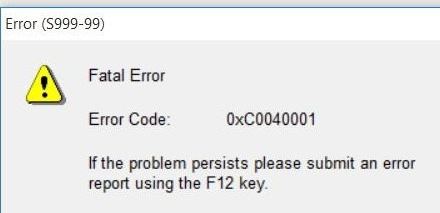
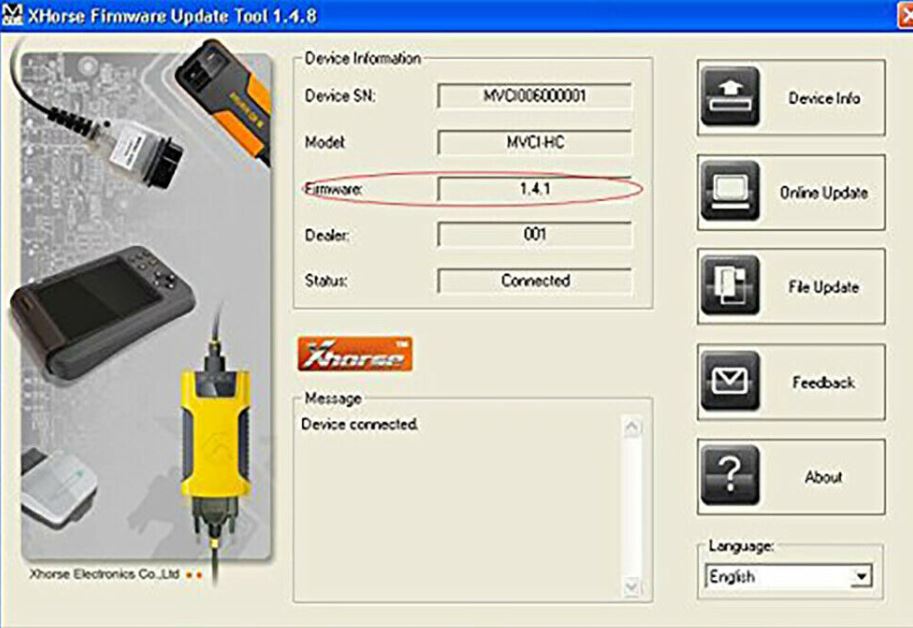
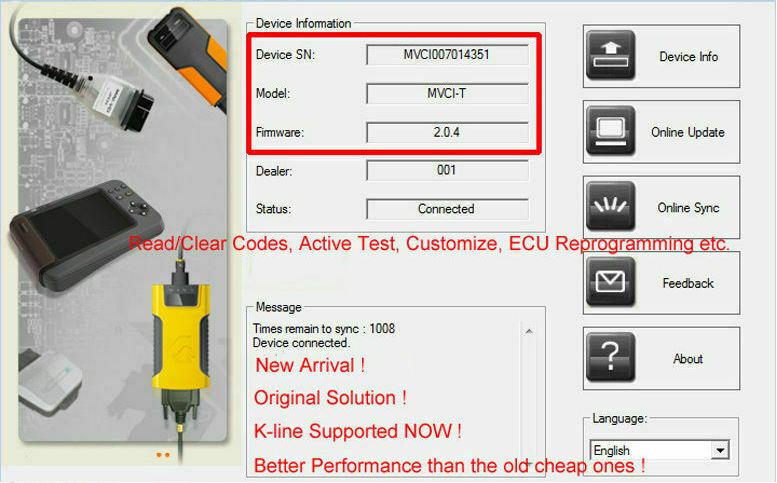
Toyota Techstream 0xC0040001 Error – This error is due to a firmware limitation, there are generally two firmware versions of the J2534 connector. Version 1.4.1 and Version 2.0.4. To access data lists and active tests, for newer vehicles you need the 2.0.4 firmware cable.
There is no real way to update the 1.4.1 cable, because it does not natively support K-line. The best course of action is to order a new 2.0.4 cable.
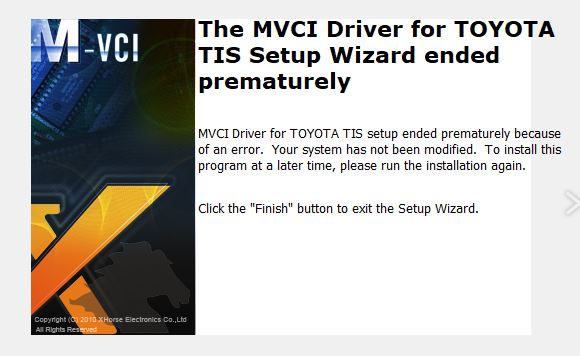
MVCI Driver ended prematurely error – This error comes up for some Windows 7, and windows 10 people (particularly 64 bit):
Follow the below to complete the install; make sure you have the cable plugged in when you go to test FirmwareUpdateTool.exe
Download (PDF, 203KB)
Unable to connect to vim – This has to do with a misplaced path; essentially Techstream is searching for MVCI32.dll in C: but really it resides in C:Program Files (x86)XHorse ElectronicsMVCI Driver for TOYOTA TISMVCI32.dll
What you need to do is take MVCI32.dll and make a copy of it, and paste it in the C drive so the path C:MVCI32.dll becomes valid.
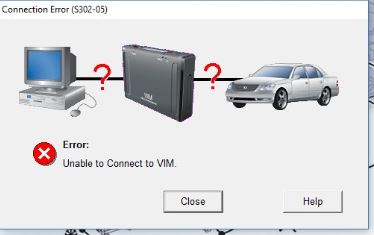
Enjoy!
This entry was posted on October 24, 2019 at 9:10 pm and is filed under Do it Yourself. You can follow any responses to this entry through the RSS 2.0 feed.