Escape from Tarkov does not start and displays the following error message:
«Error on POST. Status Code: InternalServerError/GatewayTimeout/BadGateway»
On some players’ PCs, EFT won’t launch due to the above error. If you are facing this problem too, you can fix it by following the steps.

1. Clear Cache
Need for Speed Unbound Gameplay Tra…
Please enable JavaScript
To fix «Error on POST» in Escape from Tarkov, try to clear the cache first. This has worked for many players. Follow these steps and see if it fixes it:
How to clear cache in Escape from Tarkov
- Run your Battlestate Games Launcher
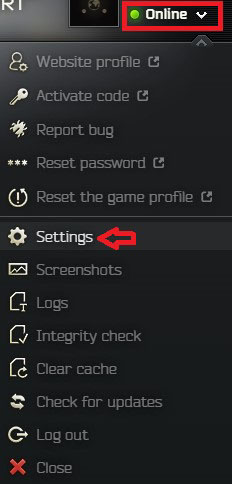
- Open the drop-down menu under your name.
- Then select Settings
- Scroll down and click the «Clean Temp folder«
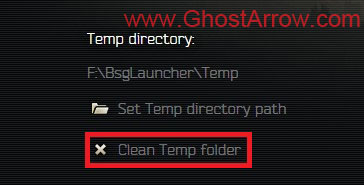
- Select Yes
- Restart the launcher
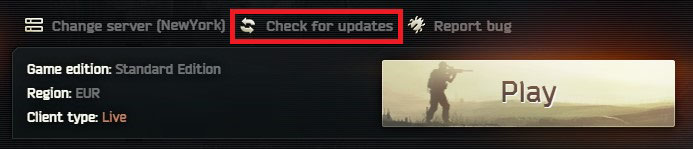
- Click on the «Check for updates«
2. Verify game files
If the error persists even after clearing the cache, you should try verifying the game files.
How to verify integrity of EFT files
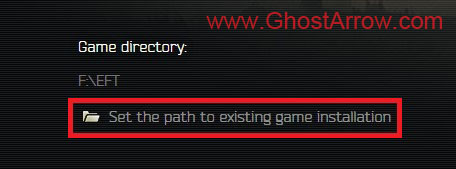
- Open the launcher and go to Settings
- Click on the «Set the path to existing game installation«
- Select the same main folder where EFT is currently installed. So just click the «Select Folder» button.
This may or may not download files which might take a while depending on your internet connection or HDD/SSD speeds so be wary of that.
Once the verification is finished, you can try to play Escape from Tarkov.
If all else fails, maybe this is a temporary issue due to server congestion. Just wait a bit or submit a ticket by clicking the «Report bug» button in the launcher.

Когда пытаюсь зайти в Escape from Tarkov, появляется окошко Error on Post с какой-то ссылкой и кодом BadGateway. Недавно вышла новая обнова для игры, а поэтому хотел зайти и посмотреть, чего там разрабы наворотили. Но вот уже часа полтора никак не могу зайти в игру. Думал, может с инетом какие-то проблемы, но вроде бы нет. По Speedtest показатели нормальные.
Решение
Сообщение Error on Post зачастую появляется в случае перегрузок игровых серверов Escape from Tarkov. Возможно, в настоящий момент к игре пытается подключиться слишком большое количество игроков одновременно — сервера не справляются.
Что делать? Ждать спада количества игроков. Кроме того, можно следить за состоянием игровых серверов EfT. Если же вы видите, что с серверами все в порядке, прошло немало времени, но сообщение Error on Post никуда не исчезло, то, вероятно, с файлами вашей игры что-то не так.
Разработчики Battlestate Games утверждают, что появление подобных ошибок могут спровоцировать неправильно установленные файлы последнего патча. Попробуйте полностью переустановить EfT в официальном лаунчере и проверьте наличие проблемы.
Игра в Escape from Tarkov — это жестокий опыт, от получения одного выстрела из кустов до того, чтобы наткнуться на не того босса не в том месте. время. Ветераны франшизы, однако, знают еще одного босса, который может представиться сам — пытаясь попасть в игру. Как правило, это происходит во время обновлений и событий Twitch, когда серверы могут быть перегружены и вызывать странные ошибки, что приводит к таким ошибкам, как Ошибка при публикации: вот что вы можете сделать, чтобы исправить это.
Ошибка Post возникает, когда серверы перегружаются, а это означает, что когда это происходит, обычно это происходит из-за перегрузки сервера — слишком много игроков пытаются войти в систему одновременно, или стоять в очереди на серверы. Однако это также может происходить редко из-за несоответствия патча Escape from Tarkov. Однако перед попыткой устранения неполадок обязательно проверьте состояние сервера Escape from Tarkov: если Tarkov сообщает о проблеме, не выполняйте шаги по устранению неполадок, перечисленные ниже. Вместо этого подождите, пока Battlestate Games сообщит, что сервер снова подключен к сети и работает.

Если Battlestate Games не сообщает об ошибке сервера в программе запуска, официальной учетной записи Twitter или на странице состояния сервера, скорее всего, у вас несоответствие файла/патча. Вам нужно полностью удалить Escape From Tarkov, а затем переустановить ее с помощью программы запуска Battlestate Games. Если это по-прежнему не устраняет ошибку, вам следует обратиться в службу поддержки Battlestate Games для дальнейшего устранения неполадок.
Если это происходит сразу после исправления, лучше попытаться устранить ошибку для несколько часов, позволяя Battlestate Games справиться с новой нагрузкой, которую патчи, как правило, приносят шутерам такой популярности. Не вносите радикальные изменения в файлы конфигурации или домашнюю сеть без консультации со службой поддержки, так как это может привести к возникновению новых проблем.


Molferen2
-
Replies
100 -
Created
1 yr -
Last Reply
Jan 17
Top Posters In This Topic
-
4
-
4
-
3
-

2
Posted Images
Papka_Nagibun
-
- Share
2 минуты назад, Molferen2 сказал:
Same problem
Edited December 12, 2021 by Papka_Nagibun
typo
- Quote
Link to comment
Share on other sites


Vin_
-
- Share
Link to comment
Share on other sites


sherifu
-
- Share
Right now the servers are overloaded because of the update and you may experience the error you just got there. Have a bit of patience, thousands of players are logging in the same time so this may cause errors.
- Quote
Link to comment
Share on other sites
LawfulShark
-
- Share
Idk what this issue is, but im having it too
- Quote
Link to comment
Share on other sites
xtriggatrentx
-
- Share
Same…. Nakita… let me hold like 10 Bitcoin for the inconvenience… CHeeki Breeki
Link to comment
Share on other sites
GamerDeibos
-
- Share
10 minutes ago, sherifu said:
Right now the servers are overloaded because of the update and you may experience the error you just got there. Have a bit of patience, thousands of players are logging in the same time so this may cause errors.
Its unfortunate, but it’s great news to know what it is and that the game is PEAKING! Wooo wooo! thanks for the response!
- Quote
Link to comment
Share on other sites
ghost1669
-
- Share
the BsgLauncher.exe file seems to be messed up, it says that it was modified about 6 hours into the future. at about 4:05 pm, its currently 8:36am my time. might be cause of problem or maybe a clue to it @devs
Edited December 12, 2021 by ghost1669
wrong timeframe
- Quote
Link to comment
Share on other sites
Jaeger522
-
- Share
The problem seems to be that the launcher tries to access the old 12.11 path and not server overloading — pls fix the launcher !
Thx
- Quote
Link to comment
Share on other sites
ataros
-
- Share
Link to comment
Share on other sites
Tastee
-
- Share
also getting this code
any idea on how to fix or heard anything?
- Quote
Link to comment
Share on other sites
.thumb.jpg.0be34f5a66e5d23b476d2039807f555d.jpg)
MylesE
-
- Share
The developers are aware of the issue and are actively working on a fix.
- Quote
Link to comment
Share on other sites
NerdCoreTV
-
- Share
vor 34 Minuten schrieb sherifu:
Right now the servers are overloaded because of the update and you may experience the error you just got there. Have a bit of patience, thousands of players are logging in the same time so this may cause errors.
sorry, maybe the devs update the servers. it`s every wipe the same, for christ sake, let me pay 5€ a month for decent servers — i would pay that. but this sh** show, wipe and wipe again. it`s utterly annoying. luckilie your fav streamers can play and promote your game 
- Quote
Link to comment
Share on other sites
BYDZTxx
-
- Share
Link to comment
Share on other sites

ChaosManiek
-
- Share
Same here, whats worse I can’t get verification email. Some of my buddies are currently logged in.
Link to comment
Share on other sites
J-3-L-L-O
-
- Share
1 minute ago, ChaosManiek said:
Same here, whats worse I can’t get verification email. Some of my buddies are currently logged in.
Same, I don’t get verification email, and cant login either. This happened last wipe, hopefully over soon…
- Quote
Link to comment
Share on other sites
Droidhunt
-
- Share
Link to comment
Share on other sites
Harjek
-
- Share
I restarted my launcher several times, now it is loading
- Quote
Link to comment
Share on other sites


Xarc
-
- Share
13 minutes ago, BYDZTxx said:
加油吧!
Try to post here if you are bothered of something from the game.
- Quote
Link to comment
Share on other sites

DiBBz
-
- Share
this is not overload. ive got people that have logged in fine but a couple of us are having this issue. and its only because we need to login which we cant do because emails wont be sent out via launcher requests. but if you login on the website its completely fine. doesn’t break like it used to!
- Quote
Link to comment
Share on other sites
Rickys_smokes
-
- Share
After not getting email confirmation codes, I restarted my computer and tried again. Got the code finally, and when I typed it in I got the same damn «Error on POST» message. Do I keep trying with this code or start all over and pray that it sends me an email confirmation? Any info would be nice Battlestate…
EDIT: Also have tried changing my password multiple times on the website and that poo is down too…
Edited December 12, 2021 by Rickys_smokes
Added more
- Quote
Link to comment
Share on other sites
Garthok
-
- Share
Servers are loaded? I don’t think the servers being flooded with players is the reason my launcher can’t even find 12.12.
- Quote
Link to comment
Share on other sites
J-3-L-L-O
-
- Share
4 minutes ago, Rickys_smokes said:
After not getting email confirmation codes, I restarted my computer and tried again. Got the code finally, and when I typed it in I got the same damn «Error on POST» message. Do I keep trying with this code or start all over and pray that it sends me an email confirmation? Any info would be nice Battlestate…
EDIT: Also have tried changing my password multiple times on the website and that poo is down too…
We can’t really do anything, the bug makes the launcher think its in 12.11, so BSG needs to fix it, thats all…
- Quote
Link to comment
Share on other sites
Garthok
-
- Share
Just reset my launcher around 10 times and got the option to DL the patch. As soon as it was DL’ed the launcher locked up for a sec, then reverted back to 12.11 and gave me a POST bad gateway again. Dev’s announced that they «know that the servers are flooded» they haven’t taken any notice to the fact that the launcher is drunk.
- Quote
Link to comment
Share on other sites
ChaosManiek
-
- Share
Yea, but the most weird part is that some people are actually able to play.. My friend from same country can play now while I am not able to even login to launcher. Whats even more weird that launcher sees that I was changing PC/IP whatever which is not true and actually it even shouldn’t ask me for verifcation code.
- Quote
Link to comment
Share on other sites
How to fix tarkov error on post (100% working method)
tarkov error on post,tarkov error,tarkov error fixed,how to fix tarkov error, Escape from Tarkov status code 523,Escape from Tarkov,error fixed tarkov error,tarkov,tarkov error,error,tarkov server down,
Escape from Tarkov triton could be a first-person shooter game for Windows developed by Battle state Games. the sport has several players often taking part in the sport that aren’t ready to play currently thanks to the above-named error. therefore during this guide allow us to take a glance at why you get this error and the way to mend it.
There square measure voluminous variables that may trigger the error code in question. however at the top of the day, it’s a network issue. This issue happens after you aren’t ready to connect with the server. It will happen thanks to a fault within the network or the server. There square measure multiple solutions that you simply will use to resolve the fault. apart from that, one in all the foremost common reasons, poor web association, should create it to our list of the explanations that may cause the difficulty. we’ve coated all the workarounds and solutions during this article. So, execute every resolution, one by one, and you’ll be ready to resolve the difficulty.
How to Fix tarkov error on post (solved)
There square measure 2 ways that you’ll be able to fix this error.
☑️Resetting your account: Reset your triton account and take a look at taking part in the sport once more. because of user u/KAID3N on Reddit for sharing this fix. you’ll be able to check the entire Reddit thread here.
☑️Log in employing a VPN: Logging in employing a VPN will assist you play the sport. instead, if you employ a VPN then you’ll be able to strive work in while not victimisation one to check if that helps. This fix worked for user u/Ranezu on Reddit. though during this fix the user was solely ready to log in to the sport and didn’t play it.
These square measure the 2 workarounds that you simply will attempt to fix the error. If each of those don’t work then you have got no choice however to attend, that’s as a result of this is often a tangle with their servers. Once the servers square measure up and running properly you must be ready to play once more.
[100% fixed] tarkov error on post (solved)
You get this error once the sport will Twitch drops. whereas this is often not the official reason, however rather robust speculation by the community. that’s as a result of the servers aren’t ready to handle the players when a drop event.
Solution:01-Pick the most effective server

Before moving to the answer, you must grasp that selecting the most effective server is crucial, you would like to create positive that you simply square measure victimisation the server with the most effective ping. the simplest issue you’ll be able to do is to enable Use automatic server choice. To do that, click on Change server after launching the sport, then tick “Use automatic server selection” box and click on Apply. Then restart the sport and check if the difficulty persists.
Solution:02-Restart your Router

Let us begin with a really straightforward resolution, i.e; restarting your Router. could|this can} resolve any fault that you simply may have and can resolve the difficulty. the method is incredibly straightforward, simply follow the given steps and you’ll be sensible to travel.
☑️Turn off your network devices.
☑️Plug it out of the facility supply.
☑️Wait for a moment or 2.
☑️Plug them back in.
☑️Now, try connecting to the server. Hopefully, it’ll work this point.
Solution:03— Use VPN

Next up, strive employing a VPN association to attach to a distinct server. in line with several victims simply sanctioning the VPN has resolved this issue and plenty of different server-related problems. So, we tend to suggest you are doing an equivalent. you’ll be able to either select a free VPN service or go for a paid service. Either way, it’s your call, browse their description from our guide, get one for you, and so fancy vice.
Solution:04-Flush DNS and reset network

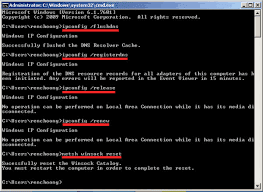
The issue may occur thanks to some fault within the Network. To resolve the difficulty, we want to execute some commands. These commands can flush DNS and reset your Network.
✔️First, open the Command Prompt as Associate in Nursing administrator, then run these commands, one by one.
✔️Finally, restart your pc, open the sport, and see if you’re ready to connect with the server or not.
Solution:05-Disable IPv6

A lot of the victims were ready to resolve the difficulty simply by disabling the IPv6. And since most people don’t use this protocol anyway, disabling it won’t have any severe result. Follow the given steps to try to to an equivalent.
✔️Open Run, type “ncpa.cpl” and click OK.
✔️Then right-click on LAN or LAN (the one you’re using) and choose Properties.
✔️Disable Internet Protocol Version half dozen (TCP/IPv6).
✔️Click Ok.
✔️Then restart your pc and check if the difficulty persists.
Solution:06-Use Static information processing

There square measure 2 kinds of IPs, Dynamic and Static. In Dynamic information processing, your router can assign you the web Protocols. however during this case, you would like to assign a Static IP manually and see if that may fix the difficulty.
After doing that, restart your pc and check if the difficulty persists.
Solution:07-Check your web (internet connection)

Last however not least, if nothing is functioning, use an Internet Speed tester to grasp your information measure. Your information measure can’t be low, if it is, then check if all the devices square measure seeing similar information measure. If all of them have web problems, decision your ISP and raise them to resolve the matter. If yours is that the solely device with slow web, then fix the difficulty.click here for check network connection
Содержание
- EFT — Error on POST InternalServerError/GatewayTimeout/BadGateway
- 1. Clear Cache
- How to clear cache in Escape from Tarkov
- 2. Verify game files
- How to verify integrity of EFT files
- Коды ошибок Escape from Tarkov
- Ошибка Escape From Tarkov при исправлении плохого шлюза POST
- Как исправить ошибку POST Bad Gateway в Escape From Tarkov
- Ошибка Escape From Tarkov при исправлении плохого шлюза POST
- Как исправить ошибку POST Bad Gateway в Escape From Tarkov
- Escape From Tarkov Backend Error: что это такое и как это исправить
- Что такое бэкэнд-ошибка Escape From Tarkov?
- Как устранить ошибку бэкэнда?
- 1. Перезапустить Escape From Tarkov
- 2. Обход брандмауэра
EFT — Error on POST InternalServerError/GatewayTimeout/BadGateway
Escape from Tarkov does not start and displays the following error message:
«Error on POST. Status Code: InternalServerError/GatewayTimeout/BadGateway»
On some players’ PCs, EFT won’t launch due to the above error. If you are facing this problem too, you can fix it by following the steps. 
1. Clear Cache
Please enable JavaScript
To fix «Error on POST» in Escape from Tarkov, try to clear the cache first. This has worked for many players. Follow these steps and see if it fixes it:
How to clear cache in Escape from Tarkov
- Run your Battlestate Games Launcher
- Open the drop-down menu under your name.
- Then select Settings
- Scroll down and click the «Clean Temp folder«
- Select Yes
- Restart the launcher
- Click on the «Check for updates«
2. Verify game files
If the error persists even after clearing the cache, you should try verifying the game files.
How to verify integrity of EFT files
- Open the launcher and go to Settings
- Click on the «Set the path to existing game installation«
- Select the same main folder where EFT is currently installed. So just click the «Select Folder» button.
This may or may not download files which might take a while depending on your internet connection or HDD/SSD speeds so be wary of that.
Once the verification is finished, you can try to play Escape from Tarkov.
If all else fails, maybe this is a temporary issue due to server congestion. Just wait a bit or submit a ticket by clicking the «Report bug» button in the launcher.
Источник
Коды ошибок Escape from Tarkov
Kernel Errors
1000 — Неизвестная ошибка при выполнении сценариев.
Серверные:
213 error: Server DOWN, ошибка бэкенда сервера, никакого отношения к клиенту игры или вашему интернету и ПК не имеет, случилась какая то проблема на стороне сервера игры Таркова, так что починить ее могут только разработчики — ожидайте решения и фикса ошибки от команды разработчика.
403 — В часы пиковой нагрузки на выходных вы можете получить ошибку 403. Игра после этого может быть недоступна на короткое время. Команда разработчика работает над устранением этой проблемы! Если вы получили такую ошибку — просто подождите 5-10 минут и перезагрузите игру.
Авторизация
204 — Указанная недопустимая бэкэнд версия, решение: обновите игру, если не получается переустановите. (Версия на сервере не совпадает с вашей)
205 — Клиент не авторизован, решение: перезайдите. (иногда разлогинивает по разными причинам, в томч числе не зависящих от вас самих)
206 — Неправильный адрес электронной почты или пароль.
208 — Вход из этой страны запрещен для вашей учетной записи. (помните что игра купленная в РФ, не может быть запущена в Евро зоне или США, проверьте не включен ли у вас VPN)
209 — Код авторизации отправлен по электронной почте. Вы должны ввести код.
210 — Нет купленной игры. (Возможно ваша триальная версия игры закончилась)
211 — Введен неправильный код авторизации.
229 — Профиль заблокирован.
230 — Учетная запись заблокирована. Максимальное количество попыток авторизации достигнуто.
231 — Неправильная таксономия версии.
232 — Неверная основная версия.
233 — У вас нет доступа к этому серверу.
Общие игровые команды
200 — Неизвестная ошибка.
201 — Клиент не авторизовался или профиль не выбран.
207 — Недопустимый переданный параметр (отправлен в разные команды).
224 — Максимальное количество созданных профилей.
225 — Это имя профиля уже есть.
226 — Это имя профиля недопустимо.
227 — Произошла ошибка при отправке очереди команд. Недопустимое имя команды в очереди.
228 — Ошибка отправки очереди команд. Недопустимые данные внутри команды.
299 — Невозможно выполнить это действие. Профиль в матче.
Лаунчер
300 — нет версии для обновления.
301 — версия устарела.
302 — передан недопустимый параметр.
Ошибки лаунчера решаются путем удаления корневой папки самого лаунчера (BsgLauncher), затем устанавливаем лаунчер по новой (с сайта).
Торговля
500 — Неизвестная ошибка.
501 — Неизвестная ошибка.
503 — Товары не переданы или не найдены по ID.
504 — Недействительный параметр типа.
505 — У трейдера не хватает денег на покупку.
506 — У игрока недостаточно денег, чтобы купить.
507 — Игрок не хватает места в схроне для размещения товаров, полученных в результате сделки.
508 — Трейдер не приобретает этот вид товаров.
509 — Нет денег или товаров для обмена на этот товара.
510 — Ошибка сценария во время операции.
511 — Торговец покупает только отремонтированные товары.
512 — Торговец сейчас не работает.
Матчмейкинг
600 — Неизвестная ошибка.
601 — Неверный параметр прошел.
602 — Сессия потеряна. Требуется повторный вход.
603 — Этот профиль уже находится в игре.
604 — Сервер не зарегистрирован.
605 — Доступен поиск игры.
606 — Недопустимый идентификатор местоположения.
607 — Неверный идентификатор сервера.
608 — Идентификатор сервера уже зарегистрирован.
609 — IP-адрес сервера: ПОРТ уже зарегистрирован.
610 — Соединение с этим IP отказано.
Групповое соответствие
620 — Игрок alredy в группе.
622 — Ошибка приглашения.
623 — Плохая группа id.
624 — Группа не создана.
625 — Группа заполнена.
626 — Плохой идентификатор пользователя.
627 — Старая версия игры.
628 — Плохое расположение.
Квесты
700 — Неизвестная ошибка.
703 — Квесты с этим идентификатором не найдены.
704 — Квест недоступен для вас.
705 — В схроне нет места для награды.
706 — Невозможно выполнить квест. Квест должен находиться в состоянии «Выполнения».
707 — Невозможно выполнить квест. Все условия для завершения не выполняются.
708 — Неустранимая ошибка при создании счетчиков бэкэнда в профиле.
710 — Невозможно выполнить квест. Не выполнено хотя бы одно условие отказа.
711 — Невозможно выполнить квест. Квест должен находиться в состоянии «Выполнения».
E-mail
900 — Неизвестная ошибка.
903 — Недопустимый идентификатор чата.
904 — Неверный идентификатор профиля.
905 — Передан недопустимый тип параметра.
906 — Передан недопустимый текстовый параметр.
907 — Неверный параметр Имя.
908 — Произошла ошибка при прикреплении данных. Дополнительная информация указана внутри ошибки.
909 — Пользователь добавил вас в список игнорирования.
Список друзей
921 — Идентификатор недопустимого профиля.
923 — Неверный запрос id для добавления в друзья.
924 — Неверный профиль друга.
Ремонт объектов
1200 — Неизвестная ошибка.
1201 — Неверные предметы передаются. Дополнительная информация указана внутри ошибки.
1202 — Был отправлен недопустимый объект пользователя. Дополнительная информация указана внутри ошибки.
1203 — Нет денег на ремонт.
1204 — Этот торговец не ремонтирует предметы.
Страхование
1300 — Неизвестная ошибка.
1301 — Неверный идентификатор продавца.
1302 — Неверные вещи возвращены.
Источник
Ошибка Escape From Tarkov при исправлении плохого шлюза POST
Escape From Tarkov – очень популярный онлайн-шутер от первого лица. Этот подход к дизайну, известный своей чрезвычайной реалистичностью и суровым геймплеем, привлек единомышленников со всего мира. Но, как и в каждой онлайн-игре, есть ошибки, которые могут помешать вам играть в игру. Одной из наиболее серьезных таких проблем является так называемая ошибка POST Bad Gateway. Если вы сталкиваетесь с этим постоянно и задаетесь вопросом, можете ли вы что-нибудь с этим сделать со своей стороны, наше руководство Escape From Tarkov Error on POST Bad Gateway Fix предлагает вам решение, а также объясните, почему вообще возникает эта ошибка.

Как исправить ошибку POST Bad Gateway в Escape From Tarkov
Для начала давайте сначала уточним, что что это за ошибка и почему она возникает. А именно такое часто может происходить, когда Escape From Tarkov недавно обновился до новой версии. И, поскольку ТЭО находится в стадии разработки, это часто имеет место. Программа запуска пытается получить доступ к старому патчу, поэтому вы получаете указанную ошибку. Кроме того, кажется, что серверы часто не могут справиться с нагрузкой по одновременному обновлению такого количества экземпляров игры, что видно из этой цитаты разработчиков с их форумов: «Сейчас серверы перегружены из-за обновления, и вы может возникнуть ошибка, которую вы только что получили. Имейте немного терпения, тысячи игроков одновременно входят в систему, поэтому это может привести к ошибкам.”
Поэтому единственное, что вы действительно можете здесь сделать, это попытаться перезапустить программу запуска. несколько раз, пока ошибка POST Bad Gateway не исчезнет и вы не сможете запустить игру в обычном режиме. Если это не помогает, вам придется подождать, пока разработчики не решат эту проблему со своей стороны.
Источник
Ошибка Escape From Tarkov при исправлении плохого шлюза POST
Escape From Tarkov – очень популярный онлайн-шутер от первого лица. Этот подход к дизайну, известный своей чрезвычайной реалистичностью и суровым геймплеем, привлек единомышленников со всего мира. Но, как и в каждой онлайн-игре, есть ошибки, которые могут помешать вам играть в игру. Одной из наиболее серьезных таких проблем является так называемая ошибка POST Bad Gateway. Если вы сталкиваетесь с этим постоянно и задаетесь вопросом, можете ли вы что-нибудь с этим сделать со своей стороны, наше руководство Escape From Tarkov Error on POST Bad Gateway Fix предлагает вам решение, а также объясните, почему вообще возникает эта ошибка.
Как исправить ошибку POST Bad Gateway в Escape From Tarkov
Для начала давайте сначала уточним, что что это за ошибка и почему она возникает. А именно такое часто может происходить, когда Escape From Tarkov недавно обновился до новой версии. И, поскольку ТЭО находится в стадии разработки, это часто имеет место. Программа запуска пытается получить доступ к старому патчу, поэтому вы получаете указанную ошибку. Кроме того, кажется, что серверы часто не могут справиться с нагрузкой по одновременному обновлению такого количества экземпляров игры, что видно из этой цитаты разработчиков с их форумов: «Сейчас серверы перегружены из-за обновления, и вы может возникнуть ошибка, которую вы только что получили. Имейте немного терпения, тысячи игроков одновременно входят в систему, поэтому это может привести к ошибкам.”
Поэтому единственное, что вы действительно можете здесь сделать, это попытаться перезапустить программу запуска. несколько раз, пока ошибка POST Bad Gateway не исчезнет и вы не сможете запустить игру в обычном режиме. Если это не помогает, вам придется подождать, пока разработчики не решат эту проблему со своей стороны.
Источник
Escape From Tarkov Backend Error: что это такое и как это исправить
Escape from Tarkov — тактический шутер от первого лица от студии Battlestate Games. Это эксклюзивно для Windows, и в нем игроки присоединяются к разным фракциям, чтобы сражаться друг с другом либо за добычу, либо за побег из области.
Игроков бросают в матчи, где они должны добраться с одной стороны карты на другую и добраться до точки эвакуации. И попутно сталкивайтесь с натиском других, пытающихся их остановить или достичь цели.
Игра существует с 2017 года и в настоящее время находится в стадии закрытого бета-тестирования. Вы можете приобрести игру на веб-сайте разработчика, что даст вам доступ к бета-версии, но неизвестно, когда выйдет финальная версия Escape from Tarkov.
Некоторые игроки столкнулись с серверной ошибкой во время игры в Escape from Tarkov. Это руководство покажет вам, как решить эту проблему.
Что такое бэкэнд-ошибка Escape From Tarkov?
Бэкенд-ошибка в Таркове возникает, когда возникают проблемы с подключением к серверам игры. Внезапно происходит сбой соединения между вашим компьютером и сервером, что приводит к сбою игры.
Вы также испытываете ошибку различными способами. Согласно различным отчетам, может появиться всплывающее окно с сообщением о том, что игра не может получить данные, или это простое сообщение 502 bad gateway.
Независимо от того, как вы сталкиваетесь с ошибкой, это раздражает и разочаровывает. Это руководство покажет, что вы можете сделать с этой ошибкой бэкэнда в Escape From Tarkov.
Как устранить ошибку бэкэнда?
1. Перезапустить Escape From Tarkov
Лучшее и самое простое, что вы можете сделать, чтобы устранить ошибку бэкэнда, — это либо перезагрузить Escape From Tarkov, либо перезагрузить компьютер. Мы рекомендуем вам сделать и то, и другое.
Как вы знаете, перезагрузка компьютера решает большинство проблем. Это распространяется и на Escape From Tarkov. Также настоятельно рекомендуется перезагрузить маршрутизатор.
2. Обход брандмауэра
- Во-первых, вам нужно иметь полный контроль над папкой Escape From Tarkov.
- Перейдите в папку Escape From Tarkov на вашем компьютере.
- Щелкните папку правой кнопкой мыши и в контекстном меню выберите «Свойства».
- Нажмите на вкладку «Безопасность».
- На вкладке «Безопасность» нажмите «Дополнительно».
- Нажмите «Изменить» рядом с именем владельца вверху.
- В этом новом окне нажмите «Дополнительно».
- Теперь в другом новом окне нажмите «Найти сейчас».
- Найдите свое имя пользователя и нажмите кнопку ОК.
- Нажмите OK в этом новом окне.
- Нажмите «Применить» в следующем окне, а затем закройте все.
- Теперь найдите и откройте брандмауэр Защитника Windows на своем компьютере.
- Нажмите «Дополнительные настройки» слева.
- В этом новом окне нажмите «Правила для входящих подключений» слева.
- Выберите Новое правило справа.
- В поле «Тип правила» выберите «Программа» и нажмите «Далее».
- Щелкните Путь к этой программе, а затем Обзор. Найдите файл Escape From Tarkov.
- После того, как вы нашли Escape From Tarkov и добавили его в правило для входящих подключений, нажмите «Далее».
- Если вы используете частный компьютер, нажмите Разрешить подключение. Или, если хотите, Разрешите соединение, если оно защищено — для дополнительного уровня безопасности.
- Нажмите Далее, когда закончите.
- Выберите, когда применять правило.
- Дайте имя правилу и описание, если хотите. Затем нажмите Готово.
Не стесняйтесь оставлять комментарии ниже, если у вас есть какие-либо вопросы о других играх или если у вас есть те, которые вы рекомендуете. Кроме того, не стесняйтесь оставлять комментарии о руководствах, которые вы хотели бы видеть, или информацию о других веб-браузерах.
Источник
This is an issue most likely caused by a game launcher problem
by Claudiu Andone
Oldtimer in the tech and science press, Claudiu is focused on whatever comes new from Microsoft. His abrupt interest in computers started when he saw the first Home… read more
Published on December 30, 2022
Reviewed by
Alex Serban

After moving away from the corporate work-style, Alex has found rewards in a lifestyle of constant analysis, team coordination and pestering his colleagues. Holding an MCSA Windows Server… read more
- Escape from Tarkov is an exciting game but the Error on POST message is preventing gamers from enjoying it.
- The developers say that the issue is caused by overloaded servers but in fact, the game loader is the culprit.
- Clearing the cache and updating the game will help you fix this problem quickly.
XINSTALL BY CLICKING THE DOWNLOAD FILE
This software will repair common computer errors, protect you from file loss, malware, hardware failure and optimize your PC for maximum performance. Fix PC issues and remove viruses now in 3 easy steps:
- Download Restoro PC Repair Tool that comes with Patented Technologies (patent available here).
- Click Start Scan to find Windows issues that could be causing PC problems.
- Click Repair All to fix issues affecting your computer’s security and performance
- Restoro has been downloaded by 0 readers this month.
Escape from Tarkov is a very popular game that is packed with action. However, the Tarkov Error on POST message is appearing more often than wanted for gamers who try to enjoy it.
In this article, we will point out the causes of this error and provide the best solutions to fix the problem.
Why do I get the Tarkov Error on POST message?
As ridiculous as it may seem, the developers say that the Error on POST message in Escape from Tarkov is caused by a server overload.
In other words, a lot of players try to access the servers at the same time which causes them to cave in.
This usually happens when there’s a new patch or update for the game and everyone wants to get it as soon as possible.
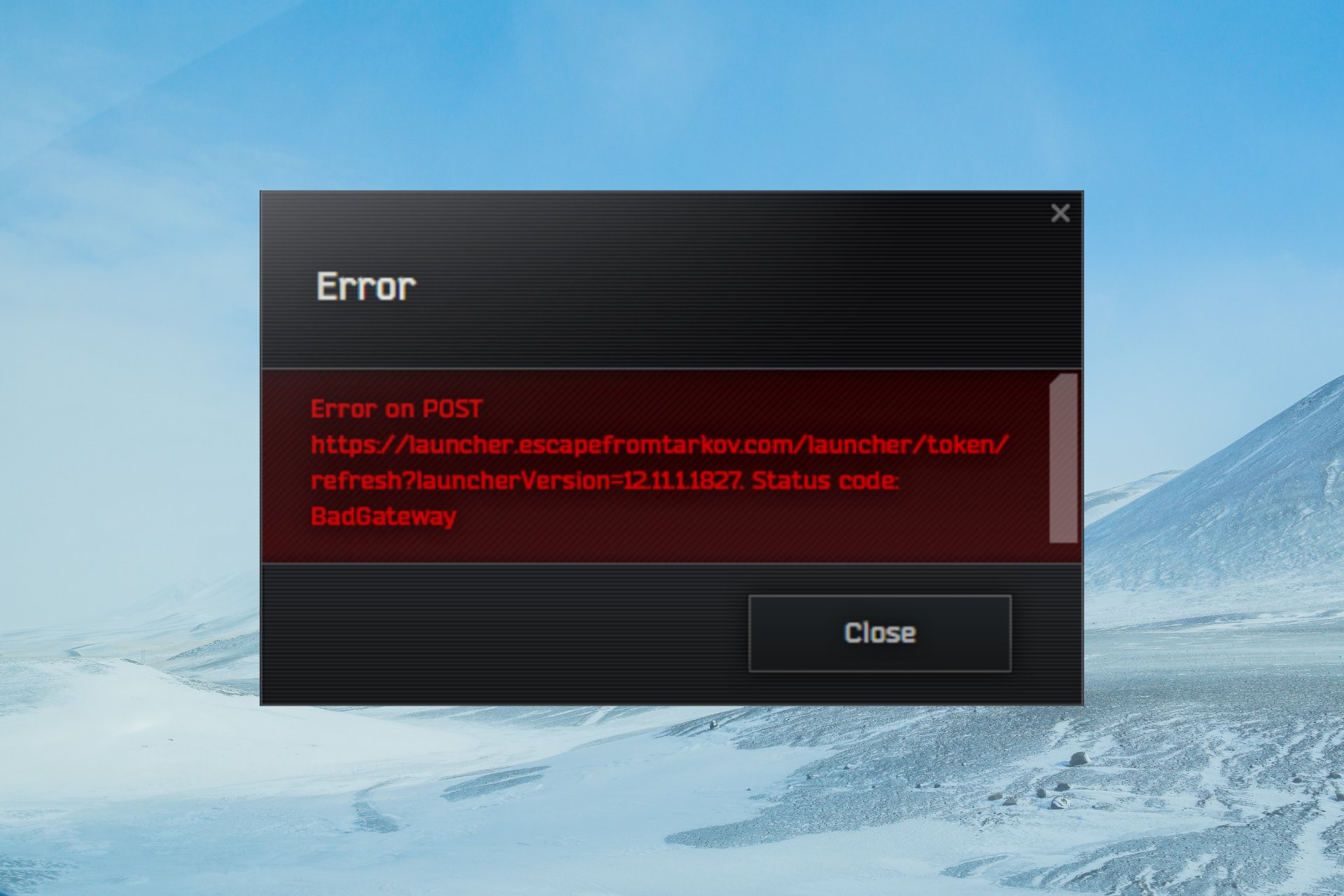
However, the complete message error points out the real problem: https://launcher.escapefromtarkov.com/launcher/config?launcherVersion=12.11.1.1826.
As you can see, that there is a problem with the BsgLauncher.exe file that was modified and it’s trying to access the old 12.11 patch.
Now that we know why this happens, let’s see how we can fix the issue with the solutions below.
How can I fix the Tarkov Error on POST?
Before getting into more complicated solutions for this issue, let’s crosscheck some preliminary methods:
- Restart the game and your PC. As useless as it may seem, this simple procedure may fix the problem.
- Restart your router. Sometimes, a local connection problem may prevent you from accessing the game server.
- Check the server status. You can do that by checking out the service status page where they announce such problems. Another way is to use a specialized website like Downdetector to check if the Escape from Tarkov server is down.
If the Error on POST is a server-related issue, there is nothing much to do except for waiting for a patch or a server fix.
However, if the problem is the launcher, we have a couple of solutions below that may bring back the game to life.
1. Clear the game cache
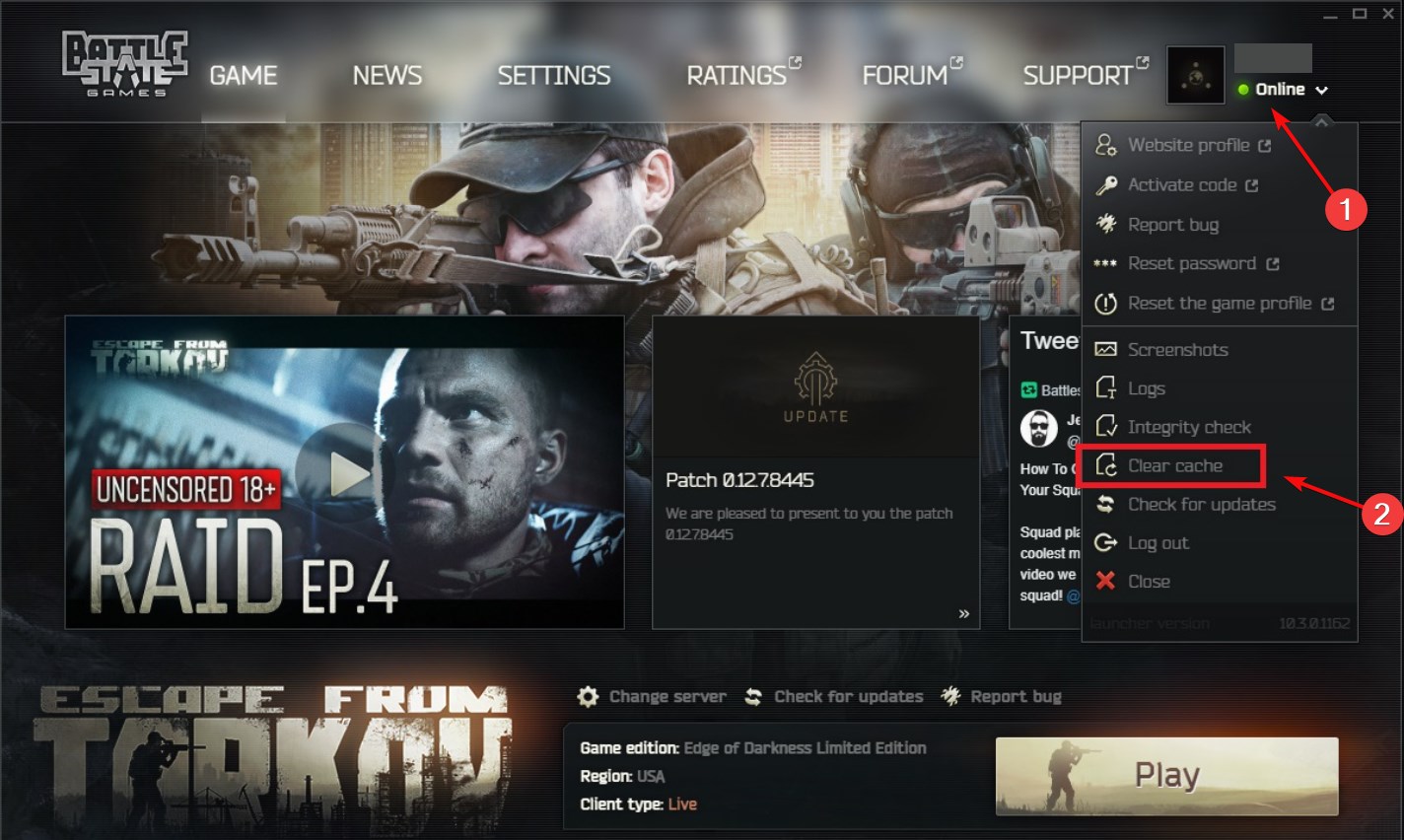
- Open the Escape from the Tarkov game launcher.
- Click your profile name and select Clear Cache from the drop-down menu.
- Close the launcher and reopen it again.
If all is well, the game will have the Update option, and the loader will be fixed. This is a verified solution so try it out.
2. Reinstall the game and the patch
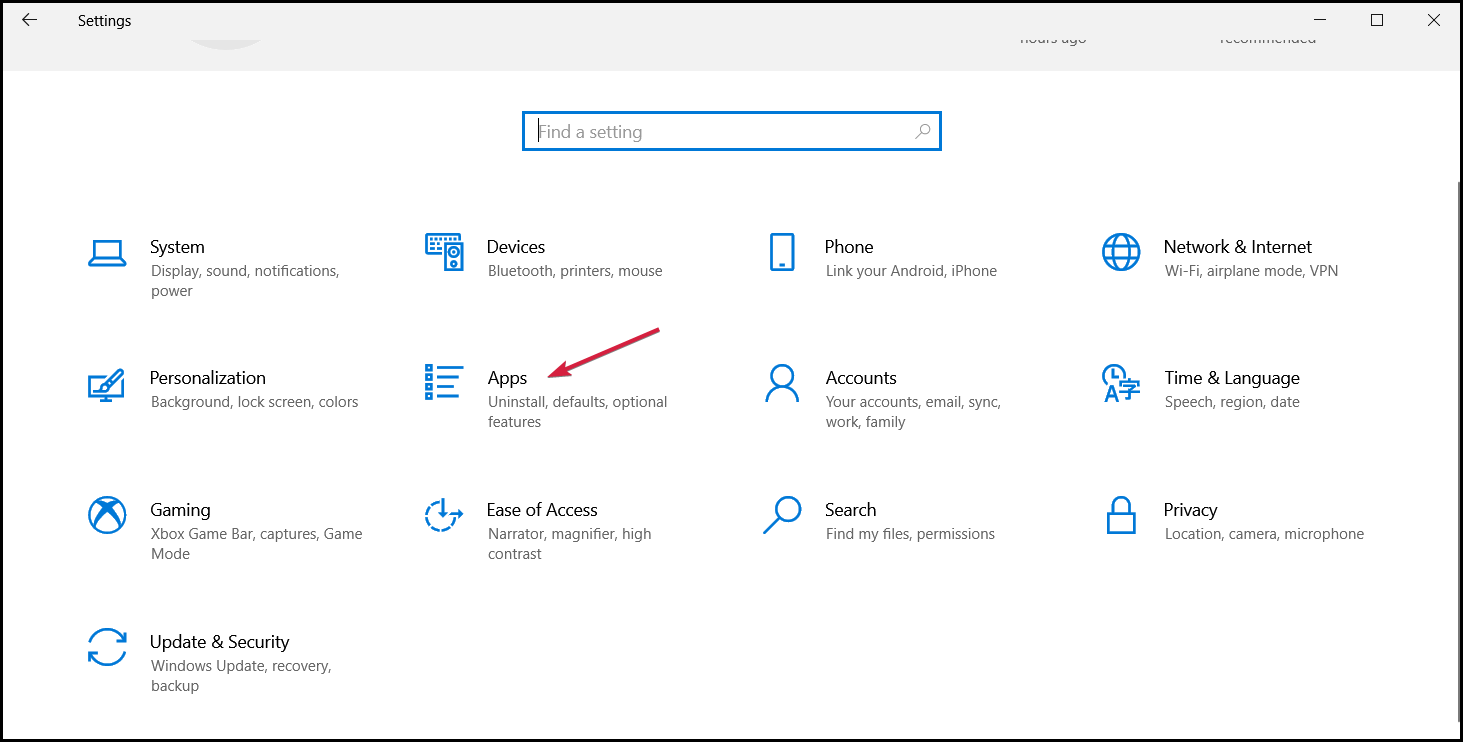
- Click the Start button and select Settings.
- Select Apps.
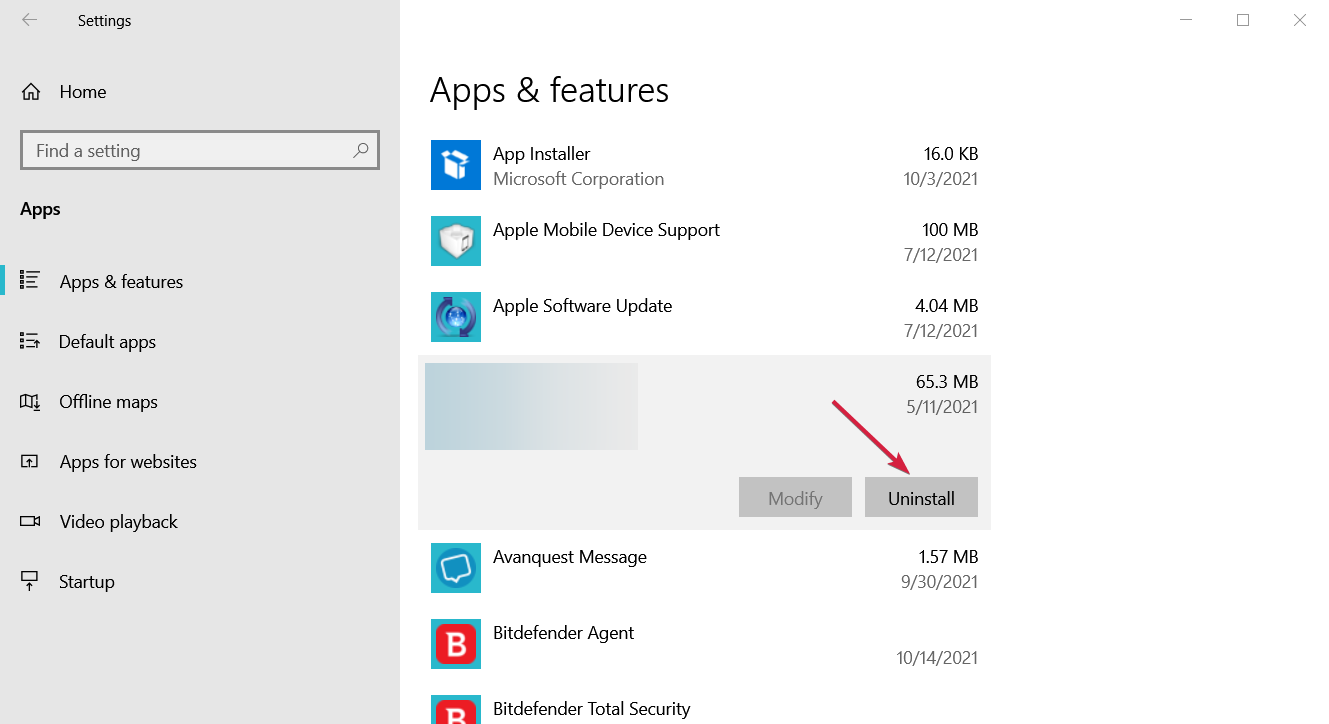
- Look through the list of apps, click on Escape from Tarkov and select Uninstall.
- Download the game again from the official website and then the patch.
This should fix the BsgLauncher.exe file, and everything should get back to normal. If that doesn’t work, try to install an older patch since the current one might be broken.
- Fix: PUBG Keeps Crashing PC [On Startup, In-Game]
- Forza Horizon 4 0x89232001 Error: 3 Quick Ways to Fix It
- FFXIV Unable to Download Patch Files: Why & How to Fix
- Sims 4 Lagging on PC: 4 Quick Fixes to Get Things Running
3. Try using a VPN
If a server overload really causes the situation, you might try using a VPN to circumvent the problem.
We have a great list of the best VPNs for gaming, but our recommendation is to use ExpressVPN.
It has super fast servers all over the world, and it can also work on PlayStation and Xbox.
⇒ Get ExpressVPN
We hope that our solutions helped you fix the Error on POST problem in Escape from Tarkov.
Our first solution was proven to work for a lot of our readers so you should try it out at once.
You might also be interested in our guide on how to fix the Escape from Tarkov backend error.
Have you succeeded in fixing the game? Let us know all about it in the comments section below.
Still having issues? Fix them with this tool:
SPONSORED
If the advices above haven’t solved your issue, your PC may experience deeper Windows problems. We recommend downloading this PC Repair tool (rated Great on TrustPilot.com) to easily address them. After installation, simply click the Start Scan button and then press on Repair All.

Newsletter
Escape From Tarkov – очень популярный онлайн-шутер от первого лица. Этот подход к дизайну, известный своей чрезвычайной реалистичностью и суровым геймплеем, привлек единомышленников со всего мира. Но, как и в каждой онлайн-игре, есть ошибки, которые могут помешать вам играть в игру. Одной из наиболее серьезных таких проблем является так называемая ошибка POST Bad Gateway. Если вы сталкиваетесь с этим постоянно и задаетесь вопросом, можете ли вы что-нибудь с этим сделать со своей стороны, наше руководство Escape From Tarkov Error on POST Bad Gateway Fix предлагает вам решение, а также объясните, почему вообще возникает эта ошибка.
Как исправить ошибку POST Bad Gateway в Escape From Tarkov
Для начала давайте сначала уточним, что что это за ошибка и почему она возникает. А именно такое часто может происходить, когда Escape From Tarkov недавно обновился до новой версии. И, поскольку ТЭО находится в стадии разработки, это часто имеет место. Программа запуска пытается получить доступ к старому патчу, поэтому вы получаете указанную ошибку. Кроме того, кажется, что серверы часто не могут справиться с нагрузкой по одновременному обновлению такого количества экземпляров игры, что видно из этой цитаты разработчиков с их форумов: «Сейчас серверы перегружены из-за обновления, и вы может возникнуть ошибка, которую вы только что получили. Имейте немного терпения, тысячи игроков одновременно входят в систему, поэтому это может привести к ошибкам.”
Поэтому единственное, что вы действительно можете здесь сделать, это попытаться перезапустить программу запуска. несколько раз, пока ошибка POST Bad Gateway не исчезнет и вы не сможете запустить игру в обычном режиме. Если это не помогает, вам придется подождать, пока разработчики не решат эту проблему со своей стороны.
Escape from Tarkov — одна из самых популярных онлайн-стрелялок от первого лица. Многие пользователи входят в него ежедневно каждую минуту дня на онлайн-сервере. Хотя, хотя кажется, что все идет гладко, бывают случаи, когда возникают определенные проблемы. Излишне говорить, что многие пользователи сообщают об ошибке в посте Таркова при входе в систему, которая не позволяет им войти в игру. И для этого мы составили для них список возможных решений, которые могут пригодиться при попытке быстро вернуться в игру. Не стесняйтесь, следуйте инструкциям, поскольку мы собрали исправления из многих надежных источников и от экспертов, чтобы ваша игра работала с абсолютной вероятностью.
Хотя может быть множество причин, по которым вы можете получить такую ошибку, мы все же можем сузить ее до нескольких абсолютных источников. В большинстве случаев это проблема, связанная с сервером, которая не имеет ничего общего с вашей целью. Кроме того, могут быть некоторые отсутствующие файлы, которые могут вызвать ошибку в сообщении Tarkov. Часто у некоторых пользователей возникают проблемы с настройками DNS. Независимо от источника ошибки, ниже приведены исправления, которые помогут вам устранить ошибку в сообщении Tarkov.
Альтернативные настройки DNS
Как упоминалось ранее, одним из источников ошибки post Tarkov могут быть ваши настройки DNS. Что вы можете сделать со своей стороны, так это изменить настройки DNS вашего персонального ПК на другие. Если вам интересно, что означает DNS, то это система имен Doman. Чтобы упростить вам задачу, он просто дает вашему компьютеру возможность использовать подключение к Интернету.
Теперь давайте перейдем к делу и сразу перейдем к шагам по изменению настроек DNS. Откройте «Настройки», выберите «Сеть и Интернет» и нажмите «Изменить параметры адаптера». Появится новое окно. В окне будут показаны различные типы соединений. Дважды щелкните тип подключения, подходящий для вашего ПК, а затем нажмите “Свойства”. Появится еще одно окно. Прокрутите вниз и выберите “Интернет-протокол версии 4 (IPv4)” и снова нажмите “Свойства”.
Появится последнее окно с надписью «Использовать следующие адреса DNS-серверов», нажмите на него. После этого введите «8.8.8.8» в строку «Предпочитаемый DNS-сервер». Таким образом, введите «8.8.4.4» в строке «Альтернативный DNS-сервер». Наконец, установите флажок «Проверять настройки при выходе» и нажмите «ОК». Это устранит ошибку Post Tarkov.
Используйте VPN
Ошибка Post Tarkov также может быть связана с проблемами с вашим IP-адресом и местоположением. В этом случае наличие VPN уместно. Вы можете получить любой вид VPN, премиальный или бесплатный, какой вам больше подходит. Если вы хотите пользоваться бесплатно, вы можете попробовать Windscribe в качестве надежного бесплатного VPN.
Переключите подключение к Интернету
Хотя это может показаться недостойным, оно определенно сработало для некоторых пользователей, когда они переключили свое интернет-соединение. Вместо того, чтобы подключить свой компьютер к Wi-Fi, они переключили его на свою локальную личную точку доступа. Вы также можете попробовать проводное соединение вместо беспроводного, чтобы исправить ошибку Post Tarkov, если точка доступа тоже не работает.
Хотя многие пользователи могут найти ошибку в Post Tarkov неприятной. , есть еще множество способов обойти это. Важно помнить, что вы не одиноки в середине, и для большинства пользователей проблема решается сама по себе. Так что не волнуйтесь и следуйте нашим решениям. Удачной игры!
Это все исправления ошибки Escape from Tarkov в посте. Если вы сталкиваетесь с ошибками и проблемами, связанными с другими компьютерными играми или с вашим ПК, посетите наш центр часто встречающихся ошибок ПК и способов их устранения.
Escape from Tarkov players is unable to play the game as they are restricted by an error. Most of the players have encountered this error as they launch EFT. Now, this can be intensely frustrating and annoying at the same time. But is there a fix for it? Check out our guide to find out everything about the error on the post message in Escape from Tarkov.
How to Fix Error on Post in Escape From Tarkov (EFT)
While many players are looking for a fix to resolve this error, there is no fix for this as of now. One of the main causes for this error to occur is the Overloaded servers. And so, we might have to wait for a while for the developers to release an update or patch. You will encounter this error while launching Escape from Tarkov. Due to this error, players are unable to start the game.
Several people in the EOT community have suggested reinstalling the Battlestate Game launcher. Although it could have fixed the problem if it was a new patch, downloading the current launcher did not solve the issue.
One of the moderators, sherifu, confirmed in an EFT forum, that this is due to the update. With thousands of players logging in at the same time, you can expect this error. But as it is a server-related problem from the developer’s end, we have no choice rather than wait for an update.
We suggest having patience as the developers resolve this issue with a new patch or update.
That’s everything covered about Error on post message in Escape from Tarkov. If you liked this guide, check out our other guides on how to spot cheaters, how to split ammo, and where to find gas analyzers and their uses in Escape from Tarkov right here on Gamer Tweak.