Roundcube не хочет посылать письма
Обустраиваю почтовый сервер на FreeBSD 10.1. Поставил Postfix+Courier+Cyrus+Postfixadmin+Roundcube.
В Roundcube логинюсь нормально, читаю тестовые сообщения отправленные Postfixadmin’ом.
Но не могу отправить ни одного письма. Выдает в интерфейсе: «SMTP ошибка (250): Ошибка авторизации,» — и вот такое в логе Roundcube:
[24-Apr-2015 08:35:26 +0300]: SMTP Error: Authentication failure: SMTP server does not support authentication (Code: ) in /usr/local/www/roundcube/program/lib/Roundcube/rcube.php on line 1714 (POST /rc/?_task=mail&_unlock=loading1429853732832&_lang=undefined&_framed=1?_task=mail&_action=send)
При этом из Windows Live Mail, подключаясь к этому серверу под теми же аккаунтами, спокойно посылаю письма как с авторизацией по SSL, так и без SSL.
В чем может быть проблема, где копать?
Apr 24 12:48:13 imap authdaemond: Authenticated: sysusername= , sysuser >
Apr 24 12:48:13 imap authdaemond: Authenticated: clearpasswd=12345, passwd=$1$2729ec51$OTSLqnvfyZsQO89JPx6CU0
Apr 24 12:48:13 imap imapd: LOGIN, user=valery.krizhevich, ip=[::ffff:127.0.0.1], port=[25454], protocol=IMAP
Apr 24 12:48:13 imap imapd: LOGOUT, user=valery.krizhevich, ip=[::ffff:127.0.0.1], headers=0, body=0, rcvd=49, sent=340, time=0 Apr 24 12:48:13 imap authdaemond: Authenticated: sysusername= , sysuser >
Apr 24 12:48:13 imap authdaemond: Authenticated: clearpasswd=12345, passwd=$1$2729ec51$OTSLqnvfyZsQO89JPx6CU0
Apr 24 12:48:13 imap imapd: LOGIN, user=valery.krizhevich, ip=[::ffff:127.0.0.1], port=[17483], protocol=IMAP
Apr 24 12:48:13 imap imapd: LOGOUT, user=valery.krizhevich, ip=[::ffff:127.0.0.1], headers=0, body=0, rcvd=96, sent=620, time=0
Apr 24 12:48:14 imap authdaemond: Authenticated: sysusername= , sysuser >
Apr 24 12:48:14 imap authdaemond: Authenticated: clearpasswd=12345, passwd=$1$2729ec51$OTSLqnvfyZsQO89JPx6CU0
Apr 24 12:48:14 imap imapd: LOGIN, user=valery.krizhevich, ip=[::ffff:127.0.0.1], port=[45124], protocol=IMAP
Apr 24 12:48:14 imap authdaemond: Authenticated: sysusername= , sysuser >
Apr 24 12:48:14 imap authdaemond: Authenticated: clearpasswd=12345, passwd=$1$2729ec51$OTSLqnvfyZsQO89JPx6CU0
Apr 24 12:48:14 imap imapd: LOGIN, user=valery.krizhevich, ip=[::ffff:127.0.0.1], port=[58540], protocol=IMAP
Apr 24 12:48:14 imap imapd: LOGOUT, user=valery.krizhevich, ip=[::ffff:127.0.0.1], headers=0, body=0, rcvd=178, sent=612, time=0
Apr 24 12:48:14 imap imapd: LOGOUT, user=valery.krizhevich, ip=[::ffff:127.0.0.1], headers=816, body=0, rcvd=320, sent=2130, time=0
Apr 24 12:48:19 imap authdaemond: Authenticated: sysusername= , sysuser >
Apr 24 12:48:19 imap authdaemond: Authenticated: clearpasswd=12345, passwd=$1$2729ec51$OTSLqnvfyZsQO89JPx6CU0
Apr 24 12:48:19 imap imapd: LOGIN, user=valery.krizhevich, ip=[::ffff:127.0.0.1], port=[49903], protocol=IMAP
Apr 24 12:48:19 imap imapd: LOGOUT, user=valery.krizhevich, ip=[::ffff:127.0.0.1], headers=0, body=0, rcvd=40, sent=155, time=0
Apr 24 12:48:19 imap authdaemond: Authenticated: sysusername= , sysuser >
Apr 24 12:48:19 imap authdaemond: Authenticated: clearpasswd=12345, passwd=$1$2729ec51$OTSLqnvfyZsQO89JPx6CU0
Apr 24 12:48:19 imap imapd: LOGIN, user=valery.krizhevich, ip=[::ffff:127.0.0.1], port=[63388], protocol=IMAP
Apr 24 12:48:19 imap imapd: LOGOUT, user=valery.krizhevich, ip=[::ffff:127.0.0.1], headers=0, body=0, rcvd=52, sent=396, time=0
Apr 24 12:48:38 imap postfix/smtpd[1627]: connect from localhost[127.0.0.1]
Apr 24 12:48:38 imap postfix/smtpd[1627]: disconnect from localhost[127.0.0.1]
[24-Apr-2015 12:48:38 Europe/Riga] PHP Deprecated: Non-static method PEAR::isError() should not be called statically, assuming $this from incompatible context in /usr/local/www/roundcube/vendor/pear/net_smtp/Net/SMTP.php on line 448
[24-Apr-2015 12:48:38 Europe/Riga] PHP Deprecated: Non-static method PEAR::isError() should not be called statically, assuming $this from incompatible context in /usr/local/www/roundcube/vendor/pear/net_smtp/Net/SMTP.php on line 465
[24-Apr-2015 12:48:38 Europe/Riga] PHP Deprecated: Non-static method PEAR::isError() should not be called statically, assuming $this from incompatible context in /usr/local/www/roundcube/vendor/pear/net_smtp/Net/SMTP.php on line 472
[24-Apr-2015 12:48:38 Europe/Riga] PHP Deprecated: Non-static method PEAR::isError() should not be called statically, assuming $this from incompatible context in /usr/local/www/roundcube/vendor/pear/net_smtp/Net/SMTP.php on line 515
[24-Apr-2015 12:48:38 Europe/Riga] PHP Deprecated: Non-static method PEAR::isError() should not be called statically, assuming $this from incompatible context in /usr/local/www/roundcube/vendor/pear/net_smtp/Net/SMTP.php on line 263
[24-Apr-2015 12:48:38 Europe/Riga] PHP Deprecated: Non-static method PEAR::isError() should not be called statically, assuming $this from incompatible context in /usr/local/www/roundcube/vendor/pear/net_smtp/Net/SMTP.php on line 519
[24-Apr-2015 12:48:38 Europe/Riga] PHP Deprecated: Non-static method PEAR::raiseError() should not be called statically, assuming $this from incompatible context in /usr/local/www/roundcube/vendor/pear/net_smtp/Net/SMTP.php on line 615
[24-Apr-2015 12:48:38 Europe/Riga] ERROR: SMTP server does not support authentication ()
[24-Apr-2015 12:48:38 Europe/Riga] PHP Deprecated: Non-static method PEAR::isError() should not be called statically, assuming $this from incompatible context in /usr/local/www/roundcube/vendor/pear/net_smtp/Net/SMTP.php on line 1266
[24-Apr-2015 12:48:38 Europe/Riga] PHP Deprecated: Non-static method PEAR::isError() should not be called statically, assuming $this from incompatible context in /usr/local/www/roundcube/vendor/pear/net_smtp/Net/SMTP.php on line 263
[24-Apr-2015 12:48:38 Europe/Riga] PHP Deprecated: Non-static method PEAR::isError() should not be called statically, assuming $this from incompatible context in /usr/local/www/roundcube/vendor/pear/net_smtp/Net/SMTP.php on line 1269
[24-Apr-2015 12:48:38 Europe/Riga] PHP Deprecated: Non-static method PEAR::isError() should not be called statically, assuming $this from incompatible context in /usr/local/www/roundcube/vendor/pear/net_smtp/Net/SMTP.php on line 489
[24-Apr-2015 12:48:38 Europe/Riga] PHP Deprecated: Non-static method PEAR::isError() should not be called statically, assuming $this from incompatible context in /usr/local/www/roundcube/vendor/pear/net_smtp/Net/SMTP.php on line 263
[24-Apr-2015 12:48:38 Europe/Riga] PHP Deprecated: Non-static method PEAR::isError() should not be called statically, assuming $this from incompatible context in /usr/local/www/roundcube/vendor/pear/net_smtp/Net/SMTP.php on line 492
[24-Apr-2015 12:48:38 Europe/Riga] PHP Deprecated: Non-static method PEAR::isError() should not be called statically, assuming $this from incompatible context in /usr/local/www/roundcube/vendor/pear/net_smtp/Net/SMTP.php on line 495
[24-Apr-2015 12:48:38 +0300]: SMTP Error: Authentication failure: SMTP server does not support authentication (Code: ) in /usr/local/www/roundcube/program/lib/Roundcube/rcube.php array ( ‘label’ => ‘smtpautherror’, ‘vars’ => array ( ‘code’ => 250, ), ):: 1714 array ( 0 => ‘Authentication failure: SMTP server does not support authentication (Code: )’, ) on line 0 (POST /?_task=mail&_unlock=loading1429868925852&_lang=undefined&_framed=1?_task=mail&_action=send)
(Пытался отлаживать раундкьюб, вывел дамп переменных $error и $response в лог.)
Resolved SMTP Error (250): failure during authentication (ROUNDCUBE)

Basic Pleskian
I can not send emails anymore with RoundCube.
It was working. but it’s not working anymore. I guess since the last update (not sure).
Plesk Version 17.5.3
I already tried ALL those solutions. Including trying to switch to qmail (but then I can not even get rouncube to work (server 500 error. ) ). So I switched back to postfix.
What can I do to troubleshot the problem?
Where can I find the logs, which hopefully will tell us more?
I need help, this is a critical issue
Basic Pleskian
Can it be a whitelist/blacklist issue?
How should those be configured?
AYamshanov
Silver Pleskian
Basic Pleskian
it is a NIGHTMARE!
How come this SMTP error can happen?
I can’t manage to fix it
HELP NEEDED. like really needed. pleeasseeeee
UFHH01
Guest
some general informations:
It was working. but it’s not working anymore. I guess since the last update (not sure).
Plesk Version 17.5.3
. which will output as well decent informations about your operating system and the current used Plesk version ( incl. #MU ).
Pls. note that such informations are essential for troubleshooting and investigations, as Plesk supports several OS.
I leave out to quote your other statements and questions, as they don’t provide any usefull informations for any possible investigation, so pls. be so kind to look for corresponding entries in your depending log — files and pls. don’t forget to post the depending configuration files, so that people willing to help have something to start with their investigations together with you.
Basic Pleskian
plesk version
Product version: Plesk Onyx 17.5.3 Update #10
Update date: 2017/06/21 22:33
Build date: 2017/03/17 16:00
OS version: CentOS 7
Revision: 55d1b49a272f44666e1920eca8b6e4da449a38cd
Architecture: 64-bit
Wrapper version: 1.2
I followed those steps:
Change this line:
$config[‘smtp_server’] = ‘localhost’;
to
$config[‘smtp_server’] = ‘tls://localhost’;
and change this line:
$config[‘smtp_port’] = 25;
to
$config[‘smtp_port’] = 587;
That should resolve the issue.
Well, it did not resolve anything. Before I had an error 250. now I’m getting an error 220
. and it still doesn’t work. and there is way less documentation on the error 220.
UFHH01
Guest
what is the output of the command:
Basic Pleskian
..u
0010 — 6a ad 43 d2 3e 86 24 51-f6 79 ef 38 e4 05 53 8f j.C.>.$Q.y.8..S.
0020 — f8 86 62 51 de 1f 79 af-f0 9b a4 bc 0d 0f a9 88 ..bQ..y.
0030 — 5c 78 15 25 1f 04 8a eb-a7 e5 20 82 2e cd f8 b8 x.%. .
0040 — 1f 15 9a dd c8 2d 73 b5-bb ab d0 fa e4 06 d9 49 . -s. I
0050 — be 15 6f cf 7f 65 e1 1c-39 e6 11 30 ca a8 34 60 ..o..e..9..0..4`
0060 — d4 57 b7 d5 79 70 d9 c6-89 eb 98 9e e0 76 7e d6 .W..yp. v
.
0070 — f3 6c 93 12 e9 21 7d b9-2c 2a 99 d9 16 2d 1f 7b .l. >.,*. -. <
0080 — ce 9d 32 3f 7b 49 fb ba-87 8a a1 17 30 44 1f 43 ..2? 0090 — 51 eb af 93 fa 3f d8 04-62 e0 8e ae d6 a2 07 ab Q. b.
Start Time: 1498249261
Timeout : 300 (sec)
Verify return code: 0 (ok)
—
250 DSN
Basic Pleskian
logs looks super weird.
The log file pretty big, growing very quickly and looks like that:
Jun 23 22:01:00 ns3037957 postfix/smtpd[21670]: lost connection after CONNECT from unknown[156.67.106.245]
Jun 23 22:01:00 ns3037957 postfix/smtpd[21670]: disconnect from unknown[156.67.106.245]
Jun 23 22:04:20 ns3037957 postfix/anvil[21675]: statistics: max connection rate 1/60s for (smtp:156.67.106.245) at Jun 23 22:01:00
Jun 23 22:04:20 ns3037957 postfix/anvil[21675]: statistics: max connection count 1 for (smtp:156.67.106.245) at Jun 23 22:01:00
Jun 23 22:04:20 ns3037957 postfix/anvil[21675]: statistics: max cache size 1 at Jun 23 22:01:00
Jun 23 22:04:24 ns3037957 postfix/smtpd[21955]: connect from ool-addc6ce6.static.optonline.net[173.220.108.230]
Jun 23 22:04:25 ns3037957 postfix/smtpd[21955]: disconnect from ool-addc6ce6.static.optonline.net[173.220.108.230]
Jun 23 22:05:17 ns3037957 postfix/smtpd[21955]: connect from unknown[156.67.106.245]
Jun 23 22:05:17 ns3037957 postfix/smtpd[21955]: lost connection after CONNECT from unknown[156.67.106.245]
Jun 23 22:05:17 ns3037957 postfix/smtpd[21955]: disconnect from unknown[156.67.106.245]
Jun 23 22:08:37 ns3037957 postfix/anvil[21957]: statistics: max connection rate 1/60s for (smtp:173.220.108.230) at Jun 23 22:04:24
Jun 23 22:08:37 ns3037957 postfix/anvil[21957]: statistics: max connection count 1 for (smtp:173.220.108.230) at Jun 23 22:04:24
Jun 23 22:08:37 ns3037957 postfix/anvil[21957]: statistics: max cache size 2 at Jun 23 22:05:17
Jun 23 22:09:37 ns3037957 postfix/smtpd[22386]: connect from unknown[156.67.106.245]
Jun 23 22:09:37 ns3037957 postfix/smtpd[22386]: lost connection after CONNECT from unknown[156.67.106.245]
Jun 23 22:09:37 ns3037957 postfix/smtpd[22386]: disconnect from unknown[156.67.106.245]
Jun 23 22:12:57 ns3037957 postfix/anvil[22388]: statistics: max connection rate 1/60s for (smtp:156.67.106.245) at Jun 23 22:09:37
Jun 23 22:12:57 ns3037957 postfix/anvil[22388]: statistics: max connection count 1 for (smtp:156.67.106.245) at Jun 23 22:09:37
Jun 23 22:12:57 ns3037957 postfix/anvil[22388]: statistics: max cache size 1 at Jun 23 22:09:37
Jun 23 22:14:00 ns3037957 postfix/smtpd[22662]: connect from unknown[156.67.106.245]
Jun 23 22:14:00 ns3037957 postfix/smtpd[22662]: lost connection after CONNECT from unknown[156.67.106.245]
Jun 23 22:14:00 ns3037957 postfix/smtpd[22662]: disconnect from unknown[156.67.106.245]
Jun 23 22:17:20 ns3037957 postfix/anvil[22667]: statistics: max connection rate 1/60s for (smtp:156.67.106.245) at Jun 23 22:14:00
Jun 23 22:17:20 ns3037957 postfix/anvil[22667]: statistics: max connection count 1 for (smtp:156.67.106.245) at Jun 23 22:14:00
Jun 23 22:17:20 ns3037957 postfix/anvil[22667]: statistics: max cache size 1 at Jun 23 22:14:00
Jun 23 22:18:01 ns3037957 postfix/smtpd[22933]: connect from ns—-MYSERVER —.eu[IP of MYSERVER]
Jun 23 22:18:06 ns3037957 postfix/smtpd[22980]: connect from unknown[156.67.106.245]
Jun 23 22:18:06 ns3037957 postfix/smtpd[22980]: lost connection after AUTH from unknown[156.67.106.245]
Jun 23 22:18:06 ns3037957 postfix/smtpd[22980]: disconnect from unknown[156.67.106.245]
Jun 23 22:19:15 ns3037957 postfix/smtpd[22933]: disconnect from ns—-MYSERVER —.eu[IP of MYSERVER]
Jun 23 22:19:23 ns3037957 postfix/smtpd[22933]: connect from ns—-MYSERVER —.eu[IP of MYSERVER]
Jun 23 22:20:01 ns3037957 postfix/smtpd[22933]: disconnect from ns—-MYSERVER —.eu[IP of MYSERVER]
Jun 23 22:21:01 ns3037957 postfix/smtpd[22933]: connect from ns—-MYSERVER —.eu[IP of MYSERVER]
Jun 23 22:21:26 ns3037957 postfix/anvil[22981]: statistics: max connection rate 1/60s for (smtp:156.67.106.245) at Jun 23 22:18:06
Jun 23 22:21:26 ns3037957 postfix/anvil[22981]: statistics: max connection count 1 for (smtp:156.67.106.245) at Jun 23 22:18:06
Jun 23 22:21:26 ns3037957 postfix/anvil[22981]: statistics: max cache size 1 at Jun 23 22:18:06
Jun 23 22:22:20 ns3037957 postfix/smtpd[22933]: lost connection after STARTTLS from ns—-MYSERVER —.eu[IP of MYSERVER]
Jun 23 22:22:20 ns3037957 postfix/smtpd[22933]: disconnect from ns—-MYSERVER —.eu[IP of MYSERVER]
Jun 23 22:22:29 ns3037957 postfix/smtpd[23185]: connect from unknown[156.67.106.245]
Jun 23 22:22:29 ns3037957 postfix/smtpd[23185]: lost connection after CONNECT from unknown[156.67.106.245]
Jun 23 22:22:29 ns3037957 postfix/smtpd[23185]: disconnect from unknown[156.67.106.245]
Jun 23 22:25:49 ns3037957 postfix/anvil[23241]: statistics: max connection rate 1/60s for (smtp:156.67.106.245) at Jun 23 22:22:29
Jun 23 22:25:49 ns3037957 postfix/anvil[23241]: statistics: max connection count 1 for (smtp:156.67.106.245) at Jun 23 22:22:29
Jun 23 22:25:49 ns3037957 postfix/anvil[23241]: statistics: max cache size 1 at Jun 23 22:22:29
What is that. Can it be linked to my SMTP problem? I would say say. no?
How can I block those access attempts? (blacklist works just with domains)
Roundcube SMTP error 250 authentication failed – Here’s how to fix it
by Lakshmi Vijayakumar | 28 February , 2019
Authentication errors are always annoying, especially when you’re sure the logins are correct.
One such error in Roundcube is “SMTP error 250 authentication failed“.
This usually happens when customers try to send emails from their Roundcube webmail client.
At Bobcares, we resolve these email errors as part of Dedicated Support Services to our customers.
Today, we’ll discuss the top 3 reasons for this error and how we fix them.
Roundcube SMTP error 250 authentication failed – A Brief idea
Most web hosts now use SMTP AUTH on their servers. This prevents the server from being used as open relays and spam.
SMTP authentication allows the email sender to login to the email server using an authentication mechanism. In other words, only trusted users can send data via the SMTP server.
Customers usually see this error when they try to send emails using Roundcube email client. For instance, the complete error looks like this:
So, our Support Experts check the mail server logs(/var/log/maillog or /var/log/exim_mainlog) and roundcube error logs. In addition to that, we enable SMTP debugging in roundcube configuration file. For example, on Plesk servers, we add the following code in the roundcube configuration file /usr/share/psa-roundcube/config/defaults.inc.php to enable SMTP debugging.
This helps us to identify the origin of the issue.
Roundcube SMTP error 250 authentication failed – Causes & Fixes
Now, let’s see the common reasons for this error and how our Dedicated Engineers fix them.
1) Incorrect authentication settings in SMTP server
Roundcube SMTP error 250 authentication failed usually occurs when there is incorrect SMTP authentication setting in the email server configuration.
For example, one of the common mistakes that we see on Postfix servers is that users enable complex authentication methods such as CRAM MD5 in Postfix mail server. But, Roundcube doesn’t support this authentication. That is, users set the following authentication option in Postifx configuration file /etc/postifx/main.cf.
This means that the server won’t support normal authentication mechanisms such as LOGIN, PLAIN, etc and roundcube throws this error.
Similarly, on Plesk servers, we’ve seen instances where Postifx is configured for SMTP authentication over TLS, but it’s not configured correctly. This can also create problems.
How we fix?
In such cases, our Support Engineers fix this by enabling PLAIN and LOGIN authentication mechanisms. For example, on Postfix servers, we add the following line.
Customers can then login and send emails via Roundcube using the username and password.
Moreover, on Plesk servers, we ensure that SMTP authentication is enabled from Tools & Settings > Mail Server Settings > Relay options > Relaying.
In addition to that, we enable SMTP service on port 587 for all IPs from Tools & Settings > Mail Server Settings.
Also, we make sure that the following parameters are disabled in the Postifx configuration file.
2) Certificate mismatch issues
This usually happens when the mail server is configured to use SSL/TLS, but roundcube is not configured to use the proper certificate.
For example, one of the common mistakes that we see on cPanel servers is that customers setup Roundcube to use TLS for sending.
However, this can sometimes conflicts with the SSL host value in /etc/exim.cert file and create problems.
How we fix?
In such case, our Support Engineers add the server hostname in the Rouncube configuration file.
Therefore, we confirm that the hostname matches the SSL host in /etc/exim.cert file.
3) Roundcube configuration issues
Most web hosts use port 587 for SMTP authentication. We’ve seen instances where roundcube configuration settings aren’t properly configured to support SMTP authentication.
How we fix?
Here, our Support Engineers ensure that Roundcube is configured properly to support SMTP authentication. Most importantly, we make sure that the following parameters in Roundcube configuration file config.inc.php are set correctly.
In addition to that, we tweak the following entries in Roundcube configuration file.
In the above setting, Rouncube uses the current user and current user’s password for logging in. This can sometimes create problems. So, for a safer side, we set blank entries for these parameters.
[Need an Expert to look into your annoying email errors? Our Support Engineers are here 24/7].
Conclusion
In short, roundcube SMTP error 250 authentication failed can mainly occur due to SMTP authentication settings in the mail server or in the Roundcube email client. Today, we’ve discussed the main reasons for this error and how our Dedicated Engineers fix them.
Отправка письма из Telnet с SMTP авторизацией
В некоторых случаях с целью тестирования или диагностики работы почты, почтовому администратору требуется проверить отправку писем через свои сервера Exchange (и не только) с определенных хостов. В том случае, если сервер не требует авторизации (open-relay сервер), отправить почту можно из командной строки telnet. Однако в большинстве случае почтовые сервера для отправки почты требуют авторизации. В этом примере мы покажем, как в консоли telnet выполнить аутентификацию типа AUTH LOGIN на SMTP сервере и отправить письмо.
AUTH LOGIN – в терминологии Exchange – это базовая аутентификация, когда имя и пароль пользователя передаются по сети в закодированном по алгоритму base64 виде. На большинстве внутренних серверах Exchange администраторы не отключают Basic Authentication. Проверить ее поддержку можно в настройках принимающего коннектора.
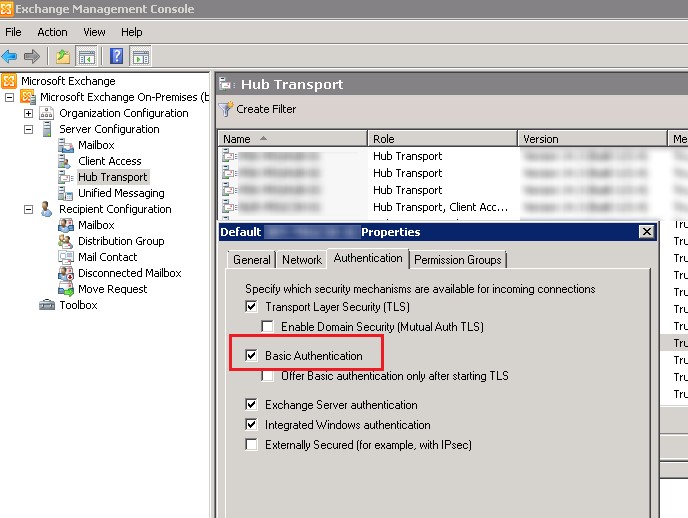
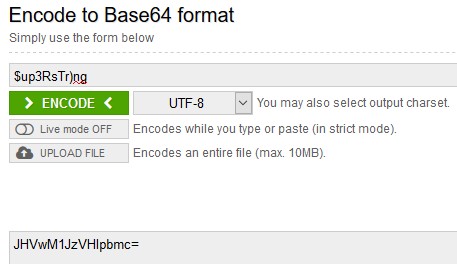
Для авторизации на почтовом сервер с с помощью AUTH LOGIN, нам нужно преобразовать имя и пароль пользователя, из-под которого будет отправляться письмо в формат Base64. Это можно сделать с помощью скриптов или онлайн сервисов. Я воспользоваться сайтом https://www.base64encode.org/ .
Имя пользователя: testuser@contoso.com, в кодировке Base64 получилось: dGVzdHVzZXJAY29udG9zby5jb20=
Пароль: $up3RsTr)ng — в Base64 JHVwM1JzVHIpbmc=
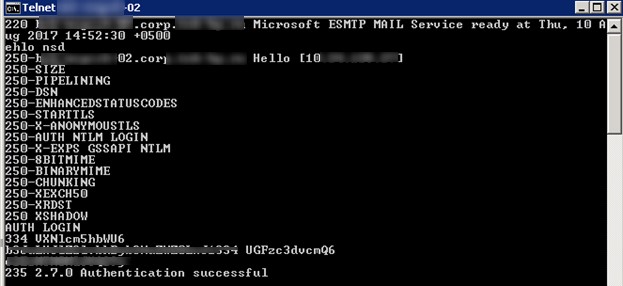
 Теперь в командой строке с помощью Telnet подключаемся на 25(SMTP) порт нашего почтового сервера (вводимые команды я буду выделять синим цветов):
telnet mail.contoso.com 25
Если это Exchange, он вернет что-то вроде;
220 mail.contoso.com Microsoft ESMTP MAIL Service ready at Thu, 10 Aug 2015 14:25:30 +0300
Сервер вернет список поддерживаемых типов авторизаций и возможностей. Как вы видите базовая авторизация (AUTH LOGIN) в списке имеется.
250-mail.contoso.com Hello [192.168.100.15]
250-SIZE 36700160
250-PIPELINING
250-DSN
250-ENHANCEDSTATUSCODES
250-STARTTLS
250-AUTH LOGIN
250-8BITMIME
250-BINARYMIME
250 CHUNKING
Сообщаем SMTP серверу, что мы хотим авторизоваться с помощью имеющейся учетной записи:
Сервер должен ответить:
334 VXNlcm5hbWU6
Теперь вставляем имя пользователя в формате Base64, которое мы закодировали ранее:
dGVzdHVzZXJAY29udG9zby5jb20=
Сервер должен ответить:
Теперь пора вставить пароль в формате Base64:
JHVwM1JzVHIpbmc=
Если имя и пароль пользователя верны, сервер ответит.
235 2.7.0 Authentication successful
535 5.7.8 Error: authentication failed: UGFzc3dvcmQ6
 Теперь можно заполнить стандартные поля письма:
mail from: testuser@contoso.com
250 2.1.0 Sender OK
rcpt to: admin@contoso.com
250 2.1.5 Recipient OK
data
354 Start mail input; end with .
from: TestUserovich
to: TheAdmin
Subject: Test BASE SMTP Authenticated via Telnet
This is test
.
250 2.6.0 [Internal >
221 2.0.0 Closing connection.
Connection closed by foreign host.
На этом все, тестовое письмо должно успешно доставиться в ящик получателя.
I am pretty new on setting up webservices and i only have basic knowledge on networks, and i am trying to set one web service on a local server, to receive and send mail through an mail server hosted in my ISP.
Setup: — OSX — Roundcubemail — Server app — Dinamic IP with No-IP link
Here is my default.inc.php:
And i am getting a:
Without being possible to send mails to no one.
And If i change those to default:
I would have a different output, here i am able to send and receive mails between my several domains in my ISP, but i am unable to send mails to domains such as gmail.com, receiving the following error:
I have also activated the smtp log, but cannot see where is the problem:
I discover that SMTP works with authentication through SPF and DKIM but dont know if that is interfering with SMTP auth.
четверг, 1 февраля 2018 г.
Linux Roundcube ошибка авторизации 250
Ошибка возникает при попытке отправки сообщения
При настройке указал в default.inc.php
$config[‘smtp_auth_type’] = ‘LOGIN PLAIN’;
LOGIN похоже не рабочий метод
Если поставить
$config[‘smtp_auth_type’] = null;
Linux and Open Source Blog
Recently while trying to install roundcube I am stuck with the error “roundcube SMTP Error (250): Authentication failed”.
With the error the clear hint is there should be some issue with SMTP setting, so I checked all SMTP settings and I had bit doubt on following settings.
After doing some experiments with my main.inc.php file following tweaks are worked for me.
Rate this:
Share this:

Like this:
Related
8 comments on “ Roundcube SMTP Error (250): Authentication failed ”
Yes, this fixed worked for me as well.
Where can I find this files?
You can find it in roundcube config directory.
For example in Centos its in /var/www/html/roundcube/config & in Ubuntu its in /var/www/roundcube/config.
Thanks for this, fixed it for me too 🙂
Thanks a lot, fixed it for me,
Many thanks it work for me too
thanks, it works!!
This trick doesn’ work if: smtpd_tls_auth_only = yes
I changed:
// SMTP server host (for sending mails).
// To use SSL/TLS connection, enter hostname with prefix ssl:// or tls://
//$config[‘smtp_server’] = ‘localhost’;
$config[‘smtp_server’] = ‘tls://localhost’;
// SMTP port (default is 25; use 587 for STARTTLS or 465 for the
// deprecated SSL over SMTP (aka SMTPS))
//$config[‘smtp_port’] = 25;
$config[‘smtp_port’] = 587;
Now everything works fine.
Nevertheless this blog gave me the hint to look in the right place, so thanks!
17.03.2016, 18:12
#1

Senior Member
 после обновление перестал отправлять почту
Всем доброе утро!
После бета обновления до версии 5.53. lite
Перестал отправлять почту, до этого работало, а сейчас перестал, принимает почту, но не отправляет
в файле /var/log/mail.err, две строчкиКод:
Mar 17 12:33:17 ciberbox dovecot: pop3(info@ciberbox.ru): Error: Index /var/www/ciberbox/data/email/ciberbox.ru/info/.maildir/dovecot.index: Lost log for seq=1 offset=0
Mar 17 12:33:17 ciberbox dovecot: pop3(info@ciberbox.ru): Error: Fixed index file /var/www/ciberbox/data/email/ciberbox.ru/info/.maildir/dovecot.index: log_file_seq 1 -> 47
ISPmanager Lite стоит на OS UbuntuServer 14.04
пишет SMTP Error (250) ошибка авторизации
Последний раз редактировалось vismuth; 17.03.2016 в 18:15.
intel S1200RPS / Intel Xeon E3-1220V3 / DDR3L 2x8Gb PC3-12800 / LSI MegaRAID SAS 9260-8i / HDD 3х1Tb RAID5 /
18.03.2016, 15:57
#2
Senior Member
и еще ошибка две строчки в файле /var/log/roundcube/errors
[18-Mar-2016 10:50:39 Europe/Moscow] SMTP server does not support authentication ():
[18-Mar-2016 10:50:39 +0300]: SMTP Error: SMTP error: Authentication failure: SMTP server does not support authentication (Code: ) in /usr/share/roundcube/program/include/rcmail.php on line 1035 (POST /roundcube/?_unlock=loading14582874$
intel S1200RPS / Intel Xeon E3-1220V3 / DDR3L 2x8Gb PC3-12800 / LSI MegaRAID SAS 9260-8i / HDD 3х1Tb RAID5 /

Topic: Can’t send — smtp error 250 (Read 15473 times)
Hello,
I’m doing some testing with roundcube and hoping that it will prove to be a solid webmail client that I can roll out to my users (I administer an email server for a small ISP). I’m really liking what I see so far, but I’m having some issues getting mail to send.
I am able to log in and access my emails. When I try to send a message, though, I get an smtp error 250: authentication failed. The strange part is that my test messages sent out no problem with the installer.
Anyone have thoughts on where I should start with this? The server is running postfix, and does not require authentication to send.
Any tips are greatly appreciated!
Joe
« Last Edit: August 05, 2010, 10:13:35 AM by jgijanto »

Logged
Try changing $rcmail_config[‘smtp_auth_type’] in
/config/main.inc.php to PLAIN if you have no authentication, if that doesn’t work try using LOGIN.
Logged
Hi Skaero,
I tried what you suggested but that doesn’t seem to help, either with PLAIN or LOGIN. I found in the rc/logs folder the following error message:
SMTP Error: SMTP error: Authentication failure: SMTP server does not support authentication (Code: ) in /var/www/rc/program/steps/mail/func.inc on line 1365 (POST /rc/?_task=mail&_action=send)
So it seems like its still trying to use some type of SMTP authentication?
Logged
Enable smtp_debug option and attach logs/smtp file here.
Logged
Ok, with the SMTP debug added here’s what I get from a single attempt to send email:
[06-Aug-2010 08:13:22 -0400]: Recv: 220 mail3.primelink1.net ESMTP server ready.
[06-Aug-2010 08:13:22 -0400]: Send: EHLO 10.100.0.75
[06-Aug-2010 08:13:22 -0400]: Recv: 250-mail3.primelink1.net
[06-Aug-2010 08:13:22 -0400]: Recv: 250-PIPELINING
[06-Aug-2010 08:13:22 -0400]: Recv: 250-SIZE 20240000
[06-Aug-2010 08:13:22 -0400]: Recv: 250-ETRN
[06-Aug-2010 08:13:22 -0400]: Recv: 250 8BITMIME
[06-Aug-2010 08:13:22 -0400]: Send: RSET
[06-Aug-2010 08:13:22 -0400]: Recv: 250 Ok
[06-Aug-2010 08:13:22 -0400]: Send: QUIT
[06-Aug-2010 08:13:22 -0400]: Recv: 221 Bye
I also verified that the server this is running on has relay access to the mail server. Strange too, I looked up the smtp codes and 250 isn’t even an error.
Logged
Your SMTP server doesn’t returns AUTH response. If you really would like to send mail without authentication then you should set smtp_user, smtp_pass and smtp_auth_type to null.
Logged
Same error for me : SMTP ERROR (250) : authentication problem
I just want to tell that if i use the previous version roundcubemail-0.3-stable (always installed) everything works well.
With the new version roundcubemail-0.4 I can’t send an email
An authentication error. Logs enabled in roundcube tells :
SMTP Error: SMTP error: Authentication failure: SMTP server does not support authentication (Code: ) in /var/wws/roundcubemail-0.4/program/steps/mail/func.inc on line 1425 (POST /mail/?_task=mail&_action=send)
I cheked the main.inc.php file twice; put the previous main.inc.php (0.3-stable)
Nothing works.
I have to use the old version 0.3-stable.
I’m disapointed because I would like to use the very interesting feature : threaded view in messages boxes.
Thanks for your help
Logged
Can you post a imap_debug log?
Logged
From my mail.log. Ask me if you want more
With roundcube4 (send an email failure) :
Sep 7 09:03:56 net1 dovecot: imap-login: Login: user=
, method=PLAIN, rip=127.0.0.1, lip=127.0.0.1, TLS
Sep 7 09:03:56 net1 dovecot: IMAP(jc2010@domain.net): Disconnected: Logged out bytes=23/398
Sep 7 09:03:56 net1 dovecot: imap-login: Login: user=, method=PLAIN, rip=127.0.0.1, lip=127.0.0.1, TLS
Sep 7 09:03:56 net1 dovecot: IMAP(jc2010@domain.net): Disconnected: Logged out bytes=31/1836
Sep 7 09:03:56 net1 dovecot: imap-login: Login: user=, method=PLAIN, rip=127.0.0.1, lip=127.0.0.1, TLS
Sep 7 09:03:56 net1 dovecot: IMAP(jc2010@domain.net): Disconnected: Logged out bytes=408/17090
Sep 7 09:03:56 net1 dovecot: imap-login: Login: user=, method=PLAIN, rip=127.0.0.1, lip=127.0.0.1, TLS
Sep 7 09:03:56 net1 dovecot: IMAP(jc2010@domain.net): Disconnected: Logged out bytes=2305/18353
Sep 7 09:03:59 net1 dovecot: imap-login: Login: user=, method=PLAIN, rip=127.0.0.1, lip=127.0.0.1, TLS
Sep 7 09:03:59 net1 dovecot: IMAP(jc2010@domain.net): Disconnected: Logged out bytes=34/359
Sep 7 09:03:59 net1 dovecot: imap-login: Login: user=, method=PLAIN, rip=127.0.0.1, lip=127.0.0.1, TLS
Sep 7 09:03:59 net1 dovecot: IMAP(jc2010@domain.net): Disconnected: Logged out bytes=31/1836
Sep 7 09:04:10 net1 dovecot: imap-login: Login: user=, method=PLAIN, rip=127.0.0.1, lip=127.0.0.1, TLS
Sep 7 09:04:10 net1 postfix/smtpd[7207]: connect from net1.domain.net[192.168.0.111]
Sep 7 09:04:10 net1 postfix/smtpd[7207]: disconnect from net1.domain.net[192.168.0.111]
Sep 7 09:04:10 net1 dovecot: IMAP(jc2010@domain.net): Disconnected: Logged out bytes=8/331
Logged
With roundcube3-stable (send an email to gmail successfull)
Sep 7 09:05:39 net1 dovecot: imap-login: Login: user=
, method=PLAIN, rip=127.0.0.1, lip=127.0.0.1, TLS
Sep 7 09:05:39 net1 dovecot: IMAP(jc2010@domain.net): Disconnected: Logged out bytes=23/398
Sep 7 09:05:39 net1 dovecot: imap-login: Login: user=, method=PLAIN, rip=127.0.0.1, lip=127.0.0.1, TLS
Sep 7 09:05:40 net1 dovecot: IMAP(jc2010@domain.net): Disconnected: Logged out bytes=368/18164
Sep 7 09:05:40 net1 dovecot: imap-login: Login: user=, method=PLAIN, rip=127.0.0.1, lip=127.0.0.1, TLS
Sep 7 09:05:40 net1 dovecot: IMAP(jc2010@domain.net): Disconnected: Logged out bytes=2455/18703
Sep 7 09:05:44 net1 dovecot: imap-login: Login: user=, method=PLAIN, rip=127.0.0.1, lip=127.0.0.1, TLS
Sep 7 09:05:44 net1 dovecot: IMAP(jc2010@domain.net): Disconnected: Logged out bytes=8/331
Sep 7 09:05:44 net1 dovecot: imap-login: Login: user=, method=PLAIN, rip=127.0.0.1, lip=127.0.0.1, TLS
Sep 7 09:05:44 net1 dovecot: IMAP(jc2010@domain.net): Disconnected: Logged out bytes=31/1836
Sep 7 09:05:56 net1 dovecot: imap-login: Login: user=, method=PLAIN, rip=127.0.0.1, lip=127.0.0.1, TLS
Sep 7 09:05:56 net1 postfix/smtpd[7207]: connect from net1.domain.net[192.168.0.111]
Sep 7 09:05:56 net1 postfix/smtpd[7207]: setting up TLS connection from net1.domain.net[192.168.0.111]
Sep 7 09:05:56 net1 postfix/smtpd[7207]: net1.domain.net[192.168.0.111]: TLS cipher list «ALL:+RC4:@STRENGTH»
Sep 7 09:05:56 net1 postfix/smtpd[7207]: SSL_accept:before/accept initialization
Sep 7 09:05:56 net1 postfix/smtpd[7207]: SSL_accept:SSLv3 read client hello B
Sep 7 09:05:56 net1 postfix/smtpd[7207]: SSL_accept:SSLv3 write server hello A
Sep 7 09:05:56 net1 postfix/smtpd[7207]: SSL_accept:SSLv3 write certificate A
Sep 7 09:05:56 net1 postfix/smtpd[7207]: SSL_accept:SSLv3 write key exchange A
Sep 7 09:05:56 net1 postfix/smtpd[7207]: SSL_accept:SSLv3 write server done A
Sep 7 09:05:56 net1 postfix/smtpd[7207]: SSL_accept:SSLv3 flush data
Sep 7 09:05:56 net1 postfix/smtpd[7207]: SSL_accept:SSLv3 read client key exchange A
Sep 7 09:05:56 net1 postfix/smtpd[7207]: SSL_accept:SSLv3 read finished A
Sep 7 09:05:56 net1 postfix/smtpd[7207]: SSL_accept:SSLv3 write session ticket A
Sep 7 09:05:56 net1 postfix/smtpd[7207]: SSL_accept:SSLv3 write change cipher spec A
Sep 7 09:05:56 net1 postfix/smtpd[7207]: SSL_accept:SSLv3 write finished A
Sep 7 09:05:56 net1 postfix/smtpd[7207]: SSL_accept:SSLv3 flush data
Sep 7 09:05:56 net1 postfix/smtpd[7207]: Anonymous TLS connection established from net1.domain.net[192.168.0.111]: TLSv1 with cipher DHE-RSA-AES256-SHA (256/256 bits)
Sep 7 09:05:56 net1 postfix/smtpd[7207]: 6CF146E043: client=net1.domain.net[192.168.0.111], sasl_method=PLAIN, sasl_username=jc2010@domain.net
Sep 7 09:05:56 net1 postfix/cleanup[7211]: 6CF146E043: message-id=<9f068022cf61699d0c59ff3fd9a591bf@localhost>
Sep 7 09:05:56 net1 postfix/qmgr[1524]: 6CF146E043: from=, size=828, nrcpt=1 (queue active)
Sep 7 09:05:56 net1 dovecot: IMAP(jc2010@domain.net): Disconnected: Logged out bytes=605/1894
Sep 7 09:05:56 net1 postfix/smtpd[7207]: disconnect from net1.domain.net[192.168.0.111]
Sep 7 09:05:56 net1 dovecot: imap-login: Login: user=, method=PLAIN, rip=127.0.0.1, lip=127.0.0.1, TLS
Sep 7 09:05:56 net1 dovecot: IMAP(jc2010@domain.net): Disconnected: Logged out bytes=368/18164
Sep 7 09:05:56 net1 dovecot: imap-login: Login: user=, method=PLAIN, rip=127.0.0.1, lip=127.0.0.1, TLS
Sep 7 09:05:56 net1 dovecot: IMAP(jc2010@domain.net): Disconnected: Logged out bytes=368/18164
Sep 7 09:05:57 net1 dovecot: imap-login: Login: user=, method=PLAIN, rip=127.0.0.1, lip=127.0.0.1, TLS
Sep 7 09:05:57 net1 dovecot: IMAP(jc2010@domain.net): Disconnected: Logged out bytes=2455/18727
Sep 7 09:05:57 net1 postfix/smtp[7272]: 6CF146E043: to=, relay=gmail-smtp-in.l.google.com[209.85.227.27]:25, delay=0.66, delays=0.01/0.02/0.3/0.33, dsn=2.0.0, status=sent (250 2.0.0 OK 1283843157 v14si8128784weq.13)
Sep 7 09:05:57 net1 postfix/qmgr[1524]: 6CF146E043: removed
Logged
Better use imap_debug and smtp_debug options in Roundcube. Also what do you have in smtp configuration section in main.inc.php?
Logged
// SMTP username (if required) if you use %u as the username RoundCube
// will use the current username for login
$rcmail_config[‘smtp_user’] = ‘jc@domain.net’;
// SMTP password (if required) if you use %p as the password RoundCube
// will use the current user’s password for login
$rcmail_config[‘smtp_pass’] = ‘Mypassword’;
// SMTP AUTH type (DIGEST-MD5, CRAM-MD5, LOGIN, PLAIN or empty to use
// best server supported one)
$rcmail_config[‘smtp_auth_type’] = »;
I also tryed with PLAIN or LOGIN unsuccessfully.
I turned on imap_debug and smtp_debug
And the log is :
[07-sept.-2010 17:21:24] SMTP server does not support authentication ():
[07-Sep-2010 17:21:24 +0200]: SMTP Error: SMTP error: Authentication failure: SMTP server does not support authentication (Code: ) in /var/wws/roundcubemail-0.4/program/steps/mail/func.inc on line 1425 (POST /mail/?_task=mail&_action=send)
Nothing more
Don’t hesitate to ask me more.
Regards
Logged
Have you tried with it with a blank $rcmail_config[‘smtp_user’] and $rcmail_config[‘smtp_pass’]
Logged
OK it works when i leave
$rcmail_config[‘smtp_user’] and $rcmail_config[‘smtp_pass’] blank
But if i understand wenn there’s no more smtp authentication.
It’s not really a problem because mail server accept to relay mail from localhost but the feature is no more.
Am I wrong ?
Regards.
Logged
OK i had some time to watch carefully the problem.
And activating tls
$rcmail_config[‘smtp_server’] = ‘tls://net1.domain.net’;
smtp authentication work properly.
tls protocol was optionnal in 0.3-stable release and must be noted on 0.4 config.
Logged